

Page 1

HP Power Advisor utility: a tool for estimating
power requirements for HP ProLiant server systems
technology brief
Abstract.............................................................................................................................................. 2
Introduction......................................................................................................................................... 2
Key power parameters ..................................................................................................................... 2
Input line voltage.......................................................................................................................... 2
Device VA rating.......................................................................................................................... 2
Device input power....................................................................................................................... 3
BTUs required for cooling.............................................................................................................. 3
Input/inrush current ...................................................................................................................... 3
Leakage current............................................................................................................................ 3
Determining power needs and achieving power efficiency.................................................................... 3
HP Power Advisor................................................................................................................................5
Calculator development .................................................................................................................... 5
Calculator functionality ..................................................................................................................... 5
Example power calculations................................................................................................................ 10
Rack configuration with HP DL160 G6 servers................................................................................... 10
Rack configuration with HP DL380 G6 servers................................................................................... 13
Rack configuration with the HP c-Class BladeSystem........................................................................... 16
Conclusion........................................................................................................................................ 21
Do use the Power Advisor for:...................................................................................................... 21
Do not use the Power Advisor for: ................................................................................................ 21
For more information.......................................................................................................................... 22
Call to action .................................................................................................................................... 22
Page 2

Abstract
With power requirements of computing equipment increasing and the cost of energy rising, IT
organizations need accurate estimates of power and cooling requirements for designing and
expanding data centers. HP has created the HP Power Advisor utility to provide more accurate and
meaningful estimates of power needs for HP ProLiant BL, DL, and SL systems so that IT infrastructure
designers can determine the most efficient hardware configuration. This technology brief identifies
factors affecting power requirements, explains how the Power Advisor works, and provides an
example of how it can be used.
Introduction
As information technology evolves and system density increases, systems housed in a single rack can
now consume the amount of power once required for several racks. Effective sizing of a compute
infrastructure while managing IT costs requires realistic estimates of current and future power and
cooling requirements. Accurately estimating the power consumption of a server rack can define power
distribution requirements at the rack level and can be the starting point for estimating the total power
consumption and cooling needs for a data center.
The HP Power Advisor utility is a tool for calculating power use of the major components within a rack
to determine power distribution, power redundancy, and battery backup requirements for computer
facilities.
This document assumes that readers are familiar with basic power concepts and HP ProLiant servers.
Key power parameters
Determining total power needs for a data center requires consideration of the key parameters
described in this section. More details about these parameters are available in the white paper titled
“Power Basics for IT Professionals” downloadable at
http://h20000.www2.hp.com/bc/docs/support/SupportManual/c01234421/c01234421.pdf .
This paper does not discuss other signification parameters such as system serviceability and
scalability.
Input line voltage
Input voltage may be low-line or high-line voltage depending on what is available at the data facility.
Low-line voltage [100 – 120 volts alternating current (VAC)] is the standard for AC wall outlets in
North America. High-line voltage (200 – 240 VAC) is used in other parts of the world but is also
increasingly common in North American data centers. Most HP ProLiant servers accept a line voltage
in the 100- to 240-VAC range.
IT equipment designed to use either low-line or high-line voltage typically consumes less power and
generates less heat when operating off high-line voltage, which reduces the strain on cooling systems.
Some systems may actually require high-line voltage to meet maximum performance specifications.
Facilities may distribute AC power as single- or three-phase. Three-phase high-line power (such as
3-phase 208 VAC) is more efficient and recommended for systems requiring three kilowatts of power
or more.
Device VA rating
Apparent power is the total amount of power a device requires from the facility AC feed and is
measured in volt-amperes (VA). Knowing the total amount of VA for all active components in a system
helps data center planners determine the types and quantities of power distribution units (PDU) and
uninterruptible power supplies (UPS) needed for a given rack configuration.
Page 3

Device input power
The amount of power a device turns into work and dissipates as heat is known as real (or true) power
and is measured in watts (W). Since any heat created by electrical equipment must be extracted,
knowing the total amount of watts dissipated by systems in a data center helps determine the cooling
capacity needed in the facility.
BTUs required for cooling
The British Thermal Unit (BTU) is the standard for measuring the capacity of cooling systems. The
amount of power (watts) consumed by equipment determines the number of BTUs/hr required for
component cooling, based on this formula:
BTUs/hr = watts x 3.41.
For example: 399 watts x 3.41 = 1360 BTUs/hr
Air conditioning equipment is typically rated in terms of tons of cooling, an old measurement based
on the cooling ability of tons of ice (1 ton of cooling = 12000 BTUs/hr).
Input/inrush current
Input current is the amount of amperes a system draws during normal operation. However, when AC
voltage is first applied (power cord is plugged in and/or a circuit breaker is switched on), power
supplies of electrical components can momentarily draw several times more current than they will
draw while operating. This inrush current is cumulative across devices within a common power circuit,
and it must be considered when building a rack. Power supplies in HP servers include circuitry that
minimizes inrush current. Staggering activation of segmented circuits can further reduce the effects of
inrush current.
Leakage current
Leakage current (typically measured in milliamps) is residual current that originates in power supply
filters and flows from chassis ground to the phase and neutral power conductors. Leakage current is
cumulative across components within a power distribution circuit and can become a hazard if proper
grounding procedures are not used
.
Determining power needs and achieving power efficiency
Power supplies for ProLiant servers include a chassis nameplate that typically includes the following
information:
• Input requirement—the AC input voltages (or ranges) and associated maximum current draw
• Output power—the DC voltage, maximum current (amperage), and maximum power (wattage)
Nameplate ratings, therefore, define the input requirements of a power supply operating at full
power. Since power supplies rarely operate at their rated capacity, using nameplate ratings for
estimating system power requirements could yield inflated numbers that result in excessive power
infrastructure costs.
Figure 1 illustrates how the use of nameplate ratings can distort power distribution planning. The
ProLiant DL380 G6 implements the HP Common Slot Power Supply bay. This bay design, used across
several ProLiant platforms, can accommodate 460W, 750W, and 1200W power supplies.
Factory configurations of the DL380 G6 include models equipped with 460W and 750W, and
customers can build or specify custom configurations. Customers building a system with customconfigured DL380 G6 servers might choose the 750W power supply to ensure headroom for server
needs and use the associated nameplate ratings as a guide for power distribution needs. This
approach yields nameplate ratings-based figures that will likely be unrealistically high. As indicated in
3
Page 4
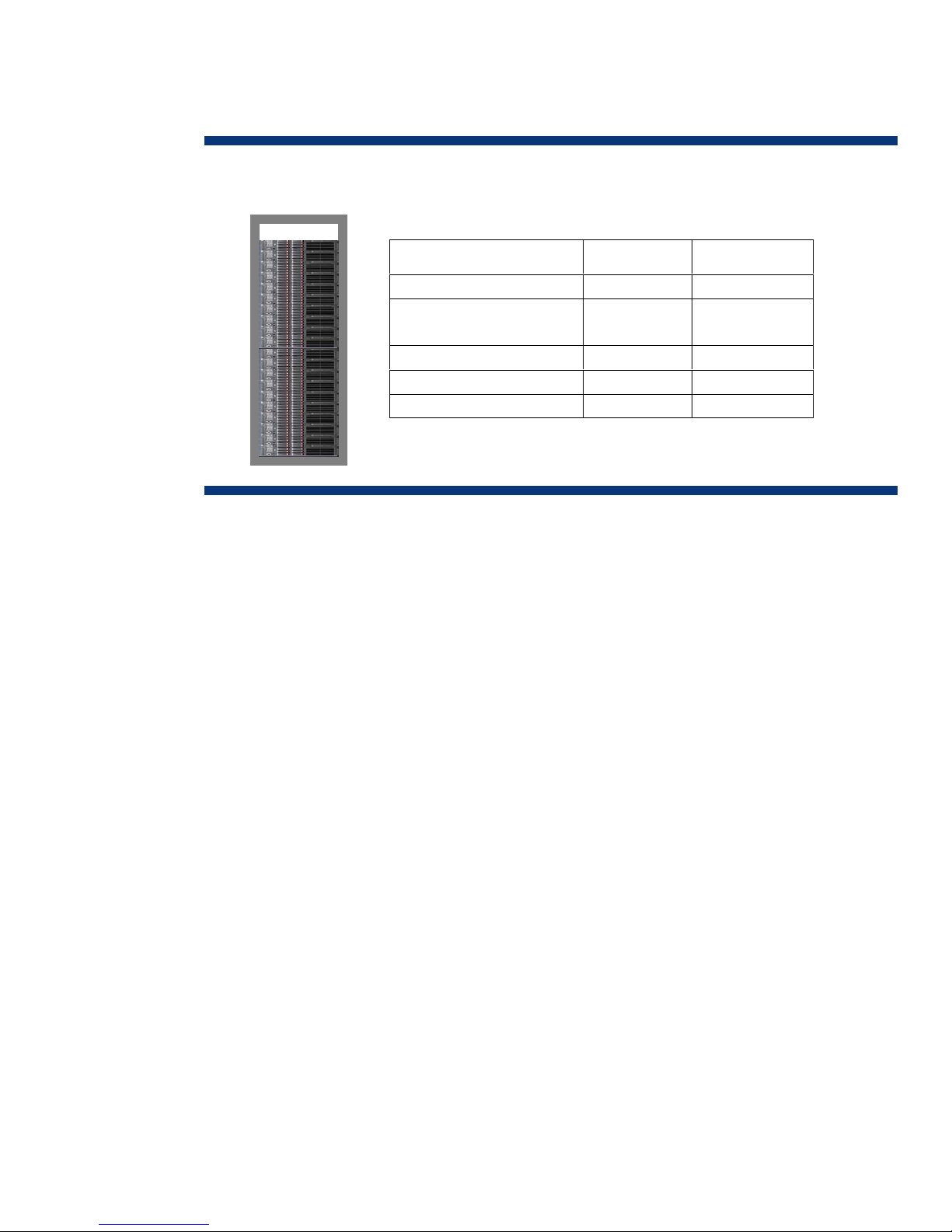
the table of Figure 1, the total amperage and VA figures based on the nameplate ratings of the
750W power supply suggest that substantial power distribution components would be necessary,
particularly if power redundancy is required.
Figure 1. Rack loading with 20 ProLiant DL380 G6 servers using 750W power supplies (PSs)
Wattage per PS unit 750 W 300 W
AC input current per PS unit
(@ 208VAC)
Total rack wattage 15kW 6kW
Total rack current 90 A 27.6 A
Total input VA (estimated) 15 – 17kVA 6 – 7kVA
Nameplate
ratings-based
4.5 A 1.38 A
Actual
operating needs
However, measurements of test configurations reveal that the actual operating needs of a given
DL380 G6 configuration can be less than half the power that nameplate ratings of the 750W power
supply indicate. This means fewer power distribution components are needed, and it reveals the
possibility of a better power supply solution.
The efficiency of a power supply is determined by how much AC input power is needed to produce a
given amount of output power. A power supply requiring 300 watts input to produce 250 watts of
output is operating at approximately 83 percent efficiency (250 / 300 = .83). The 50-watt energy
delta between the input and output is lost as heat, which must be removed by the cooling equipment.
Power supply efficiency is not linear or flat across the output range, and most power supplies achieve
maximum efficiency when they operate in the mid to upper range of their rated capacity. A 750-watt
power supply providing 300 watts (40 percent capacity) is less efficient than a 460-watt power
supply providing the same 300 watts of power (65 percent capacity). In choosing the most efficient
(right-sized) power supply for a server, an accurate power consumption estimate for that server is
important, particularly for a large (enterprise) data center where cumulative energy losses from a
number of servers can be significant.
The most accurate power consumption predictions are those obtained by pre-configuring and
measuring actual systems under load. This method of obtaining data is usually impractical for
customers since it would require purchasing, setting up, configuring, and running of each component
to acquire the measurements. HP has tested server products under various configurations and loads to
determine actual power requirements. The results of these tests are the foundation in creating the HP
Power Advisor.
4
Page 5
HP Power Advisor
The HP Power Advisor utility reduces the research and guesswork normally involved in determining
power requirements for ProLiant-based systems. Using the HP Power Advisor, an IT administrator can
build a complete system, component-by-component and rack-by-rack, assembling a complete
infrastructure.
NOTE:
HP Power Advisor is intended to be a conservative estimator of power. No two
applications will consume exactly the same amount of power. Even programs that
report the same CPU utilization will have different power consumption characteristics,
based on the exact mix and sequence of instructions being executed. The programs
used as the measurement reference for the HP Power Advisor are intended to consume
more power than typical user applications.
Calculator development
HP developed the HP Power Advisor using data collected from testing HP ProLiant servers. Each test
starts with a system fully configured with the maximum number of processors, memory, hard drives,
expansion cards, and power supplies. Proprietary software exercises the processors to the highest
possible power level and operates all peripherals while taking voltage and current measurements.
Testing continues for all levels of processor support at all speeds, with different memory amounts and
hard drive sizes. During development cycles, HP retests revised or updated servers to ensure
calculator integrity.
Calculator functionality
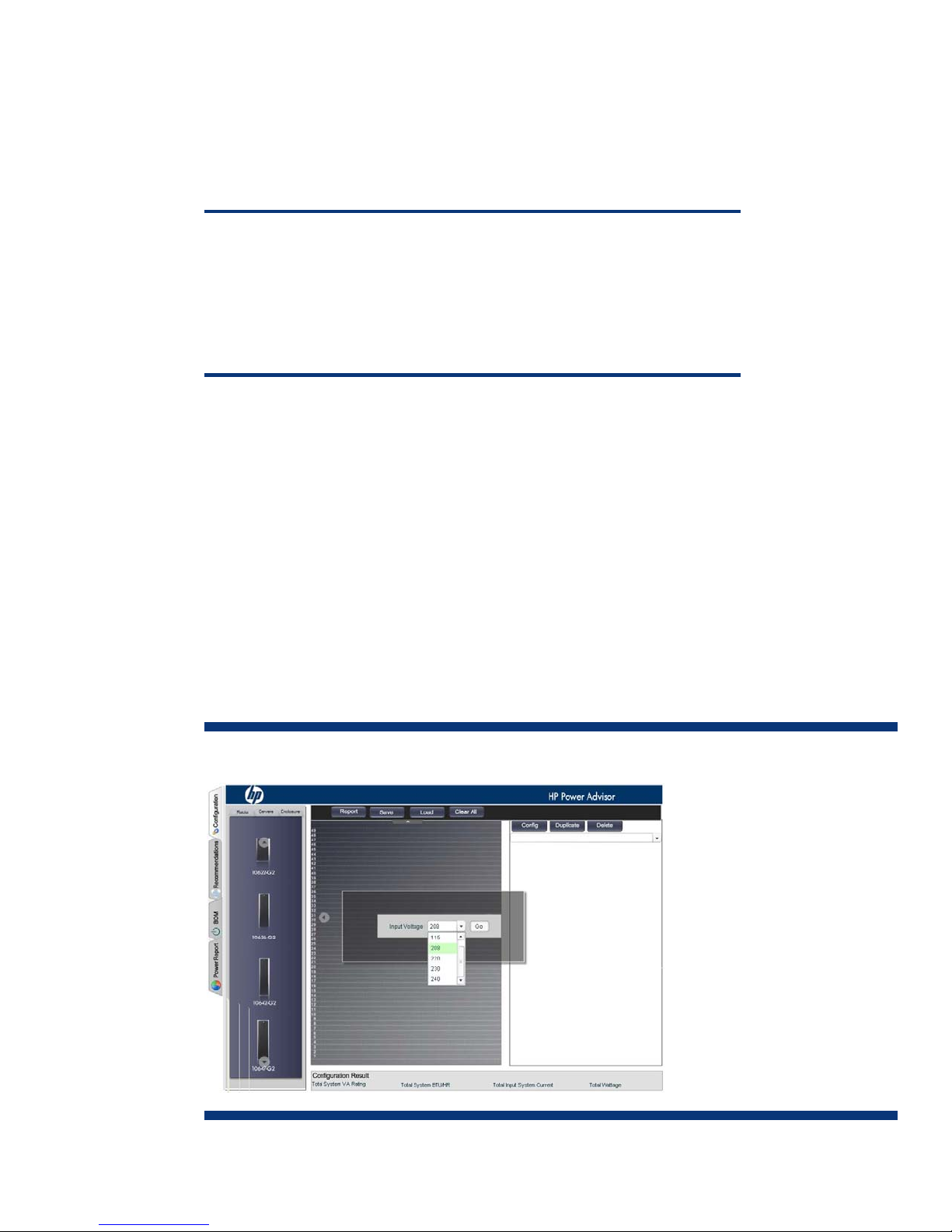
The calculator is a simple drag-and-drop tool. Figure 2 shows the main screen of the HP Power
Advisor. A drop-down menu in the center of the screen lists the choices of AC input voltage to be used
by the server systems.
Figure 2. HP Power Advisor main screen
5
Page 6
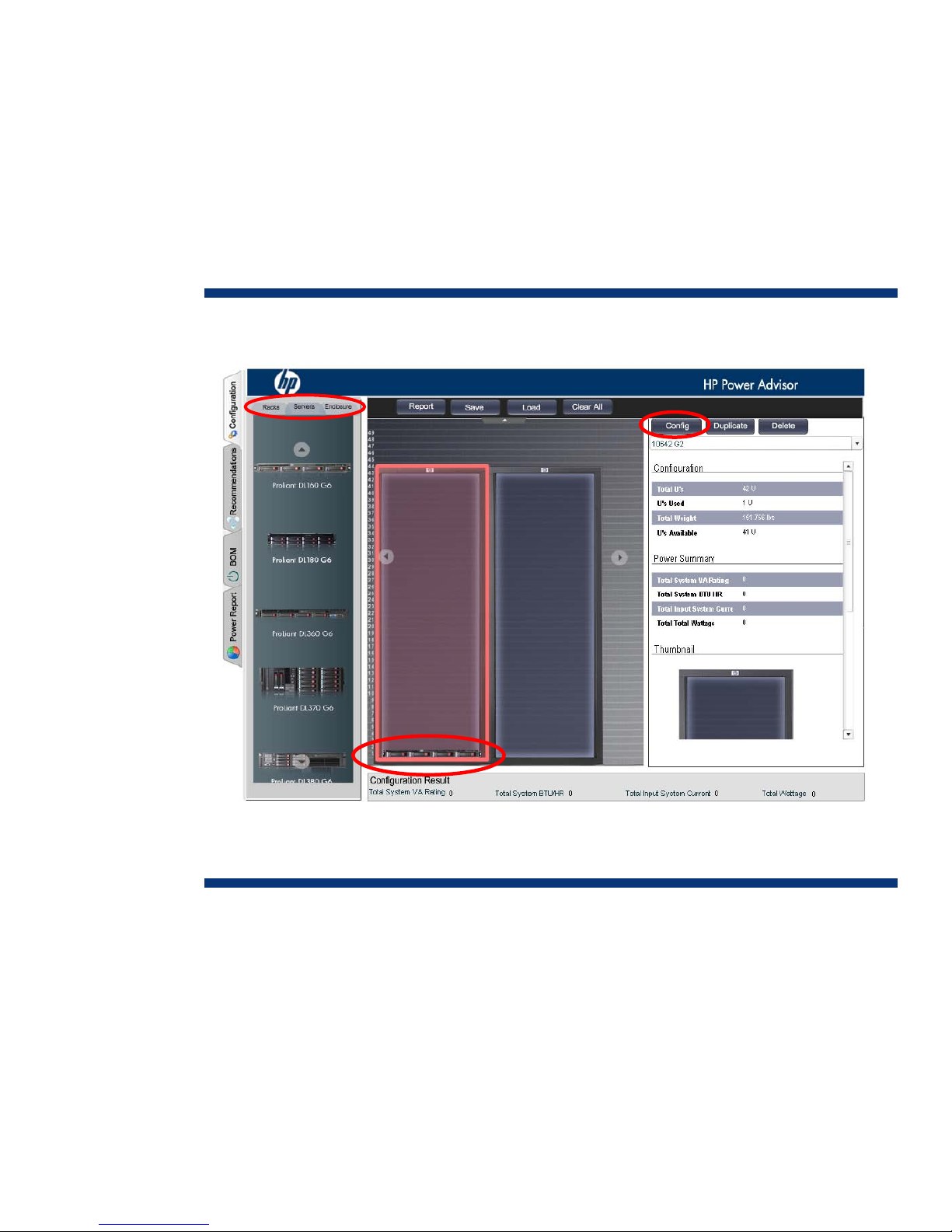
After selecting the line voltage, the user drags and drops the desired type of rack from the left pane
(Figure 2) to the center area of the screen (Figure 3). This simple process is repeated for building a
complete row of the same type of rack or a row of mixed rack types.
Next, the racks are ready to populate with components. After highlighting a rack, the user selects the
Servers or Enclosures tab in the left pane area, selects the desired components, and adds them to the
highlighted rack. HP ProLiant DL, SL, and some ML server chassis mount directly into the racks. For HP
ProLiant BL (BladeSystem) components, the user must select a BladeSystem c-Class enclosure and then
configure each enclosure with the desired components. Figure 3 shows a ProLiant DL160 G6 placed
in the bottom of the first rack. A power calculation begins with selecting (highlighting) a component in
a rack and clicking the Config tab.
Figure 3. HP Power Advisor, component selection
As shown in Figure 4, the HP Power Advisor allows the user to select the following components to
configure each server individually:
• Processor type and number
• Amount of memory
• Drive type and number
• PCI expansion cards and/or RAID controllers (if applicable)
• Power supply type
The Power Advisor also informs the user if the selected server supports power supply redundancy.
6
Page 7
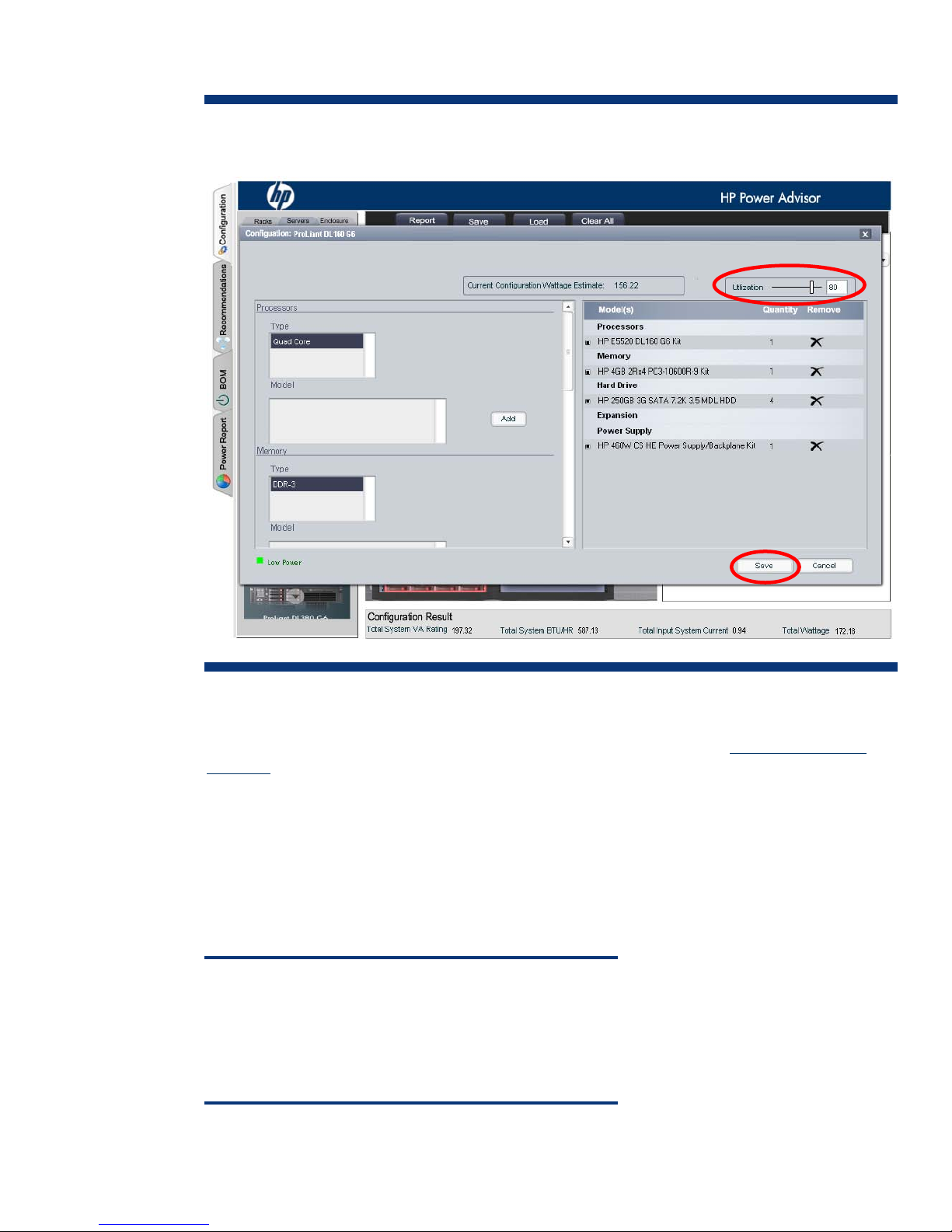
Figure 4. HP Power Advisor, component configuration
For servers that offer a choice of power supply nameplate ratings, the Power Advisor will
automatically include a power supply capable of supporting 100 percent utilization, which is the
default setting for any given server configuration. As discussed earlier in the “
Achieving maximum
efficiency” section, a power supply with less output may be sufficient and provide higher efficiency for
a configuration with an adjusted (lowered) Utilization setting. Once the final wattage has been
determined, the user can re-configure the server for a lower capacity power supply if appropriate.
The calculator maintains a real-time estimate of the power consumption and BTU generation during
the configuration of each server. When the server configuration is complete, the user clicks the Save
button to accept the configuration and return to the rack view.
The user can generate a bill of material (BOM) report (Figure 5) for a server configuration by clicking
on the BOM tab on the left of the screen.
NOTE
The Power Advisor BOM report only includes data for system
components that affect power consumption. Refer to the individual
server QuickSpecs for part numbers of optional components that
may be required but are not included in the Power Advisor BOM
report.
7
Page 8
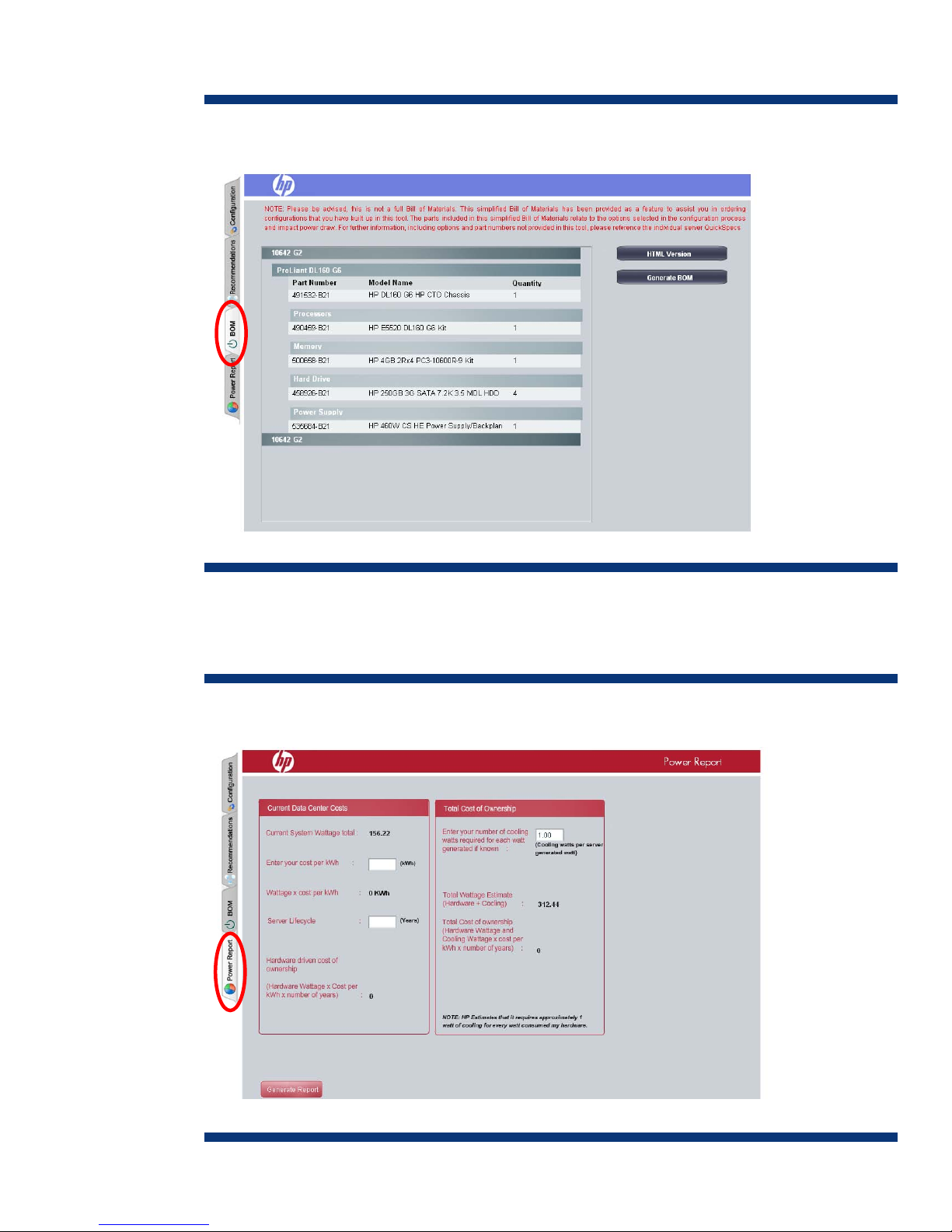
Figure 5. HP Power Advisor, BOM report
The Power Advisor makes it possible to pre-calculate the running costs (cost of ownership) of the
hardware based on the rate paid per kWh. By selecting the Power Report tab, the user can generate
a Power Report (Figure 6) for a single server or a complete rack.
Figure 6. HP Power Advisor, Power report
8
Page 9
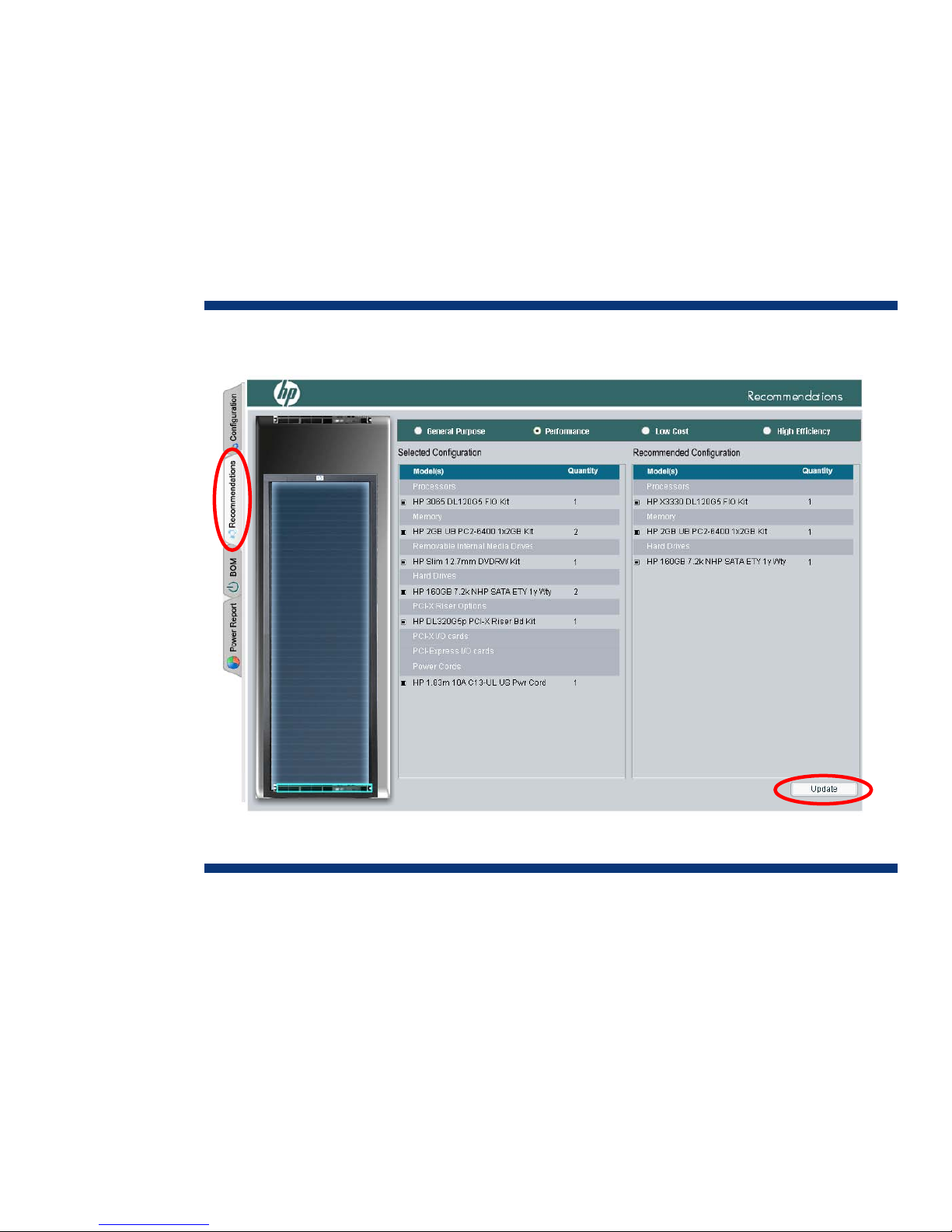
A Recommendations Report (Figure 7) is also available for each component. Based on the userselected configuration for the highlighted server, the Power Advisor offers four types of
recommendations:
• General Purpose—configuration with best balance of performance, cost, and efficiency
• Performance—enhanced configuration for maximum performance
• Low Cost—economical configuration achieving similar performance
• High Efficiency—configuration using less power with possible sacrifice in performance
The user selects a recommended configuration in the top bar of the screen and clicks Update. The tool
then displays the Configuration screen showing the updated power calculations.
Figure 7. HP Power Advisor, Recommendations report
After selecting a unit server, the user can quickly load a rack of identically configured servers by
highlighting the configured server and clicking on the Duplicate button. The Delete button removes
highlighted servers from the configuration.
9
Page 10
Example power calculations
The HP Power Advisor utility provides accurate calculations that planners can use to predetermine
power requirements of a populated rack. This section includes three examples of a rack calculation:
one for a standard 42U rack populated with HP ProLiant DL160 G6 servers, one for a standard 42U
rack populated with HP ProLiant DL380 G6 servers, and one for a standard 42U rack populated with
an HP c-Class BladeSystem.
Rack configuration with HP DL160 G6 servers
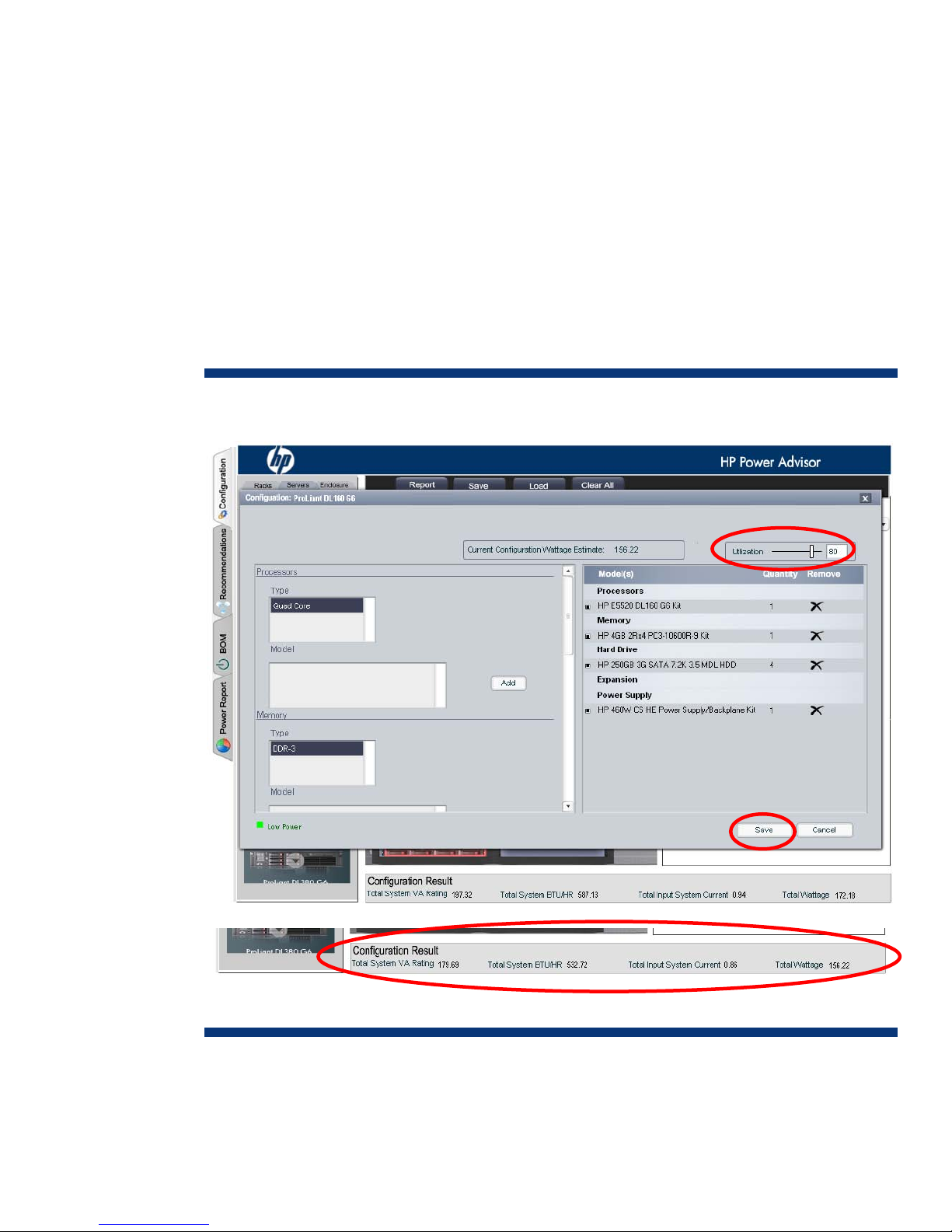
This example consists of a standard 42U rack configured with 24 HP DL160 G6 servers. For this
calculation, each DL160 G6 server is configured with an Inte®l Xeon® E5520 processor, four
gigabytes of DDR3 memory, four 250-GB SATA hard drives, and one 460-watt power supply set to
run off 208 VAC (Figure 8).
Figure 8. Power calculation for single HP DL160 G6 server
With the Utilization slider control set at 80 percent and the configuration saved, the Power Advisor
indicates that the system input requirement will be 179.69 VA, the system will draw approximately
0.86 amperes of current, and it will dissipate 156.22 watts.
10
Page 11
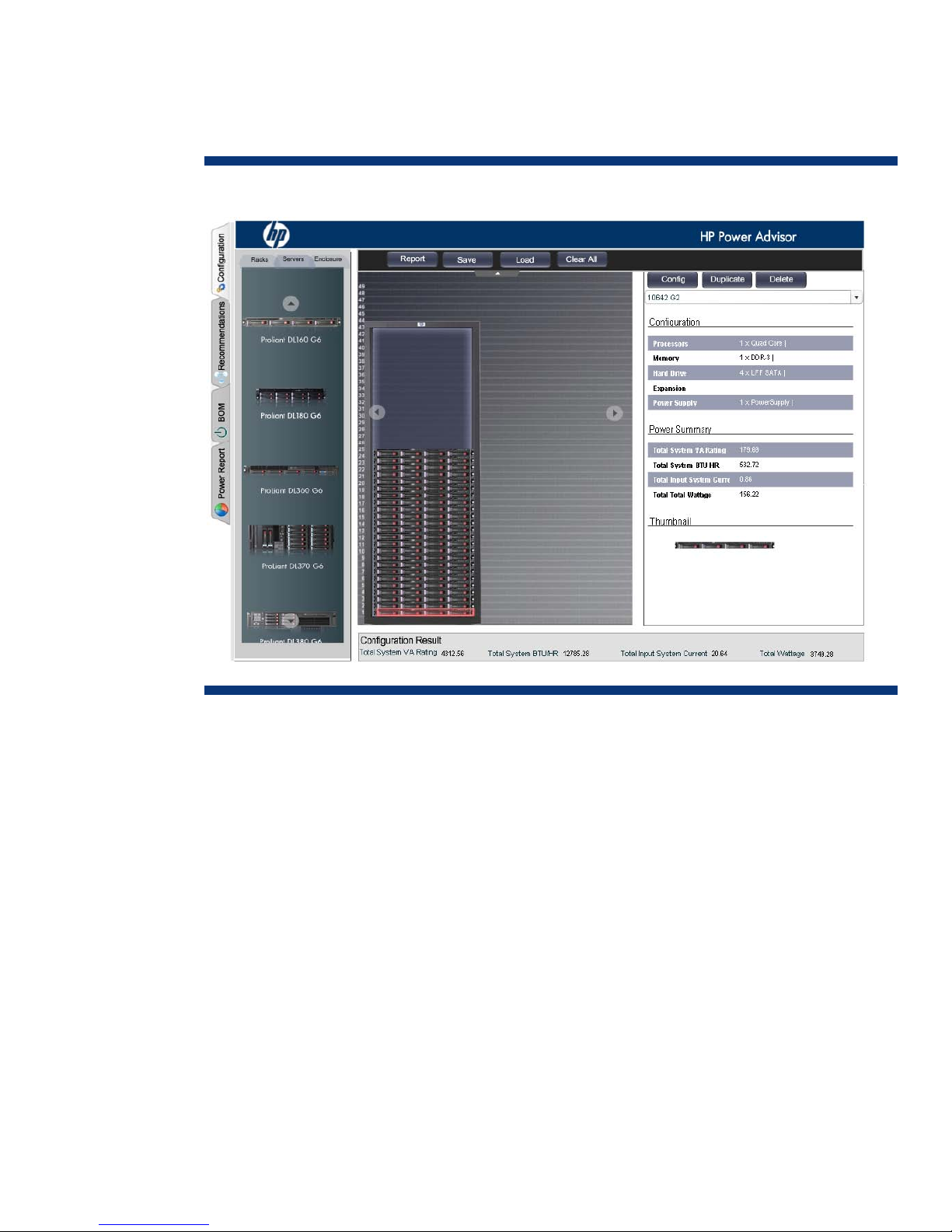
While a standard 42U rack can physically accommodate 42 ProLiant DL160 G6 servers, it is
advisable to allow space for server expansion, power distribution components,
keyboard/video/mouse (KVM) equipment, or networking components. In Figure 9, Power Advisor
calculates a single rack configured with 24 DL160 G6 servers.
Figure 9. Power calculation for 24 HP DL160 G6 servers
The Power Advisor determines that a rack configuration of 24 DL160 G6 servers would require the
following:
• 4312.56 VA total apparent power (24 x 179.69 VA) that the power distribution components must
transfer
• 12785.28 total BTU/hr that will need to be removed by the cooling system
• 20.64 amperes total current (24 x 0.86 A) drawn by the 24 servers
• 3749.28 total watts dissipated by the equipment
11
Page 12
(
)
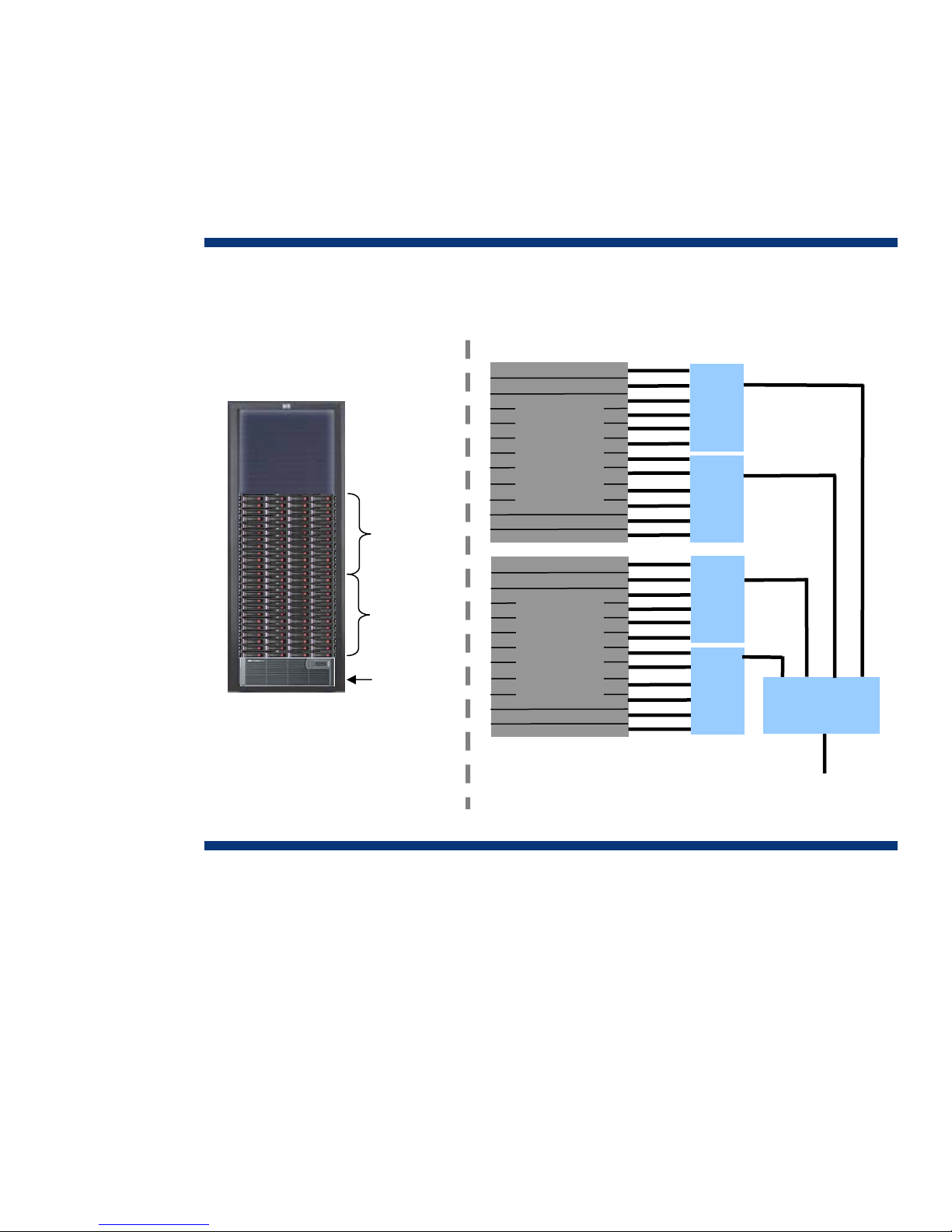
Since the ProLiant DL160 G6 accommodates only one power supply, power redundancy will have to
be provided upstream of the server’s single AC connection. Figure 10 shows a rack-level power
redundancy scheme using an uninterruptable power supply (UPS). With four 7-outlet PDUs and a total
input current capability of 5000 VA, the HP R5500 UPS would be a good fit and would provide
adequate VA and outlet headroom for server expansion or peripheral devices. Using the Power
Advisor calculations indicated in Figures 8 and 9, the total heat produced by 24 servers would be
12785.28 BTU/hr., an amount that can be cooled using conventional means in most data center
environments.
Figure 10. 42U rack configuration of 24 HP ProLiant DL160 G6 servers with battery backup power
Physical Configuration
Functional Block Diagram
PS
DL160 G6
1 thru 12
DL160 G6
servers
13 thru 24
HP R5500 UPS
servers
DL160 G6
servers
1 thru 12
DL160 G6
servers
13 thru 24
PS
PDU
PDU
PDU
PDU
HP
R5500 UPS
AC Bus
208 VAC
Figure 10 shows only one example—a number of configurations are possible. By using row-level
power redundancy and consolidating server management with a remote console, users can achieve a
maximum density configuration (42 DL160 servers).
12
Page 13
Rack configuration with HP DL380 G6 servers
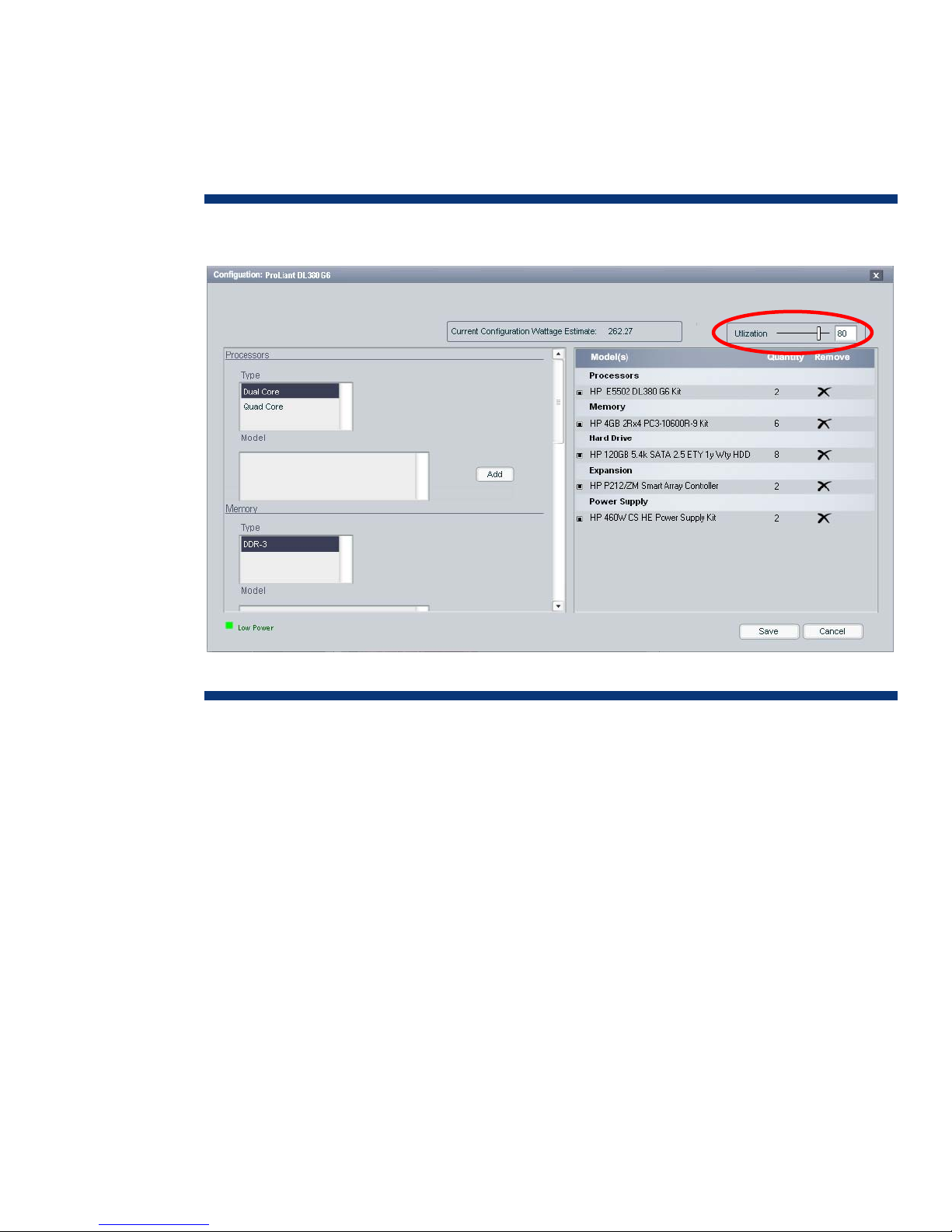
This example describes a standard 42U rack configured with 20 HP DL380 G6 servers. For this
calculation, each DL380 G6 server is configured with two Intel Xeon E5502 processors, 24 gigabytes
of DDR3 memory, eight 120-GB SATA hard drives and two Smart Array Controller cards (Figure 11).
Two 460-watt power supplies (set to run off 208 VAC) provide 1+1 power redundancy.
Figure 11. Power calculation for a single HP DL380 G6 server
With the Utilization slider control set at 80 percent and the configuration saved, the Power Advisor
calculates (Figure 12) that the system input requirement will be 288.08 VA, the system will draw
approximately 1.38 amperes of current, and it will dissipate 262.27 watts.
13
Page 14
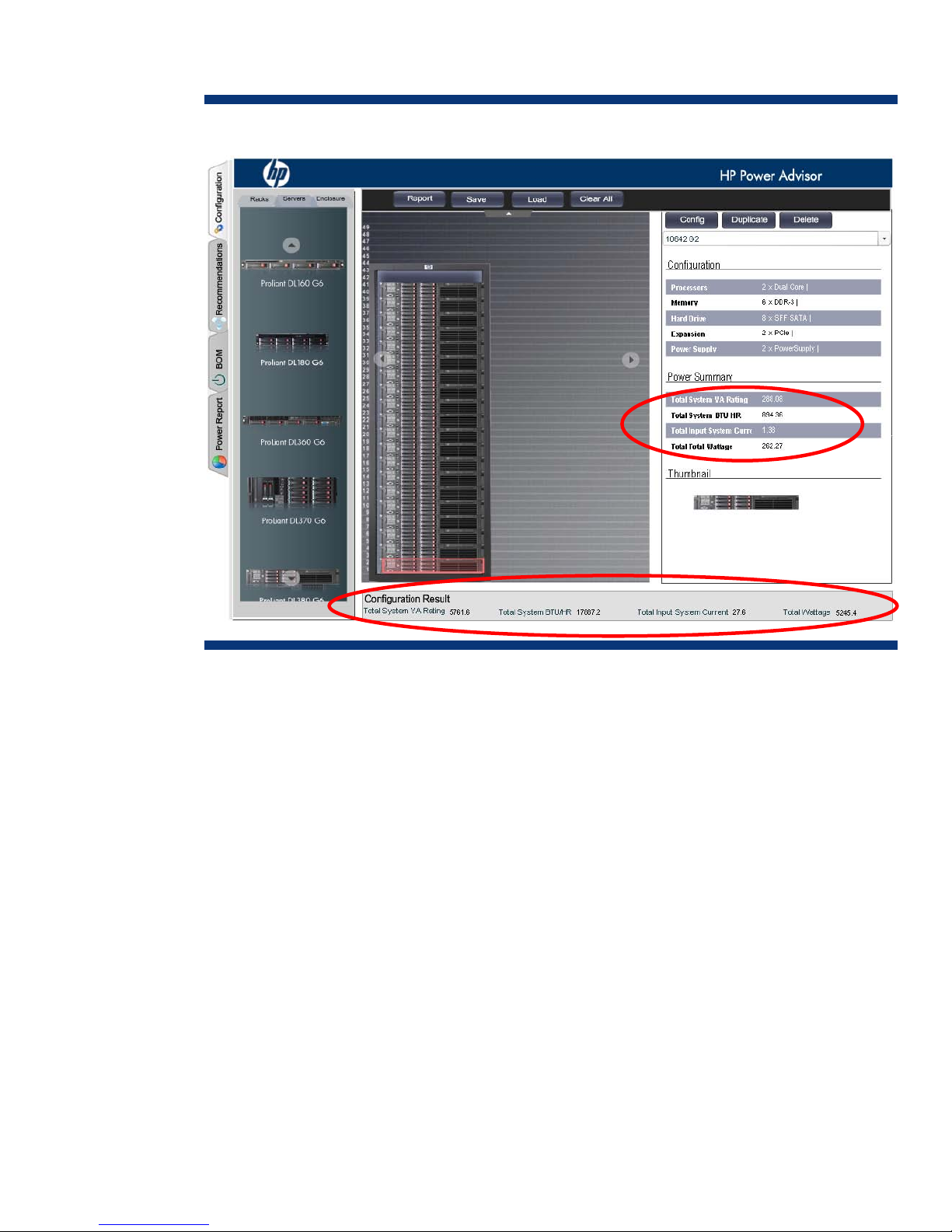
Figure 12. Power calculation for 20 HP DL380 G6 servers
The Power Advisor determines that a rack configuration of 20 DL380 G6 servers would require the
following:
• 5761.6 VA total apparent power (20 x 288.08 VA) that the power distribution components must
transfer
• 17887.2 total BTU/hr that will need to be removed by the cooling system
• 27.6 amperes total current (20 x 2.38 A) drawn by the 24 servers
• 5245 total watts dissipated by the equipment
14
Page 15
(
)
(
)
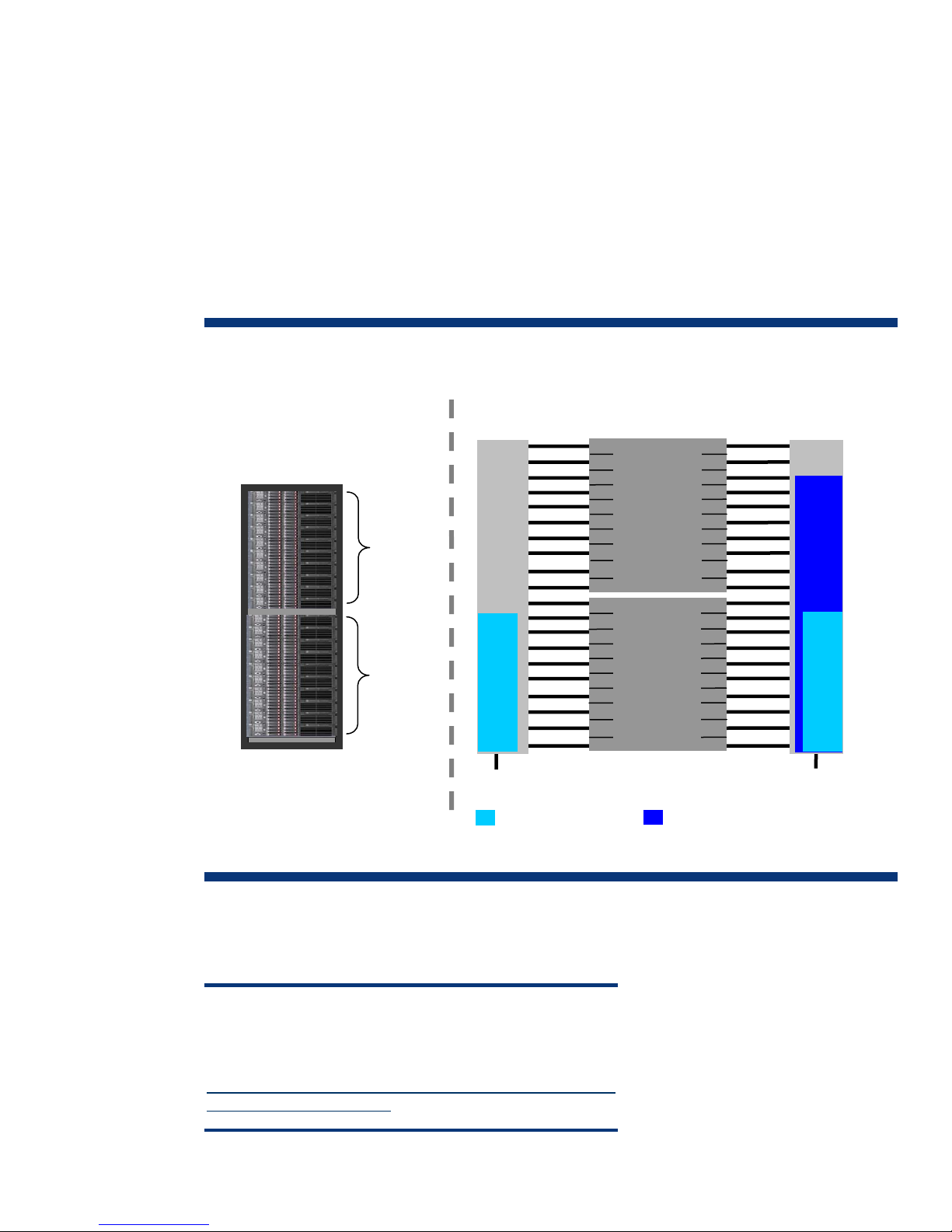
Figure 13 shows a rack configuration of twenty HP DL380 G6 servers receiving power through
redundant power buses. This example is based on the Power Advisor calculations indicated in Figures
11 and 12. The power supplies (PS A and PS B) of each server connect through PDUs to the separate
power buses.
With both power buses active, the power supplies and PDUs evenly share the server load
(approximately 13.8 A per bus). While a 24-amp PDU could handle the load during normal
conditions, a PDU would need to distribute 27.6 amps required by all the servers if one bus should
fail. For this reason, a PDU on a redundant power bus should never provide more than 50 percent of
its rated capacity in normal operation. In the example shown in Figure 13, the 40-amp PDUs are
required and provide headroom for additional equipment upgrades.
Figure 13. 42U rack configuration of HP ProLiant DL380 G6 servers with redundant power buses
Physical Configuration
DL380 G6
1 thru 10
DL380 G6
11 thru 20
servers
servers
40A
PDU
13.8 A
Functional Block Diagram
PS A
DL380 G6
servers
1 thru 10
PS A
DL380 G6
servers
11 thru 20
PS B
PS B
40A
PDU
27.6 A
13.8 A
Bus A
208 VAC
Normal operation
Redundant operation (Bus A failure)
Bus B
208 VAC
The Power Advisor indicates that the cooling requirement for the rack configuration shown in Figure
13 would be 17887.2 BTUs/hr (894.36 x 20). This level of BTU generation may require special
cooling considerations such as controlled air, forced air, or chilled-water systems.
NOTE
For more information on power distribution strategies and threephase power refer to the white paper ”Power Basics for IT
Professionals” at
http://h20000.www2.hp.com/bc/docs/support/SupportManual/
c01234421/c01234421.pdf
15
Page 16
Rack configuration with the HP c-Class BladeSystem
The HP c-Class BladeSystem is a modular-based design that offers very flexible configuration
possibilities. Therefore, the method for calculating BladeSystem installations is more involved than for
DL systems. This example describes a standard 42U rack configured with four c7000 enclosures each
loaded with 16 BL460c G6 server blades.
NOTE
Prior familiarization with the HP c-Class BladeSystem is strongly
recommended in avoiding Power Advisor error indications and
inaccurate calculations.
To calculate the power for an HP BladeSystem based on the c-7000 enclosure, perform the following
steps:
1. Open the Power Advisor and select the power input (for this example, 208).
2. Select the rack type using the drag and drop method (for this example, 10642 G2).
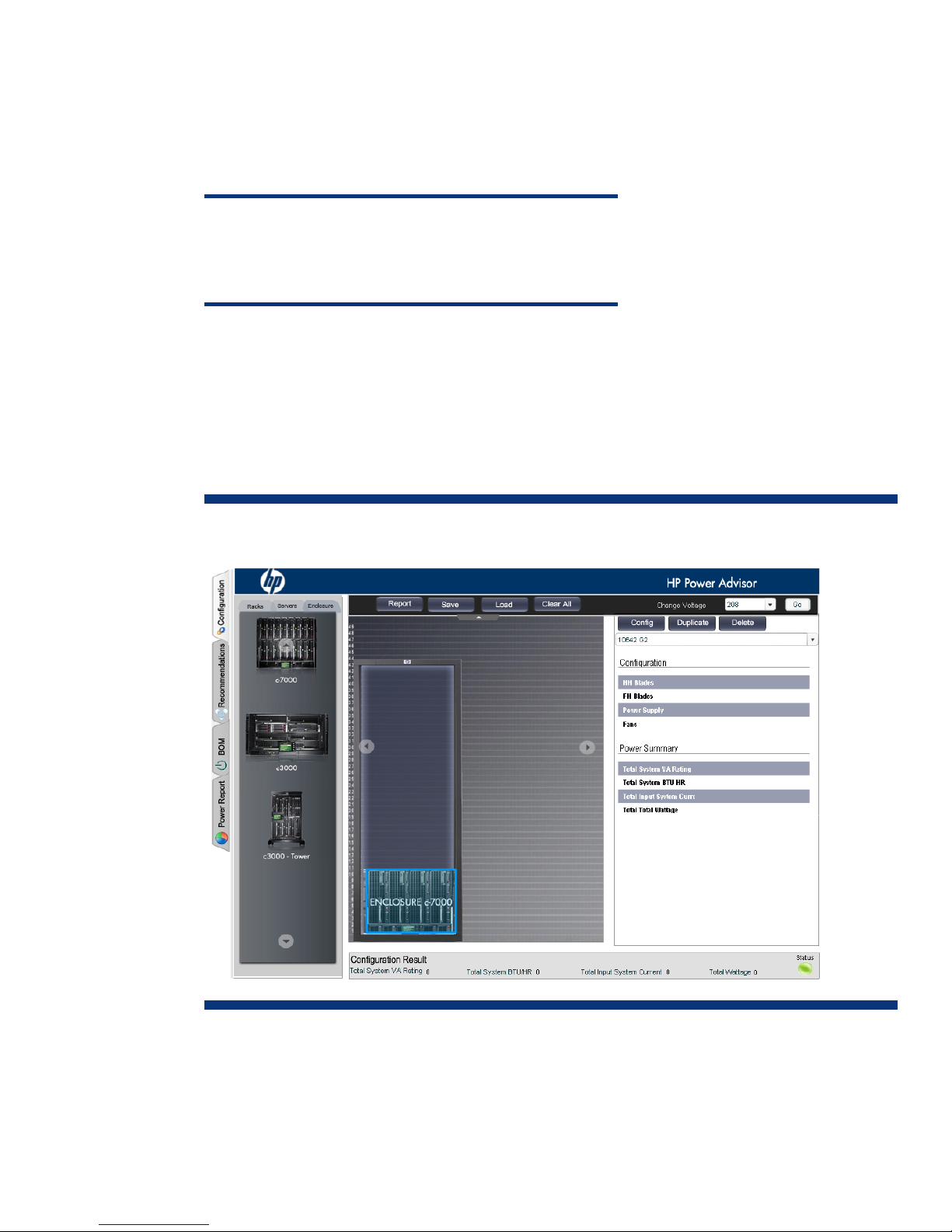
3. Select the Enclosure tab and click on the c7000 enclosure. The enclosure will appear in the rack
as shown in Figure 14.
Figure 14. c7000 enclosure selection
16
Page 17
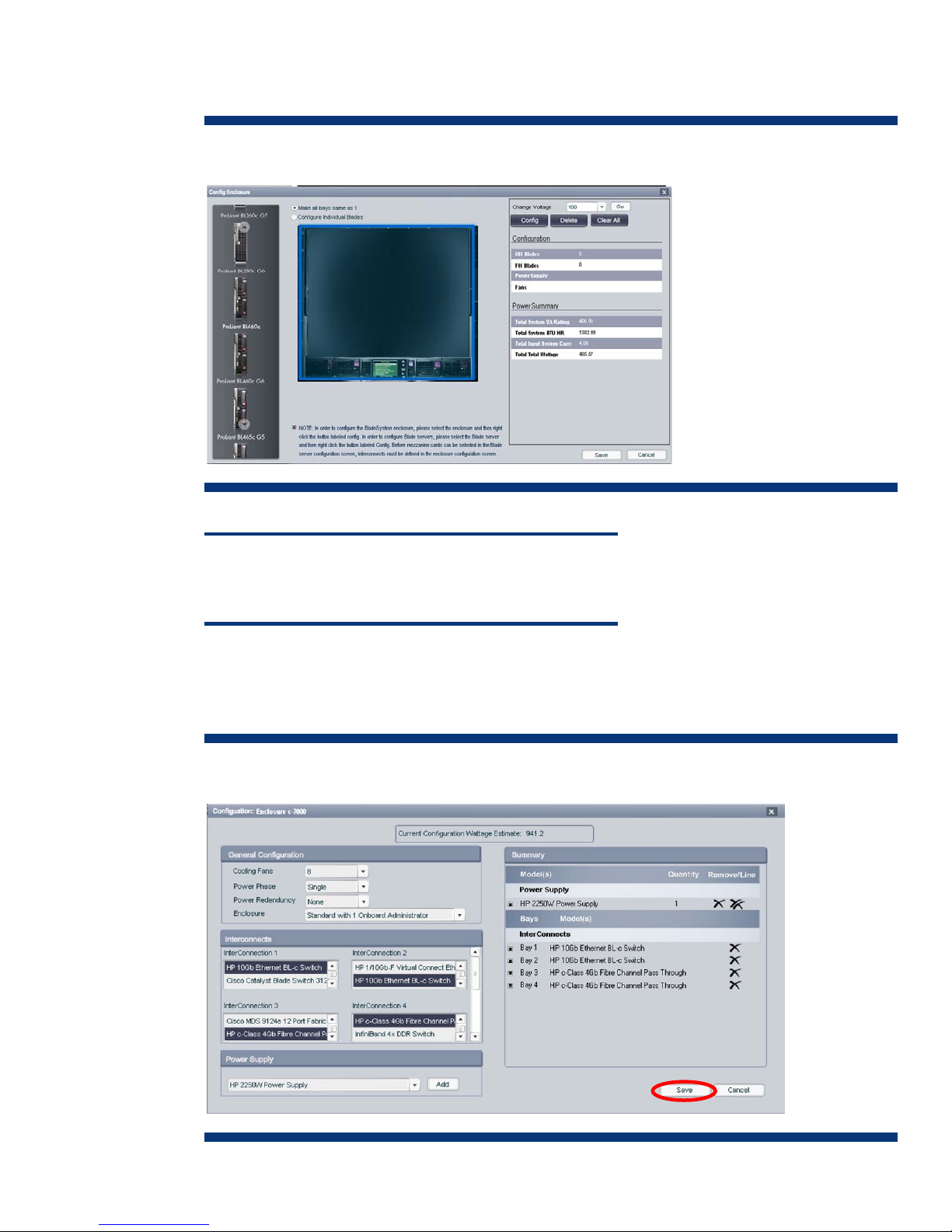
4. Highlight the enclosure in the rack and click Config. The enclosure configuration page appears as
shown in Figure 15.
Figure 15. Initial c7000 enclosure configuration screen
NOTE
The enclosure must be configured with a power supply and
interconnect modules BEFORE adding and configuring the blades.
5. Click the Config button. The enclosure configuration screen appears. Configure the enclosure as to
power supply type and quantity, number of cooling fans, and interconnect modules as shown in
Figure 16. When finished, click Save.
Figure 16. c7000 enclosure configuration screen
17
Page 18
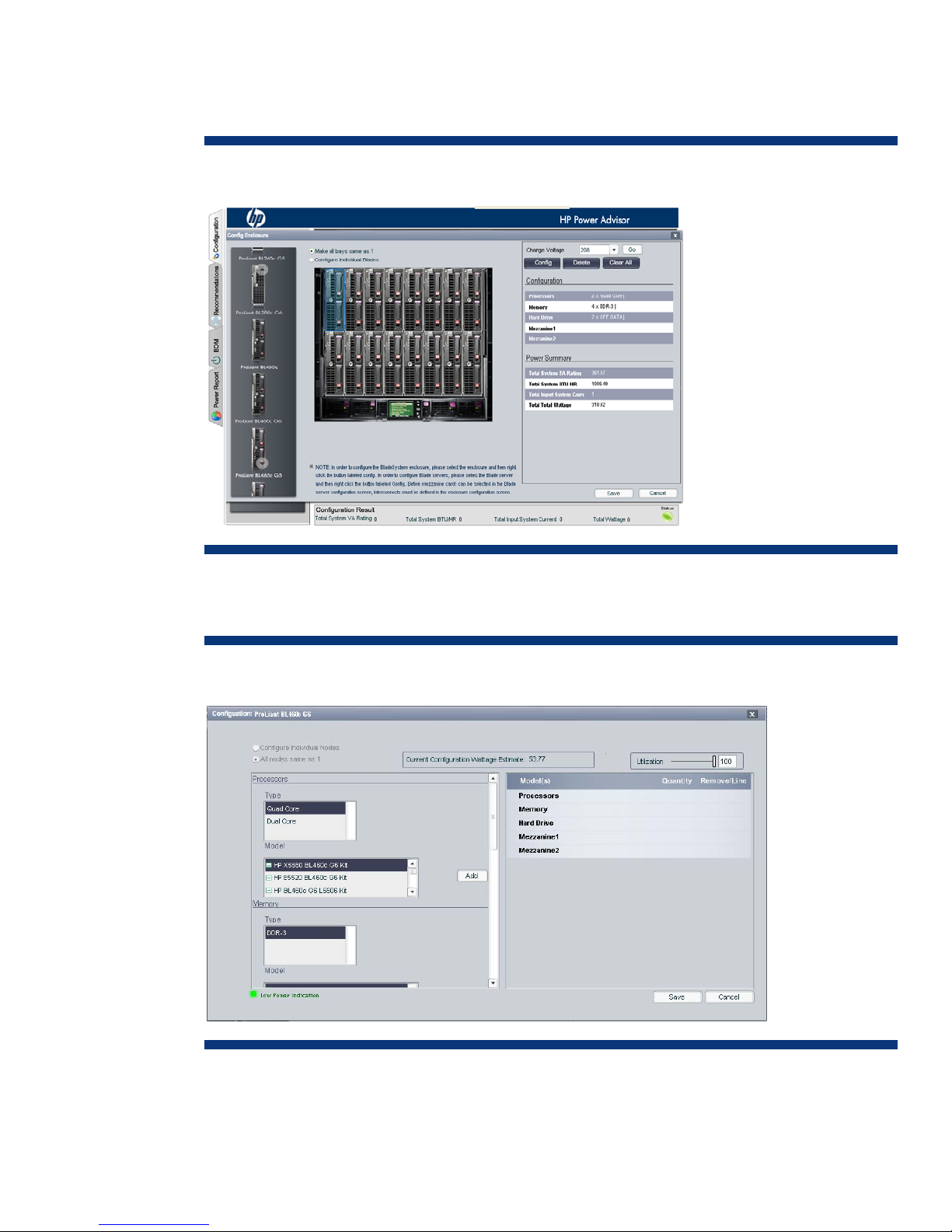
6. In the left pane, click Servers and select a server blade. If the “Make all bays same as 1” option is
selected (default), the Power Advisor will populate all blade slots of the enclosure with the selected
blade (in this example, the BL460c G6 blade) as shown in Figure 17.
Figure 17. Populating a c7000 enclosure with BL460c G6 server blades
7. Highlight the blade in slot 1 and click Config. The configuration screen for the BL460c G6
appears as shown in Figure 18.
Figure 18. Initial BL460c G6 blade configuration screen
Configure the blade for processor type and quantity, memory amount, hard drive(s), and
mezzanine card(s). Also, set the Utilization slider control at the projected level. When finished,
click Save.
18
Page 19
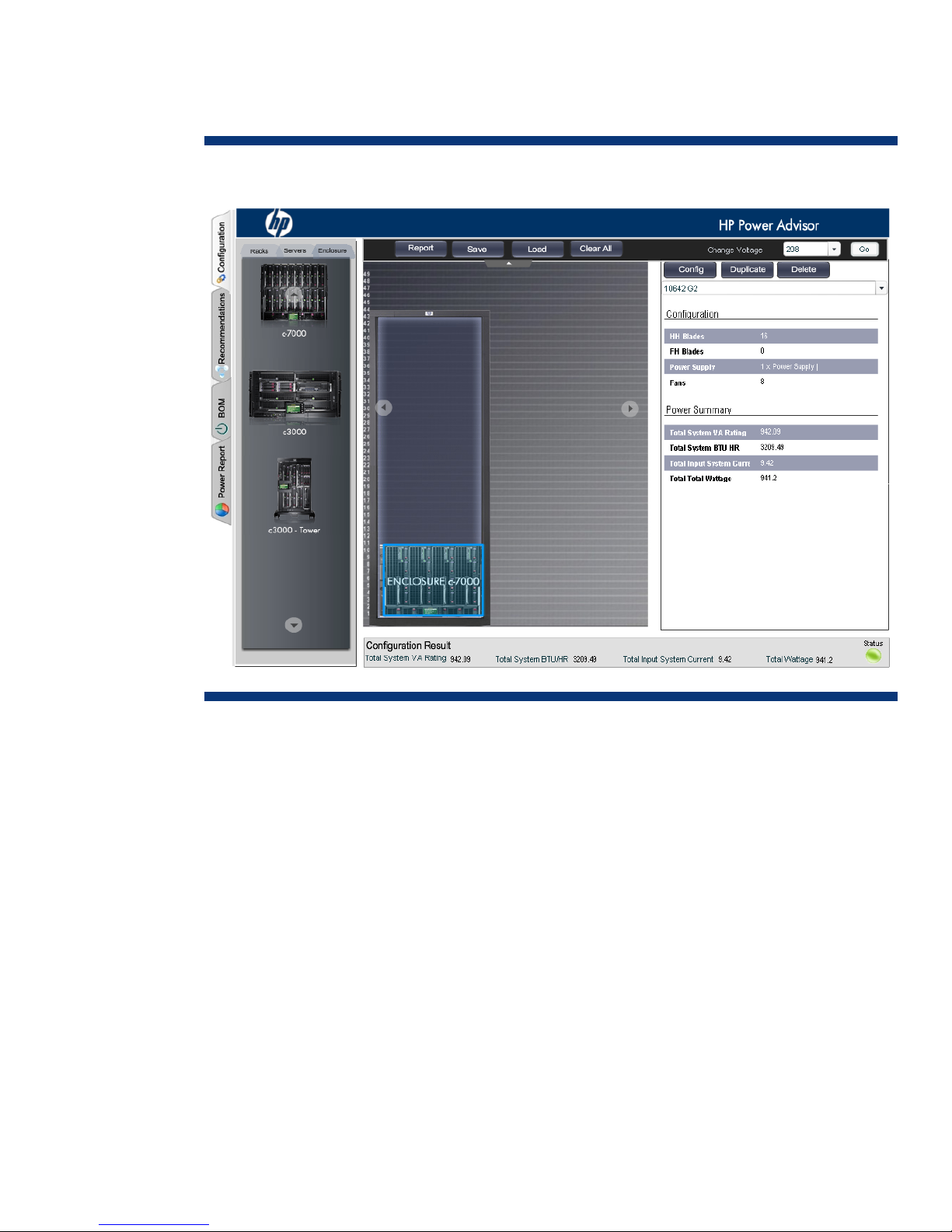
8. Check the voltage level indicated by the Power Advisor, reselect or change to 208 if necessary,
and click Go. The Power Advisor will display the calculated power requirements for the rack with
a single enclosure (Figure 19).
Figure 19. Power calculation for a single c7000 enclosure with BL460c G6 server blades
Additional enclosures are added to the rack by either duplicating a configured enclosure as
described in the next step (9) or by selecting a new enclosure and configuring it as previously
described in steps 3 through 8.
19
Page 20
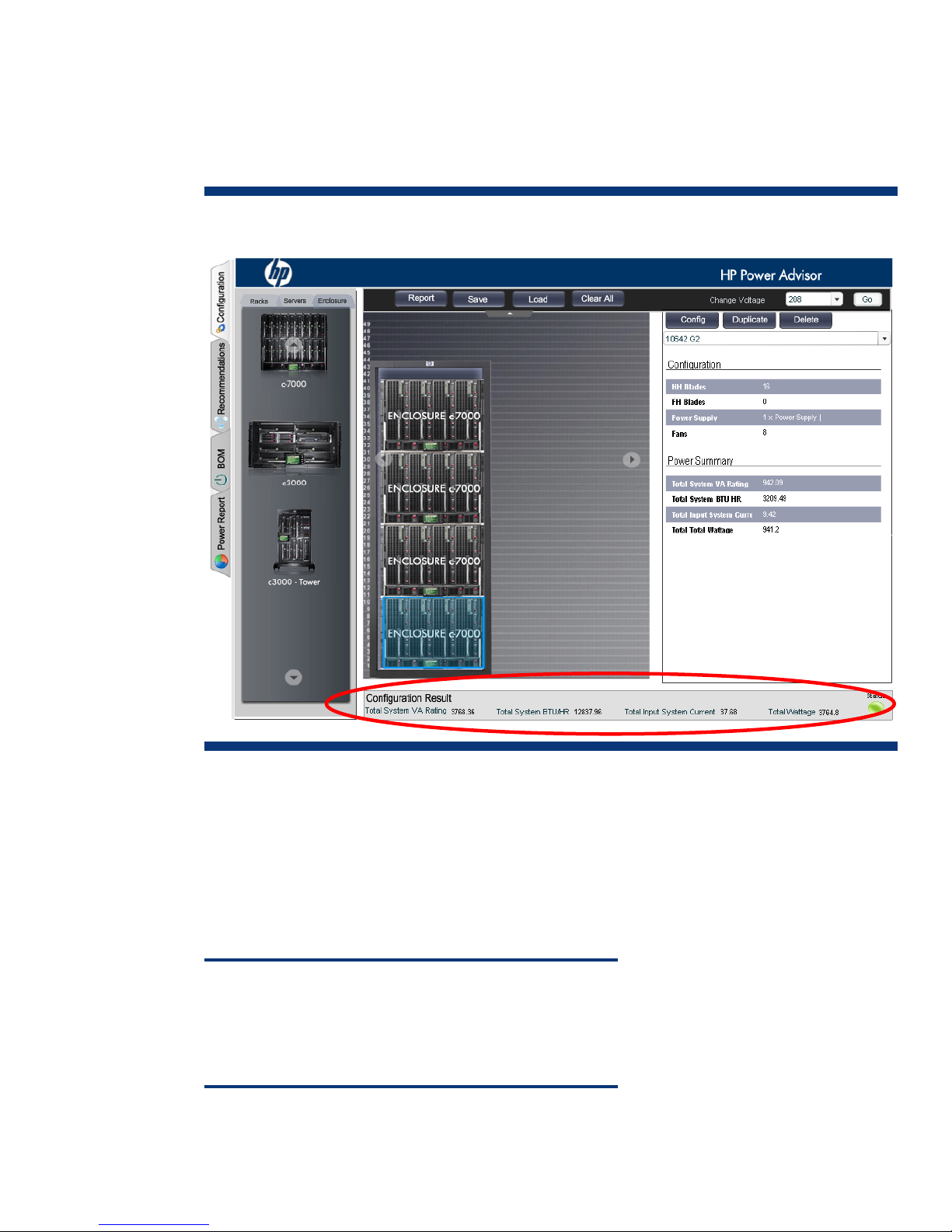
9. To duplicate an enclosure configuration, select the enclosure in the rack and click Duplicate. In the
pop up window requesting for the number of copies, enter the desired value (for this example,
enter 3). The Power Advisor will populate the rack with three additional enclosures of the same
configuration as the first and calculate the total power requirements for the rack (Figure 20).
Figure 20. Populating the rack with four configured c7000 enclosures
The Power Advisor determines that a rack configuration of four c7000 enclosures as configured in the
previous procedure would require the following:
• 3768.36 VA total apparent power (4 x 942.09 VA) that the power distribution components must
transfer
• 12837.96 total BTU/hr that will need to be removed by the cooling system
• 37.68 amperes total current (4 x 9.42 A) drawn by the four enclosures
• 3764.8 total watts dissipated by the equipment
NOTE
The configuration flexibility of the HP c-Class BladeSystem can
result in a wide range of power requirements. Depending on
components and quantities selected, c-Class configuration results
provided by the Power Advisor may vary considerably.
20
Page 21

Conclusion
The HP Power Advisor is a valuable utility for planning systems based on HP ProLiant products. The
calculator provides meaningful estimates of power for use in sizing an infrastructure. It is important to
note, however, that actual power consumption of an installed system running certain applications may
vary. To use the Power Advisor effectively, IT organizations must observe the following caveats:
Do use the Power Advisor for:
• Estimating requirements only for HP systems
• Determining maximum equipment power and cooling needs at the unit (chassis) and rack levels
Do not use the Power Advisor for:
• Estimating requirements of systems from other vendors
• Direct comparisons with other vendors’ products
• Precisely predicting the power consumption of a single instance of a server running a particular
application. Actual power consumption can be less than the power and cooling needs indicated by
the Power Advisor.
• Estimating power consumption of individual components (memory, hard drives, cards, etc.)
NOTICE
The HP Power Advisor is provided “as is” without any warranty of
any kind. The entire risk arising out of the use of the Power
Calculator remains with the customer. In no event shall HP be
liable for any direct, consequential, incidental, special, punitive, or
other damages whatsoever (including without limitation, damages
for loss of business profits, business interruption or loss of business
information) even if HP has been advised of the possibility of such
damages. Refer to the HP Power Advisor program license terms for
more information
NOTE:
HP Power Advisor is intended to be a conservative estimator of
power. No two applications will consume exactly the same amount
of power. Even programs that report the same CPU utilization will
have different power consumption characteristics, based on the
exact mix and sequence of instructions being executed. The
programs used as the measurement reference for the HP Power
Advisor were intended to consume as much or more power than
actual user applications.
.
HP offers IT administrators post-installation support with the following power management solutions
designed to maximize server efficiency and reduce power consumption to maintain the data center
power budget:
• HP Insight Power Manager—included as part of HP Insight Control Suite, a monitoring and
management application providing centralized control of server power consumption and thermal
output
• Dynamic Power Capping—a part of the HP Thermal Logic Technology initiative allowing IT
administrators to reclaim data center capacity by monitoring and capping server power without
impacting performance
21
Page 22

For more information
For additional information, refer to the resources listed below.
Resource Hyperlink
HP Power Advisor
”Power Basics for IT Professionals”
technology brief
Other industry standard technology papers
from HP
HP energy efficiency solutions information
http://www.hp.com/go/hppoweradvisor
http://h20000.www2.hp.com/bc/docs/support/SupportManual
/c01234421/c01234421.pdf
http://h18004.www1.hp.com/products/servers/technology/whi
tepapers/index.html
http://www.hp.com/go/proliant-energy-efficient
Call to action
Send comments about this paper to: [email protected]
© 2009 Hewlett-Packard Development Company, L.P. The information contained herein is
subject to change without notice. The only warranties for HP products and services are set forth
in the express warranty statements accompanying such products and services. Nothing herein
should be construed as constituting an additional warranty. HP shall not be liable for technical
or editorial errors or omissions contained herein.
Microsoft, Windows, and Windows NT are US registered trademarks of Microsoft Corporation.
TC090816TB, August 2009
22
 Loading...