

Page 1
Data sheet
HP LaserJet Pro M402 series
Impressive speed. Solid security.
Printing performance and robust
security built for how you work. This
capable printer finishes jobs faster
and delivers comprehensive security
to guard against threats.1Original HP
Toner cartridges with JetIntelligence
give you more pages.
2
Highlights
Up to 38ppm A4 black
●
First page out from sleep/Auto-Off in 8.1 sec
●
Fast duplex printing: 30ipm
●
Gigabit Ethernet connectivity
●
HP Auto-On/Auto-Off for low energy
●
consumption
PIN printing via optional USB
●
Optional 550-sheet tray
●
Optional high-yield black cartridge 9,000 pages
●
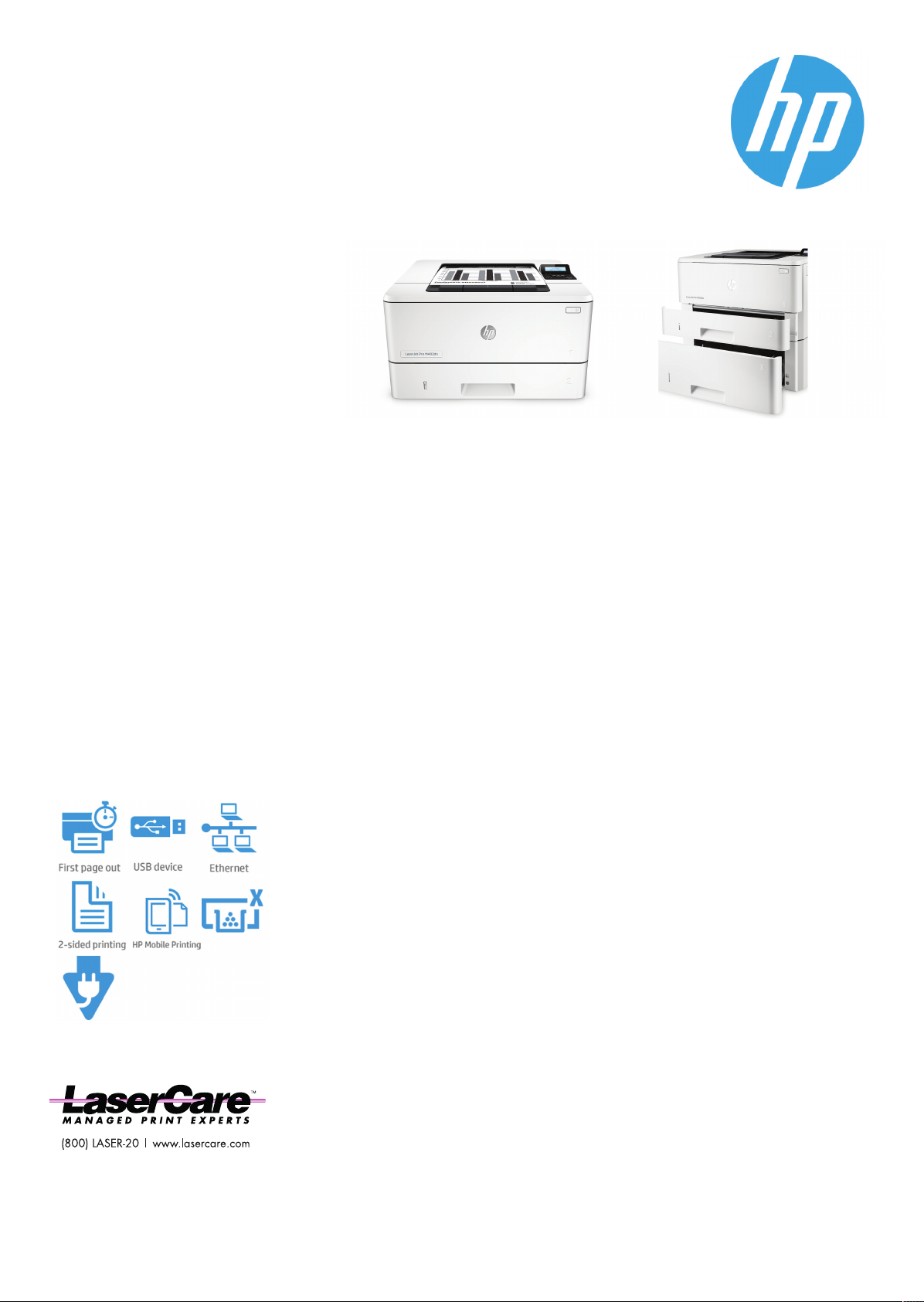
HP LaserJet Pro M402dn HP LaserJet Pro M402dn with
optional 550-sheet tray
Fast printing. Strong protection.
Grab pages and go – without waiting around. This printer wakes up and prints faster than
●
the competition.
Breeze through multipage documents with two-sided printing that’s faster than the
●
competition.
Help keep printing safe from boot up to shutdown with security features that guard
●
1
1
against complex threats.
More. Pages, Performance, and Protection.
Get the most prints for your money – with Original HP High Yield Black Toner cartridges
●
with JetIntelligence.
Count on consistent results at high speeds with precision black toner.
●
Help ensure you’re getting the authentic HP quality you paid for with innovative anti-fraud
●
2
technology.
Print right away with preinstalled toner cartridges. Replace them with optional high-yield
●
cartridges.
Help save energy and easily manage tasks
Help save energy with HP Auto-On/Auto-Off Technology.
●
Print using less energy than competitors – enhanced by Original HP Toner cartridges with
●
JetIntelligence.
Make the most of your office space, with a printer that conveniently fits right into your
●
4
3
work style.
Easily manage devices and settings using HP Web Jetadmin with a suite of essential
●
management features.
5
Stay connected with easy mobile printing options
Easily print from a variety of smartphones and tablets – generally no setup or apps
●
required.
Easily set up, print, and share with built-in Ethernet networking.
●
6
Page 2
Data sheet | HP LaserJet Pro M402 series
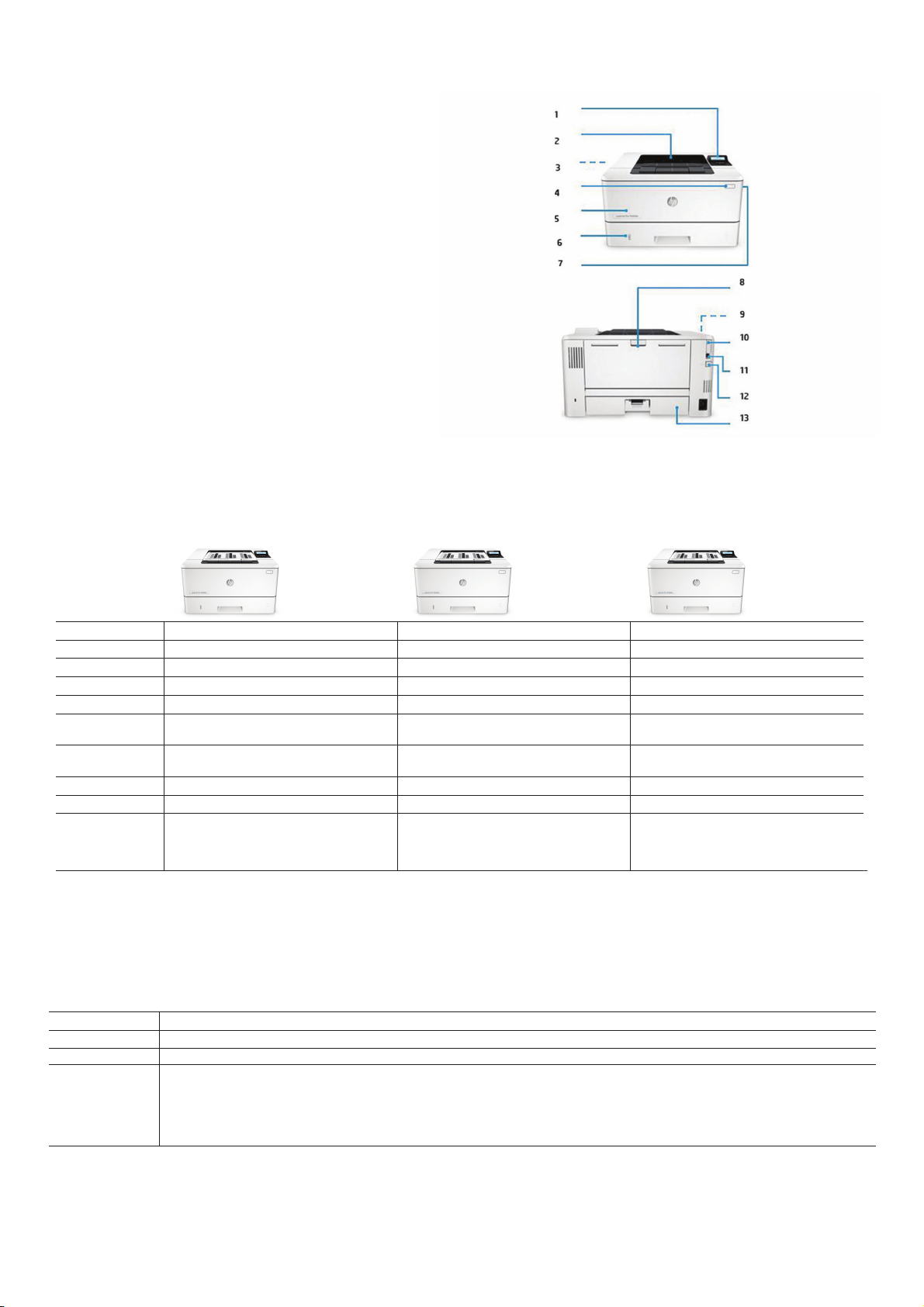
Product walkaround
HP LaserJet ProM402dn shown
1. 2-line LCD control panel
2. 150-sheet output bin
3. Automatic two-sided printing
4. Power on/off button
5. 100-sheet multipurpose tray 1
6. 250-sheet input tray 2
7. Front door release button (access to Original HP Toner cartridges with
JetIntelligence)
8. Rear door (provides access to print path)
9. 1200 MHz processor
10. USB port for job storage and private printing
11. Hi-Speed USB 2.0 printing port
12. Ethernet port
13. Dust cover for tray 2—flips up when legal-size or A4 is loaded
Series at a glance
Model
Product number
Print speed
Two-sided printing
Networking
Mobile printing
capability
100-sheet
multipurpose tray 1
250-sheet tray 2
550-sheet tray 3
Rear host USB,
enabling job storage
and PIN printingvia
USB flash drive
HP LaserJet ProM402dn HP LaserJet ProM402dne HP LaserJet ProM402n
C5F94A C5J91A C5F93A
Up to 38 ppm, A4 Duplex: 30 ipm, A4 Up to 38 ppm, A4 Duplex: 30 ipm, A4 Up to 38 ppm, A4 No duplex printing
Automatic Automatic Manual
Built-in 10/100/1000 Base-TX Ethernet Built-in 10/100/1000 Base-TX Ethernet Built-in 10/100/1000 Base-TX Ethernet
HP ePrint, Apple AirPrint, Mopria-certified, Google
Cloud Print 2.0, mobile apps
Yes Yes Yes
Yes Yes Yes
Optional Optional Optional
Yes Yes Yes
HP ePrint, Apple AirPrint™, Morpria-certified, Google
Cloud Print 2.0, mobile apps
HP ePrint, Apple AirPrint, Mopria-certified, Google
Cloud Print™ 2.0, mobile apps
Accessories, Supplies and Support
Accessories
Supplies
Service and support
D9P29A HP LaserJet Pro 550-sheet Feeder Tray
CF226A HP 26A Black Original LaserJet Toner Cartridge 3,100 pages
CF226A HP 26A Black Original LaserJet Toner Cartridge 3,100 pages
U8TM2E HP 3 year Next business day LaserJet M402 Hardware Support
U8TM5E HP 3 year Next business day Exchange LaserJet M402 Service
U8TM6E HP 3 year Return LaserJet M402 Hardware Service
U8TM7PE HP 1 year Post Warranty Next business day LaserJet M402 Hardware Support
U8TM8PE HP 1 year Post Warranty Next business day Exchange LaserJet M402 Service
U8TM9PE HP 1 year Post Warranty Return LaserJet M402 Service
Page 3
Data sheet | HP LaserJet Pro M402 series
Technical specifications
Model
Product number
Control panel
Print
Print technology
Print speed
First page out
1
2
Print resolution
Monthly duty cycle
Standard print
languages
Fonts and typefaces
Print area
Duplex printing
Processor speed
Connectivity
Standard
Wireless
Mobile printing
capability
Supported network
protocols
Network ready
Hard disk
Memory
Paper handling
Number of paper trays
Media types
Media size
Media handling
Media weight
Input capacity
Output capacity
Compatible operating
systems
HP LaserJet ProM402dn HP LaserJet ProM402dne HP LaserJet ProM402n
C5F94A C5J91A C5F93A
2-line backlit LCD graphic display; Buttons (OK, Menu, Cancel, Back); LED indicator lights (Attention, Ready)
Laser
Black (A4, normal): Up to 38 ppm; Black (A4, duplex): Up to 30 ipm
Black (A4, ready): As fast as 5.7 sec; Black (A4, sleep): As fast as 8.1 sec
Black (best): Up to 4800 x 600 enhanced dpi, HP FastRes 1200; Technology: HP FastRes 1200, HP ProRes 1200, 600 dpi
3
Up to 80,000 pages (A4); Recommended monthly page volume4: 750 to 4,000
HP PCL 5, HP PCL 6, HP Postscript Level 3 emulation, direct PDF (v1.7) printing, URF, PCLM, PWG
84 scalable TrueType fonts
Print margins: Top: 5 mm, Bottom: 5 mm, Left: 4 mm, Right: 4 mm
Automatic (standard) Automatic (standard) Manual (driver support provided)
1200 MHz
1 Hi-Speed USB 2.0; 1 Host USB; 1 Gigabit Ethernet 10/100/1000T network
No
HP ePrint; Apple AirPrint™; Mopria™-certified; Google Cloud Print2.0; Mobile Apps
TCP/IP, IPv4, IPv6; Print: TCP-IP port 9100 Direct Mode, LPD (raw queue support only), Web Services Printing, HP ePrint, Apple AirPrint™, Google Cloud Print 2.0,
Mopria, FTP Print, IPP Print; Discovery: SLP, Bonjour,Web Services Discovery; IP Config: IPv4 (BootP, DHCP, AutoIP, Manual), IPv6 (Stateless Link-Local and via Router,
Statefull via DHCPv6), SSL Security and Certificate management; Management: SNMPv1, SNMPv2, SNMPv3, HTTP/HTTPS, Syslog, FTP FW Download
Standard (built-in Gigabit Ethernet)
None
Standard: 128 MB DRAM; 128 MB NAND Flash;
Maximum : 128 MB DRAM; 128 MB NAND Flash
Standard: 2; Maximum: 3
Paper (plain, EcoFFICIENT, light, heavy, bond, coloured, letterhead, preprinted, prepunched, recycled, rough), envelopes, labels, transparencies
Custom (metric): Tray 1: 76.2 x 127 to 215.9 x 355.6 mm; Tray 2, 3: 104.9 x 148.59 to 215.9 x 355.6 mm
Supported (metric): Tray 1: A4, A5, A6, A5-R, B5 (JIS), B6 (JIS), envelope B5, C5, DL, custom size; Tray 2 & Tray 3: A4, A5, A6, A5-R, B5 (JIS), B6 (JIS), custom size
Standard input: 100-sheet multipurpose Tray 1, 250-sheet input Tray 2
Standard output: 150-sheet output bin
Optional input: Optional third 550-sheet tray
Tray 1: 60 to 175 g/m²; Tray 2, optional 550-sheet Tray 3: 60 to 120 g/m²
Tray 1: Sheets: 100; Envelopes: 10
Tray 2: Sheets: 250
Tray 3: Sheets: 550
Maximum: Up to 900 sheets
Standard: Up to 150 sheets
Envelopes: Up to 10 envelopes
Transparencies: Up to 75 sheets
Maximum: Up to 150 sheets
Windows OS compatible with In-Box Driver: Windows 10 all 32 & 64-bit editions (excluding RT OS for tablets), Windows 8/8.1 all 32 & 64-bit editions (excluding RT
OS for tablets), Windows 7 all 32 & 64-bit editions, Windows Vista all 32-bit editions (Home Basic, Premium, Professional, etc.); Windows OS compatible with
Universal Print Driver (from HP.com): Windows 10 all 32 & 64-bit editions (excluding RT OS for tablets), Windows 8/8.1 all 32 & 64-bit editions (excluding RT OS for
tablets), Windows 7 all 32 & 64-bit editions, Windows Vista all 32 & 64-bit editions (Home Basic, Premium, Professional, etc); Mac OS (HP Print Drivers available
from HP.com and Apple Store): OS X 10.8 Mountain Lion, OS X 10.9 Mavericks, OS X 10.10 Yosemite; Mobile OS (In-OS drivers): iOS, Android, Windows 8/8.1/10 RT;
Linux OS (In-OS HPLIP, auto install): BOSS (3.0, 5.0), DEBIAN (6.0, 6.0.1, 6.0.2, 6.0.3, 6.0.4, 6.0.5, 6.0.6, 6.0.7, 6.0.8, 6.0.9, 6.0.10, 7.0, 7.1, 7.2, 7.3, 7.4, 7.5, 7.6),
FEDORA (17, 18, 19, 20), LINUX MINT (13, 14, 15, 16, 17), SUSE LINUX (12.2, 12.3, 13.1), UBUNTU (10.04, 11.10, 12.04,12.10, 13.04, 13.10, 14.04, 14.10); Linux
OS (In-OS HPLIP, manual install): MANDRIVA LINUX (2010.0, 2011.0), MEPIS (6.0, 6.5, 7.0, 8.0), PCLINUXOS (2006.0, 2006, 2007.0, 2007, 2008.0, 2008, 2009.0,
2009), RED HAT (8.0, 9.0), RED HAT ENTERPRISE LINUX (5.0, 6.0, 7.0), SLACKWARE LINUX (9.0, 9.1, 10.0, 10.1, 10.2, 11, 12, 12.1), GOS (8.04.1), IGOS (1.0), LINPUS
LINUX (9.4, 9.5), LINUX FROM SCRATCH (6); Other OS: UNIX
Standard: 256 MB DRAM; 256 MB NAND Flash;
Maximum : 256 MB DRAM; 256 MB NAND Flash
Standard: 128 MB DRAM; 128 MB NAND Flash;
Maximum : 128 MB DRAM; 128 MB NAND Flash
Page 4
Data sheet | HP LaserJet Pro M402 series
Model
Product number
Compatible network
operating systems
Minimum system
requirements
Software included
Security management
Printer management
Dimensions and Weight
Printer dimensions (W x
6
D x H)
Package dimensions (W
x D x H)
Printer weight
Package weight
Operating
environment
Storage
5
Acoustics
Power
Energy savings
feature technology
Certifications
What's in the box
Warranty
Data sheet | HP LaserJet
Pro M402 series
HP LaserJet ProM402dn HP LaserJet ProM402dne HP LaserJet ProM402n
C5F94A C5J91A C5F93A
Windows OS compatible with In-Box Driver: Windows Server 2008 R2 64-bit (SP1) Standard/Enterprise (+ Cluster & Terminal Services), Windows Server 2008
32/64-bit (SP2) Standard/Enterprise (+ Cluster & Terminal Services), Windows Server 2003/2003 R2 32-bit (SP1/SP2) Standard/Enterprise (+ Cluster & Terminal
Services); Windows OS compatible with Universal Print Driver (UPD) or product-specific drivers from HP.com: Windows Server 2012/2012 R2 64-bit
Standard/Foundation/Essentials/Datacenter (+ Cluster & Terminal Services), Windows Server 2008/2008 R2 32 & 64-bit (SP1/SP2)
Standard/Enterprise/Datacenter(+ Cluster & Terminal Services), Windows Server 2003/2003 R2 32 & 64-bit (SP1/SP2) Standard/Enterprise/Datacenter (+ Cluster
& Terminal Services); MS Windows Server 2012 R2 Terminal Services: Citrix XenApp 7.5, Citrix XenDesktop 7.0, Citrix XenDesktop 7.5; MS Windows Server 2012
Terminal Services: Citrix XenApp 7.5, Citrix XenDesktop 7.0, Citrix XenDesktop7.5; MS Windows Server 2008 R2 SP1 Terminal Services: Citrix XenApp 6.0, Citrix
XenApp 6.5, Citrix XenApp 7.5, Citrix XenDesktop 5.6, Citrix XenDesktop 7.0, Citrix XenDesktop 7.5; MS Windows Server 2008 R2 Terminal Services: Citrix XenApp
6.0, Citrix XenApp 6.5, Citrix XenDesktop 5.6; MS Windows Server 2008 Terminal Services: Citrix XenApp 5.0, Citrix XenApp 5.0 Feature Pack 2 & 3; MS Windows
Server 2003 Terminal Services: Citrix Presentation Server(TM) 4.5, Citrix Presentation Server 4.0; MS Windows Server 2003 Terminal Services: Citrix Presentation
Server 4.5, Citrix Presentation Server 4.0, Citrix MetaFrame® Presentation Server, 3.0, Citrix MetaFrame XP Presentation Server (Feature Release 1, 2 and 3); Novell
Servers (http://www.novell.com/iprint): Novell Open Enterprise Server 11/SP1 /SP2, Novell Open Enterprise Server 2 for Linux; NetWare 6.5/SP8; Novell Clients
(http://www.novell.com/iprint): Novell iPrint Client v5.4 for Vista & Win 7 & Win 8 (32 & 64-bit), Novell iPrint Client v5.4 for Win XP (32 & 64-bit)
Windows: Windows10 (32 & 64-bit), Windows 8.1 (32 & 64-bit), Windows 8 (32 & 64-bit), Windows 7 (32 & 64-bit): 1 GHz processor, 1 GB RAM (32-bit) or 2 GB
RAM (64-bit), 400 MB available hard disk space, CD/DVD-ROM or Internet, USB or network port; Windows Vista (32-bit): 1 GHz 32-bit (x86) processor, 1 GB RAM
(32-bit), 400 MB available hard disk space, CD/DVD-ROM or Internet, USB or network port; Windows Server 2003 (32-bit) (SP1 or greater), Windows Server 2003
R2 (32-bit), Windows Server 2008 (32-bit) (SP1 or greater): 1 GHz 32-bit (x86) processor, 1 GB RAM (32-bit), 400 MB available hard disk space, CD/DVD-ROM or
Internet, USB or network port; Windows Server 2008 (64-bit) (SP1 or greater), Windows Server 2008 R2 (64-bit), Windows Server 2008 R2 (64-bit) (SP1): 1 GHz
64-bit (x64) processor, 2 GB RAM (64-bit), 400 MB available hard disk space, CD/DVD-ROM or Internet, USB or network port;
Mac: OS X 10.8 Mountain Lion, OS X 10.9 Mavericks, OS X 10.10 Yosemite, Internet, USB, 1 GB available hard disk space, OS compatible hardware (for OS hardware
requirements see http://www.apple.com)
For Windows 7: HP Software Installer/Uninstaller, HP PCL 6 Printer Driver, HP Device Experience (DXP), HP Update, HP Device Toolbox, HP Printer Status and Alerts,
HP Product Improvement Study, Reconfigure your HP Device, Warranty and Legal Guide, User Guide; For Windows 8+: HP Software Installer/Uninstaller, HP PCL 6
Printer Driver, HP Device Experience (DXP), Warranty and Legal Guide, User Guide, Reconfigure your HP Device; For Windows XP, Windows Vista and associated
servers: HP Software Installer/Uninstaller, HP PCL 6 Printer Driver, Warranty and Legal Guide, User Guide; For Mac OS: Welcome Screen (directs users to
http://www.HP.com or OS App Source for LaserJet Software)
Embedded Web Server: password-protection, secure browsing via SSL/TLS; Network: enable/disable network ports and features, SNMPv1 & SNMPv2 community
password change; HP ePrint: HTTPS with certificate validation, HTTP Basic Access Authentication, SASL authentication; Firewall and ACL; SNMPv3, 802.1X, Secure
Boot
Printer Administrator Resource Kit (Driver Configuration Utility, Driver Deployment Utility, Managed Printing Administrator); HP Web JetAdmin Software; HP Proxy
Agent Software; HP Imaging and Printing Security Center; HP Utility (Mac); HP Device Toolbox
Minimum: 381 x 357 x 216 mm; Maximum: 381 x 634 x 241 mm
443 x 274 x 464 mm
8.58 kg
11.36 kg
Temperature: 15 to 32.5°C; Humidity: 30 to 70% RH
Temperature: -20 to 40°C; Humidity: 10 to 90% RH
Acoustic power emissions: 6.8 B(A); Acoustic pressure emissions: 54 dB(A)
Requirements: Input voltage: 220 to 240 VAC (+/- 10%), 50/60 Hz (+/- 2 Hz); Consumption: 591 watts (printing), 6.1 watts (ready), 2.8 watts (sleep), 0.6 watts
(Auto-On/Auto-Off, via USB connectivity), 0.1 watts (off); Typical ElectricityConsumption(TEC): 1.54 kWh/Week (Energy Star), 1.40 kWh/Week (Blue Angel);
Power supply type: Built-in power supply
HP Auto-On/Auto-Off Technology
CISPR 22:2008/EN 55022:2010 (Class B1); EN 61000-3-2:2006 +A1:2009 +A2:2009; EN 61000-3-3:2008; EN 55024:2010
HP LaserJet Pro M402dn Printer; Preinstalled
Introductory HP 26A Black LaserJet Toner Cartridge
(3,100 pages); Getting Started Guide; Setup poster;
Support flyer; Warranty guide; Printer
documentation and software on CD-ROM; Power
cord
HP LaserJet Pro M402dne; Preinstalled HP 26A Black
LaserJet Toner Cartridge (3,100 pages); Getting
Started Guide; Setup poster; Support flyer; Warranty
guide; Printer documentation and software on
CD-ROM; Power cord
HP LaserJet Pro M402n Printer; Preinstalled
Introductory HP 26A Black LaserJet Toner Cartridge
(1,500 pages); Getting Started Guide; Setup poster;
Support flyer; Warranty guide; Printer
documentation and software on CD-ROM; Power
cord
One-year warranty. Warranty and support options vary by product, country and local legal requirements. Go to http://www.hp.com/support to learn about HP
award winning service and support options in your region.
Footnotes
1
Based on HP internal testing of top three leading competitors’ first page out from sleep mode and duplex print speed completed 8/2015. Subject to device settings. Actual results may vary. For details see
http://www.hp.com/go/Ljclaims.
2
Based on cartridge yields for HP 80X compared with HP 26X Original HP LaserJet Toner Cartridges. For more information, see http://www.hp.com/go/learnaboutsupplies.
3
HP Auto-On/Auto-Off Technology capabilities subject to printer and settings; May require a firmware upgrade.
4
Based on HP testing using the ENERGY STAR® program’s Typical Electricity Consumption (TEC) method or as reported in energystar.gov of top three leading competitors as of 8/2015. Actual results may vary. For details
http://www.hp.com/go/Ljclaims.
see
5
HP Web Jetadmin is free and available for download at http://www.hp.com/go/webjetadmin.
6
Wireless operations are compatible with 2.4 GHz operations only. App or software and HP ePrint account registration may also be required. Some features require purchase of an optional accessory. Learn more at
http://www.hp.com/go/mobileprinting.
Technical specifications disclaimers
1
Measured using ISO/IEC 24734, excludes first set of test documents. For more information, see http://www.hp.com/go/printerclaims. Exact speed varies depending on the system configuration, software application, driver,
and document complexity.
2
Measured using ISO/IEC 17629, excludes first set of test documents. For more information, see http://www.hp.com/go/printerclaims. Exact speed varies depending on the system configuration, software application, driver,
and document complexity.
3
Duty cycle is defined as the maximum number of pages per month of imaged output. This value provides a comparison of product robustness in relation to other HP LaserJet or HP Color LaserJet devices, and enables
appropriate deployment of printers and MFPs to satisfy the demands of connected individuals or groups.
4
HP recommends that the number of printed pages per month be within the stated range for optimum device performance, based on factors including supplies replacement intervals and device life over an extended
warranty period.
5
Acoustic values are subject to change. For current information, see http://www.hp.com/support. Configuration tested: base model, simplex printing, A4 paper at an average of 38 ppm.
 Loading...