

Page 1
Data sheetData sheet
HP LaserJet Pro MFP M132 seriesHP LaserJet Pro MFP M132 series
Keep things simple with a wireless HP LaserJet Pro MFP powered by JetIntelligence Toner cartridges.Keep things simple with a wireless HP LaserJet Pro MFP powered by JetIntelligence Toner cartridges.
Print professional documents from a range of mobile devices, plus scan, copy, fax, and help save energy with
a wireless MFP designed for efficiency.
Designed for efficiencyDesigned for efficiency
1
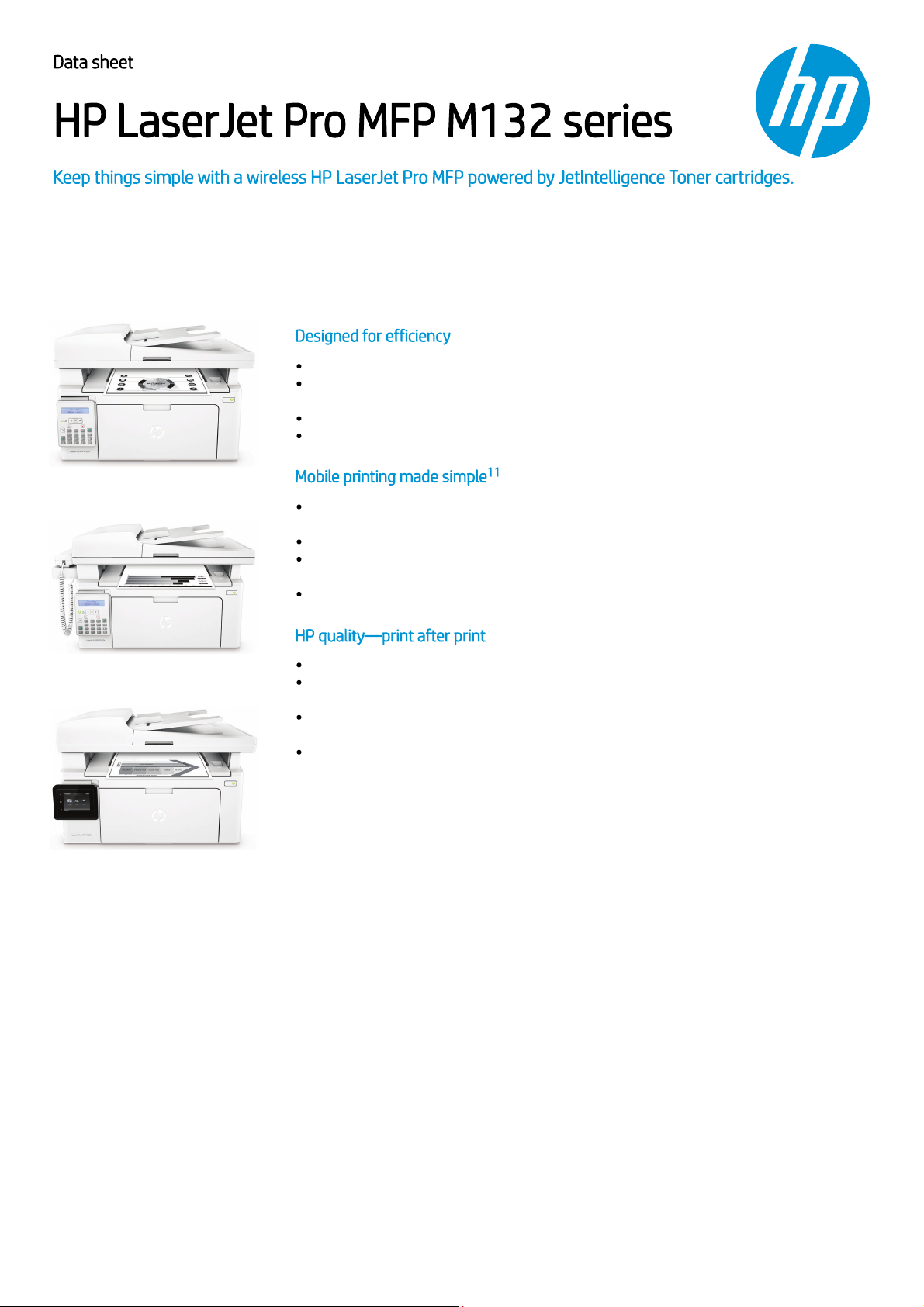
HP LaserJet Pro MFP M132fn
HP LaserJet Pro MFP M132fp
Print, scan, copy, and fax with a compact HP LaserJet MFP that fits into tight workspaces.
Wait less. Print up to 23 pages per minute, with first pages ready in as fast as 7.3
seconds.
6
Help save energy with HP Auto-On/Auto-Off Technology.
Tackle tasks and scan to email, USB, and network folders from the 2.7-inch (6.9 cm) color
touchscreen. Only available in M132fw
Mobile printing made simpleMobile printing made simple
Print from iPhone® and iPad® with AirPrint® 1.5, which automatically scales jobs to the
correct paper size.
8
1111
3
Easily print from a variety of smartphones and tablets.
Print directly from your mobile device to your Wi-Fi Direct® printer—without accessing
the company network.
HP Voice-activated printing—your HP printer works with Amazon Alexa, Google Assistant,
Microsoft Cortana.
4
5
2
7
9
HP quality—print after printHP quality—print after print
Produce sharp text, bold blacks, and crisp graphics with precision black toner.
Don’t be fooled by alternatives that mimic Original HP. Anti-fraud technology can help
ensure you’re getting the quality you paid for.
Track remaining pages with print gauge technology, and get more pages than ever with
page maximizer technology.
No delays or mess—quickly replace your cartridges, using auto seal removal and easyopen packaging.
HP LaserJet Pro MFP M132fw
Page 2
Data sheet | HP LaserJet Pro MFP M132 series
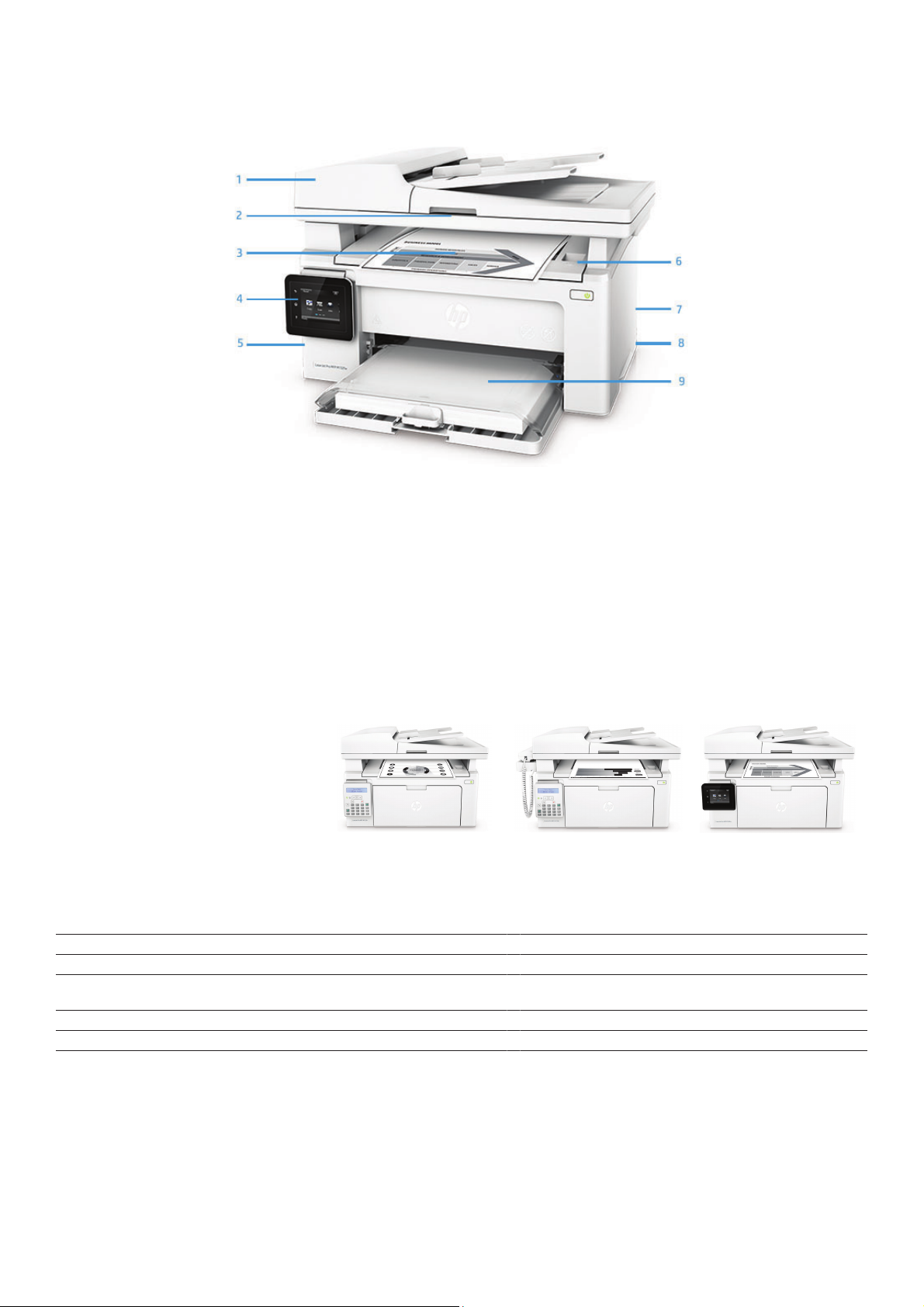
Product walkaround
HP LaserJet Pro MFPM132fw
1. 35-sheet ADF
3
2. Flatbed scanner handles up to 216 by 297 mm paper
3. 100-sheet output bin
4. 6.9 cm (2.7-inch) color touchscreen
3
5. Fax port,3 Hi-Speed USB 2.0 port, Fast Ethernet network port,3 access port for optional lock
6. Top cover access to toner cartridges
7. Wi-Fi Direct printing
8. Built-in wireless networking (802.11b/g/n)
1
2
9. 150-sheet multipurpose tray (shown open)
Series at a glance
Model HP LaserJet Pro MFPM132fn HP LaserJet Pro MFPM132fp HP LaserJet Pro MFPM132fw
Product number G3Q63A G3Q64A G3Q65A
35-sheet ADF Yes Yes Yes
Control panel 2-line LCD with numeric keypad 2-line LCD with numeric keypad 2.7-in touch screen, LCD (color
Fax capabilities Yes Yes Yes
Ethernet networking Yes Yes Yes
Wi-Fi Direct printing and wirelessnetworking Not available Not available Yes
graphics)
Page 3
Data sheet | HP LaserJet Pro MFP M132 series
HP Services
Downtime can have serious consequences, so HP
provides support beyond the standard warranty.
You benefit f om reduced risk, maximized uptime,
predictable service delivery and no unbudgeted
repair costs.
Choose from:
_
Optimized Care (optimum performance
and stability):
4 hour Onsite Support, Maintenance Kit
Replacement Service, Installation with Network
Configu ation Service
_
Standard Care (high level of uptime):
Next Business Day Onsite Support, Maintenance Kit
Replacement Service, Installation with Network
Configu ation Service
_
Basic Care (minimum recommended
support):
Next Business Day Onsite Support
_
4 hr Onsite Support:
Onsite support within four hours after a service call
received within the coverage window
_
Next Business Day Onsite Support:
Onsite service the next business day after the
service call is received
_
Maintenance Kit Replacement Service:
Onsite replacement of your printer’s maintenance
kit including parts, materials, and labor
_
Installation with Network Configuration
Service:
Assembly, network configu ation, and basic
administrator familiarization
For more information about HP Care Pack, HP
Contractual, or HP Managed Print Services, visit
hp.com/go/printservices
Top Features
Help save energy. This efficient multifunction laser printer prints, scans, copies, and faxes while keeping
energy costs low, so you save resources.
_
Mobile printing is easier than ever with HP. Print with minimal steps from a broad range of mobile
devices—smartphones, tablets, and notebooks.
_
Count on consistent results—Original HP Toner cartridges with JetIntelligence are designed to work
flawlessly with this HP LaserJet Pro. Anti-fraud authentication helps protect your business from frustrating
quality issues and costly reprints.
_
_
Product
G3Q63A HP LaserJet Pro MFP M132fn
G3Q64A HP LaserJet Pro MFP M132fp
G3Q65A HP LaserJet Pro MFP M132fw
_
Orderable supplies
CF218A HP 18A Black Original LaserJet Toner Cartridge
CF219A HP 19A Original LaserJet Imaging Drum
_
_
HP Care Packs
UH757E
UH773E
UH769E
UH764E
_
Protect your investment with HP Care Pack. Let HP certified engineers resolve your technical issues.
For more details on HP Care Pack, go to hp.com/go/cpc
_
_
Paper
Contact HP via phone: Asia: 65 6253 8500
_
_
Solutions
HP Web Jetadmin: hp.com/go/wja
HP Universal Print Driver: hp.com/go/upd
HP Imaging and Printing Security Center: hp.com/go/ipsc
_
_
HP 3 year Care Pack w/Next Day Exchange for LaserJet Printers
HP 3 year Care Pack w/Onsite Exchange for LaserJet Printers
HP 3 year Care Pack w/Pickup and Return Support for LaserJet Printers
HP 3 year Care Pack w/Return to Depot Support for LaserJet Printers
1
Page 4
Data sheet | HP LaserJet Pro MFP M132 series
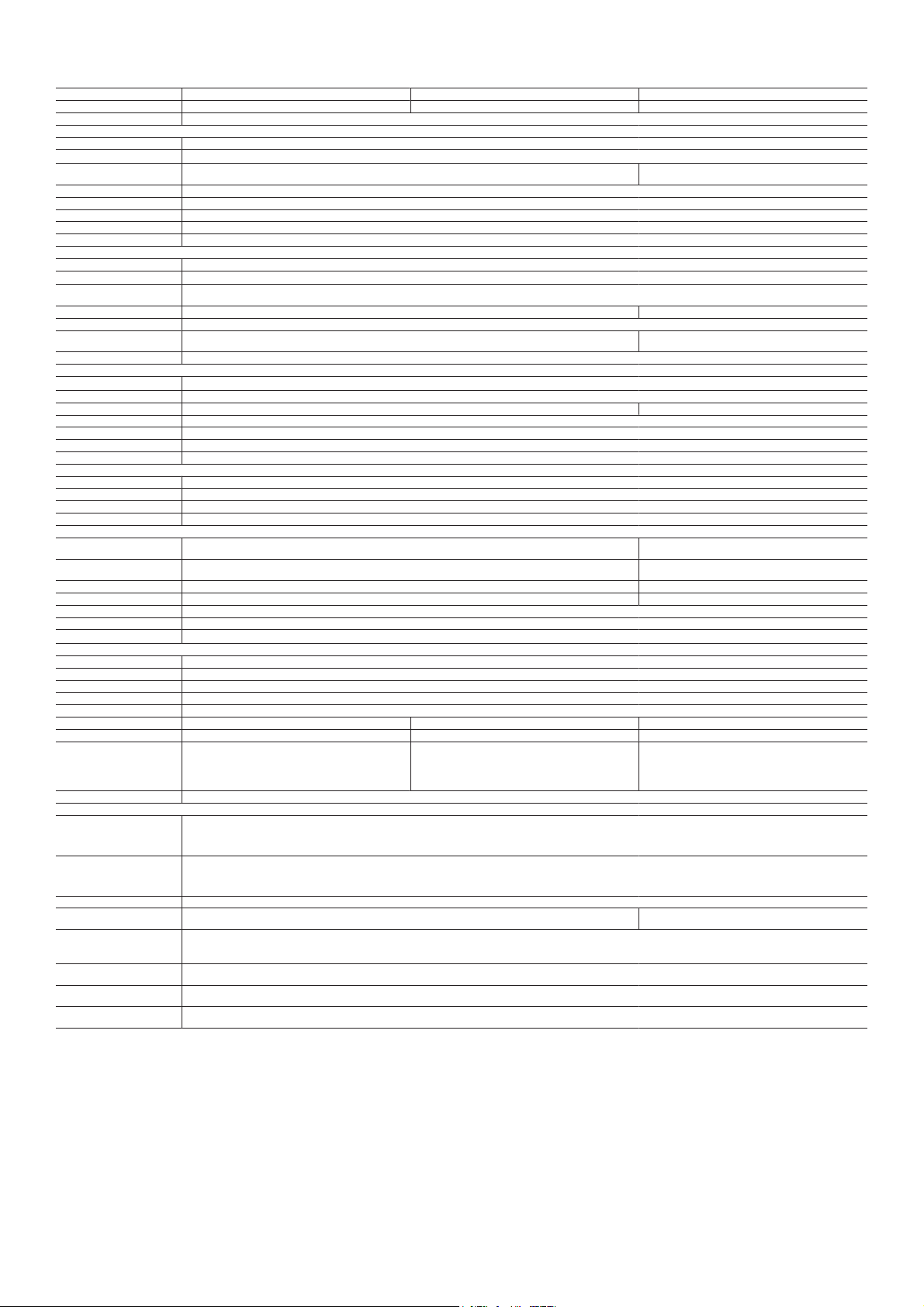
HP LaserJet Pro MFP M132 series
Model
Product number
Functions
Print
Duplex printoptions
12
Print speed
14
First pageout
Print resolution
Print resolutiontechnology
Print cartridgesnumber
Standard printlanguages
Printer management
Scan
Scan type technology
16
Scan speed
Scan resolution
Digital sending standard features
Color scanning
Scan inputmode
Scan fileformat
Copy
15
Copy speed
Copier smartsoftware features
First copyout
Copy resolution
Max no of copies
Copier resize
Copier settings
Fax
Fax speed
Fax resolution
Fax features
Fax smartsoftware features
Connectivity
Standard connectivity
Mobile printcapability
Network ready
Wireless capability
Memory
Processor speed
Duty cycle(monthly)
Paper handling
Input
Output
Media type
Media weight
Media sizescustom
Dimensions (Wx D xH)
Weight
What´s inthe box
Warranty features
Systems
Compatible operatingsystems
Minimum systemrequirements
Security management
Control panel
Power
Software included
Acoustics
Environmental ranges
9
1
HP LaserJetPro MFP M132fn HP LaserJetPro MFP M132fp HP LaserJetPro MFP M132fw
G3Q63A G3Q64A G3Q65A
Print, copy, scan, fax
Manual duplex
Black (normal,A4): Up to 22ppm; Black (normal,letter): Up to 23ppm; Black (Landscape,A5): Up to 38ppm
Black (A4,ready): As fastas 7.3 sec; Black(A4, sleep): Asfast as 8.3 sec Black (A4,ready): As fastas 7.3 sec; Black(A4, sleep): Asfast as 8.8
Black (best):Up to 600 x600 dpi, HP FastRes1200 (1200 dpi quality); Black(normal): Up to600 x 400 dpi, HPFastRes 600 (600 dpiquality)
HP FastRes600, HP FastRes 1200
1 Black
PCLmS, URF, PWG
HP Printer Assistant (UDC); HPDevice Toolbox; HPUtility (Mac)
Type: ADF, Flatbed; Technology:CIS
Normal, A4:Up to 12 ppm
Hardware: Upto 300 x 300dpi (color and mono, ADF), Upto 600 x 600 dpi(color,flatbed), Up to 1200 x1200 dpi (mono, flatbed);Optical: Up to 300dpi (color andmono, ADF), Up to600 dpi (color, flatbed),Up to 1200
dpi (mono,flatbed)
No Scan to email;Scan to network folder
Yes
Scanning via HPLaserJet Scan (Windows®); HPDirector (Macintosh) or TWAIN-compliantor WIA-compliant software Front controlpanel, scanning via HP LaserJetScan (Windows®); HP
JPEG, PDF, PNG
Black (normal,A4): Up to 21cpm; Black (normal,letter): Up to 23cpm
ID Copy
Black (A4,sleep): As fastas 8.9 sec Black (A4,sleep): As fastas 10.5 sec
Black (textand graphics): 600x 400 dpi
Up to 99copies
25 to 400%
Number of Copies; Lighter/Darker; Optimize; Paper;Multi-Page Copy; DraftMode
33.6 kbps
Up to 300x 300 dpi (halftoneenabled)
Maximum speed dialing numbers: Up to 120 numbers (119 group dials); Fax polling supported: Yes (poll to receive only)
Fax addressbook; Speed-dial; fax billingcodes; Fax archivingand forwarding; Blockincoming faxes
Hi-Speed USB2.0 port (device); built-in FastEthernet 10/100Base-TX networkport; Phoneline port (in/out) Hi-Speed USB2.0 port (device); built-in FastEthernet 10/100Base-TX
Apple AirPrint™;HP ePrint;Google Cloud Print2.0; Mopria-certified Apple AirPrint™;HP ePrint;Google Cloud Print2.0; Mopria-certified;
Standard (built-in Ethernet) Standard (built-in Ethernet, Wi-Fi802.11b/g/n)
No Standard (Wi-Fi802.11b/g/n)
Standard: 256MB; Maximum: 256 MB
600 MHz
Up to 10,000pages; Recommended monthly pagevolume10: 150to 1,500
150-sheet input tray
100-sheet output tray
Paper (laser, plain,photo, rough, vellum),envelopes, labels, cardstock, postcards
60 to 163g/m²
76 x 127to 216 x 356mm
415.1 x 288x 279.5 mm 484.1 x 288x 279.5 mm 423.1 x 288.6x 279.5 mm
7.6 kg 7.85 kg 7.6 kg
HP LaserJet Pro MFP M132fn;HP Black LaserJet Toner Cartridge ~1,400
pages; HP LaserJet Imaging Drum~12,000 pages; Power cord; Phone
cord; USBcable (AP); Getting startedguide; Set up poster;Support flyer;
Warranty documents(CN, Indo, AU, Mex,BR, AG); Printer documentation
and softwareon CD-ROM; Errata declaration(some countries)
One-year limitedwarranty
18
Windows® 10, 8.1,8, 7: 32-bit or64-bit, 2GB available harddisk space, CD-ROM/DVD driveor Internet connection, USBport, Internet Explorer. WindowsVista®: (32-bit only), 2GB available harddisk space, CD-ROM/DVD
drive or Internet connection, USBport, Internet Explorer 8.Windows® XP SP3 or higher(32-bit only): any Intel® Pentium® II,Celeron® or 233 MHzcompatible processor, 850MB available hard diskspace, CD-ROM/DVD drive
or Internet connection, USB port,Internet Explorer 8. Apple®OS X Sierra(v10.12), OSX El Capitan (v10.11),OS XYosemite (v10.10); 1 GB HD; Internetrequired; USB Linux(For more information, see
http://hplipopensource.com/hplip-web/index.html)
PC: Windows®10, 8.1,8, 7: 32-bit or64-bit, 2GB available harddisk space, CD-ROM/DVD driveor Internet connection, USBport, Internet Explorer; WindowsVista®: (32-bit only), 2GB available harddisk space,
CD-ROM/DVD drive orInternet connection, USB port,Internet Explorer 8; Windows® XP SP3or higher(32-bit only): any Intel®Pentium® II, Celeron®or 233 MHz compatibleprocessor,850 MBavailable hard diskspace,
CD-ROM/DVD drive orInternet connection, USB port,Internet Explorer 8
Mac: Apple®OSX Sierra(v10.12), OS XEl Capitan (v10.11), OS XYosemite (v10.10);1 GB HD; Internet required; USB
Password-protectednetwork embedded Web server;enable/disable network ports;SNMPv1 community password change
2-line LCDwith Alphanumeric keypad: 2-lineLCD text display;Buttons(OK, Back, Forward/Backward,Cancel, Numberof Copy,Darker/Lighter,Copy
Menu , StartCopy, Main Setup, Redial, AlphanumericKeypad, Start Fax);2light-emitting diode (LED) indicatorlights (Ready, Attention).
Power supply type: Internal; Power supply required: 110-volt input voltage: 110 to 127 VAC (+/- 10%), 60 Hz/50 Hz, 4.8 A; 220-volt input voltage: 220 to 240 VAC (+/- 10%), 60 Hz/50 Hz, 2.8 A; Power
consumption2:255 watts (active printing), 4.2 watts (ready),1.0 watts (sleep), 0.7 watts (Auto Off/Wake on USB, enabled at shipment); Typical Electricity Consumption number:3 BA: 0.627 kWh/Week; ES: 0.635 kWh/
Week
For WindowsOS: HPSoftware Installer; HPSoftware Uninstaller (exclude Win8+); HPPCLmS Printer Driver, HP DeviceExperience (DXP), HP Connected, Device Setup& Software, Online usermanuals, HP Printer Assistant,
HP Scan Driver,HP ScanApplication, HP Product Improvement Study,For Mac OS: Welcome Screen,(Directs users to HP.comor OS App Sourefor LaserJet Software).
Accoustic Power Emissions:6.5 B(A) (printing at 22ppm); Acoustic PowerEmissions (ready):2.6 B(A);Acoustic PressureEmissions Bystander (active, printing): 51dB(A); Acoustic Pressure EmissionsBystander
(ready): 16dB(A)
Operating Temperature Range:15 to 32.5ºC; RecommendedOperating Temperature: 17.5 to25ºC; Non-operating HumidityRange: 10 to 90%RH; Operating Humidity Range:10 to 80% RH;Recommended
Operating HumidityRange: 30 to 70%RH
HP LaserJet Pro MFP M132fp;HP Black LaserJet Toner Cartridge ~1,400
pages; HP LaserJet Imaging Drum~12,000 pages; Power cord; Phone
cord; USBcable (AP); Getting startedguide; Set up poster;Support flyer;
Warranty documents(CN, Indo, AU, Mex,BR, AG); Printer documentation
and softwareon CD-ROM; Errata declaration(some countries); Handset
sec
Director (Macintosh)or TWAIN-compliant or WIA-compliantsoftware
network port; Phoneline port (in/out),Wireless
Wi-Fi Direct®
HP LaserJet Pro MFP M132fw; HPBlack LaserJet Toner Cartridge ~1,400
pages; HP LaserJet Imaging Drum~12,000 pages; Power cord; Phone
cord; USBcable; Getting started guide;Set up poster; Support flyer;
Warranty documents(CN, Indo, AU, Mex,BR, AG); Printer documentation
and softwareon CD-ROM; Errata declaration(some countries)
2.7-in touchscreen, LCD (colorgraphics)
Page 5

Data sheet | HP LaserJet Pro MFP M132 series
FootnotesFootnotes
App or software and HP ePrint account registration also may be required. Some features require purchase of an optional accessory. Learn more at http://www.hp.com/go/mobileprinting
Printing speed measured using ISO/IEC 24734 and excludes first set of test documents. Exact speed versus predecessor varies depending on the system configuration, software application, driver, and document complexity.
Learn more at http://www.hp.com/go/printerclaims.
Requires the HP Smart app download. Features controlled may vary by mobile device operating system. Full list of supported operating systems and details at http://support.hp.com/us-en/document/c03561640. For details on
local printing requirements see http://hp.com/go/mobileprinting.
Feature is supported on select printers. Mobile device needs to be connected directly to the signal of a Wi-Fi Direct® supported MFP or printer prior to printing. Depending on mobile device, an app or driver may also be required.
For details, see http://www.hp.com/go/mobileprinting. Wi-Fi Direct is a registered trademark of Wi-Fi Alliance®.
Requires Amazon Alexa, Google Assistant, or Microsoft Cortana and an HP web-connected printer registered with Google Cloud Print or ePrint. For ePrint account registration, see www.hp.com/go/support/eprint.
Measured using ISO/IEC 17629. Exact speed varies depending on the system configuration, software application, driver, and document complexity. Learn more at http://www.hp.com/go/printerclaims.
HP Auto-On/Auto-Off Technology capabilities are subject to printer and settings.
Requires an Internet connection to the printer. Services may require registration. App availability varies by country, language, and agreements. For details, see hpconnected.com.
For details on local printing requirements see http://hp.com/go/mobile printing.
As compared with cartridge gauges for HP predecessor products.
Features are available only in selected printers.
Product walkaround disclaimersProduct walkaround disclaimers
Printing speed measured using ISO/IEC 24734 and excludes first set of test documents. Exact speed varies depending on the system configuration, software application, driver, and document complexity. For more information
see hp.com/go/printerclaims.
Wireless performance is dependent on physical environment and distance from access point, and may be limited during active VPN connections.
Printer requires ePrint account registration. App or software may be required. Learn more at hp.com/go/mobileprinting.
Mobile device needs to be connected directly to the signal of a Wi-Fi Direct® supported MFP or printer prior to printing. Depending on mobile device, an app or driver may also be required. For details, see
hp.com/go/mobileprinting. Wi-Fi Direct is a registered trademark of Wi-Fi Alliance®.
Mobile device must have iOS v7.0 or higher. Learn more at hp.com/go/mobileprinting.
Requires Google Cloud Print™ registration and Google™ account. Learn more at hp.com/go/mobileprinting.
Technical specifications disclaimersTechnical specifications disclaimers
HP 18A Original Black LaserJet Toner Cartridge (~1,400 pages), HP 19A Original LaserJet Imaging Drum (~12,000 pages). Actual yields vary considerably based on images printed and other factors. For details see
http://www.hp.com/go/learnaboutsupplies.
Power requirements are based on the country/region where the printer is sold. Do not convert operating voltages. This will damage the printer and void the product warranty. Power consumption values typically based on
measurement of 115 V device.
Power requirements are based on the country/region where the printer is sold. Do not convert operating voltages. This will damage the printer and void the product warranty. Energy Star value typically based on measurement of
115 V device.
Based on the BA TEC method with the following possible exceptions: 1 minute or less sleep delay setting, Wi-Fi disabled.
Declared yield value in accordance with ISO/IEC 19752 and continuous printing. Actual yields vary considerably based on images printed and other factors. For details see http://www.hp.com/go/learnaboutsupplies.
Declared yield value in accordance with ISO/IEC 19752 and continuous printing. Actual yields vary considerably based on images printed and other factors. For details see http://www.hp.com/go/learnaboutsupplies.
HP SureSupply alerts you when your print cartridge is running low and helps you purchase online or locally through HP or a participating retailer. Only available with Original HP supplies; Internet access required. To learn more,
visit http://www.hp.com/go/SureSupply.
Duty cycle is defined as the maximum number of pages per month of imaged output. This value provides a comparison of product robustness in relation to other HP LaserJet or HP Color LaserJet devices, and enables appropriate
deployment of printers and MFPs to satisfy the demands of connected individuals or groups.
HP recommends that the number of printed pages per month be within the stated range for optimum device performance, based on factors including supplies replacement intervals and device life over an extended warranty
period.
Up to 22 ppm
Measured using ISO/IEC 24734, excludes first set of test documents. For more information see http://www.hp.com/go/printerclaims. Exact speed varies depending on the system configuration, software application, driver, and
document complexity.
Measured using ISO 24734 Feature Test, A5 Landscape Feed. Speed may vary based on content, PC, media orientation, and media type.
Measured using ISO/IEC 17629. For more information see http://www.hp.com/go/printerclaims. Exact speed varies depending on the system configuration, software application, driver, and document complexity.
First Copy Out and Copy Speed measured using ISO/IEC 29183, excludes first set of test documents. For more information see http://www.hp.com/go/printerclaims. Exact speed varies depending on the system configuration,
software application, driver, and document complexity.
1
2
3
4
5
6
7
8
9
10
11
1
2
3
4
5
6
1
2
3
4
5
6
7
9
10
11
12
13
14
15
TToo lleeaarrnn mmoorree,, vviissiitt hhttttpp::////wwwwww..hhpp..ccoomm
© C
opyright 2019 HP Development Company, L.P. The information contained herein is subject to change without notice. The only warranties for HP products and services are set forth in the
express warranty statements accompanying such products and services. Nothing herein should be construed as constituting an additional warranty. HP shall not be liable for technical or editorial
errors or omissions contained herein.
Published in APJ April 2019
DOC-M
 Loading...