

Page 1
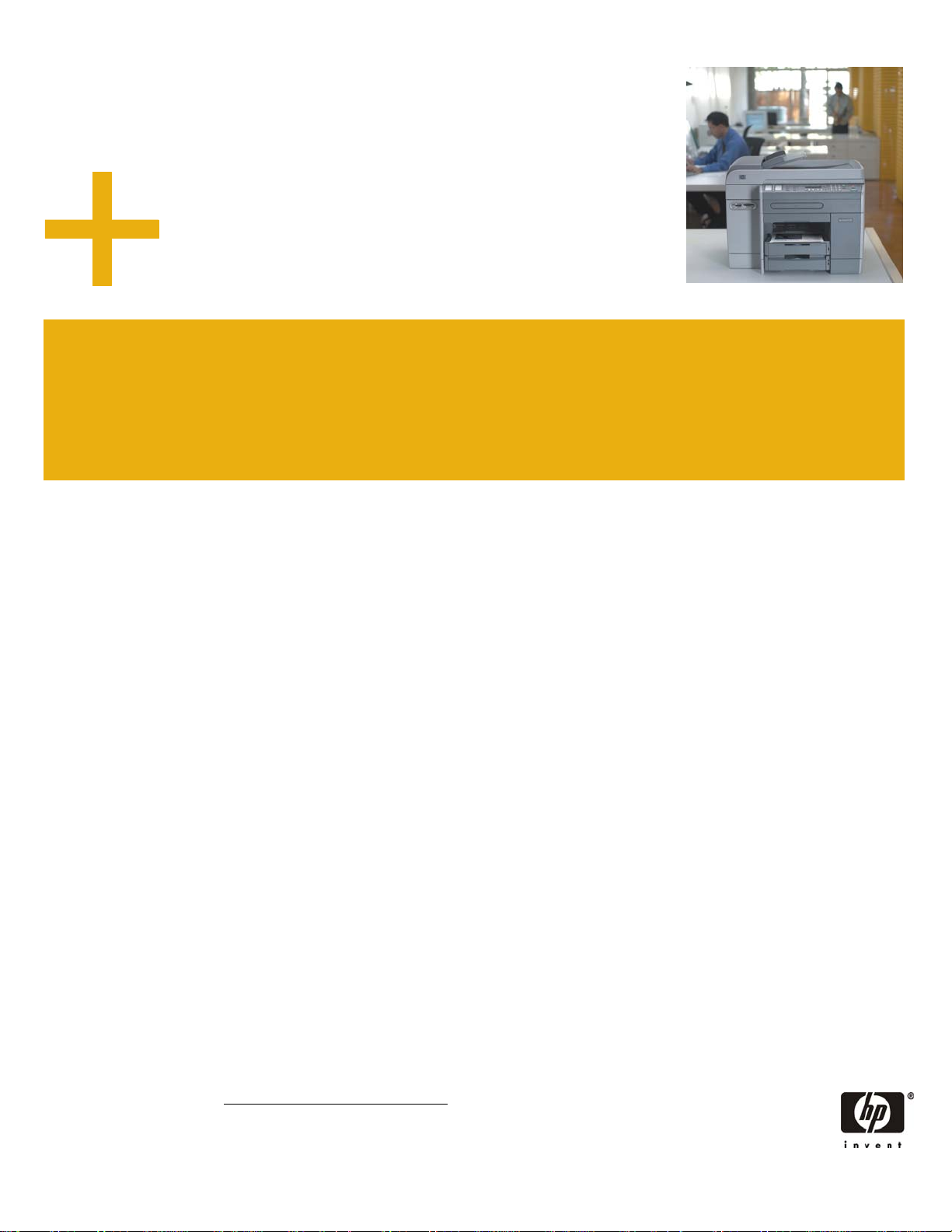
HP Officejet 9100 series all-in-one
p
9110 • 9120 • 9130
h
Do more for less.
Share the capabilities of five different devices with your business
workgroup. The HP Officejet 9100 series all-in-one delivers costeffective, high-performance document management.
Powerful performance
• Enjoy fast printing and copying. Improve business
productivity with speeds of up to 25 pages per minute
(ppm) black and 22 ppm color in Fast mode. Reduce
time waiting for your documents with a first copy out
speed of 12 seconds.
• Create professional color documents and images. Print
vibrant color documents and true-to-life photo-quality
images with up to 4800-optimized dots per inch (dpi)
color printing on HP Premium Photo Papers.
• Take advantage of productive multitasking. Scan a job,
send or receive a fax, and print simultaneously.
Multitasking is easy with enhanced memory and
HP technology.
• Share the value, increase workgroup performance.
With network throughput speeds of up to 6 MB/second
and advanced security features, you get industryleading internal networking via the HP Jetdirect 620n
Fast Ethernet print server (optional for the HP Officejet
9110 aio).
Five-in-one color convenience, with
digital sending
• Get a better return on your business investment. This
dependable all-in-one lets your entire workgroup share
the capabilities of five different devices: print, copy,
scan, fax, and digital send.
• Reinvent the way you share information. Use digital
sending to route hardcopy documents to e-mail or
network folders for archiving.
• Easily handle photo images. Print, e-mail, or send
digital images to network folders from photo memory
cards directly from the product.
• Enable efficient digital sending. The retractable
keyboard simplifies digital sending (standard with the
HP Officejet 9130 aio).
Low cost for business
• Minimize product intervention. Individual print supplies
mean you only replace the empty cartridge, and
long-lasting printheads provide cost-saving operation.
• View supply status at-a-glance. Each HP cartridge
features HP Smart printing technology, which works
with the printer to deliver real-time status information.
• Print two-sided documents with ease. Routinely printing
and copying on both sides with the standard automatic
two-sided printing unit saves resources, virtually
doubles your input capacity, and makes paperwork
more manageable.
• Manage and configure device functions remotely. The
HP embedded Web server provides powerful tools for
tracking print jobs and supplies usage by user and
department, and for controlling color usage in the costconscious office.
HP printing and imaging systems help you create
powerful, professional communications easily. The
product’s supplies, accessories, and services are
designed together to work together and are invented to
meet your business needs.
1
1
Using genuine HP supplies ensures availability of all HP printing features.
Page 2
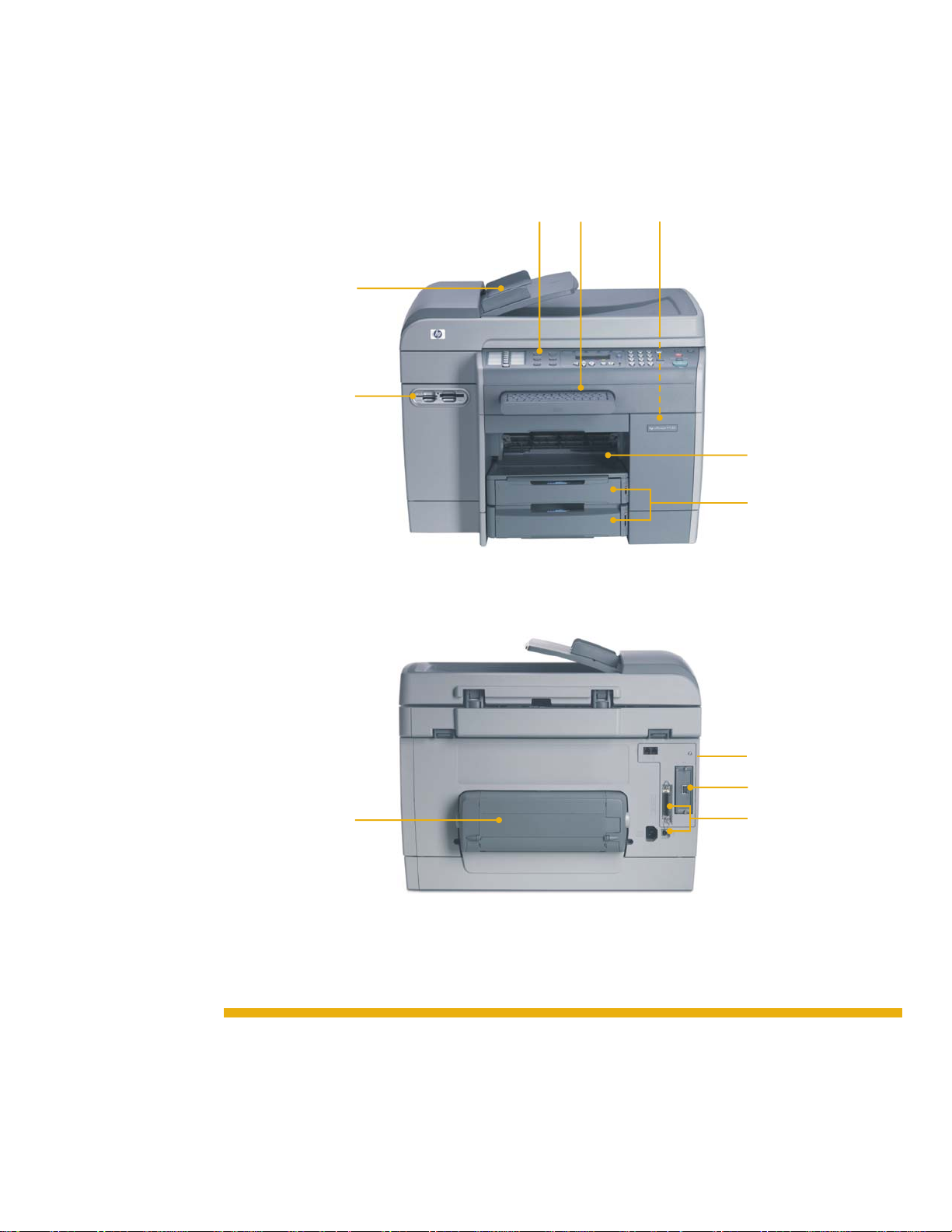
HP Officejet 9100 series all-in-one
1 Easy-to-use control
panel provides a
familiar copier interface
and instant access to
each of the product’s
five different modes
2 Retractable keyboard
enables efficient digital
sending
3 Separate ink cartridges
and printheads for costeffective operation
4 100-sheet output tray
5 150-sheet multipurpose
Tray 1 and 250-sheet
Tray 2 for a 400-sheet
total input capacity
6 Photo memory card
support for printing and
sending digital images
7 50-sheet reversing
automatic document
feeder
for duplex
copying
8 128 MB of standard
memory and powerful
256 and 133 MHz
processors perform
complex tasks quickly
9 HP Jetdirect 620n Fast
Ethernet internal print
server enables
high-performance
networking for up to
15 users
10 Built-in USB and
parallel ports
11 Automatic two-sided
printing unit
7
6
11
1
2
HP Officejet 9130 aio shown
3
4
5
8
9
10
Expandable design
• Upgrade HP Officejet 9110 aio and 9120 aio
models to allow digital sending, made easy with a
retractable keyboard.
• Fit the product seamlessly into your wireless network
environment with the optional HP Jetdirect 680n
internal wireless print server.
• Increase your media input capacity with the
500-sheet input Tray 2.
• Expand memory up to 384 MB with two open
SDRAM DIMM slots to handle the most complex
jobs.
Page 3
Support productive workgroups with this reliable
all-in-one. The product features intelligent and cost-saving
document management solutions, like digital sending to
enhance e-mail and network archiving workflows.
Powerful device management
Manage your networked all-in-one remotely with the
HP embedded Web server. Configure the speed-dial
buttons for easy, three-step digital sending, set up
authorized user passwords to protect device usage,
enable job accounting and tracking, and even back up
device settings. These tasks and others can be
conveniently performed directly from any networked
computer with a standard Web browser, saving time and
effort.
Easy digital sending
Digital sending is a fast, simple, and reliable way to
capture paper-based documents in digital format so you
can better manage valuable information.
The convenient retractable keyboard helps you effortlessly
navigate to network folders or enter e-mail addresses and
subject lines. Route incoming faxes to a network folder,
e-mail images directly from a photo memory card, and
submit reports and other business materials by simply
scanning them to a network folder or computer. Your
workgroup can share or archive information at the touch
of a button.
Effortless multitasking
Designed to be used by more than one person at a time,
the all-in-one can perform many functions simultaneously.
For example, you can scan a document into memory
while the device is printing, or scan a fax into memory
and then digitally send a document without interrupting
the fax transmission. The scan-once-print-many feature lets
you scan your job into memory, walk away with your
originals, and return for your copies when it’s convenient.
Modular ink-delivery system
HP’s modular ink-delivery system features four individual
ink cartridges, as well as specially designed printheads
for each of the black, cyan, magenta, and yellow inks.
The separate print supplies, combined with HP Smart
printing technology, deliver cost-effective, high-quality,
fast color printing. For optimal results for your business
needs, use specialty media such as HP Premium Plus
Photo Paper, HP Premium Photo Paper, and HP Brochure
and Flyer Paper, Glossy and Matte.
Business imaging
With support for CompactFlash, Secure Digital, Memory
Stick, SmartMedia, and Multimedia Card photo memory
cards, the HP Officejet 9100 series aio simplifies image
printing and sharing. (The HP embedded Web server lets
you disable photo memory card use to prevent
unauthorized photo printing and save costs.)
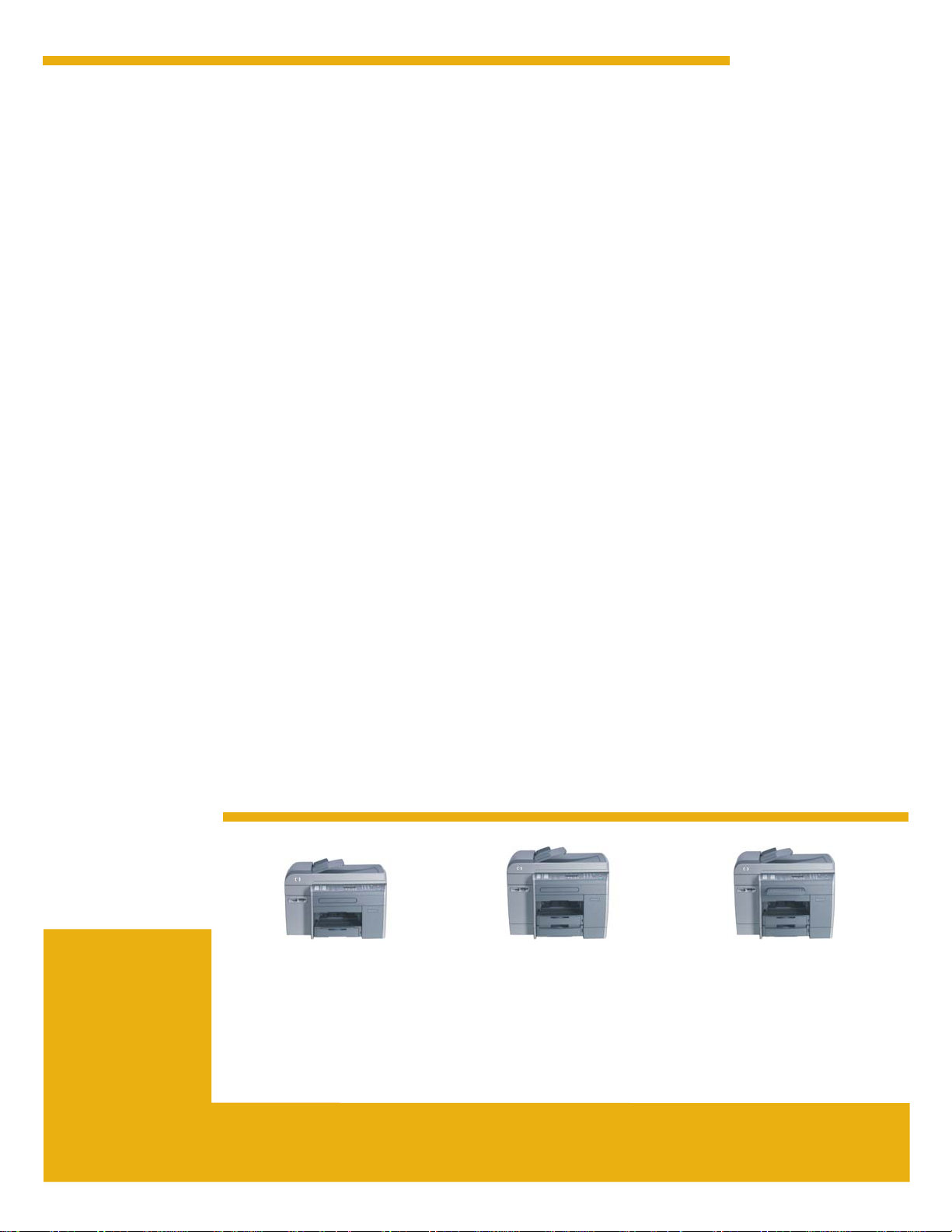
Series at a glance
HP Officejet 9110 aio (C8140A)
• 150-sheet multipurpose tray
• One open EIO slot for optional
network connectivity
HP Officejet 9120 aio (C8143A)
All the features of the 9110 model,
plus:
• Standard 250-sheet input Tray 2
for a 400-sheet input capacity
• HP Jetdirect 620n Fast Ethernet
internal EIO print server
HP Officejet 9130 aio (C8144A)
All the features of the 9120 model,
plus:
• Keyboard (enables efficient digital
sending)
Page 4
HP Officejet 9100 series all-in-one
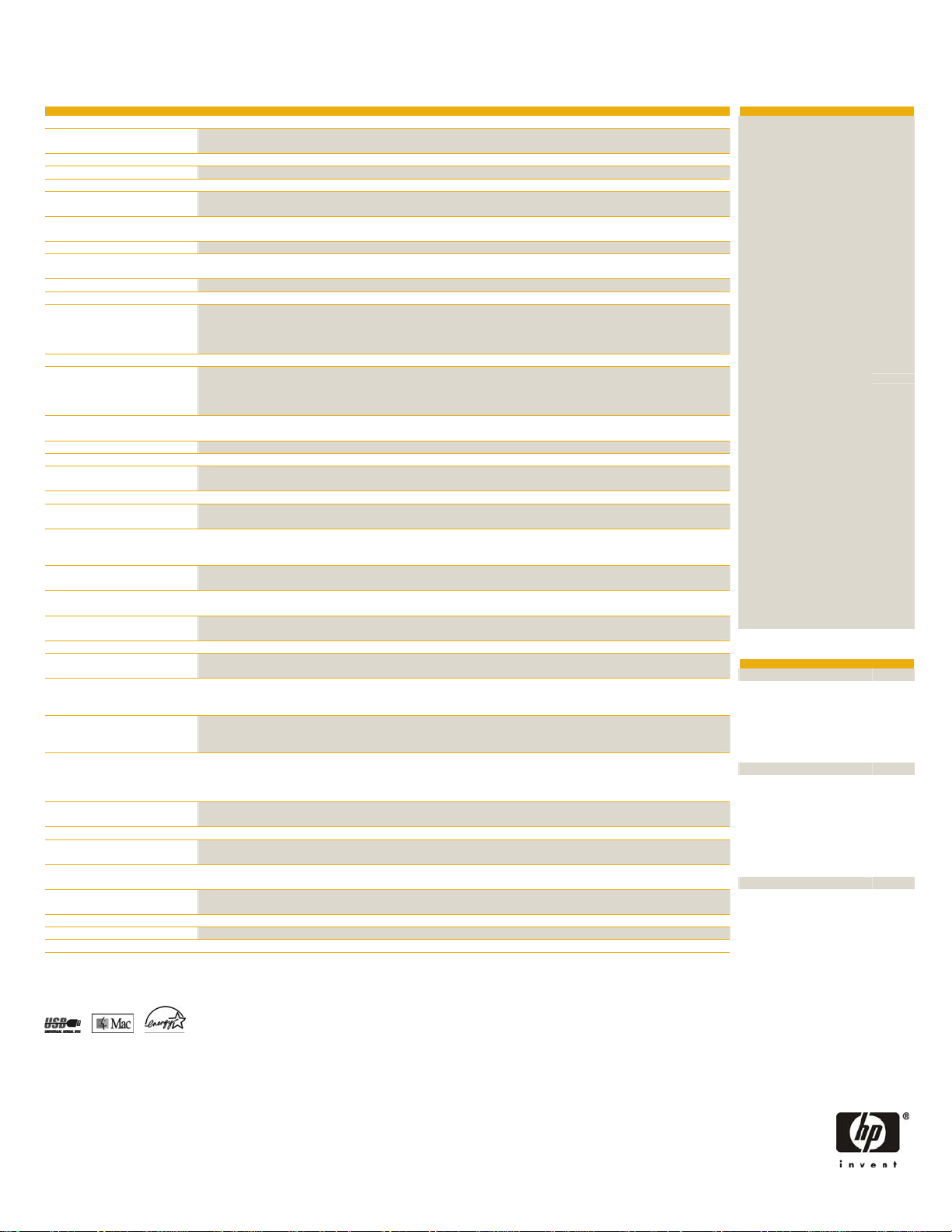
Technical specifications
1
(letter) Up to 25 ppm black and 22 ppm color in Fast mode (up to 9 ppm black and 8.5 ppm color in Normal mode)
Print
Copy
Speed
Resolution HP PhotoREt III enhanced color-layering technology or up to 4800 by 1200-optimized dpi color printing on premium photo
papers, 1200 by 1200-input dpi
Speed1 (letter) Up to 25 ppm black and 22 ppm color in Fast mode (up to 8.5 ppm black and 7.3 ppm color in Normal mode)
First copy out1 Approximately 12 seconds
Resolution Up to 2400 by 1200 dpi, using photo paper
Features Up to 99 multiple copies, scan-once-print-many, collation, reduce and enlarge 25 to 400 percent (with page size presets),
customizable copy presets, fit to Page, poster, clone, mirror copy, two pages to one page, and margin shift
Scan
Speed2 Via ADF: Up to 11 ppm, preview mode: 25 seconds, OCR letter page (black) into Microsoft Word: 22 seconds, 4 by 6 inch
photo into Microsoft Word: 17 seconds. File formats supported: PDF, TIFF, JPEG.
Resolution Optical: up to 2400 by 2400 dpi, enhanced: up to 19,200 dpi; 48-bit color bit depth, 256 grayscale levels
Input modes Front-panel scan (215.9 by 355.6 mm max. scan size), HP Photo and Imaging software (Windows), HP Image Zone software
Fax
(Mac) and user’s software application via TWAIN
Speed 33.6 kbps, 3 seconds per page (based on ITU-test image #1 at standard resolution)
Resolution Up to 300 by 300 dpi black, 200 by 200 dpi color
Features Quick scan into memory, color fax, PC fax (for direct connections), delayed faxing, fax forwarding to e-mail and fax archive to
network folder (with digital sending), automatic redial, 99 fax speed dial, up to 250 pages fax memory with 4 MB of flash
memory (Based on ITU-test image #1 at standard resolution. More complicated pages or higher resolution may reduce number of
pages stored in memory.)
Digital send
Photo memory card
LCD
Processor
Memory
Duty cycle
Cost-per-page3
Supplies yields
Media
Speed Up to 11 ppm black, up to 9 ppm color
Features With keyboard (optional for HP Officejet 9110 aio and 9120 aio): send to e-mail (SMTP, LDAP support), send to network folder
(supports HP AutoStore), forward incoming faxes to network folder, e-mail from photo memory card, send from photo memory
card to network folder, programmable speed dials for e-mail addresses and network folder paths. File formats supported: PDF,
TIFF, JPEG.
Supports direct printing and digital sending from the following formats: CompactFlash I and II, Secure Digital, Memory Stick,
SmartMedia, Multimedia Card
Text-based, 4-line by 20-character, white backlit
256 MHz Motorola 32-bit ColdFire 4e RISC, 133 MHz ARM9 RISC
128 MB built-in; expandable to 384 MB with two open industry-standard 100-pin SDRAM DIMM slots (128 MB per slot), with
Memory Enhancement Technology (MEt)
Up to 10,000 pages per month
8.4 U.S. cents color, 2.2 U.S. cents black (Total cost per US letter-sized page with 15% color coverage or 5% monochrome
coverage including ink, replaceable parts, power, paper, and average service costs.)
Ink cartridges C, M, Y (28 ml): up to 1,750 pages at 5 percent coverage per color; Ink cartridge K (69 ml): up to 1,750 pages
at 5 percent coverage; Printheads C, M, Y: up to 24,000 pages at 5 percent coverage per color; Printhead K: up to 16,000
Media handling 150-sheet multipurpose tray, 250-sheet input tray (optional for HP Officejet 9110 aio), 50-sheet reversing automatic document
pages at 5 percent coverage
feeder, automatic two-sided printing unit, 100-sheet output tray
Sizes Tray 1: 3 by 5 in to 8.5 by 14 in (76.2 by 127 mm to 216 by 356 mm); Tray 2: 7 by 10 in to 8.5 by 14 in (182 by 257 mm
to 216 by 356 mm); U.S. sizes: letter, legal, statement, executive, No. 10 envelopes, Monarch envelopes
Weights Tray 1: 16 to 110 lb (60 to 200 g/m2); Tray 2: 16 to 28 lb (60 to 105 g/m2); Automatic two-sided printing unit: 16 to 90 lb
(60 to 160 g/m2)
Types Paper (plain, inkjet, photo), envelopes, transparencies, labels, cards (index, greeting)
Connectivity
Client operating systems Standard: Microsoft Windows 98, Me, XP 32-bit edition, 2000; Mac OS 9.2, OS X (10.1.x and 10.2.x); Optional Print
Network operating systems Microsoft® Windows 98, Me, NT 4.0, 2000, XP, XP 64-Bit, Server 2003 Server; Novell NetWare 3.2, 4.2, 5.x, 6.x (NDPS);
Dimensions
Weight
Operating environment
Acoustics
Power specifications4
Certifications
Interfaces USB 2.0 compliant full speed port, IEEE 1284 compliant parallel port, one HP Jetdirect 620n Fast Ethernet internal EIO print
Languages and fonts HP PCL 6, HP PCL 5c, and HP Postscript level 3 emulation, with automatic language switching; 45 TrueType and 35 Postscript
server (optional for HP Officejet 9110 aio)
fonts built-in (all Postscript emulation, PCL 5c, and PCL 6 accessible); Intellifont and TrueType rasterizer built into PCL 5c and
PCL 6; Built-in support for Arabic, Cyrillic, Greek, and Hebrew symbol sets
functionality only for Windows NT 4.0, XP 64-bit edition; Optional scan functionality only for Windows NT 4.0; OS/2; Linux;
UNIX®; MS-DOS third-party printer driver support
Apple Mac OS 9.1 and later; Red Hat Linux 6.x and later; SuSE Linux 6.x and later; HP-UX 10.20, 11.x; Solaris 2.5x, 2.6, 7, 8
(SPARC systems only); IBM AIX 3.2.5 and later; MPE-iX; Microsoft Windows Terminal Server Edition 4.0; Windows 2000 Server
Terminal Services with Citrix MetaFrame 1.8; Windows XP Server Terminal Services with Citrix MetaFrame 1.8
HP Officejet 9110 aio: 22.6 by 18.1 by 15.6 in (574 by 460 by 397 mm)
HP Officejet 9120 aio and 9130 aio: 22.6 by 18.1 by 18.2 in (574 by 460 by 462 mm)
HP Officejet 9110 aio: 44.1 lb (20 kg); HP Officejet 9120 aio and 9130 aio (includes Tray 2): 53.1 lb (24.1 kg)
Operating temperature: 59 to 95 degrees F (15 to 35 degrees C); Storage temperature: -4 to 122 degrees F (-20 to 50
degrees C); Relative humidity: 15 to 80 percent, non-condensing
Sound power: active, 6.6 B(A); powersave, 4.04 B(A); standby, 4.06 B(A)
Sound pressure: active, 53 dB(A); powersave and standby, 27.7 dB(A)
Built-in Universal Power Supply: 110 to 240 VAC (±10 percent), 50 to 60 Hz input voltage
Power consumption: < 1 watt power off, 31 watts Standby, 77 watts max. copying; Energy Star compliant
Safety UL Listed (USA), CSA (Canada)
EMC USA (FCC Rules), Canada (ICES)
Warranty
1
Approximate figures. Exact speed depends on system configuration, software programs, media, and document complexity.
2
Scan time only; data transfer to CPU not included.
3
This information is based on the best information available and is not guaranteed accurate by Hewlett-Packard Company. Actual prices may vary.
4
Power requirements are based on the country/region where the printer is sold. Do not convert operating voltages. This will damage the printer and void the product warranty.
5
Supports printing and digital sending only.
ENERGY STAR is a U.S. registered service mark of the United States Environmental Protection Agency. As an ENERGY STAR partner, HP has determined
that this product meets the guidelines for energy efficiency. HP-UX Release 10.20 and later and HP-UX Release 11.00 and later (in both 32 and 64-bit
configurations) on all HP 9000 computers are Open Group UNIX 95 branded products. Microsoft, Windows, and Windows NT are registered trademarks
of Microsoft Corporation. UNIX is a registered trademark of The Open Group. All other brand and product names are trademarks or registered trademarks
of their respective companies.
© Copyright 2004 Hewlett-Packard Development Company, L.P.
The information contained herein is subject to change without notice. The only warranties for HP products and services are set forth in the express warranty
statements accompanying such products and services. Nothing herein should be construed as constituting an additional warranty. HP shall not be liable for
technical or editorial errors or omissions contained herein.
One-year, next business day exchange warranty
For more information visit our website at www.hp.com
5982-3073ENUC, 07/2004, Rev. 2
Ordering information
HP product Number
HP Officejet 9110 aio C8140A
HP Officejet 9120 aio C8143A
HP Officejet 9130 aio C8144A
Media handling
250-sheet input tray (Tray 2) C8237A
500-sheet input tray (Tray 2) C8238A
Print supplies
10 Black ink cartridge (69 ml) C4844A
11 Cyan ink cartridge (28 ml) C4836AN
11 Magenta ink cartridge (28 ml) C4837AN
11 Yellow ink cartridge (28 ml) C4838AN
11 Black printhead C4810A
11 Cyan printhead C4811A
11 Magenta printhead C4812A
11 Yellow printhead C4813A
Memory
128 MB SDRAM DIMM Q9121A
64 MB SDRAM DIMM Q1887A
Cables
IEEE 1284 cable (a-b) 2 meter C2950A
IEEE 1284 cable (a-b) 3 meter C2951A
USB cable (a-b) 2 meter C6518A
HP Jetdirect internal print servers
620n (Fast Ethernet 10/100 Base
TX, 802.3)
680n (802.11b wireless Ethernet) 5 J6058A
Digital sending
Localized keyboard C8240A
HP CarePack
Basic installation (one unit) H4513E
Network installation (one unit) H3110E
3-year, next-day exchange U9815E
3-year, next-day on-site U9816E
Media (letter size)
HP Bright White Inkjet Paper HPB1124
HP Office Paper HPC8511
HP Office Recycled Paper HPE1120
HP Multipurpose Paper HPM1120
HP Printing Paper HPP1122
HP Premium Plus Photo Paper, glossy C6831A
HP Premium Photo Paper, glossy C6979A
HP Photo Paper, glossy C7896A
HP Everyday Photo Paper, semi-gloss Q2509A
HP Brochure and Flyer Paper, glossy C6817A
HP Brochure and Flyer Paper, matte C6955A
HP Premium Paper, coated 51634Y
HP Premium Inkjet Transparency Film C3834A
HP Premium Plus Inkjet Transparency
Film
J7934A
C7028A
What’s in the box
HP Officejet 9110 aio C8140A
Automatic two-sided printing unit, power cord,
phone cord, HP 10 black ink cartridge
(26.5 ml), HP 11 cyan ink cartridge (28 ml),
HP 11 magenta ink cartridge (28 ml), HP 11
yellow ink cartridge (28 ml), HP 11 black
printhead, HP 11 cyan printhead, HP 11
magenta printhead, HP 11 yellow printhead,
Getting Started Guide, CDs
HP Officejet 9120 aio C8143A
Automatic two-sided printing unit, power cord,
phone cord, HP 10 black ink cartridge
(26.5 ml), HP 11 cyan ink cartridge (28 ml),
HP 11 magenta ink cartridge (28 ml), HP 11
yellow ink cartridge (28 ml), HP 11 black
printhead, HP 11 cyan printhead, HP 11
magenta printhead, HP 11 yellow printhead,
Getting Started Guide, CDs, HP Jetdirect 620n
Fast Ethernet internal EIO print server, 250-sheet
input Tray 2
HP Officejet 9130 aio C8144A
Automatic two-sided printing unit, power cord,
phone cord, HP 10 black ink cartridge
(26.5 ml), HP 11 cyan ink cartridge (28 ml),
HP 11 magenta ink cartridge (28 ml), HP 11
yellow ink cartridge (28 ml), HP 11 black
printhead, HP 11 cyan printhead, HP 11
magenta printhead, HP 11 yellow printhead,
Getting Started Guide, CDs, HP Jetdirect 620n
Fast Ethernet internal EIO print server, 250-sheet
input Tray 2, keyboard
 Loading...