

Page 1

About This Device
HP 2U Drawer Rack
Option Kit
Installation Instructions
The HP 2U Drawer Rack Option Kit enables you to add a
drawer to the HP 9000 and 10000 Series rack.
Kit Contents
• HP 2U Drawer
• Keys
• Screws
• Cage nuts
Required Tool
You will need a Phillips screwdriver.
WARNING: To reduce the risk of personal
injury or damage to the equipment, be sure that:
• The leveling feet are extended to the floor.
• The full weight of the rack rests on the leveling
feet.
• The stabilizing feet are attached to the rack if it is a
single-rack installation.
• The racks are coupled together in multiple-rack
installations.
• Only one component is extended at a time. A rack
may become unstable if more than one component
is extended for any reason.
Read Instructions Completely Before Beginning
Installation Procedures
© Copyright 2004 Hewlett-Packard Development Company, L.P.
The information contained herein is subject to change without notice. The
only warranties for HP products and services are set forth in the express
warranty statements accompanying such products and services. Nothing
herein should be construed as constituting an additional warranty. HP shall
not be liable for technical or editorial errors or omissions contained herein.
November 2004 (First Edition)
Part Number 374695-001
374695- 001
Page 2
Installing the HP 2U Drawer Rack
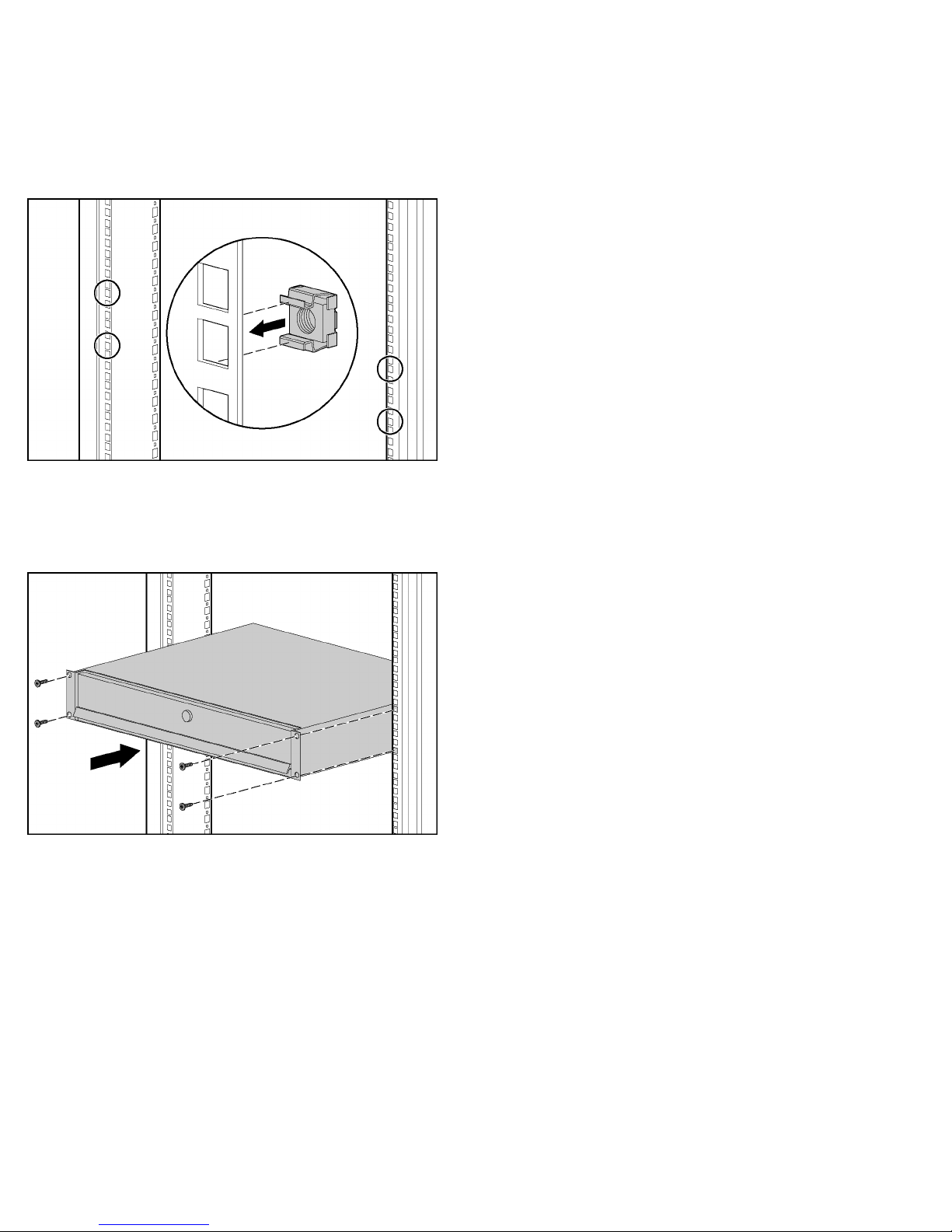
Option Kit
1. Using the template, mark where you are going to install the
HP 2U Drawer Rack Option Kit.
2. Insert cage nuts into the holes you marked.
3. Align the HP 2U Drawer Rack Option Kit with the cage
nuts.
4. Insert one screw through the brackets on the HP 2U Drawer
Rack Option Kit and into each cage nut.
5. (Optional) Lock the HP 2U Drawer Rack Option Kit using
the key provided.
Installation is complete.
 Loading...