

Page 1

April 2004
Table of Contents
Introduction .............................................................................................................. 3
PCI-X 2 Gigabit Fibre Channel and Gigabit Ethernet Performance Test Results .................... 5
Throughput ............................................................................................................... 6
GigE Traffic Alone Compared to GigE Traffic in Conjunction with FC Bidirectional .......... 6
FC Traffic Alone Compared to FC Traffic in Conjunction with GigE Bidirectional ............. 9
Performance Highlights ............................................................................................ 12
Suggested Use ........................................................................................................ 12
Achieving Best Performance and High Availability .................................................... 12
Test Details ............................................................................................................. 15
Test Details: Products Used in Testing ...................................................................... 15
Test Details: Test Configuration ............................................................................... 16
Additional Information ............................................................................................. 17
Taking the Next Step ............................................................................................... 17
Legal Notices .......................................................................................................... 18
PCI-X 2 Gigabit Fibre Channel and Gigabit Ethernet
Performance
Using the HP rp8400 Server with Server Expansion Unit
Page 2

Page 3
Introduction
3
Introduction
This article highlights the superb performance and high availability demonstrated when you
install HP’s new PCI-X multi-function 2 Gbit/s Fibre Channel and Gigabit Ethernet adapters
in HP’s award-winning midrange rp8400 servers with Server Expansion Units (SEU). The
new A9782A adapter (with fiber-based GigE) and the A9784A adapter (with copper-based
GigE) provide the following benefits:
• A single adapter combining 2 Gbit/s Fibre Channel mass storage connectivity and
1000Base-SX or Base-T Gigabit Ethernet networking connectivity.
• Higher port density for I/O slot–constrained systems.
• Higher levels of failover protection, because two multi-function adapters have no single
point of failure. The same level of failover protection would require four single-port I/O
adapters (2 Fibre Channel and 2 Gigabit Ethernet) that would consume twice the
number of I/O slots.
The adapters also fully support HP Serviceguard and PCI-X/PCI online addition and
replacement (OLAR).
• PCI-X I/O adapters that are fully backward compatible with PCI 2.2 I/O slots.
• Flexibility for implementing Virtual Partition (vPars) configurations.
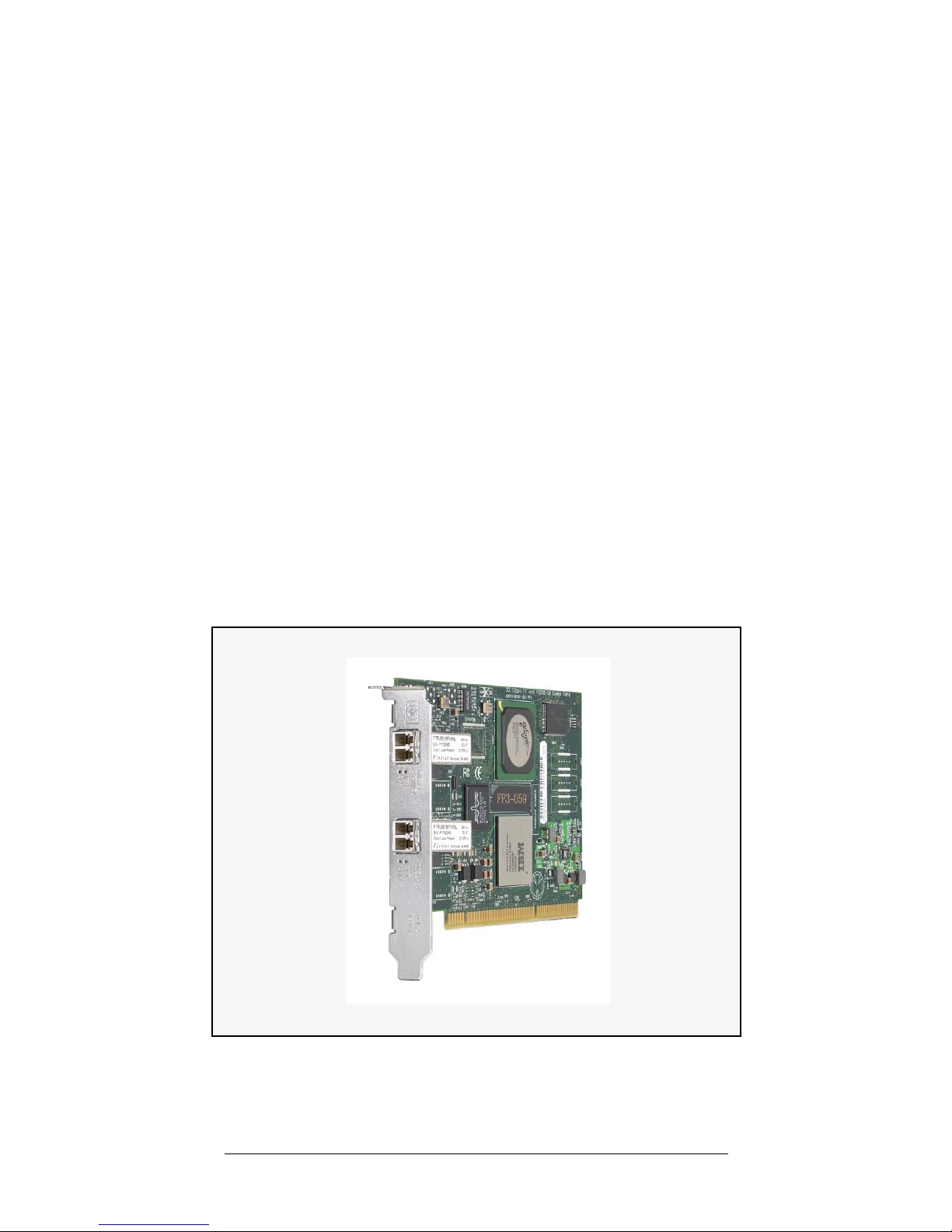
Figure 1
HP PCI-X 2 Gbit/s Fibre Channel and Gigabit Ethernet
Multi-Function Adapter (A9782A shown)
Page 4

Introduction
4
Both the A9782A and A9784A adapters offer the same level of performance and are
designed with the following advanced features.
The Fibre Channel port in each adapter:
• runs at either 200 MB/s half-duplex or 400 MB/s full duplex data rates.
• provides boot / dump support and auto speed sensing.
• supports 2 to 200 meter LC-to-LC duplex multimode fibre-optic cable and of course
LC-to-SC conversion cables.
• scales up to 16 million SAN nodes.
• operates in full switched fabric Fibre Channel (FC-SW) or FC-AL-2, FC-FLA, FC-PLDA,
and FC-PI architectures.
The Gigabit Ethernet port in each adapter:
• maximizes server CPU efficiency and increases performance through TCP, UDP, and IP
checksum protocol off loading.
• increases network flexibility through support for virtual LANs (VLANs).
• increases throughput through use of HP auto port aggregation (APA) or
• improves reliability and failover through the LAN Monitor capability of HP APA.
• is available in a choice of either a 1000 Base-SX version using multi-mode fiber
supporting distances of up to 550m or a 1000Base-T version using CAT5 or better UTP
cable supporting distances of up to 100m.
HP rp8400 servers with Server Expansion Units (SEU) like the one used in this
demonstration are highly dependable, adaptable, and efficient midrange servers for the
data center. The results in this paper show that the A9782A and A9784A adapters installed
in a server expansion unit like the one on the rp8400 increase your server and data
network efficiency while lowering your total cost of ownership.
Page 5

PCI-X 2 Gigabit Fibre Channel and Gigabit Ethernet Performance Test Results
5
PCI-X 2 Gigabit Fibre Channel and Gigabit Ethernet
Performance Test Results
The Gigabit Ethernet port performance on the A9782A and A9784A was measured with
the following traffic types:
• Transmit (Tx) using netperf with socket size of 128K bytes and message size of 32K
bytes
• Receive (Rx) using netperf with socket size of 128K bytes and message size of 32K bytes
• Bidirectional (BD) running the Tx and Rx tests concurrently
The Fibre Channel port performance on the A9782A and A9784A was measured with the
following traffic types:
• Read (Rd) using diskbench with block size of 128K bytes
• Write (Wr) using diskbench with block size of 128K bytes
• Bidirectional (BD) running the Rd and Wr tests concurrently
The following charts show the overall performance of one PCI-X multi-function 2 Gigabit
Fibre Channel and Gigabit Ethernet adapter in each 1, 2, or 4-cell, 16-way rp8400 with
Server Expansion Unit (SEU). In the enclosed charts:
• the Gigabit Ethernet throughput numbers are shown in Megabits per second, and
• the Fibre Channel throughput numbers are shown in Megabytes per second.
For each measured traffic type (for example, GigE Tx), the results for that traffic type are
shown alongside a comparison of that traffic type when running in conjunction with the
adjacent port running in bidirectional mode (for example, GigE Tx plus Fibre Channel
bidirectional). These comparisons basically show a single port compared to both ports
operating at the same time. The results of PCI-66 testing are also described though not
shown in graphs.
The following charts can be used to compare performance when 1, 2, and 4 cells are
configured per partition.
Page 6
Throughput
6
Throughput
GigE Traffic Alone Compared to GigE Traffic in Conjunction with FC
Bidirectional
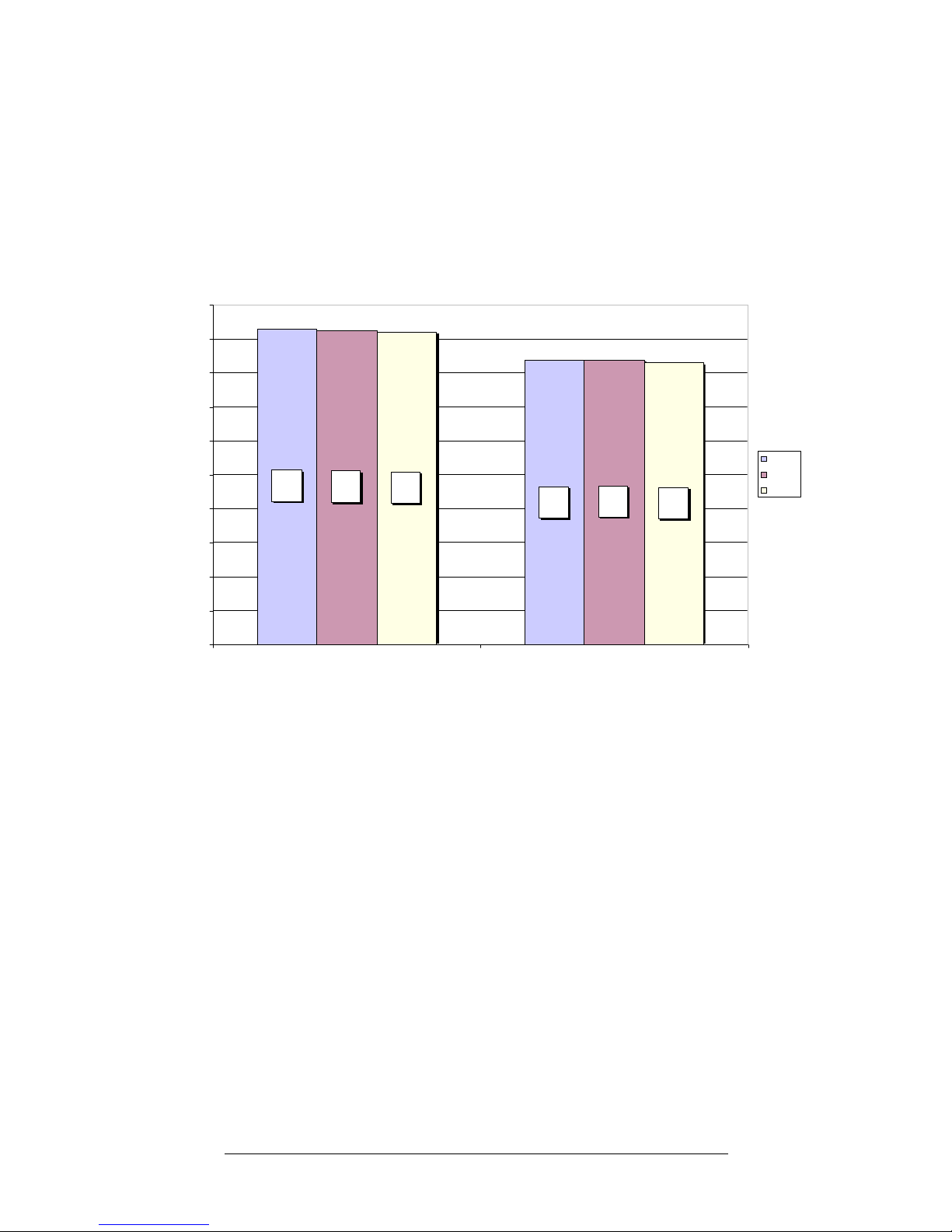
Figure 2 PCI-X GigE Rx Performance Compared to: Rx + FC BD
Figure 2 shows PCI-X Gigabit Ethernet Receive (Rx) performance. With 1, 2, or 4 cells
configured, the following throughput rates were achieved:
• Receive throughput on the GigE port with no Fiber channel traffic on a 1 cell partition is
an excellent 929 Mbits/sec. As the partition size is increased by adding up to 3 more
cells, receive throughput shows no significant drop in performance. A similar pattern
emerges when GigE receive and FC bidirectional are combined. GigE receive
throughput is 837 Mbits/sec with no significant change as partition size is increased.
• When tested in a PCI-66 slot, the performance results for receive only throughput are
identical to PCI-X performance. When GigE receive and FC bidirectional traffic are
combined, PCI-66 performance is 585 Mbits/sec with no significant change as
partition size increases. The decreased performance seen when both ports are active on
the A9782A/A9784A is a result of the bandwidth limitation of the PCI-66 technology
and is not due to a limitation in the adapter.
929
924
837
921
830
837
0
100
200
300
400
500
600
700
800
900
1000
Rx Rx + FC BD
Mbits/sec
1 Cell
2 Cells
4 Cells
Page 7
Throughput
7
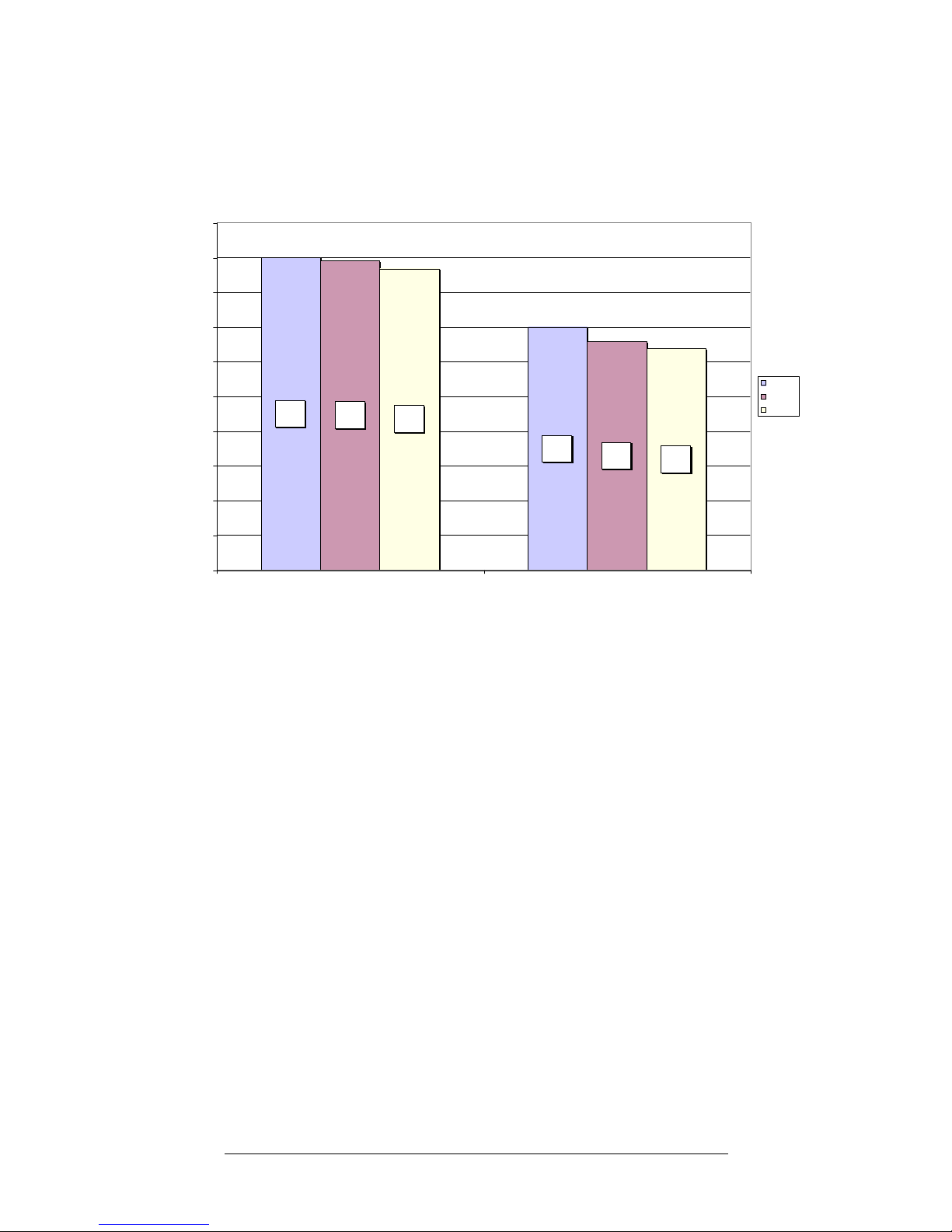
Figure 3 PCI-X GigE Tx Performance Compared to: Tx + FC BD
Figure 3 shows PCI-X Gigabit Ethernet Transmit (Tx) performance. With 1, 2, or 4 cells
configured, the following throughput rates were achieved:
• Transmit throughput on the GigE port with no Fiber channel traffic on a 1 cell partition is
900 Mbits/sec. As the partition size is increased by adding up to 3 additional cells,
transmit throughput decreases to 868 Mbits/sec.
A similar pattern emerges when GigE transmit and FC bidirectional are combined.
GigE transmit throughput is 700 Mbits/sec on a 1 cell partition and decreases to 638
Mbits/sec as partition size is increased to 4 cells.
• When tested in a PCI-66 slot, the performance results for transmit only throughput
showed no decrease in performance when compared to PCI-X. When GigE transmit
and FC bidirectional traffic are combined, PCI-66 performance is 440 Mbits/sec with
no significant change as partition size increases. The decreased performance seen
when both ports are active on the A9782A/A9784A is a result of the bandwidth
limitation of the PCI-66 technology and is not due to a limitation in the adapter.
890
658
868
638
900
700
0
100
200
300
400
500
600
700
800
900
1000
Tx Tx + FC BD
Mbits/sec
1 Cell
2 Cells
4 Cells
Page 8
Throughput
8
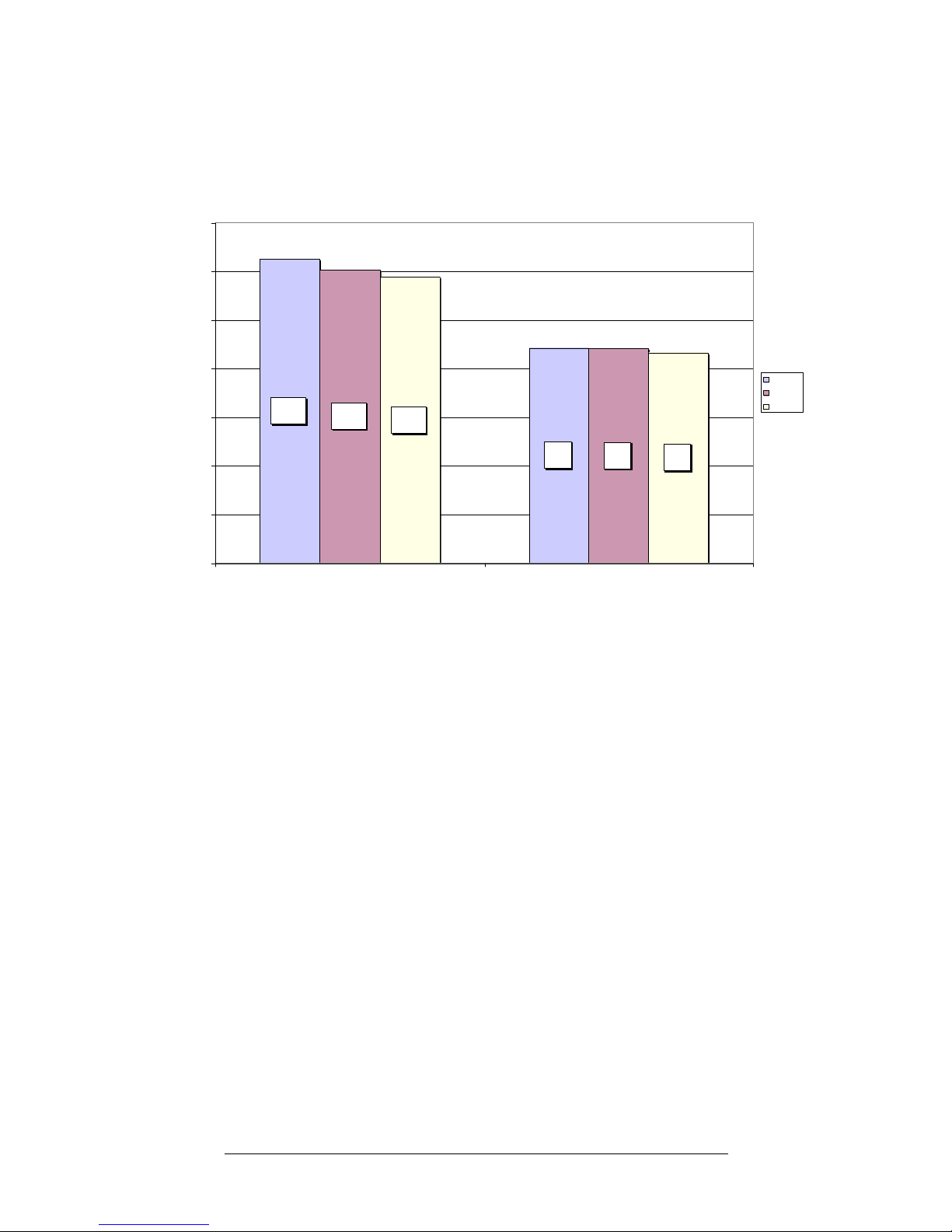
Figure 4 PCI-X GigE BD Performance Compared to: BD + FC BD
Figure 4 shows PCI-X Gigabit Ethernet Bidirectional (BD) performance. With 1, 2, or 4
cells configured, the following throughput rates were achieved:
• Bidirectional throughput on the GigE port with no Fiber channel traffic on a 1 cell
partition is 1250 Mbits/sec. As the partition size is increased by adding up to 3 more
cells, bidirectional throughput decreases to 1175 Mbits/sec. A similar pattern emerges
when GigE bidirectional and FC bidirectional are combined. GigE bidirectional
throughput is 884 Mbits/sec on a 1 cell partition and decreases to 865 Mbits/sec as
partition size is increased to 4 cells. You see a more significant decrease on the
A9782A/A9784A when both ports are active due to the inherent bandwidth limitations
of the PCI-X technology when both links are carrying full bidirectional traffic.
• When tested in a PCI-66 slot the performance results for bidirectional only throughput
showed no decrease in performance when compared to PCI-X. When GigE
bidirectional and FC bidirectional traffic are combined, PCI-66 performance is 592
Mbits/sec with no significant change as partition size increases. The decreased
performance seen when both ports are active on the A9782A/A9784A is a result of the
bandwidth limitation of the PCI-66 technology and is not due to a limitation in the
adapter.
884
1206
881
865
1250
1175
0
200
400
600
800
1000
1200
1400
BD BD + FC BD
Mbits/sec
1 Cell
2 Cells
4 Cells
Page 9
Throughput
9
FC Traffic Alone Compared to FC Traffic in Conjunction with GigE
Bidirectional
Figure 5 PCI-X Fibre Channel Read Performance
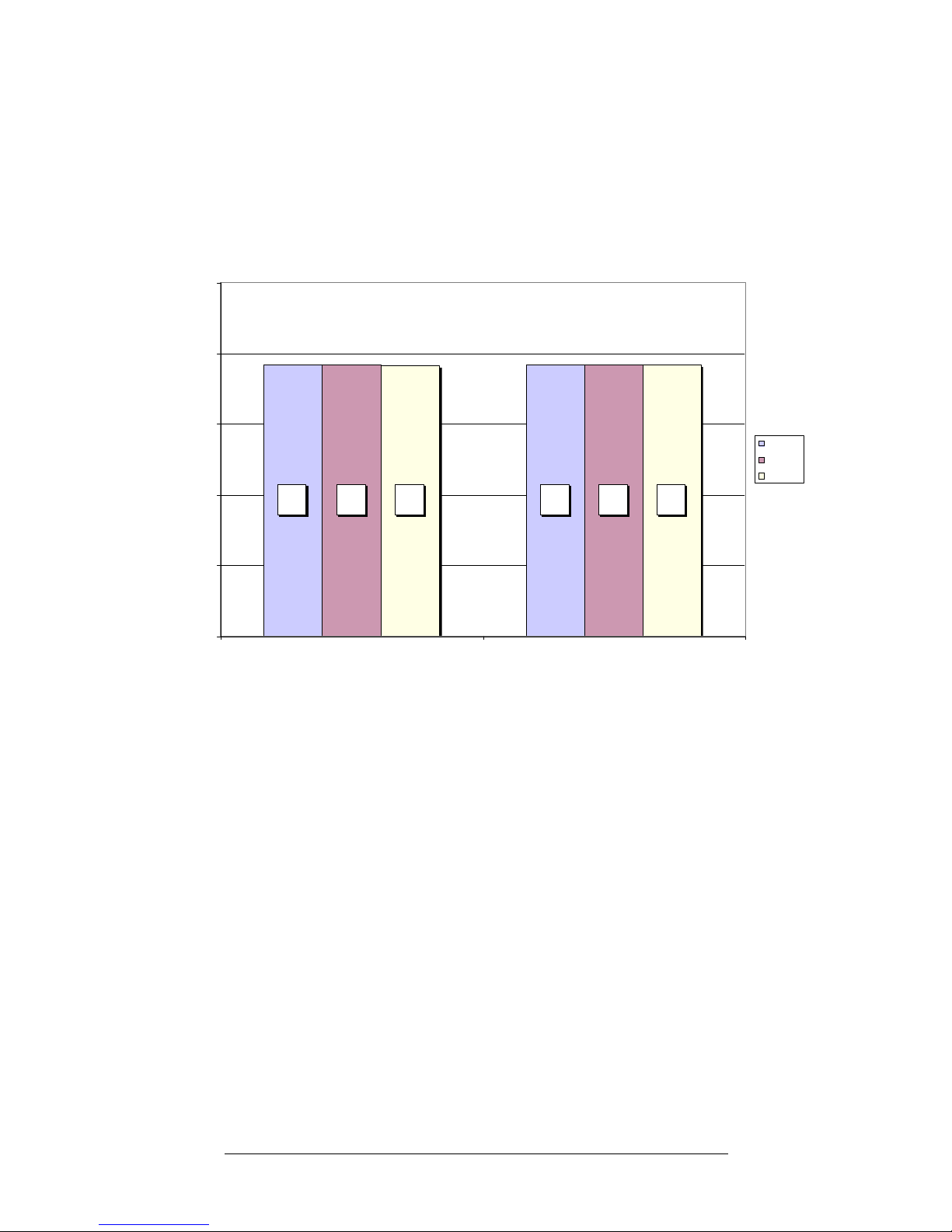
Figure 5 shows PCI-X Fibre Channel Read (Rd) performance. With 1, 2, or 4 cells
configured, the following throughput rates were achieved:
• Read throughput on the FC port with no GigE traffic on a 1 cell partition is an excellent
191 MBytes/sec. As the partition size is increased by adding up to 3 more cells, read
throughput shows no drop in performance. A similar pattern emerges when FC read
and GigE bidirectional are combined. FC read throughput is 191 MBytes/sec with no
change as partition size is increased.
• When tested in a PCI-66 slot, the performance results for read only throughput are
identical to PCI-X performance. When FC read and GigE bidirectional traffic are
combined, PCI-66 performance is 157 MBytes/sec with no change as partition size
increases.
191 191191 191 191 191
0
50
100
150
200
250
Rd Rd + GigE BD
MBytes/sec
1 Cell
2 Cells
4 Cells
Page 10
Throughput
10
Figure 6 PCI-X Fibre Channel Write Performance
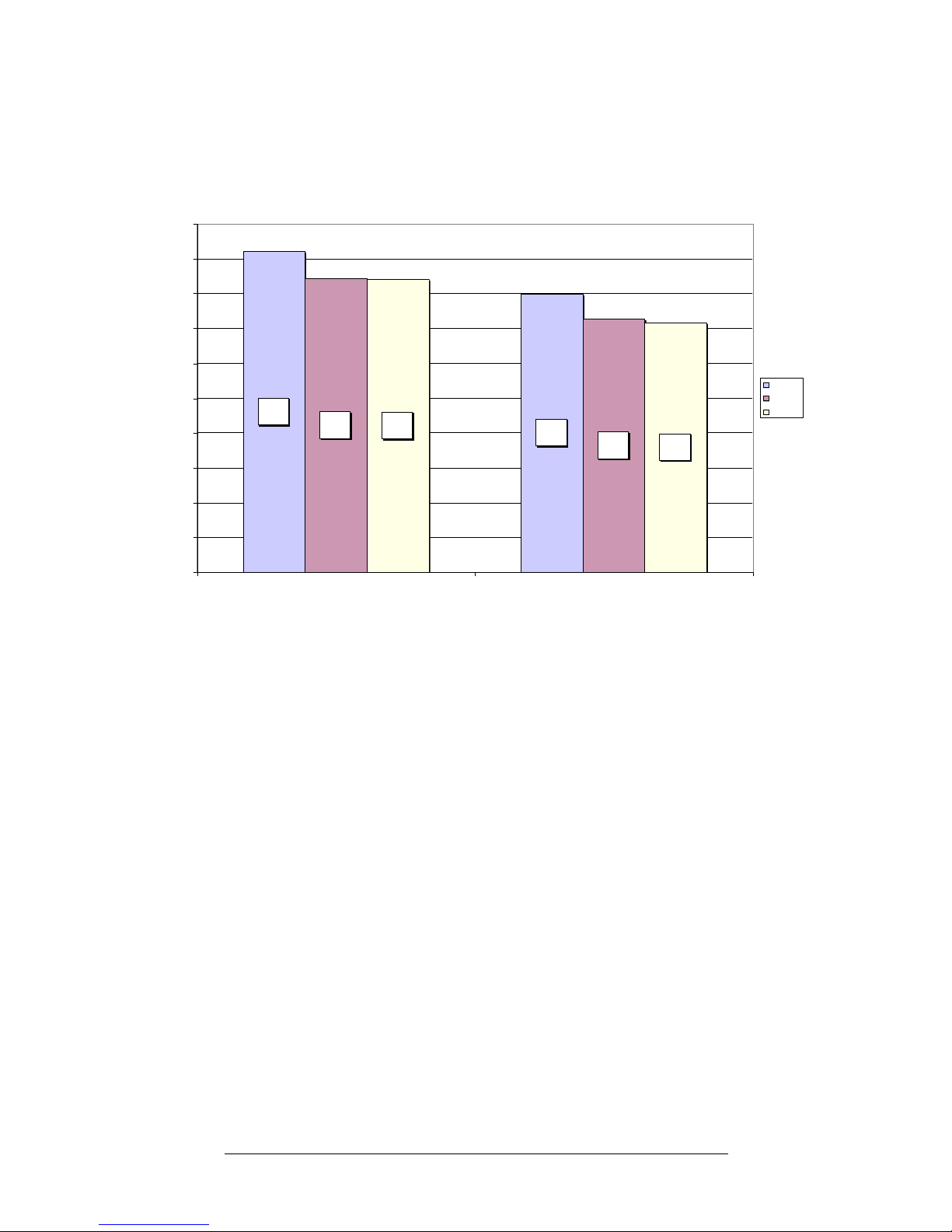
Figure 6 shows PCI-X Fibre Channel Write (Wr) performance. With 1, 2, or 4 cells
configured, the following throughput rates were achieved:
• Write throughput on the FC port with no GigE traffic on a 1 cell partition is an excellent
184 MBytes/sec. As the partition size is increased by adding up to 3 more cells, write
throughput decreases to 168 MBytes/sec. A similar pattern emerges when FC write and
GigE bidirectional are combined. FC write throughput is 160 MBytes/sec on a 1 cell
partition and decreases to 143 MBytes/sec as partition size is increased to 4 cells.
• When tested in a PCI-66 slot, the performance results for write only throughput showed
no decrease in performance when compared to PCI-X. When FC write and GigE
bidirectional traffic are combined, PCI-66 performance is 117 MBytes/sec. As you
increase the partition size by adding up to 3 more cells, write throughput decreases to
90 MBytes/sec. The decreased performance seen when both ports are active on the
A9782A/A9784A is a result of the bandwidth limitation of the PCI-66 technology and
is not due to a limitation in the adapter.
184
160
169
145
168
143
0
20
40
60
80
100
120
140
160
180
200
Wr Wr + GigE BD
MBytes/sec
1 Cell
2 C ells
4 C ells
Page 11
Throughput
11
Figure 7 PCI-X Fibre Channel Bidirectional Performance
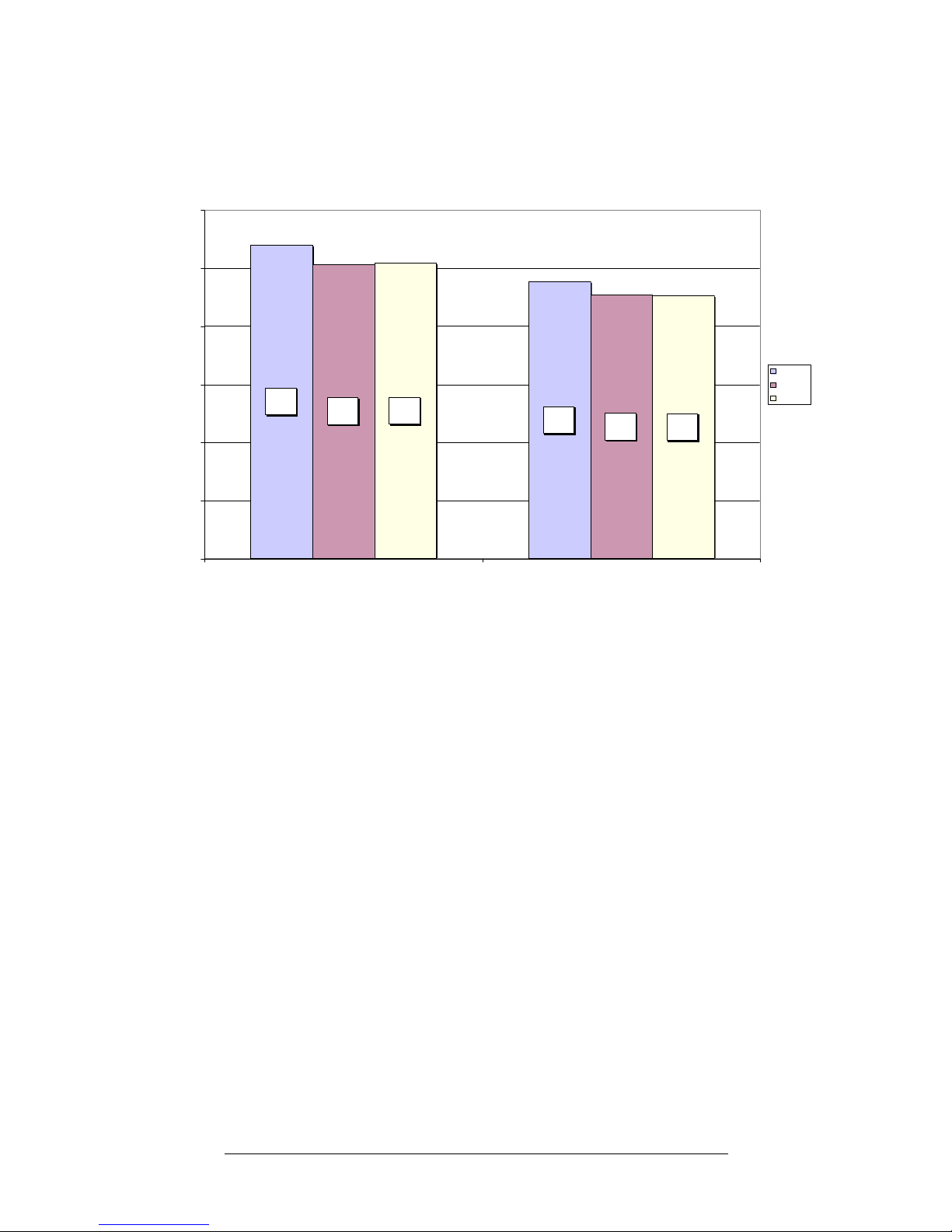
Figure 7 shows PCI-X Fibre Channel Bidirectional (BD) performance. With 1, 2, or 4 cells
configured, the following throughput rates were achieved:
• Bidirectional throughput on the FC port with no GigE traffic on a 1 cell partition is 270
MBytes/sec. As the partition size is increased by adding up to 3 more cells,
Bidirectional throughput decreases to 254 MBytes/sec. A similar pattern emerges when
FC bidirectional and GigE bidirectional are combined. FC bidirectional throughput is
238 MBytes/sec on a 1 cell partition and decreases to 226 MBytes/sec as partition
size is increased to 4 cells.
• When tested in a PCI-66 slot, the performance results for Bidirectional only throughput
showed a similar pattern when compared to PCI-X. Bidirectional throughput on the FC
port with no GigE traffic on a 1 cell partition is 250 MBytes/sec. As you increase the
partition size by adding up to 3 more cells, bidirectional throughput decreases to 230
MBytes/sec. When FC bidirectional and GigE bidirectional traffic are combined, PCI-66
performance is 155 MBytes/sec. As you increase the partition size by adding up to 3
more cells, bidirectional throughput decreases to 127 MBytes/sec. The decreased
performance seen when both ports are active on the A9782A/A9784A is a result of the
bandwidth limitation of the PCI-66 technology and is not due to a limitation in the
adapter.
270
238
253
227
254
226
0
50
100
150
200
250
300
BD BD + GigE BD
MBytes/sec
1 Cell
2 C ells
4 C ells
Page 12

Performance Highlights
12
Performance Highlights
The A9782A and A9784A adapters when installed in an rp8400 with Server Expansion
Unit (SEU) provide exceptional connectivity, reliability, and flexibility for networking and
mass storage.
When both ports on the adapter are concurrently transferring data, the adapter provides
excellent fiber channel performance and good Gigabit Ethernet performance. The reduced
Gigabit Ethernet performance is due to the inherent bandwidth limitations of the PCI-X or
PCI-66 buses through which the adapter is connected.
When only one port on the adapter is actively transferring data, the active port provides
excellent performance.
The adapters can be configured and used to best meet your business needs as described in
the “Suggested Use” section that follows.
Suggested Use
If you use both functions (ports) of an A9782A or A9784A, this obviously provides
maximum connectivity. The data in this paper shows that when both functions of the
A9782A/A9784A are in use, (as opposed to a single function), the limits of the PCI and
PCI-X technologies can be reached, reducing performance. In summary:
• Where connectivity is a higher priority than performance, use the adapters with both
functions operating concurrently.
However:
• Where performance and high availability are the highest priority, HP recommends that
you use 2 adapters in a hot-failover configuration. See the next section and Figure 8 for
more.
Achieving Best Performance and High Availability
To get the best performance as well as high availability using the A9782A/A9784A, HP
recommends the following:
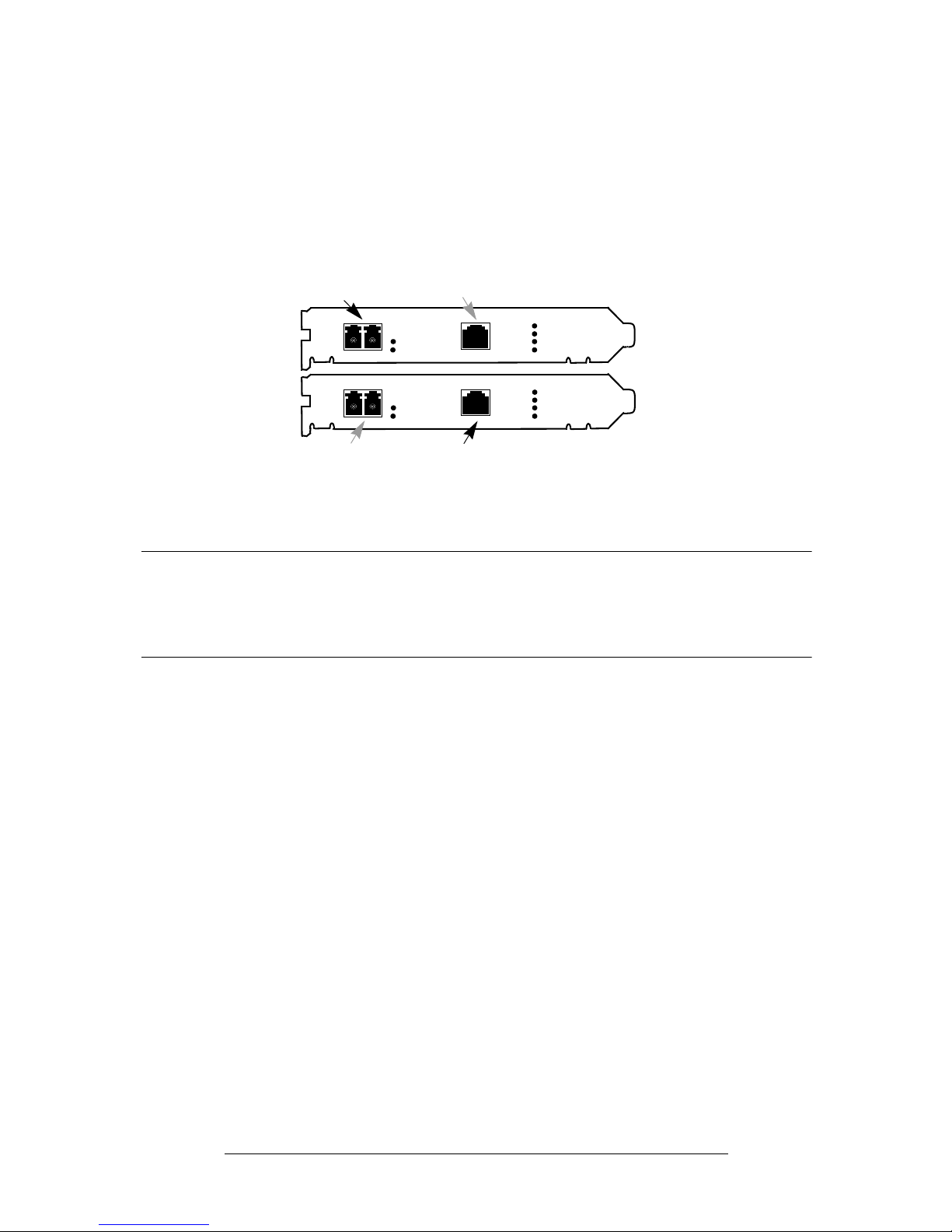
• As shown in Figure 8, you can use two multi-function adapters together to achieve both
the best performance and high availability. In the event of a system slot failure or other
fabric / network failure, the alternate data port can take over – maximizing system up
time!
Page 13
Suggested Use
13
Figure 8 Two HP Multi-Function Adapters Configured to Provide
Both High Availability and Best Performance
NOTE The following recommendations assume that your systems are also
configured with failover software such as HP Serviceguard and Logical
Volume Manager. Consult docs.hp.com for full details on configuring your
products for high availability.
— Use only 1 port on each of two adapters as the “primary” port for that technology’s
normal data traffic. The second port on the same adapter becomes an “alternate” or
hot-standby for the other adapter.
— Connect the Fibre Channel port from each of the two adapters to a different storage
area network (SAN) by connecting through different FC switches--which then connect
to different ports on the mass storage device. Failover between the two paths is
managed by logical volume manager (LVM) PVLinks (for alternate paths) or
SecurePath.
— Connect each GigE port through a different network switch and ensure that the
switches are bridged to the same IP subnet. Failover between the two network paths
is managed by Serviceguard’s local network failover capability.
— Connect the built-in network ports on multiple rp8400s to a private subnet and use
them for a dedicated heartbeat for Serviceguard.
This configuration protects you from a failure of the FC port on either adapter, a failure
of either FC switch, the failure of either controller on the mass storage device or any
single FC cable failure. It also protects you from the failure of the GigE network port on
either adapter, a failure of either network switch, or the failure of any single network
cable.
Primary
GigE Port
Port
CHANNEL
1Gb
2Gb
FIBRE
1000B-T
LNK/ACT
PCI-X
133 MHz
1000
100
10
Fibre Channel
Alternate
CHANNEL
1Gb
2Gb
FIBRE
1000B-T
LNK/ACT
PCI-X
133 MHz
1000
100
10
Primary
GigE Port
Port
Fibre Channel
Alternate
Page 14

Suggested Use
14
•
Use PCI-X mode as opposed to PCI mode. The primary PCI-X bus running at 133MHz
PCI-X with 64-bit bus width will yield the best results and the performance comparable
to that shown in this paper. HP tested the A9782A and A9784A adapters in PCI mode,
but because PCI performance is lower than PCI-X performance, HP recommends using
these adapters in PCI-X mode rather than PCI. In the system under test, the PCI-X slots
are the slots located in the rp8400 Server Expansion Unit (SEU) not the base rp8400
system. See “Test Details: Test Configuration” for more details on the PCI-X slots of the
rp8400 SEU. Please see your sytems’ documentation for the location of the PCI-X slots in
your systems.
• On an rp8400 Server with Server Expansion Unit (SEU), configure each cell in the SEU
with a multiple of 8 equal capacity dual inline memory modules (DIMMs) to take
advantage of memory interleaving. Distribute the 8 DIMMs evenly across the system’s
two busses.
Page 15
Tes t Deta ils
15
Test Details
The following subsections describe the hardware and software used in testing and the
methods of testing.
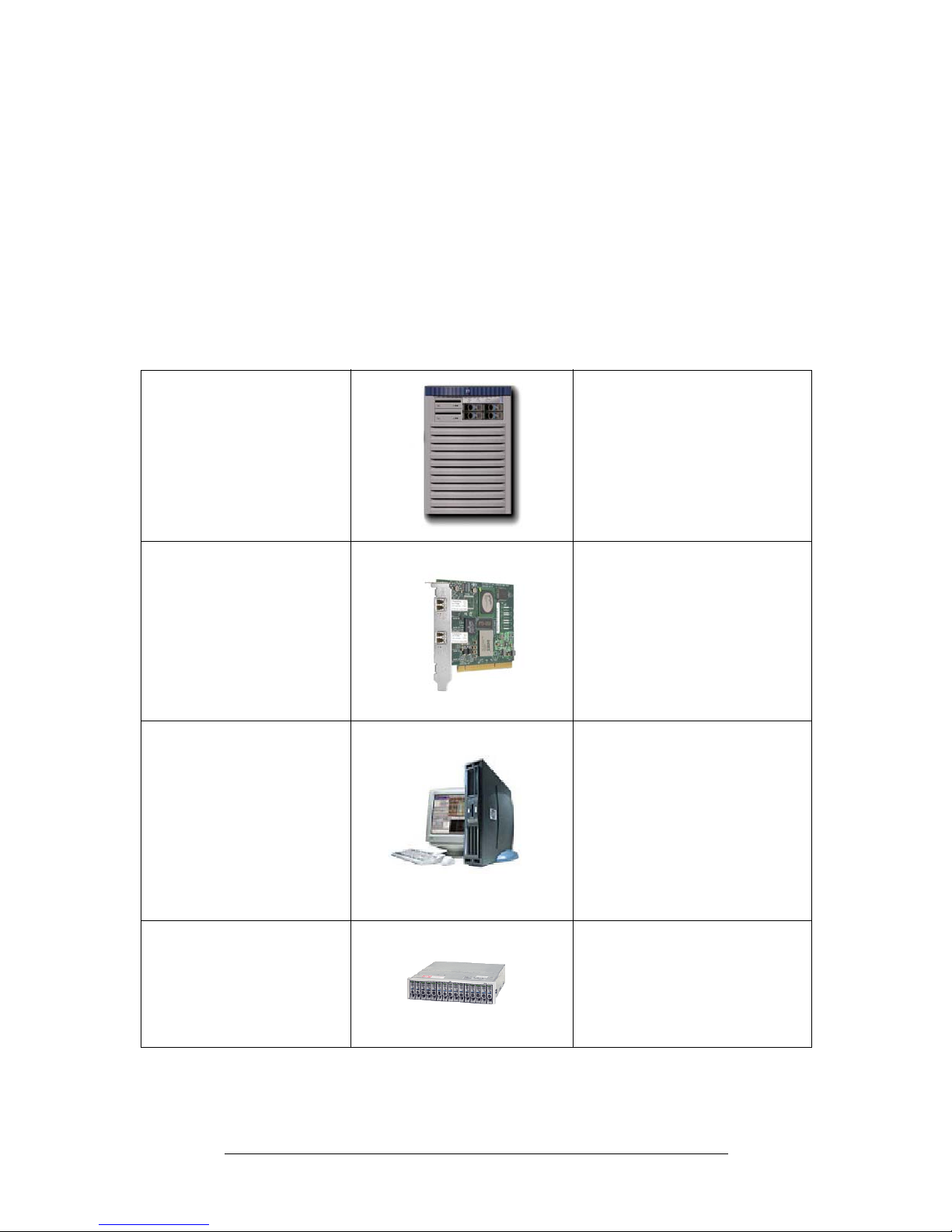
Test Details: Products Used in Testing
The following products were used for the performance measurement tests:
Table 1 Products Used in the Performance Measurement Tests
Server Tested rp8400 with Server Expansion
Unit (SEU). A6434A SEU shown.
Four, 750 MHz CPUs per cell
(16 total)
16 GB RAM (4GB per cell)
Operating System - HP-UX 11i
version 1 (B.11.11.0312)
Adapter Tested A9782A/A9784A
2 Gigabit Fibre Channel and
Gigabit Ethernet adapter
PCI-X (64-bit, 133MHz)
LAN Driver version –
Gigether-01 B.11.11.11
FC Driver version – FibrChanl-01
B.11.11.02
Clients generating the
test load for Gigabit
Ethernet
Four j6000 workstations
Two, 552 MHz CPUs each
Operating System - HP-UX 11i
version 1 (B.11.11.0303.4)
One A4926A PCI 1000Base-SX
adapter per j6000
LAN Driver version –
GigEther-00 B.11.11.14
HP StorageWorks
DS2405 Fibre Channel
Disk Systems
Four DS2405 FC disk enclosures
with a mix of drives for Fibre
Channel tests
Page 16
Test Detail s
16
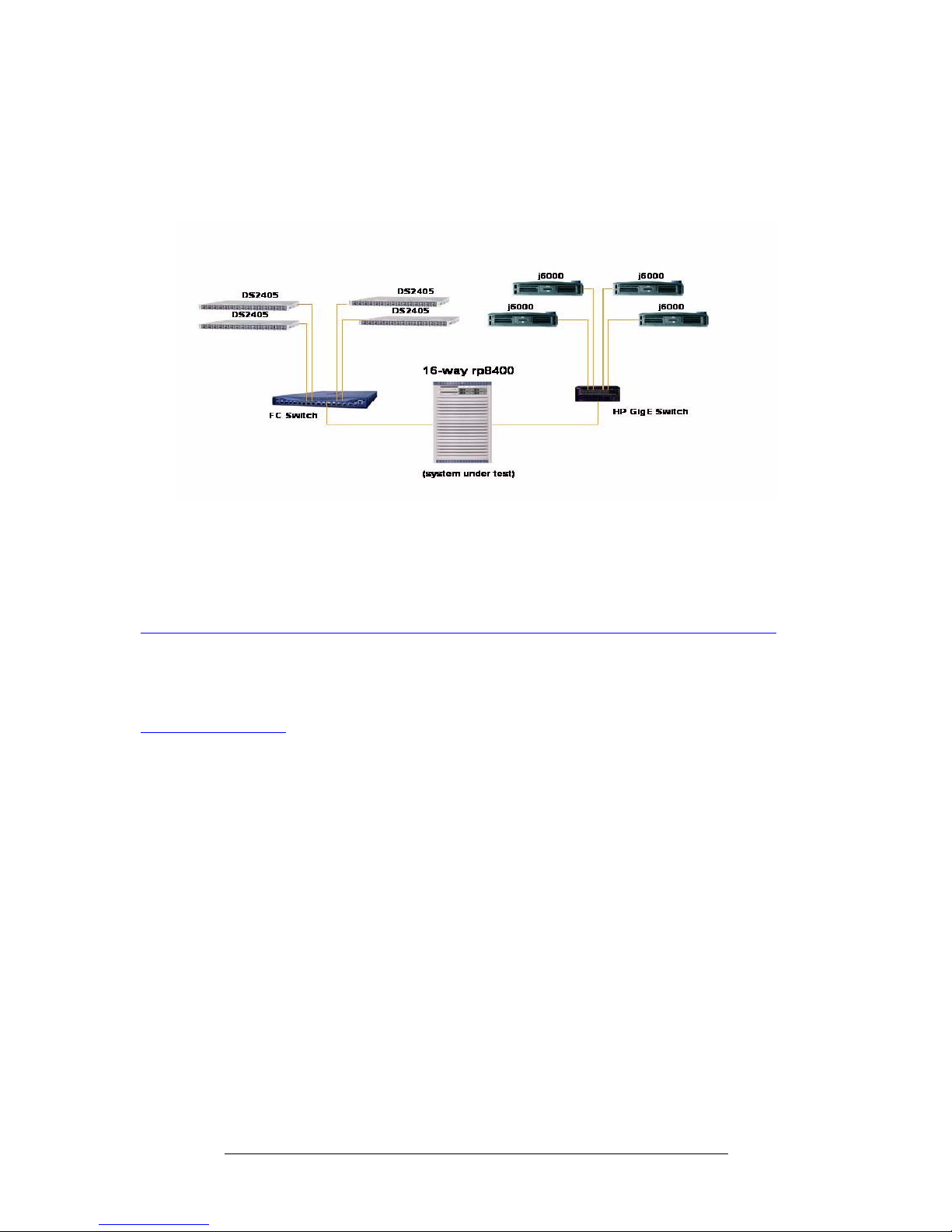
Test Details: Test Configuration
The test configuration consists of a 16-way (750 MHz) rp8400 with Server Expansion Unit
(SEU) cabinet with 16 Gigabytes of system memory and one A9782A PCI-X 2 Gigabit Fibre
Channel and Gigabit Ethernet adapter. The single adapter performance was then
measured in a system configured with 1 cell per partition, 2 cells per partition, and 4 cells
per partition. The A9782A /A9784A are 3.3 volt adapters “keyed” so that they only fit in
the correct system slots. The PCI-X slots in the system under test and in all rp8400s are the
slots located in the rp8400 Server Expansion Unit (SEU) not the base rp8400 system. The
slots labelled 1 through 6 in each of the two card cages of the base system are PCI 3.3 volt
slots. Slots 7 and 8 in the base system are PCI 5 volt slots, and these adapters cannot be
used in 5 volt slots. All 16 of the slots in the SEU cabinet are PCI-X slots.
The Gigabit Ethernet test load was generated by connecting the Gigabit Ethernet port on
the adapter in the rp8400 SEU to one HP 9304M Procurve Routing Switch. Four 2-way
j6000 each containing a single PCI 1000Base-SX adapter were connected to the switch.
The Fibre Channel test load was generated by connecting the Fibre Channel port on the
adapter in the rp8400 SEU to a Brocade
TM
Fibre Channel switch. Four HP DS2405 Disk
Systems capable of handling 2Gbyte/s Fibre Channel were evenly connected to the switch.
The switch ports were configured as QuickLoop (QL) to emulate a private loop.
NOTES:
• The networking and I/O performance of the A9782A is identical to the A9784A.
• The observed performance results are consistent across all of the same type of I/O slots
of the system.
Benchmark software
for Gigabit Ethernet
tests
Netperf is the benchmark
software suite that generated
LAN traffic for the Gigabit
Ethernet performance tests. For
more information about netperf
or to get a free copy of netperf,
go to http://www.netperf.org
Benchmark software
for Fibre Channel tests
Diskbench (db) is the benchmark
suite that generated disk read
and write traffic for the FC tests.
Table 1 Products Used in the Performance Measurement Tests
(Continued)
Page 17
Additional Information
17
•
The A7109-60001 core I/O adapter in the rp8400 SEU had only minimal site LAN
traffic during performance testing.
Figure 9 Test Configuration
Additional Information
For more information about the products described in this paper such as a current list of
tested HP products or supported systems, please go to:
http://www.hp.com/products1/unixserverconnectivity/storagesnf2/multifunction_adapters/overview.html.
This paper is the latest in a series of white papers detailing the performance of HP’s link and
server products. For a complete list of white papers on HP’s Fibre Channel and Gigabit
Ethernet solutions, go to:
http://docs.hp.com
.
Taking the Next Step
With demonstrable performance and high availability, the A9782A / A9784A PCI-X 2
Gigabit Fibre Channel and Gigabit Ethernet adapters installed in an HP server rp8400 with
Server Expansion Unit (SEU) are a winning combination. Contact your local HP Sales
Representative for a detailed analysis of your specific requirements and needs.
Page 18

Legal Notices
18
Legal Notices
© 2004 Hewlett-Packard Company, L.P. The information contained
herein is subject to change without notice.
The only warranties for HP products and services are set forth in the
express warranty statements accompanying such products and services.
Nothing herein should be construed as constituting an additional
warranty. HP shall not be liable for technical or editorial errors or
omissions contained herein.
HP-UX® , Serviceguard®, and Superdome® are registered trademarks
of the Hewlett-Packard Corporation. Brocade is a trademark of Brocade
communications.
All other trademarks and registered trademarks are the property of the
respective corporations.
 Loading...