

Page 1

HP Color LaserJet 2800 All-in-One series
p
2820 • 2840
h
Experience the ultimate HP Color LaserJet with network printing, faxing,
and scanning, plus walk up copying and direct digital photo printing in
one space-saving design—you’ll save time, space, and money and enjoy
the simplicity and reliability you expect from HP LaserJet printers.
Versatile color laser all-in-one
• Communicate effectively. The power, precision, and extensive
capabilities of HP’s Color LaserJet print, fax, scan, copy, and
direct digital photo printing All-in-One allow more effective
and efficient communication than ever before.1
• Maximize productivity. Featuring robust print and copy speeds
of up to 20 pages per minute (ppm) letter black and up to
4 ppm color, the HP Color LaserJet 2800 AiO series lets your
business produce professional documents with little time and
effort.
• Consolidate and share. Built-in HP Jetdirect 10/100 Fast
Ethernet wired networking lets your office workteam share allin-one capabilities. For personal use or hosted sharing,
connect directly via the Hi-Speed USB 2.0 port.
Greater efficiency
• Focus on business rather than waiting for output. Instant-on
Technology saves time and energy, delivering your print job’s
first page in 18 seconds for black-and-white documents
(29 seconds for color documents). Small jobs finish before
most competitors’ products have warmed up.
• Employ business-class faxing. HP innovation and Super G3
fax technology provides professional and efficient faxing at up
to 33.6 kbps (approximately 3 seconds per page) and fax
memory storage for up to 250 pages.
• Scan, send, and archive at high resolution. Integrate, store, or
send brilliant images with up to 19,200 dpi enhanced scan
resolution. Use the automatic document feeder (ADF) for
unattended faxing, copying, and scanning of documents up to
legal (8.5 by 14 inches) size, or use the flatbed scanner for
bound and single sheet originals. Enjoy greater versatility with
the ability to scan-to e-mail, scan-to PC desktop, scan-to PC
folder, or scan-to network folder.
• Count on HP printing technology. A suite of image
enhancement technologies is integrated into the all-in-one and
its HP printing supplies: HP ImageREt 2400 ensures
exceptional-quality color output, while HP Smart Printing
Technology2 monitors and makes automatic adjustments to
cartridges to ensure consistent quality throughout cartridge life.
Special fuser modes virtually eliminate print defects and
provide optimal color printing on a variety of HP papers.
1
Faxing, the 250-sheet paper input tray, and the photo memory card slots come standard with the HP Color LaserJet 2840 AiO.
The 250 sheet paper input tray (Q3952A) is an optional accessory for the HP Color LaserJet 2820 AiO only.
2
Using genuine HP supplies ensures availability of all HP printing features.
3
Photo memory card slot access settings are available via HP Toolbox and the HP Embedded Web Server only.
1
Easy to use
• Be assured of compatibility. Depend on industry-standard
HP PCL 6 and HP postscript level 3 emulation to yield the most
precise, reliable, and consistent results.
• Manage with confidence. Access device and supplies
information from the control panel, featuring a 16 character,
two-line back-lit display. And with one-handed removal and
replacement for the five supplies, management is quick and
effortless. HP Toolbox, the HP Embedded Web Server, and
HP Web Jetadmin remote management software lets you
adjust settings, receive alerts, check status, and manage
network and memory card slot access settings.3
More for your money
• Simplify digital imaging. Capitalize on the convenience of
integrated photo memory card slots featuring support for seven
popular card types and formats. HP Image Zone for
Windows® offers tools to view, enhance, manage, and share
digital photos and scanned images. Conveniently print digital
photos directly from the control panel with the card slots.1
• Invest in versatility. Get the multipurpose, easy-to-use HP Color
LaserJet 2800 AiO series at an exceptional price. Reduce
costs by printing strategic, high-quality color documents inhouse. Increase efficiency by producing only what you need,
when you need it.
• Conveniently make precise copies. Easily produce high-quality,
color or black-and-white copies of bound documents, single
sheets, or objects such as placards with the flatbed scanner.
Use the ADF to quickly process multi-page documents.
• Handle a variety of business needs. Spend less time loading
paper with an input capacity of up to 375 sheets. A 125-sheet
multipurpose tray and a 250-sheet paper tray offer easy
access to a variety of paper finishes, sizes, and types,
including labels and envelopes, at weights of up to 47 lb
(177 g/m
(220 g/m
HP printing and imaging systems help you create powerful,
professional communications easily. All-in-one products, supplies,
accessories, and services are designed together to work together
and are invented to meet your business needs.
2
) and HP laser glossy and photo papers up to 70 lb
2).1
Page 2
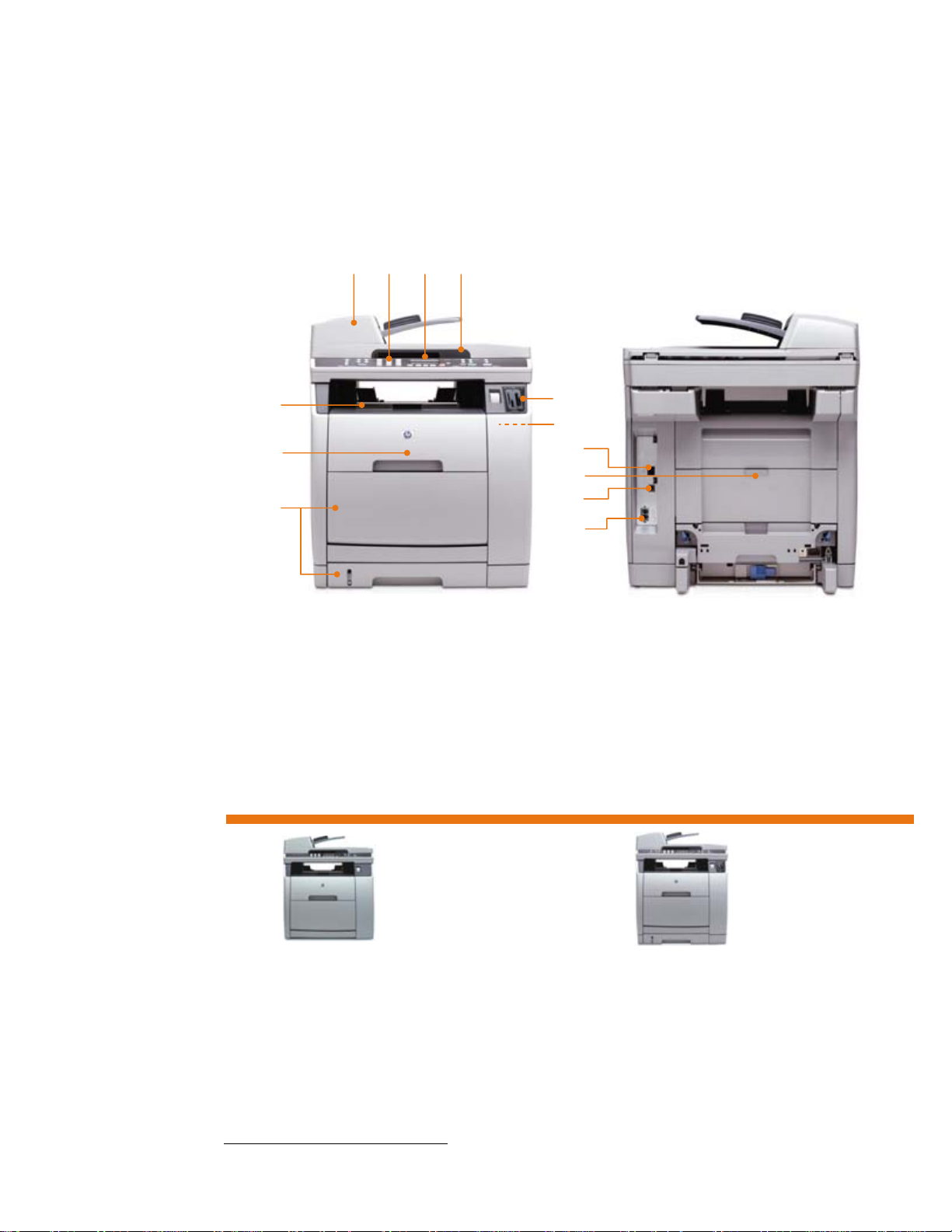
HP Color LaserJet 2800 All-in-One series
10 11 12 13
1 50-sheet automatic
document feeder (ADF)
enables unattended faxing,
scanning, and copying
2 Easy-to-use control panel
provides instant access to
the product’s different
modes
3 Easy-to-read, back-lit, two-
line LCD screen displays
helpful device status and
configuration messages
4 Up to 1200 dpi optical,
19,200 enhanced dpi
flatbed CCD scanner
enables precise, easy
copying and scanning of
bound materials or single
sheets
5 125-sheet output bin
6 One-door access to the
imaging drum and four
easy-to-install print
cartridges
7 125-sheet multipurpose
tray and 250-sheet paper
tray 2 for a 375-sheet total
input capacity
8 Photo memory card slots
for direct photo printing,
archiving, or easy
integration into business
documents
9 96 MB of standard
memory and a powerful
264 MHz processor
perform complex tasks
quickly
10 Built-in HP Jetdirect Fast
Ethernet wired networking
11 Rear door for straight-
through paper path
12 Hi-Speed USB 2.0 port
13 Super G3 V.34 fax
modem—up to 33.6
kilobytes per second—with
4 MB of fax flash memory
1 2 3 4
5
6
7
Series at a glance
HP Color LaserJet 2820 AiO HP Color LaserJet 2840 AiO
• 125-sheet multipurpose tray
• HP Color LaserJet Black Print Cartridge (estimated 5,000
• HP Color LaserJet Cyan, Magenta, and Yellow Print
4
Approximate page yield based on five percent page coverage.
4
pages)
Cartridges (estimated 2,000 pages)
4
8
9
HP Color LaserJet 2840 AiO shown
• 125-sheet multipurpose tray
• 250-sheet paper input tray 2
• HP Color LaserJet Black Print Cartridge (estimated 5,000
• HP Color LaserJet Cyan, Magenta, and Yellow Print
• V.34 fax modem
• Photo memory card slots
4
pages)
Cartridges (estimated 4,000 pages)
4
Page 3

Enhance workteam productivity with this robust, reliable,
easy-to-use color laser All-in-One.
Easily scan and capture documents
and images
Scan to e-mail, application, desktop, or computer or
network folder with ease.
With the HP Color LaserJet 2800 AiO series, archiving,
editing, and sending documents and images
electronically is a fast, simple, and reliable way to
capture paper-based documents in digital format, so you
can better manage valuable information.
Use the ADF or flatbed scanner to easily scan business
material—such as documents, manuals, and reports—
directly to your computer’s e-mail application, software
application, or to a folder on your computer or network
drive for easy archiving.
Business imaging
With support for Compact Flash, xD, Secure Digital,
Memory Stick, Memory Stick Pro, MultiMedia Card, and
SmartMedia photo memory cards, the HP Color LaserJet
2840 AiO simplifies image management. Print images
directly from supported memory cards via the control
panel or transfer images and files to or from memory
cards to supported and connected computer or network
drives for archiving, editing, sharing, or integration into
business documents.
Powerful device management
Manage your networked All-in-One remotely with
HP Toolbox, the HP Embedded Web Server, and
HP Web Jetadmin software. Configure the device settings,
photo memory card slot access, speed-dial buttons, and
an authorized Network Administrator password to protect
device network and memory card access settings.
tasks and others can be conveniently performed directly
from any networked computer with a standard Web
browser, saving time and effort.
5
Faxing and the photo memory card slots come standard with the HP Color LaserJet 2840 AiO. Photo memory card slot access
settings are available via HP Toolbox and the HP Embedded Web Server only.
6
Using genuine HP supplies ensures availability of all HP printing features.
7
To learn more about HP SureSupplyTM, visit www.hp.com/go/SureSupply.com.
5
These
HP Smart printing supplies
6
advantage
HP papers and HP Color LaserJet print cartridges are
designed to work together with HP printing devices, so
you can depend on consistent, high-quality results.
HP designs its print cartridges to continually adjust toner
properties to ensure high-quality output over the life of the
cartridge, which enables the precise printing needed for
halftone images, smooth grayscales, and fine details.
HP Smart printing technology is activated every time you
put an HP print cartridge into your product, allowing you
to monitor your current supplies, and conveniently order
new supplies with HP SureSupply
TM.7
Award-winning HP support
HP offers a variety of support options to assist you in the
setup and maintenance of the HP Color LaserJet 2800
All-in-One series. HP’s expert knowledge will help you
make the most of your AiO and ensure your equipment is
running at peak efficiency. Start with a one-year, limited
hardware, onsite HP warranty, backed by free telephone
and Web support from the award-winning HP Customer
Care (warranty and availability vary according to
region). To further guarantee trouble-free operation and
maximize the potential of your HP Color LaserJet AiO,
consider upgrading service and support options such as
installation, network installation, advanced maintenance,
and post-warranty support.
Page 4
HP Color LaserJet 2800 All-in-One series
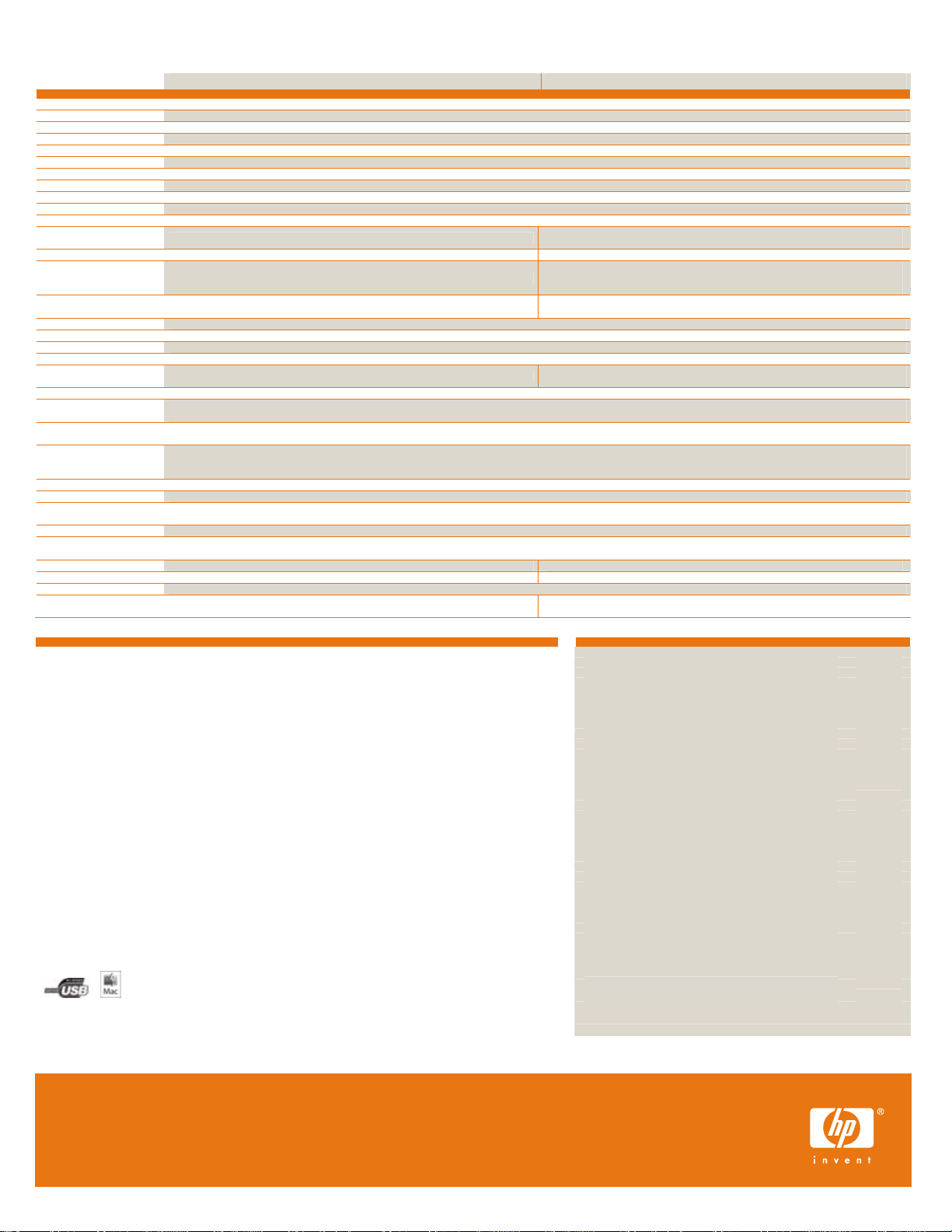
Technical specifications HP Color LaserJet 2820 AiO (Q3948A) HP Color LaserJet 2840 AiO (Q3950A)
Print speed8
First page out
Print quality
Copy quality
Copy speed
Copy settings
Scanning
Walkup initiated scanning Via front control panel with Scan-to button (preconfiguration via software required)
Remote initiated scanning Via HP Director, TWAIN-compliant or WIA-compliant software, HP Image Zone Software
File formats BMP, FPX, GIF, JPG (JPEG format, standard and progressive), JPG (EXIF 2.1 and 2.2), PCX, PNG, TIFF, PDF, TXT, RTF, HTML
Maximum size Flatbed: 8.5 by 11.7 in (216 by 297 mm); ADF: 8.5 by 15 in (216 by 381 mm)
Faxing
Speed10 Not available 3 seconds per page (Slerexe page, standard resolution)
Features
Photo memory card support11
Processor
Device memory
Duty cycle
Paper12
Input capacity
Output capacity 125-sheet face down bin, rear output door for specialty paper
Sizes Multipurpose tray: 4.1 by 5.8 to 8.5 by 14 in (105 by 148 to 216 by 356 mm); letter, executive, legal, envelopes (No. 10, Monarch); 250-sheet paper tray: 5.8 by 8.3 to 8.5 by 14 in
Weights Multipurpose tray: 16 to 47 lb (60 to 177 g/m2), up to 70 lb (220 g/m2) for HP laser photo papers and HP laser glossy papers only);
Types Multipurpose tray: Paper12 (plain, letterhead, prepunched, bond, color, rough, preprinted, recycled) HP Color Laser Glossy Photo Paper, HP Color Laser Glossy Brochure Paper, HP Color Laser Matte
Connectivity
Printer language and fonts HP PCL 6, HP postscript level 3 emulation; Postscript Printer Description (PPD); 80 TrueType internal scalable fonts for both HP PCL 6 and HP postscript emulation
Operating systems Microsoft® Windows® 2000, XP (Typical/full PC install); 98 SE, Me (scan and print drivers only); NT® 4.0 (print driver only); Mac OS 9.2.2, 10.2.8, 10.3.x (full Mac install)
Network protocols TCP/IP, Direct Mode IP, LPD; Configuration and management protocols: SLP, IGMP, BOOTP/DHCP, WINS, SNMP v1 and v2c, and HTTP
Software included
Dimensions (w by d by h)
Weight
What’s in the box
Also includes
Environmental ranges
Operating temperature 59 to 90.5 degrees F (15 to 32.5 degrees C)
Storage temperature -4 to 104 degrees F (-20 to 40 degrees C)
Relative humidity 20 to 70 percent RH, non-condensing
Max operating altitude 10,000 ft (3048 m)
Acoustic power emissions Active: 6.6 B(A); Standby: not audible
Power specifications
Input requirements 110 to 127 VAC (+/- 10%), 50/60 Hz (+/- 3 Hz); 220 to 240 VAC (+/- 10%), 50/60 Hz (+/- 3 Hz)
Consumption Active: 398 watts; Ready: 26 watts; Sleep: 20 watts; Off: 0 watts
Typical Electricity Consumption (TEC): 3.394 kWh/Week
Certifications
Safety IEC 60950-1 compliant; safety UL listed; EU LVD & EN60950-1 compliant; countries: Canada (cUL-CAN/CSA
EMC CISPR 22: 1997/EN 55022: 1998 Class B; EN 61000-3-2:2000; EN 6 1000-3-3: 1995\A1; EN
Telecom (HP Color LaserJet
2840 AiO)
Warranty One-year limited hardware onsite HP warranty, telephone and Web support (varies according to region)
HP SureSupply
8
Exact speed varies depending on the system configuration, software application, driver, an d document complexity.
9
Fax send software for supported Windows XP and 2000 based systems and Mac OS 9.2.2, 10.2.8, 10.3.x based systems; Receive Fax to PC capability via USB
connection only available for Windows 2000 and XP.
10
Based on standard ITU-T test image #1 at standard resolution. More complicated pages or h igher resolution will take longer and use more memory.
11
Memory card support for storage capacities up to 2 GB; Direct Photo Pri nting capability for .jpg image files.
12
Papers featuring coatings and finishes designed specifically for use in ink pri nting devices are not compatible.
13
All print cartridge page yields are based at five percent page coverage.
14
Power requirements are based on the country/region where the printer is sold. Do not convert operating voltages. This will damage the printer and void the
product warranty.
© Copyright 2005-2007 Hewlett-Packard Development Company, L.P.
The information contained herein is subject to change without notice. The only warranties for HP products and services are set forth in the express
warranty statements accompanying such products and services. Nothing herein should be construed as constituting an additional warranty. HP shall
not be liable for technical or editorial errors or omissions contained herein.
Microsoft, Windows, and Windows XP are U.S. registered trademarks of Microsoft Corporation.
Printed in the U.S.A.
14
TM
enabled To learn more about HP SureSupplyTM, please visit www.hp.com/go/SureSupply
125-sheet multipurpose tray (up to 10 envelopes, 50 transparencies); 50-sheet ADF
(148 by 210 to 216 by 356 mm); letter, executive, 8.5 by 13 inches, legal; ADF: 5 by 5 to 8.5 by 14 in (127 by 127 to 216 by 356 mm); letter, legal, executive
Photo Paper, HP Color Laser Soft Gloss Presentation Paper, HP Color LaserJet transparencies, HP Laser Tough Paper, labels, envelopes, and card stock; 250 sheet paper tray 2: Paper12 (plain,
letterhead, prepunched, bond, color, rough, preprinted, recycled); ADF: paper (plain, bond, recycled), HP transparencies, envelopes, labels, postcards, document carrier
HP Toolbox, HP LaserJet scan, TWAIN 1.9 or WIA scanner drivers, HP LaserJet fax, installer/uninstaller, HP Director, HP Image Zone, HP Document Viewer, HP All-in-One Setup Assistant (Mac);
Device: 69.6 lb (31.6 kg); As packaged approximately 89lb (36.8 kg) Device: 75.3 lb (34.2 kg); As packaged approximately 95lb (40.5 kg)
HP Color LaserJet 2800 AiO series, HP imaging drum, HP Color LaserJet 5,000-page13 Black Print Cartridge, power cord, Getting Started Guide, support flyer, software CDs, ADF
HP Color LaserJet 2,000-page
C22.2 No. 60950-1-03), Mexico (NOM NYCE-NOM 019 SCFI), USA (UL-UL 60950-1; FDA-21 CFR Chapter 1
Subchapter J for lasers); class 1 laser/LED product
55024:1998\A1; FCC Title 47 CFR, Part 15 Class B; ICES-003, Issue 4; GB9254-1998; EMC Directive
89/336/EEC and the Low Voltage Directive 73/23/EEC, and carries the CE-Marking accordingly (in addition,
Fax version meets R&TTEDirective 1999/5/EC (Annex II)), list of countries: Canada (Industry Canada ICES 003CISPR 22), USA (FCC Title 47 CFR Part 15 Class B); CISPR 22 Class B
TBR-21:1998; EG 201 121: 1998, FCC Part 68, Industry Canada CS03, NOM-151-SCTI-1999 (Mexico)
Black-and-white: up to FastRes 1200 print quality (600 by 600 dpi); Color: up to ImageREt 2400 print quality (600 by 600 dpi)
Black-and-white: up to 20 copies per minute (cpm) letter; color: up to 4 cpm letter; first black-and-white copy out : 19 seconds
Contrast (lighter/darker), Quality (copy quality), reduce/enlarge 25 to 400%, 2-up, 4-up, copy collation, number of copies, paper size
Black-and-white: up to 600 by 600 dpi; Color: up to ImageREt 2400 print quality (600 by 600 dpi)
Color scanning supported; resolution: up to 1200 by 1200 dpi optical or up to 19,200 by 19,200 dpi enhanced resolution
Not available
Not available
Not available
96 MB RAM (upgradeable to 224 MB with one industry standard 100-pin SDRAM DIMM slot) with Memory Enhancement technology (MEt)
Latest supported operating systems and print drivers available at www.hp.com/support/clj2800
19.6 by 20.9 by 20.6 in (497 by 532 by 523 mm) 19.6 by 20.9 by 22.4 in (497 by 532 by 573 mm)
Readiris PRO Text Recognition software (not installed with device software, separate installation required)
13
Cyan, Magenta, and Yellow Print Cartridges
Black-and-white: up to 20 ppm letter; full page color: up to 4 ppm
Black-and-white: 18 seconds; color: 29 seconds
Super G3 V.34 fax modem (up to 33 kbps) and 2 RJ-11 ports; Fax-send software for PC and
Mac over both USB and network connectivity included with Typical/full install9
Up to 300 by 300 dpi, forwarding, quick dialing (120 locations), 4 MB fax memory (up to
250 pages), polling (receive only), delayed sending, distinctive ring detection, auto reduction,
Compact Flash
auto redial, phone TAM interface, telephone mode, junk barrier
®
Type I and Type II, xD-Picture card™, Secure Digital, Memory Stick®, Memory
264 MHz
Up to 30,000 pages per month
125-sheet multipurpose tray (up to 10 envelopes, 50 transparencies),
250-sheet paper tray: 16 to 28 lb (60 to 105 g/m
2
); ADF: 16 to 24 lb (60 to 90 g/m2)
Hi-Speed USB 2.0 port, built-in HP Jetdirect Fast Ethernet wired networking
HP Color LaserJet 4,000-page
Super G3 V.34 fax modem, 250-sheet paper tray, photo memory card slots
Ordering information
Product
HP Color LaserJet 2820 AiO Q3948A
HP Color LaserJet 2840 AiO Q3950A
Paper handling
250-sheet paper input tray (accessory for 2820 only) Q3952A
HP Color LaserJet 2800 Printing Supplies with Smart Printing Technology
HP Color LaserJet Black Print Cartridge (5K pages)13 Q3960A
HP Color LaserJet Cyan Print Cartridge (4K pages)13 Q3961A
HP Color LaserJet Yellow Print Cartridge (4K pages)13 Q3962A
HP Color LaserJet Magenta Print Cartridge (4K pages)
HP Color LaserJet Cyan Print Cartridge (2K pages)13 Q3971A
HP Color LaserJet Yellow Print Cartridge (2K pages)13 Q3972A
HP Color LaserJet Magenta Print Cartridge (2K pages)13 Q3973A
HP Color LaserJet Imaging Drum (20K pages black, 5K pages color,
average 6-8K pages)13
Cables
HP network cable 7 feet C7535A
HP network cable 14 feet C7536A
USB cable (a-b) 2 meter C6518A
Memory
HP 128 MB 100 MHz Synchronous DRAM DIMM Q7709A
HP 64 MB 100 MHz Synchronous DRAM DIMM Q7708A
HP 32 MB 100 MHz Synchronous DRAM DIMM Q7707A
HP Care Packs
HP Care Pack, network installation H3110E
HP Care Pack 3-year, next business day, onsite UA337E
Paper
www.hp.com/go/everydaypaper
HP Color Laser Glossy Photo Paper, letter, 58 lb bond (220 g/m2),
100 sheets
HP Color Laser Glossy Brochure Paper, letter, 44 lb bond (160 g/m2),
150-sheets
HP Color Laser Glossy Photo Paper, letter, 32 lb bond (120 g/m2),
200 sheets
HP Color Laser Soft Gloss Presentation Paper, letter, 32 lb bond
(120 g/m2), 200 sheets
®
Stick Pro
, SmartMedia, MultiMedia Card
250-sheet paper tray; 50-sheet ADF
13
Cyan, Magenta, and Yellow Print Cartridges,
13
Q3963A
Q3964A
Q6607A
Q6610A
Q6545A
Q6541A
For more information visit our website at www.hp.com
5983-0800ENUC, 5/2007, Rev. 3
 Loading...