

Page 1
HOVERJET E - SKATEBOATD USER MANUAL
POWERED BY
B
E
T
T
E
R
I
N
P
E
R
F
O
R
M
A
N
C
E
L
i
F
e
P
O
4
B
A
T
T
E
R
Y
TM
HOVERZON.COM
Page 2

Table of Contents
Section 1: Overview . . . . . . . . . . . . . . . . . . 01
1.1 Box Contents . . . . . . . . . . . . . . . . . 01
1.2 Important Information . . . . . . . . . . . . . 01
1.3 Safe Riding Techniques . . . . . . . . . . . . 02
1.4 Disposal at End-of-Life . . . . . . . . . . . .05
Section 2: Features . . . . . . . . . . . . . . . . . .06
2.1 Parts Overview . . . . . . . . . . . . . . . . 06
2.2 Remote Control Overview . . . . . . . . . . 07
2.3 Specifi cations . . . . . . . . . . . . . . . . .08
Section 3: Usage and Instructions . . . . . . . . . .09
3.1 Remote Functions . . . . . . . . . . . . . . .09
3.2 Paring . . . . . . . . . . . . . . . . . . . . . 11
3.3 Starting and Stopping . . . . . . . . . . . . . 12
3.4 Cruise Control . . . . . . . . . . . . . . . . .14
Section 4: Battery . . . . . . . . . . . . . . . . . . . 16
4.1 Battery Specifi cations . . . . . . . . . . . . .16
4.2 Charging . . . . . . . . . . . . . . . . . . . 16
4.3 Battery Usage Warnings . . . . . . . . . . . 17
Section 5: Warranty . . . . . . . . . . . . . . . . . . 20
Page 3

SECTION 1: OVERVIEW
Before operating your Hoverjet, please read all instructions. This User Manual will guide you through the
functions, usage, and proper care of your Hoverjet. If you have any questions or cannot fi nd the information
you need in the manual, please contact your place of purchase or HOVERZONTM customer service. Before
contacting customer service, please have your model number and purchase information ready as these may be
needed during the call. HOVERZON
TM
customer service may be reached at 1-800-707-2655.
1.1 BOX CONTENTS
Before using the skateboard, please check to ensure you received all of its parts.
● 1 x HOVERZON
TM
Hoverjet E-Skateboard
● 1 x Skateboard Charger
● 1 x Remote
● 1 x Remote Wrist Strap
● 1 x User’s Manual
1.2 IMPORTANT INFORMATION
Hoverjet has been designed for safe riding. However, as with any motorized product, the Hoverjet has inherent
hazards associated with its use (such as: losing control and/or falling off, or accidentally riding over unstable
terrain). Therefore it is important to read and follow all instructions and warnings in the User’s Manual and
exercise good judgment when riding.
By riding the Hoverjet, the user acknowledges and accepts personal responsibility of all risks associated with
the use of the Hoverjet, which may include, but are not limited to, muscle injuries, broken bones, lacerations, or
other serious injuries that may be sustained while using the Hoverjet.
01Hoverzon
TM
Hoverjet E-Skateboard User’s Manual
Page 4

Hoverzon
TM
Hoverjet E-Skateboard User’s Manual02
1.3 SAFE RIDING TECHNIQUES
When operating, accelerating, decelerating, or braking, please keep your weight in line with the Hoverjet
direction in which you are going and in accordance with the functions you are performing in order to increase
your stability and avoid possible product damage.
● If braking, you should lean and/or shift weight slightly backwards.
● If starting, you should lean and/or shift weight slightly forward.
● When atop the board, stand with feet apart so that your weight is more evenly distributed over the board. This
will improve your stability.
● Wearing appropriate clothing and safety gear including knee pads, elbow pads, wrist braces, and an ASTM
F1492 approved helmet is recommended for ALL riders of ALL ages at ALL times.
● Avoid wearing anything that can drape over or get caught into/under the wheels.
● Wear fl at shoes to maintain fl exibility and stability.
● Ensure the vehicle speed is safe to yourself and others, and be ready to stop at any time.
● When riding near others, keep a safe distance to avoid collisions.
● Be alert to your surroundings in order to ensure a safe ride. Your eyes are your best tool to safely avoid
obstacles and slippery surfaces.
● Stay in open spaces and fl at areas. Avoid steeps, slopes or high traffi c areas until you’re familiar with riding.
Page 5

03Hoverzon
TM
Hoverjet E-Skateboard User’s Manual
WARNING
● Never ride at high speeds on uneven terrain or slopes.
● Never perform stunts or turn abruptly without checking your surroundings.
● Never carry one or more passengers on the Hoverjet with you.
● Never carry heavy items while riding.
● Never ride in the rain, dark, or dimly lit areas.
● Never use the Hoverjet to do anything that may cause personal injury or property damage.
● Never operate your Hoverjet near fl ammable vapor, liquids, dust, or other fi re hazards.
FAILURE TO USE COMMON SENSE AND HEED THE ABOVE WARNINGS INCREASES THE RISK OF
SERIOUS INJURY, OR IN VERY RARE CASES, DEATH. USE WITH APPROPRIATE CAUTION AND
SERIOUS ATTENTION TO SAFE OPERATION.
TO PREVENT ELECTRIC SHOCK, MATCH THE WIDER PRONG OF PLUG TO WIDE SLOT IN OUTLET,
FULLY INSERT.
FCC Regulations state that any unauthorized changes or modifi cations to this equipment not expressly
approved by the manufacturer could void the user’s authority to operate this equipment.
This product satisfi es FCC Regulations when shielded cables and connectors are used to connect
the unit to other equipment. To prevent electromagnetic interference with electric appliances such as
radios and televisions, use shielded cables and connectors for connections.
CAUTION
Page 6

DECLARATION OF CONFORMITY:
This device complies with Part 15 of the FCC Rules.
Operation is subject to the following two conditions: (1) This device may not cause harmful interference, and (2)
this device must accept any interference received, including interference that may cause undesired operation.
FCC RELATED INFORMATION:
This equipment has been tested and found to comply with the limits for a Class B digital device, pursuant
to Part 15 of the FCC Rules. These limits are designed to provide reasonable protection against harmful
interference in a residential installation. This equipment generates, uses, and can radiate radio frequency
energy and, if not installed and used in accordance with the instructions, may cause harmful interference to
radio communications. However, there is no guarantee that interference will not occur in a particular installation.
If this equipment does cause harmful interference to radio or television reception, which can be determined by
turning the equipment off and on, the user is encouraged to try to correct the interference by one or more of the
following measures:
● Reorient or relocate the receiving antenna.
● Increase the separation between the equipment and receiver.
● Connect the equipment into an outlet on a circuit different from that to which the receiver is connected.
● Consult the dealer or an experienced radio/TV technician for help.
The manufacturer is not responsible for any radio or TV interference caused by unauthorized modifi cations to
this equipment. Such modifi cations could void the user’s authority to operate the equipment.
Hoverzon
TM
Hoverjet E-Skateboard User’s Manual04
Page 7

1.4 DISPOSAL AT END-OF-LIFE
This product must not be disposed of by incineration, landfi lling, or mixing with household trash. Improper
disposal of the battery contained within this product may result in the battery heating up, rupturing, or igniting
which may cause serious injury. The substances contained inside the battery present chemical risks to the
environment. The recommended disposal for any Hoverjet at its end-of-life is to dispose of the entire unit at or
through an e-Waste recycling center, program, or facility. Local regulations and laws pertaining to the recycling
and disposal of lithium ion batteries and/or products containing them will vary according to country, state, and
local governments. You must check laws and regulations corresponding to where you live in order to properly
dispose of the battery and/or unit. It is the user’s responsibility to dispose of their waste equipment properly with
accordance with local regulations and laws.
For additional information about where you should drop off your batteries and electrical or electronic waste,
please contact your local or regional waste-management offi ce, your household waste disposal service, or your
point-of-sale.
05Hoverzon
TM
Hoverjet E-Skateboard User’s Manual
Page 8
SECTION 2: FEATURES
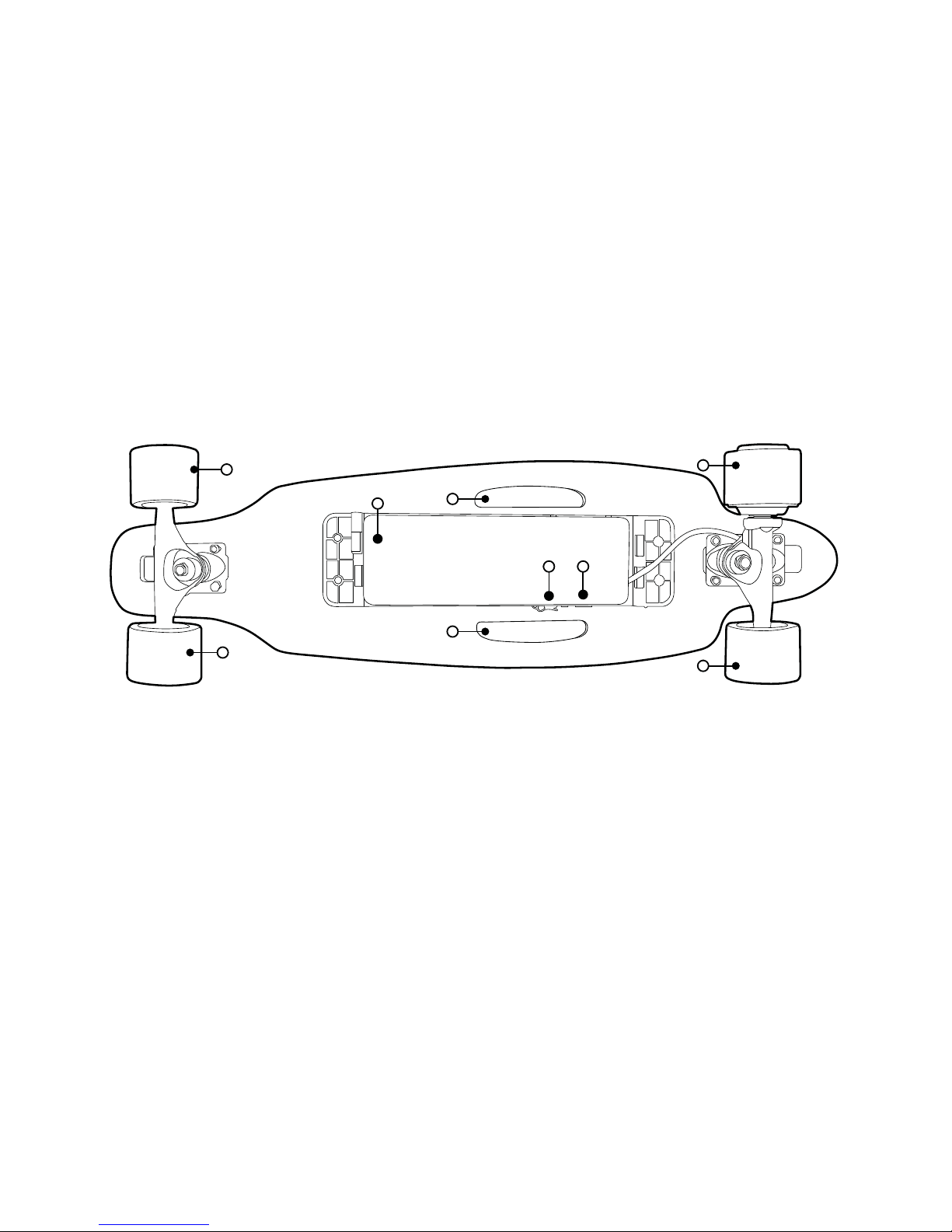
2.1 PARTS OVERVIEW
1. Front Passive Wheel 5. Power Button
2. Control Box with LiFePo4 Battery 6. Rear Motorized Wheel
3. Grips 7. Rear Passive Wheel
4. Charging Port
1
3
6
7
3
1
2
54
Hoverzon
TM
Hoverjet E-Skateboard User’s Manual06
Page 9
2.2 REMOTE CONTROL OVERVIEW
2.3 SPECIFICATIONS
2
3
8
1
2
4
6
3
5
7
8
1
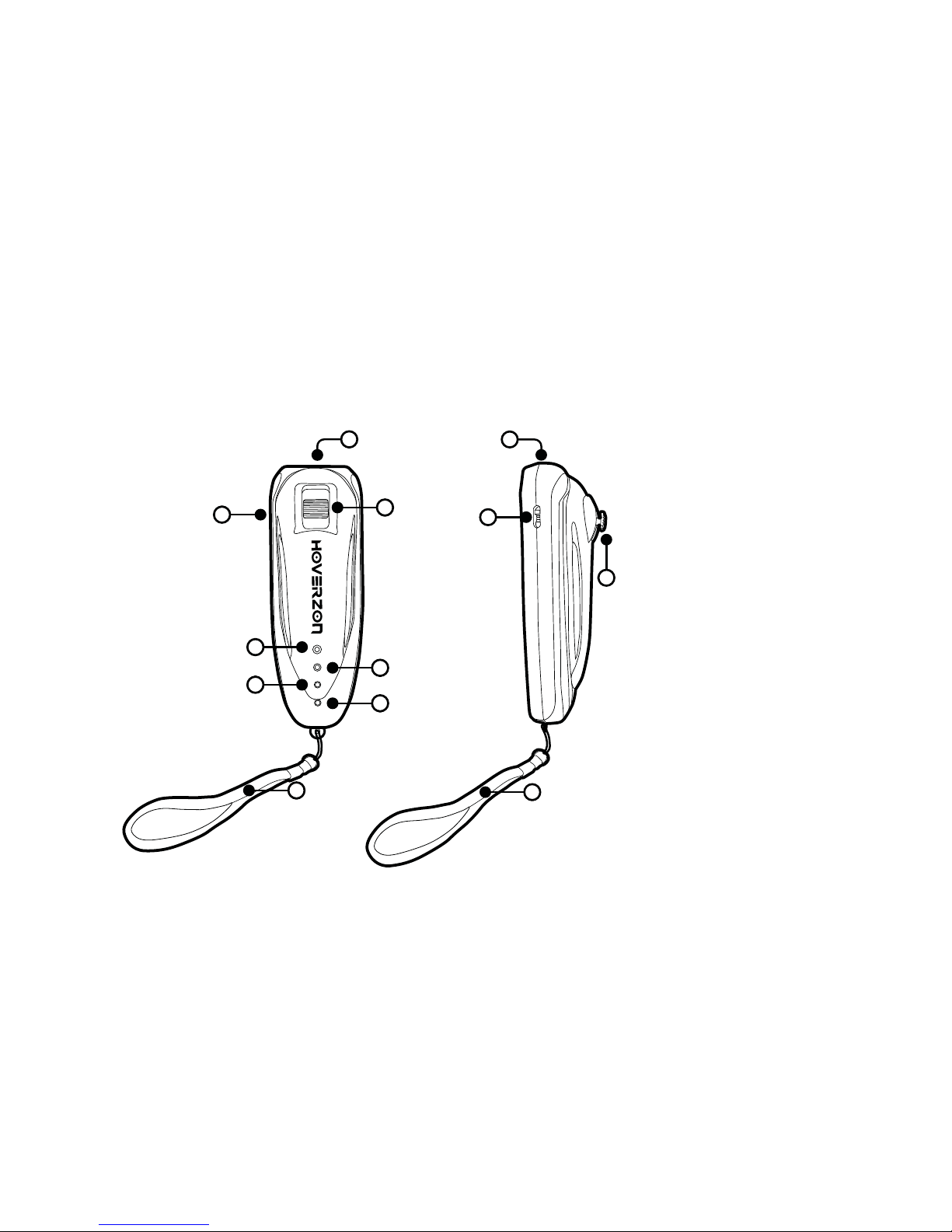
1. MicroUSB Charging Port
(Charging cable and adapter are not included.)
2. Power Switch
3. Throttle/Brake
4. Cruise Control Light
5. Pairing Light
6. Skateboard Battery Light
7. Remote Battery Light
8. Wrist Strap
07Hoverzon
TM
Hoverjet E-Skateboard User’s Manual
Page 10
Category Items Parameters
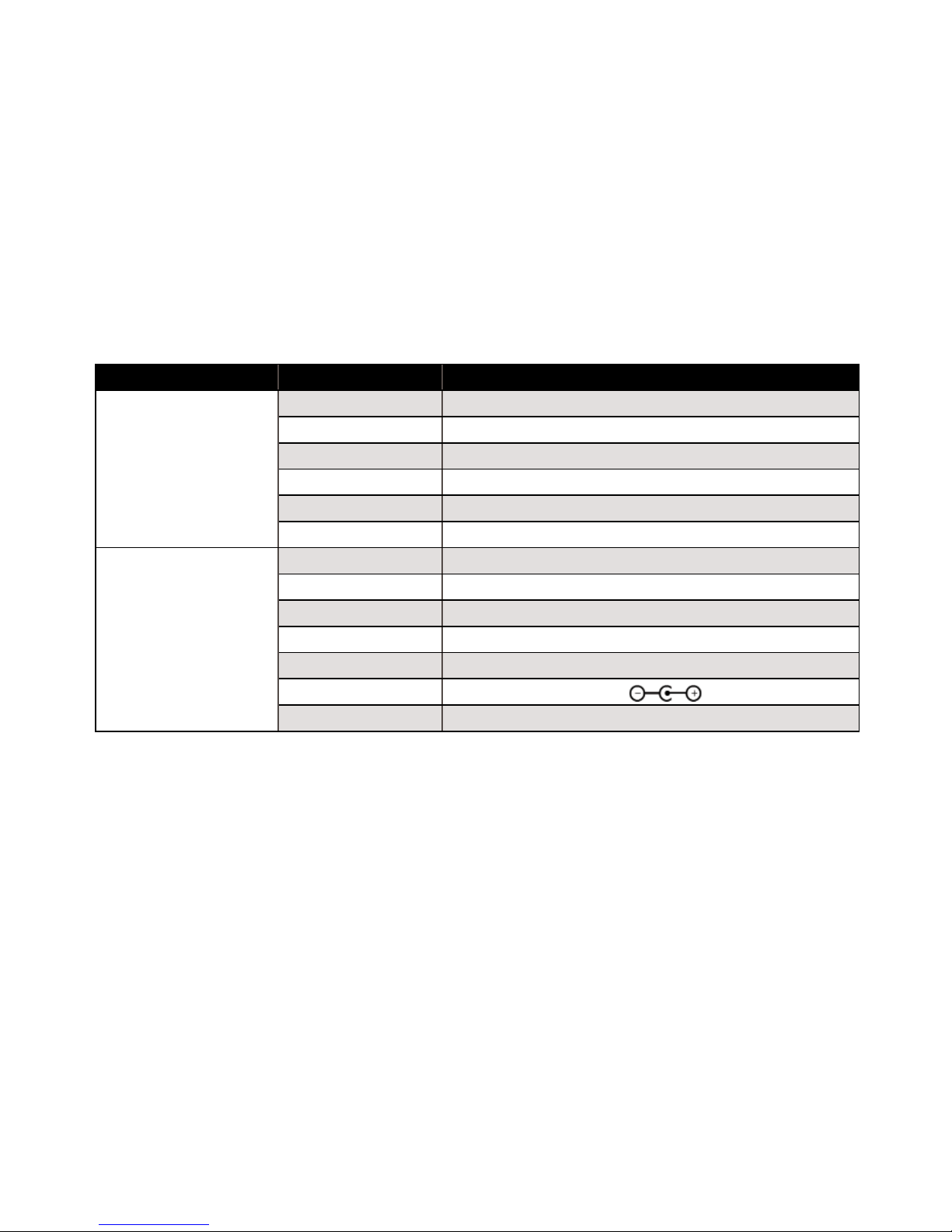
Performance
Top Speed 11 mph (17 km/h)
Mileage Per Charge 4 - 10 Mi.
Max. Load ˂ 176 lbs. (˂ 80 kg)
Actual Dimensions 32 x 9 x 4.5 in.
Charging Time 3 - 4 hrs
Connective Range 29.5 ft (9 m)
Parts
Net Weight 9.5 lbs. (4.3 kg)
Deck 7-ply Canadian Maple
Passive Wheels PU (Polyurethane)
Motorized Wheel Rubber, 24 V
Battery 24 V Lithium Iron Phosphate (LiFePo4)
Charger UL DC 29.2 V 800 mA
Control Box Aluminum Alloy Housing
Hoverzon
TM
Hoverjet E-Skateboard User’s Manual08
Page 11
SECTION 3: USAGE AND INSTRUCTIONS
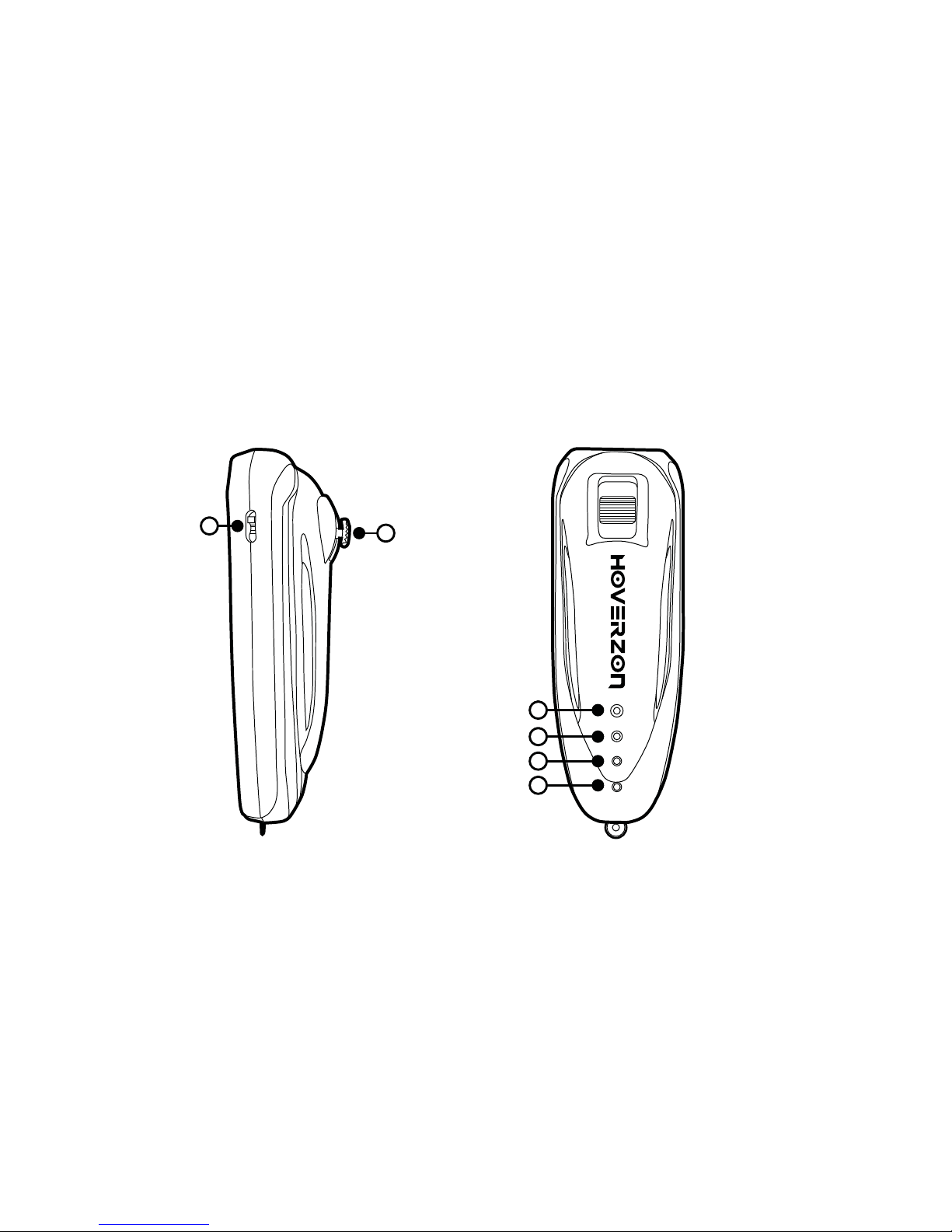
3.1 REMOTE FUNCTIONS
c
d
e
f
a
b
09Hoverzon
TM
Hoverjet E-Skateboard User’s Manual
Page 12
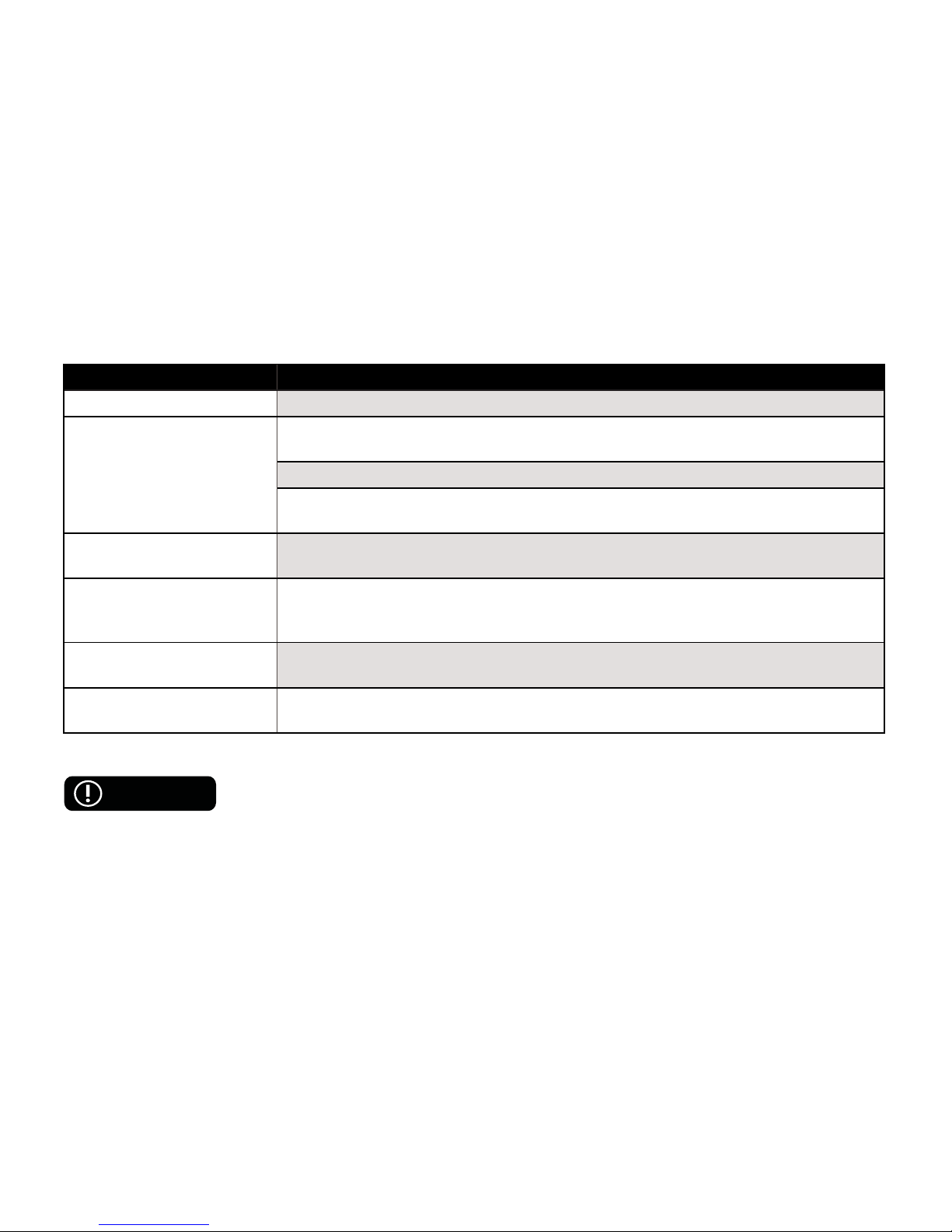
Item Functions
a. Power Switch Slide down to turn on. Slide up to turn off.
b. Throttle
Push up to accelerate. Acceleration speed depends on how far you push up the
Throttle.
Push up and hold for approx. 3 sec. to active CRUISE CONTROL.
Push down to brake and/or decelerate. Push down to brake/decelerate. Braking
speed depends on how far you push up the Throttle.
c. Cruise Control Light
When the feature is active, the light will turn RED and remain on. When the feature
is off, the light will turn off.
d. Connection Indicator
The light will turn WHITE and FLASHING when the Hoverjet and remote are
pairing. If the pairing is successful, the light will turn off. If the pairing failed, the light
will continue to flash.
e. Hoverjet Battery Indicator
The light will turn BLUE when the Hoverjet and remote are connected and the
Hoverjet is fully charged. The light will flash when the Hoverjet’s battery is low.
f. Remote Battery Indicator
The light will turn GREEN when the Hoverjet and remote are connected and the
remote is fully charged. The light will flash when the remote’s battery is low.
When not in use for approximately 10 minutes, the remote will automatically turn off.
To use it again, turn the remote back on.
CAUTION
Hoverzon
TM
Hoverjet E-Skateboard User’s Manual10
Page 13
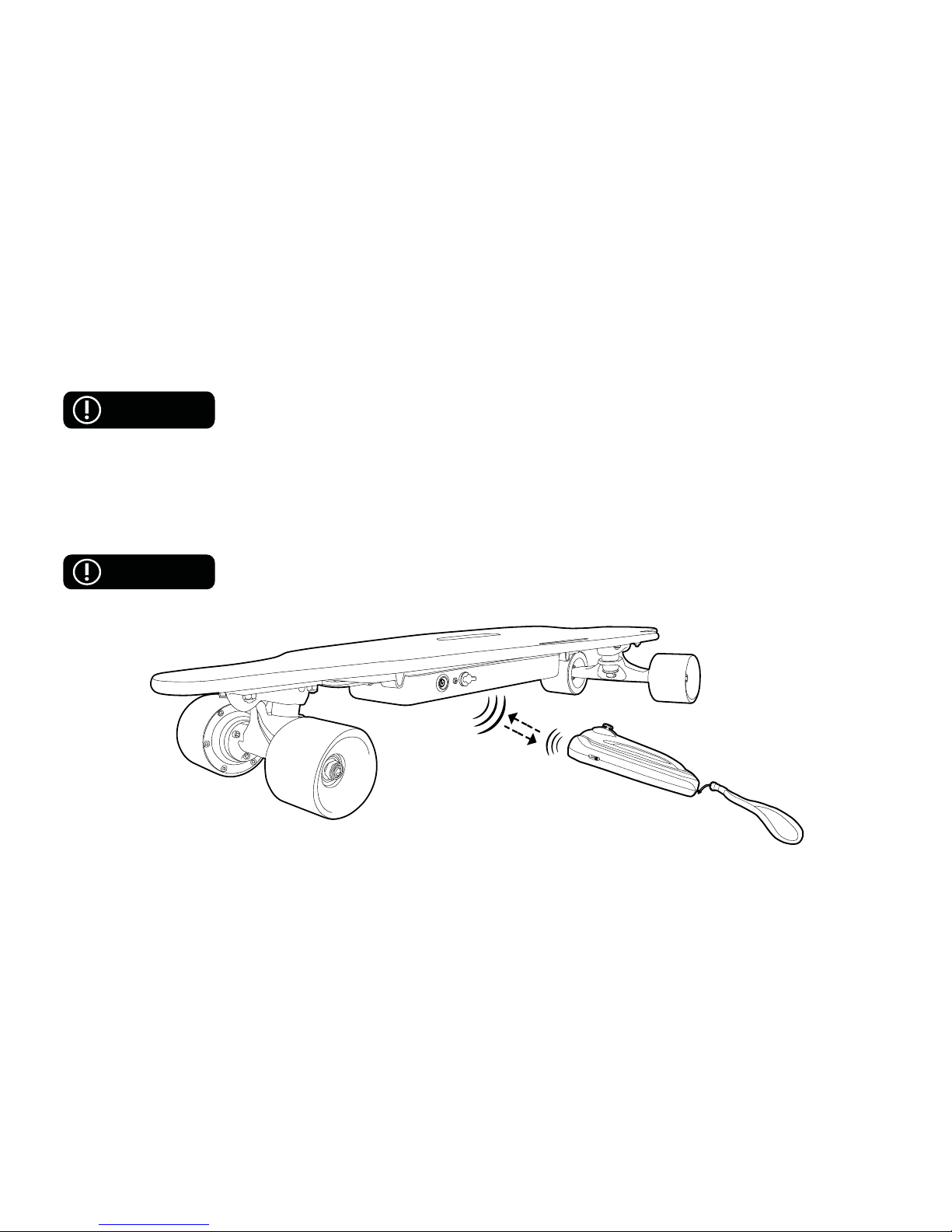
3.2 PAIRING
Ensure the Hoverjet is fully charged and place it down with the Control Box facing
the ground, before using it.
Before the Hoverjet can be used, it must be connected to the remote. In general, the remote and the Hoverjet
will automatically pair when they are both on. If the pairing is successful, the Pairing Light will turn off.
If an automatic pairing fails, the Hoverjet and remote will attempt to connect automatically for about 30 sec. If
the pairing was unsuccessful, the remote and skateboard will need to be turned off and back on again to start
another automatic pairing.
When not in use for approximately 10 minutes, the remote will automatically turn off.
To use it again, turn the remote back on.
WARNING
CAUTION
11Hoverzon
TM
Hoverjet E-Skateboard User’s Manual
Page 14
3.3 STARTING AND STOPPING
Before riding the Hoverjet, be sure you read the entire section so that you fully
understand how to start and stop.
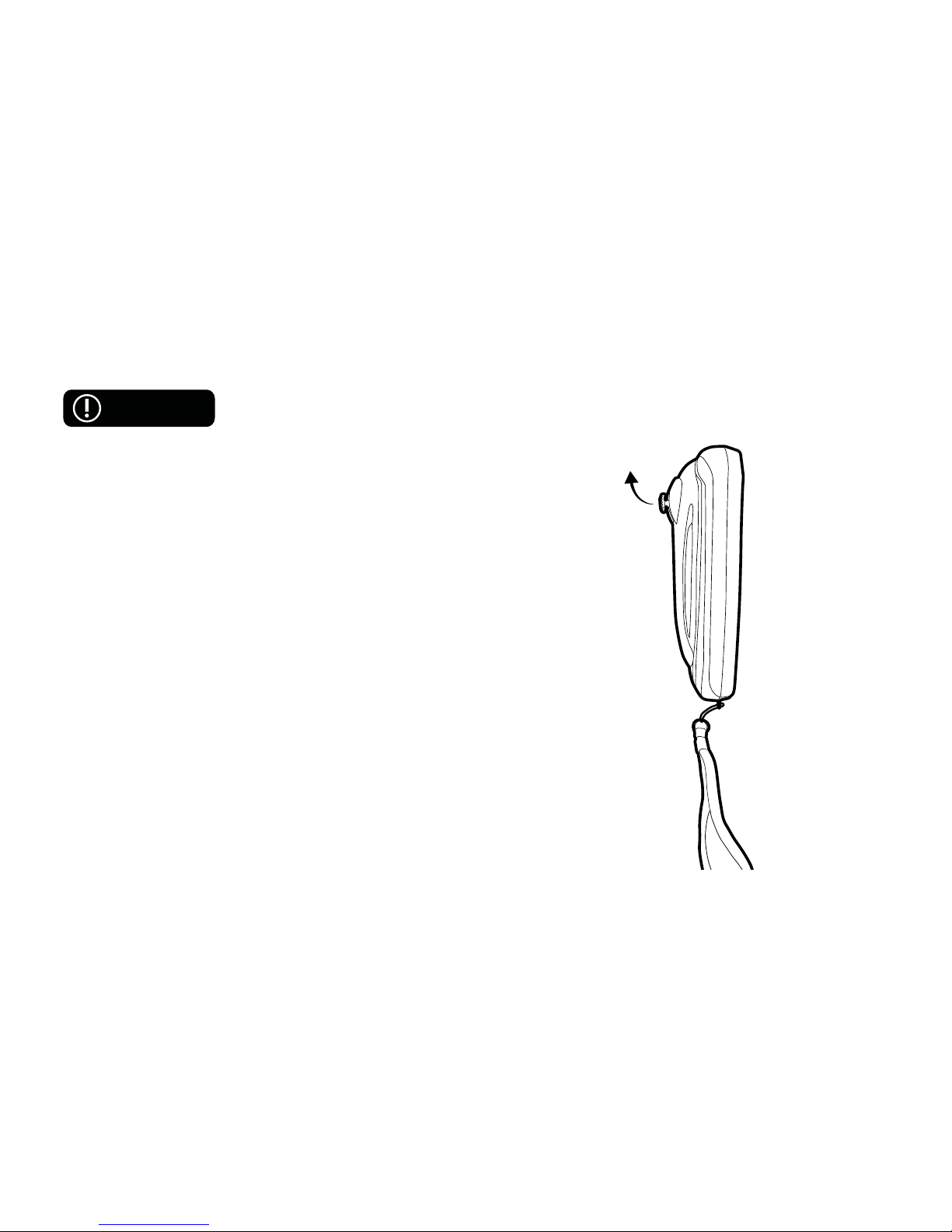
Starting
Follow the instructions below to learn the different ways to
accelerate.
● Assisted Acceleration
Push the Throttle up to move forward and/or accelerate. The speed
at which the skateboard accelerates depends on how far up you
push the Throttle i.e. pushing it slightly up will cause the skateboard
to accelerate slower compared to pushing it farther up.
● Manual Acceleration
Step onto the board with one foot. Use the other foot to kick off the
ground and move forward. Several kicks may be needed depending
on the terrain.
WARNING
Pushing
Up to Accelerate
Hoverzon
TM
Hoverjet E-Skateboard User’s Manual12
Page 15
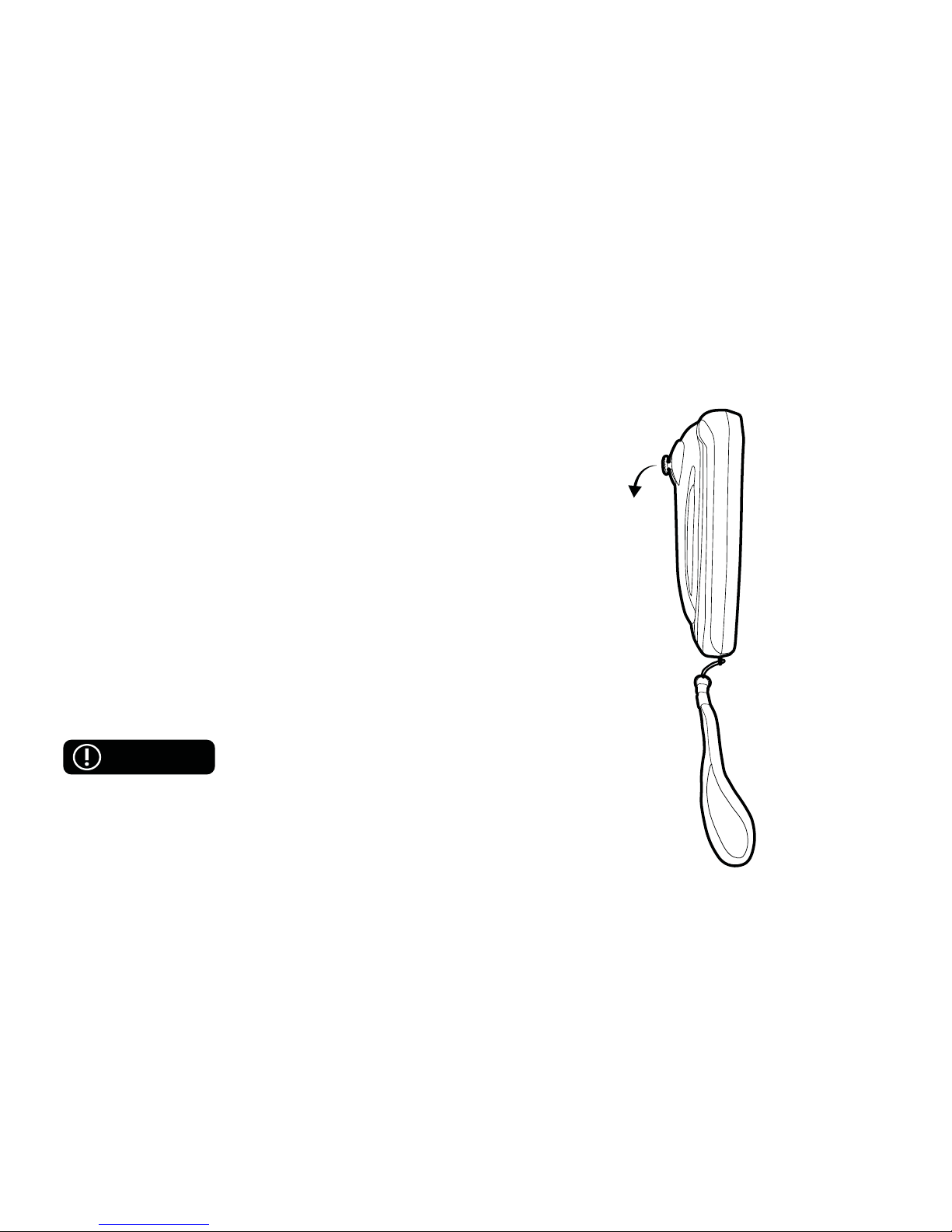
Stopping
Follow the instructions below to learn the different ways to brake.
● Assisted Braking
Push the Throttle down to brake and/or decelerate. The speed
at which the skateboard decelerates depends on how far down
you push the Throttle i.e. pushing it slightly down will cause the
skateboard to slow down more gradually compared to pushing it
farther down.
● Manual Braking
There are three options. It is recommended to practice these
methods at lower speeds until you are able to safely perform each.
If possible, use the throttle for assisted braking while using any of
these methods in order to aid with braking.
The fi rst foot lifted off the board is known as the lead foot; this is the
foot you will touch to the ground when stopping or landing.
A. Hop-Off Stop
This method is not recommended if riding at
top speed (11mph).
Lift your non-lead foot off the board as you prepare to jump off. As
you jump off, shift your weight towards your non-lead foot while
simultaneously using your lead foot to kick the board backwards
before landing, non-lead foot then lead foot.
CAUTION
Pushing
Down to Brake
and/or Decelerate
13Hoverzon
TM
Hoverjet E-Skateboard User’s Manual
Page 16

B. Step Brake
This method may be used at top speeds (10-11mph), please exercise caution.
Lift your non-lead foot off the board as you prepare to step on the ground. Shift weight to and place hands on
the knee over your lead foot. Use your non-lead foot to step on and off the ground using as many steps as
needed until you come to a complete stop before removing your other foot.
C. Drag Brake
This method may be used at top speeds (10-11mph), please exercise caution.
Lift your non-lead foot off the board as you prepare to stop. Shift weight to and place hands on the knee over
your lead foot. Use your non-lead foot to drag against the ground. Continue to do so and come to a complete
stop before removing your other foot.
3.4 CRUISE CONTROL
Before using this feature, please ensure you understand how to turn it on and off.
The Hoverjet may maintain the current speed without holding the throttle.
To active Cruise Control, please follow the steps below:
Step 1. Push and hold the Throttle up for about 3 sec.
Step 2. Let go of the Throttle and the Hoverjet will maintain the speed.
To deactivate Cruise Control, please follow the steps below:
Step 1. Push the Throttle up or down.
CAUTION
CAUTION
WARNING
Hoverzon
TM
Hoverjet E-Skateboard User’s Manual14
Page 17

Step 2. Let go of the Throttle and Cruise Control will turn off.
Cruise Control will be deactivated if either the Hoverjet or remote are at low battery,
or the connection between Hoverjet and remote are lost.
WARNING
15Hoverzon
TM
Hoverjet E-Skateboard User’s Manual
Page 18
SECTION 4: BATTERY
4.1 BATTERY SPECIFICATIONS
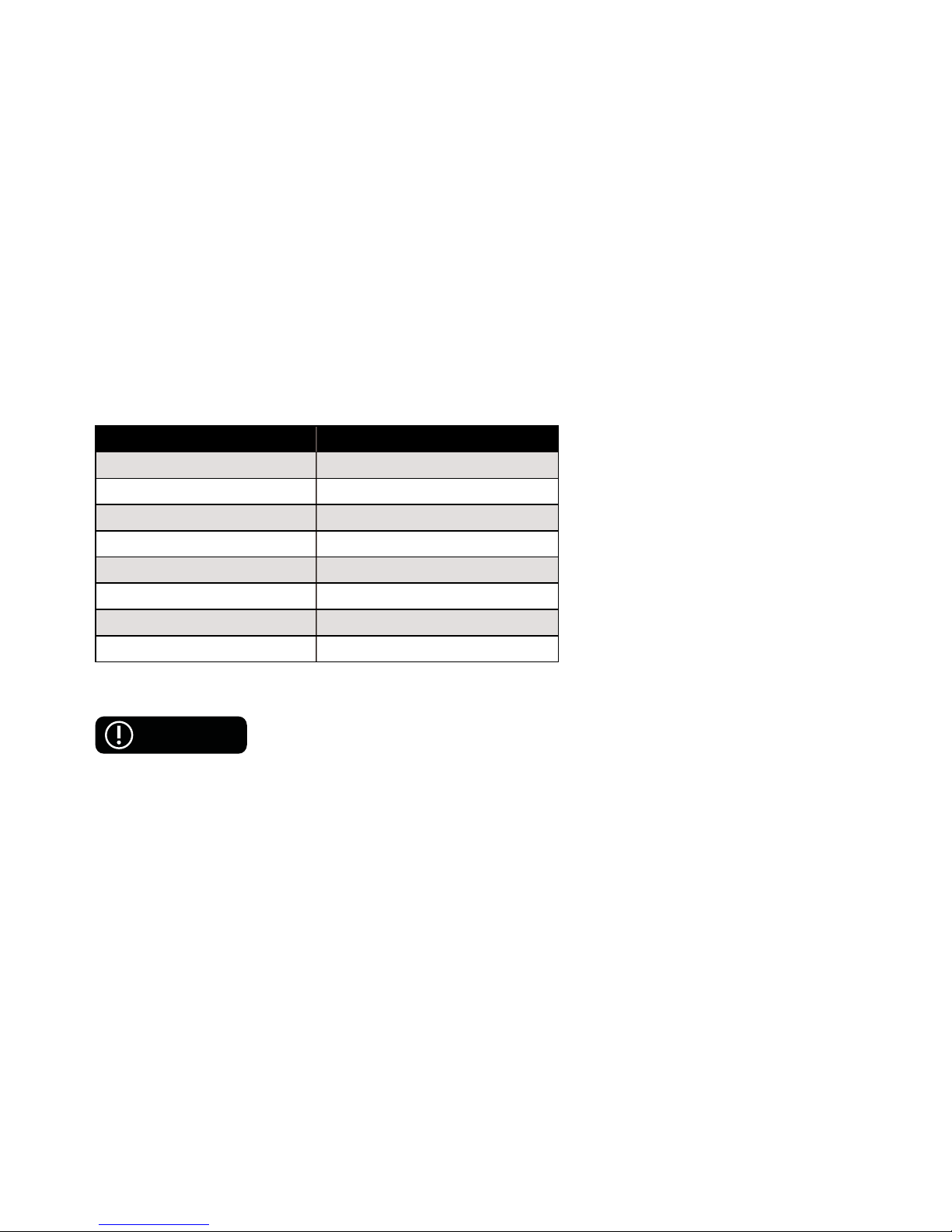
Items Parameters
Battery Type Li-On Fe Battery
Charging Time 3 - 4 Hrs.
Voltage 24 V
Weight 0.9 lbs (410g)
Working Temperature 5º F ~ 122º F (-15º C ~ 50º C)
Charging Temperature 32º F ~ 104º F (0º C ~ 40º C)
Dimensions 14.76 x 3.74 x 1.38 in.
Storage Humidity 65 ± 20% RH
4.2 CHARGING
Before charging the Hoverjet and/or its remote, you MUST turn off both devices and be sure to observe
the following instructions:
1. Plug the charger into a grounded wall outlet (100V-240V; 50-60Hz).
2. DO NOT attempt to operate or use the Hoverjet and/or its remote while either is charging.
WARNING
Hoverzon
TM
Hoverjet E-Skateboard User’s Manual16
Page 19

3. Please keep your charging environment clean and dry.
4. If the charging port is damp or has any liquid on it, DO NOT charge your Hoverjet.
5. In order for the battery to operate at maximum effi ciency, avoid charging your Hoverjet in extremely
hot or extremely cold environments.
6. DO NOT charge the battery if there’s excessive odor or heat and any leakage or physical damage.
When the Remote or Battery Indicator lights are fl ashing, the battery level is low and the Hoverjet and/
or remote need to be charged. When these indicator lights remain steady, the batteries are fully or
suffi ciently charged.
● If the battery will not be used for an extended period of time, fully charge and discharge it once every
other month.
● For your safety, only use the charger included with the Hoverjet or received from Hoverjet
as a replacement.
● Disregarding any of the above instructions may cause battery damage. Damages caused by
disregarding instructions are not covered under warranty.
● Disassembly and battery maintenance should only be performed by an authorized professional. DO
NOT touch or consume any substances leaking out of the battery. DO NOT allow children and animals
to touch or consume the battery.
4.3 BATTERY USAGE WARNINGS
When Using the Battery
Misusing the battery may cause the battery to get hot, rupture, or ignite and cause serious injury. Be sure to
follow the safety rules listed below:
17Hoverzon
TM
Hoverjet E-Skateboard User’s Manual
Page 20

● DO NOT place the battery in fi re or direct contact with heat.
● DO NOT pierce the battery with sharp objects, strike the battery, step on the battery, or otherwise subject it to
strong impacts or shocks.
● DO NOT expose the battery to water or any liquids, or allow the battery to get wet.
● DO NOT disassemble or modify the battery. The battery contains safety and protective technology which, if
damaged, may cause the battery to generate heat, rupture or ignite.
● DO NOT place the battery on or near fi res, stoves, or other high-temperature locations.
● DO NOT place the battery in direct sunlight, or use or store the battery inside cars in hot or cold weather.
Doing so may cause the battery to generate heat, rupture or ignite. Using the battery in this manner may also
result in a loss of performance and a shortened life expectancy.
● If the Hoverjet will be used by children, the guardian should explain the contents of the User’s Manual
to the children. The guardian should provide adequate supervision to ensure that the device is being
used as explained in the User’s Manual.
● Immediately discontinue use of the battery if, while using, charging, or storing the battery, the
battery emits an unusual smell, feels hot, changes color, changes shape, or appears abnormal in any
other way.
● DO NOT place the batteries in microwave ovens, high-pressure containers, or on induction cookware.
● In the event that the battery leaks and the fl uid gets into one’s eye, DO NOT rub the eye. Rinse well
with water and immediately seek medical care. If left untreated, the battery fl uid can cause damage to
the eye.
CAUTION
Hoverzon
TM
Hoverjet E-Skateboard User’s Manual18
Page 21

While Charging
● Be sure to follow the rules listed below while charging the battery. Failure to do so may cause the battery to
become hot, rupture, or ignite and cause serious injury. When charging the battery, use the specifi ed battery
charger provided in the package. DO NOT place the battery in or near fi re, or under the direct sunlight.
● DO NOT continue charging the battery if it does not recharge within the specifi ed charging time. Doing so
may cause the battery to become hot, rupture, or ignite. The temperature range within which the battery can
be charged is 32°F ~ 104°F (0°C to 40°C). Charging the battery at temperatures outside of this range may
cause the battery to become hot or to break. Charging the battery outside of this temperature range may also
harm the performance of the battery or reduce the battery’s life expectancy.
19Hoverzon
TM
Hoverjet E-Skateboard User’s Manual
Page 22

SECTION 5: WARRANTY
1 Year Limited Hardware Warranty
HOVERZON
TM
offers a ONE YEAR limited warranty covering the hardware of Hoverjet E-Skateboard
(“Product”), limited to those residing in the 50 United States and Canada. This warranty gives you specifi c legal
rights and you may also have other rights which vary from state to state.
HOVERZONTM warrants the Product to be free from defects in materials and workmanship under normal use
for one (1) year, as sold to the original purchaser, from the date of retail purchase by the original end-user
purchaser. If a hardware defect arises and a valid claim is received within the warranty period, at its option and
to the extent permitted by law, HOVERZONTM will: (1) repair the hardware defect by using new or refurbished
parts that are equivalent to new in performance and reliability; or (2) exchange the product with a product that
is new or refurbished, that is substantially equivalent to the original product. This warranty is for replacement for
like-items only and does not cover items out of production if the company no longer stocks them. This warranty
is not assignable or transferable. The original purchaser may call the HOVERZONTM toll-free number at 1-800707-2655 for service request.
Upon HOVERZON
TM
’s replacement or repair of a Product under warranty, the original end-user purchaser will
have the remaining warranty under the original warranty period (without any postponement during repair or
replacement). When a product or part is exchanged, any replacement item becomes your property and the
replaced item becomes HOVERZONTM’s property. Important: DO NOT disassemble the Product. Disassembling
the Product will void this warranty. Only HOVERZONTM or a party expressly authorized by HOVERZONTM should
perform service on this Product.
This warranty only covers technical hardware defectiveness during the warranty period and under normal
use conditions.
Hoverzon
TM
Hoverjet E-Skateboard User’s Manual20
Page 23

HOVERZONTM does not warrant uninterrupted or error-free operation of this Product. This Warranty does not
apply to damages or circumstances, such as, but not limited to: (a) Damage that is caused by conditions,
malfunctions, or damage not resulting in from defects in material or workmanship. These conditions include,
but are not limited to, road hazard, accidents, and improper operation or maintenance;(b) Product has
been tampered with, repaired and/or modifi ed by non-authorized personnel;(c) Obsolescence; (d) Damage
(accidental or other) to the Product that is cosmetic, meaning damage that does not impact the operation and
functioning of the Product, such as without limitation to rust, change in color, texture or fi nish, wear and tear,
scrapes, scratches, dents, cracks, or gradual deterioration; (e) Damage to the Product caused by war, terrorism,
fi re, accident, natural disaster, intentional or accidental misuse, abuse, neglect or improper maintenance, use
under abnormal conditions, accidental drops, abuse or fi re; (f) Damage to the Product caused by an external
electrical fault, surge, or any electrical anomaly; (g) Any contamination, condition or other circumstance, which
Hoverjet, in its sole discretion, considers a danger to health and safety, including, but not limited to any contact
between the Product and a biohazard, bodily fl uids, infectious materials/substance, chemicals, hazardous
substances, diseases, radiation, or other; (h) Fraud, theft, misplacement, unexplained disappearance, or willful
acts.
Limitation of Liability
In no event shall HOVERZON
TM
be liable for any incidental, indirect, special or consequential damages or
liabilities (including but not limited to incidental or consequential damages for loss of time, inconvenience,
loss of use of product, or any other consequential or incidental loss) in connection with the purchase, use, or
operation of the product. HOVERZONTM is not liable for property damage, personal injury, or death.
TO THE EX TENT PERMITTED BY LAW, THIS WARR ANTY AND THE REMEDIES SET FORTH ABOVE ARE EXCLUSIVE AND IN LIEU
OF ALL OTHER WARR ANTIES, REMEDIES AND CONDITIONS, WHETHER ORAL, WRIT TEN, STATUTORY, EXPRESS OR IMPLIED. AS
PERMIT TED BY APPLICABLE LAW, HOVERZON
TM
SPECIFICALLY DISCLAIMS ANY AND ALL STATUTORY OR IMPLIED WARRANTIES,
INCLUDING, WITHOUT LIMITATION, WARRANTIES OF MERCHANTABILIT Y, FITNESS FOR A PARTICULAR PURPOSE, AND
WARRANTIES AGAINST HIDDEN OR LATENT DEFECTS. IF HOVER ZON
TM
CANNOT LAWFULLY DISCLAIM STATUTORY OR IMPLIED
WARRANTIES THEN TO THE EXTENT PERMITTED BY LAW, ALL SUCH WARR ANTIES SHALL BE LIMITED IN DURATION TO THE
21Hoverzon
TM
Hoverjet E-Skateboard User’s Manual
Page 24

DURATION OF THE EXPRESS WARR ANTY AND TO THE REPAIR OR REPL ACEMENT SERVICE AS DETERMINED BY HOVERZONTM
IN ITS SOLE DISCRETION. NO RESELLER, AGENT, OR EMPLOYEE IS AUTHORIZED TO MAKE ANY MODIFICATION, EXTENSION, OR
ADDITION TO THIS WARR ANT Y. IF ANY TERM(S) IS HELD ILLEGAL OR UNENFORCEABLE, THE LEGALITY AND ENFORCEABILITY
OF THE REMAINING TERMS SHALL NOT BE AFFECTED OR IMPAIRED. EXCEPT AS PROVIDED IN THIS WARR ANT Y AND TO THE
MAXIMUM EXTENT PERMITTED BY LAW, HOVER ZON
TM
IS NOT RESPONSIBLE FOR DIRECT, INDIRECT, SPECIAL,INCIDENTAL
OR CONSEQUENTIAL DAMAGES RESULTING FROM ANY BREACH OF WARRANTY OR CONDITION OR PERFORMANCE OF
THE PRODUCT, OR UNDER ANY OTHER LEGAL THEORY, INCLUDING BUT NOT LIMITED TO LOSS OF USE; LOSS OF REVENUE;
LOSS OF ACTUAL OR ANTICIPATED PROFITS (INCLUDING LOSS OF PROFITS ON CONTRACTS); LOSS OF THE USE OF MONEY;
LOSS OF ANTICIPATED SAVINGS; LOSS OF BUSINESS; LOSS OF OPPORTUNITY; LOSS OF GOODWILL; LOSS OF REPUTATION;
LOSS OF, DAMAGE TO, COMPROMISE, OR CORRUPTION OF DATA; OR ANY INDIRECT OR CONSEQUENTIAL LOSS OR DAMAGE
HOWSOEVER CAUSED INCLUDING THE REPL ACEMENT OF EQUIPMENT AND PROPERTY, ANY COSTS OF RECOVERING,
PROGR AMMING OR REPRODUCING ANY PROGRAM OR DATA STORED IN OR USED WITH THE PRODUCT AND ANY FAILURE TO
MAINTAIN THE CONFIDENTIALITY OF DATA STORED ON THE PRODUCT. THE FOREGOING LIMITATION SHALL NOT APPLY TO
DEATH OR PERSONAL INJURY CLAIMS, OR ANY STATUTORY LIABILIT Y FOR INTENTIONAL AND GROSS NEGLIGENT ACTS AND/
OR OMISSIONS. HOVERZON
TM
DISCL AIMS ANY REPRESENTATION THAT IT WILL BE ABLE TO REPAIR ANY PRODUCT UNDER THIS
WARRANTY OR MAKE A PRODUCT EXCHANGE, AND IS UNABLE TO RECOVER ANY USER SOFTWARE OR DATA ON THE DEVICE.
Hoverzon
TM
Hoverjet E-Skateboard User’s Manual22
Page 25

23Hoverzon
TM
Hoverjet E-Skateboard User’s Manual
Page 26
TM
© HOVERZONTM. ALL RIGHTS RESERVED.
 Loading...