

Page 1
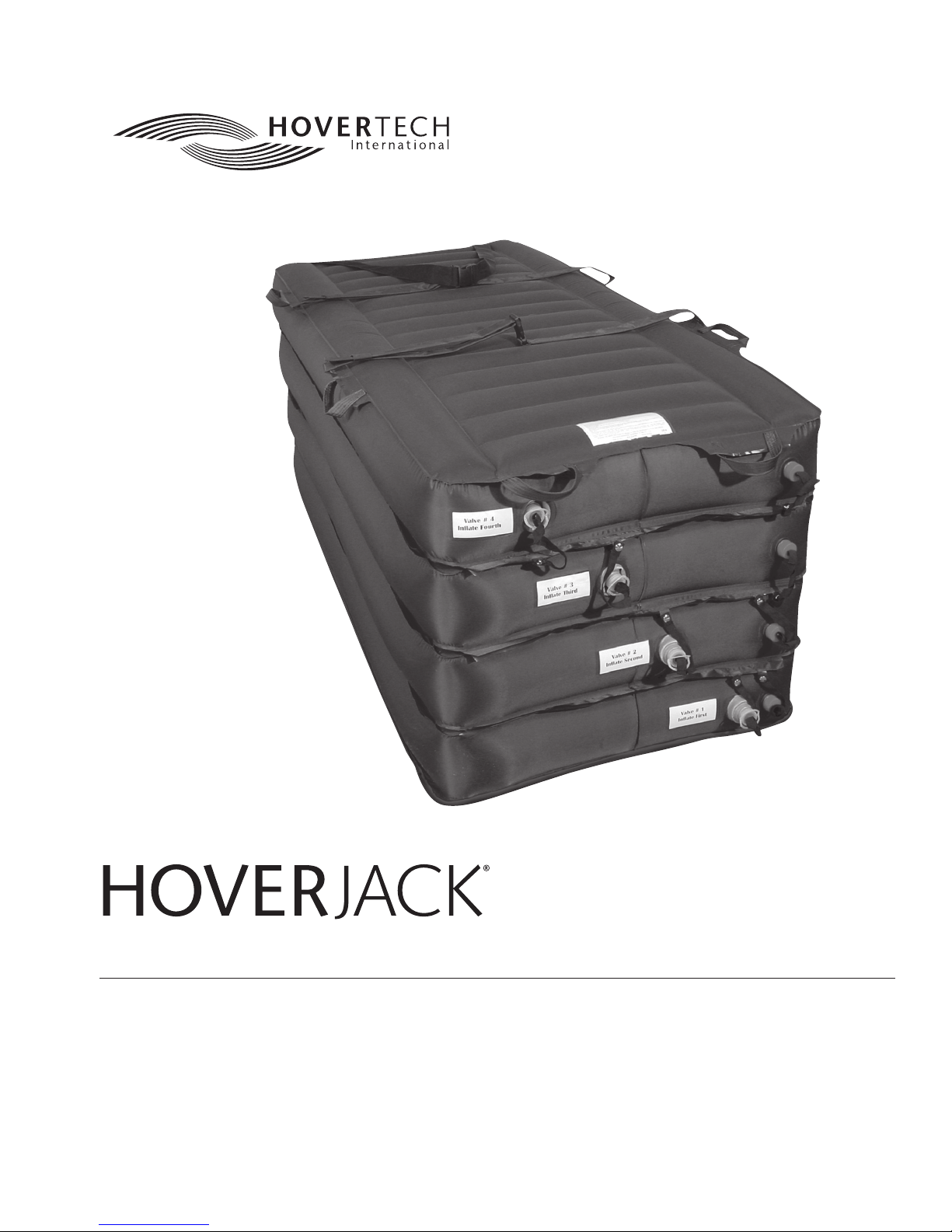
Air Patient Lift
User Manual
TABLE OF CONTENTS
Symbol Reference ..........................................................2
Intended Use and Precautions ........................................2
Part Identification - HoverJack® Air Patient Lift .............3-4
Part Identification - HT-Air® 1200 Air Supply ...................4
HT-Air® 1200 Air Supply Keypad Functions.....................4
Air200G/Air400G Air Supplies ........................................4
Instructions for Use ........................................................5
Product Specifications/Required Accessories ..................5
Cleaning and Preventive Maintenance ...........................6
Warranty Statement........................................................7
Returns and Repairs ........................................................7
Page 2

User Manual
Symbol Reference
DECLARATION OF CONFORMITY
TO MEDICAL DEVICE DIRECTIVE
Intended Use and Precautions
INTENDED USE
In the event of a patient fall, the HoverJack® Air Patient Lift is used to lift
the patient in a supine position from the floor to bed or stretcher height,
utilizing the HoverTech Air Supply to inflate each of the four chambers.
INDICATIONS
• Patients unable to assist in their own vertical lift, such as after a fall
• Patients whose weight or girth poses a potential health risk for the
caregivers responsible for lifting or moving said patients
CONTRAINDICATIONS
• Patients who are experiencing thoracic, cervical or lumbar fractures
that are deemed unstable, unless using in conjunction with a spinal
board (follow your state’s protocol regarding use of spinal boards)
INTENDED CARE SETTINGS
• Hospitals, long term or extended care facilities
PRECAUTIONS
• Make sure patient safety straps are secured before moving.
• Never use patient safety straps to pull the HoverJack, as they may tear.
• Move the HoverJack using the transport handles located along the top
perimeter.
• When moving a patient on the inflated HoverJack, use caution and
move slowly.
• Additional caregivers are recommended when moving a patient over
250 lbs/113 kg.
• Never attempt to move a patient on an un-inflated HoverJack.
• Never leave a patient unattended on an inflated HoverJack.
• Use this product only for its intended purpose as described in
this manual.
• Only use attachments and/or accessories that are authorized by
HoverTech International.
WARNING/CAUTION
• For safety, always use a minimum of two caregivers while using
the HoverJack.
• Reference product-specific user manuals for additional operating
instructions.
PRECAUTIONS
HOVERTECH INTERNATIONAL AIR SUPPLY
• Not for use in the presence of flammable anesthetics or in a hyperbaric
chamber or oxygen tent.
• Route the power cord in a manner to ensure freedom from hazard.
• Avoid blocking the air intakes of the HoverTech International Air Supply.
• CAUTION: Avoid electric shock. Do not open HoverTech International
Air Supply.
2 | HoverTech International HJManual, Rev. C
Page 3
User Manual
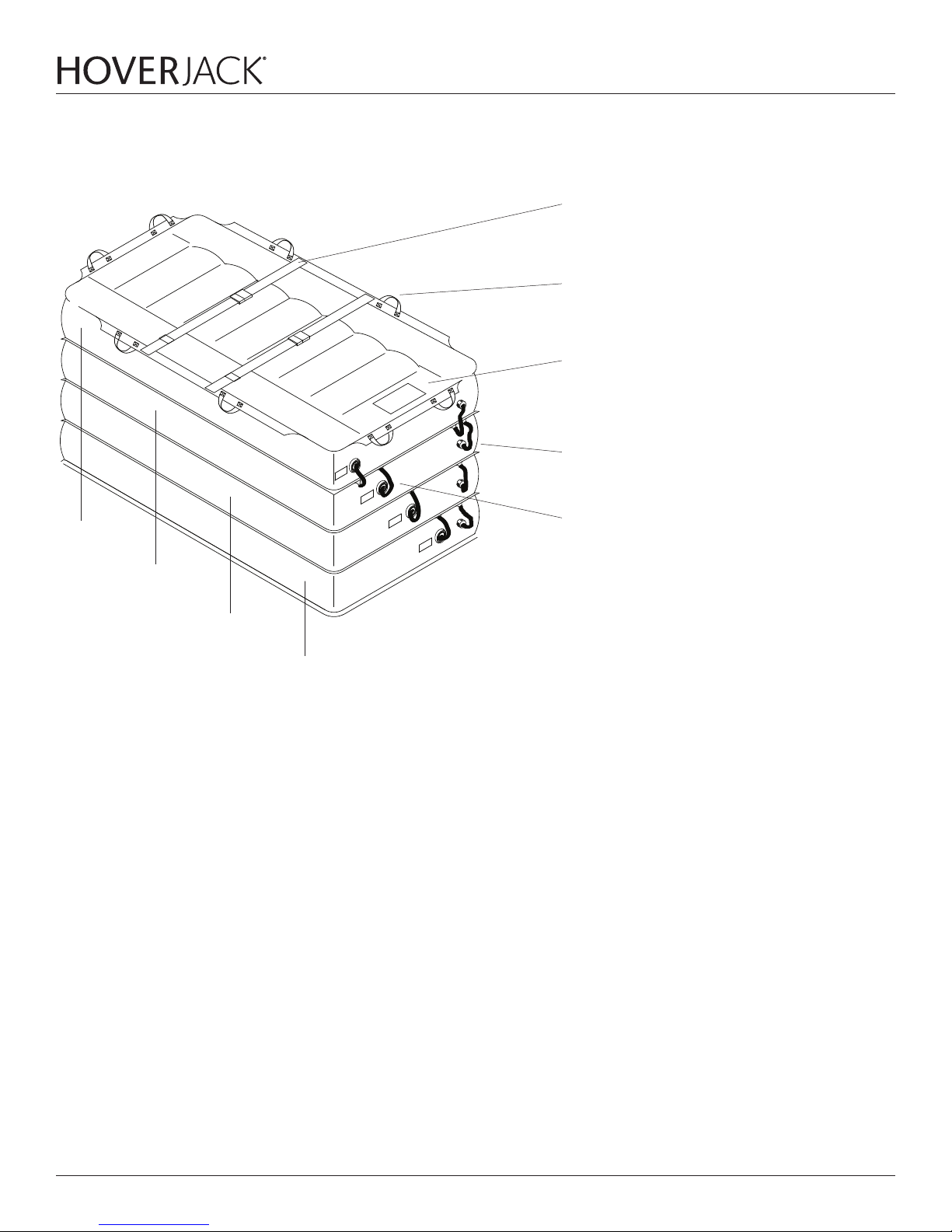
Part Identification - HoverJack® Air Patient Lift
Chamber 4
Patient Safety Straps (2)
(DO NOT USE TO TRANSPORT)
Transport Handles (8)
Label Includes: Model#, Serial# and Instructions for Use.
Red Deflate Cap and Valve (4 Total)
Inlet Cap and Valve (4 Total)
Chamber 3
Chamber 2
Chamber 1
HJManual, Rev. C www.HoverMatt.com | 3
Page 4
User Manual
Part Identification –
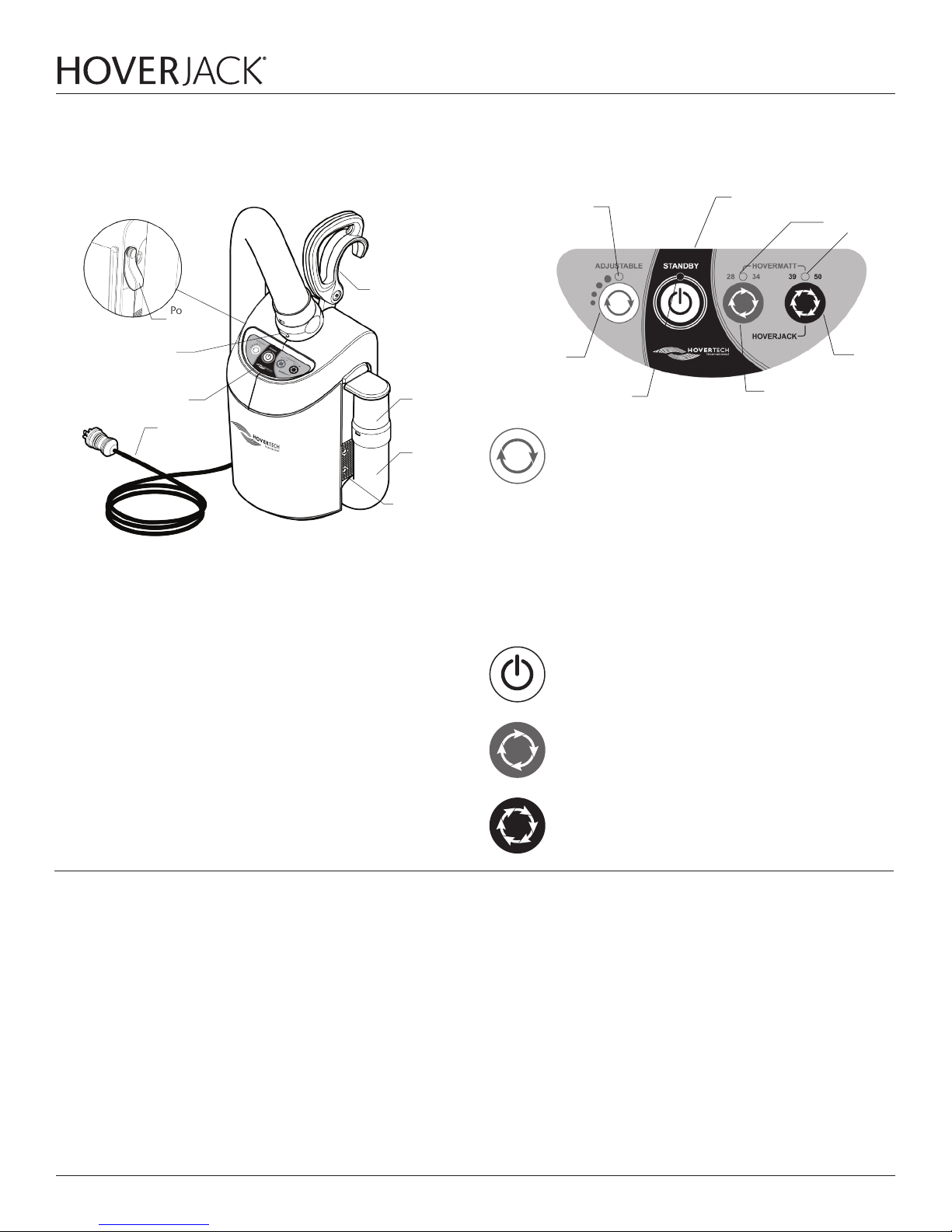
HT-Air® 1200 Air Supply
Power
Cord
Strap
Hose Release Button
Control Panel Label
Power Cord
(US/UK/Euro)
WARNING: The HT-Air is not compatible with DC power supplies.
The HT-Air is not for use with the HoverJack Battery Cart.
Carrying Handle/
Attachment Hook
Hose
Nozzle
Hose
Air Filter
Cover
HT-Air® 1200 Air Supply Keypad Functions
(Green Flashing LED)
Indication
Adjustable/
Pressure
Setting
Standby (Amber LED)
ADJUSTABLE: For use with HoverTech air-assisted positioning
devices. There are four dierent settings. Each press of the
button increases the air pressure and rate of inflation. The Green
Flashing LED will indicate the inflation speed by the number of
flashes (i.e. two flashes equals the second inflation speed).
All of the settings in the ADJUSTABLE range are substantially
lower than the HoverMatt and HoverJack settings. The
ADJUSTABLE function is not to be used for transferring.
The ADJUSTABLE setting is a safety feature that can be used
to ensure the patient is centered on HoverTech air-assisted
devices and to gradually accustom a patient who is timid or in
pain to both the sound and functionality of the inflated devices.
Power IndicationAdjustable Speed
Green LEDs
Transfer
Speed
High
Transfer
Speed
Low
Air200G/Air400G Air Supplies
If using HoverTech’s Air200G or Air400G Air Supplies, press the grey
button on the top of the canister to initiate air flow. Press the button
again to stop air flow.
STANDBY: Used to stop inflation/air flow (Amber LED indicates
STANDBY mode).
HOVERMATT 28/34: For use with 28" & 34" HoverMatts and
HoverSlings.
HOVERMATT 39/50 & HOVERJACK: For use with 39" & 50"
HoverMatts and HoverSlings and 32" & 39" HoverJacks.
4 | HoverTech International HJManual, Rev. C
Page 5

Instructions for Use
User Manual
1. Place the HoverJack on the floor next to the patient, making sure the
chamber with valve #4 is on the top and the chamber with valve #1 is
against the floor.
2. Make certain that all four red-capped deflation valves are
capped tightly.
3. Log roll patient onto the deflated HoverJack, and position patient with
feet at the valve end where indicated. Loosely secure patient safety
straps; straps will tighten during inflation.
4. The patient can be placed on top of the HoverJack using the HoverMatt®
Air Transfer System (see HoverMatt manual for instructions). If the
HoverMatt is used, make certain that the HoverMatt and patient are
properly centered on the HoverJack. Always deflate the HoverMatt
prior to inflating the HoverJack.
5. Plug HoverTech International Air Supply power cord into an
electrical outlet.
6. Turn on HoverTech International Air Supply to initiate air flow.
Product Specifications/Required Accessories
Material:
Construction: RF-Welded
Topside material: Nylon oxford
Underside material: Teflon® infused polyester
7. To begin inflation, hold hose against inlet valve #1 of HoverJack.
8. When fully inflated, remove hose. Valve will automatically close,
keeping the chamber inflated.
CHAMBERS MUST BE FULLY INFLATED TO ENSURE STABILITY.
9. Using the same process: move to valve #2, valve #3 and valve #4 in
exact succession, or until the HoverJack reaches desired height.
10. Turn o HoverTech International Air Supply, and attach valve caps,
if desired.
11. If transferring patient from the HoverJack onto an adjacent surface,
unbuckle patient safety straps.
12. If it is necessary to lower the patient, release air by opening the
uppermost red deflate valve #4. When chamber #4 is fully deflated,
move in succession downward to fully deflate HoverJack.
DO NOT RELEASE MULTIPLE CHAMBERS AT ONCE.
WARNING:
Width: 32” (81cm) or 39” (99 cm)
Length: 72” (183 cm)
Height: 30” (76 cm) Inflated [each chamber 7 1/2” (19 cm)]
LATEX FREE
Model #: HJ3202T
Model #: HJ3902T
Weight limit: 1200 lbs (544 kg)
REQUIRED ACCESSORY:
Model #: HTAIR1200 (North American Version) – 120V~, 60 Hz, 10A
Model #: HTAIR2300 (European Version) – 230V~, 50 Hz, 6A
Model #: HTAIR1000 (Japanese Version) – 100V~, 50/60 Hz, 12.5A
Model #: HTAIR2356 (Korean Version) – 230V~, 50/60 Hz, 6A
Model #: Air200G (800 W) (North American Version) – 120V~, 60 Hz, 10A
Model #: Air400G (1100 W) (North American Version) – 120V~, 60 Hz, 10A
HJManual, Rev. C www.HoverMatt.com | 5
Page 6

User Manual
Cleaning & Maintenance
HOVERJACK CLEANING INSTRUCTIONS
In between patient uses, the HoverJack should be wiped down with a
cleaning solution used by your hospital for medical equipment disinfection. A 10:1 bleach solution (10 parts water: one part bleach) or disinfectant wipes can also be used. NOTE: Cleaning with bleach solution may
discolor fabric.
First remove any visible soil, then clean the area according to the cleaning
product manufacturer’s recommended dwell time and level of saturation.
A gentle scrub brush can also be used on the aected area, if necessary, to
help penetrate the HoverJack material.
Do not launder the HoverJack.
PREVENTIVE MAINTENANCE
The HoverJack should be periodically inspected to ensure the following:
• All deflation valves are equipped with a red cap.
• The red caps are intact.
• All patient safety straps are attached.
• All buckles and zippers (if applicable) are intact and operational.
• Transfer handles are all attached.
• Inlet valves are all self-sealing with no evident leakage.
• There are no punctures or tears.
AIR SUPPLY CLEANING AND MAINTENANCE
See air supply manual for reference.
NOTE: CHECK YOUR LOCAL/STATE/FEDERAL/INTERNATIONAL
GUIDELINES BEFORE DISPOSAL.
6 | HoverTech International HJManual, Rev. C
Page 7

Warranty Statement
User Manual
The HoverJack® Air Patient Lift is warranted to be free from defects in
materials and workmanship for (1) one year. Warranty begins on date of
in-service by a HoverTech International representative or shipment date. In
the unlikely event that a problem arises as a result of a defect in materials or
workmanship, we will promptly repair your item or replace it if we feel that
it cannot be repaired – at our expense and discretion using current models
or parts performing the equivalent function – upon receipt of the original
item to our repair department.
You must pre-notify HoverTech International by phone (800-471-2776).
Item is to be insured by you against loss during transportation and must
be shipped with transportation and/or broker charges prepaid. Should any
HoverTech International product be returned that is not covered under
warranty, there will be a minimum $100 service charge plus shipping costs.
Lead time for repairs is approximately 2 weeks. Please refer to the Return
and Repairs section of this Manual for return instructions.
This warranty is not an unconditional guarantee for the life of the product.
Our warranty does not cover product damage that may result from use
contrary to Manufacturer’s instructions or specifications, misuse, abuse,
tampering, or damage due to mishandling.
Equipment that has been neglected, improperly maintained, repaired or
altered by someone other than an authorized representative of Manufacturer, or operated in anyway contrary to the operating instructions, shall
void this warranty.
Returns and Repairs
This warranty does not cover normal “wear and tear.” Component parts,
particularly any optional equipment, valve caps, their attachments and
cords, will show wear with use over time and eventually may need to be
refurbished or replaced. This normal type of wear is not covered by our
warranty, but we will provide prompt, high quality repair service and parts
at a nominal cost.
HoverTech International’s liability under this warranty and on any claim of
any kind for any loss or damage arising out of, connected with, or resulting
from the design, manufacture, sale, delivery, installation, repair or operation of its products, whether in contract or tort, including negligence, shall
not exceed the purchase price paid for the product and upon expiration of
the applicable warranty period, all such liability terminates. The remedies
which this warranty provides are exclusive and HoverTech International
shall not be liable for any incidental or consequential damages.
There are no warranties, expressed or implied, which extend beyond this
warranty statement. The provisions of these warranty clauses are in lieu of
all other warranties, expressed or implied, and of all other obligations or liabilities on HoverTech International’s part and and they neither assume nor
authorize any other person to assume for HoverTech International any other liability in connection with manufacturer sale or lease of said products.
HoverTech International makes no warranty of merchantability or fitness for
a particular purpose. By accepting the goods, the buyer acknowledges that
buyer has determined the goods are suitable for the buyer’s purposes.
MANUFACTURER’S SPECIFICATIONS ARE SUBJECT TO CHANGE.
All products being returned to HoverTech International (HTI) must have
a Returned Goods Authorization (RGA) number issued by the company.
Please call (800) 471-2776 and ask for a member of the RGA Team who will
issue you an RGA number. Any product returned without an RGA number
will cause a delay in the repair time.
HTI’s warranty covers manufacturer’s defects in material and workmanship.
If a repair is not covered under warranty, a minimum repair fee of $100 per
item will be assessed, plus return shipping. A Purchase Order for the repair
charge should be provided by the facility at the time the RGA number is
issued, should the repair not be covered under warranty. Lead-time for
repairs is approximately 1-2 weeks, not including shipping time.
Returned products should be sent to:
HoverTech International
Attn: RGA # ___________
4482 Innovation Way
Allentown, PA 18109
HJManual, Rev. C www.HoverMatt.com | 7
Page 8

User Manual
8 | HoverTech International HJManual, Rev. C
4482 Innovation Way
Allentown, PA 18109
800.471.2776
Fax 610.694.9601
www.HoverMatt.com
[email protected]
 Loading...