

Page 1
GENERAL INFORMATION
COMPOSITION & SPECIFICATIONS
26 Dublin Street, Carlow, Ireland. Te l: +353 (0)59 914 0345 Fax: +353 (0)59 914 0543 Email: [email protected] Web: www.hotron.com
Hotron Ltd.
HR80-WL Setup Instructions
HR80-WL
Thank you for purchasing the dual purpose HR80-WL Wireless Digital Door Key / Digital Touch Pad.
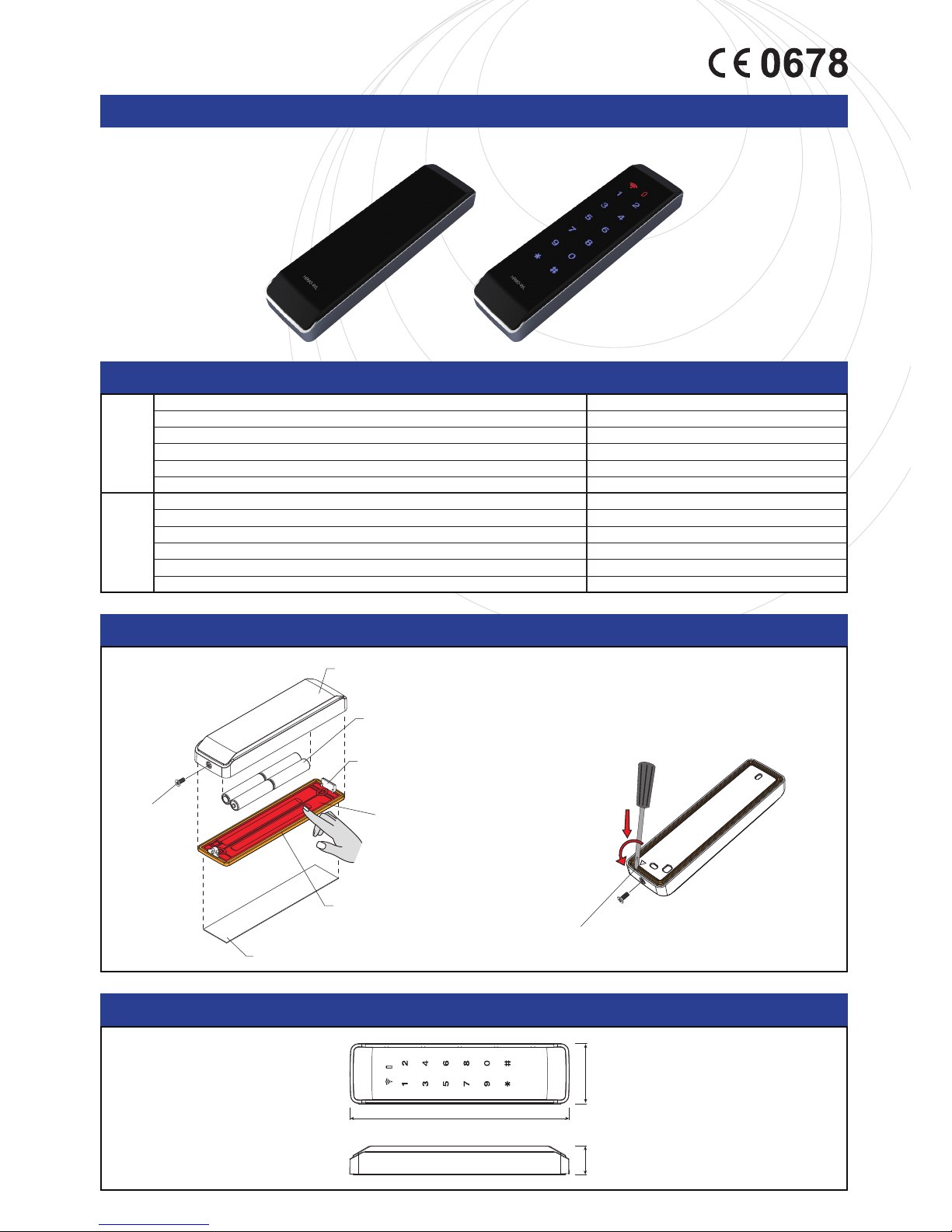
Unfasten the screw bolt,
and use a flat blade (⊖)screwdriver
to disassemble it,
as shown in the figure below.
Water proof pad (Silicone rubber)
Between outside gaps
3M double sided tape
Water proof pad (Silicone rubber)
Upper case
Battery
Screw bolt for
disassembling
/assembling
Lower case
(When assembling the product,
the water proof pad should not be twisted)
<Precaution for Installation>
Please make sure that you
press firmly down the red
plate after attaching the lower case.
Disassembling the upper case
HOTRON LTD.
unit : m/m
20
41
150
Wireless Digital Door Key main body
Wireless receiver (HR80-RX)
Wireless remote control (FT-240) (optional)
3M double-sided adhesive tape
1
1
1
1
Battery
4 X 1.5V AAA size
User’s Manual
1 copy
Transmission frequency
Battery
Operating temperature
The number of programmable personal entry codes (passwords)
FM 433.92MHz
4 X 1.5V AAA size
-20℃~50
℃
20
Dimensions (HR80-WL) 150×41×20mm
International Protection IP54 (water proof)
CompositionSpecification
DIMENSION
Page 2
26 Dublin Street, Carlow, Ireland. Te l: +353 (0)59 914 0345 Fax: +353 (0)59 914 0543 Email: [email protected] Web: www.hotron.com
Hotron Ltd.
HR80-WL Setup Instructions
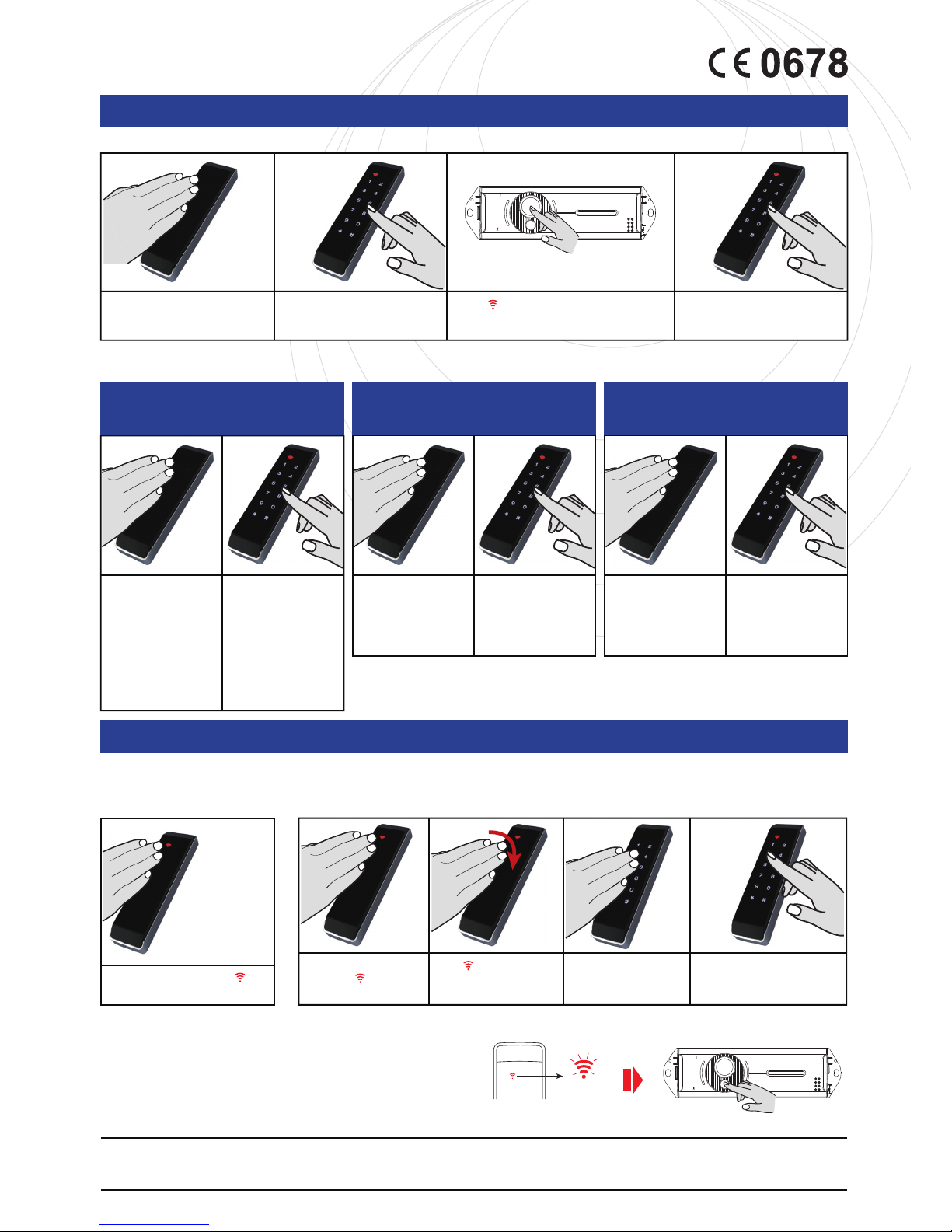
Touch the middle of the key pad.
HR80-WL
The HR80 will begin operating on the default setting which is (0) or Digital Keypad Mode.
Key in the following digits 1,2,3,4
1,2,3,4 #1#1
While on the wireless door key (HR80-WL) is
blinking, press and hold the Register Button on the
wireles receiver (HR80-RX) for 5 seconds.
Note : Once the keycode password is saved, test by
entering the saved keycode and then press the # key.
The red transmit icon on the HR80-WL should
be displayed showing it is operating correctly.
*
(End)
Note : Upon initially pairing the HR80-WL, it is already
operating as function (0) Digital Keypad mode.
1. Swap from Function (0) Digital
Key Pad to function (1) Digital
Push Pad.
2. Swap from Function (1) Digital Touch Pad back to function (0)Digital Key Pad.
3. Deleting a Password
4. Clear All Passwords
Touch the key pad, the indicator will
appear and the door key will be operating.
Touch the middle of the key pad,
the indicator will appear
for about 1 second.
After disappears, tap
HR80-WL several time within
0.5 seconds.
The entire numeric and
symbol keys will be displayed.
Key in your keycode password
followed by the keys 9
*
STEP 1
Pairing your HR80-WL Wireless Door Key with the Receiver (HR80-RX)
ADDITIONAL INSTRUCTIONS
Key in 4 digit Master Code twice #8#(then 4 digit keycode you want
to delete) # * (ON THE HR80-WL).
**Note** The password must be deleted from the HR80-RX receiver also.
Key in 4 digit Master Code twice #1#(then 4 digit keycode you want
to delete)
*
with blinking red icon on the HR80-WL, press and hold the
Delete Button on the wireless receiver (HR80-RX) for 2 seconds.
Wireless Receiver (HR80-RX)Wireless door key (HR80-WL)
Key in 4 digit Master Code twice #7#
5. Restore factory settings
Key in your 4 digit Master Code twice * #. Once completed, your 4 digit Master Code is
deleted. To set a new Master Code, repeat step 2 above.
Key in the
following
digits (Enter
your saved 4
digit keycode)
followed by the
keys 9
*
, Digital
Touch Pad will
be activated.
Press and hold the Delete button for 2 seconds.
Blinking
HR80-RX
Register (5sec
)
Mode2
Mode1
Output
AC/DC 12V~30V / Power
Delete (2sec
)
HR80-RX
Register (5sec
)
Mode2
Mode1
Output
AC/DC 12V~30V / Power
Delete (2sec
)
wireless receiver(HR80-RX)
STEP 2
Set a new 4 digit Master Code
for main menu access
Touch the middle of the
key pad.
STEP 4
Select your required function,
function (0) Digital Key Pad or
function (1) Digital Push Pad.
Touch the middle of the
key pad.
Key in your 4 digital
Master Code twice, then
press #3# (insert 1 or 0) #
*
STEP 3
Set a Keycode Password
Key in your 4 digital
Master Code twice,
then press #2# (insert 4 digit
keycode password) #
*
Touch the middle of the
key pad.
Key in the following digits if
setting a master code for the
first time. 1,2,3,4 1,2,3,4
#*## 1,2,3,4# (insert new
master code) #
If changing a previous installed
master code, perform the
sequence above and replace
the default digits 1,2,3,4 with
the current master code.
Note : If you want to transmit the signal again from the HR80-WL to start the pairing process again, simply press 1.
4 digit Master Code allows access to settings menu (only 1 code). 4 digit keycode opens the door(up to 20 codes).
 Loading...