

Page 1

Instructions for Installation and Use
7kg Washing Machine
Ultima LCD
To the Installer:
Before installation, fill in the product details on the back cover of this
book. The information can be found on the rating plate.
To the User:
You must read these instructions prior to installing and using the
appliance and then retain them for future reference.
Page 2
GB
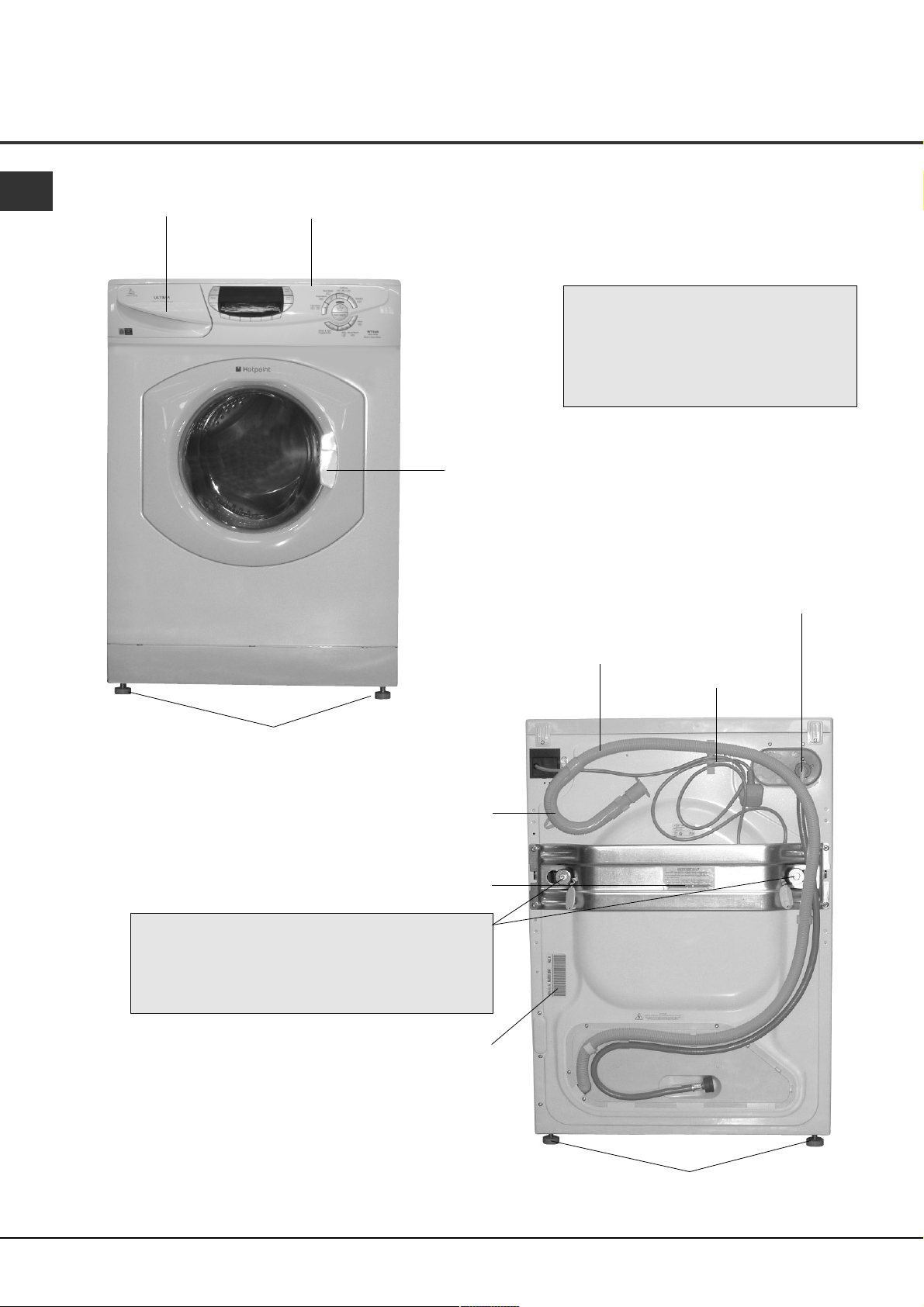
Description
Dispenser drawer
Control panel
●
Varies by Model)
(
●
Interlocking door and
release lever.
Drainage hose
Please record the Model number and
Serial number of your machine on the
back cover of this book for future
reference.
- The Serial number can be found on
the inside door trim.
Cold water inlet point
and attached fill hose
(blue connector)
Mains cable
Front adjustable feet
Hooked end support
Plumbing indicator line
TWO transit fixings.
Comprising of: two bolts, two washers,
two rubber grommets and two nylon spacers
! BOTH transit fixings must be removed BEFORE
you use your machine (
sseeee ppaaggee 55
Rating plate
).
Back feet
2
Page 3

Contents
WASHING MACHINE
GB
Description, 2
Installation, 4-7
Unpacking
Remove the transit fixings
Location
Levelling
Water connection
Drainage connection
Electrical connection
Before you start using your machine
Control Panel Features, 8
Programmes and Option Modifiers, 9-13
Starting a programme
Programme table
Special features
Option modifiers
Automatic features
Detergents, 14
Detergent dispenser
Washcare tips
Description
Contents
Control Panel
FeaturesInstallation
Programmes
and Option
Modifiers
Care and Maintenance, 15
Cleaning your machine
Fuses
Changing the plug
Precautions and Advice, 16-17
General safety
Saving energy and respecting the environment
Disposal
Safety advice
Technical details chart
Something Wrong? - Troubleshooting, 18-19
Service, 20
Before calling for assistance
Spare parts
Key Contacts
! Keep this instruction book on hand in order to refer to it when necessary. Take it with you when you move,
and should you sell this appliance or pass it on to another party, make sure that this booklet is supplied
along with the appliance so that the new owner may be informed about warnings and suggestions on how
the machine works.
and Laundry
Detergents
Maintenance
Care and
Precautions
and Advice
Troubleshooting Service
Something
Wrong? -
3
Page 4
Installation
GB
! Read these instructions carefully: the following
pages contain important information on installation
and suggestions on how the appliance works.
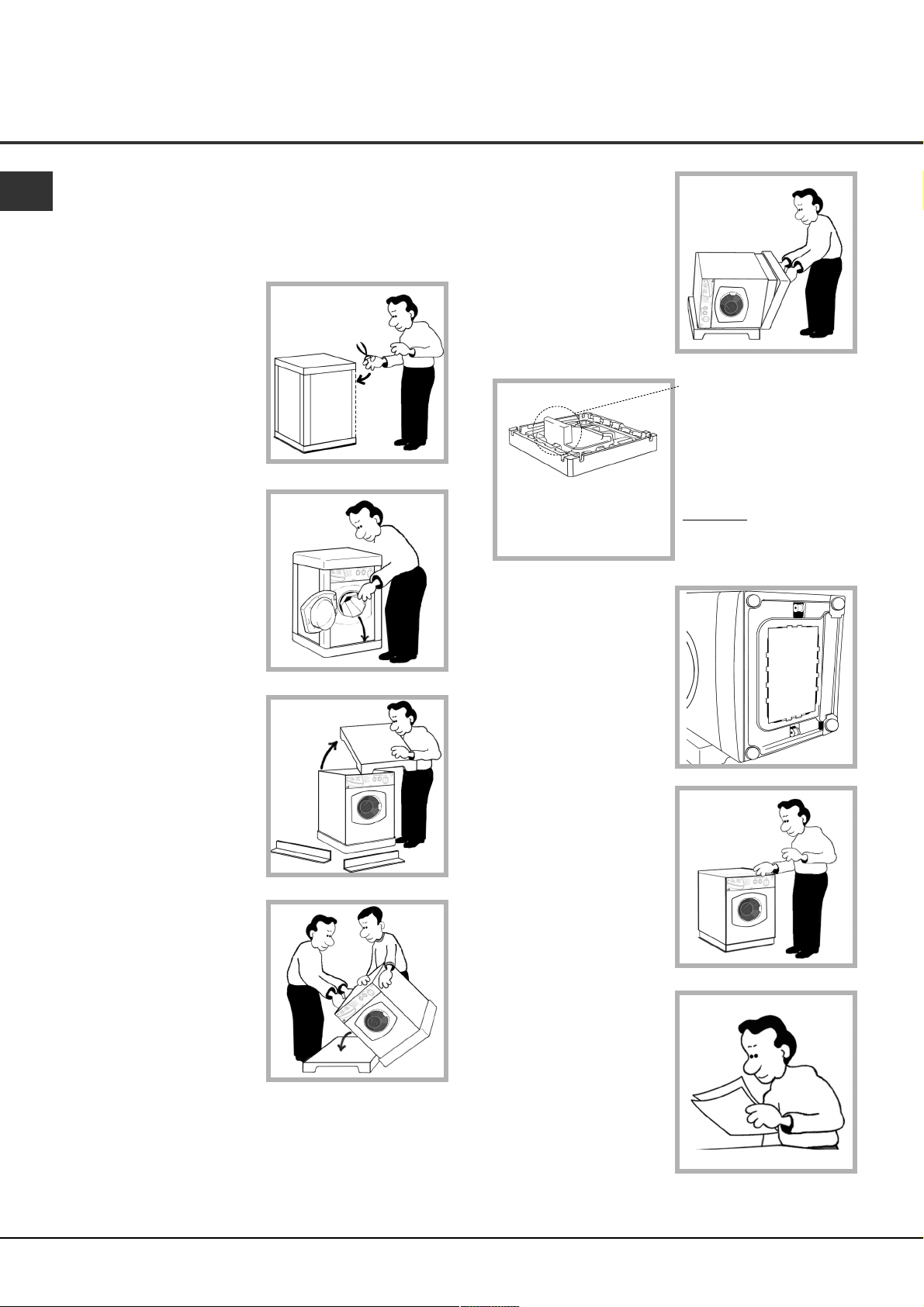
Unpacking
1. Using scissors, cut
carefully along one corner
post to remove the film.
2. Open the door and check
inside the drum.
Remove the transit tube (if
applicable - not all models).
! Retain all packaging
material until installation
is complete.
3. Lift off the polystyrene
top cap and remove the
four corner posts.
5. Remove the
polystyrene base.
! IMPORTANT check
when unpacking your
machine:
6. Cut out the perforated
shape in the transit tube
you removed from the drum
(if applicable - see Step 2).
Follow instructions listed on
the cut out to fit it to the
base of the machine. When
fitted this panel aids noise
reduction.
! This is a part of the
polystyrene base and
should have stayed intact
when you removed the
base.
! If it has broken off and
is still in the machine...
ve it... while the
remo
machine is still laying on
its side on the top cap.
4. Carefully lay the left
side of the machine down
onto the top cap.
! We recommend that a
second person helps to raise
and lower the machine.
7. Stand the machine
upright.
! We recommend that a
second person helps to raise
and lower the machine.
! Continue to read the rest
of these instructions
carefully; the following
pages contain important
information on installation
and troubleshooting.
! Protect the environment - please dispose of the
packaging material carefully and considerately.
4
Page 5
Installation
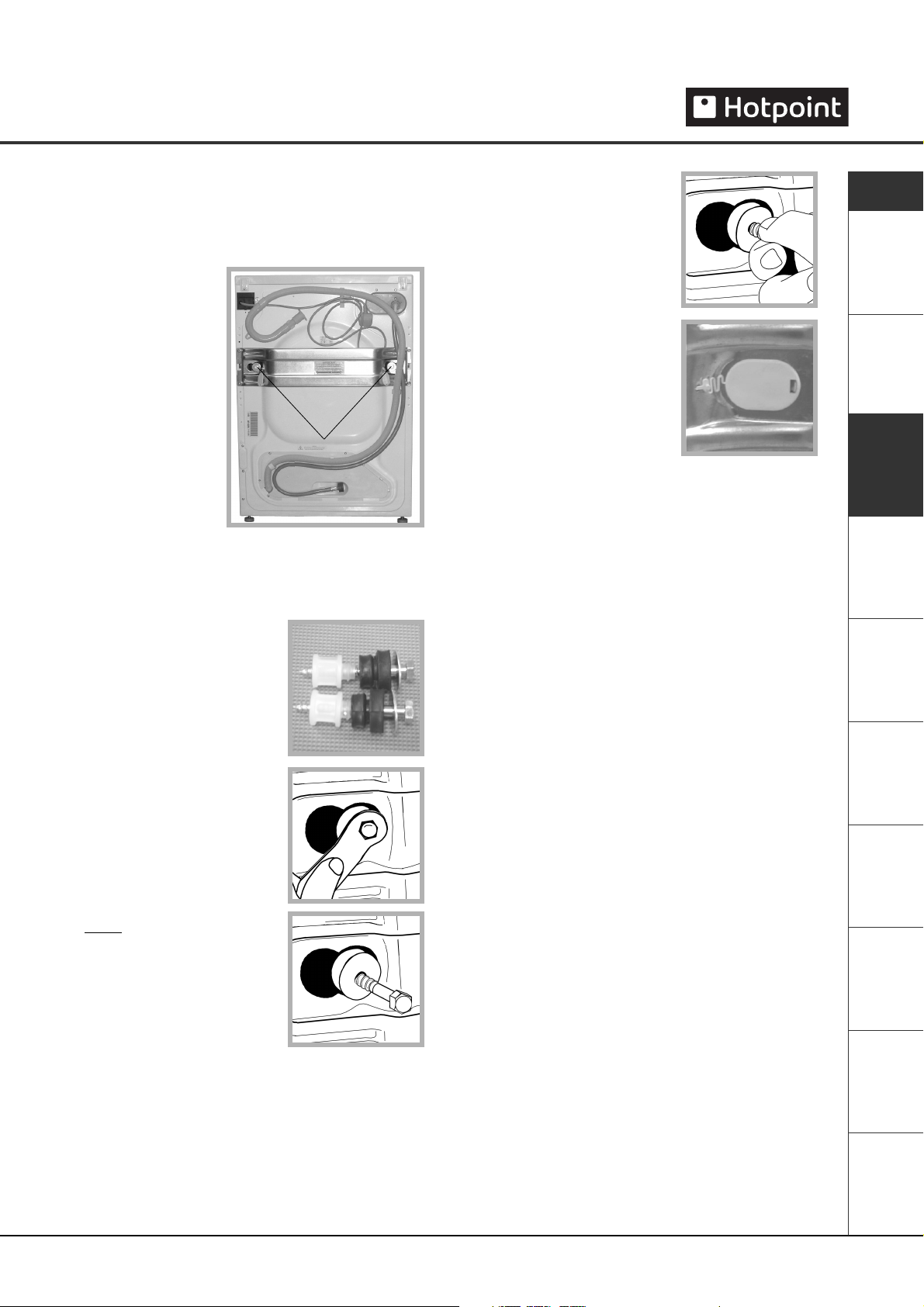
Remove the transit fixings
IMPORTANT: Follow these instructions to remove the
TWO transit fixings (see Description for location).
! Situated one either
side of the rear panel,
BOTH transit bolts
MUST be removed
before use.
Location of transit bolts.
! Failure to do so may cause damage to your machine.
! It is important the TWO transit fixings come out intact.
! Be sure to remove TWO bolts,
TWO washers, TWO rubber
grommets and TWO nylon
spacers (see pic).
1. Unscrew the bolt using a
13mm spanner.
2. STOP
seen.
when 3 threads can be
3. Hold, slide sideways and pull to
remove.
4. For safety, insert one of the
the plastic covers (supplied
with your machine) over the
hole.
! Repeat steps 1 to 4 to remove the second transit bolt.
PPaacckkaaggiinngg mmaatteerriiaallss aarree nnoott cchhiillddrreenn''ss ttooyyss..
!
Location
Where you install your machine will affect its
performance:
! For your safety and to comply with electrical
regulations, seek professional advice if you want to
install your machine in a bath or shower room.
●
Make sure that the electrical socket and water
taps are easily accessible. You should switch off
the machine’s electrical and water supplies
when you are not using it for extended periods.
●
Make sure that you allow enough space for the
machine. Select a space at least 60cm wide,
60cm deep and 85cm high. Also leave enough
space to open the door fully, so that you can load
and unload it easily.
●
Where possible, the machine should be positioned
on a solid floor to minimise vibration.
GB
Description Contents
Installation
Control Panel
Features
Programmes
and Option
Modifiers
and Laundry
Detergents
Maintenance
Care and
Precautions
and Advice
! Take care when you move the machine not to rip any
floor coverings. The weight of the machine may cause
indentations in some floor coverings.
Did you know?...
●
...the transit fixings are fitted to ensure that your machine is undamaged during delivery.
●
...both of the transit fixings MUST BE removed before using the machine, be sure to remove TWO bolts,
TWO washers, TWO rubber grommets and TWO nylon spacers, not doing so will lead to excessive vibration,
movement of the machine and could eventually lead to internal damage.
●
...the majority of problems with noisy machines are due to the transit fixings not being removed.
●
...you will be charged for a service engineers visit if a problem with your machine is caused by incorrect
installation or misuse.
Troubleshooting
Service
5
Something
Wrong? -
Page 6
Installation
GB
Levelling
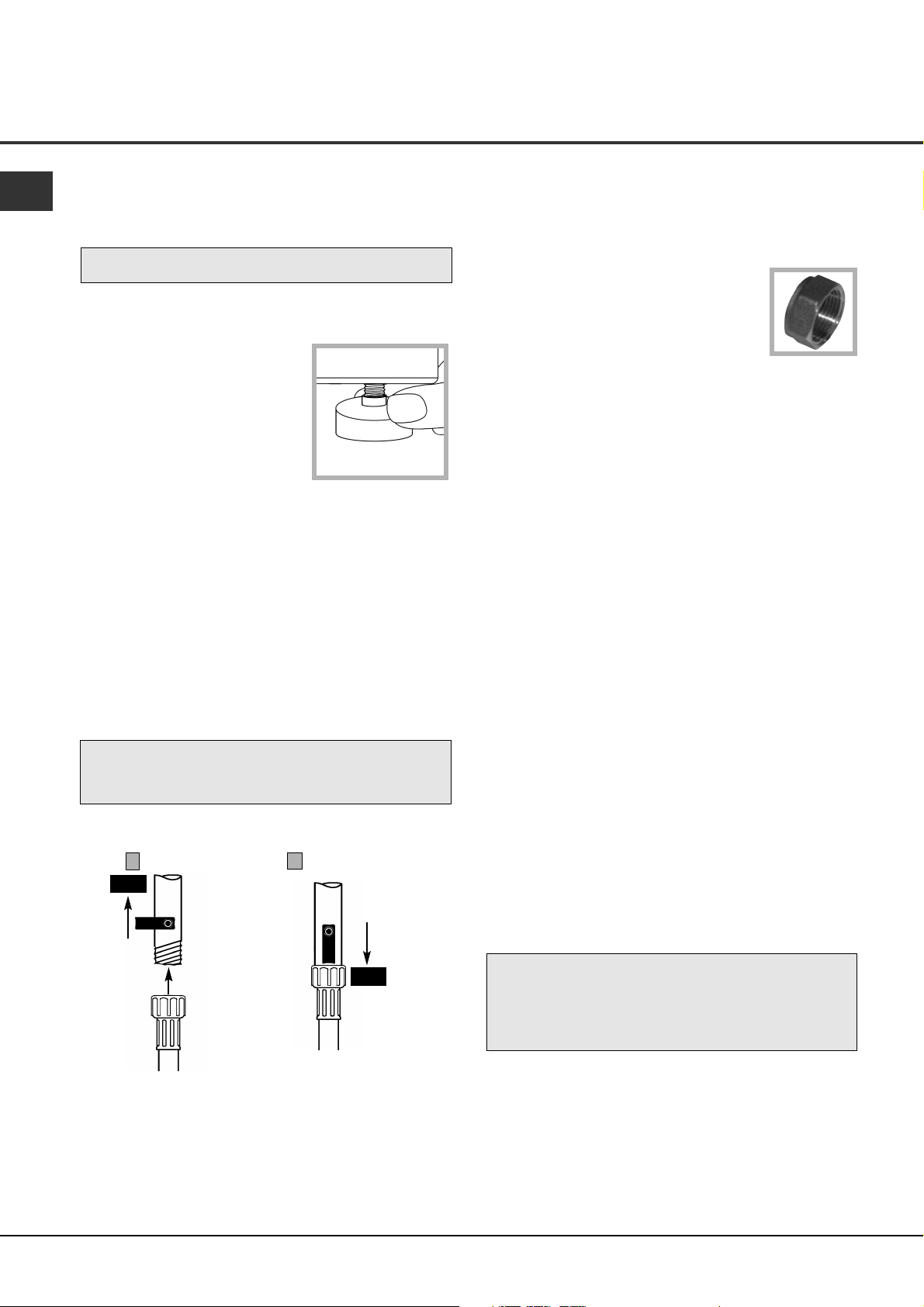
Your machine will be noisy if the two front feet are not
adjusted so that the machine stands firm and level.
! The machine must be levelled from side to side and
from front to back.
1. Move your machine into its final location, taking
care not to trap or kink the hoses.
2. Turn one or both front feet
anti-clockwise by hand until the
feet cannot be turned any more.
When adjusting the feet, use a
spirit level to check the machine
stands level, from side to side
and from front to back.
The spring on each foot will stop
them coming loose.
! If it is placed on a fitted or loose carpet, adjust the
feet in such a way as to allow enough room for
ventilation beneath the machine.
Water Connection
Remember this is a cold fill machine.
! Please use the new hose supplied, fitted to the
machine. Old hoses may cause leaks due to worn out
washers or may be split due to water pressure.
! Before making connections to the cold water supply,
allow the water to run freely from the supply tap until
it is perfectly clear.
Connecting the cold water inlet hose to the COLD
WATER SUPPLY:
1
OFF
COLD
WATER
SUPPLY
Cold water
fill hose (Blue
Connector)
2
COLD
WATER
SUPPLY
ON
1. Screw the cold water fill hose (blue connector) onto
the cold water supply until tight.
2. Turn on the cold water supply and check for leaks,
tighten if necessary.
3
! We recommend fitting a
/4" sealing cap
to the hot water supply tap (if present), to
ensure there are no leaks. Sealing caps
can be purchased from Hotpoint Service
on 08709 077 077 or all good DIY and
Plumbing outlets.
Benefits of cold fill
●
Modern detergents are designed to give the best
cleaning results at low temperatures. Biological
detergents contain enzymes which are active
between 30˚C and 53˚C, giving greater results at
lower temperatures.
●
Cold water relaxes fabrics, whilst hot water can
seal in stains.
●
Improved stain removal with cold water.
●
The most commonly used programme at present is
40˚C, which will take on cold water even if hot and
cold were available.
●
You can heat the water required to finish the wash
cycle, which makes it more economical than taking
water heated in a tank by an immersion heater or
gas boiler.
Hints and tips
! Make sure there are no kinks or bends in the hose.
! The water pressure at the supply tap must be within
the values indicated in the Technical Details table
(see page 17).
! If the water inlet hose is not long enough, you can
purchase an extended hose from Hotpoint Service on
08709 077 077.
! Always use a new inlet hose.
! Check the water inlet hose at least once a year,
replace if cracked as worn hoses could split under
water pressure.
! Turn on the water supply and check that the
connections do not leak. If there is a leak, turn off
the water supply, disconnect the hoses and check
that the sealing washers are in place. Refit the hoses
and turn on the water supply.
Did you know?...
●
...the most common cause of problems with water connection is that the customer has not turned the
supply tap on..
●
...it is very important to ensure that your hoses or cables are not kinked or squashed when the machine
is pushed back into its location, as this can lead to your machine failing to fill or empty the water.
●
...the majority of problems with noisy machines are due to the feet not being adjusted correctly to
level the machine.
6
Page 7

Installation
Drainage Connection
! Although you may need to move the hooked end
support along the grey drainage hose, DO NOT
remove it.
! Whichever drainage method you use, make sure
that the hooked end support is fixed level to, or
above the ‘Plumbing Indicator Line’ (see Description
page 2).
We recommend one of the following:
Standpipe method:
1. Make sure the standpipe
height is a minimum 500mm up
to a maximum 1200mm from the
floor.
2. Insert the drainage hose
approximately 100mm into the
standpipe.
Under sink method:
1. Cut off the blocked end of
the under sink drainage unit, or
remove the blanking plug if fitted.
Hooked end
support
minimum:
500mm
maximum:
1200mm
Electrical connections
Before plugging the appliance into the mains socket,
make sure that:
●
the socket is earthed and in compliance with the
applicable law.
●
the socket is able to sustain the appliances
maximum power load indicated in the Technical
Details table (see page 17).
●
the supply voltage is included within the values
indicated in the Technical Details table (see page 17).
●
the socket is compatible with the machines plug.
If this is not the case, replace the socket or the
plug, ensuring a 13A fuse is fitted.
! The machine should not be installed in an outdoor
environment, not even when the area is sheltered,
because it may be very dangerous to leave it exposed
to rain and thunderstorms.
! When the machine is installed, the mains socket
must be within easy reach and should be connected
to a suitable electrical supply.
! Do not use extensions or multiple sockets.
! The power supply cable must never be bent or
dangerously compressed.
! The power supply cable must only be replaced by an
authorised serviceman.
! The company denies all liability if and when these
standards are not respected.
GB
Description Contents
Installation
Control Panel
Features
Programmes
and Option
Modifiers
2. Fix the hooked end support a
minimum of 800mm from the
floor.
The first wash cycle
Once the appliance has been installed and before you
use it for the first time, run a wash cycle without
3. Use a hose clip (eg. a jubilee
clip) to securely attach the grey
drainage hose end to the under
sink drainage unit.
Hose clip
minimum:
800mm
from floor
detergent and no laundry. This will check your
installation, connections and drainage and will
thoroughly clean the interior before you carry out an
actual wash programme on your laundry.
1
This will take approximately 2
/2 hours to complete.
! Run the 95˚ White Cotton programme 'B', without
laundry and without detergent.
! During this cycle check for any leaks from under the
machine. If present ensure all hoses are securely
tightened.
Did you know?...
●
...it is very important to ensure that your hoses or cables are not kinked or squashed as this can lead
to your machine failing to fill or empty the water.
●
...it is very important to respect the dimensions given within the drainage connection methods (see above).
●
...if using the undersink drainage method remember to cut off the blocked end, or remove the blanking plug.
●
...you will be charged for a service engineers visit if a problem with your machine is caused by incorrect
installation or misuse.
Before you start using your machine
and Laundry
Detergents
Maintenance
Care and
Precautions
and Advice
Troubleshooting
Something
Wrong? -
Service
7
Page 8

Control Panel Features
GB
Ultima
Detergent dispenser
drawer
LCD display
Option
buttons
Status indicator
lights
START/CANCEL
ON/OFF
light
button
ON/OFF Pause
button
Programme selector
buttons
Ultima control panel features
●
Option buttons: To select the options available (see Programme Table and Option Modifiers).
●
LCD display: Shows all information relating to your programme selections: wash temperature and spin speed,
chosen options, along with time remaining. It will also indicate if the door is locked (when ‘keyhole’ symbol lit,
the door cannot be opened) and the stage of the programme the machine has reached (wash, rinse or spin).
●
ON/OFF Pause button: To turn the washing machine on and off. If pressed when the machine is running the
programme will be paused, press again and the machine will restart.
●
ON/OFF light: Shows that the machine is in use or is on ready for you to select a programme.
●
START/CANCEL button: To start the selected programme - or to cancel a running programme, if incorrect
settings were selected.
●
Programme selector buttons: To select the programme you require. Press the button the required number
of times to select the programme you want (For more information please see ‘Starting a wash programme’
section, Programmes and Option Modifiers).
8
Page 9

Starting a Programme
Starting a typical wash programme
1. Switch the machine on by
pressing the ON/OFF Pause
button.
2. Sort your laundry into groups
by washcare labels. Load the
machine.
Close the machine door by
pushing it until it clicks.
3. Add detergent and fabric
conditioner to the dispenser
drawer.
! Refer to detergent
manufacturer’s dosage
instructions.
4. Select the programme:
- press the programme
selector button the required
number of times (see
Programme Table).
! The LCD display will change on
each press to show the
temperature of the selected programme.
5. Select any optional wash
feature(s) (see Option Modifiers)
you require by pressing the
appropriate button(s).
- Indicator lights on the LCD
display will show what you have
chosen.
8. In addition to showing you all
information relating to your
programme selections, the LCD
display will show you the stage
of a programme in progress, the
time remaining until the end of a
programme in hours and minutes (counting down
each minute) and the door lock status.
- If ‘Time Delay’ option was selected the display will
show the time remaining until the start of the wash
programme in hours (counting down each hour).
9. Start the programme by
pressing the START/CANCEL
button for at least 3 seconds
! The ‘Door Locked’ indicator, will light up.
●
To stop/change a programme once the machine
has started:
- Press the START/CANCEL button until a beep is
heard.
- The machine will start to empty.
When the machine has finished emptying:
- Selector the new programme required (you may need
to add detergent).
- Press the START/CANCEL button to start the
new programme.
10. During the programme,
the status indicator lights will
show you what stage in the
programme the machine has
reached (wash, rinse, spin).
11. A short time after the programme has finished
the ‘Door Locked’ indicator will go out and you can
open the machine door.
.
GB
Description Contents
Installation
Control Panel
Features
Programmes
and Option
Modifiers
and Laundry
Detergents
Maintenance
Care and
6. Reduce the wash temperature of your selected
programme:
- Press the Temp button, each press will reduce the
wash temperature by 5˚C.
The new temperature will be shown in the LCD display.
7. Reduce the spin speed of your selected
programme:
- Press the Spin button, each press will reduce the
spin speed.
The new spin speed will be shown in the LCD display.
12. Switch the machine off by pressing the ON/OFF
Pause button.
! Do not allow children to play with the machine or
tamper with the controls.
! Do not overload the machine. This may damage the
laundry and reduce the quality of the wash.
The maximum load is 7kg (Cotton).
! Do not try to open the dispenser drawer during any
programme.
! Do not try to open the machine door when the
‘Door Locked’ indicator is lit.
Precautions
and Advice
Troubleshooting
Something
Wrong? -
Service
9
Page 10

GB
Label Programme Programme Type / Fabric Description Temp Max Approximate Required Soil Level Spin Available Recommended
Selector (˚C) Load Programme Additional Speed Options Detergent
Button (kg) Time (h : min) Option
A P THREE Hygienic For hard wearing heat resistant cotton and linen. 95 7 2 : 30 - Normal Max Pre Wash, Rinse Hold, Mini Load, Ariel Bio Powder /
TIMES White Cotton Extra Rinse, Time Delay, How Dirty Tablets
B 60 Superwash An intensive cleaning programme for heavily soiled 60 6 2 : 00 - Heavy Max Rinse Hold, Extra Rinse, Ariel Colour
ONCE Colourfast Cotton hard wearing fabrics. Time Delay, How Dirty
D 60 Everyday For everyday cleaning needs for colourfast cotton 60 6 1 : 45 - Light to Max Pre Wash, Wash Enhance, Reduce Creases, Ariel Colour
TWICE Colourfast Cotton or linen fabrics. Normal Rinse Hold, Mini Load, Extra Rinse, Time
Delay, How Dirty
D 60 TWICE Standard An intensive cleaning, energy efficient cycle using 60 7 2 : 15 Wash Normal to Max Time Delay Ariel Colour
Colourfast Cotton (IEC 60456*) the maximum load capacity. Enhance Heavy
E 60 Fast Wash A fast cycle for lightly soiled heat resistant cotton 60 5 1 : 00 - Light 1200 Reduce Creases, Rinse Hold, Mini Load, Ariel Colour
ONCE Colourfast Cotton & linen fabrics. Extra Rinse, Time Delay
F 40 Everyday For the everyday cleaning needs of cottons and other 40 6 1 : 30 - Light to Max Pre Wash, Wash Enhance, Reduce Creases, Ariel Colour
ONCE Non Colourfast Cotton hard wearing fabrics. Normal Rinse Hold, Mini Load, Extra Rinse, Time
Delay, How Dirty
F 40 Intensive A less energy efficient intensive 40˚C cycle for more 40 7 1 : 45 Wash Heavy Max Time Delay Ariel Colour
ONCE Non Colourfast Cotton stubborn soiling. Enhance
G 40 - Man-made fibres A cycle designed to wash a variety of man-made fibres 40 3.5 1 : 15 - Normal 800 Pre Wash, Reduce Creases, Rinse Hold, Ariel Colour
ONCE Coloured Synthetics & Acrylics and fibre mixtures. Mini Load, Extra Rinse, Time Delay,
How Dirty
H 30 Cool Wash Delivers the same performance as the intensive 40˚C 30 5 1 : 50 - Normal to Max Pre Wash, Reduce Creases, Rinse Hold, Ariel Colour Liquid
TWICE Non Colourfast Cotton cycle but is more energy efficient at the expense of duration. Heavy Mini Load, Extra Rinse, Time Delay
J 40 - - Machine Washable For machine washable wool and wool mixtures. 40 3 0 : 50 - Normal 800 Wash Enhance, Time Delay Dreft
ONCE Wool
J 40 - - Platinum Woolmark Approved A special cycle for Hand Wash wool that will not shrink 40 1 0 : 50 Wash Normal 1000 Time Delay Dreft
ONCE Handwash Wool your garments exclusively approved by Woolmark. Enhance
K 30 - Machine Washable For silk garments labelled as machine washable. 30 3 0 : 50 - Normal 800 Pre Wash, Rinse Hold, Time Delay Dreft
ONCE Silk
L 30 Fast Wash A very short refresh programme for lightly soiled mixed 30 3 0 : 30 - Light 800 Time Delay Ariel Colour Liquid
TWICE Mixed (not Wool/Silk/Handwash) fabrics.
M H Handwash A gentle cycle for delicate items labelled as Hand Wash 25 4 0 : 55 - Normal 800 Rinse Hold, Time Delay Ariel Colour Liquid
TWICE Delicates (not Wool/Silk) only.
R&S - Rinse & Fast Spin This partial programme completes two full rinses and then - 7 0 : 45 - - Max Reduce Creases, Rinse Hold, Mini Load -
ONCE Cotton a fast spin. Extra Rinse, Time Delay
R&S - Rinse & Slow Spin This partial programme completes two full rinses and then - 3.5 0 : 35 - - 800 Reduce Creases, Rinse Hold, Mini Load, -
TWICE Mixed a slow spin. Extra Rinse, Time Delay
FS - THREE Fast Spin This partial programme completes the maximum speed - 7 0 : 20 - - Max Time Delay -
TIMES Cotton final spin.
SS - FOUR Slow Spin This partial programme completes the intermediate speed - 3.5 0 : 12 - - 800 Time Delay -
TIMES Delicates final spin.
Press START/CANCEL Pump Out This draining programme ensures the appliance is emptied - 7 0 : 02- - - - -
button All of water.
Programme Table
Programme Table *Programme setting for test in accordance with IEC 60456 and EN 60456
1 sheet 400-500g
How much does your laundry weigh?
1 pillow case 150-200g
1 tablecloth 400-500g
1 bathrobe 900-1200g
1 towel 150-250g
4 Items of Sportswear
4 Shirts
4 Blouses
1 Set of Pyjamas
8 Items of Underwear
= 3.5kg
SYNTHETIC
10
2 Bath Towels
1 Hand Towel
6 Shirts
6 Blouses
2 Set of Pyjamas
12 Items of Underwear
2 T-Shirts
= 7kg
COTTON
A typical wash load... Two examples of maximum wash loads for different types of fabric:
Page 11

Option Modifiers and
Special Features
Special features
! Not all special features can be used on all programmes - (see Programme Table for option availability).
●
Fast Wash:
The Fast Wash programmes are designed for lightly soiled loads delivering quick results for smaller loads,
using less energy. For loads with stains or increased soil levels which require deeper cleaning, use the standard
or intensive wash cycles.
●
Cool Wash: 30˚C
A low temperature wash which delivers cleaning results comparable to the intensive 40˚C cotton programme
but at a lower temperature for more colour sensitive garments and using less energy.
●
Handwash:
A gentle action programme for delicate items and items labelled as hand wash only.
Not for Wool or Silk garments (use the special programmes for those materials).
●
Handwash Wool Approved: (M0507)
The wool wash cycle on Hotpoint machines has been tested and approved by the Woolmark Company for washing
garments labelled as ‘hand wash’, provided that the ‘garments’ are washed in accordance to the instructions
issued by the manufacturer of this machine.
GB
Description Contents
Installation
Control Panel
Features
Programmes
and Option
Modifiers
This cycle is selected by pressing the wool programme selector button and selecting the ‘Wash Enhance’
option modifier (see Programme Table and Option Modifiers).
WWee rreeccoommmmeenndd uussiinngg aa wwooooll wwaasshh lliiqquuiidd wwhheenn uussiinngg WWooooll pprrooggrraammmmeess..
!
●
Super Silent Wash:
Using the latest brush-less electric motors and damper technology the noise levels during the washing phase
are significantly lower than a conventional washing machine.
●
LCD Display
Shows all information relating to your programme selections. Also indicating the stage of a programme in
progress.
If ‘Time Delay’ option is selected, the display shows the time remaining until the start of the wash programme
in hours – counting down each hour.
It also displays which option modifiers have been selected, the door lock status and the time to end of the
wash programme in hours and minutes counting down each minute.
! Please note time can go up as well as down depending on load absorbency, load size and water temperature.
Note: We recommend that if you use colour catcher sheets in your appliance that these only be used inside
a wash bag, as otherwise they can affect the performance of your machine.
Did you know?…
Detergents
Maintenance
Care and
Precautions
and Advice
Troubleshooting
Something
Wrong? -
●
… when an option button is selected the corresponding light is illuminated.
●
… if the option selected is incompatible with the programme selected, the button will flash and the option
will not be enabled.
●
… if you set an option that is incompatible with an option selected previously, only the last option selected
will be enabled.
Service
11
Page 12

Option Modifiers and
Special Features
GB
Option modifiers
! Not all options can be used on all programmes - (see Programme Table for option availability).
●
Wash Enhance:
Use this option to select a more intensive wash programme for the cotton 60˚C and cotton 40˚C for more
heavily soiled items. Additionally, use this option on the machine wash wool programme to select the special
Handwash wool programme for wool items that are not marked as machine washable.
This cycle has been approved by Woolmark for the Platinum Care award.
●
Reduced Creases:
Selecting this option will run the wash programme with a more gentle action and lower spin speed, in addition
to carrying out an additional rinse to ensure your laundry has fewer creases and will require less ironing.
●
Rinse Hold:
Selecting this option will pause the cycle in the final rinse with the fabric conditioner keeping the laundry
fresh until you are ready to complete the programme. The Rinse Hold light will flash to indicate the cycle is
paused. The machine will stay in this state, tumbling the load occasionally until either the Start/Cancel button
is pressed or the Rinse Hold button is pressed again to continue the cycle.
●
Mini Load:
Use this option for smaller loads less than the capacity listed for the material and programme type (see
Programmes Table). This option reduces water consumption and washing time, saving energy when washing
smaller loads.
●
Extra Rinse:
Use this option for people with sensitive skin, to add a rinse to your selected wash programme. Press the ‘Rinse’
option button once and ‘Extra Rinse’ will illuminate on the LCD display. Press the ‘Rinse’ button again to cancel.
●
Time Delay:
Use this option to delay the programme start by up to 24 hours. The LCD display will show the delay chosen.
Each press of the button increases the Time Delay in increments of 1 hour. If you press the button again
after 24 shows in the display the machine will reset the Time Delay and show ‘OFF’ in the display, pressing the
button after this will start the Time Delay selection from 1 hour. Once the countdown reaches zero the
programme will start.
●
Variable Temperature:
Use this option to reduce the wash temperature below the maximum for the programme you have chosen.
- each press of the button will reduce the wash temperature by 5˚C. The new wash temperature will be
shown in the LCD display. If you press again after ‘OFF’ has been displayed, the machine will revert to
the original higher temperature.
●
Variable Spin Speed:
Use this option to reduce the spin speed below the maximum for the programme you have chosen.
- each press of the button will reduce the spin speed. The new spin speed will be shown in the LCD display.
If you press again after ‘OFF’ has been displayed, the machine will revert to the original higher spin
speed.
●
Prewash:
Use Prewash to loosen heavy soil deposits on laundry. Selecting this option will run a short 30˚ wash cycle before
the selected main wash programme. Add detergent to both the prewash and main wash compartments of the
dispenser drawer.
- To select press the Prewash option button and the option light will illuminate on the LCD display above the
button.
Press the button for again to cancel, the option light will go out.
●
How Dirty:
Use this option to modify your programme according to the degree of soiling on the laundry to be washed.
You can select either ‘Light’, ‘Normal’ or ‘Super’.
This option is set automatically to ‘Normal’, this will be illuminated on the LCD display.
- Each press of the ‘How Dirty’ option button will scroll through the three options.
The new selection will be shown on the display.
continued...
12
Page 13

Option Modifiers and
Special Features
Option modifiers continued...
●
Stored Programme:
Use this option to store your favourite programme. Only one programme can be stored.
- To store a programme:
Load your machine and add detergent to the dispenser drawer. Select the programme and any options
required. Press the START/CANCEL button and the programme will start. Then press the ‘Stored’
option button twice and that programme will be stored for future use. ‘Saving Favourite’ will illuminate
on the LCD display for 2 seconds after the programme settings have been stored.
- To retrieve and use a stored programme:
Load your machine and add detergent to the dispenser drawer. Press the ‘Stored’ option button, your
favourite programme settings will appear on the LCD display. Press the START/CANCEL button to start
the programme.
- To change a stored programme:
Load your machine and add detergent to the dispenser drawer. Press the ‘Stored’ option button, your
favourite programme settings appear on the LCD display. Select the programme and option selections
for you new requirements, then press the START/CANCEL button to start the programme. Press the
‘Stored’ option button again and the new settings will replace the old. ‘Saving Favourite’ will illuminate
on the LCD display for 2 seconds after the programme settings have been stored.
●
Child Lock:
Select this option to disable all buttons so no programme and option selections can be altered.
Press the Child Lock option button and the option light will illuminate on the LCD display above the button.
Once Child Lock is selected it remains activated even when the machine is switched off. If power is interrupted
at any time pressing any button will reactivate the Child Lock feature. If Child Lock is activated and any
control buttons are pressed the option light will flash: no alterations to the settings will be allowed.
- Press and hold the Child Lock option button for 2 seconds to cancel, the option light will go out.
GB
Description Contents
Installation
Control Panel
Features
Programmes
and Option
Modifiers
Automatic features
Unbalanced load detection:
The machine has an inbuilt feature to prevent it from spinning too fast with an unbalanced load. When an
unbalanced load is detected, the machine will attempt to redistribute the load in order to balance it evenly to
achieve full spin speed.
If this is not possible and an unbalanced load remains the spin speed will be reduced, depending on the amount
of unbalance detected. This is to prevent the machine from damaging itself or its surroundings and to prevent
excessive noise from the machine.
! If the spin result is unsatisfactory following a reduced spin speed attempt to rectify the unbalanced load, then
on completion of the programme the load can be redistributed evenly in the drum by hand. Select a spin cycle.
NNoottee::
Do not attempt to spin heavy or absorbent single items as the machine cannot distribute these evenly.
If you need to wash a single item you will need to add some other items as ballast to allow the machine to distribute
the load evenly throughout the drum.
No water detection:
The machine will automatically detect if it cannot take in water and will notify you by flashing the ‘tap’ icon
and showing ‘H20’ on the LCD display.
If this occurs please check the appliance is plumbed in correctly (see Installation ‘Water connection’).
Energy saving and water levels
Modern machines are designed to be as environmentally friendly as possible.
To achieve this water levels are kept to a minimum to ensure they are economic and use the lowest energy
possible. Unlike older appliances you will not see high water levels in the drum during washing.
and Laundry
Detergents
Maintenance
Care and
Precautions
and Advice
Troubleshooting
Something
Wrong? -
Service
! We recommend always washing as close to a full load as possible (see Programmes Table for the maximum
load size of your selected programme).
13
Page 14

Detergents and Laundry
GB
Detergent dispenser
! Do not put any items into the drawer, other than
detergents designed to be released from the drawer,
as they may cause damage or blockage.
Grate
Pre-wash deter-
gent compartment.
Maximum:
200ml powder
or
100ml liquid
Fabric conditioner compartment.
Maximum: 120ml
Dispensing powder detergent
To achieve the best wash results the manufacturer’s
recommended amount of detergent should be
measured and added to the main detergent
compartment.
Dispensing tablets
Tablets can be dispensed via the machine drum or via
the dispenser drawer.
! Please CHECK the detergent pack for dispensing
instructions.
! Incorrect use can damage your laundry.
Dispensing liquid detergent
We recommend the use of a detergent dosing ball, as
provided by your detergent manufacturer.
Adding fabric conditioner
Pour the recommended amount of fabric conditioner into
the compartment. Do not exceed the maximum fill line.
Pre-Wash
When selecting prewash, add detergent to both the
pre-wash and the main wash compartments.
Drawer release catch
Main wash detergent
compartment.
Maximum:
400ml powder
or
200ml liquid
Washcare Tips
●
DO NOT overload or underload the machine (see
the Programme Table for maximum load), in addition
to reducing the quality of the wash this may also
damage your laundry and the machine, whilst
causing the machine to become unstable and noisy.
●
We strongly recommend that you DO NOT wash
underwired bras in this machine. Should the
wires become detached it could cause damage to
your laundry and the machine. If the washcare
label states that the bra is machine washable,
then we advise placing it in a sealed pillow case or
a similar washbag.
Remember you will be charged for a service
!
engineers visit resulting from a detached bra wire.
●
Do not use the machine if the item to be washed
does not have a wash label.
Before washing laundry we recommend you:
●
Pre-treat awkward stains with washable treatments.
Do not wash any items that have previously been
treated with solvents.
●
Close zips, fasten belts, tie strings and close
press studs to prevent tangling.
●
Empty all objects from pockets as they may
damage the laundry and the machine.
Remember you will be charged for a service
!
engineers visit to rectify malfunction resulting
from objects such as coins, pens, hair grips etc.
falling from pockets.
●
Limit the size of absorbent loads ie. towels, to half
loads to give good washing and rinsing results.
●
Place small items in a wash bag.
●
Always follow the care label on items when
choosing the wash programme.
●
Wash non-colourfast items or really dirty items
separately as they may affect other laundry.
Did you know that with Hotpoint and Ariel you’ll get the best washing results?
Certain laundry products work better in some machines than others. At Hotpoint we know this is true because
we’ve done the research to prove it. We used real everyday clothes and ran tests to find out which washing powder
works best with Hotpoint. The results proved that Hotpoint and Ariel produces the best washing results on all your
clothes.
Ariel can meet all your laundry needs. It is available as a biological powder for everyday wash loads. Colour powder to
keep your clothes staying brighter for longer and a Non-Bio powder for when you need brilliant cleaning but are
concerned about sensitive skin.
Did you know?...
●
...undissolved detergent left in the drawer or on clothes can be due to incorrect dosing or using the incorrect
dispensing method - CHECK the detergent manufacturers instructions on the pack for dispensing and
dosage advice.
14
Page 15

Care and maintenance
Cleaning
! Unplug your machine when cleaning it and before all
maintenance operations.
! Do not clean any part of the machine with abrasive
cleaners, scouring agents, acids, any bleach or metal
polish as they may cause damage.
●
Use a damp cloth or silicon polish to clean the
exterior surfaces of the appliance.
●
Clean the internal surface of the door bowl regularly
with a soft cloth. A build up of soap powder and
water hardness residue may result in water leaking
from the door.
●
Always leave the appliance door ajar to prevent
unpleasant odours from forming.
Cleaning the dispenser drawer and compartments
It is advisable to clean the dispenser drawer regularly.
! Do not try to clean any part of the dispenser drawer
while the machine is running.
1. Pull out the drawer until it
reaches its stop.
2. Press the drawer release
button to remove the dispenser
drawer (see pic).
3. Clean and dry the dispenser
drawer, syphons, grate and
fabric conditioner exit channel
(A), ensuring any build up of
detergent and fabric conditioner
is fully removed.
! Failure to do so may lead to
the machine leaking from the
dispenser drawer.
Also regularly clean the
outlet pipe area (B).
Moulded plug
! The plug must not be used without the fuse cover in place.
If a replacement fuse holder/cover is
required, it must be of the same colour
coding or wording as shown on the base
of the plug.
Replacements are available from authorised dealers.
Changing the plug
The wires in the power cord are coloured in accordance
with the following:
Green and Yellow
(Earth) wire to terminal
marked ‘E’, symbol ,
or coloured green and
yellow.
Blue (Neutral) wire to
terminal marked ‘N’ or
coloured black.
Cord clamp
! If the plug being replaced is a non-rewirable type,
then the cut-off plug must be disposed of safely.
DO NOT leave it where it can be inserted into a socket
and create a shock hazard.
! The power supply cord should be checked periodically
and replaced by a cord specially prepared for this
machine and fitted only by authorised technicians (see
Service). Replacement power cords can be purchased,
at an extra cost from our Genuine Parts and
Accessories department or authorised dealers.
! The manufacturer denies any responsibility should any
of these rules not be followed.
! If in doubt about any of the above consult a
qualified electrician.
A
13A ASTA approved
fuse to BS1362.
Brown (Live) wire to
terminal marked ‘L’ or
coloured red.
GB
Description Contents
Installation
Control Panel
Features
Programmes
and Option
Modifiers
and Laundry
Detergents
Maintenance
Care and
4. Relocate the dispenser drawer
and push it firmly back into place.
! We recommend a maintenance wash 2 or 3 times a
year, to avoid a build up of greasy deposits and water
hardness residue. Run the 95˚ White Cotton programme,
with the normal amount of detergent but no
laundry.
Precautions
and Advice
B
Troubleshooting
Something
Wrong? -
Service
15
Page 16

GB
Precautions and advice
●
General safety
●
Unplug your appliance when cleaning it and during
all maintenance operations.
●
This machine should only be used by adults and in
accordance with the instructions.
●
Do not overload or underload the machine.
In
addition to reducing the quality of the wash,
this may also damage your laundry and the machine.
●
Do not pull on the power supply cable to unplug
the appliance from the electricity socket. Pull the
plug out.
●
Do not open the machine door while the
appliance is in operation.
●
Do not open the detergent dispenser while the
appliance is in operation.
●
Never force the machine door: this could damage
the safety lock mechanism designed to prevent
any accidental opening.
●
Turn off the water tap after every wash. This will
limit the wear of your appliances water system
and also prevent leaks.
●
In the event of a malfunction, do not under any
circumstances touch internal parts in order to
attempt repairs.
●
Always keep children well away from the appliance
while in operation. Do not let children play with the
machine or tamper with the controls.
●
The appliance door tends to get quite hot during
the cycle.
●
Should it have to be moved, proceed with the
help of two or three people and handle it with the
utmost care. Never try to do this alone, because
the appliance is very heavy.
●
Before loading your laundry into the machine,
make sure the drum is empty.
●
Check the water fill hose at least once a year. If
you see any cracks, replace it immediately:
during the wash cycles, high water pressure could
cause a cracked hose to split open.
! Never use hoses that have already been used.
●
In the unlikely event of something not working see the Troubleshooting section.
Saving energy and respecting the
environment
Environmentally-friendly technology
If you only see a little water through your appliance
door, this is because thanks to the latest Hotpoint
technology, your machine only needs less than half
the amount of water to get the best results: an
objective reached to respect the environment.
Saving on detergent, water, energy and time
●
To avoid wasting resources, the machine should
be used with a full load. A full load instead of two
half loads allows you to save up to 50% on energy.
The pre-wash cycle is only necessary on extremely
soiled garments. Avoiding it will save on detergent,
time, water and between 5 and 15% energy.
●
Treating stains with a stain remover or leaving
them to soak before washing will cut down the
need to wash them at high temperatures.
A pro gramme at 60˚C instead of 90˚C or one at
40˚C instead of 60˚C will save up to 50% on
energy.
●
Use the correct quantity of detergent, depending
on the water hardness, how soiled the garments
are and the amount of laundry you have, to avoid
wastage and to protect the environment: despite
being biodegradable, detergents do contain
ingredients that alter the natural balance of the
environment. In addition, avoid using fabric
softener as much as possible.
●
If you use your machine between late in the
afternoon and the early hours of the morning, you
will help reduce the electricity board’s peak load.
Recycling and Disposal information
As part of Hotpoint’s continued commitment to
helping the environment, Hotpoint reserve the right
to use quality recycled components to keep down
customer costs and minimise material wastage.
●
Please dispose of packaging and old appliances
carefully.
●
To minimise risk of injury to children, remove the
door and plug - then cut off mains cable,flush with
the appliance. Dispose of these parts separately
to ensure that the appliance can no longer be
plugged into a mains socket, and the door cannot
be locked shut.
Disposal of old electrical appliances
The European Directive 2002/96/EC on Waste
Electrical and Electronic Equipment (WEEE), requires
that old household electrical appliances must not be
disposed of in the normal unsorted municipal waste
stream. Old appliances must be collected separately
in order to optimise the recovery and recycling of the
materials they contain and reduce the impact on
human health and the environment.
Consumers should contact their local authority or
retailer for information concerning the correct
disposal of their old appliance.
The crossed out “wheeled bin” symbol on
the product reminds you of your obligation,
that when you dispose of the appliance it
must be separately collected.
16
Page 17

Precautions and advice
Safety advice
! This machine was designed and built in compliance
with the applicable international safety regulations.
The following information is provided for your safety
and should be read carefully.
●
This machine is designed for domestic use only.
●
Before using your machine make sure that the TWO
transit bolts, TWO rubber grommets and TWO
spacers have been removed (see page 5).
●
Any electrical work necessary to install this
machine should be carried out by a qualified
electrician.
●
Do not plug your machine into a socket when your
hands are wet.
●
Do not try to modify this machine in any way.
●
Do not let children play with the machine or with its
controls.
●
Do not lean on the door or use the door to lift or
move the machine.
●
Do not wash garments that have previously been
treated with solvents.
●
Do not connect the machine to a single outlet
instantaneous water heater.
●
Do not connect the machine directly to a watersoftening unit; use the recommended amount of
detergent for the water hardness in your area.
●
Do not overload or underload the machine. In
addition to reducing the quality of the wash, this
may also damage your laundry and the machine.
●
Do not pull on the power supply cable to unplug
the appliance from the electricity socket. Pull the
plug out.
●
Do not touch the drain water as it could reach very
high temperatures (over sink drainage).
●
Never force the machine door; this could damage
the safety lock mechanism design to prevent any
accidental opening.
●
In the event of a malfunction, do not under any
circumstances touch internal parts in order to
attempt repairs.
●
Should it have to be moved, proceed with the help
of two or three people and handle it with the
utmost care. Never try to do this alone, because
the appliance is very heavy.
●
Before loading your laundry into the machine, make
sure the drum is empty.
Technical Details Chart
Models WT965, WT960, WT940
59.5cm wide
Dimensions 85cm high
60cm deep
Capacity From 1 to 7kg
Electric Voltage 220/240 50Hz
connections Max absorbed power 1700W-2100W
Water Maximum pressure 1 MPa (10 bar)
connections Minimum pressure 0.05 MPa (0.5 bar)
Drum capacity 58 litres
Spin Speed up to 1600 rpm - WT965, WT960
up to 1400 rpm - WT940
Control 60˚C cotton
programme with Wash Enhance
according to - run with a 7kg load
IEC60456
This appliance is compliant with the
following European Community
Directives:
- 73/23/EEC & 93/68/EEC
(Low Voltage) and subsequent amendments.
- 89/336/EEC,92/31/EEC & 93/68/EEC
(Electromagnetic Compatibility) and subsequent
amendments.
GB
Description Contents
Installation
Control Panel
Features
Programmes
and Option
Modifiers
and Laundry
Detergents
Maintenance
Care and
Precautions
and Advice
Troubleshooting
Something
Wrong? -
17
Service
Page 18

Something Wrong? - Troubleshooting
If your machine seems not to be working, GO through the following troubleshooting suggestions BEFORE you call your
Service Centre (see Service).
GB
Section 1: All Ultima (LCD) Models - General Troubleshooting
Problem:
The machine won’t start:
(Nothing lights up on the
control panel).
Lights/Display illuminate on
the control panel but the
wash cycle will not start.
The machine fails to fill with
water.
Possible causes / Solution:
●
Check the appliance is fully plugged into the socket and switched on.
●
Is the socket ok? Try another appliance in the socket to check.
●
Is the fuse in the plug ok? If not, replace it, fuse must be 13 Amps (see Care and Maintenance).
●
There has been a power failure - Check another electrical device in your home to see if this is
the case.
●
The ON/OFF Pause button has not been pressed.
●
The Start/Cancel button has not been pressed, for at least 3 seconds - Press and hold the
START/CANCEL button until the machine starts to operate.
●
The appliance door is not shut properly - Close the door firmly and try the machine again.
●
The START/CANCEL button has not been pressed, for at least 3 seconds - Press and hold the
START/CANCEL button until the machine starts to operate.
●
The cold water supply tap is not turned on - (H20 is displayed).
●
Have you selected ‘Time Delay’ (see
●
The START/CANCEL button has not been pressed, for at least 3 seconds.
- Press and hold the START/CANCEL button until the machine starts to operate.
●
Is the ‘tap’ icon flashing and is H20 showing on the display? This indicates the machine has
failed to take in water (see Installation) - Check that:
- The cold water inlet hose is connected to the tap.
- The hose is not kinked.
- The cold water supply tap is turned on - Ensure it is fully turned on.
- The water pressure is sufficient (see
- The inlet filter is not blocked... Turn off the water, unscrew the fill hose at the back of
the appliance then remove and clean the filter.
Note: Modern machines use less water and the water taken into the machine is automatically
adjusted depending on the load in the drum. For this reason, you may not always be able to
see water in the drum: But if the load is ‘wet’ and the machine completes the wash cycle
then the amount of water into the machine is sufficient.
Programmes and Option Modifiers
Technical Details Chart
).
).
The machine does not drain
or spin (during the first wash
cycle, after installation).
The machine does not drain
or spin (although it has
drained/spun during
previous wash cycles).
The programme takes a long
time.
I cannot read the information
on the LCD Display.
There is too much foam in the
drum during the wash cycle.
●
Has the drain hose been installed correctly (see Installation).
●
Are the drain hose, standpipe or undersink connections blocked?
Note: If the drain hose is connected to an undersink ‘U’ trap - Check that the sink trap
blanking plug was removed before the drain hose was connected. This is the most common
installation fault.
●
Is the drain hose kinked or squashed - Check the hose at the back of the machine.
●
Carry out the additional checks listed below...
●
There has been an unbalanced load in the drum and the machine could not spin - Try the
machine again with a different wash load (see ‘ Automatic Features’, Programmes and Option
modifiers).
●
Has the ‘Rinse Hold’ option been selected? ‘Rinse Hold’ indicator light will flash.
- To complete the paused programme press either the START/CANCEL button or the
Rinse Hold button (see Programmes and Option modifiers).
●
If the machine completes the wash cycle, it is unlikely there is a problem.
●
Check the programme table to be sure the programme you have selected is that most suited for
your needs - The table also gives an indication of approximate programme times you can expect.
Note: The programme times listed in the Programme Table are approximate.
(see
Options selected can affect the programme times
Programmes and Option Modifiers
The wash load, temperature and pressure of the incoming water supply can cause some
variation in the programme times.
●
If the LCD display is not showing the correct information:
- Switch off at the electric socket, wait 5 seconds then switch back on.
●
Check that the detergent you have used is suitable for ‘Automatic’ machines.
●
Refer to the detergent manufacturers recommendations to ensure that you have not used
too much detergent.
●
If you have used the wrong type of detergent (or too much), select a Rinse programme to
flush out your machine.
).
Steam is coming from the
dispenser drawer.
18
●
This is not a fault, we have designed the machine to release steam from the drawers during
hot washes.
Page 19

Something Wrong? - Troubleshooting
The machine makes a noise or
vibrates too much during the
spin cycle.
The machine leaks:
Not all the detergent has
been flushed out of the
dispenser drawer.
●
The transit fixings may not have been removed correctly (see Installation ‘Remove the
transit fixings’) - Failure to remove all the parts of the transit fixings will cause the
machine to vibrate excessively during spin.
Note: There are TWO transit fixings that need to be removed - two bolts, two washers,
two rubber grommets and two nylon spacers.
●
The machine is not level (see Installation) - Adjust the feet so that the machine stands firm on the
floor (ie, it does not rock) and ensure the machine is level from front to back and from side to side.
●
The machine is closed in, between furniture cabinets and the wall (see Installation).
●
Perhaps the machine was attempting to spin an unbalanced load - Try the machine again
with a different was load.
●
When you sort your laundry into wash groups, check all loose items, such as coins are
removed from the laundry. Check the drum at the end of each cycle and remove any loose
items (coins etc).
Note: ‘Super Silent’ refers to wash sound level only - there will always be some motor
and drum noise during spin.
... from behind or underneath:
●
Check each end of the cold water inlet hose, ensuring connections at both ends are tight
and not leaking (see
●
Depending on the installation method used (see
Installation
).
Installation
). Check:
- that the drain hose is firmly secured to the undersink ‘U’ trap, or...
- that the drain hose is positioned correctly into the standpipe.
●
Check that your water pressure is within limits (see
Technical Details Chart
).
- If too high, try turning the cold water supply tap down slightly and try the machine
again (see
Installation
).
... from the dispenser drawer (water leaking down the front of the machine):
●
Check that the detergent dispenser is not blocked or obstructed.
- Remove the drawer from the machine and clean it (see
●
Check the cold water supply tap is turned on sufficiently (see
●
Is your water pressure within limits (see
Technical Details Chart
Care and Maintenance
Installation
).
), if it is too low it may
not be sufficient to flush all the detergent out of the drawer.
●
Check that the detergent dispenser is not blocked or obstructed.
- Remove the drawer from the machine and clean it (see
Care and Maintenance
Note: Are you using detergent tablets? - If yes, please check the detergent manufacturers
instructions on the side of the detergent box, not all detergent tablets are suitable for
use in the dispenser drawer some need to be placed into the machine drum with
the wash load for them to dissolve correctly.
GB
Description Contents
Installation
Control Panel
Features
).
Programmes
and Option
Modifiers
).
and Laundry
Detergents
●
The dispenser drawer will
not close properly or is
Check that the detergent dispenser is not blocked or obstructed.
- Remove the drawer from the machine and clean it (see
Care and Maintenance
).
collecting water.
Section 2: Specific Error Messages on the LCD Display
Your machine carries out automatic checks at various stages of the wash cycles - Error messages will be displayed on the
LCD display to indicate there is something wrong.
The error message displayed is dependent upon which machine you have:
Error message:
‘tap’ icon flashing and ‘H20’
on the display.
‘door’ on the LCD display.
‘F00’ on the LCD display.
‘child lock’ icon is illuminated
(machine beeps each time a
button is pressed).
This indicates that the machine has failed to take in water (see Installation).
Check that:
●
that the cold water inlet hose is connected to the cold water supply tap.
●
the cold water inlet hose is not kinked.
●
the cold water supply tap is turned on - Ensure it is fully turned on.
●
the water pressure is sufficient (see
Technical Details Chart
).
This indicates that the door is not closed properly.
●
Close the door firmly and try the machine again.
This indicates that there is a fault.
●
Where 00 is the number - please contact Service and quote the number (see
This indicates that the ‘Child Lock’ feature has been activated.
●
To deactivate Child Lock, press and hold the Child Lock option button for at least 2
seconds. You will hear a beep and the ‘child lock’ icon will go out.
Service
Maintenance
Care and
Precautions
and Advice
Troubleshooting
Something
Wrong? -
).
Service
19
Page 20

Service
195057719.00
06/2006 - SIMLEX . Four Ashes, Wolverhampton
GB
Before calling the Service Centre:
●
Use the troubleshooting guide to see if you can
solve the problem yourself (see Troubleshooting).
●
If not, turn off the machine and call the Service
Centre closest to you.
! You will be charged for a service engineers visit if a
problem with your machine is caused by incorrect
installation or misuse.
Key Contacts
After Sales Service
Over 1100 trained specialists, directly employed by us, ensure that you can have
complete confidence in both the appliances and services we offer.
Repair Service and Information Help Desk
UK: 08709 066 066
Monday to Friday, 8am to 7.30pm
Saturday, 8.30am to 5.30pm
Sunday, 9.30am to 3.30pm
www.hotpointservice.co.uk
Spare Parts
This is a complex machine. Repairing it yourself or
having a non-authorised person try to repair it could
cause harm to one or more persons, could damage
the machine and could invalidate the spare parts
warranty.
Call an authorised technician if you experience problems
while using the machine.
The spare parts have been designed exclusively for
this appliance and not for other uses.
Republic of Ireland: 0818 313 413
Note: Our operators will require the following information:
Model number
Serial number
Date of purchase
Model number and Serial number can be found on the inside of the door.
Extended Warranties
UK: 08709 088 088
Monday to Sunday, 8am to 8pm
www.hotpointservice.co.uk
Republic of Ireland: 0123 002 333
Genuine Parts and Accessories
UK: 08709 077 077
Monday to Friday, 8.30am to 5pm
Saturday, 8.30am to 12noon
www.hotpointservice.co.uk
Republic of Ireland: 0818 313 413
www
.hotpoint.co.uk
Indesit Company UK Limited, Morley Way, Peterborough, PE2 9JB
 Loading...