

Page 1
Outdoor waterproof
bluetooth speaker
User Manual
HPS-026
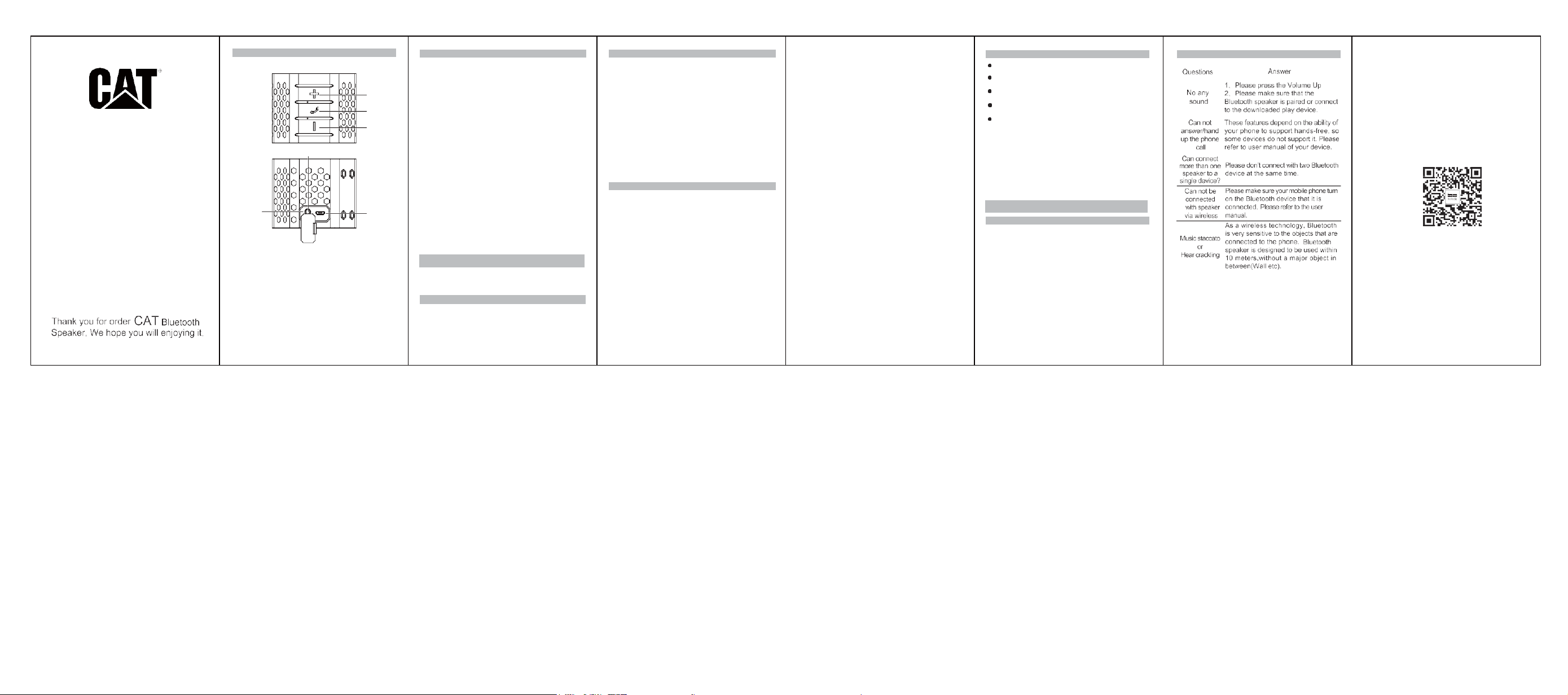
Button Function
5
4
1、Volume up/Next song
2、Volume down/Previous song
3、Phone Key
(Long press to Power On/Off, Short press to Answer/
Hang up phone call/Play/Pause)
4、3.5mm AUX Port
5、Reset(Inside AUX)
6、USB
Specifications
Mode:CAT-BT-MINISPK
Bluetooth Version:Bluetooth V2.1+EDR/4.2
Bluetooth Range:10-12m
1
3
2
Bluetooth Profile
Rated Power:3W
Frequency Response:100Hz-16KHz
SNR:82 dB
THD :<10% THD (1KHz-6 dB Input)
Battery: Built-in 3.7V 1800mAh Lithium Battery Input:
Micro USB 5V 2A
Charge Time:About 2H
Playtime: 6 Hours
Product Size:78*78*63mm
Operation Temperature:0~45°C
Storage Temperature:-10~60°C
6
Charge Mode: The red light bright when charge.
The red light go out after full charge.
Pair mode: When pairing state,the red and blue light
alternately flash. The blue light steady on after pairing
success
Play: The blue light flashes slowly
Pause: The blue light steady on
Call status: The blue light flashes slowly during the call
Package Include
1、Bluetooth Speaker 1 PCS
2、USB charging cable 1 PCS
3、3.5mm audio cable 1 PCS
4、User Manual 1 PCS
:
HPF V1.5,HSP V1.2,A2DP V1.2, AVRCP
LED Indicator Light
Wireless Bluetooth Connection
1、 The B15 speaker will under Bluetooth mode
automatically when turn on.
2、 When pairing state,the red and blue light
alternately flash.
3、 Turn on the Bluetooth of your phone, then search
and find the device named”CAT-BT-MINISPK”,
Please click it and wait for connection.The blue
indicator light steady on after pairing success
Tips: Please restart or maybe the battery power not
enough if the connection fails
Function Description
1、 Power On/Off:
Long press the Phone Button(3) to turn on the
speaker, You will hear the prompt when turn on.
And the red and blue light alternately flash.Long
press the Phone button(3) again to turn off the
speaker.
2、 Low battery:
Products in the Bluetooth mode to use the process
of continuous interval of 10 seconds to hear a "Di"
prompt sound prompt is low battery, automatically
shut down after 5 times
3、 AUX Mode:
Please short press Phone button(3) to pause when
4、Bluetooth Mode:
After the Bluetooth connection is successful, turn
on the Bluetooth device to play music.Short press
“+/-” button to adjust the volumeLong press “+/-”
button to pick a song Short press Phone button(3)
to Play/Pause
5、Hands-free call:
After the Bluetooth speaker is connected with the
mobile phone successfully. The speaker will have a
prompt when there is a call. Press the Phone
button to answer the phone call. Short press to
hang up the call during a call. And long press for 1
second to reject the call when you have a call.
6、TWS:
First: Turn on these twin speakers at the same time
①
Second: Select one of the products and long press
the “+” button (1) for 3 seconds. Waiting for two
products to interconnect, after connection, the blue
light of one product will steady on, and the red and
blue light of another product will alternately
flashing.
Third: Turn on the Bluetooth of your phone, search
and find the device named”CAT-BT-MINISPK”,
then pair with them.
Finally: Play music to experience true wireless
stereo sound after pairing success.
Please clear the mobile phone Bluetooth pairing
②
record “CAT-BT-MINISPK” when the Bluetooth
connection is unsuccessful. Re-search the
“CAT-BT-MINISPK” bluetooth and reconnect.
Attention
● Please store and use this product in a normal
temperature environment;
● Please don’t expose this product in the rain or
moisture environment;
● Please don’t throw away to avoid damage
products
● Please don’t disassemble,repair and modify this
product;
● The product built-in lithium battery, please don't
arbitrarily discard it or put it in the fire to avoid
danger!
● Please quickly unplug the charging cable if the
sudden abnormal phenomenon to avoid accident,
and please contact with our after-sales department
for maintenance in time
Tips
To help extencl the life of the speaker an your
1 、
physical and mental health,Please don' t listento
long time in a large volume, so as not to damage
ytour hearing.
In the event of a malfunction, turn off the power
2、
switch immediately and unplug the USB plug to
prevent damage to the speakers and other
components.
Low battery will affect the Bluetooth distance or
3、
Bluetooth is easy to disconnect, please charge in
time.
Ask and Answer
Page 2

FCC Statement
This equipment has been tested and found to comply with the limits for a Class B
digital device, pursuant to part 15 of the FCC rules. These limits are designed to
provide reasonable protection against harmful interference in a residential installation.
This equipment generates, uses and can radiate radio frequency energy and, if not
installed and used in accordance with the instructions, may cause harmful interference
to radio communications. However, there is no guarantee that interference will not
occur in a particular installation. If this equipment does cause harmful interference to
radio or television reception, which can be determined by turning the equipment off
and on, the user is encouraged to try to correct the interference by one or more of the
following measures:
-Reorient or relocate the receiving antenna.
-Increase the separation between the equipment and receiver.
-Connect the equipment into an outlet on a circuit different from that to which the
receiver is connected.
-Consult the dealer or an experienced radio/TV technician for help.
To assure continued compliance, any changes or modifications not expressly
approved by the party.
Responsible for compliance could void the user’s authority to operate this
equipment. (Example- use only shielded interface cables when connecting to
computer or peripheral devices).
This equipment complies with Part 15 of the FCC Rules. Operation is subject to
the following two conditions:
(1) This device may not cause harmful interference, and
(2) This device must accept any interference received, including interference that
may cause undesired operation.
RF warning statement:
The device has been evaluated to meet general RF exposure requirement.
device can be used in portable exposure condition without restriction.
The
 Loading...