

Page 1

HTM160160E
LCD Module User Manual
Shenzhen HOT Display Technology Co., Ltd.
Rev.
Descriptions Date
01 Prelimiay Release 2013-9-16
Page 2

HOT Display HTM160160E
URL:www.hotlcd.com File name:HTM160160E
Page 2 of 14
Table of Content
1. Basic Specifications……………….………………………………………………3
1.1 Display Specifications………………………..……………………………………………………………….3
1.2 Mechanical Specifications………………..…………………………………………………………………..3
1.3 Circuit Diagram…..………………………..…………………………………………………………………..3
1.4 Terminal Function…..…………………..……………………………………………………………………..4
2. Absolute Maximum Ratings...…….………………………………………………5
3. Electrical Characteristics………….………………………………………………5
3.1 DC Characteristics……..………………..…………………………………………………………………….5
3.2 LED Backlight Circuit……………..………………………………………………………………………….5
3.3 AC Characteristics….….………………..…………………………………………………………………….6
3.4 Reset Timing .………………….……………………………………………………..……………………… .8
4. Function specifications……………………………………………………………9
4.1 Display Data Formate……………………………….………………………………………………………...9
4.2 Resetting the LCD module………………….…………………………………….…………………………..9
4.3 Display Commands…………..…………………….…………………………….……………………………10
4.4 Basic Operating Sequence………….………………………… …………………………………………. ..12
5. Inspection Standards………………….……………………….………………….13
6. Handling Precautions………..…………………………………….………………14
6.1 Mounting method………………………………………………………….……….………………………….14
6.2 Cautions of LCD handling and cleaning……………………………………….….………………………...14
6.3 Caution against static charge……………………………………….…………….………………………….14
6.4 Packaging……………………………………………………….…………………….………………………..14
6.5 Caution for operation…………………………….……………………………….………………………...…14
6.6 Storage…………………………………………….…………………………….……………………….. ……14
6.7 Safety…………………………………………….……………………………….……………………………..14
Page 3
HOT Display HTM160160E
URL:www.hotlcd.com File name:HTM160160E
Page 3 of 14
1. Bsaic Specifications
1.1 Display Specifications
1>LCD Display Mode : FSTN/B&W, Positive, Transflective
2>Viewing Angle : 6H
3>Driving Method : 1/160 Duty, 1/10 Bias
4>Backlight : White LED (5PCS)
1.2 Mechanical Specifications
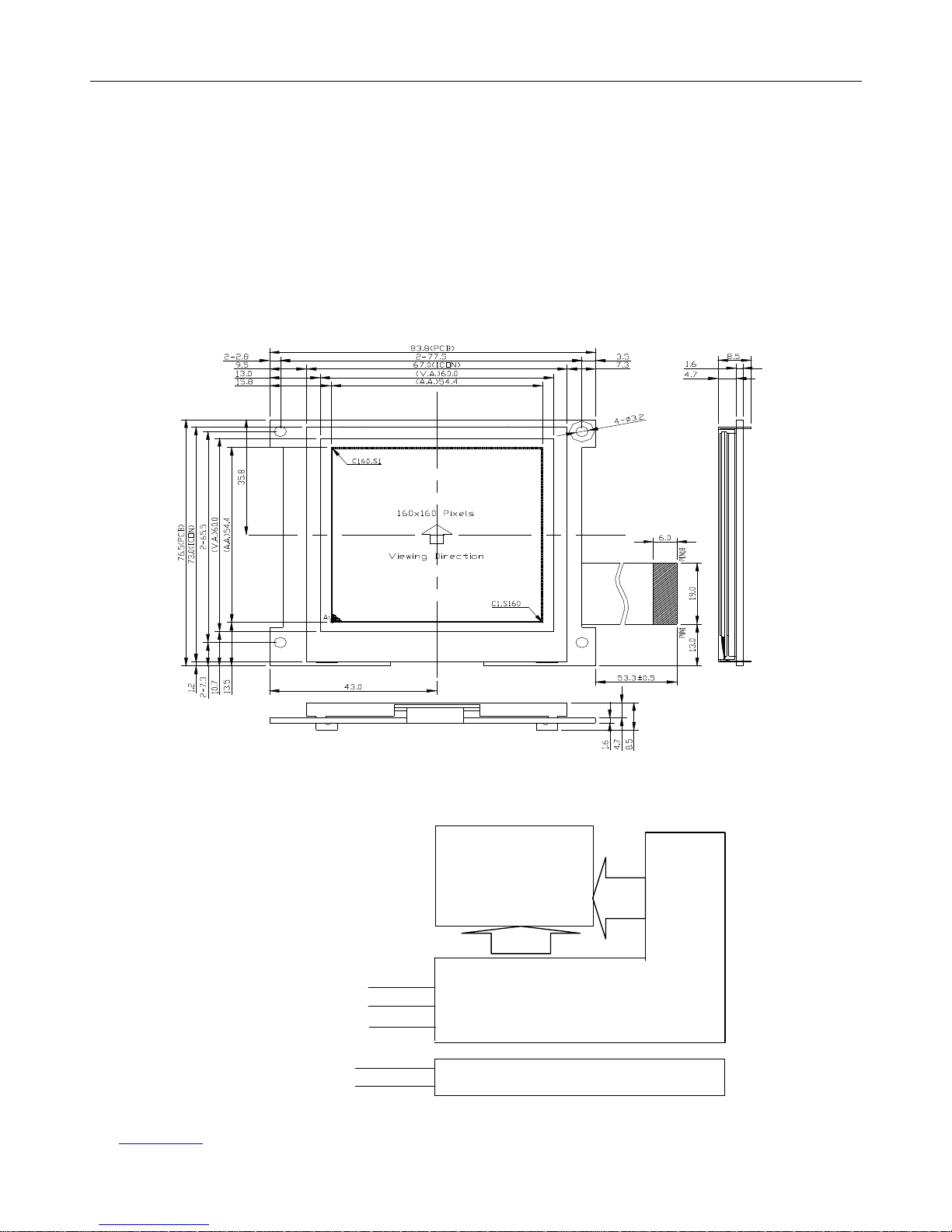
1>Outline Dimension : 83.8 x 76.5 x 8.5mm (See attached Outline Drawing for Details)
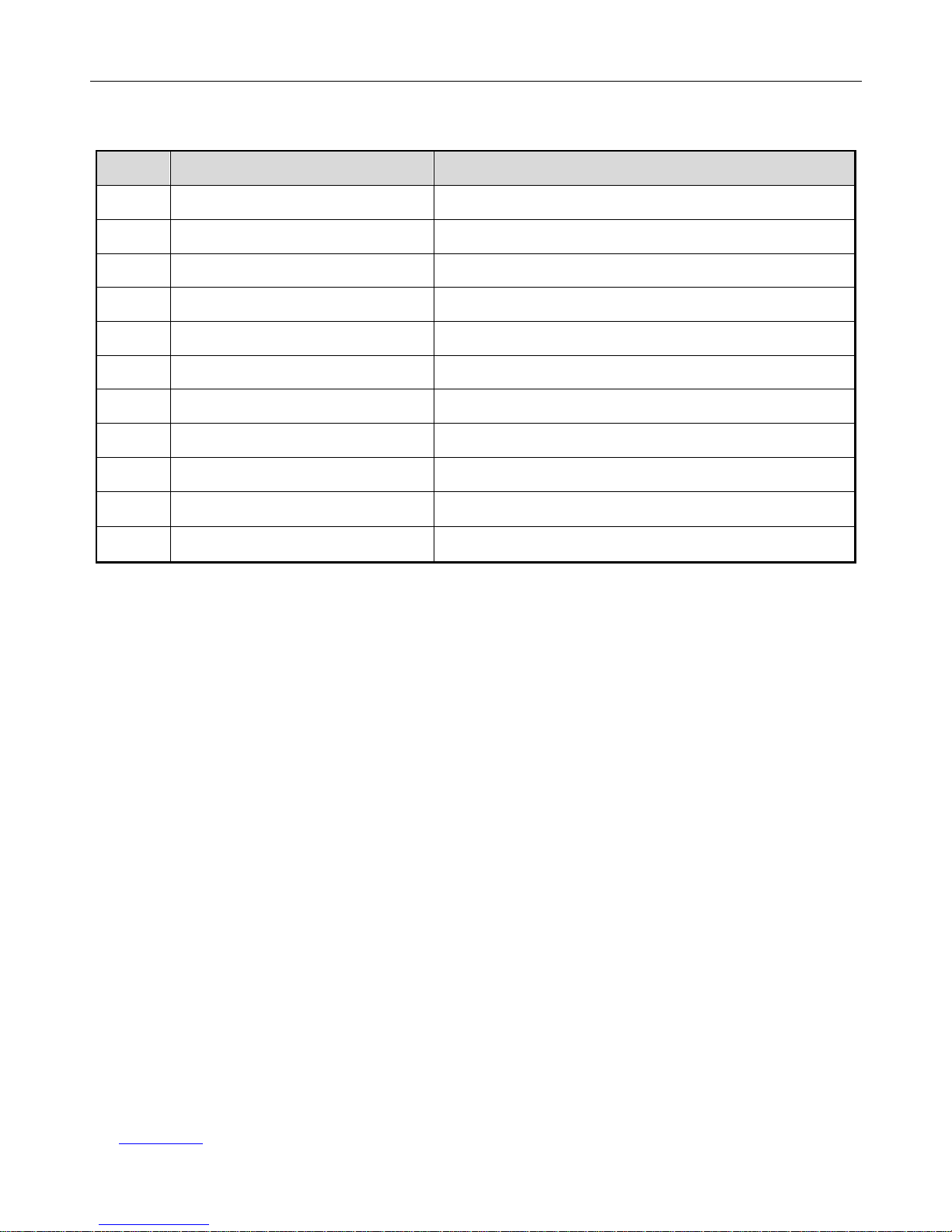
1.3 Circuit Diagram
LCD Panel
160 x 160 Pixels
SEG112
SEG271
……
COM160
COM1
…
Backlighr Circuit
BLA
BLK
UC1698 Cortrol/Driver IC
VDD,VSS
/CS
,/RST,A0,/WR,/RD
D0-D7
Page 4
HOT Display HTM160160E
URL:www.hotlcd.com File name:HTM160160E
Page 4 of 14
1.4 Terminal Function
Pin No.
Pin Name Function
1
VSS Negative power supply,0V
2
A0 Data/Command control
3
/WR Write Data/Command Clock
4
/RD
Read Data Clock
5
XCS Chip selection input
6
/RST Reste, L->H
7
VDD
Power supply voltage (+3.3V)
8-15
D0-D7
Data Bus
16
BLK
Backlight Power Supply Negative
17
NC
NC
18
BLA
Backlight Power Supply anode (+3.3V)
Page 5
HOT Display HTM160160E
URL:www.hotlcd.com File name:HTM160160E
Page 5 of 14
2. Absolute Maximum Ratings
Items Symbol MIN. MAX. Unit Condition
Supply Voltage
VDD -0.3 +4.0 V VSS = 0V
VDD2 -0.3 +4.0 V VSS = 0V
Input Voltage VIN -0.3 VDD+0.3 V VSS = 0V
Operating Temperature TOP -20 +70 ℃ No Condensation
Storage Temperature Tst -30 +80 ℃ No Condensation
3. Electrical Characteristics
3.1 DC Characteristics
(VSS = 0V, VDD = 2.4 to 3.6V, Ta = -40~85°C)
Items Symbol
MIN. TYP. MAX. Unit Condition
Operating Voltage(1) VDD 2.4 - 3.6 V
Driver Voltage
VLCD -0.3 - 19.0 V
Input High Voltage VIH 0.8 x VDD
- VDD V
Input Low Voltage VIL VSS - 0.2 x VDD V
Output High Voltage VOH 0.8 x VDD
- VDD V
IOH = -0.5mA
Output Low Voltage VOL VSS - 0.2 x VDD V
IOL = 0.5mA
Input Leakage Current ILI - - 1.5
μA
VIN = VDD or VSS
Operating Current II - 80 -
mA
VDD=3.3V
3.2 LED Backlight Circuit
Items Symbol
MIN. TYP. MAX. Unit Condition
Forward Voltage VR - 3.1 - V Ta=25℃
Forward Current IF - 75(5LED)
- mA Ta=25℃
Average Brightness
(without LCD)
IV - 400 - cd/m2 IF=15mA*5
Operating Temperature Top -20 - +70 ℃ -
Storage Temperature Tst -30 - +80 ℃ -
Solder Temp. For 3
- - - 260 ℃ -
Color White
Page 6
HOT Display HTM160160E
URL:www.hotlcd.com File name:HTM160160E
Page 6 of 14
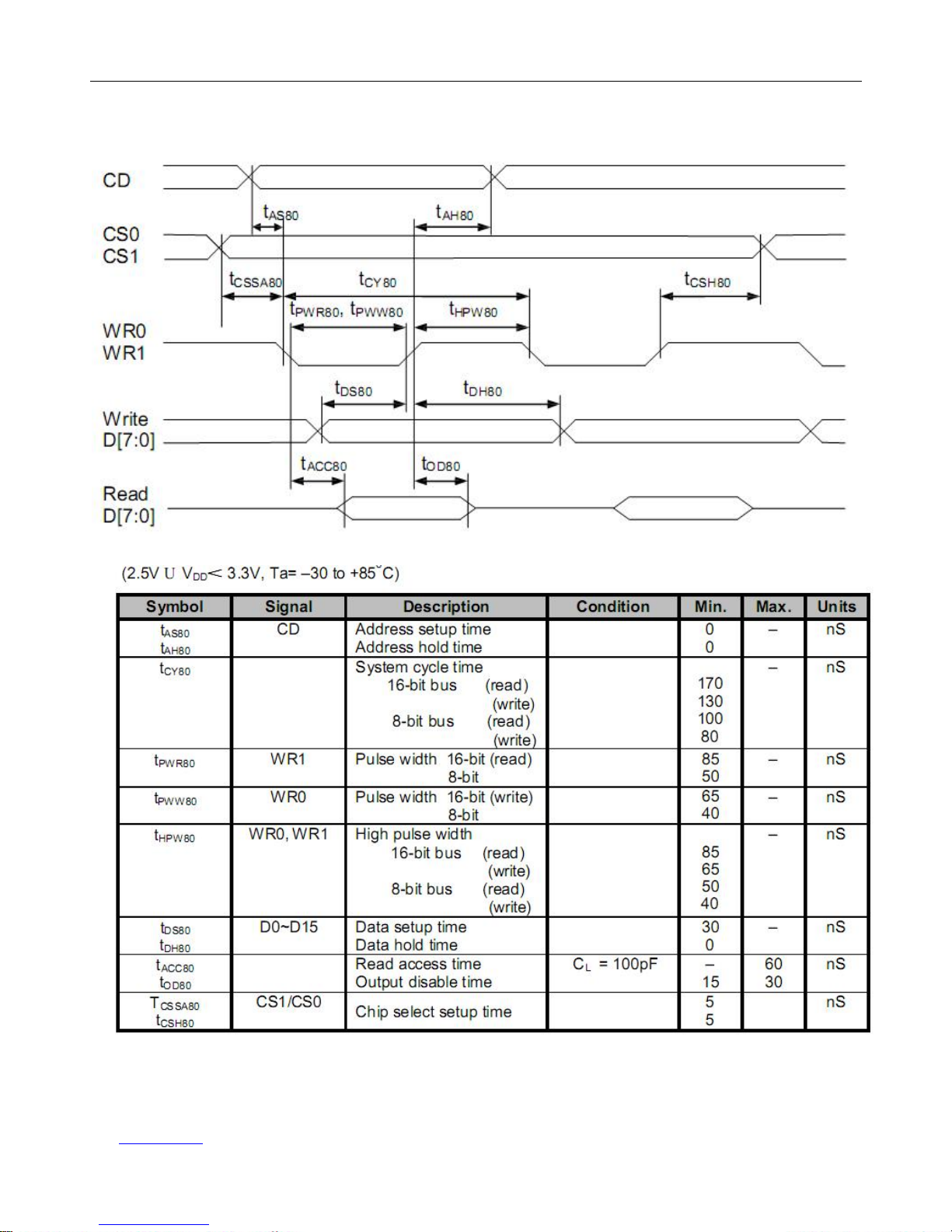
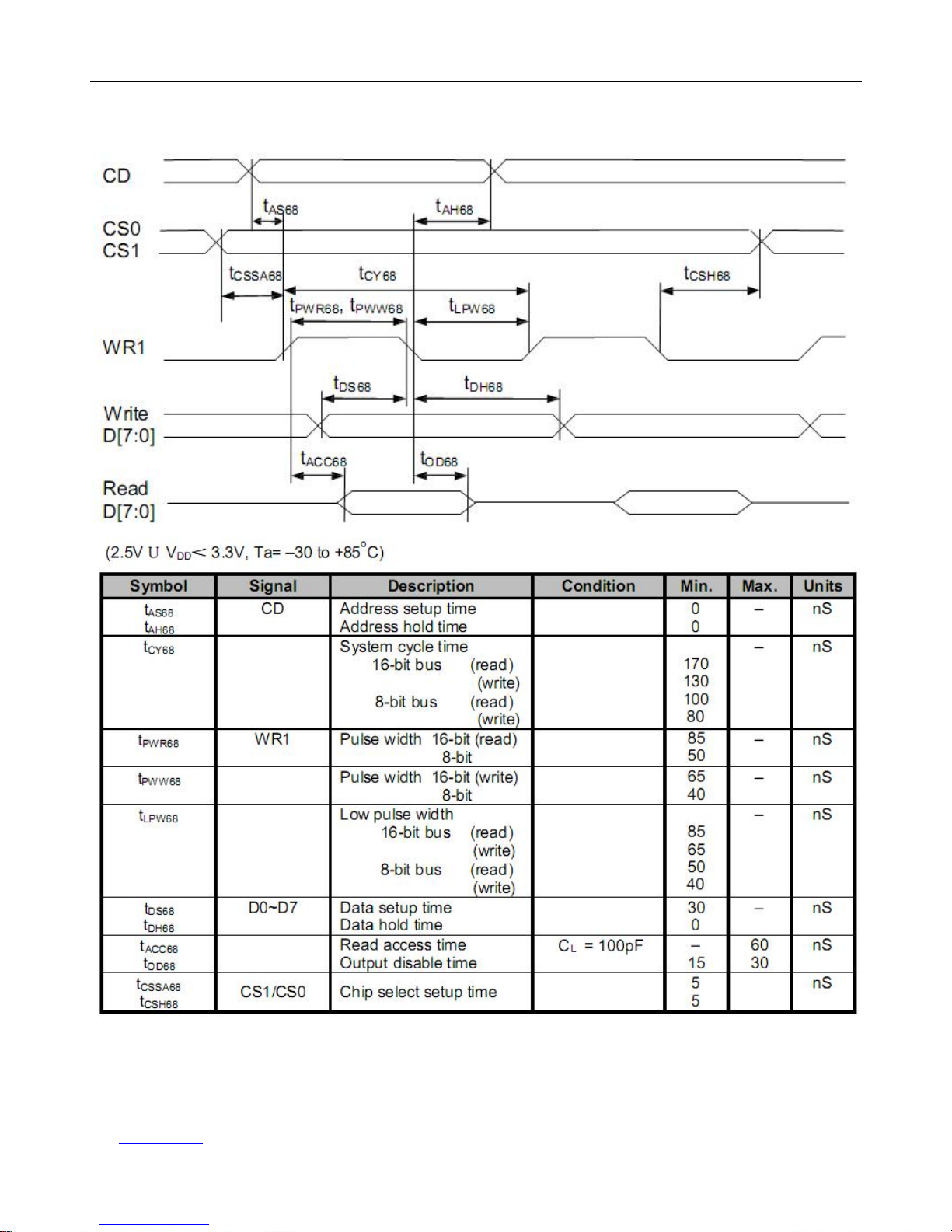
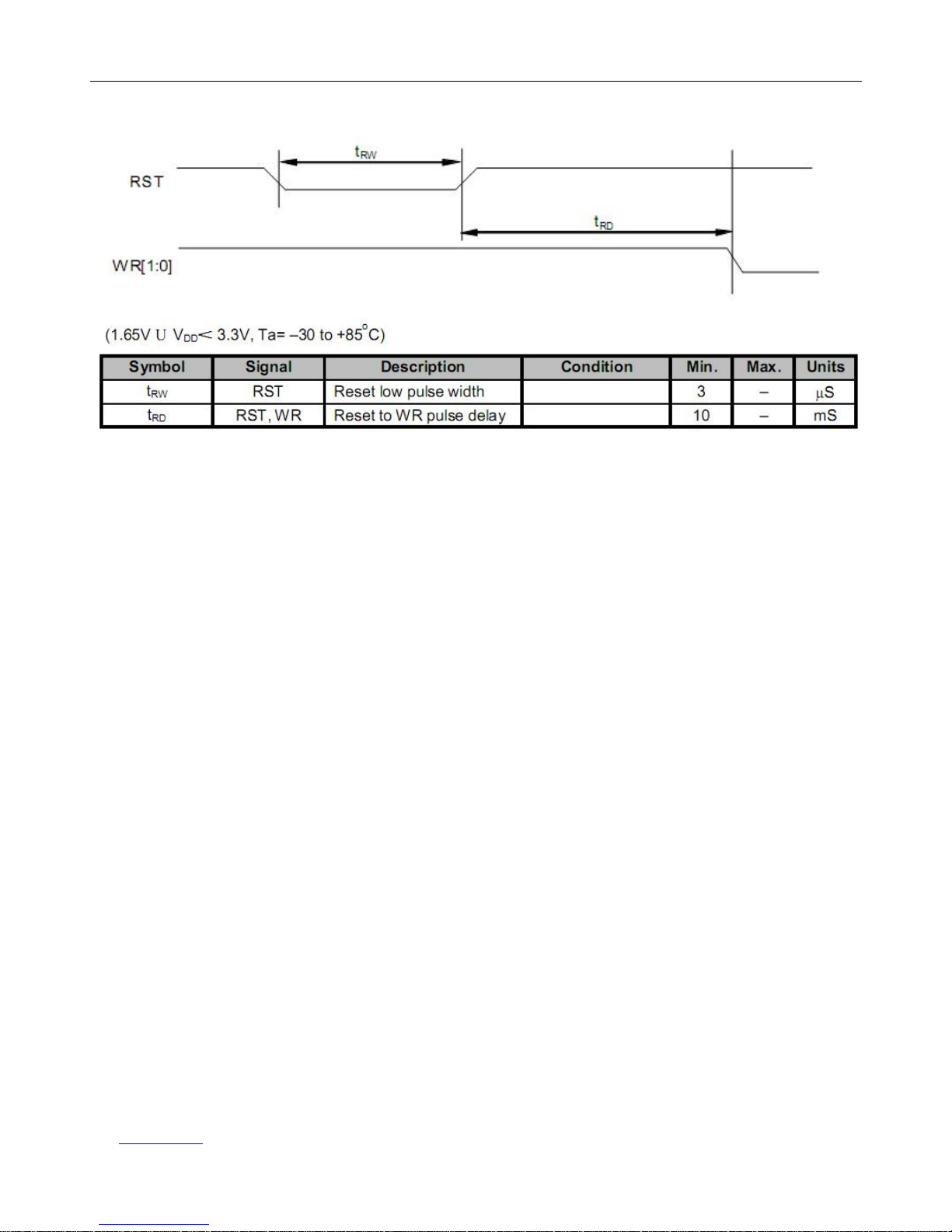
3.3 AC Characteristics
Read/Write Characteristics (8080-series MPU)
Page 7
HOT Display HTM160160E
URL:www.hotlcd.com File name:HTM160160E
Page 7 of 14
Read/Write Characteristics (6800-series MPU)
Page 8
HOT Display HTM160160E
URL:www.hotlcd.com File name:HTM160160E
Page 8 of 14
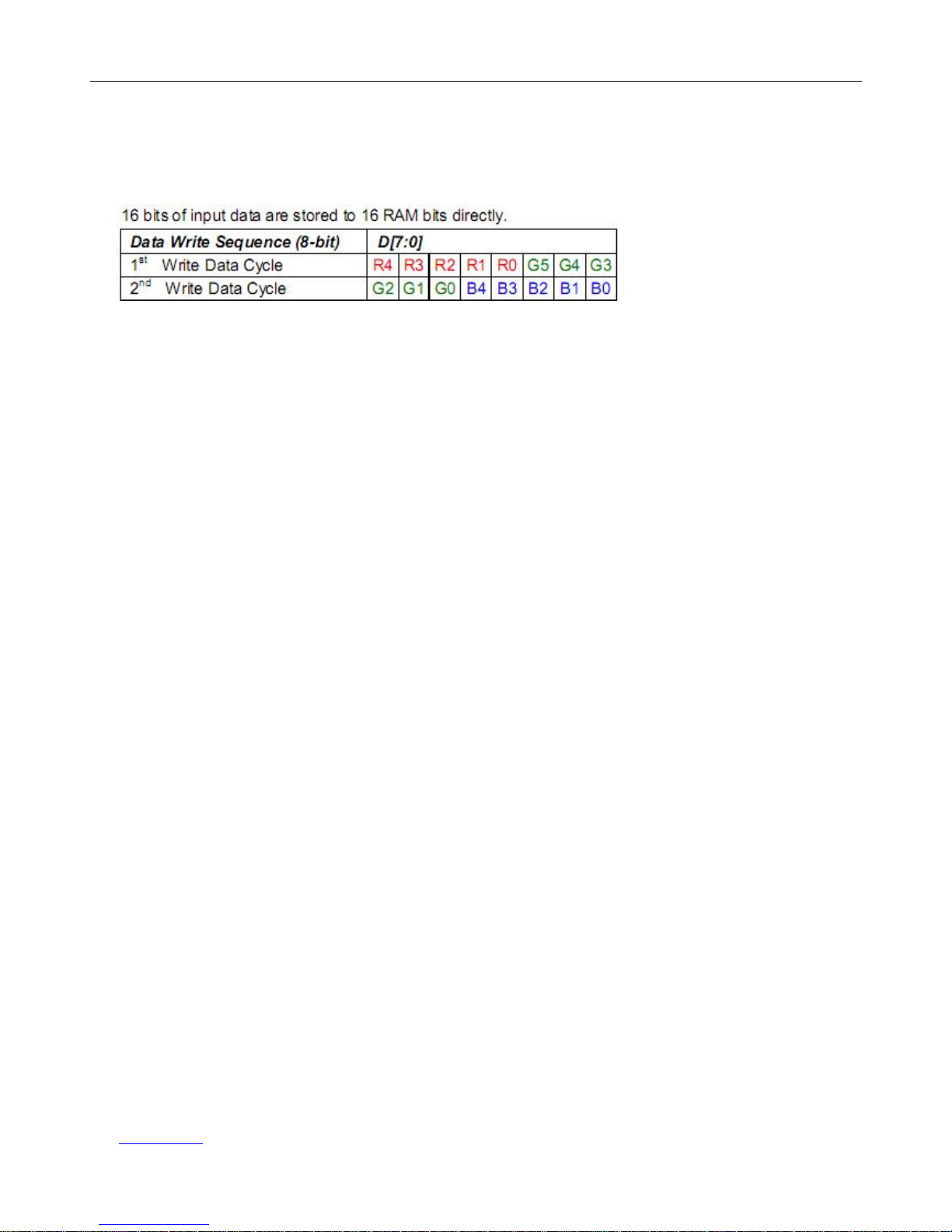
3.4 Resret Timing
Page 9
HOT Display HTM160160E
URL:www.hotlcd.com File name:HTM160160E
Page 9 of 14
4. Function specifications
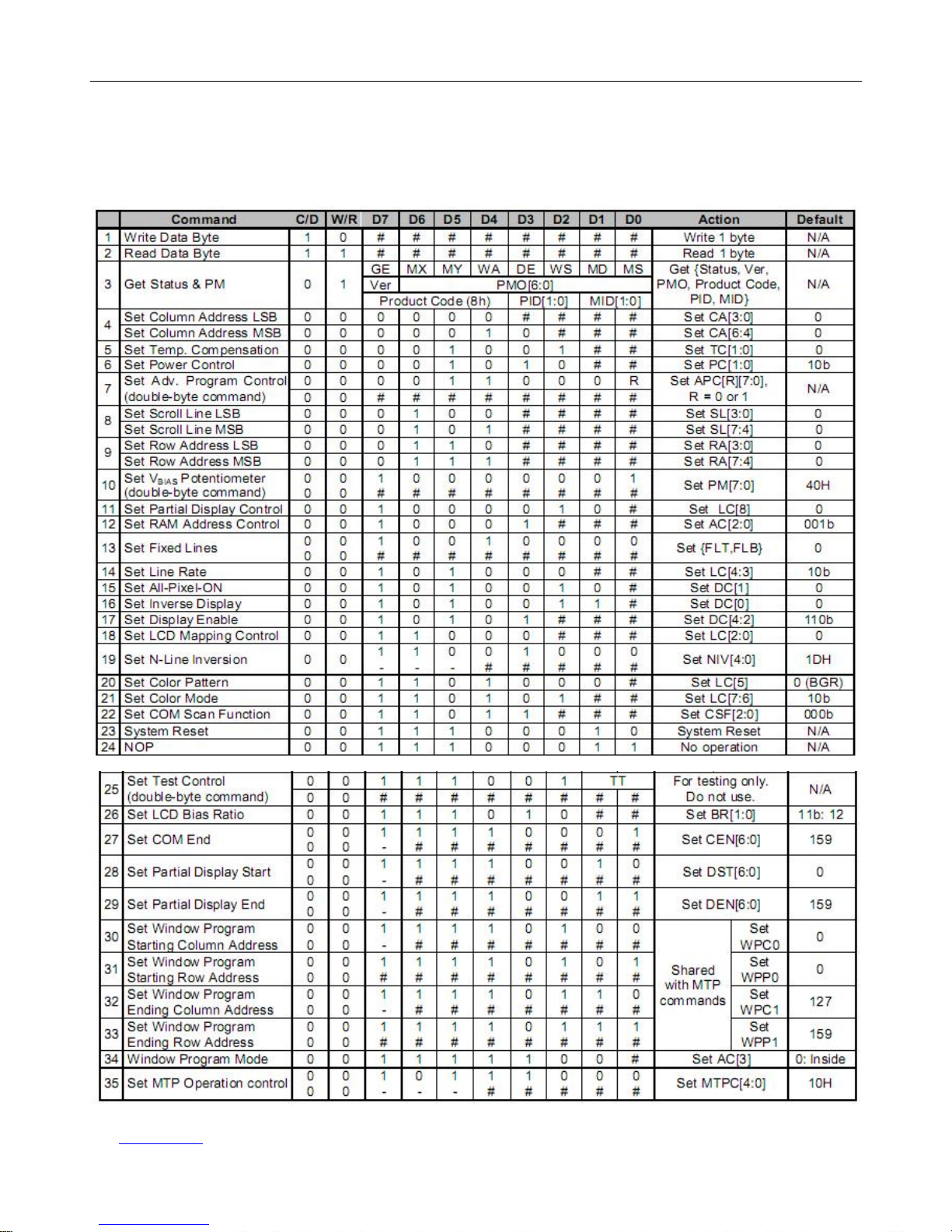
4.1 Display data format
For Example
Black and white mode:
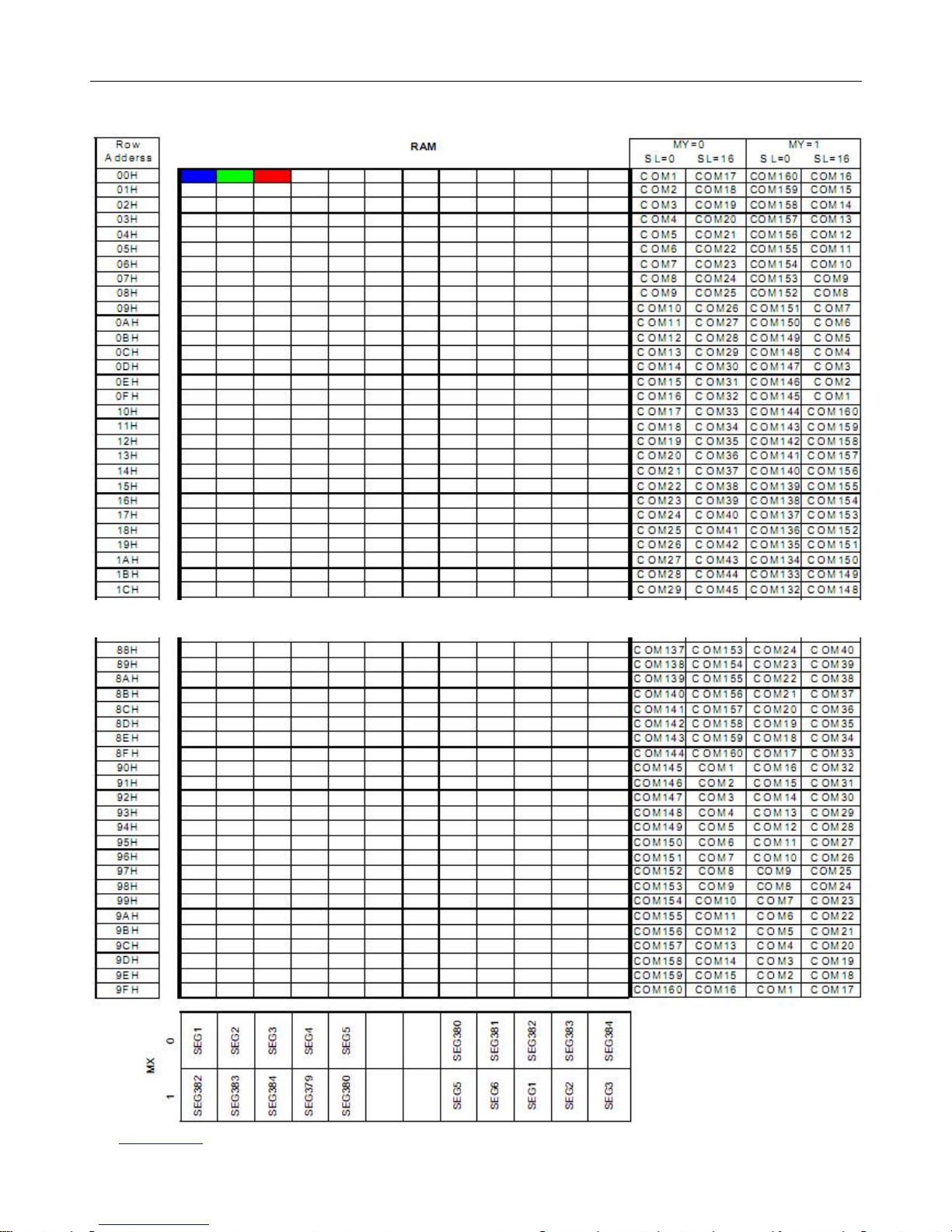
RGB=SEG1/SEG2/SEG3.
R[4:0]= Fixed Value[0x1F] ->SEG1 Show,
G[5:0]= Fixed Value[0x3F] ->SEG2 Show,
B[4:0]= Fixed Value[0x1F] ->SEG3 Show,
Grayscale mode:
R[4:0]= Range[ 0-31] ->SEG1 Show,
G[5:0]= Range[ 0-63] ->SEG2 Show,
B[4:0]= Range[ 0-31] ->SEG3 Show,
Note:Write three points must be continuous,SEG1/SEG2/SEG3 Share a single address
(注:必须连续写三个点,因为三点共用一个地址,根据设置,写完后,地址会自动加(减)一)
4.2 Resetting the LCD module
The LCD module should be initialized bu using /RES terminal.
While turning on the VDD and VSS power supply, maintain /RES terminal at LOW level, After the
Power supply stabilized, release the reset terminal(/RES = High)
Page 10
HOT Display HTM160160E
URL:www.hotlcd.com File name:HTM160160E
Page 10 of 14
4.3 Commands Table
The following is a list of host commands supported by UC1698u
C/D: 0: Control, 1: Data W/R: 0: Write Cycle, 1: Read Cycle
#: Useful Data bits –: Don’t Care
Page 11
HOT Display HTM160160E
URL:www.hotlcd.com File name:HTM160160E
Page 11 of 14
LCD Display Memory Mapping (显示屏与显存的映射关系)
Page 12
HOT Display HTM160160E
URL:www.hotlcd.com File name:HTM160160E
Page 12 of 14
4.4 Basic Operating Sequence
Initialization Sequence
Specific application, refer to IC data and Programm
void intial(void)
{
RES=0;
delay(500);
RES=1;
delay(200);
Comwrite(0xe2);//soft rest
Comwrite(0x2A);//set power control
Comwrite(0x81);//set Vbias
Comwrite(190); //0-255
Comwrite(0x8d);//set RAM address control
Comwrite(0xea);
//set lcd bais ratio 1/12 22page
//- - - - - MY MX LCO
Comwrite(0xc0);//set LCD Mapping Control
Comwrite(0xa0);//set line rate
Comwrite(0xD1);
//Set Color Pattern 0xD0(BGR) 0xD1(RGB)
Comwrite(0xD6);
//set color mode DC[4]=1;RGB=565
Comwrite(0xD8);//set com scan function 22page
Comwrite(0x00);
Comwrite(0x10);
Comwrite(0x60);
Comwrite(0x70);
Comwrite(0xf1);
Comwrite(159);//set com end 0-0x7f
Comwrite(0xF8);//set window progran mode or f9
Comwrite(0xaf); //set Display Enable
delay(10);
}
void Setadd(uchar xs,ys,uchar xd,yd)
{ uchar j;
Comwrite(0xf4);//set start column address
Comwrite(xs);//0-7f
Comwrite(0xF6);//set end column address
Comwrite(xd);//0-7f
Comwrite(0xF5);//set start row address
Comwrite(ys);//0-ff
Comwrite(0xF7);//set end row address
Comwrite(yd);//0-ff
j=xs;
Comwrite(j&0x0f);
j>>=4;
Comwrite(0x10+j);
j=yd&0x0f;
Comwrite(0x60+j);
j=yd>>4;
Comwrite(0x70+j);
}
void Clear(uchar dat)
{
uchar i;
uint j;
Setadd(37,0,90,159);
for(i=0;i<160;i++)
for(j=0;j<110;j++)
Datwrite(dat);
}
Page 13
HOT Display HTM160160E
URL:www.hotlcd.com File name:HTM160160E
Page 13 of 14
5. Inspection Standards
Item Criterion for defects Defect type
1) Display on inspection
(1) Non display (2) Vertical line is deficient
(3) Horizontal line is deficient (4) Cross line is deficient
Major
2) Black/White spot
Size
Φ(mm) Acceptable number
Φ≤0.3 Ignore (note)
0.3<Φ≤0.45 3
0.45<Φ≤0.6 1
0.
6<Φ
0
Minor
3) Black/White line
Length (mm) Width (mm) Acceptable number
L≤10 W≤0.03 Ignore
5.0≤L≤10 0.03<W≤0.04 3
5.0≤L≤10 0.04<W≤0.05 2
1.0≤L≤10 0.05<W≤0.06 2
1.0≤L≤10 0.06<W≤0.08 1
L≤10 0.08<W follows 2) point defect
Defects separate with each other at an interval of more than 20mm
Minor
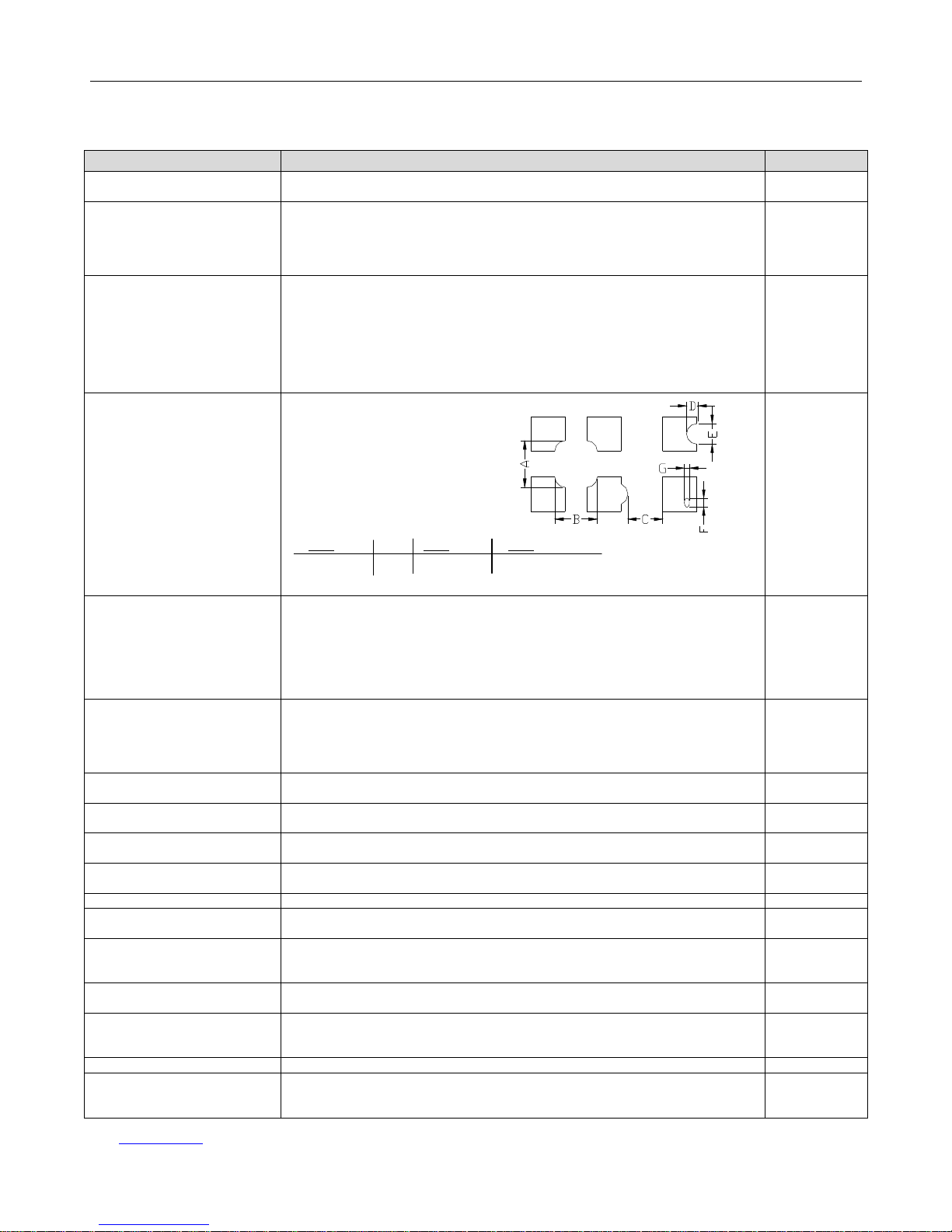
4) Display pattern
A+B≤0.28 0<C D+E≤0.25 F+G≤0.25
2 2 2
Note: 1) Up to 3 damages acceptable
2) Not allowed if there are two or more pinholes every three-fourth inch.
Minor
5) Spot-like contrast
irregularity
Size Φ(mm) Acceptable Number
Φ≤0.7 Ignore (note)
0.7<Φ≤1.0 3
1.0<Φ≤1.5 1
1.5<Φ 0
Note: 1) Conformed to limit samples.
2) Intervals of defects are more than 30mm.
Minor
6) Bubbles in polarizer
Size Φ(mm) Acceptable Number
Φ≤0.4 Ignore (note)
0.4<Φ≤0.65 2
0.65<Φ≤1.2 1
1.2<Φ 0
Minor
7) Scratches and dent on the
polarizer
Scratches and dent on the polarizer s
hall be in the accordance with “2)
Black/white spot”, and “3) Black/White line”.
Minor
8) Stains on the surface of
LCD panel
Stains which cannot be removed even when wiped lightly
with a soft cloth or similar cleaning.
Minor
9) Rainbow color
No rainbow
color is allowed in the optimum contrast on state within the active
area.
Minor
10) Viewing area
encroachment
Polarizer edge or line is visible in the opening viewing area due to polarizer
shortness or sealing line.
Minor
1
1) Bezel appearance
Rust and de
ep damages that are visible in the bezel are rejected.
Minor
12
) Defect of land surface
contact
Evident crevices that are visible are rejected. Minor
13) Parts mounting
(1) Failure to mount parts
(2) Parts not in the specifications are mounted
(3) For example: Polarity is reversed, HSC or TCP falls off.
Minor
14) Part alignment
(1) LSI, IC lead width is more than 50% beyond pad outline.
(2) More than 50% of LSI, IC leads is off the pad outline.
Minor
15) Conductive foreign
matter (solder ball,
solder hips)
(1) 0.45
<Φ, N≥1
(2) 0.3<Φ≤0.45, N≥1, Φ: Average diameter of solder ball (unit: mm)
(3) 0.5<L, N
≥
1, L: Average length of solder chip (unit: mm)
Minor
16) Bezel flaw
Bezel claw missing or not bent
Minor
17) Indication on name plate
(sampling indication label)
(1) F
ailure to stamp or label error, or not legible.(all acceptable if legible)
(2) The separation is more than 1/3 for indication discoloration, in which the
characters can be checked.
Minor
Page 14

HOT Display HTM160160E
URL:www.hotlcd.com File name:HTM160160E
Page 14 of 14
6. Handling Precautions
6.1 Mounting method
A panel of LCD module made by our company consists of two thin glass plates with polarizers that easily get damaged.
And since the module in so constructed as to be fixed by utilizing fitting holes in the printed circuit board (PCB), extreme care
should be used when handling the LCD modules.
6.2 Cautions of LCD handling and cleaning
When cleaning the display surface, use soft cloth with solvent (recommended below) and wipe lightly.
-Isopropyl alcohol
-Ethyl alcohol
-Trichlorotriflorothane
Do not wipe the display surface with dry or hard materials that will damage the polarizer surface.
Do not use the following solvent:
-Water
-Ketene
-Aromatics
6.3 Caution against static charge
The LCD module use C-MOS LSI drivers. So we recommend you:
Connect any unused input terminal to Vdd or Vss. Do not input any signals before power is turned on, and ground your body,
work/assembly areas, assembly equipment to protect against static electricity.
6.4 Packaging
-Module employs LCD elements, and must be treated as such. Avoid intense shock and falls from a height.
-To prevent modules from degradation, do not operate or store them exposed direct to sunshine or high temperature/humidity.
6.5 Caution for operation
-It is an indispensable condition to drive LCD module within the limits of the specified voltage since the higher voltage over the
limits may cause the shorter life of LCD module.
-An electrochemical reaction due to DC (direct current) causes LCD undesirable deterioration so that the uses of DC (direct
current) drive should be avoided.
-Response time will be extremely delayed at lower temperature than the operating temperature range and on the other hand at
higher temperature LCD module may show dark color in them. However those phenomena do not mean malfunction or out of
order of LCD module, which will come back in the specified operating temperature.
6.6 Storage
In the case of storing for a long period of time, the following ways are recommended:
-Storage in polyethylene bag with the opening sealed so as not to enter fresh air outside in it. And with not desiccant.
-Placing in a dark place where neither exposure to direct sunlight nor light is. Keeping the storage temperature range.
-Storing with no touch on polarizer surface by any thing else.
6.7 Safety
-It is recommendable to crash damaged or unnecessary LCD into pieces and to wash off liquid crystal by either of solvents
such as acetone and ethanol, which should be burned up later.
-When any liquid leaked out of a damaged glass cell comes in contact with your hands, please wash it off well at once with
soap and water.
 Loading...