

Page 1
Hoshizaki America, Inc.
Hoshizaki
Modular Flaker
Models
FD-1001MAH(-C)
“A Superior Degree
of Reliability”
www.hoshizaki.com
FD-1001MWH(-C)
FD-1001MRH(-C)
FD-1001MLH(-C)
SERVICE MANUAL
Number: 73159
Issued: 2-12-2010
Page 2
IMPORTANT
Only qualied service technicians should install, service, and maintain the
icemaker. No service or maintenance should be undertaken until the technician
has thoroughly read this Service Manual. Failure to service and maintain
the equipment in accordance with this manual may adversely affect safety,
performance, component life, and warranty coverage.
Hoshizaki provides this manual primarily to assist qualied service technicians in the
service and maintenance of the icemaker.
Should the reader have any questions or concerns which have not been satisfactorily
addressed, please call, write, or send an e-mail message to the Hoshizaki Technical
Support Department for assistance.
HOSHIZAKI AMERICA, INC.
618 Highway 74 South
Peachtree City, GA 3069
Attn: Hoshizaki Technical Support Department
Phone: 1-800-33-1940 Technical Support
(770) 487-331
Fax: 1-800-843-1056
(770) 487-3360
E-mail: techsupport@hoshizaki.com
Web Site: www.hoshizaki.com
NOTE: To expedite assistance, all correspondence/communication MUST include the
following information:
• Model Number ________________________
• Serial Number ________________________
• Complete and detailed explanation of the problem.
Page 3
IMPORTANT
This manual should be read carefully before the icemaker is serviced or
maintenance operations are performed. Only qualied service technicians
should install, service, and maintain the icemaker. Read the warnings
contained in this booklet carefully as they give important information regarding
safety. Please retain this booklet for any further reference that may be
necessary.
CONTENTS
Important Safety Information ................................................................................................. 7
I. Specications ..................................................................................................................... 8
A. Icemaker ....................................................................................................................... 8
1. FD-1001MAH (air-cooled) ....................................................................................... 8
. FD-1001MAH-C (air-cooled) ................................................................................... 9
3. FD-1001MWH (water-cooled) ............................................................................... 10
4. FD-1001MWH-C (water-cooled) ............................................................................ 11
5. FD-1001MRH (remote air-cooled) ......................................................................... 1
6. FD-1001MRH-C (remote air-cooled) ..................................................................... 13
7. FD-1001MLH (low side, parallel rack system) ....................................................... 14
8. FD-1001MLH-C (low side, parallel rack system) ................................................... 15
B. Condenser Unit ........................................................................................................... 16
1. URC-5F ................................................................................................................. 16
II. General Information ......................................................................................................... 18
A. Construction ................................................................................................................ 18
1. FD-1001MAH(-C) (air-cooled) ............................................................................... 18
. FD-1001MWH(-C) (water-cooled) ......................................................................... 19
3. FD-1001MRH(-C) (remote air-cooled) ................................................................... 0
4. FD-1001MLH(-C) (low side, parallel rack system) ................................................ 1
5. Ice Making Unit ......................................................................................................
B. Sequence of Operation ............................................................................................... 3
1. Sequence Cycles and Shutdown .......................................................................... 3
a) Fill Cycle .......................................................................................................... 3
b) Ice Purge Cycle ............................................................................................... 3
c) Freeze Cycle .................................................................................................... 3
d) Drain Cycle ..................................................................................................... 3
e) Shutdown Cycle ............................................................................................... 4
. Sequence Flow Chart ............................................................................................ 5
C. Control Board ............................................................................................................. 6
1. Control Board Layout ............................................................................................ 7
. Features ................................................................................................................ 8
a) Low Water Safety ............................................................................................ 8
b) Ice Purge Cycle Bypass ................................................................................... 8
c) Freeze Timer .................................................................................................... 8
d) Drain Frequency .............................................................................................. 8
e) Bin Control Shutdown Delay ............................................................................ 8
f) High Voltage and Low Voltage Cut-outs ........................................................... 9
g) LED Lights and Alarm Safeties Chart .............................................................. 9
3
Page 4

3. Alarm Safeties ....................................................................................................... 30
a) Low Water Safety (1-beep alarm) .................................................................... 30
b) Control Switch in the "DRAIN" Position (-beep alarm) ................................... 30
c) High Pressure Switch (3 & 4-beep alarms) ...................................................... 30
d) Freeze Timer (5-beep alarm) ........................................................................... 30
e) Low Voltage (6-beep alarm) ............................................................................ 30
f) High Voltage (7-beep alarm) ............................................................................. 31
g) Gear Motor (8-beep alarm) .............................................................................. 31
h) Bin Control (9-beep alarm) ............................................................................ 31
4. Controls and Adjustments ..................................................................................... 31
a) Default Dip Switch Settings ............................................................................. 31
b) Infrared Sensor Shutdown Delay (S1 dip switch 1, , & 3) .............................. 3
c) Drain Frequency Control (S1 dip switch 4) ...................................................... 3
d) Continuous Dispensing Timer (S1 dip switch 5 & 6) ........................................ 3
e) Bin Control Selector (S1 dip switch 7) ............................................................. 33
f) Mechanical Bin Control Shutdown Delay (S1 dip switch 8) .............................. 33
g) Factory Use (S1 Dip Switch 9 & 10) ................................................................ 33
D. Bin Control .................................................................................................................. 34
E. Float Switch ................................................................................................................ 34
III. Technical Information ..................................................................................................... 35
A. Water Circuit and Refrigeration Circuit ....................................................................... 35
1. FD-1001MAH(-C) (air-cooled) ............................................................................... 35
. FD-1001MWH(-C) (water-cooled) ......................................................................... 36
3. FD-1001MRH(-C) (remote air-cooled) ................................................................... 37
4. FD-1001MLH(-C) (low side, parallel rack system) ................................................ 38
B. Wiring Diagrams ......................................................................................................... 39
1. FD-1001MAH(-C), FD-1001MWH(-C), FD-1001MRH(-C) ..................................... 39
. FD-1001MLH(-C) .................................................................................................. 40
3. Sequence Wiring Diagram .................................................................................... 41
a) Fill Cycle. ........................................................................................................ 41
b) Ice Purge Cycle .............................................................................................. 4
c) Freeze Cycle ................................................................................................... 43
d) 1-in-1 Drain Cycle ........................................................................................... 44
e) 1-in-1 Drain Cycle ......................................................................................... 45
f) Infrared Sensor Shutdown ................................................................................ 46
g) Mechanical Bin Control Shutdown ................................................................... 47
h) Low Water Safety ............................................................................................ 48
i) High Pressure Switch ........................................................................................ 49
C. Performance Data ...................................................................................................... 50
1. FD-1001MAH (air-cooled) ..................................................................................... 50
. FD-1001MAH-C (air-cooled) ................................................................................. 51
3. FD-1001MWH (water-cooled) ............................................................................... 5
4. FD-1001MWH-C (water-cooled) ............................................................................ 53
5. FD-1001MRH (remote air-cooled) ......................................................................... 54
6. FD-1001MRH-C (remote air-cooled) ..................................................................... 55
7. FD-1001MLH (low side, parallel rack system) ....................................................... 56
8. FD-1001MLH-C (low side, parallel rack system) ................................................... 57
4
Page 5

IV. Service Diagnosis .......................................................................................................... 58
A. Ice Production Check .................................................................................................. 58
B. Diagnostic Procedure ................................................................................................. 58
C. Control Board Check .................................................................................................. 61
D. Bin Control Check ....................................................................................................... 66
1. Infrared Sensor Check .......................................................................................... 66
. Mechanical Bin Control Check .............................................................................. 67
E. Float Switch Check and Cleaning ............................................................................... 69
1. Float Switch Check ................................................................................................ 69
. Float Switch Cleaning ............................................................................................ 69
F. Diagnostic Charts ........................................................................................................ 71
1. No Ice Production .................................................................................................. 71
. Low Ice Production ................................................................................................ 74
3. Other ..................................................................................................................... 75
V. Removal and Replacement of Components ................................................................... 76
A. Service for Refrigerant Lines ...................................................................................... 76
1. Refrigerant Recovery (except MLH model) ........................................................... 76
. Brazing .................................................................................................................. 77
3. Evacuation and Recharge (R-404A) (except MLH model) .................................... 77
4. Refrigerant Recovery, Evacuation, and Recharge - MLH Model (low side, parallel
rack system) .......................................................................................................... 78
B. Removal and Replacement of Compressor ................................................................ 79
C. Removal and Replacement of Expansion Valve......................................................... 80
D. Removal and Replacement of Evaporator Assembly Components ............................ 81
1. Upper Bearing Wear Check .................................................................................. 8
. Removal and Replacement of Cutter .................................................................... 8
3. Removal and Replacement of Extruding Head ..................................................... 83
4. Removal and Replacement of Auger .................................................................... 83
5. Removal and Replacement of Evaporator ............................................................ 84
6. Removal and Replacement of Mechanical Seal and Lower Housing ................... 85
7. Removal and Replacement of Gear Motor ............................................................ 86
E. Removal and Replacement of Air-Cooled Condenser ................................................ 87
F. Removal and Replacement of Water-Cooled Condenser ........................................... 88
G. Removal and Replacement of Water Regulating Valve - Water-Cooled Model ......... 89
H. Adjustment of Water Regulating Valve - Water-Cooled Model ................................... 90
I. Removal and Replacement of Fan Motor (air-cooled and remote air-cooled models) . 90
J. Removal and Replacement of Headmaster (Condensing Pressure Regulator - C.P.R.)
- Remote Air-Cooled Model ...................................................................................... 91
K. Removal and Replacement of Liquid Line Valve or Suction Line Valve - MLH Model
(low side, parallel rack system) ................................................................................. 9
L. Removal and Replacement of Evaporator Pressure Regulator (E.P.R.) MLH Model
(low side, parallel rack system) ................................................................................. 93
M. Removal and Replacement of Water Valves.............................................................. 93
1. Inlet Water Valve ................................................................................................... 93
. Drain Valve ............................................................................................................ 94
N. Removal and Replacement of Control Board ............................................................. 95
5
Page 6

VI. Cleaning and Maintenance ............................................................................................ 96
A. Cleaning and Sanitizing Instructions ........................................................................... 96
1. Cleaning Solution .................................................................................................. 96
. Cleaning Procedure ............................................................................................... 96
3. Sanitizing Solution ................................................................................................. 98
4. Sanitizing Procedure - Initial .................................................................................. 98
5. Sanitizing Procedure - Final .................................................................................. 99
B. Maintenance ............................................................................................................. 100
C. Preparing the Icemaker for Long Storage ................................................................ 10
6
Page 7
Important Safety Information
Throughout this manual, notices appear to bring your attention to situations which could
result in death, serious injury, or damage to the unit.
WARNING Indicates a hazardous situation which could result in death or
serious injury.
CAUTION Indicates a situation which could result in damage to the unit.
IMPORTANT Indicates important information about the use and care of the
unit.
WARNING
This icemaker should be destined only to the use for which it has been
expressly conceived. Any other use should be considered improper and
therefore dangerous. The manufacturer cannot be held responsible for
eventual damage caused by improper, incorrect, and unreasonable use.
To reduce the risk of death, electric shock, serious injury, or re, follow
basic precautions including the following:
• Electrical connection must be hard-wired and must meet national, state, and
local electrical code requirements. Failure to meet these code requirements
could result in death, electric shock, serious injury, re, or severe damage to
equipment.
• This unit requires an independent power supply. See the nameplate for
proper voltage and breaker/fuse size. Failure to use a proper breaker or fuse
can result in a tripped breaker, blown fuse, or damage to existing wiring. This
could lead to heat generation or re.
• THIS UNIT MUST BE GROUNDED. Failure to properly ground this unit could
result in death or serious injury.
• This unit should be disassembled or repaired only by qualied service
personnel to reduce the risk of electric shock, injury, or re.
• Do not make any alterations to the unit. Alterations could result in electric
shock, injury, re, or damage to the unit.
7
Page 8

I. Specications
A. Icemaker
1. FD-1001MAH (air-cooled)
Awaiting Data
Note: We reserve the right to make changes in specications and design without prior
notice.
8
Page 9
2. FD-1001MAH-C (air-cooled)
AC SUPPLY VOLTAGE 208-230/60/1 (3 wire with neutral for 115V)
COMPRESSOR 240 V 4.2 RLA 34 LRA
GEAR MOTOR 120 V 3 FLA 1/4 HP
FAN MOTOR 115 V 0.85FLA 1/15 HP
OTHER 120 V 0.03A
MAXIMUM FUSE SIZE 15 A
MAX. HACR BREAKER (USA ONLY) 15 A
MAX. CIRC. BREAKER (CANADA ONLY) 15 A
MINIMUM CIRCUIT AMPACITY 15 A
APPROXIMATE ICE PRODUCTION Ambient WATER TEMP. (°F)
PER 24 HR. Temp.(°F) 50 70 90
lbs./day ( kg/day ) 70 *940 (427) 890 (405) 855 (389)
Reference without *marks 80 820 (373) 790 (358) 755 (344)
90 725 (330) *695 (317) 670 (304)
100 640 (292) 615 (280) *580 (265)
SHAPE OF ICE Cubelet
ICE QUALITY Approx. 80%, Ice (90/70°F, Conductivity 200 µs/cm)
APPROXIMATE STORAGE CAPACITY N/A
ELECTRIC & WATER CONSUMPTION 90/70°F 70/50°F
ELECTRIC W (kWH/100 lbs.) 1390 (4.8) 1320 (3.4)
POTABLE WATER 86 (12) 113 (12)
gal./24HR (gal./100 lbs.)
EXTERIOR DIMENSIONS (WxDxH) 22" x 24" x 25-15/16" (560 x 610 x 658mm)
EXTERIOR FINISH Stainless Steel, Galvanized Steel (Rear)
WEIGHT Net 176 lbs. ( 80 kg ), Shipping 205 lbs. ( 93 kg )
CONNECTIONS - ELECTRIC Permanent - Connection
- WATER SUPPLY Inlet 1/2" FPT
- DRAIN Outlet 3/4" FPT
ICE MAKING SYSTEM Auger type
HARVESTING SYSTEM Direct Driven Auger ( 1/4 HP Gear Motor )
ICE MAKING WATER CONTROL Float Switch
COOLING WATER CONTROL N/A
BIN CONTROL SYSTEM (PRIMARY) Photoelectric Sensor
BIN CONTROL SYSTEM (SECONDARY) Mechanical Bin Control (Proximity Sw.)
COMPRESSOR Hermetic, Model RS70-C1E-PFV
CONDENSER Air-cooled, Fin and tube type
EVAPORATOR Copper Tube on Cylinder
REFRIGERANT CONTROL Thermostatic Expansion Valve
REFRIGERANT CHARGE R-404A, 1 lb.12oz. (800g)
DESIGN PRESSURE High 427 PSIG, Low 230 PSIG
P.C. BOARD CIRCUIT PROTECTION High Voltage Cut-off Relay
COMPRESSOR PROTECTION Internal Protector
GEAR MOTOR PROTECTION Fuse (3A)
REFRIGERANT CIRCUIT PROTECTION Auto-reset High Pressure Control Switch
LOW WATER PROTECTION Float Switch and Timer
ACCESSORIES -SUPPLIED Spare Fuse
-REQUIRED Ice Storage Bin
OPERATING CONDITIONS VOLTAGE RANGE 187-253 V
AMBIENT TEMP. 45-100° F
WATER SUPPLY TEMP. 45-90° F
WATER SUPPLY PRESSURE 10-113 PSIG
Note: We reserve the right to make changes in specications and design without prior
notice.
9
Page 10

3. FD-1001MWH (water-cooled)
Awaiting Data
Note: We reserve the right to make changes in specications and design without prior
notice.
10
Page 11

4. FD-1001MWH-C (water-cooled)
Awaiting Data
Note: We reserve the right to make changes in specications and design without prior
notice.
11
Page 12

5. FD-1001MRH (remote air-cooled)
Awaiting Data
Note: We reserve the right to make changes in specications and design without prior
notice.
1
Page 13
6. FD-1001MRH-C (remote air-cooled)
AC SUPPLY VOLTAGE 208-230/60/1 (3 wire with neutral for 115V)
COMPRESSOR 240 V 4.2 RLA 34 LRA
GEAR MOTOR 120 V 3 FLA 1/4 HP
FAN MOTOR REMOTE 115 V 3A MAX
OTHER 120 V 0.03A
MAXIMUM FUSE SIZE 15 A
MAX. HACR BREAKER (USA ONLY) 15 A
MAX. CIRC. BREAKER (CANADA ONLY) 15 A
MINIMUM CIRCUIT AMPACITY 15 A
APPROXIMATE ICE PRODUCTION Ambient WATER TEMP. (°F)
PER 24 HR. Temp.(°F) 50 70 90
lbs./day ( kg/day ) 70 *930 (423) 895 (406) 860 (390)
Reference without *marks 80 825 (375) 790 (360) 760 (345)
90 730 (332) *720 (326) 670 (306)
100 645 (294) 620 (282) *580 (263)
SHAPE OF ICE Cubelet
ICE QUALITY Approx. 80%, Ice (90/70°F, Conductivity 200 µs/cm)
APPROXIMATE STORAGE CAPACITY N/A
ELECTRIC & WATER CONSUMPTION 90/70°F 70/50°F
ELECTRIC W (kWH/100 lbs.) 1449 (4.8) 1401 (3.6)
POTABLE WATER 86 (12) 112 (12)
gal./24HR (gal./100 lbs.)
EXTERIOR DIMENSIONS (WxDxH) 22" x 24" x 25-15/16" (560 x 610 x 658mm)
EXTERIOR FINISH Stainless Steel, Galvanized Steel (Rear)
WEIGHT Net 176 lbs. ( 80 kg ), Shipping 205 lbs. ( 93 kg )
CONNECTIONS - ELECTRIC Permanent - Connection
- WATER SUPPLY Inlet 1/2" FPT
- DRAIN Outlet 3/4" FPT
- REFRIGERATION Discharge line 1-1/16-12 UNF Fitting (#10 AEROQUIP)
CIRCUIT Liquid line 5/8-18 UNF Fitting (#6 AEROQUIP)
ICE MAKING SYSTEM Auger type
HARVESTING SYSTEM Direct Driven Auger ( 1/4 HP Gear Motor )
ICE MAKING WATER CONTROL Float Switch
COOLING WATER CONTROL N/A
BIN CONTROL SYSTEM (PRIMARY) Photoelectric Sensor
BIN CONTROL SYSTEM (SECONDARY) Mechanical Bin Control (Proximity Sw.)
COMPRESSOR Hermetic, Model RS70-C1E-PFV
CONDENSER Air-cooled Remote Condenser unit URC-5F Recommended
EVAPORATOR Copper Tube on Cylinder
REFRIGERANT CONTROL Thermostatic Expansion Valve
Condensing Pressure Regulator on URC-5F
REFRIGERANT CHARGE R-404A, 4 lb.1oz. (1850g)
(Ice Maker: 2 lb. 3 oz., Cond. Unit: 1 lb. 14 oz. )
DESIGN PRESSURE High 427 PSIG, Low 230 PSIG
P.C. BOARD CIRCUIT PROTECTION High Voltage Cut-off Relay
COMPRESSOR PROTECTION Internal Protector
GEAR MOTOR PROTECTION Fuse (3A)
REFRIGERANT CIRCUIT PROTECTION Auto-reset High Pressure Control Switch
LOW WATER PROTECTION Float Switch and Timer
ACCESSORIES -SUPPLIED Spare Fuse
-REQUIRED Ice Storage Bin
OPERATING CONDITIONS VOLTAGE RANGE 187-253 V
AMBIENT TEMP. 45-100° F
WATER SUPPLY TEMP. 45-90° F
WATER SUPPLY PRESSURE 10-113 PSIG
13
Page 14

7. FD-1001MLH (low side, parallel rack system)
Awaiting Data
Note: We reserve the right to make changes in specications and design without prior
notice.
14
Page 15

8. FD-1001MLH-C (low side, parallel rack system)
Awaiting Data
Note: We reserve the right to make changes in specications and design without prior
notice.
15
Page 16
AC SUPPLY VOLTAGE 115/60/1 (Connection to Icemaker)
FAN MOTOR
115 V Total 1.3FLA 65W
EXTERIOR DIMENSIONS (WxDxH
) 21-15/16" x 15-11/16" x 17-7/8" (557 x 398 x 454 mm)
DIMENSIONS INCLUDING LEGS (WxDxH
) 24" x 18-1/8" x 32-13/16" (610 x 460 x 834 mm)
EXTERIOR FINIS
H Galvanized Steel
WEIGHT Net 61 lbs. ( 28 kg ) Shipping 68 lbs. ( 31 kg )
CONNECTIONS - ELECTRI
C Permanent - Connection
- REFRIGERANT Discharge Line 1-1/16"-12 UNF Fitting (#10 AEROQUIP)
Liquid Line 5/8"-18 UNF Fitting (#6 AEROQUIP)
CONDENSER Air-cooled, Fin and tube type
FAN MOTOR PROTECTIO
N Thermal Protection
REFRIGERANT CONTROL Condensing Pressure Regulator
REFRIGERANT CHARG
E R-404A 1 lb. 14 oz. (850g)
DESIGN PRESSURE High 467 PSIG
OPERATING CONDITIONS VOLTAGE RANGE 104 ~ 127 V
AMBIENT TEMP
. -20 ~ 122 °F
ACCESSORIES -SUPPLIED Leg 2 pcs
Hex. Head Bolt w/Washe
r 8 x 16 8 pcs
Hex. Nut 8 8 pcs
B. Condenser Unit
1. URC-5F
a) Specications
Note: We reserve the right to make changes in specications and design without prior
notice.
16
Page 17
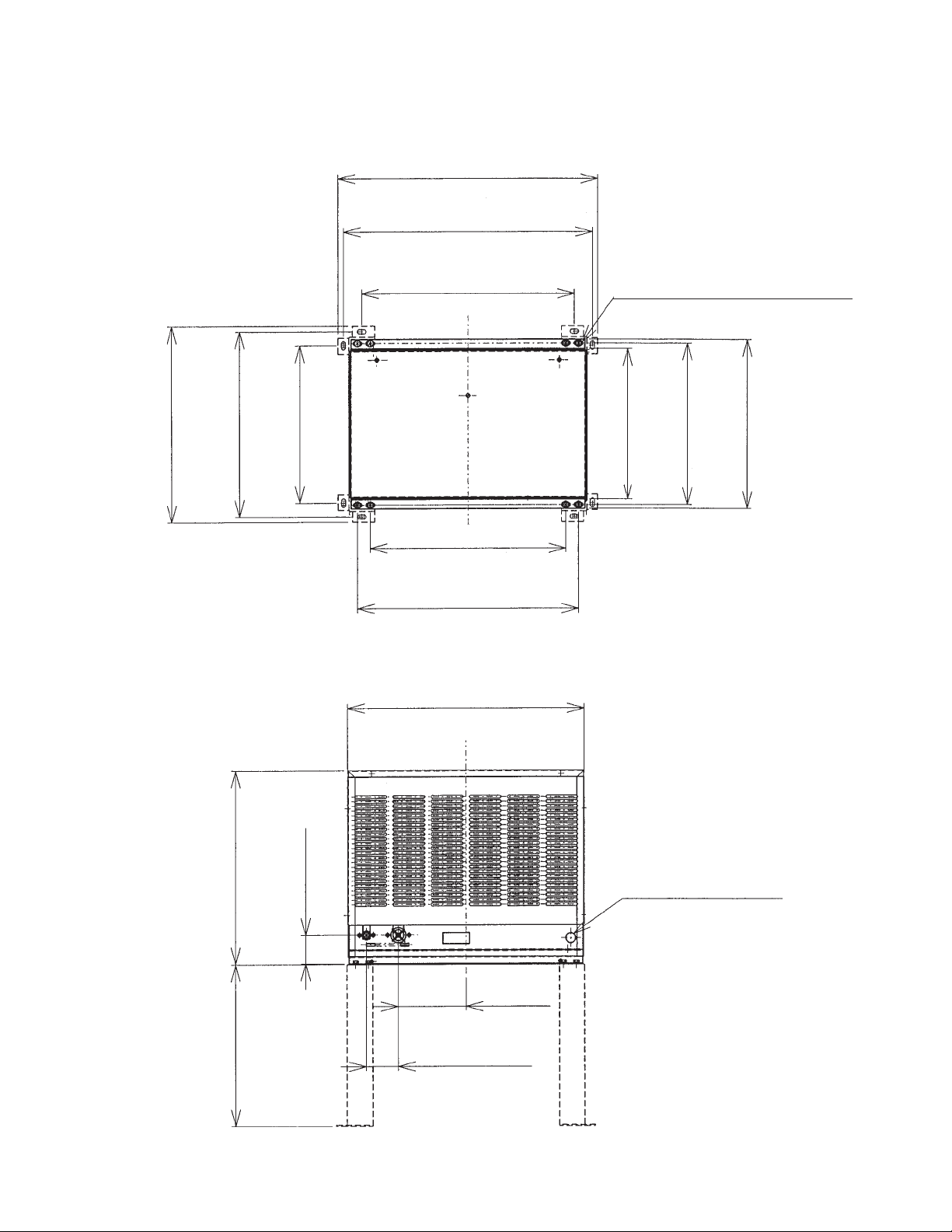
b) Dimensions
24"
(610 mm)
23-1/32"
(585 mm)
Unit: in. (mm)
18-1/8"
(460 mm)
17-1/8"
(435 mm)
14-9/16"
(370 mm)
19-11/16"
(500 mm)
18-1/8"
(460 mm)
20-15/32"
(520 mm)
21-15/16"
(557 mm)
6/16" × 3/4" (10×20 mm)
4×2 (SLOTTED HOLES)
14-1/8"
(358 mm)
(380 mm)
14-15/16"
(398 mm)
15-11/16"
17-7/8"
(454 mm)
(380 mm)
14-15/16"
2-1/2"
(63 mm)
7/8" DIA. HOLE
(23 mm DIA.)
6-5/16"
(160 mm)
2-15/16"
(75 mm)
17
Page 18
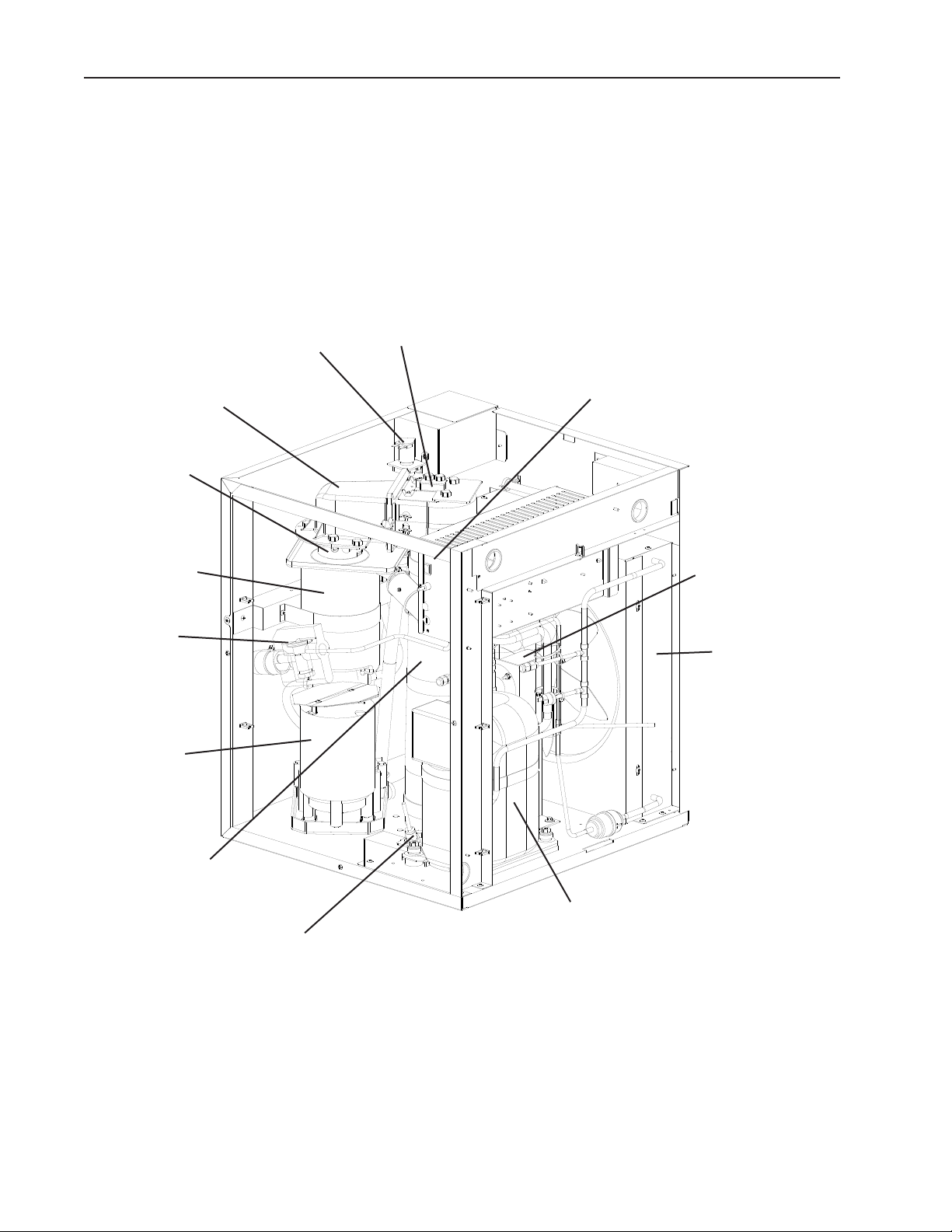
II. General Information
A. Construction
1. FD-1001MAH(-C) (air-cooled)
Spout
Extruding Head
Heater
(FD-1001MAH-C)
Evaporator
Expansion
Valve
Gear Motor
Inlet Water Valve
Mechanical Bin Control
Control Box
Fan Motor
Air-Cooled
Condenser
Ice Chute
Compressor
Infrared Sensor
18
Page 19
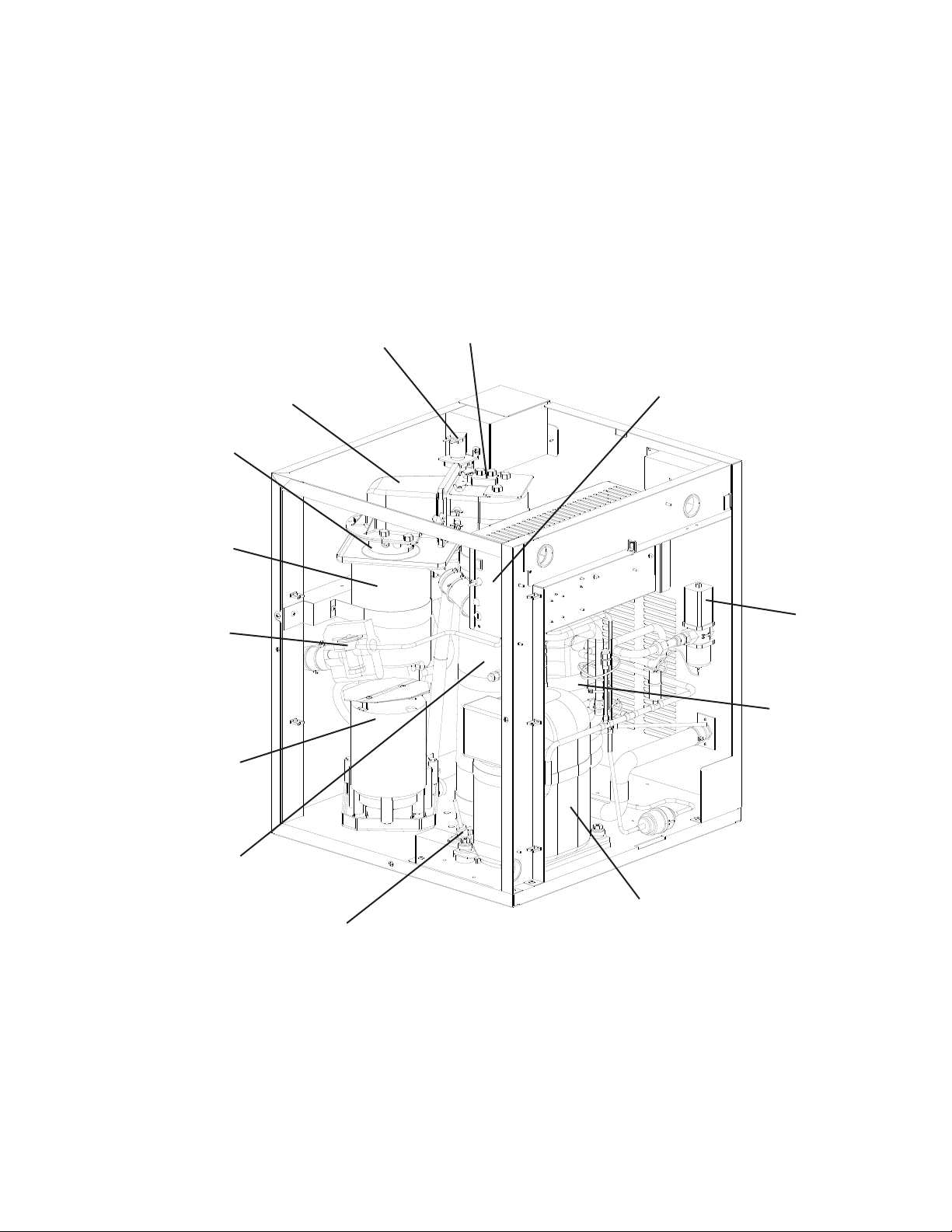
2. FD-1001MWH(-C) (water-cooled)
Extruding Head
Heater
(FD-1001MWH-C)
Evaporator
Expansion
Valve
Gear Motor
Inlet Water Valve
Spout
Mechanical Bin Control
Control Box
Water
Regulating
Valve
Water-Cooled
Condenser
Ice Chute
Compressor
Infrared Sensor
19
Page 20
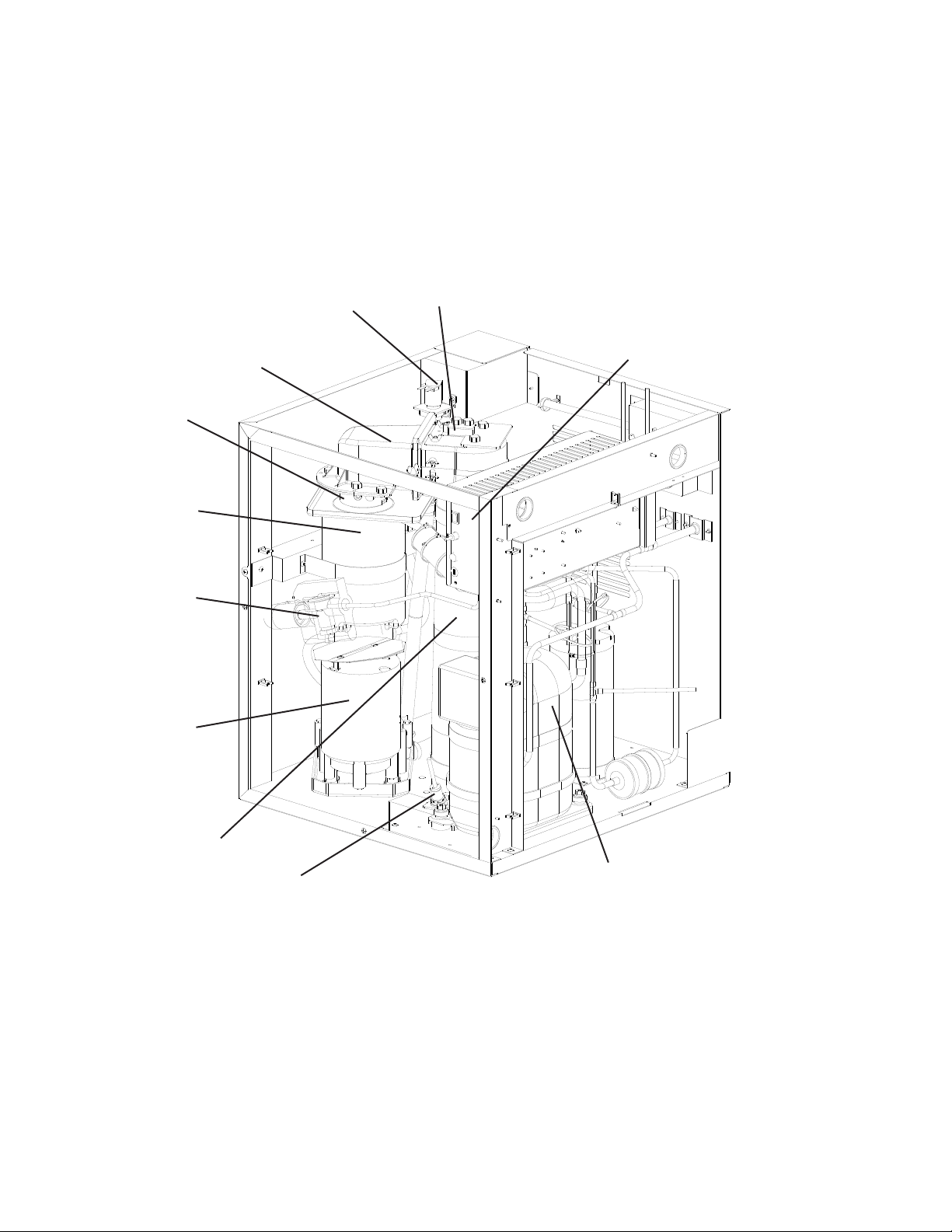
3. FD-1001MRH(-C) (remote air-cooled)
Extruding Head
Heater
(FD-1001MRH-C)
Evaporator
Expansion
Valve
Gear Motor
Inlet Water Valve
Spout
Mechanical Bin Control
Control Box
Ice Chute
Infrared Sensor
Compressor
0
Page 21
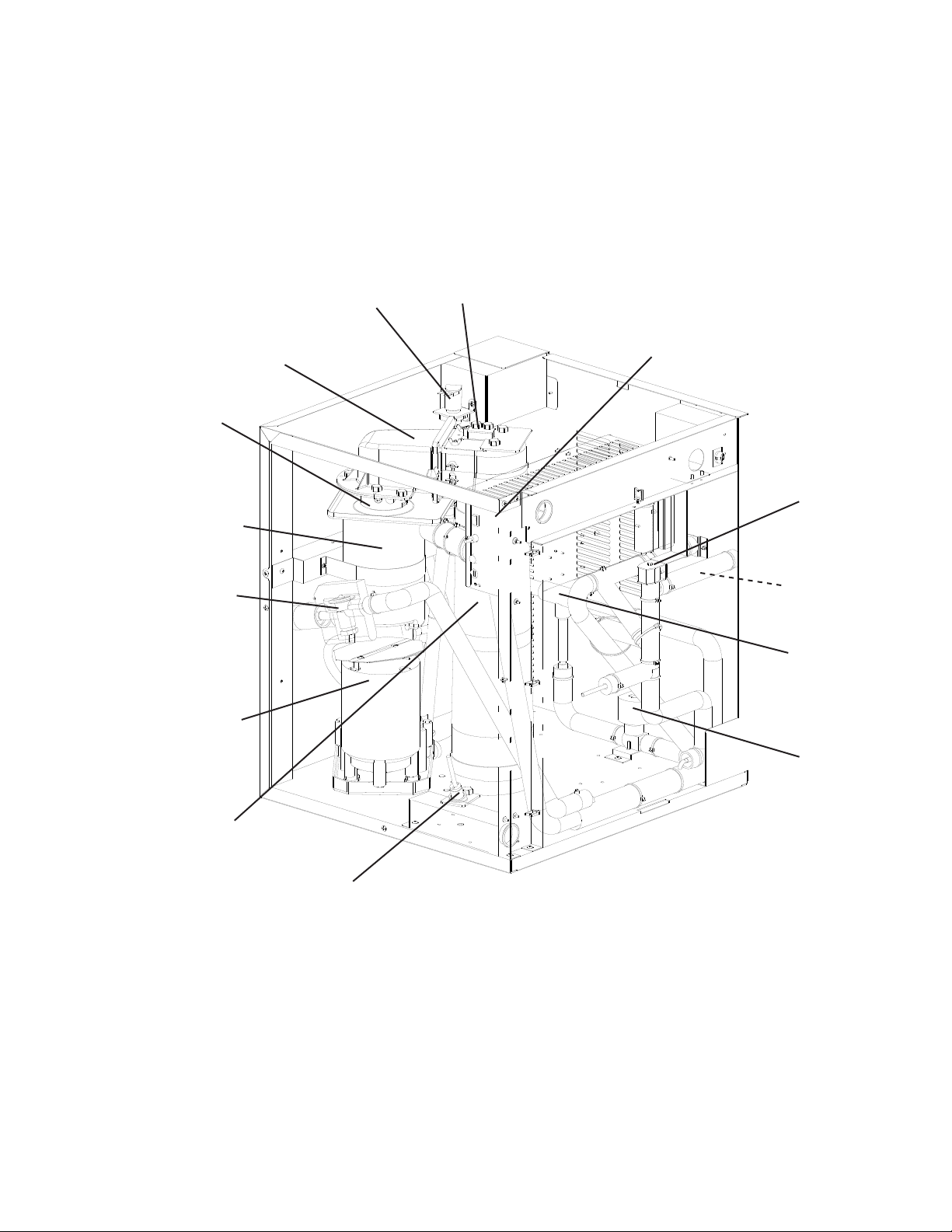
4. FD-1001MLH(-C) (low side, parallel rack system)
Extruding Head
Heater
(FD-1001MLH-C)
Evaporator
Expansion
Valve
Gear Motor
Inlet Water Valve
Spout
Mechanical Bin Control
Control Box
Liquid
Line
Valve
Strainer
Evaporator
Pressure
Regulator
Ice Chute
Suction
Line
Valve
Infrared Sensor
1
Page 22
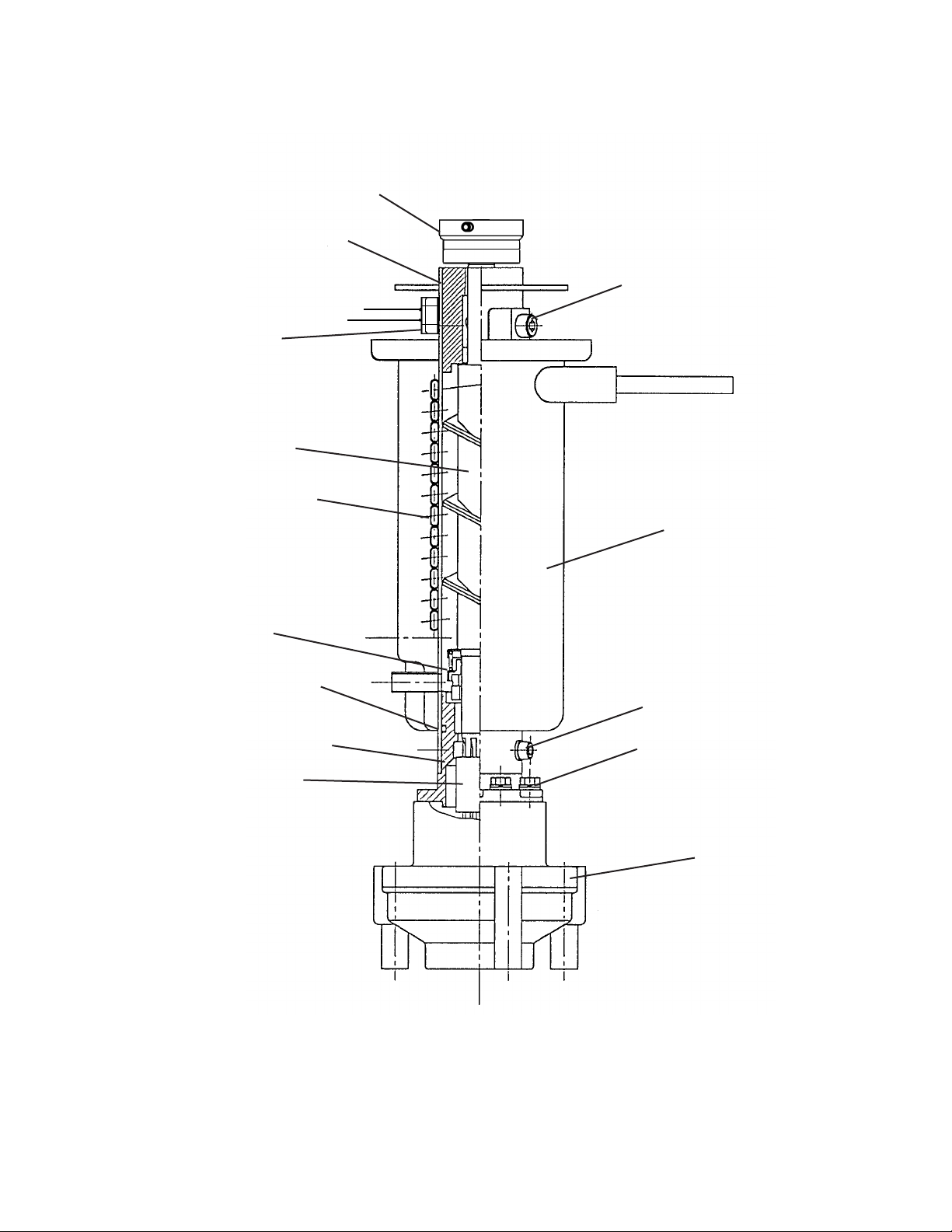
5. Ice Making Unit
Extruding Head Heater
(Cubelet Models Only)
Cutter
Extruding Head
Upper Bearing
Allen Head Cap Screw
Auger
Cylinder
Insulation
Mechanical Seal
O-Ring
Housing-Lower Bearing
Spline Coupling
Allen Head Cap Screw
Hexagon Head Bolt
Gear Motor
Page 23

B. Sequence of Operation
The steps in the sequence are as outlined below. This unit utilizes a control board to
switch the components on and off as needed. When power is supplied, the power switch
is in the "ON" position, and the control switch is in the "ICE" position, CB "POWER OK"
LED comes on.
1. Sequence Cycles and Shutdown
a) Fill Cycle
"WTRIN" LED is on. WV energizes and ll cycle begins. UF/S closes and WV
de-energizes. 30-second GM delay timer starts. If UF/S remains open during ll cycle
longer than 90 seconds, WV remains energized, and a 1-beep alarm sounds.
b) Ice Purge Cycle
"GM" LED is on. 30-second GM delay timer terminates. GMR (X on CB), GM, GMPR,
FM/FMR energize. 5-minute ice purge timer starts; GM runs for 5 minutes to clear any
ice from the evaporator. To bypass, press the "SERVICE" button on the control board
after GM starts. WARNING! Risk of electric shock. Care should be taken not to
touch live terminals.
Note: UF/S must be closed before GMR will energize.
c) Freeze Cycle
"COMP" and "GM" LEDs are on. 5-minute ice purge timer terminates. GMR (X on
CB), GM, GMPR, and FM/FMR remain energized, CR (X1 on CB) and Comp energize
(LLV and SLV energize on MLH models). As water in the evaporator cools, ice starts
forming within 4 to 6 minutes. This time frame depends on the inlet water and ambient
temperature conditions. UF/S and LF/S operate WV as needed to continue the ice
making process. This continues until BC shuts down the icemaker or power is turned off
to the unit.
d) Drain Cycle
(1) 1-in-1 Drain Cycle: DV energizes once every hour when the 1-in-1 drain cycle
is activated (S1 dip switch 4 is in the "OFF" position (factory default position)).
GMR (X on CB), GM, GMPR, FM/FMR, CR (X1 on CB), and Comp continue. DV
energizes for seconds every hour. This setting is recommended for optimum
icemaker performance. The 1-in-1 drain cycle allows any sediment to drain from the
evaporator without interrupting the icemaking process.
(2) 1-in-12 Drain Cycle (optional): DV energizes once every 1 hours when the 1-in-1
drain cycle is activated (S1 dip switch 4 is in the on position (optional)). 1 hour
drain cycle timer terminates, CR (X1 on CB) and Comp de-energize (LLV and SLV
de-energize on MLH model), GMR (X on CB), GM, GMPR, and FM/FMR continue.
The 5-minute ice purge timer begins. When the 5-minute ice purge timer terminates,
GMR (X on CB), GM, GMPR, and FM/FMR de-energize. 10-minute DT begins, DV
energizes. After 10-minute DT terminates, 1 hour drain cycle timer starts.
3
Page 24

(3) Manual Drain: Manual drain is used when servicing evaporator components and
cleaning and sanitizing the unit. When the unit is making ice and the control switch is
moved to the "DRAIN" position, there is a 3-second delay, then CR (X1 on CB) and
Comp (LLV and SLV on MLH models) de-energize and the 5-minute ice purge timer
begins. When the 5-minute ice purge timer terminates, GMR (X on CB), GM, GMPR,
and FM/FMR de-energize. DV energizes to drain the evaporator and reservoir. To
avoid the 5-minute shutdown delay, turn off the power supply, then move the control
switch to the "DRAIN" position. Turn on the power supply. DV energizes to drain the
evaporator and reservoir. DV de-energizes when the control switch is moved to the
"ICE" position.
e) Shutdown Cycle
(1) Infrared Sensor: When power is supplied to the icemaker, the green LED on IS
turns on. The green LED remains on constantly. As ice lls the storage bin to the
level of activating IS, IS yellow LED turns on (ashing or steady). The yellow LED
ashes when ice is at the outer limit of its range and turns steady as ice nears. After
the yellow LED turns on (ashing or steady), IS shutdown delay timer (S1 dip switch
1, , & 3) begins. For a typical dispenser unit application, a 100-second shutdown
delay is recommended. When used with a standard Hoshizaki storage bin, any
shutdown delay setting is acceptable. See "II.C.4.b) Infrared Sensor Shutdown Delay
(S1 dip switch 1, , & 3)." Once IS shutdown delay timer terminates, CR (X1 on CB)
and Comp (LLV and SLV on MLH models) de-energize and the 5-minute ice purge
timer begins. When the 5-minute ice purge timer terminates, GMR (X on CB), GM,
GMPR, and FM/FMR de-energize. See "II.D. Bin Control."
Note: If IS fails to shutdown the icemaker, MBC opens, CB shuts down the icemaker
and a 9-beep alarm sounds.
(2) Mechanical Bin Control: CB shuts down the entire unit within 10 seconds when
MBC opens (actuator paddle engaged), and sounds a 9-beep alarm. For further
details, see "II.C.4.f) Mechanical Bin Control Shutdown Delay (S1 dip switch 8)" and
"II.D. Bin Control."
Legend: BC–bin control; CB–control board; Comp–compressor;
CR–compressor relay; DT–drain timer; DV–drain valve; FM–fan motor;
FMR–fan motor-remote; GM–gear motor; GMPR–gear motor protect relay;
GMR–gear motor relay; IS–infrared sensor; LF/S–lower oat switch;
LLV–liquid line valve (MLH model); MBC–mechanical bin control;
SLV–suction line valve (MLH model); UF/S–upper oat switch; WV–inlet
water valve
4
Page 25
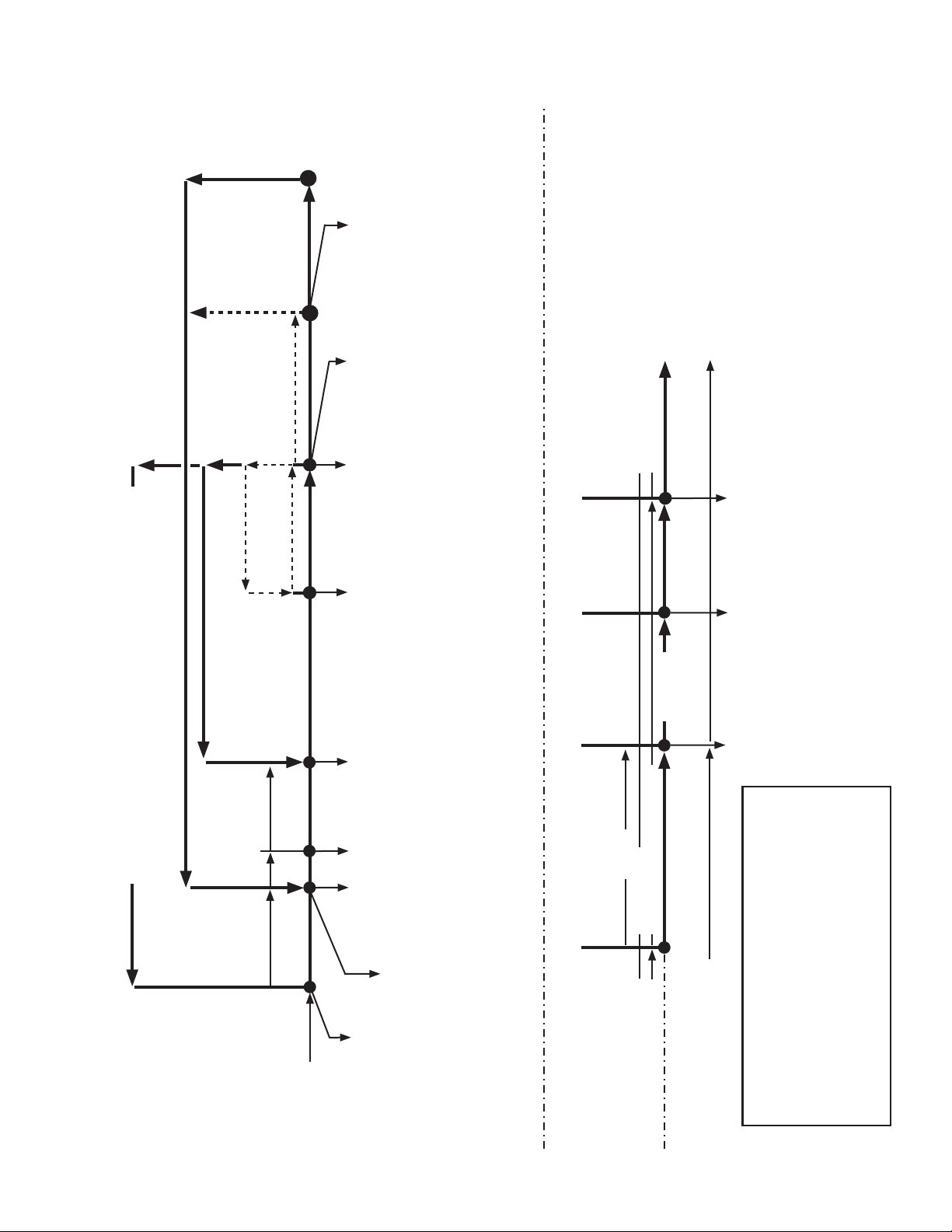
2. Sequence Flow Chart
1-beep alarm continues
WV continues
GMR off
GM off
GMPR off
FM off
FMR off
When UF/S closes,
alarm resets and
. Ice Purge Cycle
starts.
90 seconds
Low Water Safety
90 sec. FT exceeded
1-beep alarm sounds
90 sec. PT begins
Rell
FT Maximum
90 seconds
3. Freeze Cycle
FD Sequence Flow Chart
1-in-1 drain cycle. DV opens for seconds every hour
(S1 Dip Switch 4).
Icemaker status does not change.
terminates
PT
UF/S open
WV on
exceeded
FT
LF/S closed
UF/S closed
FT off (90 sec.)
UF/S open
LF/S open (WV on)
CR on
Comp on
FT exceeded
1-beep alarm sounds
CR off
Comp off
LLV off
SLV off
FT off
WV off
CR continues
Comp continues
GMR continues
GM continues
FT started (90 sec.)
WV on
CR continues
Comp continues
GMR continues
GM continues
LLV on
SLV on
GMR continues
GM continues
GMPR continues
FM continues
GMR continues
GM continues
GMPR continues
GMPR continues
FM continues
FMR continues
GMPR continues
FM continues
FMR continues
FMR continues
FM continues
FMR continues
LLV continues
SLV continues
LLV continues
SLV continues
to ". Ice Purge Cycle" above
IS Green LED on
IS Yellow LED off
4. Icemaker Restart
3. Icemaker Off
4. Icemaker Restart
3. 10-Minute
5 minutes
2. Ice Purge Cycle
2. Ice Purge Cycle
to "1. Fill Cycle" above
10-min. DT off (DC only)
DV off (DC only)
1-in-12 DT reset (DC only)
Drain
DV on (DC only)
GMR off
GM off
GMPR off
FM off
IS activated or
DC starts
CR off
Comp off
LLV off
FMR off
SLV off
GMR continues
GM continues
GMPR continues
FM continues
FMR continues
5 minutes
To bypass, press the
"SERVICE" button after
4. 1-in-12 Drain Cycle - Although the factory default 1-in-1 drain cycle
is recommended, a 1-in-1 drain cycle is available. For 1-in-1 drain
cycle sequence, see "3. 1-in-1 Hour Drain Cycle & Restart (optional)."
GM starts.
2. Ice Purge Cycle
1. Fill Cycle
Power Switch "ON"
30 sec.
Maximum
90 seconds
Control Switch in "ICE"
POWER OK LED on
IS Green LED on
IS Yellow LED off
1. Startup
GMR on
GM on
GMPR on
LF/S closed
UF/S closed
FT off
If Fill > 90 sec. FT
WV on
FT on (90 sec.)
FM on
FMR on
WV off
1-beep alarm sounds
WV continues
When UF/S closes
alarm resets and
5
. Ice Purge Cycle starts.
Note: If IS fails to shutdown the
2. Infrared Sensor Shutdown & Restart
1, , & 3
1. DT Initiates DC
IS Green LED on
1. Bin Full
icemaker, MBC opens and a
9-beep alarm sounds.
IS Yellow LED (ashing or steady)
IS delay determined by S1 dip switch
IS Green LED on
IS Yellow LED off
& Restart (optional)
(S1 dip switch 4)
3. 1-in-12 Drain Cycle
GMR-gear motor relay (X CB)
IS-infrared sensor bin control
LF/S-lower oat switch
LLV-liquid line valve (MLH only)
MBC-mechanical bin control
PT-purge timer
SLV-suction line valve (MLH only)
Legend:
Comp-compressor
CR-compressor relay
DC-drain cycle
DT-drain timer
DV-drain valve
FM-fan motor
FMR-fan motor-remote
UF/S-upper oat switch
WV-water valve
FT-ll timer (low water safety)
GM-gear motor
GMPR-gear motor protect relay
Page 26
C. Control Board
• A Hoshizaki exclusive control board is employed in FD-1001MAH(-C), FD-1001MWH(-C),
FD-1001MRH(-C), and FD-1001MLH(-C) Modular Flakers.
• All models are pre-tested and factory set.
CAUTION
1. The control board is fragile; handle very carefully.
. The control board contains integrated circuits, which are susceptible to
failure due to static discharge. It is especially important to touch the metal
part of the icemaker before handling or replacing the control board.
3. Do not touch the electronic devices on the control board or the back of the
control board to prevent damage to the control board.
4. Do not change wiring and connections. Never misconnect terminals.
5. Do not short out power supply to test for voltage.
6. Always replace the whole control board if it goes bad.
The control board provides the following safeguards:
• High and low voltage protection.
• Provides component protection during low water supply.
• Purges remaining ice in the evaporator.
• Provides short cycle protection for the compressor.
6
Page 27
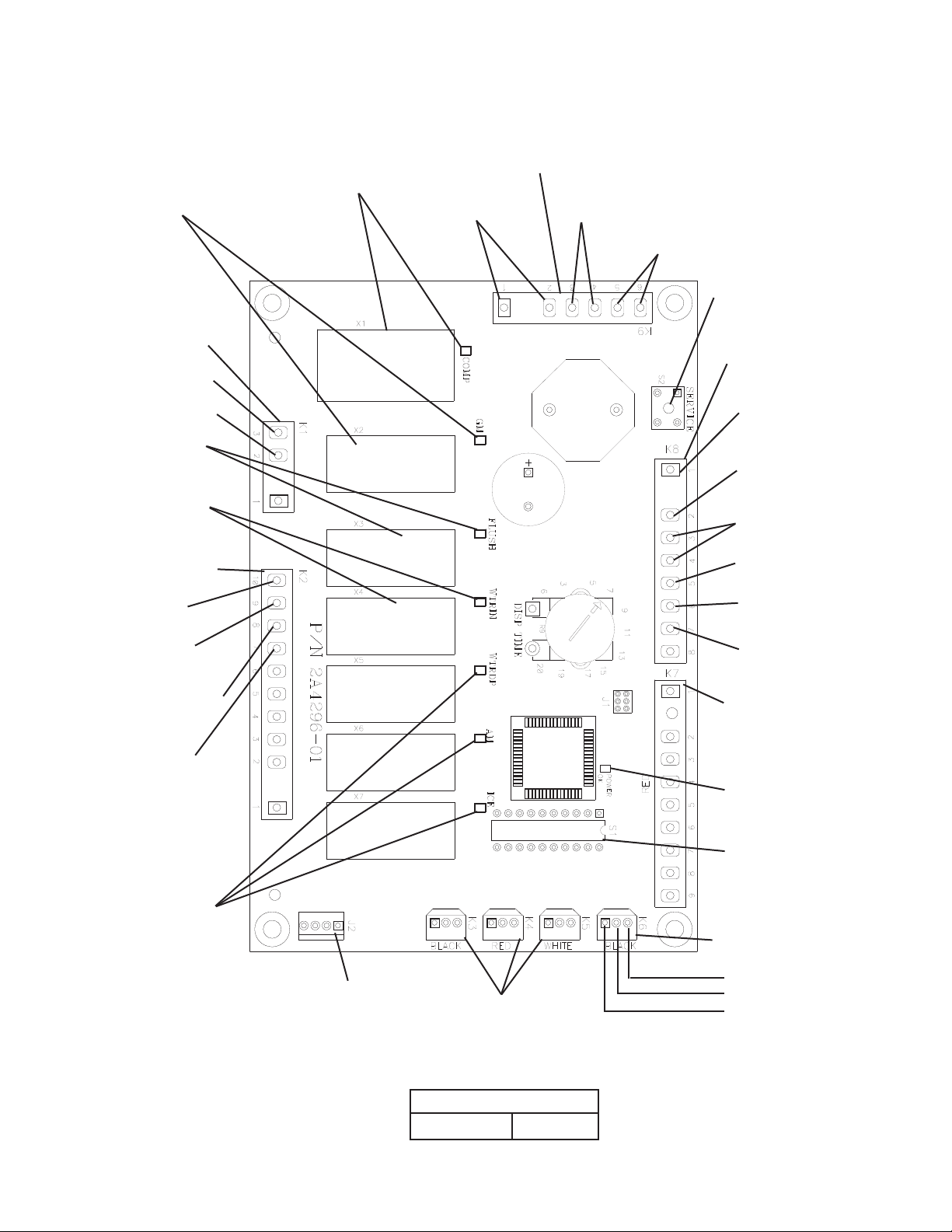
1. Control Board Layout
• "COMP" LED
(X1 Relay)
• "GM" LED
(X2 Relay)
GM
FMR
FMS
Comp
LLV
SLV
"F-A" Control Board
• K9 Connector (5VDC)
Control Switch
#1 & # (white/black)
High Pressure Switch
#3 & #4 (yellow)
Gear Motor Protect Relay Circuit
#5 & #6 (white/orange)
• S2 "SERVICE" Button
(Ice Purge Cycle Bypass)
• K1 Connector
(115VAC)
#3 Input (black)
# GM, FMR,
FMS (brown)
• "FLUSH" LED
(X3 Relay) (drain)
DV
• "WTRIN" LED
(X4 Relay)
WV
• K2 Connector
(24VAC)
Drain Valve
#10 (white/blue)
Transformer
Input
#9 (white/red)
Inlet Water Valve
#8 (white/brown)
Transformer
Input
#7 (white/red)
• K8 Connector
(24VAC and 5VDC)
Transformer
4VAC Input
#1 (white/red)
Transfomer
4VAC Neutral
# (light blue)
Mechanical Bin Control
#3 & #4 (gray) (5VDC)
Float Switch
#5 (black) (5VDC)
Upper Float Switch
#6 (red)
Lower Float Switch
#7 (dark blue)
• K7 Connector-Open
• "POWER OK" LED
Water Dispensing
Valve, Agitation
Motor, and Ice
Dispensing LEDs
(not used on this
model)
• J2 Connector-Open
• K3 Connector-Open
• K4 Connector-Open
• K5 Connector-Open
"F-A" Control Board
Part Number
A496-01
7
• S1 Dip Switch
• K6 Connector (20VDC)
Infrared Sensor
(brown (ground))
(white, signal (common))
(dark blue)
Page 28

2. Features
a) Low Water Safety
When the inlet water valve opens during ll and rell, a 90-second low water safety
timer starts. Once the upper oat switch closes the 90-second low water safety timer
terminates. If the upper oat switch remains open longer than 90 seconds, a 1-beep
alarm sounds. The water valve and 1-beep alarm continue until the upper oat switch
closes.
b) Ice Purge Cycle Bypass
To speed up the diagnostic process, the 5-minute ice purge cycle may be bypassed
by pressing the "SERVICE" button on the control board after the gear motor starts.
WARNING! Risk of electric shock. Care should be taken not to touch live
terminals.
c) Freeze Timer
A 30-minute freeze timer starts once the upper oat switch closes. Should the upper
oat switch fail to close again before the 30-minute timer terminates, the control board
shuts down the icemaker and sounds a 5-beep alarm every 5 seconds. Also, when the
lower oat switch is open and the upper oat switch is closed, the control board sounds
a 5-beep alarm every 5 seconds. Both alarms require a manual reset. For further details,
see "II.C.3.d) Feeze Timer (5-beep alarm)."
d) Drain Frequency
(1) 1-in-1 Drain Cycle: The 1-hour drain timer terminates, then the drain valve energizes
for seconds. This occurs once every hour when the 1-in-1 drain cycle is activated
(S1 dip switch 4 in the "OFF" position (factory default)). This setting is recommended
for optimum icemaker performance. The 1-in-1 drain cycle allows for maximum
drainage of any sediment from the evaporator without interrupting the icemaking
process.
(2) 1-in-12 Drain Cycle (optional): The 1-hour drain timer terminates, then the
icemaker cycles down and the drain valve energizes for 10 minutes. This occurs once
every 1 hours when the 1-in-1 drain cycle is activated (S1 dip switch 4 in the "ON"
position (optional)). For further details, see "II.B.1.d) Drain Cycle."
e) Bin Control Shutdown Delay
(1) Infrared Sensor: The ice level at shutoff may need to be adjusted depending on the
dispenser agitation or dispense method. For a typical dispenser unit application, a
100-second shutdown delay is recommended. Increasing the shutdown delay setting
allows for a higher level of ice in the bin before the icemaker shuts down. When used
with a standard Hoshizaki storage bin, any shutdown delay setting is acceptable. For
further details, see "II.C.4.b) Infrared Sensor Shutdown Delay (S1 dip switch 1, , and
3)."
(2) Mechanical Bin Control: The control board shuts down the entire unit within
10 seconds when the mechanical bin control proximity switch opens (actuator paddle
engaged). For further details, see "II.C.4.f) Mechanical Bin Control Shutdown Delay
(S1 dip switch 8)."
8
Page 29
f) High Voltage and Low Voltage Cut-outs
The maximum and minimum allowable supply voltages of this icemaker are limited by
the high voltage (147Vac±5% or more) and low voltage (9Vac±5% or less) cut-outs.
When high voltage (147Vac±5% or more) is present, the icemaker automatically stops
and the control board signals with a 7-beep alarm every 3 seconds.
When low voltage (9Vac±5% or less) is present, the icemaker automatically stops and
the control board signals with a 6-beep alarm every 3 seconds.
When the proper supply voltage is resumed, the icemaker automatically starts running
again.
g) LED Lights and Alarm Safeties Chart
The "POWER OK" LED indicates proper control voltage and will remain on unless a
control voltage problem occurs. For further details, see "II.B. Sequence of Operation."
Sequence Step LED
Fill Cycle WTRIN WV - Ice Purge Cycle GM GM, FM/FMR 5 min. 5 min.
Freeze Cycle (with rell) GM, WTRIN* (rell),
COMP
Drain Cycle FLUSH (Drain) DV sec. 10 min.
Energized
Components Min. Max.
GM, Comp,
FM/FMR, LLV,
SLV, WV* (rell)
- *On until UF/S closes.
Alarm sounds after
90 sec.
The built-in alarm safeties shut down the unit.
No. of Beeps
(every 5 sec.)
1 Low Water Safety
UF/S open > 90 seconds after WV energized.
Control Switch
In "DRAIN" position longer than 15 minutes.
3 High Pressure Switch
First and second activation in 1 hour.
4 High Pressure Switch
Third activation in 1 hour.
5 Freeze Timer
WV off > 30 minutes since last WV activation.
6 Low Voltage
(9Vac ±5% or less)
7 High Voltage
(147Vac ±5% or more)
8 Gear Motor
GMPR contacts fail to close.
9 Infrared Sensor (S1 dip switch 7)
MBC actuator paddle engaged.
Type of Alarm Reset Options
Automatic reset once water supply is restored
and UF/S closes.
Automatic reset once the control switch is
moved to the "ICE" position.
Automatic reset once pressure drops below
the high pressure threshold and the high
pressure switch closes.
Call for service. To avoid possible catastrophic
failure, it is recommended to leave the
icemaker off until this alarm is resolved.
Manual reset. Turn power off and on again.
Manual reset. Turn power off and on again.
"POWER OK" LED turns off if voltage
protection operates.
The control voltage safeties automatically
reset when voltage is corrected.
Manual reset. Turn power off and on again.
Manual reset. Turn power off and on again.
Legend: Comp–compressor; DV–drain valve; FM–fan motor; FMR–fan motor-remote;
GM–gear motor; GMPR–gear motor protect relay; LLV-liquid line valve
(MLH model only); MBC–mechanical bin control; SLV–suction line valve (MLH
model only); UF/S–oat switch; WV–inlet water valve
9
Page 30

3. Alarm Safeties
a) Low Water Safety (1-beep alarm)
(1) Fill Cycle: If upper oat switch remains open 90 seconds after the inlet water valve
has energized, the control board sounds a 1-beep alarm every 5 seconds. The alarm
resets and the icemaker automatically starts running again once water is restored or
the oat switch is cleaned or replaced.
(2) Freeze Cycle/Rell: If upper oat switch remains open 90 seconds after the inlet
water valve energizes, the compressor de-energizes and the control board sounds a
1-beep alarm every 5 seconds. The gear motor continues for another 90 seconds to
clear the ice from the evaporator. The inlet water valve and 1-beep alarm continue
until the upper oat switch closes. The alarm resets and the icemaker automatically
starts running again when the upper oat switch closes.
b) Control Switch in the "DRAIN" Position (2-beep alarm)
When the control switch is left in the "DRAIN" position longer than 15 minutes, the
control board sounds a -beep alarm every 5 seconds. When the control switch is
moved to the "ICE" position, the alarm resets and the icemaker starts running again.
c) High Pressure Switch (3 & 4-beep alarms)
(1) 3-beep alarm: For the rst and second high pressure switch activation in 1 hour,
the icemaker shuts down and the control board sounds a 3-beep alarm every
5 seconds. When the high pressure switch closes, the alarm resets and the icemaker
automatically starts running again.
(2) 4-beep alarm: For the third high pressure switch activation in 1 hour, the icemaker
shuts down and the control board sounds a 4-beep alarm every 5 seconds. This
alarm is to prevent catastrophic failure to the compressor and requires a manual
reset. Before resetting, contact your local Hoshizaki Service Representative. Turn the
power off and then on again to reset the alarm. If the high pressure switch has reset,
the icemaker starts running again.
d) Freeze Timer (5-beep alarm)
The control board starts a 30-minute freeze timer once the upper oat switch closes. As
the water level drops in the reservoir, the upper oat switch opens. Should the upper
oat switch fail to close again before the 30-minute freeze timer terminates, the control
board sounds a 5-beep alarm every 5 seconds. This alarm requires a manual reset.
Turn the power off and then on again to reset the alarm. The icemaker starts running.
Also, when the lower oat switch is open and the upper oat switch is closed, the control
board sounds a 5-beep alarm every 5 seconds. This alarm requires a manual reset.
Turn the power off and then on again to reset the alarm. For further details, see "IV.E.
Float Switch Check."
e) Low Voltage (6-beep alarm)
The minimum allowable power supply voltage of this icemaker is limited by the low
voltage cut-out. When low voltage (9Vac ±5% or less) is present, the "POWER OK"
LED turns off and the control board shuts down the unit and sounds a 6-beep alarm
every 5 seconds. When the proper supply voltage resumes, the icemaker automatically
starts running again.
30
Page 31

f) High Voltage (7-beep alarm)
The maximum allowable supply voltage for this icemaker is limited by the high voltage
cut-out. When high voltage (147.5Vac ±5% or more) is present, the "POWER OK" LED
turns off and the control board shuts down the unit and sounds a 7-beep alarm every
5 seconds. When the proper supply voltage resumes, the unit automatically starts
running again.
g) Gear Motor (8-beep alarm)
Gear motor operation is conrmed through the gear motor protect relay (control board
K1 connector). If the white/orange (W/O) wires on the control board K9 connector (gear
motor protect circuit) do not have continuity (gear motor protect relay de-energized),
the compressor relay does not energize. If the icemaker is running, and the gear motor
protect relay de-energizes, the control board shuts down the compressor and gear
motor and sounds an 8-beep alarm every 5 seconds. This alarm requires a manual
reset. Turn the power off and then on again to reset the alarm. The icemaker starts
running. The compressor starts running again when the gear motor protect relay
energizes. For further details, see "IV.B. Diagnostic Procedure."
h) Bin Control (9-beep alarm)
This alarm provides protection to prevent the icemaker from overlling the ice storage
bin. If the infrared sensor is signifying the ice storage bin is empty (yellow LED off), and
the mechanical bin control is signifying the ice storage bin is full (proximity switch open),
the control board shuts down the unit and sounds a 9-beep alarm every 5 seconds. This
alarm requires a manual reset. Turn the power off and then on again to reset the alarm.
For further details, see "IV.D. Bin Control Check."
4. Controls and Adjustments
CAUTION
Dip switches are factory set. Failure to maintain factory settings may adversely
affect performance and warranty coverage. For more information, contact
Hoshizaki Technical Support at 1-800-33-1940.
a) Default Dip Switch Settings
The S1 dip switch settings are factory-set to the following positions:
Dip Switch No. 1 2 3 4 5 6 7 8 9 10
FD-1001M_H(-C) ON OFF OFF OFF OFF OFF ON ON OFF OFF
Normally off (factory use)
Mechanical Bin Control Shutdown Delay
Bin Control Selector
Continuous Dispensing Timer
(DCM models only, do not adjust on modular icemakers)
Drain Frequency Control
Infrared Sensor Shutdown Delay
31
Page 32

b) Infrared Sensor Shutdown Delay (S1 dip switch 1, 2, & 3)
Infrared sensor shutdown delay is the delay between the infrared sensor detecting ice
(yellow LED ashing or steady) and the start of the shutdown sequence. For dispenser
unit applications, the ice level at shutoff may need to be adjusted depending on the
dispenser agitation or dispense method. Increasing the shutdown delay setting allows for
a higher level of ice in the bin before the icemaker shuts down. For a typical dispenser
unit application, a 100-second shutdown delay is recommended. When used with a
standard Hoshizaki storage bin, any shutdown delay setting is acceptable.
WARNING
Increasing the shutdown delay allows a higher level of ice in the dispensing
unit/storage bin before shutdown. This could lead to icemaker movement or ice
overow.
S1 Dip Switch Setting
No. 1 No. 2 No. 3
OFF OFF OFF 0 Seconds
ON OFF OFF 100 Seconds (1.6 minutes) (Factory Default)
OFF ON OFF 1100 Seconds (18.3 minutes)
OFF OFF ON 1650 Seconds (7.5 minutes)
ON ON OFF 00 Seconds (36.7 minutes)
OFF ON ON 0 Seconds
ON ON ON 0 Seconds
Infrared Sensor Shutdown Delay
c) Drain Frequency Control (S1 dip switch 4)
This unit is factory set for optimum performance with the 1-in-1 drain cycle (S1 dip
switch 4 in the "OFF" position). This setting allows for removal of sediment from the
evaporator without interrupting the icemaking process. An optional 1-in-1 drain cycle is
available.
S1 Dip Switch Setting
No. 4
OFF (1-in-1) 1 Hour Seconds
ON (1-in-1)
Drain Timer Interval Drain Valve Open
11 Hours 45 Minutes 10 Minutes
d) Continuous Dispensing Timer (S1 dip switch 5 & 6)
DCM models only. The dispense mode switch on DCMs must be in the "CONTINUOUS"
position for this setting to apply. The factory setting allows ice to be dispensed
continuously as long as the dispense solenoid is activated.
S1 Dip Switch Setting
No. 5 No. 6
OFF OFF No Limit
ON OFF 0 Seconds
OFF ON 60 Seconds
ON ON No Limit
Dispense Time
3
Page 33

e) Bin Control Selector (S1 dip switch 7)
This unit is factory set for infrared sensor bin control operation. No adjustment is
required. When used on a standard ice storage bin, the mechanical bin control may be
used instead of the infrared sensor by moving S1 dip switch 7 to the off position. In the
factory default position (S1 dip switch 7 in the on position), the gear motor delay after the
upper oat switch closes is 30 seconds. When the mechanical bin control is used (S1 dip
switch 7 in the off position), the gear motor delay after the upper oat switch closes is
5 seconds. WARNING! Do not place S1 dip switch 7 in the off position on dispenser
unit applications.
S1 Dip Switch
Setting
No. 7
OFF Mechanical Bin Control (Standard Ice Storage Bins Only) 5 seconds
ON
Infrared Sensor with
Mechanical Bin Control Backup
Bin Control Application Gear Motor Delay
30 seconds
f) Mechanical Bin Control Shutdown Delay (S1 dip switch 8)
Factory set for normal operation. No adjustment is required. The shutdown delay is the
time between the mechanical bin control proximity switch opening and the control board
shutting off the icemaker.
S1 Dip Switch
Setting
No. 8
OFF 0.5 Seconds
ON 6.7 Seconds
Bin Control #1
Shutdown Delay
g) Factory Use (S1 Dip Switch 9 & 10)
Factory set for optimum performance. Do not adjust.
33
Page 34

D. Bin Control
An infrared sensor is used to control the level of ice in the dispenser unit/ice storage
bin (S1 dip switch 7 in the "ON" position). The infrared sensor is the primary bin control
device. 0VDC powers the infrared sensor from the control board K6 connector. A green
power LED and a yellow ice detection LED are located on the infrared sensor. See
Fig. 1. The paddle-actuated mechanical bin control is used as a backup bin control and
safety device. See Fig. . For further details, see "IV.D. Bin Control Check."
The paddle-actuated mechanical bin control may be used as a stand-alone bin control
when the unit is placed on a standard Hoshizaki ice storage bin (S1 dip switch 7 in
the off position). WARNING! Do not place S1 dip switch 7 in the off position on
dispenser unit applications.
Infrared Sensor
Connector (0V DC
from K6 connector on
control board)
Infrared Sensor LED
Infrared Sensor
Infrared Sensor
Housing
Fig. 1
Infrared Sensor LED
Infrared Sensor
Lens
Ice Chute
Fig. 2
Proximity
Switch
Actuator
Paddle
E. Float Switch
A dual oat switch is used to determine that there is sufcient water in the reservoir
during ll and rell. The control board monitors the upper oat switch to de-energize
the inlet water valve when the upper oat switch closes during ll and rell. The control
board monitors the lower oat switch to energize the inlet water valve when the lower
oat switch opens during the freeze cycle (rell). See Fig. 3. The control board monitors
the time between the lower oat switch opening and the upper oat switch closing
(90-second low water safety). The control board also monitors the time between the
upper oat switch closing and the lower oat switch opening (30-minute freeze timer).
No adjustment is required. For a oat switch check procedure, see "IV.E.1. Float Switch
Check."
Red (R)
(upper float switch)
Black (BK)
(common)
Dark Blue (DBU)
(lower float switch)
Upper Float Switch
(blue)
Spring Retainer Clip
Lower Float Switch
(white)
Plastic Retainer Clip
Fig. 3
34
Page 35

III. Technical Information
A. Water Circuit and Refrigeration Circuit
1. FD-1001MAH(-C) (air-cooled)
Inlet
Water
Valve
Float
Water Supply Line
Switch
Water Level
Spout
Insulation
Drain Outlet
Condenser
Reservoir
Overow
Evaporator
Gear
Motor
Drain Pan
Drier
Condenser
Fan Motor
Expansion
Valve
Drain
Valve
Pressure
Switch
35
Access
Valve
Access
Valve
Compressor
Water Circuit
Refrigerant Circuit
Page 36

2. FD-1001MWH(-C) (water-cooled)
Inlet
Water
Valve
Float
Water Supply Line
Switch
Spout
Insulation
Water Level
Drain Outlet
Cond.
Water
Inlet
Cond.
Water
Outlet
Reservoir
Overow
Evaporator
Gear
Motor
Drier
Condenser
Expansion
Valve
Drain
Valve
Drain Pan
Pressure
Switch
Access
Valve
Water
Regulating
Valve
Access Valve
Compressor
Water Circuit
Refrigerant Circuit
36
Page 37

3. FD-1001MRH(-C) (remote air-cooled)
Inlet
Water
Valve
Float
Switch
Water Supply Line
Water Level
Spout
Insulation
Drain Outlet
Reservoir
Overow
Condenser
Unit
Condenser
Evaporator
Gear
Motor
Drain Pan
Coupling
Insulation
Condensing
Pressure
Regulator
(Headmaster)
Condenser
Fan Motor
Pressure
Switch
Expansion
Valve
Drain
Valve
Drier
Fusible
Plug
Receiver Tank
Insulation
Coupling
Access
Valve
Compressor
Water Circuit
Refrigerant Circuit
37
Page 38

4. FD-1001MLH(-C) (low side, parallel rack system)
Inlet
Water
Valve
Float
Water Supply Line
Switch
Water Level
Spout
Insulation
Drain Outlet
Reservoir
Overow
Evaporator
Gear
Motor
Access
Valve
Drain Pan
Expansion
Valve
Drain
Valve
Heat
Exchanger
Liquid
Line
Valve
Strainer
Multi-Rack
Condensing
Unit
Access
Valve
Water Circuit
Refrigerant Circuit
38
Suction
Line
Valve
Evaporator
Pressure
Regulator
Valve
(EPR Valve)
Page 39

B. Wiring Diagrams
1. FD-1001MAH(-C), FD-1001MWH(-C), FD-1001MRH(-C)
CONTROL BOARD
S1 SERVICE BUTTON
DIP SWITCH
S
X1 COMPRESSOR RELAY
WIRE COLOR CODE
R RED
BK BLACK
BR BROWN
O ORANGE
Y YELLOW
GR GREEN
GY GRAY
P PINK
V VIOLET
W WHITE
LBU LIGHT BLUE
DBY DARK BLUE
W/BU WHITE / BLUE
W/R WHITE / RED
W/BK WHITE / BLACK
W/BR WHITE / BROWN
W/0 WHITE / ORANGE
39
Page 40

2. FD-1001MLH(-C)
CONTROL BOARD
S1 SERVICE BUTTON
DIP SWITCH
S
X1 COMPRESSOR RELAY
WIRE COLOR CODE
R RED
BK BLACK
BR BROWN
O ORANGE
Y YELLOW
GR GREEN
GY GRAY
P PINK
V VIOLET
W WHITE
LBU LIGHT BLUE
DBY DARK BLUE
W/BU WHITE / BLUE
W/R WHITE / RED
W/BK WHITE / BLACK
W/BR WHITE / BROWN
W/0 WHITE / ORANGE
40
Page 41

3. Sequence Wiring Diagram
a) Fill Cycle.
Power supply is turned on. Inlet water valve energizes and reservoir lls.
CONTROL BOARD
S1 SERVICE BUTTON
DIP SWITCH
S
X1 COMPRESSOR RELAY
WIRE COLOR CODE
R RED
BK BLACK
BR BROWN
O ORANGE
Y YELLOW
GR GREEN
GY GRAY
P PINK
V VIOLET
W WHITE
LBU LIGHT BLUE
DBY DARK BLUE
W/BU WHITE / BLUE
W/R WHITE / RED
W/BK WHITE / BLACK
W/BR WHITE / BROWN
W/0 WHITE / ORANGE
41
Page 42

b) Ice Purge Cycle
Upper oat switch closes, 30-second gear motor delay timer starts. After 30-second gear
motor delay timer terminates, 5-minute ice purge timer starts, gear motor, fan motor/
fan motor-remote energize.
Note: The 30-second gear motor delay is active when S1 dip switch 7 is in the on
position. Otherwise, gear motor has a 5-second delay when upper oat switch
closes.
CONTROL BOARD
S1 SERVICE BUTTON
DIP SWITCH
S
X1 COMPRESSOR RELAY
WIRE COLOR CODE
R RED
BK BLACK
BR BROWN
O ORANGE
Y YELLOW
GR GREEN
GY GRAY
P PINK
V VIOLET
W WHITE
LBU LIGHT BLUE
DBY DARK BLUE
W/BU WHITE / BLUE
W/R WHITE / RED
W/BK WHITE / BLACK
W/BR WHITE / BROWN
W/0 WHITE / ORANGE
4
Page 43

c) Freeze Cycle
5-minute ice purge timer terminates, compressor energizes (liquid line valve, and suction
line valve on MLH models).
CONTROL BOARD
S1 SERVICE BUTTON
DIP SWITCH
S
X1 COMPRESSOR RELAY
WIRE COLOR CODE
R RED
BK BLACK
BR BROWN
O ORANGE
Y YELLOW
GR GREEN
GY GRAY
P PINK
V VIOLET
W WHITE
LBU LIGHT BLUE
DBY DARK BLUE
W/BU WHITE / BLUE
W/R WHITE / RED
W/BK WHITE / BLACK
W/BR WHITE / BROWN
W/0 WHITE / ORANGE
43
Page 44

d) 1-in-1 Drain Cycle
Compressor, (liquid line valve, suction line valve on MLH models), fan motor/fan
motor-remote, and gear motor continue. Drain valve energizes for seconds every hour.
CONTROL BOARD
S1 SERVICE BUTTON
DIP SWITCH
S
X1 COMPRESSOR RELAY
WIRE COLOR CODE
R RED
BK BLACK
BR BROWN
O ORANGE
Y YELLOW
GR GREEN
GY GRAY
P PINK
V VIOLET
W WHITE
LBU LIGHT BLUE
DBY DARK BLUE
W/BU WHITE / BLUE
W/R WHITE / RED
W/BK WHITE / BLACK
W/BR WHITE / BROWN
W/0 WHITE / ORANGE
44
Page 45

e) 1-in-12 Drain Cycle
1-in-1 drain cycle initiates (S1 dip switch 4). Compressor and fan motor/fan
motor-remote de-energize. 5-minute ice purge timer starts and gear motor continues.
5-minute ice purge timer terminates, gear motor de-energizes. Drain valve opens for
10 minutes.
CONTROL BOARD
S1 SERVICE BUTTON
DIP SWITCH
S
X1 COMPRESSOR RELAY
WIRE COLOR CODE
R RED
BK BLACK
BR BROWN
O ORANGE
Y YELLOW
GR GREEN
GY GRAY
P PINK
V VIOLET
W WHITE
LBU LIGHT BLUE
DBY DARK BLUE
W/BU WHITE / BLUE
W/R WHITE / RED
W/BK WHITE / BLACK
W/BR WHITE / BROWN
W/0 WHITE / ORANGE
45
Page 46

f) Infrared Sensor Shutdown
Ice lls storage bin to level of activating infrared sensor, infrared sensor yellow LED
turns on (ashing or steady). Infrared sensor shutdown sequence begins. For further
information, see "II.B.1.e) Shutdown Cycle."
CONTROL BOARD
S1 SERVICE BUTTON
DIP SWITCH
S
X1 COMPRESSOR RELAY
WIRE COLOR CODE
R RED
BK BLACK
BR BROWN
O ORANGE
Y YELLOW
GR GREEN
GY GRAY
P PINK
V VIOLET
W WHITE
LBU LIGHT BLUE
DBY DARK BLUE
W/BU WHITE / BLUE
W/R WHITE / RED
W/BK WHITE / BLACK
W/BR WHITE / BROWN
W/0 WHITE / ORANGE
46
Page 47

g) Mechanical Bin Control Shutdown
Ice lls the chute to the point of engaging the mechanical bin control.
Dip Switch 7 "ON": The icemaker shuts down within 10 seconds of the mechanical bin
control opening and a 9-beep alarm sounds.
Dip Switch 7 "OFF": Hoshizaki ice storage bin applications only. The icemaker shuts
down within 10 seconds of the mechanical bin control opening.
CONTROL BOARD
S1 SERVICE BUTTON
DIP SWITCH
S
X1 COMPRESSOR RELAY
WIRE COLOR CODE
R RED
BK BLACK
BR BROWN
O ORANGE
Y YELLOW
GR GREEN
GY GRAY
P PINK
V VIOLET
W WHITE
LBU LIGHT BLUE
DBY DARK BLUE
W/BU WHITE / BLUE
W/R WHITE / RED
W/BK WHITE / BLACK
W/BR WHITE / BROWN
W/0 WHITE / ORANGE
47
Page 48

h) Low Water Safety
During ll or rell, should the upper oat switch fail to close within 90 seconds after the
water valve energizes, a 1-beep alarm sounds. The water valve remains open until the
upper oat switch closes. If this occurs during rell, the icemaker cycles down.
CONTROL BOARD
S1 SERVICE BUTTON
DIP SWITCH CONTROL
S
X1 COMPRESSOR RELAY
WIRE COLOR CODE
R RED
BK BLACK
BR BROWN
O ORANGE
Y YELLOW
GR GREEN
GY GRAY
P PINK
V VIOLET
W WHITE
LBU LIGHT BLUE
DBY DARK BLUE
W/BU WHITE / BLUE
W/R WHITE / RED
W/BK WHITE / BLACK
W/BR WHITE / BROWN
W/0 WHITE / ORANGE
48
Page 49

i) High Pressure Switch
If pressure on the refrigeration circuit high-side exceeds Hoshizaki specications, a high
pressure switch activates. The control board then shuts down the unit until the high-side
pressure returns to an acceptable level. See "II.C.3.c) High Pressure Switch (3 & 4-beep
alarms)."
CONTROL BOARD
S1 SERVICE BUTTON
DIP SWITCH CONTROL
S
X1 COMPRESSOR RELAY
WIRE COLOR CODE
R RED
BK BLACK
BR BROWN
O ORANGE
Y YELLOW
GR GREEN
GY GRAY
P PINK
V VIOLET
W WHITE
LBU LIGHT BLUE
DBY DARK BLUE
W/BU WHITE / BLUE
W/R WHITE / RED
W/BK WHITE / BLACK
W/BR WHITE / BROWN
W/0 WHITE / ORANGE
49
Page 50

C. Performance Data
1. FD-1001MAH (air-cooled)
Awaiting Data
Note: We reserve the right to make changes in specications and design without prior
notice.
50
Page 51

APPROXIMATE Ambient Water Temp. (°F)
ICE PRODUCTION Temp. (°F)
PER 24 HR. 70
*940 *(427)
890
(405)
855
(389)
80 820
(373)
790
(358)
755
(344)
90 725
(330) *695 *(317)
670
(304)
lbs./day (kg/day) 100 640
(292)
615
(280) *580 *(265)
APPROXIMATE ELECTRIC 70
*1404
-- 1402 -- 1400 --
CONSUMPTION 80 1398 -- 1395 -- 1393 --
90 1391 --
*1389
-- 1372 --
watts 100 1354 -- 1337 --
*1319
--
APPROXIMATE WATER 70
*113 *(427)
107
(405)
103
(389)
CONSUMPTION PER 24 HR. 80 99
(373)
95
(358)
91
(344)
90 87
(330) *84 *(317)
80
(304)
gal./day (l/day)
100 77
(292)
74
(280) *70 *(265)
EVAPORATOR OUTLET TEMP. 70
*17 *(-9)
17
(-9)
17
(-9)
80 17
(-9)
14
(-10)
14
(-10)
90 14
(-10) *14 *(-10)
12
(-11)
°F (°C) 100 12
(-11)
12
(-11) *12 *(-11)
HEAD PRESSURE 70
*304 *(21.4)
304
(21.4)
304
(21.4)
80 287
(20.1)
287
(20.1)
287
(20.1)
90 269
(18.9) *269 *(18.9)
269
(18.9)
PSIG (kg/cm²G)
100 204
(14.3)
204
(14.3) *204 *(14.3)
SUCTION PRESSURE 70
*39 *(2.7)
39
(2.7)
39
(2.7)
80 37
(2.6)
37
(2.6)
37
(2.6)
90 36
(2.5) *36 *(2.5)
36
(2.5)
PSIG ( kg/cm²G )
100 31
(2.2)
31
(2.2) *31 *(2.2)
TOTAL HEAT OF REJECTION 8800 BTU/h (AT 90°F /WT 70°F)
50 70 90
2. FD-1001MAH-C (air-cooled)
Note: We reserve the right to make changes in specications and design without prior
notice.
51
Page 52

3. FD-1001MWH (water-cooled)
Awaiting Data
Note: We reserve the right in make changes to specications and design without prior
notice.
5
Page 53

4. FD-1001MWH-C (water-cooled)
Awaiting Data
Note: We reserve the right to make changes in specications and design without prior
notice.
53
Page 54

5. FD-1001MRH (remote air-cooled)
Awaiting Data
Note: We reserve the right to make changes in specications and design without prior
notice.
54
Page 55

APPROXIMATE Ambient Water Temp. (°F)
ICE PRODUCTION Temp. (°F)
PER 24 HR. 70
*930
*(423) 895
(406)
860
(390)
80 825 (375) 790
(360)
760
(345)
90 730
(332)
*720
*(326)
670
(306)
lbs./day (kg/day) 100 645
(294)
620
(282) *580 *(263)
APPROXIMATE ELECTRIC 70
*1401
-- 1408 -- 1415 --
CONSUMPTION 80 1422 -- 1428 -- 1435 --
90 1442 --
*1449
-- 1444 --
watts 100 1440 -- 1435 --
*1430
--
APPROXIMATE WATER 70
*112 *(423)
108
(406)
103
(390)
CONSUMPTION PER 24 HR. 80 99
(375)
95
(360)
91
(345)
90 88
(332) *86 *(326)
81
(306)
gal./day (l/day)
100 78
(294)
75
(282) *70 *(263)
EVAPORATOR OUTLET TEMP. 70 *5 *(-15) 5 (-15) 5 (-15)
80 5 (-15) 9
(-13)
9
(-13)
90 9
(-13)
*9
*(-13)
12
(-11)
°F (°C) 100 12
(-11)
12
(-11) *12 *(-11)
HEAD PRESSURE 70 *205
*(14.4)
205
(14.4)
205
(14.4)
80 234 (16.5) 234 (16.5) 234 (16.5)
90 264
(18.6) *264 *(18.6)
264
(18.6)
PSIG (kg/cm²G)
100 301 (21.1) 301 (21.1) 301 *(21.1)
SUCTION PRESSURE 70 *33
*(2.3)
33 (2.3) 33 (2.3)
80 35 (2.4) 35 (2.4) 35 (2.4)
90 36
(2.6) *36 *(2.6)
36
(2.6)
PSIG ( kg/cm²G )
100 39
(2.7)
39
(2.7) *39 *(2.7)
CONDENSER VOLUME 74.5 cu in
HEAT OF REJECTION FROM CONDENSER 8900 BTU/h (AT 90°F /WT 70°F)
HEAT OF REJECTION FROM COMPRESSOR 1400 BTU/h (AT 90°F /WT 70°F)
50 70 90
6. FD-1001MRH-C (remote air-cooled)
Note: We reserve the right to make changes in specications and design without prior
notice.
55
Page 56

7. FD-1001MLH (low side, parallel rack system)
Awaiting Data
Note: We reserve the right to make changes in specications and design without prior
notice.
56
Page 57

8. FD-1001MLH-C (low side, parallel rack system)
Awaiting Data
Note: We reserve the right to make changes in specications and design without prior
notice.
57
Page 58

IV. Service Diagnosis
WARNING
1. This unit should be diagnosed and repaired only by qualied service
personnel to reduce the risk of death, electric shock, serious injury, or re.
. Risk of electric shock. Use extreme caution and exercise safe electrical
practices.
3. Moving parts (e.g., fan blade) can crush and cut. Keep hands clear.
4. CHOKING HAZARD: Ensure all components, fasteners, and thumbscrews
are securely in place after the unit is serviced. Make sure that none have
fallen into the dispenser unit/storage bin.
5. Make sure all food zones in the icemaker and dispenser unit/storage bin are
clean after the unit is serviced. For cleaning procedures, see "VI. Cleaning
and Maintenance."
A. Ice Production Check
To check production, prepare a bucket or pan to catch the ice and a set of scales to
weigh the ice. After the icemaker has operated for 10 to 0 minutes, catch the ice
production for 10 minutes. Weigh the ice to establish the batch weight. Multiply the batch
weight by 144 for the total production in 4 hours.
B. Diagnostic Procedure
This diagnostic procedure is a sequence check that allows you to diagnose the electrical
system and components. Before proceeding, check for correct installation, adequate
water supply (minimum of 10 PSIG, maximum of 113 PSIG) and proper voltage per
unit nameplate. Check that the 4VAC 1A fuse and the 115VAC 3A GM fuse are good.
When checking for high-voltage (115VAC), always choose a white (W) neutral wire
to establish a good neutral connection. When checking for low-voltage (secondary)
(4VAC), always choose a light blue (LBU) neutral wire to establish a good neutral
connection. If the icemaker is in alarm, see "II.C.3. Alarm Safeties."
Note: FM/FMR and EHH (-C model only) energize when "GM" LED turns on. On MLH
model, CB X1 Comp relay energizes LLV and SLV.
1) Turn off the power supply.
) Remove the front panel, then move the power switch to the "OFF" position.
3) Remove the control box cover and access CB.
4) Check the S1 dip switch settings, see "II.C.4.a) Default Dip Switch Settings" to assure
that they are in the correct positions. For proper operation of IS, conrm that S1 dip
switch 7 is in the "ON" position.
WARNING
1. Risk of electric shock. Use extreme caution and exercise safe electrical
practices.
. Moving parts (e.g., fan blade) can crush and cut. Keep hands clear.
58
Page 59

5) Turn on the power supply, then move the power switch to the "ON" position. Make sure
the control switch is in the "ICE" position. CB "POWER OK" LED and IS green LED
turn on. Diagnosis "POWER OK" LED: Check that CB "POWER OK" LED is on. If not,
check for proper supply voltage (115VAC) input to the control transformer. If 115VAC
is not present, check the power switch and breaker. Next, check that the circuit protect
relay is de-energized (closed between terminals #1 and #5). If the circuit protect relay
is energized (08/30VAC), conrm proper power supply. The circuit protect relay
helps protect 115VAC components from exposure to 08/30VAC. Next, check for
proper outpout voltage (4VAC) from the control transformer. If "POWER OK" LED
is off, check 4VAC at CB K8 connector pin #1 white/red (W/R) to pin # light blue
(LBU). If 4VAC is not present, replace the control transformer. If 4VAC is present and
"POWER OK" LED is off, CB is bad and must be replaced.
Diagnosis IS: If "POWER OK" LED is on and IS green LED is off, check 0VDC at CB
K6 connector brown (BR) wire to dark blue (DBU) wire. If 0VDC is not present, conrm
dip switch 7 is in the "ON" position. If dip switch 7 is in the "ON" position and 0VDC is
not present, CB is bad and must be replaced. If IS yellow LED is on or ashing, move
ice away from IS lens. If no ice is present, clean the lens with a warm, clean damp
cloth. If cleaning the lens does not work, replace IS. Diagnosis MBC: Conrm S1 dip
switch 7 is in the "OFF" position. Check that the actuator paddle is properly positioned.
Check for continuity across MBC proximity switch. When MBC proximity switch is
closed 5VDC is present at CB K8 connector pin #3 or #4 gray (GY) to CB white
K5 connector pin closest to red K4 connector (5VDC gnd). See Fig. 6. If 5VDC is not
present, the control board is bad and must be replaced.
CB monitors the following switches with 5VDC: High-Pressure Switch, Gear Motor
Protect Relay (relay terminals 3 & 5), and Mechanical Bin Control. When 5VDC is
present across any of these switches, the switch is open.
6) Fill Cycle – "WTRIN" LED is on. WV energizes. The 90-second low water safety timer
begins. LF/S closes. Nothing occurs at this time. The reservoir continues to ll until
UF/S closes, terminating the 90-second low water safety timer, starting the 30-minute
freeze timer, and de-energizing WV. Diagnosis: Check that "WTRIN" LED turns
on. If not, make sure IS yellow LED is off. If not, move ice away from IS. If IS yellow
LED does not turn off, clean the lens with a warm, clean damp cloth. If cleaning the
lens does not work, replace IS. When "WTRIN" LED turns on, check that WV lls the
reservoir. If not, check 4VAC to WV from CB K connector pin #8 white/brown (W/
BR) wire to a light blue (LBU) neutral wire. Check for continuity through WV solenoid.
If open, replace WV. Check for water supply line shut-off valve closed, clogged water
lters, and clogged WV screen. Check that DV is not leaking by. Check that WV shuts
off when UF/S closes. If not, check UF/S, LF/S, CB, and WV. See "IV.E.1. Float Switch
Check."
Note: Low Water Safety–If UF/S remains open 90 seconds after WV energizes, a
1-beep alarm sounds. This alarm resets automatically once UF/S closes.
59
Page 60

7) Ice Purge Cycle – "GM" LED is on. 30-second GM delay timer and 30-minute freeze
timer start. WV de-energizes and "WTRIN" LED turns off. Once the 30-second GM
delay timer terminates, the 5-minute ice purge timer starts. GMR (X on CB), GM,
GMPR, FM/FMR, and EHH (-C model only) energize. Diagnosis: If "GM" LED is off,
check that WV de-energizes and UF/S closes. If "GM" LED is on and GM is off, conrm
115VAC at CB K1 connector pin #3 black (BK) to white (W) neutral. Check for 115VAC
at CB K1 connector pin # brown (BR) to a white (W) neutral. If no voltage is present,
CB is bad and must be replaced. If 115VAC is present, check GM fuse, thermal
protector, and GM windings. If FM/FMR is on but GM is off, check GM capacitor,
GM windings, and GM coupling between auger and GM. If FM/FMR does not start,
check FM/FMR capacitor, FM/FMR windings, and FM/FMR bearings.
8) Freeze Cycle – "COMP" LED is on. "GM" LED remains on. Comp, LLV (MLH model),
and SLV (MLH model) energize. GMR (X on CB), GM, GMPR, and FM/FMR continue.
Ice production begins 4 to 6 minutes after Comp, LLV (MLH model), and SLV (MLH
model) energize depending on ambient and water conditions. Diagnosis: Check
that "COMP" LED is on and that Comp, or LLV (MLH model) and SLV (MLH model),
energize. If "COMP" LED is off, check DC voltage across GMPR terminals 3 and
5 white/orange (W/O) wires. If 5VDC is present, GMPR contacts are open. Check
GMPR solenoid voltage and solenoid continuity. Replace GMPR if necessary. If
"COMP" LED remains off, CB is bad and must be replaced. If "COMP" LED is on and
Comp is off, check for 115VAC at CB X1 Comp relay, Comp, LLV (MLH model), and
SLV (MLH model). Check Comp internal overload (motor protector), start relay, and
capacitors.
9) Rell Cycle/Low Water Safety Cycle – As ice is produced, the water level in the
reservoir drops. UF/S opens. Nothing occurs at this time. When LF/S opens, WV
energizes, 90-second low water safety timer (ll timer) starts. Comp, GMR, GM, GMPR,
and FM/FMR continue. When UF/S closes, WV de-energizes, 90-second low water
safety timer (ll timer) terminates and 30-minute freeze timer resets.
If UF/S remains open 90 seconds after WV energizes (ll timer exceeded), a 90-second
shutdown cycle starts. Comp de-energizes and CB signals a 1-beep alarm every
5 seconds. 90-second purge timer starts. GMR, GM, GMPR, and FM/FMR continue to
clear ice from the evaporator. 90-second purge timer terminates, GMR, GM, GMPR,
and FM/FMR de-energize. WV and 1-beep alarm continue until UF/S closes.
Diagnosis – Check that "WTRIN" LED is on. If not, check LF/S. See "IV.E. Float
Switch Check and Cleaning." If LF/S is open and "WTRIN" LED is off, CB is bad and
must be replaced. If "WTRIN" LED is on, check that the reservoir lls. If not, check
the water supply line, clogged water lters, WV solenoid, clogged WV screen. If WV
is energized and rell exceeds 90-second low water safety timer (ll timer), check DV
leaking by, UF/S open. See "IV.E. Float Switch Check and Cleaning."
Note: Each time UF/S closes, 30-minute freeze timer starts. The 30-minute freeze timer
resets when UF/S closes again. If UF/S does not close again within 30 minutes,
CB shuts down the unit and sounds a 5-beep alarm every 5 seconds. See "II.
C.3.d) Freeze Timer (5-beep alarm)."
60
Page 61

10) Shutdown – See "IV.D. Bin Control Check."
Legend: CB–control board; Comp–compressor; DV–drain valve; EHH–extruding
head heater (-C model only); FM–fan motor; FMR–fan motor-remote;
GM–gear motor; GMPR–gear motor protect relay; GMR–gear motor
relay; IS–infrared sensor; LF/S–lower oat switch; LLV–liquid line
valve (MLH model only);
valve (MLH model only); UF/S–upper oat switch; WV–inlet water valve
MBC–mechanical bin control; SLV–suction line
C. Control Board Check
Before replacing a control board that does not show a visible defect and that you suspect
is bad, always conduct the following check procedure. This procedure will help you verify
your diagnosis.
1) Check the S1 dip switch settings to assure that they are in the factory default position.
S1 dip switch 7 is determined by bin control application:
Bin Control Application:
Infrared Sensor Bin Control: S1 dip switch 7 in the "OFF" position.
Mechanical Bin Control: S1 dip switch 7 in the "ON" position.
For factory default settings, see "II.C.4.a) Default Dip Switch Settings."
) Move the power switch to the "ON" position and move the control switch to the "ICE"
position. The "POWER OK" LED turns on. Diagnosis "POWER OK" LED: Check that
the "POWER OK" LED is on. If not, check for proper supply voltage (115VAC) input to
the control transformer (power switch, breaker, fuse, and circuit protect relay). Next,
check for proper low-voltage (4VAC) output from the control transformer and that
the 1A fuse is good. Check for 4VAC from K8 connector pin #1 white/red (W/R) to
K8 connector pin # light blue (LBU). If 4VAC is present and the "POWER OK" LED is
off, the control board is bad and must be replaced.
3) "WTRIN" LED is on: When the lower or upper oat switch is open, the inlet water valve
energizes and water lls the reservoir. Diagnosis: If "WTRIN" LED is off, upper oat
switch is closed (reservoir full), "GM" LED is on, and the gear motor energizes, skip
to step 8. If "WTRIN" and "GM" LED are off, conrm that the control switch is in the
"ICE" position (open). Check that the yellow LED on the infrared sensor is not steady
or ashing (see step 4 below). Next, check the continuity of the lower and upper oat
switches (open or closed). For further details, see 5.f. below. If the lower or upper
oat switch is open and the "WTRIN" LED is off, the control board is bad and must be
replaced. If the "WTRIN" LED is on and the lower or upper oat switch is open, water
should be lling the reservoir. If not, skip to step 6.
61
Page 62

4) Infrared Sensor (K6 connector): Check that the infrared sensor green LED is on.
If not, check for 0VDC from the black K6 connector dark blue wire (DBU) to the
K6 connector brown (BR) wire. See Fig. 4. If 0VDC is not present, the control board is
bad and must be replaced. Next, conrm that the yellow LED is not ashing or steady.
If IS yellow LED is on or ashing, move ice away from IS lens. If no ice is present,
clean the lens with a warm, clean damp cloth. If cleaning the lens does not work,
replace IS.
Infrared Sensor (0VDC)
Closed
0VDC DBU to BR
0VDC DBU to W
0VDC W to BR
Infrared Sensor (0VDC)
Open (yellow LED ashing or steady)
0VDC DBU to BR
0VDC DBU to W
0VDC W to BR
Dark Blue (DBU)
Brown (BR)
White (W)
Fig. 4
Red Positive
Test Lead
Black Negative
Test Lead
• K6 Connector
Infrared Sensor
0VDC
Multimeter
5) 5VDC control board switch output checks: Control Switch, High Pressure Switch, Gear
Motor Protect Relay (terminals 3 & 5), Mechanical Bin Control Proximity Switch, and
Float Switch.
When checking 5VDC control voltage, always place the red positive test lead from the
multimeter to the white K5 connector pin closest to the red K4 connector. See Fig. 5.
Then place the black negative test lead from the multimeter to the corresponding pin
to complete the 5VDC check. If the icemaker is in alarm (beeping), see "II.C..g) LED
Lights and Alarm Safeties Chart."
Red positive test lead to white
K5 connector pin closest to
red K4 connecotor
Red Positive
Test Lead
Fig. 5
5VDC
Multimeter
Black Negative
Test Lead
Control Board K9 Connector
6
Control Switch
white/black (W/BK)
High-Pressure Switch
yellow (Y) wires
Gear Motor Protect Relay
(terminals #3 and #5)
white/orange (W/O)
Page 63

a. Control Switch (K9 connector pins #1 and # white/black (W/BK) wires): 5VDC is
present from the white K5 connector pin closest to red K4 connector to the
K9 connector pin #1 white/black (W/BK) wire at all times. If 5VDC is not present,
the control board is bad and must be replaced. When the control switch is in the
"ICE" position, the control switch contacts are open. 0VDC is present from the white
K5 connector pin closest to red K4 connector to the K9 connector pin # white/black
(W/BK) wire. When in the "ICE" position, 5VDC is present from the K9 connector
pin #1 white/black (W/BK) wire to pin # white/black (W/BK) wire. When the control
switch is in the "DRAIN" position, the control switch contacts are closed. 5VDC
is present from the white K5 connector pin closest to red K4 connector to the
K9 connector pins #1 or # white/black (W/BK) wires. If 5VDC is not present the
control board is bad and must be replaced. 0VDC is present from the K9 connector
pin #1 white/black (W/BK) wire to pin # white/black (W/BK) wire.
b. High Pressure Switch (K9 connector pins #3 and #4 yellow (Y) wires): When the
high pressure switch is closed, 5VDC is present from the white K5 connector pin
closest to red K4 connector to the K9 connector pins #3 and #4 yellow (Y) wires.
If 5VDC is not present, the control board is bad and must be replaced. If 5VDC is
present to K9 connector pin #3 yellow (Y) wire and not to K9 connector pin #4 yellow
(Y) wire, the high pressure switch is open and the control board sounds a 3-beep
alarm. Check continuity across the high pressure switch (K9 connector pins #3 and
#4 yellow (Y) wires). When the high-pressure switch is closed, 0VDC is present
from the K9 connector pin #3 yellow (Y) wire to K9 connector pin #4 yellow (Y) wire.
When the high-pressure switch is open, 5VDC is present from the K9 connector pin
#3 yellow (Y) wire to K9 connector pin #4 yellow (Y) wire. If the high pressure switch
is open and the control board is not in alarm, the control board is bad and must be
replaced.
c. Gear Motor Protect Relay (K9 connector pins #5 and #6 white/orange (WO) wires):
When the gear motor protect relay contacts terminals 3 and 4 are open (gear motor
protect relay de-energized), 5VDC is present from the white K5 connector pin
closest to red K4 connector to the K9 connector pin #5 white/orange (W/O) wire.
If 5VDC is not present, the control board is bad and must be replaced. When the
gear motor protect relay contacts terminals 3 and 4 are closed (gear motor protect
relay energized), 5VDC is present from the white K5 connector pin closest to red
K4 connector to the K9 connector pins #5 and #6 white/orange (W/O) wires. Also
check from the K9 connector pin #5 white/orange (W/O) wire to K9 connector
pin #6 white/orange (W/O) wire. If 0VDC is present, the gear motor protect relay
contacts (terminals 3 & 5) are closed. If 5VDC is present, the gear motor protect
relay contacts (terminals 3 & 5) are open and the control board may be in an 8-beep
alarm. See "II.C.3.g) Gear Motor (8-beep alarm)."
d. Mechanical Bin Control (K8 connector pins #3 and #4 gray (GY) wires): When the
mechanical bin control proximity switch is closed (calling for ice), 5VDC is present
from the white K5 connector pin closest to red K4 connector to the K8 connector pin
#3 and #4 gray (GY) wires. If 5VDC is not present, the control board is bad and must
be replaced. If 5VDC is present to pin #3 gray (GY) wire and not to pin #4 gray (GY)
wire, the mechanical bin control proximity switch is open. See "IV.D.. Mechanical
Bin Control Check."
63
Page 64

e. Float Switch (K8 connector pins #5 black (BK) wire, #6 red (R) wire (upper), and
#7 dark blue (DBU) wire (lower)): 5VDC is present from the white K5 connector pin
closest to red K4 connector to the K8 connector pin #5 (black (BK) wire). If 5VDC is
not present, the control board is bad and must be replaced. For further oat switch
diagnostics, see "IV.E. Float Switch Check and Cleaning."
6) "WTRIN" LED is on, and the inlet water valve is off: Check that the water supply is
on and that no water restrictions exist. Next, check for 4VAC from the K connector
pin #7 white/red (W/R) wire to a light blue (LBU) wire. If 4VAC is present, check for
4VAC from the K connector pin #8 white/brown wire to a light blue (LBU) wire. If
4VAC is not present, the control board is bad and must be replaced. If 4VAC is
present, check for 4VAC directly across the inlet water valve solenoid. If 4VAC is
present, turn off the power supply and check continuity across the inlet water valve
solenoid. If open, replace the inlet water valve.
7) "GM" LED is on and the gear motor and condenser fan are off: Check for 115VAC
from the K1 connector pin # brown (BR) wire to a white (W) neutral wire. If 115VAC
is not present, see "IV.B. Diagnostic Procedure" step 5. If 115VAC is present, check
for 115VAC from the control board K1 connector pin #3 black (BK) wire to a white (W)
neutral wire. If 115VAC is not present, the control board is bad and must be replaced.
8) "GM" and "COMP" LED are on and the compressor is off: (Note: To bypass the Ice
Purge Cycle, press the "SERVICE" button after the "GM" LED turns on). Check for
115VAC from the control board X1 relay brown (BR) wire to a white neutral wire. If
115VAC is not present, see "IV.B. Diagnostic Procedure" step 5. If 115VAC is present,
check X1 relay red (R) wire to a white neutral wire. If 115VAC is not present, the control
board is bad and must be replaced.
64
Page 65

• K1 Connector
(115VAC)
#3 Input (black)
# GM, FMR,
FMS (brown)
• K2 Connector
(24VAC)
Drain Valve
#10 (white/blue)
Transformer
Input
#9 (white/red)
Inlet Water Valve
#8 (white/brown)
Transformer
Input
#7 (white/red)
Control Switch
#1 to # (white/black)
"ICE"-Open-5VDC
"DRAIN"-Closed-0VDC
High Pressure Switch
#3 to #4 (yellow)
Open-5VDC
Closed-0VDC
Gear Motor Protect Relay Circuit
#5 to #6 (white/orange)
Relay De-Energized-Open-5VDC
Relay Energized-Closed-0VDC
• K9 Connector
• "SERVICE" Button
(Ice Purge Cycle Bypass)
• K8 Connector
(24VAC and 5VDC)
Transformer
4VAC Input
#1 (white/red)
Transformer
4VAC Neutral
# (light blue)
Mechanical Bin Control
#3 to #4 (gray)
Open-5VDC
Closed-0VDC
Float Switch
#5 (black)
Upper Float Switch
#6 (red)
Open-5VDC to #5 black
Closed-0VDC to #5 black
Lower Float Switch
#7 (dark blue)
Open-5VDC to #5 black
Closed-0VDC to #5 black
• K7 Connector-open
5VDC common terminals
Fig. 6
65
Brown
(BR)
White
(W)
Dark Blue
(DBU)
• "POWER OK" LED
• S1 Dip Switch
• K6 Connector (20VDC)
Infrared Sensor
Closed
(yellow LED off)
0VDC DBU to BR
0VDC DBU to W
0VDC W to BR
Open
(yellow LED ashing
or steady)
0VDC DBU to BR
0VDC DBU to W
0VDC W to BR
Page 66

D. Bin Control Check
1. Infrared Sensor Check
IMPORTANT
Make sure S1 dip switch 7 is in the "ON" position. This allows the control board
to monitor the infrared sensor along with the mechanical bin control.
1) Turn off the power supply.
) Remove the front panel, top panel, and control box cover.
3) Conrm that S1 dip switch 1, , & 3 are in the proper position for your application. See
"II.C.4.b) Infrared Sensor Shutdown Delay (S1 dip switch 1, , & 3)."
4) Conrm that the infrared sensor is connected to the K6 connector on the control board.
Wipe down the infrared sensor lens with a clean, warm, damp cloth.
5) Move the control switch to the "ICE" position, then move the power switch to the "ON"
position.
6) Turn on the power supply to start the automatic icemaking process. Check that the
infrared sensor green LED is on. This green LED conrms 0VDC power from the
K6 connector on the control board to the infrared sensor and remains on constantly.
Diagnosis: If the green LED is not on, check DC voltage at K6 connector dark blue
(DBU) to brown (BR). If 0VDC is not present the control board is bad and must be
replaced. If 0VDC is present and the green LED is off, the infrared sensor is bad and
must be replaced.
7) Make sure the "GM" LED on the control board is on. There is a delay of at least
30 seconds before the "GM" LED turns on after power-up. After the "GM" LED turns
on, press the "SERVICE" button on the control board to bypass the 5-minute ice purge
cycle. See "II.C.1. Control Board Layout." WARNING! Risk of electric shock. Care
should be taken not to touch live terminals. The "COMP" LED turns on.
8) "GM" and "COMP" LEDs are on. Use an object to cover the infrared sensor lens at
the bottom of the icemaker. If the bottom of the icemaker is not accessible in your
application, remove the thumbscrew securing the infrared sensor housing, remove
the housing from the base, then cover the infrared sensor lens. See Fig. 7. The yellow
LED on the infrared sensor turns on (ashing or steady). The yellow LED ashes when
ice is at the outer limit of its range and turns steady as ice nears. After the yellow LED
turns on (ashing or steady), the infrared sensor shutdown delay timer starts . See
"Infrared Sensor Shutdown Delay (S1 dip switch 1, , and 3)." The compressor should
de-energize immediately after the shutdown delay timer expires. Five minutes later,
the gear motor and fan motor should de-energize. Diagnosis: If the yellow LED is not
on after covering the lens, the infrared sensor is bad and must be replaced. If the unit
remains on after the infrared sensor shutdown delay timer expires and the 5-minute
ice purge timer expires, the control board is bad and must be replaced. If the infrared
sensor fails to shut down the icemaker and the level of ice activates the mechanical
bin control, the icemaker shuts down within 10 seconds of the mechanical bin control
opening and a 9-beep alarm sounds. To reset, turn the power off, and then on again.
66
Page 67

9) Remove the object covering the infrared sensor. If you removed the infrared sensor
housing from the base, replace it in its correct position, and secure it with the
thumbscrew.
10) Move the power switch to the "OFF" position. Turn off the power supply, then proceed
to "IV.D.. Mechanical Bin Control Check."
Infrared Sensor LED
Infrared Sensor
Thumbscrew
Infrared Sensor LED
Infrared Sensor
Housing
Fig. 7
Lens
2. Mechanical Bin Control Check
When the actuator paddle is not engaged the mechanical bin control is closed and the
icemaker produces ice.
a) Backup Bin Control: S1 dip switch 7 placed in the "ON" position, the mechanical bin
control is used as a backup bin control safety. When ice lls the chute and engages the
actuator paddle, the mechanical bin control opens and the control board shuts down the
icemaker within 10 seconds and sounds a 9-beep alarm.
b) Stand-Alone Bin Control: S1 dip switch 7 placed in the "OFF" position, the
mechanical bin control is used as a stand-alone bin control. The stand-alone application
should only be used in Hoshizaki standard ice storage bin applications. When ice lls
the chute and engages the actuator paddle, the mechanical bin control opens and the
control board shuts down the icemaker within 10 seconds. WARNING! Do not place
S1 dip switch 7 in the "OFF" position on dispenser unit applications. See "II.C.4.a)
Default Dip Switch Settings."
1) Make sure the power supply is off.
) Remove the strap connecting the spout to the chute assembly. See Fig. 8. Pull up the
chute assembly slightly so that you can access the actuator paddle located in the top of
the chute.
3) Move the power switch to the "ON" position.
4) Turn on the power supply to start the automatic icemaking process.
Strap
Spout
Strap
Proximity Switch
Actuator Paddle
Chute Assembly
Fig. 8
67
Page 68

5) Make sure the "GM" LED is on. There is a delay of at least 30 seconds before the "GM"
LED turns on after power-up. After the "GM" LED turns on, press the "SERVICE" button
on the control board to bypass the 5-minute compressor delay. WARNING! Risk of
electric shock. Care should be taken not to touch live terminals. The "COMP" LED
turns on.
6) Press the actuator paddle located in the top of the chute.
S1 dip switch 7 in the "ON" position: The compressor and gear motor should
de-energize within 10 seconds and the control board should sound a 9-beep alarm.
S1 dip switch 7 in the "OFF" position: The compressor and gear motor should
de-energize within 10 seconds. Diagnosis: If the mechanical bin control fails to
open or the icemaker fails to shut down, check that the actuator paddle is moving
freely. Conrm that the actuator paddle is engaged. Check for continuity across
the mechanical bin control wires. If the mechanical bin control is found open and
the icemaker continues to run, the control board is bad and must be replaced. If
the mechanical bin control is found closed with the actuator paddle engaged, the
mechanical bin control proximity switch is bad and must be replaced.
7) Move the power switch to the "OFF" position and turn off the power supply.
8) Replace the chute assembly and strap in their correct positions.
9) Move the power switch to the "ON" position.
10) Replace the control box cover, top panel, and front panel in their correct positions.
11) Turn on the power supply to start the automatic icemaking process.
68
Page 69

E. Float Switch Check and Cleaning
1. Float Switch Check
1) Remove the front panel and move the power switch to the "OFF" position. Move the
control switch to the "DRAIN" position.
) Move the power switch to the "ON" position.
3) Allow the water to drain from the reservoir, then move the power switch to the "OFF"
position and the control switch to the "ICE" position.
4) Remove the molex plug from the control box and check continuity across the oat
switch wires. Black (BK) to red (R) for the upper oat and black (BK) to dark blue (DBU)
for the lower oat. See Fig. 9. With the water reservoir empty, the oat switches are
open. If open, continue to step 5. If closed, follow the steps in "IV.E.. Float Switch
Cleaning." After cleaning the oat switches, check them again. Replace if necessary.
5) Replace the molex plug on the control box.
6) Move the power switch to the "ON" position and let the water reservoir ll.
7) Once the reservoir is full and the gear motor starts, move the power switch to the "OFF"
position.
8) Remove the molex plug from the control box and check continuity across the oat
switch wires. Black (BK) to red (R) for the upper oat and black (BK) to blue (DBU) for
the lower oat. They should be closed. Clean or replace if necessary.
2. Float Switch Cleaning
Depending on local water conditions, scale may build up on the oat switch. Scale on the
switch can cause the oats to stick. In this case, the oat switch should be cleaned and
checked.
1) Turn off the power supply.
) Remove the oat switch assembly from the reservoir cover. See Fig. 10.
3) Wipe down the oat switch assembly with a mixture of 1 part recommended cleaner
Hoshizaki "Scale Away" or "LIME-A-WAY" (Economics Laboratory, Inc.) and 5 parts
warm water. Rinse the assembly thoroughly with clean water.
4) While not necessary, the oats can be removed from the shaft during cleaning. If you
remove them, note that the blue oat is on top. The oats must be installed with the
magnets inside them towards the top of the switch. Installing the oats upside down will
affect the timing of the oat switch operation. See Fig. 9.
5) Rinse the oat switch assembly thoroughly with clean water and replace in its original
position.
69
Page 70

Red (R)
(upper float switch)
Black (BK)
(common)
Dark Blue (DBU)
(lower float switch)
Magnet (towards top)
Upper Float (blue)
Magnet (towards top)
Lower Float (white)
Float Switch Assembly
Spring Retainer Clip
Plastic Retainer Clip
Fig. 9
Reservoir Cover
Reservoir
Fig. 10
70
Page 71

F. Diagnostic Charts
1. No Ice Production
Problem Possible Cause Remedy
[1] The icemaker will not
start.
a) Power Supply 1. Off, blown fuse, or
tripped breaker.
Loose connection. . Tighten.
.
3. Bad contacts. 3. Check for continuity and
4. Not within
specications.
b) Water Supply 1. Water supply off or
pressure too low.
c) Power Switch
(Control Box)
d) Circuit Protect Relay 1. Power supply not
e) Transformer 1. Coil winding opened. 1. Replace.
f) Fuse (Control Box) 1. Blown. 1. Check for short circuit and
g) Infrared Sensor 1. No power or defective. 1. See "IV.D. Bin Control
h) Mechanical Bin
Control (Backup Bin
Control Safety)
i) High Pressure Switch 1. Bad Contacts. 1. Check for continuity and
1. "OFF" position. 1. Move to "ON" position.
Bad contacts. . Check for continuity and
.
within specications.
Bad Contacts. . Check for continuity and
.
1. Tripped with bin lled
with ice. (9-beep
alarm)
Mechanical bin control
.
stuck open.
3. Actuator paddle does
not move freely.
Dirty air lter or
.
condenser.
3. Ambient or condenser
water temperature too
warm.
4. Refrigerant
overcharged.
5. Fan not operating
(except water-cooled
model).
6. Refrigerant line or
component restricted.
1. Turn on, replace, or reset.
replace.
4. Refer to nameplate and
correct.
1. Check and get
recommended pressure.
replace.
1. Refer to nameplate and
correct or re-wire.
replace.
replace.
Check."
1. Remove ice.
. See "IV.D. Bin Control
Check."
3. Clean shaft and its
corresponding holes
or replace damaged
components.
replace.
. Clean.
3. Reduce temperature.
4. Recharge.
5. See chart "3.[.]a) Fan
Motor"
6. Remove the restriction or
component and replace the
drier.
71
Page 72

Problem Possible Cause Remedy
[1] The icemaker will not
start (continued).
i) High Pressure Switch
(continued)
7. Condenser water
pressure too low or off
(water-cooled model).
7. Check and get
recommended pressure.
Fill cycle will not
[]
terminate.
Ice purge cycle will
[3]
not start.
Freeze cycle will not
[4]
start (compressor).
8. Water regulating
valve set too high
(water-cooled model).
j) Control Switch 1. "DRAIN" position. 1. Move to "ICE" position.
Bad contacts. . Check for continuity and
.
k) Inlet Water Valve 1. Coil winding opened. 1. Replace.
l) Control Board 1. Defective. 1. See "IV.B. Diagnostic
a) Float Switch 1. Bad contacts. 1. Check for continuity and
Float does not move
.
freely.
b) Drain Water Valve 1. Valve seat clogged
and water leaking.
c) Hoses 1. Disconnected. 1. Connect.
d) Control Board 1. Defective. 1. See "IV.B. Diagnostic
a) Control Board 1. Defective. 1. See "IV.B. Diagnostic
b) Gear Motor Fuse 1. Blown. 1. Check gear motor
c) Gear Motor Thermal
Protector
d) Gear Motor Protect
Relay
e) Gear Motor 1. Open windings. 1. Replace.
a) Control Board 1. Defective. 1. See "IV.B. Diagnostic
b) Starter (start relay) 1. Bad contacts. 1. Check for continuity and
c) Start Capacitor or Run
Capacitor
1. Open. 1.Check gear motor bearings,
1. Open windings. 1. Replace.
Open or stuck
.
contacts.
Auger coupling broke. . Replace.
.
3. Locked bearings. 3. Replace.
Coil winding opened. . Replace.
.
3. Loose connections. 3. Tighten.
1. Defective, weak. 1.Replace.
8. Adjust it lower.
replace.
Procedure."
replace.
. Clean or replace.
1. Clean or replace.
Procedure."
Procedure."
amperage, bearing wear
(see "V.D.1. Upper Bearing
Wear Check"), supply
voltage.
voltage supply.
. Replace.
Procedure."
replace.
7
Page 73

Problem Possible Cause Remedy
Freeze cycle will not
[4]
start (compressor)
(continued).
[5] Freeze cycle
starts, but no ice is
produced.
d) Compressor 1. Wiring to compressor. 1. Check for loose or open
connection, repair or replace.
.
Loose connections. . Tighten.
3. Motor winding opened
or grounded.
4. Compressor locked
and motor protector
tripped.
e) Power Supply 1. Not within
specications.
a) Refrigerant Line 1. Gas leaks. 1. Check for leaks with a leak
Refrigerant line or
.
component restricted.
b) Expansion Valve
(TXV) (not adjustable)
c) Compressor 1. Defective. 1.See ".[1]g) Compressor".
d) Headmaster (C.P.R.)
(remote air-cooled
model)
e) Water Supply Line
(water-cooled model)
f) Water Regulating
Valve (water-cooled
model)
1. Defective. 1. Replace.
1. Not operating properly
and liquid line
temperature too warm.
1. Condenser water
pressure too low or
off and high pressure
control opens and
closes frequently.
1. Set too high. 1. Adjust or replace. See
3. Replace.
4. Replace.
1. Refer to nameplate and
correct.
detector. Repair leaks.
Replace drier and charge
with refrigerant. See "V.A.
Service for Refrigerant
Lines."
. Remove the restriction or
component and replace the
drier.
1. Replace.
1. Check and get
recommended pressure.
"V.H. Adjustment of Water
Regulating Valve."
73
Page 74

2. Low Ice Production
Problem Possible Cause Remedy
[1] Low ice production. a) Evaporator 1. Dirty. 1. Clean. See "VI.A.
Cleaning and Sanitizing
Instructions."
b)Bin Control 1. Erratic, sticking,
defective.
c) Losing Water 1. Drain valve leaking. 1. Clean or replace.
Mechanical seal
.
leaking.
3. O-ring leaking. 3. Replace.
d)Expansion Valve (TXV)
(not adjustable)
e)Refrigerant Line 1. Gas leaks. 1. Check for leaks with a leak
f) High-Side Pressure
Too High
g)Compressor 1. Inefcient compressor. 1. Replace compressor.
1. Low-side pressure too
low.
Low-side pressure too
.
high.
Refrigerant lines or
.
components restricted
3. Overcharged. 3. Recharge.
1. Dirty air lter or
condenser.
Ambient or condenser
.
water temperature too
warm.
3. Fan motor slow rpm. 3. See "3.[]a) Fan Motor".
4. Fan motor capacitor. 4. Check and Replace.
5. Condenser water
pressure too low or off
(water-cooled model).
6. Water regulating
valve restricted
(water-cooled model).
Faulty thermal
.
protector (overload).
3. Faulty capacitor/
starter.
1. See "IV.D. Bin Control
Check."
. Replace.
1. Replace.
. See if expansion valve
bulb is mounted properly,
and replace the valve if
necessary.
detector. Repair leaks.
Replace drier and charge
with refrigerant. See "V.A.
Service for Refrigerant
Lines."
. Remove the restriction or
component and replace
the drier.
1. Clean.
. Reduce temperature.
5. Check and get
recommended pressure.
6. Clean.
. Replace compressor.
3. Replace components.
74
Page 75

3. Other
Problem Possible Cause Remedy
[1] Icemaker will not stop
when bin is lled with
ice.
Abnormal noise a)Fan Motor (except
[]
[3] Overow from
reservoir (water does
not stop).
[4] Gear motor protector
operates frequently or
fuse blows frequently.
a)Bin Control 1. Erratic or defective. 1. See "IV.D. Bin Control
Check."
1. Bearing worn out. 1. Replace.
water-cooled model)
b)Compressor 1.Bearings worn out, or
c) Refrigerant Lines 1. Rub or touch lines or
d)Auger 1. Bearings or auger
e)Gear Motor 1. Bearing or gear worn
f) Evaporator 1.Scale on inside wall
a)Water Supply 1. Water pressure too
b)Inlet Water Valve 1. Diaphragm does not
c) Float Switch 1. Bad contacts. 1. Check for continuity and
a)Power Supply 1. Not within
b)Evaporator Assembly 1.Gear motor bearings
c) Bin Control 1. Defective. 1. See "IV.D. Bin Control
d)Control Board 1. Erratic operation of
. Fan blade deformed. . Replace fan blade.
3. Fan blade does not
move freely.
cylinder valve broken.
Mounting pad out of
.
position.
other surfaces.
worn out.
out / damaged.
of evaporator freezing
cylinder.
Low refrigerant
.
pressures.
3. Expansion valve bad. 3.Replace.
4. Evaporator bad. 4. Replace.
high.
close.
specications.
or auger bearings
worn out.
Actuator does not
.
move freely.
gear motor relay.
3. Replace.
1. Replace.
. Reinstall.
1. Reposition.
1. Replace bearings or
auger. See "V.D.1. Upper
Bearing Wear Check."
1. Replace.
1. Use "SCALE AWAY"
solution to clean
periodically. If the water
is found hard by testing,
install a softener.
. Check charge, check for
possible leak, repair,
re-charge.
1. Install a pressure reducing
valve.
1. Clean or replace.
replace.
1. Refer to nameplate and
correct.
1. Replace bearings or
auger. See "V.D.1. Upper
Bearing Wear Check."
Check."
. Clean shaft and its
corresponding holes or
replace bin control.
1. See "IV.B. Diagnostic
Procedure."
75
Page 76

V. Removal and Replacement of Components
WARNING
1. This unit should be diagnosed and repaired only by qualied service
personnel to reduce the risk of death, electric shock, serious injury, or re.
. Move the power switch to the "OFF" position and turn off the power supply
before servicing. Lockout/Tagout to prevent the power from being turned
back on inadvertently.
3. CHOKING HAZARD: Ensure all components, fasteners, and thumbscrews
are securely in place after the equipment is serviced. Make sure that none
have fallen into the dispenser unit/storage bin.
4. Make sure all food zones in the icemaker and dispenser unit/storage are
clean after the unit is serviced. For cleaning procedures, see "VI. Cleaning
and Maintenance."
A. Service for Refrigerant Lines
WARNING
1. Repairs requiring the refrigeration circuit to be opened must be performed
by properly trained and EPA-certied service personnel.
. Always recover the refrigerant and store it in an approved container. Do not
discharge the refrigerant into the atmosphere.
3. Use an electronic leak detector or soap bubbles to check for leaks. Add a
trace of refrigerant to the system (if using an electronic leak detector), and
then raise the pressure using nitrogen gas (140 PSIG). DO NOT use R-404A
as a mixture with pressurized air for leak testing.
CAUTION
1. Do not leave the system open for longer than 15 minutes when replacing or
servicing parts. The Polyol Ester (POE) oils used in R-404A units can absorb
moisture quickly. Therefore it is important to prevent moisture from entering
the system when replacing or servicing parts.
. Always install a new drier every time the sealed refrigeration system is
opened.
3. Do not replace the drier until after all other repair or replacement has been
made. Install the new drier with the arrow on the drier in the direction of the
refrigerant ow.
4. When brazing, protect the drier by using a wet cloth to prevent the drier from
overheating. Do not allow the drier to exceed 50°F (11°C).
1. Refrigerant Recovery (except MLH model)
The icemaker unit is provided with refrigerant access valves. Using proper refrigerant
practices, recover the refrigerant from the access valves and store it in an approved
container. Do not discharge the refrigerant into the atmosphere.
76
Page 77

2. Brazing
WARNING
1. R-404A itself is not ammable at atmospheric pressure and temperatures up
to 176°F (80°C).
. R-404A itself is not explosive or poisonous. However, when exposed to
high temperatures (open ames), R-404A can be decomposed to form
hydrouoric acid and carbonyl uoride both of which are hazardous.
3. Do not use silver alloy or copper alloy containing arsenic.
4. Use an electronic leak detector or soap bubbles to check for leaks. Add a
trace of refrigerant to the system (if using an electronic leak detector), and
then raise the pressure using nitrogen gas (140 PSIG). DO NOT use R-404A
as a mixture with pressurized air for leak testing.
1) Braze all ttings while purging with nitrogen gas owing at a pressure of 3 to 4 PSIG.
CAUTION
1. Always install a new drier every time the sealed refrigeration system is
opened.
. Do not replace the drier until after all other repair or replacement has been
made. Install the new drier with the arrow on the drier in the direction of the
refrigerant ow.
3. When brazing, protect the drier by using a wet cloth to prevent the drier from
overheating. Do not allow the drier to exceed 50°F (11°C).
) Use an electronic leak detector or soap bubbles to check for leaks. Add a trace of
refrigerant to the system (if using an electronic leak detector), and then raise the
pressure using nitrogen gas (140 PSIG). DO NOT use R-404A as a mixture with
pressurized air for leak testing.
3. Evacuation and Recharge (R-404A) (except MLH model)
1) Attach a vacuum pump to the system. Be sure to connect charging hoses to both high
and low-side access valves.
IMPORTANT
The vacuum level and vacuum pump may be the same as those for current
refrigerants. However, the rubber hose and gauge manifold to be used for
evacuation and refrigerant charge should be exclusively for POE oils.
) Turn on the vacuum pump. Never allow the oil in the vacuum pump to ow backwards.
3) Allow the vacuum pump to pull down to a 9.9" Hg vacuum. Evacuating period depends
on pump capacity.
4) Close the low-side valve and high-side valve on the gauge manifold.
77
Page 78

5) Disconnect the gauge manifold hose from the vacuum pump and attach it to a
refrigerant service cylinder. Remember to loosen the connection and purge the air from
the hose. For air-cooled and water-cooled models, see the nameplate for the required
refrigerant charge. For remote air-cooled models, see the rating label inside the
icemaker. Hoshizaki recommends only virgin refrigerant or reclaimed refrigerant which
meets ARI Standard 700 (latest edition) be used.
6) A liquid charge is recommended for charging an R-404A system. Invert the service
cylinder and place it on scales. Open the high-side valve on the gauge manifold.
7) Allow the system to charge with liquid until the proper charge weight is met.
8) If necessary, add any remaining charge to the system through the low-side. Use a
throttling valve or liquid dispensing device to add the remaining liquid charge through
the low-side access port with the unit running.
9) Close the gauge manifold valves and disconnect the gauge manifold hoses.
10) Cap the access valves to prevent a possible leak.
4. Refrigerant Recovery, Evacuation, and Recharge - MLH Model (low side, parallel rack
system)
a) Refrigerant Recovery
Using proper refrigerant practices, close the liquid and suction line service valves at the
rack system. Then, follow the steps below to recover the refrigerant from the line set and
icemaker and store it in an approved container. Do not discharge the refrigerant into the
atmosphere.
1) Turn off the icemaker power supply.
) Close the liquid and suction line service valves at the rack system.
3) Connect gauge manifold hoses to the line set liquid and suction access valves.
4) Place magnets on top of the liquid and suction line solenoids.
5) Recover the refrigerant from the line set and icemaker. Note the charge amount
removed. Do not discharge the refrigerant into the atmosphere.
b) Brazing
See "V.A.. Brazing."
c) Evacuation and Recharge (R-404A)
1) Attach a vacuum pump to the system. Be sure to connect charging hoses to both liquid
and suction access valves.
IMPORTANT
The vacuum level and vacuum pump may be the same as those for current
refrigerants. However, the rubber hose and gauge manifold to be used for
evacuation and refrigerant charge should be exclusively for POE oils.
) Turn on the vacuum pump. Never allow the oil in the vacuum pump to ow backwards.
3) Allow the vacuum pump to pull down to a 9.9" Hg vacuum. Evacuating period depends
on pump capacity.
78
Page 79

4) Close the low-side valve and high-side valve on the gauge manifold.
5) Disconnect the gauge manifold hose from the vacuum pump and attach it to a
refrigerant service cylinder. Remember to loosen the connection and purge the air from
the hose. Hoshizaki recommends only virgin refrigerant or reclaimed refrigerant which
meets ARI Standard 700 (latest edition) be used.
6) A liquid charge is recommended for charging an R-404A system. Invert the service
cylinder and place it on scales. Open the high-side valve on the gauge manifold.
7) Allow the system to charge with liquid until a charge weight equal to the charge weight
removed earlier in step "4.a)5)" is met.
8) Remove the magnets from the liquid and suction line valves.
9) Close the gauge manifold valves.
10) Open the rack system liquid and suction line service valves.
11) Turn on the power supply.
1) Allow the system to run, then conrm the EPR (evaporator pressure regulator) setting.
EPR Setting: 3 PSIG for evaporator temperature no less than 5°F (-15°C).
13) Disconnect the gauge manifold hoses.
14) Cap the access valves to prevent a possible leak.
B. Removal and Replacement of Compressor
CAUTION
1. Always install a new drier every time the sealed refrigeration system is
opened.
. Do not replace the drier until after all other repair or replacement has been
made. Install the new drier with the arrow on the drier in the direction of the
refrigerant ow.
3. When brazing, protect the drier by using a wet cloth to prevent the drier from
overheating. Do not allow the drier to exceed 50°F (11°C).
Note: When replacing a compressor with a defective winding, be sure to install the
new start capacitor and start relay supplied with the replacement compressor.
Due to the ability of the POE oil in the compressor to absorb moisture quickly,
the compressor must not be opened more than 15 minutes for replacement or
service. Do not mix lubricants of different compressors even if both are charged
with R-404A, except when they use the same lubricant.
1) Turn off the power supply.
) Remove the panels.
3) Recover the refrigerant and store it in an approved container.
4) Remove the terminal cover on the compressor, and disconnect the compressor wiring.
On remote air-cooled models, disconnect the crankcase heater.
5) Remove the drier and the discharge, suction, and process pipes.
79
Page 80

6) Remove the hold-down bolts, washers, and rubber grommets.
7) Remove the compressor. Unpack the new compressor package.
8) Attach the rubber grommets of the prior compressor to the new compressor.
9) Place the compressor in position and secure it using the bolts and washers.
10) Place the new drier in position.
11) Remove plugs from the suction, discharge, and process pipes.
1) Braze all ttings while purging with nitrogen gas owing at a pressure of 3 to 4 PSIG.
13) Use an electronic leak detector or soap bubbles to check for leaks. Add a trace of
refrigerant to the system (if using an electronic leak detector), and then raise the
pressure using nitrogen gas (140 PSIG). DO NOT use R-404A as a mixture with
pressurized air for leak testing.
14) Evacuate the system, and charge it with refrigerant. For air-cooled and water-cooled
models, see the nameplate for the required refrigerant charge. For remote air-cooled
models, see the rating label inside the icemaker.
15) Connect the terminals, and replace the terminal cover in its correct position. On remote
air-cooled models, connect the crankcase heater.
16) Replace the panels in their correct positions.
17) Turn on the power supply.
C. Removal and Replacement of Expansion Valve
Moisture in the refrigeration circuit may exceed drier capacity and freeze up at the
expansion valve.
CAUTION
1. Always install a new drier every time the sealed refrigeration system is
opened.
. Do not replace the drier until after all other repair or replacement has been
made. Install the new drier with the arrow on the drier in the direction of the
refrigerant ow.
3. When brazing, protect the valve body and drier by using wet cloths to
prevent the valve body and drier from overheating. Do not allow the valve
body or drier to exceed 50°F (11°C).
1) Turn off the power supply.
) Remove the panels.
3) Recover the refrigerant and store it in an approved container.
4) Remove the insulation and the expansion valve bulb on the suction line.
5) Remove the expansion valve cover and disconnect the expansion valve. Place the new
expansion valve in position.
6) Remove the drier, then place the new drier in position.
7) Braze all ttings while purging with nitrogen gas owing at a pressure of 3 to 4 PSIG.
80
Page 81

8) Use an electronic leak detector or soap bubbles to check for leaks. Add a trace of
refrigerant to the system (if using an electronic leak detector), and then raise the
pressure using nitrogen gas (140 PSIG). DO NOT use R-404A as a mixture with
pressurized air for leak testing.
9) Evacuate the system, and charge it with refrigerant. For air-cooled and water-cooled
models, see the nameplate for the required refrigerant charge. For remote air-cooled
model, see the rating label inside the icemaker.
10) Attach the expansion valve bulb to the suction line in the same location as the previous
bulb. The bulb should be between the 10 and o'clock position on the tube. Be sure to
secure the bulb with the clamp and holder and to insulate it.
11) Place the expansion valve cover in position.
1) Replace the panels in their correct positions.
13) Turn on the power supply.
D. Removal and Replacement of Evaporator Assembly Components
CAUTION
On aker models, make sure the cutter pin is in place after service. On cubelet
models, make sure the extruding head heater is installed after service.
Extruding Head Heater
(-C models only)
Cutter Pin
(Flaker models
only)
Auger
Allen Head Cap Screw
Spring Retainer
Mechanical Seal
O-Ring
Housing-Lower Bearing
Cutter, Bolt, and Washer
Extruding Head
Upper Bearing
Evaporator
Allen Head Cap Screw
with Washer
Hex Head Bolts
Spline Coupling
Barrier
Gear Motor
Fig. 11
81
Page 82

1. Upper Bearing Wear Check
To ensure that the bearing inside the extruding head does not exceed the wear tolerance
of .0", follow the instructions below.
1) Turn off the power supply.
) Remove the panels.
3) Remove the strap connecting the spout to the chute assembly, then remove the spout.
4) Remove the bolt from the auger and lift off the cutter.
5) Replace the bolt in the auger. Grasp the
bolt at the top of the auger and move the
auger towards you and then try to insert a
.0" round stock or pin gauge in between
the back side of the auger shaft and the
bearing surface. Check several locations
around the auger shaft. If the gauge goes
between the shaft and the bearing at
any point or if the bearing is scratched
or cracked, both the top bearing in the
extruding head and the lower bearing in the
housing should be replaced. Instructions
for removing the extruding head and
housing are located later in this procedure.
Note: Replacing the bearing requires a bearing press adaptor. If one is not available,
replace the whole extruding head and housing.
.0" Round Stock
or Pin Gauge
Auger
Extruding
Head
Fig. 12
6) Remove the bolt. Replace the cutter and then the cutter bolt.
7) Replace the spout.
8) Replace the panels in their correct positions.
9) Turn on the power supply.
2. Removal and Replacement of Cutter
1) Turn off the power supply.
) Remove the panels.
3) Remove the strap connecting the spout to the chute assembly, then remove the spout.
4) Remove the bolt and lift off the cutter.
5) Install the new cutter and replace the bolt.
6) Replace the spout.
7) Replace the panels in their correct positions.
8) Turn on the power supply.
8
Page 83

3. Removal and Replacement of Extruding Head
1) Drain the water from the evaporator.
a) Move the power switch to the "OFF" position.
b) Move the control switch to the "DRAIN" position.
c) Move the power switch to the "ON" position and allow the water to drain from the
evaporator.
d) Move the power switch to the "OFF" position, then turn off the power supply.
) Remove the panels.
3) Remove the strap connecting the spout to the chute assembly, then remove the spout.
4) Remove the bolt and lift off the cutter.
5) Remove the allen head cap screws and lift off the extruding head.
6) Place the new extruding head in place and tighten down the allen head cap screws.
7) Replace the cutter, cutter bolt, and spout.
8) Replace the panels in their correct positions.
9) Move the drain switch to the "ICE" position. Then, turn on the power supply.
4. Removal and Replacement of Auger
1) Drain the water from the evaporator.
a) Move the power switch to the "OFF" position.
b) Move the control switch to the "DRAIN" position.
c) Move the power switch to the "ON" position and allow the water to drain from the
evaporator.
d) Move the power switch to the "OFF" position.
) Turn off the power supply.
3) Remove the panels.
4) Remove the strap connecting the spout to the chute assembly, then remove the spout.
5) Remove the allen head cap screws securing the extruding head. Using the cutter, lift
out the auger assembly.
6) Remove the cutter bolt, cutter pin (aker only), cutter, and extruding head from the
auger and place on the new auger. (On aker models, a new cutter pin is supplied with
the new auger.)
7) Install the new auger.
8) Replace the removed parts in the reverse order of which they were removed.
9) Replace the panels in their correct positions.
10) Move the drain switch to the "ICE" position. Then, turn on the power supply.
83
Page 84

5. Removal and Replacement of Evaporator
CAUTION
1. Always install a new drier every time the sealed refrigeration system is
opened.
. Do not replace the drier until after all other repair or replacement has been
made. Install the new drier with the arrow on the drier in the direction of the
refrigerant ow.
3. When brazing, protect the drier by using a wet cloth to prevent the drier from
overheating. Do not allow the drier to exceed 50°F (11°C).
1) Drain the water from the evaporator.
a) Move the power switch to the "OFF" position.
b) Move the control switch to the "DRAIN" position.
c) Move the power switch to the "ON" position and allow the water to drain from the
evaporator.
d) Move the power switch to the "OFF" position, then turn off the power supply.
) Remove the panels.
3) Recover the refrigerant and store it in an approved container.
4) Remove the strap connecting the spout to the chute assembly, then remove the spout.
5) Disconnect the water hoses.
6) Remove the allen head cap screws securing the extruding head. Using the cutter, lift
out the auger assembly.
7) Remove the insulation and the expansion valve bulb on the suction line.
8) Disconnect the inlet and outlet tubing.
9) Remove the allen head cap screws securing the evaporator to the lower housing.
10) Lift off the evaporator.
11) Inspect the mechanical seal and O-ring prior to installing the new evaporator. The
mechanical seal consists of two parts. One moves along with the auger, and the other
is xed on the lower housing. If the contact surfaces of these two parts are worn,
cracked, or scratched, the mechanical seal may cause water leaks and should be
replaced. Instructions for removing the mechanical seal and lower housing are located
later in this procedure.
1) Make sure the lower mechanical seal is in place, then place the evaporator in position.
Secure the evaporator to the lower housing using the allen head cap screws.
13) Remove the drier, then place the new drier in position.
14) Braze all ttings while purging with nitrogen gas owing at a pressure of 3 to 4 PSIG.
15) Use an electronic leak detector or soap bubbles to check for leaks. Add a trace of
refrigerant to the system (if using an electronic leak detector), and then raise the
pressure using nitrogen gas (140 PSIG). DO NOT use R-404A as a mixture with
pressurized air for leak testing.
84
Page 85

16) Evacuate the system, and charge it with refrigerant. For air-cooled and water-cooled
models, see the nameplate for the required refrigerant charge. For remote air-cooled
models, see the rating label inside the icemaker.
17) Replace the removed parts in the reverse order of which they were removed.
18) Replace the panels in their correct positions.
19) Move the drain switch to the "ICE" position. Then, turn on the power supply.
6. Removal and Replacement of Mechanical Seal and Lower Housing
6a. Mechanical Seal
1) Drain the water from the evaporator.
a) Move the power switch to the "OFF" position.
b) Move the control switch to the "DRAIN" position.
c) Move the power switch to the "ON" position and allow the water to drain from the
evaporator.
d) Move the power switch to the "OFF" position.
) Turn off the power supply.
3) Remove the panels.
4) Remove the strap connecting the spout to the chute assembly, then remove the spout.
5) Remove the allen head cap screws securing the extruding head. Using the cutter, lift
out the auger assembly.
6) The mechanical seal consists of two parts. One moves along with the auger, and the
other is xed on the lower housing. If the contact surfaces of these two parts are worn,
cracked, or scratched, the mechanical seal may cause water leaks and should be
replaced.
7) Remove the allen head cap screws securing the evaporator to the lower bearing
housing.
8) Raise the evaporator up to access the lower housing.
9) Remove the O-ring and mechanical seal from the housing. If only replacing the
mechanical seal, proceed to step 1.
WARNING
To help prevent water leaks, be careful not to damage the surfaces of the
O-ring or mechanical seal.
85
Page 86

6b. Lower Housing
10) Remove the bolts securing the housing to the gear motor and remove the housing
from the gear motor. If inspection of the upper bearing inside the extruding head (see
"V.D.1. Upper Bearing Wear Check") indicates that it is out of tolerance, replace both it
and the bearing inside the lower housing.
Note: Replacing the bearing requires a bearing press adaptor. If one is not available,
replace the whole extruding head and housing.
11) Mount the lower housing on the gear motor.
1) Install the O-ring and lower part of the mechanical seal on the lower housing.
13 ) Lower the evaporator down and secure it to the lower housing.
14) Install the auger assembly with the upper part of the mechanical seal attached.
15) Replace the removed parts in the reverse order of which they were removed.
16) Replace the panels in their correct positions.
17) Move the drain switch to the "ICE" position. Then, turn on the power supply.
7. Removal and Replacement of Gear Motor
1) Drain the water from the evaporator.
a) Move the power switch to the "OFF" position.
b) Move the control switch to the "DRAIN" position.
c) Move the power switch to the "ON" position and allow the water to drain from the
evaporator.
d) Move the power switch to the "OFF" position.
) Turn off the power supply.
3) Remove the panels.
4) Remove the strap connecting the spout to the chute assembly, then remove the spout.
5) Remove the bolts securing the lower housing to the gear motor. Lift the evaporator up
slightly.
6) Remove the bolts securing the gear motor.
7) Disconnect the gear motor wiring, then remove the gear motor.
8) Remove the gear motor bracket and spline coupling from the old gear motor and place
on the new gear motor.
9) Install the new gear motor and re-connect the electrical wires.
10) Replace the removed parts in the reverse order of which they were removed.
11) Replace the panels in their correct positions.
1) Move the drain switch to the "ICE" position. Then, turn on the power supply.
86
Page 87

E. Removal and Replacement of Air-Cooled Condenser
CAUTION
1. Always install a new drier every time the sealed refrigeration system is
opened.
. Do not replace the drier until after all other repair or replacement has been
made. Install the new drier with the arrow on the drier in the direction of the
refrigerant ow.
3. When brazing, protect the drier by using a wet cloth to prevent the drier from
overheating. Do not allow the drier to exceed 50°F (11°C).
1) Turn off the power supply.
) Remove the panels.
3) Recover the refrigerant and store it in an approved container.
4) Disconnect the condenser inlet and outlet piping.
5) Remove the corner barrier from the condenser.
6) Remove the screws securing the condenser assembly, then remove the assembly.
7) Install the new condenser, then attach the corner barrier.
8) Remove the drier, then place the new drier in position.
9) Braze all ttings while purging with nitrogen gas owing at a pressure of 3 to 4 PSIG.
10) Use an electronic leak detector or soap bubbles to check for leaks. Add a trace of
refrigerant to the system (if using an electronic leak detector), and then raise the
pressure using nitrogen gas (140 PSIG). DO NOT use R-404A as a mixture with
pressurized air for leak testing.
11) Evacuate the system, and charge it with refrigerant. See the nameplate for the required
refrigerant charge.
1) Replace the panels in their correct positions.
13) Turn on the power supply.
87
Page 88

F. Removal and Replacement of Water-Cooled Condenser
CAUTION
1. Always install a new drier every time the sealed refrigeration system is
opened.
. Do not replace the drier until after all other repair or replacement has been
made. Install the new drier with the arrow on the drier in the direction of the
refrigerant ow.
3. When brazing, protect the drier by using a wet cloth to prevent the drier from
overheating. Do not allow the drier to exceed 50°F (11°C).
1) Turn off the power supply.
) Remove the panels.
3) Close the condenser water supply line shut-off valve. If connected to a closed loop
water supply, also close the condenser return outlet shut-off valve.
4) Open the condenser water supply line drain valve. If connected to a closed loop water
supply, also open the condenser return outlet drain valve.
5) Attach a compressed air or carbon dioxide supply to the condenser water supply line
drain valve.
6) Open the water regulating valve by using a screwdriver to pry up on the spring retainer
underneath the spring. While holding the valve open, blow out the condenser using the
compressed air or carbon dioxide supply until water stops coming out.
7) Recover the refrigerant and store it in an approved container.
8) Disconnect the condenser water inlet and outlet piping and the refrigeration inlet and
outlet piping at the condenser.
9) Remove the old condenser and install the new condenser.
10) Remove the drier, then place the new drier in position.
11) Braze all ttings while purging with nitrogen gas owing at a pressure of 3 to 4 PSIG.
1) Use an electronic leak detector or soap bubbles to check for leaks. Add a trace of
refrigerant to the system (if using an electronic leak detector), and then raise the
pressure using nitrogen gas (140 PSIG). DO NOT use R-404A as a mixture with
pressurized air for leak testing.
13) Evacuate the system, and charge it with refrigerant. See the nameplate for the required
refrigerant charge.
14) Close the drain valve(s). Open the condenser water supply line shut-off valve. If
connected to a closed loop water supply, also open the condenser return outlet shut-off
valve.
15) Check for water leaks.
16) Replace the panels in their correct positions.
17) Turn on the power supply.
88
Page 89

G. Removal and Replacement of Water Regulating Valve -
Water-Cooled Model
CAUTION
1. Always install a new drier every time the sealed refrigeration system is
opened.
. Do not replace the drier until after all other repair or replacement has been
made. Install the new drier with the arrow on the drier in the direction of the
refrigerant ow.
3. When brazing, protect WRV and drier by using wet cloths to prevent the
WRV and drier from overheating. Do not allow the WRV or drier to exceed
50°F (11°C).
1) Turn off the power supply.
) Remove the panels.
3) Close the condenser water supply line shut-off valve. If connected to a closed loop
water supply, also close the condenser return outlet shut-off valve.
4) Open the condenser water supply line drain valve. If connected to a closed loop water
supply, also open the condenser return outlet drain valve.
5) Attach a compressed air or carbon dioxide supply to the condenser water supply line
drain valve.
6) Open the water regulating valve by using a screwdriver to pry up on the spring retainer
underneath the spring. While holding the valve open, blow out the condenser using the
compressed air or carbon dioxide supply until water stops coming out.
7) Recover the refrigerant and store it in an approved container.
8) Disconnect the capillary tube at the condenser outlet.
9) Disconnect the are-connections of the valve.
10) Remove the screws and the valve from the bracket.
11) Install the new valve.
1) Remove the drier, then place the new drier in position.
13) Braze all ttings while purging with nitrogen gas owing at a pressure of 3 to 4 PSIG.
14) Use an electronic leak detector or soap bubbles to check for leaks. Add a trace of
refrigerant to the system (if using an electronic leak detector), and then raise the
pressure using nitrogen gas (140 PSIG). DO NOT use R-404A as a mixture with
pressurized air for leak testing.
15) Evacuate the system, and charge it with refrigerant. See the nameplate for the required
refrigerant charge.
16) Connect the are-connections.
17) Close the condenser water supply line drain valve. If connected to a closed loop water
supply, also close the condenser return outlet drain valve.
89
Page 90

18) Open the condenser water supply line shut-off valve. If connected to a closed loop
water supply, also open the condenser return outlet shut-off valve.
19) Check for water leaks.
0) Replace the panels in their correct positions.
1) Turn on the power supply.
H. Adjustment of Water Regulating Valve - Water-Cooled Model
The water regulating valve (also called "water regulator") is factory-adjusted. No adjustment
is required under normal use. Adjust the water regulator, if necessary, using the following
procedure.
1) Prepare a thermometer to check the condenser outlet temperature. Attach a pressure
gauge to the high-side line of the system.
) Five minutes after a freeze cycle starts,
conrm that the thermometer reads 104°F
to 115°F (40°C to 46°C). If it does not,
rotate the adjustment screw by using a at
blade screwdriver until the temperature
is in the proper range. See Fig. 13. Next,
check that the reference pressure is in the
range indicated in the Head Pressure table
in the Performance Data section. If it is not
in the proper range, verify the refrigerant
charge.
3) Check that the condenser drain temperature is stable.
Top View
Adjustment Screw
CCW – Higher
CW – Lower
Fig. 13
I. Removal and Replacement of Fan Motor (air-cooled and remote
air-cooled models)
Note: When replacing a fan motor with defective winding, it is recommended that a new
capacitor be installed.
1) Turn off the power supply.
) Remove the panels.
3) Remove the junction box cover from the remote condenser unit (remote air-cooled
model).
4) Disconnect the fan motor wires and the capacitor wires.
5) Remove the fan motor bracket (air-cooled model), fan motor, and capacitor.
6) Install the new fan motor onto the fan motor bracket (air-cooled model). Install the fan
motor assembly and connect the fan motor wires. Make sure the wires are properly
routed in the wire saddles and do not interfere with the fan blade. Install the capacitor
and connect the capacitor wires.
7) Replace the panels in their correct positions.
8) Replace the junction box cover in its correct position (remote air-cooled model).
9) Turn on the power supply.
90
Page 91

J. Removal and Replacement of Headmaster (Condensing Pressure
Regulator - C.P.R.) - Remote Air-Cooled Model
CAUTION
1. Always install a new drier every time the sealed refrigeration system is
opened.
. Do not replace the drier until after all other repair or replacement has been
made. Install the new drier with the arrow on the drier in the direction of the
refrigerant ow.
3. When brazing, protect the C.P.R. and drier by using wet cloths to prevent the
C.P.R. and drier from overheating. Do not allow the C.P.R. or drier to exceed
50°F (11°C).
1) Turn off the power supply.
) Remove the panels from the remote condenser unit.
3) Recover the refrigerant and store it in an approved container.
4) Before heating, break off the stub on the dome to release the dome charge.
5) Disconnect the headmaster.
6) Place the new headmaster in position.
7) Remove the drier, then place the new drier in position.
8) Braze all ttings with nitrogen gas owing at a pressure of 3 to 4 PSIG.
9) Use an electronic leak detector or soap bubbles to check for leaks. Add a trace of
refrigerant to the system (if using an electronic leak detector), and then raise the
pressure using nitrogen gas (140 PSIG). DO NOT use R-404A as a mixture with
pressurized air for leak testing.
10) Evacuate the system and charge it with refrigerant. See the rating label inside the
icemaker, for the required refrigerant charge.
11) Replace the panels in their correct positions.
1) Turn on the power supply.
91
Page 92

K. Removal and Replacement of Liquid Line Valve or Suction Line Valve
- MLH Model (low side, parallel rack system)
CAUTION
1. Always replace the strainer when replacing the liquid line valve.
. Always install a new drier every time the sealed refrigeration system is
opened.
3. Do not replace the drier until after all other repair or replacement has been
made. Install the new drier with the arrow on the drier in the direction of the
refrigerant ow.
4. When brazing, protect the valve body and drier by using wet cloths to
prevent the valve body and drier from overheating. Do not allow the valve
body or drier to exceed 50°F (11°C).
1) Turn off the power supply.
) Remove the panels.
3) Isolate the icemaker from the rack system. See "V.A.4. Refrigerant Recovery,
Evacuation, and Recharge - MLH Model (low side, parallel rack system)" or the rack
system manufacturer's instructions.
4) Recover the refrigerant from the icemaker and store it in an approved container.
5) Remove the screw and the solenoid.
6) Disconnect the valve and strainer.
7) Place the new valve and strainer in position.
8) Braze all ttings while purging with nitrogen gas owing at a pressure of 3 to 4 PSIG.
9) Use an electronic leak detector or soap bubbles to check for leaks. Add a trace of
refrigerant to the system (if using an electronic leak detector), and then raise the
pressure using nitrogen gas (140 PSIG). DO NOT use R-404A as a mixture with
pressurized air for leak testing.
10) Evacuate and recharge the system. See "V.A.4. Refrigerant Recovery, Evacuation,
and Recharge - MLH Model (low side, parallel rack system)" or the rack system
manufacturer's instructions.
11) Cut the leads of the solenoid allowing enough lead length to reconnect using closed
end connectors.
1) Connect the new solenoid leads.
13) Attach the solenoid to the valve body and secure it with the screw.
14) Replace the panels in their correct positions.
15) Turn on the power supply.
9
Page 93

L. Removal and Replacement of Evaporator Pressure Regulator (E.P.R.)
MLH Model (low side, parallel rack system)
CAUTION
1. Always install a new drier every time the sealed refrigeration system is
opened.
. Do not replace the drier until after all other repair or replacement has been
made. Install the new drier with the arrow on the drier in the direction of the
refrigerant ow.
3. When brazing, protect the E.P.R. and drier by using wet cloths to prevent the
E.P.R. and drier from overheating. Do not allow the E.P.R. or drier to exceed
50°F (11°C).
1) Turn off the power supply.
) Remove the panels.
3) Isolate the icemaker from the rack system. See "V.A.4. Refrigerant Recovery,
Evacuation, and Recharge - MLH Model (low side, parallel rack system)" or the rack
system manufacturer's instructions.
4) Recover the refrigerant and store it in an approved container.
5) Remove the E.P.R. valve.
6) Place the new E.P.R. valve in position.
7) Braze all ttings while purging with nitrogen gas owing at a pressure of 3 to 4 PSIG.
8) Use an electronic leak detector or soap bubbles to check for leaks. Add a trace of
refrigerant to the system (if using an electronic leak detector), and then raise the
pressure using nitrogen gas (140 PSIG). DO NOT use R-404A as a mixture with
pressurized air for leak testing.
9) Evacuate and recharge the system. See "V.A.4. Refrigerant Recovery, Evacuation,
and Recharge - MLH Model (low side, parallel rack system)" or the rack system
manufacturer's instructions.
10) Replace the panels in their correct positions.
11) Turn on the power supply.
M. Removal and Replacement of Water Valves
1. Inlet Water Valve
1) Turn off the power supply.
) Remove the panels.
3) Close the water supply line shut-off valve
4) Open the water supply line drain valve.
5) Disconnect the terminals from the inlet water valve.
93
Page 94

6) Loosen the tting nut on the inlet water valve, and remove the inlet water valve. Do not
lose the packing inside the tting nut.
7) Remove the water supply hose from the inlet water valve.
8) Install the new inlet water valve.
9) Replace the removed parts in the reverse order of which they were removed.
10) Close the water supply line drain valve.
11) Open the water supply line shut-off valve.
1) Check for water leaks.
13) Replace the panels in their correct positions.
14) Turn on the power supply.
2. Drain Valve
1) Turn off the power supply.
) Remove the panels and close the water supply line shut-off valve.
3) Remove the clamp and disconnect the drain water valve.
Note: Water may still remain inside the evaporator. Be sure to drain the water into the
drain pan.
4) Disconnect the terminals from the drain water valve.
5) Remove the drain water valve from the bracket.
6) Remove the drain pipe from the drain water valve.
7) Connect the drain pipe to the new drain water valve, and place the new drain water
valve in position.
8) Connect the hose to the drain water valve and secure it with the clamp.
9) Pour water into the reservoir, and check for water leaks.
10) Open the water supply line shut-off valve.
11) Turn on the power supply.
1) Move the control switch to the "ICE" position.
13) Check for water leaks.
14) Turn off the power supply, then move the control switch to the "DRAIN" position.
15) Turn on the power supply. Make sure water is draining.
16) Turn off the power supply, then move the control switch to the "ICE" position.
17) Turn on the power supply.
18) Replace the panels in their correct positions.
94
Page 95

N. Removal and Replacement of Control Board
1) Turn off the power supply.
) Remove the front panel and the control box cover.
3) Disconnect the control board connectors from the control board.
4) Remove the control board.
5) Adjust the dip switches on the new control board to the factory default settings. See "II.
C.4.a) Default Dip Switch Settings."
6) Install the new control board taking care not to damage it.
7) Connect the control board connectors to the new control board.
8) Replace the control box cover and front panel in their correct positions.
9) Turn on the power supply.
95
Page 96

VI. Cleaning and Maintenance
WARNING
CHOKING HAZARD: Ensure all components, fasteners, and thumbscrews are
securely in place after any cleaning or maintenance is done to the unit. Make
sure that none have fallen into the dispenser unit/storage bin.
A. Cleaning and Sanitizing Instructions
Hoshizaki recommends cleaning and sanitizing this icemaker at least twice a year. More
frequent cleaning and sanitizing, however, may be required in some existing water
conditions.
WARNING
1. To prevent injury to individuals and damage to the icemaker, do not use
ammonia type cleaners.
. Carefully follow any instructions provided with the bottles of cleaning and
sanitizing solution.
3. Always wear liquid-proof gloves and goggles to prevent the cleaning and
sanitizing solutions from coming into contact with skin or eyes.
4. After cleaning and sanitizing, do not use ice made from the cleaning and
sanitizing solutions. Be careful not to leave any solution on the parts or in the
dispenser unit/storage bin.
1. Cleaning Solution
IMPORTANT
For safety and maximum effectiveness, use the solution immediately after
dilution.
Dilute 9.6 . oz. (0.9 l) of recommended cleaner, Hoshizaki "Scale Away" or "LIME-AWAY" (Economics Laboratory, Inc.), with 1.6 gal. (6.0 l) of warm water.
2. Cleaning Procedure
1) Turn off the power supply, then remove the front panel. Make sure the power switch is
in the "ON" position, then move the control switch to the "DRAIN" position. Replace the
front panel in its correct position.
) Close the water supply line shut-off valve.
3) Turn on the power supply and allow the water system to drain for 5 minutes.
4) Turn off the power supply, then remove the front and top panels. Move the power
switch to the "OFF" position.
5) Remove all of the ice from the dispenser unit/storage bin.
96
Page 97

6) Remove the strap connecting the spout to the chute assembly, then remove the spout.
Proximity Switch
Bin Control Assembly Mount
Shaft
Plate
Packing
Chute Insulation
Ties
(Hook and Loop)
Spout
Rubber O-Ring
Nylon O-Ring
(if applicable)
Extruding Head
Evaporator
Assembly
Packing
Actuator
Strap
Bafe
Reservoir
Chute
Fig. 14
Packing
7) Pour the cleaning solution over the extruding head until the evaporator assembly and
the reservoir are full and the solution starts to overow into the drain pan.
Note: If there is excess scale on the extruding head, ll the evaporator assembly and
reservoir as described above, then use a clamp on the reservoir hose between
the reservoir and evaporator assembly to block ow. Pour additional cleaning
uid over the extruding head until the evaporator assembly is completely full.
8) Replace the spout and strap in their correct positions.
9) Allow the icemaker to sit for about 10 minutes before operation. If you placed a clamp
on the reservoir hose in step 7, remove it before operation.
10) In bad or severe water conditions, clean the oat switch assembly as described below.
See Fig. 15. Otherwise, continue to step 1.
a. Remove the oat switch assembly from the reservoir cover.
b. Wipe down the oat switch assembly with the cleaning solution.
c. Rinse the oat switch assembly thoroughly with clean water.
d. Replace the oat switch assembly in its correct position.
Float Switch Assembly
Reservoir Cover
Reservoir
Fig. 15
97
Page 98

11) Wipe down the infrared sensor's lens (located on the bottom of the icemaker) with
the cleaning solution. See Fig. 16. Next, rinse the cleaning solution off of the infrared
sensor's lens with a clean, damp cloth.
Infrared Sensor
Infrared Sensor
Housing
Lens
Fig. 16
1) Move the control switch to the "ICE" position, then move the power switch to the "ON"
position. Replace the panels in their correct positions. Turn on the power supply and
make ice using the solution until the icemaker stops making ice.
13) Turn off the power supply, then remove the front panel. Move the control switch to the
"DRAIN" position, then replace the front panel in its correct position.
14) Turn on the power supply and allow the solution to drain for 5 minutes.
15) Turn off the power supply, then remove the front panel. Move the control switch to the
"ICE" position, then replace the front panel in its correct position.
16) Open the water supply line shut-off valve, then turn on the power supply to supply water
to the reservoir.
17) After the gear motor starts, turn off the power supply. Remove the front panel, then
move the control switch to the "DRAIN" position. Replace the front panel in its correct
position.
18) Turn on the power supply and allow the water system to drain for 5 minutes.
Note: If you do not sanitize the unit, go to step 14 in "VI.A.5. Sanitizing Procedure -
Final."
19) Turn off the power supply, then close the water supply line shut-off valve.
3. Sanitizing Solution
IMPORTANT
For safety and maximum effectiveness, use the solution immediately after
dilution.
Dilute .5 . oz. (74 ml or 5 tbs) of a 5.5% sodium hypochlorite solution (chlorine
bleach) with 5 gal. (19 l) of warm water.
4. Sanitizing Procedure - Initial
1) Make sure the power supply is off and the water supply line shut-off valve is closed.
Remove the panels, then move the power switch to the "OFF" position.
) Remove the strap connecting the spout to the chute assembly, then remove the spout.
Remove the rubber O-ring and nylon O-ring (if applicable) at the top of the cylinder and
also remove the packing between the spout and the chute.
3) Pour the sanitizing solution over the extruding head until the evaporator assembly and
the reservoir are full and the solution starts to overow into the drain pan.
98
Page 99

4) Remove the proximity switch from the chute assembly, then remove the chute assembly
from the icemaker.
5) Remove the packing at the bottom of the ice chute. Remove the 3 ties and the chute
insulation.
6) Remove the bafes.
7) Remove the plate and the packing from the top of the ice chute, then remove the
backup bin control assembly by sliding it slightly towards the chute opening and lifting it
off.
8) Disassemble the backup bin control assembly by removing the snap pins, shaft, and
actuator.
9) Soak the spout, O-ring, packings, chute, bafes, plate, and backup bin control assembly
in the sanitizing solution for 10 minutes then wipe them down.
10) Rinse the parts thoroughly with clean water.
CAUTION
If the solution is left on these parts, they will rust.
11) Replace all parts in their correct positions.
IMPORTANT
When installing the bafes, make sure that the bent surface (the one without
the studs) faces the actuator so that the bent surface can guide the ice to the
center of the actuator.
1) Move the control switch to the "ICE" position, then move the power switch to the "ON"
position. Replace the panels in their correct positions, then turn on the power supply.
Make ice using the solution until the icemaker stops making ice.
13) Turn off the power supply, then remove the front panel. Move the control switch to the
"DRAIN" position, then replace the front panel in its correct position.
14) Turn on the power supply and allow the solution to drain for 5 minutes.
15) Turn off the power supply.
5. Sanitizing Procedure - Final
1) Mix a new batch of the sanitizing solution.
) Make sure the power supply is off and the water supply line shut-off valve is closed.
Remove the front and top panels, then move the power switch to the "OFF" position.
3) Remove the strap connecting the spout to the chute assembly, then remove the spout.
4) Pour the sanitizing solution over the extruding head until the evaporator assembly and
the reservoir are full and the solution starts to overow into the drain pan.
5) Replace the spout and strap in their correct positions.
6) Allow the icemaker to sit for about 10 minutes before operation.
7) Move the control switch to the "ICE" position, then move the power switch to the "ON"
99
Page 100

position. Replace the panels in their correct positions, then turn on the power supply.
Make ice using the solution until the icemaker stops making ice.
8) Turn off the power supply, then remove the front panel. Move the control switch to the
"DRAIN" position, then replace the front panel in its correct position.
9) Turn on the power supply and allow the solution to drain for 5 minutes.
10) Turn off the power supply, then remove the front panel. Move the control switch to the
"ICE" position, then replace the front panel in its correct position.
11) Open the water supply line shut-off valve, then turn on the power supply to supply water
to the reservoir.
1) After the gear motor starts, turn off the power supply. Remove the front panel, then
move the control switch to the "DRAIN" position. Replace the front panel in its correct
position.
13) Turn on the power supply and allow the water system to drain for 5 minutes.
14) Turn off the power supply, then remove the front panel. Move the control switch to the
"ICE" position, then replace the front panel in its correct position.
15) Turn on the power supply to start the automatic icemaking process. Allow the icemaker
to run for about 30 minutes, then turn off the power supply.
16) Pour warm water into the dispenser unit/storage bin and melt any remaining ice. Clean
the dispenser unit/storage bin liner using a neutral cleaner. Rinse thoroughly after
cleaning.
17) Turn on the power supply to start the automatic icemaking process.
B. Maintenance
This icemaker must be maintained individually, referring to the instruction manual and
labels provided with the icemaker. The schedule below is a guideline. More frequent
maintenance, however, may be required depending on water quality, the icemaker's
environment, and local sanitation regulations.
Consult with your local distributor about inspection and maintenance service. To obtain
the name and phone number of your local distributor, visit www.hoshizaki.com or call
Hoshizaki Technical Support at 1-800-33-1940 in the USA.
WARNING
1. Only qualied service technicians should attempt to service or maintain this
icemaker.
. Disconnect power before performing maintenance.
100
 Loading...