

Page 1
Fire Alarm Control Panel
Operating Manual
Page 2
AH-02412
FAMILY
C
2005-04E1
I
AH-02412 FAMILY
ITEM
Introduction and Characteristics
Fire Alarm System Assembly Diagram
Fire Alarm Signal Flow Chart
Panel Descriptions
Standard Detector Wiring Method
Method of Wiring
Wiring Principle
Operating Instructions
1.Fire Surveillance
2.Fire Alarm
3.Reset
4.Fault Alarm
5.Standby Power
6.Alarm Relay Output
7.Fault Relay Output
8.Control Board LED Test
9.Occurrence of Alarm Signal during Testing
10.The Display Module LCD (AH-02412L)
11.Extinguishing Facility (AH-02412E)
Installation Location
Important Notes On Maintenance
1.Normal State of Control Panel
2.Maintenance of Devices
3.Overall Maintenance
Trouble Shooting
1.Malfunction of Zone Indicator & Combination PBL Box
2.Functions of Fuses
3.Causes of Burnt Fuses & Inspection Guidelines
4.Combination PBL Fire Indicating Lamp & Alarm Bell malfunction
5.Zone
“ Fault/Disable ”
Indicator & “ Fault ” Indicator light up
6.AC Power Fault
7.Standby Power Fault
8.PCB Connection Fault
9.Ground Fault
10.Zone “Alarm” Indicator & Fire “Alarm” In dicator light up
Main Specifications
CONTENTS
1
2
2
3-5
6
7,8
9
10
10
10
11
11
11
11
11
11
11
12
13
13
13
14
14
14
15
15
15
16
16
Page
13
16
16
16
Page 3

AH-02412 FAMILY
C
2005-04E1
1
AH-02412 FAMILY
Due to the creativity and progress of fire fighting technology among
highly developed countries, we never give up any chance to upgrade
our new generation fire alarm control panel. We are not only pursuing
higher technology level, but also compact design to meet national
quality standard.
..
This digital control panel primary uses processor to handle relevant
signal, which improve most weak points of traditional control panel.
See below for more details.
(1)The use of microprocessor has improved the unit's correctness
that used to be affected by bad characteristic of traditional devices.
(2)Uses digital mode to transmit and control signal process, which
highly increase the precision of signal.
(3)Internal control voltage uses 5V that prevent burning circuit caused
by traditional high voltage.
(4)Module type design simplified entire system, function up-grade just
has to change related module and no need big work to complete it.
Thus, users are able to save big bucks on up-grade or repair cost.
(5)Microprocessor can be revised according to user's request, its
expand ability has much greater than traditional ones.
(6)Shortage of terminal has not seen on this unit, up to four sets of
signal transfer contacts (relay outputs) are added for new design.
(7)Zone isolating button and control board switches are electronic-type
and used digital 0 and 1 signals for switch control signal. Also they
will not damaged by abnormal high voltage because of undirected
control high voltage and interfered by dust, this phenomenon
usually happened on mechanical-type switch.
Introduction and Characteristics
Introduction
Characteristics
Page 4
AH-02412 FAMILY
C
2005-04E1
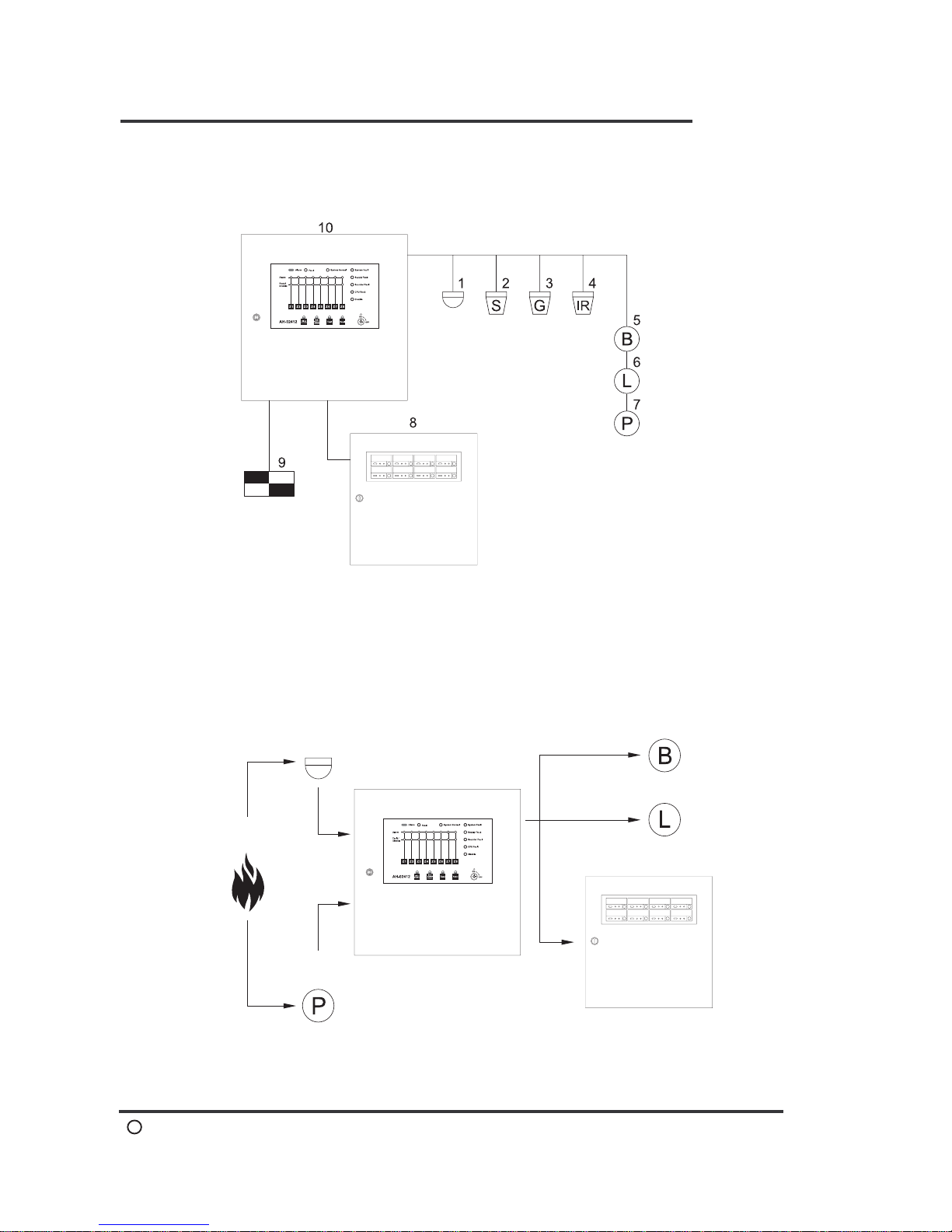
Fire Alarm System Assembly Diagram
2
AH-02412 FAMILY
Fire Alarm System Assembly Diagram
Fire Alarm Signal Flow Chart
1-Heat Detector
2-Smoke Detector
3-Gas Detector
4-Flame Detector
5-Alarm Bell
6-Indicating Lamp
7-Manual Call Point
8-Annunciator
9-Extinguishing Device
10-Control Panel
1.Occurrence
of fire
2-1.Detector
2-2.Manual Call Point
3.Control Panel
4-1.Alarm Bell
4-2.Indicating Lamp
4-3.Annunciator
Page 5
AH-02412 FAMILY
C
2005-04E1
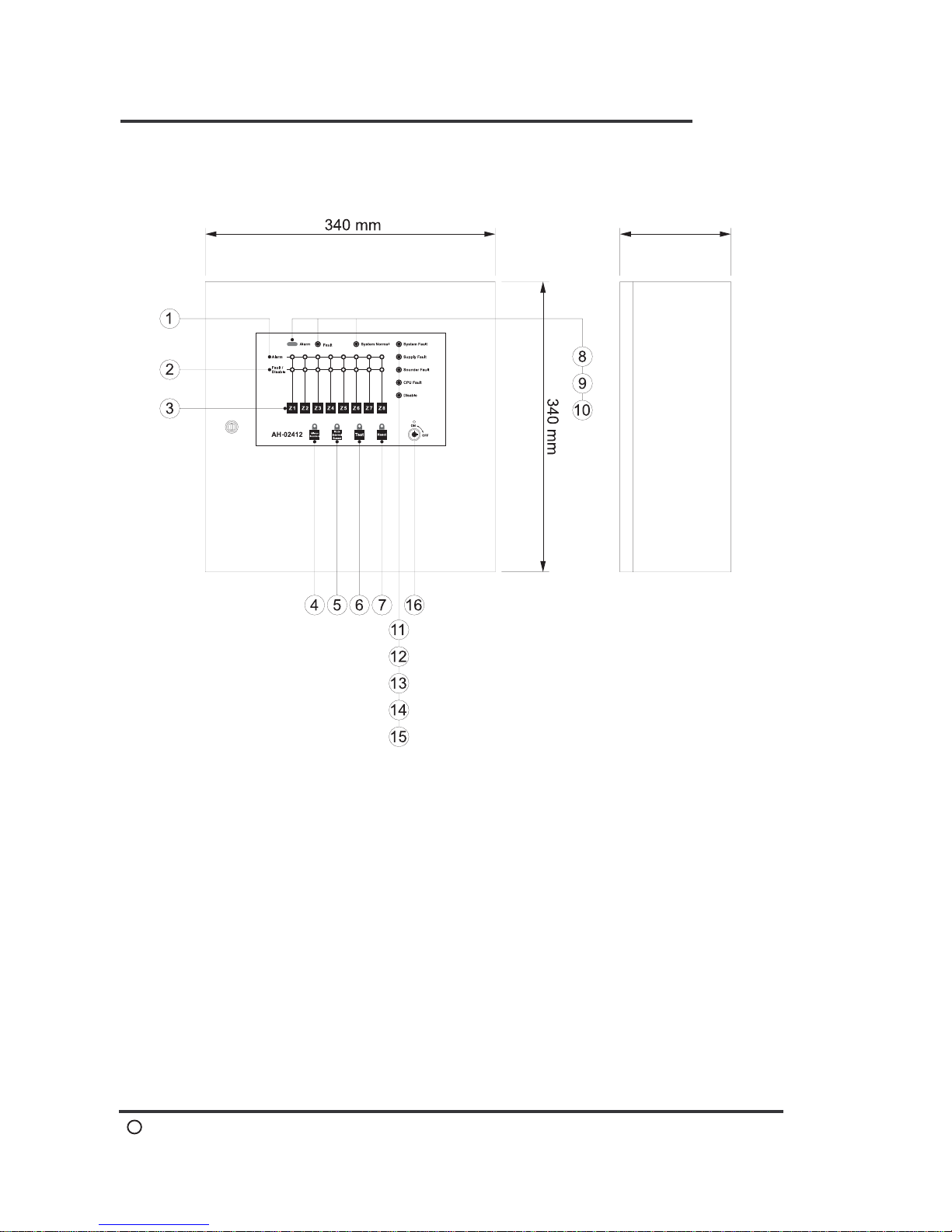
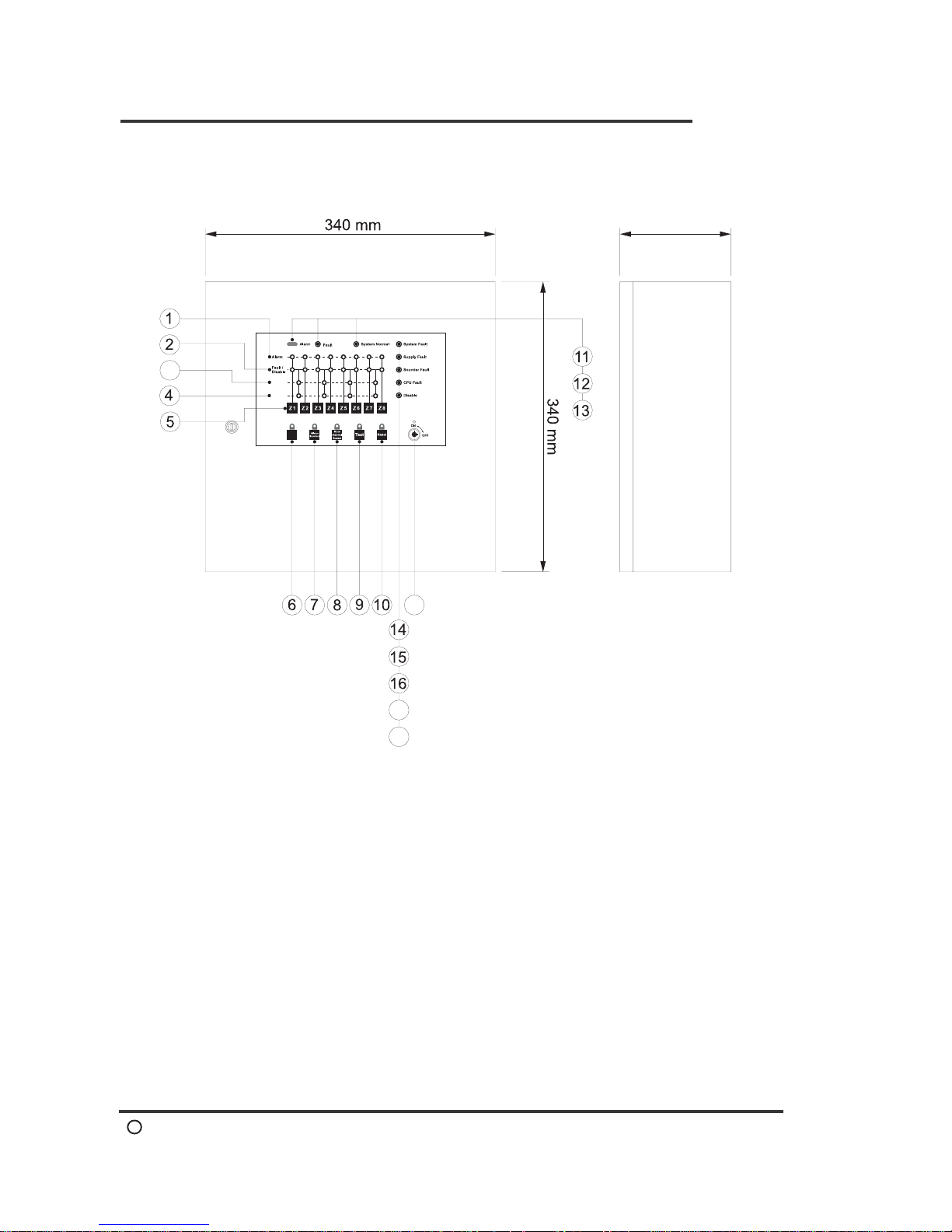
Panel Description(AH-02412)
3
AH-02412 FAMILY
Description
1.Zone Alarm LED
2.Zone Fault/Disable LED
3.Zone Disable
4.Silence Sounders
5.Mute Internal Buzzer
6.Lamp Test
7.Reset
8.Fire Alarm LED
9.Fault LED
10.System Normal LED
11.System Fault LED
12.Supply Fault LED
13.Sounder Fault LED
14.CPU Fault LED
15.Disable LED
16.Key Switch
Dimensions and Specifications
130 mm
Page 6
AH-02412 FAMILY
C
2005-04E1
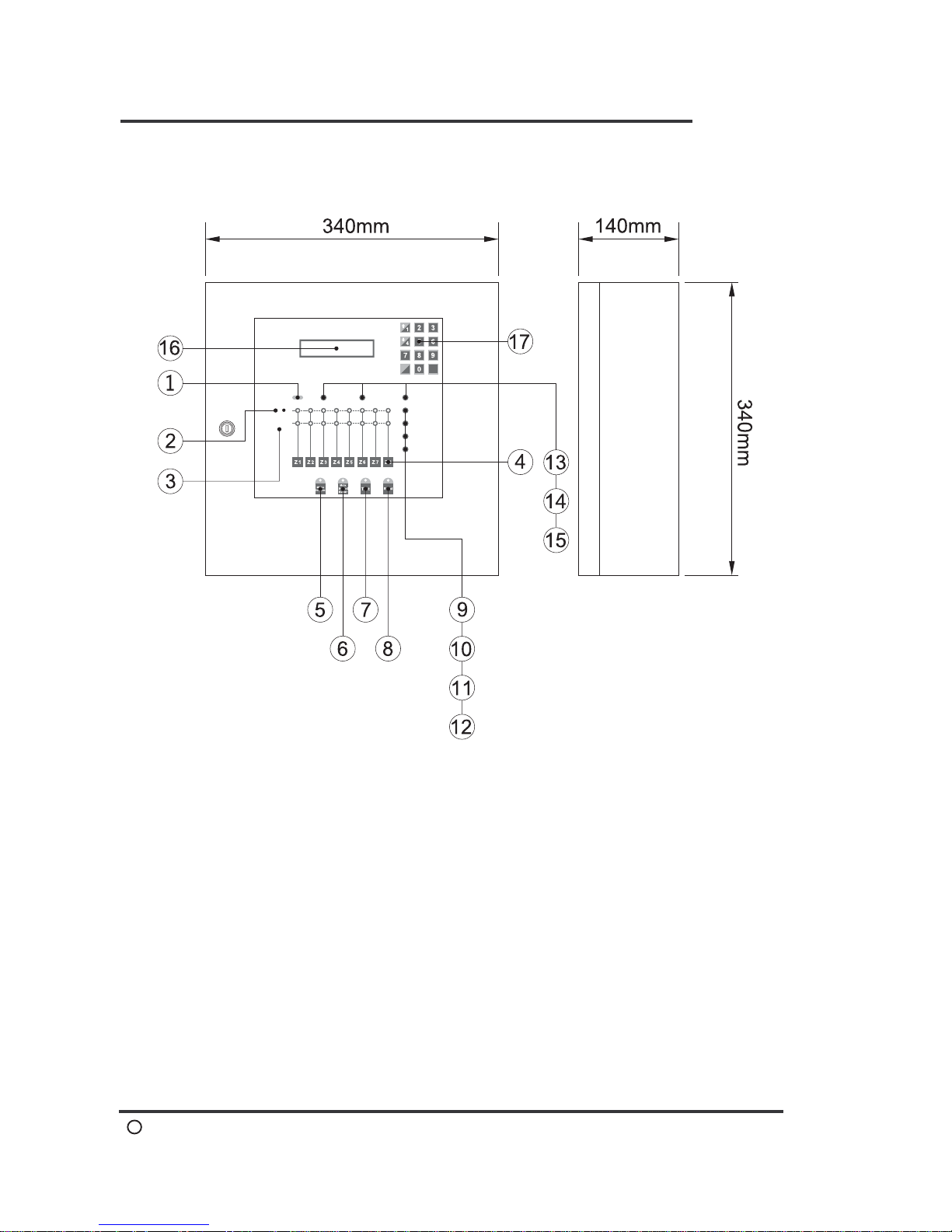
Panel Description(AH-02412E)
4
AH-02412 FAMILY
Description
Dimensions and Specifications
Nac
Active
Trouble
(Nac)
3
17
18
19
1.Zone Alarm LED
2.Zone Fault / Disable LED
3.Nac Active LED
4.Nac Fault LED
5.Zone Disable
6.Nac
7.Silence Sounders
8.Mute Internal Buzzer
9.Lamp Test
10.Reset
11.Fire Alarm LED
12.Fault LED
13.System Normal LED
14.System Fault LED
15.Supply Fault LED
16.Sounder Fault LED
17.CPU Fault LED
18.Disable LED
19.Key Switch
130 mm
Page 7
AH-02412 FAMILY
C
2005-04E1
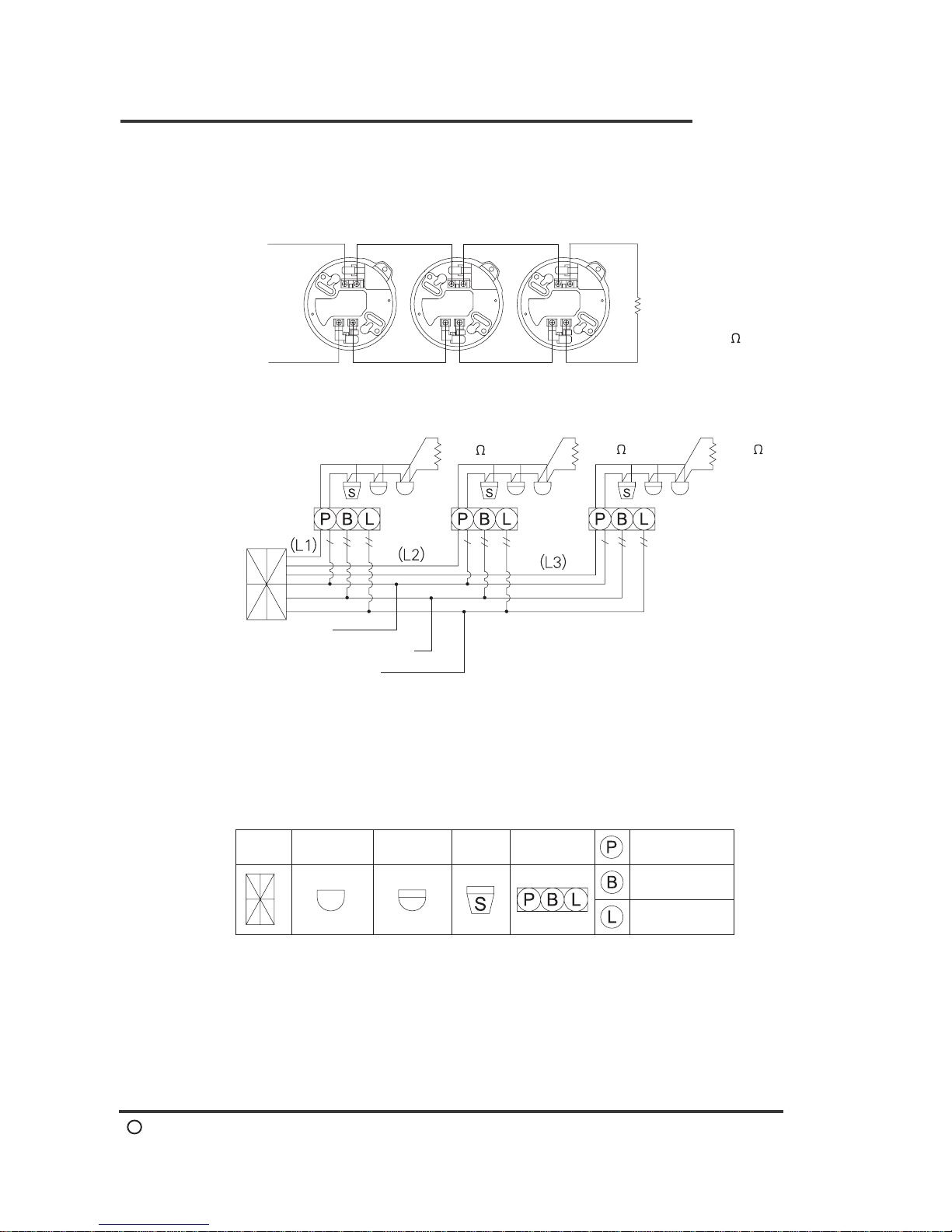
Panel Description(AH-02412L)
5
AH-02412 FAMILY
Description
Dimensions and Specifications
1.Fire Alarm LED
2.Zone Alarm LED
3.Zone Fault/Disable LED
4.Zone Disable
5.Silence Sounders
6.Mute Internal Buzzer
7.Lamp Test
8.Reset
9.Supply Fault LED
10.Sounder Fault LED
11.CPU Fault LED
12.Disable LED
13.Fault LED
14.System Normal LED
15.System Fault LED
16.LCD Display
17.Numeric Key
Fire Alarm Control Panel
Fault
Alarm
System Normal
System Fault
Supply Fault
CPU Fault
Disable
Sounder Fault
Alarm
Fault /
Disable
s
c
ACK
AH-02412L
Page 8
AH-02412 FAMILY
C
2005-04E1
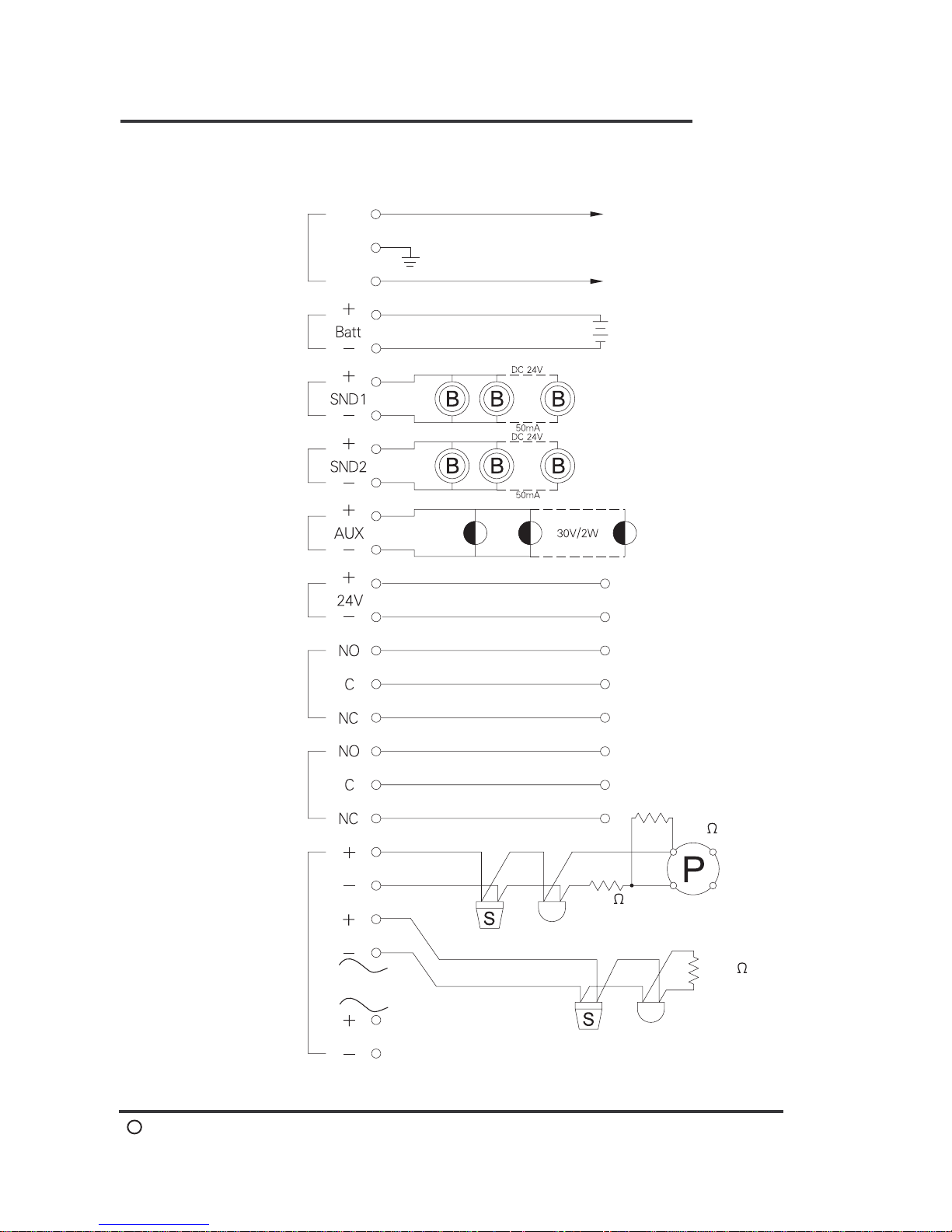
Standard Detector Wiring Method
6
AH-02412 FAMILY
Standard Detector Wiring Method
Common Line(Zn-)
Circuit Line(L)
Connect
to Control
Panel
Detector at the
end of every
Circult is
installed with
one terminal
resistor 4.7k
1/4W
Control
Panel
Terminal Resistor
4.7K
4.7K
4.7K
(C) 1.6mmx1
Indicating Lamp 1.6mmx1
Alarm Bell 1.6mmx1
(L)Diameter of Circuit line be 1.0mm~1.2mm
(C)Common line 1.2~1.6mm.Limited to seven Circuit lines per
wire (according to regulation)
Symbols
Control
Panel
Rate of Rise
Detector
Fixed Temp.
Detector
Somke
Detector
Combination
P.B.L.Box
Manual
Call Point
Alarm Bell
Indicating
Lamp
Page 9
AH-02412 FAMILY
C
2005-04E1
Method of Wiring
7
AH-02412 FAMILY
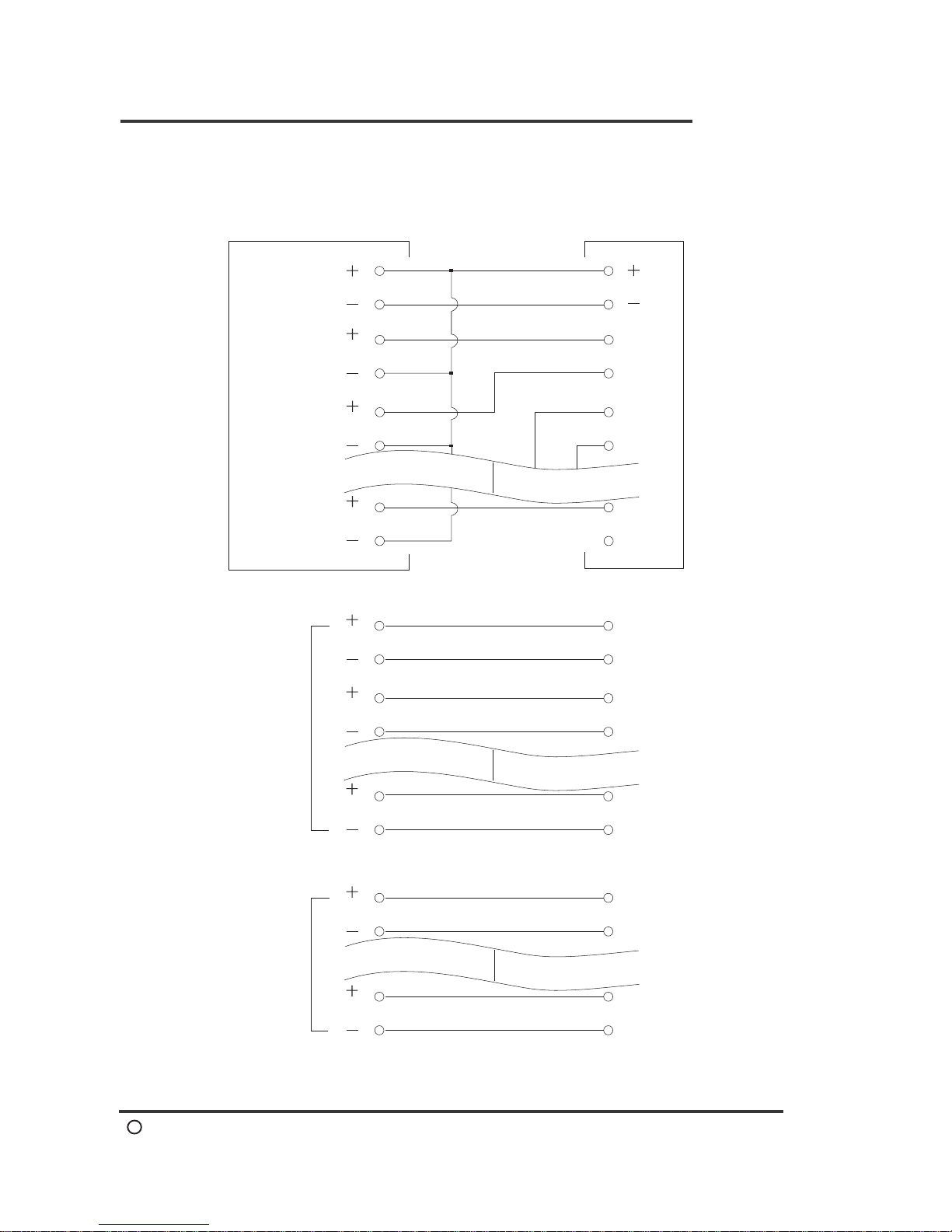
Method of wiring
AC
110V
/220V
Stand by
Power
Sounder 1
Sounder 2
AC 110/220V
50Hz/60Hz
DC 24V/A accroding
to number of zone
Max. connection =
no. of zone x 1.2
Terminal device
4.7k
4.7k
Fire Relay
Output Of
Contact Point
Fault Relay
Output of
Contact point
Zone
AC Power
Indicating
Lamp
24V DC
Output Wiring
Max. connection =
no. of zone x 1.2
Max. connection =
no. of zone x 1.2
Detector
Detector
To Relay Output Device
To Relay Output Device
220
Z1
Z2
Z8
.....
Page 10
AH-02412 FAMILY
C
2005-04E1
Method of Wiring
8
AH-02412 FAMILY
Signal Transfer
(Voltage Free
Contacts)
Method of Wiring
Reset 24V
To Relay Output
Device
E1
To Relay Output
Device
E2
To Relay Output
Device
E8
Gas Relay
To Gas Release
Equipment
S1
To Gas Release
Equipment
S4
Annunciator
Control Panel
E1
E2
E8
DC
1
2
3
4
8
9
Page 11
AH-02412 FAMILY
C
2005-04E1
9
AH-02412 FAMILY
Wiring Principle
Wiring Principle
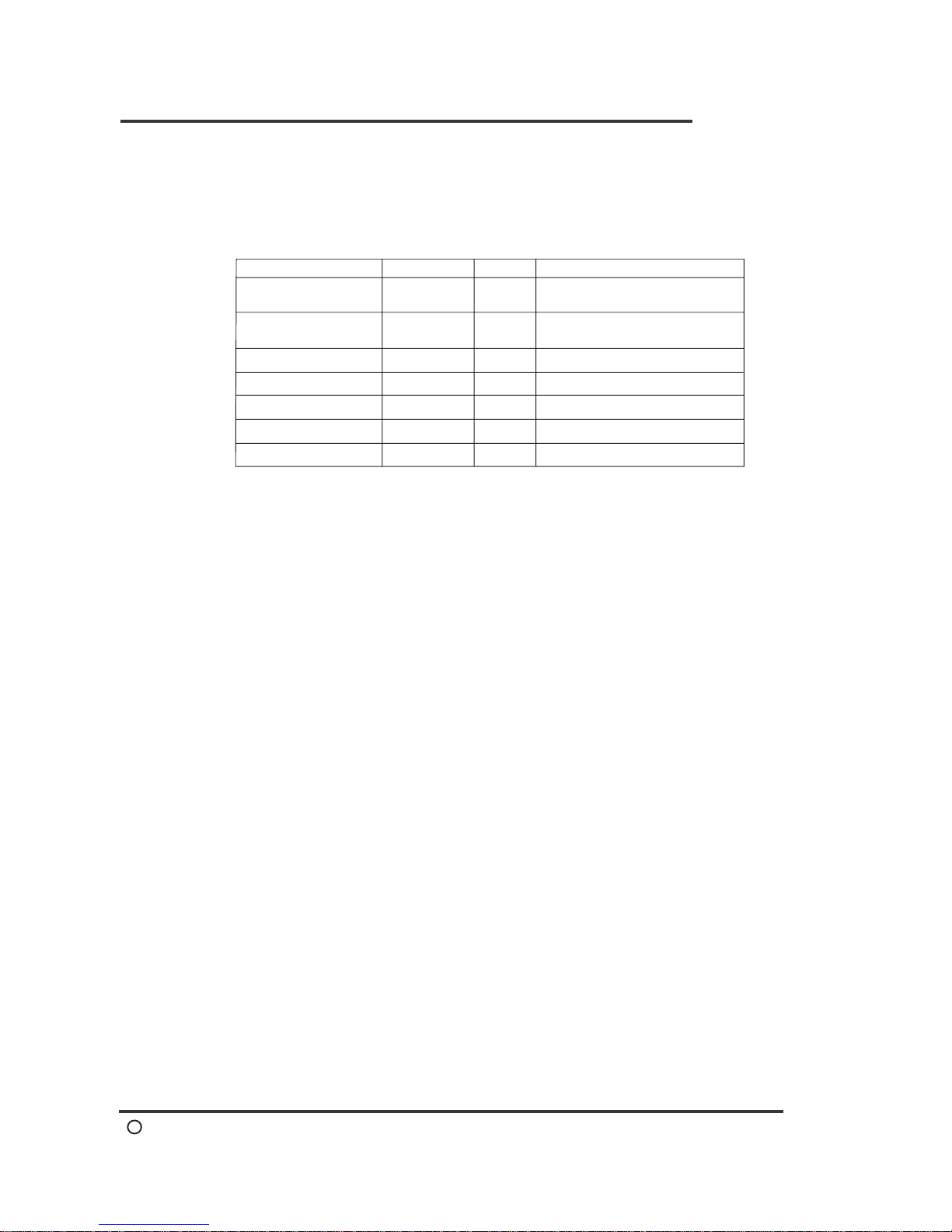
1. Wiring Material Table
(longer distance excluded; please refer to your local regulation)
1.0 ~ 1.2M/M
N
1.2 ~ 1.6M/M
N
1.2 ~ 1.6M/M
2
1.2 ~ 1.6M/M
2
1.0 ~ 1.2M/M
1.0 ~ 1.6M/M
1
1.2 ~ 2.0M/M
2
2.
3. Wire-Point Labels and Joint Clips
Inside the Control Panel and every Wire Connection Box, the wire
points are to be attached to Label Covers or Label Stickers and
then connected to the Y-clip.
4.Wiring Method
Please refer to Page 6 ~ 8 of this handbook for the wiring of safety
equipment.
5. Terminal Resistor Connecting Method
Every end of a Detector zone shall be fitted with a resistor (not
more than one).
6.
Wiring Record
Once the external wiring is laid, a record of the detailed external
wiring diagram shall be kept for future inspection and repair.
Item
Detector Zone
Zone Common Line
Alarm Bell
Fire Indicating Lamp
Manual Call Point
Earth
AC Power
Specification
Quantity
Depends on zone device,
basically 1/zone.
No more than 7 zones per
common line.
Parallel connect with detectors.
Dependents on panel's load.
Wire Connection Box
In order to facilitate inspection, maintenance and repair, every floor
or appropriate area should install a Wire Connection Box in which
connecting joints are provided. The Box case shall be waterproof
and the wording “Fire Fighting Only” should labeled on an
aluminum plate.
Page 12

AH-02412 FAMILY
C
2005-04E1
Operating Instructions
10
AH-02412 FAMILY
Operating Instructions
1. Fire Surveillance
After installed system devices into the panel, connect with AC supply
source and the "System Normal" indicators will lighten up. Fire
Indicating Lamp of the combination PBL box light up and surveillance
begins.
,
2. Fire Alarm
When detector has detected a signal of fire, the Fire "Alarm" Indicator
(red) and the related zone indicator will lighten up simultaneously.
The Main Bell and Alarm Bell will also sound. The Fire Indicating
Lamp of the combination PBL box will blink. These activities indicate
that the fire alarm is valid
(1) Main Bell Disable
To stop the Main Bell from sounding, press "Mute Internal
Buzzer" button the sounding stop immediately. It will resound
when next alarm is issued.
(2) Alarm Bell Disable (SND1 & SND2)
To stop the Alarm Bell from sounding, press "Silence Sounder"
button the sounding stop immediately. It will resound when next
alarm is issued.
3. Reset
Once the fire alarm is activated, the Fire "Alarm" Indicator and the
Zone "Alarm"Indicator will remain lighten. If the control panel requires
starting the surveillance again after the previous fire situation has
been resolve, just depress the "Reset" button and wait 5 seconds.
However, if detectors have been burnt or the MCP press-down not
recovered, reset cannot be activated. For this matter, repair should be
completed first, then depress the "Reset"button to reset the system.
(3) Single Zone Relay Output Disable (optional)
To stop any zone relay output during alarm, press "Z1 ~Z8"
button then the zone alarm LED will off, and the zone fault LED
will blink. Press again to start relay output.
(4) Gas Release Disable (optional)
To stop gas release output after cross-zone action just press
"Nac" button. When the "Nac Active" LED turns on means gas
release output has completed. Note that you have to switch off
the AC & DC power and switch them back on to clear this
feature.
Page 13

AH-02412 FAMILY
C
2005-04E1
Operating Instructions
11
AH-02412 FAMILY
4.Fault Alarm
The panel is equipped with "Auto Fault Indication/ Release"function.
Should there be a Circuit Break in certain areas, or detachment of the
terminal resistor, the "Fault"indicator and the related Zone"Fault/
Disable"indicator will lighten up simultaneously. The internal beeper
will sound. Upon repair of the circuit, the mentioned situation above
will cease.
(1) Disable Fault Sound
To stop the fault sound, press"Mute Internal Buzzer"button. When
new fault alarm received, it will resound.
5.Standby Power
The control panel is equipped with automatic rechargeable batteries
the stand-by power source (24VDC) shall be installed during
operation. When the Main power source has been terminated, the
"System Normal" indicator will light off and the"Fault" indicators will
light up. If the standby power is in trouble, the "Supply Fault"indicator
will also turn on.
6.Alarm Relay Output
One 'A' contact (24V/3A) for alarm output when any zone in alarm
condition.
7.Fault Relay Output
One 'A' contact (24V/3A) for alarm output when any zone in fault
condition.
8.Control Board LED Test
Press the "Test" button, all LED on board will light up and buzzer will
sound and reset automatically after 5 sec.
9.Occurrence of Alarm Signal during Testing
If there is an alarm signal in any Circuit other than those under testing
, the test must be end immediately and handle the alarm signal Circuit
first.
10.The Display Module LCD (optional)
The LCD is only comes with model AH-02412L and has a backlight
display with 2 rows of 20 characters each. By means of the 12
buttons on right side, it is possible to obtain detailed information for
the warning signaled LED's on the front panel and set up the
security code for protection purpose.
A.Input 4-digits security code (xxxx) and then press ACK button to
start.
Page 14

AH-02412 FAMILY
C
2005-04E1
Operating Instructions
12
AH-02412 FAMILY
B.12 buttons including 10 numeric,1 select/clear and 1 acknowledge.
C.Use S/C for displayed heading selection and information clear, the
" " and " " buttons scroll of the manual headings.
D.Original screen: first line shows Alarm= 000 Fault= 000 (note: 0
means normal condition); second line shows current date & time
(yr/mo/day/hr/min/sec).
E.For inconsecutive alarm signal, screen will show 000 but fire
indicator will remain ON. For inconsecutive fault signal, screen
will show 000 and zone fault indicator will OFF.
F.Features as follow:
1.Time setting: After correct time is set up, press "ACK" for
completion.
2.Zone status display:
a.Display current zone status, at normal condition it will show
'No Signal'; press "ACK" and back to last screen.
b.Display any alarm, disconnection or short; the first line shows
event #, zone # and event status. The second line shows the
date and time of the event. Press "ACK" and back to last
screen.
3.Memory data display:
a.255 events memory and display with capital M.
b.Record all kind of status; the first line shows event #, zone #
and event status. The second line shows the date and time of
the event. Press "ACK" and back to last screen.
4.Memory data delete: By input access code, memory data will
clear automatically and then back to last screen.
5.Access code setting: First enter original code (0000) then enter
the access code. To return the original code, press '5' and short
the two pins on the right of PCB 528D inside the panel.
6.System information: It shows model #, zone # and version; press
"ACK" will back to original screen.
>
>
11. Extinguishing Facility (AH-02412E only)
The extinguishing system will be activated after fire alarm has issued
for 0 ~ 60 seconds with adjustable timer (please refer to the logic
switch located on main board, single digit on the right and decimal
digit on the left) and gas discharge will automatically turned off after
10 seconds or by pushing the "Nac" button. While activated, the
LED (Active) on the panel will be ON until the system's supply power
was turned OFF and ON again. When user intends to stop the
extinguishing process just press the "Nac" button. The extinguishing
facility is only activated when both zone in same area have issued
fire alarm.
Page 15

AH-02412 FAMILY
C
2005-04E1
13
AH-02412 FAMILY
Please refer to your local regulation for installation details.
..
Installation Location
Installation Location
Important Notes On Maintenance
1.Normal State of Control Panel
(1)Normal Condition (Fire Surveillance Alert)
Under normal conditions, the "System Normal" indicator should
light up. All other indicators should be OFF for ready status and
Fire Indicating Lamp on the Combination PBL Box should light
up.
(2)Power Failure
When there is a power failure, the "System Normal" indicator
should light off and the "System Fault" indicators will light up.
2.Maintenance of Devices
(1)If maintenance may cause disturbances to public, appropriate
co-ordination must be made before.
(2)Priority should be given to those faulty devices in the area.
(3)Maintenance should be scheduled at least twice a year and must
include both physical and functional inspections.
3.Overall Maintenance
Annual overall inspection should carry out by the professional
institution or the original equipment manufacturer. Inspection
records must be tabulated and kept by a responsible person or the
department concerned, to ensure the public safety.
(1)Power Supply
Check whether the external wiring of the panel its power
consumption are within the safety regulation, whether the standby
power conforms to specifications and whether the duration of
power supply is within the safety regulation.
(2)Detectors
To perform a site test for the detectors in order to check whether
they are functioning properly and also to check the condition of
detector's Indicating LED (on the detector's base).
(3)Insulation Test
The insulation between power terminal of control panel and earth
shall have a value of 250V 20M and above.
Page 16

AH-02412 FAMILY
C
2005-04E1
14
AH-02412 FAMILY
Trouble Shooting
Trouble Shooting
The Control Panel is produced with an advanced technology and
delicate design that is easy to assemble. It requires no special skills
to trouble-shoot a malfunction, thus avoiding any teething problems
that might be encountered during maintenance.
1.Malfunction of Zone Indicator & Combination PBL Box
The system devices are assembled with many single units (refer
page 2), either the 'Detectors', 'Circuits' or 'Combination PBL Box '
become defective, it will affect the functionality of the Control Panel.
(1)Measure terminal "AC" with a Multi-meter for any voltage.
(2)Check whether the "System Normal" indicator is functioning
properly. The system should specify 24V DC.
(3)Check whether fuses are in good condition.
(4)Check whether the external devices and wiring conform to
specifications, as stated in this handbook.
2.Function of Fuses
The Control Panel has fuses, each fuse with individual protection
function. It must not be replaced with fuses that do not conform to
specifications or are of bad quality; otherwise we will not be liable
for any damage. Burnt fuses are probably caused by external wiring
error, short circuit or faulty external devices.
(1)AC: Fuse for power source AC.
(2)BATT: Fuse for standby power source.
(3)SND1,SND2: Fuse for alarm bell. (Resettable type)
(4)AUX: Fuse for Combination PBL Fire Indicating Lamp.
(Resettable type)
(5)DC24V: Fuse for direct current source 24VDC. (Resettable type)
3.Causes of Burnt Fuses & Inspection Guidelines
(1)AC Fuse Burnt
a.It could be due to excessive voltage supply that causes the AC
Fuse to be burnt.
b.Conformance of Specification (lower-rated fuse may be burnt
by a surge of current).
(2)BATT Fuse Burnt
a.Check whether the standby power polarity '+' and '-' have been
in reversed position.
b.Similar to inspection guidelines for AC Fuse, the standby power
supply will pass through BATT Fuse when power supply from
the Main Source has been cut-off.
Page 17

AH-02412 FAMILY
C
2005-04E1
15
AH-02412 FAMILY
Trouble Shooting
4.Combination PBL Fire Indicating Lamp & Alarm Bell Malfunction
(1)Remove the external wiring of the Fire Indicating Lamp and
Alarm Bell.
(2)Measure the ( '+' and '-' ) outlet of Fire Indicating Lamp with a
multi-meter and Check whether it is read DC24V. Then perform
a fire test. Reset after it is completed.
(3)Measure the ( '+' and '-' ) outlet of the Alarm Bell with multi-meter.
It should not have any voltage supplied. Then perform a fire test
and a DC24V voltage should be recorded. Reset after the test.
(4)When the test results conform to (2) and (3), it indicates that the
control panel is functioning properly. The wires should only be
connected after the external wiring have been repaired.
5.Zone "Fault" Indicator & "Fault/Disable" Indicator light up
When one or several "Fault/Disable" Indicator and "Fault" Indicator
light up simultaneously, it should be regarded as a signal of circuit
break. In this instance, inspection and repairs should be carried out
in the following manner:
(1)Check for any loops in the control panel not use End-of-line
resistor.
(2)Remove the circuit that in trouble; the disconnection signal should
immediately go off.
(3)If test results conform to (2), it indicates that the control panel is
functioning properly. The wire shall only be connected after the
external wiring has been repaired.
(4)Inspect the external circuit to check whether last detector has
been installed one End of Line Resistor, or improperly installed.
(5)Check for any break in the external wiring as well as any
dislocation of detectors.
(6)Set the multi-meter to mode and measure the malfunction
circuit resistance value. The resistance value between the zone
line and common line should 4.7k .
(7)After removal of the circuit line, there should not be any voltage
between the zone line and zone common line. The wire shall only
be connected after the external wiring has been repaired.
6.AC Power Fault
When AC power is too high, "Fault" & "System Fault" indicators will
light up. When AC power is too low, "Fault" & "CPU Fault" indicators
will light up.
Page 18
AH-02412 FAMILY
C
2005-04E1
16
AH-02412 FAMILY
Trouble Shooting
7.Standby Power Fault
When there is any problem on Battery, the "Fault" indicator & "Supply Fault"
indicator will on and sound.
8.PCB Connection Fault
When there is any disconnection between PCBs, the "Fault" indicator will light up
& "System Fault" indicator will blink every 0.5 sec.
9.Ground Fault
When there is any external wiring has short circuit with earth, the "Fault" indicator
will light up & "System Fault" indicator will blink every 0.2 sec.
10.Zone "Alarm" Indicator & Fire "Alarm" Indicator light up
When one or more zone "Alarm" indicators and Fire "Alarm" Indicator lighten up
simultaneously, it should be regarded as a fire alarm signal. The inspection and
repair guidelines are as follows:
(1)Remote the circuit that in trouble. Measure between the loop line and loop
common line to check for short circuit or resistance value is normal (normal
value=4.7k ).
(2)After remote the circuit that in trouble, the control panel must be reset. At this
moment, the zone indicator should carry a circuit break signal. After repairing
the circuit line, re-connect the external circuit line.
(3)Check for presence of any short circuit of the external wiring, or any defective
detectors.
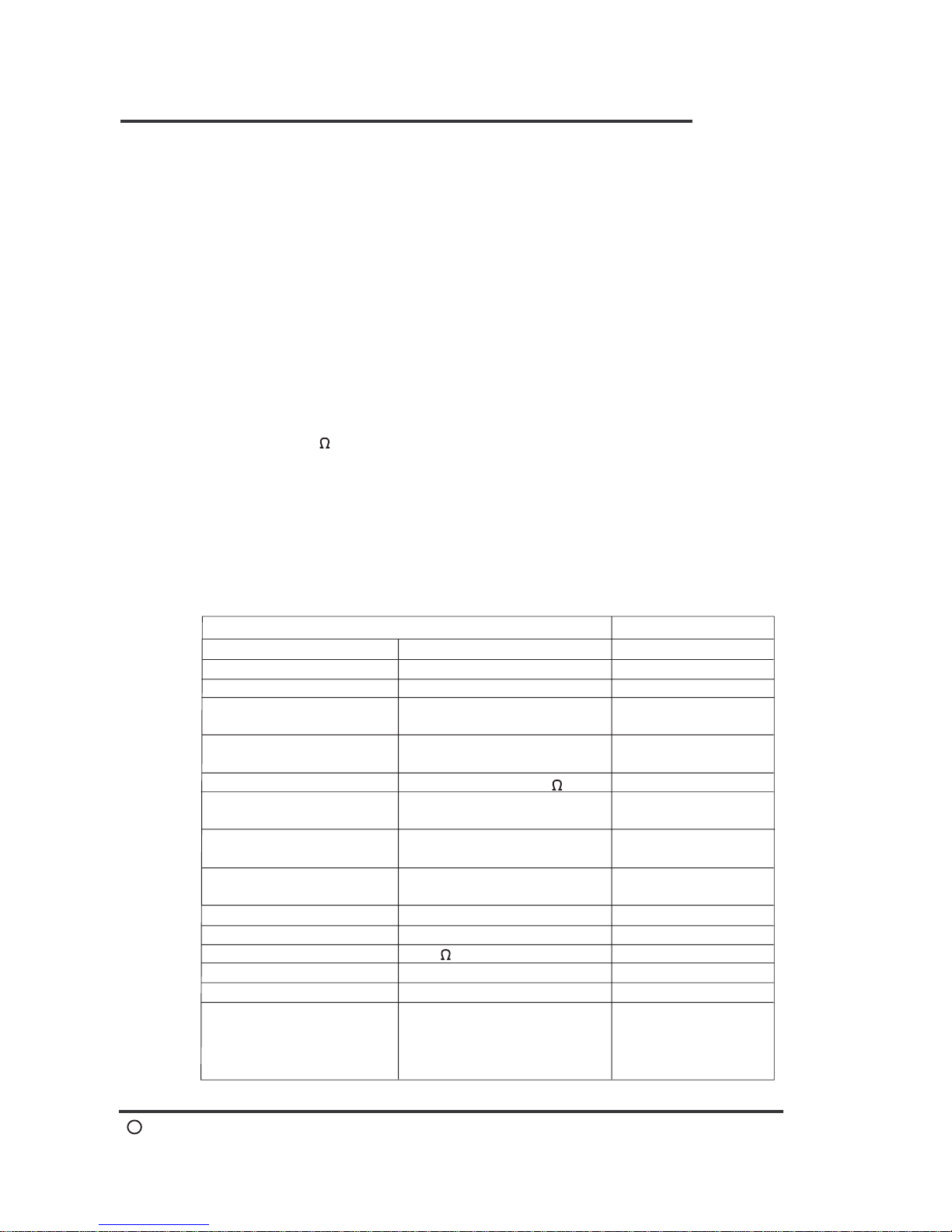
Main Specification
Descriptions
Remakers
Power
Voltage range
Standby power
Charging voltage,
current
Exterior resistance
# of heat detector
connected
# of smoke detector
connected
# of fire indicating lamp
connected
# of alarm bell connected
Digital Switch
End of line resistor
Material
Color
Accessory functions
220VAC 50/60Hz
Nominal voltage 15%
24VDC 4Ah
24VDC;short circuit under
5V 30mA
Round-trip under 50
# of loop x 1.2
500000 cycle Min. reliability
4.7k
1.2mm steel plate
Ivory white
Aux. Contacts for signal
transfer and computer
monitor, MCP contact and
phone Jack
26VDC 100mA ~ 400mA
Loop voltage,current
Max. 30 per loop
Max. 30 per loop
# of loop x 1.2
Others also avilable
With auto adjustment
function
Mechanic type has
no limit
One per loop
Others also avilable
Optional selections
+
-
Page 19
AH-02412 FAMILY
C
2005-04E1
AH-02412 Fire Alarm Control Panel
 Loading...