

Page 1
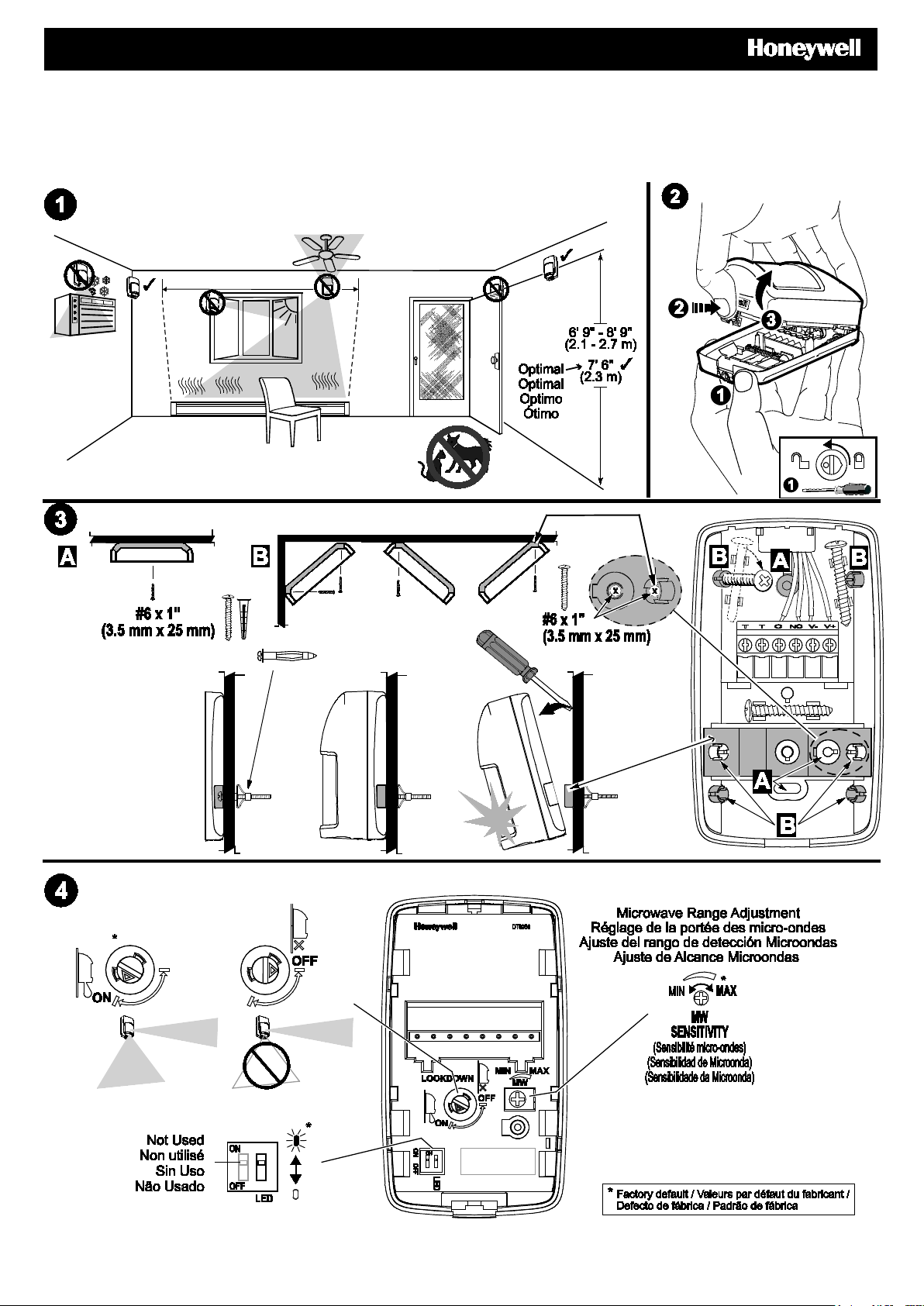
DT8050 DUAL TEC® Motion Sensor – Quick Installation Guide
Détecteur de mouvement DT8050 DUAL TECMD – Guide d'installation rapide
Sensor de Movimiento DUAL TEC® DT8050 – Guía Rápida de Instalación
Sensor de Movimento DUAL TEC® DT8050 – Guia rápido de instalação
Page 2
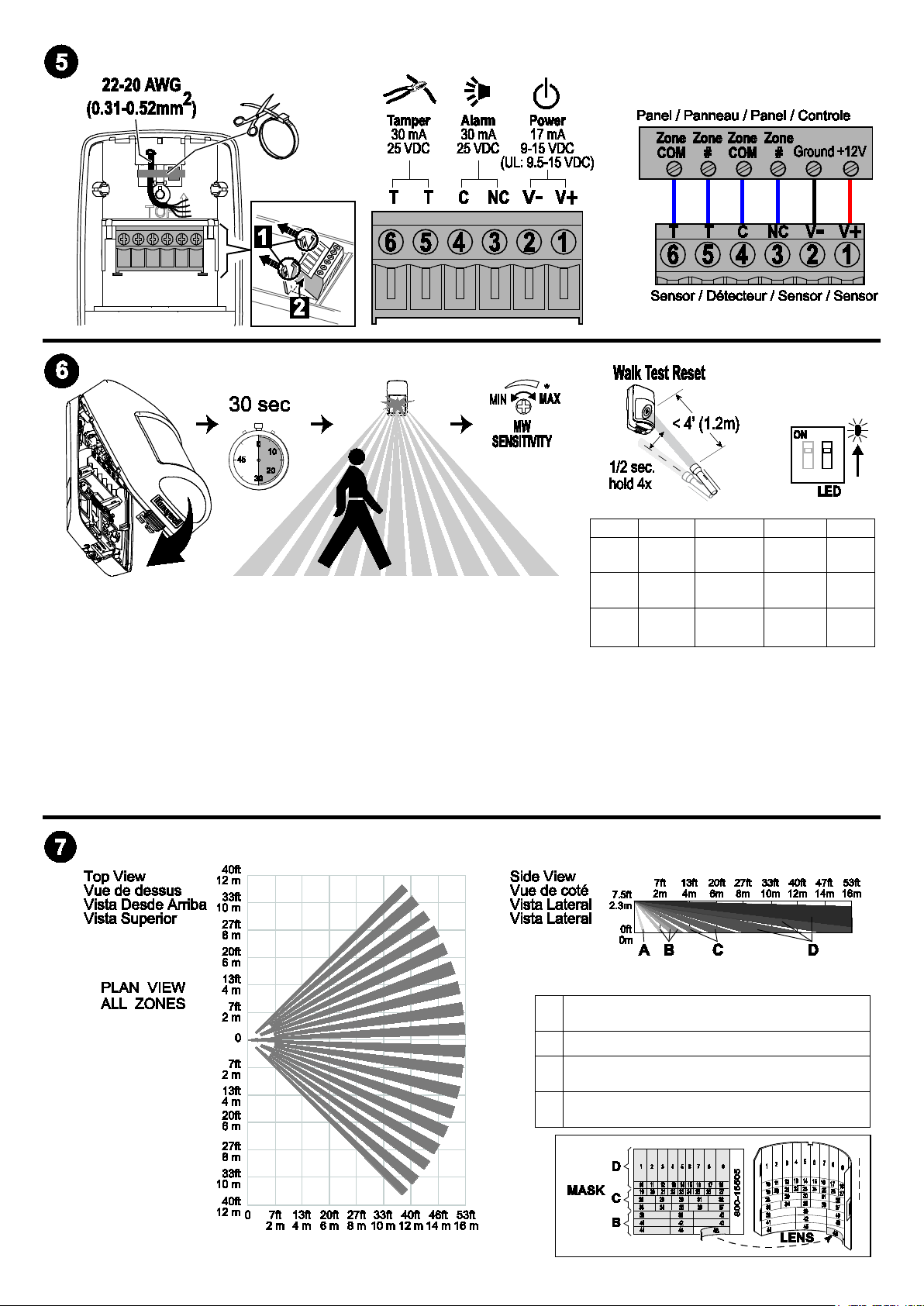
LED
Power Up
Walk Test
Normal
Fault
Zones / Zones / Zonas / Zonas
1. Apply power to the sensor. Initialization is complete when the LED stops
flashing slowly (about 30 seconds).
Red
Yellow OFF
Green OFF
Slow
Blink
ON
Alarm
ON
Microwave
ON
PIR
ON
Alarm
ON
Microwave
ON
PIR
2. Turn the microwave sensitivity counterclockwise to reduce the microwave
range (minimum = 16.4’ / 5m) and close the sensor.
3. Walk through the detection area and observe the LED.
4. Adjust the microwave range as necessary to meet installation requirements.
Walk test mode is active for 10 minutes, then automatically exits test mode, disables the LED and enters normal
operation mode. For an additional 10 minute walk test, enable walk test mode again with the flashlight feature (see
Walk Test Reset above).
Note: During power up and walk test modes the LED is active regardless of the LED Enable/Disable Dip switch setting.
A
B
C
D
Look-down / Basses / Vista Zona 0 /
2
Vigilância inferior
Lower / Courtes / Cercana/ Mais baixas
18
Intermediate / Intermédiaires / Intermedia /
20
Intermédias
Long / Longues / Largo Alcance / Longo
54
alcance
Fast
Blink
OFF
OFF
- 2 -
Page 3
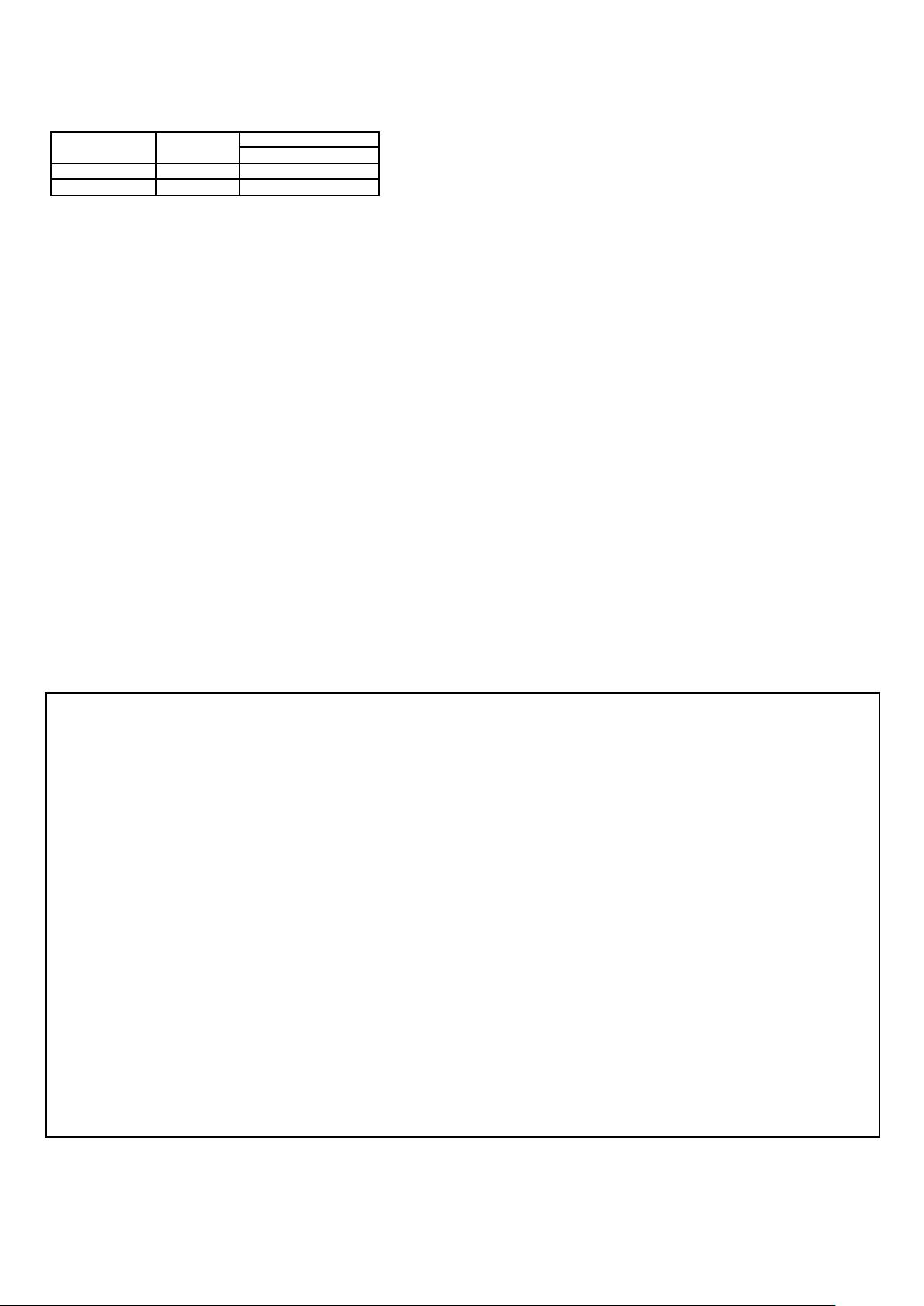
SPECIFICATIONS:
TROUBLE*
NORMAL
Self-Test Failure1
Alarm Relay
Closed
Open
Red LED
Off
Flashing
If the Trouble condition does not clear, replace the sensor.
FEDERAL COMMUNICATIONS COMMISSION STATEMENTS
Operating Temperature: 14° to 131° F / -10° to 55° C
Relative Humidity: 5 to 93% (UL tested at 93%); non-condensing
TROUBLESHOOTING:
*TROUBLE CONDITIONS:
1
Self-Test Failure conditions:
• Microwave supervision failure: The sensor is operating in PIR mode
only.
• PIR self-test failure: The sensor is disabled.
• Temperature compensation failure: The temperature compensation is
disabled.
Depending on the Trouble condition, take the following corrective actions:
• Verify the power supply is sufficient (at least 9V at the sensor).
• Cycle power to the sensor.
• Walk test the sensor.
APPROVAL/ LISTINGS:
• FCC part 15, Class B verified
• IC ICES-003, Class B verified
• UL 639
• ULC S306-03
• SIA-PIR-01 Passive Infrared detector standard features for false alarm immunity.
Product must be tested at least once each year / Le fonctionnement du produit doit être vérifié au moins une fois par année /
El producto debe ser probado al menos una vez al año / O produto deve ser testado pelo menos uma vez por ano
All wiring must be in accordance with: the National Electrical Code (ANSI/NFPA70); the Canadian Electrical Code, Part I (where applicable); UL681,
Standard for Installation and Classification of Burglar and Holdup Alarm Systems; ULC-S302, Standard for Installation and Classification of Burglar
Alarm Systems for Financial and Commercial Premises, Safes and Vaults; ULC-S310, Standard for Installation and Classification of Residential Burglar
Alarm Systems; local codes and the authorities having jurisdiction.
The products are intended to be powered by a power-limited output of a UL/CUL Listed Burglar Alarm control unit, or via a Listed UL603/ULC-S318
power-limited power supply that provides 4 hours of standby power.
The sensor must be mounted indoors, within the protected premises, and on a wooden stud, solid wood or with a robust wall anchor.
UL Note: All interconnecting devices must be UL Listed.
The user shall not make any changes or modifications to the equipment unless authorized by the Installation Instructions or User's Manual.
Unauthorized changes or modifications could void the user's authority to operate the equipment.
CLASS B DIGITAL DEVICE STATEMENT
This equipment has been tested to FCC requirements and has been found acceptable for use. The FCC requires the following statement for your
information:
This equipment generates and uses radio frequency energy and if not installed and used properly, that is, in strict accordance with the
manufacturer's instructions, may cause interference to radio and television reception. It has been type tested and found to comply with the limits for
a Class B computing device in accordance with the specifications in Part 15 of FCC Rules, which are designed to provide reasonable protection
against such interference in a residential installation. However, there is no guarantee that interference will not occur in a particular installation. If this
equipment does cause interference to radio or television reception, which can be determined by turning the equipment off and on, the user is
encouraged to try to correct the interference by one or more of the following measures:
• Reorient the receiving antenna until interference is reduced or eliminated.
• Move the radio or television receiver away from the receiver/control.
• Move the antenna leads away from any wire runs to the receiver/control.
• Plug the receiver/control into a different outlet so that it and the radio or television receiver are on different branch circuits.
• Consult the dealer or an experienced radio/TV technician for help.
INDUSTRY CANADA CLASS B STATEMENT
This Class B digital apparatus complies with Canadian ICES-003.
Cet appareil numérique de la classe B est conforme à la norme NMB-003 du Canada.
FCC / IC STATEMENT
This device complies with Part 15 of the FCC Rules, and Industry Canada’s license-exempt RSSs. Operation is subject to the following two
conditions: (1) This device may not cause harmful interference, and (2) This device must accept any interference received, including interference
that may cause undesired operation.
Cet appareil est conforme à la partie 15 des règles de la FCC et exempt de licence RSS d’Industrie Canada. Son fonctionnement est soumis aux
conditions suivantes: (1) Cet appareil ne doit pas causer d’interférences nuisibles. (2) Cet appareil doit accepter toute interférence reçue y compris
les interférences causant une réception indésirable.
- 3 -
Page 4
To protect the environment, a detailed installation guide is available on
the Honeywell website – Please consider before printing the document!
respectivos proprietários. Todos os direitos reservados.
800-15115-06V1 09/17 Rev A
For the latest documentation and online support information, please go to: https://mywebtech.honeywell.com/
Pour de l’assistance en ligne, visitez : https://mywebtech.honeywell.com/
Para recibir soporte en línea, visite: https://mywebtech.honeywell.com/
Para obter suporte online, visite: https://mywebtech.honeywell.com/
For the latest warranty information, please go to: www.honeywell.com/security/hsc/resources/wa
Pour les dernières informations de garantie, s'il vous plaît aller à: www.honeywell.com/security/hsc/resources/wa
Para la información más reciente de la garantía, por favor vaya a: www.honeywell.com/security/hsc/resources/wa
Para obter as últimas informações sobre garantia, visite: www.honeywell.com/security/hsc/resources/wa
For patent information, see: www.honeywell.com/patents
Pour des informations sur les brevets, voir : www.honeywell.com/patents
Para información de Patentes, vea: www.honeywell.com/patents
Para informações sobre patentes, acesse: www.honeywell.com/patents
MyWebTech Warranty
Garantie
Garantía
Garantia
Patents
Brevets
Patentes
2017 Honeywell International Inc.
Honeywell and DUAL TEC are registered trademarks of Honeywell International
Inc. All other trademarks are the properties of their respective owners. All rights
reserved.
Honeywell et DUAL TEC sont des marques déposées de Honeywell International
Inc. Toutes les autres marques de commerce appartiennent à leurs propriétaires
respectifs. Tous droits réservés.
Honeywell y DUAL TEC son marcas registradas de Honeywell International Inc.
Todas las demás marcas son propiedad de sus respectivos propietarios. Todos
los derechos reservados.
Honeywell e DUAL TEC são marcas comerciais registradas da Honeywell
International Inc. Todas as outras marcas são de propriedade de seus
2 Corporate Center Drive, Suite 100
P.O. Box 9040, Melville, NY 11747
www.honeywell.com/security
 Loading...