

Page 1
HomingGame Crane Machine Manual www.hominggame.com [email protected]
Basic function introduction
1.CPU using ARM-CORTEX core chip, clocked up to 128Mhz.
2.SRAM to achieve 64KB, 8MB external FLASH dedicated to the storage of music as well as graphics library files
3 display screen using the STNLCD screen. User-friendly settings interface
4 the motor drive system uses the high quality relay and the high power MOSFET drive. It can work for a long time without
heating and the quality is stable and reliable
5 scalable WeChat module interface.
6 with the light eye detection interface, can accurately know how many gifts were taken
7 onboard audio power amplifier for playing music and sound effects when the game
8 minimalist installation. The complete set of connecting lines is only 4 main lines. It saves at least 30% of the time
9 intuitive fault detection system. It can clearly show the failure of the crane and the sensor failure points
10 unique procedures of the 3 claw force algorithm, intuitive adjustment of the.3 segment claw force time adjustment
11 unique crane position detection function, can detect the fuzzy crane stay in a certain position, to achieve precise loss
12 standby interface LOGO can be customized. See the top left corner of the standby interface icon can be customized.
13 unique light eye fault detection algorithm, even if the light eye damage can also be excellent to ensure the accuracy of
the object, to protect the interests of operators.
14 gift direct purchase function, so that the machine can achieve greater revenue.the real gift vending machine.
第 1页
文控: 无
Page 2
HomingGame Crane Machine Manual www.hominggame.com [email protected]
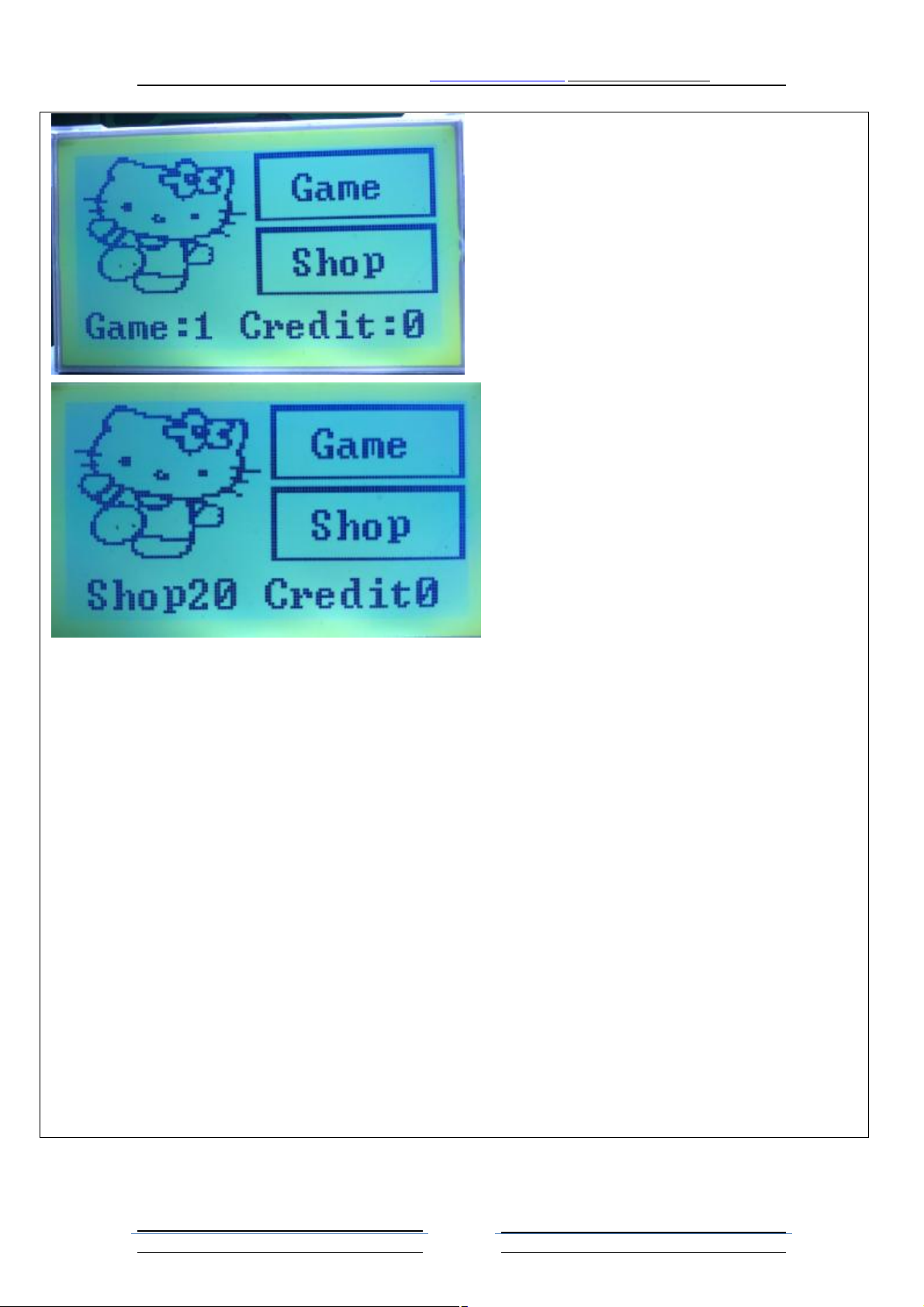
The standby mode selection "game" mode
The two standby mode selection "mode" to buy gifts
Tips 20 coins have been cast into the currency of 0 yuan, which means that the purchase of gifts need to invest $20.
第 2页
文控: 无
Page 3
HomingGame Crane Machine Manual www.hominggame.com [email protected]
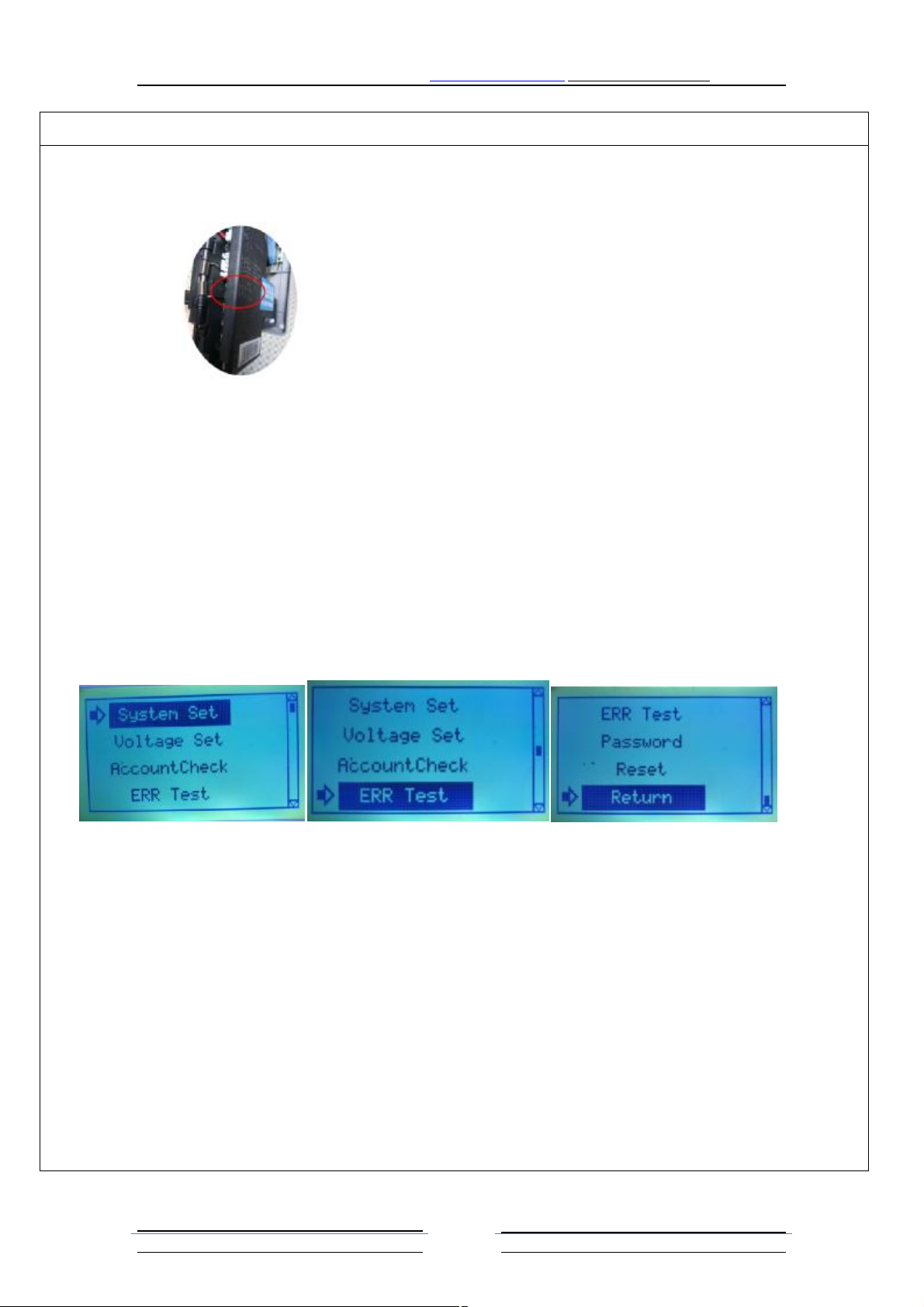
Background management system interface: to enter the back office management system, the operation of the joystick up
and down the direction of the project can be selected corresponding to the need to set the project, according to grasp the
key to confirm the choice1..
Coin NO NC switch
Enter the interface background management system: in the standby mode NO switch NC coin set to boot and state is
not the same state after 2 seconds, you can enter the backstage management system. After entering the system to
immediately switch back on, if the switch back in to forget, in the exit management background, the coin will the error
phenomenon automatically enter the backstage management system. (see Figure 2 red circle shown in the picture for
the coin type TL131, other brands or types of coin may be different, NO NC switch position to observe the coin side
text label)
Example 1: after the boot of the NC NO switch in the NC state, then the NO NC switch to the NO state 2 seconds to
enter the background management interface, the switch back to the NC state
Example 2: after the boot of the NC NO switch in the NO state, then the NO NC switch to the NC state 2 seconds to
enter the background management interface, the switch back to the NO state
Into the background management system interface two: in the standby state click "system settings key" can enter the
background management system
Background management system icon function:
1. System Set: If you select this item, press the key to enter the system settings interface, this project is used for
some of the basic functions of the software settings, as well as the hardware parameters.
2. Voltage Set: If the operation of the joystick to select this item, press the key to grasp the interface can be set into
the interface, the project for the machine set the grip force
3. AccountCheck: If you select this item, press the key to enter the account management interface.
4. ERR Test: If the joystick is selected for this project, press the key to enter the fault detection interface.
5. Password: If you select this item, click the key to enter the password settings interface, this project is mainly used
to set the machine administrator privileges
6. Reset:
7. Return: If you select this item, you can immediately exit the background management system by pressing the key.
Note: this interface if the exit to the standby interface, after the coin will automatically enter the backstage
management system, for the coin NO NC switch did not return to the starting state, please return to the NC NO coin
position can be switched on or off and then boot again at this time, can also be.
第 3页
文控: 无
Page 4
HomingGame Crane Machine Manual www.hominggame.com [email protected]
System settings interface: the operation of the joystick up and down the direction of the need to set up the project,
according to grasp the key to confirm the selection of items, the operation of the joystick to adjust the parameters of the
left and right direction.
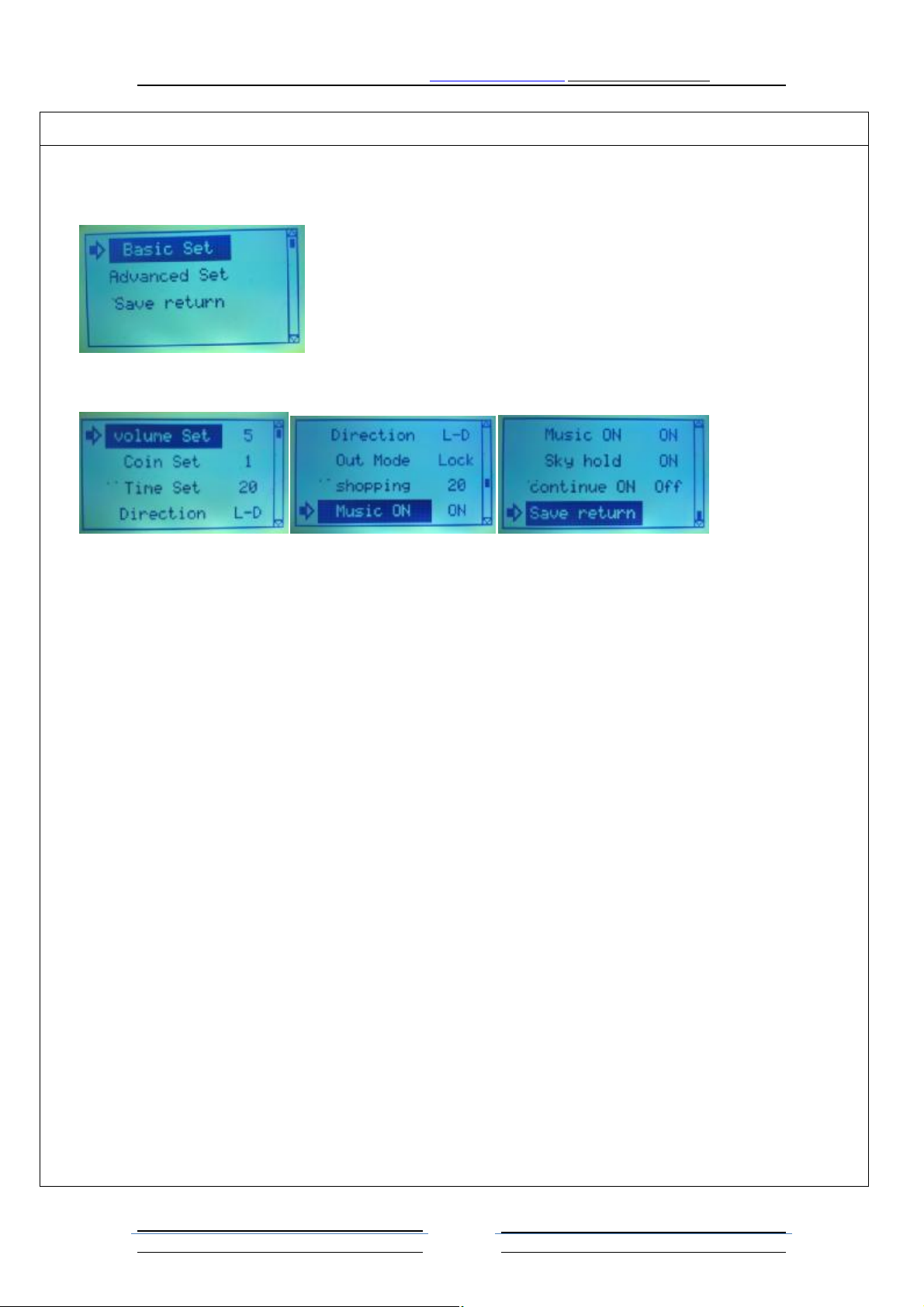
The setting of the main interface for the system
1. system settings the main interface menu items are divided into "basic system settings", "advanced system settings",
"save return" a total of 3 items can be selected.
2. The basic system settings include a total of 9 settings to choose from
3. Volume Set:Adjust the system volume size range 132. number. System default 5
4. Coin Set: Set the minimum number of coins to start the game. Range 1-15.
5. Time Set: Set game countdown time. Range 5-60
6. Direction: Set the direction of the outlet of the crane: the upper left corner / lower left corner / upper right corner /
lower right corner.
7. Out Mode: Set out the gift is in accordance with the random or fixed mode out of the gift. Set parameters for random
and fixed in 2 ways.
Example 1: out of the probability of 20, out of the gift mode is fixed, then each game to the twentieth inning will
appear a strong can take the gift.
Example 2: out of the probability of 20, out of the gift mode is random, then the game in the 20 inning randomly
generated a strong force can grab the gift.
8. Shopping: Range 0-100, 0 for the closing of the shopping function, other figures for the opening of the shopping
function, the corresponding number of coins can be directly into the shopping gift.
9. Music ON: Otherwise, the standby music is turned off. The standby music is played for every 5 minutes.
10. Sky hold: If this function is open, when the game began to fall down after 1 second, and then hold the key to grasp the
grasp of the child immediately grasp the rise, and will not fall directly to the end of the catch.
11. Continue ON: That is, the function of walking; this function needs to be used in conjunction with the light eye function
of the utility model, only when the light eye is opened, only the function configuration is effective.
12. Save return: Select this item, press the capture key to return to the system settings
Other special features:
1. what is the continuous grasping: continuous grasping is when the opportunity to achieve a strong gift when arrested,
but did not catch the game player can retain gifts, gifts and opportunities. Just when the game player, game player.
Until the gift so far. So this feature must be installed machine and light eye object light to eyes open, effective
configuration. If the installation of light eyes, continuous grasping is not open, that appeared in the game player
grasping opportunity, and did not get a gift, the opportunity is not strong. Until the game to the next opportunity can
be a powerful gift.。
第 4页
文控: 无
Page 5
HomingGame Crane Machine Manual www.hominggame.com [email protected]
System settings interface: the operation of the joystick up and down the direction of the need to set up the project,
according to grasp the key to confirm the selection of items, the operation of the joystick to adjust the parameters of
the left and right direction.
The setting of the main interface for the system
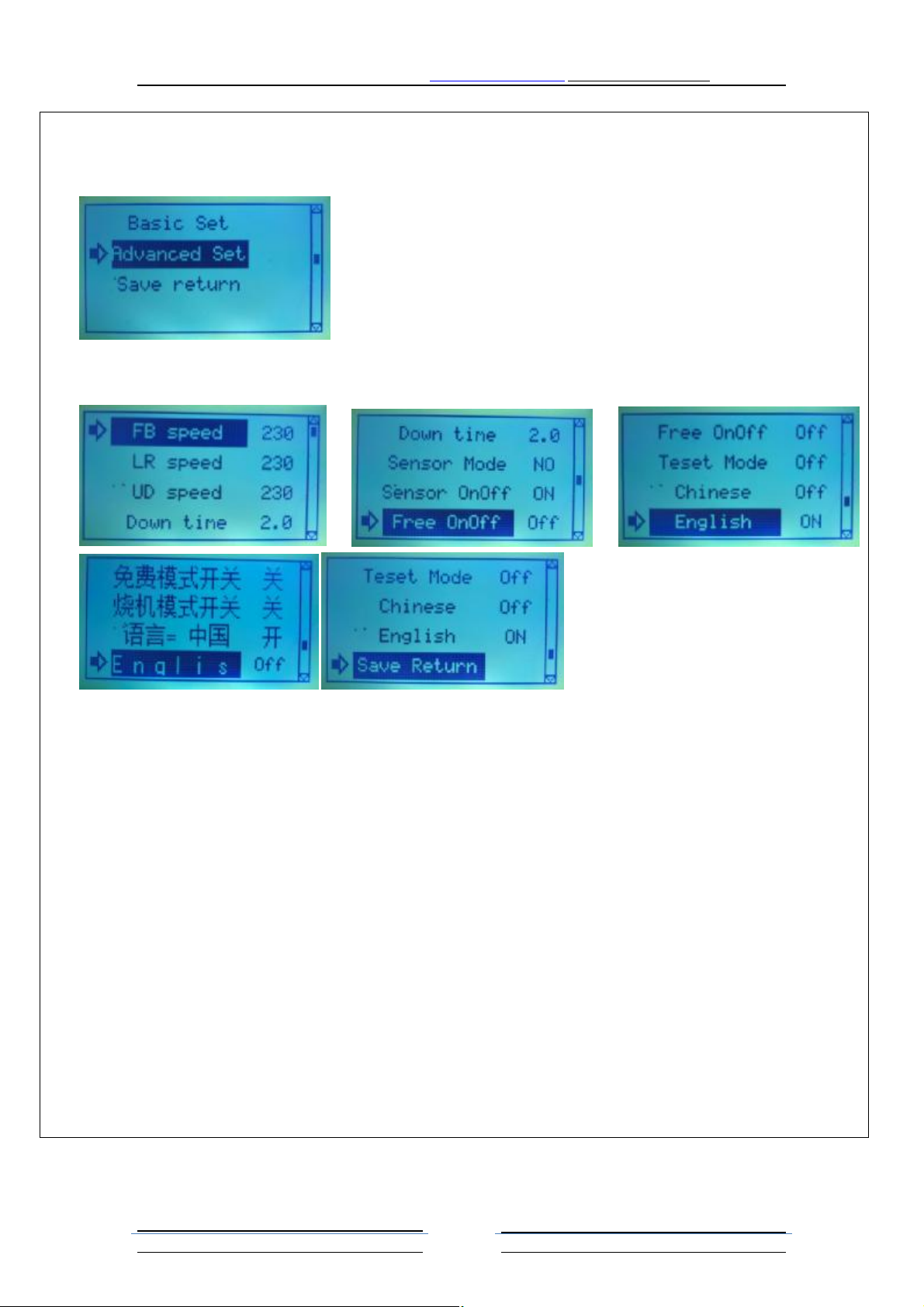
The system is set up in the main interface menu item is divided into "basic system settings", "advanced system
settings", "save return" a total of 3 items can be selected
Advanced system settings include a total of 10 settings to choose from
2. FB speed: set the speed of the front and rear of the crane running. The greater the value the faster the range 200-255;
3.LR speed: set the speed of the left and right direction of the crane. The faster the value the faster the range 200-255;
4. UD speed: set the top and bottom of the crane running speed. The greater the value of the speed faster. The scope of
the 200-255; the upper and lower crane to pull up and down the direction of movement
5. Down Time: set the height of the drop of the claw rope. This parameter is set free according to the depth of the grip
space, 0.5 to 8 seconds.
6. Sensor Mode: set the parameters for NO or NC that set the level of polarity of the optical eye is normally open NO or
normally closed NC. default NO.
7. Sensor OnOff: if the machine has a light eye, you can choose to open
8. free OnOff: this feature does not need to open the coin, as long as the joystick can enter the game
9. Test Mode this function is only applicable to the factory commissioning test. If the machine is automatically open to
achieve the movement of the action
10. Chinese: language = China: select this open, the language used in Chinese
11. English: Off or ON language switch selection. Select NO is English, OFF for the Chinese interface default OFF
12. save Return: select this item, press the capture key to save the settings and return to the system settings
第 5页
文控: 无
Page 6
HomingGame Crane Machine Manual www.hominggame.com [email protected]
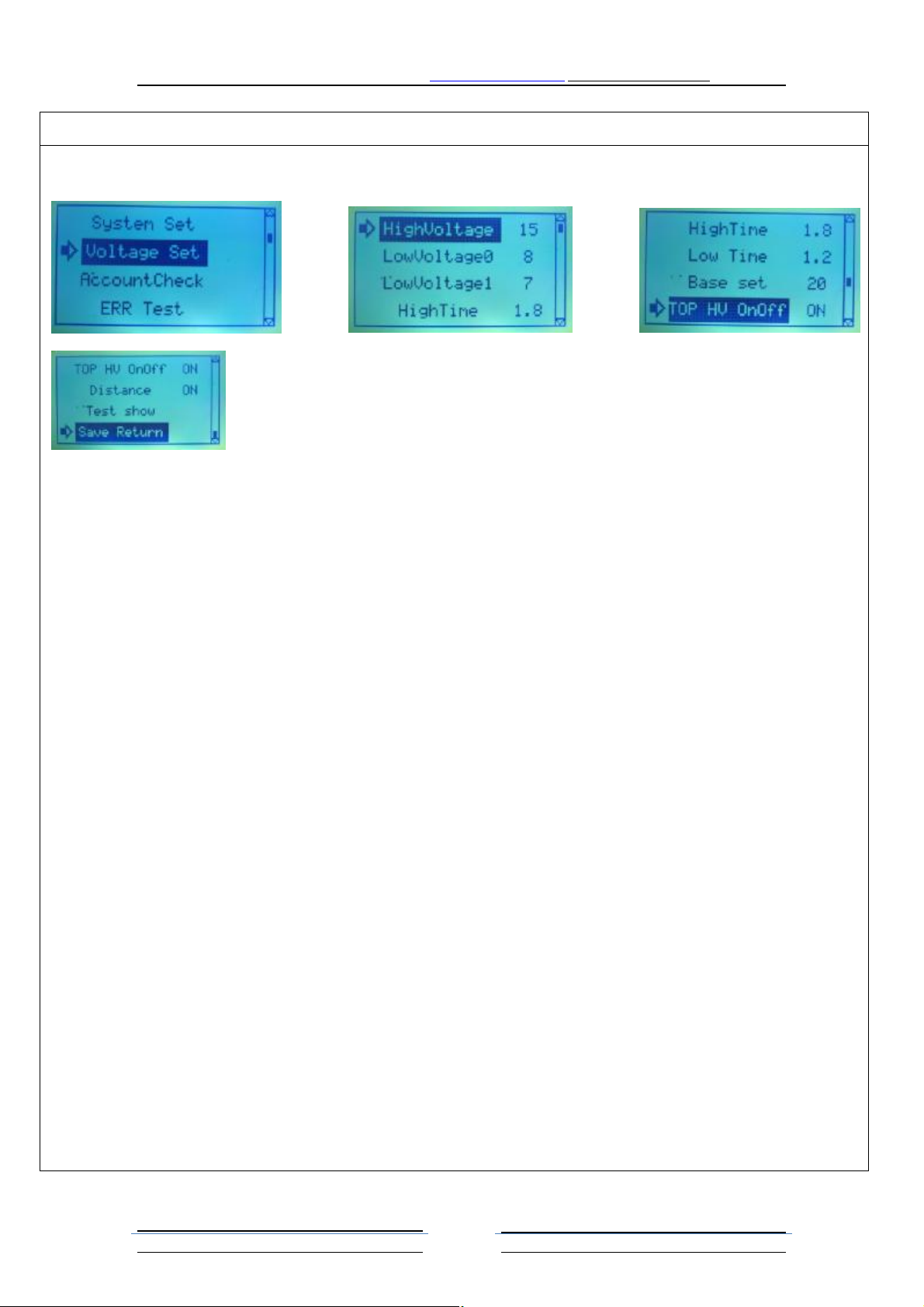
The claw force is arranged in the backstage management main interface to select the claw force and press the grab key to
enter the claw force setting interface
1. HighVoltage: set up the use of the strength of the value of the acquisition of large Mini range of machine 0-48. program
scope: 0-24.
2. LowVoltage0: set up the use of the first part of the acquisition of weak strength. Large machine range 0-48. Mini
machine program scope: 0-24.
3. LowVoltage1: set up the use of the acquisition of the weak strength of the value of the. Large machine range 0-48. Mini
machine program scope: 0-24.
4. HighTime: set the time to hold the gift when using a strong voltage
5. Low time: set the use of a weak voltage when holding a gift to keep the time
6. Base Set: set the number of times after the capture of a strong grasp. (Note: the strength of the system based on the
calculation of the most powerful, this strength can not be set)The top
7. TOP HV OnOff: the open said when the claw rises to the top is just a touch switch immediately by strong voltage into a
weak voltage. This function is greater than when grasping from the bottom up to a maximum automatic protection
function at the top of the time set in the strong time, protect the gifts will not be..
8. distance: the self check on the machine open open automatically when you turn back to the crane running time, to
detect the crane around the time required for operation. In order to use the crane is running to know the player control a
position in the game, to automatically determine when grasping objects need strength duration.
9. test show: this can be selected to test the effect of grasping objects, this interface is absolutely not be taken away, it is
normal to set the grip force is too strong
10. save return: the operation of the joystick to select this item, press the key can be pulled out of the claw to set the
interface, back to the main interface management background
Special function specification
How to check the voltage response of the grasping effect and time value: setting up the sub project parameters, press the
joystick check "grasping", according to the test results after grasping key display "start test, the operation can control the
mobile crane rocker, then press the grasping button 1 times can grasp objects to be. After setting. If the paw homing
parameters to less than ideal grasping effect, click the button" start grasping test "into" test exit effect ", the joystick
continue to set the parameters. So setting up the test to achieve the desired grasping effect, the voltmeter function can be
observed in the voltage meter the voltage state items fall. (Note: in this test condition, please adjust to the parameters
cannot be captured so far. This state has nothing to do with the grasping probability only for regulating the gift slide effect.
See <jum8000 on) The voltage regulating method. The intensity of the gift
第 6页
文控: 无
Page 7
HomingGame Crane Machine Manual www.hominggame.com [email protected]
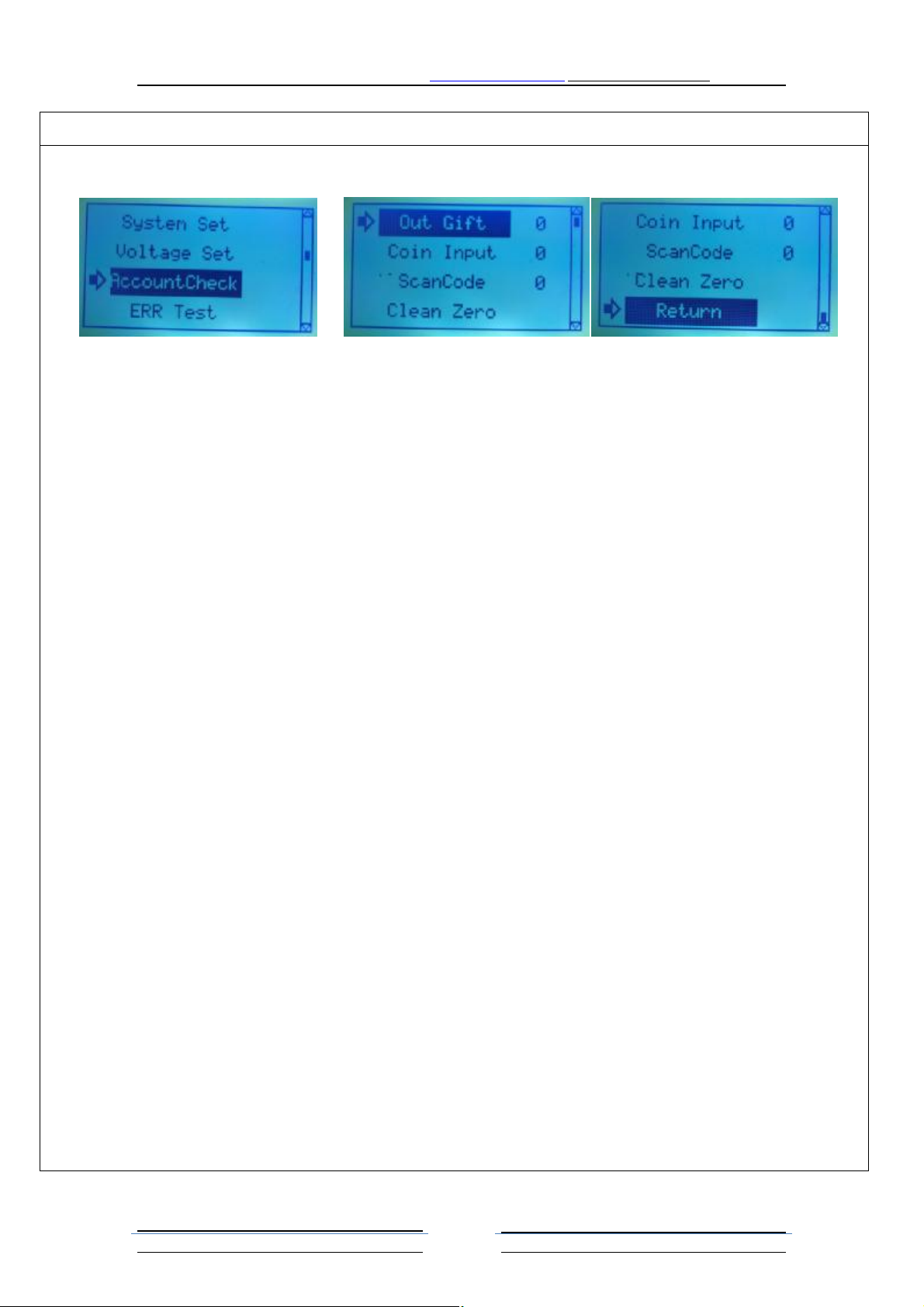
Account query interface in the management of the main interface to select the "account query", according to grasp the key
to enter the account query interface
1. Out Gift: Show total number of captured gifts
2. Coin Input: Shows the total number of coins from the coin collector
3. ScanCode: Display from WeChat or Alipay payment interface number of coins.
4. Clean Zero: Clear business data
How to remove the accounts: press the rocker "choose to remove the accounts" button turns black, then press button to
remove all grasping accounts, if set the system password, you need to manipulate the joystick input the correct password
before clearing system.
Out of the account management interface: key joystick to select "exit" key to black, and then press the key to immediately
withdraw from the background management system interface.
第 7页
文控: 无
Page 8
HomingGame Crane Machine Manual www.hominggame.com [email protected]
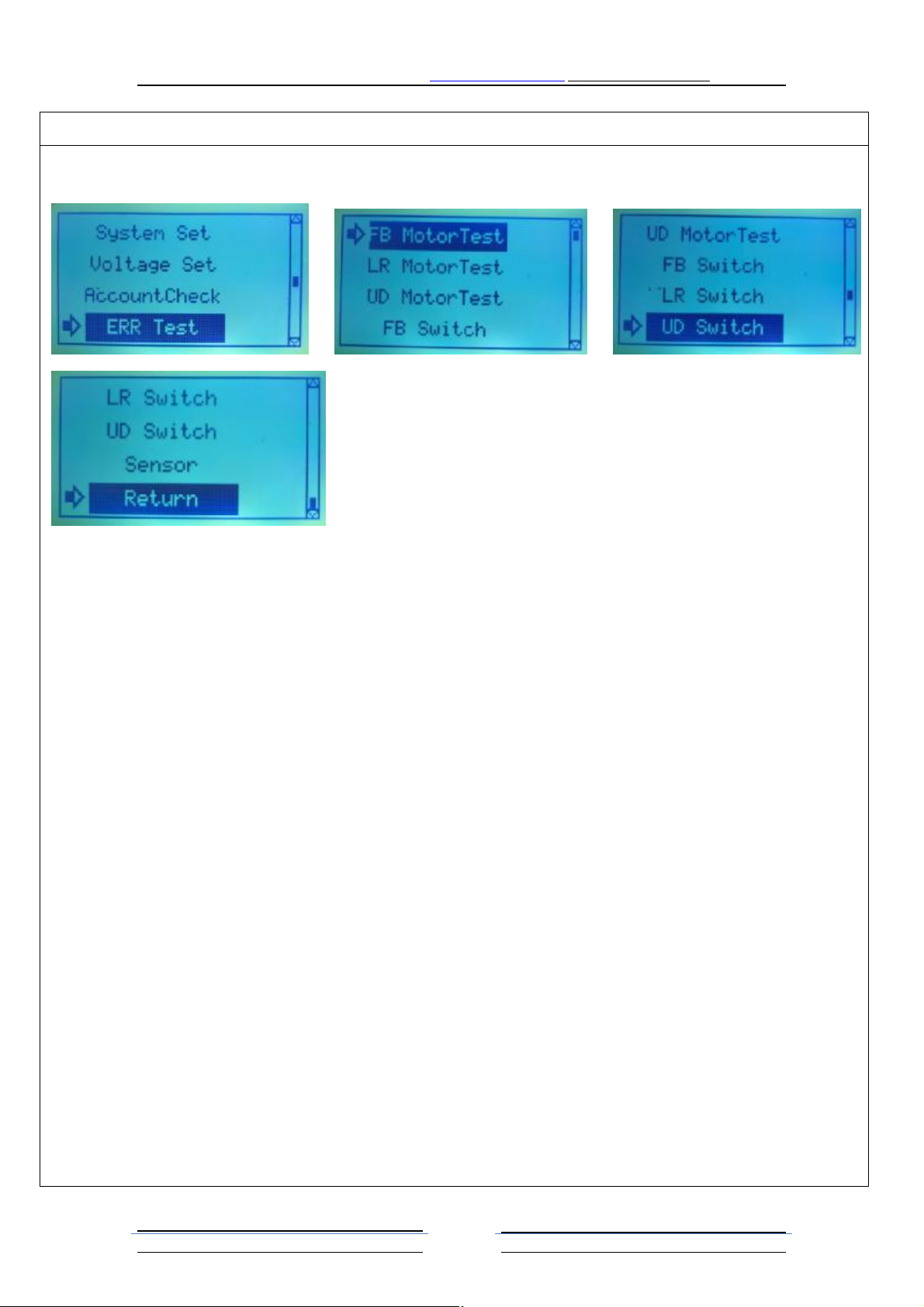
Fault detection interface in the management of the main interface to select the fault detection, according to grasp the key
to enter the fault detection interface
1. FB Motor Test: Before and after the test of the direction of the motor is running properly, the operation of the rocker
around the front and rear to observe whether the operation, if the operation is normal before and after the motor, or
motor failure or wire fault or motherboard failure. If the motor does not turn to observe whether the main engine
working indicator light will operate with the rocker around the lights, if not bright for the motherboard failure, or
motor or wire fault。
2. LR Motor Test:Test the left and right direction of the motor is running properly, the operation of the left and right
sides of the operator to observe whether or not the direction of the operation, if the operation is normal to the
direction of the motor, or motor failure or wire fault or motherboard failure. If the motor does not turn to observe
whether the main engine working indicator light will operate with the rocker around the lights, if not bright for the
motherboard failure, or motor or wire fault。
3. UD Motor Test :Test the rise and fall of grasping the direction of motor is in normal operation, the operation about
whether on the observation of rocker catch under the direction of operation, if the operation is grasping the rise and
fall of normal motor or motor fault, or wire fault or motherboard failure. If the motor does not turn to observe
whether the main engine working indicator light will operate with the rocker around the lights, if not bright for the
motherboard failure, or motor or wire fault。
4. FB Switch: With the switch test crane, can test the front and rear limit switch is normal, need to cooperate with the
first test results of common observation. If the first and the second motor test is normal, this article if the crane to
suppress the corresponding direction of the limit switch motor to stop the limit switch is normal, otherwise the
corresponding direction limit switch fault。
5. LR Switch:With switch test crane, can test whether the left and right limit switch is normal, need to cooperate with
the second test results. If the second tests before and after the motor is normal, this article if the crane in the
direction of the corresponding limit switch motor stop limit switch is normal, otherwise the corresponding direction
limit switch fault。
6. UD Switch:With the switch to test the crane, the crane can be tested in the direction of rise and fall of the limit switch
is normal, need to cooperate with the third test results. If the third tests before and after the motor is normal, this
第 8页
文控: 无
Page 9

HomingGame Crane Machine Manual www.hominggame.com [email protected]
article if the crane in the direction of the corresponding limit switch motor stop limit switch is normal, otherwise the
corresponding direction limit switch fault。
7. Sensor:Select this item, the gift from the mouth drop, if the light eye is normal, it will show the normal eye light, and
record the number of dropped gifts. If you do not show the normal eye of light eye 。
8. Return:Select this key to return to the background management interface
第 9页
文控: 无
Page 10
HomingGame Crane Machine Manual www.hominggame.com [email protected]
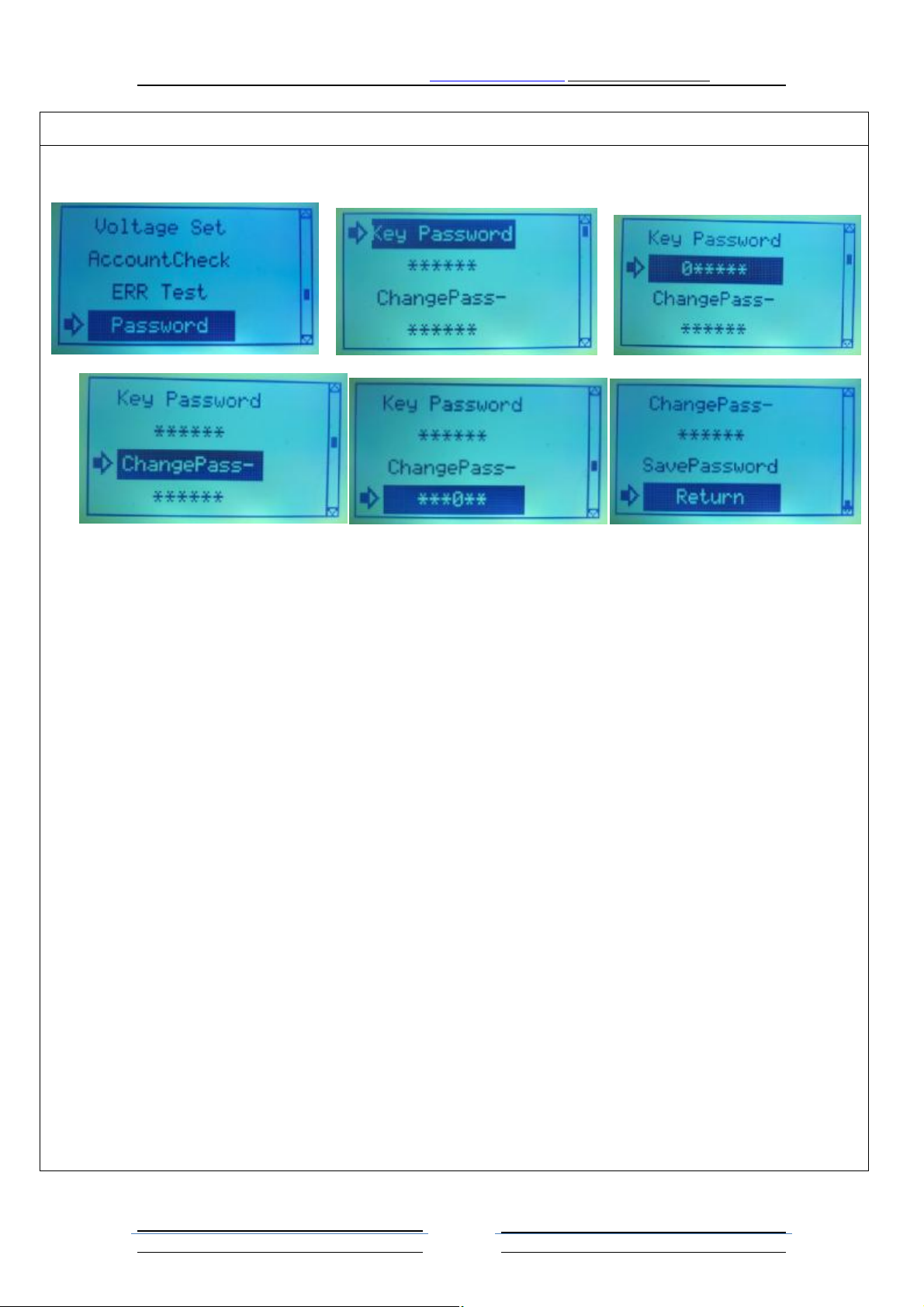
Password settings interface in the background management interface to select the "password settings", press the key to
enter the password settings interface
1. Key Password:System password 6 initial 000000。
2. 0*****: System password input box. The upper and lower direction of the joystick to select the number of bits, press
the key to confirm the selection, and then manipulate the joystick can be adjusted around the password parameters
3. ChangePass-:
4. ***0**: New password input box. Select the number under the direction of joystick, press the button to confirm the
choice of grasping, and can adjust the parameters about joystick password, if the need to modify the system password
new, you need to enter the correct password system in the old system password input box, in order to save the system
password updated, otherwise cannot be saved, and will prompt system wrong password。
5. SavePassword:If you have to modify the new system password, you must select this item and press the capture key to
confirm the save, save directly from the password settings interface back to the background management interface。
6. Return:Select this item and return directly to the admin interface。
Role of system password:
1. when the system password is 6 000000, in the account inquiry which can not directly remove the accounts, if you need
to remove the accounts, you first need to enter the correct password input interface for this system, and then
returned to the accounts of the query interface, select clear accounts to remove the accounts。
2. when the system password is not 6, you can not directly modify the new system password, the first to enter the
correct system of the old password to change the new system password。
第 10 页
文控: 无
Page 11
HomingGame Crane Machine Manual www.hominggame.com [email protected]
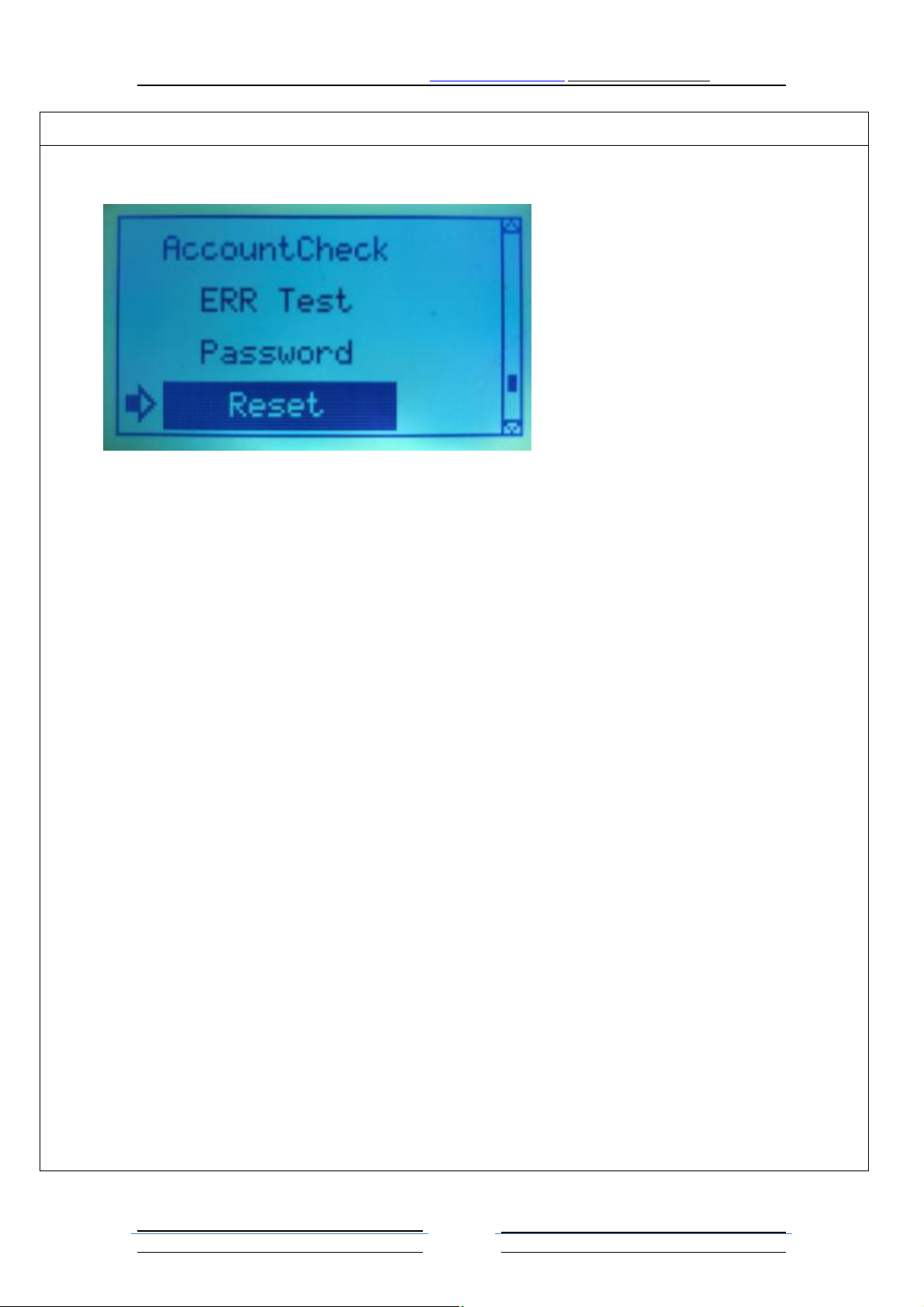
Restore the factory settings in the background management interface select "restore factory settings", according to grasp
the key to all the items can be set to restore the factory settings parameters。
Note: when restoring factory settings, business accounts will remain intact。
第 11 页
文控: 无
Page 12
HomingGame Crane Machine Manual www.hominggame.com [email protected]
Fault treatment method
Fault phenomenon Treatment method
Toggle the NC NO switch to observe whether it can enter the background
management system. If you can replace the coin, if you can not check the coin line
Invalid coin
connection is good
Note: the coin signal is less than 20ms or greater than 200ms is invalid, the
machine is determined to be malicious interference or fishing
Coin into the background
management system
1 processing 1: NC position of the coin will be transferred to the boot NO state
2 handle 2: shutdown restart the machine
1 check whether the power supply of the 12V is connected to the connection line
Invalid coin
2 Coin damage, replace the coin
3 whether there is no coin coin coin, comparative coin
1 check the sound regulating knob is transferred to the minimum state.
No sound
2 check whether or not the horn line is falling off
3 replace the horn
4 drive motherboard failure, replace the driver board
Display is not normal 1 white screen, black screen, flower screen, display inconsistent display failure
The rocker can not control the
movement of the crane in 4
directions
To observe whether the normal boot crane complete self action, and display no
detection error message. If the crane replacement or check rocker rocker
connecting line is normal. If prompted crane fault detection, fault handling see
crane.
1 non Apple mobile phone to open the camera light emitting part is a purple eye
powder, if the normal light, re adjust the position of the light emitting and receiving
Display light eye detection error
eye alignment. If it can not be solved, replacing the light eye receiving module.
2 if the transmitting component does not emit light, check whether the connection
line of the emission component is falling off or replace the transmitting component
3 check whether the receiving component connection line is connected properly
Display no eye detection error
information, but the gift can not
be detected when falling gifts
1 check whether or not the connection line of the light receiving unit is connected
properly
2 replace light eye receiving assembly
1 shake the machine in the process of grasping the object, the alarm function can
not be shaken
Anti sway failure
2 check the alarm alarm balancer connection line is off
3 check the shaking alarm balancer whether or not to fall off
4 shake the machine to observe whether the balance of the balance can touch the
edge of the iron edge, if you can not touch, adjust the height of the balance
Table 1 check line connection is connected.
A table or gift table does not
take the word
Table 2 replacement is able to solve the problem.
Table 3 line is wrong (this problem may occur only in the factory installation).
4 drive board failure, replace the driver board
第 12 页
文控: 无
Page 13
HomingGame Crane Machine Manual www.hominggame.com [email protected]
Fault handling method two
Fault phenomenon Treatment method
Can cause the crane detection error alarm information for several reasons
Loss of power supply for 1 overhead traveling crane
Boot detection error
Check the corresponding switch
or motor according to the
prompt
2 crane limit switch fault
3 crane fault
4 crane fault
5 crane fault caused by installation error
6 crane connection and plug failure
The following are the reasons for the failure and treatment methods are
described
1 crane power supply loss good distinction, the crane can not move in one
direction, and the drive plate crane motor indicator light is not bright. At this time
as long as the replacement of the power supply or find the power supply 48V
power supply is normal
2 if the Mini crane power supply loss, but also accompanied by no sound and
music, because the Mini motor power supply and power supply 12V power supply
3 if the crane 6 directions in a certain direction, do not exercise, how to distinguish
itself belongs to the crane fault or drive motherboard failure. At this time the boot
Loss of power supply or failure
of drive circuit board
is complete, enter the backstage management system management system, and
then enter the fault test interface, select the "start test of crane manually move to
the middle position, the operation of the rocker observation LED indicator driver
board around 4 the direction is lit, if the 4 direction indicator lights are lit, and the
crane crane. According to the fault does not move, grasping the key, LED lights
under the crane on the observation of the movement in 2 directions is normal light,
if the normal light, but there is no corresponding direction movement of the crane,
crane is fault.
4 if the operation of the rocker direction indicator light is not a normal light, first of
all, the need to exclude the direction of the crane limit switch is normal, if all the
limit switches are normal, then the driver circuit board failure 6
1 in the process of self inspection, observe whether the crane can be properly in
accordance with the established direction of movement
2 how to judge the fault caused by the limit switch or other fault caused by the
The limit switch failure of crane
alarm
3 enter the backstage management system fault detection interface, manual crane
moves to the middle position, each manual press crane limit switch, if the screen
can show the corresponding switch state change, the limit switch is normal.
Otherwise the limit switch failure, replace the limit switch after re testing.
第 13 页
文控: 无
Page 14
HomingGame Crane Machine Manual www.hominggame.com [email protected]
Troubleshooting Fang Fasan
Fault phenomenon Treatment method
Can cause the rope to reverse the situation: only the limit switch failure or touch
the afternoon limit switch card failure
How to determine the limit switch card failure: through the above limit switch fault
The top of the crane is not
moving up and down
handling, eliminate switch failure, through the observation of grasping the
downward motion in the end, but not immediately catch the upward movement,
but to see continue to let go of the rope down, release the rope to tighten the rope
to reverse. As the switch card failure. The way: you can make some lubricants
maintenance crane can be solved.
Crane grasp the start of the son
to tighten
Drive motherboard failure, replace the driver board
1 May day after the coin, have been caught empty (only MINI chance of grasping,
namely after the coin, no joystick crane claw down directly in the material mouth is
empty catch phenomenon of the fault normal without treatment, the normal
Error of catch limit switch under
crane tip
operation of a crane can be removed, or 10S fault display automatically cut).
2 crane can not go down in the end, that will also be back to report this error. If this
occurs, please enter the advanced system settings will be able to adjust the time to
claw down.
3 crown of the foot in the end, but the fault is the fault of the lower limit switch or
wire connection failure or motherboard failure.
Claws can drop normal, but the
rise is not normal or up to stop
for a while and then a paw and
loose state
1 please check whether the anti sway balancer is pressed. When the anti swing
balancer failure occurs, this does not rise, and the sound will appear corresponding
do not shake tips.
If the crane self-test process cannot be run in accordance with established
Fault of crane motor
procedures. Exclusion limit switch fault free, observe the driver board LED light is
normal, can judge the fault of motor crane. Crane or mechanical failure stuck
problem. Check out the replacement of crane motor stuck mechanical problems.
Press the key to grasp the object
can not carry out action
Change the grab button, or check the key connection is off
1 into the background to determine whether the grip force is set to 0 or too small
Claws can not be folded when
grasping
2 check if the coil is damaged. Observe whether the coil is blackened and burnt
3 check the claw connection wire is connected properly
4 for Mini 24V power supply is normal, handle the replacement power supply
The gift is easy to be taken away
or the gift is not ideal
Into the back office management system: grasp the force set interface to adjust the
grasp force to achieve the ideal effect of the gift slip
第 14 页
文控: 无
Page 15
HomingGame Crane Machine Manual www.hominggame.com [email protected]
Troubleshooting Fang Fasan
Fault phenomenon Treatment method
If the installation is not in place but also can alarm fault movement in a desired
Crane installation failure
direction by the general after the coin can run normally, if by observing the crane
operation process connected line pull or joint encounter cannot touch the limit
switch to return at this time, please handle the interference location.
Crane connection and plug
failure
This fault is relatively complex, need to be combined with the above exclusion
method one by one to eliminate the method, can locate the fault location
First of all, whether or not it is caused by the dislocation of the rope to cause
mechanical failure, leading to block movement
The top of the crane is not
moving up and down
If the observation judgment rope clamping reversal, please strictly hold this
method: first boot immediately hold the crane upward limit switch, motor
operation will wait for automatic rope after shutdown, then manual rope all over,
reboot, it will automatically drive the rope back.
第 15 页
文控: 无
 Loading...