

Page 1
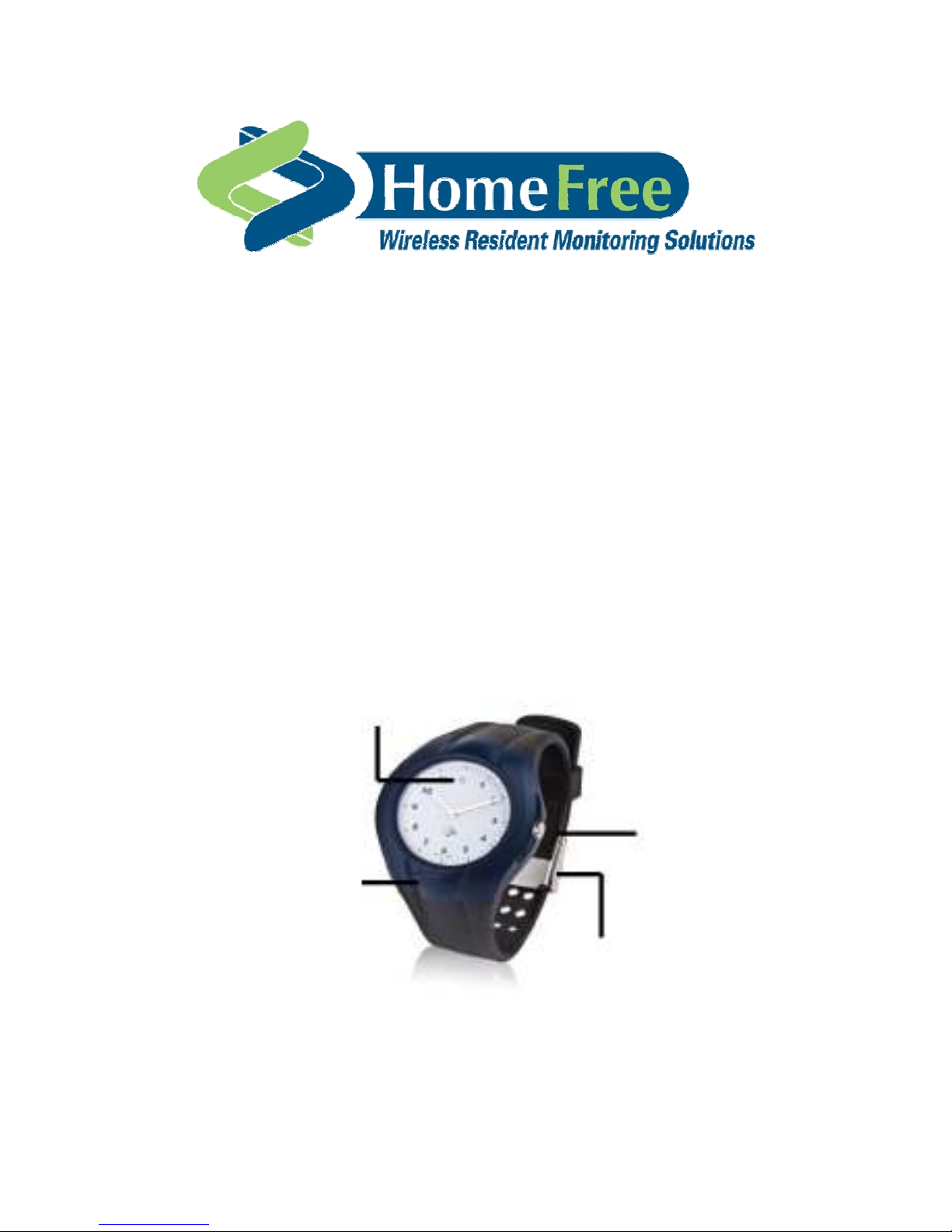
Personal Watcher™
Operating Instructions
Red Light Indicates ON/OFF
Adjusts time
ON/OFF Button
Metal Clip secures
Page 2

Operating Instructions
About the Personal Watcher™ Unit
The Personal Watcher™ (Watch Style) is a uniquely designed wristwatch
and wander-monitoring device. Lightweight and water-resistant, it is worn
by the monitored individual at all times. The Wireless Monitoring Unit
(WMU) network picks up its silent, continuously active signal, alerting staff
members whenever a monitored individual enters or exits a restricted
zone, approaches a monitored door or exit, or removes the device. The
Personal Watcher
TM
is not for use outside of the monitored area.
The Personal WatcherTM (PW) continuously sends a signal to the wireless
network, indicating a resident’s current location and status. The PW has
multiple sensing capabilities, including strap tamper/open, body contact,
and motion sensing.
Resident location – The PW transmissions are monitored at all times by
the network, providing continuous, real-time resident monitoring throughout
the coverage area of your facility/community. From the monitor screen, you
can determine a resident's general location by selecting the resident’s
name in the Residents Status area, right-clicking with the mouse, and
selecting Position from the dropdown list. The map on the right side of the
screen will display a 'walking person' in the general area of the WMU
receiving the PW signal.
Secondary layer of security – The HomeFree system notifies staff
members via computer and pager if a resident wearing a PW exits the
facility/community through a non-monitored exit, such as a window or a
non-monitored door. The alert duration can be defined for each resident
profile.
PW removal alerts – The HomeFree system notifies the staff if residents
remove their PWs.
Resident motion monitoring – PWs are equipped with motion sensors. The
HomeFree system notifies staff members if residents are in motion or
motionless during a specified time period. This function needs to be
activated in the resident’s profile screen in the Motion Monitoring area at
the bottom of the screen.
Personal Watcher
Page 2 of 5
Page 3

Operating Instructions
Turn On PW
The PW can only be turned on if the strap is completely open and the back
of the PW does not detect heat.
1. Open the watchstrap. Hold the PW so that you are not touching the
back of the device (body sensor) and the straps do not touch each
other. Press and hold the ON/OFF button until the Red Light on the
watch face turns on and off briefly.
2. IMMEDIATELY put the watch down on its side on a non-metal surface,
near the central monitoring computer. The PW is automatically
calibrated.
3. Do not touch or move the PW during the time it is calibrating. Look for
the “Calibration Passed” message in the Events Display area of the
HomeFree Monitor screen. You must wait to see this message before
proceeding.
4. The PW is now ready for testing.
If you do not see the “Calibration Passed“ message, or you see a
“Calibration Failed” message, turn the PW off. Wait 15-20 seconds before
turning the PW back on and repeating the above steps.
If the PW does not calibrate, contact Technical Support for assistance.
Do not place the Personal Watcher™ on a resident if calibration fails
or you do not see “Calibration Passed”.
Test PW
You MUST test the PW before placing it on a resident.
1. Place the PW on your wrist, making sure the strap is tucked into the
strap loop. You do not have to fasten the latch for testing.
2. Walk toward a HomeFree monitored door and open the door. Verify
that the Wireless Monitoring Door Unit alerts appropriately, and that
alarm information is sent to the pager. Close the door and reset the
alarm.
3. If the door alerts appropriately, the PW is ready to place on a resident.
4. If the door does not alert appropriately, contact Technical Support for
assistance.
Personal Watcher
Page 3 of 5
Page 4

Operating Instructions
Turn Off PW
PWs should be turned off when not in use, for example, when a resident is
in the hospital or discharged from the facility. A PW can only be turned off
if its strap is completely open and the PW back does not detect heat.
1. Open the PW strap. Press and hold the ON/OFF button until the Red
Light on the watch face turns on.
2. Release the ON/OFF button, and then quickly press the button twice.
The Red Light turns on for 1-2 seconds and then turns off again. The
message “Watch Closed” or “Watch Turned Off” appears in the Events
Display area of the HomeFree Monitor screen.
Putting the Personal Watcher™ on a Resident
Make sure the PW has been tested.
1. Make sure that the serial number on the watch matches the serial
number on the resident’s profile screen.
2. Fasten the strap around the resident’s wrist like any other watch,
making sure the back of the watch touches the skin, the watch face is
on the top of the wrist, and the strap is not too loose or too tight. Attach
the metal clip around the strap and snap it closed. Use the hex
screwdriver to tighten the screw to insure the watch cannot be
removed.
3. Tuck the strap through the strap loop.
4. Set the time like any other watch.
Recommendations
On a regular basis (recommended at least once per shift), in the
Residents Status area on the Monitor screen, check that all names/identifiers
are in
GREEN. Any other color (BLUE or RED) requires attention. Scroll
through the entire screen or use the Filter option to check.
Verify that PWs are turned OFF when not in use. This will extend battery life.
Verify that PWs are removed from residents when they are transferred to the
hospital or are permanently discharged from the facility.
Make sure that you have extra PWs in stock for new residents.
Make sure that you have longer PW straps in stock for residents with larger
wrists.
Make sure that you have extra strap and battery replacements in stock.
Personal Watcher
Page 4 of 5
Page 5

Operating Instructions
FCC Notices
The PW-830-2 complies with Part 15 of the FCC Rules. Operation
issubjectto the following conditions:
1. This device may not cause harmful interference and
2. This device must accept any interference received, including
interference that may cause undesired operation.
3. Changes or modifications not expressly approved by Elmo Tech Ltd
could void the user’s authority to operate the equipment
CAUTION
Any changes or modifications not expressly approved by the
grantee of this device could void the user’s authority to
operate the equipment.
HomeFree Technical support is available 24/7/365.
To contact HomeFree technical support during regular business hours
(M-F 7am-5:00pm CST) call toll free
1-800-606-0661.
You can also email Technical Support at: [email protected] for
non-emergency issues.
HomeFree Inc. 6629
West Mill Road
Milwaukee, WI 53218
Toll Free: 1-800-606-0661
Tel: 414-358-8200
Fax: 414-358-8100
After 5pm Central Time/Emergency:
1-800-606-0661 Press #5 and wait for pick up of on-call answering
service.
Page 6

Personal Watcher
Page 5 of 5
 Loading...