

Page 1
H4 SuperMINI
Surround Sound Microphone
User Guide
Copyright © 2001, 2004, 2006, 2007 Rising Sun Productions Ltd.
Page 2

H4 SuperMINI User Guide
Contact us:
HOLOPHONE
Rising Sun Productions Limited
258 Adelaide Street East, Suite 200
Toronto, Ontario, Canada M5A 1N1
Telephone: (416) 362-7790 Fax: (416) 504-6500
Website: http://www.holophone.com
Email: [email protected]
Warranty contact:
(416) 362-7790
NOTE:
The term Holophone
as used in this manual
is a registered trade mark of
Rising Sun Productions Limited.
Page 3

H4 SuperMINI User Guide
Terms and Conditions
1. Rising Sun Productions Limited “Rising Sun” warrants its products to be free of
defects in material and workmanship for a period of one (1) year from the original
date of receipt or retail purchase.
2. During the warranty period, Rising Sun shall, at its sole discretion, either repair or
replace free of charge any product that proves to be defective.
3. This warranty does not cover claims for damage arising out of abuse, neglect,
alteration or attempted repair by any unauthorized personnel, and is limited to failures
arising during the course of normal use for the product.
4. Rising Sun does not authorize any person to create for it any other condition or
liability in connection with this product. Any implied warranty or condition
(including any implied warranty of merchantability or fitness for a particular purpose)
is limited to the duration of this warranty. The performance of repairs and needed
adjustments is the exclusive remedy under this written warranty or any implied
warranty.
5. In the event that your jurisdiction provides rights to you through legislation or law,
which are inconsistent with the rights set out in this warranty, this warranty does not
exclude or limit those rights, but shall run concurrently with any applicable
legislation law.
6. Rising Sun shall in no event be liable for incidentals, economic, consequential or
other losses or damages resulting from the breach of any express or implied
warranty, law or statute, including, but not limited to, damage to property,
damage based on inconvenience or on the loss of use of the product, and to the
extent permitted by law, damages arising out of personal injury or death. In no
event shall Rising Sun be held responsible for an amount exceeding the dollar
value of the product(s) purchased.
7. Some jurisdictions do not allow for the exclusions or limitation of some or all
damages, so the above limitation or exclusion may not apply to you.
8. It is agreed that any dispute or claim arising out of the purchase, sale or use of the
product(s) is to be decided within the exclusive jurisdiction of the courts of the
Province of Ontario, Canada.
Warnings
Failure to heed these warnings could result in an electrical shock
hazard, reduced service life or damage to your equipment.
• The Holophone SuperMINI is intended for professional use only.
• All safety and operating instructions should be read before the unit is operated and
retained for future reference.
• Refer internal servicing to qualified personnel.
Page 4

H4 SuperMINI User Guide
Table of Contents
Terms and Conditions ................................................................................................. ii
Warnings ..................................................................................................................... ii
Introducing the Holophone H4 SuperMINI................................................................1
The H4 SuperMINI System .....................................................................................1
The Holophone Breakthrough..................................................................................2
The Holophone H4 SuperMINI ...............................................................................2
Control Unit Functions ............................................................................................3
The Holophone System..................................................................................................4
A Brief Overview of Surround Sound .........................................................................6
The Holophone SuperMINI ..........................................................................................9
SuperMINI Microphone Head .................................................................................9
Top View .................................................................................................................9
Front View ...............................................................................................................9
H4 SuperMINI and Control Unit ...........................................................................10
Control Unit—Rear View......................................................................................13
Using the Holophone H4 SuperMINI.........................................................................16
Setting Levels.........................................................................................................16
Audio Zoom...........................................................................................................16
External Center Microphone..................................................................................17
Page 5
H4-SuperMINI User Guide
Introducing the Holophone H4 SuperMINI
Congratulations. You are the proud owner of a truly ingenious
piece of audio engineering. The Holophone H4 SuperMINI
Surround Sound microphone system is a lightweight, portable,
super-compact package that captures professional-quality 5.1
surround-sound audio for Electronic News Gathering (ENG),
professional video and film production, or music recording. The
H4 SuperMINI provides the ideal solution for all live event
television broadcasters, live music producers and engineers, and
film and video location crews who need real-time surround audio
to satisfy the ever-expanding Home Theater audience.
The H4 SuperMINI System
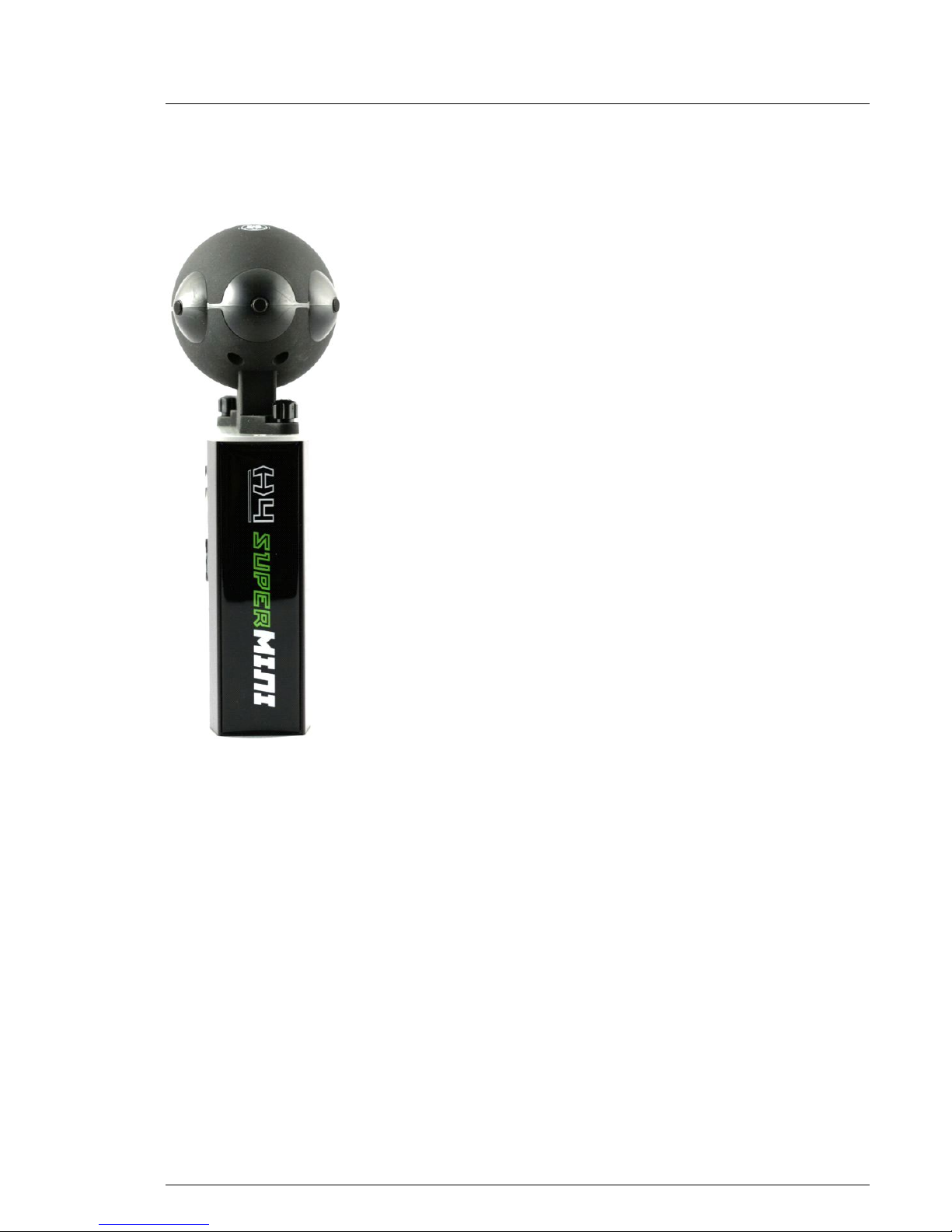
The H4 SuperMINI system includes two major components:
• H4 SuperMINI Head with six microphone elements: five
external elements and an internal Low Frequency Effects
element (5.1);
• Control Unit, which carries out extensive processing and
control functions during sound capture.
The H4 SuperMINI Head is mounted securely on the Control Unit,
which can be mounted in turn on any professional-level video
camera. It can also be mounted on a tripod, a boom, or simply held
in the hand. Together, the Head and the Control Unit weigh less
than 1 lb. (450 grams).
The sound captured by the six independent microphone elements
can be output in two ways:
• Dolby ProLogic II, a matrix surround-encoded stereo
analog output, or
• six line-level analog outputs (L, R, C, LFE, LS, RS)
available through three stereo mini-plug jacks.
The H4 SuperMINI has additional capabilities that include an
input for an external, center-channel placed shotgun or lavalier
microphone to enhance sonic opportunity options and features a
zoom button that increases the forward bias of the pick-up pattern.
It also includes Virtual Surround Monitoring on headphones for
real-time on-camera 3-D audio monitoring of the surround field.
Page 6
H4-SuperMINI User Guide
The Holophone Breakthrough
The H-4 SuperMINI is based on the patented Holophone Surround
technology that has revolutionized the capture of surround sound.
Instead of using separate microphones to capture the multiple
inputs required for surround sound, the Holophone system mounts
the required microphone elements on a single “Head” – a spheroid
that approximates the physical shape of the human head.
The placement of these elements captures the variations that the
human mind uses to locate the source of sounds. The result is an
extremely accurate reproduction of the ambiance of the venue
being recorded, combined with great ease of use.
Until now, the breakthrough Holophone approach has been
available in two implementations:
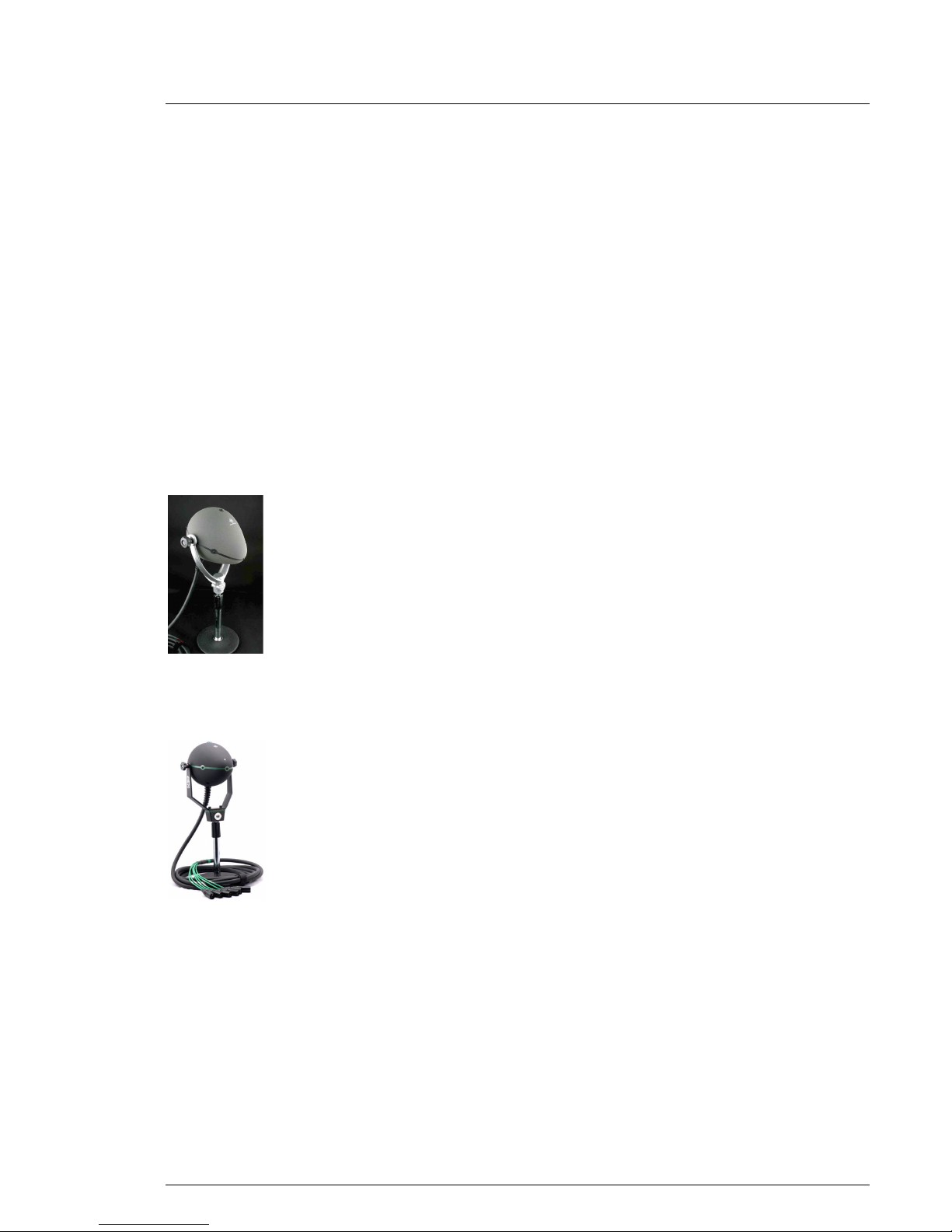
• Holophone H2-PRO
The senior member of the Holophone family, the H2-PRO
has 7 microphone elements mounted on the surface of the
Head and one in the interior to capture low frequency
effects (LFE). It supports all consumer audio formats,
including IMAX, Dolby Digital EX, DTS ES, Circle
Surround II (CS II), Dolby Digital, Dolby ProLogic II,
DTS, Circle Surround, AAC, WMA, SDDS and Dolby
Stereo.
• Holophone H3-D
The H3-D, with 5 microphone elements mounted on its
surface and one LFE mic in the interior, provides an
economical solution for those standards that do not require
the additional mic elements. These include Dolby Digital,
Dolby ProLogic II, DTS, Circle Surround, AAC, WMA
and Dolby Stereo.
The Holophone H4 SuperMINI
Holophone H4 SuperMINI is a further advance in the Holophone
technology, designed principally for use by videographers
requiring an integrated video and sound package. The unit is small
enough to be mounted on top of a video camera.
Holophone H2-PRO
Holophone H3-D
Page 7
H4-SuperMINI User Guide
Control Unit Functions
The H4 SuperMINI Head is only part of the story. Typically, in
videography, the sound is captured in stereo, to be stored either in
the camera or in a separate stereo recording unit. The H4
SuperMINI system converts the six surround channels to Dolby
ProLogic II, encoding the 5.1 channels within two stereo channels.
The result can be played (and edited) in stereo or decoded back
into the original 5.1 channels.
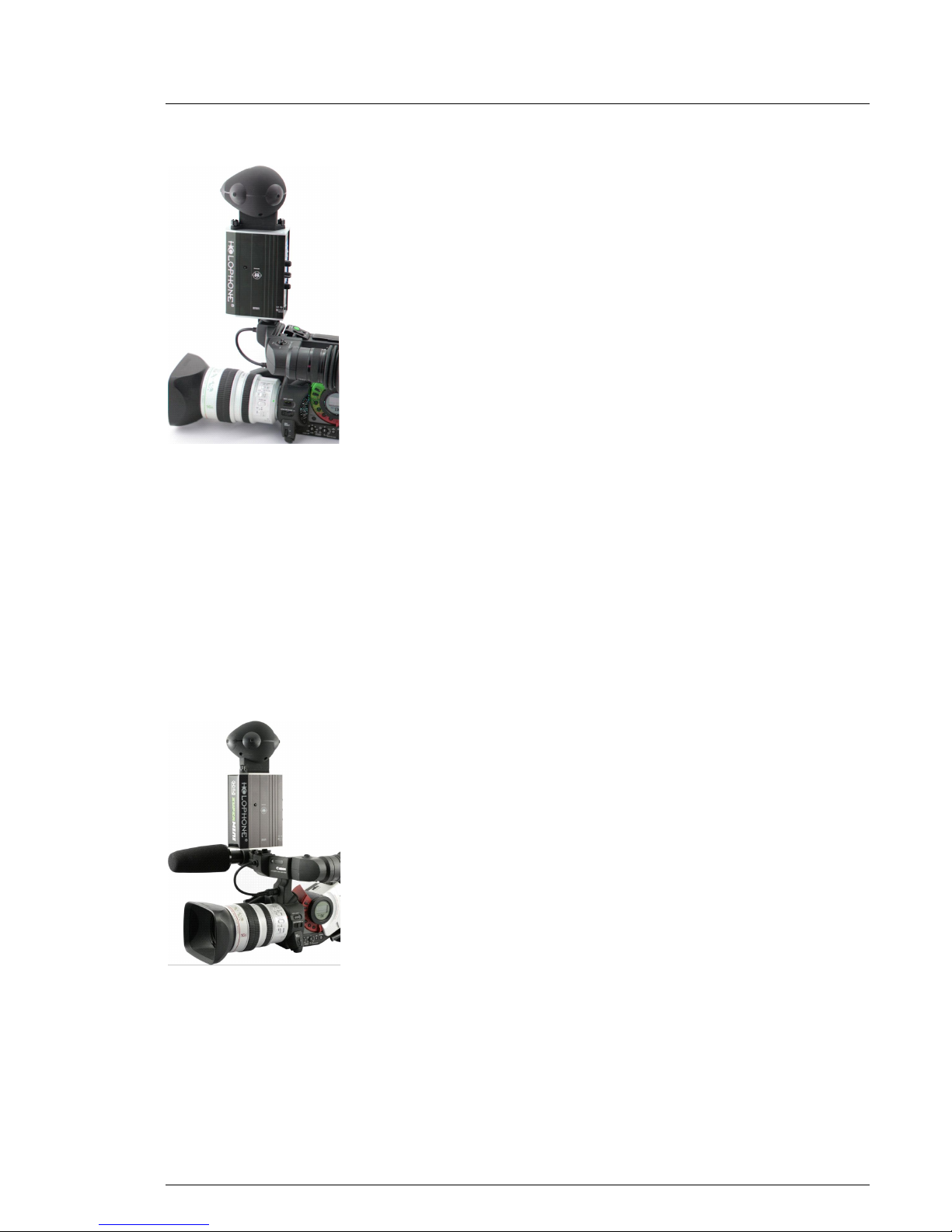
The encoding is carried out within the Control Unit. The Head is
mounted on the Control Unit and the two together can be mounted
on the video camera using either a hot-shoe or cold-shoe mount.
(SuperMINI can’t be powered from hotshoe mount)
Despite its small size, the H4 SuperMINI is a highly versatile
piece of equipment.
Here is what it can do:
• Encodes the input from the six microphone inputs in Dolby
ProLogic II format, exporting the result as two channels of
stereo audio.
• Provides simultaneous six-channel output, converting the
six channels of audio from mic level to line level, making
them available via three stereo outputs (six channels).
• Provides the ability to replace the center channel
microphone with an external microphone (e.g., lavalier or
shotgun), with an independent gain control. Supplies
phantom power for the external microphone, if required.
On playback, audio from (external) center mic is played
out of center (dialogue) speaker.
• Provides virtual surround headphone output for
monitoring, with a separate gain control.
• -12 db PAD switch
• Zoom button, to change the center bias of the inputs to
match video close-ups.
• Two colored LED monitor for six input channels.
• Runs on 4 x AA batteries with over 6 hours of battery life.
Alternatively, provides input for 5 V DC input converted
from AC power.
H4 SuperMINI mounted
on camera
H4 SuperMINI and
Control Unit mounted on
camera with external
microphone
Page 8

H4-SuperMINI User Guide
The Holophone System
The Holophone is a specially designed microphone system for
capturing sound in three dimensions, while keeping signals
discrete for surround sound playback.
Designed specifically to create sound tracks for surround sound
playback systems, the Holophone’s superb realism and ease of use
make it the preferred choice for a wide range of other applications.
The 1990s witnessed an explosion of surround sound playback
technology in the form of motion picture systems, HDTV and
DVDs. The recording of natural and instantaneous surround sound
was left behind, until the Holophone.
Three-dimensional sound is based on the brain’s amazing ability to
decode subtle differences in timing and volume of sounds coming
from different directions as the waves bend around our head.
Surround sound has traditionally been created by mixing sounds
recorded from multiple sources. The sound engineer controls the
mix to simulate what a person sitting in a particular space would
hear. The mixing approach is costly and time consuming, and the
results are inconsistent.
The Holophone solution is to place multiple discrete microphones
on the surface of a specially-designed Head. These microphones
capture the sounds that come from various directions. An internal
microphone captures low frequency sounds.
The Holophone’s Head is actually an ellipsoid. It looks more like a
pointy football than a real human head. Acoustically, however, it
performs remarkably like the real thing.
Without the Head, each microphone would have an
omnidirectional response field. The Holophone Head provides a
spherical boundary layer of varying proportions between each
microphone, which effectively divides the incoming sound into
sectors so that each microphone picks up sound primarily from
one direction. The shape of the Head also ensures that one
microphone’s response does not bleed directly into another, but
will bleed enough to ensure a smooth transition from channel to
channel. These channels relate directly to the channels in a
standard surround-equipped audio playback system. Small
differences in the time it takes for a sound to be picked up by the
various microphones are interpreted by the brain to determine
where the sound is located.
Holophone SuperMINI
Page 9
H4-SuperMINI User Guide
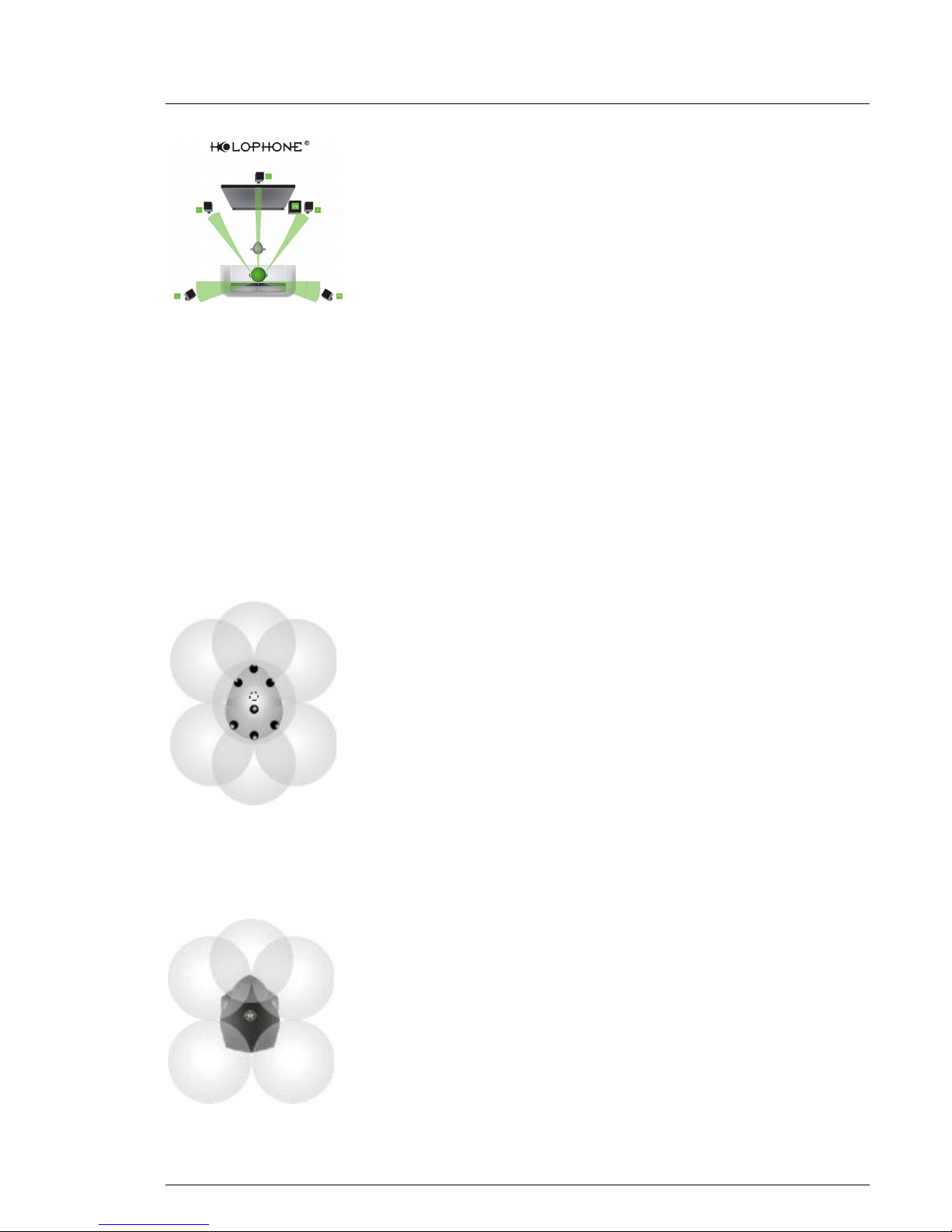
Our real head performs in a similar way, shielding each ear from
sound waves that are picked up by the other. Small differences in
timing are interpreted as position. This phenomenon is known as
binary localization. The output from all the speakers arrives at our
ears with the same small differences in timing, and we hear as we
would if our own head was in the same position as the Holophone
when it recorded the sounds.
This simple principle governs the recording process, and
determines where to position the Holophone. Recording is very
subjective. Different positions produce different effects for
different purposes. The best guide is simply to ask yourself "where
does it sound best?" and put the Holophone there.
The primary advantage of the Holophone system over all other
existing approaches is that no signal manipulation is required.
The output of the Holophone itself can be used directly, and in
most situations this will produce the best results.
The initial design was completed and a patent application filed for
the new system in 1994. When it became apparent in late1996 that
the patent would issue, the first prototype was built. The Canadian
government’s National Research Council became interested in the
technology and joined in a collaborative research agreement to
fine-tune the system and build a prototype that was compatible
with industry requirements.
The Holophone surround system is now available for professionals
wishing to optimize their surround sound recording projects.
The top-of-the-line Holophone model is the H2-PRO, with eight
microphone elements: center, left, right, left surround, right
surround, overhead, center rear, low frequency (inside the Head).
Compatible with all consumer formats, including 7.1 systems, the
H2-PRO can be readily connected with industry-standard
preamplifiers and sound recording devices. The H2-PRO is now
recognized as setting the standard for professional surround sound
recording.
However, there are many recording situations that do not require
the full capabilities of the H2-PRO. With that in mind, the H4
SuperMINI has been designed to provide all the functionality
needed for 5.1 recording in a package that can be integrated with
ENG-style videography. Lightweight, versatile, and affordable, the
H4 SuperMINI does not compromise on quality.
Home theatre setup
showing binary
localization
Holophone H2-PRO
Holophone H4 SuperMINI
Page 10

H4-SuperMINI User Guide
A Brief Overview of Surround Sound
Mono
In the beginning there was mono. No matter how many speakers
there were, the sound coming from each speaker was the same. In
monaural recording, the effect was as if all the sound was recorded
from the same single location, and for the most part this was how
it was recorded.
First Surround Sound: Disney’s Fantasia
In 1940, Disney introduced surround sound to cinemas with the
movie Fantasia, using three channels behind the movie screen,
with additional speakers on either side and at the rear.
Implementation was expensive, and the results were demonstrated
in only two theaters — one in New York and one in Los Angeles.
Stereo
In the 1950s, stereo recording was introduced to the mass
consumer market. Stereo is based on the premise that we have two
ears. If the sound is recorded from two sources, we get a better
image of where the sound is coming from. Through the 1960s,
stereo sound swept monaural out of the marketplace.
Quad
Throughout the seventies there were a number of experiments with
quadraphonic sound for the home market. Quad sound failed to
catch on for a variety of reasons — lack of material, high cost of
systems and lack of consumer demand.
Dolby Stereo: 4 channels
In 1970, George Lucas’s Star Wars introduced Dolby Stereo to
movie theaters, and within a few years it became the most
common audio format. Contrary to its name, Dolby Stereo can
actually deliver four sound sources, thanks to an ingenious
principle called matrixing: left, right, center and rear.
A decoder/processor "unfolds" the sound into the original 4.0
surround—left and right, center, and a single limited frequencyrange mono rear channel—while systems lacking the decoder play
back the audio as standard Stereo.
Page 11

H4-SuperMINI User Guide
Dolby Surround, Dolby ProLogic: 4-2-4
Dolby Surround and Dolby ProLogic are home cinema versions of
Dolby Stereo. For television home video, the four signals are
compressed into two conventional stereo tracks, and then
decompressed into four if the home equipment supports surround
sound. This compression is referred to as 4-2-4.
Dolby Digital: 5.1 configuration
Today, surround sound in theaters is delivered most commonly by
Dolby Digital systems, including Dolby Digital 5.1, Dolby AC-3
and Dolby SR-D (Spectral Recording Digital). Dolby Digital
employs six sound sources, as follows:
• Center
• Left
• Right
• Left surround
• Right surround
• LFE (or Low Frequency Effects)
This configuration is known as 5.1, with the “.1” referring to the
LFE source (also known as a subwoofer). Dolby Surround Digital
is the home video version, available on digital video disks
(DVDs).
Other 5.1 Systems
A competing system called DTS (Digital Theater Systems),
introduced with Jurassic Park, also uses the 5.1 configuration.
Circle Surround analog decoding system also supports 5.1.
All models of the Holophone (H2-PRO, H3-D, H4 SuperMINI)
support 5.1 surround systems.
Dolby ProLogic II: Encoded 5.1
Dolby ProLogic II is an advanced implementation of Dolby Pro
Logic that processes any high quality stereo signal into 5.1
surround sound. (It can also decode 5.1 channels from 4-channel
Dolby Surround.)
The Holophone H4 SuperMINI takes advantage of Dolby
ProLogic II encoding (or any other stereo media) to create stereo
signals that can be stored on a video camera, and decoded later
for 5.1 stereo sound. (The H4 SuperMINI can also deliver 5.1
channels without encoding, to be stored or delivered directly.)
5.1 configuration
Page 12

H4-SuperMINI User Guide
6.1 and 7.1 formats
IMAX uses a 6.1 system, adding a top channel to the 5.1 standard.
This configuration was supported by the original Holophone H-1
(now discontinued). It is currently supported by the H2-PRO.
Dolby, DTS and SRS Labs (among others) introduced extended
surround formats that use a 6.1 configuration. These are Dolby
Digital EX, DTS ES (Extended Surround) and Circle Surround II
(CS II). However, instead of a top channel, these standards add a
center rear channel.
Sony has introduced a standard, SDDS (Sony Dynamic Digital
Sound), which has a 7.1 configuration. However, it does not use
either the rear channel or the top channel. Instead, it adds a left
center and a right center channel.
All 6.1 and 7.1 formats are supported by the Holophone H2-PRO.
The Holophone H4 SuperMINI supports the following formats:
5.1 Dolby Digital
Dolby ProLogic II
DTS
Circle Surround
AAC (Advanced Audio Coding – MPEG 4)
WMA (Windows Media Audio)
4-2-4 Dolby Stereo
Direct support for center, left and right channels.
Left surround and right surround are combined into
one mono output.
Stereo Surround sound recorded using Dolby ProLogic II
encoding can be played back as stereo.
Note: Dolby, Dolby Stereo, Dolby Surround, Dolby ProLogic, Dolby
Digital, IMAX, DTS (Digital Theater Systems), Circle Surround, AAC, WMA,
SDDS (Sony Dynamic Digital Sound) are trade-marked terms.
Page 13
H4-SuperMINI User Guide
The Holophone SuperMINI
SuperMINI Microphone Head
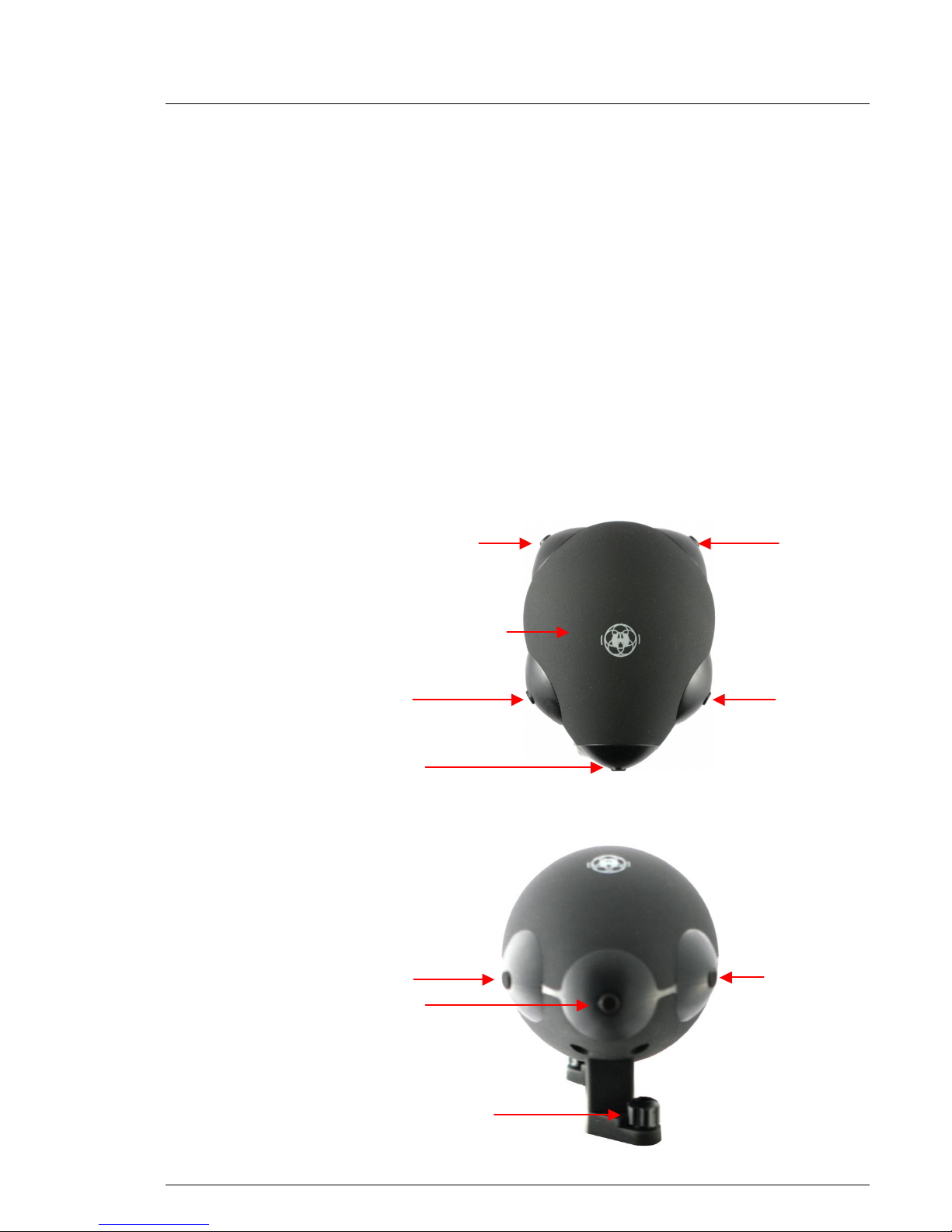
Five omni-directional microphone elements are mounted
externally on the H4 SuperMINI (L, R, C, LS, RS) Each element
has a bandwidth of 20Hz-20Khz.
A sixth is enclosed in the Head, and records Low Frequency
Effects (LFE). Its bandwith is 20Hz to 100Hz for outstanding
Low Frequency performance.
The Head is mounted securely on the Preamp/Monitor/Encoder by
tightening two PEM bolts at the base.
Top View
Front View
LFE low frequency
effects (inside the
Head)
left
center
left surround
right surround
right
tightening knob
right
left
center
Page 14
H4-SuperMINI User Guide
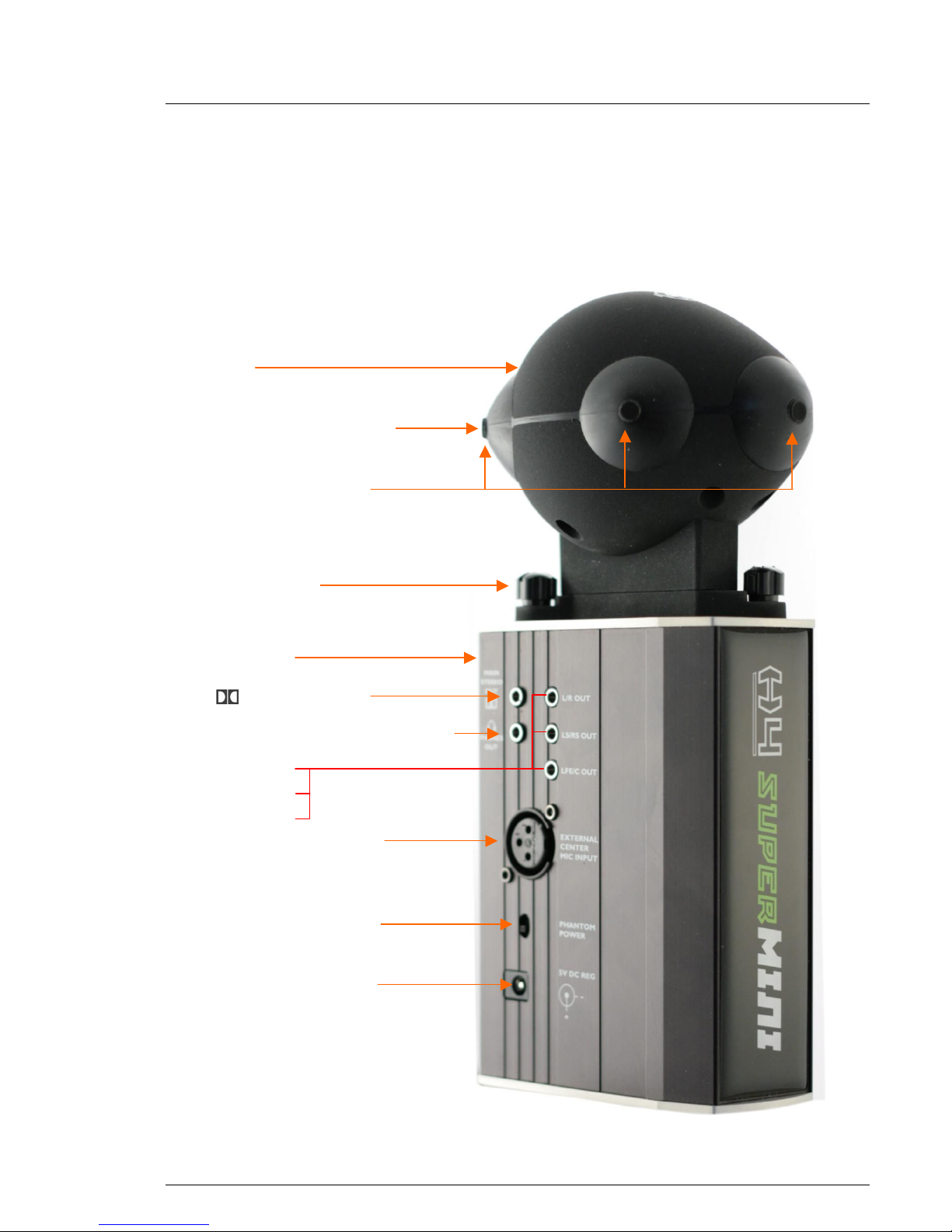
6 channel output
H4 SuperMINI and Control Unit
Mount the Control Unit on the camera, using either a hot-shoe or
cold-shoe mount, the front of the Head pointing in the same
direction as the camera. (There is no connection to the camera
through the shoe.) You can also hand-hold the H4 SuperMINI, or
mount it on a microphone stand or tripod.
Head
L/R out
LS/RS out
LFE/C out
tightening knob
microphone elements
main stereo out
( Dolby ProLogic II)
Control Unit
front of
Head
external center mic input
external phantom power
ON/OFF (48 volts)
5 volt DC power supply
virtual surround stereo headphones
right surround microphone
element
Page 15

H4-SuperMINI User Guide
The right side of the Control Unit (as you hold the camera) has the
output ports for the captured sound.
Main Stereo Out Records direct to the media in the camera,
eliminating synchronization issues. Outputs
two channels via a stereo connection. The
stereo signals are encoded using Dolby
ProLogic II to support the 5.1 mic inputs.
They may be played back as stereo or
decoded for surround sound.
The direct connection to the video camera
enables on-camera surround sound capture
from multiple points and perspectives within a
venue.
Stereo Headphone Out Virtual surround headphone output with gain
control on 3.5mm mini stereo jack for live and
instantaneous on-camera monitoring of the
surround field.
Although the headphones are stereo, a
virtual surround processor inside the Control
Unit takes the six channels of audio and
virtualizes them through the headphones.
You will hear a close approximation to the
surround sound being recorded.
There is a gain control for the headphone
output on the rear of the Control Unit. (See
below.)
Six Channel Output Three stereo jacks provide six line-level
analog outputs, using the left and right
channels of each jack. You can run these
directly into the console or into any other type
of device that captures six or more channels
of audio.
The output is line level (rather than mic level)
to eliminate the need for an external preamplifier. You can capture 5.1 channels on a
wide variety of recording devices.
Use this six-channel option if you prefer not to
have the sound capture encoded as stereo.
You can also use the main stereo out and six
channel output options simultaneously.
External Center Microphone Input
Auxiliary Center channel microphone input
(XLR) for attaching external lavalier or
shotgun microphone. Selector switch, gain
control and phantom power selectable.
Page 16

H4-SuperMINI User Guide
This input port allows you to replace the
center microphone in the H4 SuperMINI
Head with a separate microphone of your
own choosing. It can be any type of
microphone: shotgun, hand-held, lavalier,
wireless.
You can adjust the input level using the
External Microphone Gain Control on the rear
of the Control Unit (see below).
The use of an external center microphone is
particularly useful for dialogue, interviews,
and Electronic News Gathering (ENG).
Traditionally, in these applications, on
playback, a center channel speaker is used
for the dialogue and the surround speakers
provide ambience. It is perfect for on the spot
interviews to separate the dialogue from the
ambiance instantly on camera.
Phantom Power The Phantom Power Switch provides
phantom power (48 volts) for the external
center microphone. Press to toggle phantom
power on and off.
5 volt DC Power Supply External 5 volt input.
The H4 SuperMINI operates on 4 x AA
batteries and lasts for more than 6 hours.
You can bypasss the batteries by plugging in
the included AC adapter with a 5 volt output
into this port.
Page 17
H4-SuperMINI User Guide
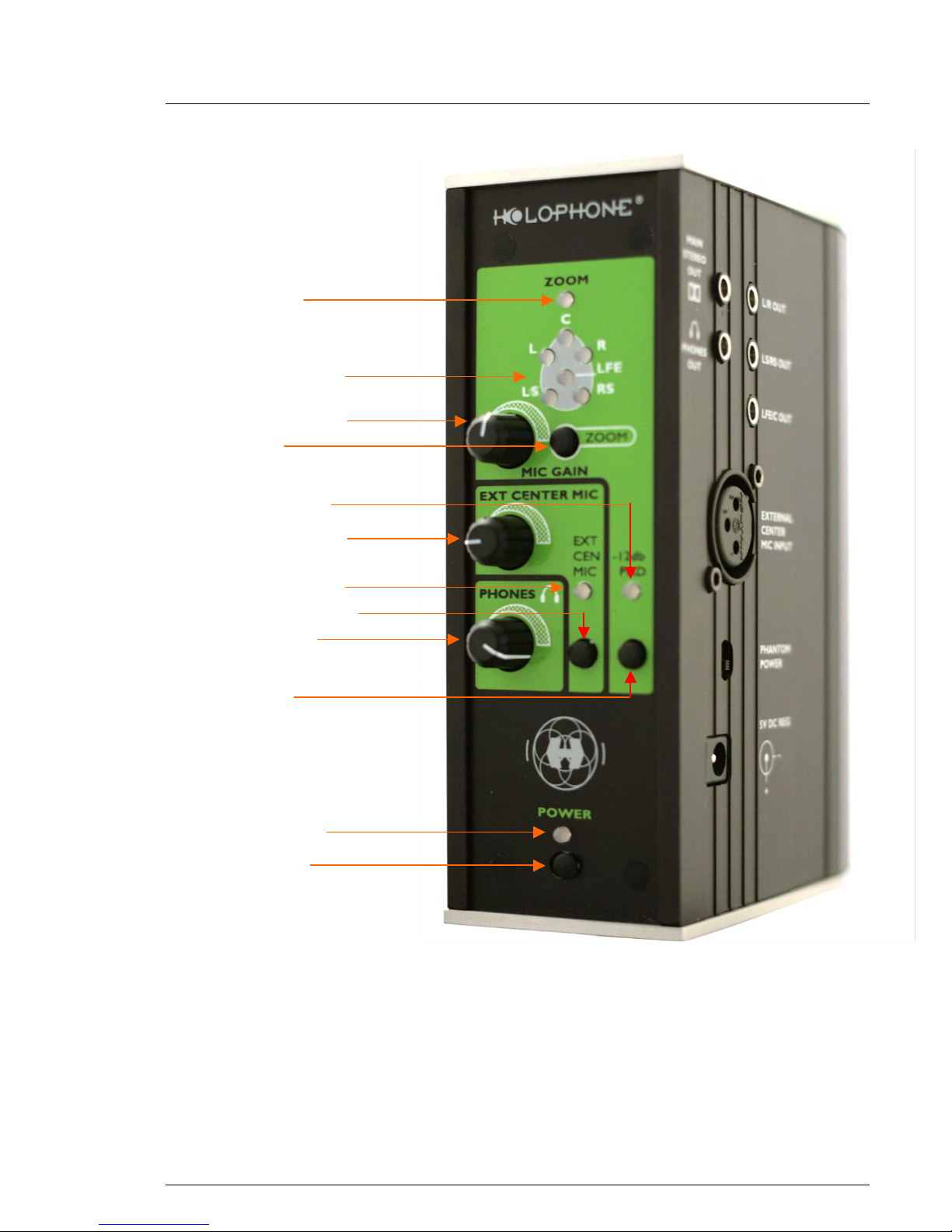
Control Unit—Rear View
zoom indicator
Two-color LED monitor
mic gain dial (all mics)
zoom button
external center gain
power switch
power indicator
external center LED
external center switch
headphone level
- 12 db PAD
- 12 db PAD LED
Page 18
H4-SuperMINI User Guide
Zoom Indicator LED display indicating whether Audio Zoom
has been activated. (See Zoom Button
below.)
Two-color LED Monitor LED display indicating the sound pressure for
each microphone element. The display
provides the operator with an intuitive
indication of relative levels.
green: the channel is active
red: clipping
Mic Gain Controls the input level of all six (5.1)
microphone elements in the H4 SuperMINI
Head.
This should be adjusted only after setting the
input level on the camera or external storage
device.
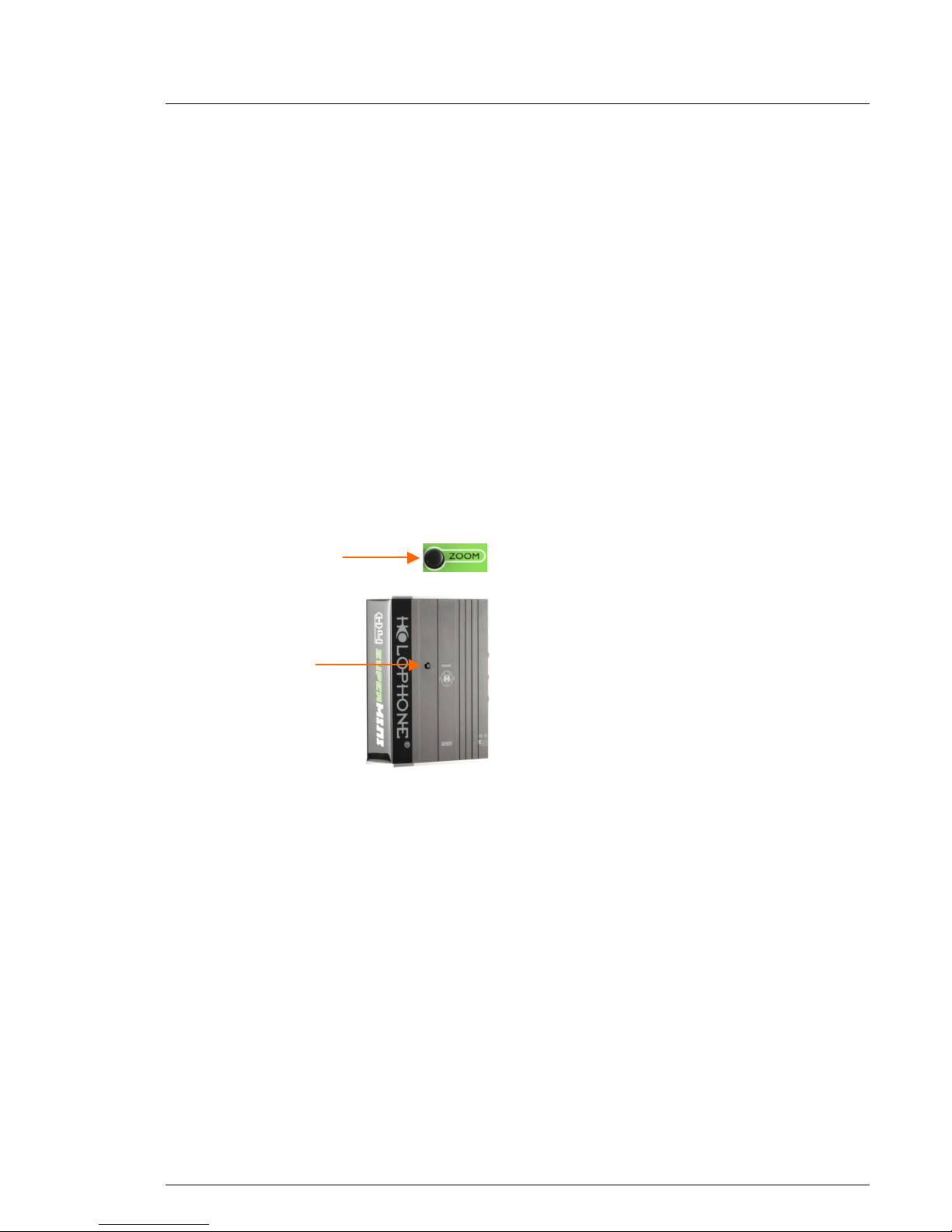
Zoom Button Audio Zoom Button increases the forward
bias of microphone pickup pattern to match
the video zoom for a close-up camera shot.
There are two zoom buttons – one on the
back of the Control Unit and one on the left
side (operator’s viewpoint).
When you press either of the zoom buttons,
the decibel levels of the mic inputs change as
follows:
Center: plus 6 db
R & L: plus 3 db
SR & SL: minus 3 db
-12 db PAD LED LED indicates that the -12 db PAD has been
activated (see below).
External Center LED LED indicates that an external center
microphone is in use.
External Center Switch Hold down this switch for one second to
activate an External Center Microphone that
has been attached to the Control Unit via the
XLR input on the right side (see External
Center Microphone Input above.) The
External Center LED illuminates.
To switch from an External Center
Microphone back to the built-in SuperMINI
center microphone, hold down the switch for
one second. The LED is extinguished.
back zoom button
left side zoom
button
Page 19

H4-SuperMINI User Guide
Phone Level This gain control sets the overall sound level
in the headphones. Used for monitoring the
sound that is being captured.
Important Note: The Phone Level control
does not set the record level. It simply
determines what you hear in the earphones,
not what is being stored. Set the input level
first on the storage device, and listen to the
sound through the device if possible. You can
then adjust the sound slightly using the Mic
Gain dial, if necessary.
-12 db PAD The -12 db PAD is used in situations where
there is an excessive Sound Pressure Level
(SPL), to ensure that the sound is not
distorted. Press and hold the switch for one
second to activate the PAD. The sound levels
are reduced by 12 decibels.
(To turn the PAD off again, hold the switch
for one second.)
Power Button Toggle switch to turn on the battery power for
the H4 SuperMINI.
(Four AA batteries will provide at least 6
hours of continuous use.)
Power Indicator LED indicates that the power is turned on
and the H4 SuperMINI is in use.
Page 20

H4-SuperMINI User Guide
Using the Holophone H4 SuperMINI
The Holophone SuperMINI is remarkably simple to use, because it
accurately reproduces in three dimensions what you would hear at
a particular location in space. In most cases, if you have
experience recording sound with traditional microphones, you can
rely on your ear and your intuition as to the appropriate placement
for a particular event or venue.
The Virtual Surround Sound Headphone capability provides quite
an accurate impression of the sound that is being captured and
enables monitoring in three dimensions.
Setting Levels
First listen to source material through the headphones with the
jack in the H4 SuperMINI Control Unit. Then check the levels on
the two coloured LEDs on the H4. The greens should be lighting
with very occasional reds. If the red LED is lighting consistently,
your gain is too high, and must be reduced using the gain knob.
Next look at the recording device‘s audio display to confirm that
input from the H4 SuperMINI is at the optimal level for the
specific device. Move the headphone monitor to the recording
device to confirm the device’s recording level.
Monitoring from either source is optional once the optimal levels
have been achieved.
The Mic Gain Dial should be used only for minor adjustments.
This is because it is possible to overload the recording device
without being aware of it.
Audio Zoom
Audio zoom increases the forward bias of the surround sound. It
does not “zoom” incrementally, but simply adjusts the levels of the
channels to a second set of values:
Center: plus 6 db
R & L: plus 3 db
SR & SL: minus 3 db
Page 21

H4-SuperMINI User Guide
With this in mind, you should decide whether your video shot is a
close-up that would be complemented by the use of audio zoom,
or whether the standard configuration is appropriate.
External Center Microphone
The H4 SuperMINI provides the ability to replace the center mic
element on the Head with an external microphone, with an
independent gain control. Almost any type of microphone can be
used, depending on the result required. The possibilities are
limitless.
This is most useful for ENG work and other situations a core
channel or dialogue mic is desirable. Both lavalier and shotgun
mics can be used.
The Virtual Surround Sound Headphone capability of the H4
SuperMINI system is very useful in providing an accurate
impression of what is being captured. (Remember, however, that
the recording levels should be set on the recording device first.)
In general, bear in mind that in using an external center
microphone, you will be creating a more center-weighted
(dialogue) surround-sound picture. You will be trying for clear
front sound capture with good dialogue separation, with the H4
SuperMINI’s other channels providing ambient sound.
For current tips and tricks in using the Holophone, visit our
website: http://www.holophone.com/inaction.html
Enjoy!
 Loading...