

Page 1
Read the manual carefully and ensure you have fully understood
its contents before operating this device for the first time.
English
Page 2
Important Safety Instructions
▐ Important Notice
Paragraphs beginning with the symbol indicate important instructions, tips or
conditions for the following settings.
For your own safety and the optimal performance of your TV, ensure to
read the safety instructions before performing any installation.
It is not guarantee operation and performance of peripheral devices made by other
manufacturers. We disclaim any liability or damage that may arise from operation and/
or performance from usage of such other maker’s peripheral devices.
The recording and playback of content on this or any other device may require
permission from the owner of the copyright or other such rights in that content. It is
your responsibility to ensure that your use of this or any other device complies with
applicable copyright legislation in your country. Please refer to that legislation for more
information on the relevant laws and regulations involved or contact the owner of the
rights of the content you wish to record or playback.
The Index/Glossary explains certain terms used in this manual and in the TV menu.
Read these instructions
Follow all instructions
Heed all warnings
Keep these instructions
All rights reserved.
▌Safety Instructions
To ensure safe and correct use of this product, always comply with the following
precautions to avoid dangerous situations and damage to your unit:
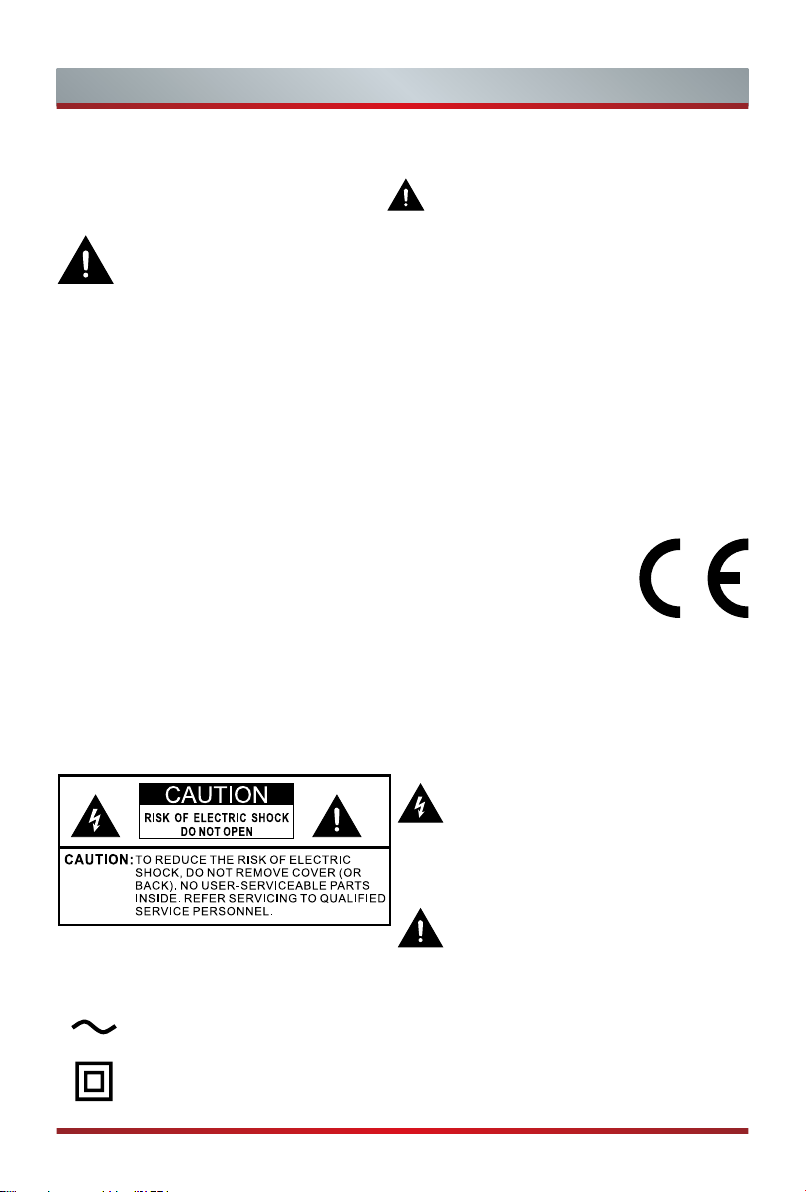
The lightning flash with arrowhead
symbol, within an equilateral triangle is
intended to alert the user to the presence
of uninsulated dangerous voltage within
the product's enclosure that may be of
sufficient magnitude to constitute a risk of
electric shock.
The exclamation point within an equilateral
triangle is intended to alert the user to
the presence of important operating and
maintenance (servicing) instructions in the
literature accompanying the appliance.
AC voltage: This symbol indicates that the rated voltage marked with the
symbol is AC voltage.
Class II product : This symbol indicates that it does not require a safety connection of
protective earthing (ground).
A
Page 3
Important Safety Instructions
The intended use and ambient conditions for this TV
This TV is intended for the rendering of video and audio signals, on a table-top or wall-
mounted, in a home or ofce environment. It must not be used in rooms with a high
level of humidity or dust concentration. The warranty is only valid if used as intended
by the manufacturer.
WARNING
High humidity and dust concentration may lead to current leaks in the device. To
reduce the risk of re or electrical shock:
- Do not expose this unit to rain, moisture, dripping or splashing water, and do
not place objects lled with liquids, such as vases, cups, etc. on or over the
unit.
- Do not touch the TV with wet hands.
- Do not expose to direct air-conditioning and keep candles or other naked
ames away from the TV at all times.
If the TV is moved from a cold environment to a hot environment, leave it switched off
for at least an hour to avoid condensation. If used outside, make sure it is protected
from moisture.
If you notice anything unusual, immediately remove the power plug.
In case of re, use preferably a CO
are not accessible, try to isolate the electrical supply before using a water re extinguisher.
gas or powder re extinguisher. If such extinguishers
2
WARNING
Never place a television set in an unstable location. A television set may fall,
causing serious personal injury or death. Many injuries, particularly to children, can
be avoided by taking simple precautions such as:
- Using cabinets or stands recommended by the manufacturer of the television
set.
- Only using furniture that can safely support the television set.
- Ensuring the television set is not overhanging the edge of the supporting
furniture.
- Not placing the television set on tall furniture (for example, cupboards or
bookcases) without anchoring both the furniture and television set to a suitable
support.
- Not placing the television set on cloth or other materials that may be located
between the television set and supporting furniture.
- Educating children about the dangers of climbing on furniture to reach the
television set or its controls.
If your existing television set is being retained and relocated, the same considerations
as above should be applied.
B
Page 4

Important Safety Instructions
Moving/Transportation
Before moving this TV, disconnect all
cables and move in the vertical position
only. Grasp the device on the upper and
lower edges of the frame.
- Do not press or put stress on the front
panel of the TV. It may take two or
more people to carry larger TVs.
If you have to briey lay down the TV,
place the unit with its entire front surface
lying at on soft material.
The LED screen is made of glass and can
break if is not handled properly. Always
wear rubber gloves to carry the unit. If
the LED screen is damaged, liquid crystal
might leak out. In case of skin contact,
immediately rinse thoroughly with water.
Power Supply
Incorrect voltages can damage the TV.
Only connect this unit to a power supply
with the correct voltage and frequency
noted on the type plate, using the
supplied power cable.
The power plug must be easily accessible
so that the device can be disconnected at
all time. The unit is live, even if in standby
mode, as long as the unit is connected to
a power outlet.
It is recommended that this unit is placed
on a dedicated circuit.
- Do not overload the power outlets by
connect too many appliances to the
same outlet. Overloaded wall outlets,
extension cords, etc. are dangerous
and can result in electric shock and
re.
After power off, don't turn it on again in
5 seconds. Frequent switching power
supply in a short period of time can cause
abnormal TV.
Power plug and power cable
- Do not touch the power plug with wet
hands.
- Do not place heavy objects on the
power cable. Route the cable so that it
is not kinked or laid over sharp edges,
walked on or exposed to chemicals. A
power cable with damaged insulation
can cause electric shock and re.
- Pull the power plug, NOT on the cable
when disconnecting. The cable can
become damaged and cause a short
circuit if pulled on.
- Do not place the power cable near a
high temperature object.
- Do not move the TV with the power
cable plugged into a socket.
- Do not use a damaged or loose power
cable, or a damaged socket outlet.
- Do not use any power cords other
than the one supplied with this unit.
Set-up
Check that the location is suitable to bear
the load of the TV. Place on a level, sturdy
and horizontal base. Ensure that the unit
does not hang over the edge of the base
when placed in or on furniture. If placed
on a cart, use caution when moving to
avoid the unit from tipping over.
- Place the unit in a normal upright
horizontal position. It must never
be operated vertically, lying at or
hanging overhead from the ceiling.
- Place the unit where it is not exposed to
direct sunlight or other sources of heat.
When mounting the TV on a wall, follow
the instructions supplied with the wallmount, make sure not to install the TV by
hanging the power and signal cables on
the back of the TV.
C
Page 5
10cm
10cm
Important Safety Instructions
Air ventilation and high
temperatures
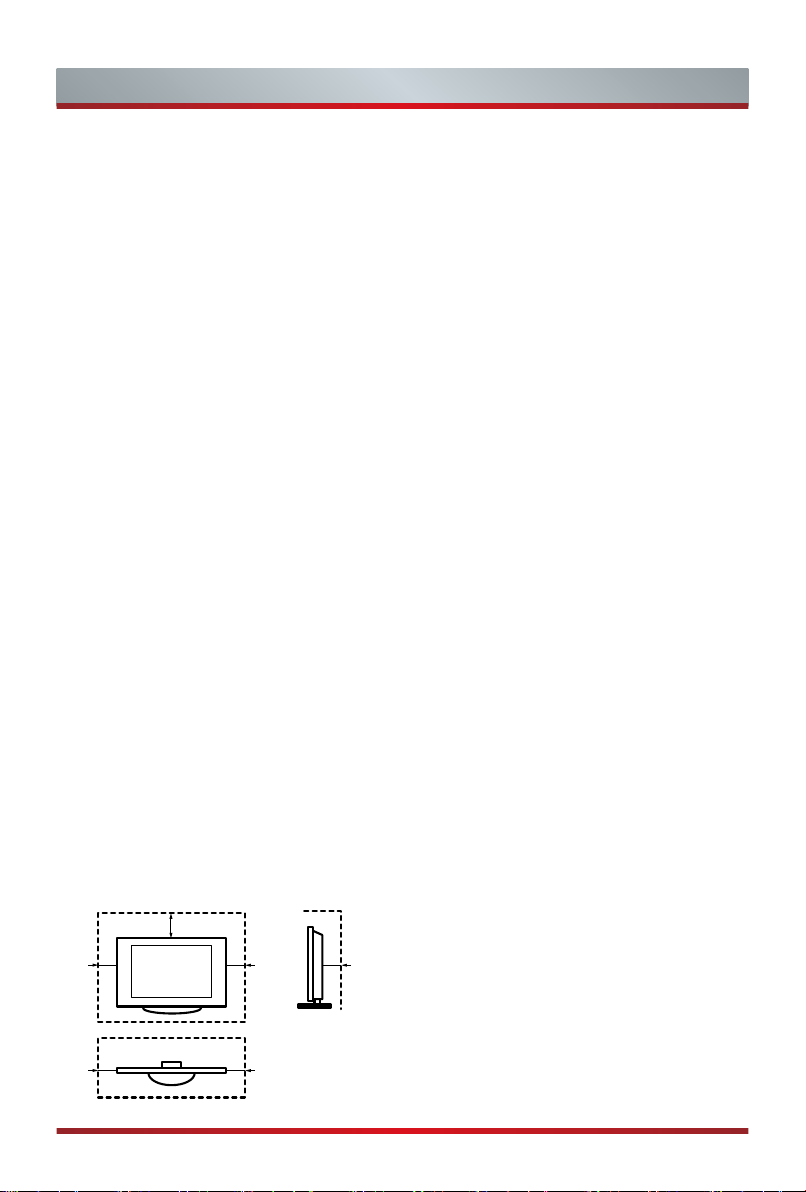
Install your TV only where there is proper
ventilation, and ensure that there is at least
10 cm free space on the sides and 20 cm
above the unit for air circulation. Excessive
heat and obstruction of ventilation could
lead to re or early failure of some electric
components.
- Do not block any ventilation openings
with newspapers, tablecloths, curtains,
etc.
- Do not dry clothing etc. on top of the unit.
- Take care not to touch the ventilation
openings since they may become hot.
- Do not insert foreign objects into the TV
through the vents.
The Stand
- Do not use any stand other than the one
supplied with this unit.
- Do not modify or use the stand if it
becomes warped of physically damaged.
- During setup, make sure that all the
screws are securely tightened.
- Ensure that the TV does not suffer any
impact during the attachment of the
stand.
- Ensure that children do not climb onto
the stand.
- Attach or remove the stand with at least
two people.
20cm
10cm
Prevent small items from getting into the
interior of the device through the ventilation
slots. Such objects may cause short circuits,
which may cause re.
If something should get inside the unit,
immediately unplug the power plug of the
device and contact service support.
The LED screen
Despite thorough care when manufacturing
this display, it cannot be 100% guaranteed
that no sub-pixel defects will occur due
to technical reasons. These cannot be
considered as a device defect in terms
of the guarantee. They will not affect the
performance and reliability of the TV.
To prevent “image burn”, avoid displaying
still images for long periods of time, there
is a possibility that a copy of the image
may remain. If the aspect ratio is set to 4:3
for a long period of time, image burn may
occur on the black areas. Image burn is not
covered by the warranty.
- Do not apply strong force or impact on
the display panel.
Avoid touching the LED screen or touching
it for long periods of time. Doing so may
produce some temporary distortion effects
on the screen.
Radio waves
- Do not use the TV in any medical
institutions or locations with medical
equipment. Radio waves may interfere
with medical equipment and cause
malfunction.
- Do not use the TV near any automatic
control equipment such as automatic
doors or re alarms. Radio waves
may interfere with automatic control
equipment and cause malfunction.
D
Page 6

Important Safety Instructions
If you have a cardiac pacemaker, keep a
distance of at least 22 cm from the TV. Radio
waves may interfere with the operation of a
pacemaker.
Built-in wireless LAN
- Do not connect to wireless networks
that you do not have the usage rights
for. Data transmitted and received over
radio waves may be intercepted and
monitored.
The built-in wireless LAN uses 2.4 GHz
and 5 GHz frequency bands. To avoid
malfunctions or slow response caused by
radio wave interference, keep the TV away
from devices such as other wireless LAN
devices, microwaves, mobile phones, and
other devices that use 2.4 GHz and 5 GHz
signals.
Warning about off-gassing
New furniture, carpet, paint, building
materials and electronics can release
chemicals into the air through evaporation.
After you set your TV up and turn it on for
the rst time, you may notice a slight smell
within a couple of hours. This is because
some components of TV are heating up
for the rst time. The materials that we use
fully meet the environmental requirements
and regulations. Your TV is working just
ne and the fumes from the off-gassing
will diminish eventually.
Supervision
- Do not let children play unsupervised
close to the TV. It could tip over, be
pushed off or pulled down from the
stand surface and injure someone.
- Do not allow a switched-on TV to run
unattended.
Volume
Loud music and noises can lead to
irreversible damage to your ears. Avoid
extreme volume, especially over long
periods and when using headphones.
If you hear a drumming noise in your ears,
turn down the volume or temporarily stop
using headphones.
Thunder Storms
Pull out the power plug and all connected
antenna cables from the TV during a
thunderstorm. Overvoltage caused by
lightning strikes can damage the TV via
the antenna system, as well as the wall
socket.
Long periods of absence
As long as the power plug is connected to
a live socket outlet, the TV will consume
power even in standby mode. The power
plug and all connected antenna cables
should be disconnected out during long
periods of absence.
E
Page 7

Important Safety Instructions
Cleaning and care
CAUTION:
Unplug the power cord prior to cleaning
the TV.
Clean the TV, the screen, and the remote
control with a soft, moist, clean and
color-natural cloth only. Do not use any
chemicals.
- Do not subject the surfaces to insect
repellent, solvent, thinner or other
volatile substances. This may degrade
the surface quality.
- Do not spray water or other liquids
directly on the TV. Liquid inside the TV
could lead to product failure.
- The surface of the display panel is
treated and may be easily damaged.
Take care not to scratch it with
ngernails or other hard objects.
- Also wipe the power plug with a dry
cloth at regular intervals.
Service/Repair
Never remove the cover/back of the TV;
there are no user serviceable parts inside.
Refer all service to qualied service
personnel.
Packaging
Keep the anti-moisture materials and
plastic bags out of reach of children.
Plastic bags can cause suffocation and
the anti-moisture material is harmful if
swallowed. If swallowed by mistake, force
the patient to vomit and visit the nearest
hospital.
Modication
Do not attempt to modify this product
in any way. Unauthorized modication
could void the warranty of this unit, cause
electric shock and res.
Remote Control batteries
- Incorrect installation may cause battery
leakage, corrosion and explosion.
- Replace only with the same or
equivalent type.
- Do not mix old and new batteries.
- Do not mix different battery types.
- Do no use rechargeable batteries.
- Do not burn or break up batteries.
- Be sure to dispose of batteries
correctly.
- Do not expose batteries to excessive
heat such as sunshine, re or the like.
Outdoor Antenna Grounding
If an outdoor antenna used, be sure the
antenna system is protected against
voltage surges and built-up static charges.
Disposal
Refer to the recycling section of this manual.
F
Page 8
Contents
Figures and illustrations in this manual are provided for reference only and
may differ from actual product appearance.
Parts of the software function changes with the system upgrade.
Contents
Accessories List..............................................................................................................1
Installing the Stand or Wall mount bracket .....................................................................2
TV Front..........................................................................................................................4
TV Rear ..........................................................................................................................5
Making Connections .......................................................................................................7
Remote Control ............................................................................................................10
Turning the TV on for the First Time .............................................................................12
Specifications ...............................................................................................................13
Other Information..........................................................................................................14
Accessories List
The following accessories are included with TV:
User Manual × 1 Warranty Card × 1 Base Stand × 2
Screw × 4 Remote Control × 1 AAA Battery × 2
RCA jack to AV Cable × 1
NOTE
The accessories may be different from the list above due to different models, countries /
regions, please refer to the actual accessory bag.
SIMPLIFIED EU DECLARATION OF CONFORMITY
Hereby, Hisense Czech s.r.o declares that the radio equipment type [32A5600F/32A5
620F/32A5640F/32A5660F/32AE5500F/32AE5510F/32AE5530F/32AE5550F/32A560
0FTUK/32A5620FTUK/32AE5500FTUK/32AE5510FTUK/40A5600F/40A5620F/40A56
40F/40A5660F/40AE5500F/40AE5510F/40AE5530F/40AE5550F/40A5600FTUK/40A
5620FTUK/40AE5500FTUK/40AE5510FTUK] is in compliance with Directive 2014/53/
EU. The full text of the EU declaration of conformity is available at the following internet
address: http://global.hisense.com/downloads.
1
Page 9
Installing the Stand or Wall mount bracket
Installing the Stand
CAUTION
Be sure to disconnect the A/C power cord before installing a stand or Wall-Mount
brackets.
The screen is very fragile, and must be protected at all times when installing the base
stand. Be sure that no hard or sharp object, or anything that could scratch or damage
the screen, comes into contact with it. DO NOT exert pressure on the front of the TV
at any time because the screen could crack.
After the installation is complete, make sure the TV is steady on a table or firmly
attached to a wall mount, before removing all protective film, if any.
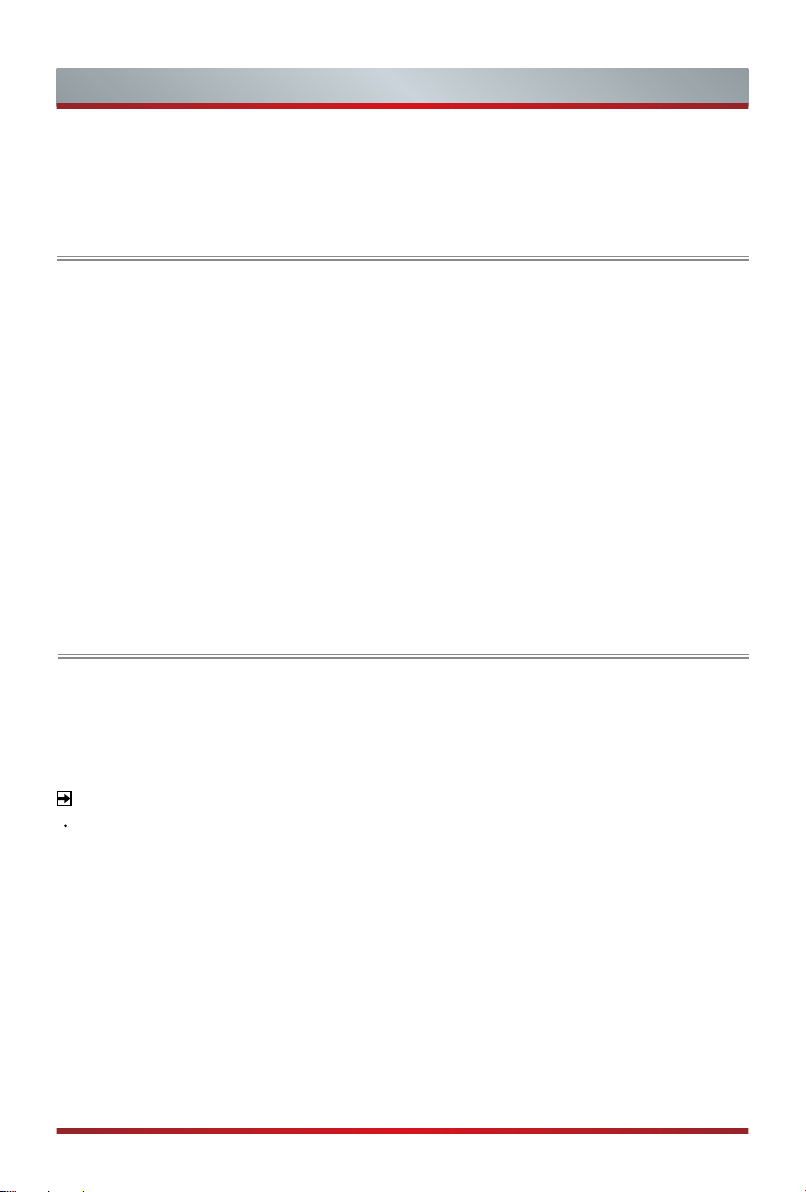
Follow the illustrations and textual instructions below to complete the installation steps:
1. Carefully place your TV face-down on a soft, flat surface to prevent damage to the
TV or scratching to the screen.
2. Remove the Base Stand from the accessory bag and then insert the stand into the
bottom slots of the TV.
3. Secure the Base Stand to the TV with the screws in accessory tightly.
Base Stand
Screws:
(ST4×14F) × 4(32")
(ST4×20F) × 4(40")
2
Page 10
Installing the Stand or Wall mount bracket
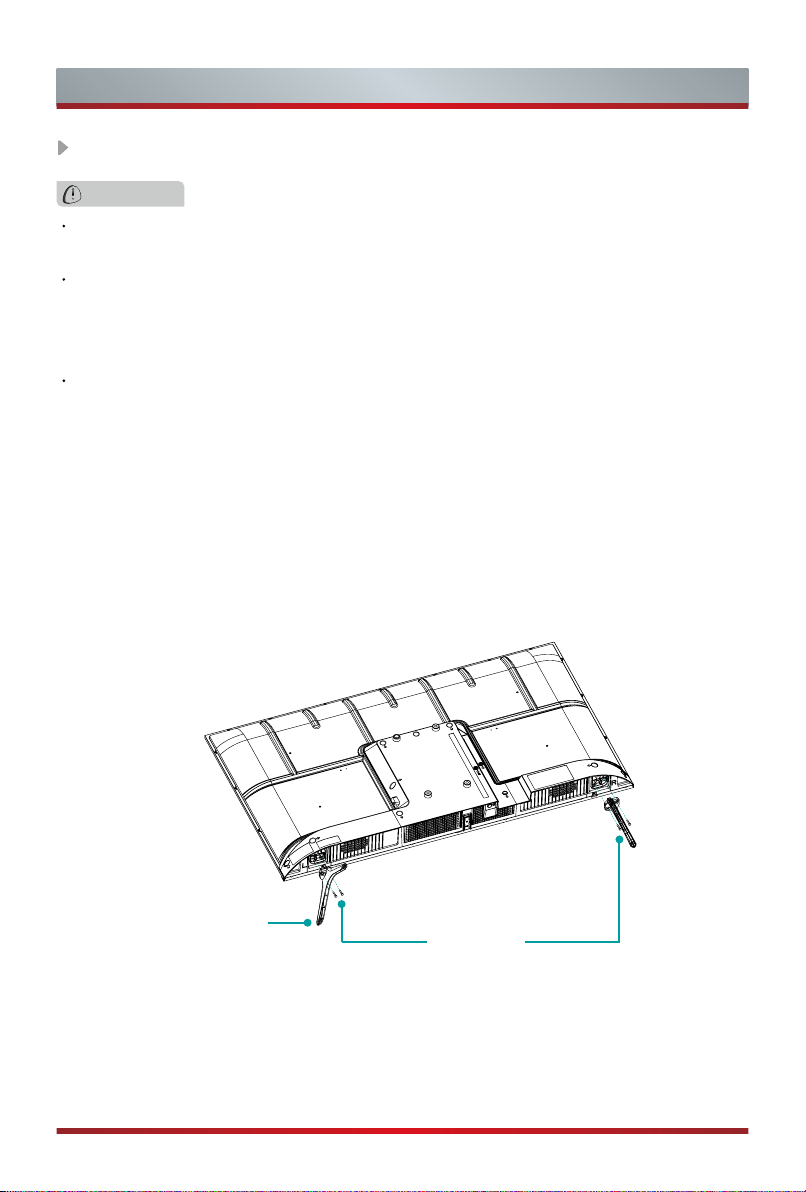
Installing the wall mount bracket
Wall mount hole pattern (mm) 100 × 200
Wall mount screw size (mm) M6
9.5 -11.5 mm
Wall Mount Bracket
Wall Mount Screw
Rear cover of the TV
Follow instructions provided with the wall mount bracket.
NOTE
• The diameter and length of the screws differ depending on the wall mount bracket model.
• Wall mount bracket is optional, your device may not have wall mount bracket, please refer
to the actual accessories.
Wall Mount Spacer
3
Page 11
TV Front
TV Front
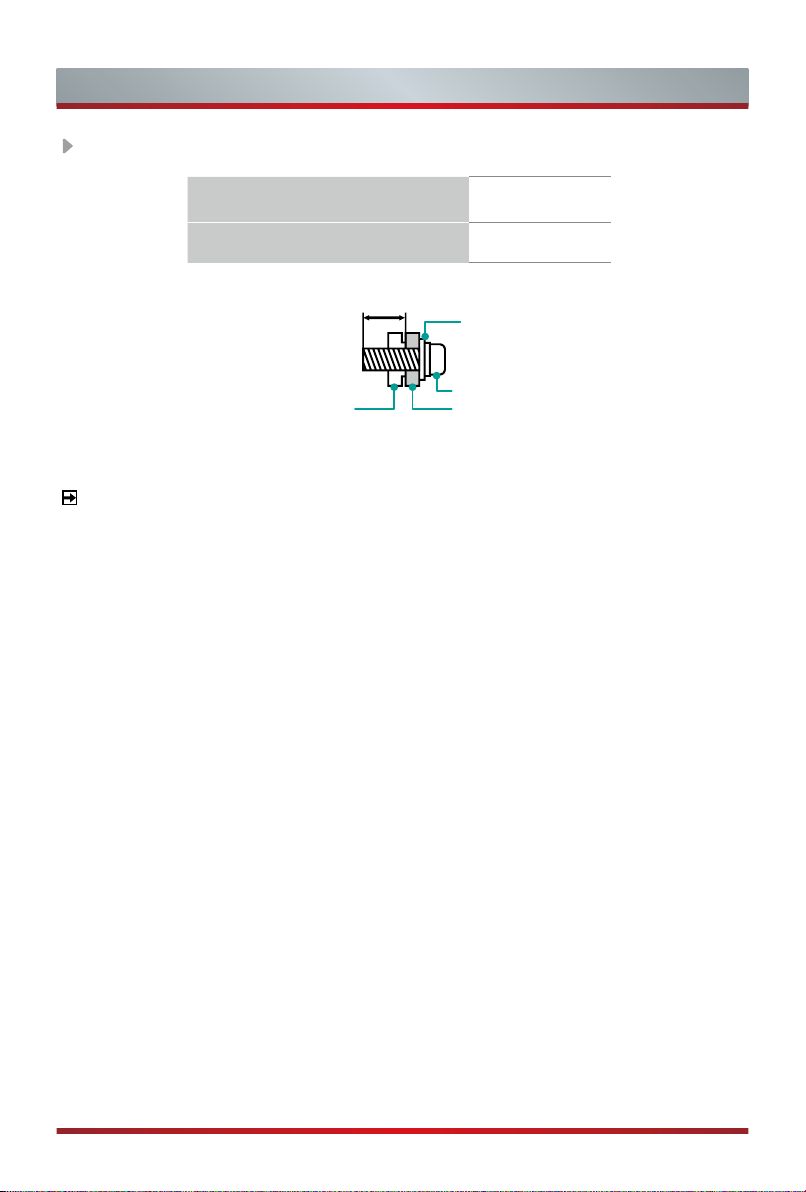
Standby / Source
Remote sensor / Power indicator
Item Description
Receive remote signals from the remote control.
Remote sensor
Power indicator The light is red in standby mode.
Standby / Source
Do not put anything near the sensor, as its function may be
affected.
Press the single button when in standby mode, TV will be turned
on. Press the single button to call up the menu, when the focus
is on "Power Off", wait for 3 seconds, then the TV will go into
standby mode automatically.
/ Press the single button to call up the menu and then select
among the different input signal sources.
NOTES
The Picture is Only for Reference.
Powering on the TV requires several seconds to load programs. Do not rapidly
turn the TV off as it may cause the TV work abnormally.
4
Page 12
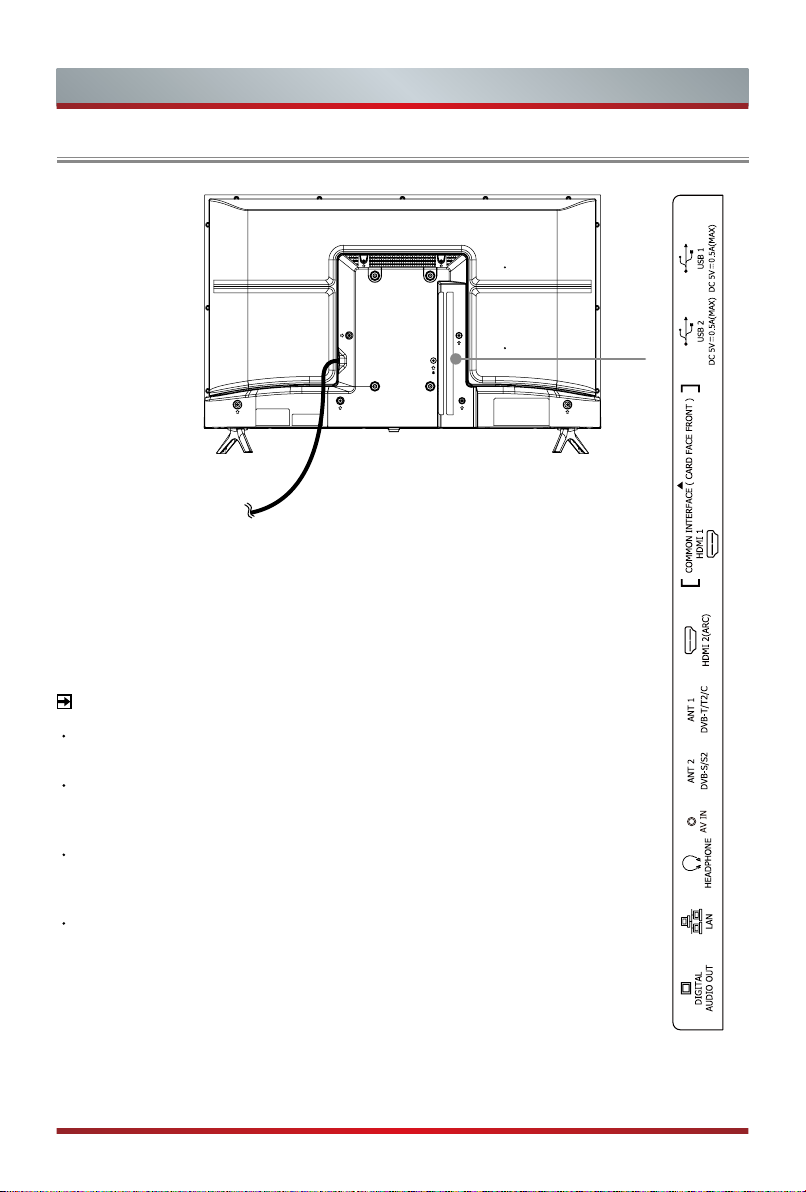
TV Rear
32"
TV Rear
Power cord
NOTES
ANT2 Jack supports power supply for satellite antenna (13/18V, 0.5A
max.)
Check the jacks for position and type before making any connections.
Loose connections can result in image or color problems. Make sure
that all connections are tight and secure.
Not all A/V devices have the ability to connect to a TV, please refer to
the user’s manual of your A/V device for compatibility and connections
procedure.
Before connecting external equipment, remove the mains plug from the
wall socket. Otherwise, it may cause electric shock.
5
Page 13
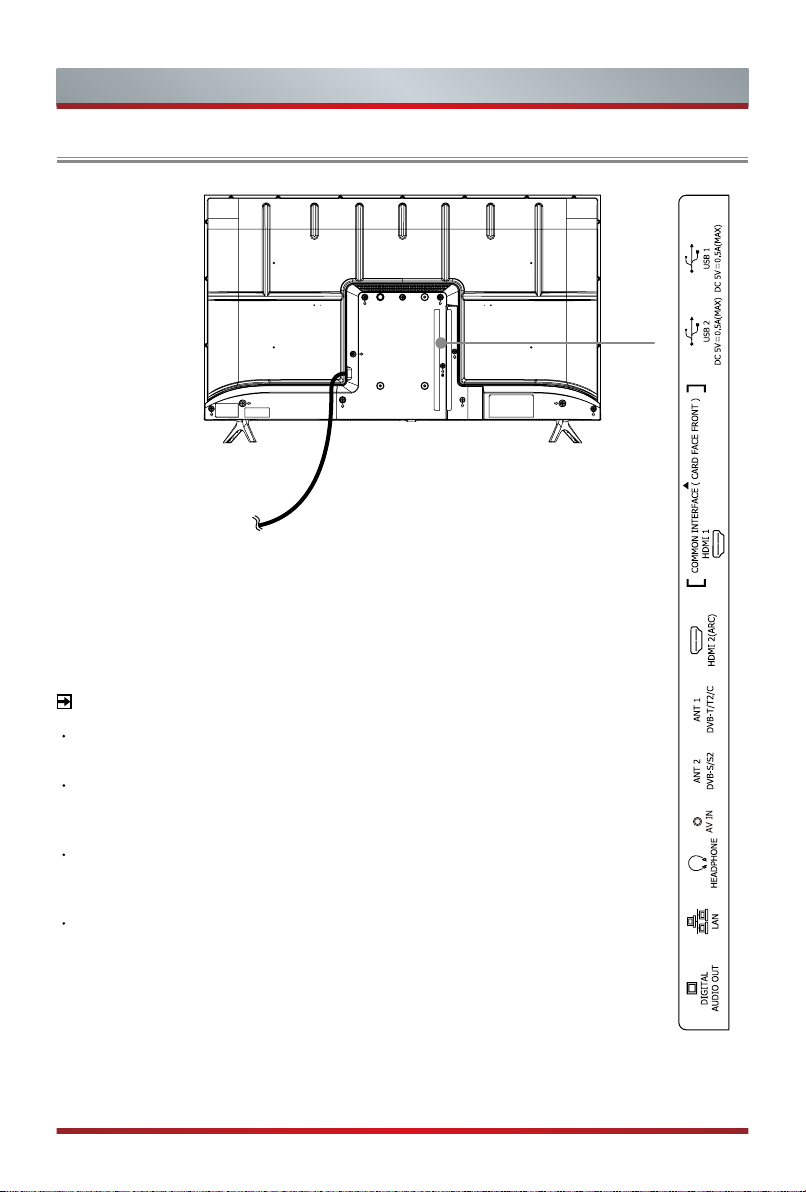
TV Rear
40"
TV Rear
Power cord
NOTES
ANT2 Jack supports power supply for satellite antenna (13/18V, 0.5A
max.)
Check the jacks for position and type before making any connections.
Loose connections can result in image or color problems. Make sure
that all connections are tight and secure.
Not all A/V devices have the ability to connect to a TV, please refer to
the user’s manual of your A/V device for compatibility and connections
procedure.
Before connecting external equipment, remove the mains plug from the
wall socket. Otherwise, it may cause electric shock.
6
Page 14
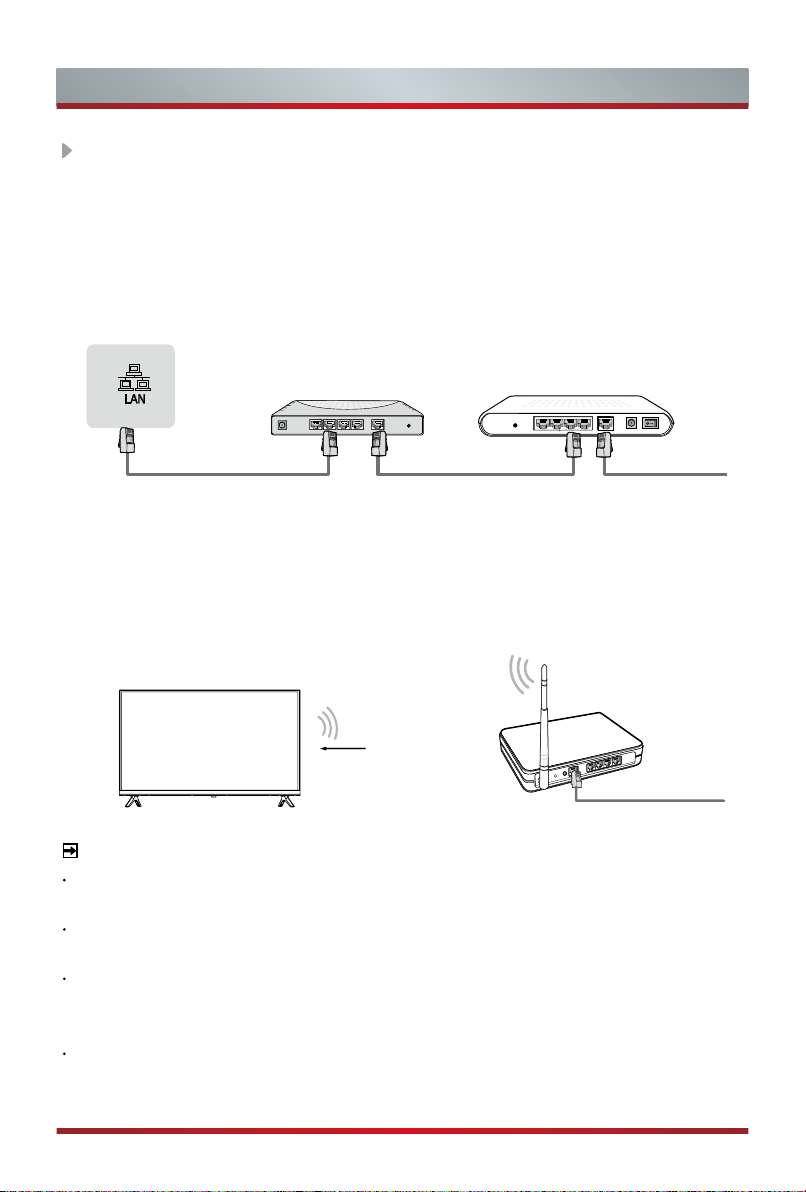
Making Connections
LAN (
Wired setup
)
Connect your TV to your network by connecting the LAN port on the back of your
TV to an external modem or router using a LAN (Ethernet/Cat 5) cable. See the
illustration below.
·
We recommend to use a modem or router that supports Dynamic Host
Configuration Protocol (DHCP). Modems and routers that support DHCP
automatically provide the IP address, subnet mask, gateway, and DNS, so you
don’t have to enter them manually. Most home networks already have DHCP.
TV JACK
Wireless setup
IP Sharer (Router)
(with DHCP server)
External Modem
(ADSL / VDSL / Cable TV)
Modem CableLAN CableLAN Cable
Connect your TV to your network wirelessly, you need a wireless router or modem.
See the illustration below.
·
The built-in Wireless LAN Adapter supports the IEEE 802.11a/b/g/n/ac
communication protocols. We recommend using IEEE 802.11n router. Low
transfer rates for b/g may have the influence on the quality of streamed videos
and other media.
Wireless router with DHCP
Wireless LAN Adapter
built-in TV set
LAN Cable
NOTES
You must use the built-in Wireless LAN Adapter to use a wireless network because
the set doesn’t support external USB network adapter.
If the wireless router supports DHCP, your TV can connect more easily to the wireless
network.
If you apply a security system other than the systems listed below, it will not work with
the TV.
Security system:WPA,WEP,WPA2.
In order to guarantee smooth network, the distance between router and TV should be
less than 10 meters.
7
Page 15
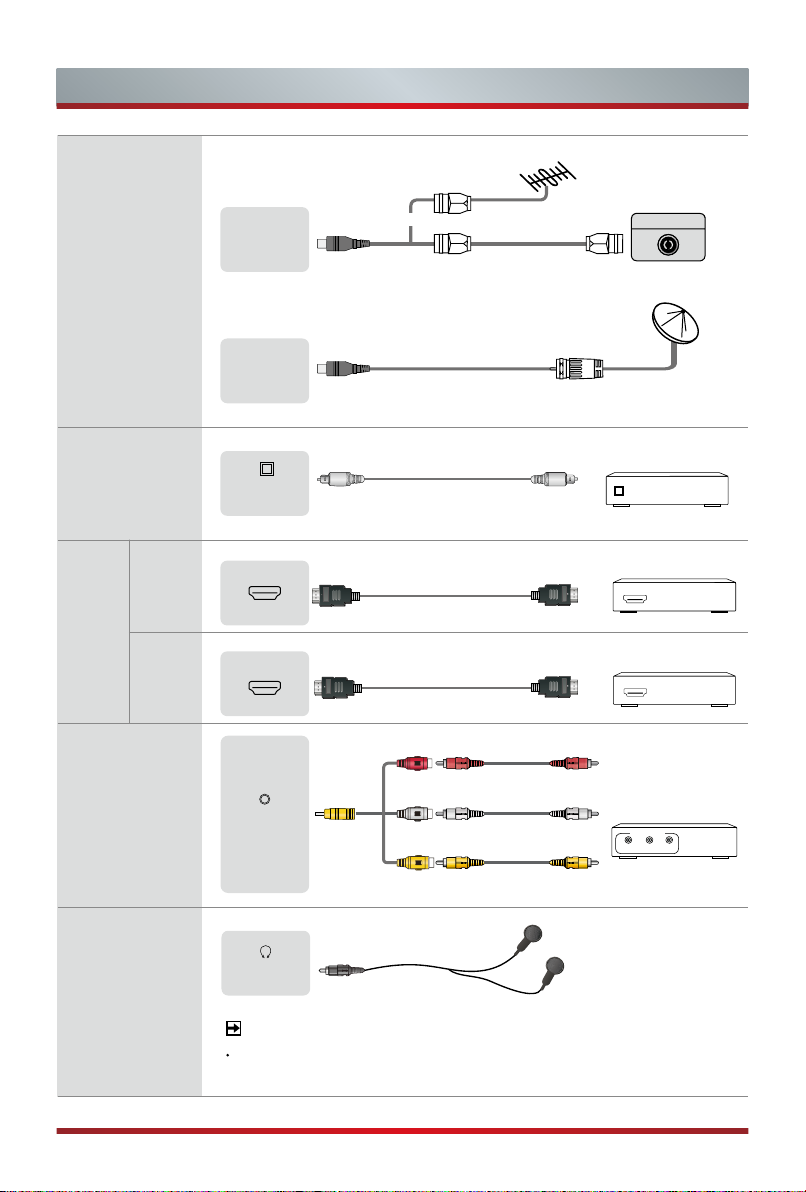
ANT
Making Connections
ANT 1
DVB-T/T2/C
ANT 2
DVB-S/S2
or
(not included)
Antenna Cable (75Ω)
(not included)
Outdoor
Antenna
ANT OUT
VHF/UHF Antenna
Satellite antenna
Cable
DIGITAL
AUDIO OUT
HDMI
(ARC)
HDMI
HDMI
AV IN
HEADPHONE
Audio Amplier/Speaker
DIGITAL
AUDIO OUT
HDMI
ARC
DIGITAL AUDIO cable (not included)
Audio Amplier/Speaker
HDMI
HDMI cable (not included)
DVD/Blu-Ray/AV receiver/
HDMI
Set-top Box
HDMI
HDMI cable (not included)
AV IN
Red(R)
(not included)
White(L)
(not included)
Yellow(Video)
VCR/DVD Player/
Recorder/Set-top box/
Satellite Receiver/
Video Camera
A/V OUT
Video
R
L
(not included)
HEADPHONE
NOTE
Headphone (not included)
Excessive sound pressure from earphones and headphones
can cause hearing loss.
8
Page 16
Making Connections
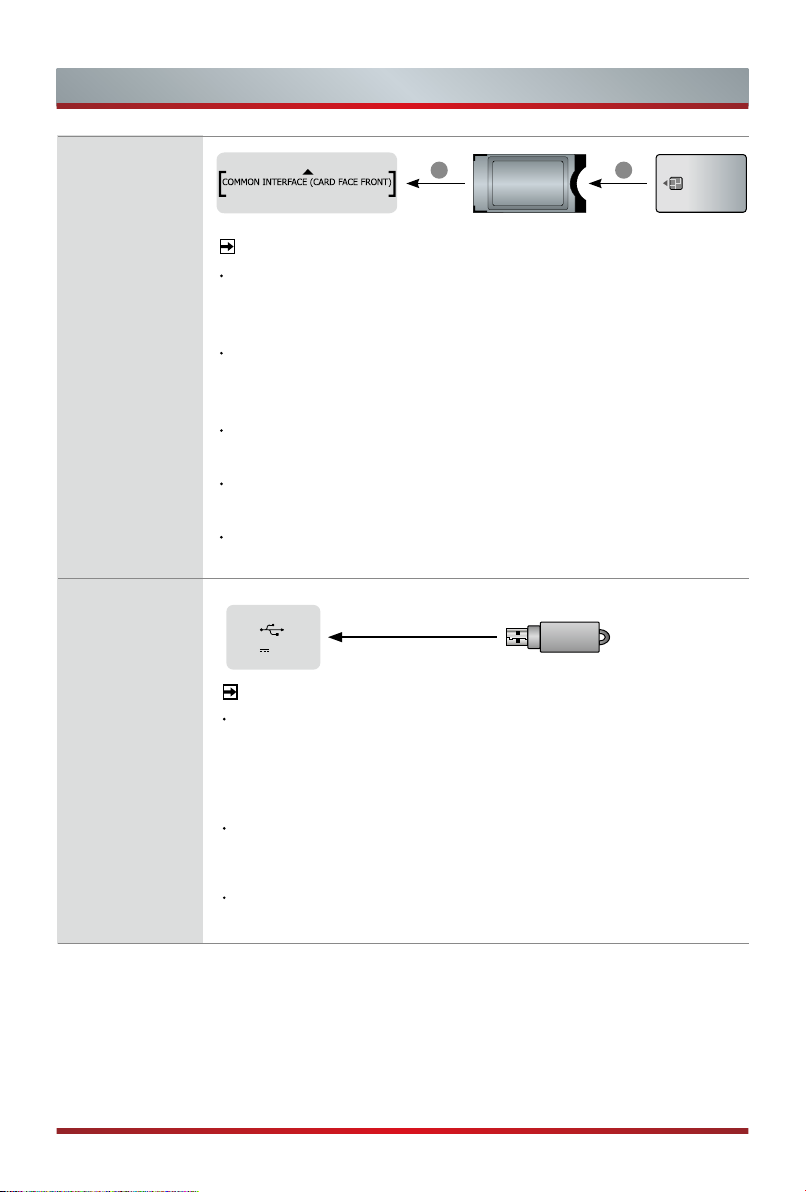
COMMON
INTERFACE
USB
CAM CARD
1 2
SMART CARD
NOTES
Before you insert/remove the CI+ module, ensure that the TV
is switched off. Then insert the CI card into the CI+ module in
accordance with the Service Provider’s instructions.
Do not repeatedly insert or remove the Common Access
Module as this may damage the interface and cause a
malfunction.
You must obtain a CI+ module and card from the service
provider of the channels you want to watch.
Insert the CI+ module with the SmartCard in the direction
marked on the module and SmartCard.
CI+ is not supported in some countries and regions; check with
your authorized dealer.
USB
DC 5V 0.5A(MAX)
NOTES
When connecting a hard disk or a USB hub, always connect
the mains adapter of the connected device to the power
supply. Exceeding a total current consumption may result in
damage. The USB1.1 and USB2.0 devices maximum current
consumption are 500mA.
For individual non-standard high-capacity mobile hard disk, if
its impulse current is greater than or equal 1A, it may cause
TV-rebooting or self-locking. So the TV does not support it.
The USB port supports a voltage of 5V.
9
Page 17
Remote Control
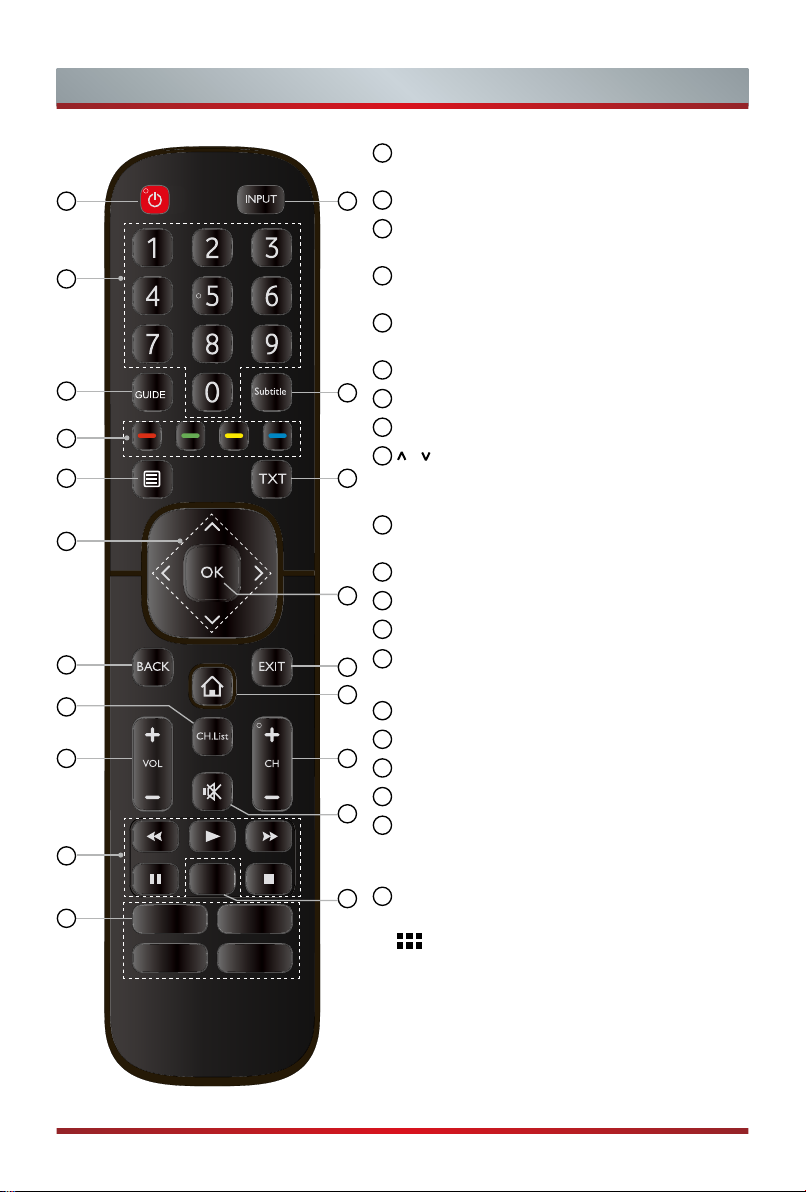
1
POWER: Switch the TV on or into standby
mode
1
3
4
6
7
9
11
14
15
18
20
2
2
INPUT: Select input sources
3
Number button: Direct channel selection or
numbers input
4
GUIDE: Display the Electronic Program Guide
(DTV mode)
5
Subtitle: Activate or deactivate the subtitle
mode
6
Special function buttons
5
7
Display the Quick setup menu
8
TXT: Turn on/off the teletext function
9
/ / < / >: Allows you to navigate the OSD
8
menus and adjust the system settings to
your preference
10
OK: Confirm the selection in the OSD
menus
11
BACK: Return to previous menu
10
12
EXIT: Exit the menu
13
HOME: Enter the Smart
14
CH.List: Display the Channel List on the
12
screen
13
15
VOL + /-: Adjust the volume
16
CH + /-: Switch channel
16
17
MUTE: Mute or restore the TV sound
18
Media content control function buttons
17
19
Quick access to the app
Audio Only: When you select this option,
the screen will not display the picture
20
Quick access buttons to apps
19
Media: Enter the media mode
All Apps
:
NOTE: The included remote control will vary depending
on model, country.
Check information according to the
actual remote control in the accessory bag.
10
Page 18
Remote Control
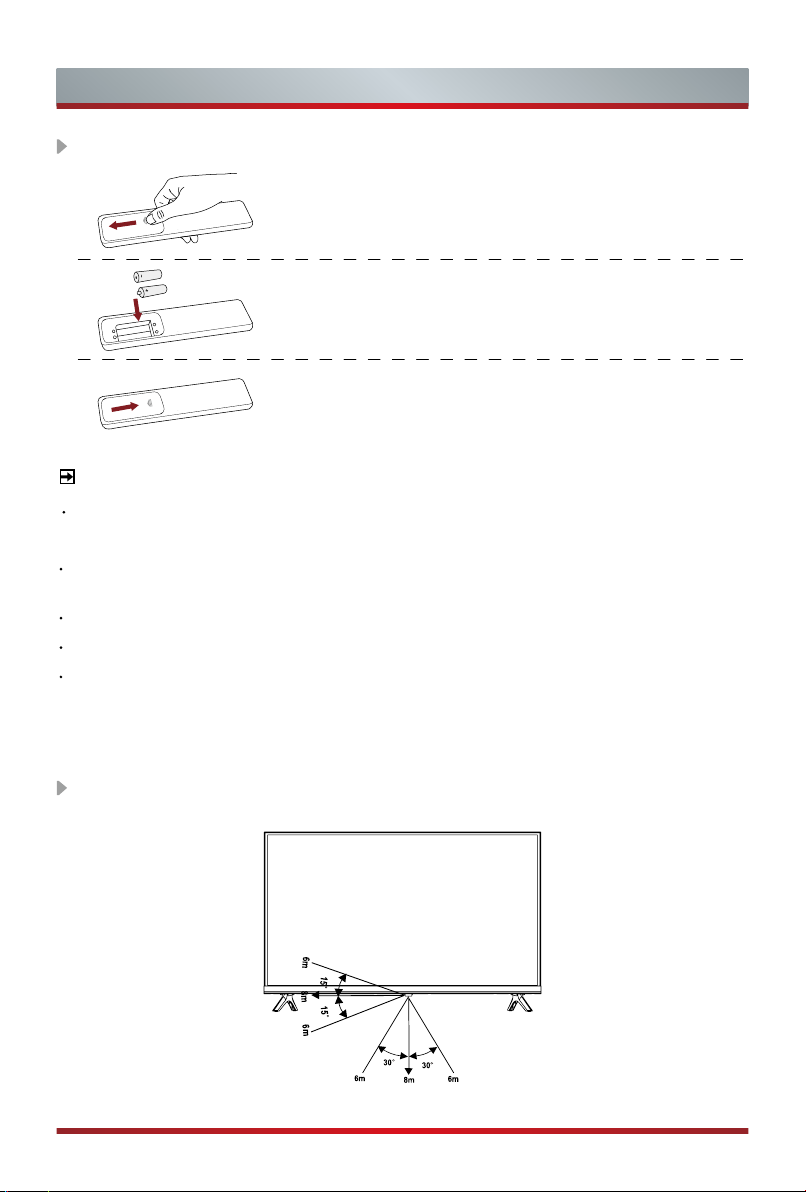
Installing Batteries in the Remote Control
1. Slide the back cover to open the battery compartment
of the remote control.
2. Insert two AAA size batteries. Make sure to match
the (+) and ( - ) ends of the batteries with the (+)
and ( - ) ends indicated in the battery compartment.
3. Close the battery compartment with the cover.
NOTES
Product image is only for reference, actual product may vary in appearance.
Handling the Batteries
Incorrect use of batteries may cause corrosion or battery leakage, which could
cause fire, personal injury or damage to property.
Only use the battery type indicated in this manual.
Do not mix old and new batteries or different types of batteries.
Do not dispose of used batteries as domestic waste. Dispose of them in
accordance with local regulations.
Remote Control Operation Range
11
Page 19
Turning the TV on for the First Time
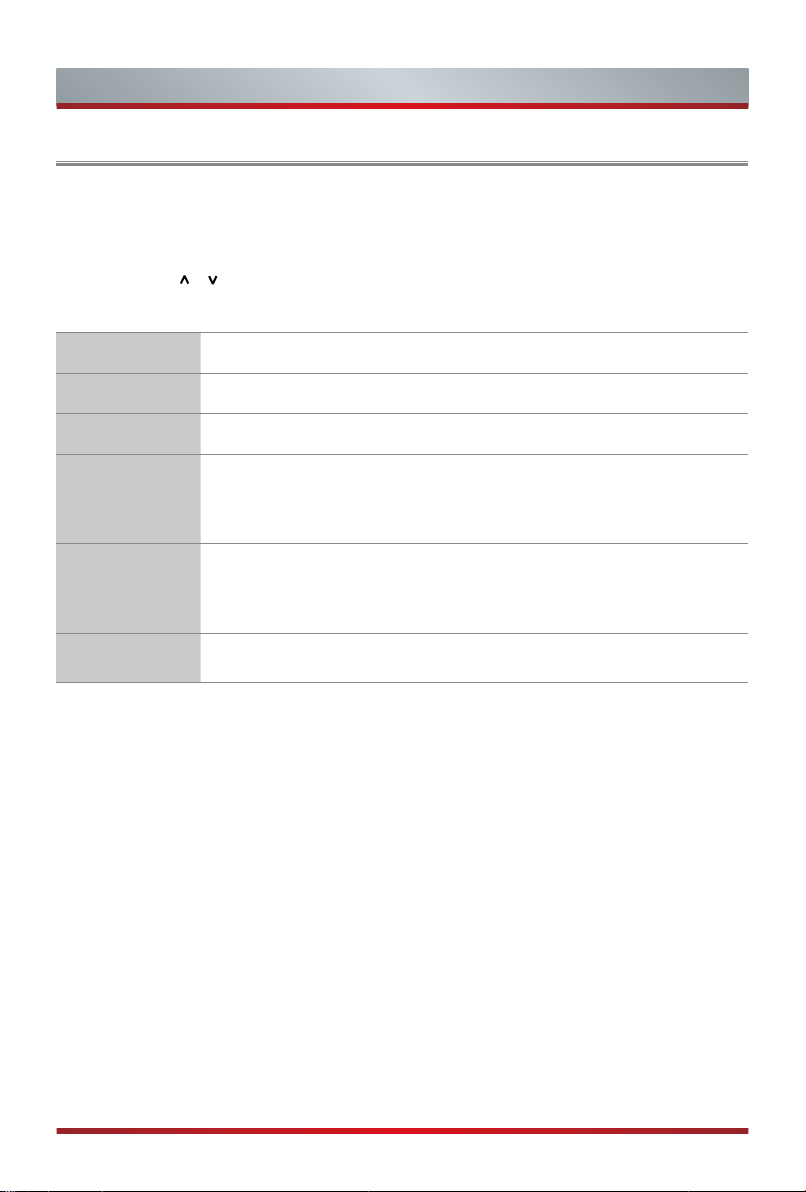
Turning the TV on for the First Time
1. Connect the mains cable to the mains socket after you have completed all the
connections.
2. The first time you turn the TV on, it will go straight into the Installation Guide.
3. Press the [
Press the [OK] button to confirm.
Language Select your desired language to be displayed on the menu.
Location Select the location where you will operate the TV.
Time Zone Select the local time zone according to your region.
Disclaimer
Network
Connection
Success
/ / < / >] buttons to navigate the menu and change the settings.
Your use of this device and all related services is governed by the
End User License Agreement and relative policies. Please review
these documents carefully and make sure that you have read
and agree to the provisions of the End User License Agreement.
If your TV does not automatically detect an Ethernet connection,
then use a wireless network, select your network from the list that
displays, also you can add a hidden network. When you’re done,
move to the next screen.
Congratulations, you have finished the Wizard setup.
Press "Finish" to use your TV, for retailers press "Store Mode".
12
Page 20
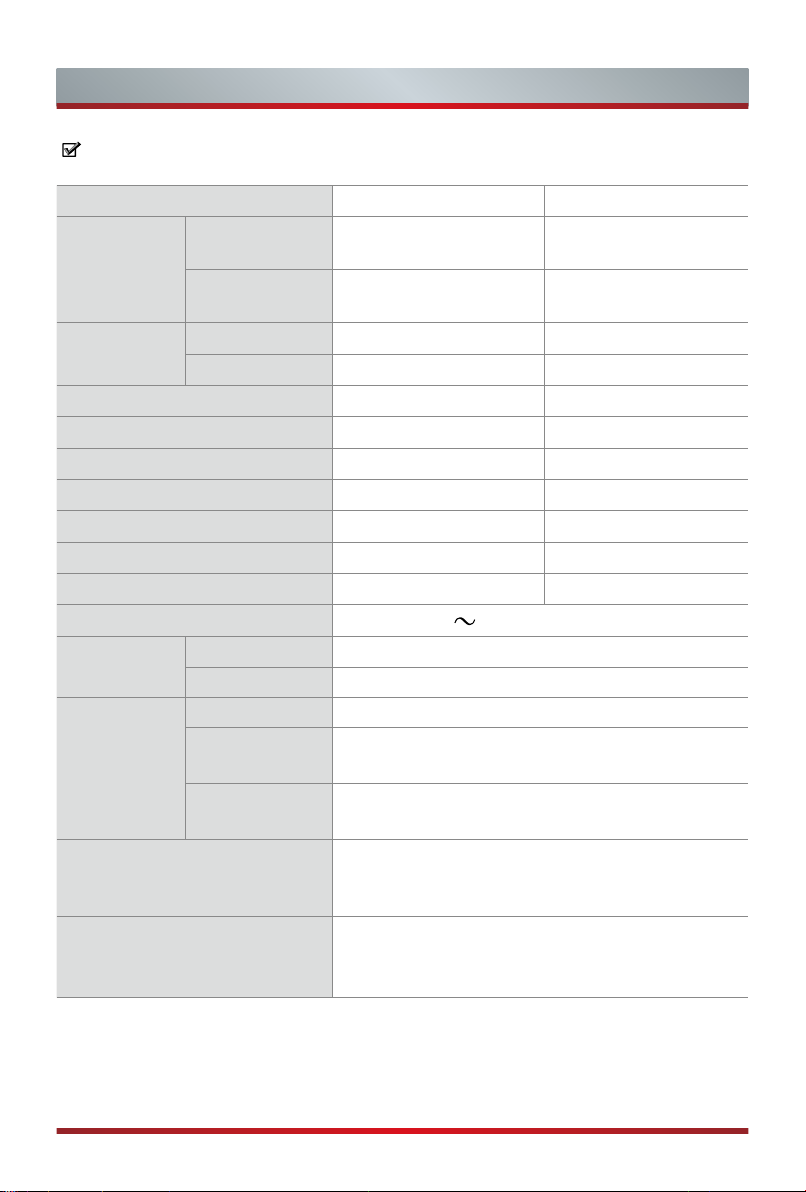
Specifications
Features, appearance and specifications are subject to change without notice.
Item
Dimension
(W × H × D)
Weight
Active Screen Size (Diagonal) 80 cm 100 cm
Screen resolution 1366 × 768 1920 × 1080
Operating mode power density 0.02 Watts/cm² 0.017 Watts/cm²
Power consumption when turned off
Power consumption in standby mode
Audio power 6W + 6W 7W + 7W
Power consumption 55W 70W
Power supply AC 100-240V
Receiving
systems
Wireless
LAN Module
specifications
Environmental conditions
Without Stand
With Stand
Without Stand 7.9 lbs (3.6 kg) 11.9 lbs (5.4 kg)
With Stand 8.2 lbs (3.7 kg) 12.1 lbs (5.5 kg)
Analog PAL-D/K, B/G, I, SECAM-D/K, B/G
Digital DVB-T/T2, DVB-C, DVB-S/S2
Model WF-M603-USB1
Frequency
Range
Output Power
(Max.)
32" 40"
28.2 × 16.9 × 3.4 inches
(717× 428 × 86 mm)
28.2 × 18.5 × 6.3 inches
(717 × 469 × 160 mm)
< 0.5 W < 0.5 W
0.5 W 0.5 W
50/60Hz
2.4~2.4835GHz
2.4~2.4835GHz 17dBm
Temperature: 41°F - 95°F (5°C - 35°C)
Humidity: 20% - 80% RH
Atmospheric pressure: 86 kPa - 106 kPa
35.2 × 20.2 × 3.4 inches
(893 × 513 × 86 mm)
35.2 × 22.0 × 7.2 inches
(893 × 559 × 182 mm)
HDMI Input
RGB / 60 Hz (640×480, 800×600, 1024×768)
YUV / 60 Hz (480 I, 480 P, 720 P, 1080 I, 1080 P)
YUV / 50Hz (576 I, 576P, 720 P, 1080 I, 1080 P)
13
Page 21
Other Information
Recycling/Licenses
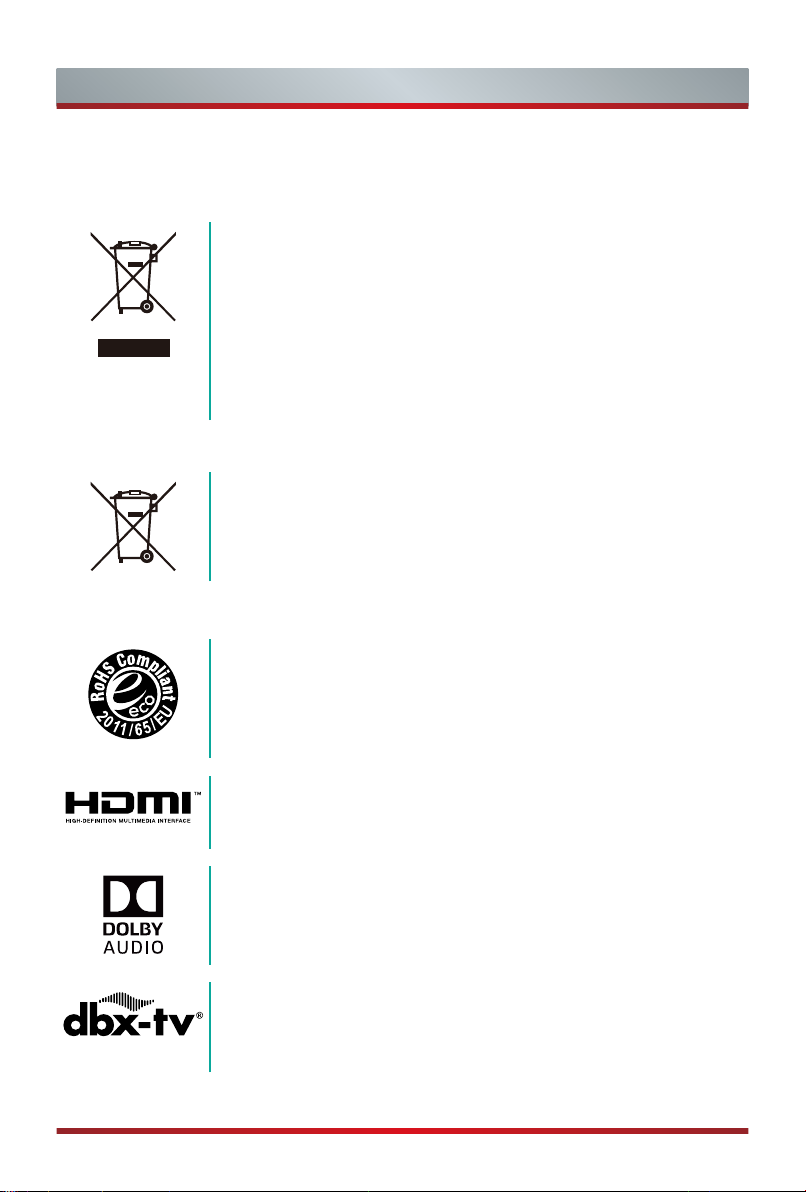
WEEE (Waste Electronic Electric Equipment)
European Directive 2012/19/EU
This symbol on the product or on its packaging indicates that this product
must not be disposed of with your household waste. Instead, it is your
responsibility to dispose of your waste equipment by handing it over to a
designated collection point for the recycling of waste electrical and electronic
equipment. The separate collection and recycling of your waste equipment at
the time of disposal will help to conserve natural resources and ensure that
it is recycled in a manner that protects human health and the environment.
For more information about where you can drop off your waste equipment for
recycling, please contact your local city ofce, your household waste disposal
service or the shop where you purchased the product.
Batteries
In accordance with the Battery Directive, used batteries should not
be disposed of in the domestic waste. Dispose your batteries in the
collection containers specic for this purpose in retail stores.
ROHS (Restriction of Hazardous Substance)
European Directive 2011/65/EU
This European directive limits the use of dangerous and hazardous
substances which are difcult to recycle.
This allows recycling easily the EEE and contributes to the safeguard of
the environment.
Substances included in this product match to the RoHS directive.
The terms HDMI and HDMI High-Denition Multimedia Interface, and the
HDMI Logo are trademarks or registered trademarks of HDMI Licensing
Administrator, Inc. in the United States and other countries.
Manufactured under license from Dolby Laboratories. Dolby, Dolby Audio,
Pro Logic, and the double-D symbol are trademarks of Dolby Laboratories. Confidential unpublished works. Copyright 1992-2019 Dolby Laboratories. All rights reserved.
Manufactured under license from THAT Corporation. THAT Corporation,
dbx-tv, Total Sonics, Total Surround and Total Volume are registered
trademarks of THAT Corporation. Total Technology is a trademark of
THAT Corporation.
14
 Loading...