

Page 1
Miniexcavators – Undercarriages - Minidumpers – Skid Steer Loaders – Aerial Platforms
ATTENTION: THIS BOOKLET DOESN'T SUBSTITUTE THE OPERATION AND MAINTENANCE
MANUAL. IT’S NECESSARY TO READ CAREFULLY AND UNDERSTAND THE OPERATION AND
MAINTENANCE MANUAL BEFORE CARRYING OUT ANY MANOEUVRE WITH THE MACHINE.
QUICK INSTRUCTIONS FOR HINOWA LIGHTLIFT 1775 AND 2010
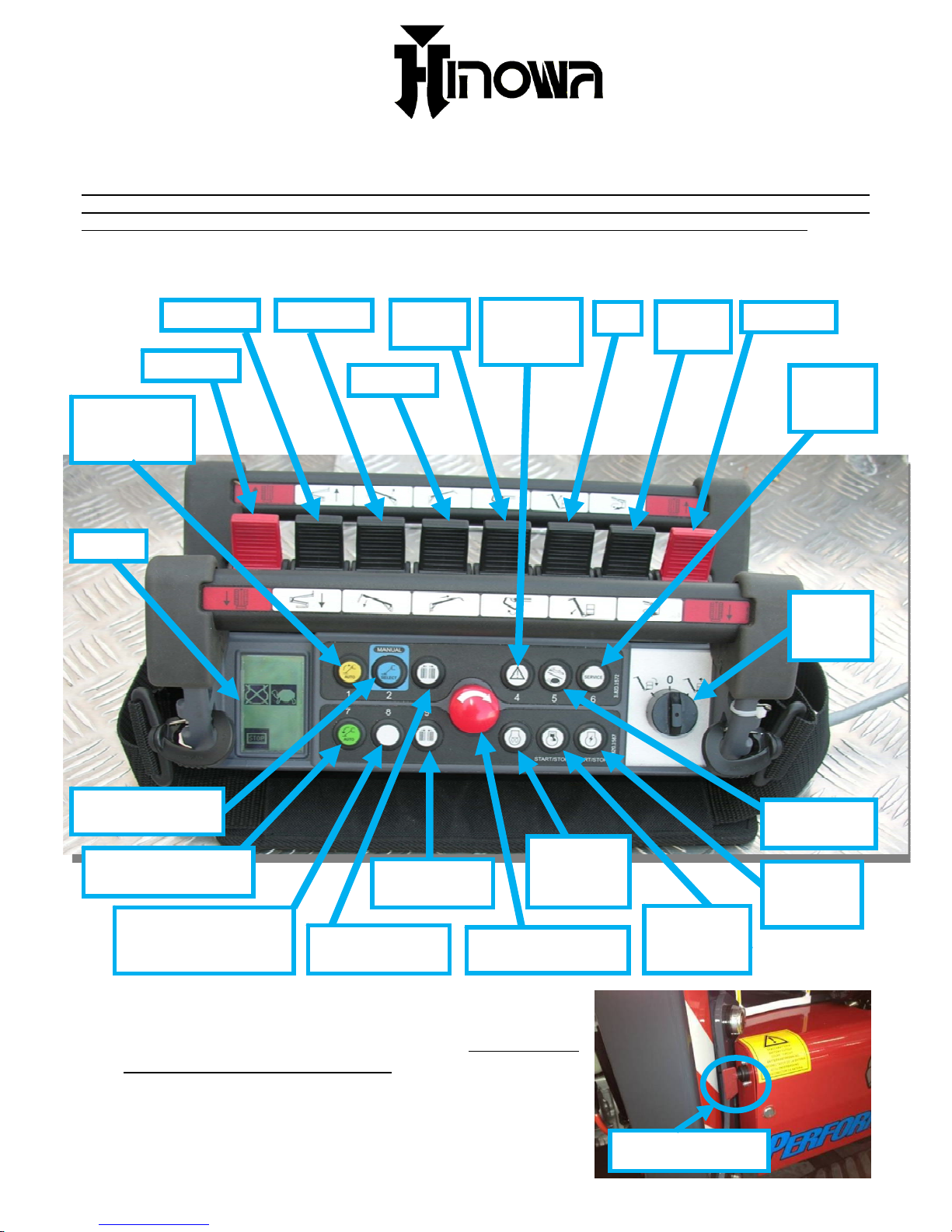
PERFORMANCE
Engine
preheat
button
Emergency STOP
button
Gravity
emergency
descent
Automatic
outriggers
retraction
Left track
1-2 arms
Jib
Turret
rotation
Right track
3 arm
Extension
Basket
leveling
key
Electric
motor
(start-stop)
Thermic
engine
(start-stop)
Undercarriage
closing
Automatic
stabilization
Undercarriage
widening
Engine speed
selector
Stabilizers manual
o
p
erating
Service
menu
selector
Display
Permission of aerial
part operation from
ground
Basket
rotation
To start the machine with the thermic engine, the
ignition switch should be turned ON and all the
STOP buttons should be released. The battery
cutter must be switched ON. Thermic engine or
electric motor must both be started by pressing
the relevant buttons on the remote control (see
picture above).
BATTERY CUTTER
FIPE1720021601
Page 2
Please note: On gasoline engine platform when the engine is cold, pre-heat it
pressing the “PREHEAT” button on the remote control, engine will run faster for
20 seconds.
MOVING THE TRACKS
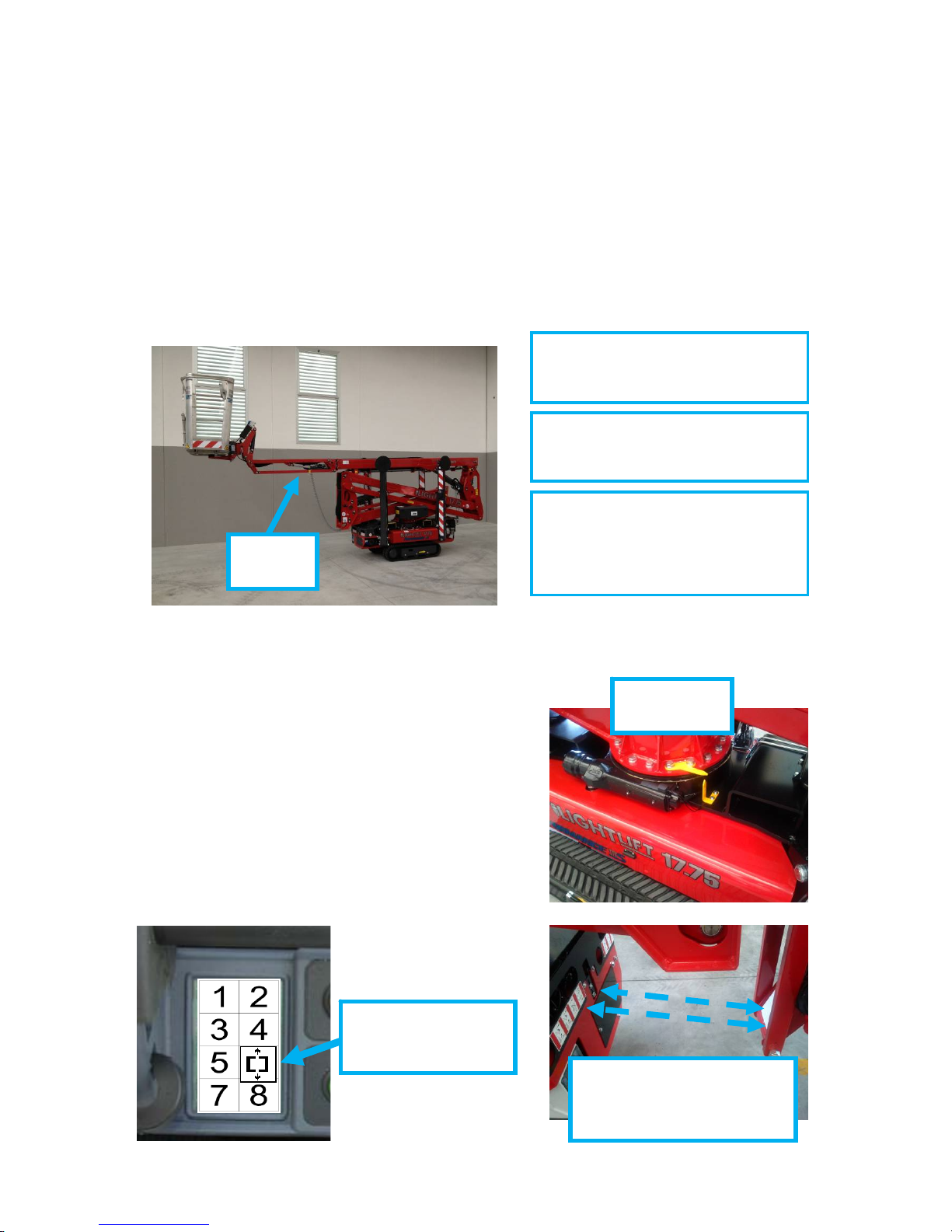
To move the tracks it’s necessary that all the outriggers are raised from the
ground. It’s possible to move the tracks even if jib arm (last arm, see picture
below) is opened but in this case basket should be empty, therefore the
operator must be at the ground keeping the remote control on his hands.
Otherwise when jib arm is closed the tracks could be moved operating from the
basket.
To move the tracks (with all the outriggers raised from the ground) press the
tracks red joystick on the remote control. To open the jib arm press the jib
movement joystick. Jib should be closed to allow outriggers movements
ALIGNMENT
ARROWS
TRACKS SPEED COULD BE
LIMITATED BY AN AUTOMATIC
SPEED CONTROL THAT PREVENT
UNSAFE TRANSALTION
CONDITIONS
TRANSLATION WITH JIB OPENED
IS POSSIBLE ONLY WHEN
OPERATOR AT THE GROUND
TRANSLATION WITH JIB CLOSED
IS POSSIBLE FROM THE GROUND
OR FROM THE BASKET.
JIB ARM
OPENED
MOVING THE OUTRIGGERS
To move the outriggers it’s necessary that
the machine is perfectly closed and aligned
(all the arms and the jib closed). In this
case the display shows the MACHINE
CLOSED AND ALIGNED icon (see the
picture below). To move the outriggers the
remote control could be in the basket
support or the operator can keep it in his
hands also standing on the ground.
MACHINE CLOSED
AND ALIGNED ICON
ON THE DISPLAY
PHOTOCELLS SYSTEM
DETECTS THE CLOSE AND
ALIGNED CONDITION OF
Page 3
AUTOMATIC STABILIZATION:
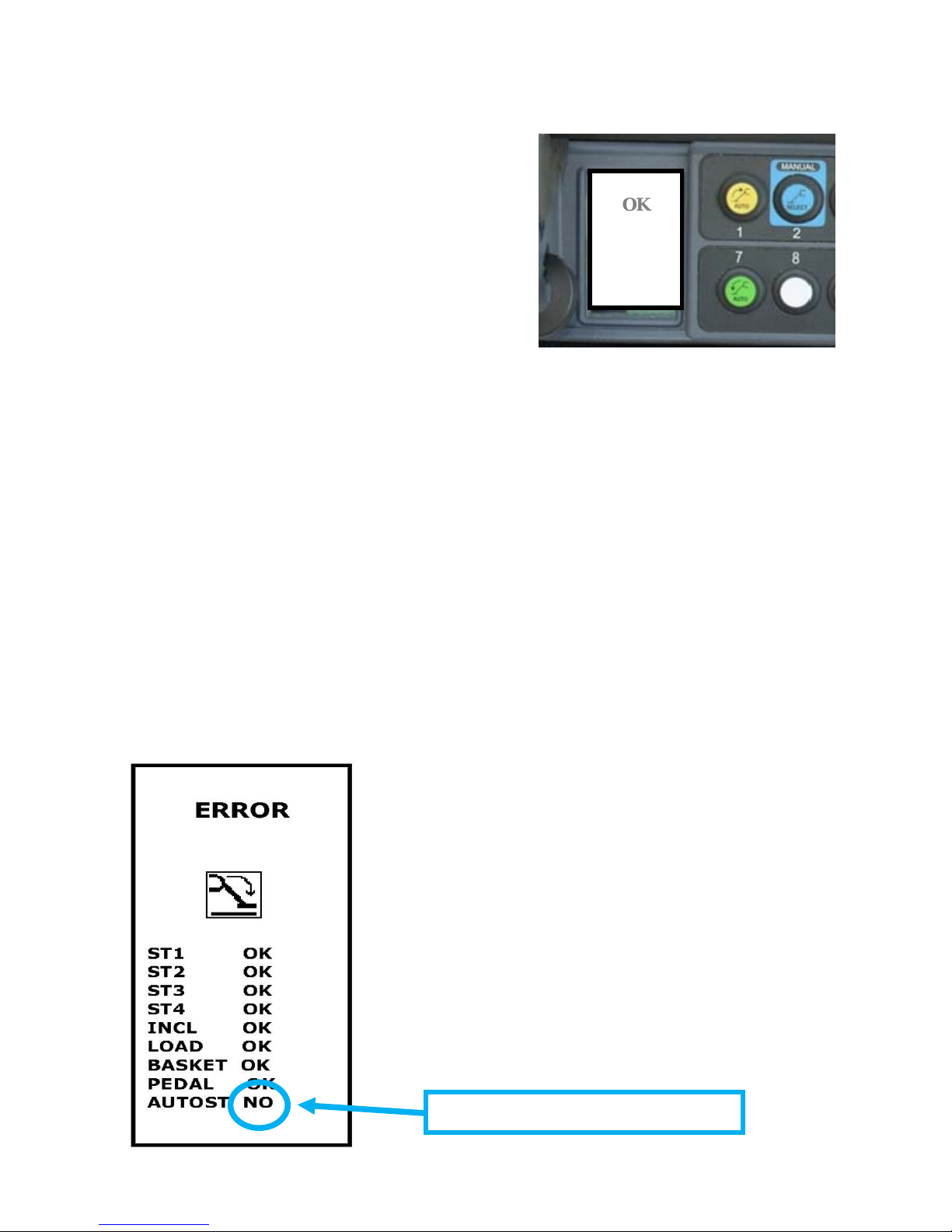
To stabilize the machine automatically the
machine must be closed aligned (all the
arms and the jib closed and turret
aligned). Keeping pressed the green
button (number 7) on the remote control
the machine start the automatic
stabilization procedure. That procedure will
be completed only when the display shows
the MACHINE STABILIZED icon (see the
picture on the right). Stabilisation is the
necessary condition to allow aerial part
movements.
OK
MANUAL STABILIZATION:
It’s also possible to move the outriggers one at a time pressing the blue button
(number 2) and following the indications given on the display. Automatic
Stabilisation remain the recommended procedure.
AUTOMATIC OUTRIGGERS RETRACTION:
To bring back the platform in transportation configuration (all the outriggers
completely lifted), once that the aerial part is closed and aligned, keep pressed
the yellow button (number 1) on the remote control.
MOVING THE AERIAL PART
Aerial part movements (except for the jib arm) are possible only when machine
is stabilized and therefore when the MACHINE STABILIZED icon appears in
position 5 of the display. To move the aerial part the remote control must be
positioned in its basket support. If a stabilization condition is missing, when a
joystick is moved the display indicates the missing condition with NO as
follows.
• ST “n”: if “NO” indicates that the outrigger “n”
is not touching the ground
• INCL: if “NO” indicates that the machine is not
properly leveled
• LOAD: if “NO” indicates that the weight in the
basket exceeds the 230 kg
• BASKET: if “NO” indicates that the remote
control is not properly positioned in its basket
support
• PEDAL (optional): if “NO” indicates that pedal
has to be pressed to allow the aerial part
movements
• AUTOST: if “NO” indicates that automatic
stabilization procedure was not properly
completed
STABILIZATION CONDITION MISSING
Page 4
After work is finished close carefully and completely all the arms and perfectly
align the turret looking at the yellow arrows. Than the outriggers could be
lifted and the tracks moved.
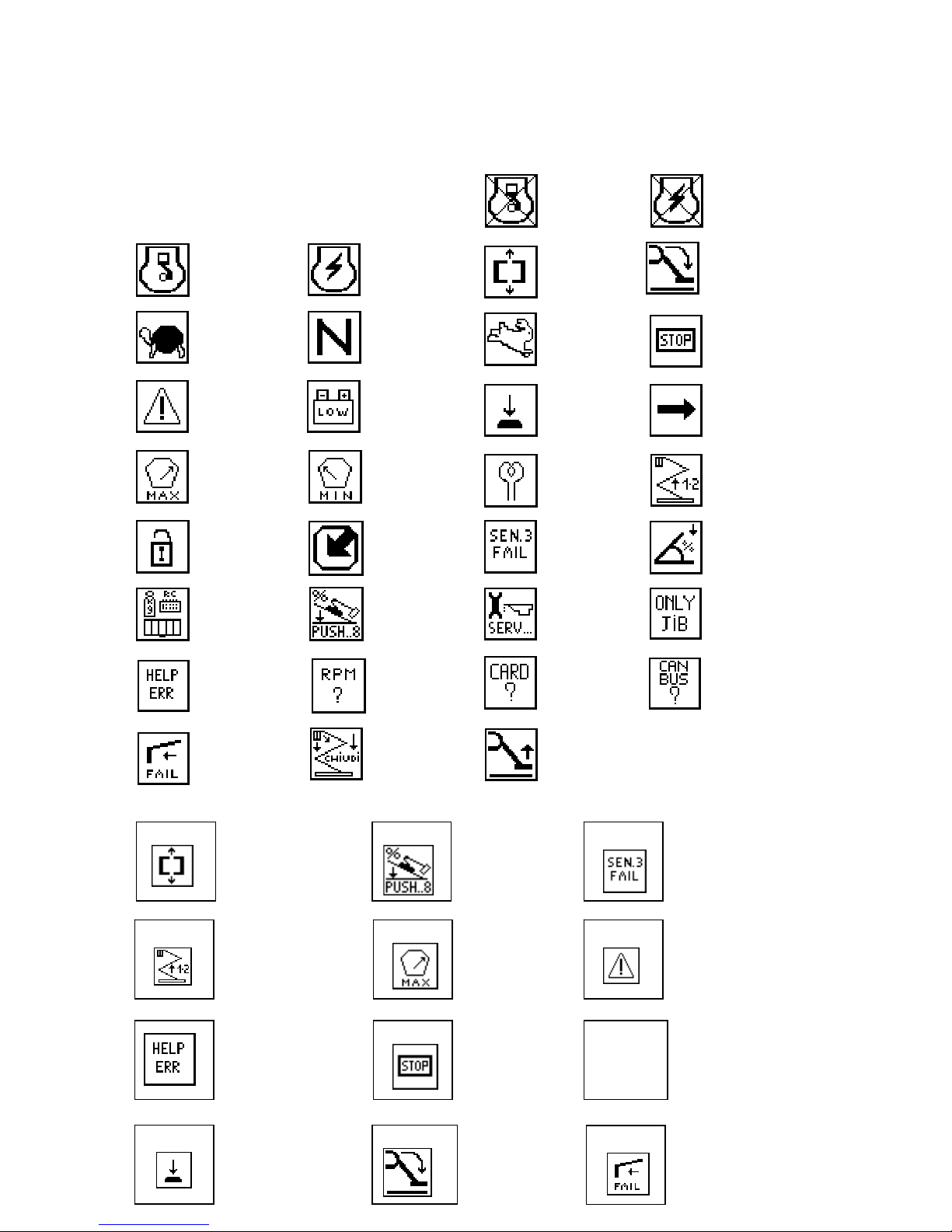
Heat engine
selected
Electric
motor
selected
LIST OF DISPLAY ICONS
Electric
motor
running
Machine
closed and
aligned
Machine
stabilized
Thermic
engine
running
Emergency
stop
pressed
Maximum
speed for
the tracks
Minimum
speed
Standard
speed
Press pedal
(option)
Battery
voltage low
Select a
control
Gravity
emergency
descent
Weigh in basket
too low
Engine
preheating
active
Overload in
basket
Lift 1 and 2
arms
Inclination too
high to stabilize
machine
Safety bypass active
Cables sensor
anomaly
Software
updates
available
Automatic
periodical
service
reminder
Inclination
too high to
drive safely
Remove weight
or remote
control from
basket
Jib only
possible
movement
RPM signal
missing
CAN BUS
signal
missing
Board or
software
wrong
Control
error menu
SELF DIAGNOSYS : LIST OF POSSIBLE ERROR MESSAGES ON THE DISPLAY
Cables sensor
missing
Only LL20.10
Lift outrigger
from the ground
Close aerial
part
ERROR
ERROR
NO
Close and
allign the
machine
Inclination too
high to move
tracks.
ERROR
It is
necessary to
lift 1-2 arms
ERROR
Overload in
basket
Error occurring on
the on 3 arm
cylinder sensor
ERROR
Movement not
allowed by
gravity
emergency
ERROR
An
emergency
stop button is
p
ressed
JIB
ONLY
ERROR
It is possible
to move only
the JIB
Error in sensor on
extension arm
Only LL20.10
ERROR
ERROR
Press the
pedal
(Op
tion)
Lift from the
ground the
outriggers
Check Error
menu
 Loading...