

Page 1

1
HM130 Instruction Manual
United States Federal Communications Commission, Code of Federal Regulations; 47CFR
American National Standards Institute (ANSI)/Institute of Electrical and Electronic
Institute of Electrical and Electronic Engineers (IEEE) C95. 1 – 1999;
International Commission on Non-Ionizing Radiation Protection (ICNIRP) 1998;
Utility Model Hand-held Marine Radio with China Exclusive Patent
Technology
RF Radiation Information
RF Radiation Profile
Your radio is designed and tested to comply with a number of national and international
standards and guidelines (listed below) regarding human exposure to radio frequency
electromagnetic energy. This radio complies with the IEEE and ICNIRP exposure limits for
occupational/controlled RF exposure environment at operating duty factors of up to 50%
transmitting and is authorized by the FCC for occupational use only. In terms of measuring RF
energy for compliance with the FCC exposure guidelines, your radio radiates measurable RF
energy only while it is transmitting (during talking in PTT mode), not when it is receiving
(listening) or in standby mode.
The device complies with SAR and/or RF field strength limits of RSS-102 requirement
RF Radiation Safety
In order to ensure user health, experts from relevant industries including science, engineering,
medicine and health work with international organizations to develop standards for safe
exposure to RF radiation. These standards consist of:
part 2 sub-part J;
Engineers (IEEE) C95. 1-1992;
FCC Regulations
Federal Communication Commission (FCC) requires that all radio communication products
should meet the requirements set forth in the above standards before they can be marketed in
the U.S, and the manufacturer shall post a RF label on the product to inform users of
operational instructions, so as to enhance their occupational health against exposure to RF
energy.
Part 15 Compliance
This equipment has been tested and found to comply with the limits for a Class B digital device,
pursuant to part 15 of the FCC Rules. These limits are designed to provide reasonable
protection against harmful interference in a residential installation. This equipment generates
uses and can radiate radio frequency energy and, if not installed and used in accordance with
the instructions, may cause harmful interference to radio communications. However, there is no
Page Rev. 3
Page 2
2
guarantee that interference will not occur in a particular installation. If this equipment does
cause harmful interference to radio or television reception, which can be determined by turning
the equipment off and on, the user is encouraged to try to correct the interference by one or
more of the following measures:
● Reorient or relocate the receiving antenna.
● Increase the separation between the equipment and receiver.
● Connect the equipment into an outlet on a circuit different from that to which the receiver
is connected.
● Consult the dealer or an experienced radio/TV technician for help. Note: “Changes or
modifications to this unit not expressly approved by the party responsible for compliance
could void the user’s authority to operate the equipment.”
EU Regulatory Conformance
As certified by the qualified laboratory, the product is in compliance with the essential
requirements and other relevant provisions of the Directive 1999/5/EC. Please note that the
above information is applicable to EU countries only.
Waterproof Design Warning:
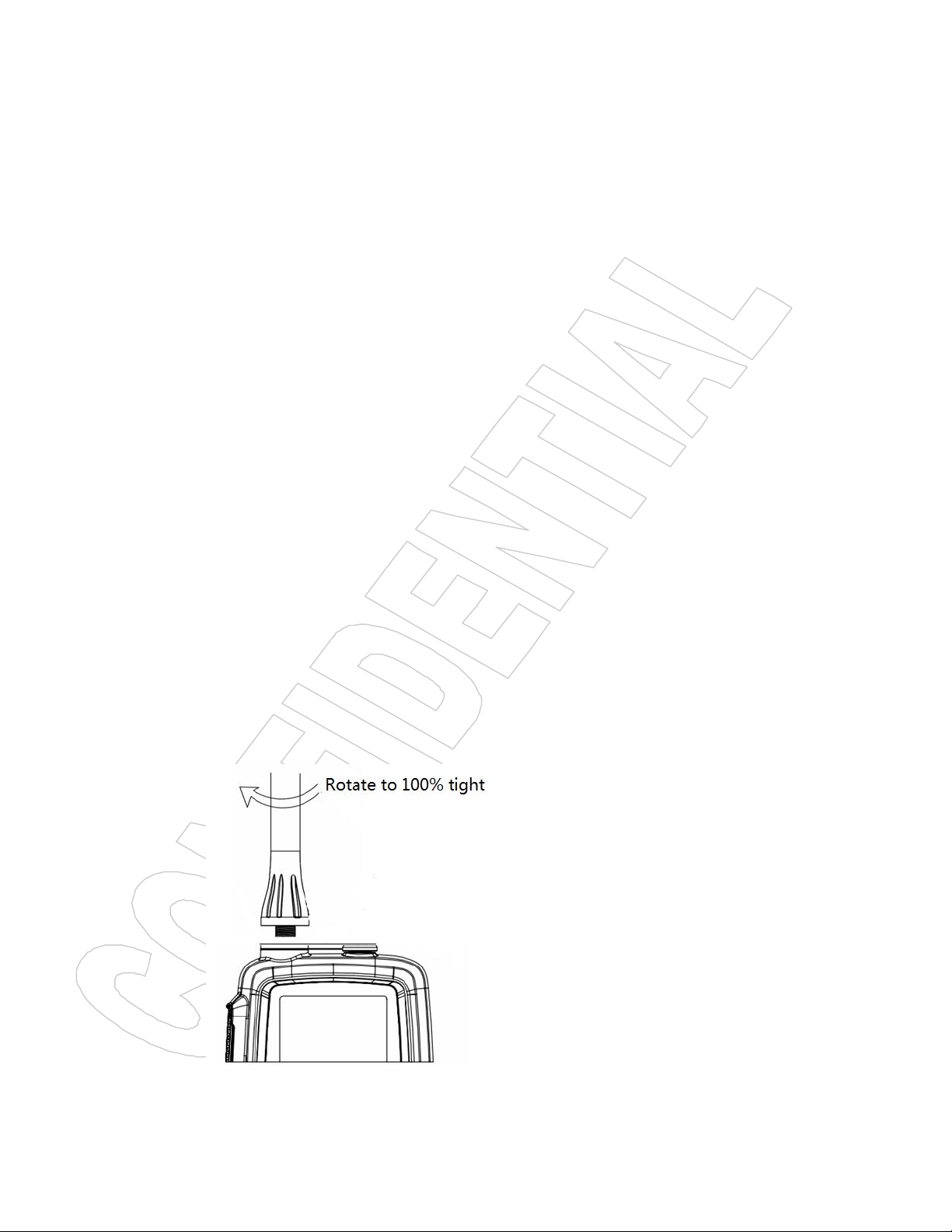
This product is the IP67 waterproof design, in order to achieve the best performance,
before the end-user use it, and please pay the highest attention for the following three
points:
1, To tight the antenna because there is an O-ring at the bottom of antenna side
2, To rotate tightly the round socket cap because there is an O-ring design around the
cap
3,Non-professionals can not disassemble the machine.
Page Rev. 3
Page 3

3
TABLE OF CONTENT
HM130 KEYS LOCATION DESCRIPTION...................................................................................................4
A.KEY FUNCTION........................................................................................................................................... 5
A.1 Key Arrangement..................................................................................................................................5
A.2 LCD....................................................................................................................................................... 5
B. DIRECT KEY OPERATION........................................................................................................................ 6
B.1 Power ON/OFF (Hardware).................................................................................................................6
B.2 VOL/SQL KEY.....................................................................................................................................6
B.3 UP/DOWN............................................................................................................................................ 6
B.4 16/9 Channel......................................................................................................................................... 6
B.5 Hi/Lo/LOCK Key.................................................................................................................................7
B.6 Private Channel.....................................................................................................................................7
B.7 WX Channel(Only available for USA,Canada)................................................................................. 7
B.8 UIC Band...............................................................................................................................................7
B.9 SCAN.....................................................................................................................................................7
B.10 MEM....................................................................................................................................................8
B.11 Watch................................................................................................................................................... 9
B.12 Back Light...........................................................................................................................................9
C.SPECIAL FUNCTION OPERATION...........................................................................................................9
C.1 TX time out........................................................................................................................................... 9
C.2 Power save Mode..................................................................................................................................9
C.3 TX Indicator........................................................................................................................................10
D. EUROPEAN KEY OPERATION...............................................................................................................10
D.1 Programming ATIS ID.......................................................................................................................10
D.2 Special Function Keys.................................................................................................................... 11
Appendix A – Near Lightning Strike Test.......................................................................................................12
Appendix B – Channel List..............................................................................................................................13
International Marine VHF Channels and Frequencies.................................................................. 13
U.S. Marine VHF Channels and Frequencies......................................................................................... 14
Notes:.........................................................................................................................................................15
Canadian Marine VHF Channels and Frequencies.................................................................................16
European Private Channels and Frequencies.......................................................................................... 18
Page Rev. 3
Page 4
4
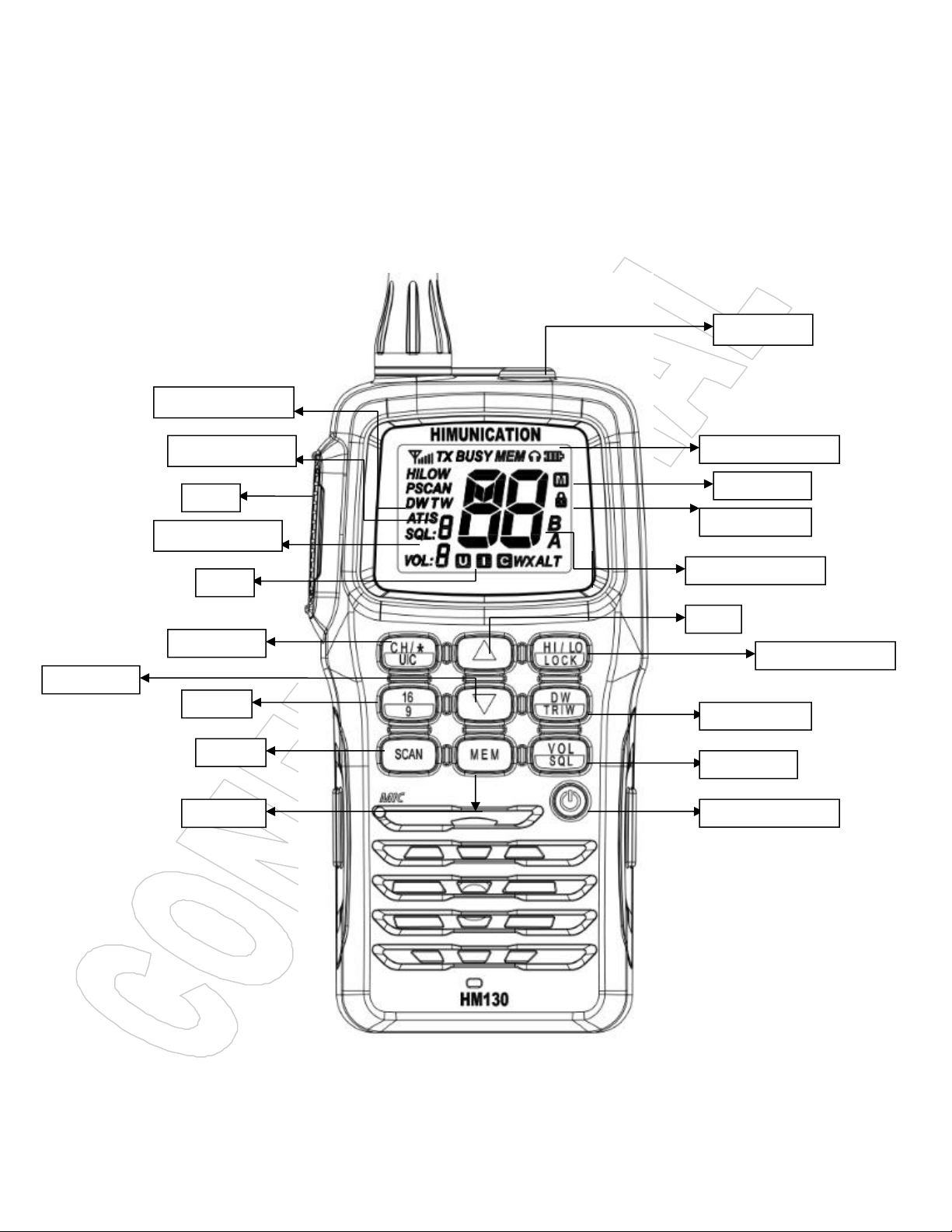
HM130 KEYS LOCATION DESCRIPTION
16/9
SCAN
MEM
HI/LOW/LOCK
UP
DOWN
UIC
Squelch Level
Volume Level
Lock icon
DUALW/TRIW
Earphone
Mem icon
Page Rev. 3
Page 5
5
A.KEY FUNCTION
Key
Short Press ( < 3 sec )
Long Press ( > 3 sec )
HI/Lo /Lock
TX Power Hi/Low
Key Lock
16/9
CH 16
CH09
DW/TRIW
Dual Watch mode
Tri Watch mode
Power Switch
On
Off
SCAN
All Scan/all memory Scan
Priority all/memory Scan
MEM
MEMORY Mode
Save/Delete Memory Channel
Up/Down
Channel/ Setting Up/Down
Channel Fast up/Fast down
CH/*/UIC
Private channel
Band Selection
VOL/SQL
SQL Set
A.1 Key Arrangement
PTT CH/*/UIC UP HI/LO/LOCK
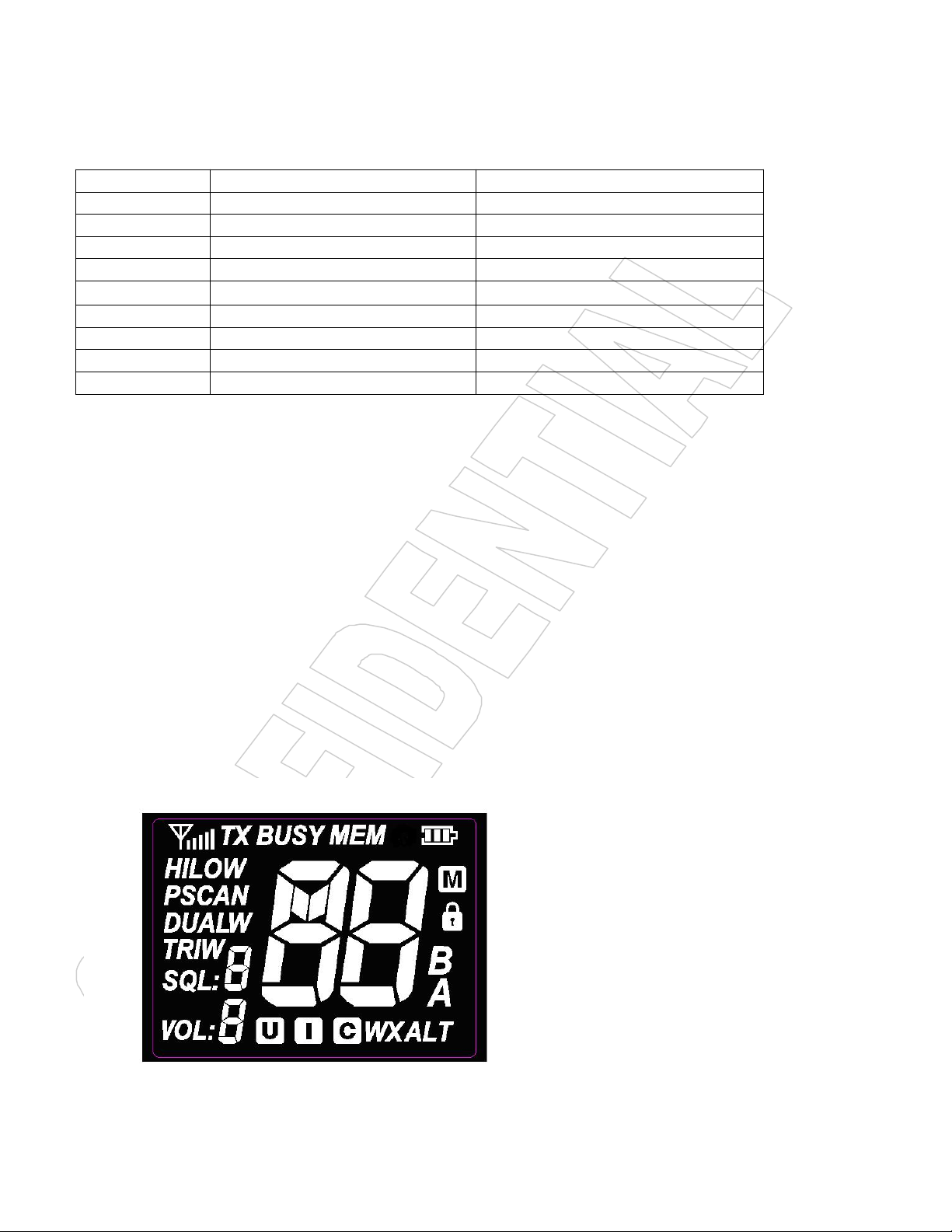
A.2 LCD
16/9 DOWN DW/TRIW
SCAN MEM VOL/SQL
POWER SWITCH
Page Rev. 3
Page 6

6
B. DIRECT KEY OPERATION
B.1 Power ON/OFF (Hardware)
Long press power switch to start normal operation mode, long press again will power
down.
B.2 VOL/SQL KEY
Short press VOL/SQL key to adjust volume level,press UP/DOWN key to select volume
level accordingly.Long press VOL/SQL key will flash squelch level,press UP/DOWN key to
select squelch level accordingly.
B.3 UP/DOWN
At the normal mode, they act as Channel Up/Down. When it press > 0.5 sec, the unit will
start to scrolls through the channels at 125ms intervals. It returns to normal mode when key
press is released
B.4 16/9 Channel
Summary of CH16/9 Key operation:
1 If current channel was not priority channel,press 16/9 key will directly jump to 16 channel
or 9 channel(short press to jump to priority CH16 at High Power and long press to jump to
priority CH9 at High Power)
Note: Accessing the priority channel will change the power setting to high power. The user
can change the power setting to low power by pressing Hi/Lo/LOCK key. If the priority
channel is limited by the cloning software for 1-W only, accessing priority channel will still
follow the low power limitation.
2 After the channel is tuned to the priority channel, the “P” icon is lit to indicate that the
priority CH16 or CH9 has been reached. UP and Down key functions normally
3 When the radio already tunes to the priority channel ,pressing 16/9 key will revert radio to
the previously used working channel depending on how it being press (see flow chart above).
16/9 Key also act ‘esc key’ to exit other modes
To reprogram a secondary priority channel:
1.Tune to priority CH9. It is indicated by “P” icon. It is done by pressing “16/9” key for
more than 3 seconds.
2.Then, press and hold the“16/9”key for 3 seconds.
3 and Currently secondary priority channel number should start flashing
and the current secondary priority channel number should start flashing.
Page Rev. 3
Page 7

7
4. While the channel number is flash,it can be changed with “UP” and “DOWN” arrow
buttons.The selection can be saved by short pressing ‘’16/9’’ key and the screen display ‘’P’’
icon to indicate that the secondary priority channel has been changed.
5.The user can reprogram the secondary priority channel on the HM130
B.5 Hi/Lo/LOCK Key
Short press Hi/Lo/LOCK key will toggle the TX power from Hi to Lo ,corresponding HI/LO
icon will display on the LCD.
Some of channels has been limited to be low power only or high power only. Thus, the
software needs to check against the channel setting stored in the EEPROM.
If the operation request is denied,error beeps tone will out.
All keypad will be locked except PTT key by pressing Hi/Lo/LOCK key more than 3
seconds, correspondingly the ’’lock icon ’’will display on the LCD,press Hi/Lo/LOCK key again
more than 3 seconds will release the key lock function
B.6 Private Channel
Shore press CH/*/UIC enter into private channel mode,switch it by press UP/DOWN
key.If private channel didn’t exist,it will display’’--’’ .
B.7 WX Channel(Only available for USA,Canada)
Short press WX/*/UIC key will enter WX mode. Press Up/Down key to change WX channel.
Long press WX/*/UIC key to enable and detect weather alarm,if the alert tone is detected, the
‘’ALT’’ symbol should flash in the screen,long press WX/*/UIC again to cancel weather
alarm,‘’ALT’’ symbol will disappear accordingly.
B.8 UIC Band
Long press CH/*/UIC to switch operational channel band(USA,INT and CAN).When band
was switched,the band sequence will change accordingly.
Noted:If one frequency was programmed to this radio device,activating this function will
generate wrong alarm.
B.9 SCAN
This is the function to scan for broadcasting channels. When available channel detected,
Page Rev. 3
Page 8

8
the receiver will stop at that channel and continue to search when that transmission ceased.
1. During the normal mode, use the UP/DOWN key to select the desired channel for
2. Long press the MEM key to store up the channel as memory channel.The “M” icon
3. Separate memory channel exists for USA, International, and Canadian Frequency
There are 4 Scan modes available – All SCAN, Memory Scan,Priority Scan & memory
Scan, Default is All Scan
1、At the normal mode,short press the SCAN key to activate SCAN function.
2、When the radio in the normal mode, All Scan will be initiated. When the radio in the All
Scan mode, all channel will be scan in sequence.
3、When the radio in the memory mode, short press SCAN key to initiate Memory Scan,will
be . long press the Scan key will initiate Priority Scan.
During scan,long press SCAN key will activate All Scan or Memory Scan.’’p’’ icon (priority
icon)will lit
The memory channel will be stated whenever signal received. Once the transmission
finished, the SCAN will automatically carry on to searching for next channel.
All Memory Scan
M1 – M2 – M3 - … M10 – M1- …
All Scan
CH1-CH2-CH3-…..-CH88-CH1
Priority Memory Scan
M1 – CH 16 – M2 – CH 16 - … CH 16 – M1 – M16 - …
(M1; M2; M3 means 1st, 2nd, 3rdprogrammed channel)
Priority All Scan
CH1-CH16-CH2-CH16-CH3-CH16-…..CH88-CH16-L1-CH16-…
(The radio only has L1 as its private channel)
B.10 MEM
Press the MEM to enter the memory mode when there is at least one channel in the
memory. The channel sequences will follow the programmed channels in the memory. The
“MEM” icon will be turned on. Short press the SCAN will start MEMORY SCAN
Adding CH from the memory:
programming.
shows up to indicate the current channel has been saved in the memory. No limited of
memory channels.
group.
Page Rev. 3
Page 9

9
Deleting CH from the memory:
1.During the normal mode, use the UP/DOWN key to select the channel to be deleted.
2.Long press the MEM key to delete the channel from the memory.’M’ icon will disappear
B.11 Watch
Dual Watch
Short press DW/TRIW key to activate the DUAL WATCH mode. Monitor the current
channel and Ch 16 in cycle.
TRI Watch
Long press DW/TRI key to activate the TRI WATCH mode. Monitor the Ch 16, current
channel and the 2nd Priority CH in cycle.
Programmable channel is CH9 by default.
Note: programmed channel is the secondary priority Channel.Current Channel – CH 16 – 2nd
Priority CH – Current Channel – CH 16 – 2nd Priority CH – Current Channel - …
B.12 Back Light
Any key press will turn on the back light (if back-light setting is ON) except the PTT key.
The back-light should be remaining on for 3 sec if no any keys pressed. The time out will be
reset if any key pressed within the time frame except PTT key.If back-light is on,press ‘PTT‘ key
will turn off back-light
C.SPECIAL FUNCTION OPERATION
C.1 TX time out
The transmission will be automatically turn off after PTT key pressed over 30 consecutive
minutes. The Tx mode will be terminate and back to Rx mode. Once the PTT key is released,
the TX time out timer will be reset. PTT key will work back normally.
C.2 Power save Mode
Normal Mode
100ms ON, 300ms OFF
Page Rev. 3
Page 10
10
C.3 TX Indicator
1. Programming start with the radio turn OFF.
2. Long press Hi/Lo/Lock and turn radio ON to access the ATIS mode.
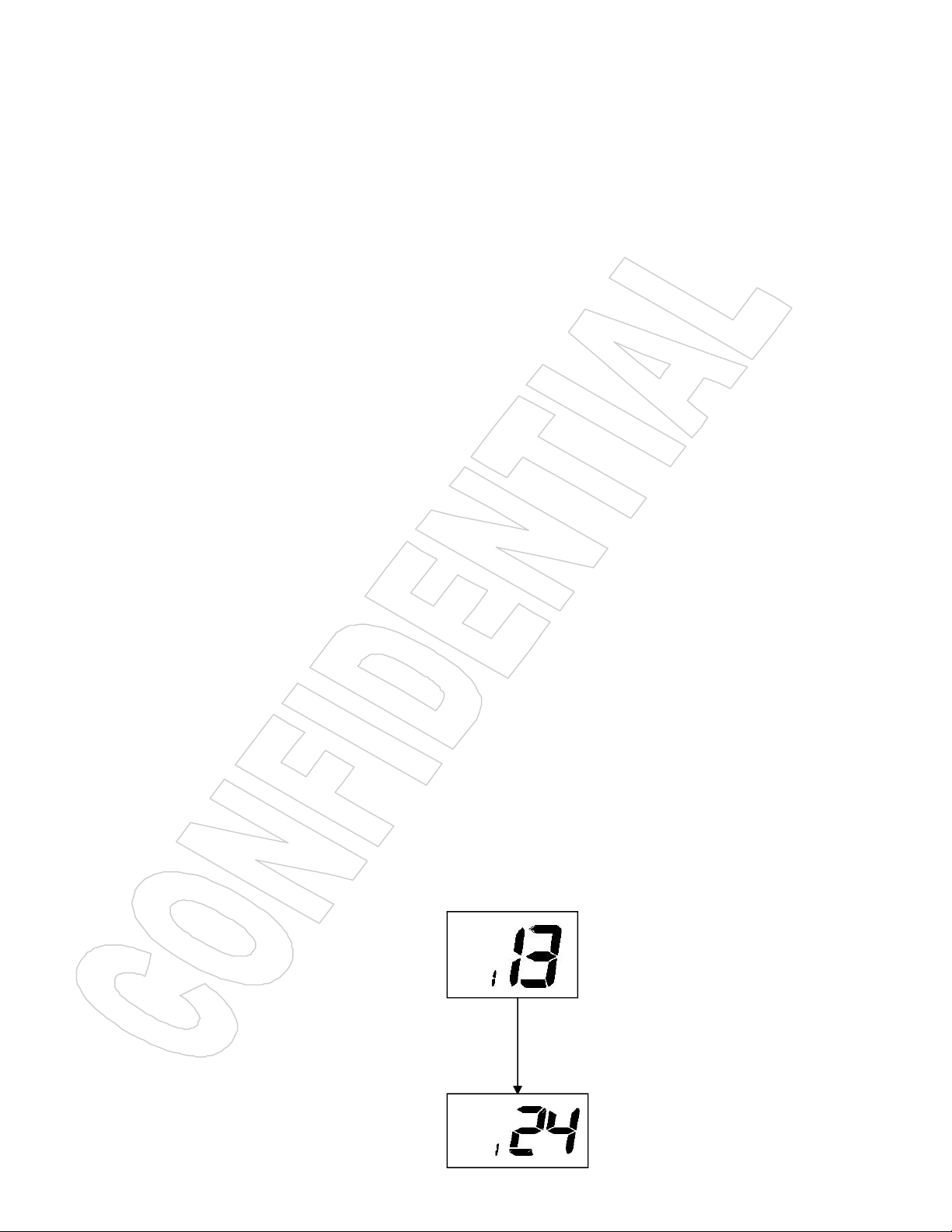
3. The front digit will indicate the digit position of the ATIS ID. The rear digit will blink
4. Press “MEM” key to confirm the selection and move to the next digit.
5. After the user complete the 9 digit ATIS ID, the user has to enter the ATIS ID the second
6. The operating procedure to enter a valid ATID ID for the second time is same as the first
When the radio is transmitting, the “TX” icon will be lit up.
D. EUROPEAN KEY OPERATION
Most of the functions in the radio are the same as the US model. These are the functions
that work differently.
D.1 Programming ATIS ID
ATIS function only exists in European Model. Therefore, it only functions when the
European radio is tuned to the International Frequency Group. After ATIS ID is being
programmed into the radio via the keypad or the cloning software, the ATIS function will be
enabled all the time. The user cannot disable it.
To enable the customer to enter ATID ID into the radio from the keypad, the check box next to
the ATIS entry by user on the Cloning software has to be ticked.
Programming ATIS ID from the Keypad
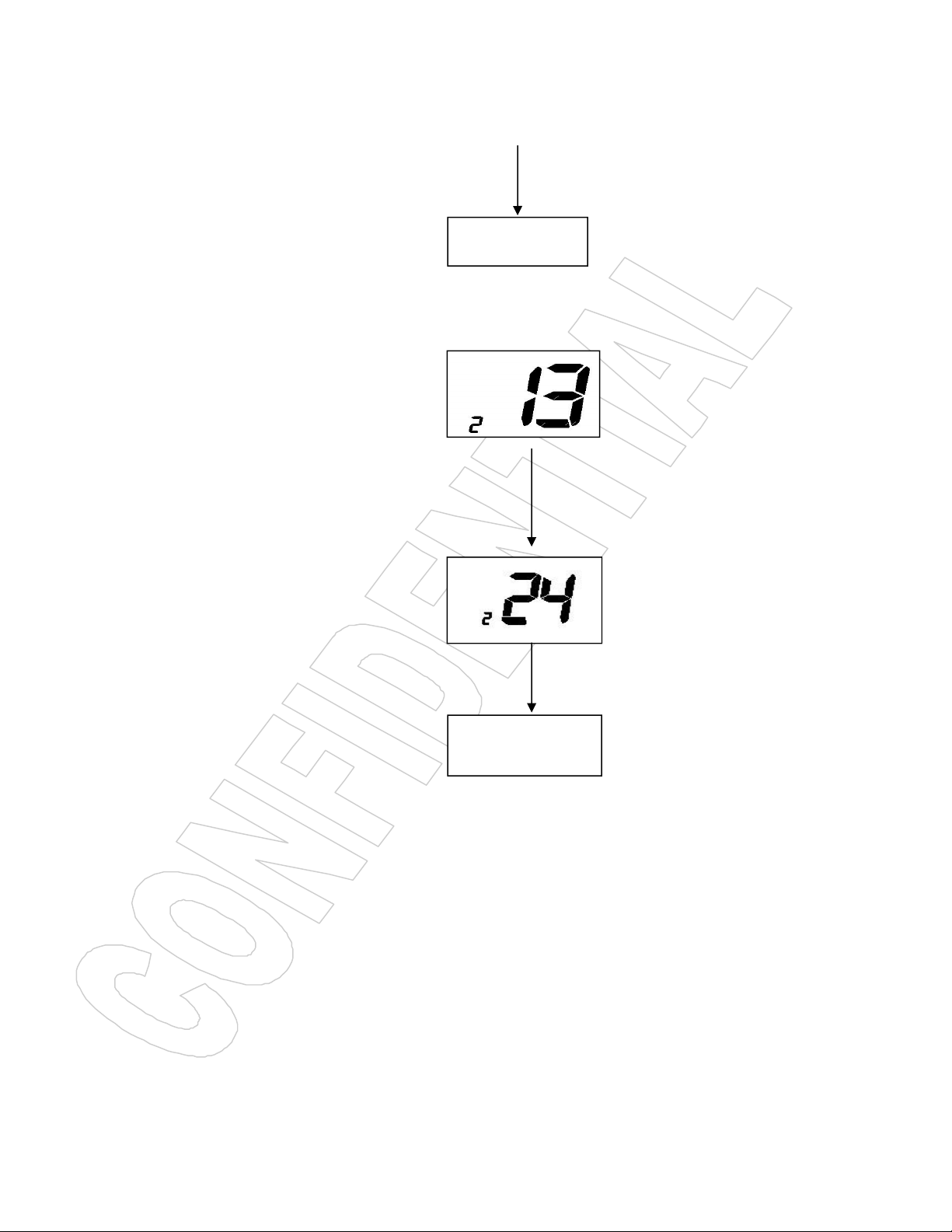
continuously. The rear digit indicates the ATIS ID. Changing the value of the rear digit
can be achieved using the “UP/DOWN” Key.
time to avoid invalid entry. If different ATIS ID is entered, operation will be canceled The
user has to repeat step one to initiate the ATID ID entering sequence.
time, the ATIS ID will be flashed in sequence one time on the screen.
Page Rev. 3
Page 11
11
ETC….
ETC….
..
7. Turn off radio,permanently save ATIS ID to the EEPROM of the radio.
8. After the ATIS ID being programmed into the radio, from OFF position holding
HI/LO/Lock and turning the radio ON will make the radio flash its ATIS ID. After this stage,
only with the cloning software the ATIS ID be modified or erased.
9.At the ATIS mode,part of international channels are restricted to transmit on
low-power,such as CH6,CH8,CH10,CH11,CH12,CH13,CH14,CH71,CH72,CH74,
CH77.
D.2 Special Function Keys
Page Rev. 3
Page 12

12
Press DW/TRIW key as well as power key to directly enter into write channel mode as
BS EN 61000-4-5 : 2006
EMC Directive 2004/108/EC
AE
Auxiliary Equipment
CE
Conducted Emissions
EMC
Electromagnetic Compatibility
EN
European Norm
EUT
Equipment Under Test
FTB
Fast Transient Burst
MED
Marine Equipment Directive
QP
Quasi Peak
below displayed.
Appendix A – Near Lightning Strike Test
This appendix describes the general procedure for evaluating the immunity to near lightning strikes (NLS) of
the HM130 VHF Radio.
The test simulates a slow, high-energy pulse produced by an NLS event.Relative external document as below
List of Abbreviations
Safety
The high voltage interference pulse can contain a very large quantity of energy and every precaution shall be
taken to avoid contact with EUT during a test. It is highly recommended that at least one other person is
present (or very close by) during the test.
Test Configuration
EUT Setup
The EUT shall be setup in a typical system configuration on an isolated wooden bench with NO
GROUNDPLANE. The power to the EUT and auxiliary equipment shall be from 12V or 24V sealed lead-acid
batteries via a suitable fuse. The length of the EUT power cable shall be no more than 2m. Any screens within
the system shall be terminated at the battery –vet connection.
Page Rev. 3
Page 13

13
EUT Configuration
All operating configurations should be tested with appropriate performance criteria defined for each test.
Performance Criteria
From BS EN 61000-4-5 : 2006
Performance criteria C: Temporary loss of function or degradation of performance, the correction of which
requires operator intervention.
Appendix B – Channel List
International Marine VHF Channels and Frequencies
CH No. XMIT Freq RCVFreq Single Freq Use
01 156.050 160.650 Public Correspondence, Port Operations and Ship Movement
02 156.100 160.700 Public Correspondence, Port Operations and Ship Movement
03 156.150 160.750 Public Correspondence, Port Operations and Ship Movement
04 156.200 160.800 Public Correspondence, Port Operations and Ship Movement
05 156.250 160.850 Public Correspondence, Port Operations and Ship Movement
06 156.300 156.300 x Intership 1
07 156.350 160.950 Public Correspondence, Port Operations and Ship Movement
08 156.400 156.400 x Intership
09 156.450 156.450 x Intership, Port Operations and Ship Movement
10 156.500 156.500 x Intership, Port Operations and Ship Movement 2
11 156.550 156.550 x Port Operations and Ship Movement
12 156.600 156.600 x Port Operations and Ship Movement
13 156.650 156.650 x Intership Safety, Port Operations and Ship Movement 3
14 156.700 156.700 x Port Operations and Ship Movement
15 156.750 156.750 x Intership and On-board Communications at 1W only 4
16 156.800 156.800 x Distress, Safety and Calling
17 156.850 156.850 x Intership and On-board Communications at 1W only 4
18 156.900 161.500 Public Correspondence, Port Operations and Ship Movement
19 156.950 161.550 Public Correspondence, Port Operations and Ship Movement
20 157.000 161.600 Public Correspondence, Port Operations and Ship Movement
21 157.050 161.650 Public Correspondence, Port Operations and Ship Movement
22 157.100 161.700 Public Correspondence, Port Operations and Ship Movement
23 157.150 161.750 Public Correspondence, Port Operations and Ship Movement
24 157.200 161.800 Public Correspondence, Port Operations and Ship Movement
25 157.250 161.850 Public Correspondence, Port Operations and Ship Movement
26 157.300 161.900 Public Correspondence, Port Operations and Ship Movement
27 157.350 161.950 Public Correspondence, Port Operations and Ship Movement
28 157.400 162.000 Public Correspondence, Port Operations and Ship Movement
60 156.025 160.625 Public Correspondence, Port Operations and Ship Movement
61 156.075 160.675 Public Correspondence, Port Operations and Ship Movement
62 156.125 160.725 Public Correspondence, Port Operations and Ship Movement
63 156.175 160.775 Public Correspondence, Port Operations and Ship Movement
64 156.225 160.825 Public Correspondence, Port Operations and Ship Movement
65 156.275 160.875 Public Correspondence, Port Operations and Ship Movement
65A 156.275 156.275 Non-Commercial
66 156.325 160.925 Public Correspondence, Port Operations and Ship Movement
66A 156.325 156.325 Non-Commercial
67 156.375 156.375 x Intership, Port Operations and Ship Movement 2
68 156.425 156.425 x Port Operations and Ship Movement
69 156.475 156.475 x Intership, Port Operations and Ship Movement
71 156.575 156.575 x Port Operations and Ship Movement
72 156.625 156.625 x Intership
73 156.675 156.675 x Intership 2
74 156.725 156.725 x Port operations and Ship movement
Page Rev. 3
Page 14

14
75 156.775 156.775 x See Note 5
76 156.825 156.825 x See Note 5
77 156.875 156.875 x Intership
78 156.925 161.525 Public correspondence, Port Operations and Ship Movement
79 156.975 161.575 Public correspondence, Port Operations and Ship Movement
80 157.025 161.625 Public correspondence, Port Operations and Ship Movement
81 157.075 161.675 Public correspondence, Port Operations and Ship Movement
82 157.125 161.725 Public correspondence, Port Operations and Ship Movement
83 157.175 161.775 Public correspondence, Port Operations and Ship Movement
84 157.225 161.825 Public correspondence, Port Operations and Ship Movement
85 157.275 161.875 Public correspondence, Port Operations and Ship Movement
86 157.325 161.925 Public correspondence, Port Operations and Ship Movement
87 157.375 157.375 x Port Operations and Ship Movement
88 157.425 157.425 x Port Operations and Ship Movement
• Intership channels are for communications between ship stations. Intership communications
should be restricted to Channels 6, 8, 72 and 77. If these are not available, the other channels
marked for Intership may be used.
• Channel 70 is used exclusively for Digital Selective Calling (DSC) and is not available for regular
voice communications.
Notes:
1. Channel 06 may also be used for communications between ship stations and aircraft engaged in
coordinated search and rescue operations. Ship stations should avoid harmful interference to
such communications on channel 06 as well as to communications between aircraft stations, ice
breakers and assisted ships during ice seasons.
2. Within the European Maritime Area and in Canada, channels 10, 67 and 73 may also be used by
the individual administrations concerned for communication between ship stations, aircraft stations
and participating land stations engaged in coordinated search and rescue and anti-pollution
operations in local areas. Channels 10 or 73 (depending on location) are also used for the
broadcast of Marine Safety Information by the Maritime and Coast Guard Agency in the UK only.
3. Channel 13 is designated for use on a worldwide basis as a navigation safety communication
channel, primarily for intership navigation safety communications.
4. Channels 15 and 17 may also be used for on-board communications provided the effective radiated
power does not exceed 1 Watt.
5. The use of Channels 75 and 76 should be restricted to navigation related communication only
and all precautions should be taken to avoid harmful interference to channel 16. Transmit power
is limited to 1 Watt.
U.S. Marine VHF Channels and Frequencies
CH. No XMIT Freq RCV Freq Single Freq Use
01A 156.050 156.050 x Port Operations and Commercial, VTS.
Available only in New Orleans / Lower Mississippi area. 1
03A 156.150 156.150 x U.S. Government only
05A 156.250 156.250 x Port Operations or VTS in the Houston, New Orleans and Seattle
areas.
06 156.300 156.300 x Intership Safety
07A 156.350 156.350 x Commercial
08 156.400 156.400 x Commercial (Intership only)
09 156.450 156.450 x Boater Calling. Commercial and Non-Commercial.
10 156.500 156.500 x Commercial
11 156.550 156.550 x Commercial. VTS in selected areas.
12 156.600 156.600 x Port Operations. VTS in selected areas.
13 156.650 156.650 x Intership Navigation Safety (Bridge-to-bridge). Ships
>20meters in length maintain a listening watch on this channel
in US waters. 2, 6
14 156.700 156.700 x Port Operations. VTS in selected areas.
15 156.750 156.750 x Environmental (Receive only). Used by Class ‘C’ EPIRBs. 3
16 156.800 156.800 x International Distress, Safety and Calling. Ships required to
carry radio, USCG, and most coast stations maintain a listenin
Page Rev. 3
Page 15

15
watch on this channel. 4
17 156.850 156.850 x State Control 5
18A 156.900 156.900 x Commercial
19A 156.950 156.950 x Commercial
20 157.000 161.600 Port Operations (duplex)
20A 157.000 157.000 x Port Operations
21A 157.050 157.050 x U.S. Coast Guard only
22A 157.100 157.100 x Coast Guard Liaison and Maritime Safety Information Broadcasts.
Broadcasts announced on channel 16.
23A 157.150 157.150 x U.S. Coast Guard only
24 157.200 161.800 Public Correspondence (Marine Operator)
25 157.250 161.850 Public Correspondence (Marine Operator)
26 157.300 161.900 Public Correspondence (Marine Operator)
27 157.350 161.950 Public Correspondence (Marine Operator)
28 157.400 162.000 Public Correspondence (Marine Operator)
61A 156.075 156.075 x U.S. Government only
63A 156.175 156.175 x Port Operations and Commercial, VTS. Available only in New
Orleans / Lower Mississippi area.
64A 156.225 156.225 x U.S. Coast Guard only
65A 156.275 156.275 x Port Operations
66A 156.325 156.325 x Port Operations
67 156.375 156.375 x Commercial. Used for Bridge-to-bridge communications in
lower Mississippi River. Intership only. 6
68 156.425 156.425 x Non-Commercial
69 156.475 156.475 x Non-Commercial
71 156.575 156.575 x Non-Commercial
72 156.625 156.625 x Non-Commercial (Intership only)
73 156.675 156.675 x Port Operations
74 156.725 156.725 x Port Operations
77 156.875 156.875 x Port Operations (Intership only) 5
78A 156.925 156.925 x Non-Commercial
79A 156.975 156.975 x Commercial. Non-Commercial in Great Lakes only.
80A 157.025 157.025 x Commercial. Non-Commercial in Great Lakes only
81A 157.075 157.075 x U.S. Government only – Environmental protection operations.
82A 157.125 157.125 x U.S. Government only
83A 157.175 157.175 x U.S. Coast Guard only
84 157.225 161.825 Public Correspondence (Marine Operator)
84A 157.225 157.225 Non-Commercial
85 157.275 161.875 Public Correspondence (Marine Operator)
85A 157.275 157.275 Non-Commercial
86 157.325 161.925 Public Correspondence (Marine Operator)
86A 157.325 157.325 Non-Commercial
87 157.375 161.975 Public Correspondence Marine Operator)
87A 157.375 157.375 Non-Commercial
88 157.425 162.025 Public Correspondence only near Canadian border
88A 157.425 157.425 x Commercial, Intership only
• Recreational boaters normally use channels listed as Non-Commercial: 68, 69, 71, 72, 78A.
• Channel 70 is used exclusively for Digital Selective Calling (DSC) and is not available for regular
voice communications.
• Channels 75 and 76 are reserved as guard bands for Channel 16 and are not available for regular
voice communications.
Notes:
1. The letter “A” following a channel number indicates simplex use of the ship station transmit side of
an international semi-duplex channel. Operations are different from that of international operations
on that channel.
2. Channel 13 should be used to contact a ship when there is danger of collision. All ships of length 20
meters or greater are required to guard VHF channel 13, in addition to VHF channel 16, when operating
within U.S. territorial waters.
3. Channel is Receive Only.
4. Channel 16 is used for calling other stations or for distress alerting.
5. Output power is fixed at 1 watt only.
6. Output power is initially set to 1 watt. User can temporarily override this restriction to transmit at
high power.
Page Rev. 3
Page 16

16
Canadian Marine VHF Channels and Frequencies
CH No. XMIT Freq RCV Freq Area of Operation Use
01 156.050 160.650 PC Public Correspondence
02 156.100 160.700 PC Public Correspondence
03 156.150 160.750 PC Public Correspondence
04A 156.200 156.200 PC Intership, Ship/Shore and Safety: Canadian Coast Guard S&R
05A 156.250 156.250 Ship Movement
06 156.300 156.300 All areas Intership, Commercial, Non-commercial and Safety: May be used
for search and rescue communications between ships and aircraft.
07A 156.350 156.350 All areas Intership, Ship/Shore, Commercial
08 156.400 156.400 WC, EC Intership, Commercial and Safety: Also assigned for operations in
the Lake Winnipeg area.
09 156.450 156.450 AC Intership, Ship/Shore, Commercial, Non-commercial and Ship
Movement: May be used to communicate with aircraft and helicopters in
10 156.500 156.500 AC, GL Intership, Ship/Shore, Commercial, Non-commercial, Safety and
11 156.550 156.550 PC, AC, GL Intership, Ship/Shore, Commercial, Non-commercial and Ship
12 156.600 156.600 WC, AC, GL Intership, Ship/Shore, Commercial, Non-commercial and Ship
13 156.650 156.650 All areas Intership, Commercial, Non-commercial and Ship Movement:
14 156.700 156.700 AC, GL Intership, Ship/Shore, Commercial, Non-commercial and Ship
15 156.750 156.750 All areas Intership, Ship/Shore, Commercial, Non-commercial and Ship
16 156.800 156.800 All areas International Distress, Safety and Calling2
17 156.850 156.850 All areas Intership, Ship/Shore, Commercial, Non-commercial and Ship
18A 156.900 156.900 All areas Intership, Ship/Shore and Commercial: Towing on the Pacific
19A 156.950 156.950 All areas except PC Intership and Ship/Shore: Canadian Coast Guard only.
20 157.000 161.600 All areas Ship/Shore, Safety and Ship Movement: Port operatio
21 157.050 161.650 All areas Ship/Shore, Safety and Ship Movement: Port operatio
21A 157.050 157.050 All areas Intership and Ship/Shore: Canadian Coast Guard only.
21B - 161.650 All areas Safety: Continuous Marine Broadcast (CMB) service.3
22A 157.100 157.100 All areas Intership, Ship/Shore, Commercial and Non-commercial: For
23 157.150 161.750 PC Ship/Shore and Public Correspondence: Also in the inland waters of
24 157.200 161.800 All areas Ship/Shore and Public Correspondence
25 157.250 161.850 PC Ship/Shore and Public Correspondence: Also assigned for operations in
25B - 161.850 AC Safety: Continuous Marine Broadcast (CMB) service.
26 157.300 161.900 All areas Ship/Shore, Safety and Public Correspondence
27 157.350 161.950 AC, GL, PC Ship/Shore and Public Correspondence
28 157.400 162.000 PC Ship/Shore, Safety and Public Correspondence
28B - 162.000 AC Safety: Continuous Marine Broadcast (CMB) service.
60 156.025 160.625 PC Ship/Shore and Public Correspondence.
61A 156.075 156.075 EC Intership, Ship/Shore and Commercial: Commercial fishing only.
62A 156.125 156.125 EC Intership, Ship/Shore and Commercial: Commercial fishing only.
64 156.225 160.825 PC Ship/Shore and Public Correspondence
64A 156.225 156.225 EC Intership, Ship/Shore and Commercial: Commercial fishing only.
65A 156.275 156.275 Intership, Ship/Shore, Commercial, Non-commercial, Safety: Search &
predominantly maritime support operations.
Ship Movement: May also be used for communications with aircraft
engaged in coordinated search and rescue and antipollution operations.
Movement: Also used for pilotage purposes.
Movement: Port operations and pilot information and messages.
Exclusively for bridge-to-bridge navigational traffic. Limited to 1-watt
maximum power.
Movement: Port operations and pilot information and messages.
Movement: All operations limited to 1-watt maximum power. May also be
used for on-board communications.
Movement: All operations limited to 1-watt maximum power. May also be
used for on-board communications.
Coast.
communications between Canadian Coast Guard and non-Canadian Coast
Guard stations only.
British Columbia and the Yukon.
the Lake Winnipeg area.
rescue and antipollution operations on the Great Lakes. Towing on the
Page Rev. 3
Page 17

17
Pacific Coast. Port operations only in the St. Lawrence River areas with 1W
maximum power. Pleasure craft in the inland waters of Alberta,
Saskatchewan and Manitoba (excluding Lake Winnipeg and the Red River).
66A 156.325 156.325 Intership, Ship/Shore, Commercial, Non-commercial, Safety and Ship
Movement: Port operations only in the St.Lawrence River/Great Lakes
Areas with 1-watt maximum power.
67 156.375 156.375 All areas except EC Intership, Ship/Shore, Commercial, Non-commercial,
Safety: May also be used for communications with aircraft engaged in
coordinated search and rescue and antipollution operations.
68 156.425 156.425 All areas Intership, Ship/Shore and Non-commercial: For marinas and yacht
clubs.
69 156.475 156.475 All areas except EC Intership, Ship/Shore, Commercial and
Non-commercial
71 156.575 156.575 PC Intership, Ship/Shore, Commercial, Non-commercial, Safety and Ship
Movement
the East Coast and on Lake Winnipeg.
72 156.625 156.625 EC, PC Intership, Commercial and Non-commercial: May be used to
communicate with aircraft and helicopters in predominantly maritime support
73 156.675 156.675 All areas except EC Intership, Ship/Shore, Commercial, Non-commercial,
Safety: May also be used for communications with aircraft engaged in
coordinated search and rescue and antipollution operations.
74 156.725 156.725 EC, PC Intership, Ship/Shore, Commercial, Non-commercial and Ship
Movement.
77 156.875 156.875 Intership, Ship/Shore, Safety and Ship Movement: Pilotage on Pacific
Coast. Port operations only in the St. Lawrence River/Great Lakes areas
with 1W maximum power.
78A 156.925 156.925 EC, PC Intership, Ship/Shore and Commercial
79A 156.975 156.975 EC, PC Intership, Ship/Shore and Commercial
80A 157.025 157.025 EC, PC Intership, Ship/Shore and Commercial
81A 157.075 157.075 Intership and Ship/Shore: Canadian Coast Guard use only in the St.
Lawrence River/Great Lakes areas.
82A 157.125 157.125 Intership and Ship/Shore: Canadian Coast Guard use only in the St.
Lawrence River/Great Lakes areas.
83 157.175 161.775 PC Ship/Shore and Safety: Canadian Coast Guard use only.
83A 157.175 157.175 EC Intership and Ship/Shore: Canadian Coast Guard and other Government
agencies.
83B - 161.775 AC, GL Safety: Continuous Marine Broadcast (CMB) Service.
84 157.225 161.825 PC Ship/Shore and Public Correspondence
85 157.275 161.875 AC, GL, NL Ship/Shore and Public Correspondence
86 157.325 161.925 PC Ship/Shore and Public Correspondence
87 157.375 161.975 AC, GL, NL Ship/Shore and Public Correspondence
88 157.425 162.025 AC, GL, NL Ship/Shore and Public Correspondence
AC: Atlantic Coast, Gulf and St. Lawrence River up to and including Montreal
EC (East Coast): includes NL, AC, GL and Eastern Arctic areas
GL: Great Lakes (including St. Lawrence above Montreal)
NL: Newfoundland and Labrador
PC: Pacific Coast
WC (West Coast): Pacific Coast, Western Arctic and Athabasca-Mackenzie Watershed areas
All areas: includes East and West Coast areas
Notes:
1. An “A” following a channel number indicates simplex use of the ship station transmit side of an international
duplex channel. Operations are different from that of international operations on that channel.
2. Channel 16 is used for calling other stations or for distress alerting.
3. The letter “B” following a channel number indicates simplex use of the coast station transmit side of an
international duplex channel. That is, the channel is Receive Only.
4. Channel 70 is used exclusively for Digital Selective Calling (DSC) and is not available for regular voice
communications.
5. Channels 75 and 76 are reserved as guard bands for Channel 16 and are not available for regular voice
communications.
Page Rev. 3
Page 18

18
European Private Channels and Frequencies
In addition to the channels listed above in the International Marine VHF Channels & Frequencies table,
your radio may also include some of the following private channels. W hich channels are included
depend upon the country in which the radio is to be operated and whether you possess the appropriate
licensing.
Country CH No. XMIT Freq RCV Freq Freq Use
Belgium 96 162.425 162.425 Marina
--------------------------------------------------------------------------------------------------------------------------------------Denmark L1 155.500 155.500 Leisure
--------------------------------------------------------------------------------------------------------------------------------------Denmark, Finland, Norway & Sweden
--------------------------------------------------------------------------------------------------------------------------------------Finland, Norway&Sweden
--------------------------------------------------------------------------------------------------------------------------------------Netherlands 31 157.550 162.150 Marina
--------------------------------------------------------------------------------------------------------------------------------------UK M1 157.850 157.850 Marina
Note: A license may be required to operate the radio on the private channels. It is your responsibility to
obtain the proper license to operate the radio on these frequencies.
L2 155.525 155.525 Leisure
F1 155.625 155.625 Fishing
F2 155.775 155.775 Fishing
F3 155.825 155.825 Fishing
L1 155.500 155.500 Leisure
L2 155.525 155.525 Leisure
L3 155.650 155.650 Leisure
37 157.850 157.850 Leisure
M2 161.425 161.425 Marina
Page Rev. 3
 Loading...