

Page 1
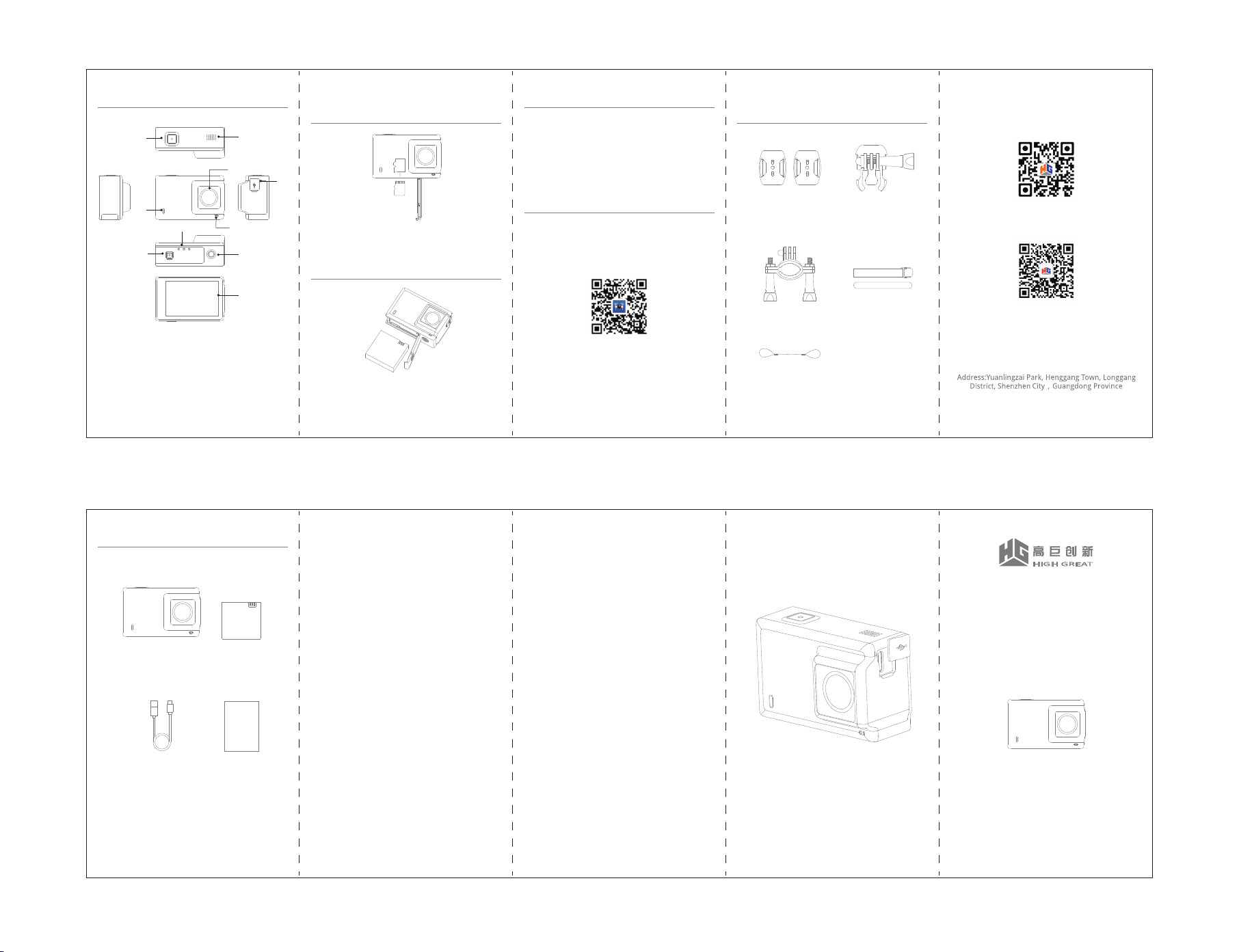
Camera Diagram
⑤
③
⑦
⑧
Insert/Pull out Micro SD Card
(Separate for Sell)
⑩
①
⑥
Charging
1. Open the soft rubber cover and charge the battery through
the Micro USB cable and the adaptor or connecting to PC.
2. Solid red on screen top left means charging and light off
means full charged.
FlightGo APP
②
⑨
Insert Micro SD Card: Insert SD card into the SD card slot
and push to the bottom.
Pull Out Micro SD Card: Push SD card edge with fingertip to
make the SD card pop up.
APP can control taking photos and downloading, recording
videos and playback. Photos can be shared to the social
medias or directly share to APP community to communicate
with the fans.
More Accessories for Fun
(Separate for Sell)
Flat surface and cambered
surface base / 3M tape
Adjustable Base
Official HighGreat Website
Install and Remove the Battery
④
1、Lens
2、Microphone: Audio input port
3、Status Indicator: Solid red means charging and light off
when full charge. Solid green means power on; green flashing
means recording; green flashing once means shooting. Blue
flashing means WiFi under working.
4、Screen: LCD Screen
5、Power/Shutter Button: Press and hold to power on/off;
press once to start/finish recording.
6、TType-c Port: Charging; data transmission
7、Micro SD Slot: Max support 64GB SD card
8、Battery Cover
9、1/4 Threaded Port: Connect selfie stick/tripod
10、Speaker
Official Standard Set
View Action Camera X1 Battery X1
USB Cable X1 User Manual X1
Install the Battery:
1. Open the battery cover and insert the battery follow by the
arrow direction.
2. Close the battery cover and ensure it’s closed.
Remove the Battery:
Open the battery cover and grab the holder on battery to pull
out the battery.
VIEW Action Camera Warranty
Warranty Regulations
The after-sales service of HighGreat VIEW action
camera is as follows:
1. Within 7 days from the date of your signing and the
product is functional fault proved by HighGreat
after-sales center, the product can be returned or
replaced.
2. Within 8 to 15 days from the date of your signing and
the product is functional fault proved by HighGreat
after-sales center, the product can be replaced or
repaired for free.
3. Within 12 months from the date of your signing and
the product is functional fault proved by HighGreat
after-sales center, the product can be repaired for free.
Non-warranty Regulations
Including but not limited as bellow:
1. Improper use, maintain or keep the product and not
follow the instruction of user manual.
2. The damage caused by force majeure factors such as
fire, flood and lightning strike.
3. The product model code on the warranty certificate is
inconsistent with the goods.
4.Damage caused by non-HighGreat after-sales service
repair.
5.The normal decolorization, wear and consumption of
the product during using.
6. * In case of any of these situations, you should seek
solutions from the responsible parties or choose paid
services.
Scan the QR and install the APP
You also can search for FlightGo in App Store or Google
Play, or login HighGreat website to download the APP.
FCC Statement
This equipment has been tested and found to comply with
the limits for a Class B digital device, pursuant to Part 15
of the FCC Rules. These limits are designed to provide
reasonable protection against harmful interference in a
residential installation. This equipment generates uses and
can radiate radio frequency energy and, if not installed and
used in accordance with the instructions, may cause
harmful interference to radio communications. However,
there is no guarantee that interference will not occur in a
particular installation. If this equipment does cause harmful
interference to radio or television reception, which can be
determined by turning the equipment off and on, the user
is encouraged to try to correct the interference by one or
more of the following measures:
-- Reorient or relocate the receiving antenna.
-- Increase the separation between the equipment and
receiver.
-- Connect the equipment into an outlet on a circuit
different from that to which the receiver is connected.
-- Consult the dealer or an experienced radio/TV
technician for help.
This device complies with part 15 of the FCC Rules.
Operation is subject to the following two conditions:(1)
This device may not cause harmful interference, and (2)
this device must accept any interference received,
including interference that may cause undesired operation.
Changes or modifications not expressly approved by the
party responsible for compliance
could void the user's authority to operate the equipment.
This equipment complies with FCC radiation exposure
limits set forth for an uncontrolled environment.
Holder
Steel Wire Rope
Binding Band
Official Wechat Account
Shenzhen HighGreat Innovation Technology Development Co., Ltd.
All right reserved
VIEW 1S
S02 User Manual
V 1.0.0
 Loading...