

Page 1
Funktionen:
• Steuerung der AudiostreamingWiedergabe
• Preset-Auswahl
• Eingangsquellenauswahl
• Quellenauswahl für das automatische Überblenden
• Regelung der Gesamtlautstärke
• Regelung des Subwooferpegels
WICHTIG: Die DSP-Steuerung per HF-DMC Controller und PC-Software bzw. per Smartphone-App funktioniert nicht gleichzeitig. Nutzen Sie nur eine der drei Steuerungsoptionen.
Lieferumfang:
1 x DSP Fernbedienungs-Controller
1 x Druckguss-Einbaugehäuse
4 x Befestigungsschrauben
1 x Klebepad
1 x 5 m Verlängerungskabel
Technische Daten:
Bluetooth Version 5.0
Frequenzbereich 2.400 - 2.484 MHz
Max. abgestrahlte Leistung 30,0 dBm
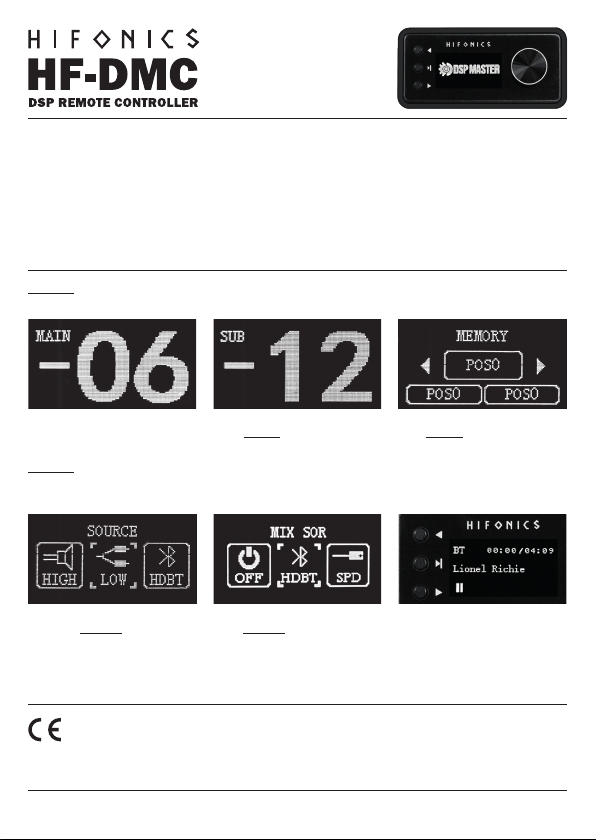
Im Hauptmenü kann mit dem Drehknopf die Gesamtlautstärke geregelt
werden. Regelbereich = - 40 bis 6.
HINWEIS: Nach etwa 5 Sekunden Inaktivität wechselt das Display Anzeige
immer zurück zum Hauptmenü.
Drücken Sie im Hauptmenü den
Drehknopf 2 x kurz, um das Menü
SOURCE anzuzeigen. Mit dem Drehknopf kann dann die gewünschte Eingangsquelle angewählt und per Knopfdruck bestätigt werden.
KONFORMITÄTSERKLÄRUNG
Hiermit erklärt die Audio Design GmbH, dass das Gerät HiFonics HF-DMC der Richtlinie 2014/53/EU entspricht. Die vollständige Konformitätserklärung ist unter www.hifonics.de/ce einzusehen.
Drücken Sie im Hauptmenü den Drehknopf 1 x kurz, um das Menü SUB
anzuzeigen. Mit dem Drehknopf kann
dann der Subwooferpegel eingestellt
werden. Regelbereich = - 40 bis +6.
Drücken Die im Hauptmenü den Drehknopf 3 x kurz, um das Menü MIX
SOURCE anzuzeigen. Mit dem Drehknopf kann dann die Quelle für das au-
tomatische Überblenden angewählt
und per Knopfdruck bestätigt werden.
Drücken Sie im Hauptmenü den Drehknopf 4 x kurz, um das Menü MEMO-
RY anzuzeigen. Mit dem Drehknopf
kann dann das gewünschte Preset
angewählt und per Knopfdruck bestätigt werden.
Mit den drei Hardware-Tasten neben
dem Display kann die Wiedergabe des
Audiostreamings gesteuert werden.
HIFONICS / AUDIO DESIGN GMBH · AM BREILINGSWEG 3 · D-76709 KRONAU · WWW.HIFONICS.DE
Page 2
Functions:
• Controlling audio streaming playback
• Preset selection
• Input source selection
• Source selection for the automatic
crossfading
• Control of the main volume
• Subwoofer level control
CAUTION: The DSP control via HF-DMC controller and PC software or via smartphone app does not work at the same time.
Use only one of the three control options.
Scope of delivery:
1 x DSP Remote Controller
1 x Die-Cast installation housing
4 x Mounting screws
1 x Adhesive pad
1 x 5m extension cable
Specications:
Bluetooth Version 5.0
Frequency range 2.400 - 2.484 MHz
Max. emitted power 30,0 dBm
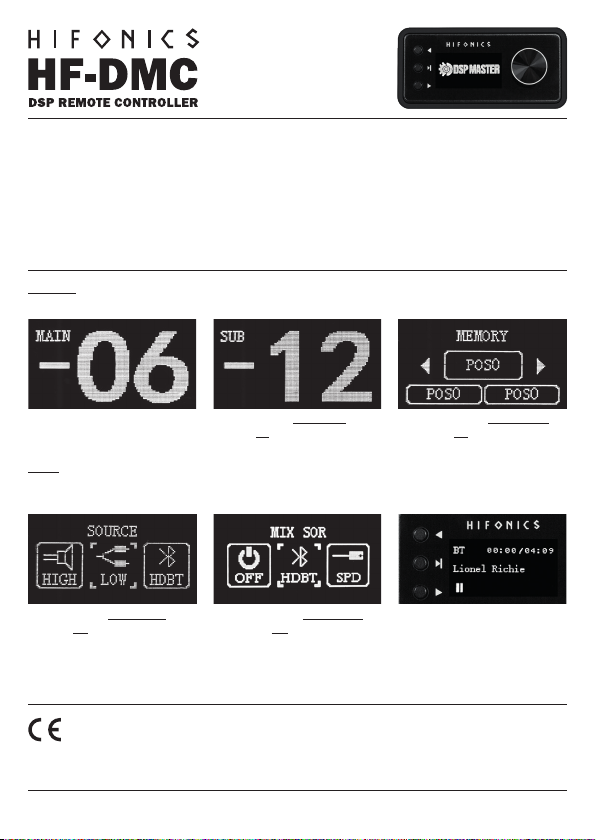
In the main menu, the main volume
can be adjusted using the rotary knob.
Controller range = - 40 to 6.
NOTE: After about 5 seconds of inactivity, the display always switches back
to the main menu.
In the main menu, briey press the rotary knob 2 x to display the SOURCE
menu. The desired input source can
then be selected using the rotary knob
and conrmed by pressing the rotary
knob.
DECLARATION OF CONFORMITY
Audio Design GmbH hereby declares that HiFonics HF-DMC complies with Directive 2014/53/EU. The full declaration of
conformity can be viewed at www.hifonics.de/ce
In the main menu, briey press the rotary knob 1 x to display the SUB menu.
The subwoofer level can then be adjusted using the rotary knob. Controller
range = - 40 to 6.
In the main menu, briey press the
rotary knob 3 x to display the MIX
SOURCE menu. The source for the
automatic crossfade can then be
selected using the rotary knob and
conrmed by pressing the rotary knob.
In the main menu, briey press the
rotary knob 4 x to display the MEMO-
RY menu. The desired preset can then
be selected using the rotary knob and
conrmed by pressing the rotary knob.
The playback of the audio streaming
can be controlled using the three hardware buttons next to the display.
HIFONICS / AUDIO DESIGN GMBH · AM BREILINGSWEG 3 · D-76709 KRONAU · WWW.HIFONICS.DE
 Loading...