

Page 1
KRYPTODISK
QUICK
INSTALLATION GUIDE
General information
Disclaimer
Hiddn’s advantage
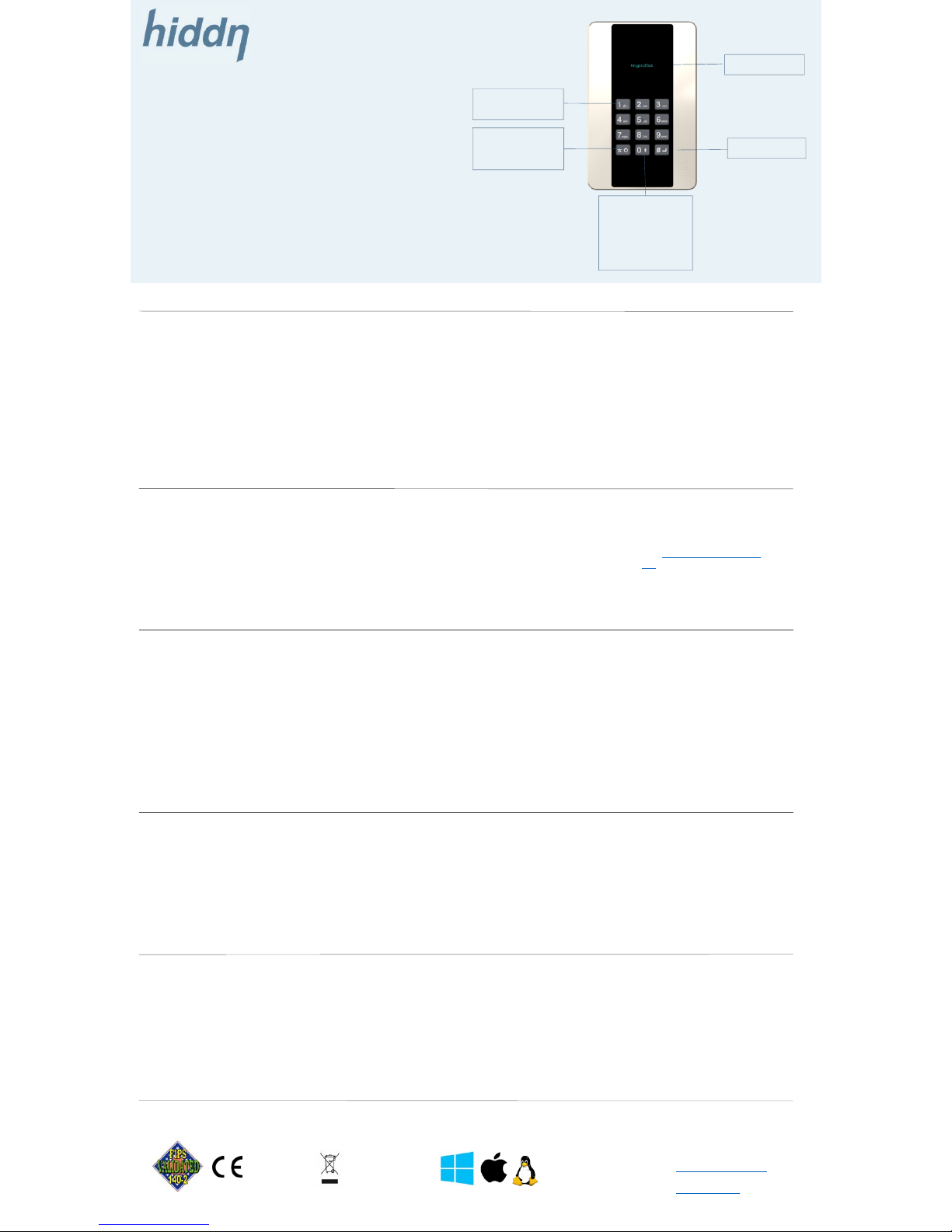
* ON/OFF
* BACK
* ERASE
Step 1. Initialise
Plug your KryptoDisk to a USB
computer device (PC) and follow
instructions on the display.
Restart by unplugging the
KryptoDisk from the USB device
and plug the cable back in the
KryptoDisk. The disk is now
initialised.
Step 3. PIN code
After PUK is accepted the
KryptoDisk will ask you to select
and type in a PIN code. The
criteria for PIN code are a
combination of 7-16 digits.
Please retype and the disk will
ready for formatting.
Step 2. PUK code
You will now be asked to select
and type in a PUK code. The
criteria for your PUK code are a
combination of 12-16 digits.
Select your PUK code, press enter
and then confirm your PUK.
Data Recovery
An unfortunate user entering the
wrong PIN/passphrase too many
times does not have to face
erased data, but may still recover
from the situation of a locked
storage device by entering the
PUK.
0: OPENS ADMIN
MODE
USE ‘0’ KEY TO
NAVIGATE IN THE
ADMIN MENU
# ENTER
OLED DISPLAY
ALPHANUMERIC
KEYBOARD
Support
www.hiddn.no/support
www.hiddn.no
Designed, produced and assembled in Norway
Easy to use
KryptoDisk comes with a bright,
easy to read OLED display that
informs the user about the status
of the device.
KryptoDisk offers a full
alphanumeric keyboard enabling
the user to enter passphrases in a
T-9 style format as known from
mobile users.
Plug and Play
KryptoDisk can be used straight
out of the box and does not
require any software or drivers to
be installed prior to use. It is
compatible with various operating
system (OS). Before first time use
you will need to format the
KryptoDisk.
Before you can start using the
KryptoDisk you will be asked to
initialise and create a PIN and a
PUK code.
Security information
Two – factor authentication
Hiddn’s unique and secure value
proposition is that the encryption
key is stored encrypted on the
smart card and deleted from the
KryptoDisk when the unit is
switched off.
The user can only access the
device by inserting the smart card
and entering users’ PIN.
All data encryption keys are
stored in Common Criteria EAL 5+
certified tokens (Smart Cards).
Users can change PIN.
A PUK can reopen the Smart Card
and the user can set a new PIN.
To many failed attempts to enter
PUK will zeroize your KryptoDisk,
data is lost and unit is set back to
factory settings. Re-start using
the KryptoDisk according to “First
time use”
All trademarks and brand names are the property of their respective owners
Step 4. Formatting the disk
Please use Disk manager
(Microsoft OS) to initialise and
format your KryptoDisk. If you
need guidance, please follow this
link: Formatting the disk drive
(N).
After formatting the disk drive
your KryptoDisk is ready for use.
Introduction
Please read through this guide
thoroughly before powering up
your KryptoDisk USB device. This
is an encrypted USB disk
providing some unique security
features you must be aware of.
These are described in the
sections “Security information”
and “Important security functions”
further down in the document.
Hiddn accepts no liability for any consequential, incidental, direct or indirect damage (including but not limited to loss of business profits, business interruption,
loss of business information and similar events causing losses to business) arising from any action and/or inaction based on information contained in this
document. Hiddn does not accept any liability for any loss of data and/or company and/or personal information that may result from any action and/or inaction
based on information contained in this document. Users are instructed to make backups of all data prior to installation of any device or products described
herein. All Hiddn KryptoDisk parts are Hiddn parts, and Hiddn does not accept any liability for any direct or indirect loss related to the handling and/or
mishandling of any of the parts and/or combination of the parts provided in this package. Hiddn reserve the rights to at any time and without notification
change its offer and/or price and/or availability of parts.
Rev. no 1.01.KD-SHE-05.10.17.
First time use
Zeroize
This function restore the device
back to factory settings.
All data will be permanently
erased and creation of a new
PIN/PUK are required.
This function is useful if the
KryptoDisk changes owner/user.
Important security functions from the admin menu
Erase all data
Some situations require that you
delete all information on the hard
drive but keep the PIN and PUK.
The function “erase all data” will
make sure that all data are
permanently deleted – similar to
wiping out a hard disk. The data
cannot be recovered.
Other admin features
Admin menu provides you with
detailed system information,
enables you to change the device
name and change PIN.
SECURITY FIRST
As any type of storage devices may occasionally fail we
strongly recommend that you store and back up any
valuable or critical data according to the rules provided
by your IT-department (or using at least two
independent storage devices).
Security recommendation
To ensure the best security for
your device and protection of your
data we recommend that you
keep the smart card and
KryptoDisk separate from each
other when in use.
Two-factor authentication require
you to have both smart card, PIN
and the KryptoDisk to be able to
access data stored on the device.
Admin menu
To enter the Admin menu press
and hold the ‘0’ key while
powering on the device. Please
note that if you hold the ‘*’ key for
more than 1 second the device
will switch off again.
Use the ‘0’ key to navigate in the
Admin menu.
Page 2
Safeguarding your data anywhere
WHAT
We provide hardware-based encryption solutions for data at rest. With our encrypted
products you are guaranteed the right level of confidentiality, integrity and availability
for sensitive information.
We provide a solution that enables people to bring data and access centralized
content regardless of time, place and network. Hiddn Solutions is your guarantee for
the right level of confidentiality, integrity, and availability for sensitive information.
Our patented encryption technology ensure the best data protection and rights
management. We deliver the world’s most secure memory stick and hardware based
encryption for laptops. The combination empowers and protects your workforce when
working outside the office.
HOW
Our technology fall within the segment of full drive encryption products and is applied
on encrypted hard drives, encrypted USB sticks and encrypted USB drives.
Hiddn’s technology offers unparalleled authentication and secure key handling features
and differ from other hardware encryption solutions in that the key is deleted when the
storage device is without power. The encryption key is stored encrypted on the chip of
a separate smart card and is only transferred to the device following a proprietary
process of two-factor authentication and encrypted key transfer.
The administration of our secured products are made simple with an “easy to use” Key
Management System.
WHY
Cybersecurity is getting increasingly complicated, with attackers continuously
finding new ways to achieve their goals. As a consequence, the market is turning to
data encryption as a part of the solution.
40 % of all data leakages happen through lost or stolen devices. Data lost through
devices comprise both data stored directly on the device as well as network data
accessed through the device. To prevent unauthorized access on devices like PCs,
USB sticks and other mobile drives the devices needs to be secured.
TECHNOLOGY APPROVED AND IN USE BY NATIONAL SECURITY AUTHORITIES
ENCRYPTION KEYS STORED EXTERNAL ON A SMART CARD
TWO-FACTOR AUTHENTICATION
KRYPTODISK
ENCRYPTED EXTERNAL
USB 3.1 SSD 1 TB
FIPS 140-2 LEVEL 3
ENCRYPTED INTERNAL SSD
500 GB
2,5″″, 7mm
ENCRYPTED MEMORYSTICK
64 GB
FIPS 140-2 LEVEL 3
COCRYPT SAFEDISK
 Loading...