

Page 1

EQUIVITAL™ EQ-01 VITAL SIGNS
MONITOR
USER APPLICATION GUIDE
Draft: D Date: 02nd June 2006
For Support or further information on this product contact:
Customer Support
Hidalgo Limited
Stable Block at The Grange
20 Market Street
Cambridge
CB4 5QG
United Kingdom
www.hidalgo.co.uk
Tel: +441954 233430
email: [email protected]
Stable Block at The Grange, 20 Market Street, Swavesey, Cambridge, CB4 5QG
Tel: +44 (0) 1954 233430 Fax: +44 (0) 1954 233431
www.hidalgo.co.uk
Page 2

USER APPLICATION GUIDE
CONTENTS
What is the Equivital Monitor Used For: .................................................................................................... 4
What does the Equivital Vital Signs Monitor Consist Of: .........................................................................5
Fitting Instructions........................................................................................................................................ 5
Recharging or Changing Batteries on the SEM ...................................................................................... 8
Switching the Sensor On and Off............................................................................................................ 10
Washing and Cleaning ............................................................................................................................ 10
Accessories................................................................................................................................................ 10
Repair and Service ................................................................................................................................... 11
Technical Specifications .......................................................................................................................... 11
FCC Compliance and Advisory Notice (US Markets) .......................................................................... 13
Draft: D 02nd June 2006 Page: 2 of 14
Page 3
USER APPLICATION GUIDE
Explanation of Symbols
Within this manual the following symbols are used to indicate warnings and precautions a user
should take when using this device:
A warning is shown within a highlighted box and includes a symbol
Failure to follow the warning may comprise the safe operation of the device and can lead to a
risk of injury.
A precaution is noted in a highlighted box. Failure to follow a precaution may lead to a
reduction in performance of the device when in use.
Before using Equivital™
Please observe the following warnings and precautions:
Warnings
IF YOU ARE UNCLEAR AS TO WHY YOU ARE BEING ASKED TO WEAR THIS DEVICE
•
PLEASE CONSULT THE HEALTH CARE PROFFESIONAL OR OCCUPATIONAL WELFARE
PERSONNEL RESPONSIBLE BEFORE USE.
• THE EQUIVITAL™ DEVICE MAY BE USED TO MONITOR INDIVIDUALS IN THE
WORKPLACE. WHEN USED IN THIS MANNER THE DEVICE MUST BE INTEGRATED INTO
THE OPERATING ORGANISATIONS SAFETY AND RISK MANAGEMENT PROCEDURES.
YOU SHOULD RECEIVE APPROPRIATE TRAINING FROM YOUR ORGANISATION
BEFORE USING THIS DEVICE
• USE OF THE DEVICE DOES NOT JUSTIFY THE USER OR ORGANISATION TO TAKE
ADDITIONAL SAFETY RISKS OR TO REDUCE LEVEL OF CARE.
• THIS DEVICE DOES NOT AUTOMATICALLY CALL EMERGENCY SERVICE ASSISTANCE.
• DO NOT APPLY SENSOR TO BROKEN, DAMAGED OR IRRITATED SKIN.
REMOVE SENSOR IMMEDIATELY IF SKIN IRRITATION OR RASHING OCCURS.
•
• DO NOT ATTEMPT TO CONNECT ANY CABLES TO THE EQUIVITAL DEVICE WHEN
WORN ON BODY- THIS INCLUDES HIDALGO SUPPLIED BATTERY CHARGING DEVICE.
ALWAYS REMOVE THE DEVICE BEFORE CHARGING.
Draft: D 02nd June 2006 Page: 3 of 14
Page 4
USER APPLICATION GUIDE
• IF YOU HAVE AN IMPLANTED DEFIBRILLATOR OR PACEMAKER DO NOT USE THIS
DEVICE. IF YOU WEAR OR USE OTHER MEDICAL EQUIPMENT PLEASE CONTACT YOU
HEALTH CARE PROFESSIONAL BEFORE USING THIS DEVICE.
• USE ONLY THE HIDALGO PROVIDED BATTERY CHARGER AND BELT ASSEMBLIES WITH
THE DEVICE. THE SAFE USE OF THE DEVICE IS ONLY GUARANTEED WITH THESE
ACCESSORIES. A FULL LIST OF ACCESSORIES IS PROVIDED AT THE REAR OF THIS
DOCUMENT
Precautions
• DO NOT USE LOTIONS, OILS, PERFUMES, DEODORANT OR POWDER ON THE AREA WHERE THE SENSOR
BELT IS BEING APPLIED
EACH TIME YOU USE THE SENSOR INSPECT THE BELT AND CASE UNIT FOR SIGNS OF DAMAGE (TEARS/
•
CRACKS ETC). IF ANY DAMAGE IS IDENTIFIED DO NOT USE THE SENSOR UNTIL THE DAMAGED PART
HAS BEEN REPLACED
• TO GET MAXIMUM PERFORMANCE FROM THE SYSTEM YOU SHOULD REPLACE THE BELT HARNESS AFTER
25 WASHES.
What is the Equivital Monitor Used For:
The Equivital™ Vital Signs Physiological Monitor is a non-invasive ambulatory monitoring
wireless telemetry device intended to allow monitoring of a users vital signs physiology in
environment’s where access to traditional clinical care facilities may be limited or
impractical (for example in the workplace or outdoors) and justification exists for such
monitoring.
The device maybe used by persons operating in circumstances where an increased risk of
physical trauma exists due to the environment in which the user is placed. Typically these
environments may be found within personnel working in the military, public safety and
hazardous plant workplaces.
The device may also be used for the collection of ambulatory physiology for general
research purposes in application such as sports or human performance medicine.
The device offers continuous monitoring of two views of the user’s heart electrical activity
(ECG) and respiratory breathing frequency inferred from thoracic cavity movement and
uses this data to derive a Heart and Breathing Effort Rate.
The sensor also provides additional information:
• an indication of the users activity level (none, low or high) derived from a
movement detection sensor.
Draft: D 02nd June 2006 Page: 4 of 14
Page 5
USER APPLICATION GUIDE
• body orientation.
• chest skin surface temperature.
• alternate secondary measurement of heart rat
• alternate secondary measurement of respiration effort
indications and alerts if physiology exceeds predefined boundaries.
•
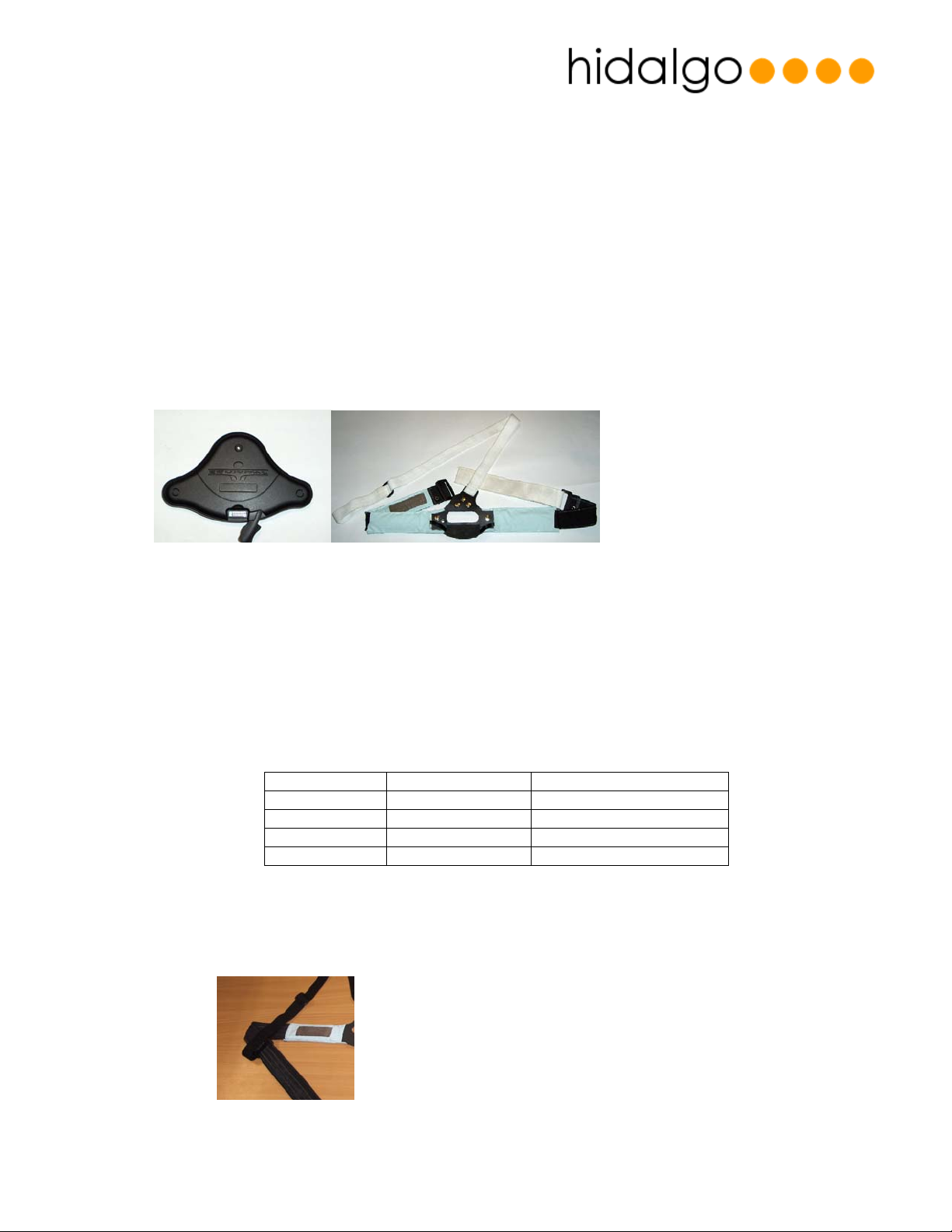
What does the Equivital Vital Signs Monitor Consist Of:
The device consists of two items:
A sensor electronics module (SEM) which contains a battery , electronics and software in order
to measure the vitals signs signals off the body.
A belt harness which holds the SEM onto the body and contains fabric electrodes in order to
contact to the user skin.
Fitting Instructions
Selecting the Correct Belt Size
The following sizing chart provides a guideline on how to select the correct belt size to use
Belt Size Shirt Size Chest Circumference
S S 33-37
M M 37-41
L L 41-45
XL XL 45-49
Some variation may exist for uses at the size boundaries in which case it is recommended to go
for the larger sized belt.
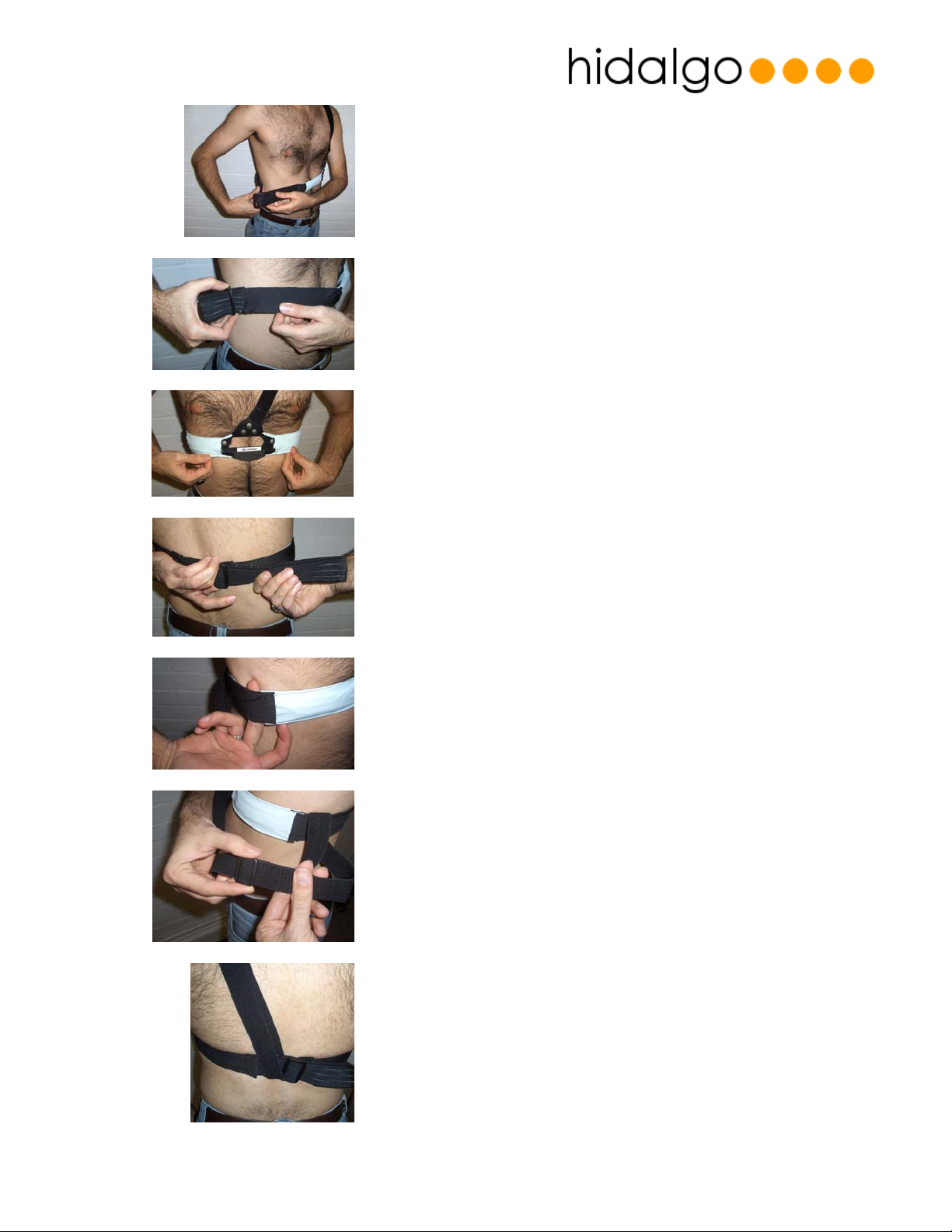
Applying the Belt
1. Pass adjuster strap through loop of shoulder strap
Draft: D 02nd June 2006 Page: 5 of 14
Page 6
USER APPLICATION GUIDE
2. Place shoulder strap over left arm and then place chest
strap around the waist. Then pull the adjuster band with
the right hand so that it comfortable meets the buckled
end (held in the left hand), on the right hand side of the
torso.
3. Loop the adjuster band through the buckle and tighten
just enough to take out excess slack.
4. Straighten the band so the centre section sits centrally
on the chest.
5. Tighten strap by holding the buckle with the left hand
and pulling the adjuster strap with the right hand. The
belt should be a snug fit to the body
6. When tensioned correctly, the strap must be
comfortable and should not restrict the users chest
movement. As a guide, it should be possible to easily
place one finger under the strap when tightened.
7. To adjust the upper strap, remove from the shoulder
and lengthen/shorten as necessary.
8. Replace strap over shoulder and adjust rear lower
section such that it sits centrally on the back between
Draft: D 02nd June 2006 Page: 6 of 14
the buckles.
Page 7
USER APPLICATION GUIDE
9. To ensure that the strap is now positioned and
tensioned correctly, extend arms to the side and raise
and lower them a few times. Now moisten the skin
under the three electrode sites with saliva or water
which accelerates the electrode to skin connection
and improves in the initial few minutes after application.
Attaching the “SEM” Electronics Unit and Final Adjustments
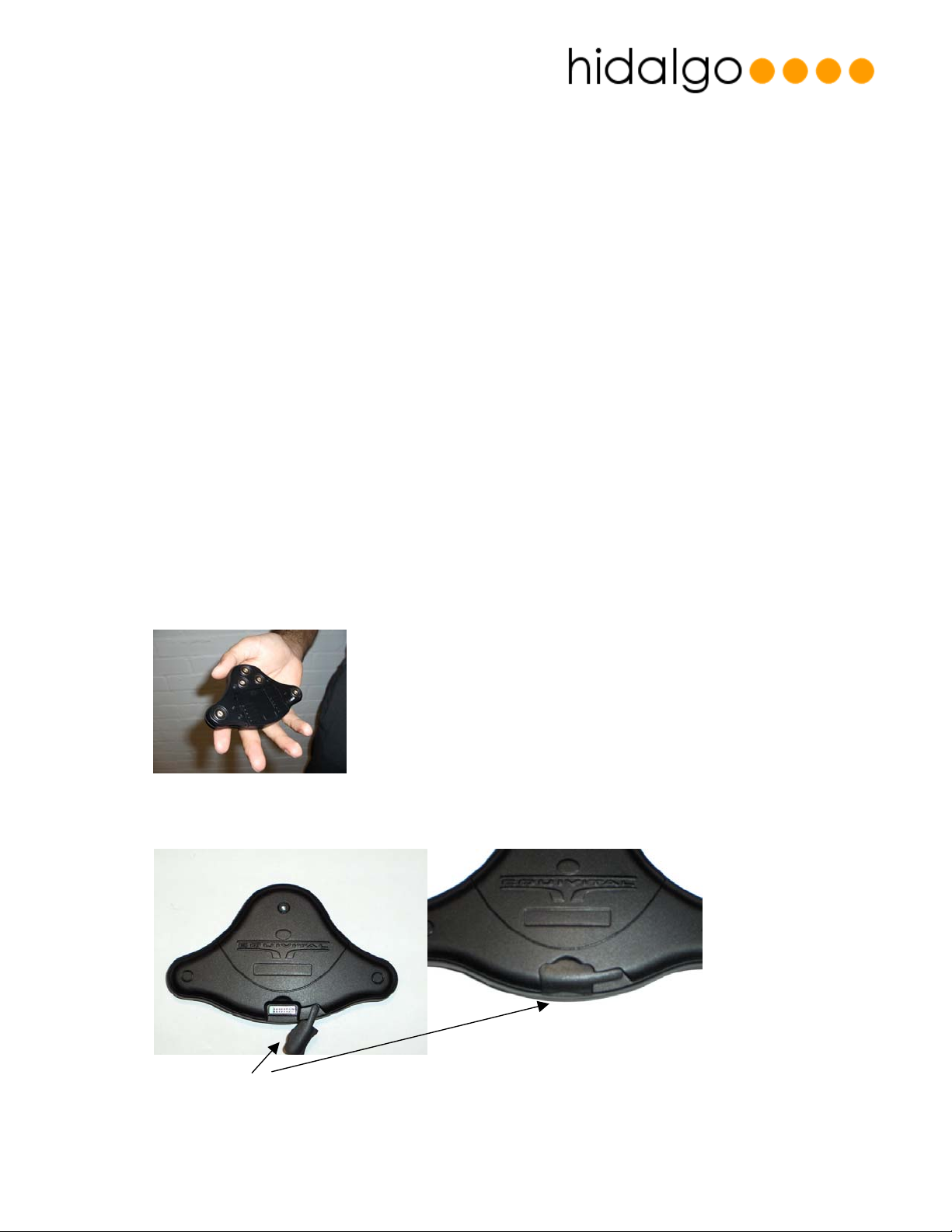
Take the SEM electronics module:
The rear of the SEM electronics unit has simple “snap” stud connectors which allow it to be
connected to the sensor
If this is the first time you have used the SEM or you have just completed recharging the SEM.
Place the activation connector into the hole on the front of the unit.
Activation connector
Draft: D 02nd June 2006 Page: 7 of 14
Page 8
USER APPLICATION GUIDE
Once the device is activated, hold the device for approximately six seconds. The units internal
vibration alerter will operate with three short pulses indicate that it is correctly operating.
In order to verify transmission from the sensor is being received remotely you will need to check
or confirm with the receiving station or monitoring point your sensor talks to. (This will vary from
system to system so ask your system operator or health care practioner if you are unsure)
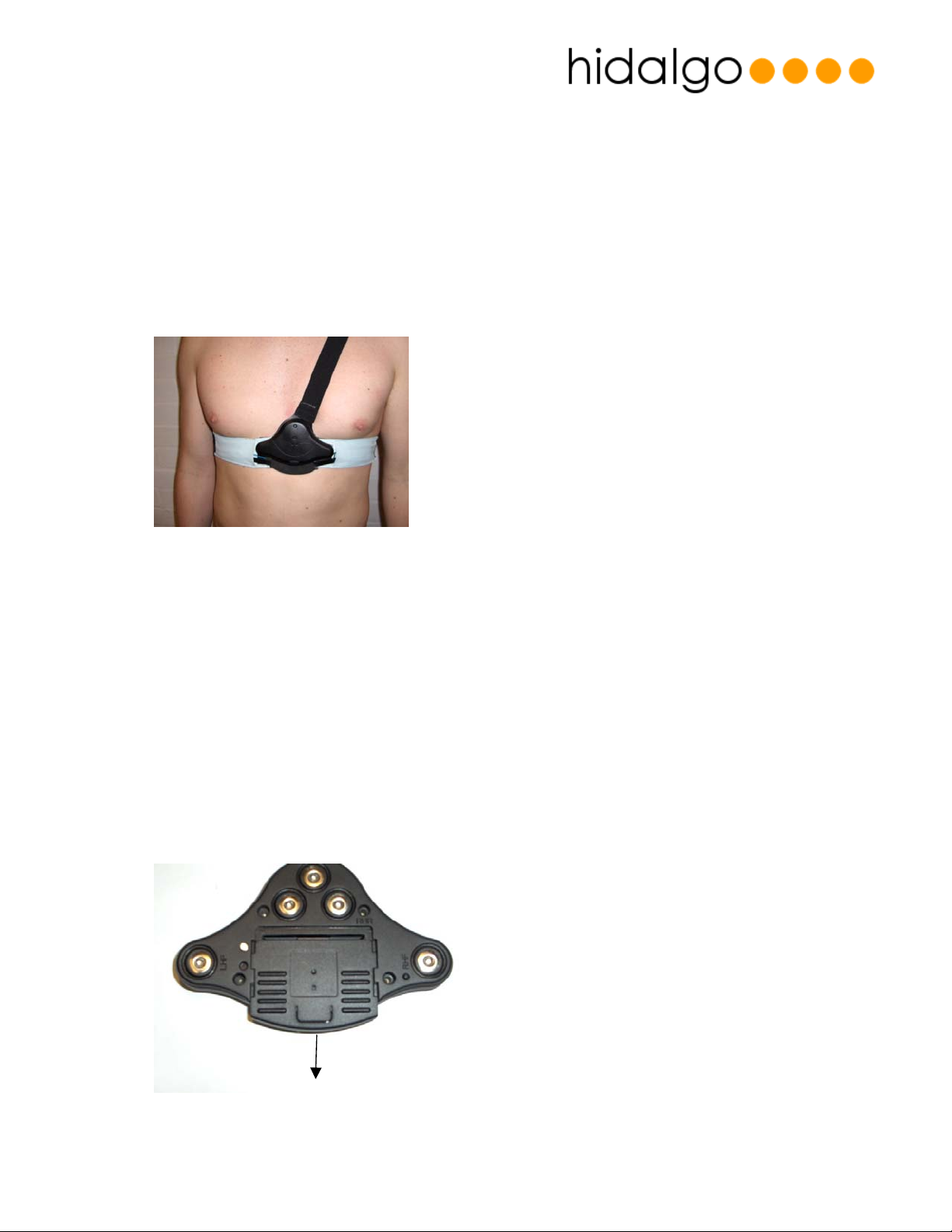
Now take the unit and connect each snap in turn making sure all have been connected.
Finally adjust the location of the sensor belt for comfort and make sure the SEM unit
is centrally located on the chest as shown below:
Recharging or Changing Batteries on the SEM
The sensor unit SEM comes with two options for powering the unit, a rechargeable cell, or
replaceable AAA/LR03 batteries. The option you have will depend on what type of device was
specified when it was purchased.
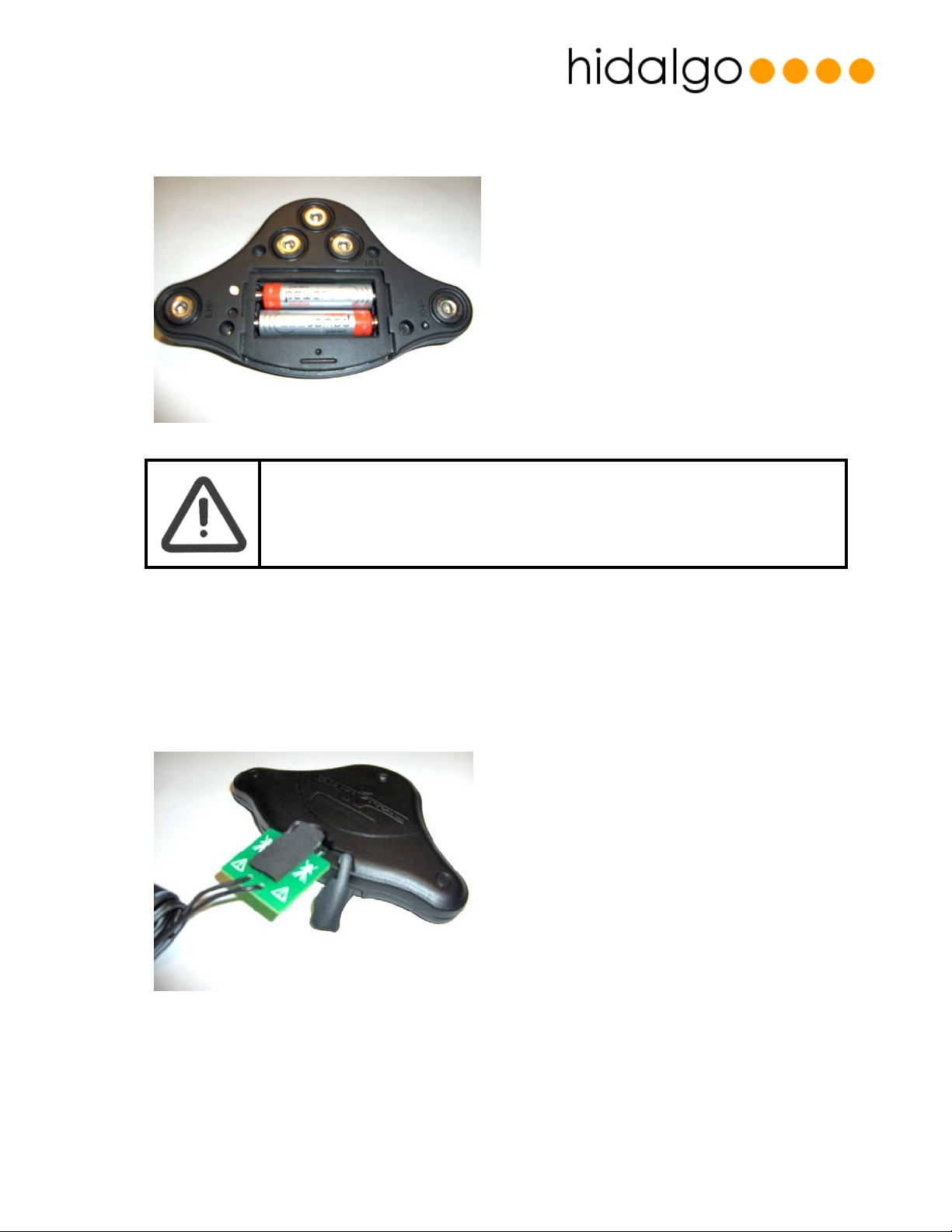
Changing the AAA Batteries
Remove the rear battery door by sliding it down and then lifting it out
Draft: D 02nd June 2006 Page: 8 of 14
Page 9
USER APPLICATION GUIDE
Fit the batteries into the battery compartment observing the polarity marking inside the case
and replace the case.
• USE ONLY PRIMARY NON-RECHARGABLE (LR03 AAA) ALKALINE CELLS.
RECHARGEABLE AAA CELLS SHOULD NOT BE USED.
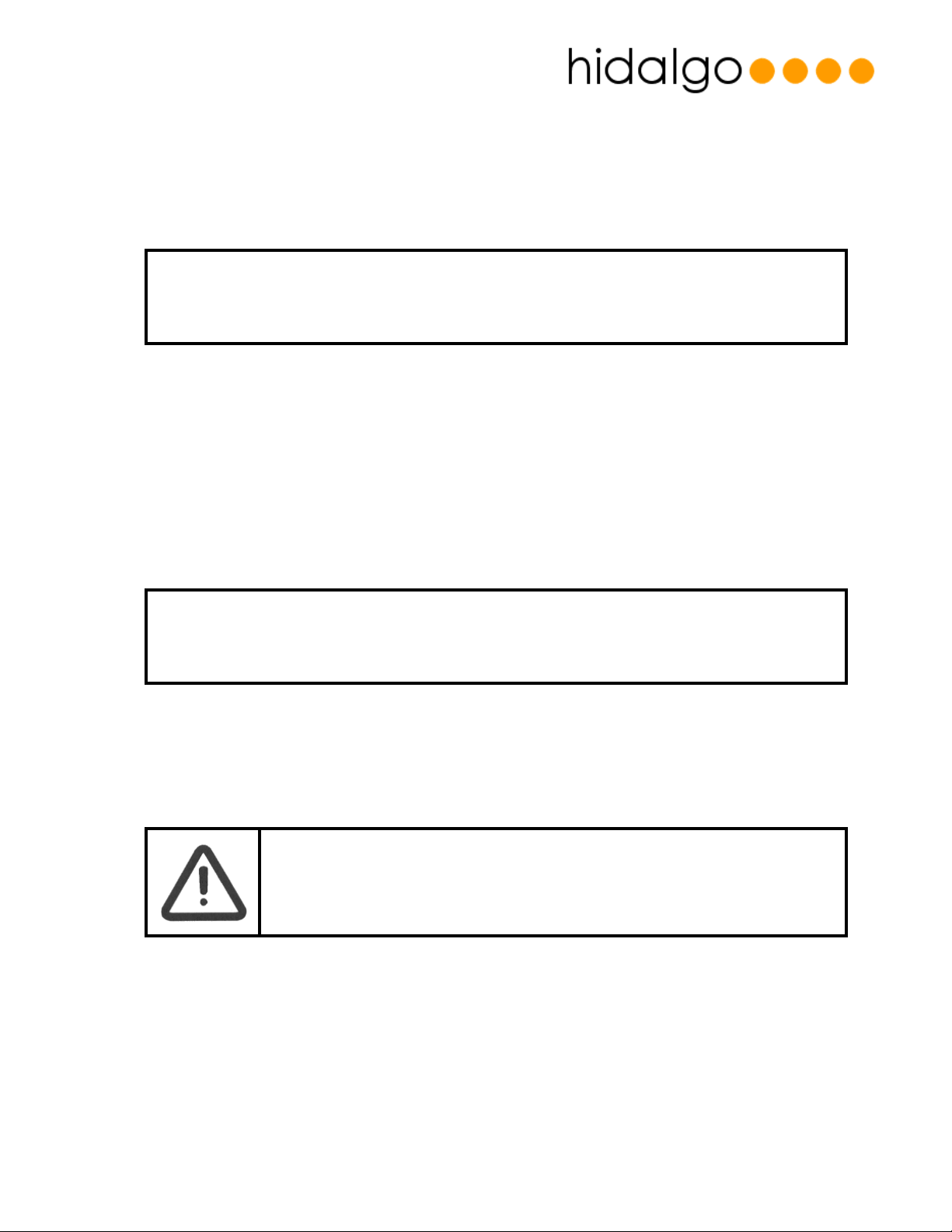
Recharging the SEM
Remove the activation bung and attach the charger unit cable to the connector. The charger
will indicate a red light when charging and green when charged. Only connect the charger
power plug to the socket after you have attached it to the SEM. Failing to do this can give false
indications of charge on the charger light.
In order to maximise the rechargeable battery lifetime it is recommended to avoid leaving the
unit connected to the charger once fully charged.
Draft: D 02nd June 2006 Page: 9 of 14
Page 10
USER APPLICATION GUIDE
Switching the Sensor On and Off
If you want to stop using the sensor, or only use it intermittently – remove power by taking the
activation bung out of its hole.
• REMOVE THE AAA BATTERIES FROM THE DEVICE IF IT WILL NOT BE USED FOR SOME TIME (>10DAYS).
THIS IS TO REDUCE THE RISK OF THE CELLS LEAKING AND CORODING THE BATTERY CONTACTS
Washing and Cleaning
SEM
Wipe the SEM clean with a damp cloth and leave to dry normally
Belt
Wash the belt in a cold wash (40°C) using a mild non biological detergent.
• DO NOT TUMBLE DRY THE BELT – THIS WILL REDUCE THE LIFE OF THE BELT
Accessories
• USE ONLY THE FOLLOWING ACCESSORIES.
Battery Charger
Hidalgo Part Number:
EQ-ACC-01 - Mascot 2240 LI(UK Plug)
EQ-ACC-02 - Mascot 2240 LI (US Plug)
Draft: D 02nd June 2006 Page: 10 of 14
Page 11
USER APPLICATION GUIDE
EQ-ACC-03 - Mascot 2240 LI (EU Plug)
Chest Belt
Hidalgo Part Number:
EQ01-020 (/S/M/L/XL)
Repair and Service
• THERE ARE NO USER SERVICEABLE PARTS IN THE DEVICE. SHOULD YOU REQUIRE
Technical Specifications
SERVICE OR REPAIR PLEASE CONTACT HIDALGO
Device Classification
Shock Protection : Type BF Applied Part , Internally Powered Equipment
Enviromental Protection: IPx0 (unprotected)
Flammable Gas Protection: Unprotected
Mode of Operation: Continuous
FDA Device Classification: Class II
EU Device Classification: Class IIb
Chest Harness /Belt
Size (circumference):
Small: 40mm x 108mm
Medium: 40mm x 116mm
Large: 40mm x 124mm
Extra Large:40mm x 131mm
Weight: 80g
Operating temperature: -10°C to +55°C
Operating Humidity: 10% to 75% RH Non-Condensing
Storage Temperature: -20°C to +65°C
Storage Humidity: 5% to 90% RH Non-Condensing
Air Pressure: 570hPA – 1060hPA
Draft: D 02nd June 2006 Page: 11 of 14
Page 12

USER APPLICATION GUIDE
Sensor Electronics Module
• General
Size (overall dimensions): 123mm x 75mm x 14mm
Weight: 75g
Power: 2 x 1.5v AAA LR03 Alkaline cells or
3.7V 740mA Li-ION rechargeable cell
Operating temperature: -10°C to +55°C
Operating Humidity: 0% to 95% RH Non-Condensing
Storage Temperature: -20°C to +65°C
Storage Humidity: 0% to 95% RH Non-Condensing
• ECG
No of leads: 2
Sampling frequency: 256 Hz
Resolution: 10 bits
Voltage range: +/- 5mV
CMRR: >85 dB
Frequency Range: Diagnostic Setting : 0.05 – 85 Hz (3dB points)
Monitor/Ambulation Setting : 5Hz – 85Hz (3dB points)
Heart Rate Calculation
Frequency: 15 seconds
• Impedance Respiration Effort
Measurement type: Bipolar
Sampling frequency: 25.6 Hz
Resolution: 10 bits
Modulation: 50 KHz
Drive Current: 200 µA
Frequency Range: 0.05 – 7 Hz
Respiration Rate Reporting
Frequency: 15 seconds
• Chest Expansion Respiration Effort
Measurement type: Resistive strain gauge
Sampling frequency: 25.6 Hz
Resolution: 10 bits
Frequency Range: 0.05 – 7 Hz
Respiration Rate Reporting
Frequency: 15 seconds
• Temperature
Sampling frequency: 0.25Hz
Resolution: 10 bits
Range: 10°C - 45°C
Sensor Accuracy: <35.8C and > 41C +/- 0.3 C
35.8C to 37C +/-0.2C
37 to 39 C +/- 0.1C
39C to 41 C +/- 0.2 C
Draft: D 02nd June 2006 Page: 12 of 14
Page 13
USER APPLICATION GUIDE
Measurement type: Thermistor
Temperature Reporting
Frequency: 15 seconds
Radio – Type 0 Low Power Pan
Frequency: 40.68MHz
Modulation: Binary FSK
Data Rate: 2400 Baud
Modulation: +/- 4KHz
Radio – Type 1 Bluetooth
Frequency: 2401 – 2480MHz
Modulation: TDD GFSK (BbT -0.5)
Data Rate: 1MBPS
Carrier Spacing: 1 MHz
No of Channels: 79
Tx Power: Class 2/+4dBm Max
Electromagnetic Compatibility
This device has been designed to meet the relevant radio and electromagnetic interference
standards for the countries its is used in.
A risk remains however, as for all radio based devices, that interference may occur either from or
to the device.
If you experience unwanted interference increase the physical separation between the devices.
We recommend a separation of 0.5 meter or greater between the SEM device and other
wireless devices.
If you have specific concerns about the devices compatibility or experience problems which
cannot be resolved by increasing separation of the devices, please contact Hidalgo.
• IF YOU ARE ENTERING A FACILITY WHERE INTERFERENCE MAY BE A PARTICULAR
CONCERN (EG: A HOSPITAL OR HAZARDOUS PLANT ENVIROMENT ) CONTACT THE
PERSON IN CHARGE OF THE FACILITY TO CHECK IF ANY SPECIAL PRECAUTIONS
NEED TO BE TAKEN.
FCC Compliance and Advisory Notice (US Markets)
This equipment has been tested and found to comply with the limits for a Class B digital device,
pursuant to Part 15 of the FCC Rules. These limits are designed to provide reasonable protection
against harmful interference in a residential installation. This equipment generates, uses and can
Draft: D 02nd June 2006 Page: 13 of 14
Page 14

USER APPLICATION GUIDE
radiate radio frequency energy and, if not installed and used in accordance with the
instructions for use, may cause harmful interference to radio communications.
However, there is no guarantee that interference will not occur in a particular installation. If this
equipment does cause harmful interference to radio or television reception which can be
determined by turning the equipment off and on, the user is encouraged to try to correct the
interference by one or more of the following measures:
• Reorient or relocate the receiving antenna.
• Increase the separation between the equipment and the receiver.
• Connect the equipment into an outlet on a circuit different from that to which the receiver is
connected.
• Consult the dealer or an experienced radio/television technician for help.
This device complies with Part 15 of the FCC Rules. Operation is subject to the following two
conditions: (1) this device may not cause harmful interference, and (2) these devices must
accept any interference received, including interference that may cause undesired
operation.
FCC ID: T85EQ001
Draft: D 02nd June 2006 Page: 14 of 14
 Loading...