

Page 1
Version No.2.0 Issued October
2015 English
MINING OPERATIONS
Access Point 360A
Technical Reference Manual
Software Version: v1.19
Page 2

Page 3

Devex Mining is committed to providing only the highest standards in technical
documentation and training.
Through a continual process of review and renewal, based on industry standards, client
feedback and best practice, we ensure our products are supported by quality documentation
and training.
From product offerings to customer support, Devex Mining is governed by the overarching
principal that the customer comes first. We offer comprehensive documentation and training;
ensuring client needs are met and exceeded.
Devex Mining is a division of Hexagon Mining
Devex Mining delivers leading solutions for fleet management and production optimization,
machine maintenance, business intelligence and analytics.
Devex Mining is part of Hexagon Mining, the only global provider of surface and underground
smart mining solutions that integrate design, planning, and operations technologies for safer,
more productive mines. Learn more at hexagonmining.com.
Devex AP360 Technical Reference v2.0
This document and any information or descriptive matter contained therein is communicated
in confidence and is the copyright property of Devex Mining Neither the whole, nor any
extract may be disclosed, loaned, copied, or used in manufacturing or tendering purposes
without their written consent.
© Copyright [2011-2015] Devex Mining. All rights reserved. Devex Mining is part of
Hexagon. Devex Mining and the Devex Mining logo are the registered trademarks of Devex
Mining. All trademarks or service marks used herein are property of their respective owners.
Devex Mining makes no representation or warranty regarding the accuracy of the information
in this publication. This document gives only a general description of the product(s) or
service(s) offered by Devex Mining and, except where expressly provided otherwise, shall
not form part of any contract. Such information, the products and conditions of supply is
subject to change without notice.
Disclaimer: Illustrations, descriptions, and technical specifications in this document are not
binding and are subject to change without notice.
This document is optimized for printing on A4 paper.
Devex Mining is focused on providing you with low maintenance products that
have competent back-up support, when you need it, 24/7 every day of the year.
For further information contact your local Devex Mining office or go to
www.devexmining.com
Page 4

Date
Document
Version
Software
Version
Author
Revision
21 JUL
2015
1
1.19
Gustavo
Henrique
L.Severino
Initial Document Release
13 OCT
2015
2
1.19
Marco
Antonio
Santuci
Carvalho
Modifications in label
documentation
Revision History
ii © Devex Mining
Page 5

Table Of Contents
1 Document Introduction .............................................................................. 1
1.1 Contacting Support ...................................................................................................... 1
1.2 Document Conventions ................................................................................................ 1
2 Access Point 360 Overview ....................................................................... 2
2.1 System Information ...................................................................................................... 2
2.2 Product Faceplate Description ..................................................................................... 2
2.3 Labels ........................................................................................................................... 2
2.3.1 Labels Location .................................................................................................. 2
2.3.2 Access Point 360 FCC Certification Label ......................................................... 4
2.3.3 Access Point 360 Serial Number Label ............................................................. 4
3 AP Commissioning .................................................................................... 5
3.1 Commissioning Workflow ............................................................................................. 5
4 Hardware Installation ................................................................................. 6
4.1 Before Installation ........................................................................................................ 6
4.2 Access Point Installation .............................................................................................. 6
4.2.1 Front View .......................................................................................................... 6
4.2.2 Rear View .......................................................................................................... 7
4.3 Data Head End – DHE ................................................................................................. 8
4.4 Power Cable Installation .............................................................................................. 8
4.5 Communication Cable Installation ............................................................................... 9
4.6 Ethernet Cable Installation ........................................................................................... 9
4.7 Final Assembly ........................................................................................................... 10
5 Software Installation ................................................................................ 11
5.1 Update Accesst Point 360 using debug cable ........................................................... 11
5.2 Installation and Configuration Verification.................................................................. 13
6 Technical Data .......................................................................................... 15
6.1 Design ........................................................................................................................ 15
6.1.1 User interface................................................................................................... 15
6.1.2 Dimensions ...................................................................................................... 15
6.1.3 Weight .............................................................................................................. 15
6.1.4 Power ............................................................................................................... 15
6.2 Envionmental Specifications ...................................................................................... 15
6.2.1 Temperature .................................................................................................... 15
6.2.2 Protection Against Water, Dust and Sand ....................................................... 15
6.2.3 Humidity ........................................................................................................... 15
6.3 Communication Interfaces ......................................................................................... 15
6.4 FCC Statement (Applicable for U.S.) ......................................................................... 16
7 Glossary .................................................................................................... 17
© Leica Geosystems Commercial in Confidence iii
Page 6

Page 7

Contact Method
Details
Web portal
http://devexmining.com/smartmine/suporte-eservicos/suporte-tecnico and select Suporte ao Cliente
Devex
Convention Example
Description
See xxx
Refer to
“See” indicates a reference to another section of this
document.
“Refer to” indicates reference to another document.
WARNING
Warnings alert the user to dangerous procedures which could
cause injury or death.
CAUTION
Cautions alert the user to dangerous procedures which could
cause damage to equipment.
Note
Notes supply important information about a procedure which is
not covered in the procedure text.
1 Document Introduction
The AP360 (Access Point) Technical Reference Manual is part of the Devex Mining´s reference
manual suite.
This manual is for internal use only and is intended to serve as a commissioning and
maintenance guide for the AP360 product when used within a Smartmine system.
The AP360 Technical Reference Manual is to be used as a supplement to the AP360 User
Reference Manual. The AP360 User Reference Manual covers the process of how to set up the
Smartmine network.
WARNING:
Operators must be aware of the physical surroundings of their equipment and
drive to conditions and mine requirements at all times.
It is assumed an operator using this manual is familiar with:
Site-specific safety procedures, Safe Work Procedures (SWPs) and Standard Operating
Procedures (SOPs).
Note:
The document uses generic images to show general layout and generic information
for various procedures. The site-specific screen layout, menu, and procedure
information may vary from what is displayed in the manual.
1.1 Contacting Support
For all Devex Mining product support:
1.2 Document Conventions
This document uses basic conventions to indicate actions:
© Leica Geosystems Commercial in Confidence 1
Page 8
DISPLAY
KEYBOARD
2 Access Point 360 Overview
The Access Point 360 is a communication controller between static and remote device (Data
head End - DHE and Trackers360) and the management system SmartMine|UG.
2.1 System Information
Note:
The document uses generic images to show general layout and generic information
for various procedures. The site-specific screen layout, menu, and procedure
information may vary from what is displayed in the manual.
Access Point 360 performs the following functions:
Transmits dispatch orders and messages sent by operator’s SmartMine|UG.
Receives from operators an indication of the situation and current state of the equipment
and its appropriation of hours, for example: Maintenance, Queues, etc.
Receives data stored in the Trackers360, related to remote operations executed in event
transfer windows provided by the SmartMine|UG.
Receives and transmits to the SmartMine|UG system alarms generated by the operator
regarding the speeding, improper operations, unjustified stops, etc.
Receives and transmits to the SmartMine|UG tags's values which informs the equipament’s
location.
Access Point 360 software provides:
Intutive setup and use
Command line configuration
Upgrade through debug cable
See Software Installation for more information
2.2 Product Faceplate Description
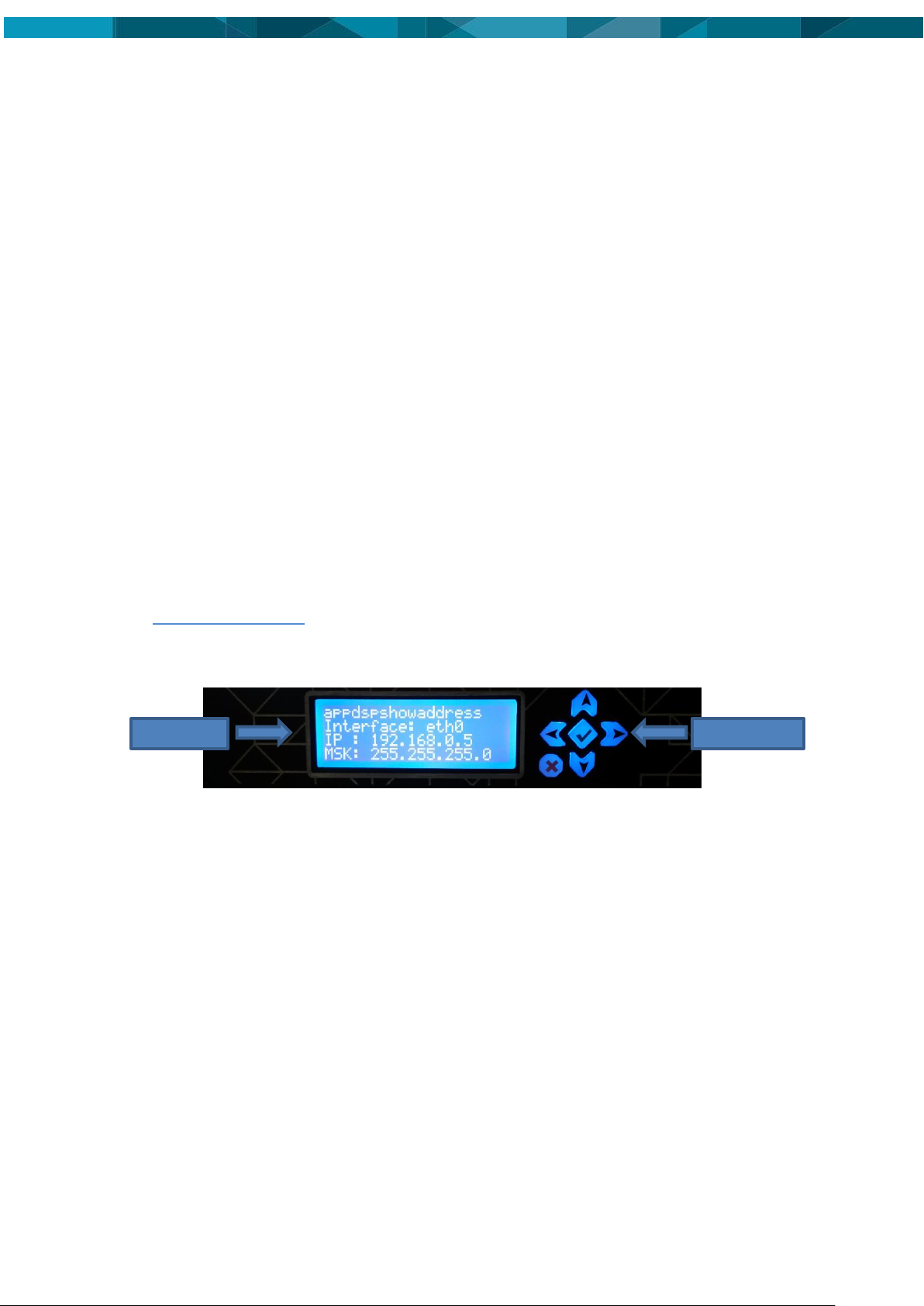
The display is responsible for showing the expected settings and the keyboard is used to choose
what is displayed. Section 5.2 will explain how to use them.
2.3 Labels
2.3.1 Labels Location
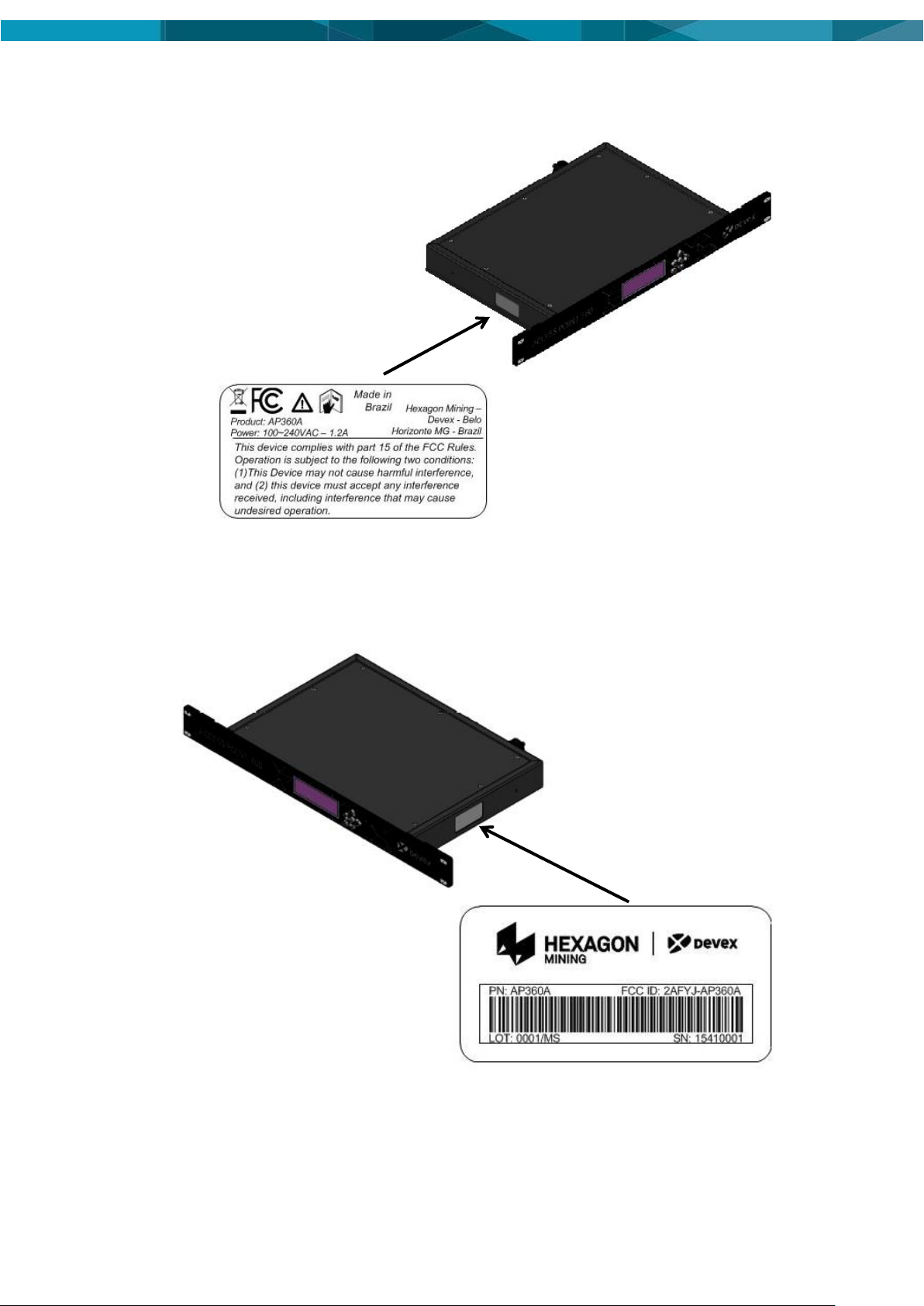
Compliance labels are located on all Access Point 360 in the following locations:
FCC Certification Label and Serial Number Label Locations
2 © Devex Mining
Page 9
© Leica Geosystems Commercial in Confidence 3
Page 10

2.3.2 Access Point 360 FCC Certification Label
2.3.3 Access Point 360 Serial Number Label
4 © Devex Mining
Page 11

3 AP Commissioning
3.1 Commissioning Workflow
1. See Chapter 4 Hardware Installation.
2. See Chapter 5 Software Installation.
© Leica Geosystems Commercial in Confidence 5
Page 12
4 Hardware Installation
4.1 Before Installation
Installation requires specialized knowledge and must be installed by a Hexagon Mining
Authorized Installer. Hexagon Mining recommends that installation of the Access Point 360
equipment be performed by a qualified technician because installation requires marking
electrical connections and software development.
Install the system in a clean and workshop environment. Failure to do so may cause the
system to short or promote product malfunction.
Route and secure all cables and wiring to ensure that they not chafe or rub premature failure
4.2 Access Point Installation
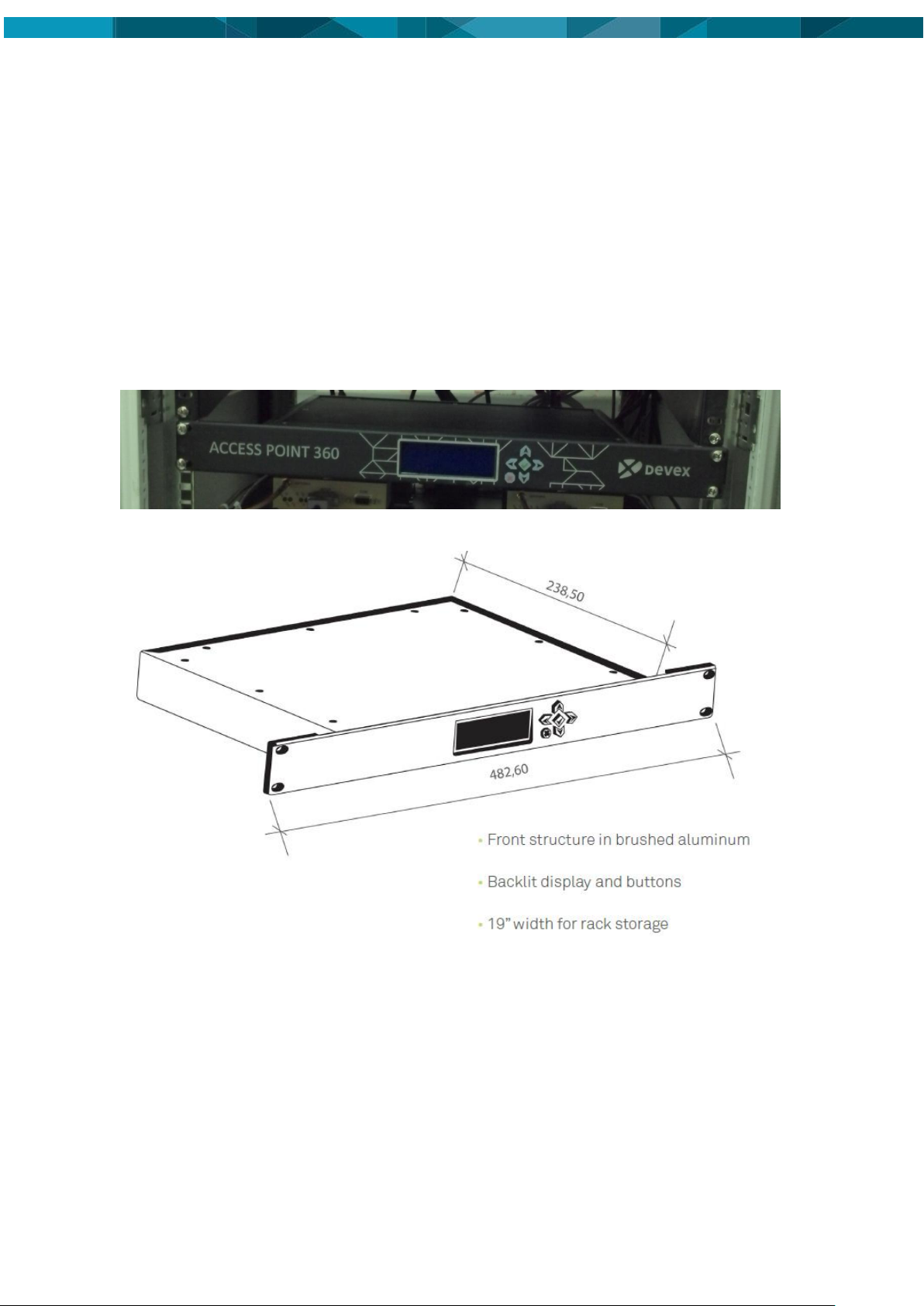
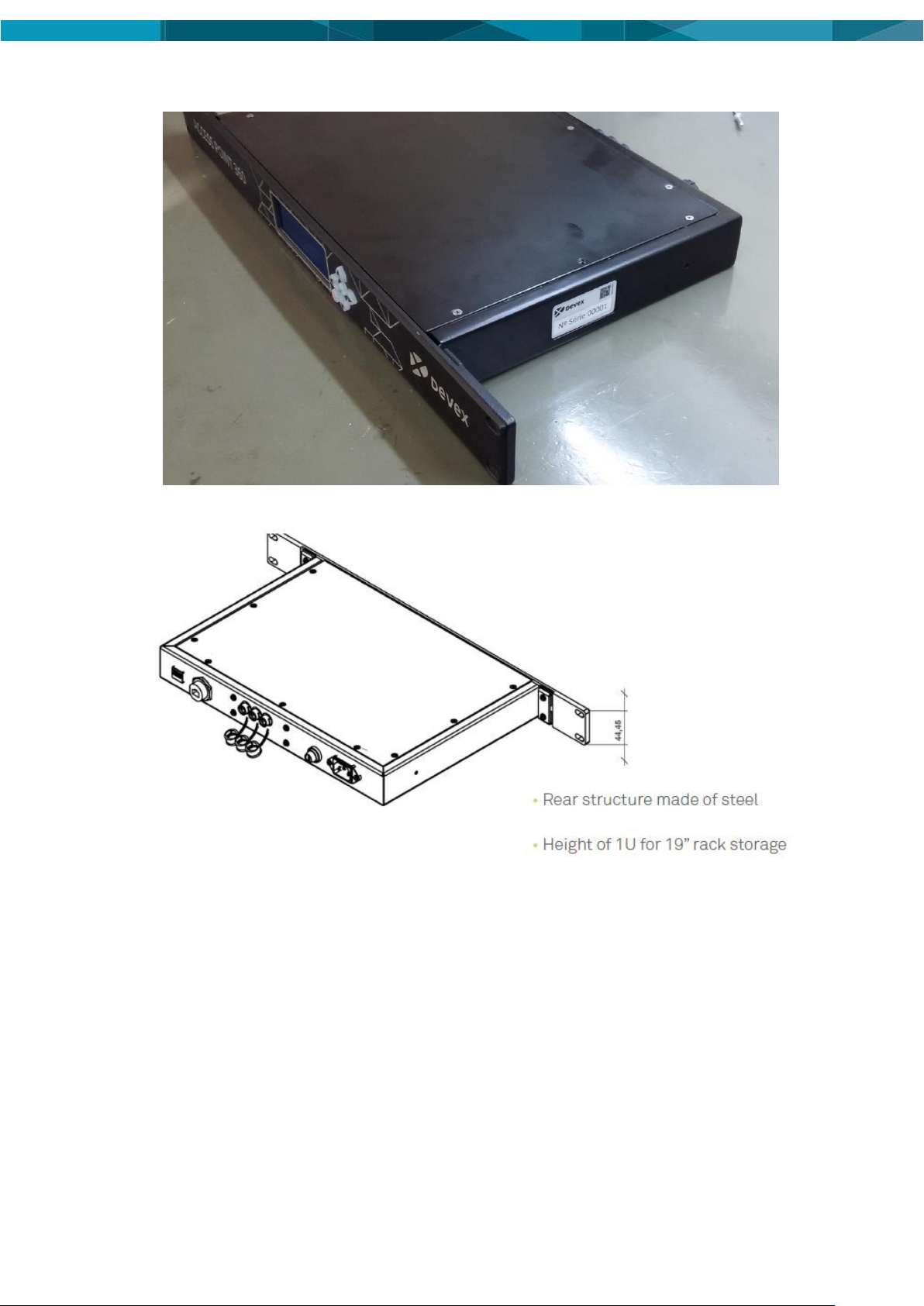
The installation of AP360 inside the rack must be done using 4 screws to fix the device near to
the DHE.
4.2.1 Front View
6 © Devex Mining
Page 13
4.2.2 Rear View
© Leica Geosystems Commercial in Confidence 7
Page 14
4.3 Data Head End – DHE
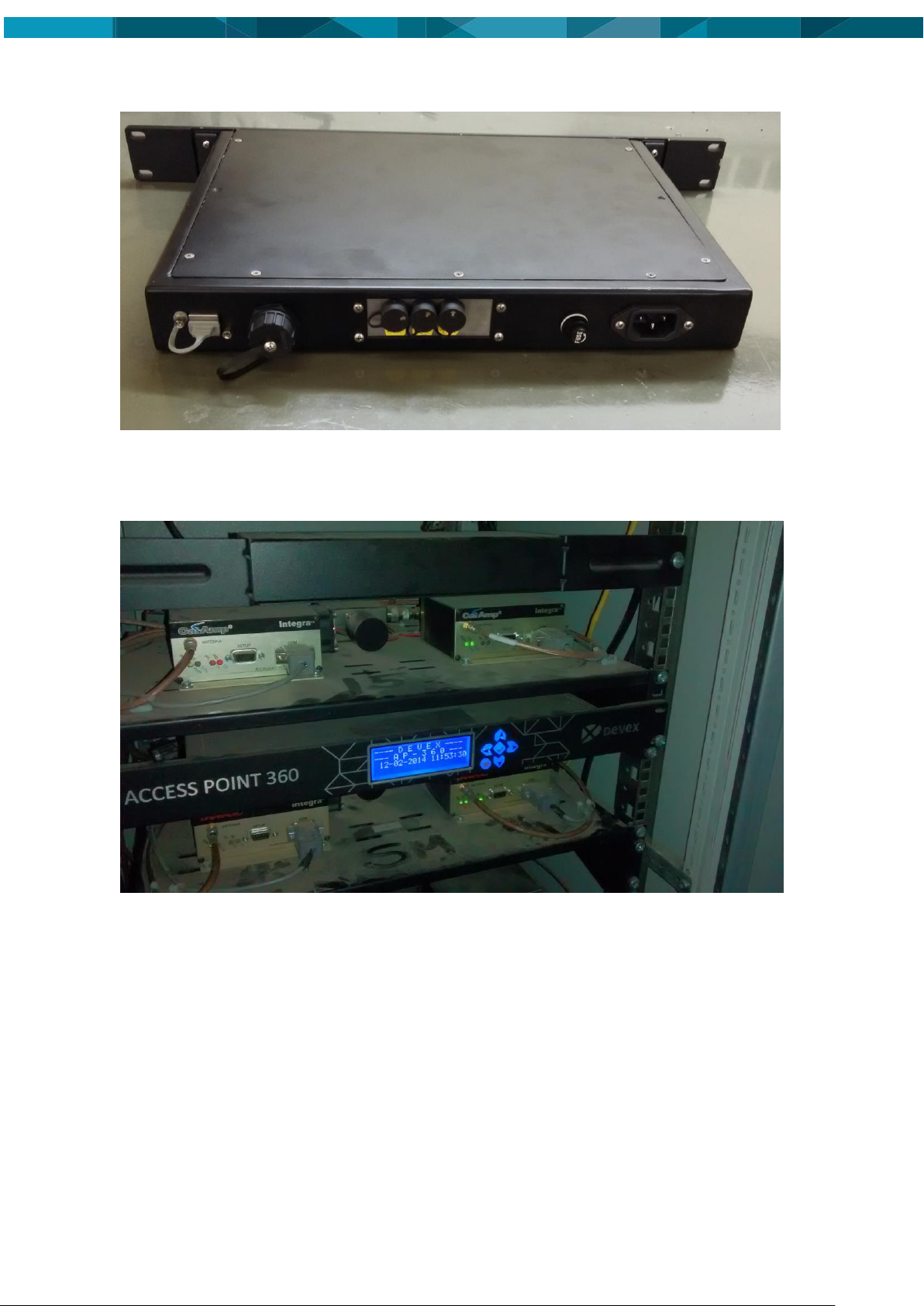
The AP360 must be fixed near to DHE, as shown in the figure below.
4.4 Power Cable Installation
Caution
The Access Point 360 is a 110 – 220 Volts AC system only.
1. Connect the supplied power cable to a reliable power source, for example, the rack’s main
power system.
2. Route and secure all cables and wiring to ensure that there is no rubbing, which can cause
premature failure.
3. Connect the power cable to the power connector on the rear of the module.
8 © Devex Mining
Page 15
4.5 Communication Cable Installation
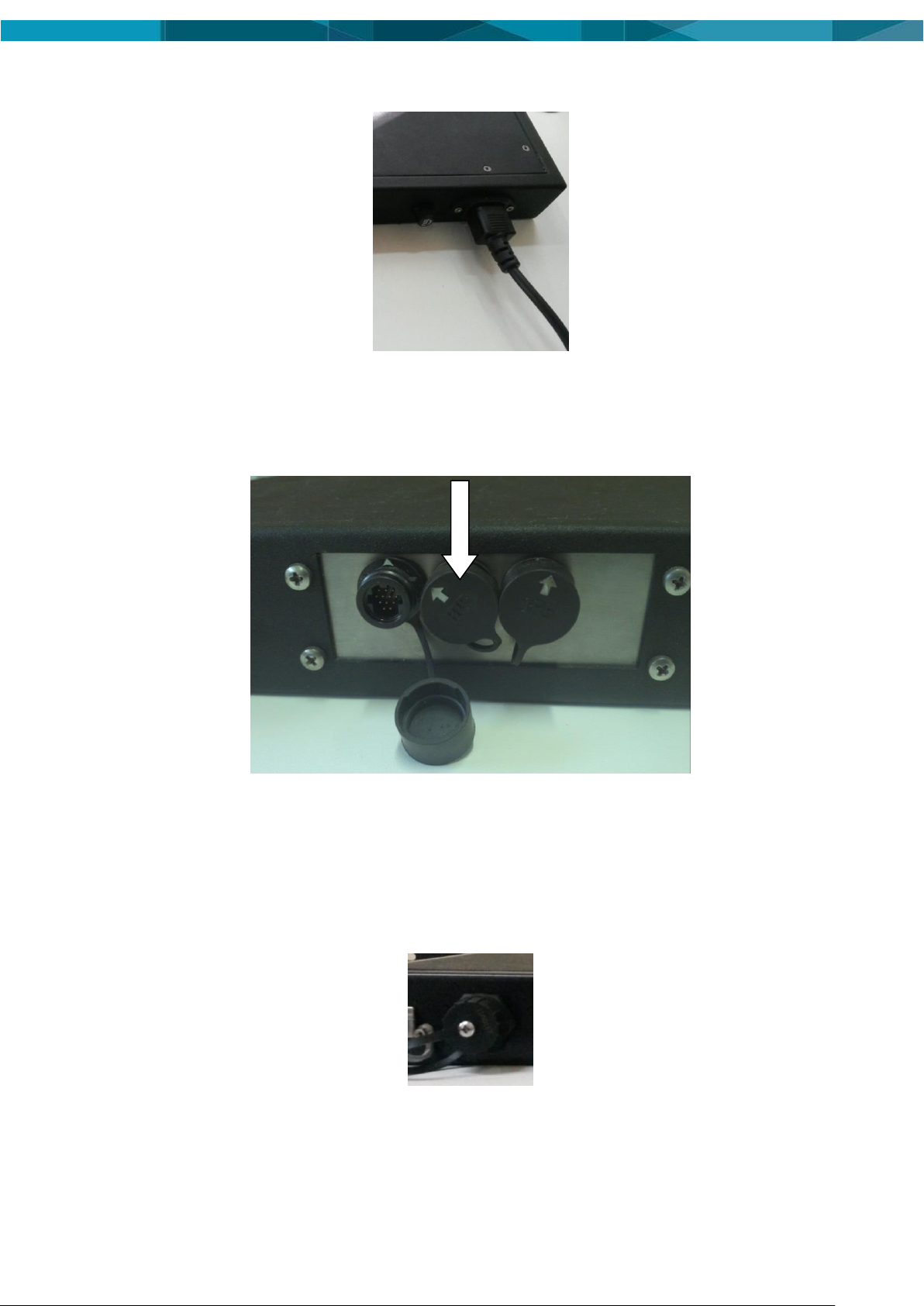
Connect the communication cable (Part number: DVXHW_CBL0056R02 - Cabo AP360 – DHE)
in the middle AP360’s connector and other cable extremity in the DHE’s connector, as shown in
the figure below.
4.6 Ethernet Cable Installation
Connect one side of the ethernet cable in the connector of the Access Point 360, show in the
figure below. Connect the other connector side in the same network of the system
SmartMine|UG.
© Leica Geosystems Commercial in Confidence 9
Page 16
Network
Cable
Communication
Cable
Power Suplly
Cable
4.7 Final Assembly
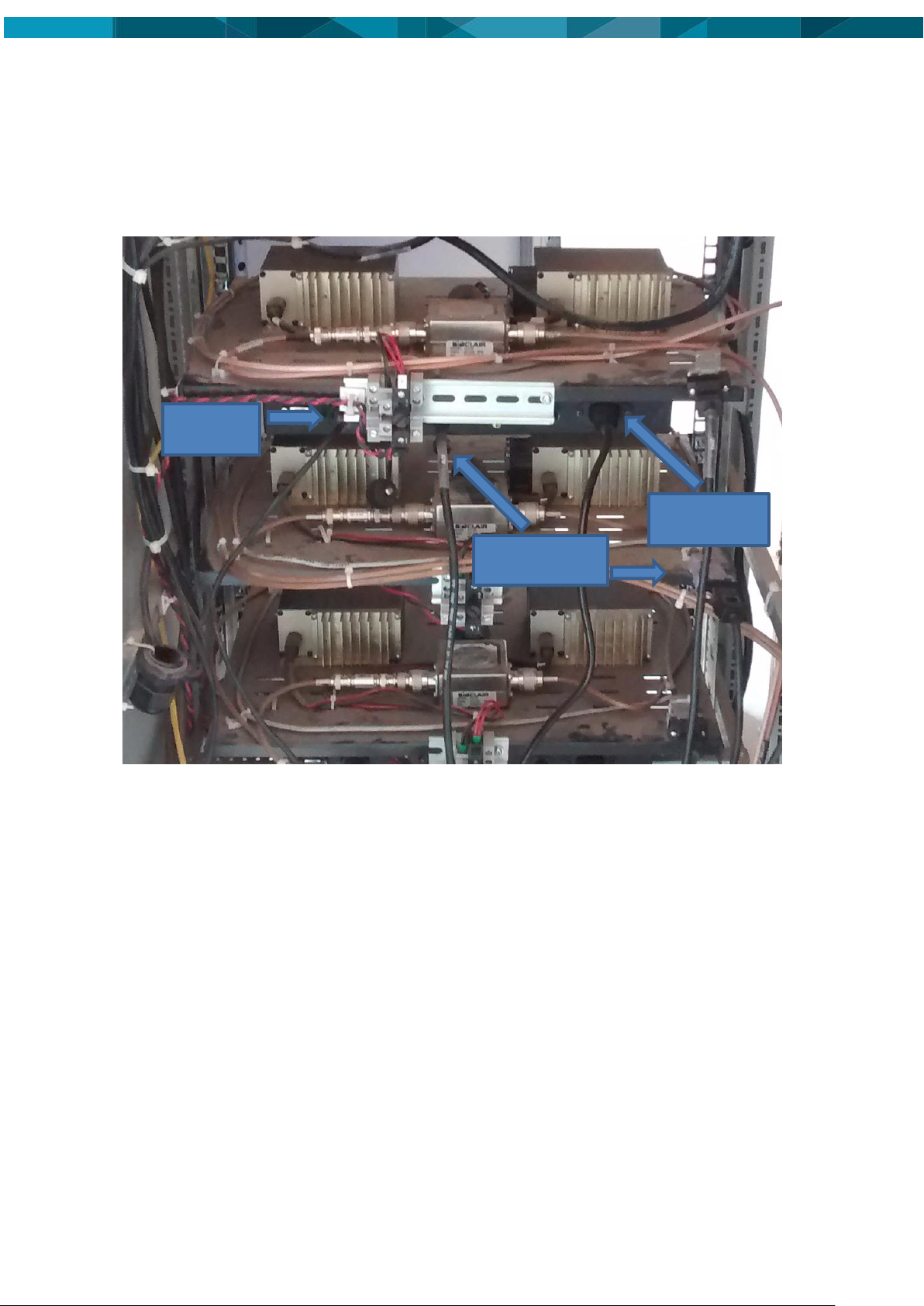
The figure X.XX shows the back view of AP360 installed in the rack with the DHEs. The figure
shows the three cables installed.
10 © Devex Mining
Page 17
Location to connection
of the Debug cable
5 Software Installation
The following procedure is used for software upgrades of AP360.
Note:
Contact Hexagon Mining | Devex for the required files.
5.1 Update Accesst Point 360 using debug cable
WARNING:
Do not turn off the unit, or remove the debug cable while the software
upgrade is under way.
The software is installed using the debug cable. Installation files are provided by Hexagon
support and are specific for each installation site.
Procedure Requirements:
A Computer
Debug Cable
Clean USB Key – to 2 GB
1. Get the latest Linux release image available in the following link:
http://dev.devexmining.com/svn/produto_releases_dip/EmbeddedTemp/ImagensAccessPoint360/AP05_v119
2. Using the computer, extract the provided files and copy into the clean USB Key
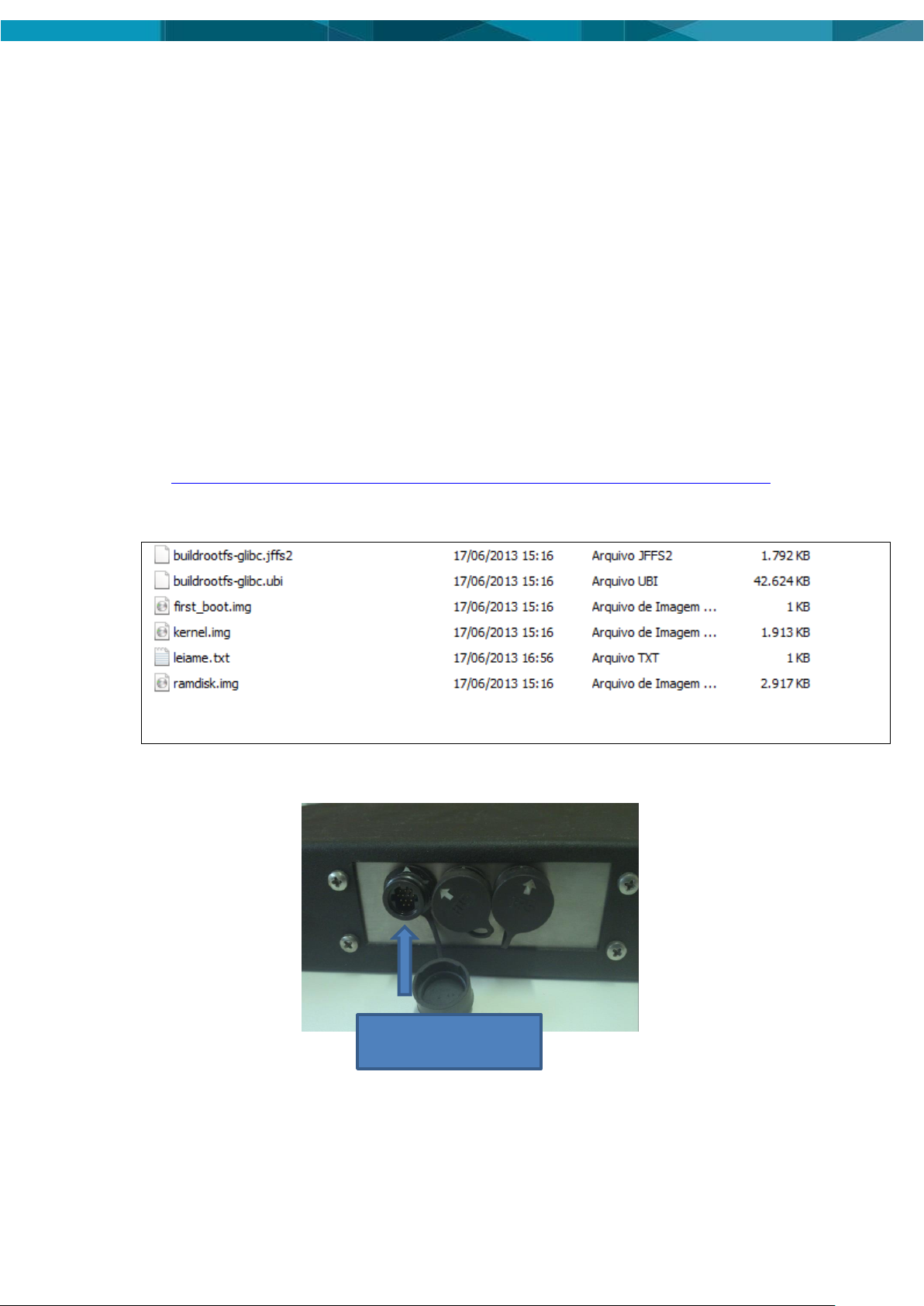
3. The files in the USB Key appear as in the graphic below:
4. To star the unit, connect the debug cable to the AP360 and USB Key:
5. Access the AP360 via serial port, this procedure will use the software "Putty".
6. Open the software and select the "Serial" option under "Connection type". Then, enter the
© Leica Geosystems Commercial in Confidence 11
port emulated by USB converter in the field "Serial Line", which in this example is the COM3
Page 18
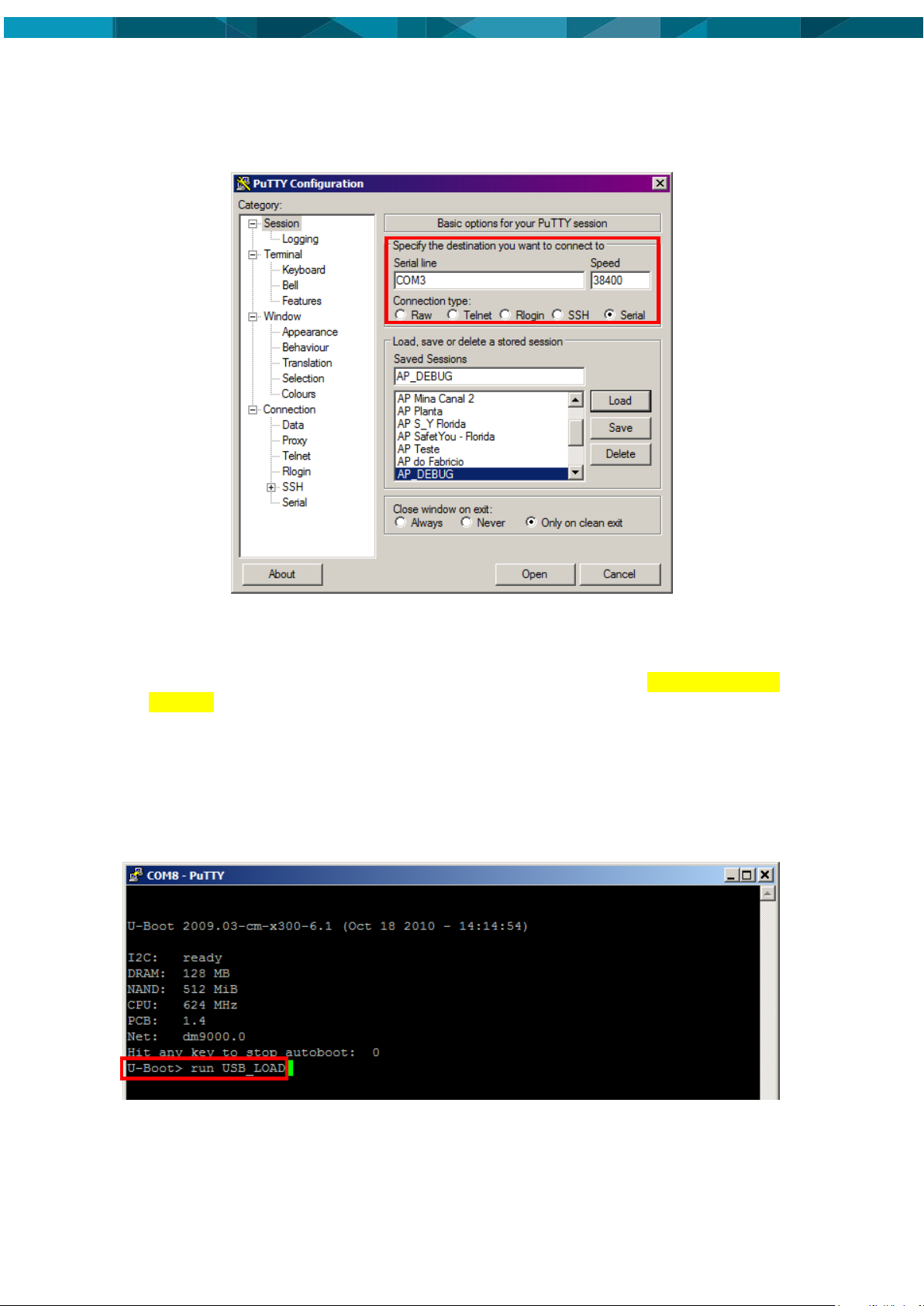
port. In the "Speed" field set "38400", as shown in figure below. Finally click "Open" and
connect the power supply cable to the AP360.
7. Configure the serial interface of your desktop or laptop and open the software “putty” and
configure which are serial port and communication speed, as show in figure below:
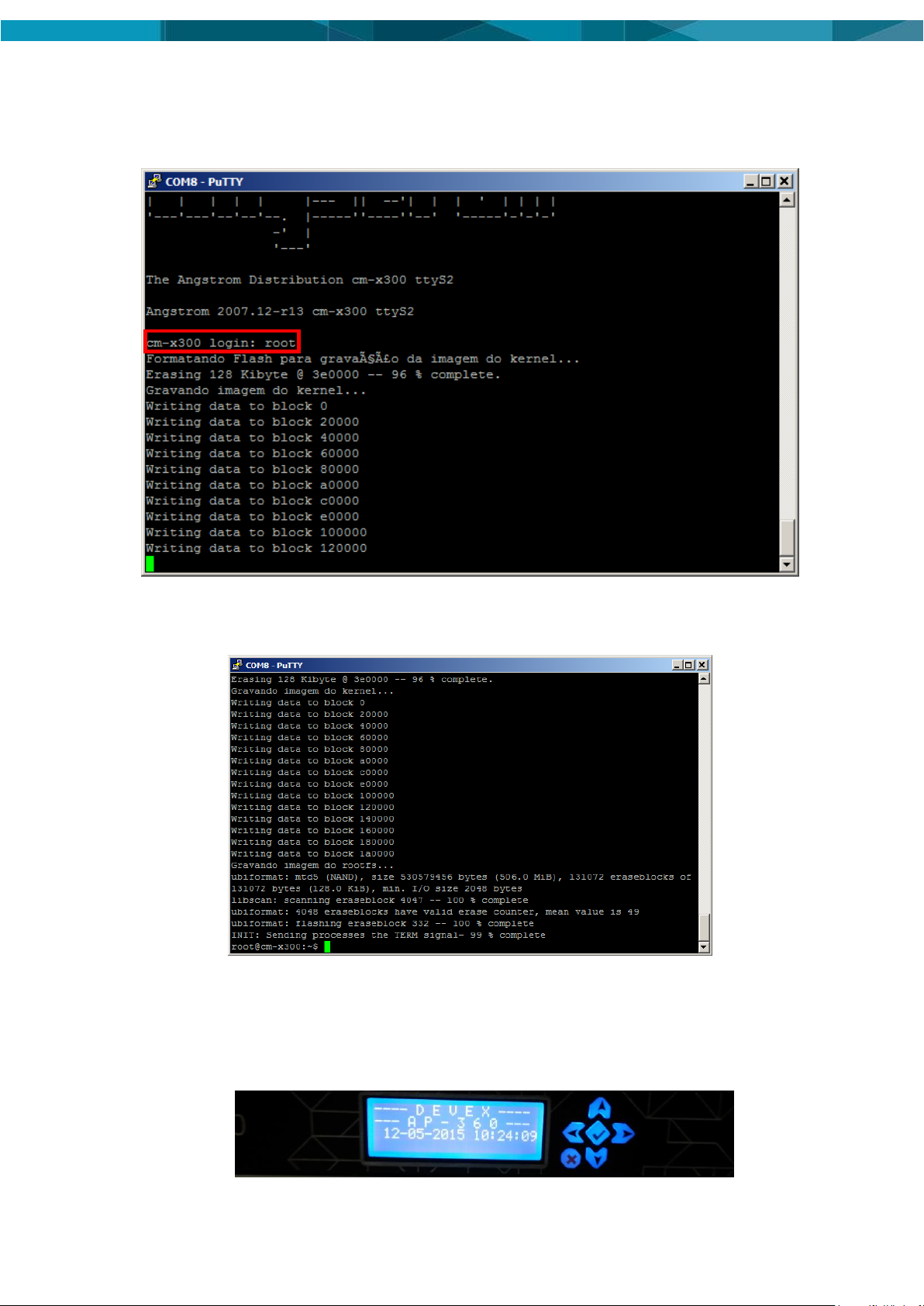
8. During initialization a message will appear with a countdown of UBOOT: "Hit any key to stop
autoboot”. Before the counter reaches zero, press "SPACE" to enter the menu UBOOT, as
show in figure below:
9. Run the command "run USB_LOAD"
> run USB_LOAD
After enter this command, several operation status messages will be displayed in the serial
terminal connected to the AP360. When finished loading, a Login prompt will appears asking the
user name to connect to the operational system.
10. Run the command "root" , as show in figure below:
12 © Devex Mining
Page 19
> root
11. Wait the process finalization and the AP360 will be restarted automatically, as show in figure
below:
5.2 Installation and Configuration Verification
12. Connect the AP360's power cable into the power supply, 110 or 220VAC (50/60 Hz) and
Ethernet cable. Wait this boot, as shown figure below.
© Leica Geosystems Commercial in Confidence 13
Page 20

13. Press the center button, highlighted in Figure below. This prodedure displays the AP360
menu. Press the center button. Note that the device's network settings are displayed.
14 © Devex Mining
Page 21

Length (cm)
Width (cm)
Height (cm)
23,85
48,26
4,44
Wieght (Kg)
3,300
Consumption
External Supply Voltage
Voltage Range 110 to 220 VCA
Operating Temperature (ºC)
Storage Temperature (ºC)
0 to +45
-10 to +50
Protection
IP 65 Specified with fitted HRS
connector
Protection
10% to 90%
Communication Interface
name
Quantity
RS232 Serial
4x
RS485 Serial
1x
6 Technical Data
6.1 Design
Industrial metal housing
6.1.1 User interface
Display 20x4 Characters
Console RS232 serial
6.1.2 Dimensions
6.1.3 Weight
6.1.4 Power
6.2 Envionmental Specifications
6.2.1 Temperature
6.2.2 Protection Against Water, Dust and Sand
6.2.3 Humidity
6.3 Communication Interfaces
© Leica Geosystems Commercial in Confidence 15
Page 22

Ethernet
1x
K-Line
1x
J1708
1x
USB
1x
Display
1x
Digital Outputs
2x
6.4 FCC Statement (Applicable for U.S.)
This equipment has been tested and found to comply with the limits for a Class A digital device,
pursuant to part 15 of the FCC Rules. These limits are designed to pro-vide reasonable
protection against harmful interference when the equipment is operated in a commercial
environment. This equipment generates, uses, and can radiate radio frequency energy and, if
not installed and used in accordance with the instruction manual, may cause harmful
interference to radio communications. Operation of this equipment in a residential area is likely
to cause harmful interference in which case the user will be required to correct the interference
at his own expense.
16 © Devex Mining
Page 23

Term
Definition
AP
Access Point
DHE
Data head End
FCC
Federal Communications Commission
HRS
Hirose
IP
Protection Index
USB
Universal Serial Bus
VCA
voltage current alternate
SOPs
Standard Operating Procedures
SWPs
Safe Work Procedures
7 Glossary
© Leica Geosystems Commercial in Confidence 17
Page 24
Hexagon Mining is the only company to solve surface and underground challenges by integrating design,
planning, and operations technologies for safer, more productive mines. Headquartered in Tucson, Arizona,
with more than 30 offices across five continents, the company is a dynamic network of talented mining
professionals delivering technology, service, and support.
Hexagon Mining unites industry leaders MineSight, Devex Mining, Leica Geosystems Mining, and
SAFEmine. Together they seamlessly link mine planning, design, fleet and production management,
optimization, and collision avoidance software for a comprehensive flow of data across all operations. Learn
more at hexagonmining.com.
Hexagon Mining is part of Hexagon (Nasdaq Stockholm: HEXA B; www.hexagon.com), a leading global
provider of information technologies that drive quality and productivity improvements across geospatial and
industrial enterprise applications.
For more information, visit;
Website: www.hexagonmining.com
Twitter: @HexagonMining
 Loading...