

Page 1
Pedal Quick-Start Guide
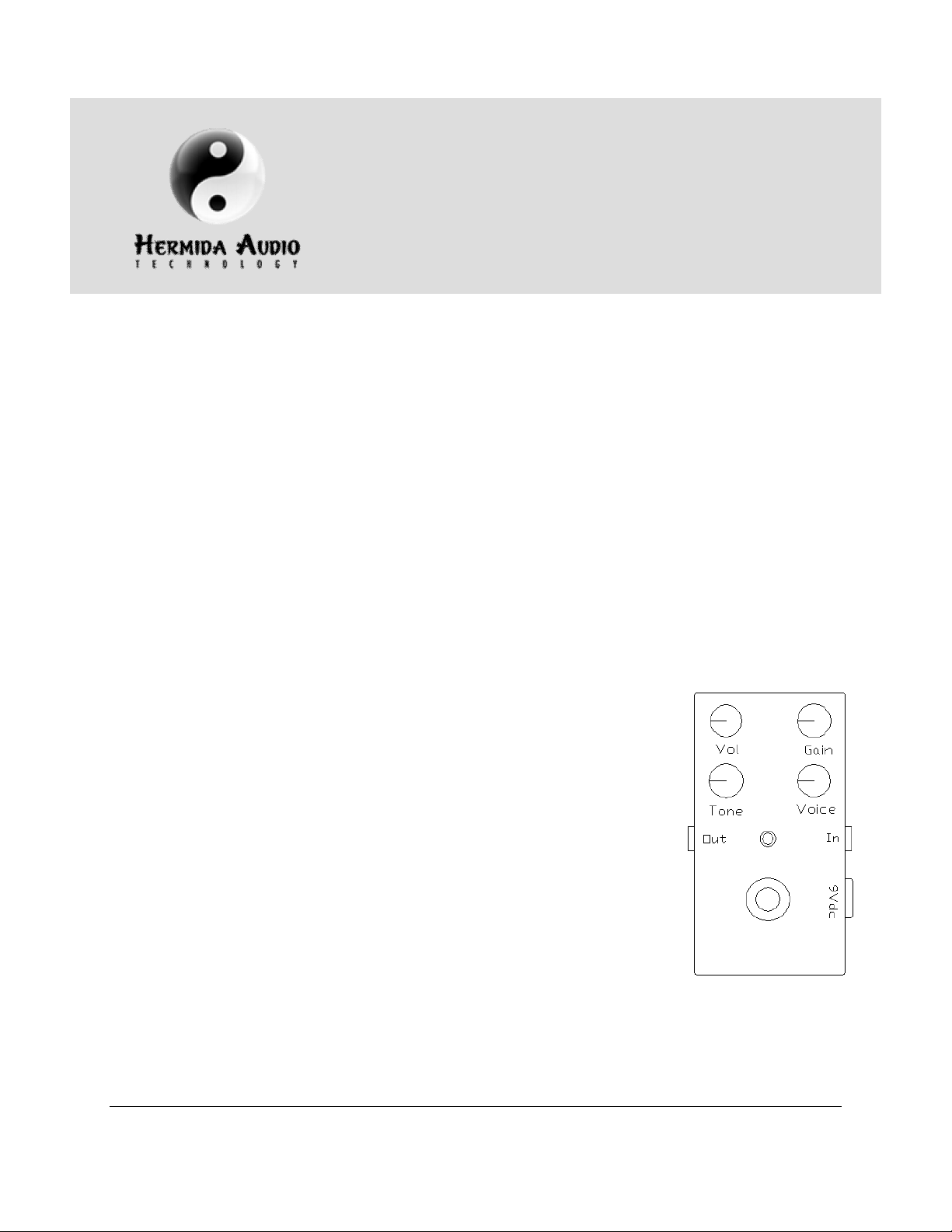
Diagram A
: Zendrive, Zendrive
Introduction
This guide describes the following pedals in the Hermida Audio Technology line:
• Zendr ive
• Zendr ive 2
• Mosferatu
• Distor ti on
• Nu-Val ve
• Dual Boost
• Rev er b
Zendrive, Zendrive 2, Mosferatu, Distortion and Nu-Valve Pedals
The above pedals have the following common configuration
(Diagram A):
• Vol (ume) , Gai n, Tone and Voi ce knobs
• In/ Out jacks
• 9V DC adapter jack
• St a t u s L E D
• Bypass footsw it ch (t r ue bypass)
• 9V batter y clip (inside the unit, except on Zendrive 2 and
Nu-Val ve
© 2009 Hermida Engineering, Inc. · All Rights Reserved · www.hermidaaudio.com · support@hermidaaudio.com
2, Mosferatu, Distortion and
Nu-Valve Pedals
Modified 11/25/09
Page 2

Hermida Audio Technology Pedal Quick-Start Guide
Knob Functi onali ty
1. Vol( ume) - Adjust s t he over all vol ume of t he uni t . The ful l y count er cl ock w i se
position is zero.
2. Ga i n - Adjusts the amount of gain i n t he unit . For cl eaner setti ngs, r ot ate
count er cl ock w i se. The maxi mum gai n i n t he pedal i s also l i mi t ed by t he Voi ce knob
set ti ngs. To set the maximum gain in the pedal, the Voice knob must be rotated fully
clock w i se.
3. Voice - “Tunes” t he pedal t o the ampl i fier and guitar . The Voice knob per for ms t w o
functions:
a. Limit s or increases t he t otal amount of gain in the pedal. To limit the gain,
rotate counterclockwise. To increase the gain, rotate clockwise.
b. Adj usts the bot t om-en d r esponse of th e ped al . To i ncr ease the bot tom -end
response, rotate counterclockwise. To reduce the bottom-end, r ot ate t he
clock w i se. Remember t o adj ust t he Gai n knob t o compensate for changes in
the overall gain of the pedal which occur during the Voice knob adjustment
process.
4. Tone - Perf or ms a basi c “ hi gh cut” f unct ion. With t he Tone knob set ful ly
count er cl ock w i se, hi gh fr equencies are ful ly att enuated.
5. In/ Out Jacks - Co n n ec t a ca b l e w i t h a ¼ ” p l u g b e t w ee n t h e g u i t a r o r t h e o u t p u t o f
anot her pedal t o t he In jack. Connect anot her cabl e w it h a ¼” pl ug betw een t he Out
jack and another pedal, amplifier or recording device.
6. 9V DC Adapter Jack - All pedal s (except t he Zendr ive 2 and Nu-Val ve) can oper ate
with a 9V battery or a 9V DC adapter. Please use a 9V DC adapter 200mA with a
cent er negative pl ug.
7. St a t u s L ED - The LED is On when the pedal is acti ve. The LED is Off when it is bei ng
bypassed.
8. Bypass Foot swi tch - Works in conjunction wit h the LED. Indicates when
el ect r oni cs ar e acti ve.
9. 9V Batter y Cli p - I n pedals t hat oper at e w i t h a 9V bat t er y, r emove t he screw s on
back cover and the battery clip will be located close to footswitch. Ensure t hat the
clip is connected correctly before closing the back cover.
Page 2 of 5
Page 3

Hermida Audio Technology Pedal Quick-Start Guide
Dia gr
am B
: Zendrive 2 pedal
Dia gram
C: Nu-Val ve
pedal
Pedals with Tubes: Zendrive 2 and Nu-Valve
Zendr ive 2
The Zendr ive 2 (Diagram B) i s a var i at i on of t he or igi nal
Zendr ive w i t h t he add i t i on of a dual tr i od e pr e-amp t ube. The
tube is installed in a socket and can be replaced with other preamp t ubes. Di f fer ent t ubes can chan ge t he voi cin g an d gai n of
the pedal. The Zendrive 2 comes with a 12AX7 tube, but can
al so use a 12 AT7 , 7025, 5751 or sim i l ar pr e-amp t ubes. Please
cont act suppor t@her mi daaudio i f you ar e unsur e of t he
compati bi l i t y of a t ube. The Zendr i ve 2 i ncl udes a 9V DC
200mA adapter. It does not operate with a battery.
Nu-Valve
The Nu-Val ve (Diagram C) i ncl udes tw o small Nuvi st or t ubes. The pedal
operates wi th a 9V DC 200mA adapter. The tubes ar e installed below the
footswitch in sockets and can be easily replaced without the need to
sol der . Th e t ubes su ppl i ed w it h t he Nu-Valve ar e NOS (New Old Stock)
6CW 4 N u v i st o r t u b e s. T h i s i s t h e o n l y t y p e t h at s h o u l d b e i n s t a l l e d i n t h e
pedal.
Page 3 of 5
Page 4

Hermida Audio Technology Pedal Quick-Start Guide
Diagram D
: Dual Boost
pedal
Dual Boost Pedal
The Dual Boost pedal (Diagram D) off er s tw o di st i nct cl ean gai n
levels selectable by a footswitch.
The Dual Boost has the followi ng configuration:
1. Ga i n A , Ga i n B , T o n e an d V o i ce k n o b s
2. In/ Out jacks
3. 9V DC adapter jack
4. St a t u s O n / O f f L ED a n d Ga i n A a n d Ga i n B L E D i n d i ca t o r s
5. Bypass footsw it ch (true bypass) and A/ B toggle footswitch
6. 9V batter y clip (located inside the unit)
Dual Boost Pedal Operation
1. Install a battery or DC adapter plug into the unit and connect the audio signal from a
guitar or anot her pedal t o the In j ack. Connect t he Out jack to anot her pedal or
ampl if ier .
2. The Status LED (lower middle) indicates if the unit is active (LED is On) or i n bypass
mode (LED is Off).
3. The Gain A and Gain B LED indicator s are located under the corr esponding Gain
knob. One of the two LEDs should always be On when there’s power supplied to the
unit. The LEDs indicate which Gain channel will be active when the Status LED is On.
4. The Gain A and Gain B knobs are independent of each other and the A/ B footswi tch
can onl y sel ect A or B.
5. To fully bypass the unit, press t he On/ Off footswitch. The Status LED should turn
Of f .
Page 4 of 5
Page 5

Hermida Audio Technology Pedal Quick-Start Guide
Diagram
E: Reverb pedal
Reverb Pedal
The Reverb pedal (Diagram E) off er s a simpl e and
eff ect ive w ay t o ad d r ever b t o your favor it e ampl if i er .
The Reverb has both analog and digital si gnal paths in
order to maintain the warmth and response of the
original signal . Bot h si gnal s ar e mi xed t oget her and sent
to the output of the pedal.
The Reverb has the following configuration:
1. Mix knob
2. In/ Out jacks
3. 9V DC adapter jack
4. St a t u s L E D
5. Bypass footsw it ch (t r ue bypass)
6. 9V batter y clip (located inside the unit)
Not e: It i s highly r ecommended t hat the pedal be pow ered
with a 9V DC adapter (included) or the power from your
pedal board. The pedal can operate with a battery but it will
consume t he batt er y qui ckl y.
Rever b Pedal Oper ati on
1. Install a battery or DC adapter plug into the unit and connect the audio signal from
anot her pedal or gui t ar t o t he In jack. Connect t he cabl e fr om t he Out jack t o
anot her pedal or amp l i fi er .
2. Pr ess t h e By pass f oo t sw i t ch t o act i vat e t h e p edal . Th e Stat u s L ED w i l l t u r n On.
3. Whil e playing the guitar, adjust the Mix knob. The Mix knob bl ends the w et r ever b
si gn al wi t h t he or igi nal dr y si gnal fr om t he i nput .
4. So m e u s e r s l i k e t o u s e t h e a m p l i f i e r reverb in combination with the Reverb pedal.
To do this, set your amplifier with the built -in reverb on and while playing the
guitar , acti vate t he Rever b pedal . Adjust t he Mix knob t o t aste. Thi s set up w i l l all ow
you to have three different settings: one w i th t he ampl if ier r ever b onl y, on e w it h t he
Rev er b ped al o nl y an d on e w i t h bo th t he am pl i fi er an d t h e p edal r ever b s on .
The Reverb pedal complies with the following regulations/ testing:
Page 5 of 5
 Loading...