

Page 1
HERMES electronic GmbH
Am Handwerkerpark 1
D-45309 Essen
Telephone:
(+49) 201.89911.0
Telefax:
(+49) 201.89911.20
Email:
[email protected]
Internet:
http://www.hermes-electronic.de
© 2004 HERMES electronic GmbH
OPERATING INSTRUCTIONS
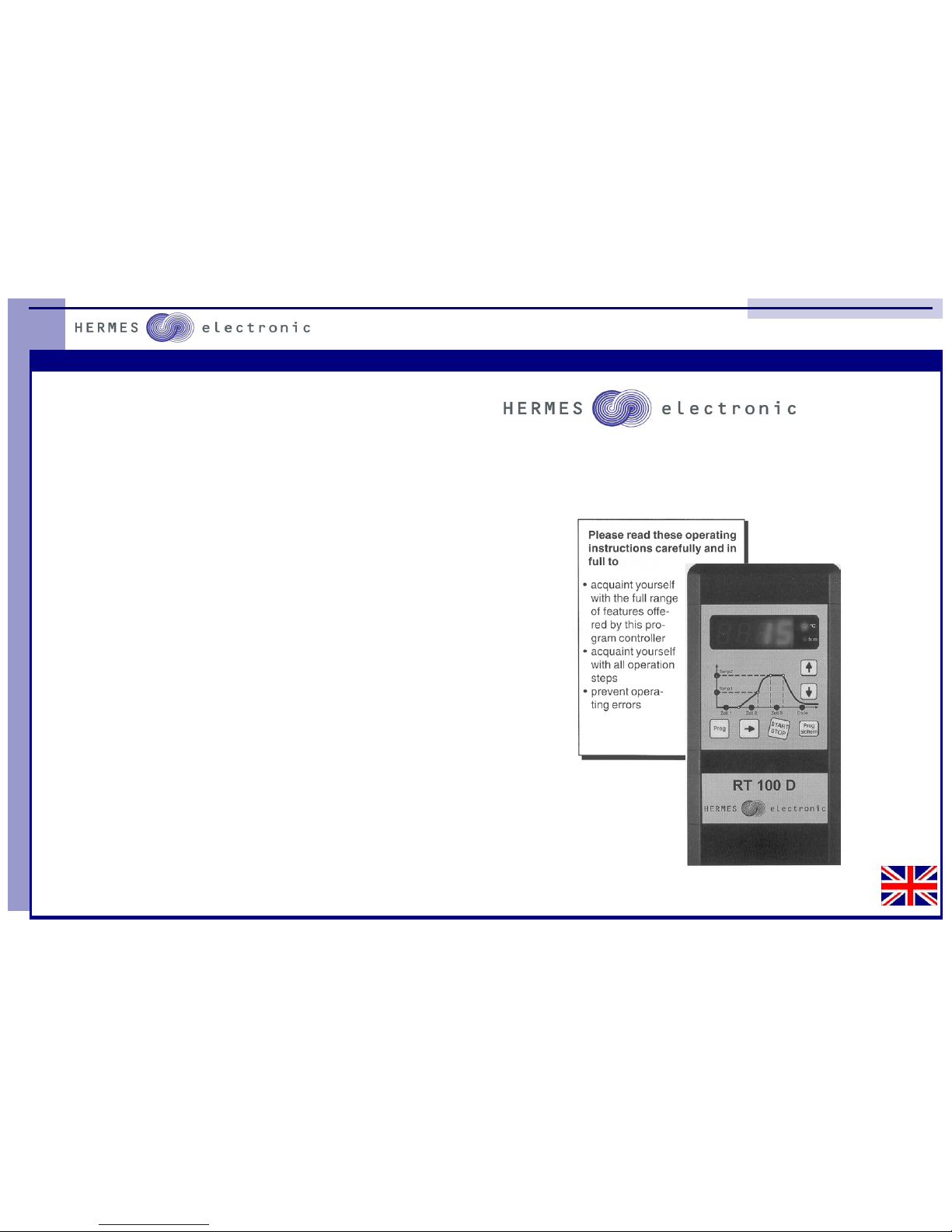
Program Controller RT100D
Page 2
11 2
Program Controller RT100D
Contens
page
Introduction . . . . . . . . . . . . . . 3
2. First Start . . . . . . . . . . . . . . . 4
3. Description of the face
3.1 Using of fixed programs . . . . . . . . . 5
3.2 Program Adjustment . . . . . . . . . . 7
4. Use of Program Datas . . . . . . . . . . . . . 8
5. Error Messages . . . . . . . . . . . . . . 9
6. Technical Datas . . . . . . . . . . . . . . 11
Notiz
Page 3
3 10
Program Controller RT100D
1. Introduction
The controller RT100D is used for controlling of electrical kilns for ceramics
and glas fireing.
The RT100D is able to control exactly the temperature and temperature
rate in a fireing process. Nine fixed programs are helpful for using this control unit. This programs can be adjusted individually. With this fixed programs the base of adjustment is already done for you.
Programdatas and values can be checked every time and set into the program memory.
The control unit will be delivered with a wall pocket. For programming work
you can move the controller out of this pocket and if programming is done
you can put it back into the pocket. This feature makes it very easy to handle the control unit.
IMPORTANT: It is not allowed to put the control unit
on the top of the kiln during fireing.
Every control unit RT100D is tested and checked for 100% of quality in our
company .
All our control units have an overheating safety relay ,but if you use the
control units you should observe the fireing .
Do not fire the kiln without observing.
If you have any problems please have a look into the error list at the end of
this manual.
If you are not able to solve your problems by yourself, please contact your
sales department.
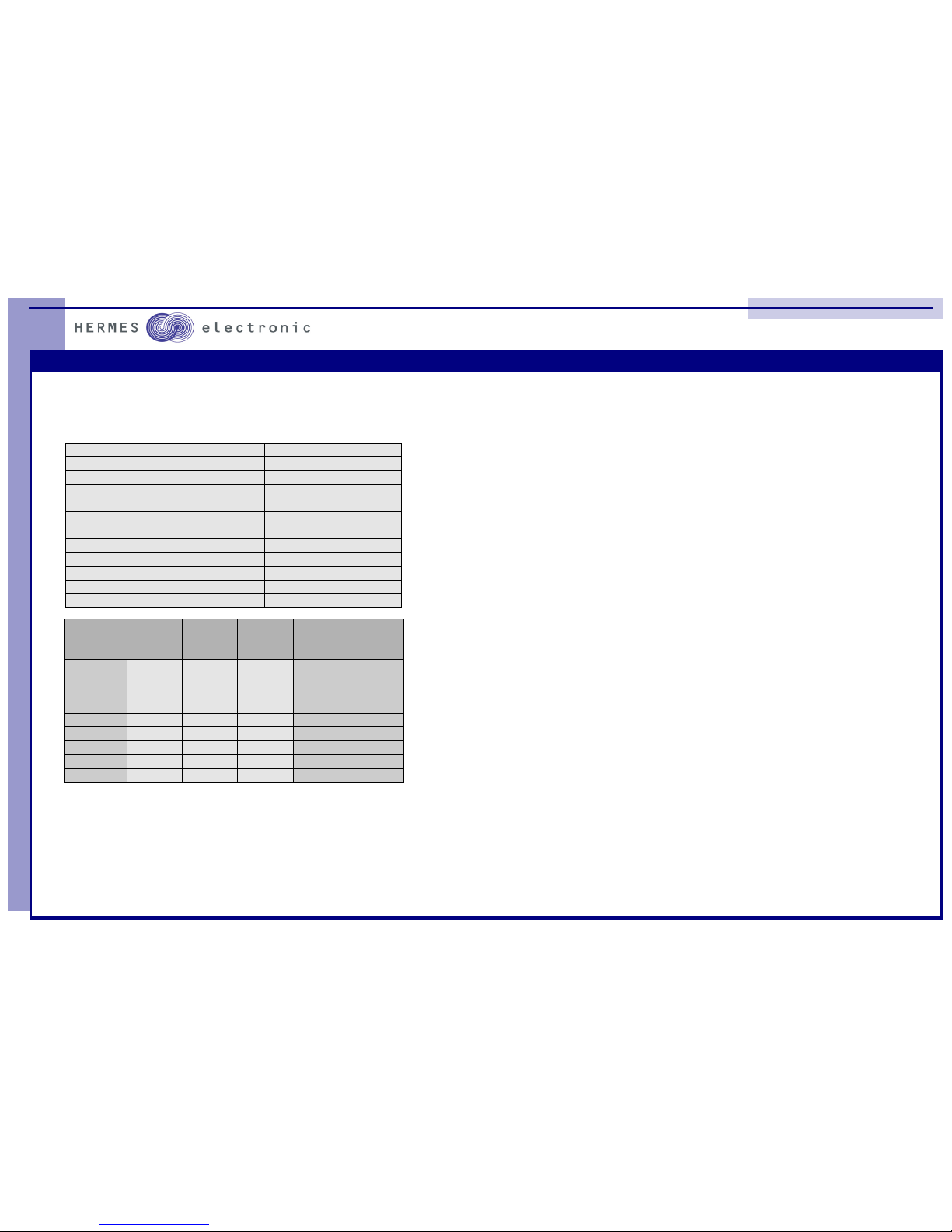
6.0 Technical Datas
* Using a Harting 7D connector the Pin-No. are not defined
Power line 200 bis 250Vol t 50 / 60Hz
Fuse 0,04 A T
Power consumption 2 VA
Out put 2 Relais n.o.
230 V max. 4 A
Imput Thermocouple Typ R
Pt10Rh / Pt
Soluti on 1 °C
Dis play 0,3 % +/- 1 Di git
Dimension 200 * 100 * 45 mm
Weight 0, 6 kg
Ambient t emperat ure 0 bis 50 °C
wir e
No.
AMP
Pin- No.
Harting 7D
Pin- No.
Hart ing
15D
Pin- No.
Functi on
+ red
-white
1
2
3
4
B5
C5
Thermocoupl e Plat in
+ green
-white
11
12
*
B5
A5
Thermocoupl e Nick el
1 8 5 A1 Input L1
2 9 2 B1 Input N
3 13 6 A3 Output heating
4 14 1 B3 Output N
7 7 7 C3 Out put saf ety relay
Page 4
9 4
Program Controller RT100D
2. First Start
The control unit has a plug for the connection with the kiln. This plug is safe
against wrong connection and it fits only in one position.
At the buttom side of the RT100D you find the main switch, please switch control
unit on and wait for the display.( app. 3 sec.). Now you can read the kiln temperature on the display and you are able to program the control unit.
5.0 Error Messages
The contr ol uni t can check a lot of funct ions by it selfs. If the control unit may find any mist ake, the ki ln
will be switched of f and the di splay shows a fault y number:
Dis pla y: F1
During t he full power peri ode the contr oll er checks the rise of t he kiln t emperatur e , it must be more
than 1°C i n 20 Minut es. I f t he kiln i s to sl ow the control unit shows F1.
causes:
- heat ing element i s fault y or to old
- wit h 3 Phase Systems: on Phase is missi ng
- Thermocoupl e is short connected.
- door swit ch is not closed
Dis pla y: F2
Is the heati ng time in the f ull power per iode l onger than 18 hours the ki ln will swit ched off and the
displ ay shows F2.
causes:
- heat ing element i s fault y or to old
- wit h 3 Phase Systems: on Phase is missi ng
Dis pla y: F3
If the measurement from the thermocoupl e is too high the control ler shows F3.
causes:
- Thermocoupl e faul ty
- wir e to thermocoupl e faulty
Dis pla y: F4
If the measurement fr om the ther mocouple i s negative t he controll er shows F4.
causes:
- ther mocouple wrong connect ed
- wir e to thermocoupl e wrong c onnected
Dis pla y: F5 or F6
Internal System Error.
Dis pl ay: F7
If the ki ln temperature is higher than 20°C over t he top temperature and t akes this pr oblem longer
than five minutes t he contr ol unit switch te ki ln off and shows F7.
causes:
- rela
y
in t he kil n is faul t
y
Page 5
5 8
Program Controller RT100D
3. Description of the face
3.1 Using of fixed programs
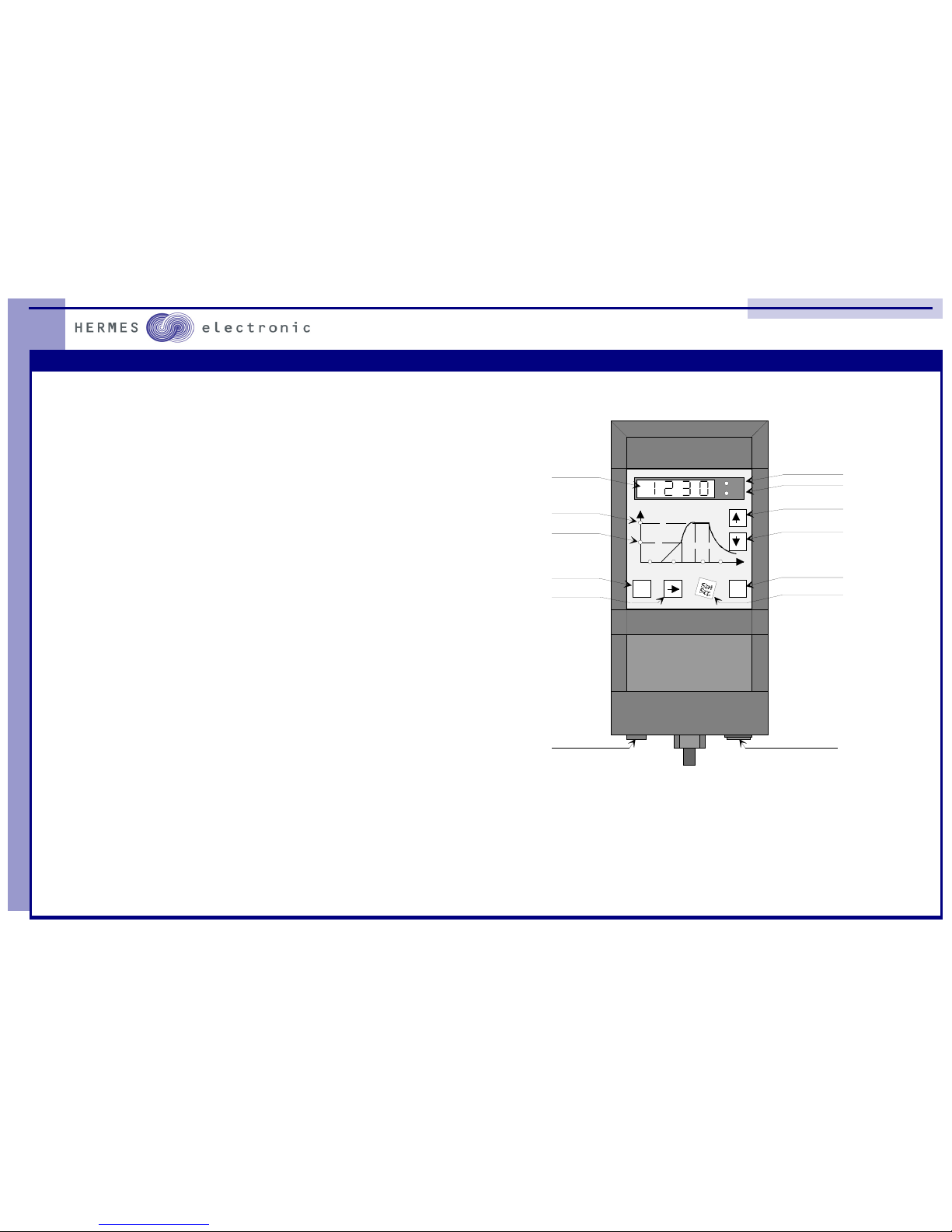
The control unit RT100D will be delivered with 9 fixed programs all this
programs can be adjusted by the customer.
The following switches should be pressed to start a fixed program.
Prog
sichern
Prog
°C
h:m
Tem p2
Tem p1
Zeit 3Zeit 2Zeit 1 Ende
Digi tal -Disp lay
top-temperature
first temperature
fixed programs
choose of
time and temp
start/stop progr am
set program to memory
values up
values down
temperature in °C
time in hours : minutes
main switch
fuse
4.0 Use of Program Datas
A
fter you have pressed the start switch the control unit will start the program .
The first point of working is the delay time.After you have programmed the delay time
the controller wait till this time is zero. On the display you will see the value of the
delay time.
The control unit starts the fireing program as soon as the delay time reached zero.
This feature will be used if you like to start a kiln e.g. in the evening.
The fire-process beginns with the ramp time. The control unit calculats the right
heating power to bring the kiln slowly to the firtst set point during the ramp time. If the
ramp time reached zero the kiln will be fired with full power. If the kiln temperature
reached the top temperature the control unit soak during the soak time.
A
fter the soak time the controller switchs the kiln of and the kiln tem perature will cool
down.
Page 6
7 6
Program Controller RT100D
switch: Prog
switch:
please press this switch a few times ,
if you get the right program number on
the display please stop pressing the key.
switch: start/stop
Program will start
Here you find the list of the fixed programs:
Programm No: 7 - 9 are all zero.
Descprition:
All time values are in hours and minutes.
0h30 = 0 hours and 30 minutes
Zeit 1: delay time
Zeit 2: ramptime
Temp 1: first set point
Temp 2: top temperature
Zeit 3: soak time
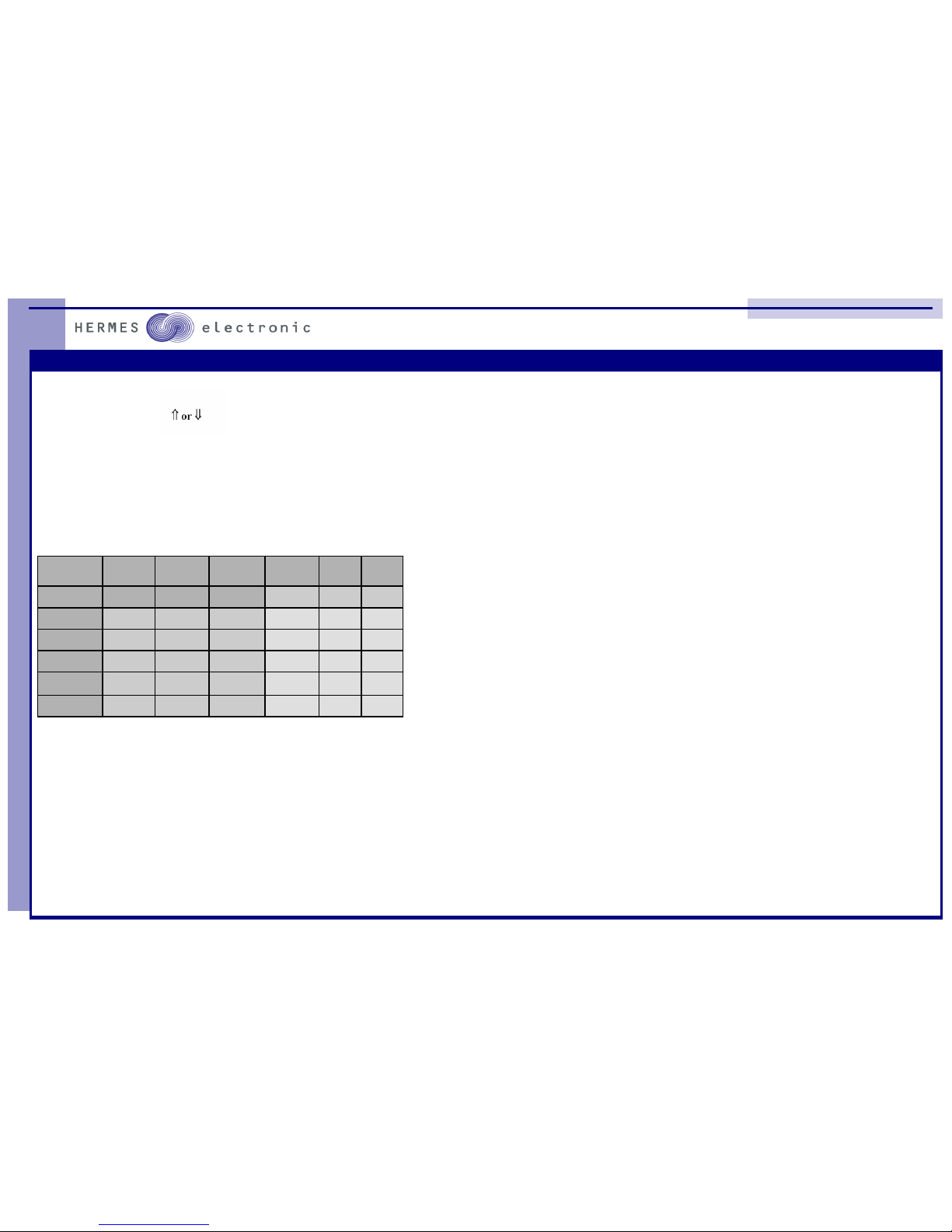
Programm
Nr.
1 2 3 4 5 6
P1 P2 P3 P4 P5 P6
Zeit 1 0h 00 0h 00 0h 00 0h 00 0h 00 0h 00
Zeit 2 4h00 5h 00 7h 00 10h 00 3h 00 4h 00
Temp 1 500°C 500°C 500°C 930°C 400°C 400°C
Temp 2 1230°C 1230°C 1230°C 1230°C 800°C 800°C
Zeit 3 0h 30 1h 00 1h 00 1h 00 0h 30 1h 00
3.2 Program Adjustment
If you l ike to adjust program datas you should use t he following descript ion:
Please load and st art your programm ( see section 3.1) and press the f ollowing swit ches:
switch: star t/stop
switch: ⇒
please pr ess thi s switch a few times if the
r ight data is displ ayed stop pressing.
switch: ⇑ or ⇓
to adjust values
If you have changed al l dat as li ke you wis h, you can s tart your programm with the star t/st op switch.
switch: start /stop
This adj ustment t hat you have made will only used for t he present fir eing. If you li ke to st ore this datas
into the memory, please use the following way:
switch: set Prog
switch: start /stop
Important:
The delay t ime can not be stor ed in memory.
 Loading...