

Page 1
ResetWPS
Primary
SIM2
SIM2
Rx Div
WiFi1
SIM1
Service
WiFi2
ResetWPS
Primary
SIM2
SIM2
Rx Div
WiFi1
SIM1
Service
WiFi2
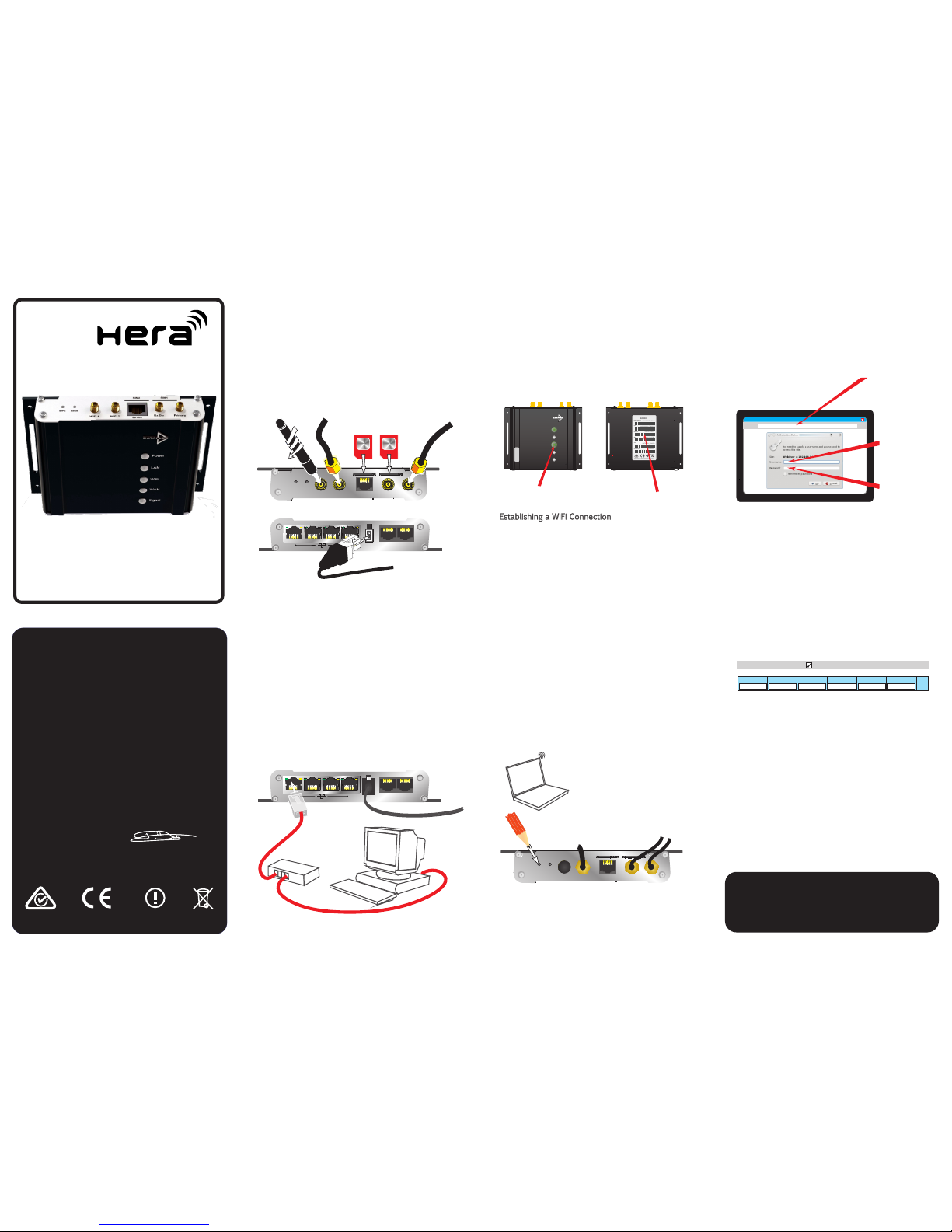
Insert SIM cards & attach antennas or cables for
cellular (Primary & RX Div) and WiFi
SIM2
Connect to a PC or laptop by ethernet cable
either directly or via an ethernet hub
SIM1
Insert the power connector. Plug the mains adapter
into a dedicated socket & switch on
Connection to the web interface is required to
configure the Hera600. This can be achieved by
wired ethernet connection or WiFi
To configure the cellular connection refer to the
documentation supplied by the equipment provider
relating to the SIM
Information required for connection:
Ÿ Username
Ÿ Password
Ÿ Pin code
Ÿ APN (Access Point Name)
Once logged into the web interface, choose a
profile name, enter the information above and tick
the 'enable' box
Never insert or remove SIM cards while
the Hera600 is powered
using username and password
Open a web page on your PC or laptop, and type
into the address bar then http://192.168.1.1
press enter
Enter the username and password and click OK to
log into the Hera web interface
Note: Appearances may vary according to
operating system and web application.
Information supplied by your equipment
provider overrides any information shown
above
Press the WPS button
If there is no SSID information on the Hera600 label,
use a wired connection to connect to the Hera600
web interface
WiFi
Cellular
using WPS
600 Series Router
Quick start guide
4: Cellular connection
3: Web interface
2a: Wired connection
2b: WiFi connection
Link1 Link2 Link3 Link4100 100 100 100
Serial 1
Power
Serial 2
HUB
Ethernet LAN
Link1 Link2 Link3 Link4100 100 100 100
Serial 1
Power
Power
SSID
WiFi username
WiFi passphrase
Internet application
Address:
http://192.168.1.1
username:
password:
admin
admin
Configur
e
WiFi
Enable
WPS
mode
1: Getting started
2c: WiFi connection
This quick start guide provides basic connection information only.
For full feature information download the latest comprehensive user
guide from:
www.dataflex.com/hera
Serial 2
Hera 600
!
Power
LAN
WIFI
WAN
Signal
Front
Back
WiFi light illuminated
Profile Name APN User Password SIM USSD
save
Mobile Connection Enable
Features parts & appearance may vary to those shown.
Declaration of Conformity
We: Dataflex Design Communications Limited
8 Frederick Sanger Road, Surrey Research Park,
Guildford, Surrey, GU2 7YD, UK
Declare under sole responsibility that the product family Hera600
to which this declaration relates, is compliant with the essential
requirements of:
RoHS Directive 2011/65/EU
WEEE Directive 2012/19/E U
Ecodesign Directive 2009/125/EC
Batteries Directive 2013/56/EU
Radio Equipment Directive (RED) 2014/53/E U
The Low Voltage Directive 2014/35/EU
The EMC Directive 2014/30/EU
Signed ....................
Name Jon Darley
Position Chief Technical Officer
Place and date of issue Guildford May 2016
Year of affixing CE Mark 2016
Manufactured by Dataflex Design Communications Ltd in China
If there is no SSID information on the Hera600 label,
use a wired ethernet to connect to the Hera600
web interface
a: Ensure the WiFi light on the Hera600 is illuminated
b: Search wireless networks on your WiFi enabled
laptop, PC, tablet or phone. Connect to the
network which matches the SSID on the
Hera600v4 label
c: Enter the WiFi username and passphrase exactly
as it appears on the label when prompted
ESN
BASE MAC
04423000003170000010
00D04C0046CA
PROD PART NO
IMEI
012345678912345
SSID
DATAFLEX_0046CA
PASSPHRASE
0046CA0010
Manufactured by Dataflex Design Communications Ltd
H604ESEYESUCK01
Hera 804
H600V4QSG002
Configure your computing
device to connect to WiFi in
WPS mode
The WPS function will automatically set up a
secure connection between your router and
computer
Page 2
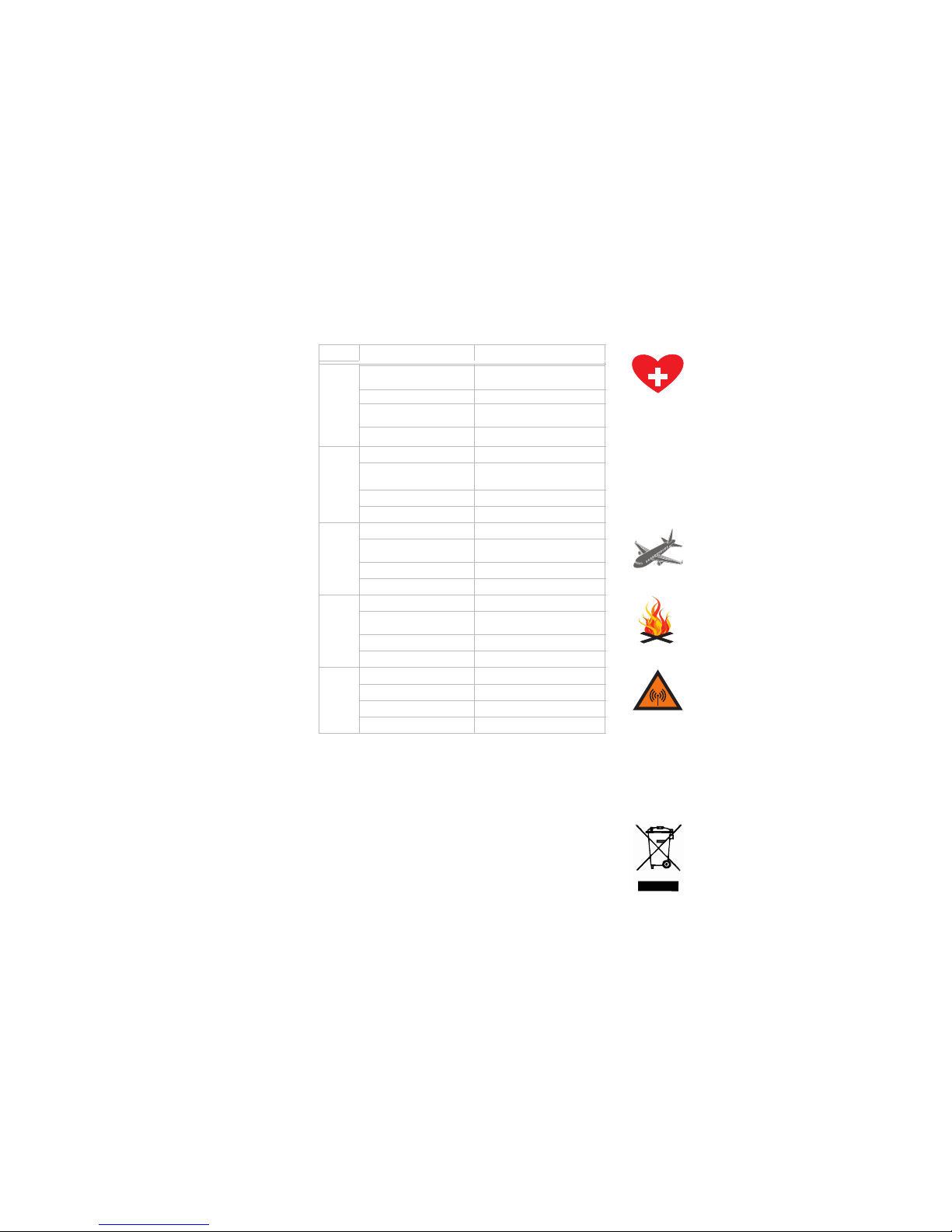
LED
State Meaning
Power Green
(during the boot the LED is red)
Unit is powered and operating normally
Flashing in sync with another LED
Error on the port indicated
Flashing independently after boot up
period
Internal error
Off No mains power or product failure
LAN
On LAN connection available
Flashing (regular pattern) in sync
with POWER LED
Error on the LAN port
Flashing (irregular) Data transfer
Off
No LAN connection available
WIFI On WiFi connection available
Flashing (regular pattern) in sync
with POWER LED
Error on WiFi port
Flashing (irregular) WiFi data transfer
Off No WiFi connection available
WAN
On
WAN connection available
Flashing (regular pattern) in sync
with POWER LED
Error on WAN port
Flashing (irregular)
WAN data transfer
Off No WAN connection available
Signal
Red Cellular signal strength WEAK
Orange Cellular signal strength MEDIUM
Green Cellular signal strength STRONG
Off No cellular service available
In accordance with EU directive 2002/96/EC regarding Waste
Electrical and Electronic Equipment (WEEE), ensure that at end-of-life
you separate this product and its accessories from other waste and
scrap and deliver to the WEEE collection system in your country for
recycling.
This product contains Lithium coin type batteries. Batteries must
only be replaced by manufacturer authorised personnel. This
ensures fitting of an approved part and avoids the warranty being
made void. Additionally it ensures full compliance with Battery
Directive 91/157/EEC & local legislation regarding responsible
recycling and disposal is adhered to.
The Hera600 receives and transmits radio frequency energy while
switched on. Remember that interference can occur if it is used close
to TV sets, radios, computers or inadequately shielded equipment.
Follow any special regulations and never install your Hera600
wherever forbidden or when you suspect that it may cause
interference or danger.
As with any electrical equipment, you should not operate your
Hera600 in the presence of flammable gases, fumes or potentially
explosive atmospheres.
Radio devices should not be used anywhere that blasting operations
are taking place.
GSM equipment such as the Hera600 must NOT be operated on
aircraft. The operation of wireless appliances in an aircraft is
forbidden to prevent interference with communications systems.
Failure to observe these instructions may lead to the suspension or
denial of cellular services to the offender, legal action, or both.
The Hera600 incorporates a GSM radio module. Users should
ensure that the antenna is positioned at least 1 metre away from
themselves and other people in normal operation.
When in a hospital or a health care facility, observe the restrictions
on the use of mobile phones. Do not install the Hera600 in sensitive
areas, such as areas where the use of mobile phones are prohibited.
Medical equipment may be sensitive to RF energy.
The operation of cardiac pacemakers, other implanted medical
equipment and hearing aids can be affected by interference from
cellular terminals such as the Hera600 when placed close to the
device. Testing of the Hera600's affect on implanted equipment
should be carried out in advance of any installations where
interference is likely to occur.
A clear visible warning should be posted informing people with
implants of the potential threat.
The Hera600 operates using radio signals and cellular networks, and
cannot be guaranteed to connect in all possible conditions.
Therefore, you should never rely solely upon any wireless device for
life critical communications.
SOS
Warnings:
Installation:
Warranty Information:
Use only the mains power adaptor provided. Do not modify in any way. Use of this product with any other mains power adaptor may damage the unit
will invalidate its warranty and may invalidate its regulatory approval.
There are no user-serviceable components inside the Hera600. If a fault develops with the product, please contact your service provider or reseller.
The casing is fitted with a tamper indicator and should NOT be opened under any circumstances as it will invalidate the warranty.
Ensure that all reasonable precautions are taken in the site choice and installation of this product. Ensure that all warnings and installation instructions
have been read and understood. Dataflex are not liable for consequential loss or damage which arises from installations where the instructions &
warnings in this quick start guide are not adhered to.
Do not insert or remove a SIM card when the product is powered. This will cause problems with the functionality of the product. Always power off
before inserting or extracting a SIM card.
Ensure all warnings on this sheet are read and understood when
choosing a site for the Hera600 device.
The Hera600 should be located indoors in a stable a vibration free
environment between -20 to +55 degrees celsius, where relative
humidity is between 0 - 95% non condensing.
Ensure there is a mains power outlet within 1 metre of the Hera600
installation. Do not modify the mains adapter.
Do not place the unit close to a heat source (such as other electrical
equipment) or in direct sunlight.
Avoid locations exposed to heavy soiling due to exhaust from
machinery, liquid or airborne particles from industrial processes or
excessive dust.
Do not enclose the device within an unventilated housing where heat
may accumulate.
The Hera600 is primarily designed to be wall mounted. It is
recommended to install the Hera600 using the fixings supplied with the
product. Ensure all cables and antennas are securely located, screwed
or latched as appropriate to avoid intermittent connection problems.
Cellular signal strength, WiFi strength and signal interference from
other equipment should be considered in the location of the product,
in addition to visibility of the front & bottom panel indicators.
Front Panel Indicators:
 Loading...