

Page 1
Quick Guide
Smar t Key is an acc essory
of Blu etooth de vice, whi ch
allo ws you to unl ock your
Smar t Handle ex actly as
you op en your car d oors.
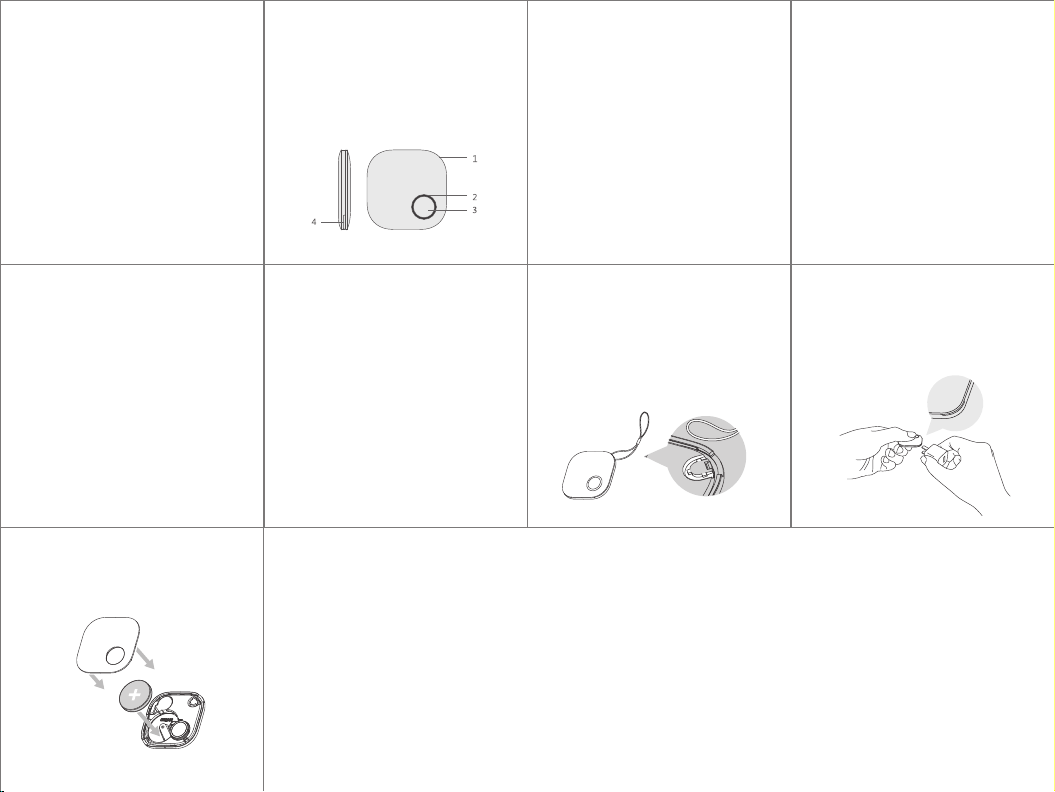
Learn about
Smart Key
1.Strap h ol e
2.LED ind ic at or
3.Power b ut to n
4.Notch : fo r re pl ac ing bat te ry
Pair your
Smart Key
1. Enter in to M y Ke ys p ag e in
Smart H an dl e App , ed it a nd
creat e a “S ma rt K ey ”, then
press “ se nd ” bu tt on .
2. Press an d ho ld t he b ut ton on
the Sma rt K ey t il l th e pairing
proce ss c om pl et es .
Red and gre en L ED i n Sm ar t
Handle wi ll ic ke r in i nterv al
with bu zz in g du ri ng p airin g
proce ss .
3. If the S ma rt H an dl e ha s been
paire d to a n ew a dm in is trato r,
please re -p ai r yo ur S mart Ke y
to get un lo ck a ut ho ri zatio n.
1
Unlock your
Smart Handle
1.Press a nd r el ea se t he power
butto n of t he S ma rt K ey, gr ee n
LED ashe s wi th a b ee p, a nd
now you can o pe n th e Sm ar t
Handle wi th in 6 0 se co nds.
5
2. Replac e th e ba tt er y with a ne w
one (CR 20 32 ) an d as se mble
the Sma rt K ey.
CR2 032
9
2
2.When yo u n d th e Sm ar t Key
can't ope n th e ha nd le i n
normal po si ti on , it m eans yo ur
Smart K ey b at te ry i s lo w,
please pl ac e it c lo se r to the
handle an d tr y ag ai n or c hange
the batte ry.
6
3
Install the Strap
Use the str ap t o ti e th e Sm art Key
onto your k ey s, b ag s or o ther
things. O pe n yo ur S ma rt Key
from the to p- ri gh t co rner, pu t th e
strap int o th e gr oo ve , and
assembl e th e Sm ar t Ke y.
7
4
Replace the Battery
1. Open the S ma rt K ey f ro m the
notch s id e.
* Rec ommen d to open t he Smar t Key wit h
a str aight s crewd river o r plug on y our
pho ne char ger str aight ly .
8
Page 2

This device complies with Part 15 of the FCC Rules. Operation is subject to the following two
conditions: (1) this device may not cause harmful interference, and (2) this device must accept any
interference received, including interference that may cause undesired operation.
Changes or modifications not expressly approved by the party responsible for compliance could
void the user's authority to operate the equipment.
NOTE: This equipment has been tested and found to comply with the limits for a Class B digital
device, pursuant to Part 15 of the FCC Rules. These limits are designed to provide reasonable
protection against harmful interference in a residential installation. This equipment generates, uses
instructions, may cause harmful interference to radio communications. However, there is no
guarantee that interference will not occur in a particular installation. If this equipment does cause
harmful interference to radio or television reception, which can be determined by turning the
equipment off and on, the user is encouraged to try to correct the interference by one or more of
the following measures:
-- Reorient or relocate the receiving antenna.
-- Increase the separation between the equipment and receiver.
-- Connect the equipment into an outlet on a circuit different from that to which the receiver is
connected.
-- Consult the dealer or an experienced radio/TV technician for help.
 Loading...