

Page 1
Tablet series security and alarm device
User Manual
陈 列 出 乎 您 想 像
More Th an Display
(Ap plied t o PX-45 B/PS- 45B ser ies)
一.Packing lis t
1. Mai n unit (1 set )
2. Cha rger (opt ional )
3. Rem ote co ntro l(opt ional )
4. Use r manu al(1 p cs)
三.Descripti on
二.Specifica tio n & par ame nt
1. Col or:W hite /Blac k
2. Mat eria l:Al umini um-ma gnesi um allo y
3. Ang le: 25 °
4. Ala rmin g:Yes
5. Cha rgin g:Yes ,bui lt-in lit hium b att ery
6. Ala rmin g sens ing hea d:sin gle con tact
7. Ala rmin g volu mn:10 5 decib el
8. Bat tery C apac ity:5 80MA
9. Cha rgin g volt age:D C 5V
10. Ch argi ng cur rent: 500MA
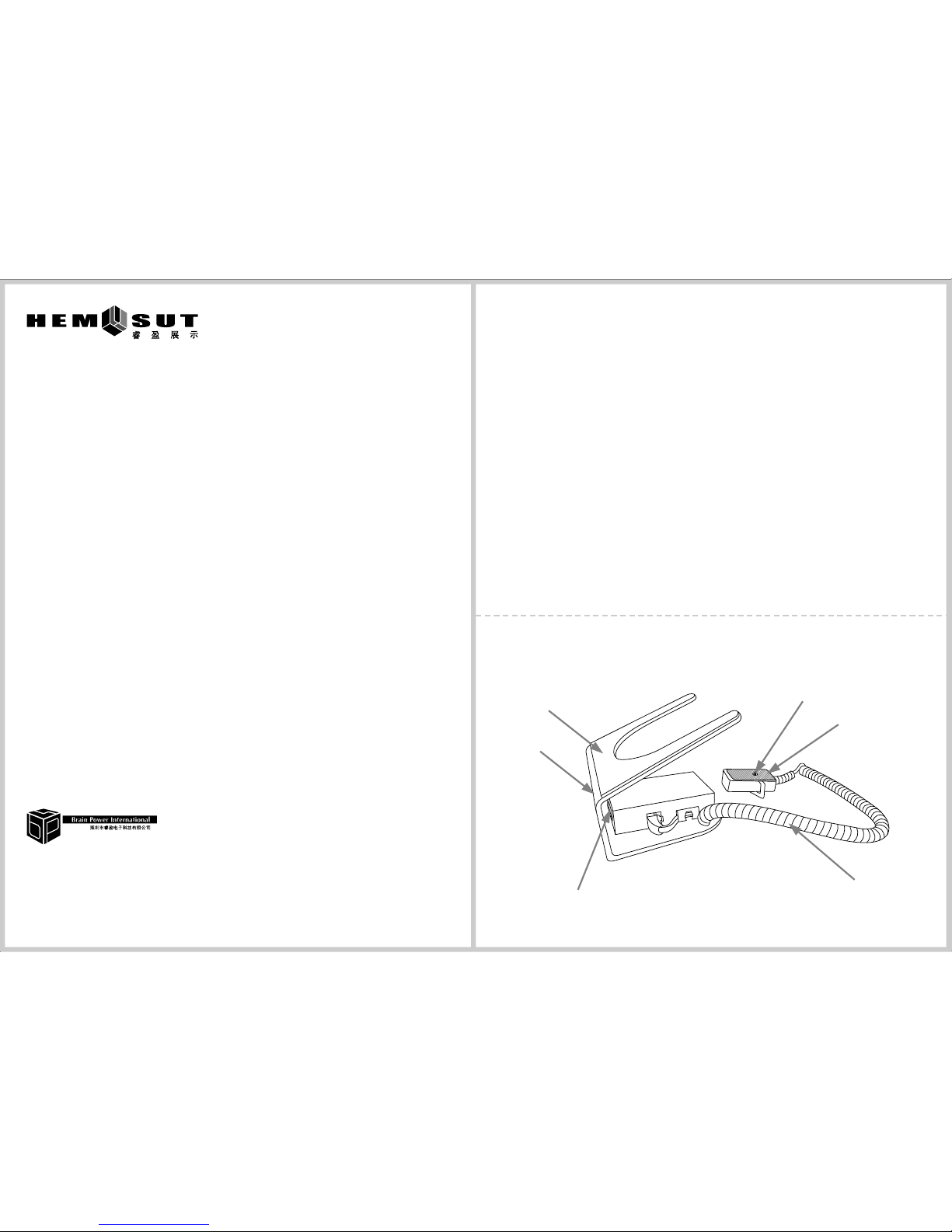
Table t base
Ant i-sli p mat
IR re ceivi ng wind ow
Sec urity s ensin g line
wit h cryst al conn ector
Sec urity c ontac t
Bra cket
She nzhen R ing Ele ctron ic Tech nolog y Co.Lt d.,
Add ress:Bl ock 5,Z one 1,J ia de ma ru an indu stria l park,
Pin gshan n ew dist rict, Shenz hen.
Telep hone:07 55-89 306 464 89 6670 05
Fax:0 755-8 328 0153
Web site:www. hem sut. com
Nat ional u nifor m servi ce line:4 006-9 18-0 22
Page 2
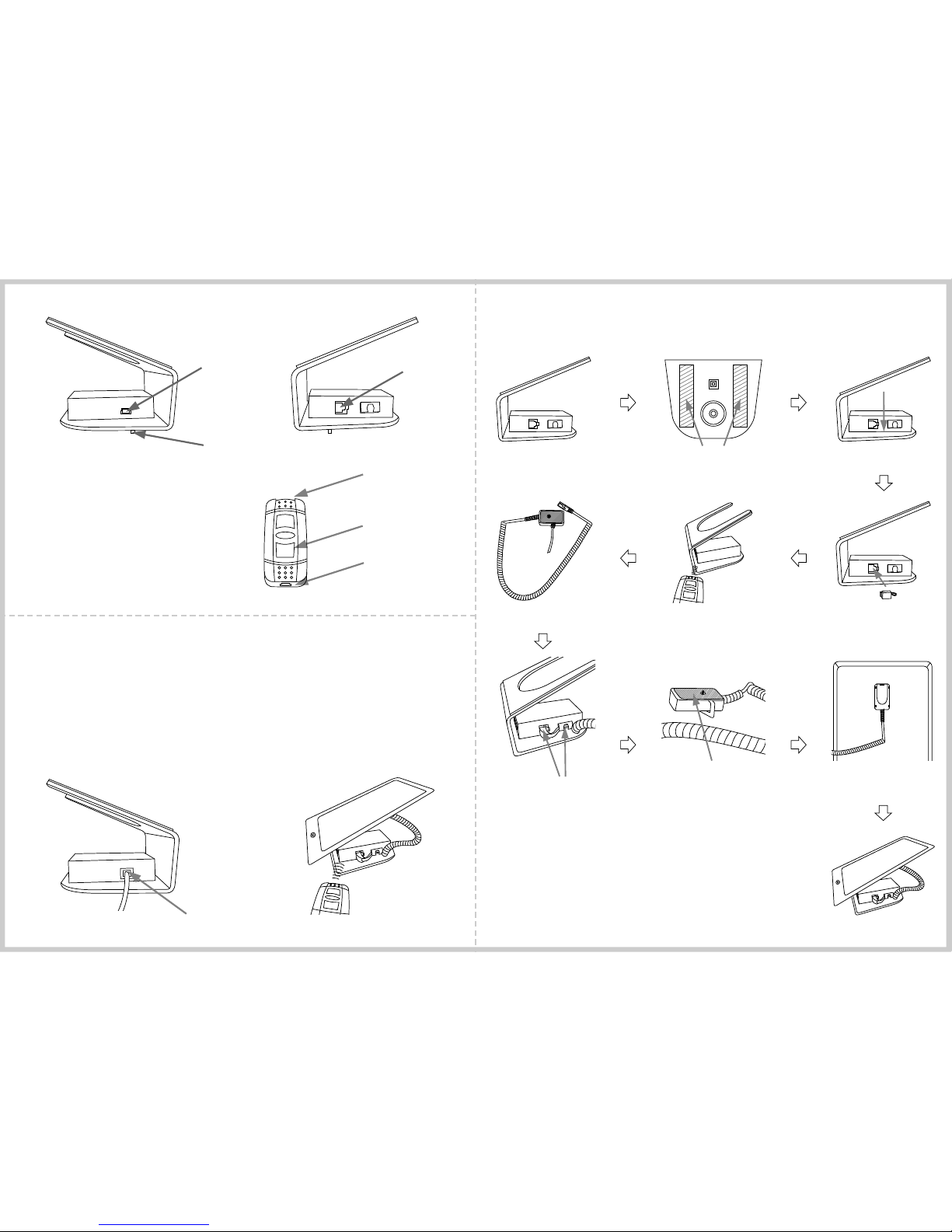
Unl ock but ton
USB c hargi ng port
IR tr ansmi tting p ort
Instruct ion a bou t cha rging
Whi le batt ery is lo w,the li ght on ma in box
tur ns red. Pleas e charg e the mai n unit vi a
con necti ng the Mi ni-US B cable t o USB
hos t on the si de
Instruct ion a bou t the
remov al of d efe nse
Se
u
t p
U
nl
oc
k
五.Installat ion
Soc ket for c rysta l
con necto r
Sec urity c ontac t on tabl e
Min i-USB c hargi ng port
1. Take o ut the ma in unit f rom pac king bo x
2. Keep th e table f lat and c lean,
tea r off the 3M t ape on th e botto m
5.P ush and h old the "Unlo ck" but ton on
rem ote con trol ab out 1 sec ond for
rem oving a larmi ng
Set
up
Un
lo
c
k
9.P ress wi th prop er stre ngth th e
tab let bas e to go int o the wor king
sta tus
10. Put the t ablet o n the ant i-sli pe mat
of th e brack et
3. Press m ain uni t downw ard wit h
5kg s treng th for fi xing we ll on the t able
6. Take o ut the se curit y Sensi ng line
7.Tak e out the s ecuri ty Sens ing lin eFix
the s ensin g line ne ar the cr ystal c onnec tor
in th e clip, and plu g the cry stal co nnect or
int o the soc ket
8.Tea r off the ta pe pape r on tabl et base ,
and s tick on t he back o f table t
Min i-USB c hargi ng port
Whi le alar ming, the lig ht on rec eivin g windo w
tur ns gree n.Ple ase pus h and hol d "Unlo ck"
but ton abo ut 1~2 se conds o n the rem ote con trol
tow ard IR re ceivi ng wind ow for re movin g alarm ing
4. Plug ou t the cry stal co nnect or,
mea nwhil e the mai n unit al arms
aut omati cally
四.Function fo r Rem ote c ont rol
Whi le push ing the " Unloc k" butt on on the
rem ote con trol, the red L ED of the m iddle
but ton is on ,it mea ns the re mote co ntrol
is wo rkabl e;or el se,it m eans th e remot e
con trol ne eds cha rging .
Unlo ck
Set up
 Loading...