

Page 1

This device complies with part 15 of the FCC Rules. Operation is subject to the following two
conditions:
(1) This device may not cause harmful interference, and
(2) this device must accept any interference received, including interference that may cause
undesired operation.
Copyright Notice
Hemisphere GPS Precision GPS Applications
Copyright © Hemisphere GPS (2011). All rights reserved.
No part of this manual may be reproduced, transmitted, transcribed, stored in a retrieval system or
translated into any language or computer language, in any form or by any means, electronic,
mechanical, magnetic, optical, chemical, manual or otherwise, without the prior written
permission of Hemisphere GPS.
Trademarks
Hemisphere GPS®, the Hemisphere GPS logo, COASTTM, Crescent®, EclipseTM, PocketMAX PCTM,
PocketMAX
trademarks are the properties of their respective owners.
TM
, SBX-4TM, and Vec to rTM are proprietary trademarks of Hemisphere GPS. Other
Patents
Hemisphere GPS products may be covered by one or more of the following U.S. Patents:
6,111,549 6,397,147 6,469,663 6,501,346 6,539,303
6,549,091 6,631,916 6,711,501 6,744,404 6,865,465
6,876,920 7,142,956 7,162,348 7,277,792 7,292,185
7,292,186 7,373,231 7,400,956 7,400,294 7,388,539
7,429,952 7,437,230 7,460,942
Other U.S. and foreign patents pending.
Page 2

Page 3

Contents
Overview . . . . . . . . . . . . . . . . . . . . . . . . . . . . . . . . . . . . . . . . . . . . . . . 1
Parts List . . . . . . . . . . . . . . . . . . . . . . . . . . . . . . . . . . . . . . . . . . . . . . . 1
Additional Documentation . . . . . . . . . . . . . . . . . . . . . . . . . . . . . . . . . 1
Installation Considerations . . . . . . . . . . . . . . . . . . . . . . . . . . . . . . . . . 2
Location . . . . . . . . . . . . . . . . . . . . . . . . . . . . . . . . . . . . . . . . . . . . . . . 2
Dimensions . . . . . . . . . . . . . . . . . . . . . . . . . . . . . . . . . . . . . . . . . . . . . 2
VHF Interference . . . . . . . . . . . . . . . . . . . . . . . . . . . . . . . . . . . . . . . . . 3
Mounting Options . . . . . . . . . . . . . . . . . . . . . . . . . . . . . . . . . . . . . . . 3
Mounting Orientation . . . . . . . . . . . . . . . . . . . . . . . . . . . . . . . . . . . . . 4
Alignment . . . . . . . . . . . . . . . . . . . . . . . . . . . . . . . . . . . . . . . . . . . . . . 5
Ports . . . . . . . . . . . . . . . . . . . . . . . . . . . . . . . . . . . . . . . . . . . . . . . . . . . 6
Serial Ports . . . . . . . . . . . . . . . . . . . . . . . . . . . . . . . . . . . . . . . . . . . . . 6
NMEA 2000 Port . . . . . . . . . . . . . . . . . . . . . . . . . . . . . . . . . . . . . . . . . 7
Powering the MV102 . . . . . . . . . . . . . . . . . . . . . . . . . . . . . . . . . . . . . 11
Power Considerations . . . . . . . . . . . . . . . . . . . . . . . . . . . . . . . . . . . 11
Connecting to a Power Source . . . . . . . . . . . . . . . . . . . . . . . . . . . . 11
Electrical Isolation . . . . . . . . . . . . . . . . . . . . . . . . . . . . . . . . . . . . . . 11
Connecting the MV102 to External Devices . . . . . . . . . . . . . . . . . . 12
Power/Data Cable . . . . . . . . . . . . . . . . . . . . . . . . . . . . . . . . . . . . . . . 12
Default Parameters . . . . . . . . . . . . . . . . . . . . . . . . . . . . . . . . . . . . . . 13
Configuration . . . . . . . . . . . . . . . . . . . . . . . . . . . . . . . . . . . . . . . . . . . 14
Supplemental Sensors . . . . . . . . . . . . . . . . . . . . . . . . . . . . . . . . . . . 14
Common Commands and Messages . . . . . . . . . . . . . . . . . . . . . . . 15
End User License Agreement . . . . . . . . . . . . . . . . . . . . . . . . . . . . . . 19
Warranty Notice . . . . . . . . . . . . . . . . . . . . . . . . . . . . . . . . . . . . . . . . 22
Page 4

Page 5

Overview
This quick reference guide provides information to get you up and running quickly
with your MV102 GPS Compass. For more detailed information on using the MV102
refer to the MV102 GPS Compass User Guide.
This guide consists of the following sections:
• “Parts List” below describes the parts in your MV102 GPS Compass kit
• “Additional Documentation” below provides information for additional
MV102 documentation
• “Installation Considerations” on page 2 contains recommendations for
where to place your MV102, dimensions of the unit, VHF interference, and
mounting options
• “Mounting Orientation” on page 4 describes parallel and perpendicular
orientations
• “Alignment” on page 5 describes how to align the MV102
• “Connecting the MV102 to External Devices” on page 12 provides
information on the included power/data cable and how to connect to serial
ports
• “Configuration” on page 14 lists basic configuration information
• “Supplemental Sensors” on page 14 describes the purpose of and
calibration procedures for the sensors
• “Common Commands and Messages” on page 15 lists commands and
messages common to MV102 (for more information on commands and
messages see the GPS Technical Reference from www.hemispheregps.com)
Parts List
In addition to this Quick Reference Guide (which is included in the MV102 kit),
installing the MV102 GPS Compass requires the following:
• MV102 GPS Compass
• Kit (accessory item) containing the following:
– Power/data cable (15 m)
–Clamp
–Screw
–Washer
• Serial-to-NMEA 2000 adapter, PN 710-0104-000#
Additional Documentation
For more in-depth information on the MV102 GPS Compass you can download the
MV102 User Guide.
MV102 Quick Reference Guide 1
Page 6
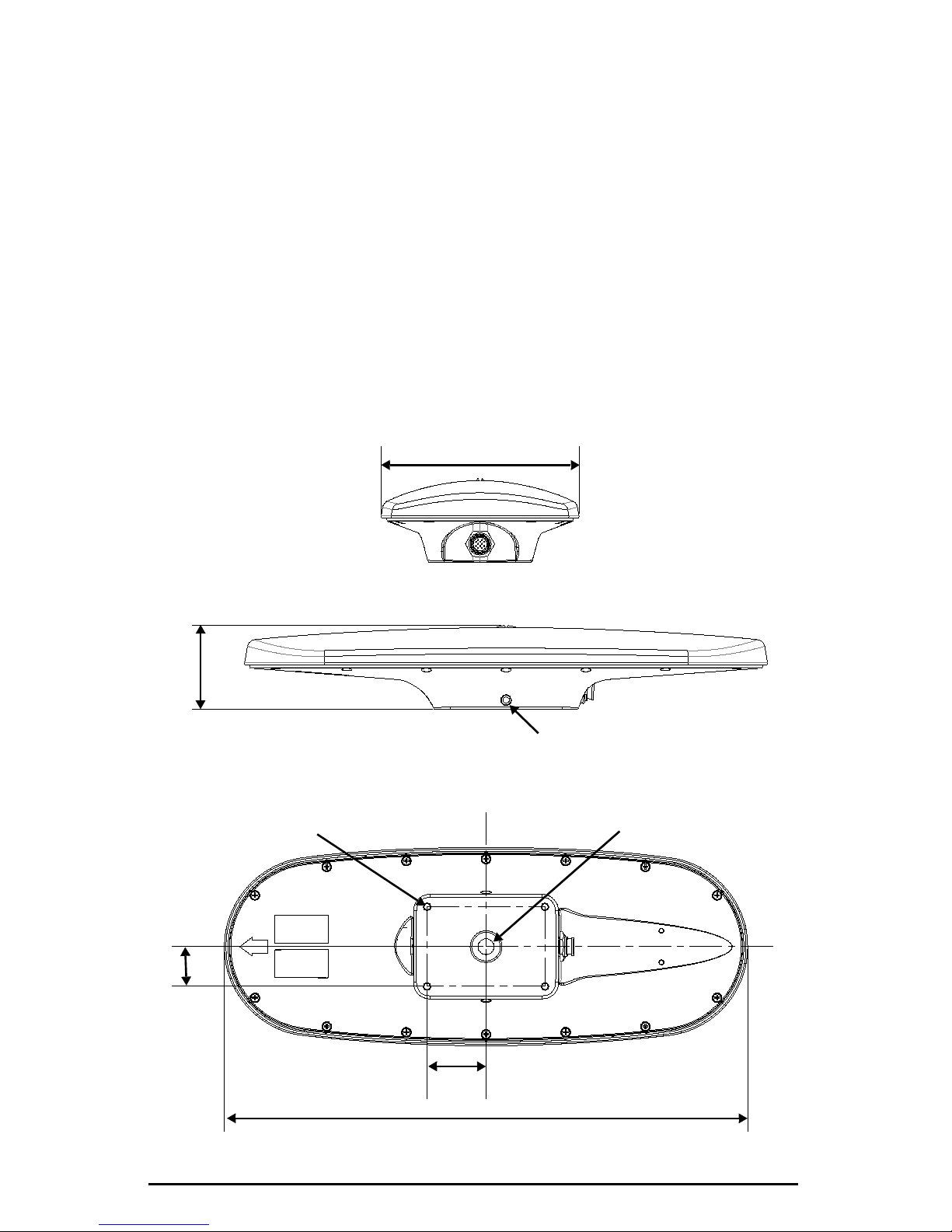
Installation Considerations
C
L
C
L
66.90 mm
(2.63”)
SET SCREW
3/8-16 THREAD SIZE
2 PLACES
MOUNTING HOLE
1-14 UNS- 2B THR EAD SIZE
MOUNTING HOLE
1/4-20 UNC-2B THREAD SIZE
4 PLACES
416.93 mm (16.41”)
157.89 mm (6.21”)
46.99 mm
31.75 mm
(1.25”)
(1.85”)
Refer to the MV102 GPS Compass User Guide for more detailed installation
instructions.
Location
Proper location is important to obtain a high-precision GPS reading. Choose an
installation location using either the pole or fixed mount where the MV102:
• Has a clear view of the sky
• Is away from other electronics and antennas
• Has enough cable to reach a power source
• Is on a level plane
Dimensions
The following drawing illustrates the physical dimensions of the MV102.
MV102 Quick Reference Guide 2
Page 7
VHF Interference
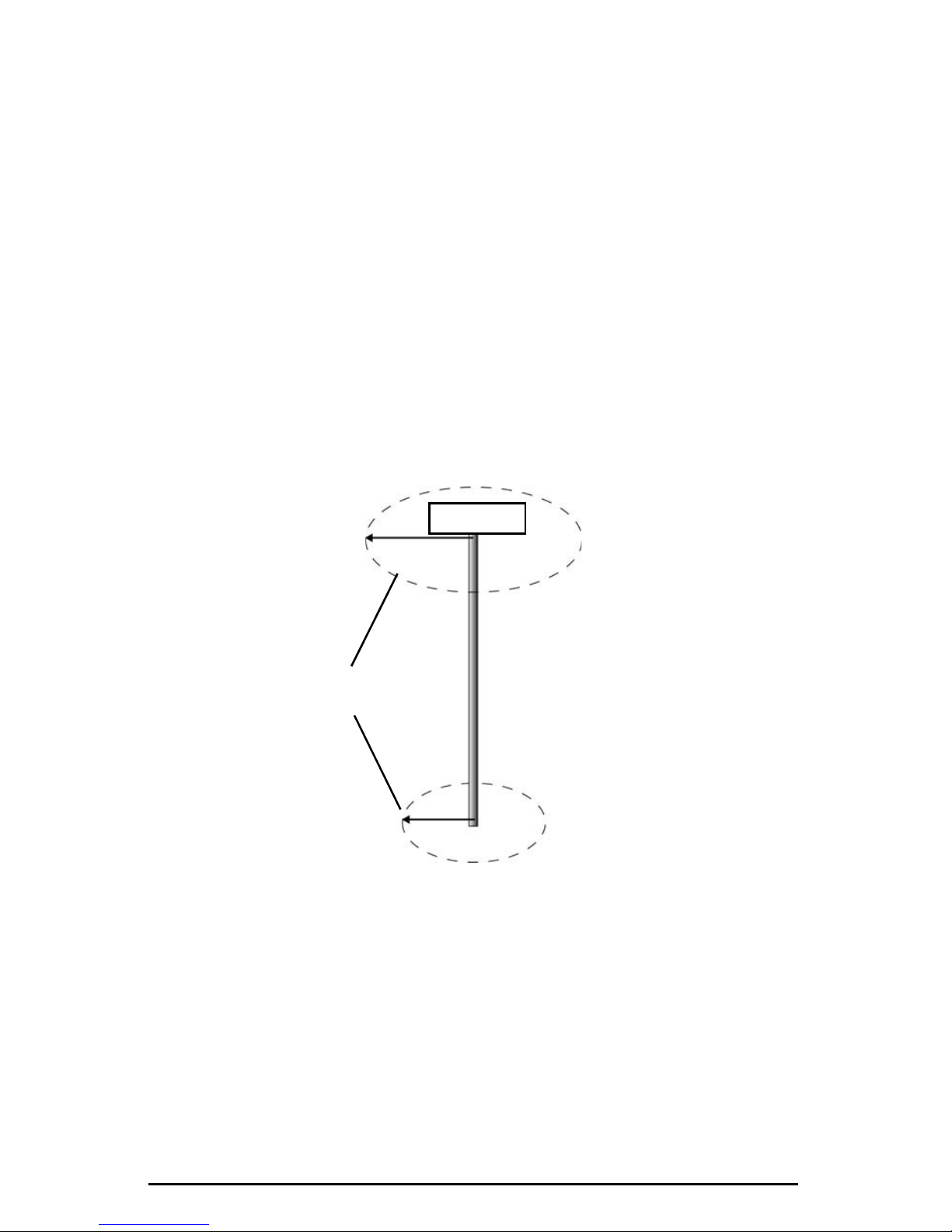
1.5 m radius at top
(minimum)
1.0 m radius at base
(minimum)
Use these minimum
distances to determine
where to place the MV102
VHF Antenna
VHF interference from such devices as cellular phones and radio transmitters may
interfere with GPS operation. For example, if installing the MV102 near marine radios
consider the folowing:
• VHF marine radio working frequencies (Channels 1 to 28 and 84 to 88) range
from 156.05 to 157.40 MHz. The L1 GPS working center frequency is 1575.42
MHz. The bandwidth is +/- 2MHz to +/- 10 MHz, which is dependent on the
GPS antenna and receiver design.
• VHF marine radios emit strong harmonics. The 10th harmonic of VHF radio,
in some channels, falls into the GPS working frequency band, which may
cause the SNR of GPS to degrade significantly.
• The radiated harmonic signal strength of different brands/ models varies.
• Follow VHF radio manufacturers’ recommendations on how to mount their
radios and what devices to keep a safe distance away.
• Handheld 5W VHF radios may not provide suitable filtering and may
interfere with the MV102’s operation if too close.
Before installing the MV102 use the following diagram to ensure there are no nearby
devices that my cause VHF interference.
Mounting Options
*Hemisphere GPS does not provide the mounting hardware.
The MV102 allows for two different mounting options: flush mount and pole mount.
• Flush mount - The bottom of the MV102 contains four holes for flush
mounting the unit to a flat surface (see “Dimensions” on page 2).
• Pole mount - The bottom of the MV102 contains a mounting hole (1" thread,
0.9" depth) for easy pole mounting. Hand tighten (do not overtighten). The
set screws on the long sides of the base (see diagram above) allow you to
secure the MV102 in place (3/16" Allen wrench not included).
MV102 Quick Reference Guide 3
Page 8
Mounting Orientation
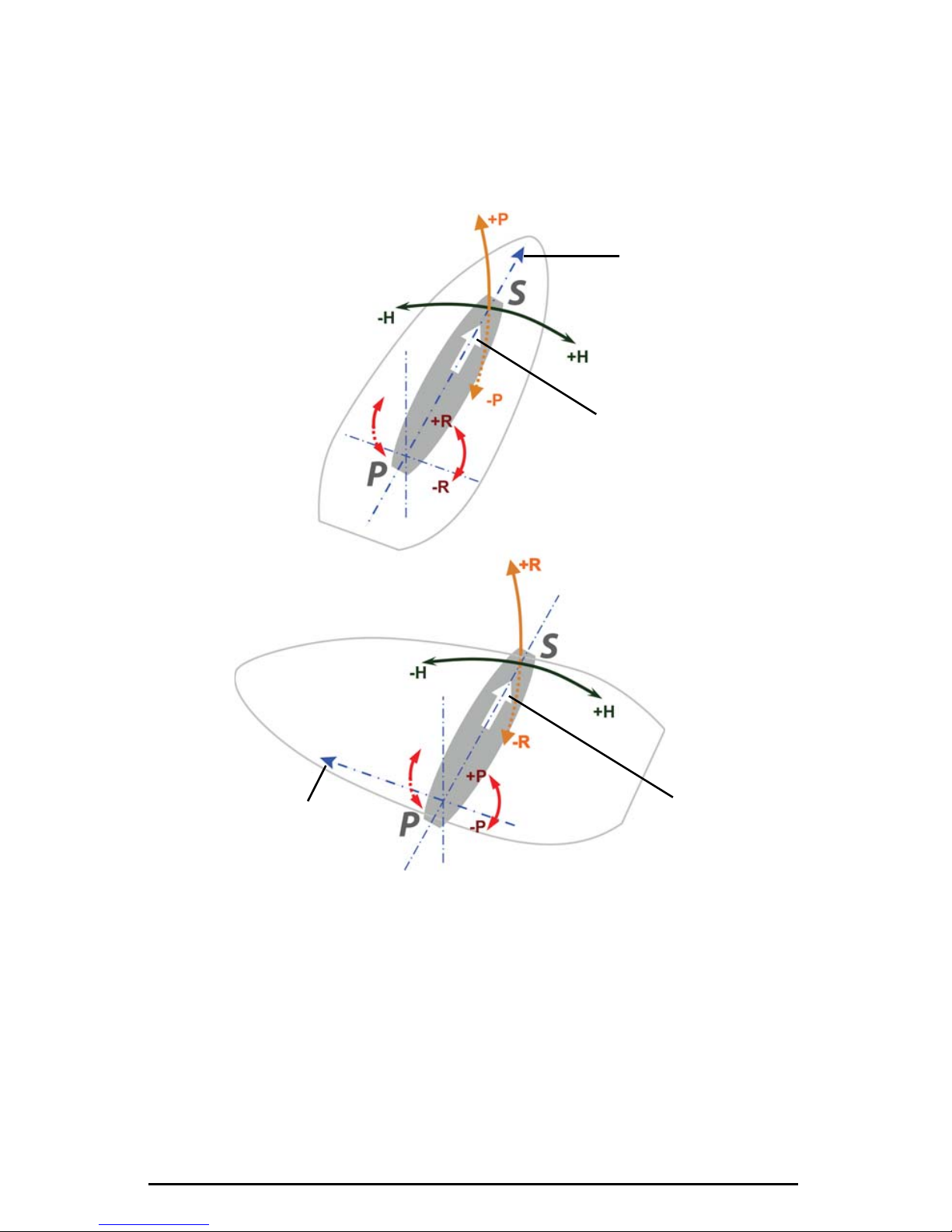
Forward
motion
Parallel
Orientation
Forward
motion
Recessed arrow
located on
bottom of
enclosure
(recommended orientation and
resulting signs of HPR values)
Recessed arrow
located on
bottom of
enclosure
Perpendicular
Orientation
(alternate orientation and
resulting signs of HPR values)
The MV102 outputs heading, pitch, and roll readings regardless of the orientation of
the antennas. However, the relation of the antennas to the boat’s axis determines
whether you will need to enter a heading, pitch, or roll bias. The primary antenna is
used for positioning and the primary and secondary antennas, working in
conjunction, output heading, pitch, and roll values.
MV102 Quick Reference Guide 4
Page 9
Alignment
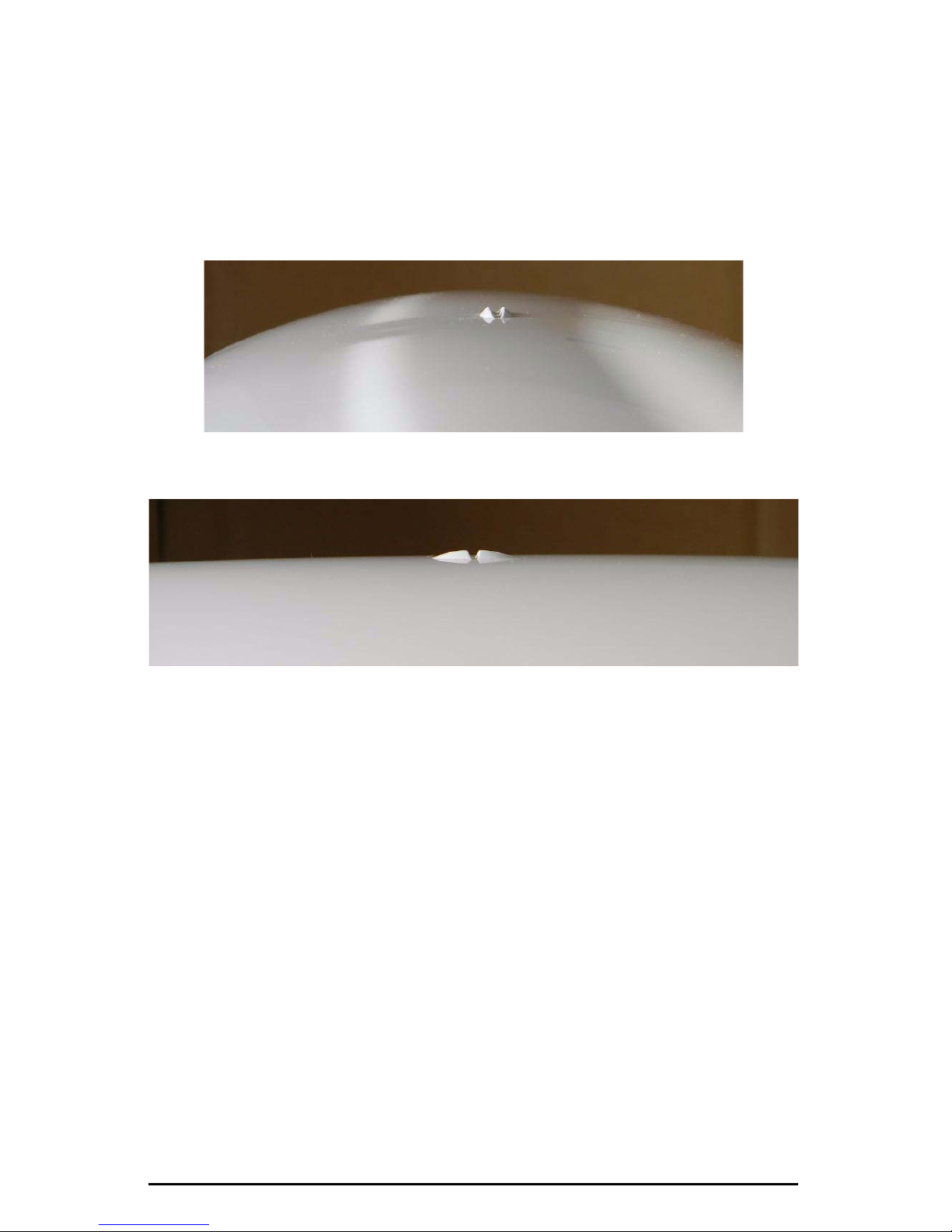
The top of the MV102 enclosure incorporates sight design features to help you align
the enclosure with respect to an important feature on your vessel.
To use the sights, center the small post on the opposite side of the enclosure from
you, within the channel made in the medallion located in the center of the enclosure
top as shown in Figure 1 and Figure 2. Alignment accuracy when looking through the
long site (Figure 1) is approximately +/- 1°, while alignment through the short site
(Figure 2) is approximately +/- 2.5°.
Figure 1: Long site alignment
Figure 2: Short sight alignment
MV102 Quick Reference Guide 5
Page 10

Ports
The MV102 offers either serial port or NMEA 2000 port functionality.
Serial Ports
The MV102 offers position and heading data via two full-duplex (bi-directional) RS-232
serial ports. Besides outputting data, these ports are used for firmware upgrades.
Selecting Baud Rates and Message Types
When selecting your baud rate and message types, use the following calculation to
determine your baud rate for your required data throughput.
Messages * Message output rate * Message length (bytes) * bits in byte
Ex: 5 * 20Hz * 40 bytes * 10 = 40,000 bits/sec
For information on message output rates refer to GPS Technical Reference available
from the Hemisphere GPS website at www.hemispheregps.com.
Configuring the Ports
You may configure Port A or Port C of the GPS receiver to output any combination of
data that you want. Port A can have a different configuration from Port C in terms of
data message output, data rates, and the baud rate of the port. This allows you to
configure the ports independently based upon your needs.
The CAN processor that controls Port C is by default programmed into NMEA 2000
mode. You must configure Port C as a serial port to use the MV102 with two serial
ports. Port A is always a serial port. To configure Port C as a serial port refer to Table 1
on page 7.
For example, if you want one generalized port and one heading-only port, you can
configure the ports as follows:
• Port A to have GPGGA, GPVTG, GPGSV, GPZDA, and GPHDT all output at
1 Hz over a 9600 baud rate
• Port C to have GPHDT and GPROT output at their maximum rate of 20 Hz
over a 19200 baud rate
A personal computer (PC) typically uses a DB9-male connector for RS-232 serial port
communications.
Note: For successful communications use the 8-N-1 protocol and set the baud rate of
the MV102’s serial ports to match that of the devices to which they are connected.
Flow control is not supported.
Recommendations for Connecting to Other Devices
When interfacing to other devices, ensure the transmit data output from the MV102 is
connected to the data input of the other device. The signal grounds must also be
connected.
There is likely little reason to connect the receive data input of the MV102 to another
device unless it is able to send configuration commands to the MV102. Since the
MV102 uses proprietary NMEA 0183 commands for control over its configuration, the
vast majority of electronics will not be able to configure its settings unless the other
device has a terminal setting where you can manually issue commands.
MV102 Quick Reference Guide 6
Page 11
NMEA 2000 Port
By default, Port C is configured as a NMEA 2000 port with the default baud rate of
57600.
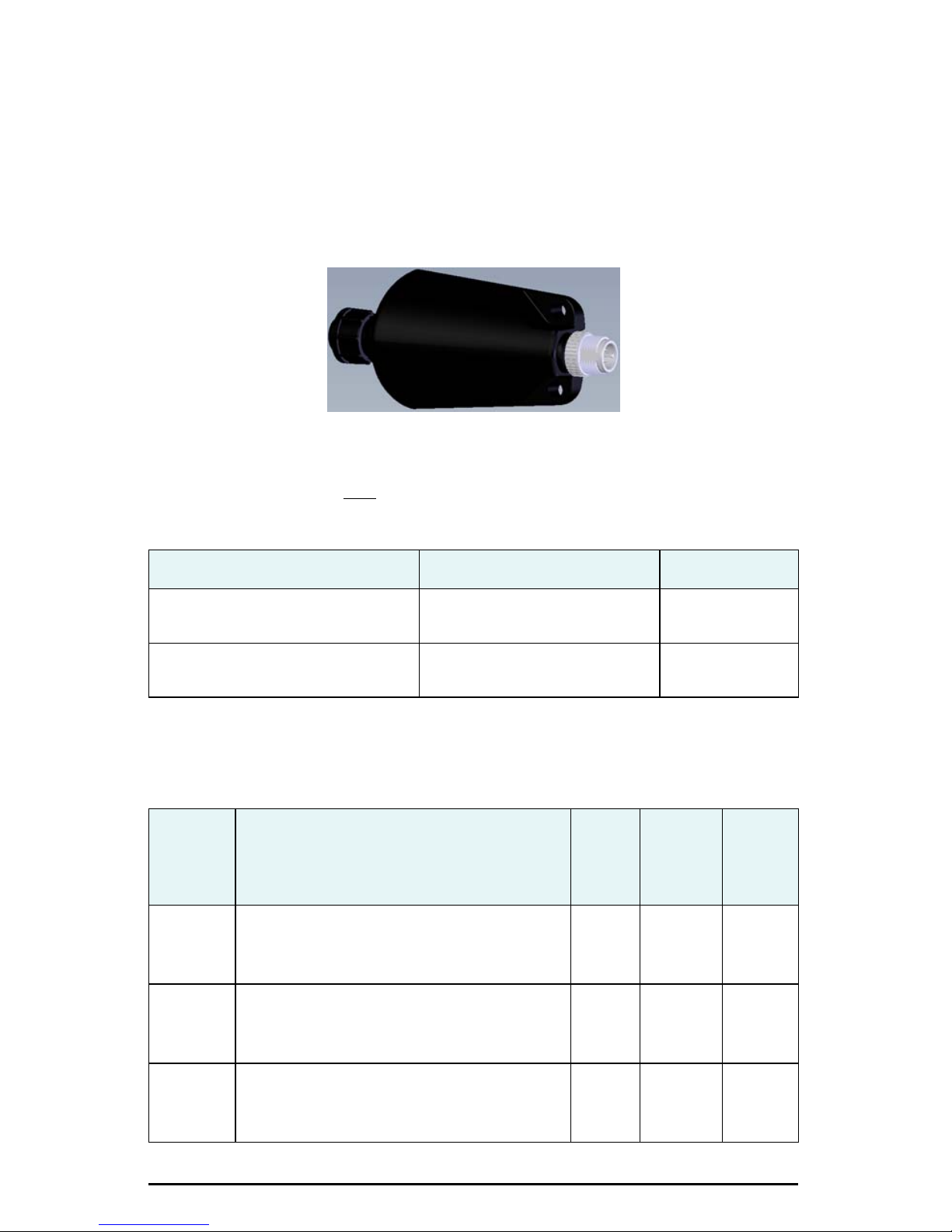
To use MV102 for NMEA 2000 you have to connect the included serial-to-NMEA 2000
adapter (P/N 710-0104-000#) to the unit. Figure 3 shows the adapter. Insert the 12-pin
connector of the adapter into the male end of the 12-pin connector on the MV102 by
aligning the keys. You can then attach the adapter to the unit using the supplied
screws (machine, 8-32, ½”, PPHC, SS) and washer (washer, flat, #8, SS). The 5-pin male
Micro-C connector connects to your NMEA 2000 drop cable.
Figure 3: Serial-to-NMEA 2000 adapter
Table 1 lists the commands used to configure Port C back to serial or NMEA 2000
when necessary. You can only
send these commands using Port A.
Table 1: Commands for changing Port C (must be sent through Port A)
Command Reply Description
$JRELAY,PORTC,$JSERIALMODE $>JSERIALMODE,ENABLED
$>resetting
$JRELAY,PORTC,$JN2KMODE $>JN2KMODE,ENABLED
$>resetting
Switch Port C to
serial
Switch Port C to
NMEA 2000
Table 2 shows the requested PGNs with the MV102 in NMEA 2000 mode.
Table 2: Received messages based on a request
Default
PG No.
(PGN)
059392 ISO Acknowledgement
Description Level
Used to acknowledge the status of certain
requests addressed to a specific ECU.
BOn
Update
Rate
(msec)
Request
Freq
(Hz)
On
Request
059904 ISO Request
Request the transmission of a specific PGN,
addressed or broadcast.
060928 ISO Address Claim
Used to identify to other ECUs the address
claimed by an ECU.
MV102 Quick Reference Guide 7
BOn
Request
BOn
Request
On
Request
On
Request
Page 12

Table 2: Received messages based on a request (continued)
PG No.
(PGN)
Description Level
Default
Update
Rate
(msec)
Freq
(Hz)
126996 Product Information
NMEA 2000 database version supported,
manufacturer’s product code, NMEA 2000
certification level, Load Equivalency number,
and other product-specific information.
126464 Receive/Transmit PGNs group function
The Transmit / Receive PGN List Group type
of function is defined by first field. The
message will be a Transmit or Receive PGN
List group function.
129538 GNSS Control Status
GNSS common satellite receiver parameter
status.
129545 GNSS RAIM Output
Used to provide the output from a GNSS
receiver's Receiver Autonomous Integrity
Monitoring (RAIM) process. The Integrity
field value is based on the parameters set in
PGN 129546 GNSS RAIM Settings.
129546 GNSS RAIM Settings
Used to report the control parameters for a
GNSS Receiver Autonomous Integrity
Monitoring (RAIM) process.
BOn
Request
BOn
Request
BOn
Request
BOn
Request
BOn
Request
On
Request
On
Request
On
Request
On
Request
On
Request
Table 3 shows the transmitted PGNs with their default update rate with the MV102 in
NMEA 2000 mode.
Table 3: Transmitted messages
PG No.
(PGN)
126992 System Time
Description Level
The purpose of this PGN is twofold: To provide a
regular transmission of UTC time and date. To
provide synchronism for measurement data.
MV102 Quick Reference Guide 8
Default
Update
Rate
(msec)
B10001
Freq
(Hz)
Page 13

Table 3: Transmitted messages (continued)
PG No.
(PGN)
Description Level
Default
Update
Rate
(msec)
Freq
(Hz)
127250 Vessel Heading
Heading sensor value with a flag for True or
Magnetic. If the sensor value is Magnetic, the
deviation field can be used to produce a
Magnetic heading, and the variation field can be
used to correct the Magnetic heading to
produce a True heading.
127251 Rate of Turn
Rate of change of the Heading.
127257 Attitude
Provides a single transmission that describes
the position of a vessel relative to both
horizontal and vertical planes. This would
typically be used for vessel stabilization, vessel
control and onboard platform stabilization.
127258 Magnetic Variation
Message for transmitting variation. The
message contains a sequence number to allow
synchronization of other messages such as
Heading or Course over Ground. The quality of
service and age of service are provided to
enable recipients to determine an appropriate
level of service if multiple transmissions exist.
B10010
B10010
B10001
1000 1
128259 Speed
Provides a single transmission that describes
the motion of a vessel.
129025 Position, Rapid Update
Provides latitude and longitude referenced to
WGS84. Being defined as single frame
message, as opposed to other PGNs that
include latitude and longitude and are defined
as fast or multi-packet, this PGN lends itself to
being transmitted more frequently without
using up excessive bandwidth on the bus for
the benefit of receiving equipment that may
require rapid position updates.
129026 COG & SOG, Rapid Update
Single frame PGN that provides Course Over
Ground (COG) and Speed Over Ground (SOG).
B10001
B10010
B2504
MV102 Quick Reference Guide 9
Page 14

Table 3: Transmitted messages (continued)
PG No.
(PGN)
Description Level
Default
Update
Rate
(msec)
Freq
(Hz)
129027 Position Delta, High Precision Rapid Update
The "Position Delta, High Precision Rapid
Update" Parameter Group is intended for
applications where very high precision and very
fast update rates are needed for position data.
This PGN can provide delta position changes
down to 1 mm with a delta time period accurate
to 5 msec.
129028 Altitude Delta, High Precision Rapid Update
The "Altitude Delta, High Precision Rapid
Update" Parameter Group is intended for
applications where very high precision and very
fast update rates are needed for altitude and
course over ground data. This PG can provide
delta altitude changes down to 1 millimeter, a
change in direction as small as 0.0057°, and
with a delta time period accurate to 5 msec.
129029 GNSS Position Data
Conveys a comprehensive set of Global
Navigation Satellite System (GNSS)
parameters, including position information.
B10010
B10010
B10001
129033 Time & Date
Single transmission that provides UTC time,
UTC Date, and Local Offset.
129539 GNSS DOPs
Provides a single transmission containing
GNSS status and dilution of precision
components (DOP) that indicate the
contribution of satellite geometry to the overall
positioning error. There are three DOP
parameters reported: horizontal (HDOP), Vertical
(VDOP), and time (TDOP).
129540 GNSS Sats in View
GNSS information on current satellites in view
tagged by sequence ID. Information includes
PRN, elevation, azimuth, SNR, defines the
number of satellites; defines the satellite
number and the information.
B10001
B10001
B10001
MV102 Quick Reference Guide 10
Page 15

Powering the MV102
Power Considerations
For best performance use a clean and continuous power supply. The MV102 power
supply features reverse polarity protection but will not operate with reverse polarity.
Additional power specifications include:
• Input voltage: 6 to 36 VDC
• Power consumption: ~ 3 W nominal
• Current consumption: 320 mA @ 9 VDC
240 mA @ 12 VDC
180 mA @ 16 VDC
• Power isolation: Isolated to enclosure
Connecting to a Power Source
Note: This section refers to powering the unit via serial connection. To power the unit
via NMEA 2000 connection, following the standard procedure for powering up via
NMEA 2000.
Before you power up the MV102 you must terminate the wires of the power cable as
required. There are a variety of power connectors and terminals on the market from
which to choose, depending on your specific requirements.
Do not apply a voltage higher than 36 VDC. This will damage the
receiver and void the warranty.
To interface the MV102 power cable to the power source:
• Connect the red wire of the cable’s power input to DC positive (+)
• Connect the black wire of the cable’s power input to DC negative (-)
The MV102’s smart antenna will start when an acceptable voltage is applied to the
power leads of the extension cable.
Electrical Isolation
The MV102’s power supply is isolated from the communication lines and the PC-ABS
plastic enclosure isolates the electronics mechanically from the vessel (addressing the
issue of vessel hull electrolysis).
MV102 Quick Reference Guide 11
Page 16
Connecting the MV102 to External Devices
J1 P1
30 mm
Strip and tin 3 mm
25 mm
100 mm
15 m
Power/Data Cable
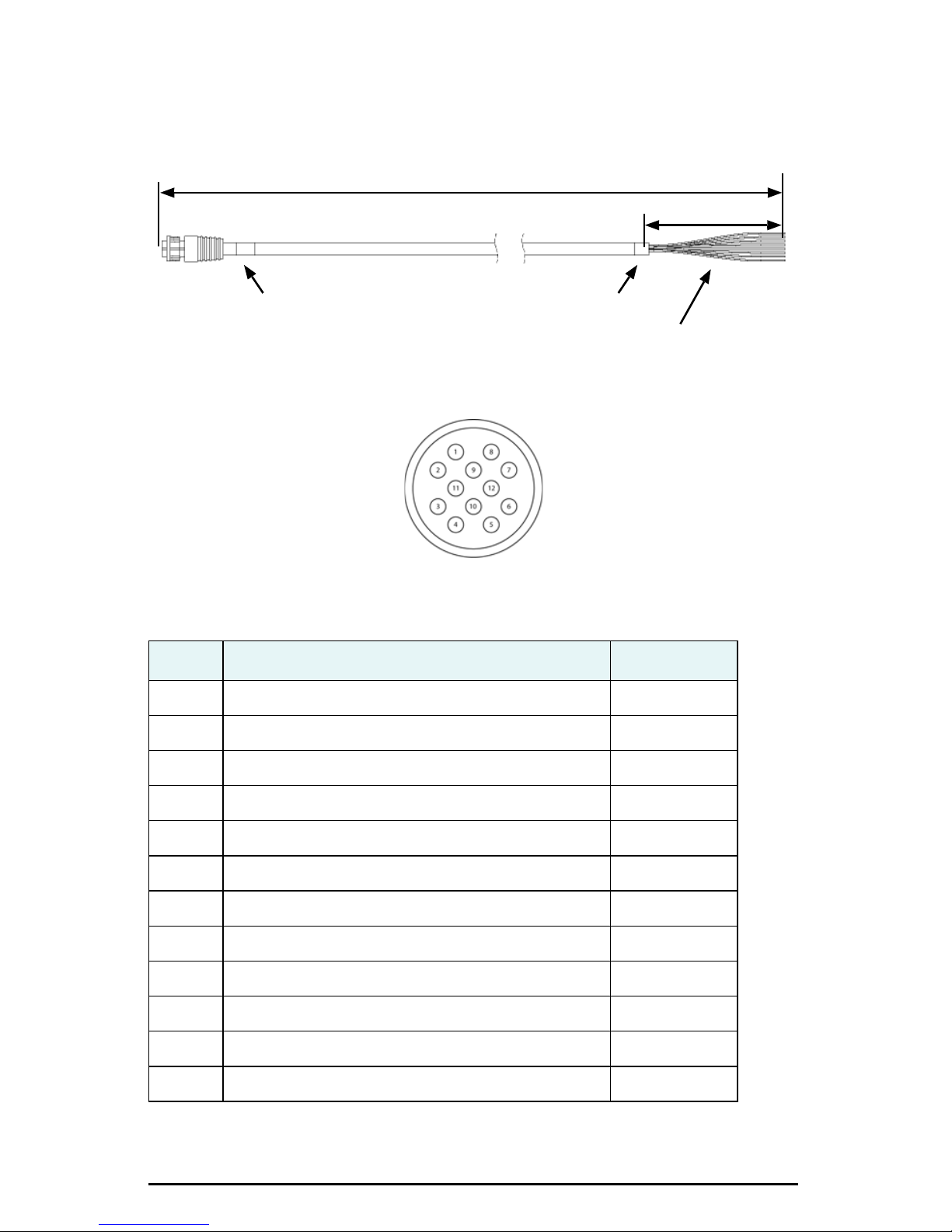
The MV102 uses a single 15 m (49 ft) cable for power and data input/output.
The receiver end of the cable is terminated with an environmentally sealed 12-pin
connection; the opposite end is unterminated and requires field stripping and tinning.
Table 4 shows the cable’s pinout specifications.
Table 4: Power/data cable pinout
Pin Function Wire Color
1 Port C, RS-232 female DB9 pin 2, device out White
2 Port C, RS-232 female DB9 pin 3, device in Green
3N/C N/C
4N/C N/C
5 Power input Red
6N/C N/C
7 Signal ground Yellow
8 Port A, RS-232 female DB9 pin 3, device in Brown
9 Port A, RS-232 female DB9 pin 2, device out Blue
10 Power ground Black
11 CH_GND Drain
12 N/C N/C
MV102 Quick Reference Guide 12
Page 17
Default Parameters
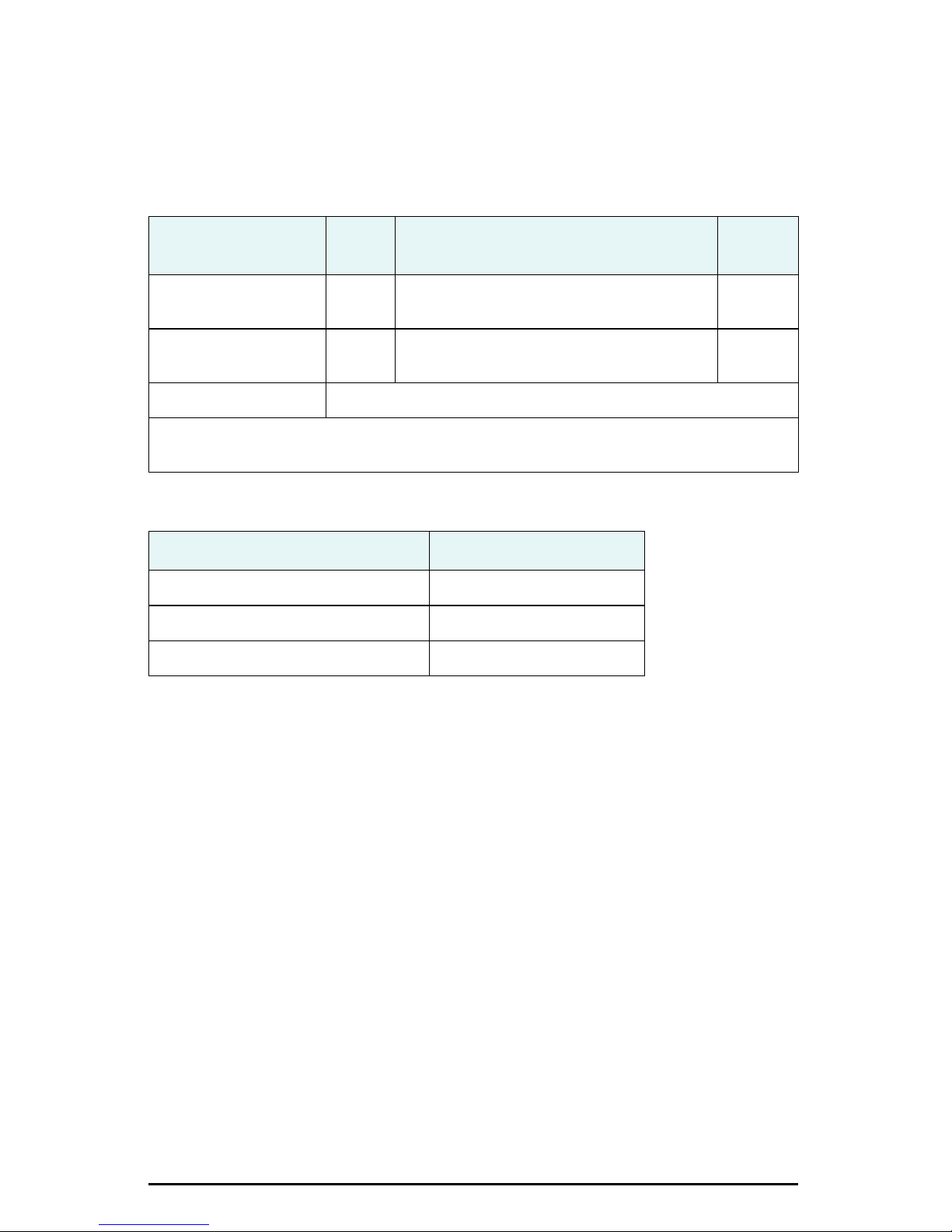
Table 5 and Table 6 provide details on the default port settings, available baud rates,
differential age, elevation mask, and default differential mode. Use the $JSAVE
command to save changes you make to the MV102’s configuration for the changes to
be present in subsequent power cycles.
Table 5: Default port settings
Port
Port A (RS-232) 19200 GPGGA, GPVTG, GPGSV, GPZDA, GPHDT,
Port C (RS-232) 19200 GPGGA, GPVTG, GPGSV, GPZDA, GPHDT,
Power RED (+), BLK (-) 6 - 36 VDC
Note: The default update rate for NMEA 0183 messages is 1 Hz. 10 Hz is the standard
maximum rate, but you can purchase a subscription to upgrade the output rate to 20 Hz.
Table 6: Additional default settings
Parameter Specification
Max DGPS age (correction age) 2700 seconds
Elevation mask 5°
Differential mode SBAS (WAAS/EGNOS)
Baud
Rate
NMEA Messages
GPROT
GPROT
Update
Rate
1 Hz
1 Hz
MV102 Quick Reference Guide 13
Page 18

Configuration
Use a terminal program or PocketMax3 (available at www.hemispheregps.com) to
connect to a serial port for additional configuration requirements. Use default baud
rate of 19200 bps and 8-N-1 protocol.
• Change baud rate of either port to match that of the external equipment to
which the MV102 is connected. After changing the baud rate, you must close
the terminal program and reconnect at the speed selected.
• Configure NMEA messages to be output on the appropriate port.
• Select differential source.
• Input heading bias (-180° to +180°) to compensate for any offset from the
centerline.
• Input bias for tilt (-15° to +15°) to compensate for any offset from horizontal.
• Enable/disable supplementary sensors (default is GYROID and TILTAID on).
• Use the $JSAVE command to save the configuration changes when finished.
Supplemental Sensors
A pair of tilt sensors and a gyro are integrated in the MV102. The user can turn either
the tilt sensors or the gyro on or off. However, the system’s performance is optimized
with both the tilt sensors and the gyro on.
Sensor Purpose Calibration Procedure
Gyro
aid
Tilt aid Smooths rate of heading
Feature Normal Operation Coasting (no GPS)
Heading GPS Gyro
Smooth rate of turn:
Provides alternate source
of heading for up to 3 min
when GPS lock is lost
Shortens heading
reacquisition time
Reduces startup and
reacquisition times for
obtaining heading
Will self-calibrate after several minutes
To manually calibrate:
1. After heading is computed
2. Send $JATT,GYROAID,YES
3. Spin Vector for 1 min at less than 15º/sec
4. Leave unit stationary for 4 min
Note: You do not need to recalibrate with
standard use since the gyro selects the calibration.
Precalibrated during manufacture
To recalibrate:
1. Ensure Vector is level
2. Send $JATT,TILTCAL
Heave GPS None
Pitch GPS Inertial sensor
Roll Inertial sensor Inertial sensor
MV102 Quick Reference Guide 14
Page 19
Common Commands and Messages
Note: When selecting your baud rate and message types, use the following
calculation to determine your baud rate for your required data throughput.
Messages * Message output rate * Message length (bytes) * bits in byte
Ex: 5 * 20Hz * 40 bytes * 10 = 40,000 bits/sec
For information on message output rates refer to GPS Technical Reference available
from the Hemisphere GPS website at www.hemispheregps.com.
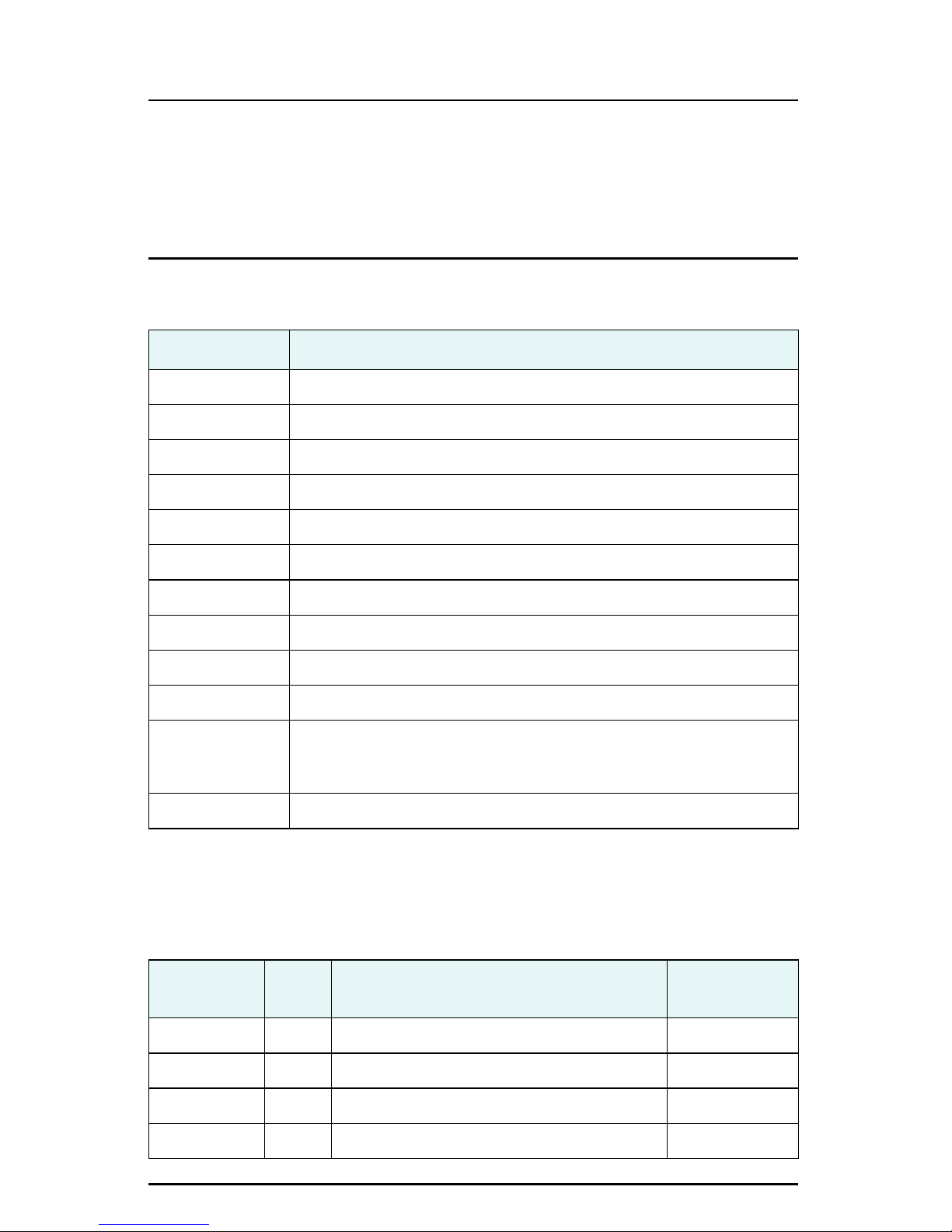
Table 7: Commands
Command Description
$JAGE Specify maximum DGPS (COAST) correction age (6 to 8100 seconds)
$JAPP Query or specify receiver application firmware
$JASC Specify ASCII messages to output to specific ports
$JBAUD Specify RS-232, RS-422 (output) communication rate
$JBIN Specify binary messages to output to specific ports
$JDIFF Query or specify differential correction mode
$JGEO Query or specify SBAS for current location and SBAS satellites
$JI Query unit’s serial number and firmware versions
$JOFF Turn off all data messages
$JQUERY,GUIDE Query accuracy suitability for navigation
$JRESET Reset unit’s configuration to firmware defaults. $JRESET clears all
parameters. See the MV102 GPS Compass User Guide for more
information.
$JSAVE Save session’s configuration changes
In Table 8 the Info Type value is one of the following: P = Position; V = Velocity, Time; H
= Heading, Attitude; S = Sats, Stats, Quality
Table 8: NMEA 0183 and other messages
Message
$GPDTM P Datum reference Yes
$GPGGA P GPS position and fix data Yes
$GPGLL P Geographic position - lat/long Yes
$GPGNS P GNSS position and fix data Yes
Info
Type
MV102 Quick Reference Guide 15
Description
IEC Approved
Message
Page 20

Table 8: NMEA 0183 and other messages (continued)
Message
Info
Type
Description
IEC Approved
Message
$GPGRS S GNSS range residual (RAIM) Yes
$GPGSA S GNSS DOP and active satellites Yes
$GPGST S GNSS pseudo range error statistics and
Yes
position accuracy
$GPGSV S GNSS satellites in view Yes
*$GPHDG H Provides magnetic deviation and variation
Yes
for calculating magnetic or true heading
*$GPHDM H Magnetic heading (based on GPS-derived
No
heading and magnetic declination)
*$GPHDT H GPS-derived true heading Yes
$GPHEV H Heave value (in meters) Yes
$GPRMC P Recommended minimum specific GNSS data Yes
*$GPROT H GPS-derived rate of turn (ROT) Yes
$GPRRE S Range residual and estimated position error
Yes
message
$GPVTG V COG and ground speed Yes
$GPZDA V Time and date Yes
$PASHR H Time, heading, roll, and pitch data in one
No
message
$PSAT,GBS S Satellite fault detection (RAIM) Yes
$PSAT,HPR H Proprietary NMEA message that provides
No
heading, pitch, roll, and time in single
message
$PSAT,INTLT H Proprietary NMEA message that provides the
Yes
pitch and roll measurements from the
internal inclinometers (in degrees)
$RD1 S SBAS diagnostic information Yes
$TSS1 H Heading, pitch, roll, and heave message in
No
the commonly used TSS1 message format
* You can change the message header for the HDG, HDM, HDT, and ROT messages to
either GP or HE using the $JATT,NMEAHE command. For more information refer to the
Hemisphere GPS Technical Reference available at www.hemispheregps.com.
MV102 Quick Reference Guide 16
Page 21
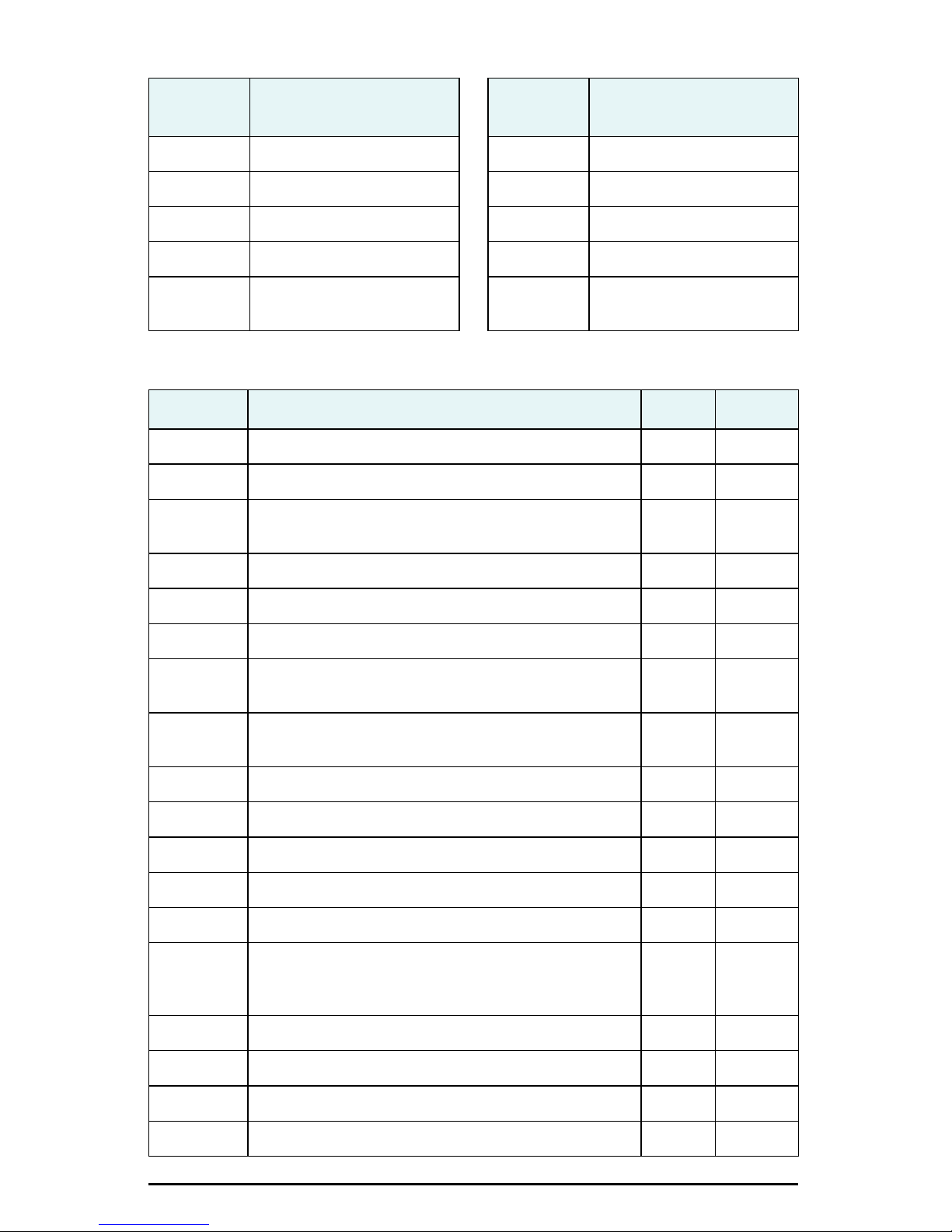
Table 9: Binary messages
$JBIN
Message
Description
$JBIN
Message
Description
1 GPS position 95 Satellite ephemeris data
2 GPS DOPs 96 Code and carrier phase
80 SBAS 97 Processor statistics
93 SBAS ephemeris data 98 Satellites and almanac
94 Ionosphere and UTC
99 GPS diagnostics
conversion parameters
Table 10: Parameters specific to $JATT command
Parameter Description Query Specify
COGTAU Set/query COG time constant (0.0 to 3600.0 s) X X
CSEP Query antenna separation X
EXACT Enable/disable internal filter reliance on the entered
XX
antenna separation
FLIPBRD Turn the flip feature on/off X X
GYROAID Enable/disable gyro X X
HBIAS Set/query heading bias (-180.0º to 180.0º) X X
HELP Show the available commands for GPS heading
X
operation and status
HIGHMP Set/query the High Multipath setting for use in poor
XX
GPS environments
HRTAU Set/query ROT time constant (0.0 to 3600.0 s) X X
HTAU Set/query heading time constant (0.0 to 3600.0 s) X X
LEVEL Query or enable/disable level operation X X
MSEP Manually set or query antenna separation X X
NEGTILT Query or enable/disable negative tilt X X
NMEAHE Query for the message headers or change the HDG,
XX
HDM, HDT, and ROT message headers between GP
and HE
PBIAS Set/query pitch/roll bias (-15.0º to 15.0º) X X
PTAU Set/query pitch time constant (0.0 to 3600.0 s) X X
ROLL Query or configure for roll or pitch GPS orientation X X
SEARCH Force a new GPS heading search X
MV102 Quick Reference Guide 17
Page 22
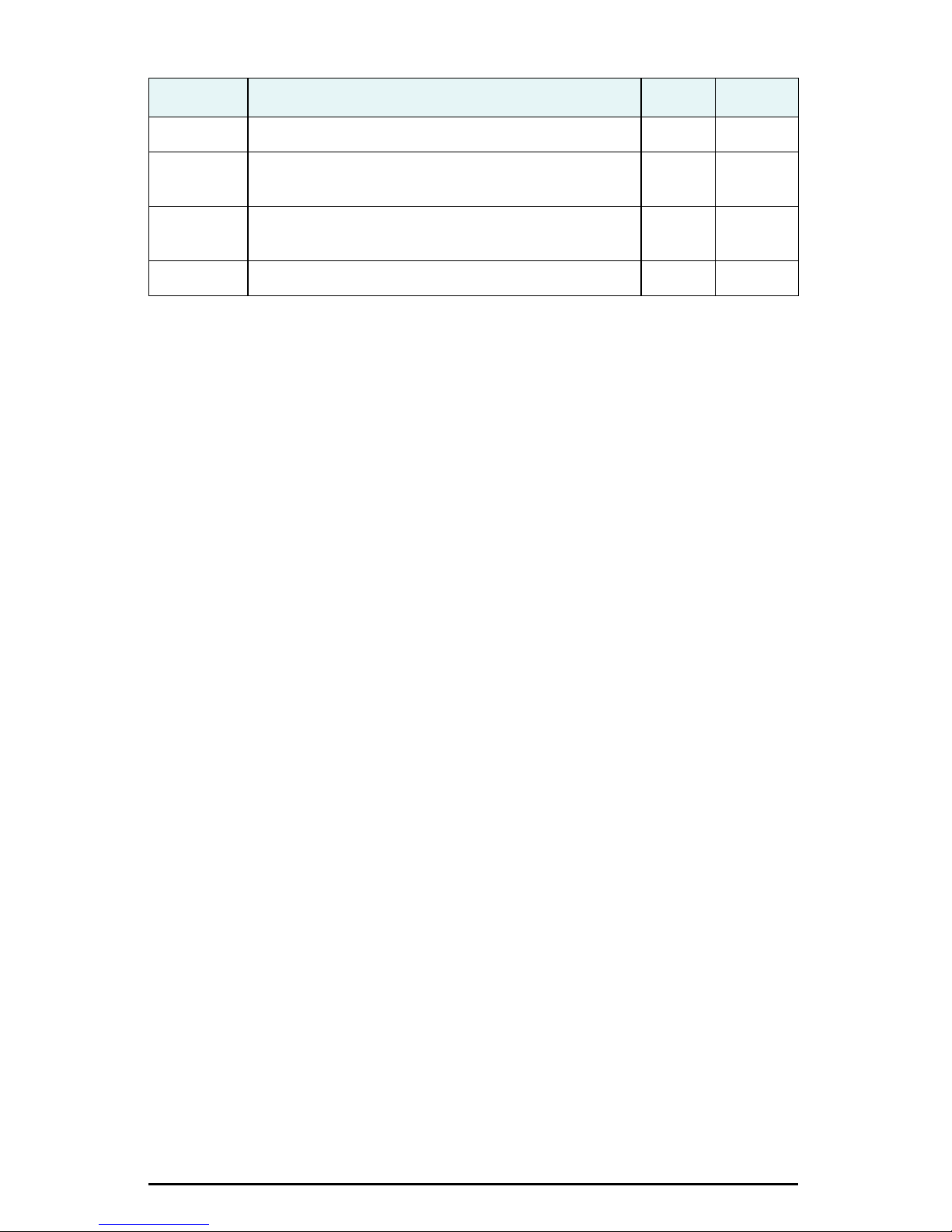
Table 10: Parameters specific to $JATT command (continued)
Parameter Description Query Specify
SPDTAU Set/query speed time constant (0.0 to 3600.0 s) X X
SUMMARY Display a summary of the current Crescent Vector
X
settings
TILTAID Query or enable/disable accelerometer, pre-
XX
calibrated
TILTCAL Calibrate accelerometers X
MV102 Quick Reference Guide 18
Page 23

End User License Agreement
IMPORTANT - This is an agreement (the "Agreement") between you, the end purchaser ("Licensee") and Hemisphere
GPS Inc. ("Hemisphere") which permits Licensee to use the Hemisphere software (the "Software") that accompanies this
Agreement. This Software may be licensed on a standalone basis or may be embedded in a Product. Please read and
ensure that you understand this Agreement before installing or using the Software Update or using a Product.
In this agreement any product that has Software embedded in it at the time of sale to the Licensee shall be referred to as a
"Product". As well, in this Agreement, the use of a Product shall be deemed to be use of the Software which is embedded
in the Product.
BY INSTALLING OR USING THE SOFTWARE UPDATE OR THE PRODUCT, LICENSEE THEREBY AGREES TO BE LEGALLY
BOUND BY THE TERMS OF THIS AGREEMENT. IF YOU DO NOT AGREE TO THESE TERMS, (I) DO NOT INSTALL OR USE
THE SOFTWARE, AND (II) IF YOU ARE INSTALLING AN UPDATE TO THE SOFTWARE, DO NOT INSTALL THE UPDATE AND
PROMPTLY DESTROY IT.
HEMISPHERE PROVIDES LIMITED WARRANTIES IN RELATION TO THE SOFTWARE. AS WELL, THOSE WHO USE THE
EMBEDDED SOFTWARE DO SO AT THEIR OWN RISK. YOU SHOULD UNDERSTAND THE IMPORTANCE OF THESE AND
OTHER LIMITATIONS SET OUT IN THIS AGREEMENT BEFORE INSTALLING OR USING THE SOFTWARE OR THE PRODUCT.
1. LICENSE. Hemisphere hereby grants to Licensee a non-transferable and non-exclusive license to use the Software
as embedded in a Product and all Updates (collectively the "Software"), solely in binary executable form.
2. RESTRICTIONS ON USE. Licensee agrees that Licensee and its employees will not directly or indirectly, in any
manner whatsoever:
a. install or use more copies of the Software than the number of copies that have been licensed;
b. use or install the Software in connection with any product other than the Product the Software was intended
to be used or installed on as set out in the documentation that accompanies the Software.
c. copy any of the Software or any written materials for any purpose except as part of Licensee's normal backup
processes;
d. modify or create derivative works based on the Software;
e. sub-license, rent, lease, loan or distribute the Software;
f. permit any third party to use the Software;
g. use or operate Product for the benefit of any third party in any type of service outsourcing, application service,
provider service or service bureau capacity;
h. reverse engineer, decompile or disassemble the Software or otherwise reduce it to a human perceivable form;
i. Assign this Agreement or sell or otherwise transfer the Software to any other party except as part of the sale
or transfer of the whole Product.
3. UPDATES. At Hemisphere's discretion Hemisphere may make Updates available to Licensee. An update
("Update") means any update to the Software that is made available to Licensee including error corrections,
enhancements and other modifications. Licensee may access, download and install Updates during the Warranty
Period only. All Updates that Licensee downloads, installs or uses shall be deemed to be Software and subject to this
Agreement. Hemisphere reserves the right to modify the Product without any obligation to notify, supply or install
any improvements or alterations to existing Software.
4. SUPPORT. Hemisphere may make available directly or through its authorized dealers telephone and email support
for the Software. Contact Hemisphere to find the authorized dealer near you. As well, Hemisphere may make
available user and technical documentation regarding the Software. Hemisphere reserves the right to reduce and
limit access to such support at any time.
5. BACKUPS AND RECOVERY. Licensee shall back-up all data used, created or stored by the Software on a regular
basis as necessary to enable proper recovery of the data and related systems and processes in the event of a
malfunction in the Software or any loss or corruption of data caused by the Software. Licensee shall assume all risks
of loss or damage for any failure to comply with the foregoing.
6. OWNERSHIP. Hemisphere and its suppliers own all rights, title and interest in and to the Software and related
materials, including all intellectual property rights. The Software is licensed to Licensee, not sold.
7. TRADEMARKS. "Hemisphere GPS", "Outback Guidance", "BEELINE", "Crescent", "Eclipse" and the associated logos
are trademarks of Hemisphere. Other trademarks are the property of their respective owners. Licensee may not use
any of these trademarks without the consent of their respective owners.
8. LIMITED WARRANTY. Hemisphere warrants solely to the Licensee, subject to the exclusions and procedures set
forth herein below, that for a period of one (1) year from the original date of purchase of the Product in which it is
embedded (the "Warranty Period"), the Software, under normal use and maintenance, will conform in all material
respects to the documentation provided with the Software and any media will be free of defects in materials and
workmanship. For any Update, Hemisphere warrants, for 90 days from performance or delivery, or for the balance of
the original Warranty Period, whichever is greater, that the Update, under normal use and maintenance, will
conform in all material respects to the documentation provided with the Update and any media will be free of
defects in materials and workmanship. Notwithstanding the foregoing, Hemisphere does not warrant that the
Software will meet Licensee's requirements or that its operation will be error free.
9. WARRANTY EXCLUSIONS. The warranty set forth in Section (8) will not apply to any deficiencies caused by (a)
the Product not being used as described in the documentation supplied to Licensee, (b) the Software having been
altered, modified or converted in any way by anyone other than Hemisphere approved by Hemisphere, (c) any
malfunction of Licensee's equipment or other software, or (d) damage occurring in transit or due to any accident,
abuse, misuse, improper installation, lightning (or other electrical discharge) or neglect other than that caused by
Hemisphere. Hemisphere GPS does not warrant or guarantee the precision or accuracy of positions obtained when
using the Software (whether standalone or embedded in a Product). The Product and the Software is not intended
and should not be used as the primary means of navigation or for use in safety of life applications. The potential
Page 24

positioning and navigation accuracy obtainable with the Software as stated in the Product or Software
documentation serves to provide only an estimate of achievable accuracy based on specifications provided by the
US Department of Defense for GPS positioning and DGPS service provider performance specifications, where
applicable.
10. WARRANTY DISCLAIMER. EXCEPT AS EXPRESSLY SET OUT IN THIS AGREEMENT, HEMISPHERE MAKES NO
REPRESENTATION, WARRANTY OR CONDITION OF ANY KIND TO LICENSEE, WHETHER VERBAL OR WRITTEN
AND HEREBY DISCLAIMS ALL REPRESENTATIONS, WARRANTIES AND CONDITIONS OF ANY KIND INCLUDING
FITNESS FOR A PARTICULAR PURPOSE, MERCHANTABILITY, ACCURACY, RELIABILITY OR THAT THE USE OF THE
SOFTWARE WILL BE UNINTERRUPTED OR ERROR-FREE AND HEREBY DISCLAIMS ALL REPRESENTATIONS,
WARRANTIES AND CONDITIONS ARISING AS A RESULT OF CUSTOM, USAGE OR TRADE AND THOSE ARISING
UNDER STATUTE.
11. LIMITS ON WARRANTY DISCLAIMER. Some jurisdictions do not allow the exclusion of implied warranties or
conditions, so some of the above exclusions may not apply to Licensee. In that case, any implied warranties or
conditions which would then otherwise arise will be limited in duration to ninety (90) days from the date of the
license of the Software or the purchase of the Product. The warranties given herein give Licensee specific legal rights
and Licensee may have other rights which may vary from jurisdiction to jurisdiction.
12. CHANGE TO WARRANTY. No employee or agent of Hemisphere is authorized to change the warranty provided or
the limitation or disclaimer of warranty provisions. All such changes will only be effective if pursuant to a separate
agreement signed by senior officers of the respective parties.
13. WARRANTY CLAIM. In the event Licensee has a warranty claim Licensee must first check for and install all
Updates that are made available. The warranty will not otherwise be honored. Proof of purchase may be required.
Hemisphere does not honor claims asserted after the end of the Warranty Period.
14. LICENSEE REMEDIES. In all cases which involve a failure of the Software to conform in any material respect to the
documentation during the Warranty Period or a breach of a warranty, Hemisphere's sole obligation and liability, and
Licensee's sole and exclusive remedy, is for Hemisphere, at Hemisphere's option, to (a) repair the Software, (b)
replace the Software with software conforming to the documentation, or (c) if Hemisphere is unable, on a
reasonable commercial basis, to repair the Software or to replace the Software with conforming software within
ninety (90) days, to terminate this Agreement and thereafter Licensee shall cease using the Software. Hemisphere
will also issue a refund for the price paid by Licensee less an amount on account of amortization, calculated on a
straight-line basis over a deemed useful life of three (3) years.
15. LIMITATION OF LIABILITY. IN NO EVENT WILL HEMISPHERE BE LIABLE TO LICENSEE FOR ANY INCIDENTAL,
CONSEQUENTIAL, SPECIAL OR INDIRECT DAMAGES INCLUDING ARISING IN RELATION TO ANY LOSS OF DATA,
INCOME, REVENUE, GOODWILL OR ANTICIPATED SAVINGS EVEN IF HEMISPHERE HAS BEEN INFORMED OF THE
POSSIBILITY OF SUCH LOSS OR DAMAGE. FURTHER, IN NO EVENT WILL HEMISPHERE'S TOTAL CUMULATIVE
LIABILITY HEREUNDER, FROM ALL CAUSES OF ACTION OF ANY KIND, EXCEED THE TOTAL AMOUNT PAID BY
LICENSEE TO HEMISPHERE TO PURCHASE THE PRODUCT. THIS LIMITATION AND EXCLUSION APPLIES
IRRESPECTIVE OF THE CAUSE OF ACTION, INCLUDING BUT NOT LIMITED TO BREACH OF CONTRACT,
NEGLIGENCE, STRICT LIABILITY, TORT, BREACH OF WARRANTY, MISREPRESENTATION OR ANY OTHER LEGAL
THEORY AND WILL SURVIVE A FUNDAMENTAL BREACH.
16. LIMITS ON LIMITATION OF LIABILITY. Some jurisdictions do not allow for the limitation or exclusion of liability for
incidental or consequential damages, so the above limitation or exclusion may not apply to Licensee and Licensee
may also have other legal rights which may vary from jurisdiction to jurisdiction.
17. BASIS OF BARGAIN. Licensee agrees and acknowledges that Hemisphere has set its prices and the parties have
entered into this Agreement in reliance on the limited warranties, warranty disclaimers and limitations of liability set
forth herein, that the same reflect an agreed-to allocation of risk between the parties (including the risk that a
remedy may fail of its essential purpose and cause consequential loss), and that the same forms an essential basis
of the bargain between the parties. Licensee agrees and acknowledges that Hemisphere would not have been able
to sell the Product at the amount charged on an economic basis without such limitations.
18. PROPRIETARY RIGHTS INDEMNITY. Hemisphere shall indemnify, defend and hold harmless Licensee from and
against any and all actions, claims, demands, proceedings, liabilities, direct damages, judgments, settlements, fines,
penalties, costs and expenses, including royalties and attorneys' fees and related costs, in connection with or arising
out of any actual infringement of any third party patent, copyright or other intellectual property right by the Software
or by its use, in accordance with this Agreement and documentation, PROVIDED THAT: (a) Hemisphere has the right
to assume full control over any action, claim, demand or proceeding, (b) Licensee shall promptly notify Hemisphere
of any such action, claim, demand, or proceeding, and (c) Licensee shall give Hemisphere such reasonable
assistance and tangible material as is reasonably available to Licensee for the defense of the action, claim, demand
or proceeding. Licensee shall not settle or compromise any of same for which Hemisphere has agreed to assume
responsibility without Hemisphere's prior written consent. Licensee may, at its sole cost and expense, retain
separate counsel from the counsel utilized or retained by Hemisphere.
19. INFRINGEMENT. If use of the Software may be enjoined due to a claim of infringement by a third party then, at its
sole discretion and expense, Hemisphere may do one of the following: (a) negotiate a license or other agreement so
that the Product is no longer subject to such a potential claim, (b) modify the Product so that it becomes noninfringing, provided such modification can be accomplished without materially affecting the performance and
functionality of the Product, (c) replace the Software, or the Product, with non-infringing software, or product, of
equal or better performance and quality, or (d) if none of the foregoing can be done on a commercially reasonable
basis, terminate this license and Licensee shall stop using the Product and Hemisphere shall refund the price paid by
Licensee less an amount on account of amortization, calculated on a straight-line basis over a deemed useful life of
three (3) years.
The foregoing sets out the entire liability of Hemisphere and the sole obligations of Hemisphere to Licensee in
respect of any claim that the Software or its use infringes any third party rights.
20. INDEMNIFICATION. Except in relation to an infringement action, Licensee shall indemnify and hold Hemisphere
harmless from any and all claims, damages, losses, liabilities, costs and expenses (including reasonable fees of
lawyers and other professionals) arising out of or in connection with Licensee's use of the Product, whether direct or
indirect, including without limiting the foregoing, loss of data, loss of profit or business interruption.
Page 25

21. TERMINATION. Licensee may terminate this Agreement at any time without cause. Hemisphere may terminate this
Agreement on 30 days notice to Licensee if Licensee fails to materially comply with each provision of this
Agreement unless such default is cured within the 30 days. Any such termination by a party shall be in addition to
and without prejudice to such rights and remedies as may be available, including injunction and other equitable
remedies. Upon receipt by Licensee of written notice of termination from Hemisphere or termination by Licensee,
Licensee shall at the end of any notice period (a) cease using the Software; and (b) return to Hemisphere (or destroy
and provide a certificate of a Senior Officer attesting to such destruction) the Software and all related material and
any magnetic or optical media provided to Licensee. The provisions of Sections 6), 7), 8), 9), 10), 15), 21), 26) and 27)
herein shall survive the expiration or termination of this Agreement for any reason.
22. EXPORT RESTRICTIONS. Licensee agrees that Licensee will comply with all export control legislation of Canada,
the United States, Australia and any other applicable country's laws and regulations, whether under the Arms
Export Control Act, the International Traffic in Arms Regulations, the Export Administration Regulations, the
regulations of the United States Departments of Commerce, State, and Treasury, or otherwise as well as the export
control legislation of all other countries.
23. PRODUCT COMPONENTS. The Product may contain third party components. Those third party components may
be subject to additional terms and conditions. Licensee is required to agree to those terms and conditions in order to
use the Product.
24. FORCE MAJEURE EVENT. Neither party will have the right to claim damages as a result of the other's inability to
perform or any delay in performance due to unforeseeable circumstances beyond its reasonable control, such as
labor disputes, strikes, lockouts, war, riot, insurrection, epidemic, Internet virus attack, Internet failure, supplier
failure, act of God, or governmental action not the fault of the non-performing party.
25. FORUM FOR DISPUTES. The parties agree that the courts located in Calgary, Alberta, Canada and the courts of
appeal there from will have exclusive jurisdiction to resolve any disputes between Licensee and Hemisphere
concerning this Agreement or Licensee's use or inability to use the Software and the parties hereby irrevocably
agree to attorn to the jurisdiction of those courts. Notwithstanding the foregoing, either party may apply to any court
of competent jurisdiction for injunctive relief.
26. APPLICABLE LAW. This Agreement shall be governed by the laws of the Province of Alberta, Canada, exclusive of
any of its choice of law and conflicts of law jurisprudence.
27. CISG. The United Nations Convention on Contracts for the International Sale of Goods will not apply to this
Agreement or any transaction hereunder.
28. GENERAL. This is the entire agreement between Licensee and Hemisphere relating to the Product and Licensee's
use of the same, and supersedes all prior, collateral or contemporaneous oral or written representations, warranties
or agreements regarding the same. No amendment to or modification of this Agreement will be binding unless in
writing and signed by duly authorized representatives of the parties. Any and all terms and conditions set out in any
correspondence between the parties or set out in a purchase order which are different from or in addition to the
terms and conditions set forth herein, shall have no application and no written notice of same shall be required. In
the event that one or more of the provisions of this Agreement is found to be illegal or unenforceable, this
Agreement shall not be rendered inoperative but the remaining provisions shall continue in full force and effect.
Page 26

Warranty Notice
COVERED PRODUCTS: This warranty covers all products manufactured by Hemisphere GPS and purchased by the end
purchaser (the "Products"), unless otherwise specifically and expressly agreed in writing by Hemisphere GPS.
LIMITED WARRANTY: Hemisphere GPS warrants solely to the end purchaser of the Products, subject to the exclusions
and procedures set forth below, that the Products sold to such end purchaser and its internal components shall be free,
under normal use and maintenance, from defects in materials, and workmanship and will substantially conform to
Hemisphere GPS’s applicable specifications for the Product, for a period of 12 months from delivery of such Product to
such end purchaser (the ”Warranty Period”). Repairs and replacement components for the Products are warranted, subject
to the exclusions and procedures set forth below, to be free, under normal use and maintenance, from defects in material
and workmanship, and will substantially conform to Hemisphere GPS’s applicable specifications for the Product, for 90
days from performance or delivery, or for the balance of the original Warranty Period, whichever is greater.
EXCLUSION OF ALL OTHER WARRANTIES. The LIMITED WARRANTY shall apply only if the Product is properly and
correctly installed, configured, interfaced, maintained, stored, and operated in accordance with Hemisphere GPS’s relevant
User’s Manual and Specifications, AND the Product is not modified or misused. The Product is provided “AS IS” and the
implied warranties of MERCHANTABILITY and FITNESS FOR A PARTICULAR PURPOSE and ALL OTHER WARRANTIES,
express, implied or arising by statute, by course of dealing or by trade usage, in connection with the design, sale,
installation, service or use of any products or any component thereof, are EXCLUDED from this transaction and shall not
apply to the Product. The LIMITED WARRANTY is IN LIEU OF any other warranty, express or implied, including but not
limited to, any warranty of MERCHANTABILITY or FITNESS FOR A PARTICULAR PURPOSE, title, and non-infringement.
LIMITATION OF REMEDIES. The purchaser’s EXCLUSIVE REMEDY against Hemisphere GPS shall be, at Hemisphere
GPS’s option, the repair or replacement of any defective Product or components thereof. The purchaser shall notify
Hemisphere GPS or a Hemisphere GPS’s approved service center immediately of any defect. Repairs shall be made
through a Hemisphere GPS approved service center only. Repair, modification or service of Hemisphere GPS products by
any party other than a Hemisphere GPS approved service center shall render this warranty null and void. The remedy in
this paragraph shall only be applied in the event that the Product is properly and correctly installed, configured, interfaced,
maintained, stored, and operated in accordance with Hemisphere GPS’s relevant User’s Manual and Specifications, AND
the Product is not modified or misused. NO OTHER REMEDY (INCLUDING, BUT NOT LIMITED TO, SPECIAL, INDIRECT,
INCIDENTAL, CONSEQUENTIAL OR CONTINGENT DAMAGES FOR LOST PROFITS, LOST SALES, INJURY TO PERSON OR
PROPERTY, OR ANY OTHER INCIDENTAL OR CONSEQUENTIAL LOSS) SHALL BE AVAILABLE TO PURCHASER, even if
Hemisphere GPS has been advised of the possibility of such damages. Without limiting the foregoing, Hemisphere GPS
shall not be liable for any damages of any kind resulting from installation, use, quality, performance or accuracy of any
Product.
HEMISPHERE IS NOT RESPONSIBLE FOR PURCHASER’S NEGLIGENCE OR UNAUTHORIZED USES OF THE
PRODUCT. IN NO EVENT SHALL HEMISPHERE GPS BE IN ANY WAY RESPONSIBLE FOR ANY DAMAGES RESULTING
FROM PURCHASER’S OWN NEGLIGENCE, OR FROM OPERATION OF THE PRODUCT IN ANY WAY OTHER THAN AS
SPECIFIED IN HEMISPHERE GPS’S RELEVANT USER’S MANUAL AND SPECIFICATIONS. Hemisphere GPS is NOT
RESPONSIBLE for defects or performance problems resulting from (1) misuse, abuse, improper installation, neglect of
Product; (2) the utilization of the Product with hardware or software products, information, data, systems, interfaces or
devices not made, supplied or specified by Hemisphere GPS; (3) the operation of the Product under any specification other
than, or in addition to, the specifications set forth in Hemisphere GPS’s relevant User’s Manual and Specifications; (4)
damage caused by accident or natural events, such as lightning (or other electrical discharge) or fresh/salt water
immersion of Product; (5) damage occurring in transit; (6) normal wear and tear; or (7) the operation or failure of operation
of any satellite-based positioning system or differential correction service; or the availability or performance of any
satellite-based positioning signal or differential correction signal.
THE PURCHASER IS RESPONSIBLE FOR OPERATING THE VEHICLE SAFELY. The purchaser is solely responsible
for the safe operation of the vehicle used in connection with the Product, and for maintaining proper system control
settings. UNSAFE DRIVING OR SYSTEM CONTROL SETTINGS CAN RESULT IN PROPERTY DAMAGE, INJURY, OR DEATH.
The purchaser is solely responsible for his/her safety and for the safety of others. The purchaser is solely responsible for
maintaining control of the automated steering system at all times. THE PURCHASER IS SOLELY RESPONSIBLE FOR
ENSURING THE PRODUCT IS PROPERLY AND CORRECTLY INSTALLED, CONFIGURED, INTERFACED, MAINTAINED,
STORED, AND OPERATED IN ACCORDANCE WITH HEMISPHERE GPS’S RELEVANT USER’S MANUAL AND
SPECIFICATIONS. Hemisphere GPS does not warrant or guarantee the positioning and navigation precision or accuracy
obtained when using Products. Products are not intended for primary navigation or for use in safety of life applications.
The potential accuracy of Products as stated in Hemisphere GPS literature and/or Product specifications serves to provide
only an estimate of achievable accuracy based on performance specifications provided by the satellite service operator (i.e.
US Department of Defense in the case of GPS) and differential correction service provider. Hemisphere GPS reserves the
right to modify Products without any obligation to notify, supply or install any improvements or alterations to existing
Products.
GOVERNING LAW. This agreement and any disputes relating to, concerning or based upon the Product shall be
governed by and interpreted in accordance with the laws of the State of Arizona.
OBTAINING WARRANTY SERVICE. In order to obtain warranty service, the end purchaser must bring the Product to a
Hemisphere GPS approved service center along with the end purchaser's proof of purchase. Hemisphere GPS does not
warrant claims asserted after the end of the warranty period. For any questions regarding warranty service or to obtain
information regarding the location of any of Hemisphere GPS approved service center, contact Hemisphere GPS at the
following address:
Hemisphere GPS
8444 N. 90th Street, Suite 130
Scottsdale, AZ 85258
Phone: 480-348-9919 Fax: 480-348-6370
[email protected]
www.hemispheregps.com
 Loading...