

Page 1
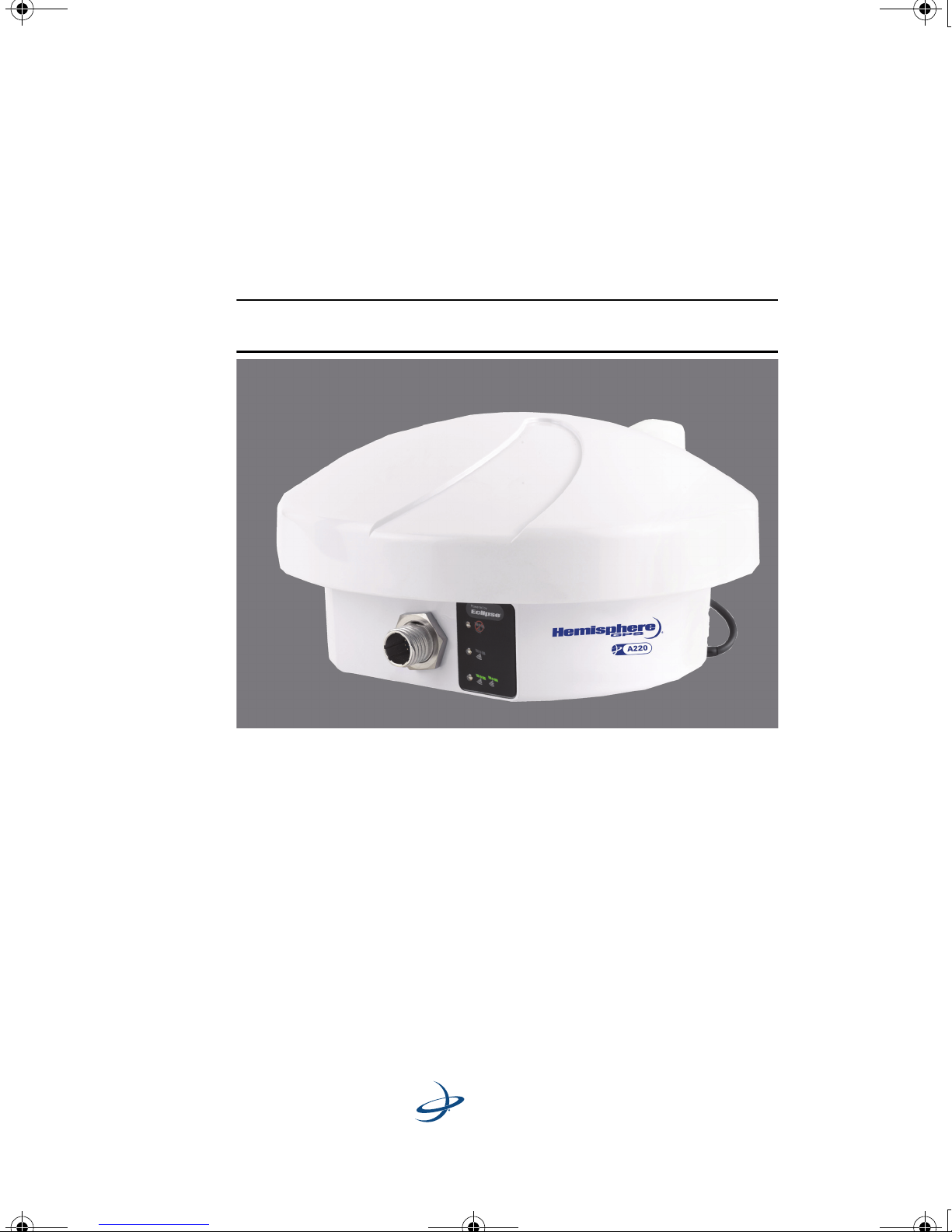
A220 Antenna
User Guide
Part No. 875-0235-000 Rev. A1
Page 2

A220 User Guide.book Page i Tuesday, November 24, 2009 2:28 PM
This device complies with part 15 of the FCC Rules. Operation is subject to the following two
conditions:
(1) This device may not cause harmful interference, and
(2) this device must accept any interference received, including interference that may cause
undesired operation.
Copyright Notice
Hemisphere GPS Precision GPS Applications
Copyright © Hemisphere GPS (2009). All rights reserved.
No part of this manual may be reproduced, transmitted, transcribed, stored in a retrieval system
or translated into any language or computer language, in any form or by any means, electronic,
mechanical, magnetic, optical, chemical, manual or otherwise, without the prior written
permission of Hemisphere GPS.
Trademarks
HEMISPHERE GPS®, the Hemisphere GPS logo, CRESCENT®, ECLIPSETM, COASTTM, e-DIF®,
OUTBACK
S-Lite
SATLOC
AerialAce
Satloc M3
IntelliStar™, IntelliTrac™,and Vector
trademarks are the properties of their respective owners.
TM
TM
, OUTBACK Guidance®, OUTBACK Guidance CenterTM, OUTBACK STM, OUTBACK
, OUTBACK S2TM, OUTBACK 360TM. OUTBACK Steering GuideTM, OUTBACK HitchTM,
®
, the Satloc logo, eDrive®, eDriveTCTM, Just Let GoTM, L-DifTM, BaseLineHDTM,
TM
, AirStarTM, AirTracTM, GPSteerTM, LiteStar IITM, PocketMaxTM, PocketMax PCTM,
TM
, MapStar®, IntelliFlow®, Beeline®, Contour LockTM, Outback Sts
TM
are proprietary trademarks of Hemisphere GPS. Other
TM
, A220™, A221™,
Patents
The OUTBACK STM and S-LiteTM automated navigation and steering guide system is covered by
U.S. Patents No. 6,539,303 and No. 6,711,501. The OUTBACK Hitch
system is covered by U.S. Patent No. 6,631,916. The OUTBACK eDriveTC GPS assisted steering
system is covered by U.S. Patent No. 7,142,956. Hemisphere GPS products may be covered by
one or more of the following U.S. Patents:
6,111,549 6,397,147 6,469,663 6,501,346 6,539,303
6,549,091 6,631,916 6,711,501 6,744,404 6,865,465
6,876,920 7,142,956 7,162,348 7,277,792 7,292,185
7,292,186 7,373,231 7,400,956 7,400,294 7,388,539
TM
automated hitch control
7,429,952 7,437,230 7,460,942
Page 3

A220 User Guide.book Page ii Tuesday, November 24, 2009 2:28 PM
Other U.S. and foreign patents pending.
Notice to Customers
Contact your local dealer for technical assistance. To find the authorized dealer near you,
call or write us at:
Hemisphere GPS
4110 9th Street S.E.
Calgary, Alberta, Canada T2G 3C4
Telephone number:
Fax number:
E-mail address:
(403) 259-3311
(403) 259-8866
[email protected]
Page 4

A220 User Guide.book Page iii Tuesday, November 24, 2009 2:28 PM
Warranty Notice
Covered Products
This warranty covers all products manufactured by Hemisphere GPS (the "Products").
Hemisphere GPS Limited Warranty
Hemisphere GPS hereby warrants solely to the end purchaser of the Products, subject to the
exclusions and procedures set forth herein below, that the Products sold to such end
purchaser shall be free, under normal use and maintenance, from defects in material and
workmanship for a period of 12 months from delivery to such end purchaser. Repairs and
replacement components are warranted, subject to the exclusions and procedures set forth
below, to be free, under normal use and maintenance, from defects in material and
workmanship for 90 days from performance or delivery, or for the balance of the original
warranty period, whichever is greater.
Purchaser's Exclusive Remedy
The end purchaser's exclusive remedy under this warranty shall be limited to the repair or
replacement, at the option of Hemisphere GPS, of any defective Products or components
thereof. The end user shall notify Hemisphere GPS or a Hemisphere GPS approved service
center immediately of any claimed defect. Repairs shall be made through a Hemisphere GPS
approved service center only.
Exclusions
Hemisphere GPS does not warrant damage occurring in transit or due to misuse, abuse,
improper installation, neglect, lightning (or other electrical discharge) or fresh/salt water
immersion of Products. Repair, modification or service of Hemisphere GPS products by any
party other than a Hemisphere GPS approved service center shall render this warranty null
and void. Hemisphere GPS does not warrant claims asserted after the end of the warranty
period. Hemisphere GPS does not warrant or guarantee the precision or accuracy of
positions obtained when using Products. Products are not intended for primary navigation or
for use in safety of life applications. The potential accuracy of Products as stated in
Hemisphere GPS literature and/or Product specifications serves to provide only an estimate
of achievable accuracy based on:
• Specifications provided by the US Department of Defense for GPS Positioning,
• DGPS service provider performance specifications.
Hemisphere GPS reserves the right to modify Products without any obligation to notify,
supply or install any improvements or alterations to existing Products.
Page 5

A220 User Guide.book Page iv Tuesday, November 24, 2009 2:28 PM
No Other Warranties
THE FOREGOING WARRANTY IS EXCLUSIVE OF ALL OTHER WARRANTIES, WHETHER WRITTEN, ORAL,
IMPLIED OR ARISING BY STATUTE, COURSE OF DEALING OR TRADE USAGE, IN CONNECTION WITH THE
DESIGN, SALE, INSTALLATION, SERVICE OR USE OF ANY PRODUCTS OR ANY COMPONENTS THEREOF,
INCLUDING, BUT NOT LIMITED TO, ANY WARRANTY OF MERCHANT ABILITY OR FITNESS FOR A PARTICULAR
PURPOSE.
Limitation of Liability
THE EXTENT OF HEMISPHERE GPS’ LIABILITY FOR DAMAGES OF ANY NATURE TO THE END PURCHASER OR
ANY OTHER PERSON OR ENTITY WHETHER IN CONTRACT OR TORT AND WHETHER TO PERSONS OR
PROPERTY SHALL IN NO CASE EXCEED, THE AGGREGATE, THE COST OF CORRECTING THE DEFECTIVE ITEM.
N NO EVENT WILL HEMISPHERE GPS BE LIABLE FOR ANY LOSS OF PROFITS, LOSS OF USE OR FOR ANY
I
SPECIAL, INDIRECT, INCIDENTAL, CONSEQUENTIAL OR CONTINGENT DAMAGES, EVEN IF HEMISPHERE GPS
HAS BEEN ADVISED OF THE POSSIBILITY OF SUCH DAMAGES. WITHOUT LIMITING THE FOREGOING,
EMISPHERE GPS SHALL NOT BE LIABLE FOR ANY DAMAGES OF ANY KIND RESULTING FROM
H
INSTALLATION, USE, QUALITY, PERFORMANCE OR ACCURACY OF ANY PRODUCTS.
Governing Legislation
To the greatest extent possible, this warranty shall be governed by the laws of the State of
Arizona. In the event that any provision hereof is held to be invalid by a court of competent
jurisdiction, such provision shall be severed from this warranty and the remaining provisions
shall remain in full force and effect.
Obtaining Warranty Service
In order to obtain warranty service, the end purchaser must bring the Product to a
Hemisphere GPS approved service center along with the end purchaser's proof of purchase.
For any questions regarding warranty service or to obtain information regarding the location
of any of Hemisphere GPS' approved service centers, contact Hemisphere GPS at the
following address:
Hemisphere GPS
8444 N. 90th Street, Suite 130
Scottsdale, AZ 85258
Phone: 480-348-9919 Fax: 480-348-6370
[email protected]
www.hemispheregps.com
Documentation Feedback
Hemisphere GPS is committed to the quality and continuous improvement of our products
and services. We urge you to provide Hemisphere GPS with any feedback regarding this
guide by writing to the following email address: [email protected].
Page 6

A220 User Guide.book Page i Tuesday, November 24, 2009 2:28 PM
Contents
Chapter 1 Introducing the A220 Smart Antenna
Connections and Parts . . . . . . . . . . . . . . . . . . . . . . . . . . . . . . . . . . . . . 3
Parts List . . . . . . . . . . . . . . . . . . . . . . . . . . . . . . . . . . . . . . . . . . . . . . . 3
Connectors . . . . . . . . . . . . . . . . . . . . . . . . . . . . . . . . . . . . . . . . . . . . . 3
Chapter 2 Installing the A220 Smart Antenna
Planning the Installation . . . . . . . . . . . . . . . . . . . . . . . . . . . . . . . . . . . 6
A220 Smart Antenna User Guide
Select the Proper Antenna Location . . . . . . . . . . . . . . . . . . . . . . . . . 6
Plan the Power Cable Source and Route . . . . . . . . . . . . . . . . . . . . . 7
Mounting the A220 Smart Antenna . . . . . . . . . . . . . . . . . . . . . . . . . . 8
Powering the A220 Smart Antenna. . . . . . . . . . . . . . . . . . . . . . . . . . . 8
Connecting the A220 Smart Antenna to External Devices . . . . . . . . 9
Chapter 3 Operating the A220 Smart Antenna
Configuring GPS Settings . . . . . . . . . . . . . . . . . . . . . . . . . . . . . . . . . 14
Selecting the Differential Type . . . . . . . . . . . . . . . . . . . . . . . . . . . . 14
Selecting the Baud Rate . . . . . . . . . . . . . . . . . . . . . . . . . . . . . . . . . . 15
Setting Message Output Options . . . . . . . . . . . . . . . . . . . . . . . . . . 15
Operating the A220 Smart Antenna . . . . . . . . . . . . . . . . . . . . . . . . . 16
Powering the A220 Smart Antenna . . . . . . . . . . . . . . . . . . . . . . . . 16
Initializing DGPS . . . . . . . . . . . . . . . . . . . . . . . . . . . . . . . . . . . . . . . . 16
Reading the LEDs . . . . . . . . . . . . . . . . . . . . . . . . . . . . . . . . . . . . . . . 17
Using the A220 Smart Antenna as a Base Station or Rover . . . . . . 17
i
Page 7

A220 User Guide.book Page ii Tuesday, November 24, 2009 2:28 PM
Contents
Chapter 4 Appendix
Appendix: Technical Specifications. . . . . . . . . . . . . . . . . . . . . . . . . . 20
HEMISPHERE GPS END USER LICENSE AGREEMENT . . . . . . . . . . 26
ii
Page 8
A220 User Guide.book Page 1 Tuesday, November 24, 2009 2:28 PM
Chapter 1: Introducing the A220
Smart Antenna
Connections and Parts
Page 9
A220 User Guide.book Page 2 Tuesday, November 24, 2009 2:28 PM
1: Introducing the A220 Smart Antenna
he A220™ Smart Antenna offers fast, portable, professional-level
differential GPS (DGPS) accuracy in a rugged, all-in-one
T
enclosure. Powered by Hemisphere GPS’ powerful dual-frequency
Eclipse
differential source used.
*Note: RTK accuracy is typically 2 cm; OmniSTAR® HP accuracy is
typically 10 cm; SBAS accuracy can range from 10 - 50 cm.
®
OEM board, it delivers *2 - 50 cm accuracy, depending on the
Figure 1-1: The A220 Smart Antenna
With an optional built-in RTK radio, this dual-frequency OmniSTAR HP
capable receiver is ideal for a wide variety of agriculture, marine and
GIS applications, including:
• automatic steering
• high-accuracy machine control
• use in an RTK base and rover system
2
Page 10
A220 User Guide.book Page 3 Tuesday, November 24, 2009 2:28 PM
The A220 Smart Antenna has a flexible design to meet your application
and integration needs. Easy-to-read LED status indicators for power,
GPS and DGPS and make the system easy to use. A built-in magnetic
mount allows you to simply place the antenna on your vehicle, connect
the power and go!
The A220 Smart Antenna supports a variety of communication
protocols for communicating with navigation systems, data loggers,
CAN systems and other devices.
Connections and Parts
Parts List
A220 User Guide
Table 1-1 lists the parts included with your A220 Smart Antenna.
Table 1-1: A220 Smart Antenna Parts List
Part No. Description Qty
875-0235 A220 Smart Antenna User Guide 1
804-0053 A220 Smart Antenna 1
051-0169 Power cable (unterminated) 1
Connectors
Available connectors for communicating with the A220 Smart Antenna
include:
• Circular connector: The A220 Smart Antenna gets power and
communicates with external devices through the supplied circular
connector. It includes support for CAN (NMEA 2000), NMEA 0183
and Binary.
• Radio (optional): There are three possible radio configurations for
the A220 Smart Antenna.
• No radio kit (basic version)
• Microhard radio kit
3
Page 11

A220 User Guide.book Page 4 Tuesday, November 24, 2009 2:28 PM
1: Introducing the A220 Smart Antenna
• Satel radio kit
To purchase an optional radio, please contact your Hemisphere
GPS dealer. For futher details on a specific radio kit, please consult
the radio manufacturer.
Complete connection diagrams and communication protocol details are
provided in “Chapter 2: Installation”.
4
Page 12
A220 User Guide.book Page 5 Tuesday, November 24, 2009 2:28 PM
Chapter 2: Installing the A220
Smart Antenna
Planning the Installation
Mounting the Antenna
Powering the Antenna
Connecting the Antenna to External Devices
Page 13

A220 User Guide.book Page 6 Tuesday, November 24, 2009 2:28 PM
2: Installing the A220 Smart Antenna
his chapter provides instructions for installing your A220 Smart
Antenna. It assumes a reasonable amount of knowledge installing
T
and operating GPS systems. It includes the following sections:
• Planning the installation
• Mounting the A220 Smart Antenna
• Connecting the A220 Smart Antenna to external devices
Planning the Installation
Before installing and using the A220 Smart Antenna, read the following
recommendations to ensure the optimal life and accuracy of your
antenna.
• Select the proper antenna location
• Plan the power cable source and route
Select the Proper Antenna Location
Proper antenna placement is critical to positioning accuracy.
To select the proper antenna location:
1. Place the antenna with an unobstructed view of the sky.
Note: An obstructed view of the sky will result in impaired system
performance. The GPS engine computes a position based on
measurements from each satellite to the internal GPS receiver.
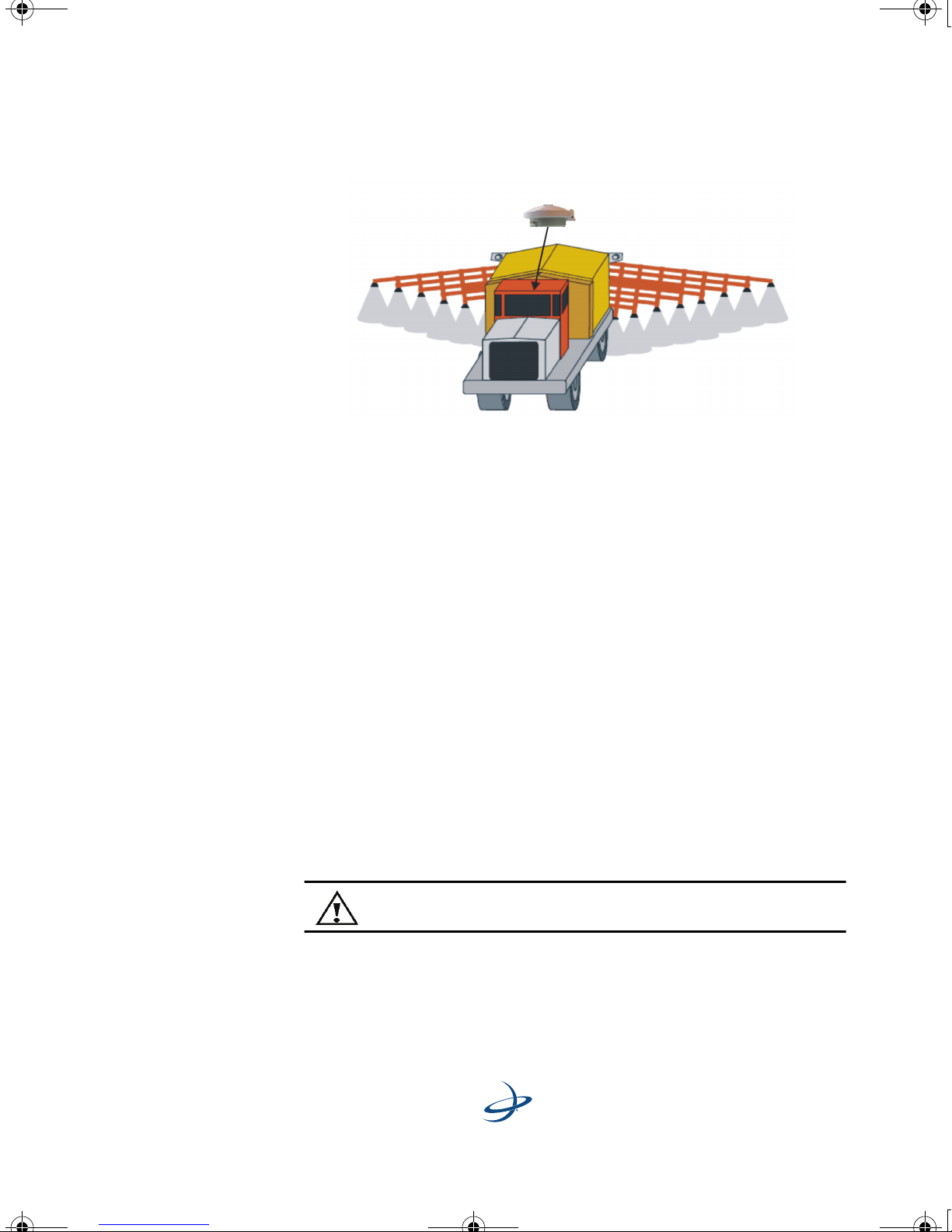
2. Mount the antenna on, or as close as possible to, the center of your
point of measurement.
3. Position the antenna as high as possible.
Figure 2-1 shows the ideal location to place the antenna on a vehicle.
6
Page 14
A220 User Guide.book Page 7 Tuesday, November 24, 2009 2:28 PM
A220 Smart Antenna User Guide
Figure 2-1: Antenna Placement On a Vehicle
Plan the Power Cable Source and Route
Review the following cautions before planning your power cable route.
• Avoid running cables in areas of excessive heat.
• Keep cables away from corrosive chemicals.
• Do not run the extension cable through door or window jams.
• Keep the cables away from rotating machinery.
• Do not bend excessively or crimp the cables.
• Avoid placing tension on the cables.
• Remove unwanted slack from the extension cable at the
receiver end.
• Secure along the cable route using plastic wraps.
Warning! Improperly installed cables near machinery are
dangerous.
7
Page 15
A220 User Guide.book Page 8 Tuesday, November 24, 2009 2:28 PM
2: Installing the A220 Smart Antenna
Mounting the A220 Smart Antenna
The A220 Smart Antenna features a built-in magnetic mount. For added
versatility, the magnet can be removed allowing the unit to be flush
mounted if desired. Standard M6 size screws can be used for mounting.
Powering the A220 Smart Antenna
Use a 9 - 36 VDC power supply source for the A220 Smart Antenna. For
optimal performance, use a continuous and clean power supply.
Refer to "Appendix A: Technical Specifications" for power requirements.
Warning: Do not apply a voltage higher than 36 VDC. This
will damage the receiver and void the warranty.
Warning: Use a weather-tight connection and connector for
outside applications.
8
Page 16

A220 User Guide.book Page 9 Tuesday, November 24, 2009 2:28 PM
To power the A220 Smart Antenna:
1. Connect the A220 Smart Antenna to a power source.
Note: The A220 Smart Antenna is shipped with an unterminated power
cable. Adapt the cable as necessary to fit your installation needs.
Note: The A220 Smart Antenna features reverse polarity protection to
prevent excessive damage if the power leads are accidentally reversed.
2. Turn on the power source. The unit is ready to use.
Note: The initial start-up can take from 5 to 15 minutes depending on
your geographic location. For example, it may take up to 5 minutes to
receive a full ionospheric map from SBAS to ensure optimum accuracy.
A220 Smart Antenna User Guide
Connecting the A220 Smart Antenna to
External Devices
The A220 Smart Antenna can communicate with a variety of external
data loggers, navigation systems, CAN systems and other devices
through the provided circular connector. In addition, an optional
internal radio allows you to use the A220 Smart Antenna as a Base or
Rover in an RTK system.
The following is a list of commonly used communication protocols:
• NMEA 0183: Use for sending and receiving messages to the
receiver. Also use for updating firmware. Use either pins 2 and 3
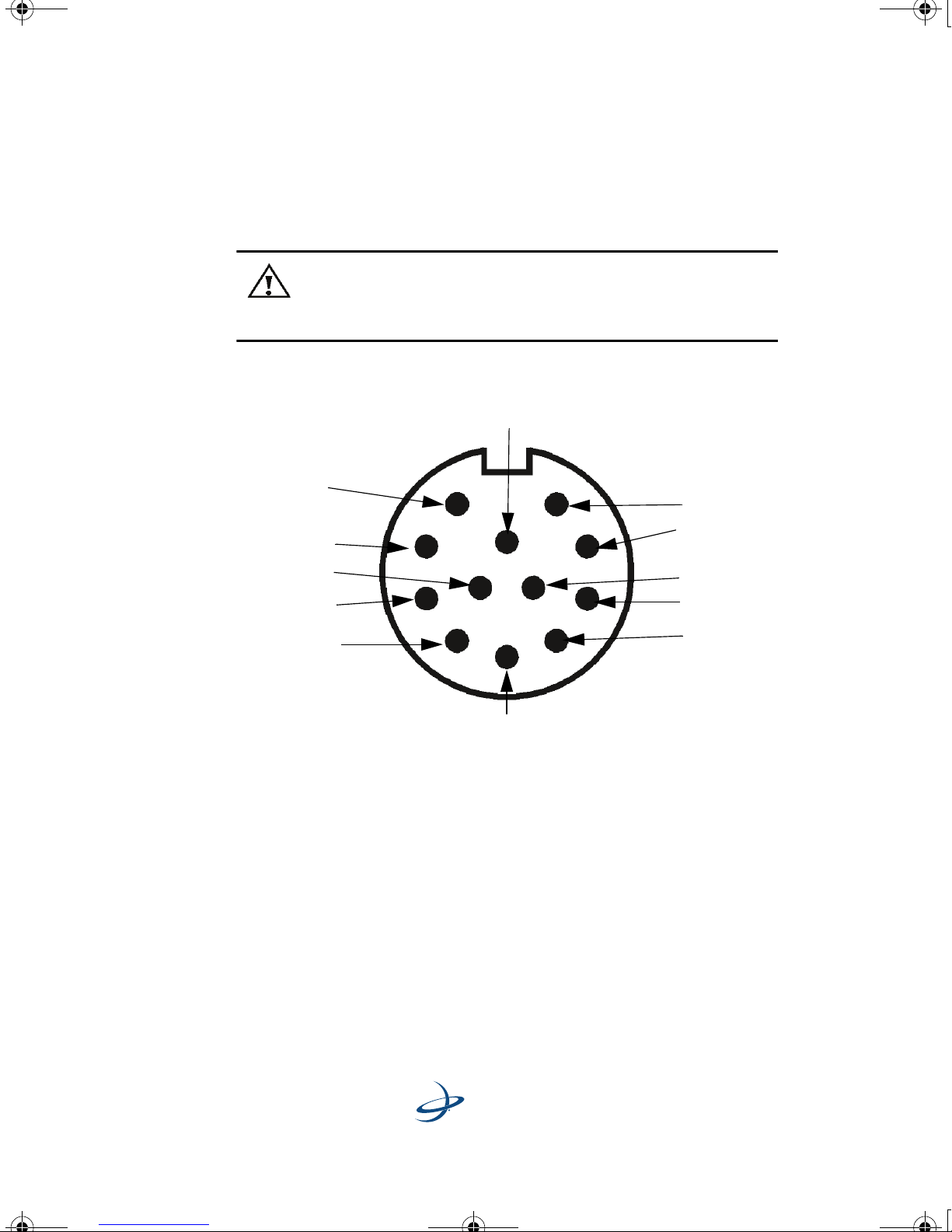
(TxB/RxB) or pins 6 and 8 (TxA/RxA) in conjunction with pin 5
(Signal Ground) to communicate with the receiver.
• Binary: Use for sending proprietary messages, such as those used
in raw data logging or to update Hemisphere GPS firmware.
• CAN (NMEA 2000): Use for sending messages over a CAN bus.
Use pins 4 and 9 for communicating through CAN.
• Radar-simulated pulse output: Use for relaying accurate ground
speed. Pin 12 is the speed out pin. Pin 12 will output a square wave
9
Page 17
5
10
8
12
7
6
9
1
2
11
3
4
A220 User Guide.book Page 10 Tuesday, November 24, 2009 2:28 PM
2: Installing the A220 Smart Antenna
with a 50% duty cycle. The frequency of the square wave varies
directly with speed. 94 Hz represents a speed of 1 meter per
second, or a 28.65 pulse per foot traveled.
Warning: Pin 12 does not have any form of isolation or surge
protection. You must incorporate isolation circuitry into your
supporting hardware if you wish to utilize the Speed Radar
Pulse output.
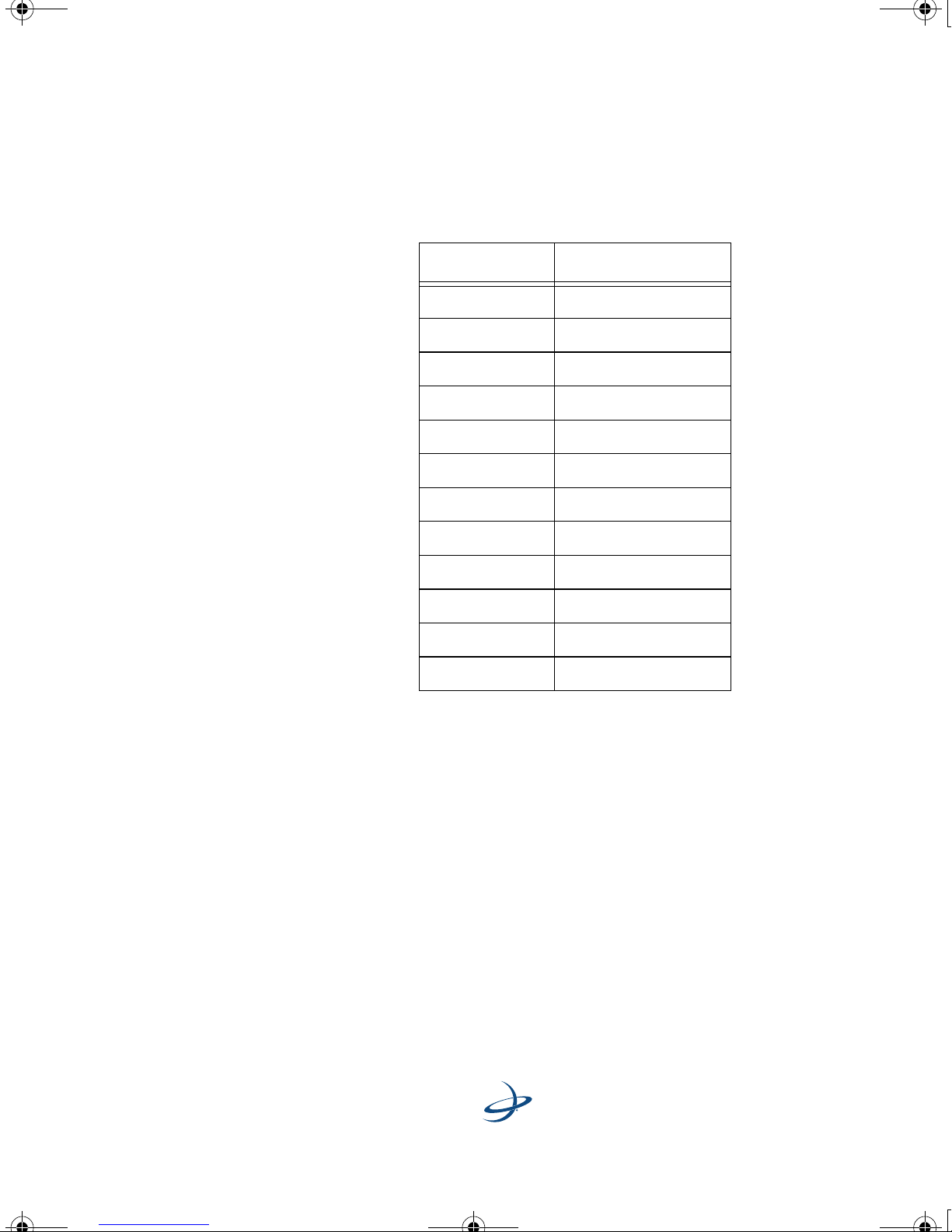
See Table 2-1 for a complete list of available pin-outs.
Figure 2-2. Circular Connector Receptacle Numbering
10
Page 18
A220 User Guide.book Page 11 Tuesday, November 24, 2009 2:28 PM
Table 2-1 provides the circular connector’s pin-outs.
A220 Smart Antenna User Guide
Table 2-1: Circular Connector Pin-outs
Pin-Out Function
1 Manual mark in
2TxB
3RxB
4CAN high
5 Signal Ground
6TxA
7 One PPS
8RxA
9 CAN low
10 Power in
11 Power ground
12 Speed out
11
Page 19

A220 User Guide.book Page 12 Tuesday, November 24, 2009 2:28 PM
2: Installing the A220 Smart Antenna
12
Page 20
A220 User Guide.book Page 13 Tuesday, November 24, 2009 2:28 PM
Chapter 3: Operating the A220
Smart Antenna
Configuring GPS Settings
Operating the A220 Smart Antenna
Using the A220 Smart Antenna as a
Base Station or Rover
Page 21
A220 User Guide.book Page 14 Tuesday, November 24, 2009 2:28 PM
3: Operating the A220 Smart Antenna
his chapter provides basic configuration and operation
instructions for your A220 Smart Antenna. It includes the
T
following sections:
• Configuring GPS settings
• Operating the A220 Smart Antenna
• Using the A220 Smart Antenna as a base station or rover
Configuring GPS Settings
The A220 Smart Antenna factory settings are detailed below. To change
the factory settings, use the commands listed in Hemisphere GPS’ “GPS
Technical Reference,” available at: http://www.hemispheregps.com.
Configuration options include:
• selecting the differential type
• setting the serial port baud rate
• setting message output options
Note: Any changes made to the default settings will not be saved
unless you issue a SAVE command.
Selecting the Differential Type
Factory settings are listed below. Contact your Hemisphere GPS dealer
to purchase an RTK subscription.
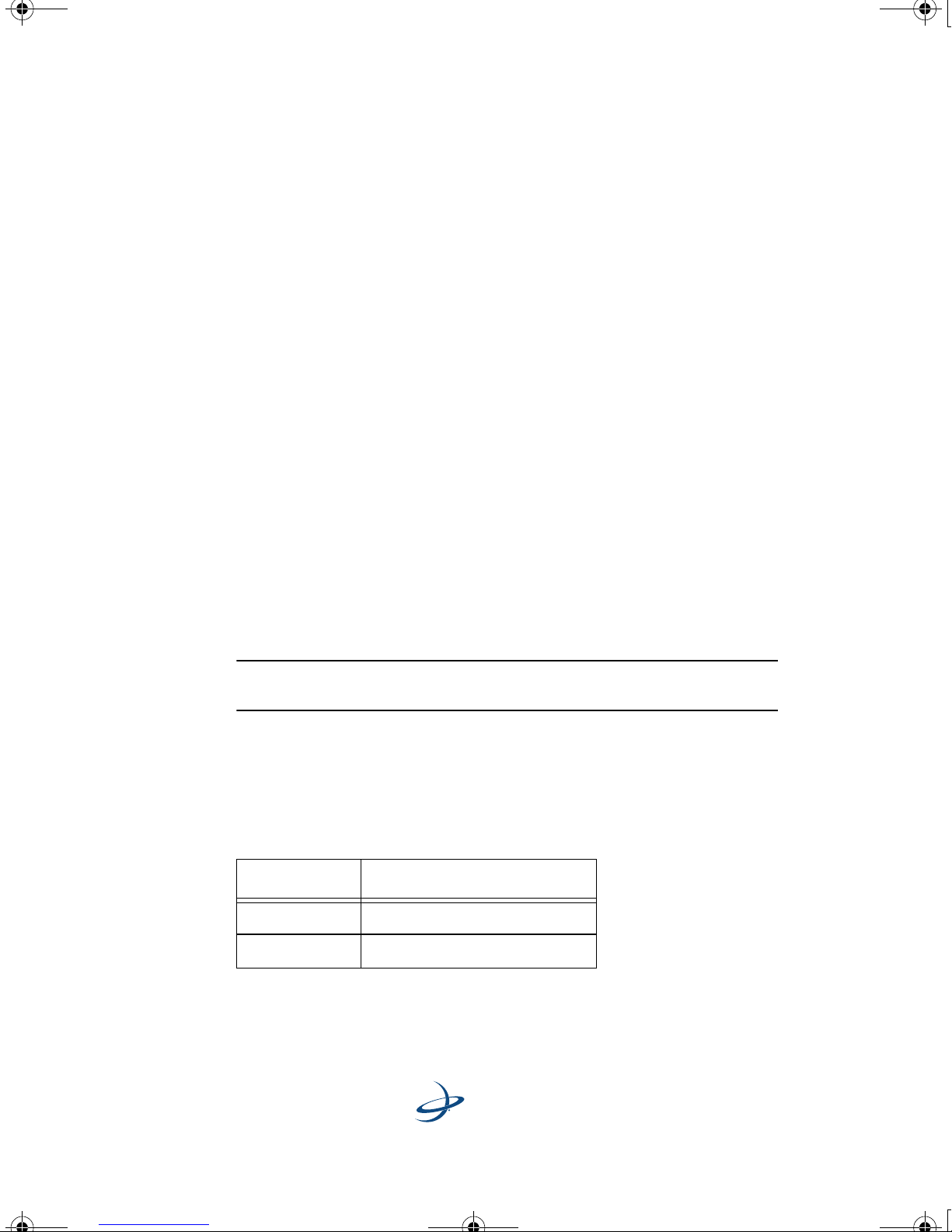
Table 3-1: Default Differential Types
Application Differential type
Application 1 RTK Rover
Application 2 OMNIHP
14
Page 22
A220 User Guide.book Page 15 Tuesday, November 24, 2009 2:28 PM
Selecting the Baud Rate
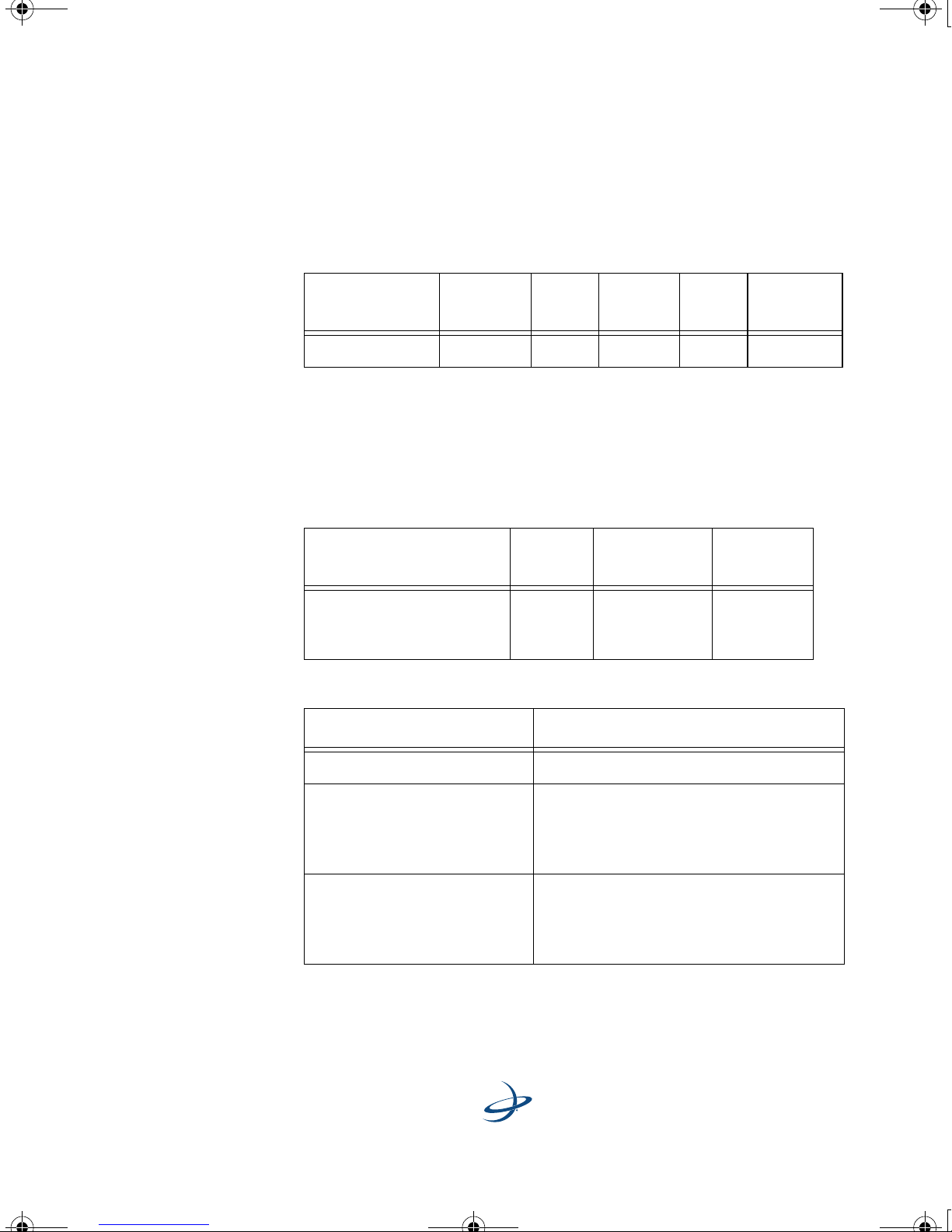
Table 3-2 lists the factory settings for the RS232 serial ports.
Table 3-2: Default Baud Rates
A220 Smart Antenna User Guide
Serial port
RS232 Tx/Rx 19200 8 None 1 RS-232C
Baud
rate
Data
bits
Parity Stop
bit
Interface
level
Setting Message Output Options
Table 3-3 and Table 3-4 list the default message output types and update
rates for Hemisphere GPS Binary, NMEA 0183 and NMEA 2000 (CAN)
messages.
Table 3-3: GPS Message Output Options
GPS message
Hemisphere GPS Binary
NMEA 0183
NMEA 2000 (CAN)
Table 3-4: Default CAN Port NMEA 2000 Commands
NMEA 2000 message Update rates
Update
rate
From
1 Hz to
20 Hz
Max DGPS
age
2700
seconds
Elevation
mask
5
°
GNNSPositionData 1 Hz
GNNSPositionRapidUpdate 20 Hz with updates based on the
subscribed rate (i.e. every other
message will be a copy of the previous
one on a 10 Hz receiver)
NMEACogSogData 20 Hz with updates based on the
subscribed rates (i.e. every other
messages will be a copy of the previous
one on a 10 Hz receiver)
15
Page 23
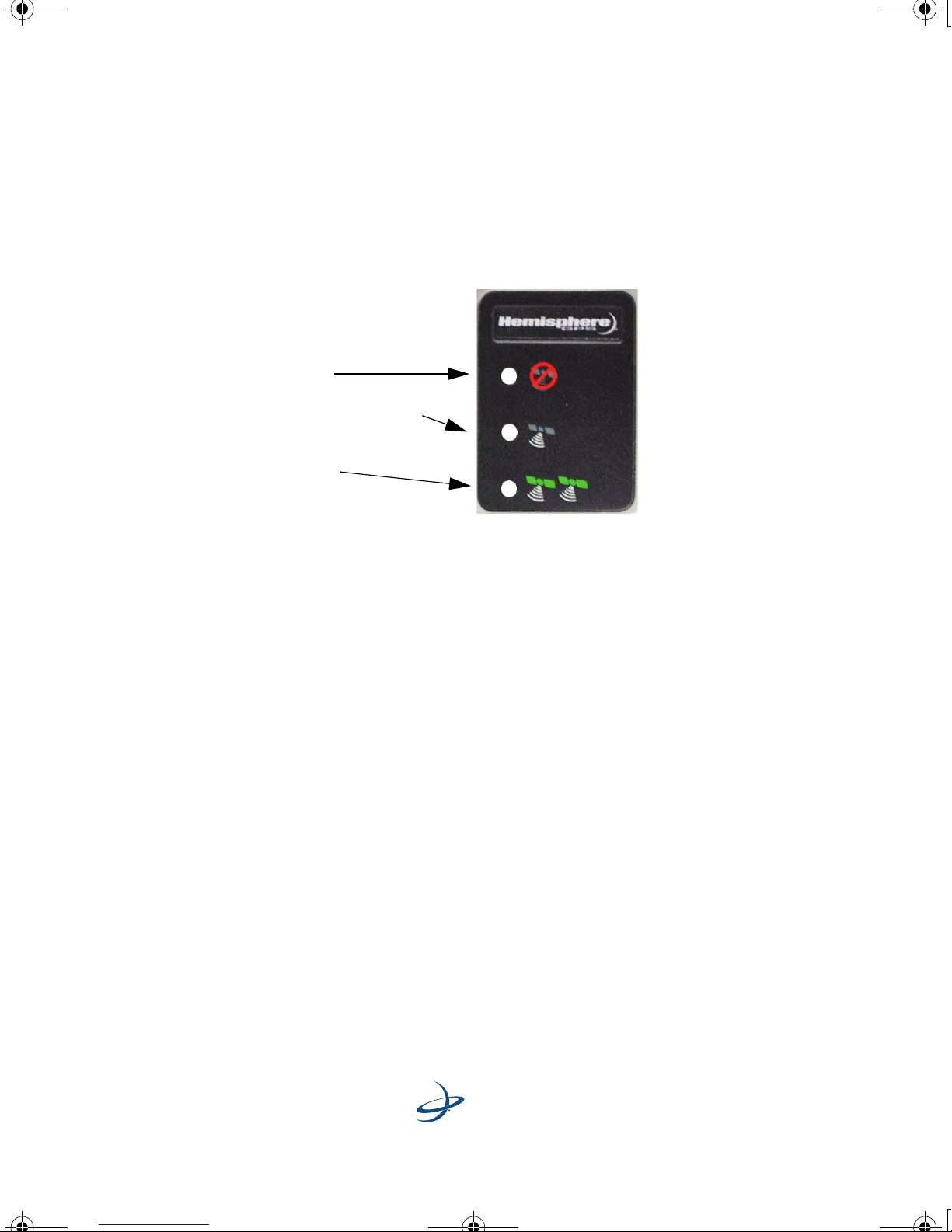
Lit LEDs indicate:
Power On
GPS position calculated
(Blinking LED indicates
acquiring data)
DGPS lock
(Blinking LED indicates
broadcast or reception of a
differential correction)
A220 User Guide.book Page 16 Tuesday, November 24, 2009 2:28 PM
3: Operating the A220 Smart Antenna
Operating the A220 Smart Antenna
The A220 Smart Antenna is easy to use. After configuring your settings,
turn on the antenna and you are ready to go!
Figure 3-1: A220 Smart Antenna LED Display
To begin using your antenna, please review the following:
• Powering the A220 Smart Antenna
• Initializing DGPS
• Reading the LEDs
Powering the A220 Smart Antenna
There is no power switch on the antenna. Power is automatically “on”
upon connecting a power source to the antenna.
Initializing DGPS
The initial start-up can take anywhere from 5 to 15 minutes, depending
on your geographic location. For example, it may take up to 5 minutes
to receive a full ionospheric map from SBAS to ensure optimum
accuracy.
16
Page 24
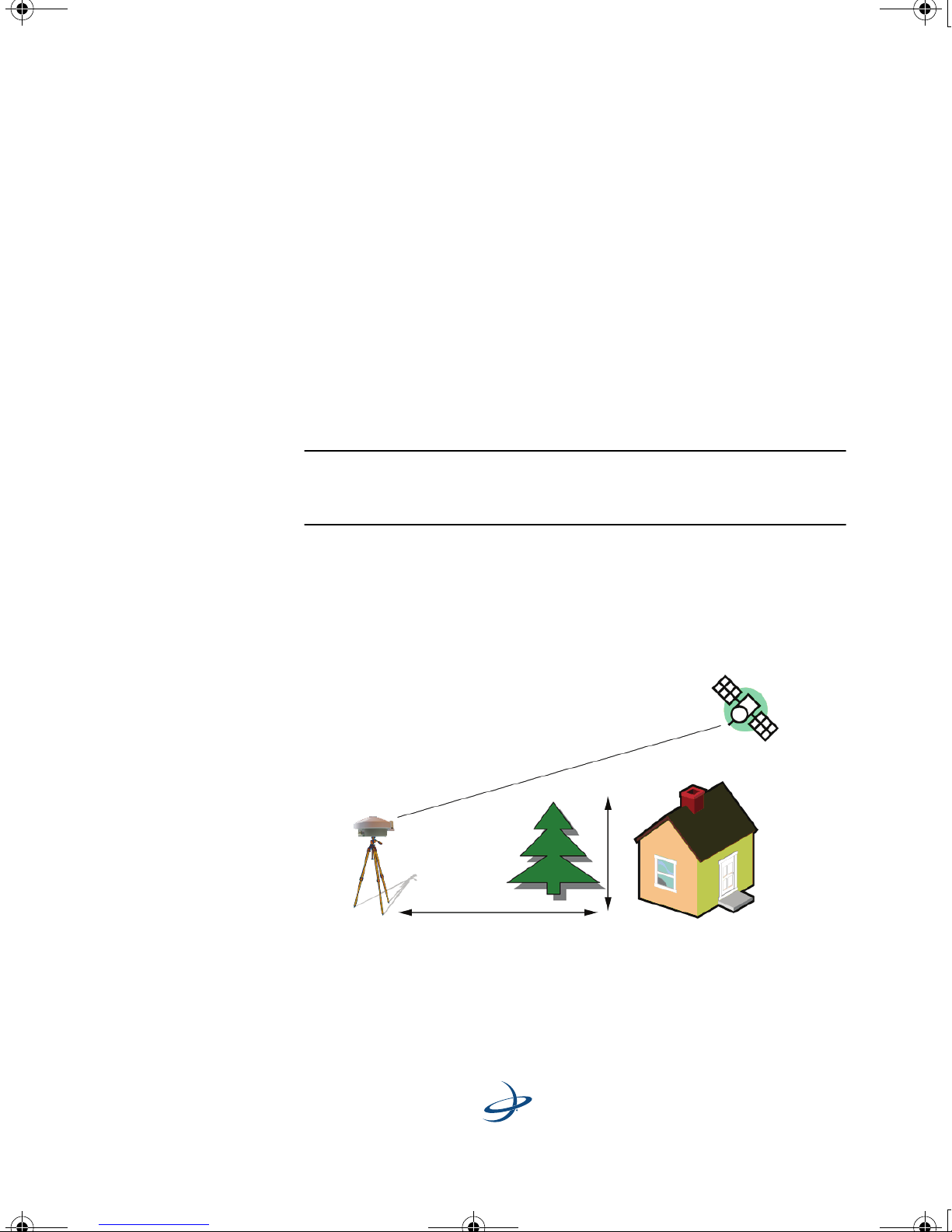
5 m
(16.4
ft)
50 m (160 ft)
A220 User Guide.book Page 17 Tuesday, November 24, 2009 2:28 PM
Reading the LEDs
As shown in Figure 3-1, the A220 Smart Antenna has three LEDs:
• Power: A red LED that indicates power to the unit.
• GPS: A yellow LED indicates the A220 has calculated a GPS
position. If the unit is configured as a base station, the yellow LED
will blink while the receiver is converging on a solution, prior to
outputting differential corrections.
• DGPS: A green LED indicates DGPS lock - you are ready to go! The
green LED will blink on the transmission and reception of
differential corrections.
A220 Smart Antenna User Guide
Note: The A220 Smart Antenna features Hemisphere GPS COASTTM
technology, which provides continuous coverage in the event of a
temporary differential signal outage.
Using the A220 Smart Antenna as a Base
Station or Rover
The A220 Smart Antenna can be used as a base station or rover.
Figure 3-2: Location of a Base Station
17
Page 25

A220 User Guide.book Page 18 Tuesday, November 24, 2009 2:28 PM
3: Operating the A220 Smart Antenna
To set up the A220 Smart Antenna for use in an RTK system:
1. Place the base station at least 1 meter (3 ft) away from the rover
radio, with an unobstructed view of the sky. See Figure 3-2.
2. Place the base station at least 50 meters (160 feet) from any
obstructions.
Note: Do not block the GPS antenna with the rover radio.
Note: Do not place the base station near metal objects.
3. Set the base station and rover radios to the same frequency and
configurable parameters.
4. Allow the rover radio to receive corrections at 1 - 2 second intervals
to achieve RTK lock (maximum accuracy).
Note: RTK lock may take anywhere from 5 - 15 minutes. Typically, the
A220 Smart Antenna will achieve a lock in under 5 minutes.
18
Page 26
A220 User Guide.book Page 19 Tuesday, November 24, 2009 2:28 PM
Appendix
Technical Specifications
Page 27
A220 User Guide.book Page 20 Tuesday, November 24, 2009 2:28 PM
Appendix
Appendix: Technical Specifications
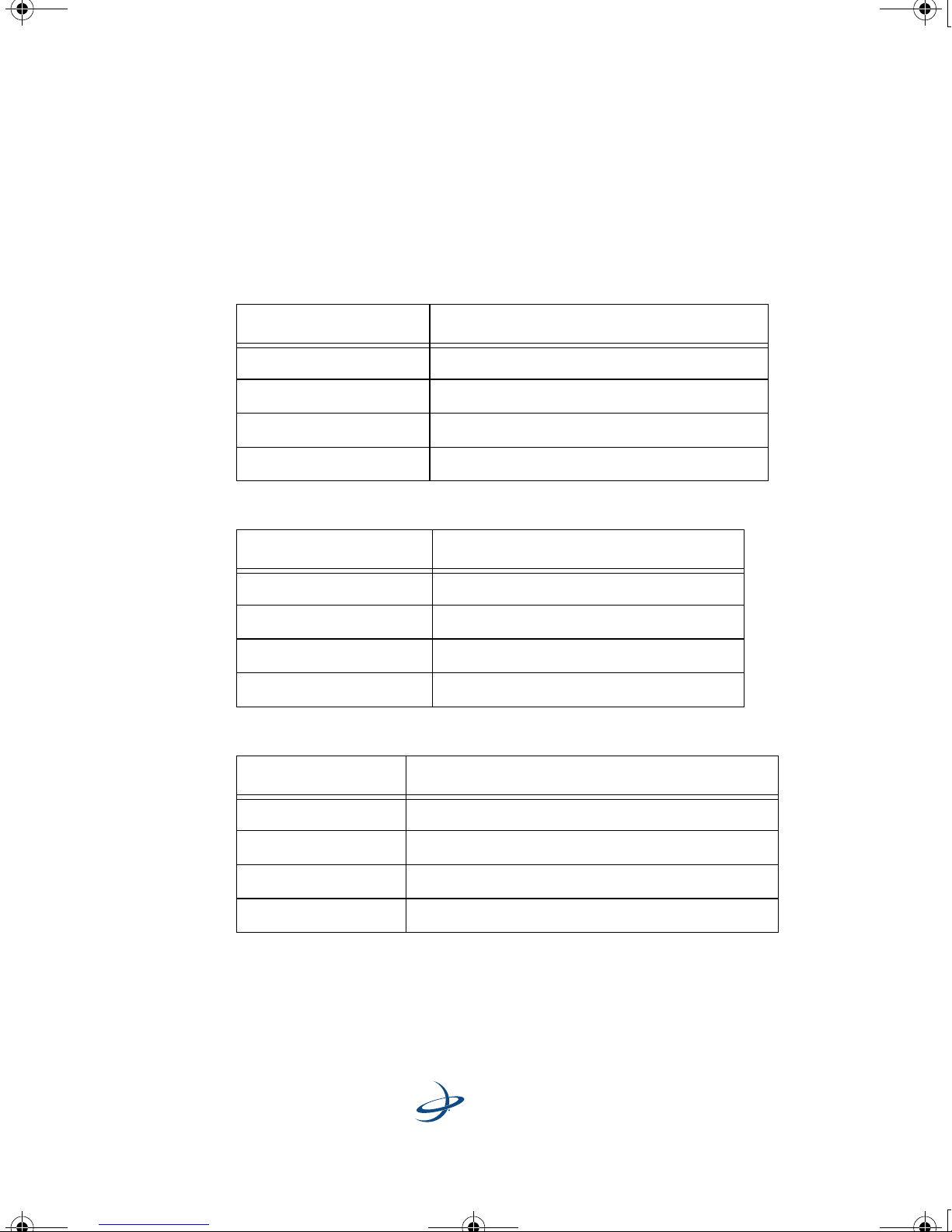
Tables A-1 through A-6 provide the power, mechanical, communication,
environmental and DGPS specifications for the A220 Smart Antenna.
Table A-1: Power Specifications
Item Specification
Input voltage 9 - 36 VDC
Power consumption < 5 W @ 12 VDC (typical, without radio)
Current consumption 400 mA @ 12 VDC (typical, without radio)
Power connector Cable mount environmentally sealed
Table A-2: Mechanical Specifications
Item Specification
Height 15 cm (5.91 in)
Width 24.4 cm (9.6 in)
Weight 1.8 kg (4 lbs)
Mounting Options Magnetic mount
Table A-3: I/O Communications
Item Description
Serial ports 2 full duplex RS232
CAN port NMEA 2000 broadcast
Pulse output 1 PPS (HCMOS, active high, rising edge sync)
Baud rates 4,800 - 115,200
20
Page 28
A220 User Guide.book Page 21 Tuesday, November 24, 2009 2:28 PM
Table A-3: I/O Communications
Item Description
A220 Smart Antenna User Guide
Differential
correction
I/O protocol
Data I/O protocol NMEA 0183, SLX binary and NMEA 2000
Ground speed
output
Event mark output HCMOS, active low, falling edge sync, 10 k-ohm,
Table A-4: Environmental Specifications
Item Specification
Operating temperature
Hemisphere GPS Proprietary DFX and ROX
RTCM SC-104 v3
CMR+
Range: 0.8 - >322 Km/h
(0.5 - >200 mph)
Signal: Opto-isolated pulse out
Frequency Conversion: 94 Hz/m/s
(28.65 pulse per foot traveled)
10 pF load
-30
° C to +65° C
° F to + 149° F)
(-22
Storage temperature
Humidity EP455 Section 5.13.1 Humidity
Enclosure Enclosure IP67
Compliance FCC, CE
Shock EP455 Section 5.14.1 Operational
Vibration EP455 Section 5.15.1 Random
EMI certification FCC part 15, E-Mark
21
° C to +85° C
-40
° F to + 185° F)
(-40
Page 29
A220 User Guide.book Page 22 Tuesday, November 24, 2009 2:28 PM
Appendix
Table A-5: GPS Sensor Specifications
Item Specification
Receiver type L1 and L2 RTK carrier phase smoothing (Patented
COAST
outage)
Channels 12 L1CA GPS
12 L1P GPS
12 L2P GPS
3 SBAS or 3 additional L1CA GPS
TM
technology during differential signal
Update rate 1 - 20 Hz positions (10 Hz standard)
Startup time Cold start: < 60 s
Warm start: 30 s
Hot start: 10 s (typical)
Satellite reaquisition < 1 s
Differential options SBAS, autonomous, external RTCM, RTK,
OmniSTAR (HP/XP)
Table A-6: Horizontal Accuracy
DGPS Source RMS (67%) 2 DRMS (95%)
1,2
RTK
OmniSTAR HP
SBAS (WAAS)
1,3
1
10 mm + 1 ppm 20 mm + 2 ppm
0.1 m 0.2 m
0.3 m 0.6 m
Autonomous, no SA
1
1.2 m 2.5 m
22
Page 30

A220 User Guide.book Page 23 Tuesday, November 24, 2009 2:28 PM
Notes:
1
Depends on multipath environment, number of satellites in view,
satellite geometry and ionospheric activity
2
Depends also on baseline length
3
Requires a subscription from OmniSTAR
A220 Smart Antenna User Guide
23
Page 31

A220 User Guide.book Page 24 Tuesday, November 24, 2009 2:28 PM
Page 32
A220 User Guide.book Page 25 Tuesday, November 24, 2009 2:28 PM
End User License Agreement
Page 33

A220 User Guide.book Page 26 Tuesday, November 24, 2009 2:28 PM
End User License Agreement
HEMISPHERE GPS
END USER LICENSE AGREEMENT
IMPORTANT - This is an agreement (the "Agreement") between you, the end purchaser
("Licensee") and Hemisphere GPS Inc. ("Hemisphere") which permits Licensee to use
the Hemisphere software (the "Software") that accompanies this Agreement. This
Software may be licensed on a standalone basis or may be embedded in a Product. Please
read and ensure that you understand this Agreement before installing or using the
Software Update or using a Product.
In this agreement any product that has Software embedded in it at the time of sale to the
Licensee shall be referred to as a "Product". As well, in this Agreement, the use of a
Product shall be deemed to be use of the Software which is embedded in the Product.
BY INSTALLING OR USING THE SOFTWARE UPDATE OR THE PRODUCT, LICENSEE
THEREBY AGREES TO BE LEGALLY BOUND BY THE TERMS OF THIS AGREEMENT. IF YOU
DO NOT AGREE TO THESE TERMS, (I) DO NOT INSTALL OR USE THE SOFTWARE, AND
(II) IF YOU ARE INSTALLING AN UPDATE TO THE SOFTWARE, DO NOT INSTALL THE
UPDATE AND PROMPTLY DESTROY IT.
HEMISPHERE PROVIDES LIMITED WARRANTIES IN RELATION TO THE SOFTWARE. AS
WELL, THOSE WHO USE THE EMBEDDED SOFTWARE DO SO AT THEIR OWN RISK. YOU
SHOULD UNDERSTAND THE IMPORTANCE OF THESE AND OTHER LIMITATIONS SET
OUT IN THIS AGREEMENT BEFORE INSTALLING OR USING THE SOFTWARE OR THE
PRODUCT.
1. LICENSE. Hemisphere hereby grants to Licensee a non-transferable and non-
exclusive license to use the Software as embedded in a Product and all Updates
(collectively the "Software"), solely in binary executable form.
2. RESTRICTIONS ON USE. Licensee agrees that Licensee and its employees will not
directly or indirectly, in any manner whatsoever:
a. install or use more copies of the Software than the number of copies that have
been licensed;
b. use or install the Software in connection with any product other than the Product
the Software was intended to be used or installed on as set out in the
documentation that accompanies the Software.
c. copy any of the Software or any written materials for any purpose except as part
of Licensee's normal backup processes;
d. modify or create derivative works based on the Software;
26
Page 34

A220 User Guide.book Page 27 Tuesday, November 24, 2009 2:28 PM
e. sub-license, rent, lease, loan or distribute the Software;
f. permit any third party to use the Software;
g. use or operate Product for the benefit of any third party in any type of service
outsourcing, application service, provider service or service bureau capacity;
h. reverse engineer, decompile or disassemble the Software or otherwise reduce it
to a human perceivable form;
i. Assign this Agreement or sell or otherwise transfer the Software to any other
party except as part of the sale or transfer of the whole Product.
3. UPDATES. At Hemisphere's discretion Hemisphere may make Updates available to
Licensee. An update ("Update") means any update to the Software that is made
available to Licensee including error corrections, enhancements and other
modifications. Licensee may access, download and install Updates during the
Warranty Period only. All Updates that Licensee downloads, installs or uses shall be
deemed to be Software and subject to this Agreement. Hemisphere reserves the right
to modify the Product without any obligation to notify, supply or install any
improvements or alterations to existing Software.
A220 Smart Antenna User Guide
4. SUPPORT. Hemisphere may make available directly or through its authorized
dealers telephone and email support for the Software. Contact Hemisphere to find the
authorized dealer near you. As well, Hemisphere may make available user and
technical documentation regarding the Software. Hemisphere reserves the right to
reduce and limit access to such support at any time.
5. BACKUPS AND RECOVERY. Licensee shall back-up all data used, created or stored
by the Software on a regular basis as necessary to enable proper recovery of the data
and related systems and processes in the event of a malfunction in the Software or
any loss or corruption of data caused by the Software. Licensee shall assume all risks
of loss or damage for any failure to comply with the foregoing.
6. OWNERSHIP. Hemisphere and its suppliers own all rights, title and interest in and to
the Software and related materials, including all intellectual property rights. The
Software is licensed to Licensee, not sold.
7. TRADEMARKS. "Hemisphere GPS", "Outback Guidance", "BEELINE", "Crescent",
"Eclipse" and the associated logos are trademarks of Hemisphere. Other trademarks
are the property of their respective owners. Licensee may not use any of these
trademarks without the consent of their respective owners.
8. LIMITED WARRANTY. Hemisphere warrants solely to the Licensee, subject to the
exclusions and procedures set forth herein below, that for a period of one (1) year
from the original date of purchase of the Product in which it is embedded (the
"Warranty Period"), the Software, under normal use and maintenance, will conform in
27
Page 35

A220 User Guide.book Page 28 Tuesday, November 24, 2009 2:28 PM
End User License Agreement
all material respects to the documentation provided with the Software and any media
will be free of defects in materials and workmanship. For any Update, Hemisphere
warrants, for 90 days from performance or delivery, or for the balance of the original
Warranty Period, whichever is greater, that the Update, under normal use and
maintenance, will conform in all material respects to the documentation provided
with the Update and any media will be free of defects in materials and workmanship.
Notwithstanding the foregoing, Hemisphere does not warrant that the Software will
meet Licensee's requirements or that its operation will be error free.
9. WARRANTY EXCLUSIONS. The warranty set forth in Section (LIMITED
WARRANTY. Hemisphere warrants solely to the Licensee, subject to the exclusions
and procedures set forth herein below, that for a period of one (1) year from the
original date of purchase of the Product in which it is embedded (the "Warranty
Period"), the Software, under normal use and maintenance, will conform in all
material respects to the documentation provided with the Software and any media
will be free of defects in materials and workmanship. For any Update, Hemisphere
warrants, for 90 days from performance or delivery, or for the balance of the original
Warranty Period, whichever is greater, that the Update, under normal use and
maintenance, will conform in all material respects to the documentation provided
with the Update and any media will be free of defects in materials and workmanship.
Notwithstanding the foregoing, Hemisphere does not warrant that the Software will
meet Licensee's requirements or that its operation will be error free. will not apply to
any deficiencies caused by (a) the Product not being used as described in the
documentation supplied to Licensee, (b) the Software having been altered, modified
or converted in any way by anyone other than Hemisphere approved by Hemisphere,
(c) any malfunction of Licensee's equipment or other software, or (d) damage
occurring in transit or due to any accident, abuse, misuse, improper installation,
lightning (or other electrical discharge) or neglect other than that caused by
Hemisphere. Hemisphere GPS does not warrant or guarantee the precision or
accuracy of positions obtained when using the Software (whether standalone or
embedded in a Product). The Product and the Software is not intended and should not
be used as the primary means of navigation or for use in safety of life applications.
The potential positioning and navigation accuracy obtainable with the Software as
stated in the Product or Software documentation serves to provide only an estimate
of achievable accuracy based on specifications provided by the US Department of
Defense for GPS positioning and DGPS service provider performance specifications,
where applicable.
10. WARRANTY DISCLAIMER. EXCEPT AS EXPRESSLY SET OUT IN THIS
AGREEMENT, HEMISPHERE MAKES NO REPRESENTATION, WARRANTY OR
CONDITION OF ANY KIND TO LICENSEE, WHETHER VERBAL OR WRITTEN AND
HEREBY DISCLAIMS ALL REPRESENTATIONS, WARRANTIES AND CONDITIONS OF
28
Page 36

A220 User Guide.book Page 29 Tuesday, November 24, 2009 2:28 PM
ANY KIND INCLUDING FITNESS FOR A PARTICULAR PURPOSE, MERCHANTABILITY,
ACCURACY, RELIABILITY OR THAT THE USE OF THE SOFTWARE WILL BE
UNINTERRUPTED OR ERROR-FREE AND HEREBY DISCLAIMS ALL
REPRESENTATIONS, WARRANTIES AND CONDITIONS ARISING AS A RESULT OF
CUSTOM, USAGE OR TRADE AND THOSE ARISING UNDER STATUTE.
11. LIMITS ON WARRANTY DISCLAIMER. Some jurisdictions do not allow the
exclusion of implied warranties or conditions, so some of the above exclusions may
not apply to Licensee. In that case, any implied warranties or conditions which would
then otherwise arise will be limited in duration to ninety (90) days from the date of the
license of the Software or the purchase of the Product. The warranties given herein
give Licensee specific legal rights and Licensee may have other rights which may
vary from jurisdiction to jurisdiction.
12. CHANGE TO WARRANTY. No employee or agent of Hemisphere is authorized to
change the warranty provided or the limitation or disclaimer of warranty provisions.
All such changes will only be effective if pursuant to a separate agreement signed by
senior officers of the respective parties.
A220 Smart Antenna User Guide
13. WARRANTY CLAIM. In the event Licensee has a warranty claim Licensee must first
check for and install all Updates that are made available. The warranty will not
otherwise be honored. Proof of purchase may be required. Hemisphere does not
honor claims asserted after the end of the Warranty Period.
14. LICENSEE REMEDIES. In all cases which involve a failure of the Software to
conform in any material respect to the documentation during the Warranty Period or
a breach of a warranty, Hemisphere's sole obligation and liability, and Licensee's sole
and exclusive remedy, is for Hemisphere, at Hemisphere's option, to (a) repair the
Software, (b) replace the Software with software conforming to the documentation, or
(c) if Hemisphere is unable, on a reasonable commercial basis, to repair the Software
or to replace the Software with conforming software within ninety (90) days, to
terminate this Agreement and thereafter Licensee shall cease using the Software.
Hemisphere will also issue a refund for the price paid by Licensee less an amount on
account of amortization, calculated on a straight-line basis over a deemed useful life
of three (3) years.
15. LIMITATION OF LIABILITY. IN NO EVENT WILL HEMISPHERE BE LIABLE TO
LICENSEE FOR ANY INCIDENTAL, CONSEQUENTIAL, SPECIAL OR INDIRECT
DAMAGES INCLUDING ARISING IN RELATION TO ANY LOSS OF DATA, INCOME,
REVENUE, GOODWILL OR ANTICIPATED SAVINGS EVEN IF HEMISPHERE HAS BEEN
INFORMED OF THE POSSIBILITY OF SUCH LOSS OR DAMAGE. FURTHER, IN NO
EVENT WILL HEMISPHERE'S TOTAL CUMULATIVE LIABILITY HEREUNDER, FROM
ALL CAUSES OF ACTION OF ANY KIND, EXCEED THE TOTAL AMOUNT PAID BY
LICENSEE TO HEMISPHERE TO PURCHASE THE PRODUCT. THIS LIMITATION AND
29
Page 37

A220 User Guide.book Page 30 Tuesday, November 24, 2009 2:28 PM
End User License Agreement
EXCLUSION APPLIES IRRESPECTIVE OF THE CAUSE OF ACTION, INCLUDING BUT
NOT LIMITED TO BREACH OF CONTRACT, NEGLIGENCE, STRICT LIABILITY, TORT,
BREACH OF WARRANTY, MISREPRESENTATION OR ANY OTHER LEGAL THEORY
AND WILL SURVIVE A FUNDAMENTAL BREACH.
16. LIMITS ON LIMITATION OF LIABILITY. Some jurisdictions do not allow for the
limitation or exclusion of liability for incidental or consequential damages, so the
above limitation or exclusion may not apply to Licensee and Licensee may also have
other legal rights which may vary from jurisdiction to jurisdiction.
17. BASIS OF BARGAIN. Licensee agrees and acknowledges that Hemisphere has set
its prices and the parties have entered into this Agreement in reliance on the limited
warranties, warranty disclaimers and limitations of liability set forth herein, that the
same reflect an agreed-to allocation of risk between the parties (including the risk that
a remedy may fail of its essential purpose and cause consequential loss), and that the
same forms an essential basis of the bargain between the parties. Licensee agrees
and acknowledges that Hemisphere would not have been able to sell the Product at
the amount charged on an economic basis without such limitations.
18. PROPRIETARY RIGHTS INDEMNITY. Hemisphere shall indemnify, defend and hold
harmless Licensee from and against any and all actions, claims, demands,
proceedings, liabilities, direct damages, judgments, settlements, fines, penalties,
costs and expenses, including royalties and attorneys' fees and related costs, in
connection with or arising out of any actual infringement of any third party patent,
copyright or other intellectual property right by the Software or by its use, in
accordance with this Agreement and documentation, PROVIDED THAT: (a)
Hemisphere has the right to assume full control over any action, claim, demand or
proceeding, (b) Licensee shall promptly notify Hemisphere of any such action, claim,
demand, or proceeding, and (c) Licensee shall give Hemisphere such reasonable
assistance and tangible material as is reasonably available to Licensee for the
defense of the action, claim, demand or proceeding. Licensee shall not settle or
compromise any of same for which Hemisphere has agreed to assume responsibility
without Hemisphere's prior written consent. Licensee may, at its sole cost and
expense, retain separate counsel from the counsel utilized or retained by
Hemisphere.
19. INFRINGEMENT. If use of the Software may be enjoined due to a claim of
infringement by a third party then, at its sole discretion and expense, Hemisphere
may do one of the following: (a) negotiate a license or other agreement so that the
Product is no longer subject to such a potential claim, (b) modify the Product so that it
becomes non-infringing, provided such modification can be accomplished without
materially affecting the performance and functionality of the Product, (c) replace the
Software, or the Product, with non-infringing software, or product, of equal or better
30
Page 38

A220 User Guide.book Page 31 Tuesday, November 24, 2009 2:28 PM
performance and quality, or (d) if none of the foregoing can be done on a
commercially reasonable basis, terminate this license and Licensee shall stop using
the Product and Hemisphere shall refund the price paid by Licensee less an amount
on account of amortization, calculated on a straight-line basis over a deemed useful
life of three (3) years.
20. The foregoing sets out the entire liability of Hemisphere and the sole obligations of
Hemisphere to Licensee in respect of any claim that the Software or its use infringes
any third party rights
21. INDEMNIFICATION. Except in relation to an infringement action, Licensee shall
indemnify and hold Hemisphere harmless from any and all claims, damages, losses,
liabilities, costs and expenses (including reasonable fees of lawyers and other
professionals) arising out of or in connection with Licensee's use of the Product,
whether direct or indirect, including without limiting the foregoing, loss of data, loss
of profit or business interruption.
A220 Smart Antenna User Guide
22. TERMINATION. Licensee may terminate this Agreement at any time without cause.
Hemisphere may terminate this Agreement on 30 days notice to Licensee if Licensee
fails to materially comply with each provision of this Agreement unless such default
is cured within the 30 days. Any such termination by a party shall be in addition to
and without prejudice to such rights and remedies as may be available, including
injunction and other equitable remedies. Upon receipt by Licensee of written notice
of termination from Hemisphere or termination by Licensee, Licensee shall at the end
of any notice period (a) cease using the Software; and (b) return to Hemisphere (or
destroy and provide a certificate of a Senior Officer attesting to such destruction) the
Software and all related material and any magnetic or optical media provided to
Licensee. The provisions of Sections OWNERSHIP. Hemisphere and its suppliers own
all rights, title and interest in and to the Software and related materials, including all
intellectual property rights. The Software is licensed to Licensee, not sold. ,
TRADEMARKS. "Hemisphere GPS", "Outback Guidance", "BEELINE", "Crescent",
"Eclipse" and the associated logos are trademarks of Hemisphere. Other trademarks
are the property of their respective owners. Licensee may not use any of these
trademarks without the consent of their respective owners., LIMITED WARRANTY.
Hemisphere warrants solely to the Licensee, subject to the exclusions and procedures
set forth herein below, that for a period of one (1) year from the original date of
purchase of the Product in which it is embedded (the "Warranty Period"), the
Software, under normal use and maintenance, will conform in all material respects to
the documentation provided with the Software and any media will be free of defects
in materials and workmanship. For any Update, Hemisphere warrants, for 90 days
from performance or delivery, or for the balance of the original Warranty Period,
whichever is greater, that the Update, under normal use and maintenance, will
conform in all material respects to the documentation provided with the Update and
31
Page 39

A220 User Guide.book Page 32 Tuesday, November 24, 2009 2:28 PM
End User License Agreement
any media will be free of defects in materials and workmanship. Notwithstanding the
foregoing, Hemisphere does not warrant that the Software will meet Licensee's
requirements or that its operation will be error free. , WARRANTY EXCLUSIONS. The
warranty set forth in Section (LIMITED WARRANTY. Hemisphere warrants solely to
the Licensee, subject to the exclusions and procedures set forth herein below, that for
a period of one (1) year from the original date of purchase of the Product in which it is
embedded (the "Warranty Period"), the Software, under normal use and maintenance,
will conform in all material respects to the documentation provided with the Software
and any media will be free of defects in materials and workmanship. For any Update,
Hemisphere warrants, for 90 days from performance or delivery, or for the balance of
the original Warranty Period, whichever is greater, that the Update, under normal use
and maintenance, will conform in all material respects to the documentation
provided with the Update and any media will be free of defects in materials and
workmanship. Notwithstanding the foregoing, Hemisphere does not warrant that the
Software will meet Licensee's requirements or that its operation will be error free.
will not apply to any deficiencies caused by (a) the Product not being used as
described in the documentation supplied to Licensee, (b) the Software having been
altered, modified or converted in any way by anyone other than Hemisphere
approved by Hemisphere, (c) any malfunction of Licensee's equipment or other
software, or (d) damage occurring in transit or due to any accident, abuse, misuse,
improper installation, lightning (or other electrical discharge) or neglect other than
that caused by Hemisphere. Hemisphere GPS does not warrant or guarantee the
precision or accuracy of positions obtained when using the Software (whether
standalone or embedded in a Product). The Product and the Software is not intended
and should not be used as the primary means of navigation or for use in safety of life
applications. The potential positioning and navigation accuracy obtainable with the
Software as stated in the Product or Software documentation serves to provide only
an estimate of achievable accuracy based on specifications provided by the US
Department of Defense for GPS positioning and DGPS service provider performance
specifications, where applicable. , WARRANTY DISCLAIMER. EXCEPT AS EXPRESSLY
SET OUT IN THIS AGREEMENT, HEMISPHERE MAKES NO REPRESENTATION,
WARRANTY OR CONDITION OF ANY KIND TO LICENSEE, WHETHER VERBAL OR
WRITTEN AND HEREBY DISCLAIMS ALL REPRESENTATIONS, WARRANTIES AND
CONDITIONS OF ANY KIND INCLUDING FITNESS FOR A PARTICULAR PURPOSE,
MERCHANTABILITY, ACCURACY, RELIABILITY OR THAT THE USE OF THE SOFTWARE
WILL BE UNINTERRUPTED OR ERROR-FREE AND HEREBY DISCLAIMS ALL
REPRESENTATIONS, WARRANTIES AND CONDITIONS ARISING AS A RESULT OF
CUSTOM, USAGE OR TRADE AND THOSE ARISING UNDER STATUTE., LIMITATION
OF LIABILITY. IN NO EVENT WILL HEMISPHERE BE LIABLE TO LICENSEE FOR ANY
INCIDENTAL, CONSEQUENTIAL, SPECIAL OR INDIRECT DAMAGES INCLUDING
ARISING IN RELATION TO ANY LOSS OF DATA, INCOME, REVENUE, GOODWILL OR
32
Page 40

A220 User Guide.book Page 33 Tuesday, November 24, 2009 2:28 PM
ANTICIPATED SAVINGS EVEN IF HEMISPHERE HAS BEEN INFORMED OF THE
POSSIBILITY OF SUCH LOSS OR DAMAGE. FURTHER, IN NO EVENT WILL
HEMISPHERE'S TOTAL CUMULATIVE LIABILITY HEREUNDER, FROM ALL CAUSES
OF ACTION OF ANY KIND, EXCEED THE TOTAL AMOUNT PAID BY LICENSEE TO
HEMISPHERE TO PURCHASE THE PRODUCT. THIS LIMITATION AND EXCLUSION
APPLIES IRRESPECTIVE OF THE CAUSE OF ACTION, INCLUDING BUT NOT LIMITED
TO BREACH OF CONTRACT, NEGLIGENCE, STRICT LIABILITY, TORT, BREACH OF
WARRANTY, MISREPRESENTATION OR ANY OTHER LEGAL THEORY AND WILL
SURVIVE A FUNDAMENTAL BREACH., INDEMNIFICATION. Except in relation to an
infringement action, Licensee shall indemnify and hold Hemisphere harmless from
any and all claims, damages, losses, liabilities, costs and expenses (including
reasonable fees of lawyers and other professionals) arising out of or in connection
with Licensee's use of the Product, whether direct or indirect, including without
limiting the foregoing, loss of data, loss of profit or business interruption. , FORUM
FOR DISPUTES. The parties agree that the courts located in Calgary, Alberta, Canada
and the courts of appeal there from will have exclusive jurisdiction to resolve any
disputes between Licensee and Hemisphere concerning this Agreement or Licensee's
use or inability to use the Software and the parties hereby irrevocably agree to attorn
to the jurisdiction of those courts. Notwithstanding the foregoing, either party may
apply to any court of competent jurisdiction for injunctive relief. and APPLICABLE
LAW. This Agreement shall be governed by the laws of the Province of Alberta,
Canada, exclusive of any of its choice of law and conflicts of law jurisprudence.
herein shall survive the expiry or termination of this Agreement for any reason.
A220 Smart Antenna User Guide
23. EXPORT RESTRICTIONS. Licensee agrees that Licensee will comply with all export
control legislation of Canada, the United States, Australia and any other applicable
country's laws and regulations, whether under the Arms Export Control Act, the
International Traffic in Arms Regulations, the Export Administration Regulations, the
regulations of the United States Departments of Commerce, State, and Treasury, or
otherwise as well as the export control legislation of all other countries.
24. PRODUCT COMPONENTS. The Product may contain third party components.
Those third party components may be subject to additional terms and conditions.
Licensee is required to agree to those terms and conditions in order to use the
Product.
25. FORCE MAJEURE EVENT. Neither party will have the right to claim damages as a
result of the other's inability to perform or any delay in performance due to
unforeseeable circumstances beyond its reasonable control, such as labor disputes,
strikes, lockouts, war, riot, insurrection, epidemic, Internet virus attack, Internet
failure, supplier failure, act of God, or governmental action not the fault of the nonperforming party.
33
Page 41

A220 User Guide.book Page 34 Tuesday, November 24, 2009 2:28 PM
End User License Agreement
26. FORUM FOR DISPUTES. The parties agree that the courts located in Calgary,
Alberta, Canada and the courts of appeal there from will have exclusive jurisdiction to
resolve any disputes between Licensee and Hemisphere concerning this Agreement
or Licensee's use or inability to use the Software and the parties hereby irrevocably
agree to attorn to the jurisdiction of those courts. Notwithstanding the foregoing,
either party may apply to any court of competent jurisdiction for injunctive relief.
27. APPLICABLE LAW. This Agreement shall be governed by the laws of the Province of
Alberta, Canada, exclusive of any of its choice of law and conflicts of law
jurisprudence.
28. CISG. The United Nations Convention on Contracts for the International Sale of
Goods will not apply to this Agreement or any transaction hereunder.
29. GENERAL. This is the entire agreement between Licensee and Hemisphere relating
to the Product and Licensee's use of the same, and supersedes all prior, collateral or
contemporaneous oral or written representations, warranties or agreements
regarding the same. No amendment to or modification of this Agreement will be
binding unless in writing and signed by duly authorized representatives of the
parties. Any and all terms and conditions set out in any correspondence between the
parties or set out in a purchase order which are different from or in addition to the
terms and conditions set forth herein, shall have no application and no written notice
of same shall be required. In the event that one or more of the provisions of this
Agreement is found to be illegal or unenforceable, this Agreement shall not be
rendered inoperative but the remaining provisions shall continue in full force and
effect.
34
Page 42
 Loading...