

Page 1
ELECTRIC FAN
USER MANUAL
KT3070
WARNING:
This is an electric appliance –
not a toy! To avoid risk of fire,
burns, personal injury and electric shock it should not be played
with or placed w here small children can re ach it. Not appropriate
for use by children 12 years of age and younger.
Page 2
1
IMPORTANT SAFETY INSTRUCTIONS
When using electrical appliances, especially when children are present, basic safety
precautions should always be followed, including:
READ ALL INSTR UCTIONS BEFORE US ING
CAUTION:
As with most electrical appliances, electrical parts are electrically live even when the switch is
off.
1. Check the voltage indicated on the rating plate. This fan is designed to work on a
120V/60Hz electric supply only.
2. Do not use electrical extension cord with this fan.
3. Do not put your fingers through the front guard. Do not let children put any objects into
the front guard.
4. Do not place hair, table cloth, clothes or curtains next to the openings of the fan.
5. Do not use any fan having a damaged cord or a plug , after wor k default, or if the fan has
fallen or has been damaged in any way.
6. This appliance is not intended for use by children, including supervision or instruction
concerning use of the appliance by a person responsible for their safety.
7. Children should be supervised to ensure that they do not play with the appliance.
8. Ensure that the fan is switched off from the supply mains before removing the guard.
9. Do not use this fan outside.
10. Do not use this fan in damp area such as a bathroom.
11. Do not use this fan by a window.
12. Do not use this fan with any semiconductor speed control.
13. T he fan should not be operated without a base or used laying on its side.
14. Refer all servicing to qualified service personnel. Servicing is required when the apparatus
has been damaged in anyway, such as power supply cord or plug is damaged, liquid has
been spilled or objects have fallen into the apparatus, the apparatus has been exposed to
rain or moisture, does not operat e normally, or has been dropped
15. Main plug is used as disconnect dev ice and it should remain readily operable durin g intended
use. In order to disconnect the apparatus from the mains completely, the mains plug should
be disconnected from the ma in s s ocket outlet completely.
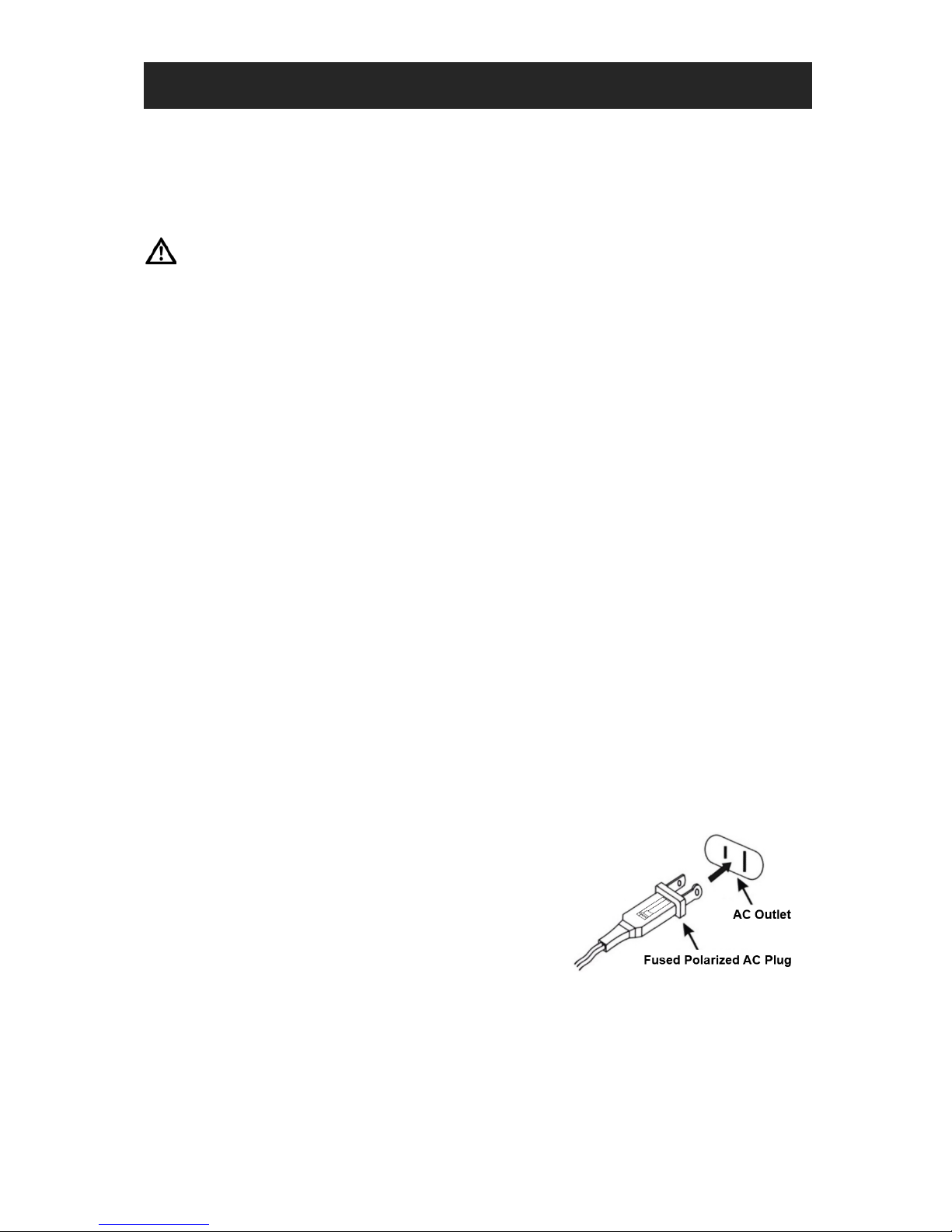
Note on AC Cord Plug
This appliance has a polarized plug (one blade is wider
than the other) and is fitted with a fuse. To reduce the risk
of injury this plug can only be inserted into a polarized
outlet one way. If the plug does not fit fully into the outlet,
reverse the plug. If it still does not fit, contact a qualified
electrician. Do not attempt to modify the plug in any way.
SAVE THESE INSTRUCTIONS
HOUSEHOLD USE ONLY
Page 3
2
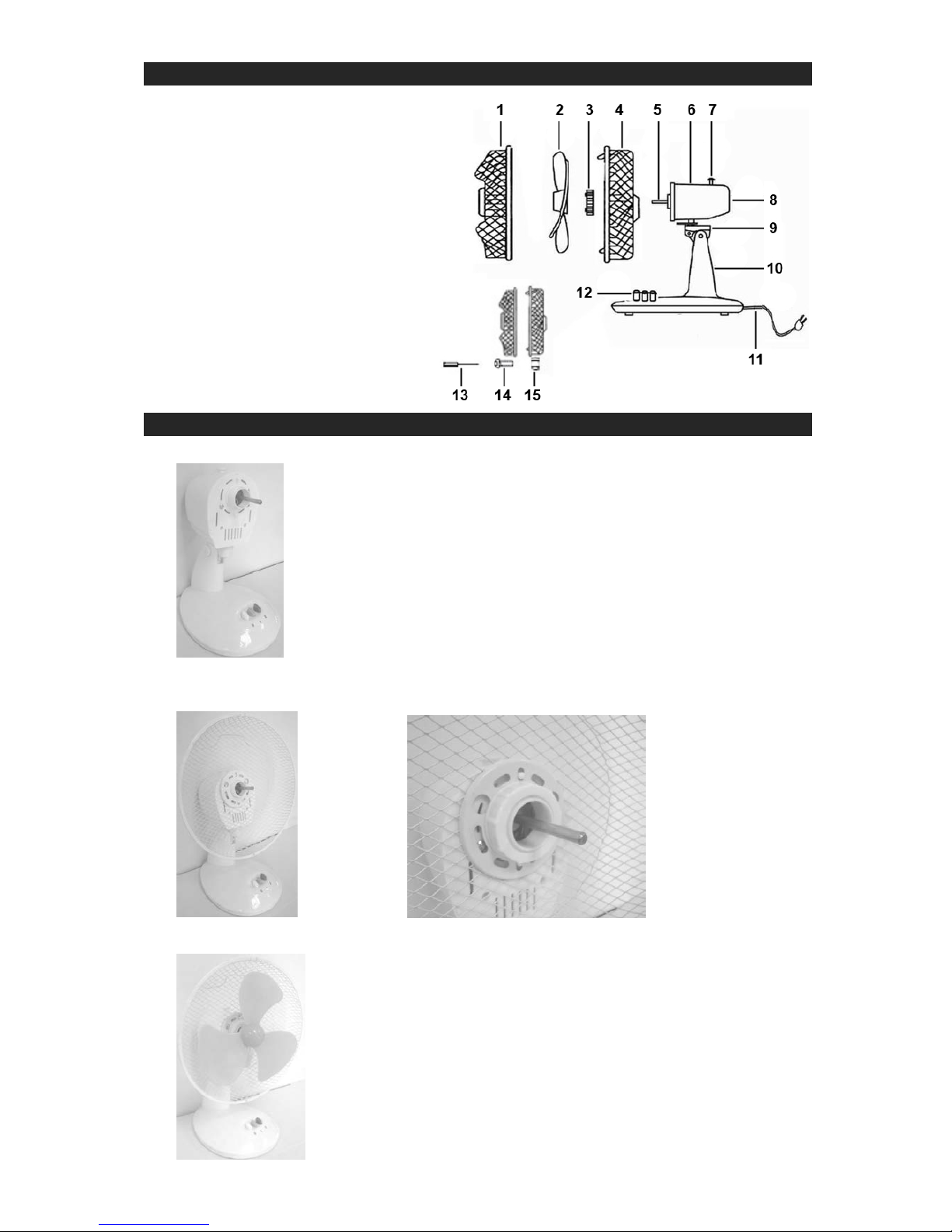
KNOW YOUR ELECTRIC TABLE FAN
1. Front Guard
2. Blade
3. Nut for Rear Guard
4. Rear Guard
5. Motor Shaft
6. Motor Housing
7. Oscillation Knob
8. Ventilation Slots
9. Connector
10. Fan Body
11. AC Power Cord
12. Fan Speed Switch
13. Screwdriver
14. Safety Screw
15. Safety Nut
ASSEMBLING INSTRUCTIONS
1. Loosen the Nut from the Motor Housing.
2. Align the Rear Guard to the anchor pins on the Motor Housing and fasten by turning the
Nut clockwise until tightened.
3. Snap the Blade fully onto the motor shaft by a few GENTLE taps.
Page 4
3
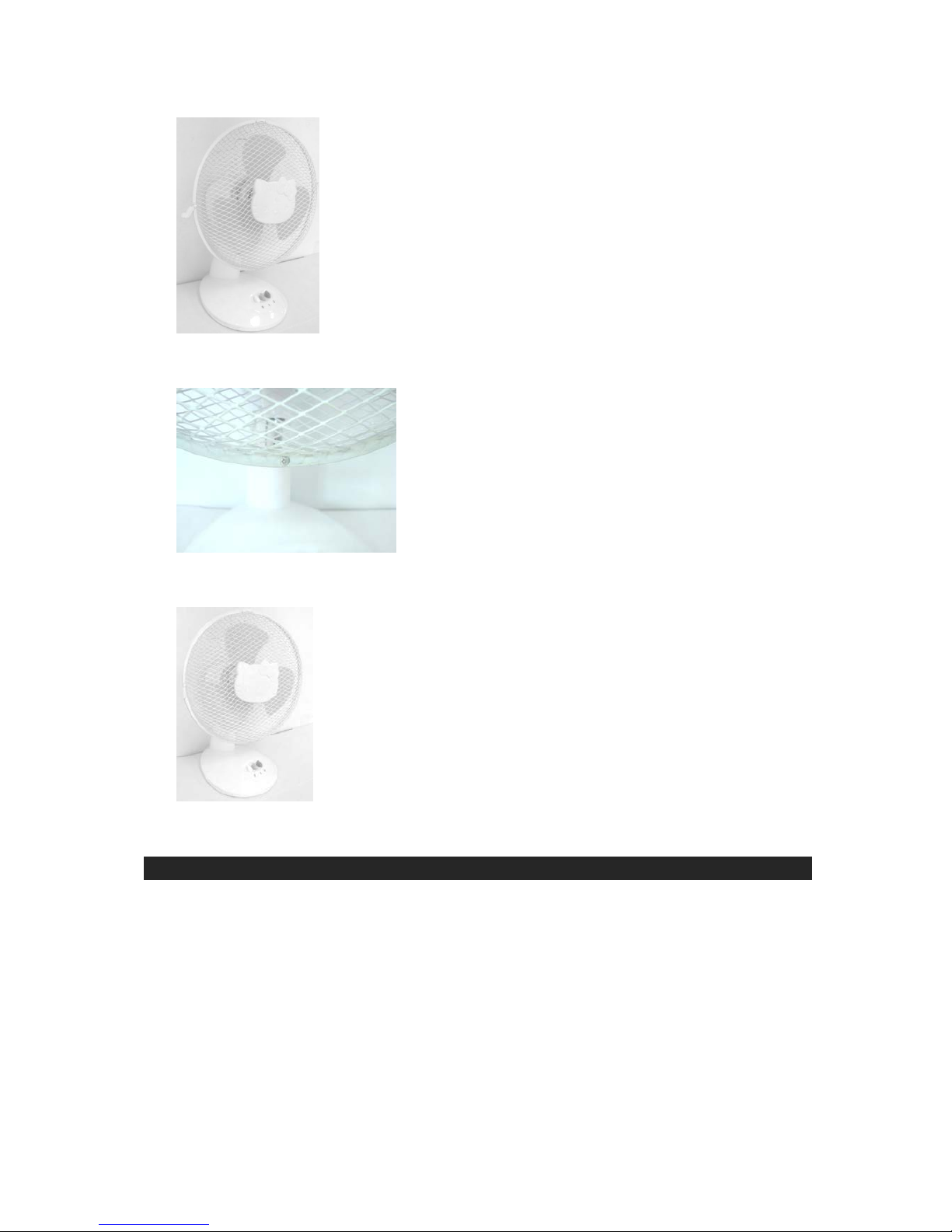
4. Carefully attach the Front Guard to the Rear Guard by aligning the top clip and the
bottom screw hole.
5. Use the provided Safety Screw and Nut and the included Screwdriver to secure the Front
Guard in place.
6. Close the clips on the left and right sides of the Front Guard to further secure the
assembly.
OPERATING INSTRUCTIONS
1. Press the Fan Speed Switch “1” or “2” buttons to select low or high speed.
2. Push the Oscillation Knob all the way down to make the fan rotate left and right.
3. Pull the Oscillation Knob up again to stop oscillation mode.
4. Press the Fan Speed Switch “0” button to shut off the fan.
Page 5
4
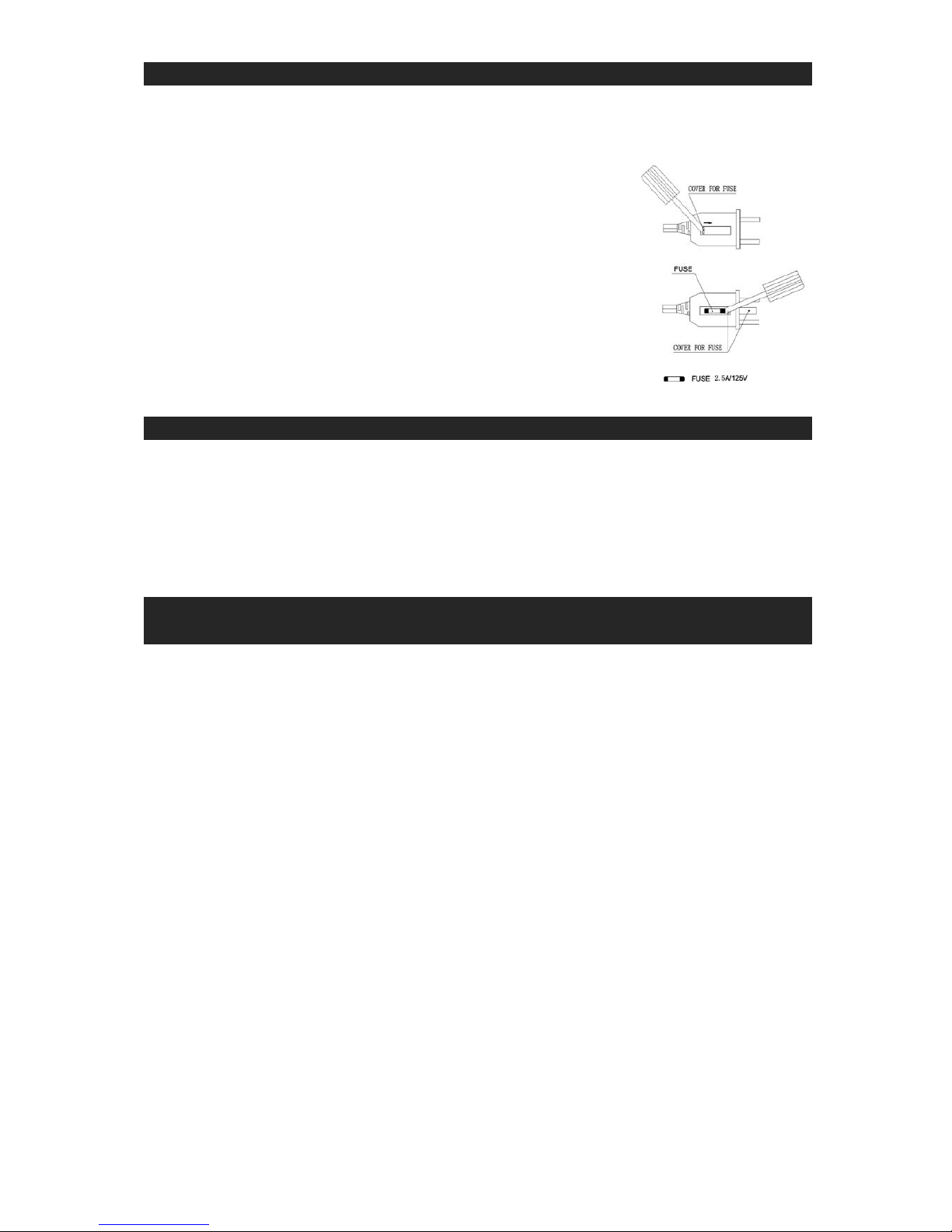
FUSE REPLACEMENT
This fan is fitted with a 2.5A/125V fuse in the AC Power Plug to protect the motor from
abnormal current surge damage. In case the fuse is blown out, a fuse of same rating must
be replaced after the fan has been carefully checked by a qualified service technician.
How to replace the fuse
Be sure to disconnect the AC Power Plug from the power outlet
and follow the instructions below.
1. Open the cover with flat head screwdriver.
2. Remove the blown out fuse with flat head screwdriver.
3. Replace with a 2.5A/125V fuse of same size.
4. Close the fuse cover with flat head screwdriver.
CARE AND MAINTENANCE
1. Before cleaning, turn off the fan and unplug the AC Power Plug from the power outlet.
2. To clean the f an, use a soft clot h to wipe off any dust. If the fan is very dirty, use a d amp
cloth and wipe dry. Do not use any cleaning detergents, sprays or other chemicals, as
they will damage the plastic parts of th e fan.
3. In case of malfunction, disconnect the AC Power Plug of the fan from power source
immediately and call for servicing by a qualified technician.
90 DAY LIMITED WARRANTY AND SERVICE
VALID IN THE U.S.A. ONLY
SPECTRA MERCHANDISING INTERNATIONAL, INC. warrants this unit to be free from
defective materials or factory workmanship for a period of 90 days from the date of original
customer purchase and provided the product is utilized within the U.S.A. This warranty is not
assignable or transferable. Our obligation under this warranty is the repair or replacement of
the defective unit or any part thereof, except batteries, when it is returned to the SPECTRA
Service Department, accompanied by proof of the date of original consumer purchase, such
as a duplicate copy of a sales receipt.
You must pay all shipping charges required to ship the product to SPECTRA for warranty
service. If the product is repaired or replaced under warranty, the return charges will be at
SPECTRA ’s expense. There are no other express warranties other than those stated herein.
This warranty is valid only in accordance with the conditions set forth below:
1. The warranty applies to the SPECTRA product only while:
a. It remains in the possession of the original purchaser and proof of purchase is
demonstrated.
b. It has not been subjected to accident, misuse, abuse, improper service, usage
outside the descriptions and warnings covered within the user manual or nonSPECTRA approved modifications.
c. Claims are made within the warranty period.
2. This warranty does not cover damage or equipment failure caused by electrical wiring
not in compliance with electrical codes or SPECTRA user manual specifications, or
failure to provide reasonable care and necessary maintenance as outlined in the user
manual.
3. Warranty of all SPECTRA products applies to residential use only and is void when
products are used in a nonresidential environment or installed outside the United States.
Page 6

5
This warranty gives you specific legal rights, and you may also have other rights which vary
from state to state. TO OBTAIN SERVICE please remove all batteries (if any) and pack t he
unit carefully and send it freight prepaid to SPECTRA at the address shown below. IF THE
UNIT IS RETURNED WITHIN THE WARRANTY PERIOD shown above, please include a
proof of purchase (dated cash register receipt) so that we may establish your eligibility for
warranty service and repair of the unit without cost. Also include a note with a description
explaining how the unit is defective. A customer service representative may need to contact
you regarding the status of your repair, so please include your name, address, phone number
and email address to expedite the process.
IF THE UNIT IS OUTSIDE THE WARRANTY PERIOD, please include a check for $15.00 to
cover the cost of repair, handling and return postage. All out of warranty returns must be sent
prepaid.
It is recommended that you contact SPECTRA first at 1-800-777-5331 or by email at
[email protected] for updated information on the unit requiring service. In some
cases the model you have may be discontinued, and SPECTRA reserves the right to offer
alternative options for repair or replacement.
SPECTRA MERCHANDISING INTERNATIONAL, INC.
4230 North Normandy Avenue,
Chicago, IL 60634, USA.
1-800-777-5331
To register your product, visit the link below to enter your
information.
http://www.spectraintl.com/wform.htm
Licensed by:
Marino Andriani, LLC
Distributed by:
Spectra Merchandising International, Inc.
4230 North Normandy Avenue
Chicago, IL 60634, USA
www.spectraintl.com
0713 Printed in China
 Loading...