

Page 1
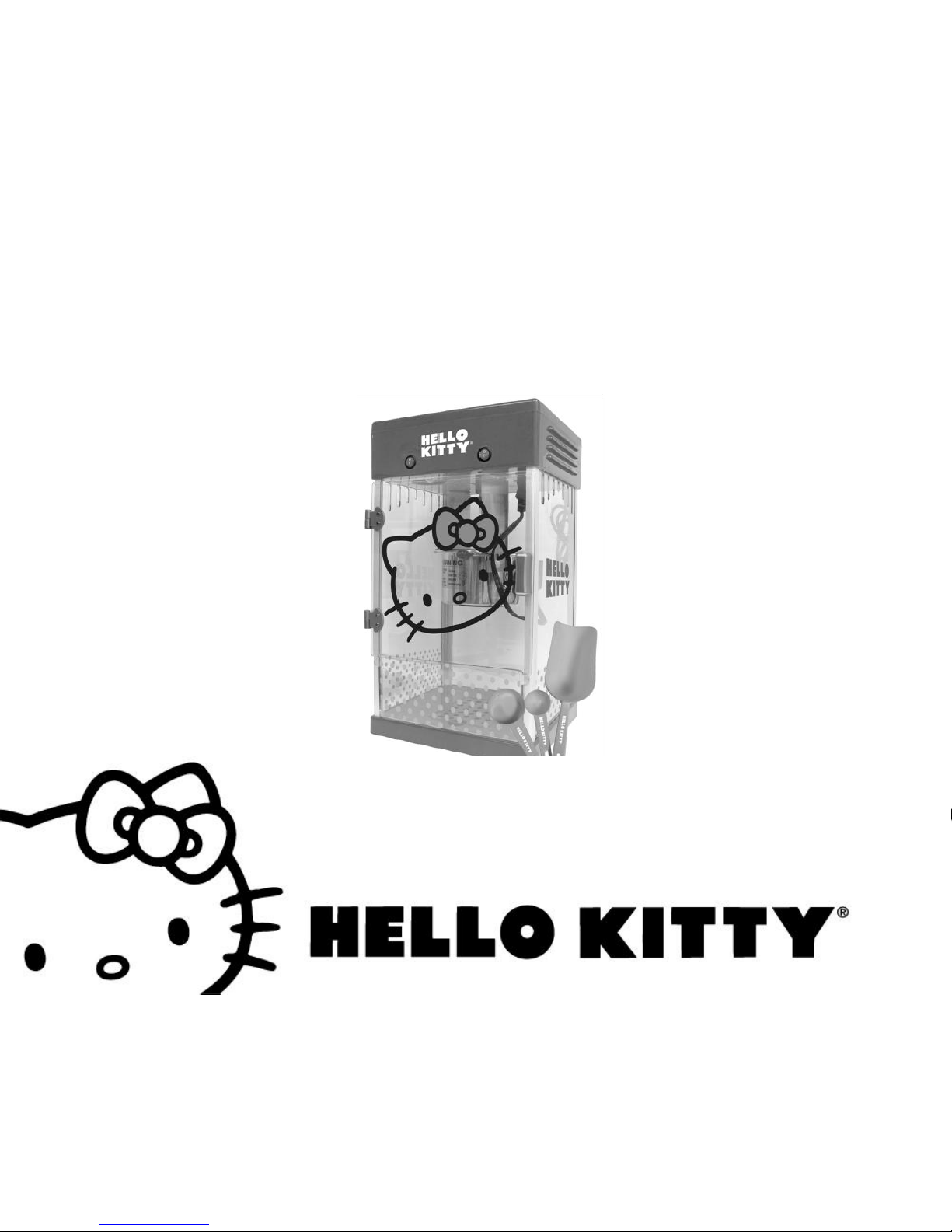
Hello Kitty Popcorn Maker
Item # APP-99209
Owner’s Manual
Page 2

Important Safety Precautions
When using any electrical appliance, basic safety precautions should always be followed, including the
following:
1. READ ALL INSTRUCTIONS BEFORE USING YOUR POPCORN MACHINE.
2. Do not touch hot surfaces. Always use handles or knobs to operate.
3. To avoid any risk of electrical shock, do not immerse the cord or plug into water or other liquids.
4. This appliance should not be used by or near children, or individuals with certain disabilities.
5. MAKE SURE THAT THE MAIN POWER CORD IS NOT PLUGGED IN WHEN YOUR POPCORN
MACHINE IS IN USE OR BEFORE CLEANING.
6. Allow HOT parts to cool down before maneuvering and cleaning.
7. Do not operate this appliance if the cord or plug is damaged or if it malfunctions. If there is any damage
of any sort, send the unit to the nearest authorized service center for examination, repair or adjustment.
(ONLY technicians should open up the unit.)
8. The use of any accessories or attachments not recommended by the manufacturer may cause injury.
9. Do not pop the kernels with a dry kettle (without oil).
10. Do not immerse the kettle into water as it is popping kernels.
11. The kettle’s surface can get HOT and should NOT be touched while kernels are popping or just after use.
12. If not being used for a long time, unplug your unit, and allow it to cool. Once it has cooled, you should
keep it cleaned and covered. Store it in a dry and safe place.
13. Do not let the power cord hang over the edge of a table or counter. Do not let it touch any hot surfaces.
14. Do not place the unit on or near a hot gas or electric burner or in a heated oven.
15. Extreme caution must be paid when moving the appliance, especially when it contains hot oil or other hot
Page 3

liquids.
16. Turn ALL switches to the OFF position before disconnecting the power plug from a wall outlet.
17. This unit is not recommended for outdoor use.
18. Only use this appliance for its intended use.
19. The popper will not shut off automatically. To avoid overheating, always add oil and then kernels before
operating.
20. Extreme caution must be used when unloading popcorn. Always place the unit over a countertop so that
residual hot oil or water running out will not cause burns.
21. KEEP OUT OF THE REACH OF CHILDREN.
22. DO NOT CLEAN USING ANY ABRASIVE MATERIALS.
23. NEVER FORCE ANY PARTS OR BRACKETS INTO POSITION.
24. CAUTION: Burns may result from the misuse of this device.
25. No parts are intended for dishwashers (except the removable tray & spoons).
26. A popper that is plugged into an outlet should not be left unattended.
SAVE THESE INSTRUCTIONS.
FOR HOUSEHOLD USE ONLY.
Page 4

Other Important Safety Notes
The power cord attached to your device is limited in length in order to prevent issues where it gets tangled or a
person can trip over it. Longer cords or extension cables may be used as well assuming one uses proper care
and caution. When using an extension cord please take the following precautions:
1. Make sure that the electrical rating of the cord is at least as great as the electrical rating of the
appliance.
2. Longer cords should be placed carefully so that they are not unintentionally pulled or tripped over.
3. If it is a grounded type appliance, the extension cord should be a grounding three wire cord.
Page 5

Introduction
Thank you for purchasing the APP-99209 Hello Kitty Popcorn Maker. You can use this device in order to make
fresh popcorn to enjoy with your family and friends. Please read this manual carefully FIRST in order to get the
most out of your device.
Page 6
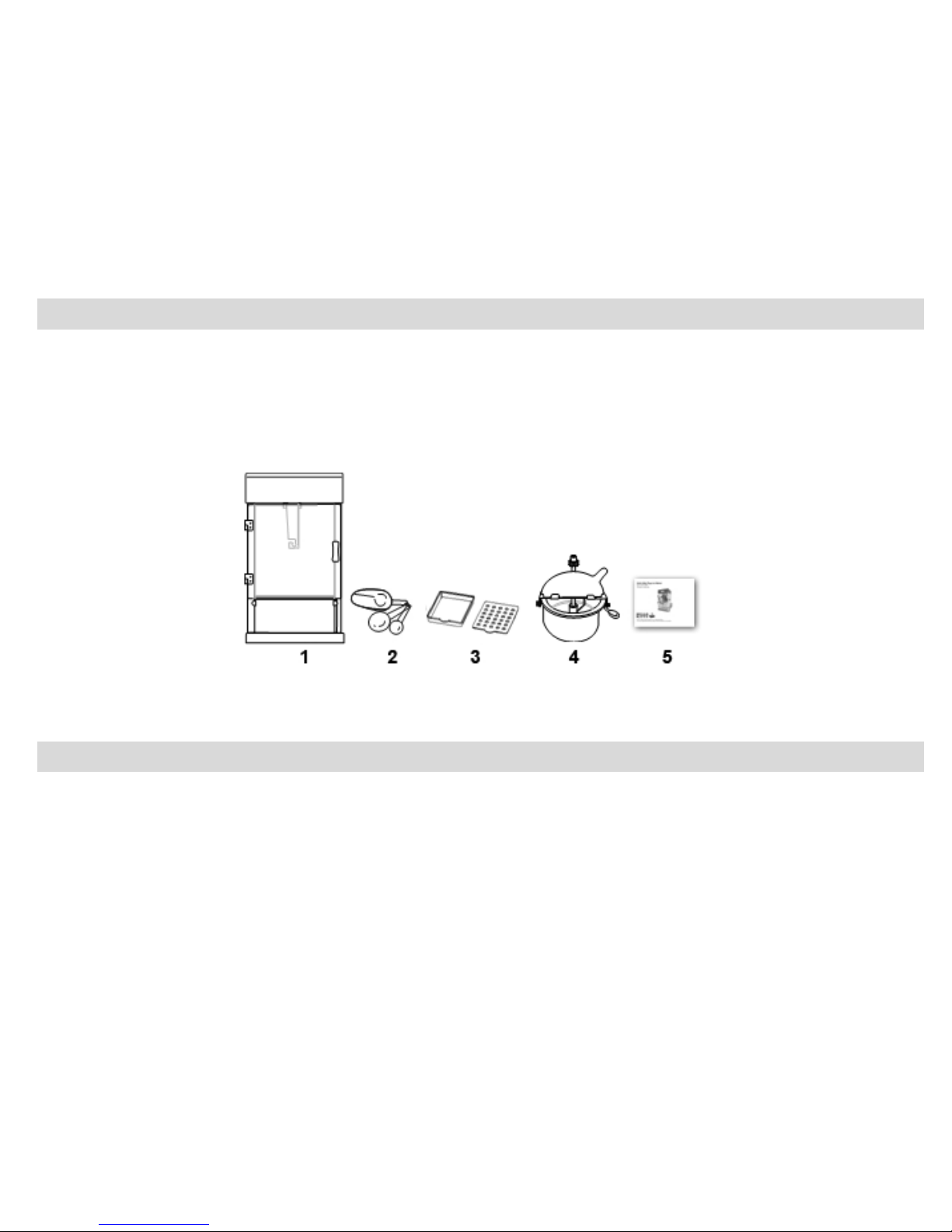
Package Contents
1. Housing
2. Measuring Spoons and Popcorn Scoop
3. Old Maid Filter
4. Kettle
5. Owner’s Manual with Warranty Information
Specifications
Model no.: APP-99209
Voltage: AC120V ~60Hz
Page 7
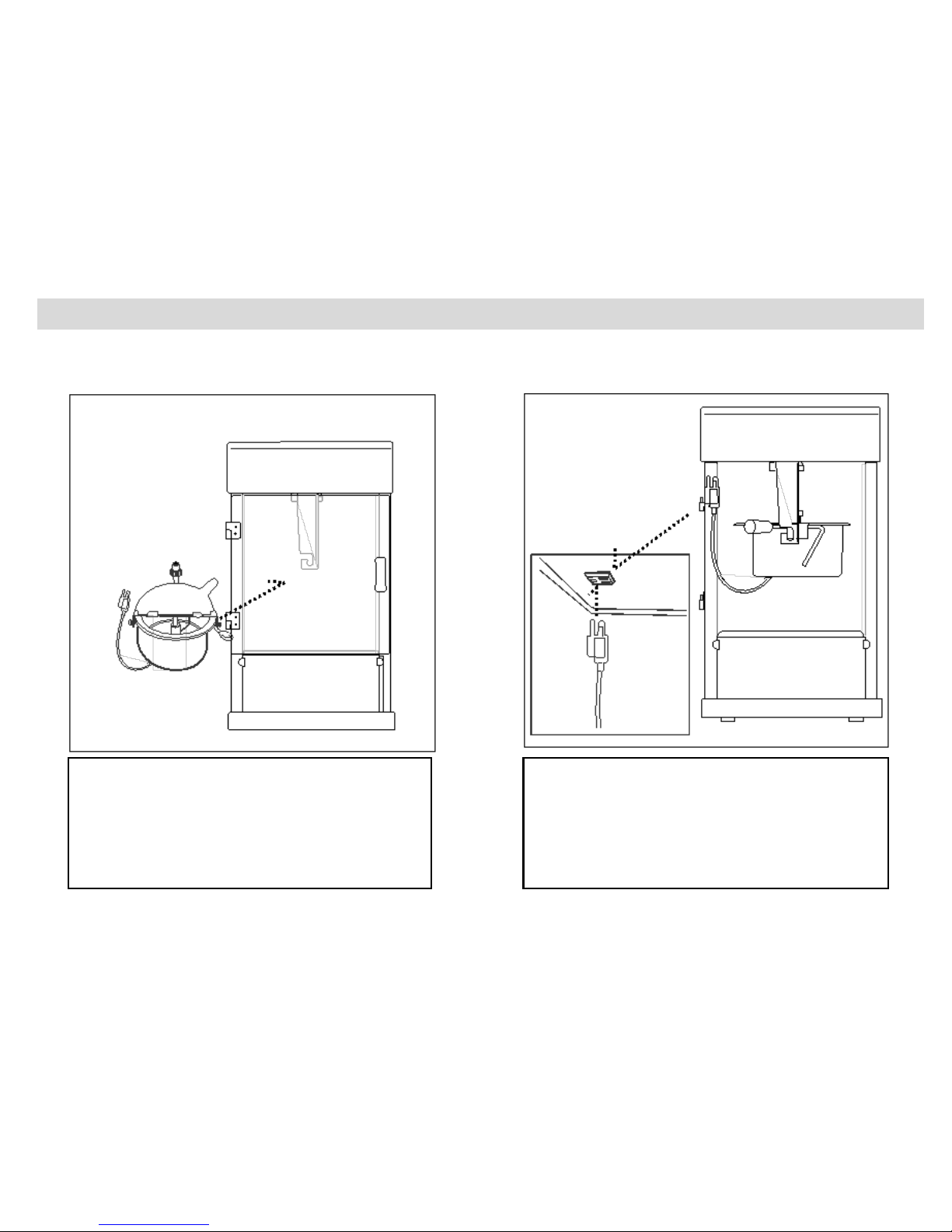
Assembling Your Popcorn Maker
In order to properly assemble your popcorn maker, using the parts included with your package, please follow
the steps below:
Step 1:
Hook the kettle onto the hangers
in the main housing.
Step 2:
Insert the kettle’s power plug into
the power socket located inside
the main housing.
Page 8
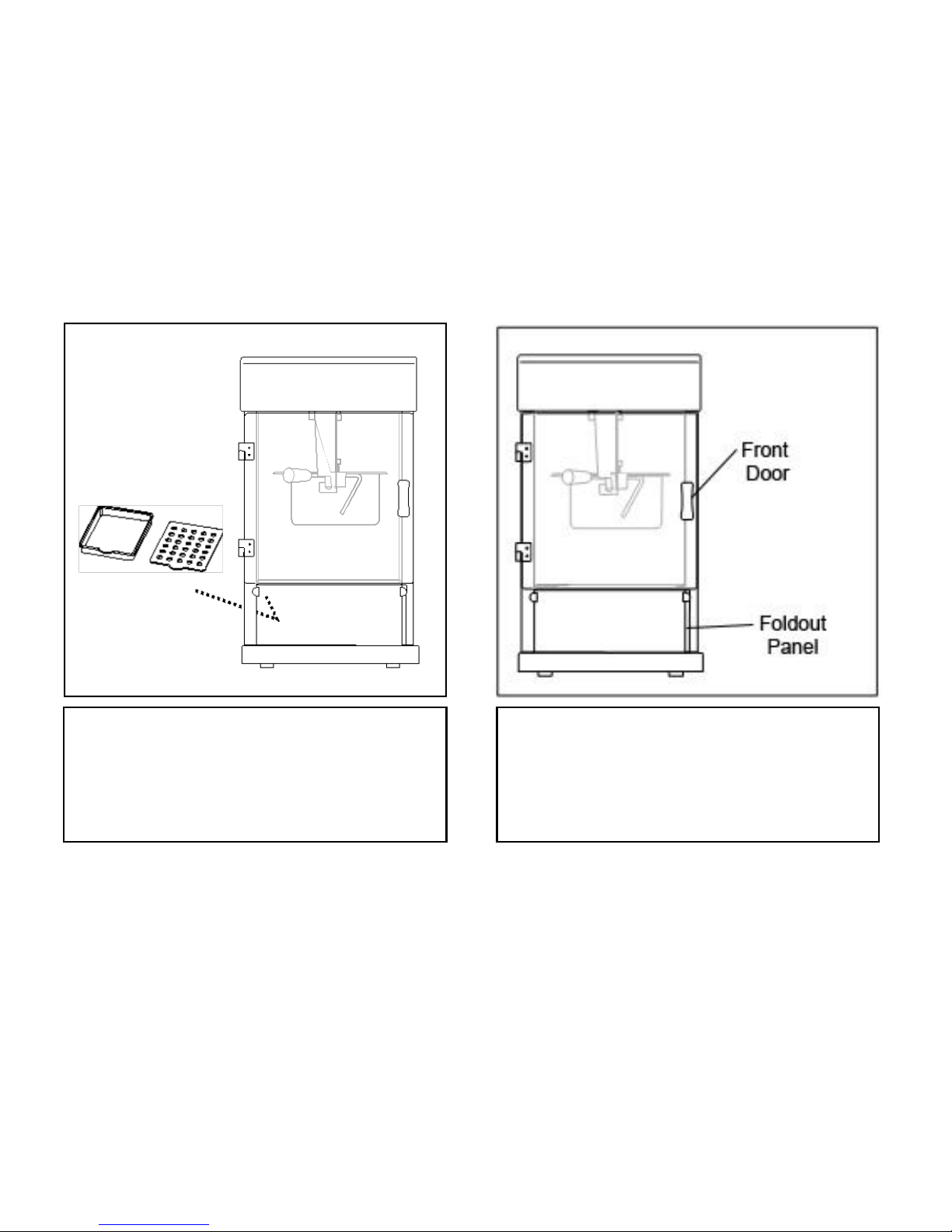
Step 3:
Insert the old maid filter into the
appropriate space in the floor
inside the housing.
Step 4:
Make sure the fold out panel is
closed securely, and then close
the front door.
Page 9
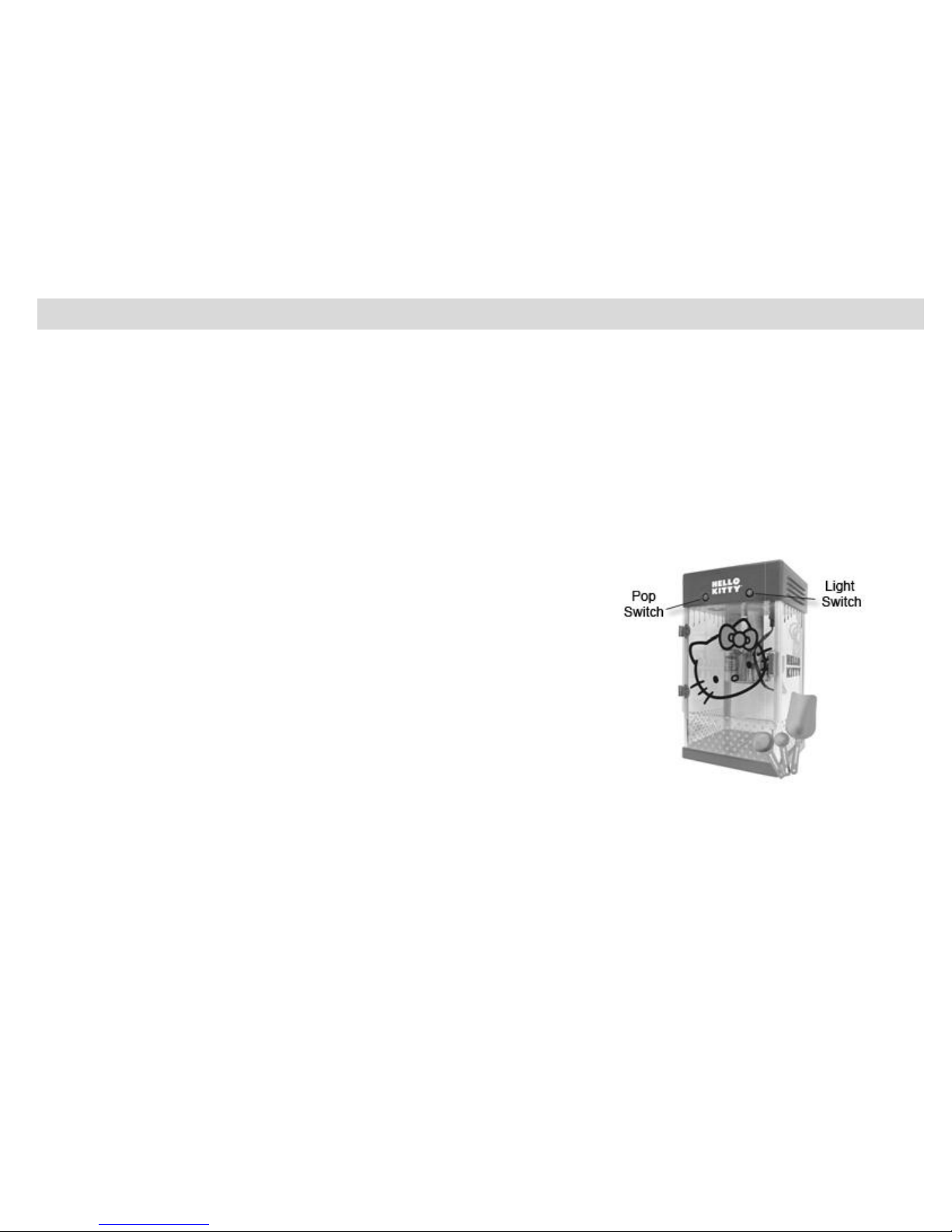
Making Popcorn
Once your popcorn maker is properly assembled you can use it to make popcorn. Before you start, make sure
to take the following precautions:
-Make sure that the voltage (AC120V ~60Hz) is suitable to your home.
-Clean the internal surface of the kettle with warm soapy water, rinse it out well, and then dry it with a clean
cloth. Wipe down the inner and outer housing with a damp cloth. Make sure that your popcorn maker is
unplugged before cleaning.
You should now be ready to start making popcorn. To do so, follow the steps below:
1. Make sure the power cable connected to the housing is
plugged into a power outlet in your home. Also be sure
that the kettle’s power plug is connected to the power
socket located inside the main housing.
2. Open the lid of the kettle by lifting the lid tab. Before
pouring oil or kernels into the kettle, turn both the LIGHT &
POP switches to the “ON” position. This will turn the light,
heater and motor on. Let the kettle preheat for about 2 to
3 minutes. Next, turn the POP switch to the “OFF” position
and add oil (1 tablespoon of vegetable, corn, peanut, or
safflower oil). Immediately add 1/3 cup of corn kernels (Note: 1/3 measuring cup included) and close
the kettle’s lid. Turn the POP switch to the “ON” position again. The stirrer will begin to rotate and the
heater will heat up the kettle.
CAUTION: The Lid might be hot – it is recommended to use an oven mitt.
Page 10

3. Popcorn will start popping out through the lid of the kettle after about 2 minutes.
4. When the unit is finished popping – you will no longer heat the corn popping – immediately turn the
POP switch to the “OFF” position and pull down the handle bar of the kettle to release any remaining
popcorn in the kettle. This will also stop the remaining popcorn from any further cooking and avoid
possible burning.
5. Keep the POP switch to the “OFF” position if the unit is not continuously in use.
6. Unplug your device when it is not in use.
7. Repeat for continuous popping.
Page 11

Cleaning and Maintenance
-It is strongly recommended to clean the kettle frequently to avoid burning excess oil onto the bottom of the
inner pot.
-After using the popcorn machine, let it cool, and use a wet cloth to clean the main body and glass. It is
strongly recommended to wash and dry the tray after each use to avoid any bacteria buildup.
-The light bulb can be replaced with an AC120V 10W bulb.
-Any other servicing should be performed by an authorized service representative.
Page 12

Quick Cleaning Procedure
In order to quickly clean your device, first make sure the “POP” switch is set to the “OFF” position. Next, pour
4 to 6 ounces of water (NO detergent is necessary) into the inner pot. Set the POP switch to the “ON” position
to boil the water and let the stirrer turn in order to remove excess oil stuck on the surface. After cooling, pour
out the water into a deep bowl and discard after about 1 to 2 minutes of boiling.
CAUTION: THE KETTLE IS HOT.
You can also remove the kettle and clean it with a scouring pad (Not included). Do not immerse the kettle or its
electrical plug in water.
Page 13

Technical Support
For technical support issues please visit our website at www.sakar.com. You can find manuals, software and
FAQ’s at the website. Can’t find what you are looking for? Fill out an online ticket and one of our technical
support team members will answer questions or call 1-877-397-8200 in the U.S. or 0-800-917-4831 in the UK
to access our technical support information on the phone.
Page 14

Sakar Warranty Card
Sakar Warranty
This warranty covers the original consumer purchaser only and is not transferable.
This warranty covers products that fail to function properly UNDER NORMAL USAGE, due to defects in
material or workmanship. Your product will be repaired or replaced at no charge for parts or labor for a
period of one year.
What Is Not Covered by Warranty
Damages or malfunctions not resulting from defects in material or workmanship and damages or
malfunctions from other than normal use, including but limited to, repair by unauthorized parties,
tampering, modification or accident.
What To Do When Service Is Required
When returning your defective product (postage pre-paid) for service, your package should include:
1. Copy of original bill of sale
2. A detailed written description of the problem.
3. Your return address and telephone number (Daytime)
MAIL TO ADDRESS BELOW:
In the U.S. In the U.K.
Sakar International Sakar UK
Attention: Service Department 2D Siskin Parkway East
195 Carter Drive CV3 4PE, UK
Edison, NJ 08817
You may also visit www.sakar.com for further assistance if necessary or call our technical support department
toll free at 1-877-397-8200 in the US, or 0-800-917-4831 in the UK.
Page 15

This device complies with the part 15 of the FCC rules. Operation is subject to the following two conditions:(1)
this device may not cause harmful interference , and (2) this device must accept any interference received,
including interference that may cause undesired operation.
Caution: changes or modifications not expressly approved by the party responsible for compliance could void
the user's authority to operate the equipment.
NOTE: This equipment has been tested and found to comply with the limits for a Class B digital device,
pursuant to Part 15 of the FCC Rules, These limits are designed to provide reasonable protection against
harmful interference in a residential installation. This equipment generates. Uses and can radiate radio
frequency energy and, if not installed and used in accordance with instructions. May cause harmful
interference to radio or -television reception, which can be
determined by turning the equipment off and on, the user is encouraged to try to correct the interference by
one or more of the following measures:
__ Reorient or relocate the receiving antenna.
__ Increase the separation between the equipment and receiver.
__ Connect the equipment into an outlet on a circuit different from that to which the receiver is connected.
__ Consult the dealer or experienced radio/ TV technician for help.
A00-070713
Page 16
 Loading...