

Page 1

User Manual
Welcome to HelloEar Arc earphone which we made just to fit your ears. Sustained and supreme
comfortable wearing experience is presented exclusively for you.
Equipment Name : HelloEar Arc
Trade : helloear
Model Name : HE-BT-01
Page 2

Use Instructions
Safety warnings
• Use caution and follow applicable laws regarding mobile phone and earphone use if using the
earphone for phone calls while driving. Some jurisdictions impose specific limitations, such as
single earpiece configuration, on the use of such products while driving. DON’T use the earphone
for any other purpose while driving.
• Focus on your safety and that of others if you use the earphone while engaging in any activity
requiring your attention, e.g., while riding a bicycle or walking in or near traffic, a construction
site or railroad, etc. Remove the earphone or adjust your volume to ensure you can hear
surrounding sounds, including alarms and warning signals.
• Remove earphone immediately if you experience a warming sensation or loss of audio.
• Do NOT use the earphone if they emit any loud unusual noise. If this happens, turn the earphone
off and contact HelloEar customer service.
• Do NOT submerge or expose the earphone for extended period to water, or wear while
participating in water sports, e.g., swimming, waterskiing, surfing, etc.
• Do NOT use mobile phone adapters to connect earphone to airplane seat jacks, as this could
result in injury or property damage due to overheating.
• Do NOT make unauthorized alterations to this product.
• Use this product only with an agency approved power supply which meets local regulatory
requirements (e.g., UL, CSA, VDE, and CCC).
• Do NOT expose products containing batteries to excessive heat (e.g. from storage in direct
sunlight, fire or the like).
• Do NOT share your HelloEar Arc earbuds with anyone else, they are custom made only for your
ears.
• Do NOT force the earbud into your ear canal. Consult a doctor without delay if you experience
any unusual pain in your ear.
Hearing protection
• Do NOT use the earphone at a high volume for any extended period.
– To avoid hearing damage, use your earphone at a comfortable, moderate volume level.
– Turn the volume down on your device before placing the earphone in your ears, then turn the
volume up gradually until you reach a comfortable listening level.
– Consult a doctor without delay if you experience any unusual pain in your ear.
Charging and battery
• Use this product only with an agency approved power supply which meets local regulatory
requirements (e.g., UL, CSA, VDE, and CCC).
• Before charging, be sure the earphone is at room temperature, between 41°F (5°C) and 104°F
(40°C). Extreme temperatures can reduce the charging capacity of the battery.
• If you are storing the earphone for more than a few months, fully charge the battery every two
Page 3

months.
Contains small parts which may be a choking hazard. Not suitable for children under
age 3.
This product contains magnetic material. Consult your physician on whether this
might a ect your implantable medical device.
Page 4

Regulatory Information
This device complies with part 15 of the FCC Rules. Operation is subject to the following two
conditions: (1) this device may not cause harmful interference, and (2) this device must accept
any interference received, including interference that may cause undesired operation.
Any changes or modifications not expressly approved by the party responsible for compliance
could void the user's authority to operate the equipment.
NOTE: This equipment has been tested and found to comply with the limits for a Class B
digital device, pursuant to Part 15 of the FCC Rules. These limits are designed to provide
reasonable protection against harmful interference in a residential installation. This equipment
generates, uses and can radiate radio frequency energy and, if not installed and used in
accordance with the instructions, may cause harmful interference to radio communications.
However, there is no guarantee that interference will not occur in a particular installation.
If this equipment does cause harmful interference to radio or television reception,
which can be determined by turning the equipment off and on, the user is encouraged to try to
correct the interference by one or more of the following measures:
-- Reorient or relocate the receiving antenna.
-- Increase the separation between the equipment and receiver.
-- Connect the equipment into an outlet on a circuit different
from that to which the receiver is connected.
-- Consult the dealer or an experienced radio/TV technician for help.
The device has been evaluated to meet general RF exposure requirement. The device can be u
sed in portable exposure condition without restriction.
FCCID: 2ALL3-HEBT01
Page 5
CAN ICES-3 (B)/NMB-3(B)
Management Regulation for Low-power Radio-frequency Devices
Article XII
According to Management Regulation for Low-power Radio-frequency Devices without
permission granted by the NCC, any company, enterprise, or user is not allowed to change
frequency, enhance transmitting power or alter original characteristic as well as performance to an
approved low power radio-frequency devices.
Article XIV
The low power radio-frequency devices shall not influence aircraft security and interfere legal
communications; If found, the user shall cease operating immediately until no interference is
achieved. The said legal communications means radio communications operated in compliance
with the Telecommunications Act.
The low power radio-frequency devices must be susceptible with the interference from legal
communications or ISM radio wave radiated devices.
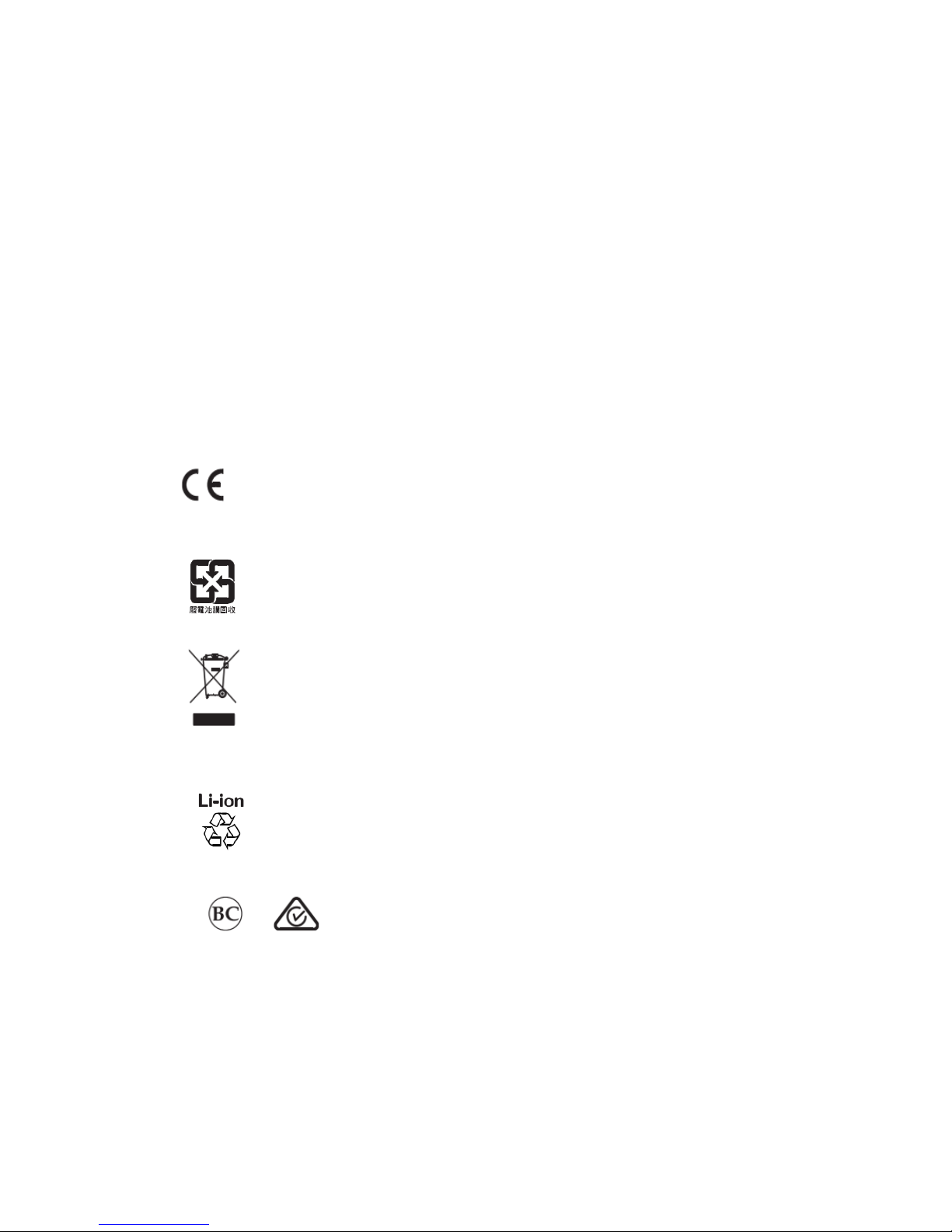
HelloEar Corporation hereby declares that this product is in compliance with the
essential requirements and other relevant provisions of Directive 2014/53/EU and all
other EU directive requirements. The complete declaration of conformity can be
found at: www.HelloEar.com
Please dispose of used batteries properly, following local regulations. Do not
incinerate.
This symbol means the product must not be discarded as household waste, and
should be delivered to an appropriate collection facility for recycling. Proper
disposal and recycling help protect natural resources, human health and the
environment. For more information on disposal and recycling of this product,
contact your local municipality, disposal service, or the shop where you bought this
product.
Removal of the rechargeable lithium ion battery in this product should be conducted
only by a qualified professional. Please contact your local HelloEar retailer or see
http://HelloEar.com for further information.
Page 6
Input Rating: 5V 1A
The warranty information provided with this product does not apply in Australia and New
Zealand.
See www .HelloEar.com for details.
Copyright © 2017 Musheng Electronic Technology Co., Ltd. All rights reserved. HelloEar and the
HelloEar logo are trademarks of Musheng Electronic Technology Co., Ltd. The Bluetooth® word
mark and logos are registered trademarks owned by Bluetooth® SIG, Inc. And any use of such
marks by HelloEar Corporation is under license. All other trademarks are the property of their
respective owners.
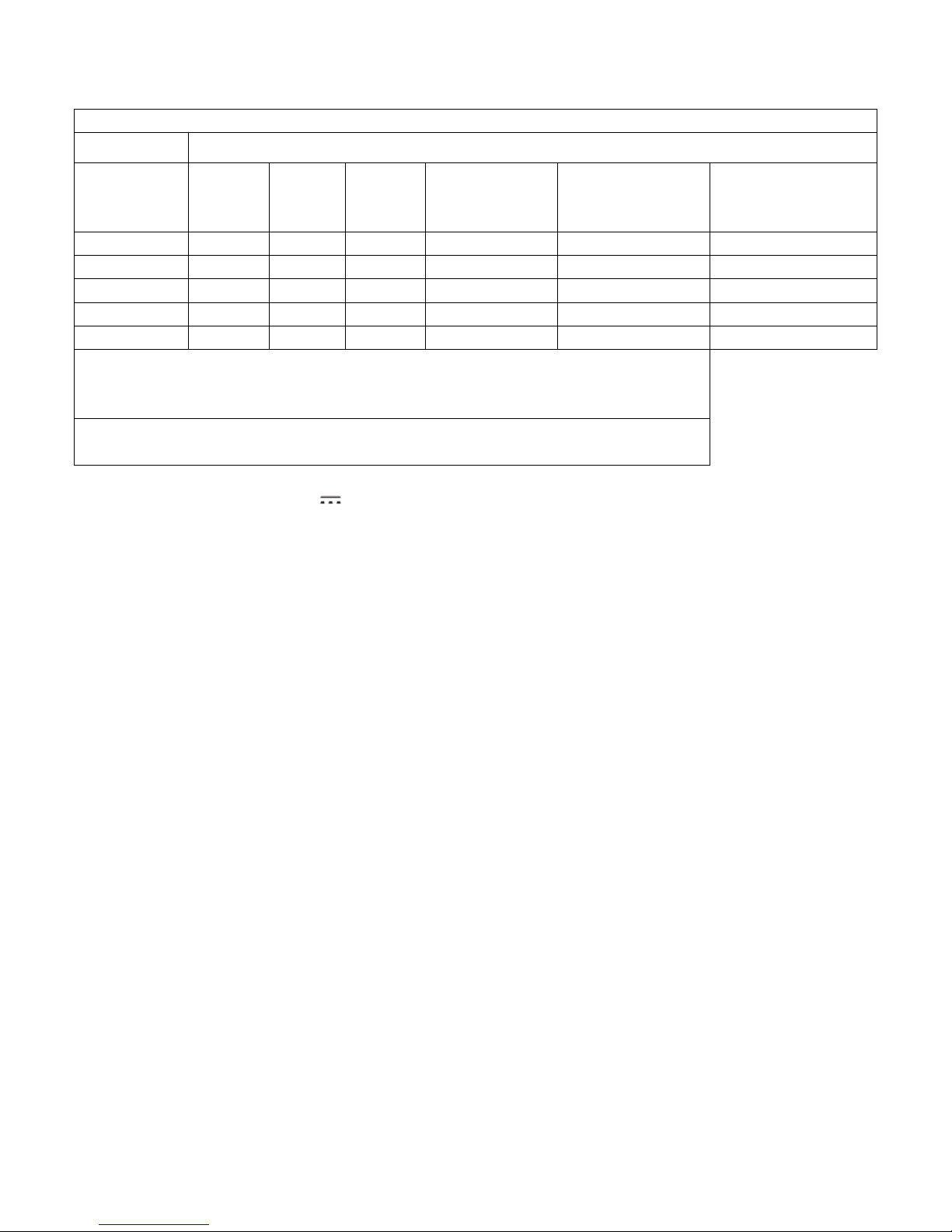
Names and Contents of Toxic or Hazardous Substances or Elements
Toxic or Hazardous Substances and Elements
Part Name
Lead
(Pb)
Mercury
(Hg)
Cadmium
(Cd)
Hexavalent
(CR(VI))
Polybrominated
Biphenyl
(PBB)
Polybrominated
diphenylether
(PBDE)
PCBs X O O O O O
Metal Parts
X O O O O
O
Plastic Parts
O O O O O
O
Speakers
X O O O O
O
Cables X O O O O O
This table is prepared in accordance with the provisions of 2011/65/EU.
O: Indicates that this toxic or hazardous substance contained in all of the homogeneous materials for
this part is below the limit requirement of IEC62321.
X: Indicates that this toxic or hazardous substance contained in at least one of the homogeneous
materials used for this part is above the limit requirement of IEC62321.
Page 7
Unpacking
Carefully unpack the carton and confirm that the following parts are included:
If any part of the product is damaged, do not use it. Contact your authorized HelloEar dealer
immediately or HelloEar customer service.
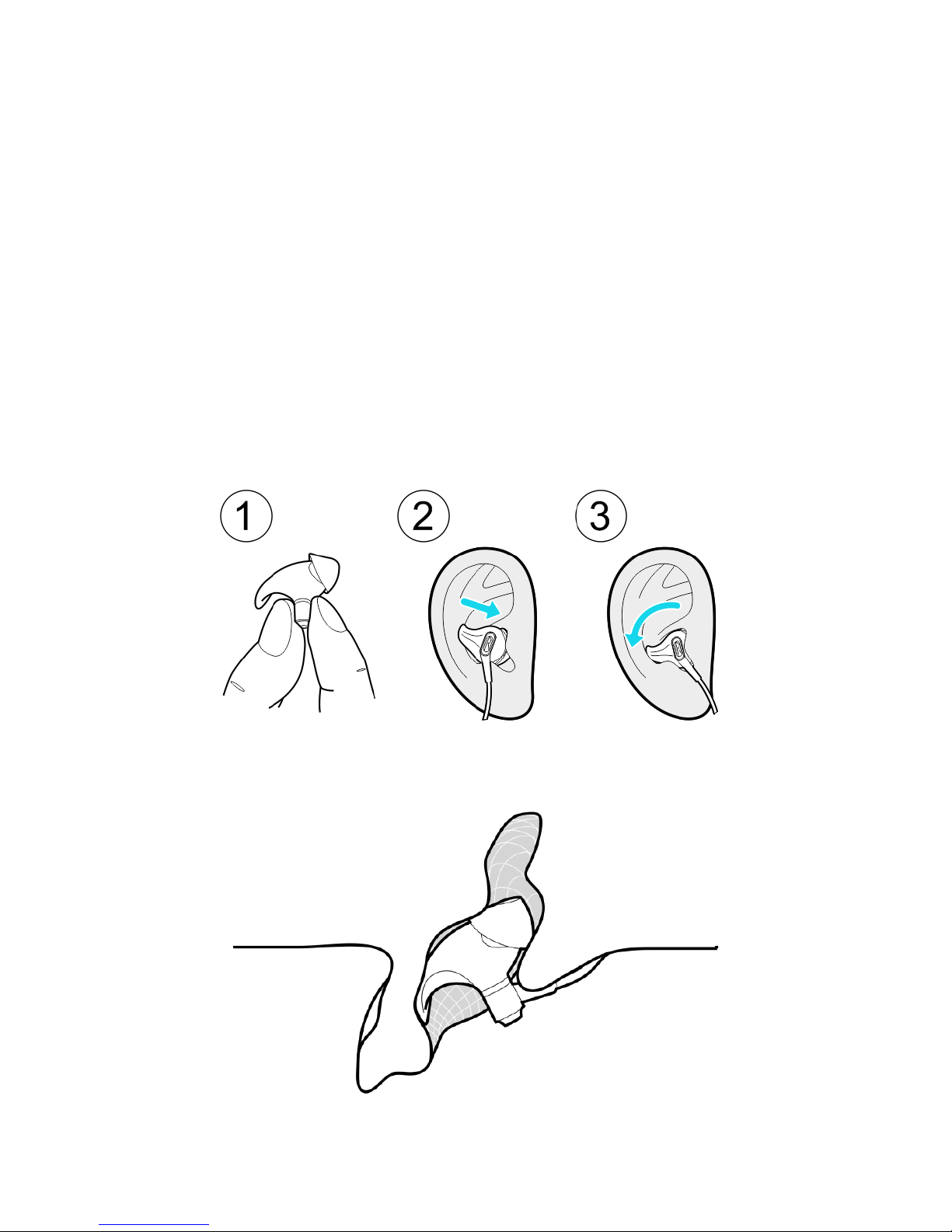
Put them on
First, hold the earphone by the Plug; be aware of the Front Stopper.
Second, place the earphone closely to the ear canal with the Front Stopper facing downward.
Third, slid the End downward to a comfortable position.
Caution: Please don’t force it into your ear canal, because the design is totally different from the
in-ear earphone which will reach deep into your ear canal.
Page 8
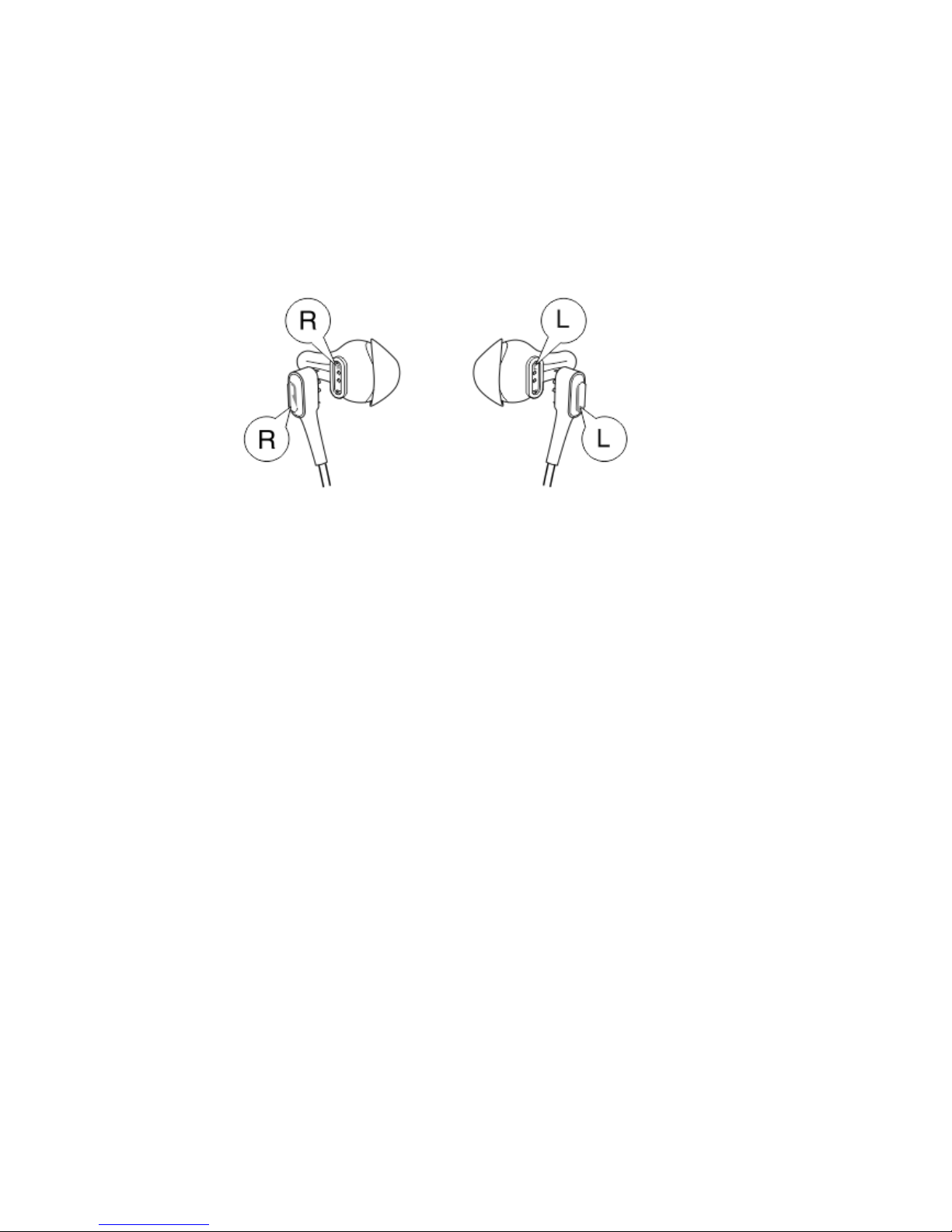
Transformation between wired earphone and Bluetooth® earphone
Signs of L or R are clearly marked on both of the wire plugs and earbuds, please be aware of this
and connect them correspondingly in parallel position.
Warning: Please match the wire plugs and earbuds correspondingly in parallel position.
Page 9
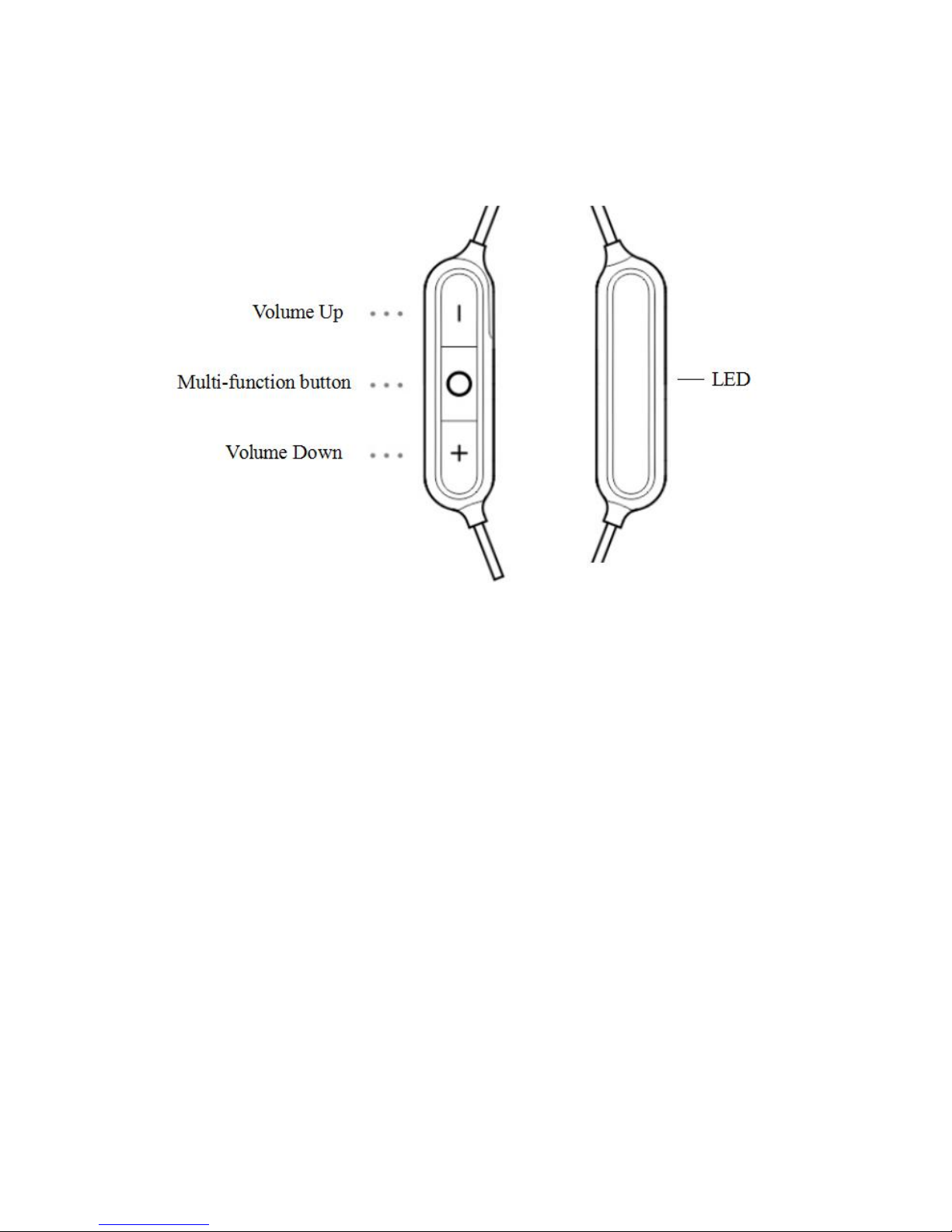
Bluetooth® Earphone
Powering on/off
To power on:
Press the Multi-function button for about 2 seconds until the LED glows blue and the voice
prompt announces power on. If the battery is low, the LED will blink red 5 times then the
earphone will shut down automatically.
To power off:
Press and hold the Multi-function button for about 3 seconds until LED blinks red and the voice
prompt announces power off.
Charging
CAUTION: Use this product only with an agency approved power supply which
meets local regulatory requirements (e.g., UL, CSA, VDE, CCC).
1. Open the hinged door on the bottom of the right earbud.
2. Plug the small end of the USB cable into the USB connector.
3. Plug the other end into a USB wall charger or computer that is powered on.
While charging, the LED blinks red.
When the battery is fully charged, LED glows blue.
Allow up to two hours to fully charge the battery. A full charge powers the earphone for up to
eight hours listening time and four hours speaking time.
The earphone can play tracks while charging, but use them while charging is not
recommended.
Page 10

Note: Before charging, be sure the earphone is at room temperature, between 41°F (5°C) and
104°F (40°C).
Checking the Battery
While the earphone is in use, the LED blinks red and voice prompt announces Battery Low
when the battery needs charging.
If your earphone is connected to an Apple device, the device displays the earphone battery
charge level near the upper right corner of the screen.
Pairing
Connect to a device
1. With your earphone powered on, press and hold the Multi-function button for about 5 seconds
until you hear pairing or the LED blinks blue and green alternatively.
2. On your device, turn on the Bluetooth® feature. Select your HelloEar Arc earphone from the
device list.
3. Once paired, you hear connected and LED blinks blue every 8 seconds.
Tip: The Bluetooth® feature is usually found in the Settings menu on a mobile device.
Discount to a device
Turn off the Bluetooth® feature on your device.
Reconnect to a device
When powered on, the earphone attempts to reconnect with the two most recently-connected
devices while the LED glows blue.
If the connection is severed due to long distance, the voice prompt will announce out of range
while LED blinks blue every 8 seconds and blinks purple 3 times every 15 seconds. The earphone
will attempt to pair for about 10 minutes and then turn off automatically.
Note: The devices must be within range and powered on with Bluetooth® feature turned on.
You can store up to eight paired devices in the earphone pairing list and your earphone can be
actively connected to one device at a time.
Note: You can only connect your earphone to one device at a time.
Media playback and volume functions
Page 11
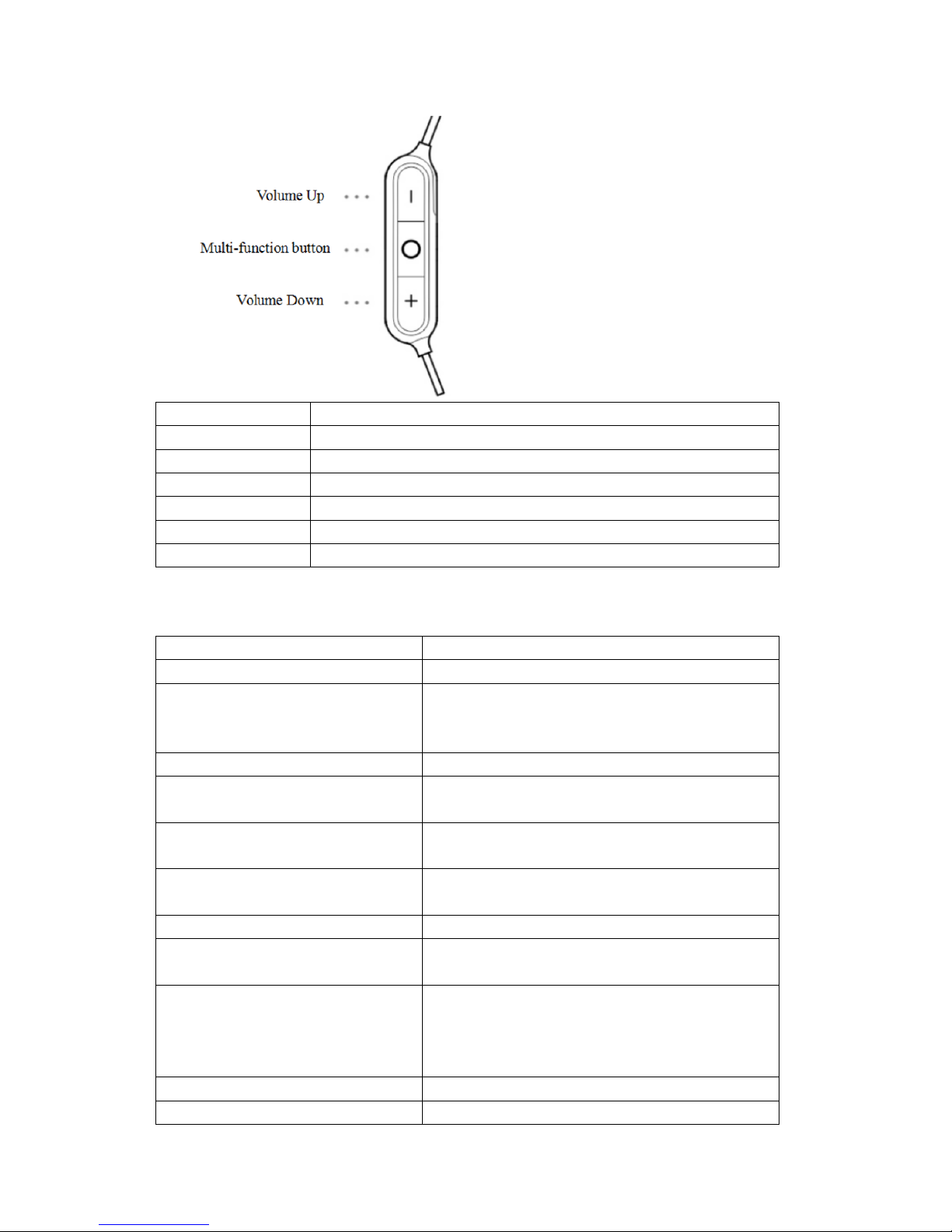
Function
What to do
Play/Pause
Single press [〇] button.
Next track
Double press [〇] button quickly.
Previous track
Triple press [〇] button quickly.
Fast forward
Double press [〇] button quickly and hold at the second press.
Fast backward
Triple press [〇] button quickly and hold at the third press.
Volume control
Press + or - to control the volume.
Call functions
Function
What to do
Answer a call
Single press [〇] button.
Decline a call
The voice prompt will announce the incoming call
number, press and hold the [〇] button for about 2
seconds until you hear a toot.
End a call
Single press [〇] button.
Answer a second incoming call
and put the current call on hold
While on a call, press and hold [〇] button until you
hear a toot.
Answer a second coming call and end
the current call
While on a call, press [〇] button once.
Decline a second incoming call
and stay on current call
While on a call, press and hold [〇] button for about 2
seconds until you hear a toot.
Switch between two calls
With two active calls, press [〇] button twice.
Create a conference call
With two active calls, press and hold [〇] button for
one second.
Activate voice control
While not on a call, press and hold [〇] button for one
second. Refer to your mobile device’s owners guide
for compatibility and usage information about this
feature.
Mute/unmute a call
While on a call, double press [〇] button.
Redial
While the earphone is in use, double press [〇] button
Page 12
until you hear a toot. The earphone will dial the last
phone number on the list.
Care and maintenance
Storing
Turn off the earphone when not in use.
• If you are storing the earphone for more than a few months, fully charge the battery every two
months.
• Place the earphone in the carry case for storage.
Cleaning
Your earphone may require periodic cleaning.
Clean only with a wet, soft cotton swab or equivalent. Never insert any cleaning tool into the
nozzle or submerge the earphone in any kind of liquid.
Replacement part and accessories
Replacement parts and accessories can be ordered through official website: www.HelloEar.com
and if the product is under the coverage of the limited warranty, see Customer service.
Troubleshooting
Problem
What to do
Earphone don’t turn on
• Power on the earphone (see page 10).
• Charge the battery.
Earphone don’t pair with a
device
• On your device:
– Turn the Bluetooth® feature off and then on.
– Delete your HelloEar earphone from the Bluetooth® list on your
device. Pair again.
• Move your device closer to the earphone and away from any
interference or obstructions.
• Pair a different device (see Pairing on page 17).
No sound
• Power on the earphone and charge the battery.
• Increase the volume on your earphone and device.
• Move your mobile device closer to the earphone and away from
any interference or obstructions.
• Use a different music source.
• Pair a different mobile device (see Pairing on page 17).
Poor sound quality
• Use a different music source.
• Pair a different mobile device (see Pairing on page 17).
• Move the mobile device closer to the earphone, and away from
any interference or obstructions.
Page 13
• Clear any debris or wax buildup from the earbuds and earphone
nozzles.
Earphone don’t charge
• Open the hinged door on the bottom of the right earbud and
securely connect the small end of the USB cable to the USB
connector. Make sure the connector on the cable is correctly
aligned with the connector on the earphone.
• Secure both ends of the USB cable.
• If your earphone has been exposed to extreme high or low
temperatures, let the earphone return to room temperature and then
try charging again.
For more information, please visit www.HelloEar.com
Customer service
For additional help using your earphone:
Visit www.HelloEar.com
Contact HelloEar customer service. Refer to the in-carton literature for contact Information.
Limited warranty
Who is covered:
This warranty extended only to the original end-use purchaser or the person receiving the product
as a gift, and shall not be extended to any other person or transferee.
What is covered/for how long:
Unless a different warranty period is stated in the User’s guide with your HelloEar product, for a
period of 1 year from the date of retail purchase by the original end-use purchaser. HelloEar
warrant this product, when delivered to you in new condition, in original packaging ,from a
HelloEar authorized retailer and used in normal condition, is free from any defects in
manufacturing, materials and workmanship.
What is not covered:
This warranty does not cover defects resulting from improper or unreasonable use or maintenance;
failure to follow operating instructions; accident; excess moisture; insects; lightning; power surges;
connections to improper voltage supply; unauthorized alteration or modification of original
condition; damages caused by inadequate packing or shipping procedures; loss of, damage to or
corruption of stored data; damages caused by use with non-HelloEar products; product that
requires modification or adaptation to enable it to operate in any country other than the country for
which it was designed, manufactured, approved and/or authorized, or repair of product damaged
by these modifications; and products purchased from unauthorized dealers.
What we will do:
During the warranty period, we will, at our sole option, repair or replace (using new or refurbished
replacement parts) any defective parts within a reasonable period of time and free of charge.
Page 14

What we will not do:
Pay shipping, insurance or transportation charges from you to us, or any import fees, duties and
taxes.
What you must do to obtain Limited Warranty Service:
Return product, with proof of purchase from an authorized HelloEar dealer, using the following
procedures:
1. Contact the HelloEar organization in your country/region for specific return and shipping
instructions;
2. Label and ship the product, freight prepaid, to the address provide by the HelloEar organization
in your country;
3. Place any necessary return authorization number prominently on the outside of the carton.
Cartons not bearing a return authorization number, where required, will be refused.
This warranty is void if the serial number has been removed or defaced.
Other legal rights:
This limited warranty gives you specific legal rights, and you also may have other rights that vary
from state to state or country to country. Some places do not allow limitations on implied
warranties or the exclusion or limitation of incidental or consequential damages, so the above
limitations or exclusions may not apply to you.
Specifications
Charging time: 2 hours
Music play time: up to 8 hours
Talk time: up to 4 hours
Frequency response: 20Hz-20kHz
Impedance: 25Ω
Sensitivity: 106.5dB
Microphone: -42±dB
Bluetooth® version: 4.1
Bluetooth® profiles: HFP, HSP, AVRCP, A2DP and SPP
Audio enhancements: Noise reduction and echo cancellation
Brand: HelloEar
Manufacturers: Xi'an Musheng Electronic Technology Co.,LTD.
Service Hotline: +86-400-103-1989
Website: helloear.com
Address: No.10, Zhangba 5th Road, Yanta District, Xi'an, Shaanxi Province, China
USA Importer: HelloEar Technology Company LLC, 12105 SE 20th PL Bellevue, WA 98005
 Loading...