

Page 1
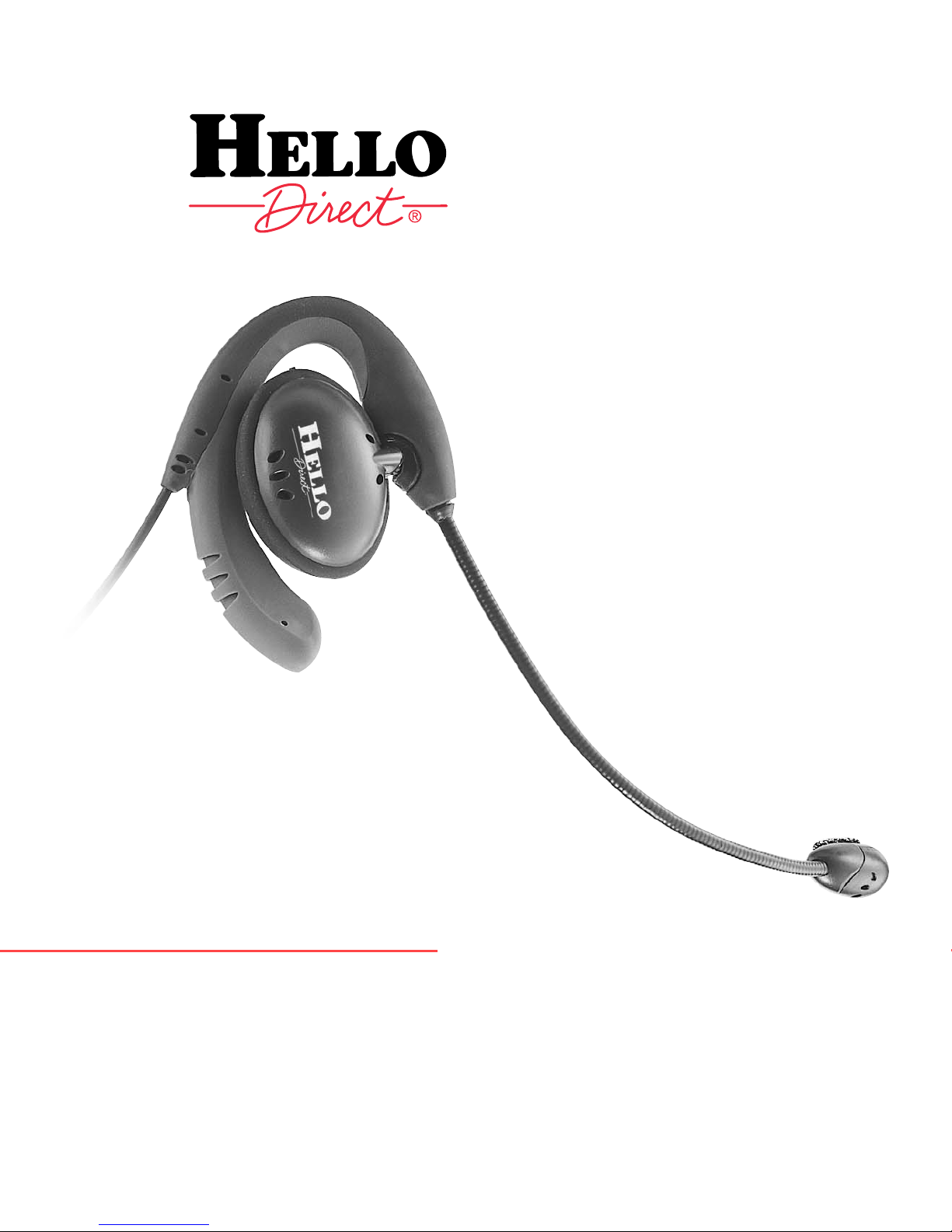
SOLO®II
H
EADSET
TOP
USER
GUIDE
# 6566
Page 2

Thank you for ordering your
Solo II headset top from Hello Direct.
You’ve made a wise choice in selecting a Solo II headset. This is a
high quality, commercial grade set designed for heavy everyday
use. With its soft adjustable materials that custom-fit your ear,
no other headset on the market today comes close to matching
Solo II’s comfort. In fact, your Solo II headset is so lightweight,
you can wear it all day, every day.
Solo II lets you keep both hands free to take notes, check files,
even access your computer while you’re on the phone—without
getting neck and shoulder cramps from scrunching your handset
between your ear and shoulder. You’ll sound great to your callers,
too, because your Solo II headset is equipped with a noise canceling microphone that won’t pick up background noise. It transmits
only your voice—clearly and naturally
.
SETUP AND COMPATIBILITY
Your amplifier needs to be connected before you can use your headset.
The Solo II headset top plugs into the quick disconnect cable of your
Hello Direct brand amplifier. Please refer to the Quick Setup Guide in
your amplifier box.
SOUND QUALITY
Sound level in the headset is adjusted via your amplifier.
Again, please refer to the Quick Setup Guide in your amplifier box.
ANSWERING AND PLACING CALLS
You’ll need to lift the handset off the cradle to begin your call, and put it
back when you’re through. (Our Touch-N-Talk, Item #1275, can help. Just
pull the lever, and the Touch-N-Talk device raises the handset off the
cradle.)
If your phone has a “headset jack” or switch, you won’t need to take the
handset off the cradle. Simply press the button to start and end your
calls. (Usually this is the SPEAKERPHONE or LINE button. Check your
telephone’s manual for details.)
If your phone has a 2 prong (PBX) jack, our Modular to PBX Adapter,
Item #1343, also lets you start and end calls with the press of a button.
2
Page 3
For maximum comfort and efficiency,
we recommend you read all the
information provided
in this guide before using
your new headset.
Wearing the Solo II headset
HEADSET COMFORT
If you’ve never used a headset, wearing one may take some getting used
to. Like wearing glasses for the first time, it will feel different and perhaps
a little awkward at first. But once you’re used to it, you won’t want to
give it up.
Give yourself some time to gradually get used to wearing your new
headset. Use it 30 to 60 minutes a day for the first week, an hour or
2 a day for the second week, and 3 to 4 hours a day for the third week.
By the end of the fourth week, you’ll prefer using the headset for all
your calls. Guaranteed!
Please read the installation instructions on the next page
to get a secure and custom fit.
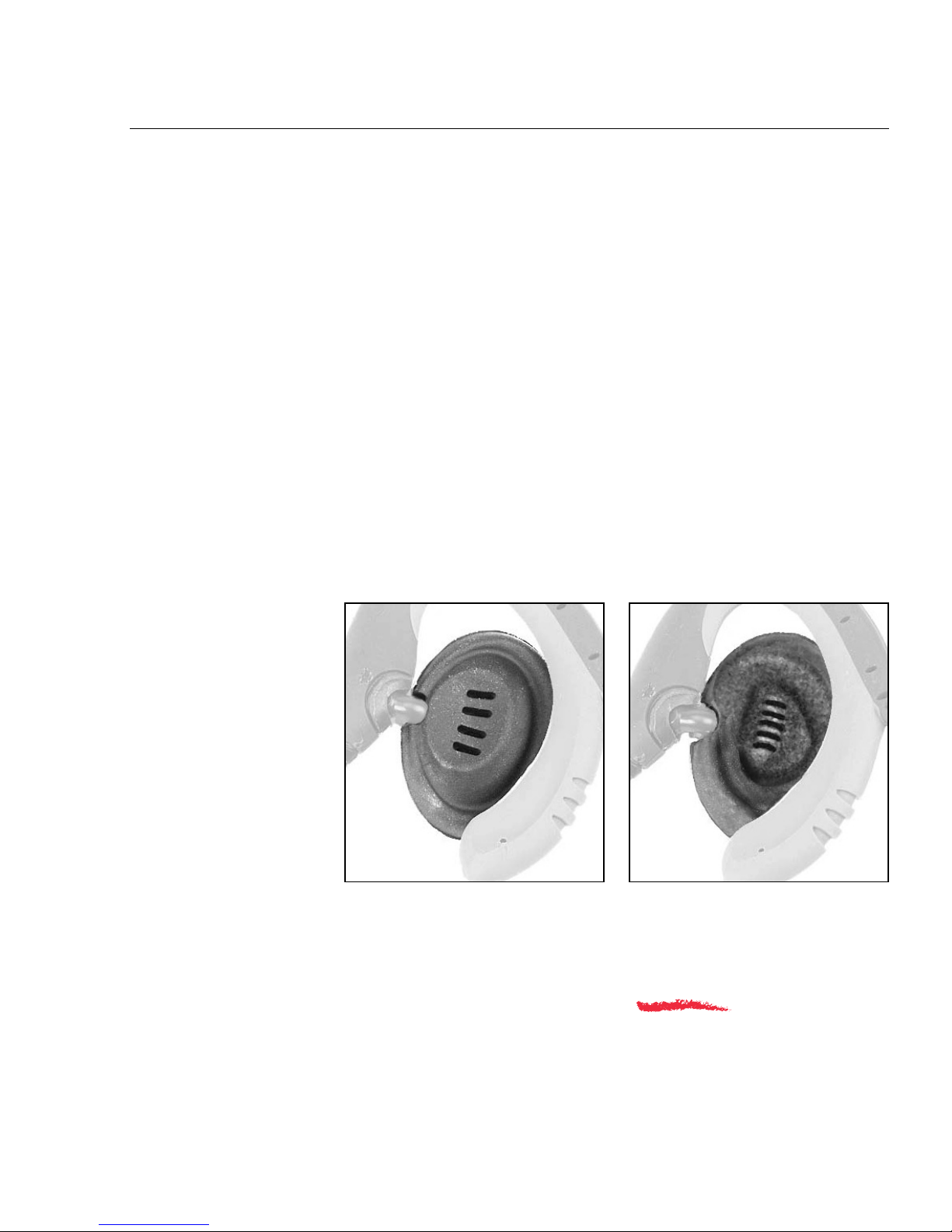
CHOOSING THE RIGHT EAR CUSHION
Your Solo II comes
with two different
ear cushions. Try
them both to determine which is the
most comfortable
for you.
3
Page 4
Installation instructions
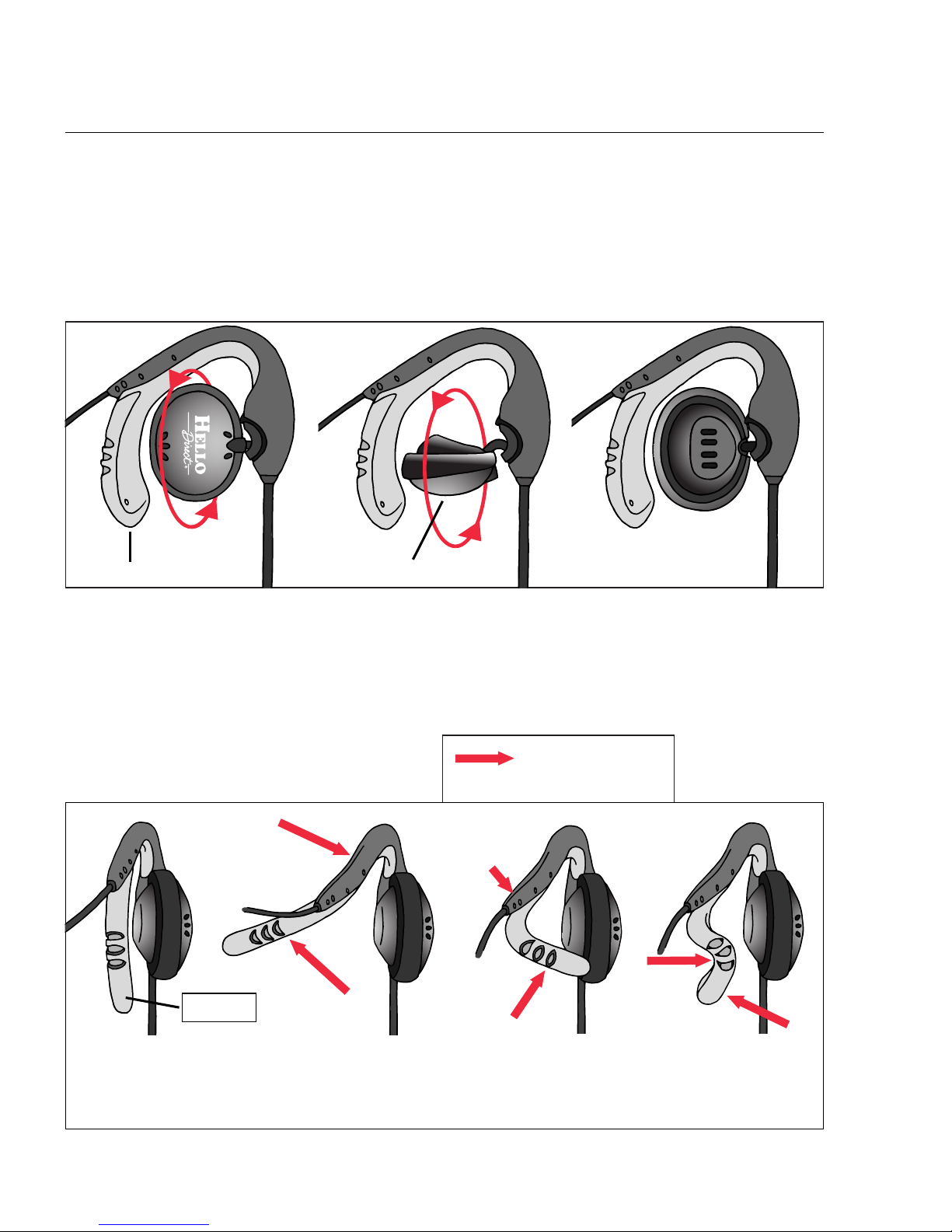
1. FITTING YOUR SOLO II FOR EITHER EAR
The Solo II can be worn on either ear. To switch it to the other ear,
simply rotate the speaker so that the Hello Direct logo rotates through
the bottom of the earhook, and continue rotating until it faces the
opposite side. (See Figure #1.)
Note: The speaker will not rotate 360 degrees. Do not force it past its stop position.
Bottom of earhook
Hello Direct logo
Figure #1
2. CUSTOMIZE THE FIT
Before putting the Solo II on, follow either the “Right Ear” or “Left Ear”
figures below and give the earhook the proper starting bend:
TOWEAR ON THE RIGHT EAR
Bend into an “S” shape.
Start with no bend,
and the earhook
pointing toward
you as shown above.
Bend to
the left.
Bend back in
to the right.
Bend back toward
the left to complete
the “S.”
Figure #2 Right Ear
Hold here
with thumb
and forefinger.
= Press with your
finger here
Earhook
Hold here with
thumb and
forefinger.
4
Page 5
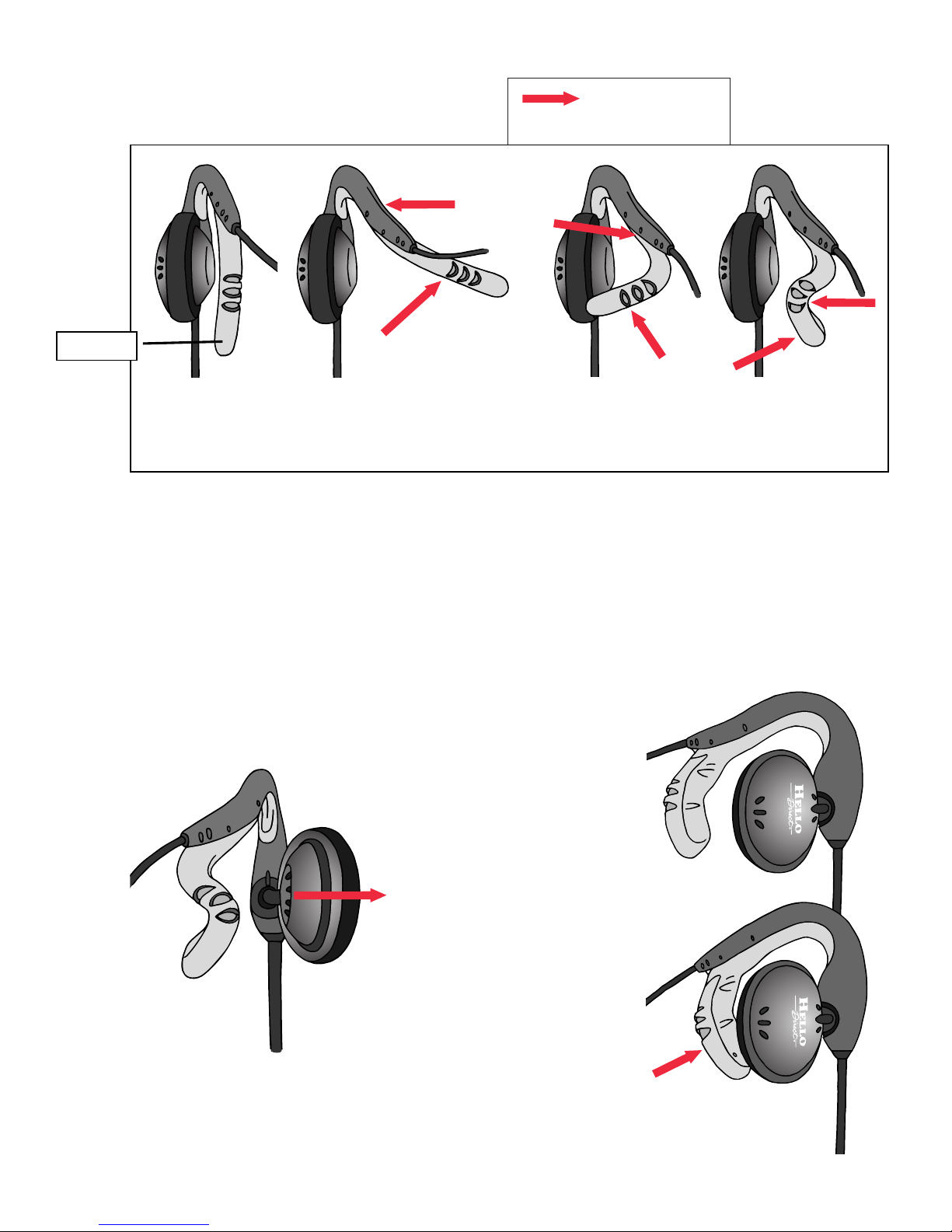
TOWEAR ON THE LEFT EAR
Bend into a “Z” shape.
Start with no bend,
and the earhook
pointing toward
you as shown above.
Bend to
the right.
Bend back in
to the left.
Bend back toward
the right to complete
the “Z.”
Figure #2 Left Ear
Hold here with
thumb and
forefinger.
= Press with your
finger here
Earhook
3. PREPARING TO PUT THE HEADSET ON
Swing the speaker out on its pivot, so it’s not in the way (Figure #3A).
While maintaining the bend, squeeze the flexible part of the earhook
slightly closed (see Figure #3B). The intent is to make sure the inside
shape of the earhook is smaller than your ear so it expands to your ear
shape when you put it on.
Figure #3A
Figure #3B
Swing speaker
out of the way.
Make sure to maintain
the “S” or “Z” bend,
and squeeze in here.
5
Page 6
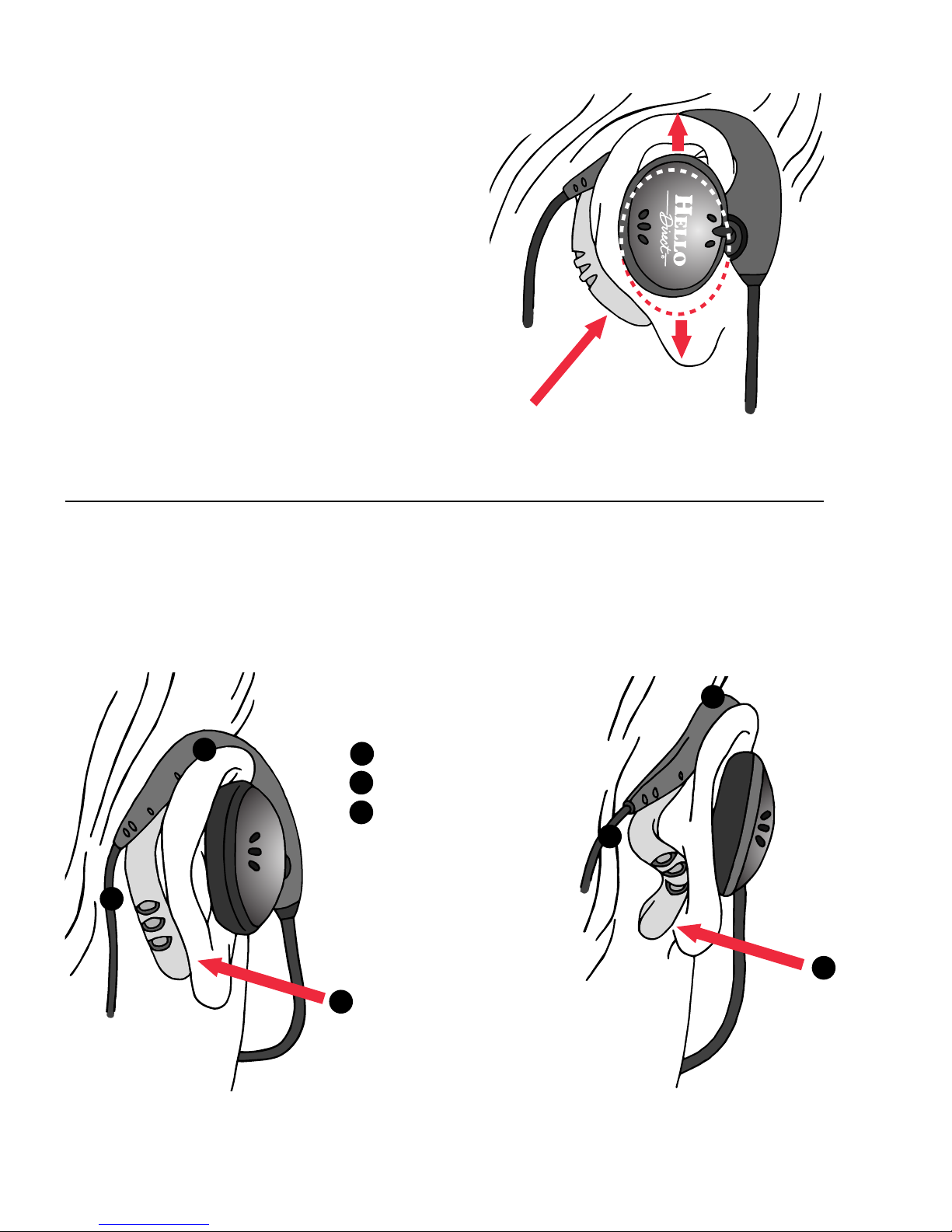
4. PUTTING THE HEADSET ON
If you wear glasses, we recommend that you
remove them to put the headset on.
• Put the headset straight down on your
ear until it rests securely on the top
and behind your ear. This will allow
the earhook to expand to fit your ear
width.
•Tighten the bottom of the earhook as
necessary so it fits snugly against your
ear. Swing the speaker back in until
the cushion is resting comfortably
on your ear. Adjust it up or down to
center it over your ear canal.
See Figure #4.
Figure #4
Press in here.
5. FINAL ADJUSTMENT
• If the headset is too tight, flatten the bend slightly. (See Figure #5.)
• If the headset is too loose, remove it and create a more exaggerated
bend before putting it on. (See Figure #6.)
Earhook should make
contact:
On top of ear
On side of head
At base of ear cartilage
A
B
C
A
B
C
A
B
C
Figure #5
Figure #6
6
Page 7
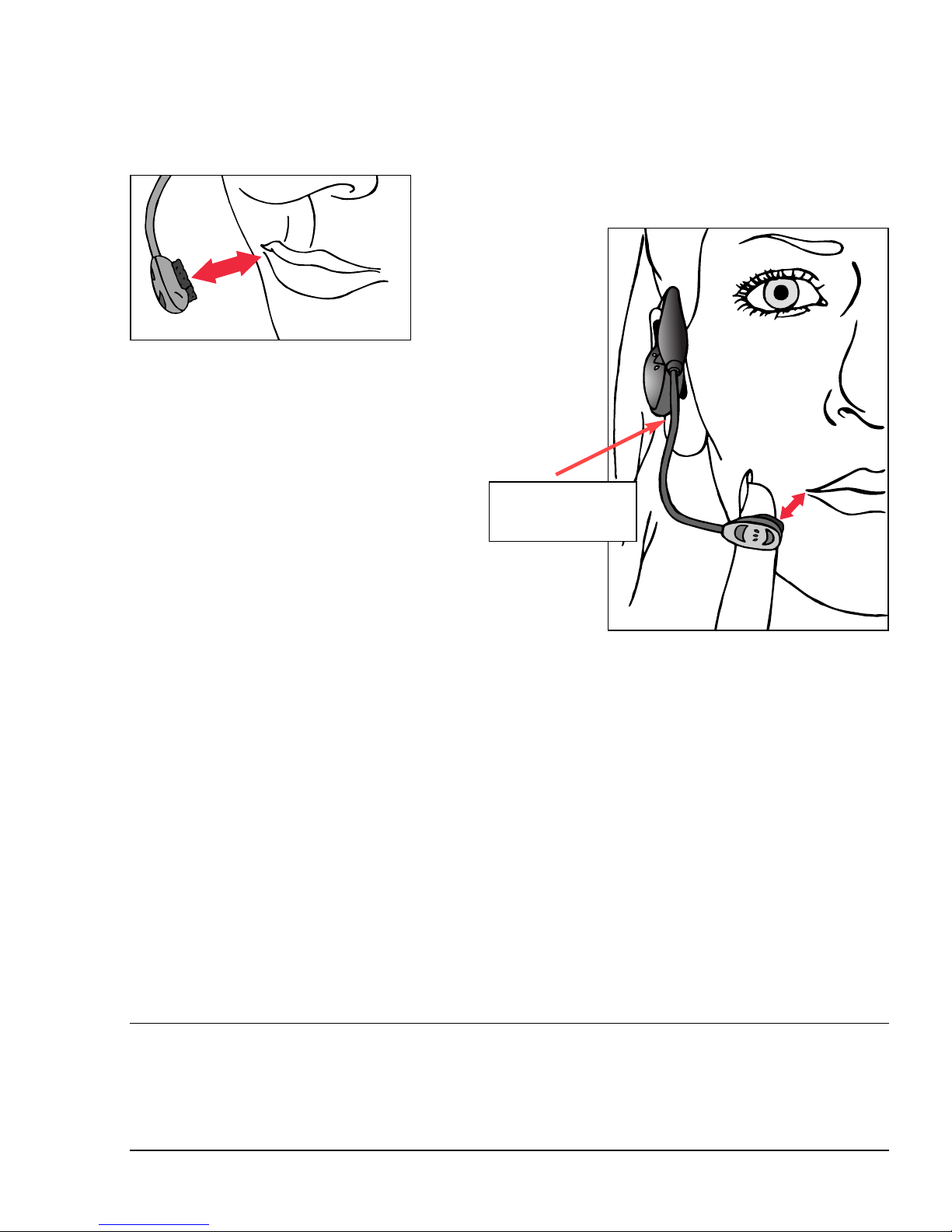
6. ADJUSTING THE MICROPHONE
• Important: Be sure that the side of the microphone with the foam
screen is pointed toward your mouth. (Figure #7)
•While holding the top of the headset
boom in place with one hand, adjust
the position of your microphone so that it is one finger
away from the corner of your
mouth. Avoid positioning the microphone directly in the path of your breath.
(Figure #8)
•A mirror may help to obtain the best
placement.
(The microphone boom is flexible, so you can position it for
comfort and the best voice transmission.)
Visit our web site http://www.hellodirect.com/soloii
to see animated installation instructions.
Figure #7
Hold here while
adjusting.
Figure #8
7
Page 8
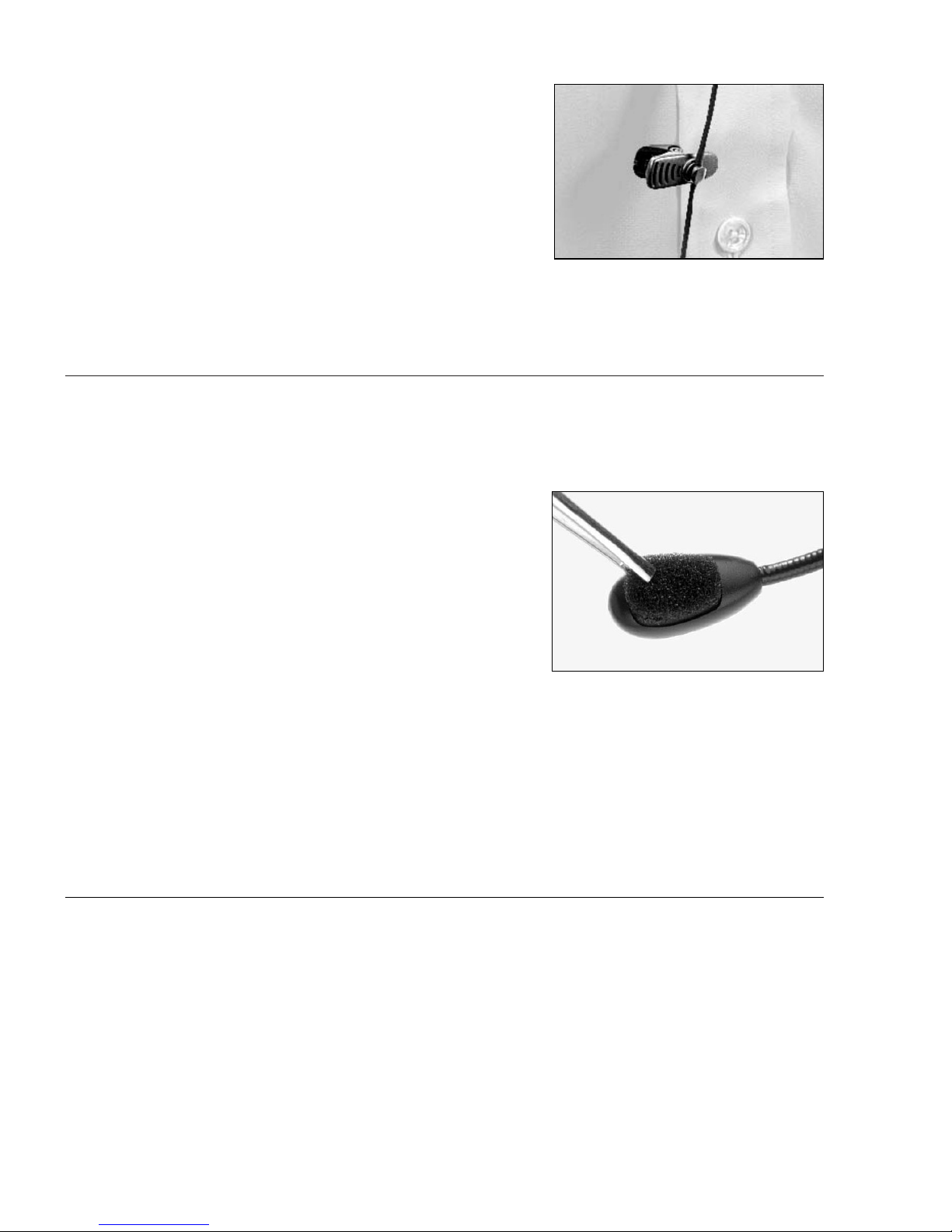
ATTACHING THE CLOTHING CLIP
After adjusting your headset, attach the
clothing clip, leaving enough slack for
comfortable head movement.
Common troubleshooting
The following information covers common problems with your headset,
and suggests solutions. If your headset is not operating properly, follow
the suggestions in this section. If your question or problem is not covered
here, please contact our Customer Care Team at 1-800-444-3556.
8
Replacement parts
Microphone screens and ear cushions should be replaced every 2 to 3
months for hygienic reasons and optimum performance. They should
also be replaced if the headset is passed along to a new user.
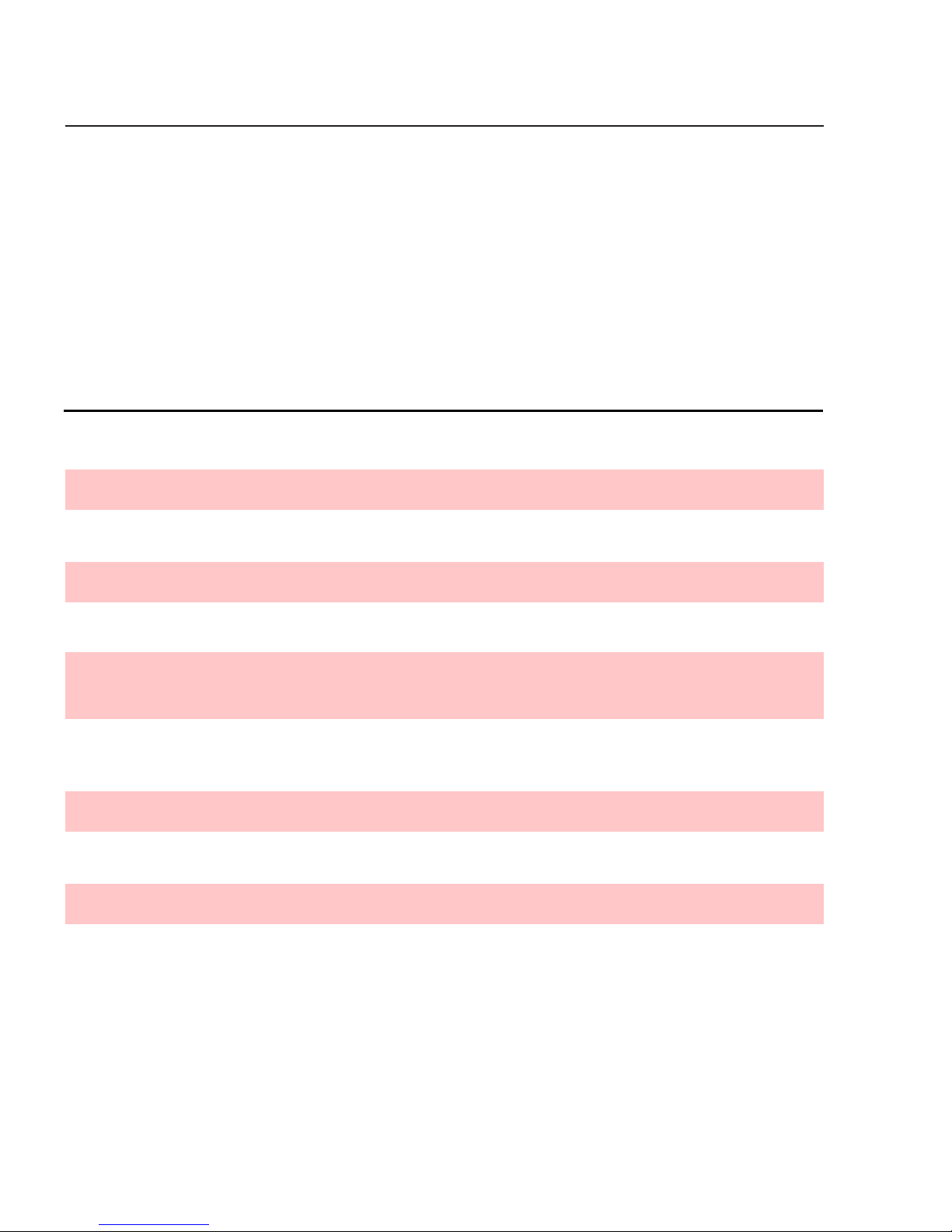
REPLACING THE FOAM MICROPHONE SCREEN
To replace the microphone screen, use a pair
of tweezers to peel off the old foam screen.
Remove the adhesive backing from the new
foam screen and install over the microphone
element.
Page 9

AUDIO PROBLEMS
Caller can’t hear me and I can’t hear caller.
1. Check installation. Make sure all cords are properly connected.
2. Make sure the headset/handset switch on the amp is in the headset
position.
3. If using the Virtuoso amplifier, recheck Instruction Steps 1, 2, and 3 in
the Virtuoso Quick Setup Guide.
Caller’s voice is low or distorted.
1. Adjust the Listening Volume Control on the amplifier.
2. If using the Pro amp, set Sensitivity Switch #1 to OFF.
3. If using the Pro or Virtuoso amplifier, replace batteries.
Caller can’t hear me, but I can hear caller.
1. Make sure the mute button isn’t activated.
2. Be sure microphone is properly positioned about one inch away from
the corner of your lips and one inch below.
3. Increase the speaking volume. For the Pro amplifier, it is located under
the amplifier. Move it toward the “+”. For Virtuoso, it is the rocker
switch located on the top back of the amplifier.
The people I’m talking to say I sound unclear or too far away.
1. Adjust microphone’s position. It should not be directly in front of your
mouth or nose.
2. Be sure the side of the microphone with the foam screen is pointed
toward your mouth.
My voice echoes or I sound like I’m in a tunnel.
1. The speaking volume control is set too high. For the Pro amplifier, it is
located under the amplifier. Move it toward the “–”. For Virtuoso, it is
the rocker switch located on the top back of the amplifier.
2. Check the microphone position.
Still have poor sound quality?
We can assist you over the phone with any Hello Direct headset. If you
have a Virtuoso amplifier, call 1-800-895-3553 for setup instructions and
optimization (24 hours a day).For other headsets, additional product support, or if you don’t have a touch-tone phone, call 1-800-444-3556 (5 a.m.
to 5 p.m. Pacific Time, 8 a.m. to 8 p.m. Eastern Time).
9
Page 10
Care and maintenance of your Solo II
Periodically clean your amplifier and headset by wiping it with a soft
damp cloth. Do not use alcohol, cleaning solvents, or detergents.
Keep your headset working and feeling like new by replacing ear cushions
and microphone screens regularly. You can order a host of other accessories for your headset, too. Below are a few of our most popular Solo II
accessories. For a complete list of headset accessories, please refer to the
Hello Direct web site at www.HelloDirect.com, or call 1-800-444-3556.
Item No. Description
1608 Automatic Busy indicator (for Virtuoso amplifier)
1520 Pro Busy indicator (manual)
1475 Touch-N-Talk Busy indicator
1498 Touch-N-Talk (when ordered with Solo II)
1619 Solo II Refresher Kit (1 of each ear cushion,
microphone screens, 1 lapel clip)
1810-4 Microphone screens, Solo II
(pkg. of 4)
1812-2 Solo II wide cushion (pkg. of 2)
1812-10 Solo II wide cushion (pkg. of 10)
1813-2 Solo II narrow cushion (pkg. of 2)
1813-10 Solo II narrow cushion (pkg. of 10)
10
Page 11

FCC INFORMATION: Your new headset complies with Part 68 of the FCC rules.
Your local phone company may need to know the compliance information, which may include the Registration Number, Ringer Equivalence
Number (REN), and other information. This information may be found
on the bottom of your new amplifier.
T
ELEPHONE /HEADSET PROBLEMS: If you experience problems with your headset,
disconnect the amplifier from the telephone. If your phone works properly,
your headset may need repair or adjustment. In the unlikely event that
the problem is causing harm to the telephone network, your telephone
company may ask that the headset remain unplugged until the problem
is corrected.
11
Page 12

Tel:
© Hello Direct, Inc. 2001 Printed on recycled and recyclable paper. #50-0026-03
www.HelloDirect.com
e-mail: [email protected] (general support)
[email protected] (technical support)
Hello Direct 30 day unconditional money
back guarantee
If,for any reason, you’re not 100% satisfied with any product you’ve received from us,
simply contact Hello Direct within 30 days of your invoice date. If our Technical Support
Specialists are unable to resolve the problem, we’ll gladly arrange for an exchange,
company credit, or refund.
HELLO DIRECT BRAND 2 YEAR UNCONDITIONAL PRODUCT WARRANTY
All new Hello Direct brand corded headset products are warranted to you, the original
owner, for two years from date of purchase, and subject to all terms, conditions, and
limitations set forth in this standard Hello Direct Product Warranty, which is included
with each product shipped.
If a Hello Direct brand product fails, as diagnosed by an authorized Hello Direct
Customer Service Representative, we will repair the product without charge or replace
it without charge with an identical product, if available, or a product of equal or
greater function and value, at our option.
The Hello Direct Warranty does not apply to any product that has been altered or
modified, or used in any manner contrary to written instructions provided by Hello
Direct. Consumable parts such as cords, ear cushions, clothing clips, microphone
screens, and batteries are not covered by this warranty. In no event shall Hello Direct
be responsible for any incidental, special or consequential damages, even if it has been
notified of the possibility of such damages.
75 Northeastern Blvd.
Fax: (800) 456-2566
Nashua, NH 03062
Hello Direct, Inc.
(800) 444-3556
 Loading...