

Page 1
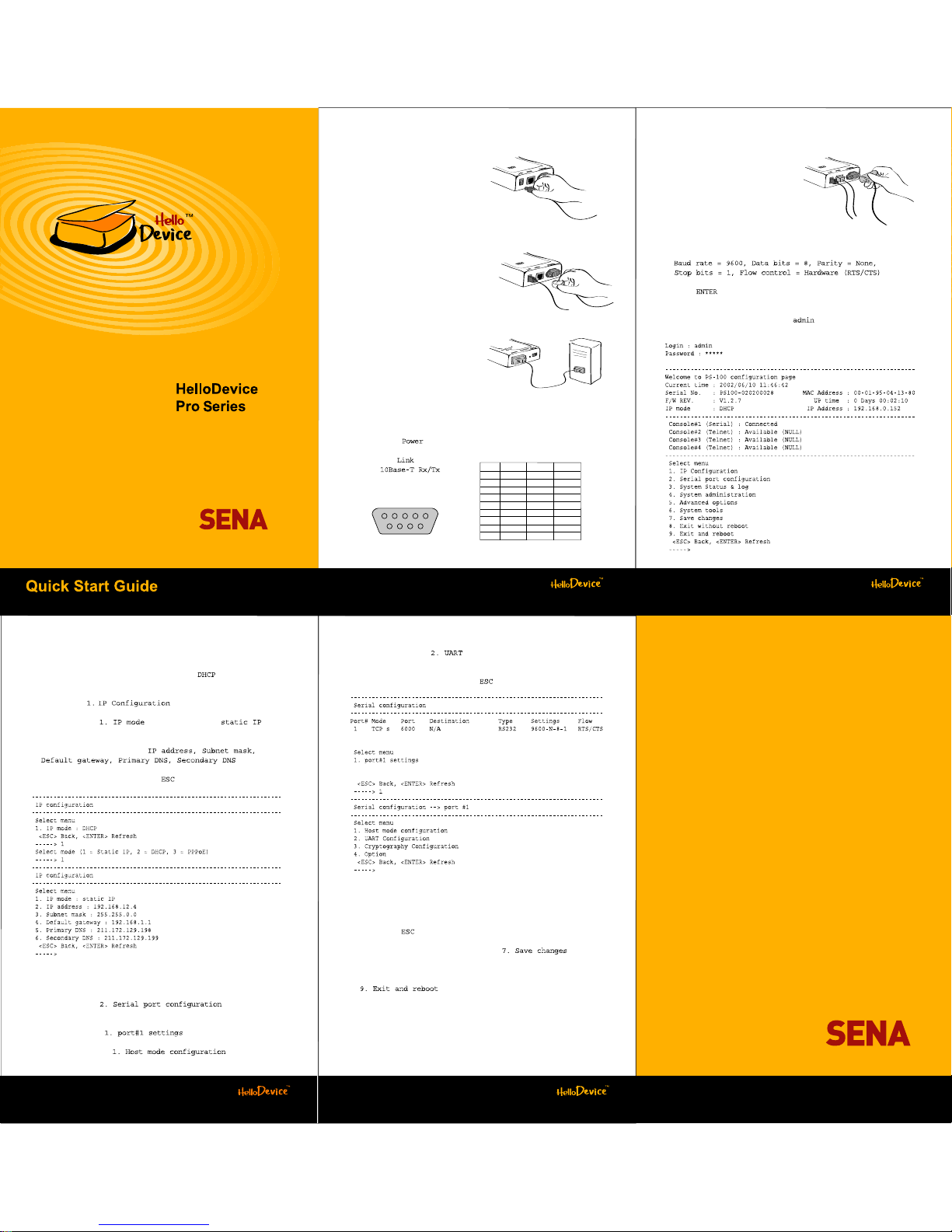
2. Log-in to serial console
1) Connectanull-modem serial cable
betweenyourcomputer and the
consoleportoftheHelloDevice PS100.
2) Run a terminalemulation programsuchasHyperTerminalandsetup
the serial configuration parametersasfollows:
3) Press key at the terminalemulation program.
4) Enter the usernameandpassword. Factory default settingsofthe
user nameandpassword are both .
1. Connection
1) Hook up the power to the
HelloDevice PS100.
2) Hook up the Ethernet cable to
the RJ45 connector of the
HelloDevice PS100 with your
hub or switch.
3) Hook up the RS232 serial cable
between the HelloDevice PS100
and your serial device.
(See Table 1 for pin assignments)
4) Turn on the power switch of the HelloDevice PS100.
5) ) Confirm the LED lights up on the front panel.
6) Confirm the LED lights
up and LED
is blinking.
Figure 1. Connecting power
Figure 4. Connecting console cable
Figure 2. Connecting Ethernet cable
Figure 3. Connecting serial device
Table1.DB9Pinassignments
Pin
1
2
3
4
5
6
7
8
9
RS232
Rx
Tx
DTR
GND
DSR
RTS
CTS
RS422
Tx-
RxRx+
Tx+
RS485
Data-
Data+
1 2 3 4 5
6 7 8 9
Serial Device
PS100
www.sena.com
4) Select the submenu , and set up the parameters as same as
those of your serial device.
5) Return to the main menu by press key.
5. Applychanges
1) After finishing the serial port configuration, return to the main menu
by pressing keyseveraltimes.
2) Save changed values by selecting menu at the
main menu.
3) Reboot the HelloDevice PS100 by selecting menu
.
3. AssignIP address
Factory default IPmodesettingof the PS100 is . If you are using
DHCPserversforyournetworkenvironments,skip this chapter.
1) Select menu at the main menu.
2) Select submenu . Change IPmodeto .
3) Select submenu 2~6 to set IP configuration parameters according to
your network environment, i.e.
.
4) Return to the main menu by press key.
4. Serial port configuration
1) Select the menu at the main
menu.
2) ) Select the menu .
3) Select the submenu , and set up the
host mode parameters according to your application.
U.S./Canada/SouthAmerica
Tel: +1(408)573-7425 Fax:+1(408)907-3738
EU/Africa
Tel: +33(0)153531629 Fax:+33(0)1 70247090
Asia/Pacific
Tel: +82-2-571-8283 Fax:+82-2-573-7710
ContactusviaE-mail
GeneralInformation: [email protected]
Sales& Distribution:[email protected]
TechnicalSupport: [email protected]
www.sena.com
Page 2
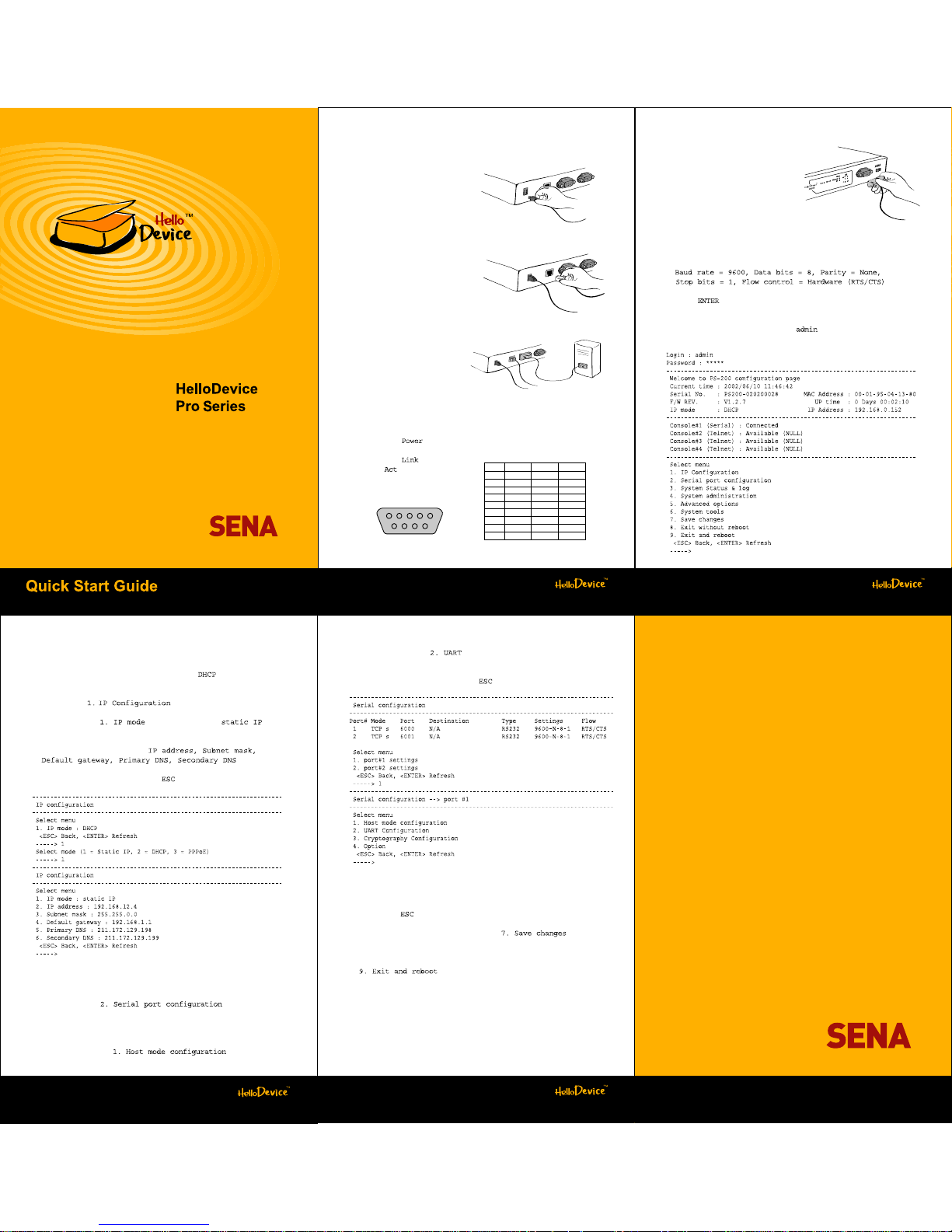
PS200
2. Log-in toserial console
1) Connect a null-modem serial cable
between your computer and the
console port of the
HelloDevice PS200
on the front panel.
2) Run a terminal emulation program such as HyperTerminal and set up
the serial configuration parameters as follows:
3) Press key at the terminal emulation program.
4) Enter the user name and password. Factory default settings of the
user name and password are both .
1. Connection
1) Hook up the power to the
HelloDevice PS200.
2) Hook up the Ethernet cable to
the RJ45 connector of the
HelloDevice PS200 with
your hub or switch.
3) Hook up the RS232 serial cable
between the HelloDevice PS200
and your serial device.
(SeeTable 1 for pin assignments)
4) Turn on the power switch on the front panel.
5) Confirm the LED lights up on the front panel.
6) Confirm the LED lights
up and LED is blinking
on the front panel.
Figure 1. Connecting power
Figure 4. Connecting console cable
Figure 2. Connecting Ethernet cable
Figure 3. Connecting serial device
Table1.DB9Pinassignments
Pin
1
2
3
4
5
6
7
8
9
RS232
Rx
Tx
DTR
GND
DSR
RTS
CTS
RS422
Tx-
RxRx+
Tx+
RS485
Data-
Data+
1 2 3 4 5
6 7 8 9
SerialDevice
www.sena.com
3. AssignIP address
Factory default IP mode setting of the PS200 is . If you are using
DHCP servers for your network environments, skip this chapter.
1) Select menu at the main menu.
2) Select submenu . Change IP mode to .
3) Select submenu 2~6 to set IP configuration parameters according to
your network environment, i.e.
.
4) Return to the main menu by press key.
4. Serial port(s) configuration
1) Select the menu at the main
menu.
2) Select the serial port that will be hooked up with your serial device.
3) Select the submenu , and set up the
host mode parameters according to your application.
4) Select the submenu , and set up the parameters as same as
those of your serial device.
5) Return to the main menu by press key.
5.Apply changes
1)After finishing the serial port(s) configuration, return to the main menu
by pressing key several times.
2) Save changed values by selecting menu at the
main menu.
3) Reboot the HelloDevice PS200 by selecting menu
.
U.S./Canada/SouthAmerica
Tel: +1(408)573-7425 Fax:+1(408)907-3738
EU/Africa
Tel: +33(0)153531629 Fax:+33(0)1 70247090
Asia/Pacific
Tel: +82-2-571-8283 Fax:+82-2-573-7710
ContactusviaE-mail
GeneralInformation:[email protected]
Sales& Distribution:[email protected]
TechnicalSupport:[email protected]
www.sena.com
Page 3
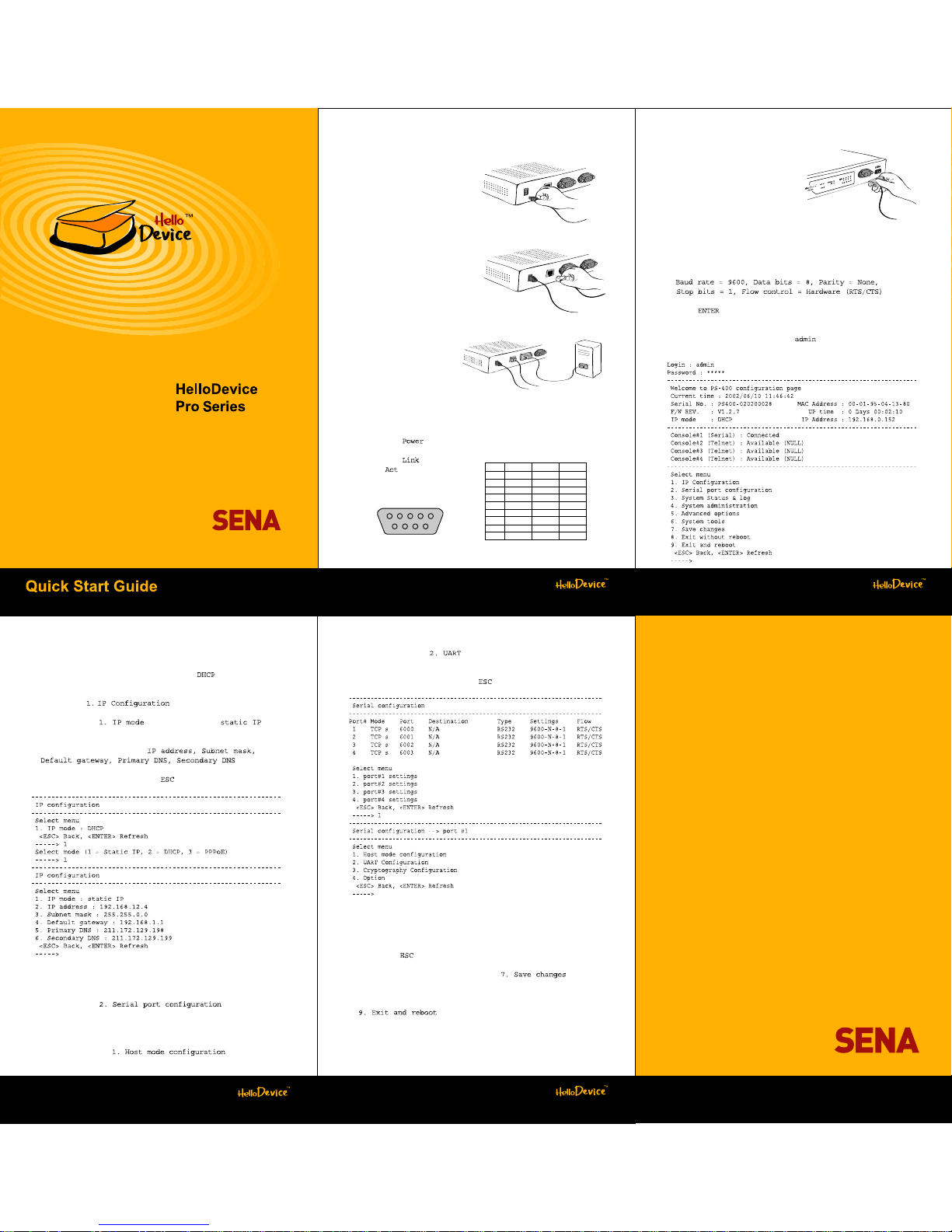
PS400
2. Log-in to serial console
1) Connectanull-modem serial cable
betweenyourcomputer and the
consoleportofthe
HelloDevicePS400
on the frontpanel.
2) Run a terminalemulation programsuchasHyperTerminal and set up
the serial configuration parametersasfollows:
3) Press key at the terminalemulation program.
4) Enter the usernameandpassword. Factory default settingsofthe
user nameandpassword are both .
1. Connection
1) Hook up the power to the
HelloDevice PS400.
2) Hook up the Ethernet cable to
the RJ45 connector of the
HelloDevice PS400 with your
hub or switch.
3) Hook up the RS232
serial cable between the
HelloDevice PS400
and your serial device.
(See Table1 for pin assignments)
4) Turn on the power switch on the front panel.
5) Confirm the LED lights up on the front panel.
6) Confirm the LED lights
up and LED is blinking
on the front panel.
Figure 1. Connecting power
Figure 4. Connecting console cable
Figure 2. Connecting Ethernet cable
Figure 3. Connecting serial device
Table1.DB9Pinassignments
Pin
1
2
3
4
5
6
7
8
9
RS232
Rx
Tx
DTR
GND
DSR
RTS
CTS
RS422
Tx-
RxRx+
Tx+
RS485
Data-
Data+
1 2 3 4 5
6 7 8 9
Serial Device
www.sena.com
3. AssignIP address
Factory default IP mode setting of the PS400 is . If you are using
DHCP servers for your network environments, skip thischapter.
1) Select menu at the main menu.
2) Select submenu . Change IP mode to .
3) Select submenu 2~6 to set IP configuration parameters according to
your network environment, i.e.
.
4) Return to the main menu by press key.
4. Serial port(s) configuration
1) Select the menu at the main
menu.
2) Select the serial port that will be hooked up with your serial device.
3) Select the submenu , and set up the
host mode parameters according to your application.
4) Select the submenu , and set up the parameters as same as
those of your serial device.
5) Return to the main menu by press key.
5. Applychanges
1) After finishing the serial port(s) configuration, return to the main menu
by pressing key several times.
2) Save changed values by selecting menu at the
main menu.
3) Reboot the HelloDevice PS400 by selecting menu
.
U.S./Canada/SouthAmerica
Tel: +1(408)573-7425 Fax:+1(408)907-3738
EU/Africa
Tel: +33(0)153531629 Fax:+33(0)1 70247090
Asia/Pacific
Tel: +82-2-571-8283 Fax:+82-2-573-7710
ContactusviaE-mail
GeneralInformation: [email protected]
Sales& Distribution:[email protected]
TechnicalSupport:[email protected]
www.sena.com
 Loading...