

Page 1
MECHANICAL HAND TOOL WARRANTY
POLICY HellermannTyton warrants its
mechanical hand tools to be free from
defects in manufacturer workmanship
and material under normal conditions of
use and service for a period of 90 days
from initial delivery to the purchaser.
Purchaser shall notify HellermannTyton of
any warranty claim within ten (10) business
days after discovery, but not later than the
expiration of the above warranty period
or such claim shall be deemed waived.
THE FOREGOING WARRANTIES AND
REMEDIES ARE EXCLUSIVE AND IN LIEU OF
ALL OTHER WARRANTIES AND REMEDIES
WHATSOEVER, EXPRESSED OR IMPLIED,
INCLUDING, BUT NOT LIMITED TO, ANY
WARRANTIES OF MERCHANTABILITY OR
FITNESS FOR A PARTICULAR PURPOSE,
WHICH HELLERMANNTYTON EXPRESSLY
DISCLAIMS. ALL WARRANTIES ARE
DEEMED VOID IF TOOL IS OPENED OR
TAMPERED WITH.
WARRANTY PROGRAM Thank you for purchasing a
HellermannTyton mechanical cable tie tool. HellermannTyton
mechanical hand tools come with a standard 90 day warranty.
To receive a free one year extended warranty register the tool
on our website.
STANDARD
EXTENDED
90 Days 1 Year Register online to apply
O
N
E
Y
E
A
R
W
A
R
R
A
N
T
Y
To register your product and nd details on the extended warranty, go to:
www.hellermann.tyton.com/warranty
{ }
Register product online
within 1 month
Registration notice
e-mail will be sent
1 Year
of FREE
Warranty
Repairs
REPAIR PROGRAM HellermannTyton will repair mechanical hand tools after
expiration of warranty date for a fee. Please refer to our website
www.hellermann.tyton.com/warranty for more information.
WARNINGS:
• Always wear approved eye protection.
• NOT insulated. Plastic-dipped or slip-on plastic handles are NOT intended for protection against electrical shock.
• Never use on or near live electrical circuits.
• Do not disassemble housing halves or injury may occur due to spring-loaded components. Disassembly of housing will void
the Warranty.
MANEVO
HellermannTyton Canada
Unit #4, 205 Industrial Parkway North
Aurora, Ontario L4G 4C4 Canada
Phone: (800) 661-2461
Fax: (800) 390-3904
email: [email protected]
HellermannTyton North American
Corporate Headquarters
7930 N. Faulkner Rd, PO Box 245017
Milwaukee, WI 53224-9517
Phone: (414) 355-1130, (800) 537-1512
Fax: (414) 355-7341, (800) 848-9866
email: [email protected]
www.hellermann.tyton.com
TS16949, ISO 9001, and
ISO 14001 Certied
HellermannTyton (México)
S. de R.L. de C.V.
Anillo Periférico Sur 7980 Edicio 6A
Parque Industrial Tecnológico II
Santa María Tequepexpan
Tlaquepaque, Jalisco, México 45601
Tel 52+33+ 3133 9880
Fax 52+ 33+ 3133 9861
ISO 9001 Certied
For instructions on how to calibrate your tool, visit
www.hellermann.tyton.com/manuals
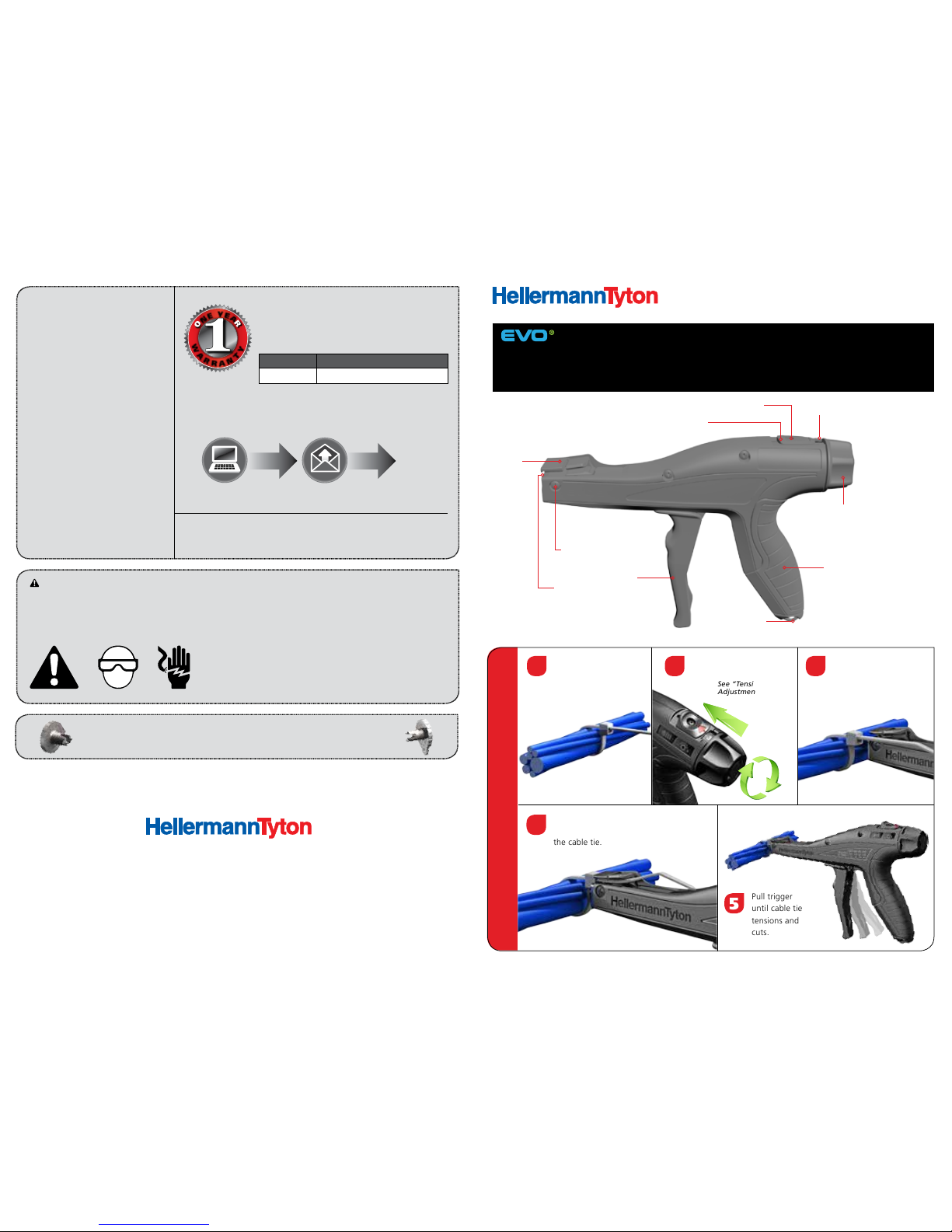
EVO series hand tools are the most ergonomic cable tie application tools on the market.
Durability, comfort and precision are combined into one revolutionary tool. At the
heart of the EVO design lies patent-pending Tension / Lock / Cut (TLC) technology;
the unbeatable ability to accurately and consistently cut a cable tie ush, at an exact
tension, with minimal strain to hands and wrists.
OPERATION MANUAL
EVO 7 | EVO 7SP | EVO 9 | EVO 9HT
CABLE TIE APPLICATION TOOLS
See “Tension
Adjustment” inside
Set tool tension for
application.
Apply HellermannTyton
cable tie around the
bundle.
Pull trigger
until cable tie
tensions and
cuts.
21
5
HOW TO USE THE TOOL
4
3
Insert strap of cable tie
through side opening of
nosepiece.
Place front of nosepiece ush to
the head of
the cable tie.
Tension
Knob
Easy-to-Read
Tension Setting
Thumb Lever
Tension Lock Screw
Blade
Trigger
Hanger Hook
Contoured Ergonomically
Engineered Handle
Nosepiece
Screw
Nosepiece
Page 2
TOOL SETTING 0 1 2 3 4 5 6 7 8
EVO 7 / EVO 7SP
4 lb.
(18 N)
7 lb.
(31 N)
11 lb.
(49 N)
15 lb.
(67 N)
19 lb.
(85 N)
24 lb.
(107 N)
28 lb.
(125 N)
33 lb.
(147 N)
37 lb.
(165 N)
EVO 9
12 lb.
(53 N)
20 lb.
(89 N)
25 lb.
(111 N)
31 lb.
(138 N)
38 lb.
(169 N)
45 lb.
(200 N)
54 lb.
(240 N)
62 lb.
(276 N)
69 lb.
(307 N)
EVO 9HT
27 lb.
(120 N)
35 lb.
(156 N)
44 lb.
(196 N)
55 lb.
(245 N)
67 lb.
(298 N)
80 lb.
(356 N)
94 lb.
(418 N)
105 lb.
(467 N)
116 lb.
(516 N)
APPROXIMATE TENSION CUT-OFF FORCE
CABLE TIE
T18
T30 T40 T50 T120 T150 T250
EVO 7 / EVO 7SP 0 to 2 1 to 4 3 to 6 5 to 8 N/A N/A N/A
EVO 9 N/A 0 to 1 0 to 3 1 to 4 3 to 8 4 to 8 6 to 8
EVO 9HT N/A N/A N/A 0 to 1 2 to 5 4 to 8 5 to 8
RECOMMENDED TENSION SETTINGS
CABLE TIE TOOLS
PART NO. DESCRIPTION
110-70083
EVO 7 Cable Tie Application Tool for use with 18 lb. to 50 lb. cable ties. Standard Tension, Standard
Hand Span, 1/pk.
110-70084
EVO 7SP Cable Tie Application Tool for use with 18 lb. to 50 lb. cable ties. Standard Tension, Short Hand
Span, 1/pk.
110-80000
EVO 9 Heavy Duty Cable Tie Application Tool for use with 50 lb. to 250 lb. cable ties. Standard Tension,
Standard Hand Span, 1/pk.
110-80004
EVO 9HT High Tension Cable Tie Application Tool for use with 120 lb. to 250 lb. cable ties. High Tension,
Standard Hand Span, 1/pk.
ACCESSORIES / REPLACEMENT PARTS
PART NO. DESCRIPTION PART NO. DESCRIPTION
110-70021
EVO 7 Replacement Blade
110-80037 EVO 9 Replacement Blade
110-70011 EVO 7 Replacement Nosepiece 110-80018 EVO 9 Replacement Nosepiece
110-70131 EVO 7; 1 mm Extended Nosepiece 110-80064 EVO 9; 2 mm Extended Nosepiece
110-70132 EVO 7; 2 mm Extended Nosepiece 110-80065 EVO 9; 3 mm Extended Nosepiece
110-70133 EVO 7; 3 mm Extended Nosepiece 110-80066 EVO 9; 4 mm Extended Nosepiece
110-70089 EVO Tools Calibration Tool 110-80067 EVO 9; 5 mm Extended Nosepiece
110-70091 T8 Star Driver 110-99000 UC200 Digital Calibration System
MOST POPULAR CABLE TIES
PART NO. DESCRIPTION
T18R9M4 4", 18 lb. Cable Tie, Natural Nylon for up to 0.87" bundle
T30R0M4 6", 30 lb. Cable Tie, Black Nylon for up to 1.5" bundle
T50R0HSM4 8", 50 lb. Cable Tie, Black Heat Stabilized Nylon for up to 2" bundle
T120R0H4 15", 120 lb. Cable Tie, Black Nylon for up to 4" bundle
DCT110HIRK2 19", 150 lb. Dual Clamping, wide strap tie for up to 2, 2.3" bundles
T250M0X2 22", 250 lb. Cable Tie, Black Nylon for up to 5.9" bundle
PART NUMBERS
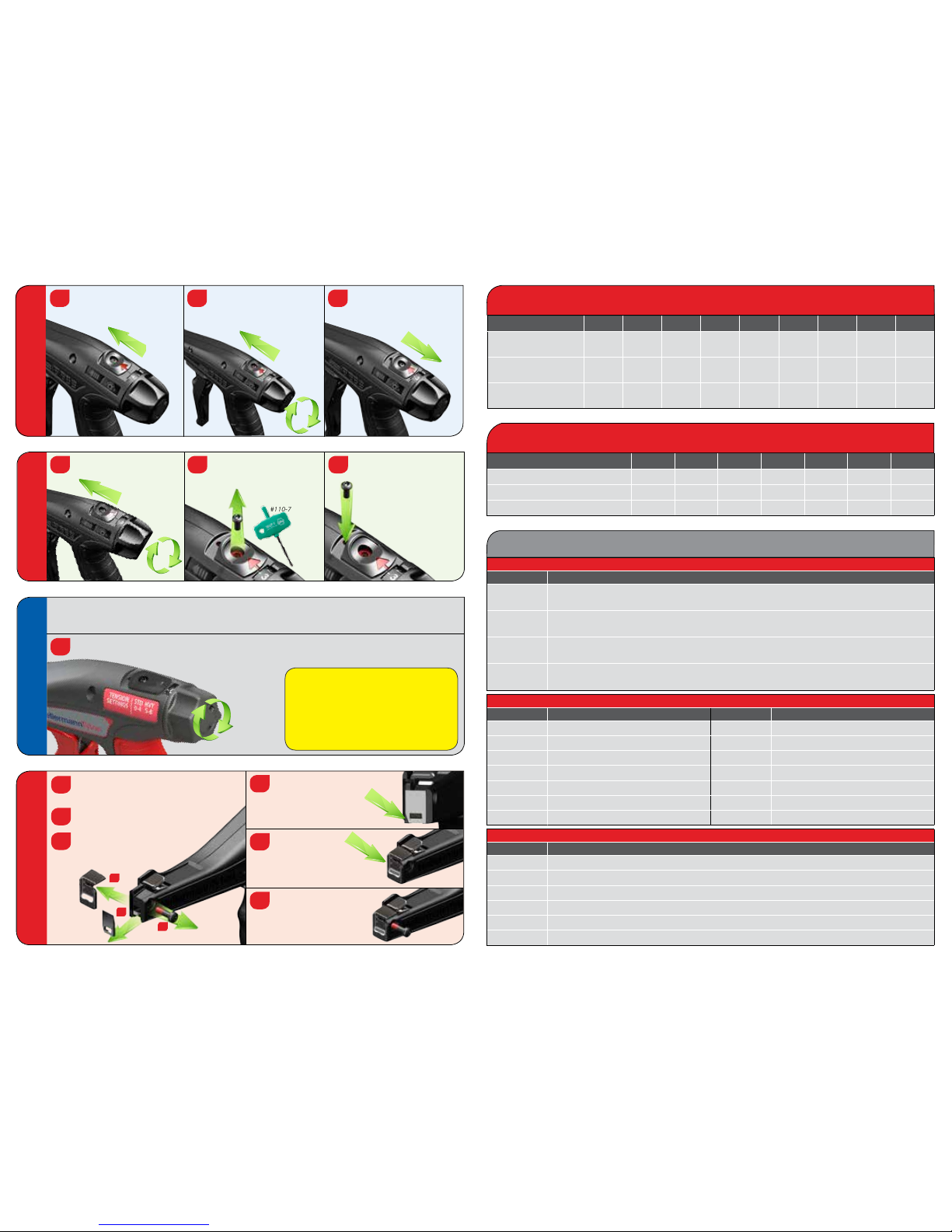
BLADE REPLACEMENT
Install new blade by
aligning the chamfered
(beveled) corner with
the housing.
4
5
6
Slide nosepiece
over the blade.
Remove screw from the nosepiece using
a #1 Phillips screwdriver.
Slide the nosepiece off of the tool.
Remove and discard blade carefully.
Blade may be SHARP.
1
2
3
Reinstall screw.
DO NOT OVERTIGHTEN.
2
3
1
QUICK-ADJUST
EVO 9 TOOLS
1
Simply twist tension knob in either direction without moving the thumb lever. The tension will move
3 full settings; e.g. twist clockwise to advance from setting 3.5 to setting 6.5.
The EVO 9 quick-adjust tension feature allows for easy, blind tension adjustments; useful when using more
than one cable tie type during an assembly application.
Notice!
If the tension setting is near the top or bottom
of the tool’s tension range (< 3 or > 5) the quick
adjust feature will not be able to move the full
3 settings, and the tension will not set properly.
Make sure there are at least 3 full settings available
before using this feature.
TENSION LOCK-IN
Adjust tension knob to
desired tension setting.
(Can purchase T8
Star Driver part
#110-70091)
Remove screw in thumb
lever using a standard
T8 Star Driver.
Place screw in front of the
thumb lever to
lock in the setting.
3
1
2
TENSION ADJUSTMENT
Slide thumb lever forward.
While holding thumb lever
forward, rotate the tension
knob to desired tension
setting.
Release thumb lever to
lock in tension setting.
3
1
2
+/- 3
 Loading...