

Page 1
.
BD0054V0004EN0416S0
460 988-17 / 04.16
Operating instructions
en
BPC-Tool
Page 2

Inhaltsverzeichnis BPC-Tool
Table of Contents
1 Safety precautions .........................................................................5
1.1 General Safety Precautions ...........................................................5
1.2 Safety precautions for the BPC-Tool..............................................5
1.3 Safety precautions for battery maintenance ..................................6
1.4 Safety Precautions Regarding the Risk of Injury ............................6
1.5 Safety precautions regarding chemical burns ................................6
2 Product descriptions...................................................................... 7
2.1 Intended use .................................................................................7
2.2 Notes for using the Bluetooth function...........................................7
2.3 Delivery Contents..........................................................................8
2.4 Top ...............................................................................................9
2.5 Connectors..................................................................................10
2.6 Power supply ..............................................................................10
3 Putting the BPC-Tool into operation ......................................13
3.1 Switching on the BPC-Tool..........................................................13
3.2 Switching off the BPC-Tool..........................................................13
4 Configuring the BPC-Tool ..........................................................14
4.1 Configuring the time zone ...........................................................14
4.2 Setting the Time Format .............................................................14
4.3 Configuring summer time............................................................14
4.4 Setting the Date Format ..............................................................14
4.5 Configuring the language ............................................................15
4.6 Configuring the temperature units...............................................15
2
Page 3

BPC-Tool Inhaltsverzeichnis
4.7 Configuring the decimal separator...............................................15
4.8 Configuring the display contrast ..................................................16
4.9 Standby time...............................................................................16
4.10 Configuring instructions..............................................................16
5 Service .............................................................................................17
5.1 Calling up product information ....................................................17
5.2 Calling up self-test......................................................................17
5.3 Calling up memory information ...................................................18
5.4 Performing a factory reset ..........................................................18
6 Working with the BPC-Tool via a diagnostic tool...............19
6.1 Preconditions for connecting the BPC-Tool..................................19
6.2 Connection to the diagnostic tool.................................................19
7 Working with the BPC-Tool.......................................................20
7.1 Symbols......................................................................................20
7.2 Connecting the BPC-Tool to the battery .......................................20
7.3 Performing a battery test ............................................................22
7.4 Performing a start/stop test ........................................................23
7.5 Performing a system test ............................................................24
7.6 Reports.......................................................................................26
8 BPC client App ...............................................................................28
8.1 Installation..................................................................................28
8.2 Putting the BPC client App into operation ....................................30
8.3 Configuring the BPC client App....................................................31
8.4 Working with the BPC client App .................................................32
3
Page 4

Inhaltsverzeichnis BPC-Tool
9 General information.....................................................................39
9.1 Problem solutions .......................................................................39
9.2 Care and maintenance.................................................................39
9.3 Disposal......................................................................................39
9.4 BPC-Tool technical data ..............................................................40
4
Page 5
BPC-Tool Safety precautions
General Safety Precautions
1 Safety precautions
1.1 General Safety Precautions
• The BPC-Tool is exclusively intended for use on a vehicle.
It is a precondition for the use of the BPC-Tool that the
user has knowledge of automotive engineering and is
therefore aware of the sources of danger and risks in the
workshop and on the vehicle.
• All notes given in the individual sections of the operating
instructions apply. In principle it is required to follow the
steps and safety precautions stated below.
• Furthermore, pay attention to all general instructions
from labour inspectorates, trade associations and vehicle
manufacturers as well as all laws, legal ordinances and
instructions which have to be commonly obeyed by a
repair shop.
1.2 Safety precautions for the BPC-Tool
In order to avoid incorrect handling and resulting injury to the
user or destruction of the BPC-Tool, observe the following:
• Use the BPC-Tool exclusively for the purpose of testing
batteries (12 V).
• Protect the BPC-Tool from long periods of exposure to
solar radiation.
• Protect the BPC-Tool from water (it is not waterproof).
• Protect the BPC-Tool from strong impacts (do not drop).
5
Page 6
Safety precautions BPC-Tool
Safety precautions for battery maintenance
1.3 Safety precautions for battery maintenance
When working on batteries, there is a risk of injury due to
faulty or damaged batteries. Therefore regard the following:
• Do not smoke or generate any sparks or open flames in
the vicinity of batteries.
• Remove any items of jewellery and watches.
• In order to prevent sparks or short circuits, avoid the use
of metal tools where possible.
1.4 Safety Precautions Regarding the Risk of Injury
When working on the vehicle, there is a risk of injury through
inadvertent rolling of the vehicle. Therefore regard the
following:
• Make connections to the vehicle only when engine is not
running.
• Additionally place selector lever of automatic
transmission vehicles to P position.
• Protect vehicle against rolling away.
1.5 Safety precautions regarding chemical burns
If the battery is damaged, there is a danger of chemical burns
due to the escape of battery acid. Therefore regard the
following:
• Immediately rinse affected parts of the body or clothing
with water(consult a doctor!).
• Seek medical attention immediately on inhaling or
swallowing.
• If battery acid comes into contact with eyes, rinse eyes
with running water for at least 15 minutes and
immediately consult a doctor.
• Wear appropriate safety googles and a face mask.
6
Page 7

BPC-Tool Product descriptions
Intended use
2 Product descriptions
2.1 Intended use
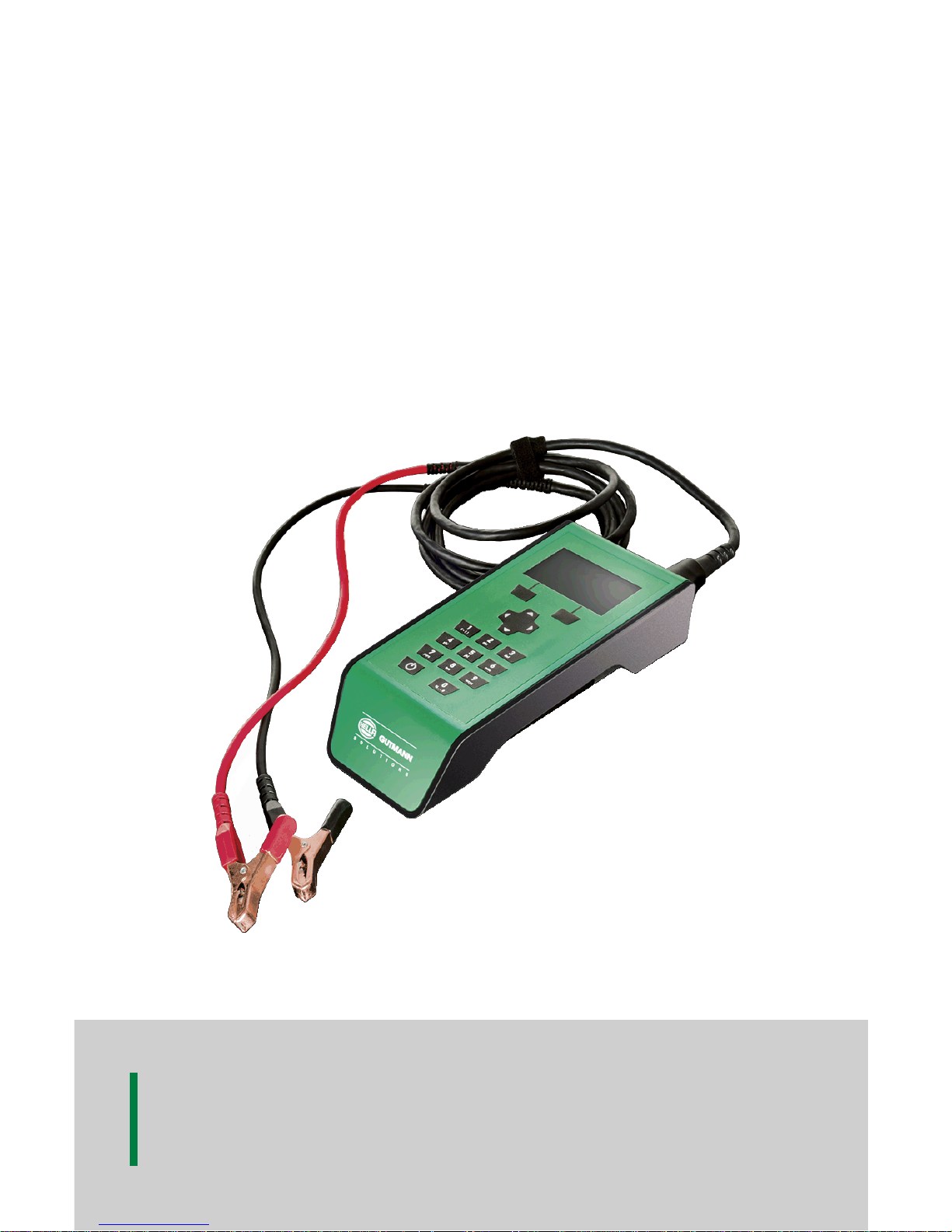
The Battery Power Check Tool (BPC-Tool) is a mobile tool for checking
batteries up to 12 V of all common types and from all standard
manufacturers. The BPC-Tool is connected directly to the battery by the
battery connecting cable. The Bluetooth wireless connection to some Hella
Gutmann diagnostic tools enables the measured data to be transferred to
the Car History. In addition, the battery test can also be carried out using
the diagnostic tool.
You can couple the BPC-Tool to the PC via Bluetooth using the BPC client
App. The BPC client App is a piece of software that can be installed on
Windows-based PCs. As a result, the battery tests and system tests can
be printed out without the diagnostic tool. You can download the BPC
client App for free from the Hella Gutmann homepage.
The BPC client App can exclusively be used on PCs, laptops and tablets
and is not suitable for smartphones.
The BPC-Tool can only be connected to certain Hella Gutmann diagnostic
tools. Diagnostic tools from other manufacturers are not supported.
The BPC-Tool cannot be used to check high-voltage battery modules in
hybrid or electric vehicles.
2.2 Notes for using the Bluetooth function
The terms of use of the Bluetooth function may be restricted or prohibited
through law or corresponding legal regulations in certain countries.
Observe the provisions in force in the respective country before using the
Bluetooth function.
7
Page 8
Product descriptions BPC-Tool
Delivery Contents
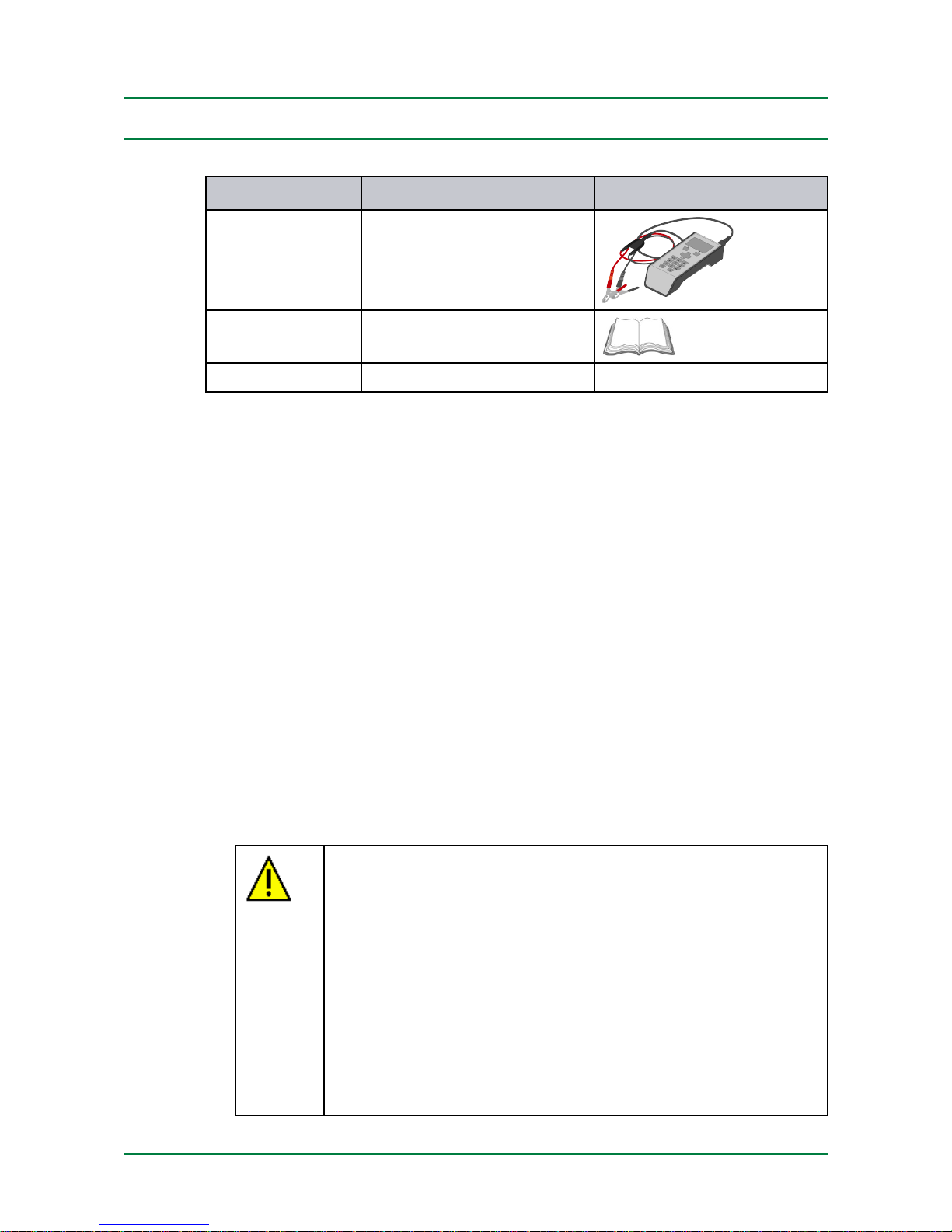
2.3 Delivery Contents
PPiieecceess
DDeessiiggnnaattiioonn
1
BPC-Tool with connecting
cable for battery
1 Operating instructions
1 DVD
2.3.1 Checking Delivery Contents
Please check the delivery contents upon receiving your tool so that
complaints regarding any potential damage can be made immediately.
Proceed as follows to check the delivery contents:
1. Check the package delivered to ensure that it is not damaged.
Should you identify any damage to the package, then open the package
in the presence of the delivery service and check the tool for hidden
damage. Any transport damage to the package supplied and damage
to the tool shall be registered in a damage report by the delivery
service.
2. Open the package supplied and check for completeness based on the
delivery slip.
3. Remove the BPC-Tool from the packaging.
CAUTION
Risk of short circuit due to loose parts in or on the BPCTool
Risk of destruction of the BPC-Tool and/or the vehicle
electronics
Never put the BPC-Tool into operation if you suspect that
there are loose parts in or on the BPC-Tool.
Please immediately contact the Hella Gutmann repair
service or a Hella Gutmann trading partner.
8
Page 9
BPC-Tool Product descriptions
Top
4. Check the BPC-Tool for mechanical damage and shake it lightly to
ensure that there are no loose parts inside.
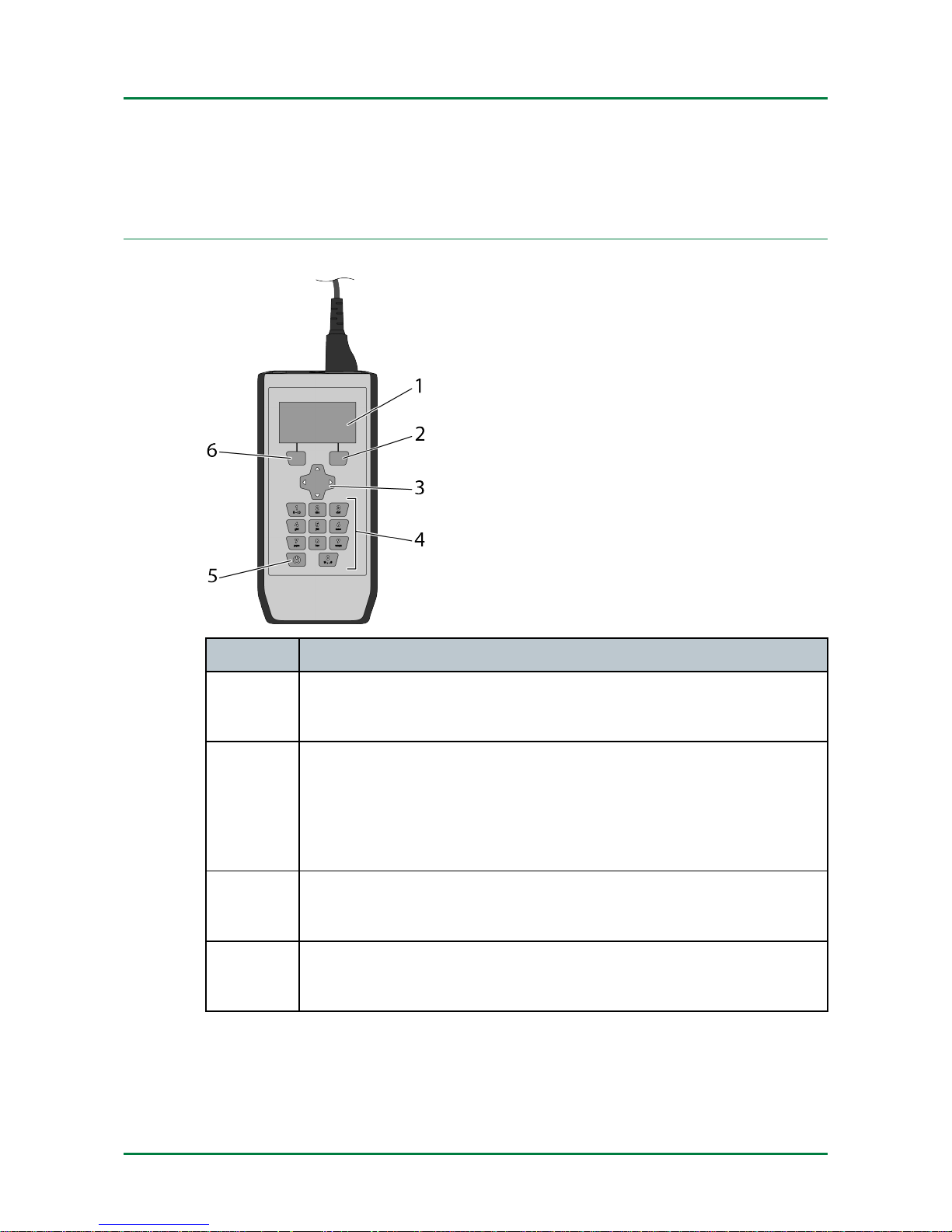
2.4 Top
DDeessiiggnnaattiioonn
1
LC display
Liquid crystal display
2
Function key 1
Here you can confirm a function.
If a function is available, the function type is shown at the
bottom right of the display.
3
Arrow keys
Navigate with the cursor in menus or functions.
4
Alphanumeric keypad
Here you can enter numerical values.
9
Page 10
Product descriptions BPC-Tool
Connectors
DDeessiiggnnaattiioonn
5
On/off key
Here you can switch the BPC-Tool on and off.
6
Function key 2
Here you can confirm a function.
If a function is available, the function type is shown at the
bottom left of the display.
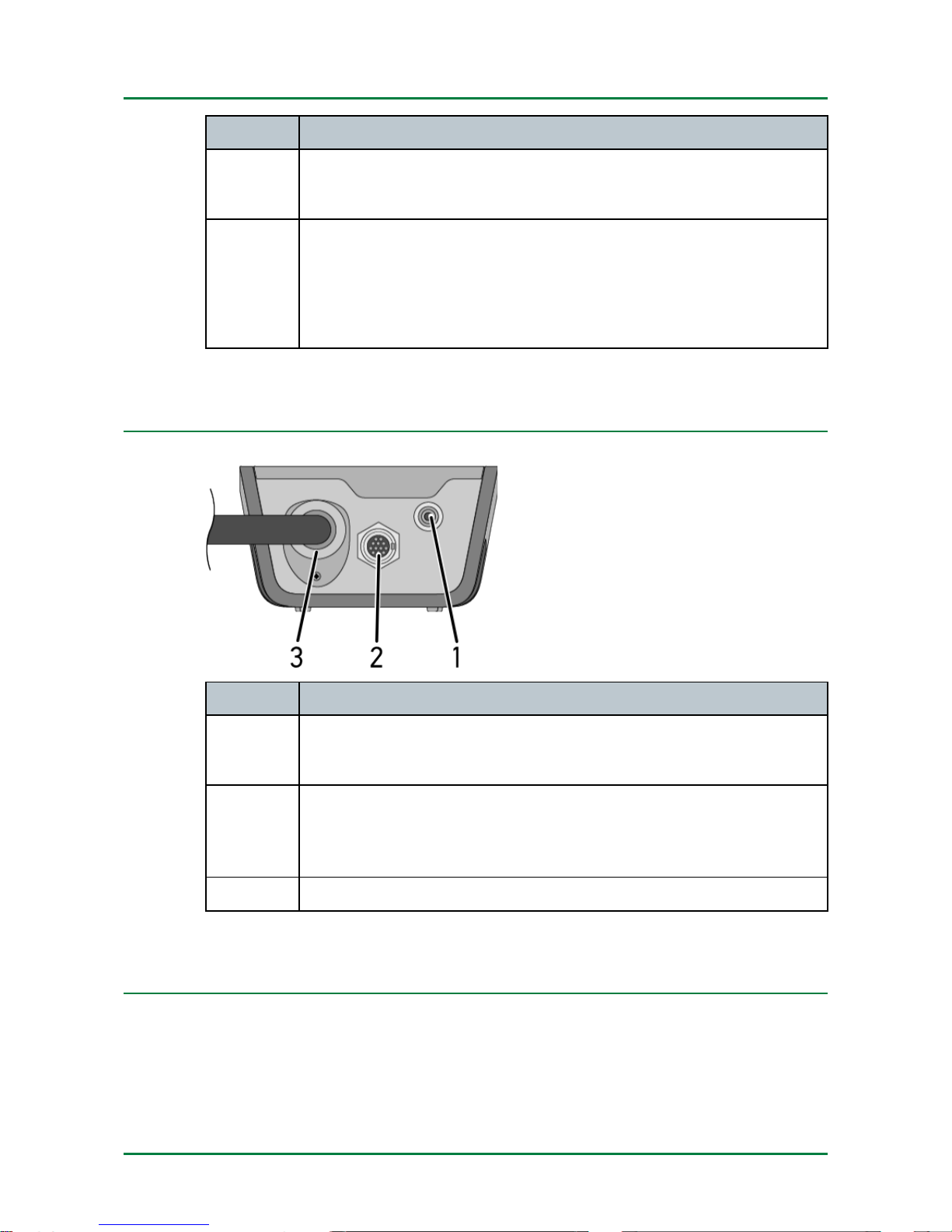
2.5 Connectors
DDeessiiggnnaattiioonn
7
Infrared sensor
Here you can perform temperature measurements.
8 ST3 connection
Here you can connect additional measuring instruments such
as a current clamp.
9
Connecting cable for battery
2.6 Power supply
The BPC-Tool is preferably supplied with power via the connected battery.
If there is no battery connected or if the battery does not provide sufficient
voltage, six 1.5 V AA batteries are used as the voltage source.
10
Page 11
BPC-Tool Product descriptions
Power supply
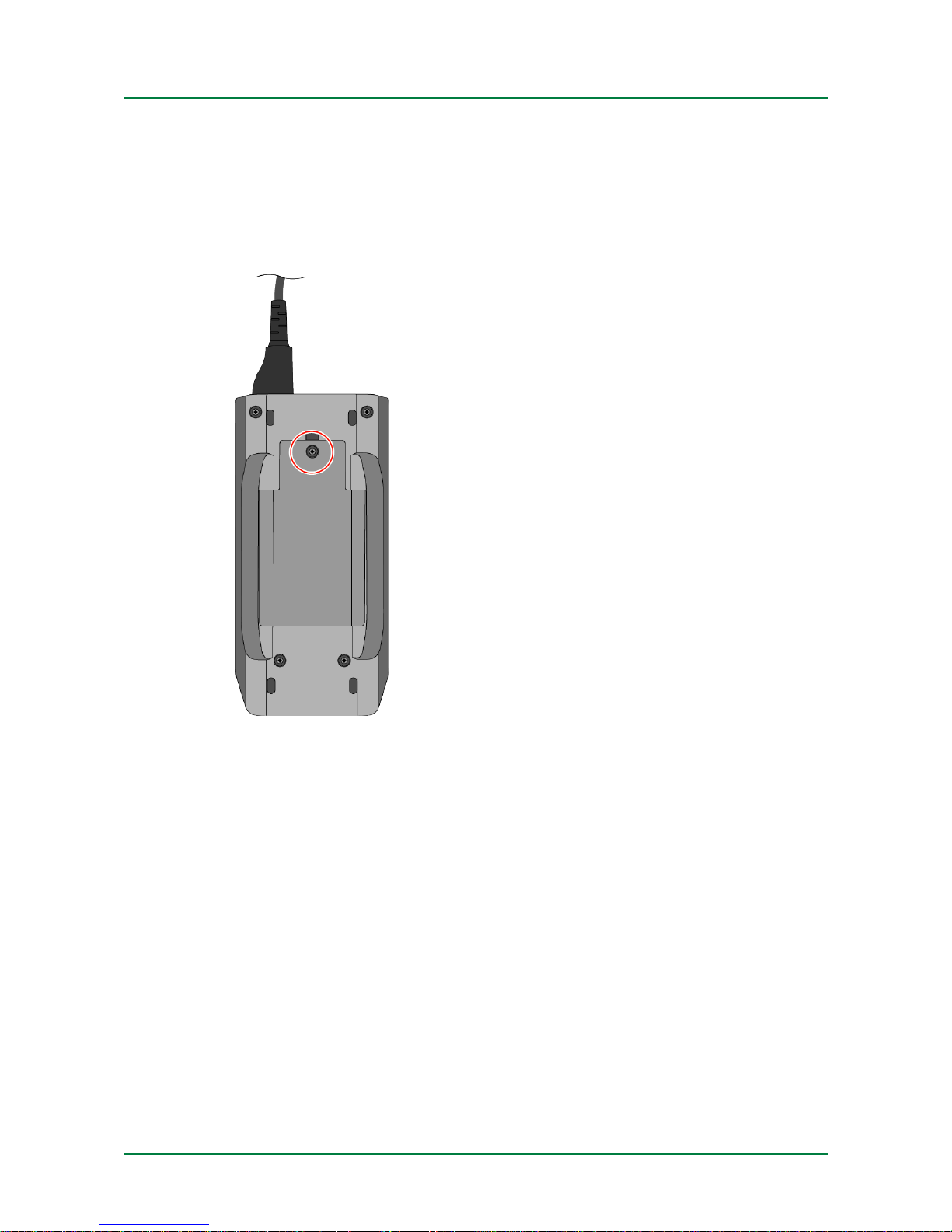
2.6.1 Replacing the Type AA Batteries
To replace type AA batteries:
1. Switch off the BPC-Tool and remove all connecting cables.
2. Remove the screw from the battery compartment cover.
11
Page 12
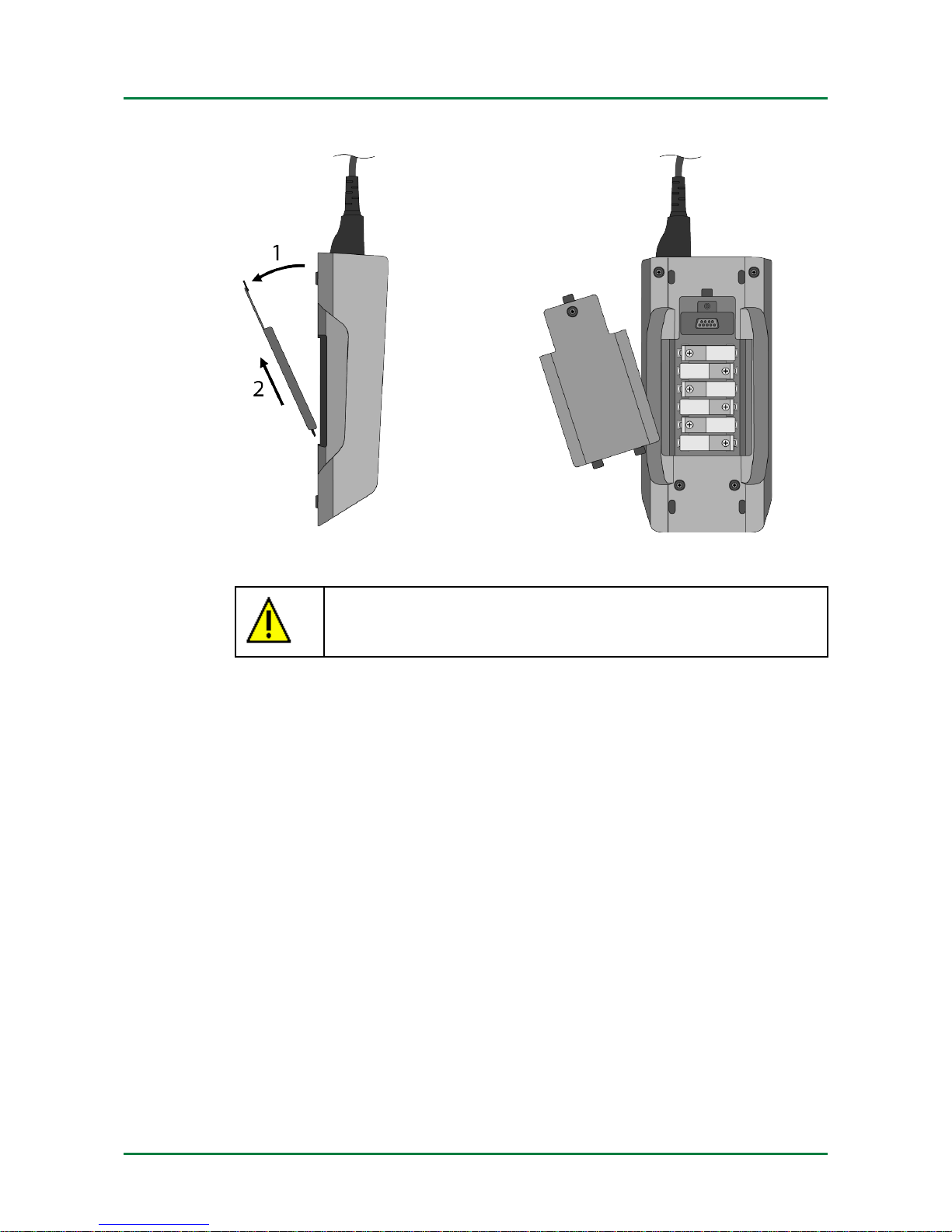
Product descriptions BPC-Tool
Power supply
3. Remove the battery compartment cover with care.
4. Remove the batteries individually.
CAUTION
Pay attention to correct installation direction/polarity
5. Reassembly in reverse order
12
Page 13

BPC-Tool Putting the BPC-Tool into operation
Switching on the BPC-Tool
3 Putting the BPC-Tool into operation
3.1 Switching on the BPC-Tool
To switch on the BPC-Tool:
• Use
to switch on the BPC-Tool.
The BPC-Tool is switched on.
3.2 Switching off the BPC-Tool
To switch off the BPC-Tool:
• Use
to switch off the BPC-Tool.
The BPC-Tool is switched off.
13
Page 14

Configuring the BPC-Tool BPC-Tool
Configuring the time zone
4 Configuring the BPC-Tool
4.1 Configuring the time zone
To configure the time zone:
1. Select
Settings in the main menu and confirm with Select.
2. Select >Time zone<.
3. Use
to select the desired time zone.
The selection is saved automatically.
4. Return to the main menu with Back.
4.2 Setting the Time Format
Proceed as follows to set the time format:
1. Select
Settings in the main menu and confirm with Select.
2. Select >Time format<.
3. Use
to select >24 hours< or >12 hours<.
The selection is saved automatically.
4. Return to the main menu with Back.
4.3 Configuring summer time
To configure summer time:
1. Select
Settings in the main menu and confirm with Select.
2. Select >Summer time<.
3. Use
to select >Activated< or >Deactivated<.
The selection is saved automatically.
4. Return to the main menu with Back.
4.4 Setting the Date Format
Proceed as follows to set the date format:
1. Select
Settings in the main menu and confirm with Select.
2. Select >Date format<.
14
Page 15

BPC-Tool Configuring the BPC-Tool
Configuring the language
3. Use
to select >DD-MM-YYYY< or >MM/DD/YYYY<.
The selection is saved automatically.
4. Return to the main menu with Back.
4.5 Configuring the language
To configure the language:
1. Select
Settings in the main menu and confirm with Select.
2. Select >Language<.
3. Use
to select the desired language.
The selection is saved automatically.
4. Return to the main menu with Back.
4.6 Configuring the temperature units
To configure the temperature units:
1. Select
Settings in the main menu and confirm with Select.
2. Select >Temperature unit<.
3. Use
to select >°C (degrees Celsius)< or >°F (degrees
Fahrenheit)<.
The selection is saved automatically.
4. Return to the main menu with Back.
4.7 Configuring the decimal separator
To configure the decimal separator:
1. Select
Settings in the main menu and confirm with Select.
2. Select >Decimal separator<.
3. Use
to select >, (comma)< or >. (full stop)<.
The selection is saved automatically.
4. Return to the main menu with Back.
15
Page 16

Configuring the BPC-Tool BPC-Tool
Configuring the display contrast
4.8 Configuring the display contrast
To configure the display contrast:
1. Select
Settings in the main menu and confirm with Select.
2. Select >Display contrast<.
3. Use
to select the desired contrast value.
The selection is saved automatically.
4. Return to the main menu with Back.
4.9 Standby time
The period after which the BPC-Tool changes to standby mode is displayed
here. The value is preset ex works and cannot be changed.
4.10 Configuring instructions
Here you can configure whether additional instructions should be
displayed. We recommend that all instructions remain enabled.
To configure instructions:
1. Select
Settings in the main menu and confirm with Select.
2. Select >Instructions<.
3. Use
to select >Activated< or >Deactivated<.
The selection is saved automatically.
4. Return to the main menu with Back.
16
Page 17

BPC-Tool
Service
Calling up product information
5 Service
Here you can call up detailed information on the following functions:
• Product information
• Self-test
• Memory information
You can also perform a factory reset here.
5.1 Calling up product information
Among other things, this includes all information required for
identification of the BPC-Tool.
Proceed as follows to call up product information:
1. In the main menu, select
Service and confirm with Select.
2. Select >Product information< and confirm with Select.
The information window appears. The information here includes the
firmware version and the serial number.
3. Return to the main menu with Back.
5.2 Calling up self-test
Here you can see system parameters, including those of the internal
memory, the internal batteries and Bluetooth.
Proceed as follows to call up the self-test:
1. In the main menu, select
Service and confirm with Select.
2. Select >Self-test< and confirm with Select.
Information including the following appears:
• Battery voltage
• State of charge
• Bluetooth status
3. Return to the main menu with Back.
17
Page 18

Service
BPC-Tool
Calling up memory information
5.3 Calling up memory information
To call up memory information:
1. In the main menu, select
Service and confirm with Select.
2. Select >Memory information< and confirm with Select.
Memory information appears.
3. Return to the main menu with Back.
5.4 Performing a factory reset
Here you can reset the BPC-Tool to its factory settings. All data and files
are reset to their state on delivery if you perform the factory reset.
Proceed as follows to perform a factory reset:
1. In the main menu, select
Service and confirm with Select.
2. Select >Factory reset< and confirm with Select.
3. Observe the confirmation prompt.
4. Confirm the confirmation prompt with Yes.
The BPC-Tool is automatically reset to its state on delivery.
5. Return to the main menu with Back.
18
Page 19

BPC-Tool Working with the BPC-Tool via a diagnostic tool
Preconditions for connecting the BPC-Tool
6 Working with the BPC-Tool via a diagnostic tool
6.1 Preconditions for connecting the BPC-Tool
• Diagnostic tool supports use with BPC-Tool.
6.2 Connection to the diagnostic tool
Proceed as follows to connect the BPC-Tool to a diagnostic tool:
1. Select
Enable connection in the main menu and confirm with
Select.
The Bluetooth symbol is displayed in the header.
2. Confirm the info window with Close.
3. Configure the diagnostic tool for connection to the BPC-Tool according
to the user manual.
The BPC-Tool can now be used via the diagnostic tool.
For a description of how to use the BPC-Tool with a diagnostic tool, see
the documentation of the respective diagnostic tool.
19
Page 20
Working with the BPC-Tool BPC-Tool
Symbols
7 Working with the BPC-Tool
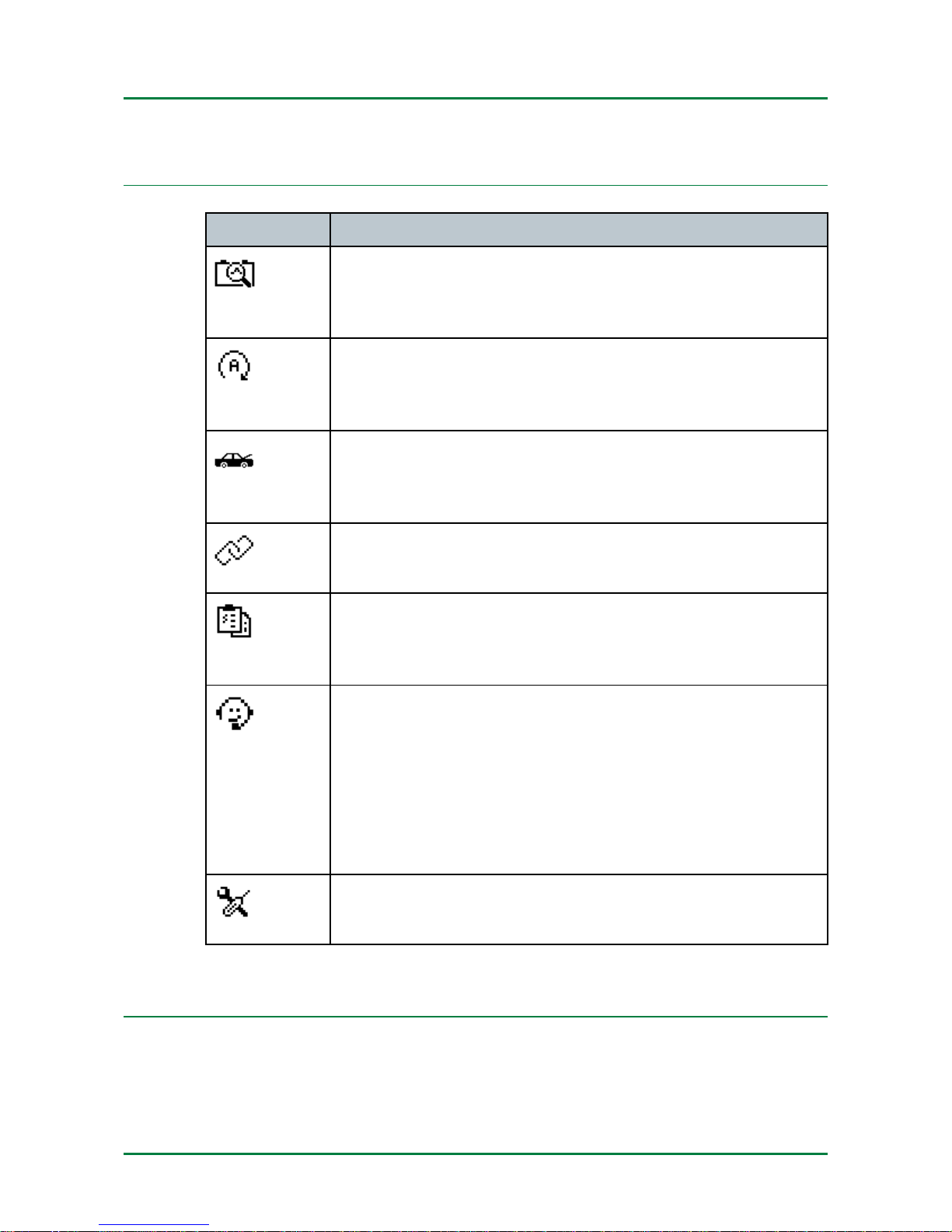
7.1 Symbols
SSyymmbbooll
MMeeaanniinngg
Battery test
Here you can perform a battery test for vehicles without a
start/stop function.
Start/stop test
Here you can perform a battery test for vehicles with a
start/stop function.
System test
Here you can perform a system test for vehicles with or
without a start/stop function.
Enable connection
Here you can enable the Bluetooth connection.
Reports
Here you can view a report on the last battery test or
system test, among other things.
Service
Here you can call up detailed information on the BPCTool, for example:
• Serial number
• Bluetooth status
• Battery test result
Settings
Here you can configure the BPC-Tool.
7.2 Connecting the BPC-Tool to the battery
7.2.1 Preconditions for battery test
Ensure the following in order to perform a battery test:
20
Page 21
BPC-Tool Working with the BPC-Tool
Connecting the BPC-Tool to the battery
• Parking brake pulled
• Park position also engaged in automatic vehicles.
• Protect vehicle against rolling away.
• Battery in perfect state of maintenance.
7.2.2 Connecting the terminal clamps
CAUTION
Overvoltage
Fire hazard/risk of destruction of the BPC-Tool and its
surroundings
Comply with the maximum permitted voltage load of the
BPC-Tool:
• Direct voltage: 35 V
NOTE
When the battery has been removed from the vehicle, ensure
the following:
• Always use lifting gear or a strap to lift the battery.
To connect terminal clamps to the battery:
1. Connect the red terminal clamp to the positive terminal (+).
2. Connect the black terminal clamp to the negative terminal (–).
If the terminal clamps have been connected to the battery incorrectly,
the following text is displayed: Incorrect polarity of terminal clamps,
connect red to positive terminal (+) and black to negative terminal (-).
3. If the terminal clamps have been connected incorrectly, repeat steps 1
+ 2.
If it is not possible to perform a battery test, the following texts are
displayed: Bad terminal clamp connection or cable problem. Check
terminal clampsor Unstable battery detected. Check terminal clamp
connection.
4. If battery testing is not possible, remove the terminal clamps, clean the
pins and reconnect the terminal clamps.
21
Page 22
Working with the BPC-Tool BPC-Tool
Performing a battery test
7.3 Performing a battery test
NOTE
The BPC-Tool can display additional instruction texts on
request. To view additional instruction texts run through
steps 1–4 as described underConfiguring instructions
(Page 16).
Proceed as follows to perform the battery test:
1. In the main menu, select
Battery test and confirm with Select.
2. Select the battery position and confirm with Next.
3. Select the battery type and confirm with Next.
4. Select additional subitems if required.
5. Select the battery standard and confirm with Next.
6. Enter the cold cranking amps and confirm with Next.
7. Select additional subitems if required.
8. Direct the front of the BPC-Tool at the battery.
9. Confirm the temperature display with Next.
The message Perform battery test for discharged battery? appears if
the battery is flat.
Compared to the simple battery test, the battery test for discharged
batteries performs additional tests so that the battery can be quickly
and reliably evaluated despite low voltage.
10. If necessary, perform the battery test for discharged batteries with
Yes.
Alternatively, you can choose not to perform a battery test for
discharged batteries by selecting No. In this case, a simple battery test
is performed.
22
Page 23

BPC-Tool Working with the BPC-Tool
Performing a start/stop test
11. Follow the on-screen instructions.
Battery test is performed. The battery test result appears.
If the battery test was successful, the following appears:
• Good - recharge.
Allow the battery to charge and put back into operation.
• Battery OK.
Put battery back into operation.
• Cell defective, replace battery.
Replace battery and test it again, if necessary.
• Replace the battery.
Replace battery and test it again, if necessary.
This message may also be displayed if the terminal contact with
the battery is insufficient, for example. In this case, disconnect the
battery and test it again by selecting >Outside the vehicle<.
12. Return to the main menu with Next.
7.4 Performing a start/stop test
NOTE
The BPC-Tool can display additional instruction texts on
request. To view additional instruction texts run through
steps 1–4 as described underConfiguring instructions
(Page 16).
Proceed as follows to perform the start/stop test:
1. In the main menu, select
Start/stop test and confirm with Select.
2. Run through steps 2–10 as described in the section headed
Performing a battery test (Page 22).
23
Page 24

Working with the BPC-Tool BPC-Tool
Performing a system test
3. Follow the on-screen instructions.
The start/stop test is performed. The result of the start/stop test is
displayed.
If the start/stop test was successful, the following appears:
• Charge and test again.
Allow the battery to charge completely and test it again.
• Good - recharge.
Allow the battery to charge and put back into operation.
• Battery OK.
Put battery back into operation.
• Cell defective, replace battery.
Replace battery and test it again, if necessary.
• Replace the battery.
Replace battery and test it again, if necessary.
This message may also be displayed if the terminal contact with
the battery is insufficient, for example. In this case, disconnect the
battery and test it again by selecting >Outside the vehicle<.
4. Return to the main menu with Next.
7.5 Performing a system test
If the BPC-Tool is connected to a Hella Gutmann diagnostic tool, software
version 47 or higher must be installed on the diagnostic tool in order to
perform the system test.
The following tests are performed consecutively by the BPC-Tool during
the system test:
• Battery test
• Starter test
• Alternator test
• Resistor test
24
Page 25

BPC-Tool Working with the BPC-Tool
Performing a system test
NOTE
A blue current clamp (CP 700) is required for a complete
system test. Without a current clamp, the current intensity is
not measured during the starter and alternator tests. The
resistor test is not applicable at all.
NOTE
The BPC-Tool can display additional instruction texts on
request. To view additional instruction texts run through
steps 1–4 as described underConfiguring instructions
(Page 16).
Proceed as follows to perform the system test:
1. Insert the electrical connector of the current clamp into the ST3
connection of the BPC-Tool with the arrow pointing down.
2. In the main menu, select
System test and confirm with Select.
3. Select the vehicle type and confirm with Next.
4. Run through steps 3–10 as described in the section headed
Performing a battery test (Page 22).
5. Follow the on-screen instructions.
The system test is carried out. The battery test result appears.
If the battery test was successful, the following appears:
• Charge and test again.
Allow the battery to charge completely and test it again.
• Good - recharge.
Allow the battery to charge and put back into operation.
• Battery OK.
Put battery back into operation.
• Cell defective, replace battery.
Replace battery and test it again, if necessary.
This message may also be displayed if the terminal contact with
the battery is insufficient, for example. In this case, disconnect the
battery and test it again by selecting >Outside the vehicle<.
6. Continue the system test with the starter test with Next.
25
Page 26

Working with the BPC-Tool BPC-Tool
Reports
7. Follow the on-screen instructions and confirm with Next.
The starter test results appear.
8. Continue the system test with the resistor test with Next.
9. Follow the on-screen instructions and confirm with Next.
The resistor test result appears.
10. Continue the system test with Next.
A summary of the system test appears.
11. Return to the main menu with End.
7.6 Reports
The following reports can be displayed here:
• Result of the last battery test
• Statistics of all battery tests
7.6.1 Calling up the battery test result
Proceed as follows to call up the last battery test result:
1. In the main menu, select
Reports and confirm with Select.
2. Select >Battery test result< and confirm with Select.
The last battery test result is displayed.
3. Return to the main menu with Back.
7.6.2 Calling up the battery test statistics
To call up the battery test statistics:
1. In the main menu, select
Reports and confirm with Select.
2. Select >Batt.test statistics< and confirm with Select.
The battery test statistics are displayed.
3. Return to the main menu with Back.
7.6.3 Calling up the system test result
To call up the last system test result:
26
Page 27

BPC-Tool Working with the BPC-Tool
Reports
1. In the main menu, select
Reports and confirm with Select.
2. Select >System test result< and confirm with Select.
The last system test result is displayed.
3. Return to the main menu with Back.
7.6.4 Calling up the system test statistics
To call up the system test statistics:
1. In the main menu, select
Reports and confirm with Select.
2. Select >Syst.test statistics< and confirm with Select.
The system statistics appear.
3. Return to the main menu with Back.
7.6.5 Deleting statistics
To delete test statistics:
1. In the main menu, select
Reports and confirm with Select.
2. Select >Batt.test statistics< or >Syst.test statistics< and confirm
with Select.
3. Use Delete to delete the test statistics.
4. Observe the confirmation prompt.
5. Confirm the confirmation prompt with Yes.
The test statistics are deleted.
6. Return to the main menu with Back.
27
Page 28

BPC client App BPC-Tool
Installation
8 BPC client App
The BPC client App makes it possible to use the BPC-Tool as a standalone tool. The BPC client App provides the following functions:
• Assigning the BPC-Tool
• Updating the BPC-Tool
• Printing the battery test result
• Printing the system test result
8.1 Installation
8.1.1 System requirements
• At least 128 MB free internal memory (RAM)
• At least 75 MB free hard disc space
• At least 1 free USB port at the PC
• Windows administrator rights (for installation)
8.1.2 Supported operating systems
• Microsoft Windows Vista or higher
• Microsoft Windows 7 or higher
• Microsoft Internet Explorer 8 or higher
8.1.3 Installing the BPC client App
An installation wizard guides you through the necessary steps.
Proceed as follows to install the BPC client App:
1. Switch on the PC.
2. Bring up the Hella Gutmann homepage.
3. Select BPC-Tool under Tools.
4. Select the >BPC client App< tab.
The HGS Update Service window is displayed.
5. Select the >Software< tab.
28
Page 29

BPC-Tool BPC client App
Installation
6. Install the BPC client App using .
The BPC client App Setup window is displayed.
7. Click >Next<.
The general terms and conditions appear.
8. Read the general terms and conditions and confirm them at the end of
the text.
9. Click >Next<.
A drop-down list appears.
A target directory for the BPC client App files is suggested. If you wish
to have another target directory then use the >Select...< function to
select a suitable directory. At the end of installation, the files will be
copied into the selected target directory.
10. Click >Next<.
11. Click >Install<.
If the programme Microsoft Visual C++ is not installed on the PC, the
GTCs for Microsoft Visual C++ are displayed.
12. Read and confirm the Microsoft Visual C++ GTCs if necessary.
13. Click >Install<.
The Microsoft Visual C++ installation is started.
14. Wait until the installation is finished.
15. Click >Close<.
The Microsoft Visual C++ installation is finished.
The BPC client App installation is started.
16. If necessary, confirm the Windows safety precautions for installation.
17. Wait until the installation is finished.
18. Click >Finish<.
Files are copied to the selected target directory.
This concludes the installation of the BPC client App.
29
Page 30
BPC client App BPC-Tool
Putting the BPC client App into operation
8.2 Putting the BPC client App into operation
8.2.1 Connecting to the PC
NOTE
The BPC client App must always be connected via Bluetooth
to the PC on which the BPC client App is being used and to
the BPC-Tool.
The BPC client App contains software components. Certain functions of
the BPC client App therefore require a connection to Bluetooth.
8.2.2 Executing the BPC client App
NOTE
When starting the app for the first time, the BPC client App
must be coupled via Bluetooth. This required the BPC client
App to be connected to the Bluetooth adapter.
Proceed as follows to execute the BPC client App:
1. Activate the Bluetooth function of the PC or insert the Bluetooth
adapter into the USB port of the PC.
2. Go to Start > All Programmes > Hella Gutmann Solutions and
selectBPC client App.
The BPC client App is started.
File
Settings
Help
8.2.3 Closing the BPC client App
Proceed as follows to close the BPC client App:
• Close the BPC client App under File > Close.
30
Page 31
BPC-Tool BPC client App
Configuring the BPC client App
8.3 Configuring the BPC client App
8.3.1 Configuring the language
Here you can set the language version if the software is multilingual. After
having set the language, the BPC client App is displayed in this language.
To configure the language:
1. Select Language under > Settings.
The selection of languages depends on the specific software.
2. Select the required language.
The selection is saved automatically.
8.3.2 Entering the workshop data
Proceed as follows to enter company or workshop data:
1. Select Workshop data under > Settings.
2. Enter the company name under Company.
3. Repeat step 2 to make more entries.
4. Confirm your entry with >OK<.
Inputs are saved automatically.
8.3.3 Printing with a standard PC printer
Here you can set the default printer for printing with the PC.
If there is no additional printer connected to the tool, it is possible to print
with the printer of a PC system. This requires a connection between the
tool and the PC. The connection to the PC can be established via the USB
port, Ethernet, Bluetooth, WLAN or UMTS.
NOTE
If the default printer is not selected, you are prompted to
select a printer when a print job is submitted.
To print to the default printer:
• Activate Use default printer under > Settings.
A blue check mark is set in front of >Use default printer<.
31
Page 32

BPC client App BPC-Tool
Working with the BPC client App
Now you can start printing via the PC.
8.4 Working with the BPC client App
8.4.1 Searching for the BPC-Tool
To search for BPC-Tool:
1. Activate the Bluetooth function of the PC or insert the Bluetooth
adapter into the USB port of the PC.
2. Switch on the BPC-Tool und connect it to the Bluetooth adapter.
3. Select Search for BPC-Tool under > Settings.
The connection to the BPC-Tool is established.
The connection to the BPC-Tool via the tool is established correctly if
the text BPC-Tool found and saved is displayed.
4. Confirm the info window with >OK<.
The selection is saved automatically.
In the bottom toolbar, the selected serial number of the BPC-Tool is
displayed, such as BPC-Tool: BPC_0814200xxx — 00:06:66:xx:
xx:Ax
8.4.2 Starting a BPC Tool update
NOTICE
Insufficient voltage supply
System data loss
Do not switch off the tool and the BPC-Tool during the update
and do not disconnect them from the voltage supply.
Ensure sufficient voltage supply.
Proceed as follows to start the BPC Tool update:
1. Connect the BPC-Tool to the battery.
2. Select Update BPC-Tool under > Settings.
If the most recent version is installed on the BPC-Tool, the following
text is displayed: Software already up to date.
32
Page 33
BPC-Tool BPC client App
Working with the BPC client App
The BPC Tool update starts.
The tool searches for a new update that is then downloaded and installed.
8.4.3 Printing the battery test result
Proceed as follows to print battery test result:
1. Print the battery test result using .
The Enter additional data window is displayed.
Customer Data
Name:
Street/no.:
Postal code/city:
Vehicle data
Vehicle:
Engine code:
Model year:
Kilometrage:
VIN:
Inspector:
Customer data can be entered here.
NOTE
If customer data is entered, it is not saved. Following a
BPC client App restart, any customer data that may have
been entered previously is deleted.
2. Enter the customer data if necessary.
3. Confirm entries using >OK<.
NOTE
If the default printer has not been activated in the settings,
you are prompted to select a printer when a print job is
submitted.
4. Select and confirm the desired printer if necessary.
33
Page 34

BPC client App BPC-Tool
Working with the BPC client App
The progress bar is displayed.
The battery test result is printed.
34
Page 35

BPC-Tool BPC client App
Working with the BPC client App
Workshop data
Date
Customer Data
Vehicle data
Battery diagnostics
Test parameters
Determined values
Battery position
: xxx
Voltage [V]
: xxx
Temperature
measurement
: xxx
Cold cranking amps
[A]
: xxx
Battery type
: xxx
Temperature [°C]
: xxx
Battery standard
: xxx
Cold cranking amps
[A]
: xxx
Battery test
Battery OK. Recharge the battery.
Battery state of charge (xx)
75 %
Battery state of health (xx)
8.4.4 Printing the system test result
Proceed as follows to print system test result:
35
Page 36
BPC client App BPC-Tool
Working with the BPC client App
1. Print the system test result using .
The Enter additional data window is displayed.
Customer Data
Name:
Street/no.:
Postal code/city:
Vehicle data
Vehicle:
Engine code:
Model year:
Kilometrage:
VIN:
Inspector:
Customer data can be entered here.
NOTE
The customer data is not saved. Following a BPC client
App restart, any customer data entered previously is no
longer available.
2. Enter the customer data if necessary.
3. Confirm entries using >OK<.
NOTE
If the default printer has not been activated in the settings,
you are prompted to select a printer when a print job is
submitted.
4. Select and confirm the desired printer if necessary.
The progress bar is displayed.
The system test result is printed.
36
Page 37

BPC-Tool BPC client App
Working with the BPC client App
Workshop data
Date
Customer Data
Vehicle data
Battery diagnostics
Test parameters
Determined values
Battery position
: xxx
Voltage [V]
: xxx
Temperature
measurement
: xxx
Cold cranking amps
[A]
: xxx
Battery type
: xxx
Temperature [°C]
: xxx
Battery standard
: xxx
Cold cranking amps
[A]
: xxx
Battery test
Battery OK. Recharge the battery.
Battery state of charge (xx)
75 %
Battery state of health (xx)
37
Page 38

BPC client App BPC-Tool
Working with the BPC client App
Starter test
Voltage [V]
: xxx
Current [A]
: xxx
Time [s]
: xxx
Resistor [mOhm]
: xxx
Battery starting voltage OK
Alternator test
Power consumer switched
off.
Power consumer switched
on.
Voltage [V]
: xxx
Voltage [V]
: xxx
Current [A]
: xxx
Current [A]
: xxx
Charging voltage OK
Power consumer switched
off.
Power consumer switched
on.
Resistor test
No-load current [A]
-1.30
The waiting time until all installed ECUs are in energy saving mode
varies depending on manufacturer and model.
38
Page 39
BPC-Tool General information
Problem solutions
9 General information
9.1 Problem solutions
The following list will help you to solve minor problems yourself. Select
the relevant problem description and check and perform the steps listed
under Solution in sequence as necessary until the problem is solved.
Problematic case Solution
BPC-Tool does not boot.
• Press the on/off button.
• Check the connection of the
connecting cable to the BPCTool and the battery.
• Charge the battery.
• Replace the type AA batteries in
the BPC-Tool.
9.2 Care and maintenance
• Like every tool, the BPC-Tool must be handled with care.
• Regularly clean the BPC-Tool with non-aggressive cleaning agents.
• Use commercial household cleaning detergents and a moistened, soft
cleaning cloth.
• Replace damaged cables/accessories immediately.
• Always use original spare parts.
9.3 Disposal
NOTE
The guidelines listed here are exclusively valid within the
European Union.
In compliance with Directive 2012/19/EU of the European Parliament and
Council of 4 July 2012 relating to Waste Electrical and Electronic
Equipment (WEEE), and the German national statute governing the
distribution, return and environmental disposal of electrical and electronic
39
Page 40
General information BPC-Tool
BPC-Tool technical data
equipment (Electrical and Electronic Equipment Act – ElektroG) of 16
March 2005, we are obliged to take back this tool, distributed by us after
13.08.2005, at the end of its service life free of charge and to dispose of it
in accordance with the above-mentioned directives.
Since, in the case of the present device, this relates to exclusively
commercially used equipment (B2B), it must not be handed over to a
public disposal facility.
The tool can be disposed of at the following address (specifying the date of
purchase and the device numbers):
Hella Gutmann Solutions GmbH
Am Krebsbach 2
79241 Ihringen
GERMANY
WEEE reg. no.: DE25419042
Phone: +49 7668 9900-0
Fax: +49 7668 9900-3999
E-mail: [email protected]
NOTE
Batteries contain toxic substances. Therefore, do not throw
used batteries into household waste but dispose of them
properly.
The batteries can also be sent to Hella Gutmann for disposal
free of charge.
9.4 BPC-Tool technical data
General data
Supply voltage
10–15 V
Battery measuring
range
1.5–16 V
Batteries 6x 1.5 V AA
Ambient temperature Working range: 0 - 50°C
Dimensions
60 x 110 x 231 mm (H x W x D)
40
Page 41

BPC-Tool General information
BPC-Tool technical data
Interfaces
1x ST3
Bluetooth class 1 (max. 3 Mbit/s)
Operating range
Inside: max. 10 m
Outside: max. 20 m
41
Page 42

Notes
BPC-Tool
Notes
42
Page 43

BPC-Tool
Notes
Notes
43
Page 44

HELLA GUTMANN SOLUTIONS GMBH
Am Krebsbach 2
79241 Ihringen
GERMANY
Phone: +49 7668 9900–0
Fax: +49 7668 9900–3999
[email protected]
www.hella-gutmann.com
© 2016 HELLA GUTMANN SOLUTIONS GMBH
1 STUECK/PIECE(S)
*9XQ 460 988-171*
9XQ 460 988-171
Made in Germany
 Loading...