

Page 1
easy
Controls 3.0
Helios Ventilatoren
FUNKTIONS- UND SCHNITTSTELLENBESCHREIBUNG
FUNCTIONAL AND INTERFACE DESCRIPTION
DE
EN
LISTE DES VARIABLES
Gebäudeleittechnik-Schnittstelle
Building Control System Interface
Interface GTC
FR
easyControls 3.0 - Modbus RTU
Page 2

DEUTSCH
Helios Ventilatoren
FUNKTIONS- UND SCHNITTSTELLENBESCHREIBUNG
INHALTSVERZEICHNIS
KAPITEL 1 ALLGEMEINE INFORMATIONEN ������������������������������������������������������������������������������������������������������������������� SEITE 1
1.1 Wichtige Informationen ........................................................................................................................................ Seite 1
1.2 Warnhinweise ..................................................................................................................................................... Seite 1
1.3 Sicherheitshinweise ............................................................................................................................................. Seite 1
KAPITEL 2 VARIABLEN ������������������������������������������������������������������������������������������������������������������������������������������ SEITE 1
2.1 Modbus-Parameter ............................................................................................................................................ Seite 1
2.1.1 Priorität der Profile ........................................................................................................................................ Seite 1
2.1.2 Prioritäts-Reihenfolge ................................................................................................................................... Seite 1
2.1.3 Unterstützte Funktionscodes im Modbus RTU.............................................................................................. Seite 1
2.1.4 Modbus Default-Einstellung des Gerätes ...................................................................................................... Seite 1
2.1.5 Geräte-Adressen .......................................................................................................................................... Seite 2
2.2 Anschluss ........................................................................................................................................................... Seite 4
KAPITEL 3 SONSTIGES/HINWEISE ���������������������������������������������������������������������������������������������������������������������� SEITE 4
Page 3
Funktionsbeschreibung
KAPITEL 1
ALLGEMEINE
INFORMATIONEN
GEFAHR
m
GEFAHR
m
WARNUNG
m
VORSICHT
m
ACHTUNG
easyControls 3.0-Modbus RTU
1�1 Wichtige Informationen
Zur Sicherstellung einer einwandfreien Funktion und zur eigenen Sicherheit sind alle nachstehenden Vorschriften genau
durchzulesen und zu beachten. Dieses Dokument ist Teil des Produktes und als solches zugänglich aufzubewahren. Nach der
Inbetriebnahme muss dem Betreiber das Dokument ausgehändigt werden.
Der Elektroanschluss muss bis zur endgültigen Montage allpolig vom Netz getrennt sein!
m
Dieses Gerät ist nicht für den Gebrauch durch Personen (einschließlich Kinder) mit eingeschränkter körperlicher, sensorischer oder geistiger Leistungsfähigkeit oder mangelnder Erfahrung und Kenntnis bestimmt, es
sei denn, sie wurden von einer für ihre Sicherheit verantwortlichen Person beaufsichtigt oder unterwiesen�
Kinder sollten beaufsichtigt werden, um sicherzustellen, dass sie nicht mit dem Gerät spielen�
1�2 Warnhinweise
Nebenstehendes Symbol ist ein sicherheitstechnischer Warnhinweis� Alle Sicherheitsvorschriften bzw� Symbole müssen unbedingt beachtet werden, damit jegliche Gefahrensituation vermieden wird�
GEFAHR
m
Warnung vor Gefahren, die bei Missachtung der Maßnahmen unmittelbar zu Tod oder schweren Verletzungen führen.
WARNUNG
m
Warnung vor Gefahren, die bei Missachtung der Maßnahmen zu Tod oder schweren Verletzungen führen können.
VORSICHT
m
Warnung vor Gefahren, die bei Missachtung der Maßnahmen zu Verletzungen führen können.
ACHTUNG
Warnung vor Gefahren, die bei Missachtung der Maßnahmen zu Sachschäden führen können.
DE
KAPITEL 2
VARIABLEN
HINWEIS
1�3 Sicherheitshinweise
Für Einsatz, Anschluss, Betrieb, Transport und Wartung gelten besondere Bestimmungen; bei Zweifel ist Rückfrage erforderlich. Weitere Informationen sind den einschlägigen Normen und Gesetzestexten zu entnehmen.
2�1 Modbus-Parameter
2�1�1 Priorität der Profile
Ist gleichzeitig mehr als ein Profil aktiv, dann überschreibt das Profil mit der höheren Priorität das Profil mit der niedrigeren.
Beispiel:
Profile Individuell und Stoßlüftung sind beide zur gleichen Zeit aktiv => aufgrund der höheren Priorität überschreibt das
Profil Individuell die Stoßlüftung.
2�1�2 Prioritäts-Reihenfolge
• Profil Timer konfigurierbarer Eingang (ist digitalen Eingängen zugeordnet)
• Profil Individuell
• Profil Stoßlüftung
• Profil Anwesend/Abwesend
2�1�3 Unterstützte Funktionscodes im Modbus RTU
Modbus (RTU) Holding Register sind 16 Bit lang (unsigned word).
• FC 03h: FCODE_READ_HOLDING_REGISTERS
Auslesen von Setup-Werten und Konfigurationsparametern
• FC 10h: FCODE_WRITE_HOLDING_REGISTERS
Schreiben von Setup-Werten und Konfigurationsparametern
• FC 06h: FCODE_WRITE_SINGLE_REGISTER
Schreiben einzelner Setup-Werte und Konfigurationsparameter
2�1�4 Modbus Default-Einstellung des Gerätes
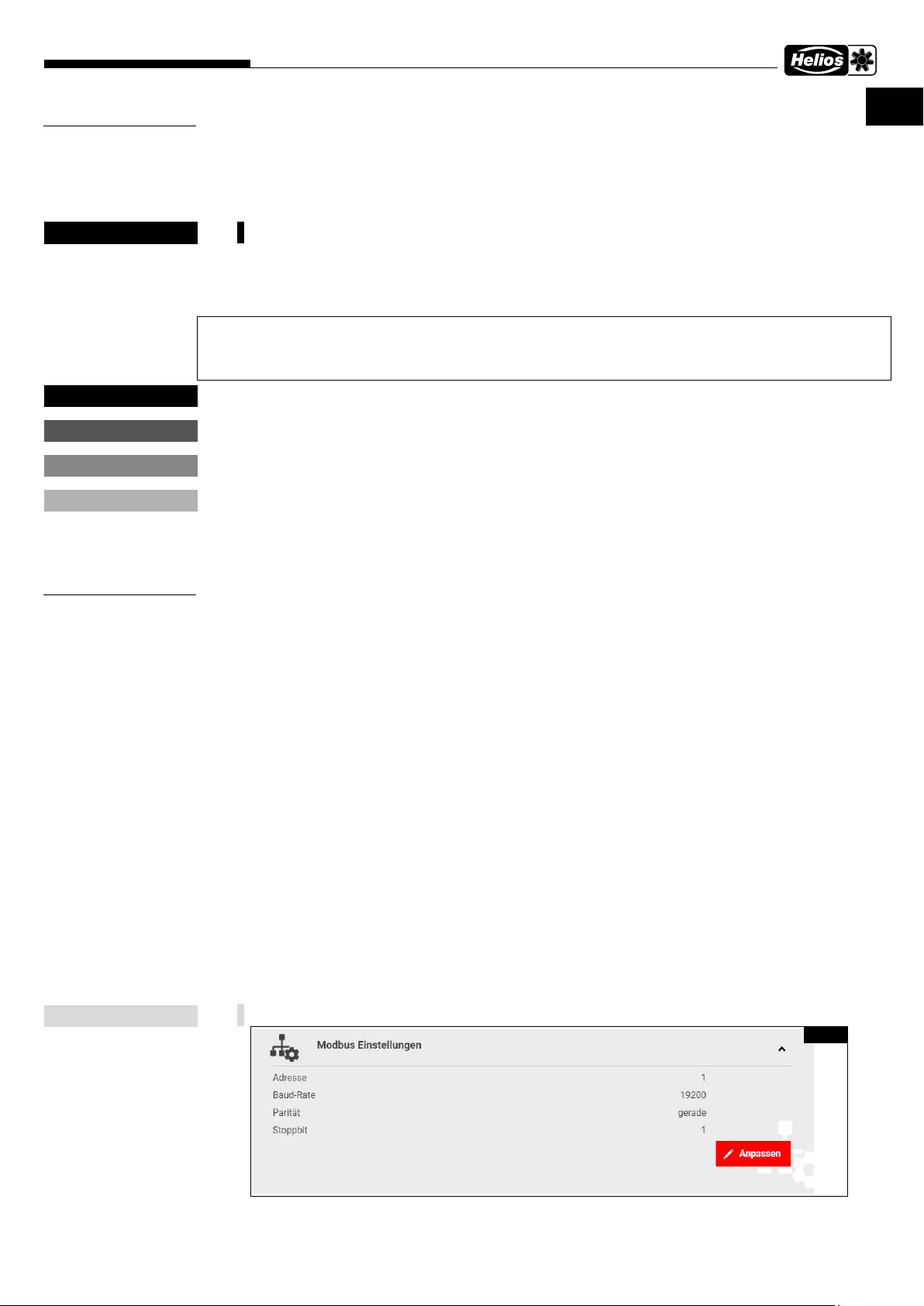
Die Modbus Defaultwerte (Abb� 1) können über KWL-BE Touch oder im internen Webserver geändert werden�
Abb. 1
1
Page 4
Funktionsbeschreibung
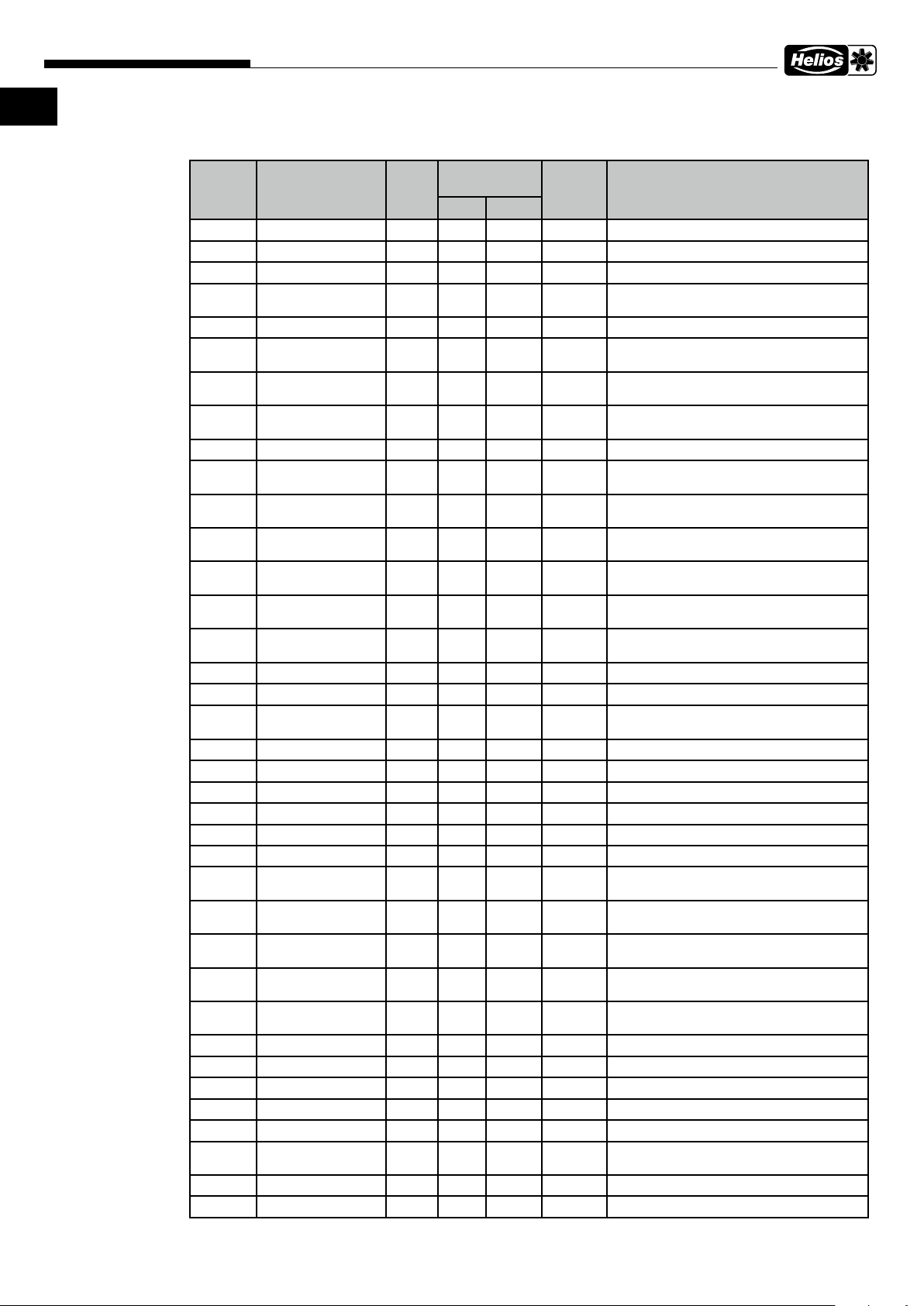
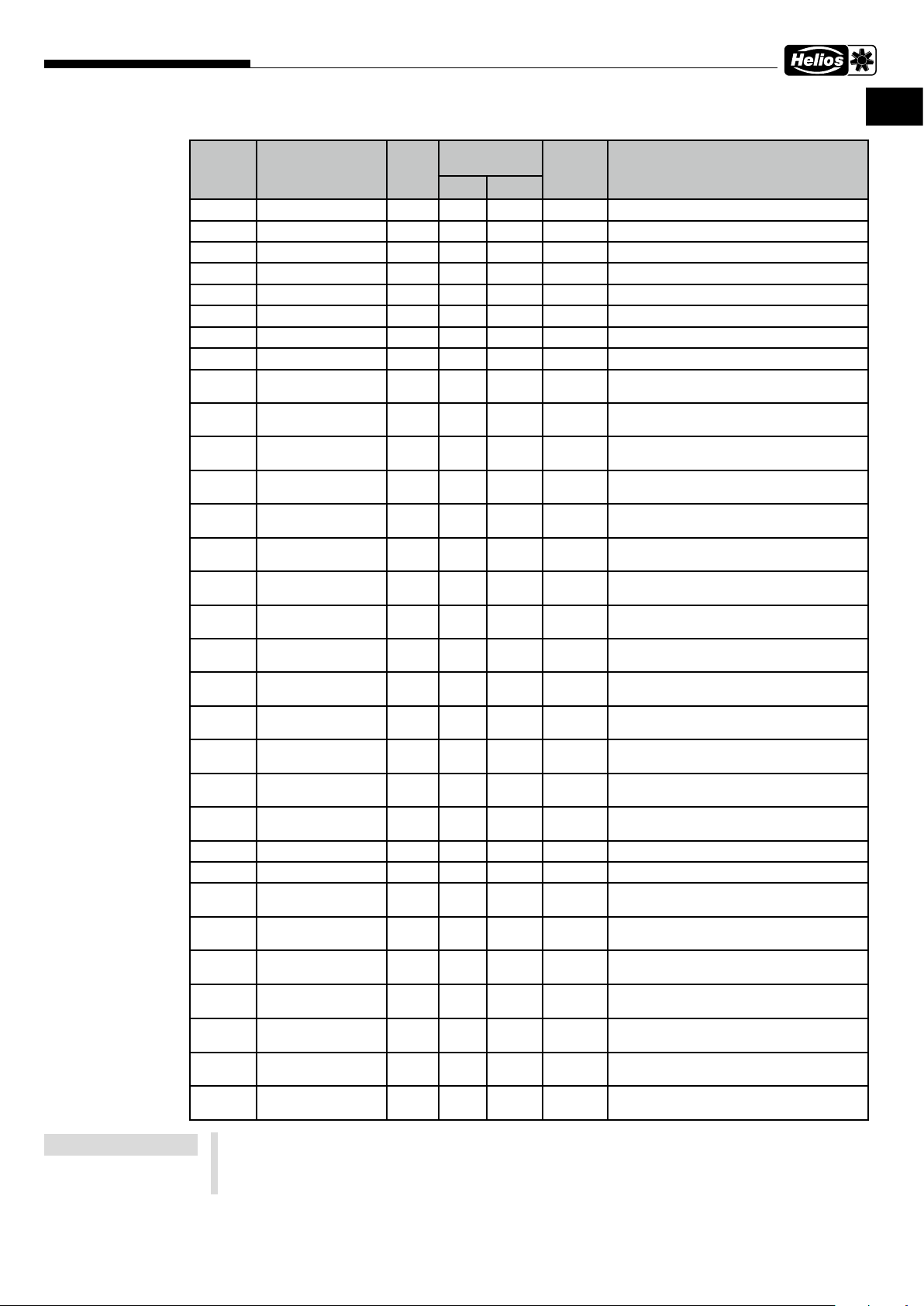
2�1�5 Geräte-Adressen
easyControls 3.0-Modbus RTU
Externer Modbus (Master): 19200-8-E-1 Lüftungsgerät (Slave): 1
Adresse Variablenname R/RW Gültigkeitsbe-
reich
min max
4353 FAN_SPEED R 0 100 % Aktuelle Ventilatorleistung
4354 TEMP_EXTRACT_AIR R 21000 33224 cK Ablufttemperatur
4355 TEMP_EXHAUST_AIR R 21000 33224 cK Fortlufttemperatur
4356 TEMP_OUTDOOR_
AIR
4358 TEMP_SUPPLY_AIR R 21000 33224 cK Zulufttemperatur
4363 RH_VALUE R 0 100 RH% Relative Feuchte, höchster Messwert, 0 =
4364 CO2_VALUE R 0 10000 PPM CO2/VOC, höchster Messwert, 0 = Kein
4369 MULTISENSOR_
TEMP
4370 MULTISENSOR_RH R 0 65535 12BIT Interner Sensor relative Feuchte
4373 RH_SENSOR_0 R 0 65535 RH% Relative Feuchte, Sensor 0, 65535 = Kein
4374 RH_SENSOR_1 R 0 65535 RH% Relative Feuchte, Sensor 1, 65535 = Kein
4375 RH_SENSOR_2 R 0 65535 RH% Relative Feuchte, Sensor 2, 65535 = Kein
4376 RH_SENSOR_3 R 0 65535 RH% Relative Feuchte, Sensor 3, 65535 = Kein
4377 RH_SENSOR_4 R 0 65535 RH% Relative Feuchte, Sensor 4, 65535 = Kein
4378 RH_SENSOR_5 R 0 65535 RH% Relative Feuchte, Sensor 5, 65535 = Kein
4379 CO2_SENSOR_0 R 0 65535 PPM CO2/VOC, Sensor 0, 65535 = Kein Sensor
4380 CO2_SENSOR_1 R 0 65535 PPM CO2/VOC, Sensor 1, 65535 = Kein Sensor
4381 CO2_SENSOR_2 R 0 65535 PPM CO2/VOC, Sensor 2, 65535 = Kein Sensor
R 21000 33224 cK Außenlufttemperatur
R 0 65535 12BIT Interner Sensor Temperatur
Typ Beschreibung
Kein Sensor
Sensor
Sensor
Sensor
Sensor
Sensor
Sensor
Sensor
4382 CO2_SENSOR_3 R 0 65535 PPM CO2/VOC, Sensor 3, 65535 = Kein Sensor
4383 CO2_SENSOR_4 R 0 65535 PPM CO2/VOC, Sensor 4, 65535 = Kein Sensor
4384 CO2_SENSOR_5 R 0 65535 PPM CO2/VOC, Sensor 5, 65535 = Kein Sensor
4389 TEMP_OPTIONAL R 20000 33224 cK Optionaler Temperatursensor
4609 STATE R/W 0 1 Lüftungsprofil [0 = Zuhause, 1 = Unterwegs]
4610 MODE R/W 0 7 Gerät ein/aus [0 = normal, 5 = aus]
4612 BOOST_TIMER R/W 0 65535 MIN Restlaufzeit Timer Intensivlüftung (Beachte
4613 CUSTOM_TIMER R/W 0 65535 MIN Restlaufzeit Timer Individuell (Beachte Daten-
4615 WEEKLY_TIMER_EN-
ABLED
4616 CELL_STATE R 0 3 Wärmetauscherstatus [0 = WRG, 1 = KRG, 2
4621 LIMP_MODE R 0 1 Gerätefehler aktiv, Gerät im Notlaufmodus
4849 MINUTE R/W 0 59 MINUTES Uhrzeit Minute
4850 HOUR R/W 0 23 HOURS Uhrzeit Stunde
4851 DAY R/W 1 31 DAYS Datum Tag
4852 MONTH R/W 1 12 MONTHS Datum Monat
4853 YEAR R/W 0 99 YEARS Datum Jahr
4854 WEEKDAY R 1 7 WEEK-
8194 GW_ADDRESS_1 R 0 65535 Gateway Addresse (0xAABB)
8195 GW_ADDRESS_2 R 0 65535 Gateway Addresse (0xCCDD)
R/W 0 1 Wochenprogramm [0 = aus, 1 = aktiviert]
DAY
Datenpunkt 21766, 65535 = Dauer aktiv)
punkt 21767, 65535 = Dauer aktiv)
= Bypass]
[aus, ein]
Wochentag [1 = Montag, 2 = Dienstag,…]
2
Page 5
Funktionsbeschreibung
easyControls 3.0-Modbus RTU
DE DE
Adresse Variablenname R/RW Gültigkeitsbe-
Typ Beschreibung
reich
min max
8196 MASK_ADDRESS_1 R 0 65535 Maske (0xAABB)
8197 MASK_ADDRESS_2 R 0 65535 Maske (0xCCDD)
8212 IP_ADDRESS_1 R 0 65535 IP Addresse erste 2 Bytes (0xAABB)
8213 IP_ADDRESS_2 R 0 65535 IP Addresse letzte 2 Bytes (0xCCDD)
20487 CUSTOM_EXTR_FAN R/W 0 100 % Leistung Abluftventilator individuell
20488 CUSTOM_SUPP_FAN R/W 0 100 % Leistung Zuluftventilator individuell
20490 RH_BASIC_LEVEL R/W 0 65535 % Grenzwert relative Feuchte
20491 CO2_THRESHOLD R/W 500 2000 PPM Grenzwert CO2/VOC
20499 AWAY_RH_CTRL_
ENABLED
20500 AWAY_CO2_CTRL_
ENABLED
20501 AWAY_SPEED_SET-
TING
20502 AWAY_AIR_TEMP_
TARGET
20505 HOME_RH_CTRL_
ENABLED
20506 HOME_CO2_CTRL_
ENABLED
20507 HOME_SPEED_SET-
TING
20508 HOME_AIR_TEMP_
TARGET
20511 BOOST_RH_CTRL_
ENABLED
20512 BOOST_CO2_CTRL_
ENABLED
20513 BOOST_SPEED_
SETTING
20514 BOOST_AIR_TEMP_
TARGET
20537 FILTER_CHANGE_IN-
TERVAL
20543 RH_LEVEL_MODE R/W 0 1 relative Feuchtesteuerung [0 = Automatikmo-
20544 BOOST_TIME R/W 1 65535 min Timer Einstellung Profil Intensivlüftung
20545 CUSTOM_TIME R/W 1 65535 min Timer Einstellung Profil Individuell
20546 FILTER_CHAN-
GED_DAY
20547 FILTER_CHANGED_
MONTH
20548 FILTER_CHANGED_
YEAR
20551 PARTIAL_BYPASS R/W 0 2 16bit
21766 BOOST_TIMER_EN-
ABLED
21767 CUSTOM_TIMER_
ENABLED
21772 EXTRA_TIMER_EN-
ABLED
R/W 0 1 Relative Feuchte im Profil Unterwegs [0 =
R/W 0 1 CO2/VOC im Profil Unterwegs [0 = inaktiv, 1
R/W 0 100 % Ventilatorleistung im Profil Unterwegs
R/W 27815 29815 cK Zulufttemperatur im Profil Unterwegs
R/W 0 1 Relative Feuchte im Profil Zuhause [0 = inaktiv,
R/W 0 1 CO2/VOC im Profil Zuhause [0 = inaktiv, 1 =
R/W 0 100 % Ventilatorleistung im Profil Zuhause
R/W 27815 29815 cK Zulufttemperatur im Profil Zuhause
R/W 0 1 Relative Feuchte im Profil Intensivlüftung [0 =
R/W 0 1 CO2/VOC im Profil Intensivlüftung [0 = inaktiv,
R/W 0 100 % Ventilatorleistung im Profil Intensivlüftung
R/W 27815 29815 cK Zulufttemperatur im Profil Intensivlüftung
R 30 365 days Filterwechselintervall in Tagen
R/W 1 31 days Letzter Filterwechsel Tag
R/W 1 12 months Letzter Filterwechsel Monat
R/W 0 99 years Letzter Filterwechsel Jahr
value
R/W 0 1 Timer Intensivlüftung aktiviert [aus, ein]
R/W 0 1 Timer Individuell aktiviert [aus, ein]
R/W 0 1 Timer konfigurierbarer Eingang aktiviert
inaktiv, 1 = aktiv]
= aktiv]
1 = aktiv]
aktiv]
inaktiv, 1 = aktiv]
1 = aktiv]
dus, 1 = Manuell]
Automatik Bypassfunktion aktiv/inaktiv
[0 = aus, 1= ein]
[aus, ein]
HINWEIS
cK = CentiKelvin
0 Grad Celsius = 27315 CentiKelvin = 273,15 Kelvin, Temp� in Kelvin = x Grad Celcius + 273,15
Temp� in CentiKelvin = x Grad Celsius *100 + 27315
10 Grad Celsius = 28315 CentiKelvin = 283,15 Kelvin
3
Page 6
Funktionsbeschreibung
easyControls 3.0-Modbus RTU
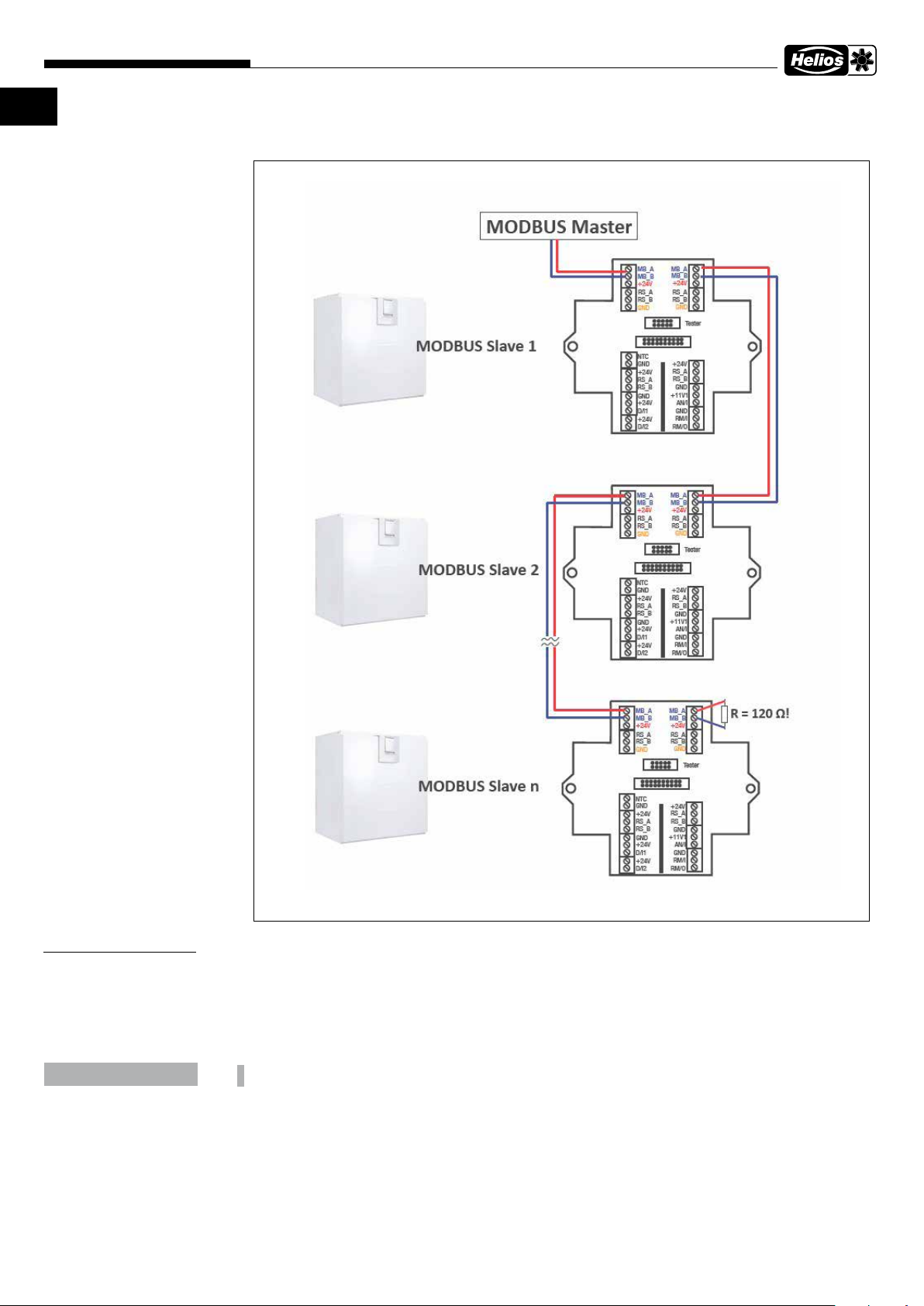
2�2 Anschluss
KAPITEL 3
SONSTIGES/HINWEISE
ACHTUNG
Alle verwendeten externen Namen, Warenzeichen, WWW-Links sind Eigentum der jeweiligen Firmen und stehen in
keinem Zusammenhang zur Helios Ventilatoren GmbH + Co KG nachfolgend kurz Helios. Für die Inhalte der jeweiligen WWW-Links sind die Eigentümer verantwortlich.
Helios übernimmt keine Haftung für inhaltliche Fehler. Abbildungen und Angaben sind unverbindlich.
Technische Änderungen ohne Ankündigung vorbehalten.
Der Anwender verwendet das Protokoll Modbus auf eigene Gefahr�
4
Page 7

Funktionsbeschreibung
easyControls 3.0-Modbus RTU
DE DE
5
Page 8

ENGLISH
Helios Ventilatoren
FUNCTIONAL AND INTERFACE DESCRIPTION
TABLE OF CONTENTS
CHAPTER 1 � GENERAL INFORMATION ���������������������������������������������������������������������������������������������������������������� PAGE 1
1.1 Important information .......................................................................................................................................... Page 1
1.2 Warning instructions ........................................................................................................................................... Page 1
1.3 Safety instructions ............................................................................................................................................... Page 1
CHAPTER 2 � VARIABLES ��������������������������������������������������������������������������������������������������������������������������������������� PAGE 1
2.1 Modbus parameters ........................................................................................................................................... Page 1
2.1.1 Profile priority .............................................................................................................................................. Page 1
2.1.2 Priority order ............................................................................................................................................... Page 1
2.1.3 Supported function codes in the Modbus RTU ............................................................................................ Page 1
2.1.4 Modbus default setting of the unit ............................................................................................................... Page 1
2.1.5 Unit addresses ............................................................................................................................................ Page 2
2.2 Connection ......................................................................................................................................................... Page 4
CHAPTER 3 � OTHER/NOTES���������������������������������������������������������������������������������������������������������������������������������� PAGE 4
Page 9
Functional Description
CHAPTER 1
GENERAL
INFORMATION
DANGER
m
easyControls 3.0-Modbus RTU
1�1 Important information
To ensure safety and correct operation please read and observe all of following instructions carefully before proceeding.
This document is part of the product and should be kept accessible as such. Following commissioning, the document
must be handed out to the operator.
The electrical connection must be fully isolated from the power supply up to the final assembly!
m
This unit is not intended for use by persons (including children) with reduced physical, sensory or mental
capabilities, or lack of experience and knowledge, unless they have been given supervision or instruction
concerning use of the unit by a person responsible for their safety� Children should be supervised to ensure
that they do not play with the unit�
1�2 Warning instructions
The adjacent symbol is a safety-relevant prominent warning label� All safety regulations and/or symbols must
be absolutely adhered to, so that any dangerous situation is avoided�
EN
m
m
m
CHAPTER 2
VARIABLES
DANGER
WARNING
CAUTION
NOTICE
DANGER
m
Indicates dangers which will directly result in death or serious injury if the safety instruction is not followed.
WARNING
m
Indicates dangers which will result in death or serious injury if the safety instruction is not followed.
CAUTION
m
Indicates dangers which can result in injuries if the safety instruction is not followed.
NOTICE
Indicates dangers which can result in material damage if the safety instruction is not followed.
1�3 Safety instructions
Special regulations apply for use, connection, operation, transportation and maintenance. Consultation is required in
case of doubt. Further information can be found in the relevant standards and legal texts.
2�1 Modbus parameters
2�1�1 Profile priority
If more than one profile is active simultaneously, then the profile with higher priority will override the profile with lower
priority.
Example:
The individual function and boost ventilation profiles are both active at the same time => the individual function will
override the boost ventilation due to its higher priority.
2�1�2 Priority order
• Profile timer configurable input (assigned to digital inputs)
• Profile individual function
• Profile boost ventilation
• Profile at home/away
NOTE
2�1�3 Supported function codes in the Modbus RTU
Modbus (RTU) Holding Registers are 16 bits long (unsigned word).
• FC 03h: FCODE_READ_HOLDING_REGISTERS
Reading setup values and configuration parameters
• FC 10h: FCODE_WRITE_HOLDING_REGISTERS
Writing setup values and configuration parameters
• FC 06h: FCODE_WRITE_SINGLE_REGISTER
Writing single setup values and configuration parameters
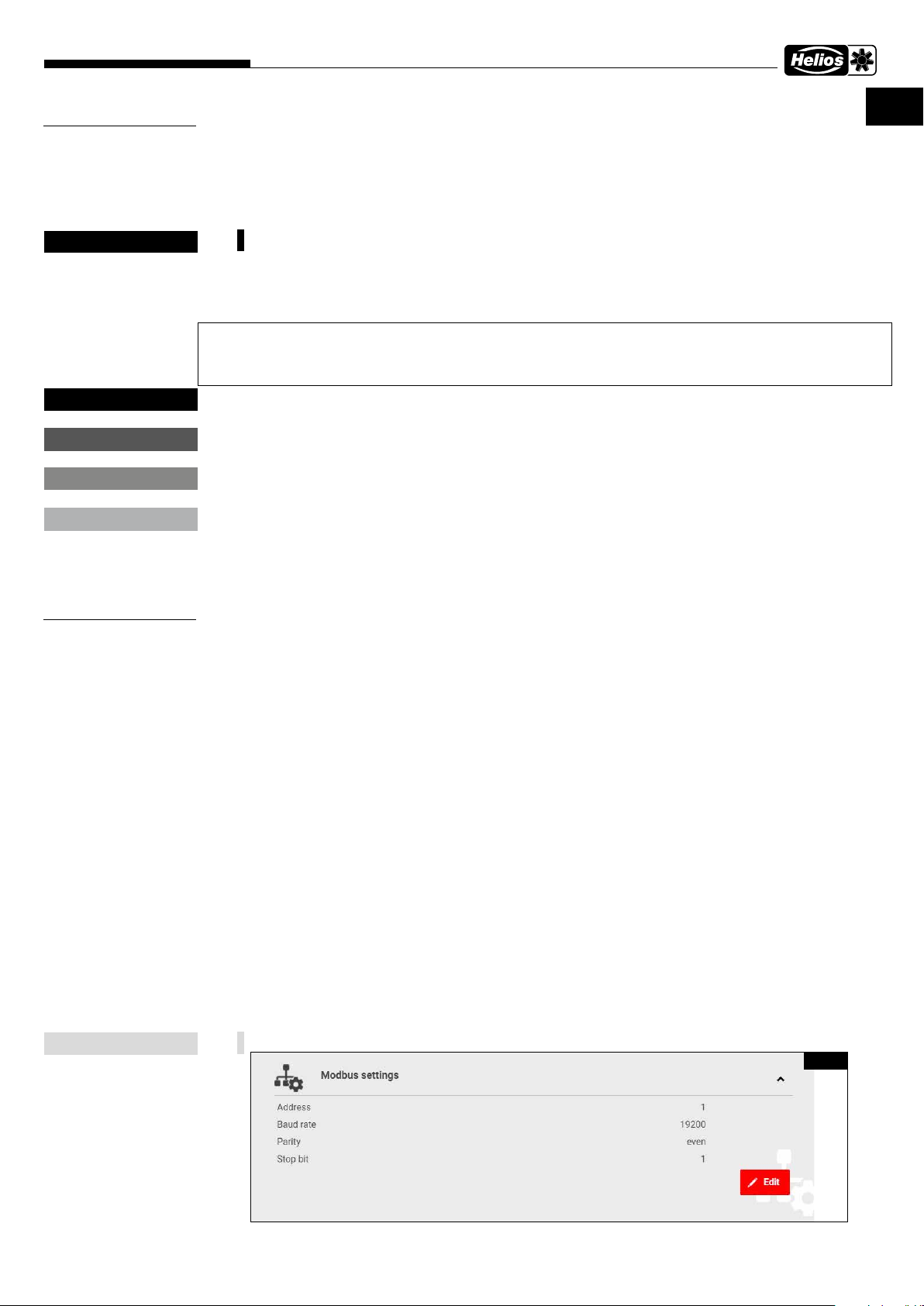
2�1�4 Modbus default setting of the unit
The Modbus default values (Fig� 1) can be changed via KWL-BE Touch or on the internal web server�
Fig. 1
1
Page 10
Functional Description
EN
easyControls 3.0-Modbus RTU
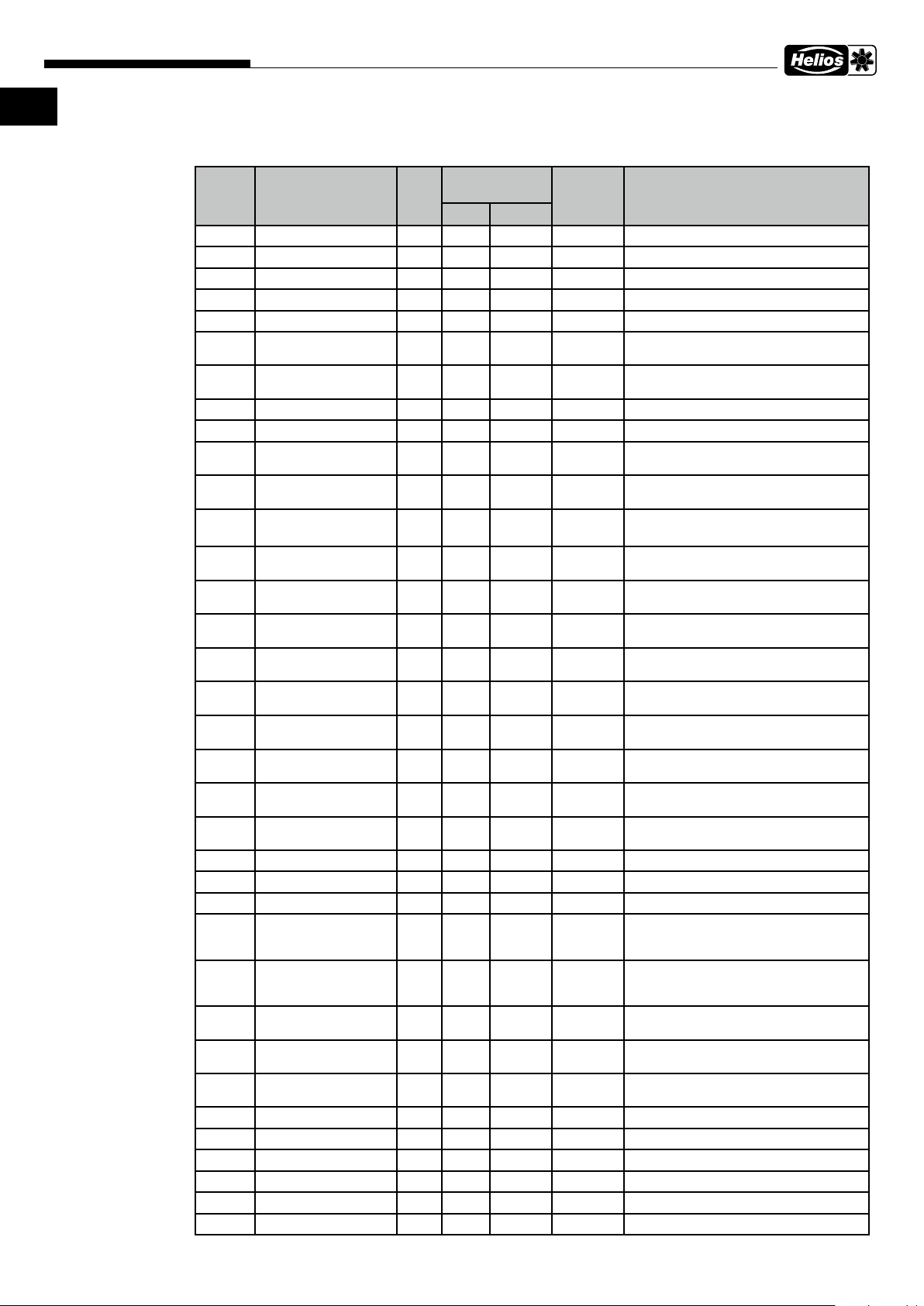
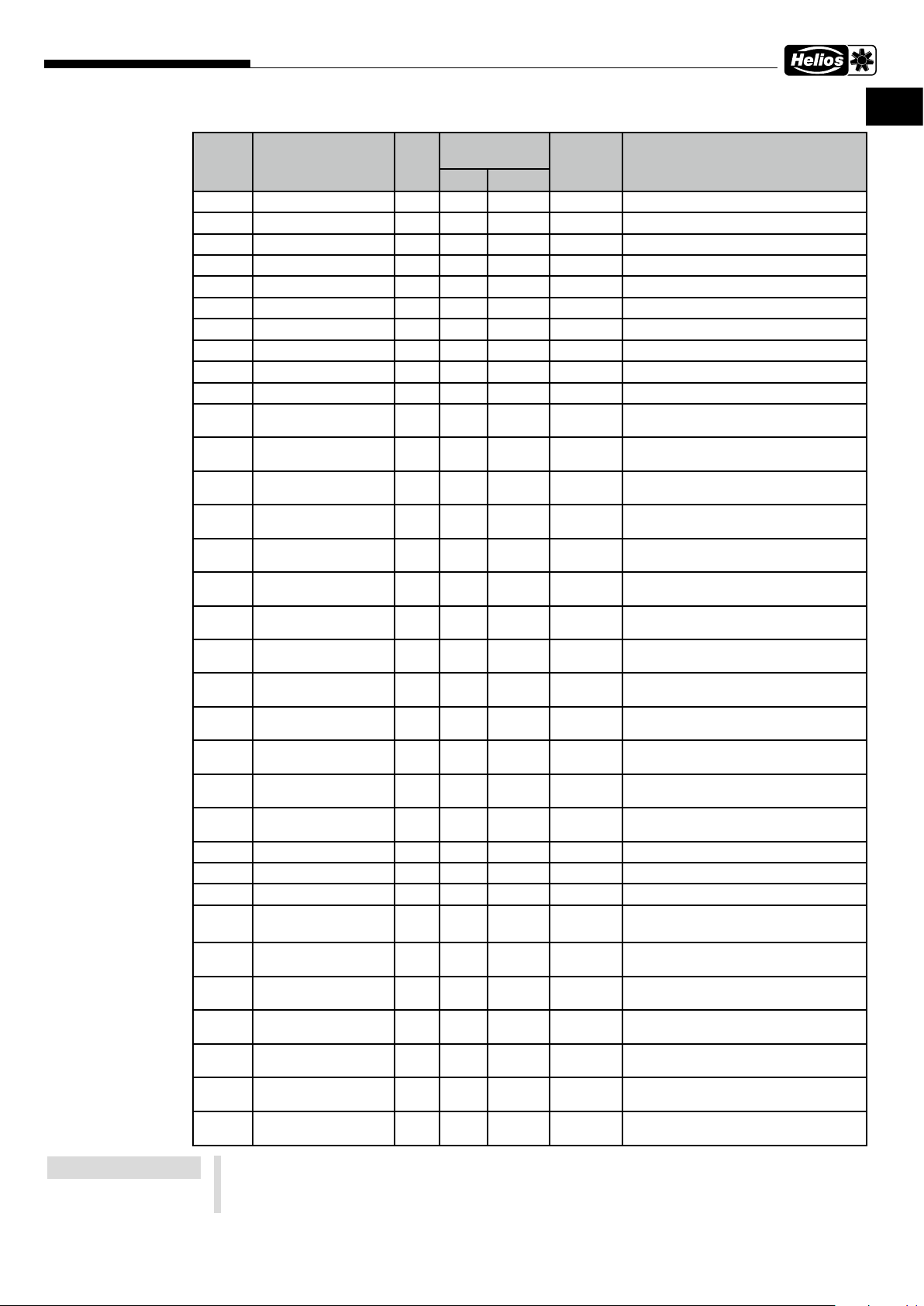
2�1�5 Unit addresses
External Modbus (Master): 19200-8-E-1 ventilation unit (Slave): 1
Address
4353 FAN_SPEED R 0 100 % Current fan speed
4354 TEMP_EXTRACT_AIR R 21000 33224 cK Temperature, extract, cell input
4355 TEMP_EXHAUST_AIR R 21000 33224 cK Temperature, extract, cell output
4356 TEMP_OUTDOOR_AIR R 21000 33224 cK Temperature, supply, cell input
4358 TEMP_SUPPLY_AIR R 21000 33224 cK Temperature, supply, heater output
4363 RH_VALUE R 0 100 RH% RH value, highest measurement read, 0 =
4364 CO2_VALUE R 0 10000 PPM CO2 value, highest measurement read, 0
4369 MULTISENSOR_TEMP R 0 65535 12BIT Temperature from internal sensor
4370 MULTISENSOR_RH R 0 65535 12BIT Humidity from internal sensor
4373 RH_SENSOR_0 R 0 65535 RH% RH value from sensor 0, 65535 = No
4374 RH_SENSOR_1 R 0 65535 RH% RH value from sensor 1, 65535 = No
4375 RH_SENSOR_2 R 0 65535 RH% RH value from sensor 2, 65535 = No
4376 RH_SENSOR_3 R 0 65535 RH% RH value from sensor 3, 65535 = No
4377 RH_SENSOR_4 R 0 65535 RH% RH value from sensor 4, 65535 = No
4378 RH_SENSOR_5 R 0 65535 RH% RH value from sensor 5, 65535 = No
4379 CO2_SENSOR_0 R 0 65535 PPM CO2 value from sensor 0, 65535 = No
4380 CO2_SENSOR_1 R 0 65535 PPM CO2 value from sensor 1, 65535 = No
4381 CO2_SENSOR_2 R 0 65535 PPM CO2 value from sensor 2, 65535 = No
4382 CO2_SENSOR_3 R 0 65535 PPM CO2 value from sensor 3, 65535 = No
4383 CO2_SENSOR_4 R 0 65535 PPM CO2 value from sensor 4, 65535 = No
4384 CO2_SENSOR_5 R 0 65535 PPM CO2 value from sensor 5, 65535 = No
4389 TEMP_OPTIONAL R 20000 33224 cK Optional external temperature sensor
4609 STATE R/W 0 1 General state [0 = Home, 1 = Away]
4610 MODE R/W 0 7 Override state [0 = normal, 5 = o]
4612 BOOST_TIMER R/W 0 65535 MIN Remaining time Timer boost ventilation
4613 CUSTOM_TIMER R/W 0 65535 MIN Remaining time Timer individual mode
4615 WEEKLY_TIMER_EN-
4616 CELL_STATE R 0 3 Cell state [0 = heat recovery, 1 = cool re-
4621 LIMP_MODE R 0 1 Device fault active, device in limp mode
4849 MINUTE R/W 0 59 MINUTES Minutes of the current time
4850 HOUR R/W 0 23 HOURS Hours of the current time
4851 DAY R/W 1 31 DAYS Days of the current date
4852 MONTH R/W 1 12 MONTHS Months of the current date
4853 YEAR R/W 0 99 YEARS Years of the current date
4854 WEEKDAY R 1 7 WEEKDAY Weekday [Mon, Tue, Wed, ...]
Variable name R/RWRange of
validity
min max
R/W 0 1 Weekly timer state [0 = o, 1 = on]
ABLED
Type Description
No sensor
= No sensor
sensor
sensor
sensor
sensor
sensor
sensor
sensor
sensor
sensor
sensor
sensor
sensor
(note data point 21766, 65535 = Duration
active)
(note data point 21767, 65535 = Duration
active)
covery, 2 = bypass, 3 = defrosting]
[o, on]
2
Page 11
Functional Description
easyControls 3.0-Modbus RTU
EN
Address
Variable name R/RWRange of
validity
Type Description
min max
8194 GW_ADDRESS_1 R 0 65535 Gateway address (0xAABB)
8195 GW_ADDRESS_2 R 0 65535 Gateway address (0xCCDD)
8196 MASK_ADDRESS_1 R 0 65535 Mask (0xAABB)
8197 MASK_ADDRESS_2 R 0 65535 Mask(0xCCDD)
8212 IP_ADDRESS_1 R 0 65535 IP address first two bytes (0xAABB)
8213 IP_ADDRESS_2 R 0 65535 IP address last two bytes (0xCCDD)
20487 CUSTOM_EXTR_FAN R/W 0 100 % Extract fan speed individual
20488 CUSTOM_SUPP_FAN R/W 0 100 % Supply fan speed individual
20490 RH_BASIC_LEVEL R/W 0 65535 % RH basic level, 65535 = not calculated
20491 CO2_THRESHOLD R/W 500 2000 PPM CO2 threshold
20499 AWAY_RH_CTRL_EN-
ABLED
20500 AWAY_CO2_CTRL_EN-
ABLED
20501 AWAY_SPEED_SET-
TING
20502 AWAY_AIR_TEMP_TAR-
GET
20505 HOME_RH_CTRL_EN-
ABLED
20506 HOME_CO2_CTRL_
ENABLED
20507 HOME_SPEED_SET-
TING
20508 HOME_AIR_TEMP_
TARGET
20511 BOOST_RH_CTRL_EN-
ABLED
20512 BOOST_CO2_CTRL_
ENABLED
20513 BOOST_SPEED_SET-
TING
20514 BOOST_AIR_TEMP_
TARGET
20537 FILTER_CHANGE_IN-
TERVAL
20543 RH_LEVEL_MODE R/W 0 1 [0 = Automatic level update, 1 = Manual]
20544 BOOST_TIME R/W 1 65535 min Boost timer load value
20545 CUSTOM_TIME R/W 1 65535 min Individual timer load value
20546 FILTER_CHANGED_
DAY
20547 FILTER_CHANGED_
MONTH
20548 FILTER_CHANGED_
YEAR
20551 PARTIAL_BYPASS R/W 0 2 16bit value Partial bypass state
21766 BOOST_TIMER_EN-
ABLED
21767 CUSTOM_TIMER_EN-
ABLED
21772 EXTRA_TIMER_EN-
ABLED
R/W 0 1 RH control in use, away [False, True]
R/W 0 1 CO2 control in use, away [False, True]
R/W 0 100 % Fan speed at away state
R/W 27815 29815 cK Supply air target temp at away state
R/W 0 1 RH control in use, home [False, True]
R/W 0 1 CO2 control in use, home [False, True]
R/W 0 100 % Fan speed at home state
R/W 27815 29815 cK Supply air target temp at home state
R/W 0 1 RH control in use, boost [False, True]
R/W 0 1 CO2 control in use, boost [False, True]
R/W 0 100 % Fan speed at boost state
R/W 27815 29815 cK Supply air target temp at boost state
R 30 365 days Interval for filter change indicator (reload
value)
R/W 1 31 days Last filter change date
R/W 1 12 months Last filter change date
R/W 0 99 years Last filter change date
[None, summer, always]
R/W 0 1 Boost timer enabled [o, on]
R/W 0 1 Individual timer enabled [o, on]
R/W 0 1 Timer configurable input activated
[o, on]
NOTE
cK = CentiKelvin
0 degree Celsius = 27315 CentiKelvin = 273,15 Kelvin, Temp� in Kelvin = x Grad Celcius + 273,15
Temp� in CentiKelvin = x Grad Celsius *100 + 27315
10 degree Celsius = 28315 CentiKelvin = 283,15 Kelvin
3
Page 12
Functional Description
EN
easyControls 3.0-Modbus RTU
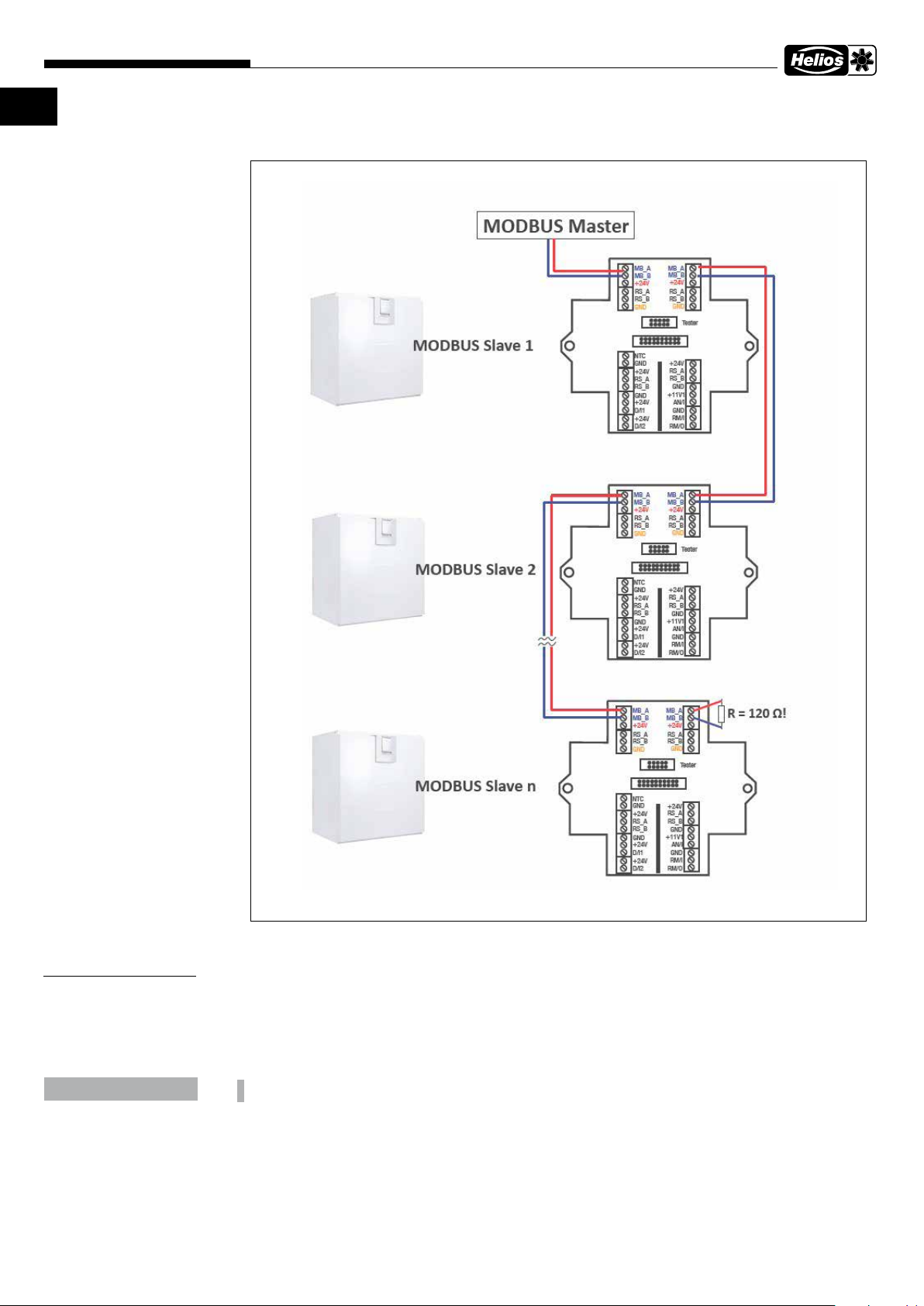
2�2 Connection
CHAPTER 3
OTHER/NOTES
NOTICE
All external names, trademarks, WWW links used are the property of the respective companies and are in no way
connected to Helios Ventilatoren GmbH + Co KG, hereinafter Helios. The owners are responsible for the content of
the respective WWW links.
Helios accepts no liability for textual errors. figures and the information is non-binding.
The right is reserved to make technical changes without notification.
Use of the protocol Modbus is at the user‘s own risk�
4
Page 13

Functional Description
easyControls 3.0-Modbus RTU
EN
5
Page 14

FRANÇAIS
Helios Ventilatoren
LISTE DES VARIABLES ET DESCRIPTIF DE L'INTERFACE
SOMMAIRE
CHAPITRE 1 INFORMATIONS GÉNÉRALES ����������������������������������������������������������������������������������������������������������� PAGE 1
1.1 Informations importantes ....................................................................................................................................... Page 1
1.2 Mises en garde .................................................................................................................................................... Page 1
1.3 Consignes de sécurité ........................................................................................................................................... Page 1
CHAPITRE 2 VARIABLE �������������������������������������������������������������������������������������������������������������������������������������������� PAGE 1
2.1 Paramètres Modbus ............................................................................................................................................. Page 1
2.1.1 Priorité des profils ........................................................................................................................................... Page 1
2.1.2 Ordre des priorités ......................................................................................................................................... Page 1
2.1.3 Codes des fonctions assurées en Modbus RTU ............................................................................................. Page 1
2.1.4 Paramètres Modbus par défaut de l'appareil ................................................................................................. Page 1
2.1.5 Adresses de l'appareil .................................................................................................................................... Page 2
2.2 Raccordement ...................................................................................................................................................... Page 4
CHAPITRE 3 REMARQUE ���������������������������������������������������������������������������������������������������������������������������������������� PAGE 4
Page 15
Description des fonctionnalités
CHAPITRE 1
INFORMATIONS
GÉNÉRALES
DANGER
m
DANGER
m
AVERTISSEMENT
m
ATTENTION
m
AVIS
easyControls 3.0-Modbus RTU
1�1 Informations importantes
Il est important de bien lire et suivre l’ensemble des consignes suivantes pour le bon fonctionnement de l’appareil et pour la
sécurité des utilisateurs. Conserver soigneusement le document comme référence à proximité de l’appareil. Cette notice doit
être remise à l’utilisateur après la première mise en service.
L’alimentation électrique doit être maintenue hors tension jusqu’à la fin de l’installation !
m
Cet appareil ne peut être utilisé par des personnes (y compris des enfants) dont les capacités physiques,
sensorielles ou mentales sont réduites ou qui manquent d’expérience ou de connaissances, sauf si elles sont
surveillées ou formées par une personne responsable de leur sécurité� Les enfants doivent être surveillés afin
de veiller à ce qu’ils ne jouent pas avec l’appareil�
1�2 Mises en garde
Les symboles ci-contre indiquent une consigne de sécurité� Toutes les consignes de sécurité ainsi que les symboles
doivent être impérativement respectés, afin d’éviter tout danger�
DANGER
m
Mise en garde contre des dangers qui, en cas de non-respect des mesures, entraînent immédiatement la mort ou de
graves blessures.
AVERTISSEMENT
m
Mise en garde contre des dangers qui, en cas de non-respect des mesures, peuvent entraîner la mort ou de graves
blessures.
ATTENTION
m
Mise en garde contre des dangers qui, en cas de non-respect des mesures, peuvent entraîner des blessures.
AVIS
Mise en garde contre des dangers qui, en cas de non-respect des mesures, peuvent entraîner des dégâts matériels.
FR
CHAPITRE 2
VARIABLE
REMARQUE
1�3 Consignes de sécurité
L’installation, le raccordement, l’utilisation, le transport et la maintenance sont soumis à des dispositions spécifiques; en cas
de doute, nous contacter. Des informations supplémentaires sont consultables dans les normes et textes de loi.
2�1 Paramètres Modbus
2�1�1 Priorité des profils
Si plus d'un profil est actif en même temps, le profil ayant la priorité la plus élevée prend le pas sur le profil ayant la
priorité la plus faible.
Exemple :
Les profils individuel et ventilation intensive sont tous deux actifs en même temps => en raison de sa priorité plus
élevée, le profil individuel prévaut sur la ventilation intensive.
2�1�2 Ordre des priorités
• Profil minuterie avec entrée configurable (aectée aux entrées numériques)
• Profil individuel
• Profil ventilation intensive
• Profil à la maison/en déplacement
2�1�3 Codes des fonctions assurées en Modbus RTU
Les registres de maintien Modbus (RTU) ont une longueur de 16 bits.
• FC 03h: FCODE_READ_HOLDING_REGISTERS
Lecture des valeurs de réglage et des paramètres de configuration
• FC 10h: FCODE_WRITE_HOLDING_REGISTERS
Écriture des valeurs de réglage et des paramètres de configuration
• FC 06h: FCODE_WRITE_SINGLE_REGISTER
Écriture des valeurs de réglage et des paramètres de configuration individuels
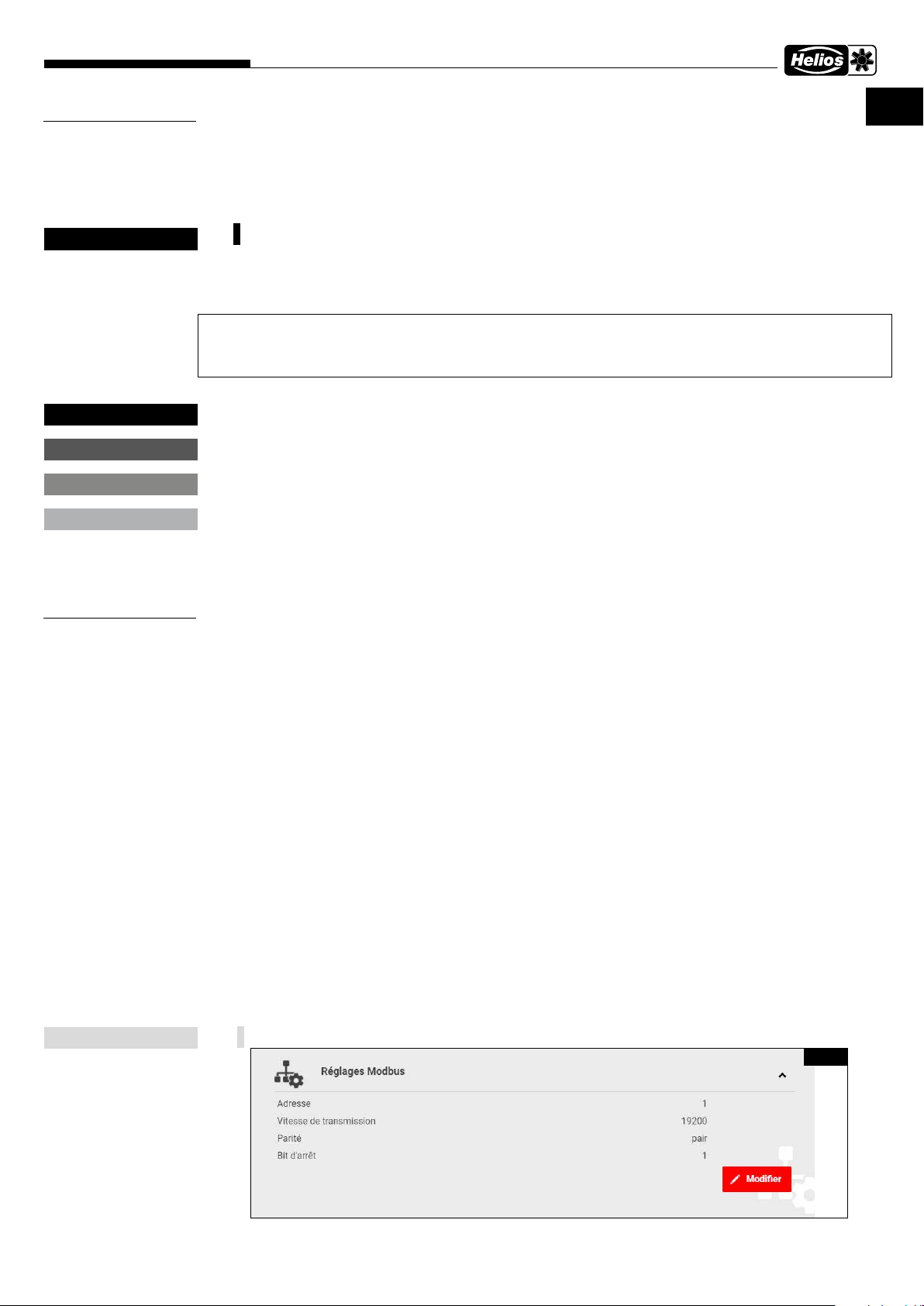
2�1�4 Paramètres Modbus par défaut de l'appareil
Les valeurs Modbus (Fig�1) par défaut peuvent être modifiées via la KWL-BE Touch ou dans le serveur web interne�
Fig.1
1
Page 16
Description des fonctionnalités
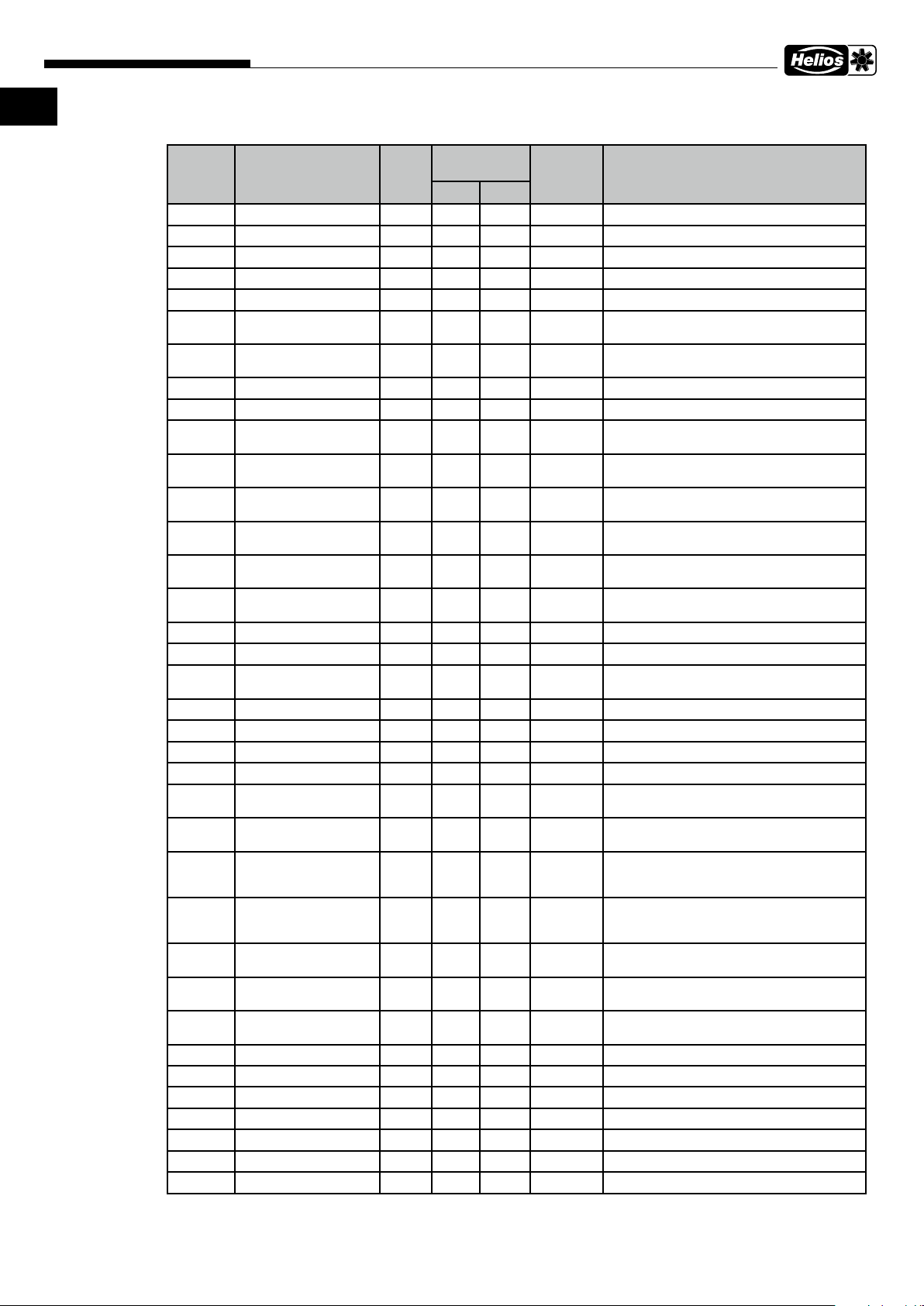
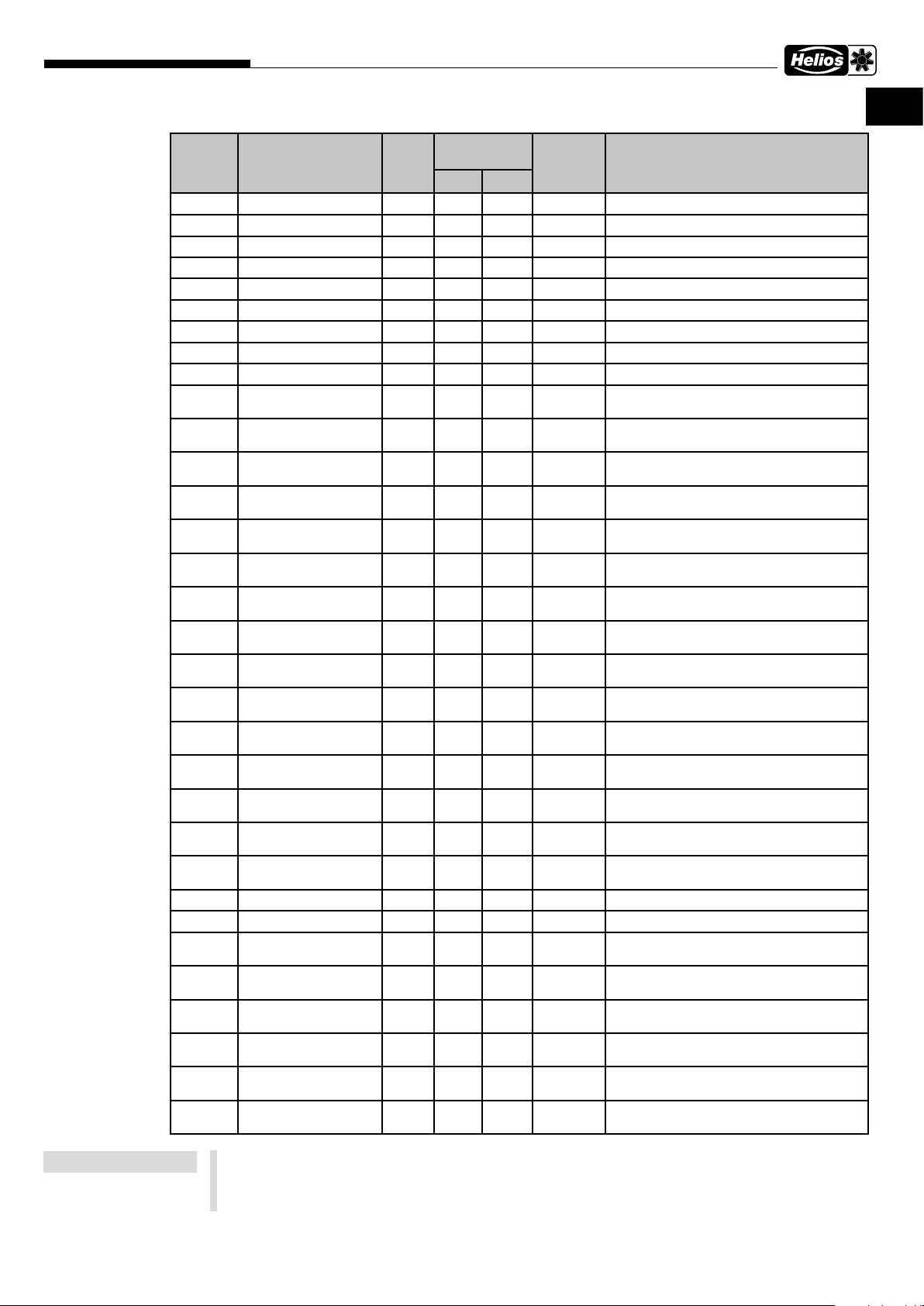
2�1�5 Adresses de l'appareil
Modbus externe (maître) : 19200-8-E-1 Unité de ventilation (esclave) : 1
Adresse Variable R/RW Plage de
4353 FAN_SPEED R 0 100 % Vitesse actuelle du ventilateur
4354 TEMP_EXTRACT_AIR R 21000 33224 CK Température de l'air extrait
4355 TEMP_EXHAUST_AIR R 21000 33224 CK Température de l'air rejeté
4356 TEMP_OUTDOOR_AIR R 21000 33224 CK Température de l'air extérieur
4358 TEMP_SUPPLY_AIR R 21000 33224 CK Température de souage
4363 RH_VALUE R 0 100 RH% Humidité relative, valeur mesurée la plus éle-
4364 CO2_VALUE R 0 10000 PPM CO2/COV, valeur mesurée la plus élevée, 0 =
4369 MULTISENSOR_TEMP R 0 65535 12BIT Température du sonde interne
4370 MULTISENSOR_RH R 0 65535 12BIT Sonde interne d'humidité relative
4373 RH_SENSOR_0 R 0 65535 RH% Humidité relative, sonde 0, 65535 = Pas de
4374 RH_SENSOR_1 R 0 65535 RH% Humidité relative, sonde 1, 65535 = Pas de
4375 RH_SENSOR_2 R 0 65535 RH% Humidité relative, sonde 2, 65535 = Pas de
4376 RH_SENSOR_3 R 0 65535 RH% Humidité relative, sonde 3, 65535 = Pas de
4377 RH_SENSOR_4 R 0 65535 RH% Humidité relative, sonde 4, 65535 = Pas de
4378 RH_SENSOR_5 R 0 65535 RH% Humidité relative, sonde 5, 65535 = Pas de
4379 CO2_SENSOR_0 R 0 65535 PPM CO2/COV, sonde 0, 65535 = Pas de sonde
4380 CO2_SENSOR_1 R 0 65535 PPM CO2/COV, sonde 1, 65535 = Pas de sonde
4381 CO2_SENSOR_2 R 0 65535 PPM CO2/COV, sonde 2, 65535 = Pas de sonde
easyControls 3.0-Modbus RTU
Type Designation
valeurs
min max
vée, 0 = pas de sonde
pas de sonde
sonde
sonde
sonde
sonde
sonde
sonde
4382 CO2_SENSOR_3 R 0 65535 PPM CO2/COV, sonde 3, 65535 = Pas de sonde
4383 CO2_SENSOR_4 R 0 65535 PPM CO2/COV, sonde 4, 65535 = Pas de sonde
4384 CO2_SENSOR_5 R 0 65535 PPM CO2/COV, sonde 5, 65535 = Pas de sonde
4389 TEMP_OPTIONAL R 20000 33224 CK Sonde de température en option
4609 STATE R/W 0 1 Profil de ventilation [0 = à la maison,
4610 MODE R/W 0 7 Appareil en marche/arrêt [0 = normal,
4612 BOOST_TIMER R/W 0 65535 MIN Durée restante de la minuterie de ventilati-
4613 CUSTOM_TIMER R/W 0 65535 MIN Durée restante de la minuterie du mode indi-
4615 WEEKLY_TIMER_EN-
ABLED
4616 CELL_STATE R 0 3 Statut de l'échangeur de chaleur [0 = WRG,
4621 LIMP_MODE R 0 1 Alarme active, appareil en défaut
4849 MINUTE R/W 0 59 MINUTES Temps en minutes
4850 HOUR R/W 0 23 HOURS Temps en heures
4851 DAY R/W 1 31 DAYS Date du jour
4852 MONTH R/W 1 12 MONTHS Mois
4853 YEAR R/W 0 99 YEARS Année
4854 WEEKDAY R 1 7 WEEKDAY Jour de semaine [1 = lundi, 2 = mardi,...]
8194 GW_ADDRESS_1 R 0 65535 Adresse de la passerelle (0xAABB)
R/W 0 1 Programme hebdomadaire [0 = désactivé,
1 = en déplacement].
5 = arrêt]
on intensive (respecter le point de données
21766, 65535 = durée active)
viduel (respecter le point de données 21767,
65535 = durée active)
1 = activé].
1 = KRG, 2 = Bypass].
[arrêt, marche]
2
Page 17
Description des fonctionnalités
easyControls 3.0-Modbus RTU
FR FR
Adresse Variable R/RW Plage de
Type Designation
valeurs
min max
8195 GW_ADDRESS_2 R 0 65535 Adresse de la passerelle (0xCCDD)
8196 MASK_ADDRESS_1 R 0 65535 Masque (0xAABB)
8197 MASK_ADDRESS_2 R 0 65535 Masque (0xCCDD)
8212 IP_ADDRESS_1 R 0 65535 Adresse IP des 2 premiers Bytes (0xAABB)
8213 IP_ADDRESS_2 R 0 65535 Adresse IP des 2 derniers Bytes (0xCCDD)
20487 CUSTOM_EXTR_FAN R/W 0 100 % Vitesse du ventilateur d'extraction individuelle
20488 CUSTOM_SUPP_FAN R/W 0 100 % Vitesse du ventilateur de souage individuelle
20490 RH_BASIC_LEVEL R/W 0 65535 % Limite d'humidité relative
20491 CO2_THRESHOLD R/W 500 2000 PPM Limite CO2/COV
20499 AWAY_RH_CTRL_EN-
ABLED
20500 AWAY_CO2_CTRL_EN-
ABLED
20501 AWAY_SPEED_SET-
TING
20502 AWAY_AIR_TEMP_TAR-
GET
20505 HOME_RH_CTRL_EN-
ABLED
20506 HOME_CO2_CTRL_EN-
ABLED
20507 HOME_SPEED_SET-
TING
20508 HOME_AIR_TEMP_TAR-
GET
20511 BOOST_RH_CTRL_EN-
ABLED
20512 BOOST_CO2_CTRL_
ENABLED
20513 BOOST_SPEED_SET-
TING
20514 BOOST_AIR_TEMP_
TARGET
20537 FILTER_CHANGE_IN-
TERVAL
20543 RH_LEVEL_MODE R/W 0 1 Régulation de l'humidité relative [0 = mode
20544 BOOST_TIME R/W 1 65535 min Réglage de la minuterie du profil ventilation
20545 CUSTOM_TIME R/W 1 65535 min Réglage de la minuterie du mode individuel
20546 FILTER_CHANGED_DAY R/W 1 31 days Dernier jour de changement de filtre
20547 FILTER_CHANGED_
MONTH
20548 FILTER_CHANGED_
YEAR
20551 PARTIAL_BYPASS R/W 0 2 16bit value Fonction Bypass partiel actif/inactif
21766 BOOST_TIMER_EN-
ABLED
21767 CUSTOM_TIMER_EN-
ABLED
21772 EXTRA_TIMER_ENAB-
LED
R/W 0 1 Humidité relative pour le profil en déplacement
[0 = inactif, 1 = actif]
R/W 0 1 CO2/COV pour le profil en déplacement [0 =
inactif, 1 = actif]
R/W 0 100 % Vitesse du ventilateur pour le profil en dépla-
cement
R/W 27815 29815 cK Vitesse du ventilateur pour le profil en dépla-
cement
R/W 0 1 Humidité relative pour le profil à la maison [0 =
inactif, 1 = actif]
R/W 0 1 CO2/COV pour le profil à la maison [0 = inactif,
1 = actif]
R/W 0 100 % Vitesse du ventilateur pour le profil à la maison
R/W 27815 29815 cK Température de souage pour le profil à la
maison
R/W 0 1 Humidité relative pour le profil ventilation inten-
sive [0 = inactif, 1 = actif]
R/W 0 1 CO2/COV pour le profil ventilation intensive [0
= inactif, 1 = actif]
R/W 0 100 % Vitesse du ventilateur pour le profil ventilation
intensive
R/W 27815 29815 cK Température de souage pour le profil ventila-
tion intensive
R 30 365 days Intervalle de changement de filtre en jours
automatique, 1 = manuel]
intensive
R/W 1 12 months Dernier mois du changement de filtre
R/W 0 99 years Dernière année du changement de filtre
[0 = arrêt, 1= marche]
R/W 0 1 Minuterie de la ventilation intensive activée
[arrêt, marche]
R/W 0 1 Minuterie du mode individuel activée [arrêt,
marche]
R/W 0 1 Minuterie de l'entrée configurable activée
[arrêt, marche]
REMARQUE
cK = CentiKelvin
0 degrés Celsius = 27315 CentiKelvin = 273,15 Kelvin, Temp� en Kelvin = x Grad Celcius + 273,15
Temp� en CentiKelvin = x Grad Celsius *100 + 27315
10 degrés Celsius = 28315 CentiKelvin = 283,15 Kelvin
3
Page 18
Description des fonctionnalités
easyControls 3.0-Modbus RTU
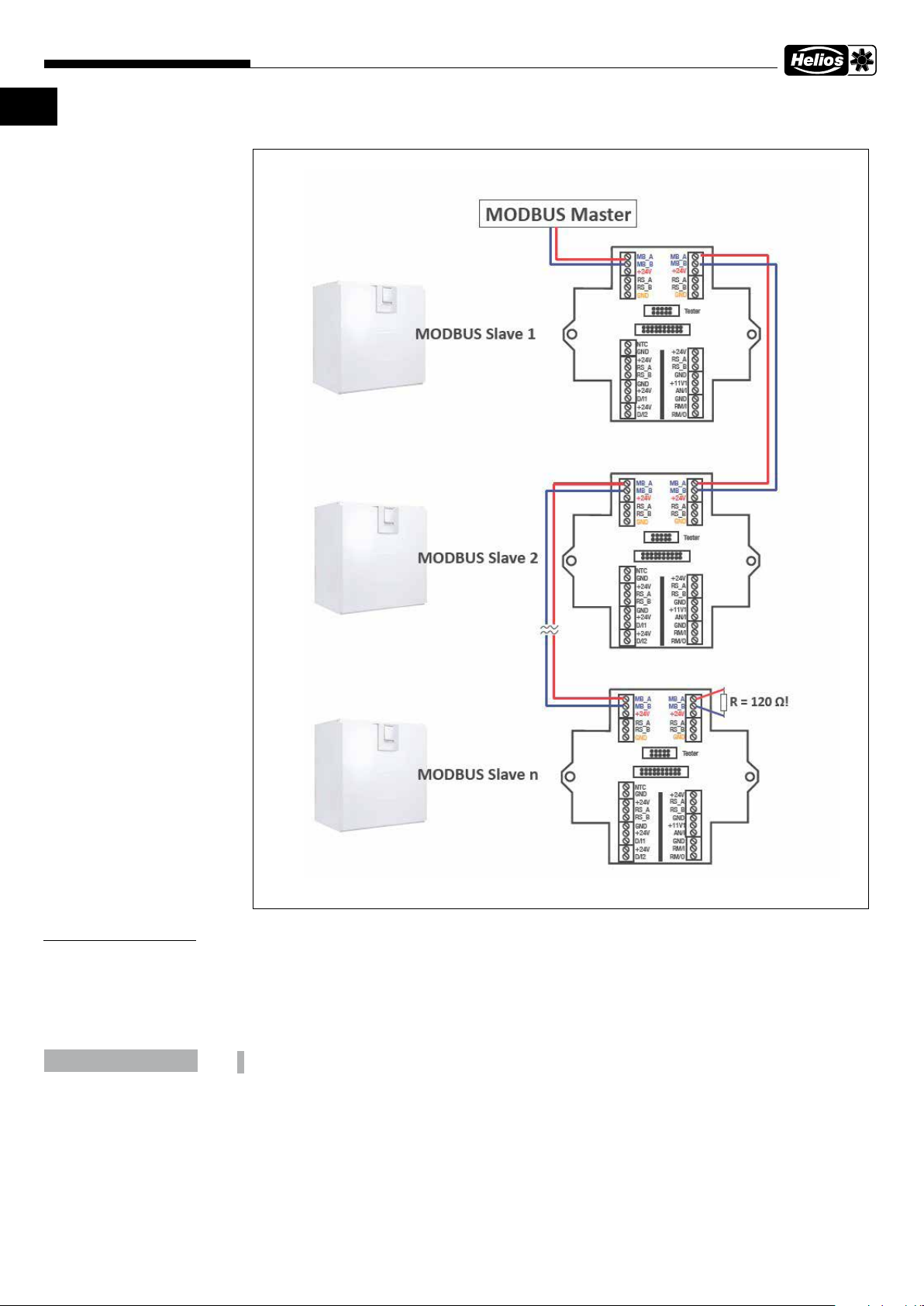
2�2 Raccordement
CHAPITRE 3
REMARQUE
AVIS
Tous les noms externes, marques commerciales, liens WWW utilisés sont la propriété des sociétés concernées et ne
sont pas liés à Helios Ventilatoren GmbH + Co KG, aussi dénommé Helios. Les propriétaires sont responsables du
contenu des liens WWW respectifs.
Helios n’assume aucune responsabilité pour les erreurs de contenu. Illustrations et informations ne sont pas contraignantes. Sous réserve de modifications techniques sans préavis.
L’utilisateur utilise le protocole Modbus à ses risques et périls�
4
Page 19

Description des fonctionnalités
easyControls 3.0-Modbus RTU
FR FR
5
Page 20

Als Referenz am Gerät gribereit aufbewahren! Druckschrift-Nr.
www.heliosventilatoren.de
Als Referenz am Gerät gribereit aufbewahren! Druckschrift-Nr.
Please keep this manual for reference with the unit! Print no.
Garder cette notice à proximité de l’unité! N° Ref.
XX XXX-001/-/V01/0824
Please keep this manual for reference with the unit! Print-No.
Conservez cette notice à proximité de l'appareil! No. Réf. 25 483-001/23-0390/24-0293/V03/0521/0325
Service und Information
D HELIOS Ventilatoren · Lupfenstraße 8 · 78056 VS-Schwenningen F HELIOS Ventilateurs · 9 rue du Gibier · 67120 Molsheim
CH HELIOS Ventilatoren AG · Tannstrasse 4 · 8112 Otelfingen GB HELIOS Ventilation Systems Ltd. · 5 Crown Gate · Wyncolls Road · Severalls Industrial Park ·
A HELIOS Ventilatoren · Siemensstraße 15 · 6063 Rum/Innsbruck Colchester · Essex · CO4 9HZ
www�heliosventilatoren�de
 Loading...