

Page 1

H600 User Manual
Page 2
Congratulations on your new Hegel H600.
All Hegel products are based on a simple
philosophy: Add as little as possible. We
work to keep the music signal as close to
the original as possible. We are always
looking for ways to lower distortion and
noise so that the music is only limited by
the quality of the recording.
H600 is our reference integrated amplifier
and sets a new standard in our line-up of
integrated amps. With its 303 watts in 8
ohms, a damping factor of 4000, and 2
ohms drive capability, this powerhouse of
an amplifier can drive any speaker with
confidence and ease. With its immensely
wide and deep soundstage, incredible
dynamic range, and tremendous bass
control, H600 reveals all the details and
nuances in the music.
2
It also features a comprehensive list of
streaming options built-in. The H600 is
an extremely capable and great-sounding
amplifier. It is highly versatile and delivers high-end sound and ease of use, all in
a high-quality, minimalist housing that fits
any interior style.
The H600 is a powerhouse
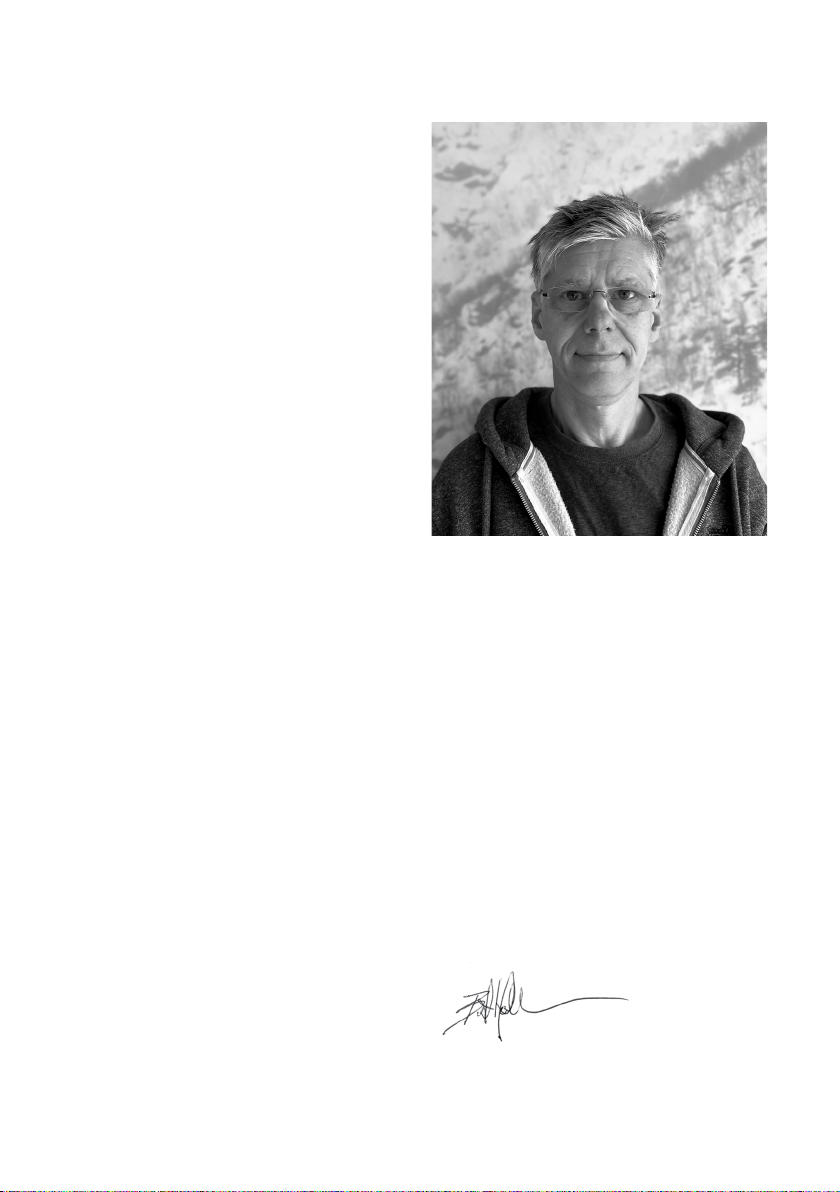
Bent Holter
Founder Hegel Music System
Page 3

Index
A word from Bent 2
What’s in the box 4
Quickstart 5
General Use 8
Connections 9
Digital Inputs and Formats 10
Network Setup 11
Streaming 12
Device Menu 14
Remote Control 16
General Information 17
Safety Instructions 18
Warranty and Disclaimers 19
IMPORTANT:
Before powering on the amplifier, make sure you
have read and understood the safety instructions and
warnings on page 18!
3
Page 4
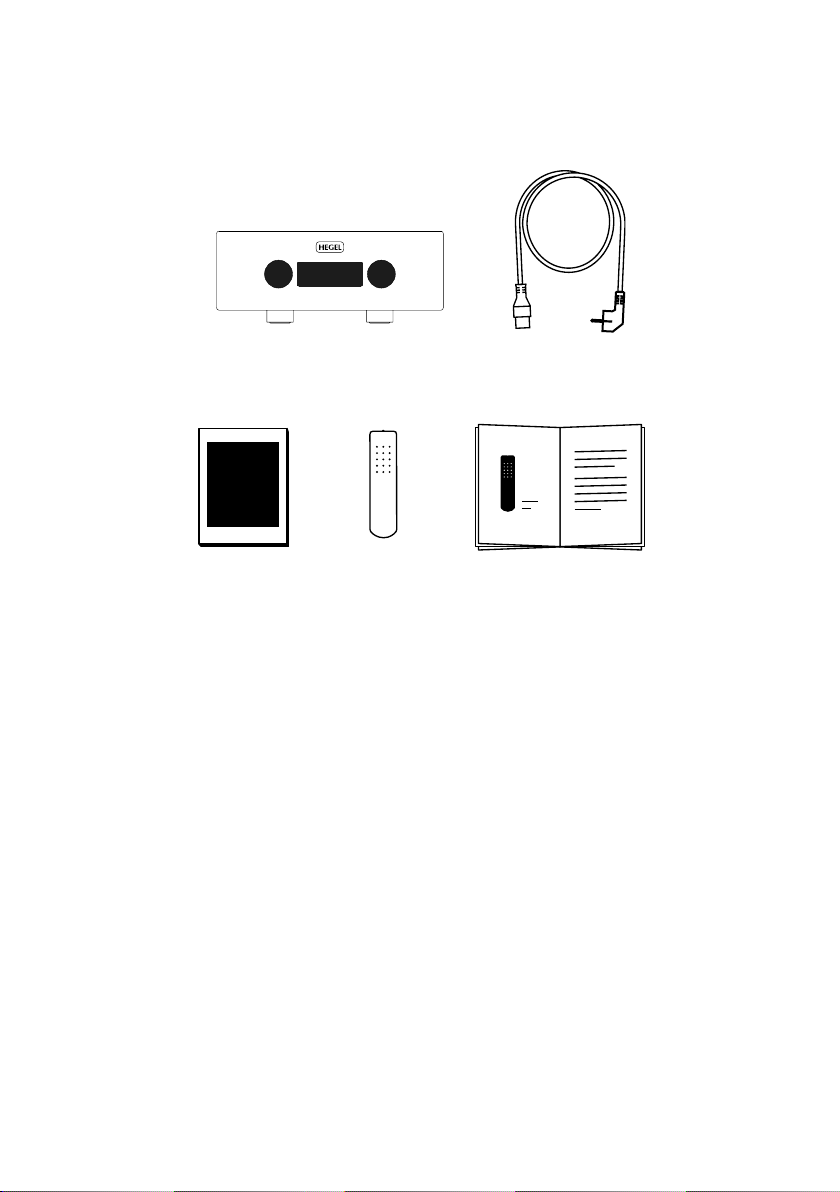
What’s in the box
Accessory Box
Amplifier
Remote
Control
Power Cord
User Manual
4
Page 5
Quickstart
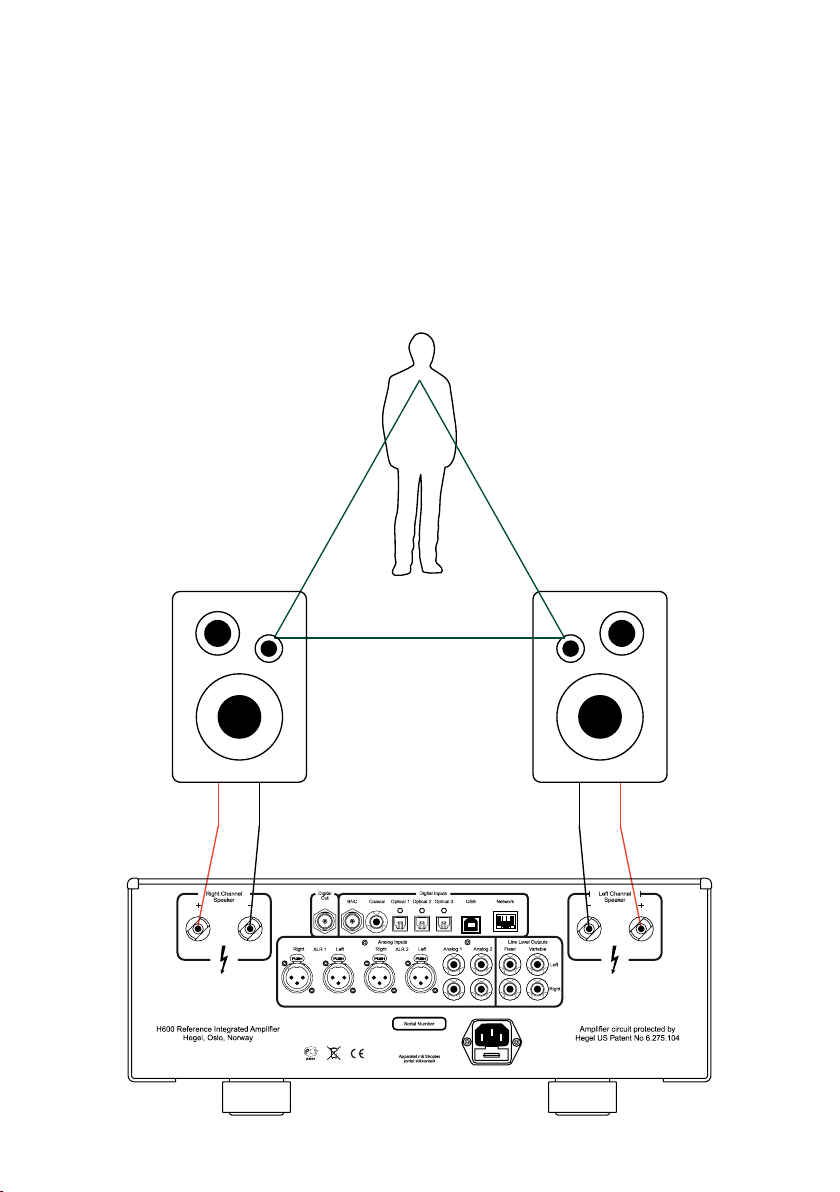
1. Connect your speakers
For the best audio experience, the distance
between the listener and each speaker should
be the same.
230V~50/60Hz Fuse:6.3A T
Input Power : 850V A
FUSE HOLDER
5
Page 6
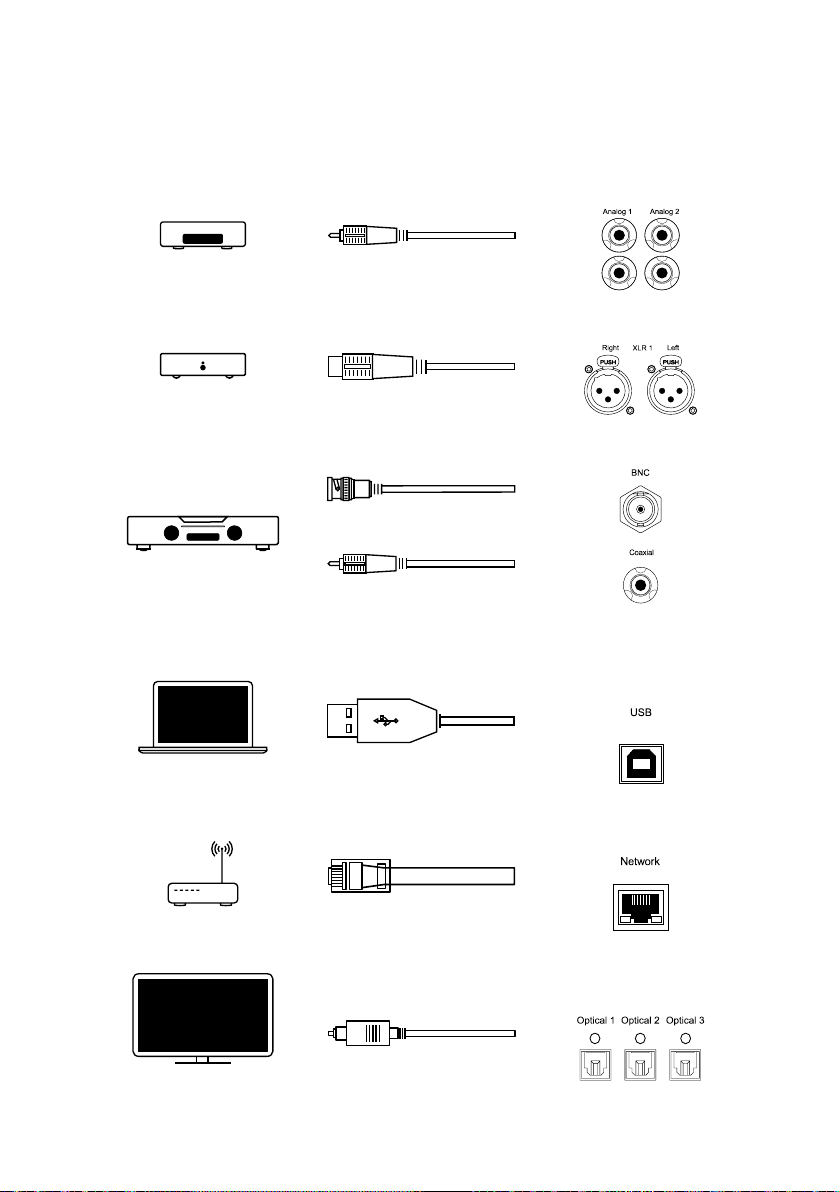
2. Connect a source
Unbalanced Analog
Balanced Analog
BNC Digital
Coaxial Digital
USB Computer
Network streaming
Optical Digital
6
Page 7
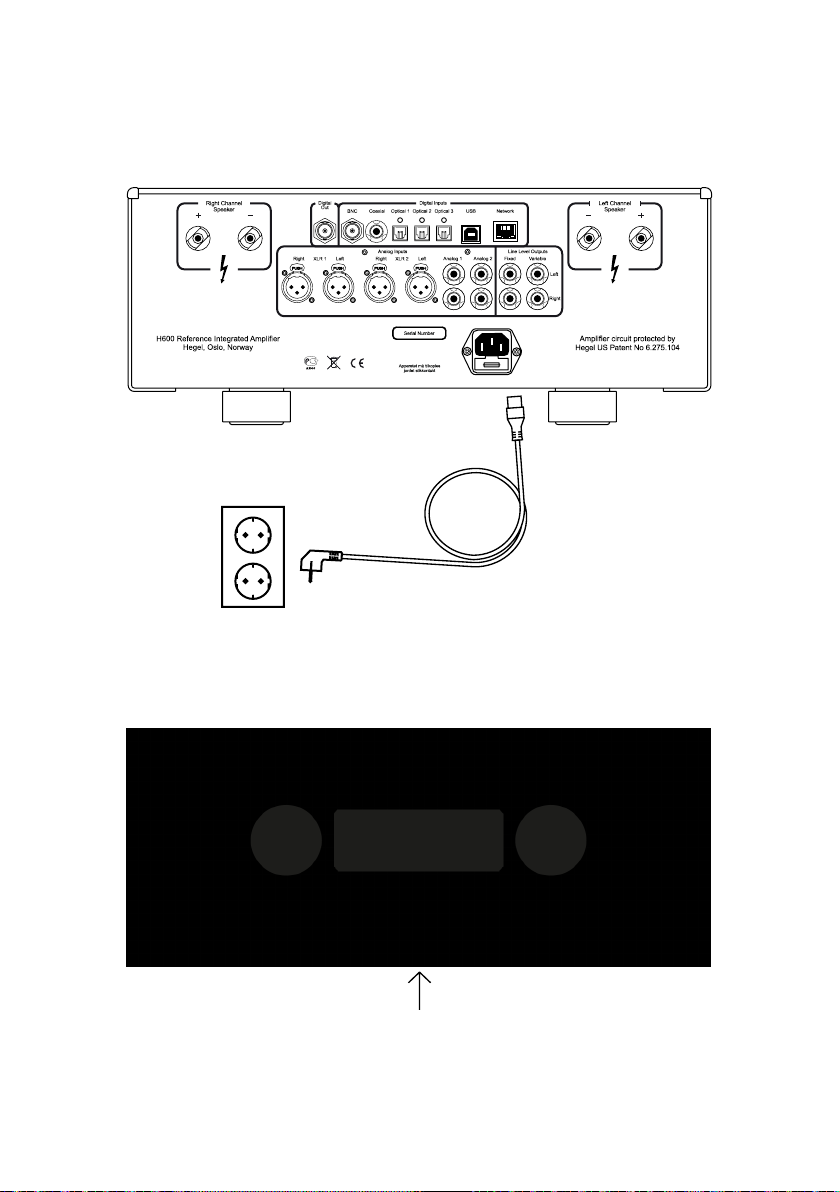
3. Connect the power cord
230V~50/60Hz Fuse:6.3A T
Input Power : 850V A
4. Turn on the amplifier
FUSE HOLDER
Power Switch
7
Page 8

General Use
Source Selector
The source can be changed by turning the
source selector on the front panel. Press
to pause/play. Press and hold to enter the
menu. Turn the wheel to navigate. Press to
select or enter submenus.
Volume Selector
The volume can be changed by turning the
volume selector on the front panel. Press
the volume selector to toggle mute on/off.
Press to exit the menu.
Power Button
The H600 amplifier can be switched on and
off with the power button located on the underside of the amplifier, towards the front of
the unit. When powered on, press and hold
the power button to reboot the amplifier.
NOTE: When powering up, the H600 takes
a few seconds to calibrate, the outputs are
muted and the volume flashes to indicate
that mute is on. This is normal and is part
of the start-up procedure. When the H600
has been switched off, wait 30 seconds
before powering it on again.
Sleep/Auto standby
In compliance with the EU Energy Efficiency
Directive, the Hegel device will automatically go into standby mode after 15 minutes
without sensing a signal, or with a very
low signal on the speaker outputs. You can
disable or change the Sleep/ Auto Standby
settings in the Device Menu.
Wake on LAN
By default, the amplifier will not automatically wake when receiving an ethernet
(LAN) signal. You can activate this feature in
the Auto In settings in the Device Menu.
Update
When put in standby mode, the device
will automatically look for and install new
updates.
8
Page 9
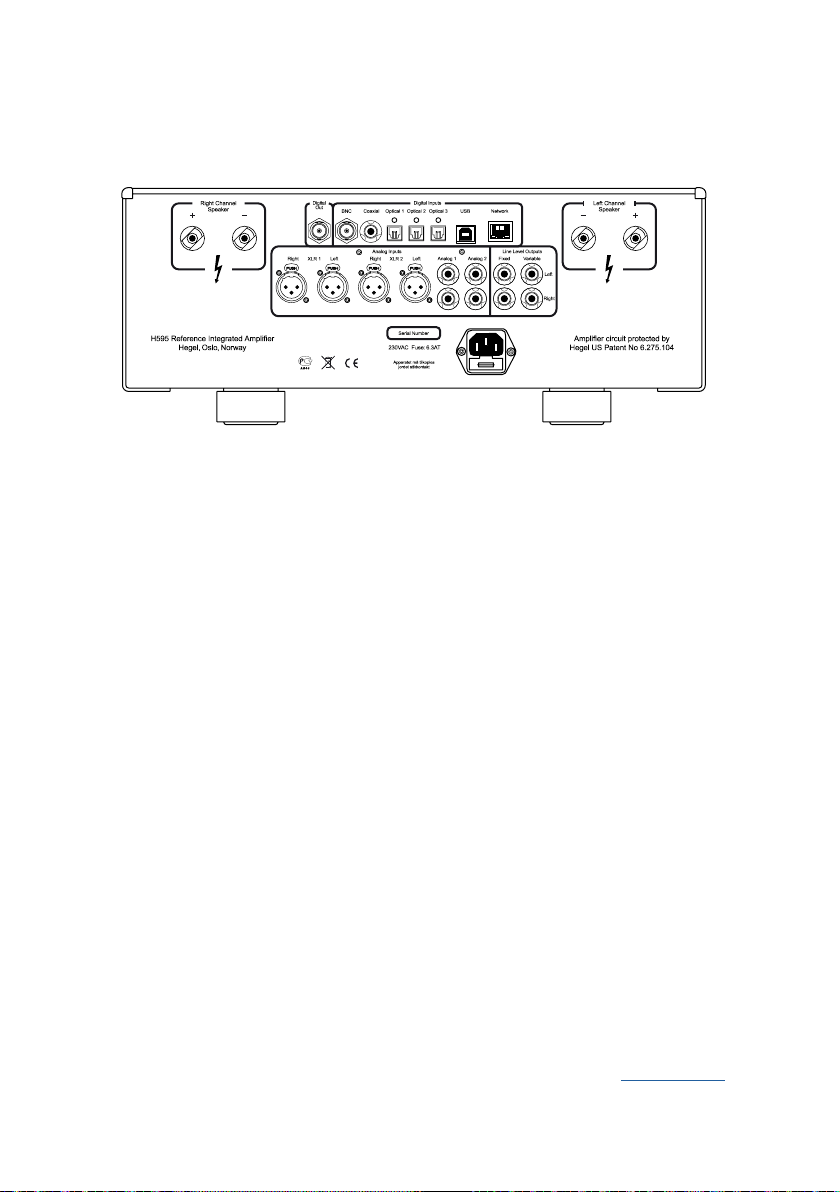
Connections
FUSE HOLDER
Always power the amplifier off before connecting input/output audio cables and the
power cable.
Right Channel Speaker
• Right outputs
Digital Out (DAC loop)
• BNC: Output BNC
Digital Input
• BNC: Input BNC
• Coaxial: Input Coaxial/RCA
• Optical1: Input TOSLINK/EIAJ Optical
• Optical2: Input TOSLINK/EIAJ Optical
• Optical3: Input TOSLINK/EIAJ Optical
• Computer USB input
• Home network connection (LAN - RJ45)
Left Channel Speakers
• Left outputs
Analog Inputs
• XLR1 (XLR): Standard balanced
analog input (Pin 1 is Chassis Ground;
Pin 2 is Positive Phase; Pin 3 is Negative
Phase)
• XLR2 (XLR): Standard balanced
analog input (Pin 1 is Chassis Ground;
Pin 2 is Positive Phase; Pin 3 is Negative
Phase)
• Analog 1 (RCA): Standard analog input
• Analog 2 (RCA): Standard analog input
Line Level Outputs
• Fixed Line level (RCA)
WARNING High level output
• Variable Line Level (RCA)
AC Power Connection
• AC Power connector with fuse holder:
230V/115V/100V AC depending on
country.
Home Theater
Most inputs on the H600 can be used as a
Home Theater input, see Device Menu.
9
Page 10

Digital Inputs and Formats
Input sense
All digital inputs except USB have input
sense. When the H600 detects a signal on
one of these inputs it will turn on and switch
to the active input. See Auto In in the Device
Menu for setup.
Bit perfect DAC
The DAC in the H600 is bit-perfect, meaning it will not alter the resolution or content
of an incoming digital signal.
Maximum supported resolution
Coax/BNC: 24/192 + DSD64(DoP)
Optical: 24/96
USB: 32/384 + DSD256(DoP)
Network: 24/192 + DSD64(DoP)
Supported formats UPnP
MP3, WAV, FLAC, ALAC, AAC, PCM, MQA,
Ogg
USB
The Hegel H600 has a plug-and-play USB
DAC that is designed to work with computers. Connect it to your PC or Mac and
enjoy all your music.
MQA (Master Quality Authenticated)
Hegel H600 includes MQA technology,
which enables you to play back MQA audio
files and streams, delivering the sound of
the original master recording.
“MQA” or “MQA.” in the display indicates
that the product is decoding and playing an
MQA stream or file, and denotes provenance to ensure that the sound is identical
to that of the source material. “MQA.” indicates it is playing an MQA Studio file, which
has either been approved in the studio by
the artist/producer or has been verified by
the copyright owner. “OFS” confirms that
the product is receiving a decoded MQA
stream or file. This delivers the final unfold
of the MQA file and displays the original
sample rate.
Hegel H600 supports up to MQA 8X
(352.8kHz/384kHz)
Visit mqa.co.uk for more information.
10
Page 11
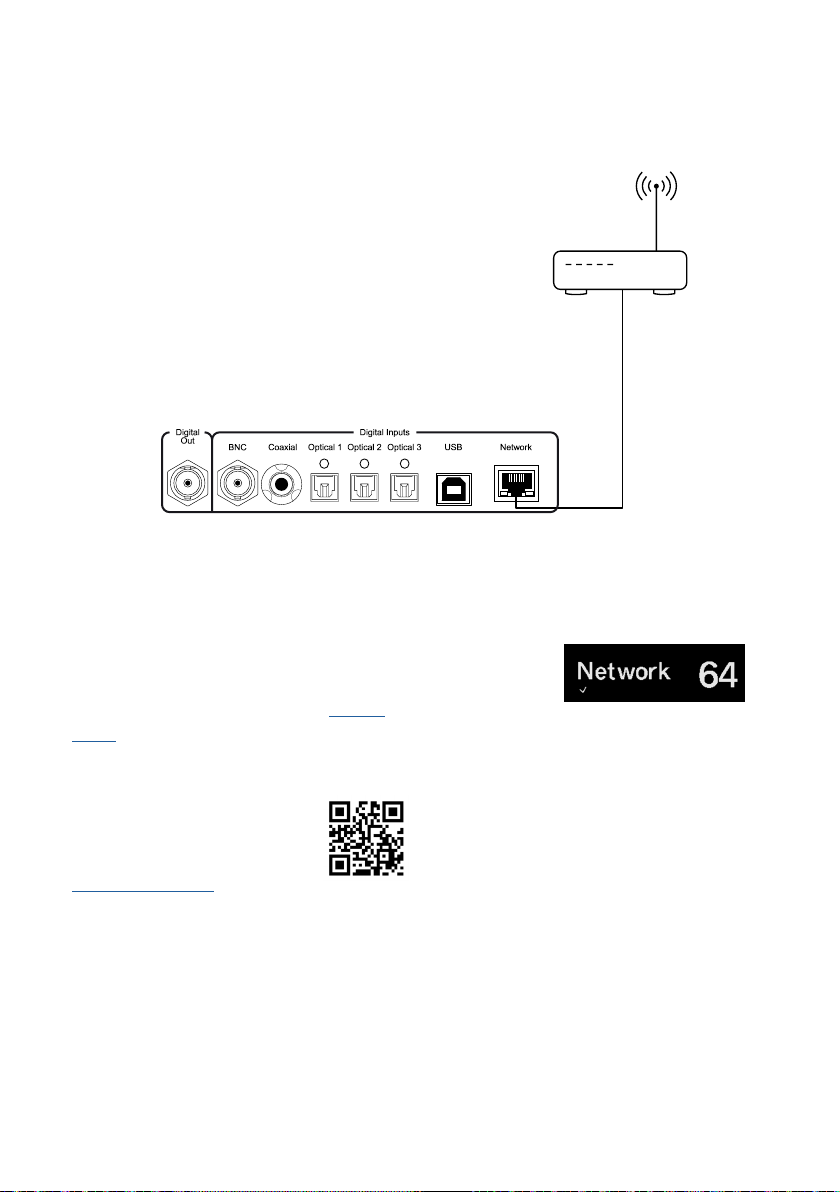
Network Setup
Connection
To be able to use the amplifier’s network
and streaming features, the amplifier needs
to be connected to your local network.
Connect your Hegel amplifier using an Ethernet cable (not supplied) from the network
connection (LAN - RJ45) port on the back of
the amplifier to your router.
Network settings
The amplifier has its own Network Configuration page where you can change the
amplifier’s network name and IP settings.
To open the page, enter your amplifier’s IP
address in a browser window.
You can find the IP address in the Device
Menu under “Network”.
For detailed information on the
Network Configuration page,
supported formats, and much
more, please visit
support.hegel.com
NOTE: Some of the features of the Hegel
device require an internet connection.
Status Indicators
The Hegel device will display the network status in the lower left corner of the display.
Network status
is OK:
Troubleshooting
If you experience problems with connecting
the amplifier to the network or have other
network issues, when powered on, press
and hold the device power button until
the device reboots. If that does not help,
disconnect the power chord for at least 30
seconds and then reconnect.
11
Page 12
Streaming
AirPlay
With Apple AirPlay, you can enjoy your
favorite music or podcasts on your Hegel
device.
Choose the Hegel device in the list of
AirPlay speakers. Go to apple.com/airplay to
learn how.
Tidal Connect
Tidal is a digital music and video streaming
service that offers high resolution audio.
With Tidal Connect you can stream your
favorite music seamlessly across supported
devices, without any loss in quality.
UPnP/DLNA
UPnP stands for Universal Plug and Play
and is a widely used media streaming protocol that is supported by a host of media
player products and applications. The Hegel
device functions as a digital media renderer.
When using UPnP/DLNA you can stream
from locally stored files or music streaming services to the Hegel device. For details
on how to set up your media player, please
refer to the user manual supplied with the
player.
NOTE: This Hegel device can be updated
with new streaming features.
For an up-to-date and in-depth
description of its streaming
features, please visit
support.hegel.com
12
WARNING:
When streaming to the Hegel device, always
remember to check the player/device volume setting
before pressing play. The Hegel device will change its
volume to the volume set in the player.
Page 13

13
Page 14
Device Menu
Navigation
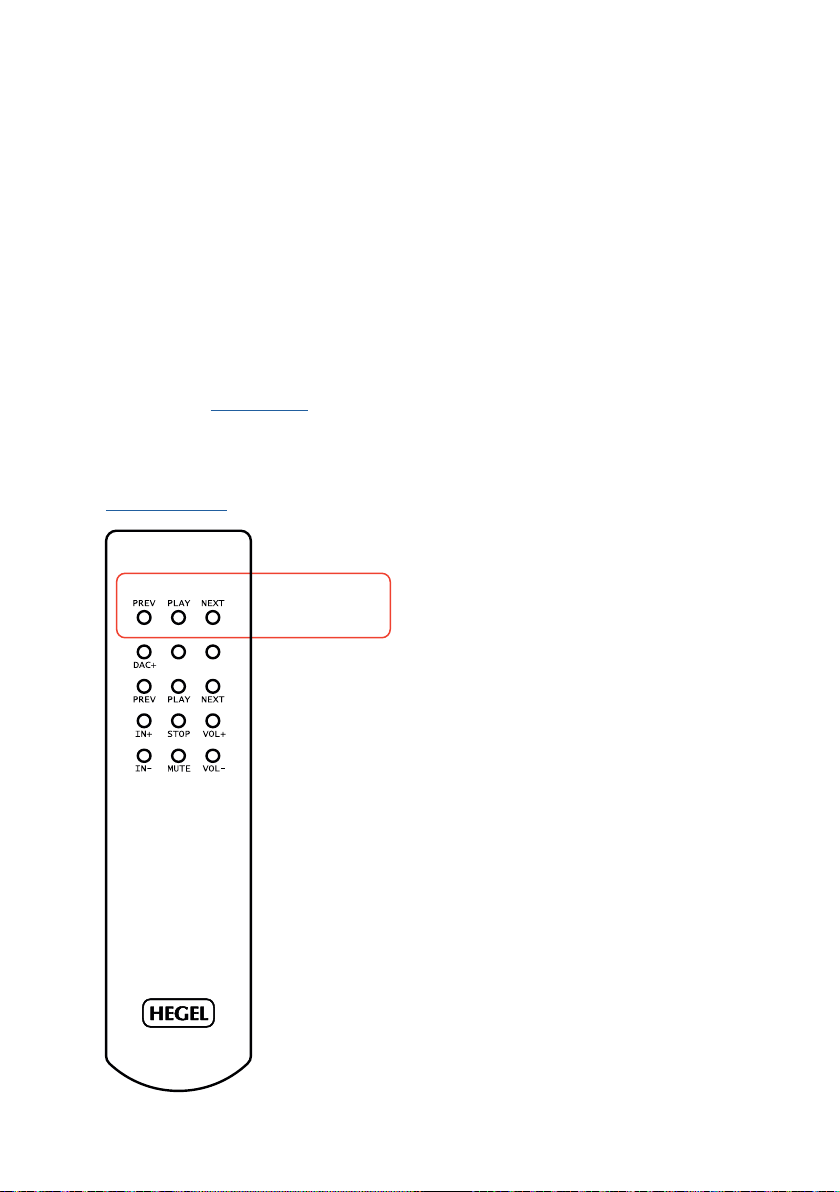
To enter the device menu, turn the Hegel
device on and press and hold the STREAMING PLAY button for 5 seconds. To navigate
the menu, use the PREV and NEXT buttons.
To select a sub-menu or feature, press the
PLAY button. To exit the menu, navigate to
“Exit” and press PLAY. You can also use the
source selector to enter and navigate the
device menu. See General Use.
NOTE: Some menu features require a connection to the internet to work properly
See Network Setup.
STREAMIN
G
DISPPWR
Menu navigation
PREV - Up
PLAY - Select
NEXT - Down
Info
Information about the Hardware Version of
your product and the Firmware Version currently running.
Network
Information about the Network Device
Name and the IP Address of your device.
Sleep
By default, this Hegel device will automatically go into standby mode after 15 minutes
without music, or with a very low signal on
the speaker outputs. The Sleep timer can be
adjusted or disabled in this menu.
Auto In
Configure how the device operates when
receiving a signal on digital inputs.
Volume
Adjust maximum volume and maximum
startup volume.
14
In this submenu, you can also activate the
USB Volume feature. This enables you to
control the volume of the device with a
connected USB source like a computer or a
streamer.
Warning: Always remember to check the
connected device volume setting before
pressing play. With USB volume activated,
the amplifier will change its volume to the
volume setting on the connected device.
Page 15
Remotes
Enables you to use your TV remote to turn
on your Hegel device and adjust its volume.
You can also configure automatic input
selection and automatic power on.
*Works with most newer Samsung, Sony, LG, and Philips
IR and Smart TV remotes.
HT
Most inputs can be configured to act as a
Home Theater input. This will set the input
volume at a fixed high volume level. Only
connect sources with volume control.
DAC-loop/Digital out
Your device comes equipped with a DACLoop function that can be activated in
the Device Menu. The function makes it
possible to upgrade the digital inputs of
the amplifier with an external high-end
DAC. This is done by connecting the jitterreduced coaxial (BNC) digital output of the
amplifier to the external DAC. The output of
the external DAC must be connected to the
XLR input of the amplifier.
Reset
Here you can reset the product to the default factory settings. This will not affect any
firmware updates you have installed.
Exit
Exit the menu
NOTE: The Hegel device menu can be updated with new features and options.
For an up-to-date and in-depth
description of the menu and its
features, please visit
support.hegel.com
In the DAC-Loop submenu, the Network and
USB inputs can be enabled separately.
Both these inputs take full advantage of
the internal synchronous master clock. For
these inputs, we recommend leaving the
DAC-Loop function disabled as it in most
cases will not benefit the sound.
In this submenu, you can also enable the
digital output to always be active.
15
Page 16
Remote Control - RC8
STREAMIN
G
DISPPWR
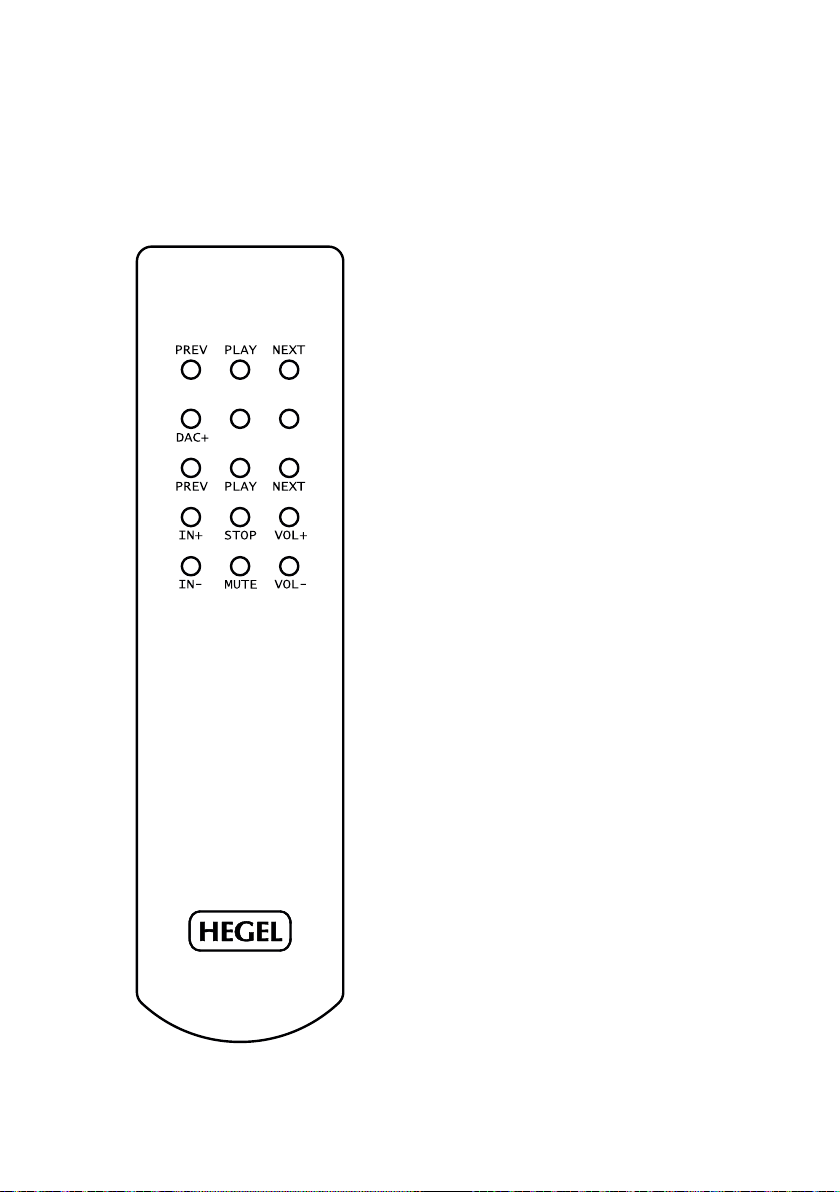
Remote control buttons
PREV
Skip backward on compatible
USB or network media players
PLAY
Play/Pause on compatible
USB or network media players
NEXT
DAC+
PWR
DISP
PREV
PLAY
NEXT
Skip forward on compatible USB
or network media players
Input selector on DACs
Standby on amplifiers
Display on/off on amplifiers
Hold for display off
Skip backward on CD-players
Hold to rewind
Play/Pause on CD-players
Skip forward on CD-players
Hold to fast forward
IN+
STOP
VOL+
INMUTE
VOL-
Switch to next input
Stop on CD-players
Volume up
Switch to previous input
Mute on amplifiers
Volume down
16
General information
This Hegel device can be controlled with the
included Hegel RC8 Remote Control. The
RC8 also controls other Hegel products,
such as CD players and preamplifiers, and
most connected media players.
Batteries
The remote control uses two standard
1.5-volt LR03 AAA batteries.
To insert the batteries, use a crosshead
(Phillips) screwdriver to remove the back lid.
When reassembling, be careful not to overtighten the screws.
Page 17

General Information
Connecting a subwoofer
The most common way to connect a
subwoofer is from the variable line output
on your Hegel amplifier. If your subwoofer
is equipped with “high-level” speaker wire
terminals, you can also use this. Many subwoofer manufacturers recommend this type
of connection if it is available.
Please consult your subwoofer manual for
detailed instructions on how to connect and
configure your subwoofer for the best audio
result.
Power
All electrical components should be turned
off or set in standby mode when not in use.
This is due to safety, because all electrical
components can fail, and it is good for the
environment. Leaving your product on all
the time could also shorten the life expectancy of the product.
That being said, our products sound even
better when they are warmed up, typically
after about 15 minutes of listening at a
moderate volume.
Connecting your TV
The best way to connect your TV is by using one of the optical inputs. If there is no
sound, try changing the sound output in the
TV’s settings menu. The setting should be
changed to “optical” or “digital out” and the
signal should be “PCM” or “stereo”. Please
consult your TV manual for detailed instructions.
The volume on this device can also be controlled by certain TV remotes. See Device
Menu for more information.
Technical Specifications
H600 Integrated Amplifier
Power output 2*303W in 8 ohms
Dual Mono
Minimum load 2 ohms
Analog inputs 2*Balanced (XLR)
2*Unbalanced (RCA)
Digital outputs 1*Coaxial (BNC) S/PDIF
Digital inputs 1*Coaxial (BNC) S/PDIF
3*Optical S/PDIF
1*USB
24/192, DSD64, MQA 8x
Line level outputs 1*Unbalanced fixed
(RCA)
1*Unbalanced variable
(RCA)
Streaming AirPlay 2, Tidal Connect,
UPnP
Streaming formats MP3, WAV, FLAC, ALAC,
AIFF, DSF, DFF, AAC,
PCM, MQA, Ogg
Frequency response 5Hz-100kHz
Signal-to-noise ratio More than 100dB
Crosstalk Less than -100dB
Distortion Less than 0.005% @
50W 8 Ohms 1kHz
Intermodulation Less than 0.01%
(19kHz + 20kHz)
Damping factor More than 4000
(main output stage)
Power use in standby:
- without wake on LAN <0,5W
- with wake on LAN <2W
Dimensions/weight 17,1 x 43 x 44,5 cm
(HxWxD), 22kg
Dimensions/weight US 6,74 x 16,93 x 17,52”
(HxWxD), 48,51 lbs
24/192
24/192, DSD64(DoP), MQA 8x
1*Coaxial (RCA) S/PDIF
24/192, DSD64(DoP), MQA 8x
24/96, MQA 8x
32/384, DSD256(DoP), MQA 8x
1*Network
17
Page 18

Safety Instructions
Unpacking and Packing
Remove the top shock absorber. When lifting the amplifier, avoid holding the knobs or
connectors. Slide the bag off/on the device.
When packing, make sure the bottom shock
absorber is placed at the bottom of the
original cardboard box. Place the amplifier
into the shock absorber. Place the top shock
absorber on top of the amplifier.
Placement and Cooling
The Hegel amplifier should be placed on
a flat, hard surface for proper cooling. The
amplifier must never be placed on a carpet
or similar surface as this obstructs air circulation through the unit. To maintain proper
ventilation, leave a space of a minimum of
10 cm from the rear, top, and side panels of
the device. The front side of the enclosure
should be left open.
If overheated, the amplifier will automatically switch itself off. When it cools down the
amplifier will turn back on, and the volume
will be set to 0.
Warning: The surfaces of the amplifier may
become hot during use. If hot, do not touch
the panels of the amplifier and let the amplifier cool down before moving or lifting it.
Connecting the wires
Incorrect connections or damaged wires can
cause short circuits, which can damage the
amplifier, cause electrical shock, and pose
a fire hazard. Follow this manual’s installation instructions and ensure all wires are
connected correctly before connecting the
power source.
Power source
Only use the power source specified on the
back panel and ensure the voltage matches
the voltage in your area.
High volume
Do not listen to music at high volumes for
extended periods of time as this can cause
permanent hearing damage and the inability
to enjoy this amplifier to its fullest.
Cleaning
Unplug the amplifier from the AC outlet
before cleaning. Fingerprints or stains can
be removed with a cloth lightly damped with
warm water or a mild detergent suitable for
cleaning mirrors and windows.
Proper use
Use the amplifier only for its intended
purpose and do not modify or misuse it in
any way. The product is designed for indoor
use only and must not be exposed to rain or
moisture.
Repair
Hegel products should only be opened
or serviced by certified technicians. The
devices contain electronic components
that may cause severe electric shock. Work
performed on Hegel products by unqualified personnel may cause serious damage
or personal injury.
Opening the product by non-authorized
personnel will void the warranty.
18
Page 19
Warranty and Disclaimers
Warranty
All Hegel products come with a 2-year
warranty against defective materials and
workmanship. The warranty is limited to the
region where it was originally purchased.
There is no need for registering the warranty. The purchase receipt will work as a
start date for the warranty.
In case you need assistance with your Hegel
product, please contact your nearest dealer
or distributor. These are listed on
www.hegel.com. Our dealers are carefully
chosen for their expertise and should be
able to help you with any Hegel-related
issue. You can of course always reach us
directly by sending an email to
[email protected] or by contacting us on our
social media pages.
For more information about the
H600, please visit www.hegel.
com
Disclaimers
Use of the Works with Apple badge means that
an accessory has been designed to work specifically
with the technology identified in the badge and has been
certified by the developer to meet Apple performance
standards.
Apple and AirPlay are trademarks of Apple Inc., registered in the U.S. and other countries and regions.
MQA and the Sound Wave Device are registered trademarks of MQA Limited.© 2016
The TV remote functionality is not guaranteed to work
with all TV remotes from the supported brands.
Technical specifications, streaming options, and features
may change without notice.
V3.1
19
Page 20

www.hegel.com
 Loading...