

Page 1
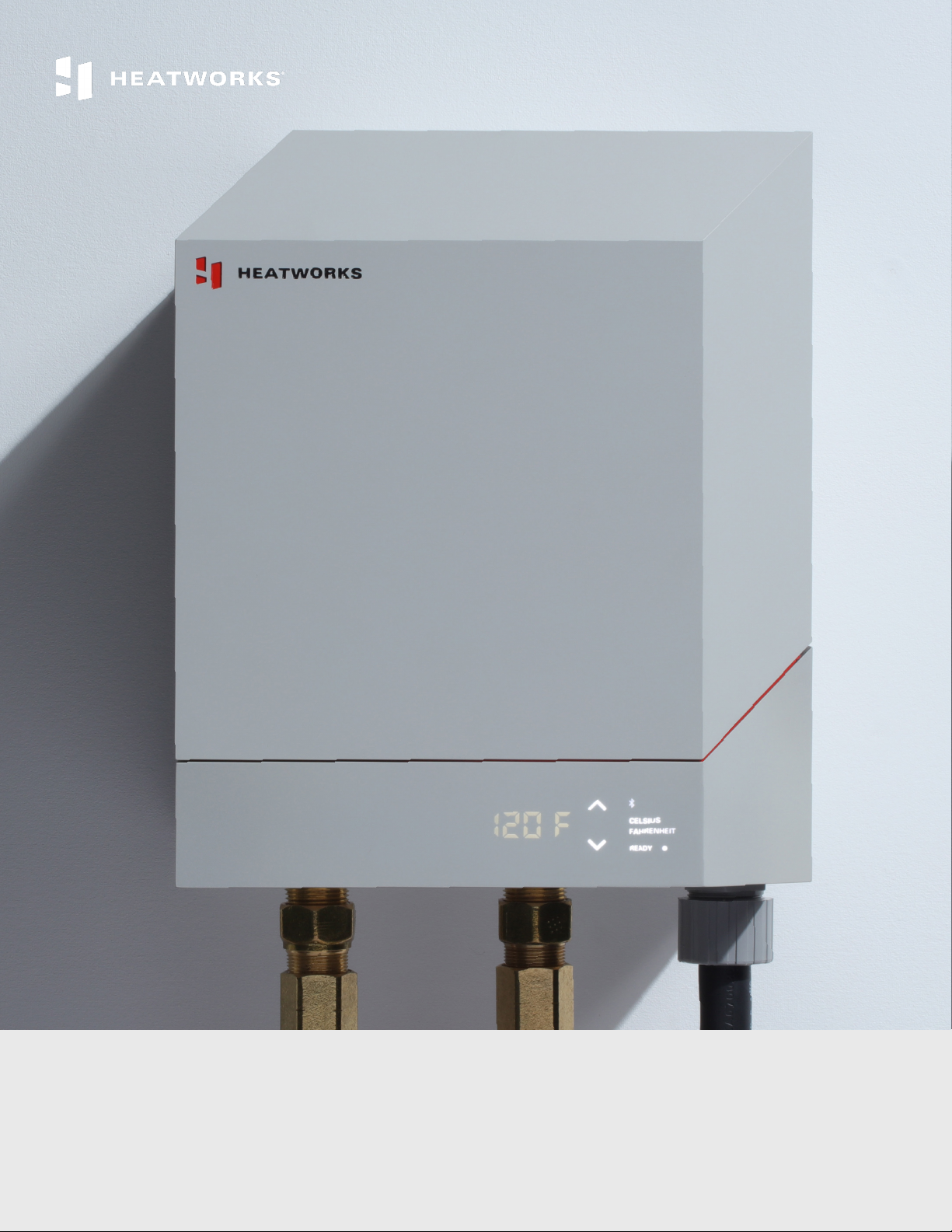
MODEL 3 TANKLESS ELECTRIC WATER HEATER
User Manual & Installation Guide
Version 12282018
Page 2

Page 3

TABLE OF CONTENTS
INTRODUCTION pg 4
About your MODEL 3 Water Heater pg 4
Registering your unit pg 4
Downloading the Heatworks app and connecting your unit to Wi-Fi pg 4
TECHNICAL DATA pg 8
TROUBLESHOOTING pg 8
INSTALLATION GUIDE pg 9
Important safety information pg 9
Intended use pg 10
What’s included in the box pg 10
MODEL 3 diagram pg 11
Precautions for selecting a location and installation pg 12
Mounting the unit pg 13
Connecting the water supply pg 14
Electrical information pg 15
Electrical installation pg 17
Completing the installation pg 18
WARRANTY AND LEGAL pg 24
Registering your unit pg 24
Making a warranty claim pg 24
Manufacturing limited warranty information pg 21
Return policy pg 27
Privacy policy pg 27
www.myheatworks.com | 3
Page 4

INTRODUCTION
Thank you for purchasing the MODEL 3, the world’s most advanced tankless electric water
heater.
ABOUT YOUR MODEL 3 WATER HEATER
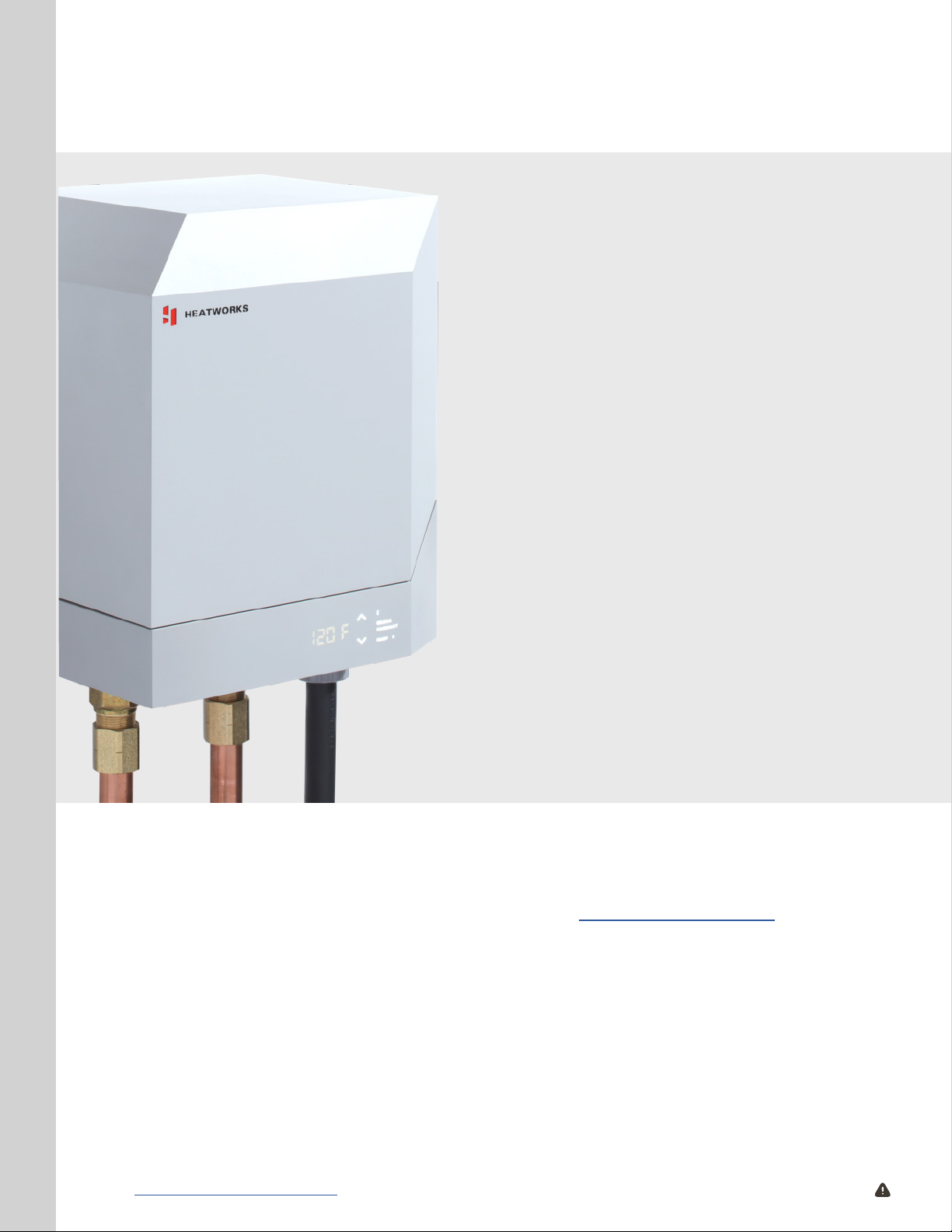
The MODEL 3 Water Heater is an internet-connected tankless electric water heater which
provides instant, endless hot water for a house, apartment, points-of-use or in certain
commercial applications. Unlike a conventional storage type water heater, the MODEL 3
does not store a large volume of hot water. Instead, water is heated instantaneously as
it ows through the unit using Ohmic Array Technology. This patented process replaces
metal heating elements found in other water heaters with a precisely engineered array
of graphite electrodes and a digital control system to provide unlimited hot water on
demand.
REGISTERING YOUR UNIT
You must register this product on our website within 90 days of purchase in order to
activate the 6-year full unit exchange warranty or be eligible for the extended warranty.
If you do not activate your warranty within 90 days, your MODEL 3 Water Heater will be
covered from the date it was manufactured. Go to our website at www.myheatworks.com/
pages/registration to complete the registration process.
If you have any questions regarding the warranty or have trouble registering your unit,
please call our customer support team at 888-506-2821.
DOWNLOADING THE HEATWORKS APP AND CONNECTING YOUR
UNIT TO WI-FI
Though not required, we highly recommend that you download the Heatworks app and
connect the MODEL 3 to your Wi-Fi network at the time of installation or as soon as
wireless internet is available.
IMPORTANT: Some dual band (5 GHz & 2.4 GHz) routers create two distinct access points
and SSID’s. The 2.4GHz SSID must be selected when on-boarding the MODEL 3.
By connecting your unit to your Wi-Fi network, you can take advantage of additional
features such as being able to remotely control temperature settings as well as timer and
scheduling functions of your unit; enable important over-the-air rmware updates to your
unit; advanced reporting features like energy usage per day and per month, calculating
the price per gallon of hot water, and identifying the amount of total dissolved solids; and
communication between your unit and other bluetooth devices, such as leak and vibration
sensors. If you cannot connect to Wi-Fi at this time, skip this section for now and move on
to “SETTING AND ADJUSTING THE SETPOINT TEMPERATURE” on page 20.
4 | www.myheatworks.com CAUTION: Breaker must remain o until installation is complete.
Page 5
1
To connect your MODEL 3 unit to your Wi-Fi network, you must rst download the
Heatworks mobile application from either the iPhone App Store or the Google Play
Store.
2
3
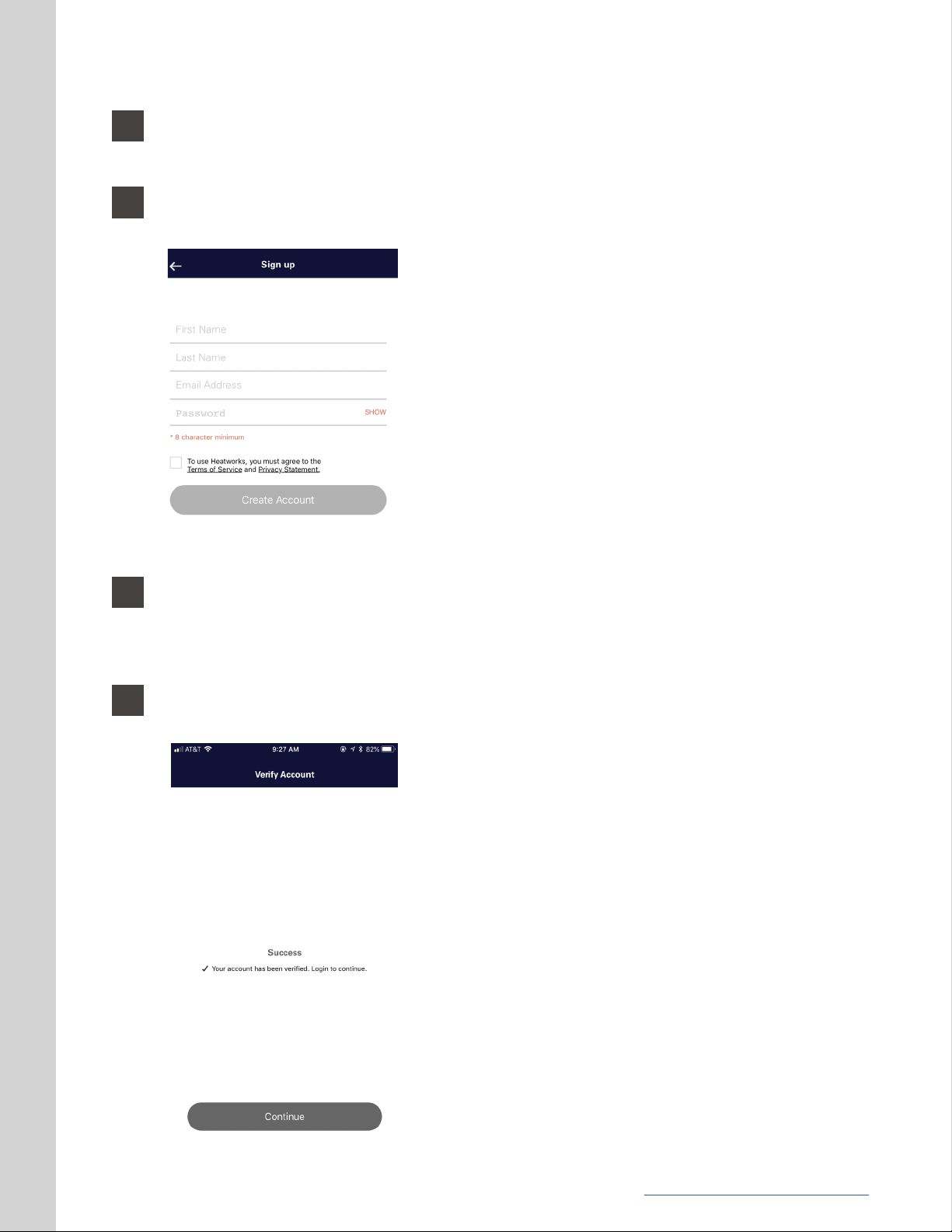
Once the Heatworks app is installed on your smart device, you will need to set up an
account.
To set up your account, please provide your rst and
last name, your email address and a password that
is at least 8 characters. You must also review and
agree to Heatworks’ Terms of Service and Privacy
Statement.
Please note that you will be asked to verify your
email account by entering a special code that will be
sent immediately to the email address you provide.
Make sure you have access to your email account or
you will not be able to proceed to the next step.
Click the “Create Account” button.
Check your email for a message from [email protected]. The subject will be “Your
Heatworks verication code”. If it isn’t in your inbox, please check your junk mailbox.
This email will provide your special code that you will need to enter into the Heatworks
app to verify your account.
4
Go back into the Heatworks app and enter the special code you received via email. You
will then see this screen:
Congratulations! You have successfully created your
Heatworks account and can now use the app.
Click the “Continue” button and log back into your
account by providing your email address and
password.
www.myheatworks.com | 5
Page 6
4
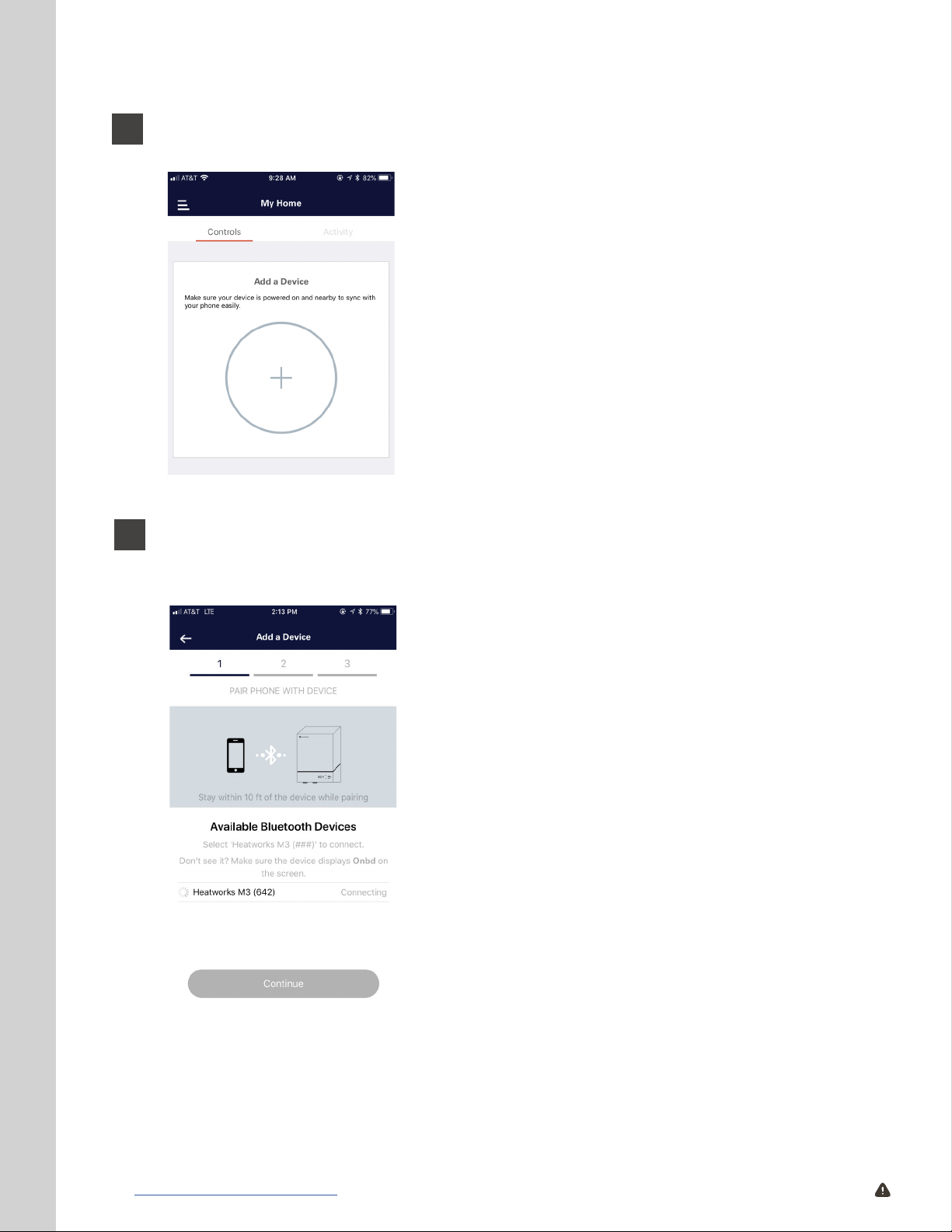
Once you are logged into your veried account, you will then need to connect to your
MODEL 3 unit.
To do this, make sure you are standing no more
than 10 feet away from the installed MODEL 3 unit
to which you are pairing and that the unit is on. You
will know the unit is on when you see an illuminated
green button located on the front home button of the
unit. If it isn’t on, simply press the button once and it
will turn on.
Once the unit is on, hold down the home button on
the front of the unit to illuminate the menu. Navigate
to the menu where “Onbd” is displayed on the
screen; the home button will also turn blue.
5
You should see this screen. If you don’t, please make sure that power to the MODEL
3 is on, your unit is displaying “Onbd” and the home button is illuminated, your Wi-Fi
network is available, and that you are standing within 10 feet of the unit.
Follow the on-screen steps to pair your MODEL 3 unit
to your device.
Step 1: Choose the MODEL 3 unit you are syncing.
6 | www.myheatworks.com CAUTION: Breaker must remain o until installation is complete.
Page 7
6
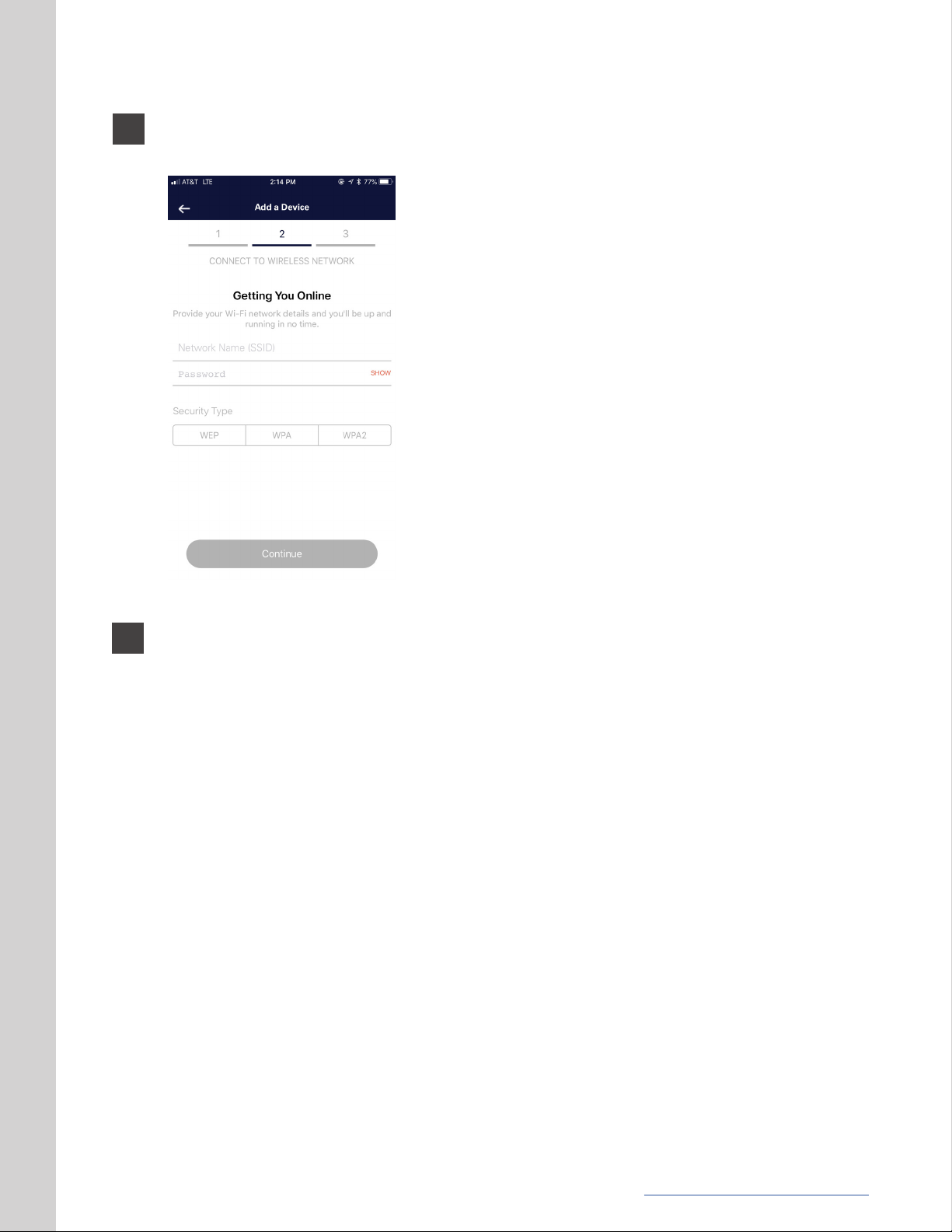
Step 2: Connect to the wireless network by choosing or entering your network name
and network password.
7
Step 3: The MODEL 3 will now pair with your Wi-Fi network. Once successfully
completed, the app will return to your dashboard, where you can control and monitor
your hot water system.
www.myheatworks.com | 7
Page 8
TECHNICAL DATA
PRODUCT INFORMATION
Size
Weight
Connections
Digital Controls
Max Temp Rise
Warranty
11” x 13.2” x 10”
35 lbs
3/4” NPT male connections
LED panel, Full Wi-Fi connectivity,
Mobile app
41° F rise at 4 GPM,
82° F rise at 2 GPM
6-year full unit exchange, 4-year
extended warranty available
OPERATING RANGES
Voltage
Frequency
Power
Working Pressure
208-240 V
50/60 Hz
6.2-24 kW
30-80 psi, 2.06-5.52 bar, 206-552 kPa
Conductivity
Current
80-2000 μS
30-100 A
TROUBLESHOOTING
If your MODEL 3 Water Heater blinks red and displays an error code, please call our
support team at 888-506-2821 or visit our support page at www.myheatworks.com
to learn more. Additionally, if you detect abnormal operation, turn the circuit breaker
associated with your unit off and call 888-506-2821.
CAUTION: Warranty will be void if anyone, including but not limited to the installer or
customer, decides to open the metal casework of the unit to service the product (electrical
access panel cited on page 17, step 2, is excluded from this statement). Attempts to
service the MODEL 3, including but not limited to, opening the casework of the unit or the
pressure vessel will result in a voided warranty and deems the unit non-refundable.
8 | www.myheatworks.com CAUTION: Breaker must remain o until installation is complete.
Page 9

INSTALLATION GUIDE
IMPORTANT SAFETY INFORMATION
This manual must be read carefully and before attempting to install the MODEL 3. If you
do not follow the safety rules or the instructions outlined in the manual, the unit may
not operate properly and it could cause property damage, serious bodily injury and/or
death. Heatworks will not be liable for any damages because of failure to comply with the
installation and operating instructions outlined in this manual.
This unit must be installed by a licensed electrician and plumber. The installation must
comply with all national, state and local plumbing and electric codes. Proper installation
is the responsibility of the installer. Failure to comply with the installation and operating
instructions or improper use voids the warranty.
This equipment has been tested and found to comply with the limits for a Class B
digital device, pursuant to part 15 of the FCC Rules. These limits are designed to provide
reasonable protection against harmful interference in a residential installation. This
equipment generates, uses and can radiate radio frequency energy and, if not installed
and used in accordance with the instructions, may cause harmful interference to radio
communications. However, there is no guarantee that interference will not occur in a
particular installation. If this equipment does cause harmful interference to radio or
television reception, which can be determined by turning the equipment off and on, the
user is encouraged to try to correct the interference by one or more of the following
measures:
• Reorient or relocate the receiving antenna.
• Increase the separation between the equipment and receiver.
• Connect the equipment into an outlet on a circuit different from that to which the
receiver is connected.
• Consult the dealer or an experienced radio/ TV technician for help.
Save these instructions for future reference. Installer should leave these instructions
with the consumer. If you have any questions regarding the installation, use or operation
of this water heater, or if you need any additional installation manuals, please call our
customer support team at 888-506-2821 or visit the support page on our website.
Throughout this manual, we have highlighted certain points that require special attention.
These points are indicated by the three BOLDED categories below:
• “IMPORTANT” Commonly missed step in installation.
• “CAUTION” Negligence of this step could result in damage to your unit or personal
injury.
• “HEATWORKS RECOMMENDS” The user or installer should be aware of these
additional notes and benets.
www.myheatworks.com | 9
Page 10
INTENDED USE
INDOOR USE ONLY
THE MODEL 3 SHOULD NEVER BE EXPOSED TO FREEZING CONDITIONS.
The appliance is intended for heating residential hot water and supplying one or more
draw-off points. If you are unsure about your intended application or installation, please
call 888-506-2821 or visit our support page at www.myheatworks.com.
Any other use beyond that described shall be deemed inappropriate. Failure to comply
with the installation and operating instructions or improper use voids the warranty.
Observation of these instructions is also part of the correct use of this appliance.
WHAT’S INCLUDED IN THE BOX
IMPORTANT: Before removing the old tank water heater and beginning installation of the
new unit, unbox the MODEL 3. Remove all parts from the box and ensure all parts are
included.
CAUTION: It is required that a licensed plumber and electrician install the unit and that
the installation must comply with all national, state and local plumbing and electric codes.
Proper installation is the responsibility of the installer.
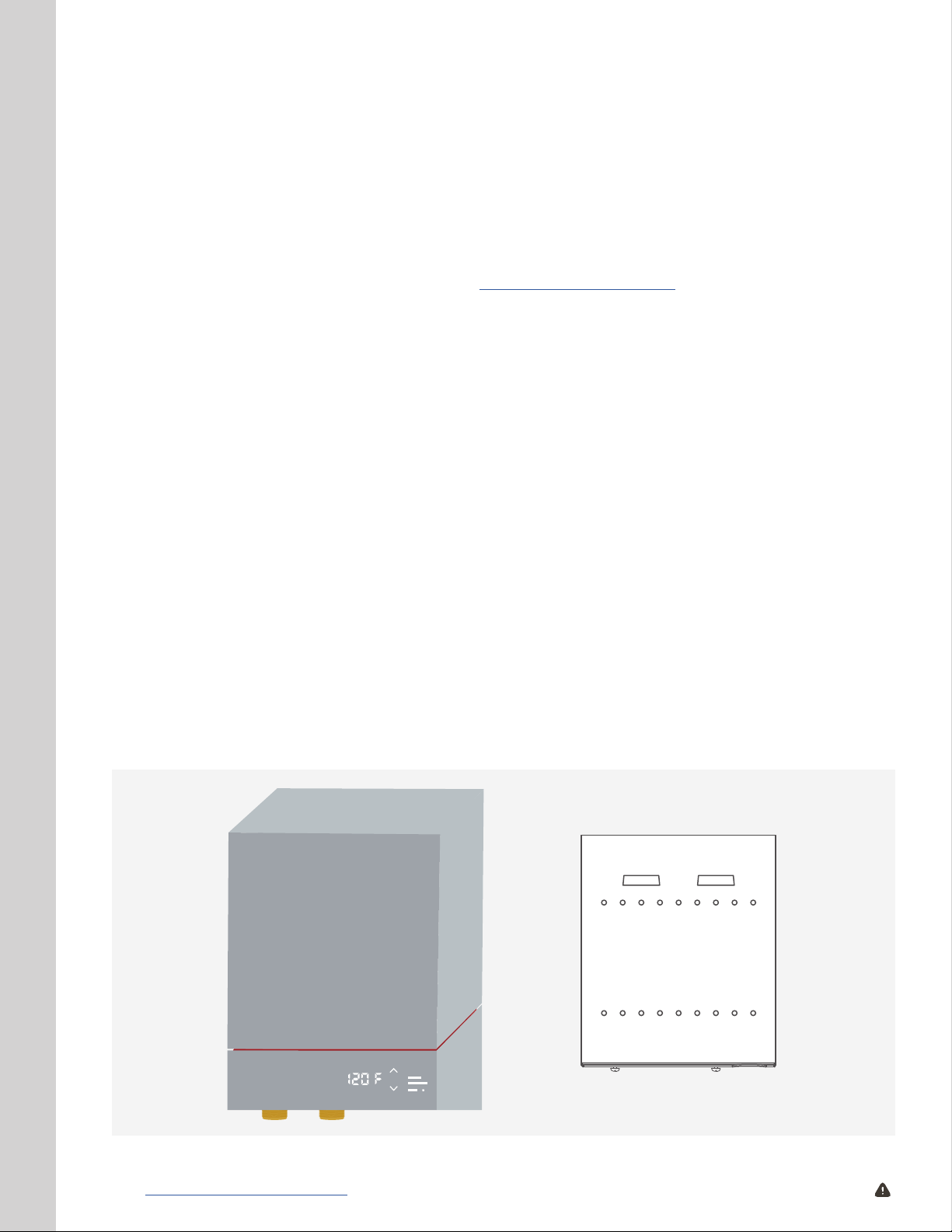
• One (1) MODEL 3 Water Heater
• One (1) MODEL 3 mounting bracket with two (2) pre-installed MODEL 3 mounting
bracket screws
• One (1) MODEL 3 Water Heater Quick Start Guide
MOUNTING BRACKET
10 | www.myheatworks.com CAUTION: Breaker must remain o until installation is complete.
Page 11
FRONT VIEW
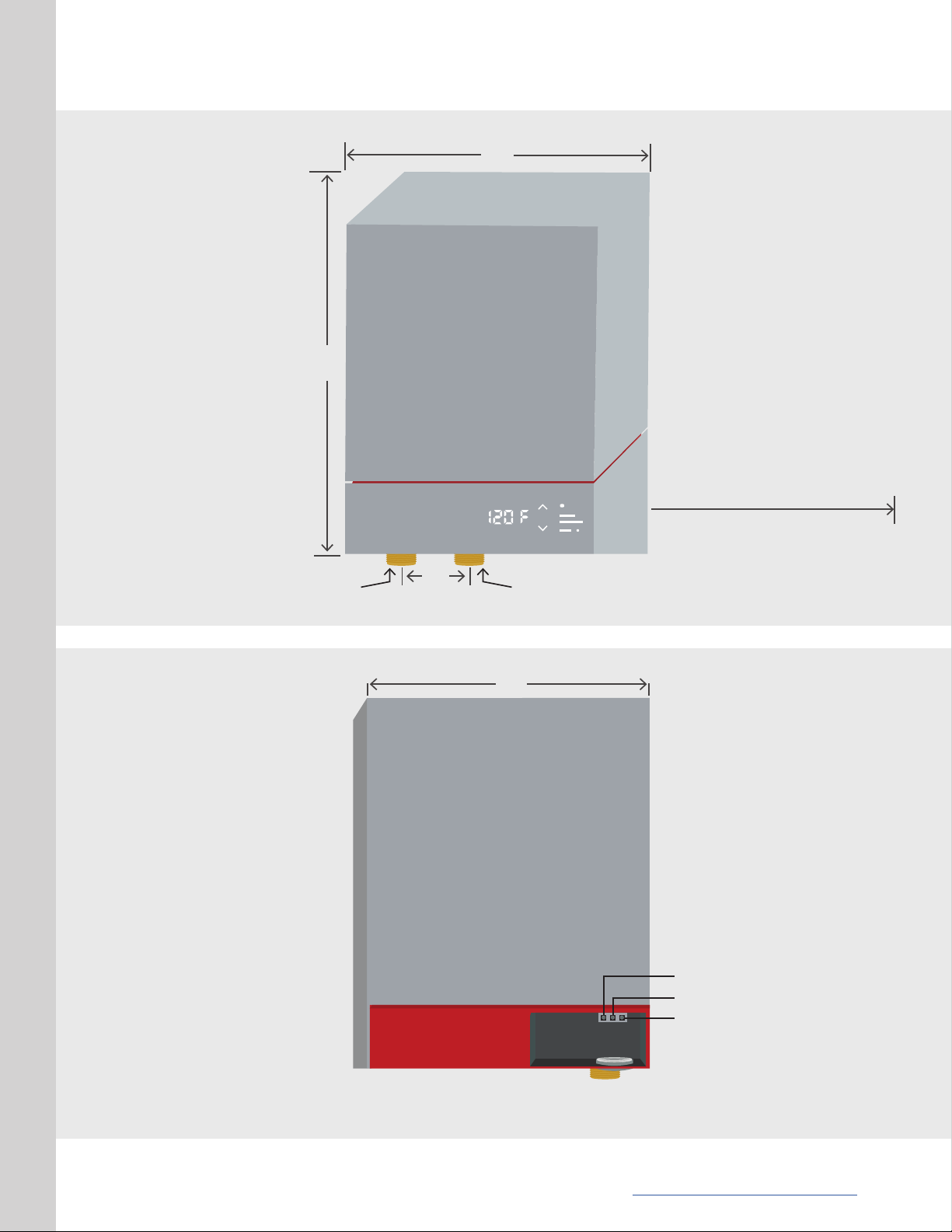
11.0”
13.2”
12” MIN
CLEARANCE
SIDE VIEW
COLD
3/4” NPT
2.2”
HOT
3/4” NPT
10.0”
L1
GROUND
L2
www.myheatworks.com | 11
Page 12
PRECAUTIONS FOR SELECTING A LOCATION AND INSTALLATION
In general, the MODEL 3 can be installed in the same location where the old tank water heater was
located or depending local codes, in a more centralized location in your home. However, to ensure
safe performance and keep the warranty in effect, the following precautions must be observed:
1
Ensure domestic water supply is turned off.
2
3
The MODEL 3 unit must be installed where minimum clearances can be met and
indoors where it is protected from the elements and extreme weather.
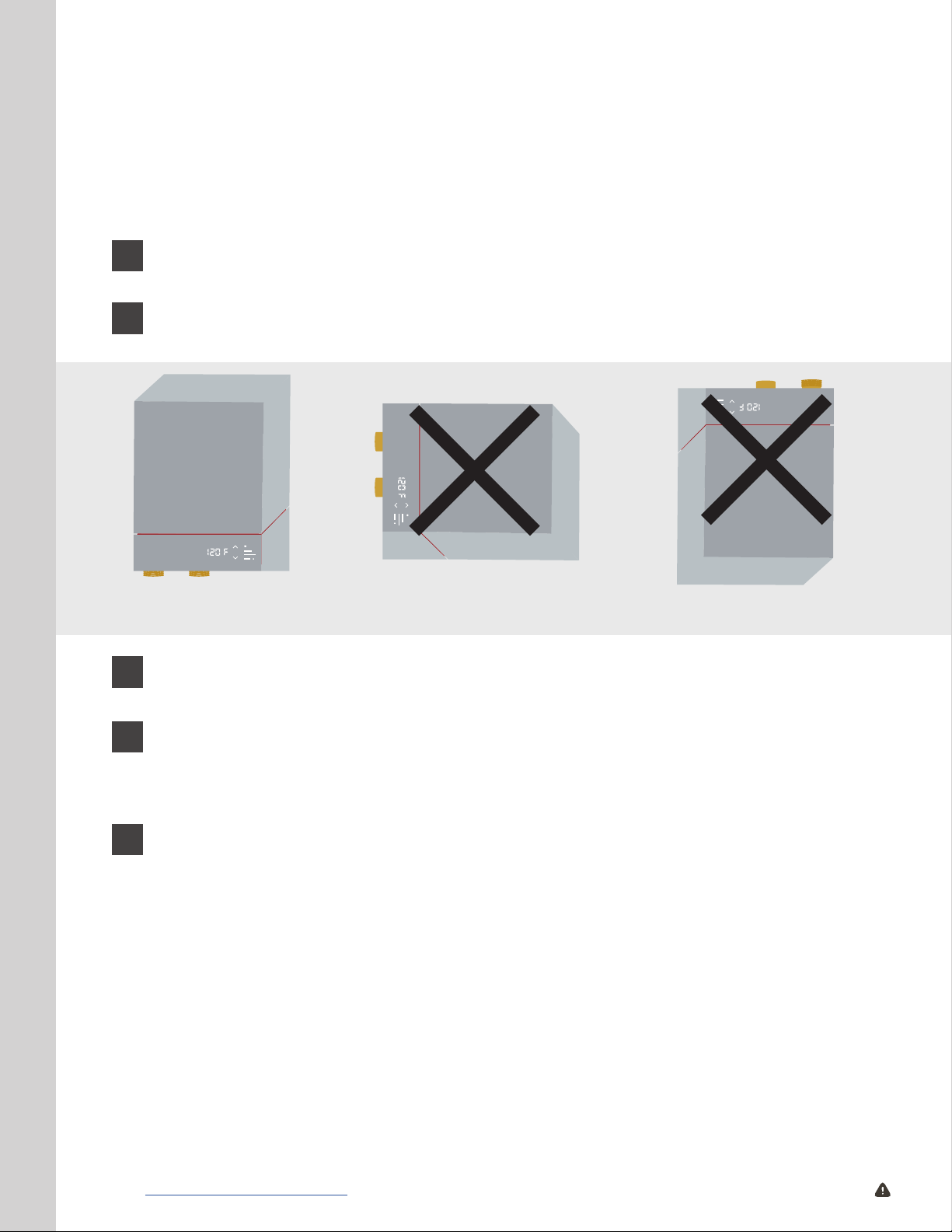
CORRECT
The unit MUST be installed in an upright orientation with the water ttings
positioned below and pointing downward.
INCORRECT
INCORRECT
When connecting to PEX or High Temperature CPVC pipe, we strongly recommend
4
5
CAUTION: Failure to comply with these requirements may result in the unit falling from
the wall, creating the possibility of personal injury or death.
MOUNTING THE UNIT
HEATWORKS RECOMMENDS: Wall studs should be utilized when mounting the water
heater to the wall. Alternately, a suitable piece of wood may be placed inside or outside
of the wall to span the distance between the wall studs. Fasten the water heater mounting
bracket to the wood.
that a T&P valve be used for added safety. For example, installations in the
Commonwealth of Massachusetts and State of Kentucky require a pressure relief
valve. Please check your local installation codes for any special requirements.
The unit must be mounted to wall studs or structural member capable of
supporting 40 pounds. If there is no wall stud or convenient structural member
available, ensure that appropriate wall anchors for the type of wall surface are
used and sufcient to securely hold 40 pounds.
12 | www.myheatworks.com CAUTION: Breaker must remain o until installation is complete.
Page 13
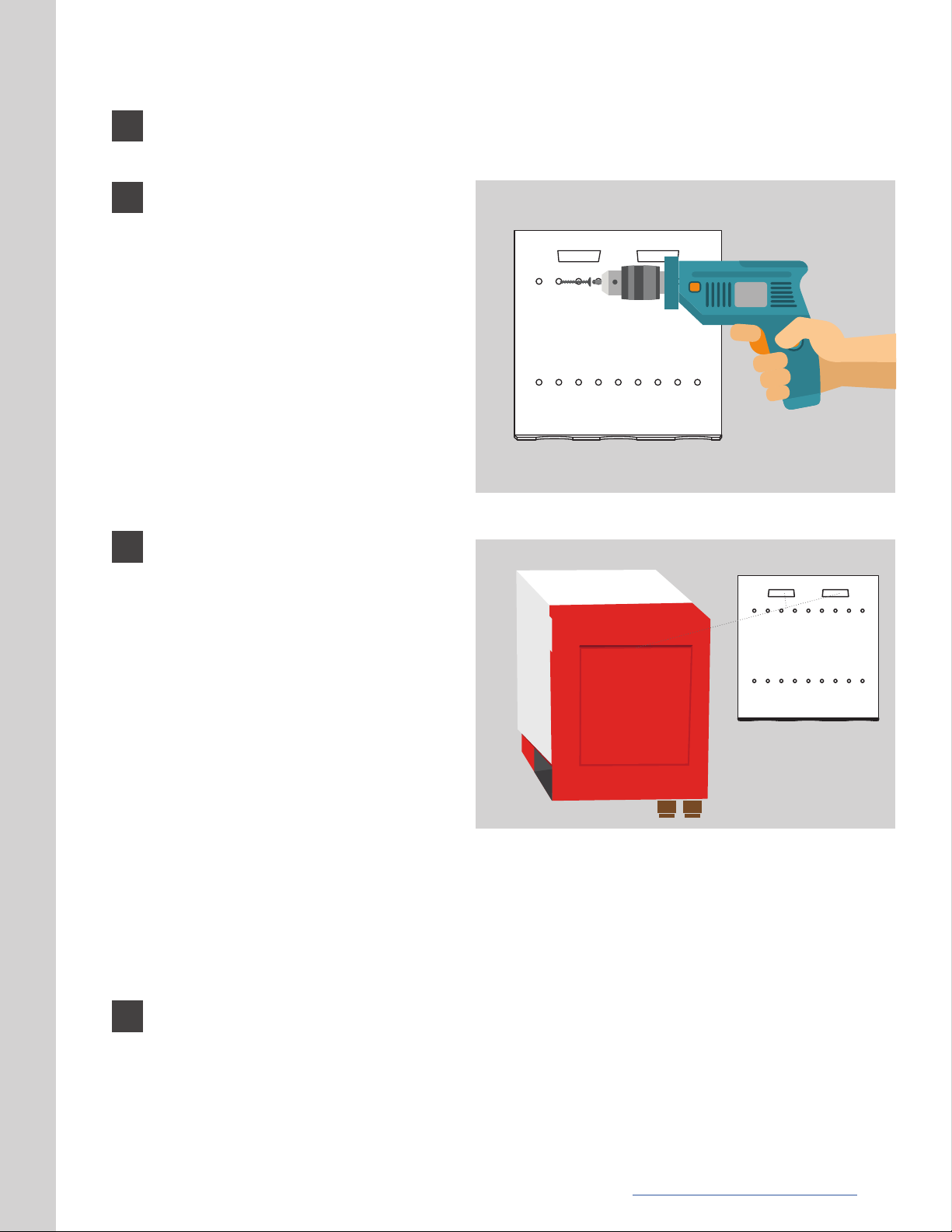
1
During shipping, the mounting bracket is attached to the back of the unit. Remove it
by unscrewing the two mounting screws located underneath the unit.
2
3
Using a bubble level, afx the
mounting bracket to the wall, using
the dimensions in the MODEL 3
Diagram found on page 11 to help
position the unit. Make sure to
pick a location that will be easy to
access the service access panel on
the right side of the unit, as well as
the tting connections located on
the bottom of the unit. The bracket
must be mounted to wall studs,
a structural member, or with wall
anchors able to support 40 pounds
and appropriate for the type of wall
surface if there are no wood studs
behind the surface.
The MODEL 3 unit has one (1) large
slot on its back panel that will t
on the two (2) tabs located towards
the top of the mounting bracket.
Mounting bracketMODEL 3 rear view
Lift the MODEL 3 unit and place
it ush on the wall with its back
against the mounting bracket,
slightly above where the tabs are
situated. Slowly lower the unit
down until it is fully resting on the
two tabs of the mounting bracket.
Ensure that both slots are in place.
Line up the screw holes located
on the bottom of the unit with the
corresponding holes on the lower
lip of the mounting bracket by sliding the unit left or right on the tabs if necessary
to center, and then use the two (2) screws supplied to secure the MODEL 3 unit to
the mounting bracket lip.
CAUTION: Failure to comply with this requirement may result in the unit falling from the
wall, creating the possibility of personal injury or death, or damage to the unit.
4
CONNECTING THE WATER SUPPLY
The MODEL 3 Water Heater is now securely attached to the wall.
When using a water well supply or a water supply where sediment is commonly found in
the water, Heatworks recommends installing a sand lter on the water supply line before
the cold water inlet of the MODEL 3.
www.myheatworks.com | 13
Page 14
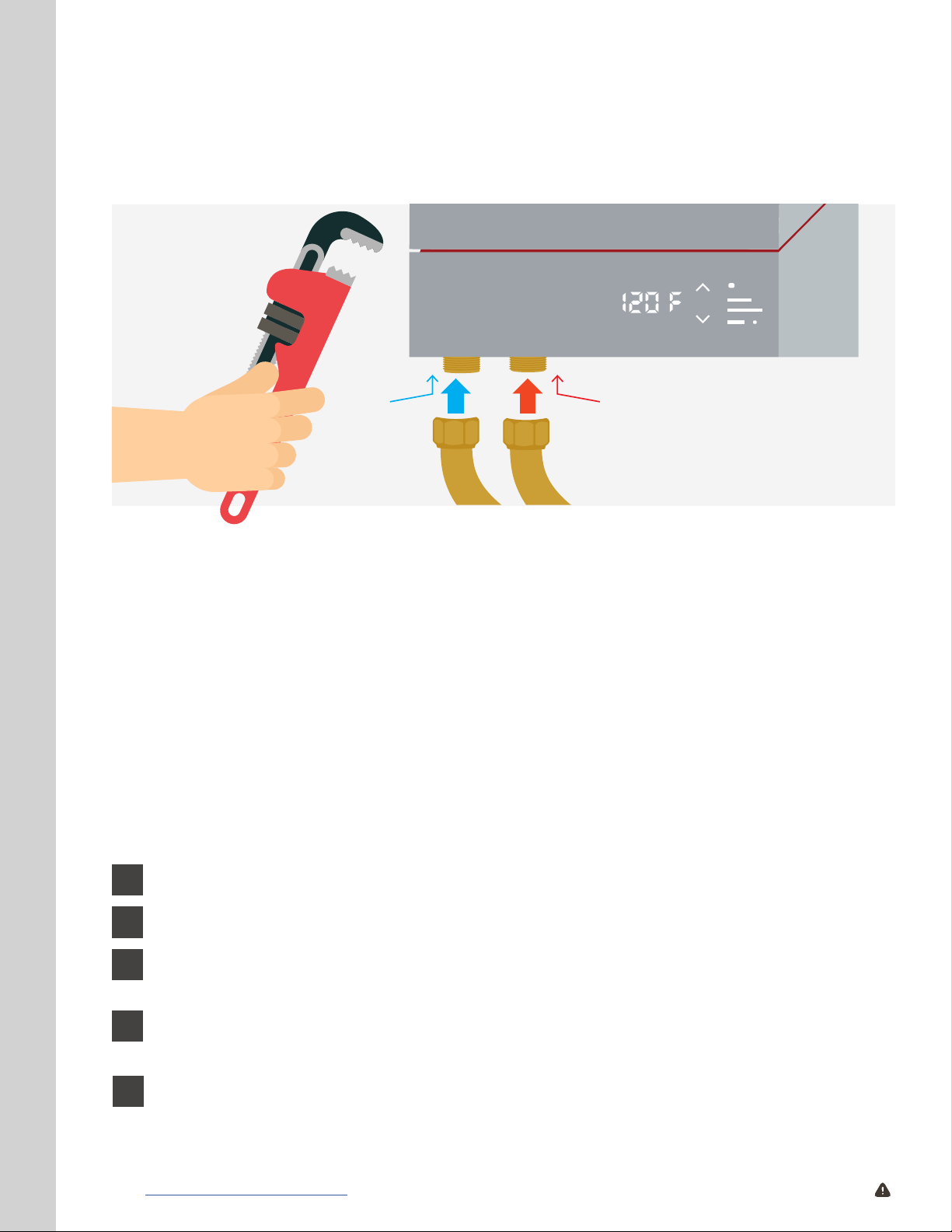
The MODEL 3 must be properly and securely connected to the water supply.
The unit has two plumbing connections: 3/4” NPT male cold water supply inlet (leftmost
when facing the unit) and 3/4” NPT male hot water outlet.
COLD
3/4” NPT
CAUTION: In order to clean the inlet lter screen, the cold water connection to the unit must be
disconnected periodically. It is required to use water heater connection hoses (minimum of 18”
in length) that are easily detachable such as braided steel exible water heater connectors. When
installing PEX piping, please reference material manufacturer’s recommendations/requirements
and ensure it is compliant with your local plumbing codes.
CAUTION: When applying plumber’s tape to the inlet and outlet of the MODEL 3, Heatworks
requires installer to avoid allowing plumber’s tape to obstruct the inlet or outlet. Applying the
plumber’s tape past the rst thread should ensure that no tape ows into the water stream after
proper plumbing connections are attached.
CAUTION: Serious damage to your MODEL 3 can occur if all water lines in the plumbing system
are not ushed of debris entirely before installing the MODEL 3 for both retro-t and new
construction projects. This is required to keep all foreign matter from entering the MODEL 3.
Failure to do so prior to installing the MODEL 3 will void the warranty.
HOT
3/4” NPT
1
2
3
4
5
14 | www.myheatworks.com CAUTION: Breaker must remain o until installation is complete.
Ensure domestic water supply is turned off.
Connect the inowing cold water supply to the inlet connection on the unit.
Next, connect the outowing hot water supply main to the outlet connection on the
unit.
Check to ensure all ttings and connections are tightened appropriately, but not over
tightened as this may damage the unit.
Turn on the water supply to the system. Open a hot water tap in the house and allow
water to ow for at least three (3) minutes, until there is a steady stream of water
owing out of the tap with no air “spitting” in the stream.
Page 15
IMPORTANT: Outowing water will be cold at this point of installation. Water will not ow
hot until an electrical supply is connected. Verify that the inlet and outlet connections are
leak-free, both with water owing and with the water ow stopped.
Heatworks strongly recommends installing a T&P relief valve rated for a maximum
6
of 150 psi; in addition, a T&P valve may be required to meet installation codes in
your area. If one is required, install the pressure relief valve in accordance with
local codes and ensure that it operates correctly and that air is purged from the
valve prior to installing the water heater. If one is used, install the valve branched
off of the hot outlet side. Check to ensure the T&P valve and ttings associated with
the valve are not leaking.
The MODEL 3 Water Heater plumbing connections are now completed.
7
ELECTRICAL INFORMATION
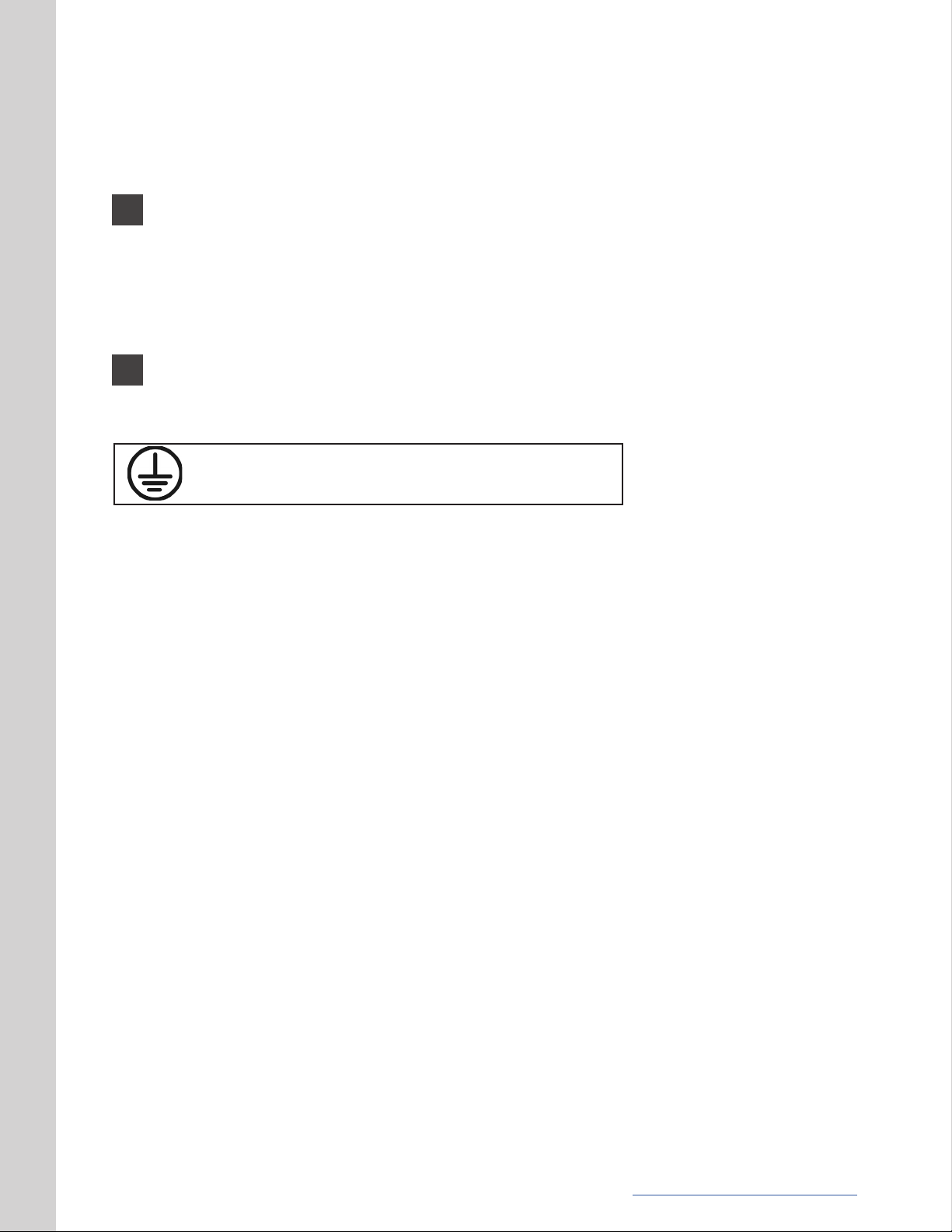
GROUND WIRE IS REPRESENTED ON PRODUCT
LABELING AS THIS UNIVERSAL SYMBOL.
CAUTION: If you ever detect abnormal operation, turn the circuit breaker associated with
your unit off and call 888-506-2821.
CAUTION: This water heater is an electrically powered high voltage and high current
device. It must be installed by a licensed electrician and licensed plumber in accordance
with all national, state, provincial and local electrical and plumbing codes. Failure to
install this unit in accordance with all applicable codes and requirements may result in
personal injury or death.
CAUTION: Always turn off the power circuit breakers at BOTH the main electrical panel
or subpanel. High voltage is present in the system. Personal injury or death can result if
caution is not taken.
CAUTION: NEVER set the amperage on the MODEL 3 to a current draw higher than the
dedicated breaker is rated for. For example, if your MODEL 3 is wired to a 50 A breaker,
you should NEVER set the amperage on the MODEL 3 to exceed a 50 A draw.
CAUTION: Serious damage to your MODEL 3 can occur if all air is not purged from the
water lines initially, or at any time after installation where air might have been introduced
into your home water system.
CAUTION: NEVER turn power on if there is a possibility the water in the heater is frozen.
CAUTION: Supply this appliance only from a grounded system. A green terminal (or a
wire connector marked “G”, “GR”, “GROUND”, or “GROUNDING”) is provided for wiring
the appliance. To reduce the risk of electric shock, connect this terminal or connector to
the grounding terminal of the electric service or supply panel with a continuous copper
wire in accordance with the electrical installation code.
RECOMMENDS: Heatworks recommends using crimps on electrical leads for ease of use
during this step in installation.
www.myheatworks.com | 15
Page 16

ELECTRICAL SERVICE
According to the denition in the National Electric Code (also known as NFPA 70), an
appliance load that is not continuous for three hours or more is considered non-continuous.
Therefore, the MODEL 3, when used for standard domestic hot water applications, is
considered a non-continuous heating appliance. Due to the diversity of water heating in
a home, the load (amps) contribution of the MODEL 3 to the overall service load of the
home or building can be calculated using the optional methods of NEC, sections NEC 22082 or 220-83. For new dwellings, the service load should be calculated using NEC 220-82.
For existing dwellings, the service load should be calculated using NEC 220-83. By both
calculation methods, the MODEL 3 load is generally added to the service load at 40% of its
maximum nameplate rating. For instance, the full load current rating of the MODEL 3 is 100
A and 40% of this rating is 40 A. The 40 A is typically the load added to the overall service
load of the dwelling when using the optional calculation methods as described in NEC 22082 and 220-83, not the full load current rating of 100 A. (Note that a conventional electric
water heater rated for use on a 30 A circuit will draw 4.5 kW or 18.75 A.) Using the same
calculation method, 40% of the nameplate rating for a conventional 4.5 kW electric tank
water heater is 7.5 A. So, one MODEL 3 will add 32.5 A (40 A minus 7.5 A) additional amps to
the service load since 7.5 A were already available for the existing tank.
POWER/VOLTAGE MODULATION
During operation, the MODEL 3 Water Heater is designed to use only the power necessary
to heat the water for various combinations of temperature rise and ow rate.
DISCONNECTS AND SUBPANELS
Electrical disconnect devices do not contain circuit breakers and are not required by the
NEC for residential appliances such as the MODEL 3 or any appliance rated less than 300
volts. However, disconnects may be required by the NEC for motor loads and for appliances
with multiple circuits in commercial applications. Electrical subpanels or parallel panels,
containing circuit breakers, may be used with appliances such as the MODEL 3 in residential
and commercial applications. In new, and in some existing residential construction, there
are generally enough breaker spaces in the main electrical panel to accommodate the
circuit breaker associated with the MODEL 3. An electrician’s load analysis is recommended
if there is doubt about available breaker spaces. However, in some existing homes, the
main electrical panel may be nearly full of circuit breakers serving existing loads. In these
cases, one or more subpanels, each with a single large breaker rated for the entire load of
the water heater, can be installed off the main panel.
BRANCH CIRCUITS AND BREAKERS
As a non-continuous heating appliance, the branch circuit wires and breakers must be
sized to at least 100% of the maximum ampere rating of the appliance or the branch circuit
breaker, whichever is more. This is particularly important to avoid over heating of the wires
at the connections to the breakers, which may cause nuisance or premature breaker trips.
It is recommended that the copper wire for the branch circuits and subfeeds be rated for
at least 75° C. If you use THHN, which is rated for 90° C, the wire gauge is smaller than
standard 75° C wire, and the nylon covering makes it much easier to pull. Multiple breakers
should never be wired to a single MODEL 3. Each MODEL 3 should be wired to its own,
dedicated breaker.
16 | www.myheatworks.com CAUTION: Breaker must remain o until installation is complete.
Page 17
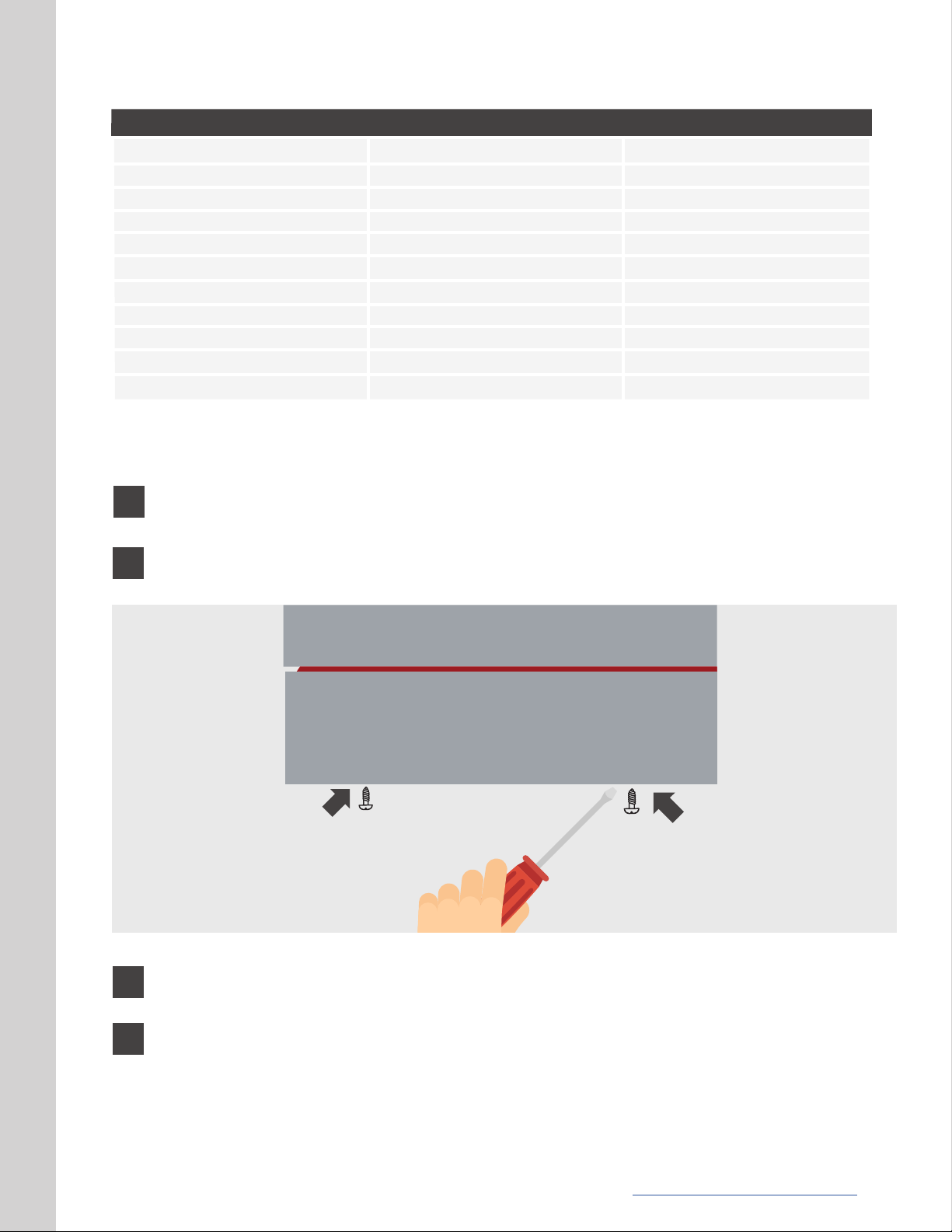
Amperage and Wiring Table
Currents (amps)
30
35
40
45
50
60
70
80
90
100
Wire gauge (75° C | 167° F)
ELECTRICAL INSTALLATION
10
*This table is for copper wire gauges only
Wire gauge (90° C | 194° F)
10
8
8
8
8
6
4
4
3
3
8
8
8
8
6
6
4
4
3
1
2
Ensure the power circuit breakers at BOTH the main electrical panel or subpanel
are turned off.
Remove the service access panel cover located on the right bottom side of the
unit by removing the two (2) screws and carefully setting aside.
3
4
Verify all wiring (wire gauge) and circuit protection (breakers) comply with
national and local electrical codes.
The MODEL 3 requires two power conductors and one grounding conductor.
The power conductors should be Line 1 and Line 2 for a typical 208, 220, or 240
VAC single phase installation. The grounding conductor should be connected to
Earth Ground. Feed wire through the bottom of the unit and connect each of the
individual wires as highlighted on the label in the service access area. Tighten
each lug; make sure each connection is very snug.
www.myheatworks.com | 17
Page 18
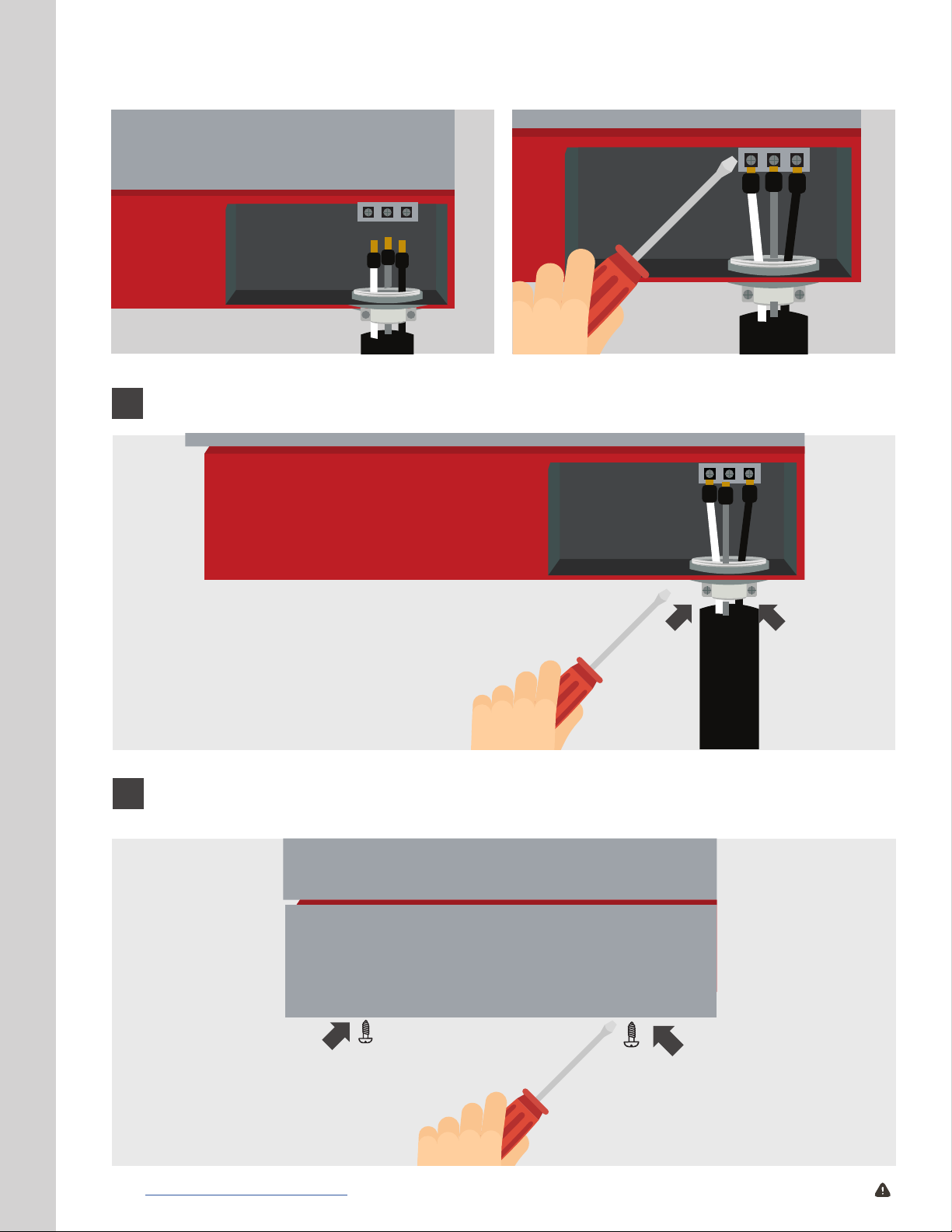
L2G
L1
L2G
L1
5
6
Tighten the strain relief.
L2G
L1
Place the service access panel cover back in on the MODEL 3 unit and fasten it in
using the two (2) screws.
18 | www.myheatworks.com CAUTION: Breaker must remain o until installation is complete.
Page 19

COMPLETING THE INSTALLATION
Conrm that the cold water supply main is turned on and that main power is
1
securely connected to the unit.
2
3
4
6
ACCESSING MODEL 3 MENUS
There are two different types of menus in the MODEL 3. The rst is the main menu, which
shows the user the current setpoint temperature (green dot), output water temperature
reading (red dot), actual current draw reading in amps (purple dot), actual water ow
reading in GPM (blue dot), and any error codes detected by the unit (red dot). This menu
can be accessed by simply tapping the home button once to cycle through each option. To
exit this menu and return to the power on screen, simply cycle through each option until
the menu screen is off and a single green dot is displayed in the home button.
Open a hot water tap inside the home and allow it to ow for a minimum of two
(2) minutes to purge air from the water lines. Turn off the tap.
Switch ON the main power circuit breakers.
Switch ON the MODEL 3 unit circuit breaker.
The unit will power up and a dot will appear on the display, indicating the unit has
5
power.
The next step in the installation process is to set your amperage by accessing the
amperage menu. To do that, it is rst important to better understand the various
menus that the MODEL 3 displays.
The second type is the settings menu. To access this, initiate a long press (press home
button for approximately two (2) seconds) from any menu screen. If you are executing a
long press from “power on”, the screen will pass through the output temperature menu
showing “120F” on the display before ultimately reaching the “C” and “F” menu. Release
the long press when you see “C” and “F” on the menu screen with a home button
ashing white. This is the rst menu in settings. The settings menu contains options for
celsius and fahrenheit, the amperage menu, the onboarding screen, and the enabling or
disabling Wi-Fi screen. The amperage, celsius and fahrenheit menus will time out in 30
seconds and return to the “power on” screen if no settings have been changed.
See both the main and settings menu owchart on the next page as a reference guide.
www.myheatworks.com | 19
Page 20
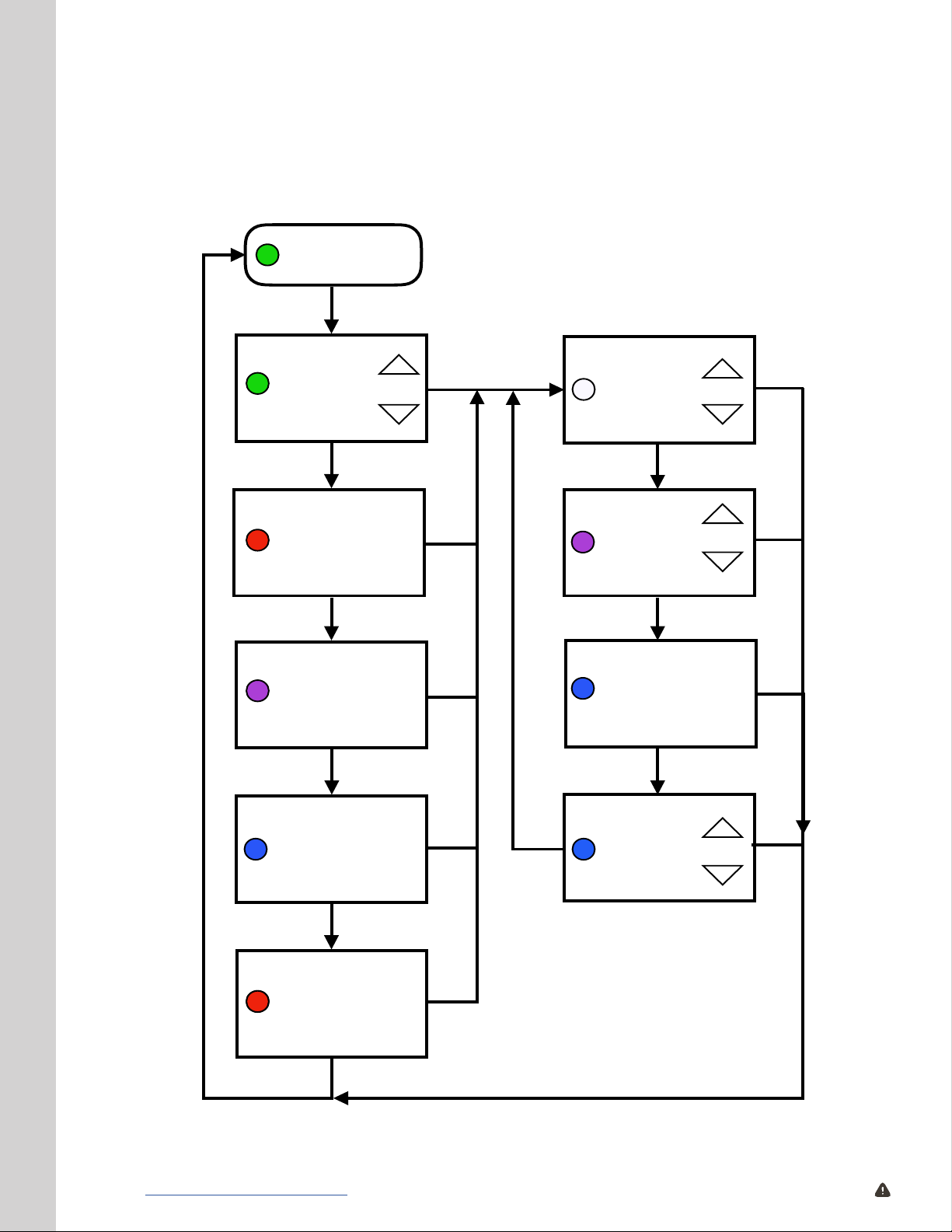
Main and Settings Menu Flowchart
Select
Degrees
°C or °F
Output
Water
Temperature
Reading
Adjust
Setpoint
Temperature
Tap
Set
Maximum
Current
(amps)
Onboard
to
WiFi
Hold
Hold
Hold
Hold
Hold
Actual
Current Draw
Reading
(amps)
Actual
Water Flow
Reading
(GPM)
Error
(if exists)
Hold
Hold
Hold
Tap
Power On
Tap
Tap
Tap
Tap
Tap
Tap
Enable or
Disable
WiFi
Hold
MAIN MENU SETTINGS MENU
20 | www.myheatworks.com CAUTION: Breaker must remain o until installation is complete.
Page 21

ACCESSING THE AMPERAGE MENU
To access the amperage menu, long press the green home button until the “C” and “F” menu
appears. Navigate to the amperage menu from the “C” and “F” menu by tapping the ashing
white home button one time. The home button will ash purple with “30A” (or, what your
previous amperage was saved to if set prior) displayed on the menu screen. To increase or
decrease your desired amperage setting, use the up and down arrows to the right of the menu
screen. Once your amperage has been selected, long press the home button until the menu
screen is blank, and a green dot is displayed on the home button. See step 7 for details on how
to determine correct amperage settings.
ACCESSING AND SELECTING CENTIGRADE OR FAHRENHEIT
The output and setpoint temperature of the MODEL 3 can be shown in °F or °C units. The factory
setting is °F. To change the unit of temperature from Fahrenheit to Celsius, long press the green
home button (approximately two (2) seconds) until the home button ashes white and “C” and
“F” is displayed on the menu. To change to Celsius, simply press the up or down arrow and the
“C” will begin ashing. To save this setting, long press the home button again. The setting will
save, and the menu screen will revert to the “power on” screen with a green home button.
ACCESSING THE WI-FI SETTINGS MENUS
When navigating to the onboarding menu, make sure you have followed the steps beginning
on page 4 in the User Manual & Installation Guide to download the Heatworks app and register
your account before engaging the MODEL 3 into onboarding mode. To access the onboarding
menu, begin by accessing the “C” and “F” menu by long pressing the home button. To navigate
to the onboarding menu from the “C” and “F” menu, simply tap the blinking white home button
two times. The letters “Onbd” will be displayed on the menu screen with the home button
ashing blue. Once you are on this menu screen, follow the prompts in the app and manual to
complete onboarding. Should you want to disconnect the unit from Wi-Fi completely, tap the
blinking white home button three times from the “C” and “F” menu. If Wi-Fi is enabled, “Conn
On” will be displayed and the button will be blue; if wi is disabled, “Conn Off” will be displayed
and the button will be white. Press the up or down arrow to select the option you want. To save
this setting, long press the home button again. Please note that if you are seeing “Conn On” but
the button is white, you have not yet entered your Wi-Fi password into the Heatworks app. This
is required in order to get your unit connected.
SETTING AND ADJUSTING THE SETPOINT TEMPERATURE
The MODEL 3 unit comes preprogrammed for an initial temperature setting of 120° F (49°
C); however, it can deliver any water temperature within (+/-) 1 degree Fahrenheit of the
temperature setpoint between 50° F (10° C) and 140° F (60° C) in single digit increments. To adjust
the temperature, rst touch the home button on the front of the unit to illuminate the menu.
This will show you the current setpoint temperature. Use the arrows on the display to select
the desired temperature, up to increase the temperature and down to decrease the setpoint
temperature of the MODEL 3. Suggested temperature settings:
Shower: 98°-110° (36°-43° C) Bath: 102°-110° F (39°-43° C) Sink: 110°-130° F (43°-54° C)
www.myheatworks.com | 21
Page 22
These temperatures are only suggestions. Most users nd a happy medium by setting
and leaving their unit at 120° F. Water temperatures over 125° F (52° C) can cause severe
burns instantly or death from scalding. Households with small children, disabled or
elderly persons may require that the thermostat be set at 113° F (45° C) or lower to prevent
possible injury from hot water.
Now that you better understand the various menus, it is now time to select the
7
correct amperage.
IMPORTANT: Unlike other water heaters, the MODEL 3 can be adjusted from 30-100 A
upon installation, depending on your specic hot water needs. The higher the power
setting, the more hot water you can expect.
CAUTION: NEVER set the amperage on the MODEL 3 to a current draw higher than the
dedicated breaker is rated for. For example, if your MODEL 3 is wired to a 50 A breaker,
you should NEVER set the amperage on the MODEL 3 to exceed a 50 A draw.
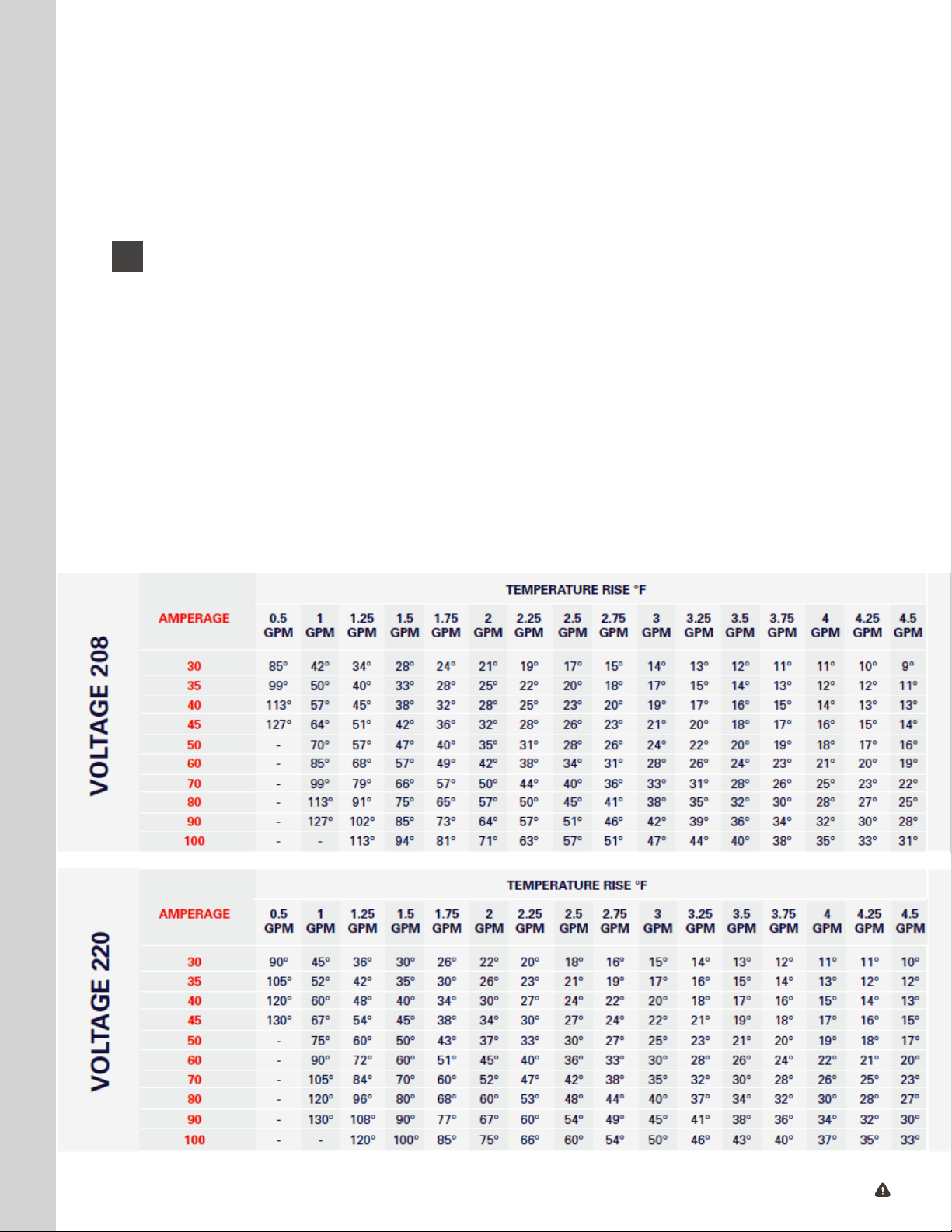
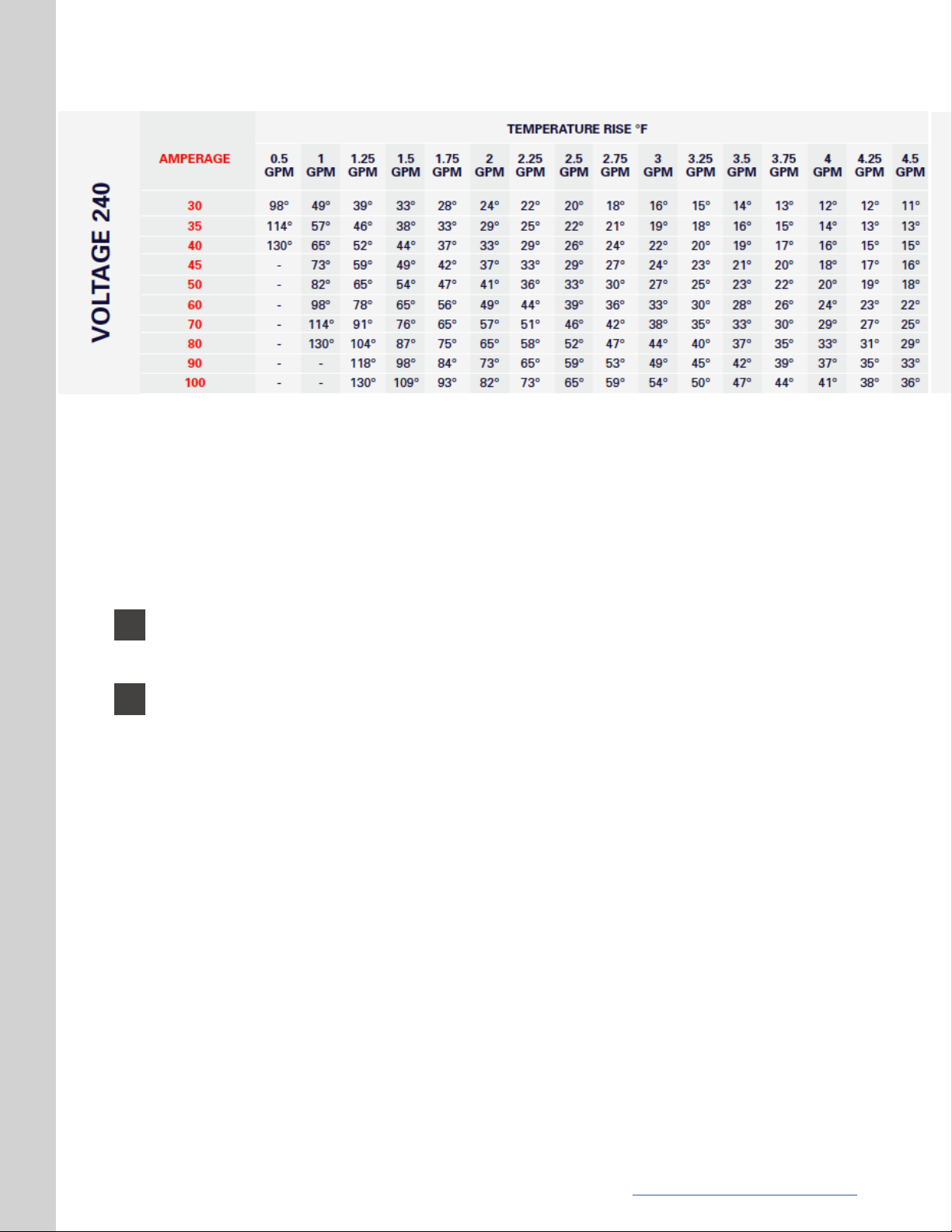
The following charts highlight temperature rises you can expect at the different voltages,
amperages, and ow rates. Choose settings based upon your home’s average demand.
For example, two simultaneous showers = 4 GPM.
22 | www.myheatworks.com CAUTION: Breaker must remain o until installation is complete.
Page 23
Navigate to the amperage menu from the “C” and “F” menu by tapping the ashing white
home button one time. The home button will ash purple with “30A” (or, what your previous
amperage was saved to if set prior) displayed on the menu screen. To increase or decrease
your desired amperage setting, use the up and down arrows to the right of the menu screen.
Once your amperage has been selected, long press the home button until the menu screen is
blank, and a green dot is displayed on the home button.
8
9
Please indicate which maximum current setting (in amps) was chosen by circling
the number on the Maximum Current Setting lable located on the bottom of the
unit in permanent marker.
This completes the installation procedure. The MODEL 3 Water Heater is now in
service.
www.myheatworks.com | 23
Page 24

WARRANTY AND LEGAL
REGISTERING YOUR UNIT
You must register this product on our website within 90 days of purchase in order to
activate the 6-year full unit exchange warranty or be eligible for the extended warranty.
If you do not activate your warranty within 90 days, your MODEL 3 Water Heater will be
covered from the date it was manufactured. Go to our website at www.myheatworks.
com/pages/registration to complete the registration process.
MAKING A WARRANTY CLAIM
If you need to le a warranty claim, you must contact support at [email protected] in
order to receive a return authorization form for the claim. No exchanges will be issued
without a return authorization number issued by Heatworks. Return shipping for the
original product is the responsibility of the customer, and all returned products must be
wrapped and packaged securely to avoid shipping damage.
A replacement water heater will not ship without Heatworks rst receiving and inspecting
the returned product. All replacement water heaters will ship standard ground within one
(1) business day of Heatworks receiving the returned product.
If you choose to receive a replacement water heater prior to returning the original
product, you will be invoiced for the replacement unit. The replacement unit will ship
within one (1) business day after payment. The original product should be returned to
Heatworks within seven (7) business days of receiving the replacement water heater.
Once the unit has been received by Heatworks, your credit card will be refunded for the
invoiced amount. Refunds will not be processed after 14 days.
If you request expedited shipping, you will receive an invoice for the shipping cost. The
replacement unit will ship within one business day after payment is received.
If you have any questions regarding the warranty, please call our customer support team
at 888-506-2821.
MANUFACTURING LIMITED WARRANTY INFORMATION
WHAT THIS LIMITED WARRANTY COVERS
Subject to the terms and conditions set forth in this limited warranty, each MODEL 3 Water
Heater is warranted to the original purchaser at the original address or the authorized
transferees (“Transferee” is dened as any owner of the residence or business which the
Heatworks unit has been installed during the term of this warranty) of such purchaser at
the original address (collectively, the “Owner”), against mechanical or electrical failure
of any component solely due to defects in material or Manufacturer’s workmanship for
a period of six (6) years from the date of original purchase and, leaks due to defects
in material or Manufacturer’s workmanship for six (6) years from the date of original
purchase. If Owner cannot document the original date of purchase with original sales
receipt, then the limited warranty period begins on the date the MODEL 3 Water Heater
was manufactured. As Owner’s sole and exclusive
24 | www.myheatworks.com CAUTION: Breaker must remain o until installation is complete.
Page 25

remedy, Manufacturer shall replace the MODEL 3 Water Heater. The MODEL 3 Water Heater is
not a consumer product and is not subject to the protections or limitations of the under state
or federal law. Manufacturer’s maximum liability is limited to Owner’s original purchase
price of the water heater.
DISCLAIMERS AND EXCLUSIONS
The remedy set forth in this limited liability warranty is the only remedy available to
Owner or any person for breach of any covenant, duty or obligation on the part of the
Manufacturer. Manufacturer is not liable to Owner or any third party for any loss, personal
injury or property damage, directly or indirectly, arising from the MODEL 3 Water Heater.
Under no circumstances is Manufacturer liable to Owner or any third party for incidental,
consequential, special, contingent, or punitive damages of any description, whether any
such claim be based upon warranty, contract, negligence, strict liability, or other tort, or
otherwise. Manufacturer specically disclaims all implied warranties, including but not
limited to the implied warranty of merchantability and implied warranty of tness for a
particular purpose.
Some states do not allow the exclusion or limitations of incidental or consequential
damages so the limitations or exclusion may not apply to Owner. In such cases, the warranty
shall be limited to six (6) years from the original date of purchase or date manufactured, as
provided in this limited warranty, or the shortest period allowed by law. This warranty gives
Owner specic legal rights and Owner may also have other rights which may vary from state
to state.
LIMITATIONS OF COVERAGE
1) Manufacturer is not liable for any costs incurred by Owner, including, without limitations,
the cost of any labor or material costs for removal, repair and/or reinstallation.
2) Manufacturer is not liable for any water damage or other damages to person or property
arising, directly or indirectly, from any defect in the MODEL 3 Water Heater component
part(s) or from its use.
3) Manufacturer is not liable under this limited warranty or otherwise if:
• The water heater or any of its component parts have been subject to misuse, alteration,
neglect, impact, or accident; or
• The water heater has not been installed in accordance with the applicable local plumbing
and/or building code(s) and/or regulation(s); or
• The water heater has not been installed or maintained in accordance with Manufacturer’s
instructions, or has been installed with improper orientation, improper fastening,
improper use of pipe dope/plumbers putty or with the use of any sealant; or
• The water heater has sediment inside the unit; or
• The water heater experiences any water pressure or ow interruptions (ie: normal inlet
water pressure is outside of the published specication for the heater), is exposed to any
condition that causes the heater to turn on before the air is purged from the heater; or
www.myheatworks.com | 25
Page 26

• The water heater has been exposed to conditions resulting from oods, earthquakes,
winds, re, freezing, lightning, or circumstances beyond the Manufacturer’s control; or
• The water heater has been used for other than the intended purpose (ie: use with
liquids other than potable water); or
• The water heater has been tampered with, either electronics or software; or
• If there is any disassembling of any components; or
• The water heater is subjected to applications of DC voltage; or
• The water heater is operated without inlet lter screen located inside the water inlet;
or
• The water heater installation exposes the unit to the elements; or
• The workmanship of any installer; or
• The spray head is not regularly descaled.
4) Owner, and not Manufacturer or its agent / representative, is liable for and shall pay
for all eld charges for labor or other expenses incurred in the removal or any NONCOVERED WARRANTY expense incurred by Owner.
Manufacturer reserves the right to deny warranty coverage upon Manufacturer’s
examination of unit.
WHAT WILL VOID YOUR LIMITED WARRANTY
1) The unit is tampered with or self-serviced in anyway.
2) The unit is installed outdoors, without adequate protection from the elements.
3) The unit is installed in an orientation other than specied in this manual.
4) The unit is used with any liquids other than potable water.
5) More than 10% glycol is used with a radiant heating application.
6) The unit is used with any unapproved chemicals.
7) Components/accessories not compatible with or not intended for the unit are used.
8) This unit is used in an unapproved scenario such as, but not limited to, a sh tank water
heater, to heat pools or spas, with a non-compatible AC/DC converter, if undersized for the
intended application, etc.
9) The inlet/outlet is connected to any tap or tting other than those specied.
10) The unit is sold through an unauthorized third party by original Owner.
26 | www.myheatworks.com CAUTION: Breaker must remain o until installation is complete.
Page 27

APPLICABLE LAW
This limited warranty shall be governed by the laws of the State of South Carolina.
RETURN POLICY
If, within (14) days of purchase (or for pre-order units date of shipment) and prior to
installation, the Owner nds that the purchased unit is not suitable for their demands,
Owner must contact support at [email protected] or call 888-506-2821 in order to
receive a return authorization form for the product. Returns will not be accepted without
a return authorization number issued by Heatworks. Return shipping is the responsibility
of the customer, and all returned products must be wrapped and packaged securely to
avoid shipping damage. All products must be returned in the same condition as they
were received in order to receive a refund. A refund will not be processed if the product
has been installed, used, or altered in any way. Heatworks must receive and inspect all
returned products prior to processing a refund. No refunds will be processed outside of
the 14-day return window.
If your purchase was not made directly through www.myheatworks.com, please check
with the distributor you purchased the water heater from in order to adhere to their return
policy.
PRIVACY POLICY
At Heatworks, we take your privacy seriously.
This Privacy Statement for Heatworks Products and Services (“Privacy Statement”)
describes information that Heatworks Technologies, Inc. and its subsidiaries and afliates
(collectively, “Heatworks”) collect, use, share, and store, including personal information
(i.e., information that personally identies you, such as your name, email address or
billing information, or other data that can be reasonably used to infer this information).
This document focuses on information related to the operation of Heatworks products
and services, including the MODEL 3 Water Heater and other products from Heatworks
(collectively, “Heatworks Products”). In this Privacy Statement, the expression “Heatworks
Products” also includes our Mobile Apps.
We provide additional details about how we collect and use information from our public
website in our Privacy Policy on the Heatworks website (www.myheatworks.com/pages/
privacy-policy).
Our Pledge:
1. We will be transparent about the different types of information we collect and how we
use them.
2. We will ask your permission before sharing your personal information with third
parties for purposes other than at your request or to provide Heatworks Products, and
www.myheatworks.com | 27
Page 28

to do so only when we think they will provide you with a welcomed additional service.
3. We will use best-in-class data security tools to keep your data safe and protect the
Heatworks Products from unauthorized access.
Your Permission: Permission for data collection and processing. By using Heatworks
Products, you agree to allow us to collect and process information as described in this
Privacy Statement.
Your Consent: Consent to data collection and processing. By using Heatworks Products,
you agree to allow us to collect and process information as described in this Privacy
Statement.
Consent to international data transfers. Your personal information may be collected,
processed and stored by Heatworks or its service providers in the United States and other
countries where our servers reside. Please be aware that the privacy protections and legal
requirements, including the rights of authorities to access your personal information, in
some of these countries may not be equivalent to those in your country. If you are using
Heatworks Products in the European Economic Area or other regions with laws governing
data collection and use that may differ from United States law, you consent to the transfer
of your personal data to the United States and other countries where Heatworks operates.
WHAT INFORMATION DOES THE HEATWORKS MODEL 3 WATER HEATER COLLECT?
The MODEL 3 Water Heater collects:
• Setup information you provide
• Environmental data from the MODEL 3’s sensors
• Direct adjustments to the device and adjustments made through the mobile app
• Water heating usage information
• Technical information from the device and mobile app
Setup information you provide: When you install the MODEL 3 Water Heater mobile
app, you’ll be asked several questions in order to help us create your account and your
preferred temperature settings that will keep you comfortable. This information helps us
to customize your user experience by, for example, providing hot water at your desired
temperature. Answering these questions helps us to set up a program that will keep you
comfortable.
Environmental data from the MODEL 3’s sensors: We collect data from several sensors
built into the MODEL 3 Water Heater. These sensors collect data such as your location,
incoming ground water temperature and your water’s conductivity. This helps your
MODEL 3 deliver hot water on demand at your desired setpoint.
Direct adjustments to the device and adjustments made through the mobile app: If you
change settings like temperature setpoint directly via the MODEL 3 unit or on the mobile
app, it records and feeds that information to the Heatworks’ algorithms to learn your
desired hot water preferences.
Water heating usage information: Every time your system turns on and off, Heatworks
28 | www.myheatworks.com CAUTION: Breaker must remain o until installation is complete.
Page 29

records the time and duration during which your system was on in order to offer you
features such as usage history.
Technical information from the device and mobile app: In order to improve your
experience over time and help troubleshoot any problem you may encounter with the
MODEL 3 Water Heater, we record your unit’s model and serial number, software version,
and technical information.
What additional information does Heatworks collect and store when a user connects a
Heatworks Product to the internet or creates an account?
Wi-Fi Network Information: To connect your Heatworks Product to our Services, or to
access your Heatworks Product over the internet from a computer, a smartphone or a
tablet, you will need to connect it to your Wi-Fi network. During setup, the Heatworks
Product will ask for your Wi-Fi network name (SSID) and password to connect to the
internet. It will save this information on the device, along with your IP address, so that
you can access it and control it from your computer, smartphone or tablet, and so that it
can communicate with Heatworks servers and download software updates.
Once connected to your Wi-Fi network, your Heatworks Product regularly sends the data
described in this Privacy Statement (excluding your Wi-Fi password) to Heatworks to
provide you with the Services.
Additional Authorized Users: Heatworks may provide you with the ability to enable
additional authorized users to access your account. If you do so, the additional authorized
users may control and view all of your devices and content. Invited users may also add
additional authorized users to your account, so be careful to add only those you trust.
An invited user must have or create a Heatworks account, and information about invited
users (like email address, name, or changes to product settings) will be stored with your
account.
Email Addresses: When you create a Heatworks account, we collect and store your email
address. From that point forward, your email address is used for communications from
Heatworks. In addition, Heatworks may provide you with the ability to enable individuals
to access your account as additional authorized users, or to invite other individuals
such as friends or family to share access to your content. We will ask you for the email
address of any such individuals and automatically send an email invitation on your
behalf. Heatworks stores this information to send this email, to register your friend if your
invitation is accepted, and to track the success of our invitation services.
Basic Prole Information: Your account allows you to provide certain basic prole
information like your name and prole photo. Names and prole photos may be shown to
others in connection with the Services. In addition, if you download the Heatworks Mobile
App, we may collect and store your mobile device identiers (such as IDFA, AAID, or other
device identiers). For example, if you invite someone as an additional authorized user,
he or she will be able to see your name and photo. You should only use photos you are
willing to make public.
Mobile Location Data: You may choose to enable features like device pairing. If you do
this, you’ll be asked to share location data from your mobile device or from additional
www.myheatworks.com | 29
Page 30

authorized users. This data may be processed or combined with data from other products
to enhance features.
Bluetooth Data: Bluetooth-enabled Heatworks Products (such as the MODEL 3 Water
Heater) may broadcast an identifying signal wirelessly. This is used to connect with your
Bluetooth-enabled devices (such as a smartphone or tablet) in order to deliver features
like easy setup.
Remember that when you visit our Sites, we collect personal information as described
in our separate Privacy Policy for Heatworks Web Sites. Like most internet sites, we
routinely record log entries (including information such as your IP address) and technical
information (such as your browser type and version) when your browser, mobile device
or Heatworks Product contacts our servers.
HOW DOES HEATWORKS USE THE INFORMATION IT COLLECTS?
We use this information to provide, develop and improve Heatworks Products and
services, including to make assessments and recommendations about products, safety, or
energy use. We may use your contact details to send you this information, or to ask you to
participate in surveys about your Heatworks use, and to send you other communications
from Heatworks.
We may also use this information in an aggregated, non-identied form for research
purposes and to help us make sales, marketing, and business decisions. For example, we
use aggregated user information about the number of active MODEL 3 Water Heater users
in a particular state to help us decide what energy companies might be good partners.
We may use service providers to perform some of these functions. Those service
providers are restricted from sharing your information for any other purpose.
We use industry-standard methods to keep this information safe and secure while it is
transmitted over your home network and through the internet to our servers. Depending
on your location and type of data, Heatworks may process your personal information on
servers that are not in your home country.
In general for purposes of applicable law (e.g., GDPR), Heatworks is a controller of the
information collected in connection with the Products and Services. However, in the case
of “Video and audio signals and data” and “Facial recognition to enable Familiar Face
Alerts feature” you are the controller of these data and Heatworks is a processor.
OUR LEGAL BASES FOR PROCESSING INFORMATION
If European data protection law applies to the processing of your information, we process
your information for the purposes described in this Privacy Statement, based on the
following legal grounds:
When we’re providing a product or service.
We process your data to provide and support a product or service you’ve asked for under
a contract, including but not limited to delivering our Terms of Service.
30 | www.myheatworks.com CAUTION: Breaker must remain o until installation is complete.
Page 31

When we’re pursuing legitimate interests.
We process your information for our legitimate interests and those of third parties while
applying appropriate safeguards that protect your privacy. This means we process your
information for things like:
• offering and improving Heatworks Products and Services
• developing new products and features
• understanding how people use our products and services
• performing research that improves our services for our users and benets the public
• sending you direct marketing and other communications from Heatworks
• protecting against harm to the rights, property, and safety of Heatworks, our users,
and the public
• detecting, preventing or otherwise addressing fraud, abuse, security or technical
issues with our services
• maintaining and improving the integrity of our computing systems, and protecting our
users’ data security
• enforcing legal claims, including investigation of potential violations of applicable
Terms of Service
When we’re complying with legal obligations.
We process your data when we have a legal obligation to do so, for example, if we’re
responding to a legal process or an enforceable governmental request.
We ask for your consent to process your information for certain specic purposes and
give you the right to withdraw that consent at anytime.
IN WHAT CIRCUMSTANCES DOES HEATWORKS SHARE MY INFORMATION?
Under no circumstance do we share personal information for any commercial or
marketing purpose unrelated to the activation and delivery of Heatworks Products and
services without asking you rst. Period. We do not rent or sell our customer lists.
THE FOLLOWING ARE THE LIMITED SITUATIONS WHERE WE MAY SHARE PERSONAL
INFORMATION:
With your permission: We may share personal information when we have your
permission. One example of this would be if you invite another user to access the
Products on your account as an additional authorized user. Another example is if you
sign up for programs offered by our partners (e.g., energy companies); if you do this,
we may share certain information with the partner. This could include things like your
www.myheatworks.com | 31
Page 32

enrollment information and the activation status of your device. Similarly, when you
connect third-party devices and services to your Heatworks Products, you are shown
information about any proposed exchange of data. Your consent is required to allow these
exchanges on your behalf and you can change your mind at any time. When you use thirdparty products and services integrated with the Heatworks Products, their own terms and
privacy policies will govern your use of those products and services.
For external processing: We have vendors, service providers, and technicians who help
with some of our processing and storage, including helping to answer your questions.
They may also assist with monitoring our servers for technical problems. These
technicians (as well as Heatworks employees) can access certain information about you or
your account in line with this work but these technicians are not allowed to use this data
for non-Heatworks purposes.
As part of business transitions: Upon the sale or transfer of the company and/or all or part
of its assets, your personal information may be among the items sold or transferred. We
will request a purchaser to treat our data under the privacy statement in place at the time
of its collection.
For legal reasons: We may provide information to a third party if we believe in good faith
that we are required to do so for legal reasons. For example, we may disclose information
in response to legal process and we may disclose information in response to lawful
requests by public authorities in the United States and other countries for the purposes of
law enforcement and national security.
We may share non-personal information (for example, aggregated or anonymized
customer data) publicly and with our partners. For example, we may publish trends
about energy use in the home. This information may also be shared with other users to
help them better understand their energy usage compared to others in the Heatworks
community, raise awareness about safety issues, or help us generally improve our
system. We may also share non-personal information with our partners, for example, if
they are interested in providing demand-response services or other incentive programs.
We take steps to keep this non-personal information from being associated with you and
we require our partners to do the same.
If you select an outside party for the purchase, installation or service of your Heatworks
device and share your personal information, we cannot control the collection, storage
or sharing of information collected by that party. For example, if you buy a MODEL 3
Water Heater from a retailer, the retailer may collect personal information as part of
the transaction. Or the party that installed the device may retain information that you
provided to them to assist them in servicing the device if needed. Always check the
privacy policies for any company that collects your personal information.
WHAT CHOICES DO I HAVE AND HOW CAN I DELETE MY PERSONAL INFORMATION?
Heatworks generally stores your personal information on Heatworks’ servers until you
delete or edit it, or for as long as you remain a Heatworks customer in order to provide
you with Heatworks Products. In addition, Heatworks may store your personal information
to resolve disputes, establish legal defenses, conduct audits, pursue legitimate business
purposes, enforce our agreements and comply with applicable laws.
32 | www.myheatworks.com CAUTION: Breaker must remain o until installation is complete.
Page 33

As described above, some information is processed and stored directly on the Heatworks
device. Personal information from Heatworks devices is encrypted while it is being
transmitted to Heatworks.
You can delete the information on the Heatworks device by resetting it to the defaults
(using Reset in the Settings menu).
You can access, amend or delete your personal information from Heatworks’ servers
through the controls in your account. Heatworks customers can also request their
Heatworks data by visiting www.myheatworks.com.
INDIVIDUAL RIGHTS IN THE EUROPEAN ECONOMIC AREA
If you are located in the European Economic Area, you may seek conrmation regarding
whether Heatworks is processing personal information about you, request access to your
personal information and ask that we correct, amend or delete your personal information.
In addition, you may object to Heatworks’ processing of your personal information at any
time. However doing so may impact your use of the Products and Services.
If applicable law provides you the right to request access to, (receive) port, object to or
restrict processing, seek rectication or request erasure of personal information held
about you by Heatworks, you may do so, as applicable, through controls in the Heatworks
application or by contacting Heatworks. To protect your privacy, Heatworks will endeavor
to take commercially reasonable steps to verify your identity before granting access to or
making any changes to your personal information.
HOW DOES HEATWORKS PROTECT MY PERSONAL INFORMATION WHEN IT IS
TRANSFERRED INTERNATIONALLY?
When we transfer personal data from the European Economic Area and Switzerland to
other countries, including to the United States, we use a variety of legal mechanisms to
help ensure your data is appropriately protected. Heatworks Technologies Inc. complies
with the EU-US Privacy Shield Framework and the Swiss–US Privacy Shield Framework
(the “Privacy Shield”) regarding the collection, use, sharing, and retention of personal
information from the European Economic Area and Switzerland to the United States,
as described in our Privacy Shield certication. Heatworks adheres to the principles
contained in the Privacy Shield (the “Principles”).
Privacy Shield participants are subject to the investigatory and enforcement powers of
the US Federal Trade Commission and other authorized statutory bodies. Under certain
circumstances (i.e. personal data sharing under the Onward Transfer Principle with third
parties for external processing on our behalf), participants like us may be liable for the
transfer of personal information from the EU to third parties outside the EU. Learn more
about Privacy Shield here.
We may share, as described in this Privacy Statement, information with our afliates and
subsidiaries, and third parties. We may disclose information in response to legal process
and lawful requests by public authorities in the United States and other countries for the
purposes of law enforcement and national security.
www.myheatworks.com | 33
Page 34

MINORS
Only individuals aged 18 and older are permitted to act as Owners of Heatworks
Accounts. Authorized Users must be over the age of 13 (or equivalent minimum age in
the jurisdiction where they reside) and may use the Products and Services under the
supervision of a parent or legal guardian and only if they agree to be bound by these
Terms on your behalf. Heatworks Products and Services do not knowingly collect or store
any personal information from anyone under the age of 13.
CAN THE PRIVACY STATEMENT BE CHANGED?
Please note that this Privacy Statement may change from time to time. We will provide
notice of any changes on the website or by contacting you.
HOW CAN I CONTACT HEATWORKS?
If you would like to access, correct, amend or delete any personal information we have
about you, register a complaint, or simply want more information, contact our Privacy
Compliance Ofcer at [email protected] or by mail at: Heatworks, 2353 N Highway 17,
Mount Pleasant, SC 29466.
34 | www.myheatworks.com CAUTION: Breaker must remain o until installation is complete.
 Loading...