

Page 1
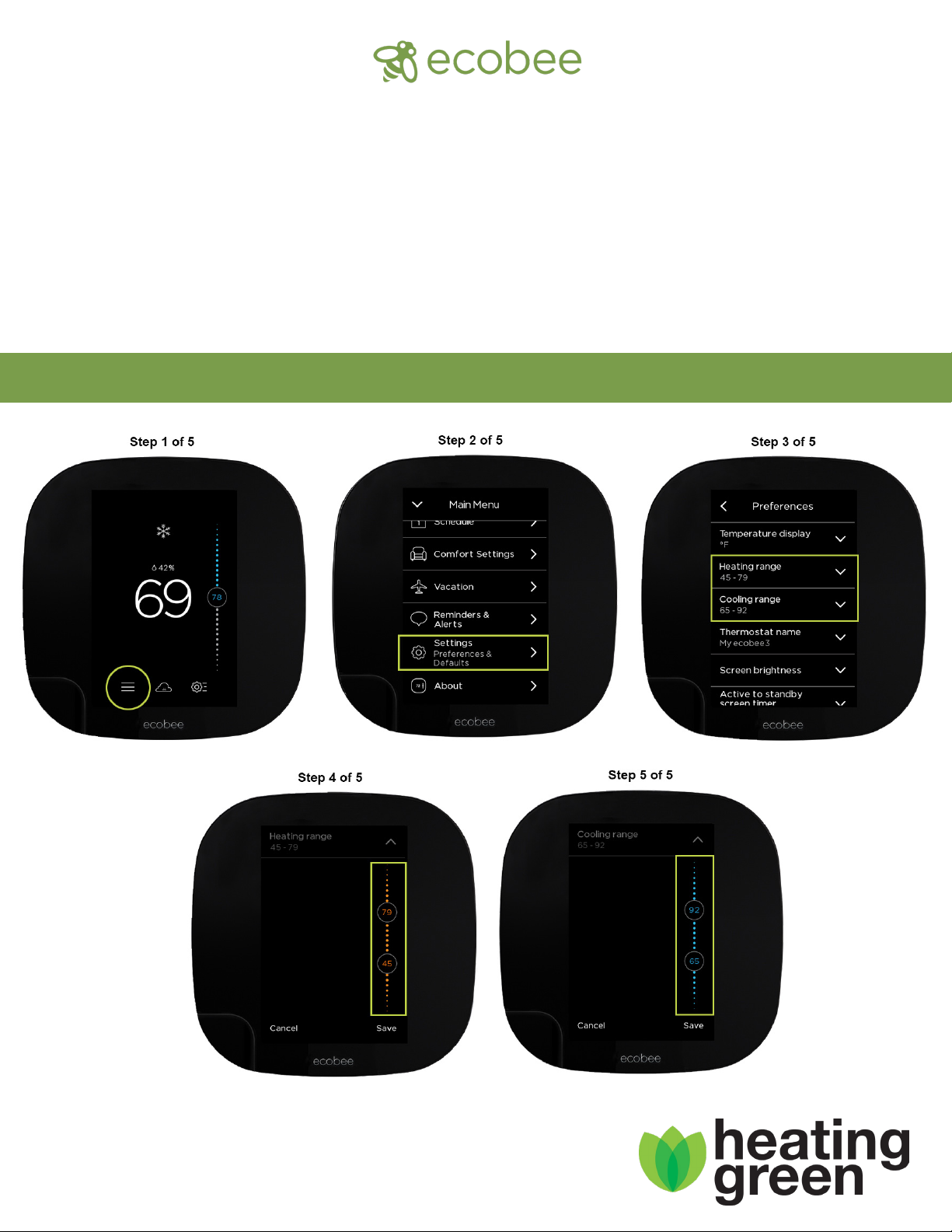
Congrats on your new ecobee!
• Adjust temperature and comfort settings easily from the ecobee mobile app on
your Android and iOS devices, including Apple Watch
• Comes with built-in Amazon Alexa Voice Service
• With Alexa, fulll everyday tasks with a simple command- including playing music
Quick Start Guide for Setting Maximum/Minimum Temperatures
1-800-618-4940 • www.heatinggreen.com
Page 2

How to disable the Heating Smart Recovery function on your Ecobee:
1. Press the Main Menu [ ] in the lower left of the screen (you may have to
touch your screen to wake up the thermostat so it shows this)
2. Press Settings
3. Press Preferences
4. Scroll to the bottom
5. Press Heating Smart Recovery
6. Press Disable
How to disable alerts on your Ecobee:
1. Press the Main Menu [ ] in the lower left corner of the screen (you may
have to touch your screen to wake up the thermostat so it shows this)
2. Press Reminders and Alerts
3. Press Preferences
4. Press Low Temp Alert
5. Disable Low Temp Alert
6. Back out of Low Temp Alert
7. Press High Temp Alert
8. Disable High Temp Alert
9. Back out of menu, returning to the main screen
10. Done!!
Please follow the instructions below to setup your Ecobee thermostat with
a passcode, which allows you to control who has access to the settings.
1. Press the Main Menu [ ] in the lower left of the screen (you may have to
touch your screen to wake up the thermostat so it shows this)
2. Press Settings
3. Press Access Control
4. Press the button - Enable Security Code
5. Enter your 4-digit code
6. Press Save
1-800-618-4940 • www.heatinggreen.com
 Loading...