

Page 1
Page 2
VER1.0B1 HeartCheck HANDHELD ECG MONITOR
- 1 -
Copyright
This document is intended to be used solely for the use of the HeartCheck© ECG
monitor. No part of this work may be copied or disseminated without prior written
approval from the distributor.
All information contained in this publication is believed to be correct at the time of
publishing. The distributor shall not be liable for errors contained herein nor for
incidental or consequential damages in connection with the furnishing, performance, or
use of this material. The information this publication refers to is protected by copyrights
or patents and does not convey any license under the patent rights of our company, nor
the rights of others. We do not assume any liability arising out of any infringements of
patents or other rights of third parties.
Contents of this manual are subject to changes without prior notice.
This item is compliant with Medical Device Directive 93/94/EEC of 14 June
1993, a directive of the European Economic Community.
All rights reserved.
Issue date: 20 July 2010
Page 3

VER1.0B1 HeartCheck HANDHELD ECG MONITOR
- 2 -
Notes on Safety
This device monitors and records ECG waveforms, it is not intended for medical
diagnosis. Please refer any recordings to a qualified physician for medical interpretation.
This device is not a substitute for seeking medical attention. If you believe you are
experiencing any adverse medical event, you are to seek medical attention immediately.
The recordings should be used as a reference for analyzing cardiac rhythm by doctors
only. Always consult your doctor.
Medical conditions can change suddenly. If you notice any change in your condition,
consult your doctor, regardless of the measurement results.
Warnings!
Not intended for use on individuals with a cardiac pacemaker.
Not intended for use with an implanted defibrillator.
Do not use in the presence of flammable anesthetics, drugs or pressurized oxygen
(such as in a hyperbaric chamber, ultraviolet sterilizer or oxygen tent).
Do not use on individuals with significant resting tremors.
Do not use on individuals with dermatological conditions.
Intended for adult user only.
Do not use batteries of a type other than that specified in this manual.
Do not take measurements where the device will be exposed to strong
electromagnetic forces.
Caution!
Do not expose the device to static electricity. Always disperse any static electricity
from your body before handling the device.
Do not take measurements in a moving vehicle.
Do not use a cellular phone near the device.
Do not disassemble, repair, or modify the device.
Do not insert batteries with their polarities reversed.
The chest electrode will be impeded by excessive body hair, remove hair at the
electrode contact point.
Page 4

VER1.0B1 HeartCheck HANDHELD ECG MONITOR
- 3 -
General
Avoid extremes in temperature and humidity. Do not use this device in locations
subject to high or low temperatures or humidity.
Use at a temperature within 5°C to 40 °C and below 80% RH.
Do not sterilize this device in an autoclave or gas sterilizer (EOG, formaldehyde, high
density ozone etc.).
Do not wash this device with water.
Do not store the device in the following ambient conditions.
- Locations exposed to direct sunlight.
- Locations subject to high temperatures and high humidity.
- Wet or damp locations where water may get on the device.
- Dusty locations.
- Near fires or open flames.
- Locations exposed to strong vibration.
- Locations exposed to strong electromagnetic fields.
Dispose of the device and its accessories according to applicable local regulations.
Page 5

VER1.0B1 HeartCheck HANDHELD ECG MONITOR
- 4 -
Contents
1. General Description..................................................................................................... - 5 -
2. Battery Installation....................................................................................................... - 7 -
3. Setting Date and Time................................................................................................. - 8 -
4. Taking a Measurement................................................................................................ - 9 -
5. Displaying an ECG..................................................................................................... - 19 -
6. System Settings ......................................................................................................... - 21 -
7. Data Management ...................................................................................................... - 22 -
8. Version ..........................................................................................................................- 23 -
9. Data Transmission..................................................................................................... - 23 -
10. Trouble Shooting........................................................................................................ - 23 -
11. Key Symbols................................................................................................................ - 24 -
12. Technical Data............................................................................................................. - 25 -
13. Maintenance and Storage........................................................................................ - 26 -
14. General information about the Heart and ECG Measurements.....................- 27 -
Appendix............................................................................................................................... - 29 -
Page 6
VER1.0B1 HeartCheck HANDHELD ECG MONITOR
- 5 -
1. General Description
1.1 Know Your Device
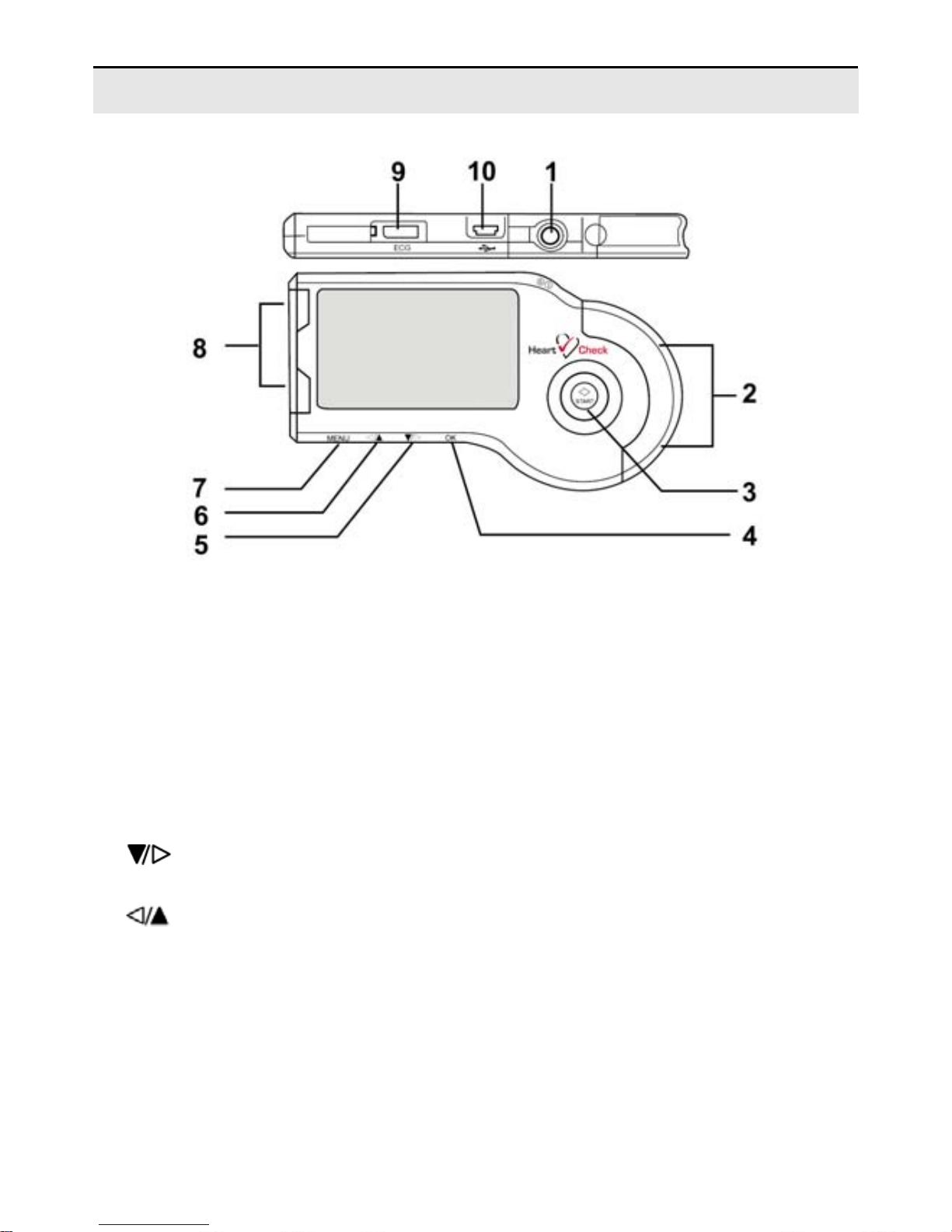
Picture 1-1
Description of Picture 1-1:
① POWER button: Power on or off the device.
② Right Metal Electrodes: Hold these two with right index finger when taking a
measurement.
③ START button: The shortcut key for ECG measurement.
④ OK button: Press this button to confirm the selection or set date and time when in the
Date and Time Setting Mode.
⑤
Button: Press this button to move the cursor to your desired menu or change
the number, or move the wave form to the left.
⑥
Button:Press this button to move the cursor to your desired menu or change
the number, or move the wave form to the right.
⑦ MENU button: Return to the previous menu by pressing this button.
⑧ Left Metal Electrodes: Place this against the center of left palm or chest when taking
a measurement.
⑨ ECG cable sock et: When taking a measurement by ECG cable, connect the ECG
cable with this port.
Page 7

VER1.0B1 HeartCheck HANDHELD ECG MONITOR
- 6 -
⑩ USB interface: Transmit data to the PC through this interface.
1.2 Product Features
Small, portable and easy to use.
Choice of two measuring modes.
USB data transmission.
Fast measurement in just 30 seconds.
Up to 200, 30 seconds ECG Strips recorded.
Measurement of one channel ECG anytime, anywhere you like.
Display of ECG waveform, heart rate, ECG quality result and battery status on the
backlit LCD screen.
Auto power-off.
Two AAA batteries.
PC Software provided to review recordings.
1.3 Intended Use
The MD100 ECG monitor is a handheld device intended for use in non-invasively
recording and displaying of ECG waveforms for self recording of adults in daily life under
physician direction to provide the physician with relevant data on the heart condition of
their patient. The MD100 is a patient triggered event recorder which makes available to
patients the ability to manually record transient cardiac events. The MD100 is suitable
for patient and professional use. The MD100 ECG monitor allows the recorded ECG
data to be saved to the device memory and to later display the ECG data on a computer.
An ECG report can be printed from the computer.
Page 8
VER1.0B1 HeartCheck HANDHELD ECG MONITOR
- 7 -
1.4 Display
The device screen is used to display the ECG waveform, a confirmation of the ECG
quality, other parameters, such as time & date, battery status and the status of data
storage in memory.
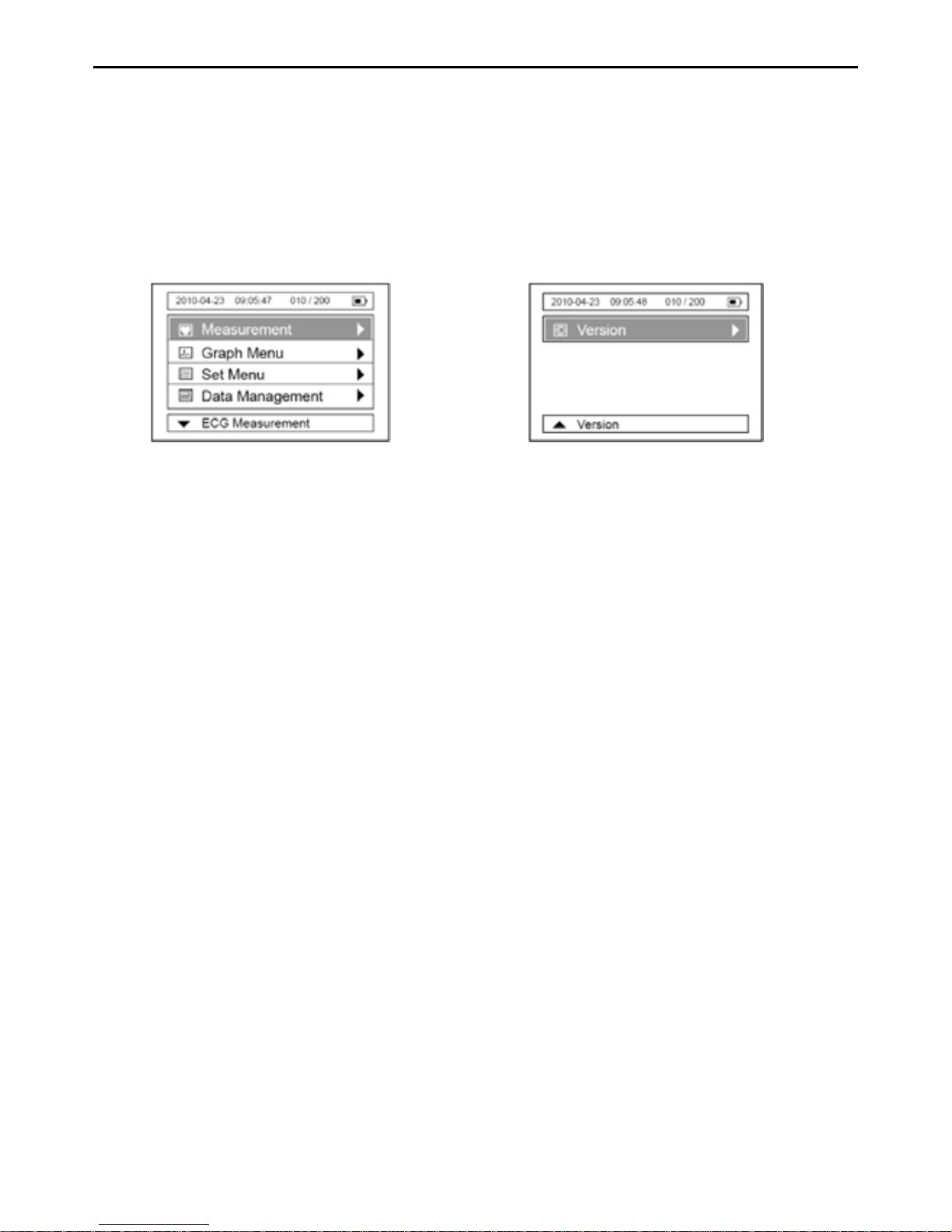
Menu interfaces
Page 9
Picture 1-2 Picture1- 3
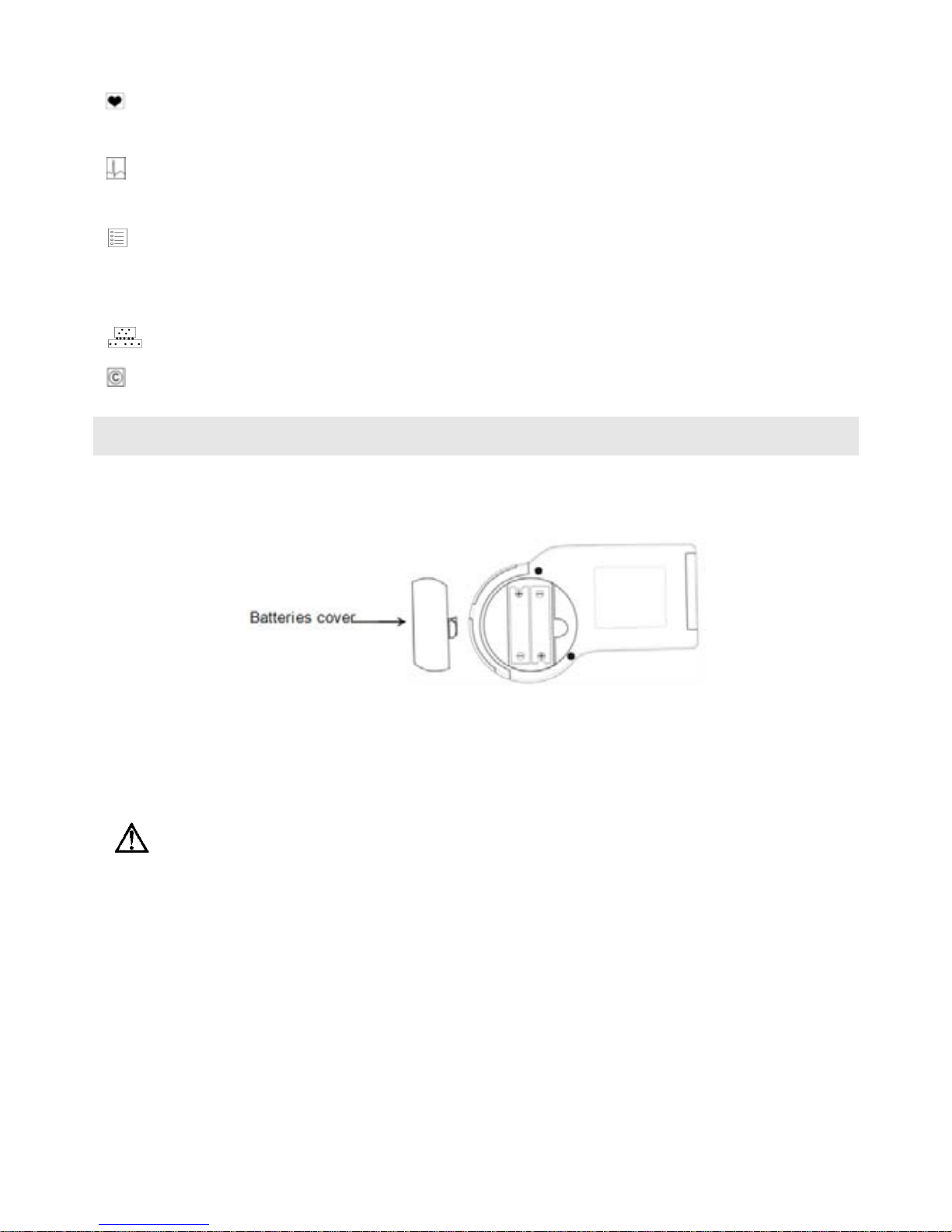
“ Measurement”: Enter this menu to select the measurement mode and take a
measurement.
“
GRAPH Menu”: Enter this menu to review, delete, and lock the detected ECG
waveform and ECG quality result.
“
SET Menu”: Enter this menu to set the Date & Time, Brightness, Beep Tone
On/Off, Automatic Power-off, Assign ECG ID Number and set
Wave Scale.
“
Data Management”: Enter this menu to delete data.
“
Version”: Enter this menu to review the device’s information.
2. Battery Installation
2.1 Open the battery cover on the back panel of the device.
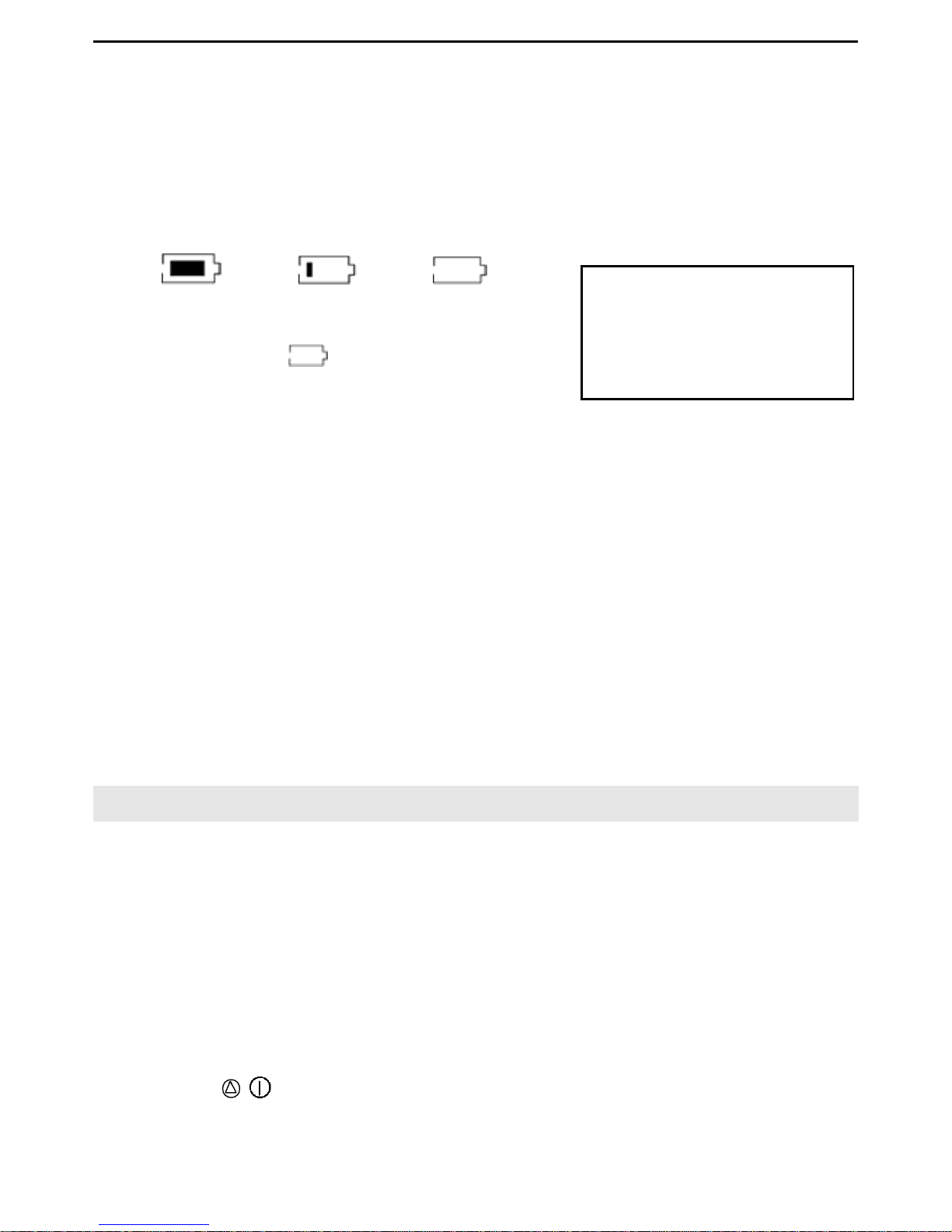
2.2 Insert two AAA batteries as indicated by the polarity sign (refer to Picture 2-1).
Picture 2-1
2.3 Replace the battery cover on the back panel of the device.
Ensure the polarity of the batteries is correct, o therwise the device will
not function correctly.
Battery life and replacement
When the “Battery power is low please replace with fresh new batteries” message
appears, replace batteries with new ones.
Always turn off the device before replacing the batteries.
Dispose of the used batteries according to the applicable local regulations.
Page 10
VER1.0B1 HeartCheck HANDHELD ECG MONITOR
- 8 -
Battery life
Two new AAA batteries will last for approximate 400 measurements.
The batteries enclosed in the package are used for demonstration purposes. It is
possible that these batteries will not last for 400 measurements.
The battery life can be confirmed in the upper right of the LCD display.
CAUTION!
Do not use batteries not specified for this device.
Do not insert the batteries with the polarities in the wrong direction.
Do not dispose of batteries in fire.
If you come into contact with battery fluid, seek immediate medical attention.
Remove batteries from this device during periods of non use.
Disposal of the batteries should comply with local laws and regulations.
3. Setting Date and Time
Always set the date and time before using the device for the first time.
Routinely check whether the date and time are correct before using the device and reset
if necessary. The date and time are important indicators when a measurement is taken.
3.1 Date and time setting
Note: The date and time information will be displayed on the interface in the format of
“Year/Month/Date”; “Hour/Minute/Second”.
1. Press the
/ Power button for 3 seconds to turn on the device.
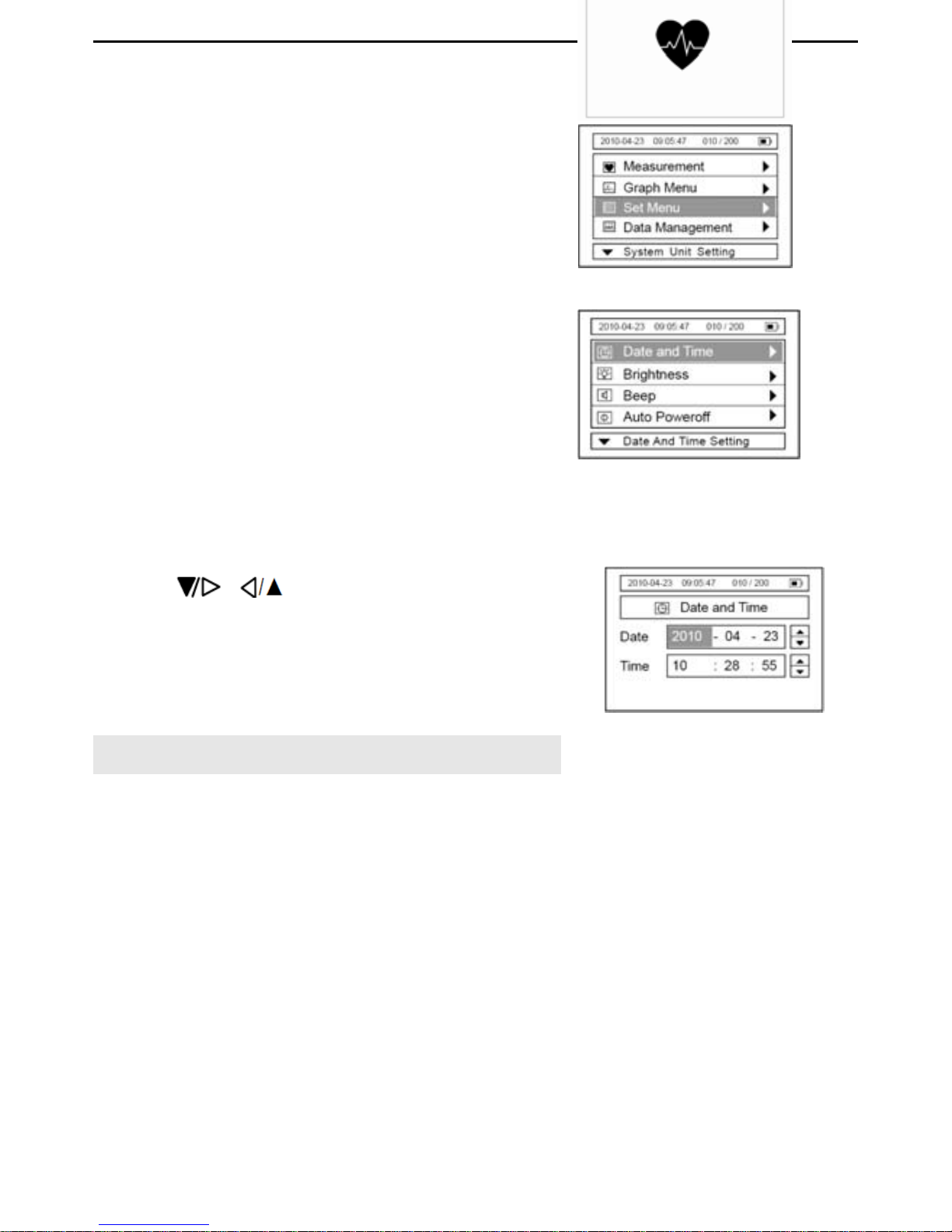
Full power low power no power
When the sign ”
” appears, it means the
battery power is not sufficient, and the device
will display the information as in picture 2-2.
We suggest users replace the batteries with
new ones.
Battery power is low
please replace with fresh
new batteries
Picture 2-2 Low power
Page 11
VER1.0B1 HeartCheck HANDHELD ECG MONITOR
- 9 -
Picture 3-3
Picture 3-4
2. Select the “Set Menu” item, as shown in
Picture
3-2. And then press the “OK” button to
enter.
3. Select the “Date and Time” item, as shown in
Picture
3-3, then press the “OK” button.
4. Press the “OK” button to highlight an item, and
press
or button to adjust each date and
time value. Press the “MENU” button to confirm
your settings.
4. Taking a Measurement
4.1 Important Notes on Taking a Measurement
In order to obtain a good ECG reading, it is important that measurements are taken
correctly. Please read the instructions carefully before taking a measurement for the first
time, and follow the instructions each time you take a measurement.
Make sure that the electrodes are directly touching your skin.
If your hands or skin are dry, wipe them with a damp towel so that they are slightly
moist.
If the electrodes are dirty, wipe any dirt off with a soft cloth moistened with
disinfectant alcohol or a cotton swab.
---- Take care not to use too much disinfectant alcohol when cleaning the electrodes.
Picture 3-2
Picture 3-1
Page 12
VER1.0B1 HeartCheck HANDHELD ECG MONITOR
- 10 -
---- Do not wipe or get disinfectant alcohol on parts other than the electrodes.
Do not move during measurement.
---- Movement, including talking, coughing, or sneezing, during measurement can
affect the quality of the measurement results.
Incorrect positioning of the device during measurement may cause the results to be
inaccurate, be sure to check the position before taking a measurement.
To ensure the device remains in good working order, keep the electrodes clean.
Disinfect the electrodes by wiping them with a soft cloth or cotton swab moistened
with disinfectant alcohol.
4.2 Measurement Methods:
There are three ways to record an ECG using this device; palm measurement, chest
measurement and cable measurement.
The ideal posture for any of the methods listed above is to be seated comfortably with
your back straight. You can also take a measurement while you are standing or while
lying down. Be sure to stay as still as possible until the measurement is complete.
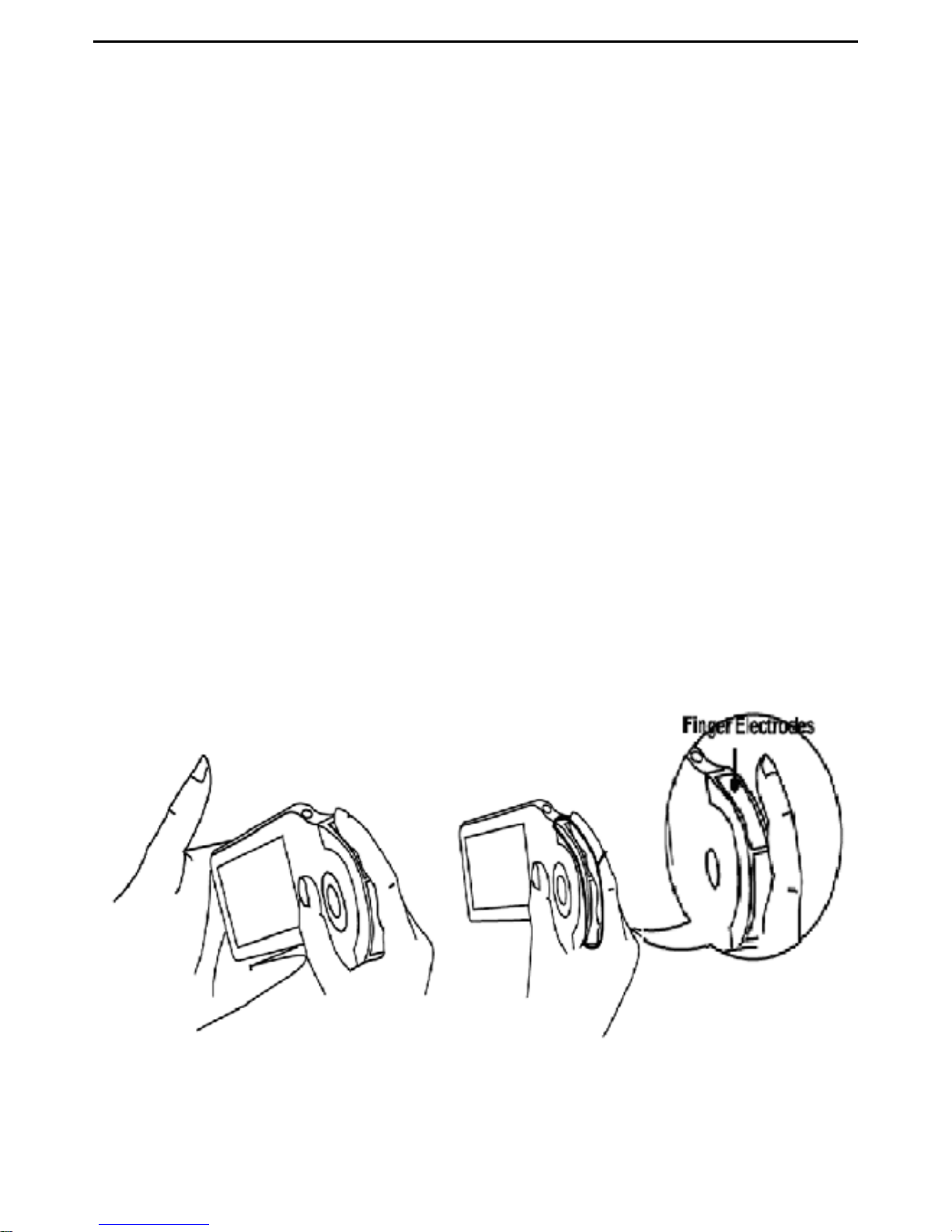
4.2.1 Palm Measurement
Make sure to hold the right metal electrodes of the device with right index finger firmly,
and place the left metal electrodes against the center of the left palm. (Refer to Picture
4-1)
Picture 4-1
Page 13
VER1.0B1 HeartCheck HANDHELD ECG MONITOR
- 11 -
Notes:
During measurement, the device will only respond to the “MENU” or “OK” button to
discontinue the measurement.
If the contact between the electrodes and skin becomes loose, or the conditions
change during measurement, the recording may be inaccurate.
If the electrodes do not have good contact during the measurement, the device will
show the “
” icon at the bottom right of the screen. Repeat recording.
Keep still and do not move until the measurement is complete.
If you experience difficulties using the palm measurement method please try one of
the alternative methods outlined below or consult your physician.
Wrong Operation Methods:
A. Hand contact with the electrodes become loose during the measurement.
B. Palm or fingers are not covering the electrodes.
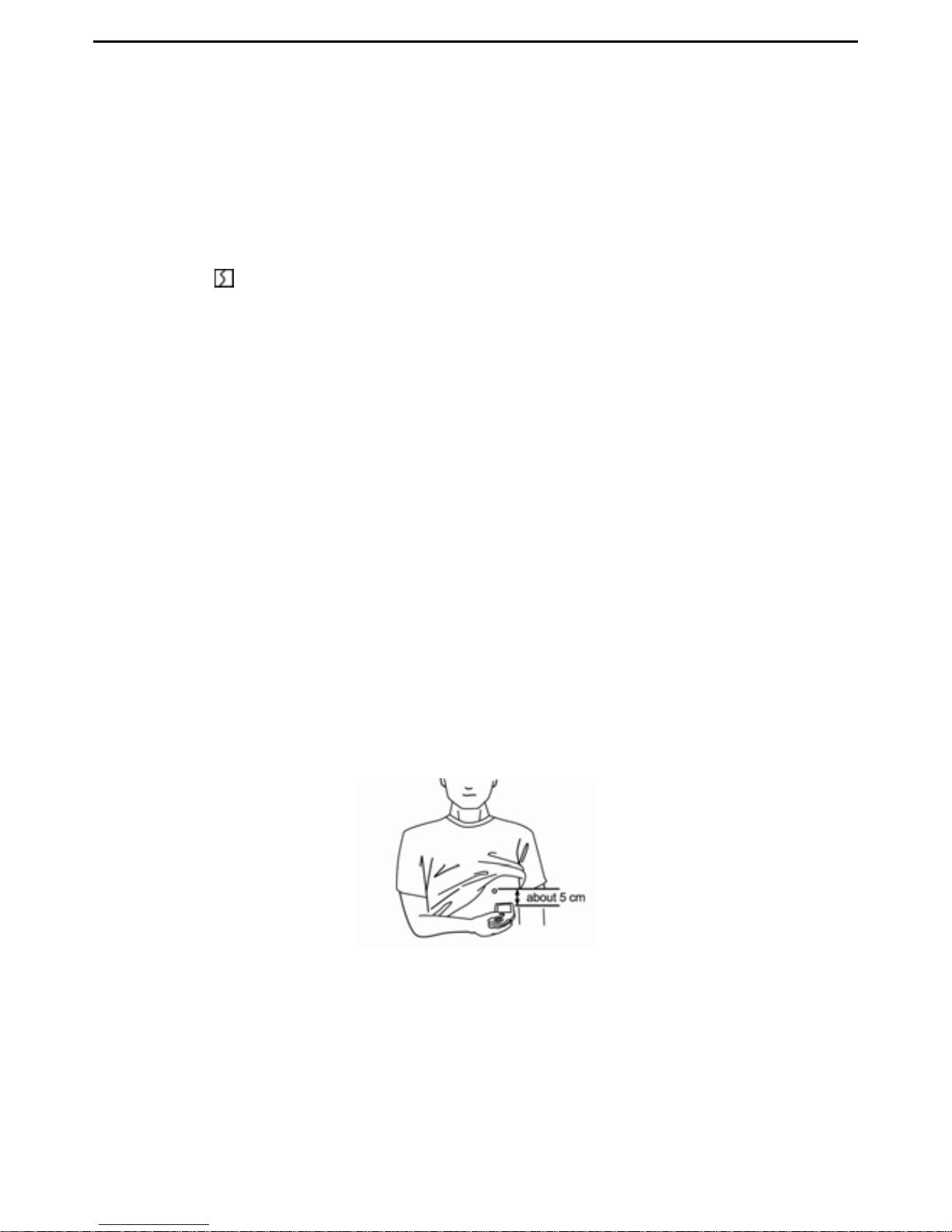
4.2.2 Chest measurement
If palm measurement is not ideal, please adopt chest measurement.
(1) Measurement for Male:
Hold the device with the right hand; make sure that the index finger makes contact with
the right metal electrodes sufficiently. Place the left metal electrodes against left side of
your chest on bare skin about 5 cm below your left nipple. (Refer to Picture
4-2)
Picture 4-2
Note: If you experience problems placing the device’s left metal electrodes flat against
your chest during chest recordings, please ask your doctor for advice.
Page 14

VER1.0B1 HeartCheck HANDHELD ECG MONITOR
- 12 -
(2) Measurement for Female
Locate the ECG monitor at the lower end of the breastbone
and move horizontally to the middle of the left part of the chest.
If necessary, gently lift the breast and place the left metal
electrodes under the left breast. If the electrodes come in
contact with under garments, move the device slightly until it
has made contact with the skin. It is NOT necessary to remove
the under garments; if you are unsure, please consult your
doctor.
Note: The proper position of the left metal electrodes is shown in Picture 4-3.
Improper Operation Methods:
A. The left metal electrodes are not in contact with the left chest.
B. The hand positioning is not correct on the right metal electrodes.
Notes:
Make sure that you are relaxed.
Press the electrodes against your bare skin. Do not try and take a recording through
clothing.
If your skin is very dry, your recording may not be accurate.
If you experience problems applying the device so that the left metal electrodes are
flat against your chest when taking the chest measurement, please ask your doctor
for advice.
Picture 4-3
Page 15
VER1.0B1 HeartCheck HANDHELD ECG MONITOR
- 13 -
4.2.3 Cable Measurement
If palm measurement is not ideal and it is not convenient to adopt the chest
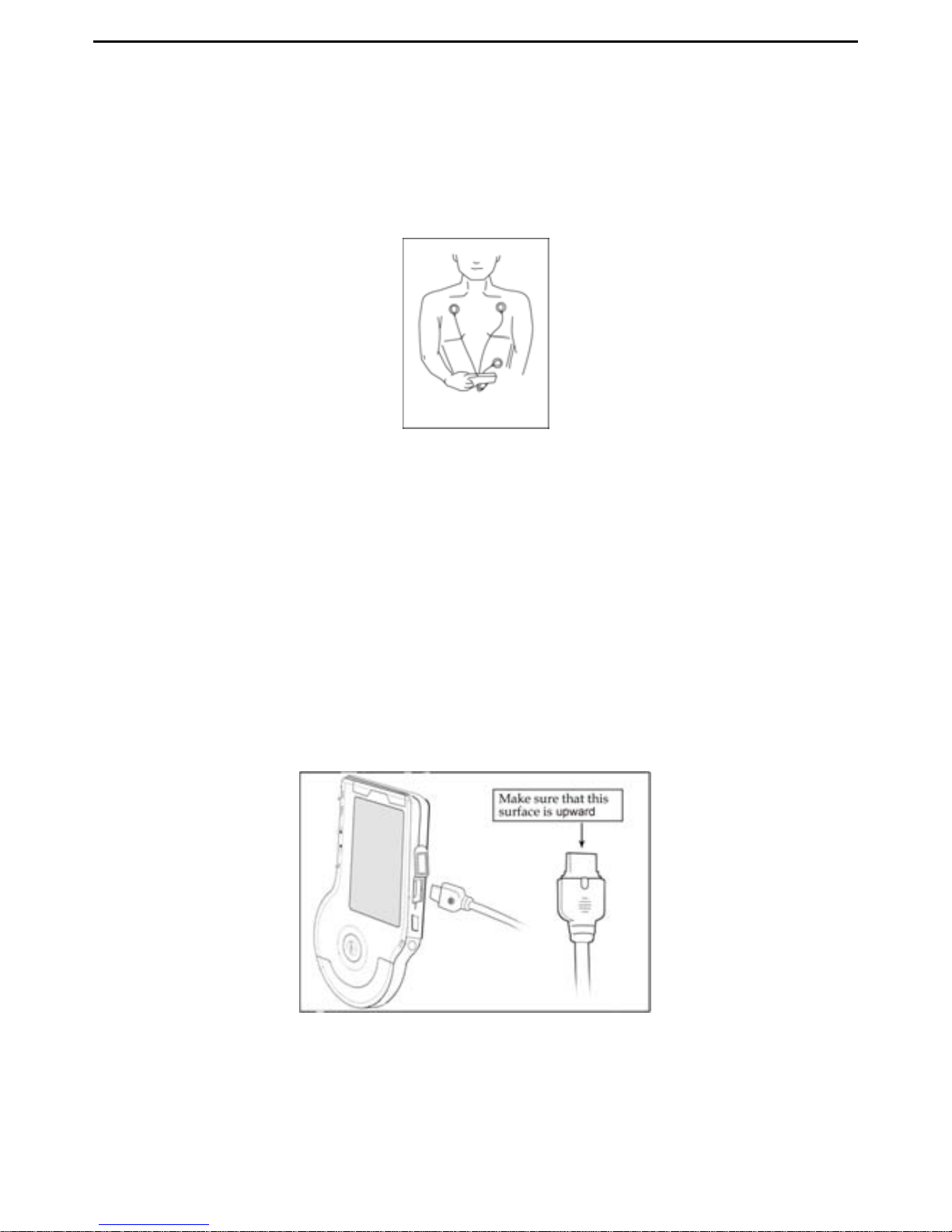
measurement, the cable measurement is recommended. 1. Place the electrode patches
on the appropriate body areas as depicted in Picture 4-4. Connect the cables to the
patches with the matching colour ends. 2. Connect the leads to the device through the
lead port.
Picture 4-4
(1) The position for placing the cable electrodes is shown in Picture 4-4.
White (right arm RA)electrode — under the clavicle next to the right shoulder.
Black (left arm LA)electrode —under the clavicle next to the left shoulder.
Red (left leg LL)electrode —at the left of the underbelly.
Note: Ensure the electrode patches are placed in the correct positions and are
well attached before pressing the “START” button.
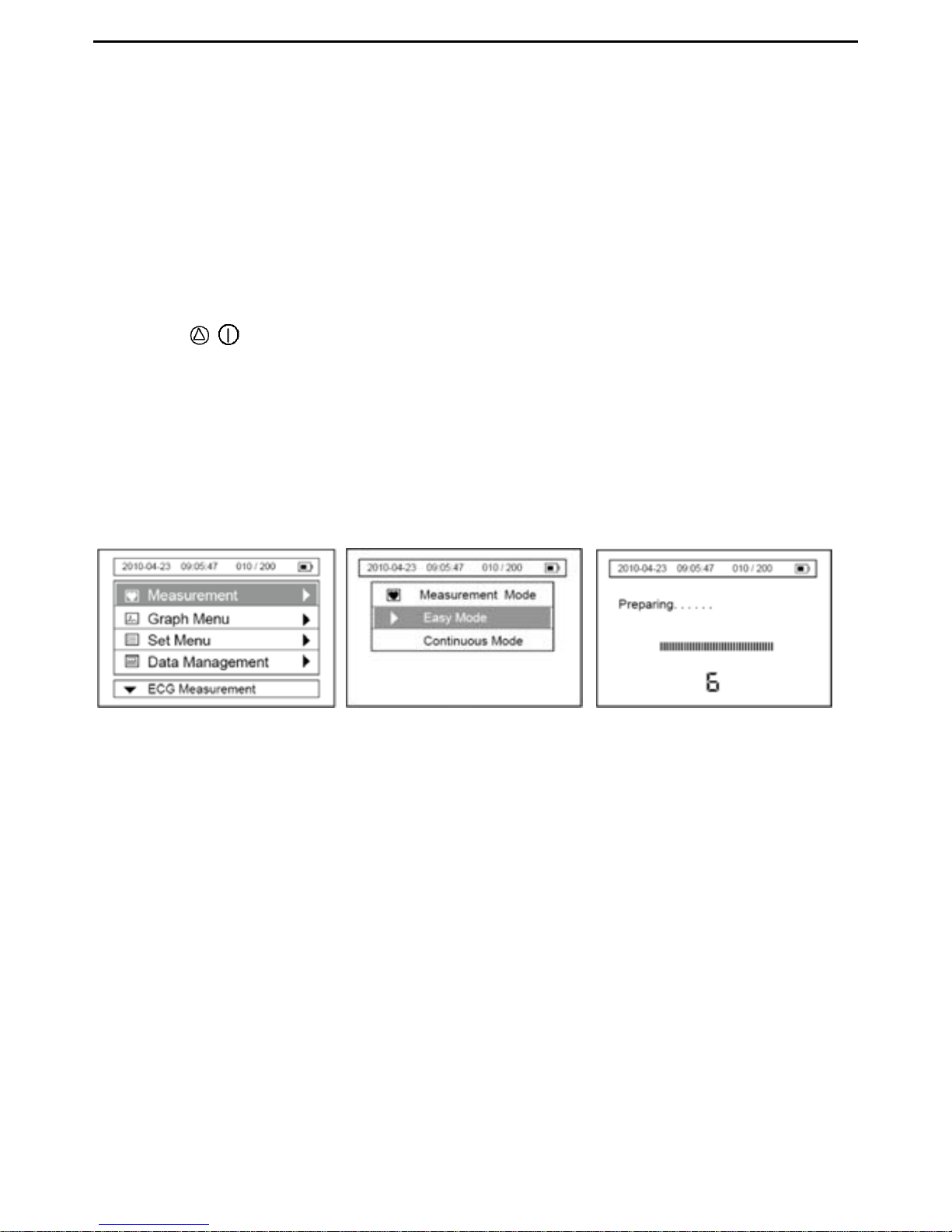
(2) Connecting the device using the ECG lead cable. (Refer to picture 4-5).
Picture 4-5
Make sure the ECG cable connector is inserted fully into the device.
If the measurement has failed, please check the placement of electrode patches
Page 16
VER1.0B1 HeartCheck HANDHELD ECG MONITOR
- 14 -
or the connection of the unit and lead cable.
Wrong Operation Methods:
A. Cables are mounted incorrectly.
B. Electrode patches have been placed on the body incorrectly
.
4.3 Measurement Mode:
There are two measurement modes for your selection easy mode and continuous mode.
4.3.1 Measuring in Easy Mode:
Press the
/ Power button for about 3 seconds to turn on the device.
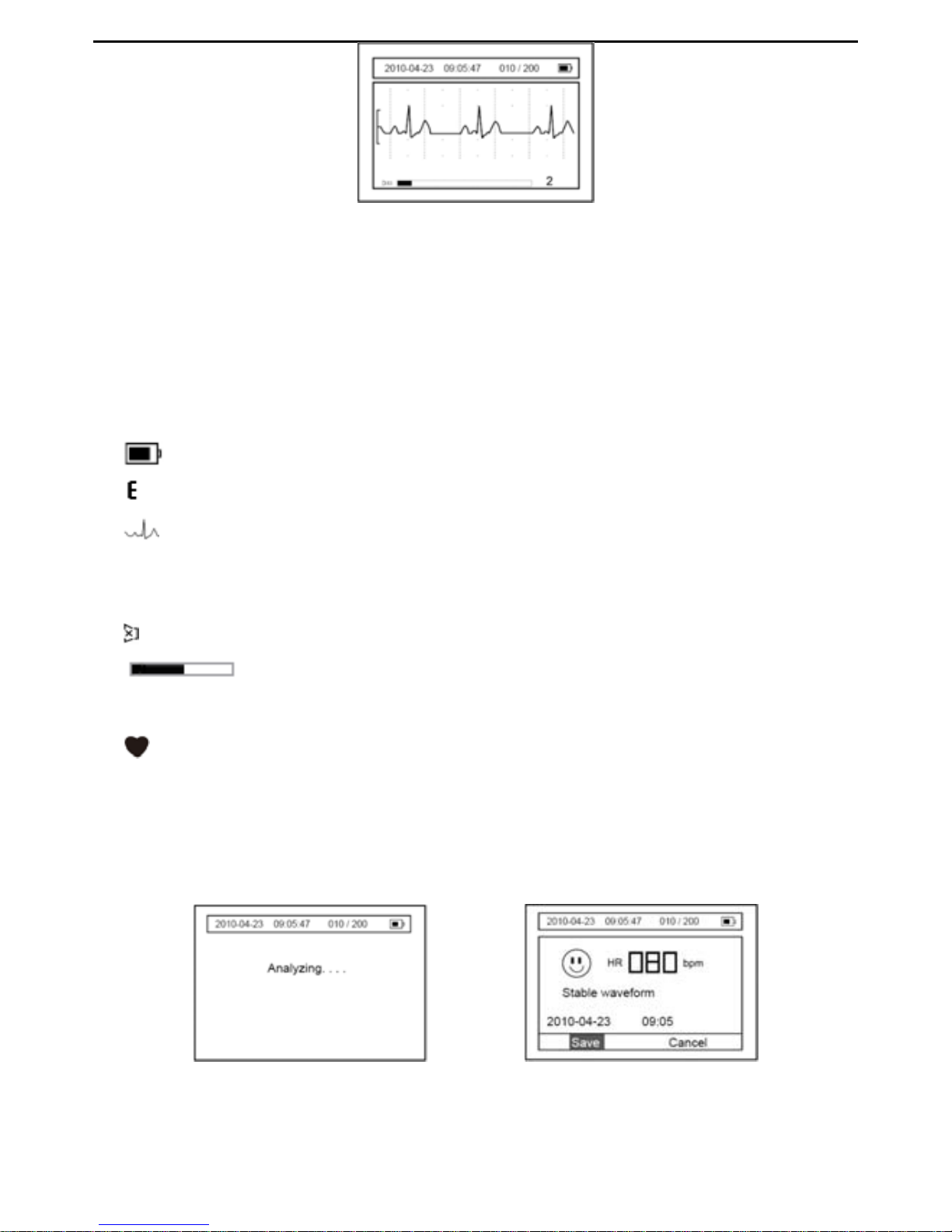
Enter the menu interface as shown in Picture
4-6 and select the “Measurement” item, the
interface switches to the one as shown in Picture
4-7. Measurement Modes include Easy
Mode and Continuous Mode. Choose the “Easy Mode” item, and click the “OK” button.
The interface will appear as shown in Picture
4-8. After the count down from six to zero,
the measurement will start.
Picture 4-6 Picture 4-7 Picture 4-8
Additionally, you can press the START button to quickly start a measurement, based on
the measuring mode selected in the “Measurement” Menu. Before measuring, make
sure that you are in a relaxed position.
Measuring interface in Easy Mode:
It takes about 30 seconds to complete the ECG measurement. During the measurement,
the device will beep synchronously along with the heart beat.
Page 17
VER1.0B1 HeartCheck HANDHELD ECG MONITOR
- 15 -
Picture 4-9
Description of Picture 4-9:
“2010-04-23”: The current date.
“09:05:47”: The current time.
“010/200”: Indicates that ten measurement results have been saved in the
device and the device may store up to a maximum of 200 records.
: Indication of the power level of the battery.
: ECG amplitude ruler.
: The examined ECG waveform.
×1: ECG waveform scale. You can select the displaying scale (x 0.5, x 1,
x 1.5 or x 2) in the "SET Menu”.
: Speaker status – On or Off.
: The status bar showing measurement progress.
2: Indication of measurement time.
: The sign of heartbeat, it flashes on and off synchronously with the
heart beat.
A measurement result message is displayed when the measurement has been
completed (Refer to Picture
4-10 &4-11 for details).
Picture 4-10 Picture 4-11
Page 18
VER1.0B1 HeartCheck HANDHELD ECG MONITOR
- 16 -
Description of Picture 4-11:
“2010-04-23”: The current date
“09:05:47”: The current time
“010/200”: Indicates ten measurement results have been saved in the device
and the device can store up to 200 records.
: Indication of the power level of the battery.
“HR 080 bpm”: The heart rate is 80 beats per minute.
“2010-04-23”: The record storage date
“09:05”: The record storage time
To cancel this ECG recording, press
button once to move the cursor to the
“Cancel” item. Press OK button to return the Menu interface.
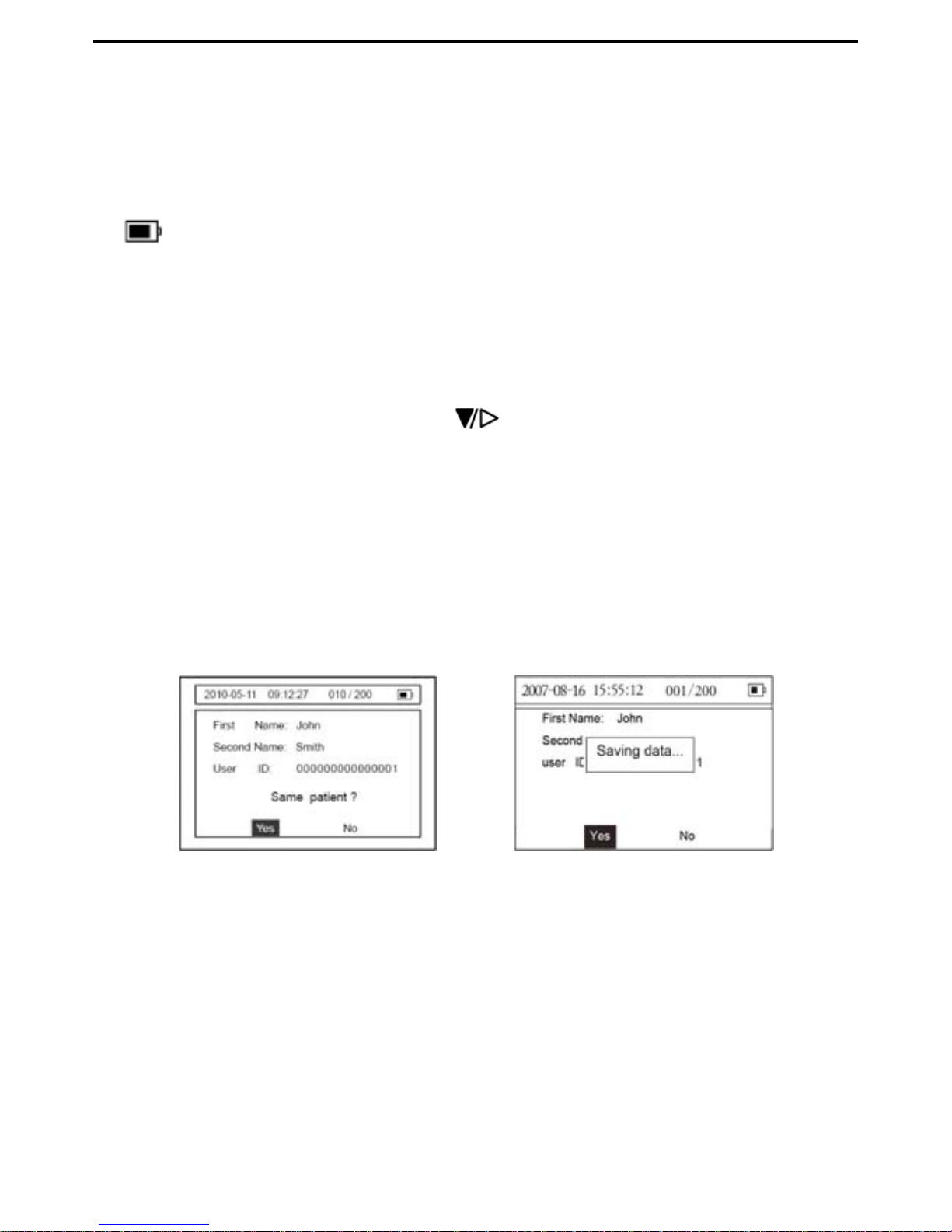
To save the ECG result, please perform the following steps:
To save the ECG press the OK button when the “Save” item is highlighted, or it will be
saved automatically within 3 seconds. The screen then switches to the user information
interface (Refer to Picture.
4-12). The user information is shown to allow the user to
confirm the patient’s identity.
Picture 4-12 Picture 4-13
If the patient’s information is correct select the “Yes” item and press the OK button. The
data will be saved under this patient.
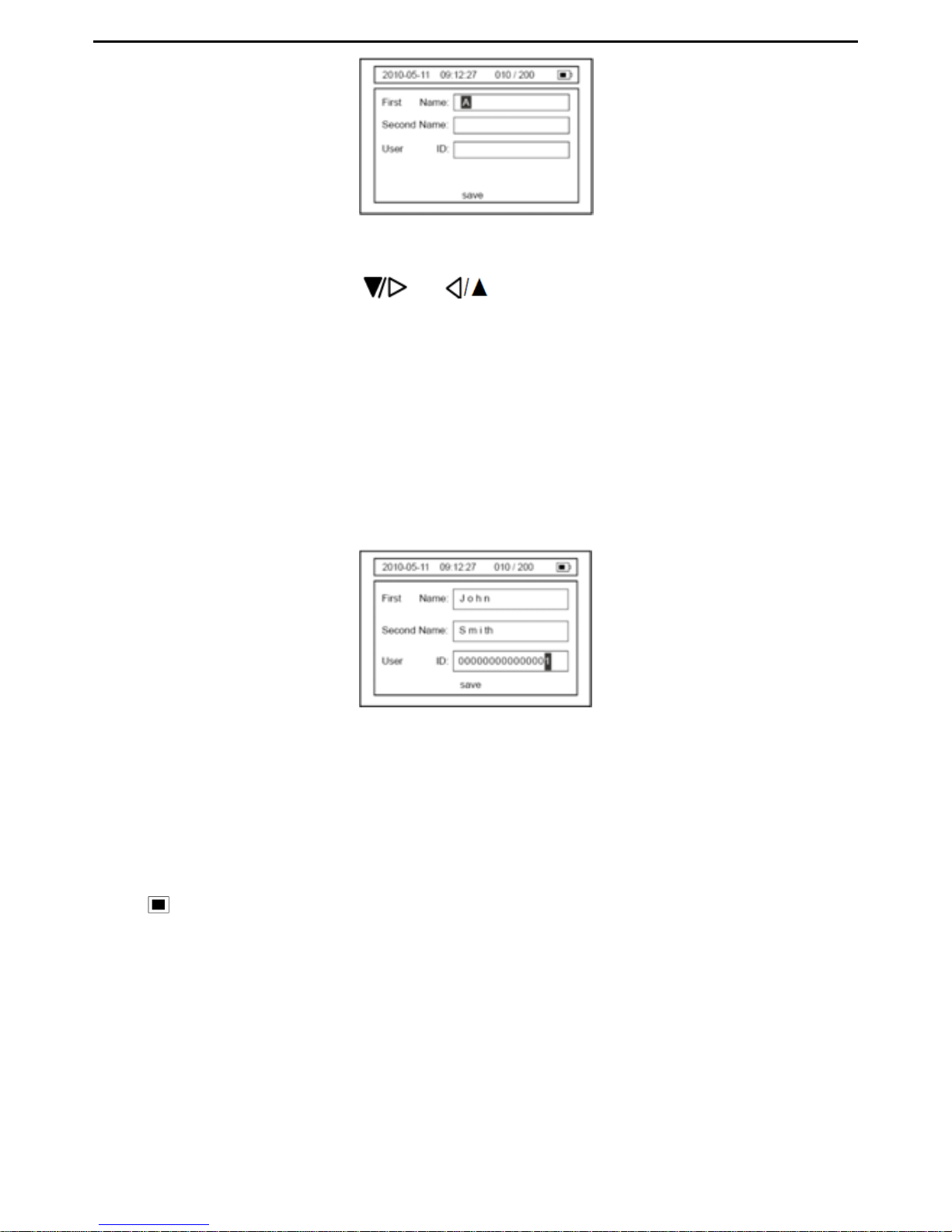
If the patient’s information is incorrect, move the cursor to the “NO” item and press the
OK button to enter the correct patient information as shown in Pic.4-14.
Page 19
VER1.0B1 HeartCheck HANDHELD ECG MONITOR
- 17 -
Picture 4-14
To input the first name, press or button to change the character from A to
the required letter (such as J in John) and then press the OK button to move the cursor
to the next space. Set each character of the first name based on the afore mentioned
steps. When the first name is complete, press the MENU button to move the cursor to
the “Second Name” field.
Enter the second Name and User ID following the steps used for the First Name
selection (see instructions above).
Note: Each field is large enough to accommodate 15 characters or numbers.
Picture 4-15
To save the information, press the MENU button to move the cursor to the “Save”
location and then press the OK button to save patient information and exit the current
interface.
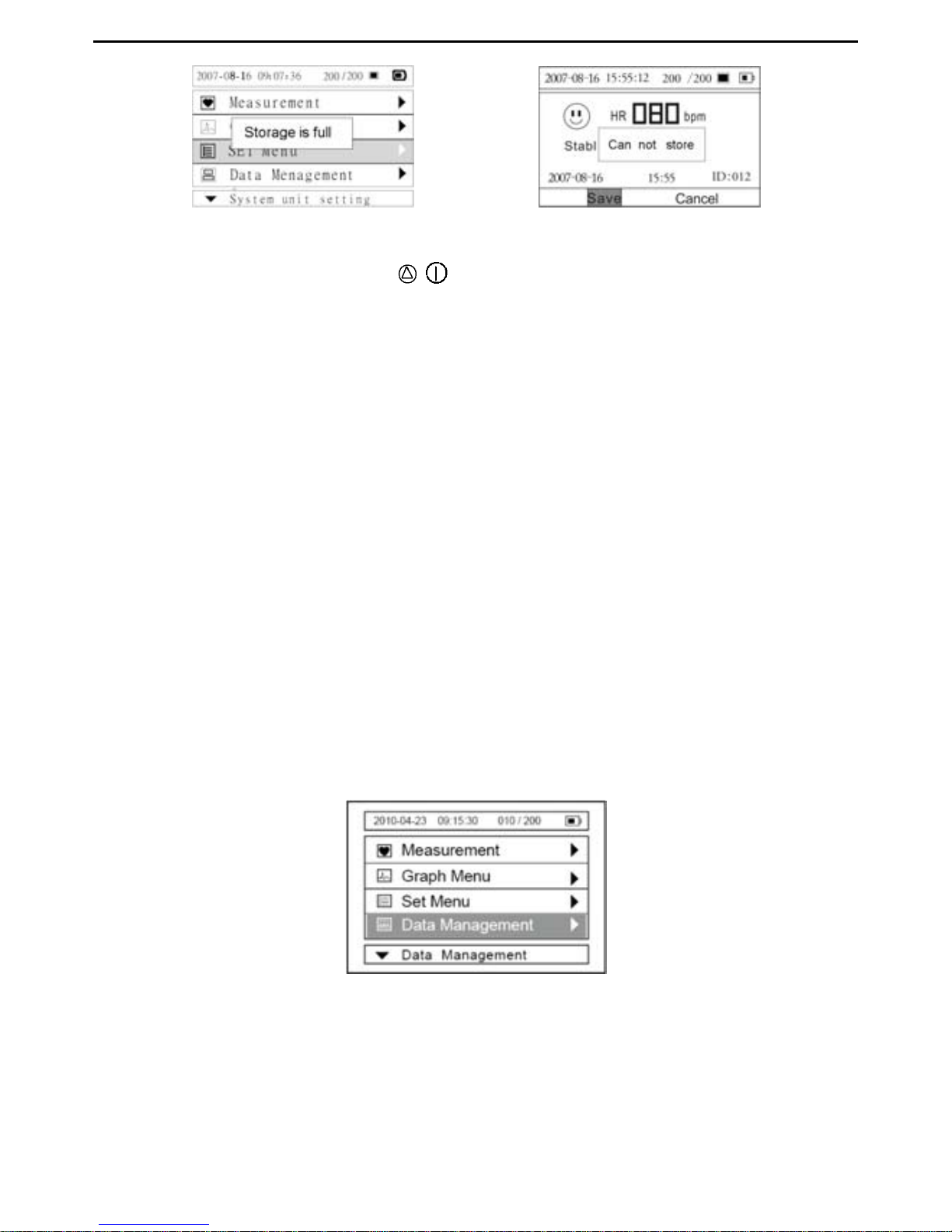
The device can save 200 30-second ECG records. When the device memory is full, the
icon “
” will appear on the upper right of the LCD screen (shown in Picture 4-16 &
Picture
4-17). Once the device memory is full an alert will be shown to indicate that no
further records can be stored (shown as Picture
4-17). Before being able to record new
ECGs delete unnecessary records from the device memory.
Page 20
VER1.0B1 HeartCheck HANDHELD ECG MONITOR
- 18 -
Picture 4-16 Picture 4-17
To turn off the device press the / button for three seconds
Note: If you forget to turn the device off, it will automatically shut down within one minute.
Users can set the auto power off time limit (1 minutes, 2 minutes…10 minutes) in
“System Settings”
Caution!
Please note that while the measurements from an ECG monitor are a useful guide for
your doctor, they cannot detect all changes in heart conditions. Always consult your
doctor if you notice any changes in your condition, regardless of the measurement
results, even if “Stable waveform” is displayed as the measurement result.
The values displayed by the device are the values at the time of measurement.
Medical conditions can change suddenly. If you notice any change in your condition,
consult your doctor, regardless of the prior measurement results.
4.3.2 Continuous Mode
The device must be connected to a computer prior to the start of a recording In the
“Measurement Mode” you can select the “Continuous Mode” for longer term monitoring.
New batteries are expected to support approximately 6 hours of recordings in
Continuous Mode.
Picture 4-18
Note: In Continuous Mode, the device must be connected to the computer as
Continuous Mode measurement results cannot be saved in the device. The
measurement results can be displayed in real-time on a computer by using the data
Page 21
VER1.0B1 HeartCheck HANDHELD ECG MONITOR
- 19 -
transmission software. To use the data transmission software connect the device to a
computer by using the data cable provided. Recordings may be saved in the software on
the computer once the transmission is complete.
5. Displaying an ECG
The “GRAPH Menu” is used to display, lock, or delete the list of ECG data stored.
Displaying ECG Waveform
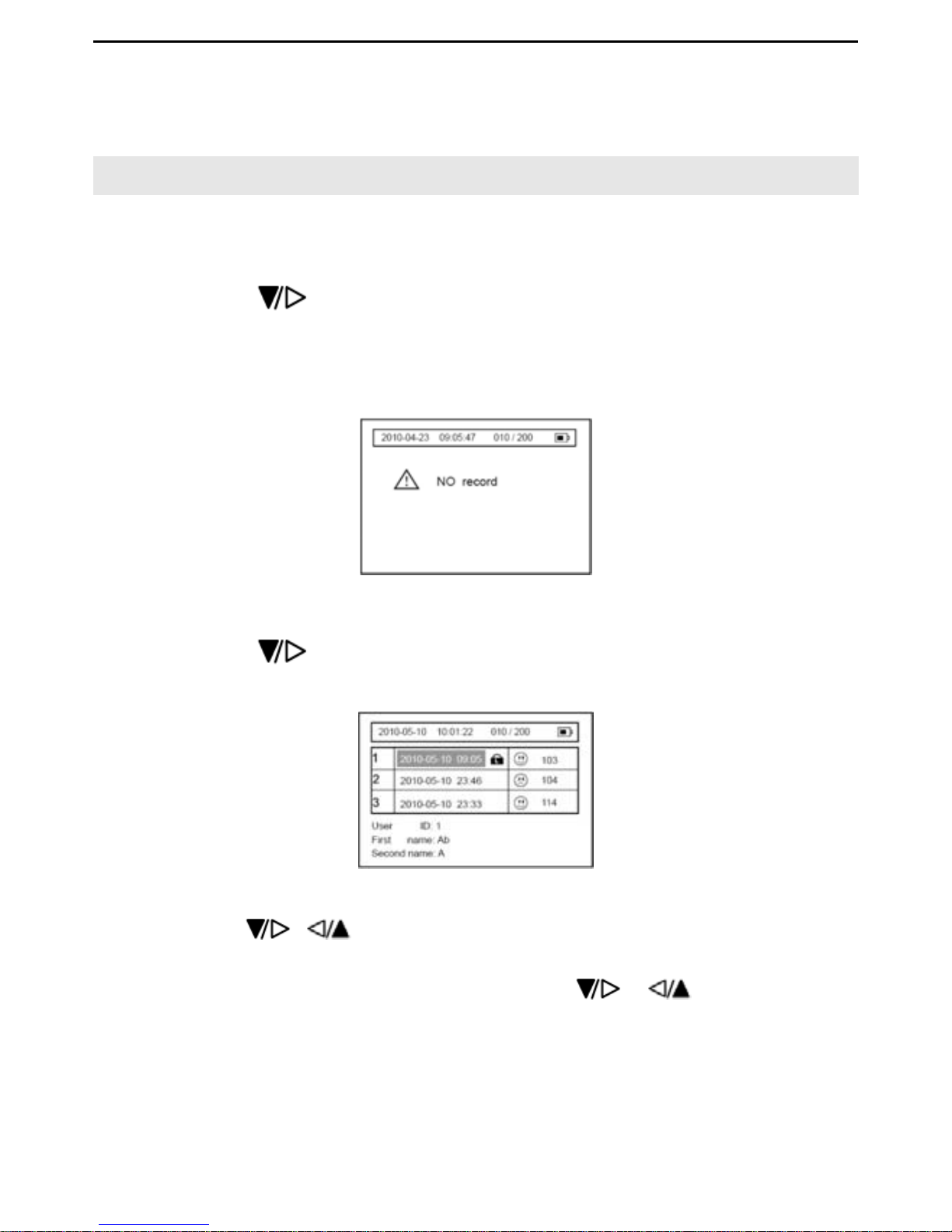
1.
Press the
button to select the “Graph Menu” when the main menu
appears,and then press the “OK” button to confirm. If the device does NOT have
stored records, it will show the following information as shown in Picture 5-1 when
users enter into the “Graph Menu” screen.
Picture 5-1
2
. Press the
button to select the “Graph Menu” when the main menu
appears,and then press the “OK” button to confirm. Refer to Picture 5-2.
Picture 5-2
3
. Press the
or button to select the ECG data you wish to view from the
ECG data list,then press the OK button to display the detailed view of the
waveform(Refer to Picture 5-3). Press the
or button to move
forward/backward through the waveforms, Press the “MENU” button to exit from
the current menu.
Page 22
VER1.0B1 HeartCheck HANDHELD ECG MONITOR
- 20 -
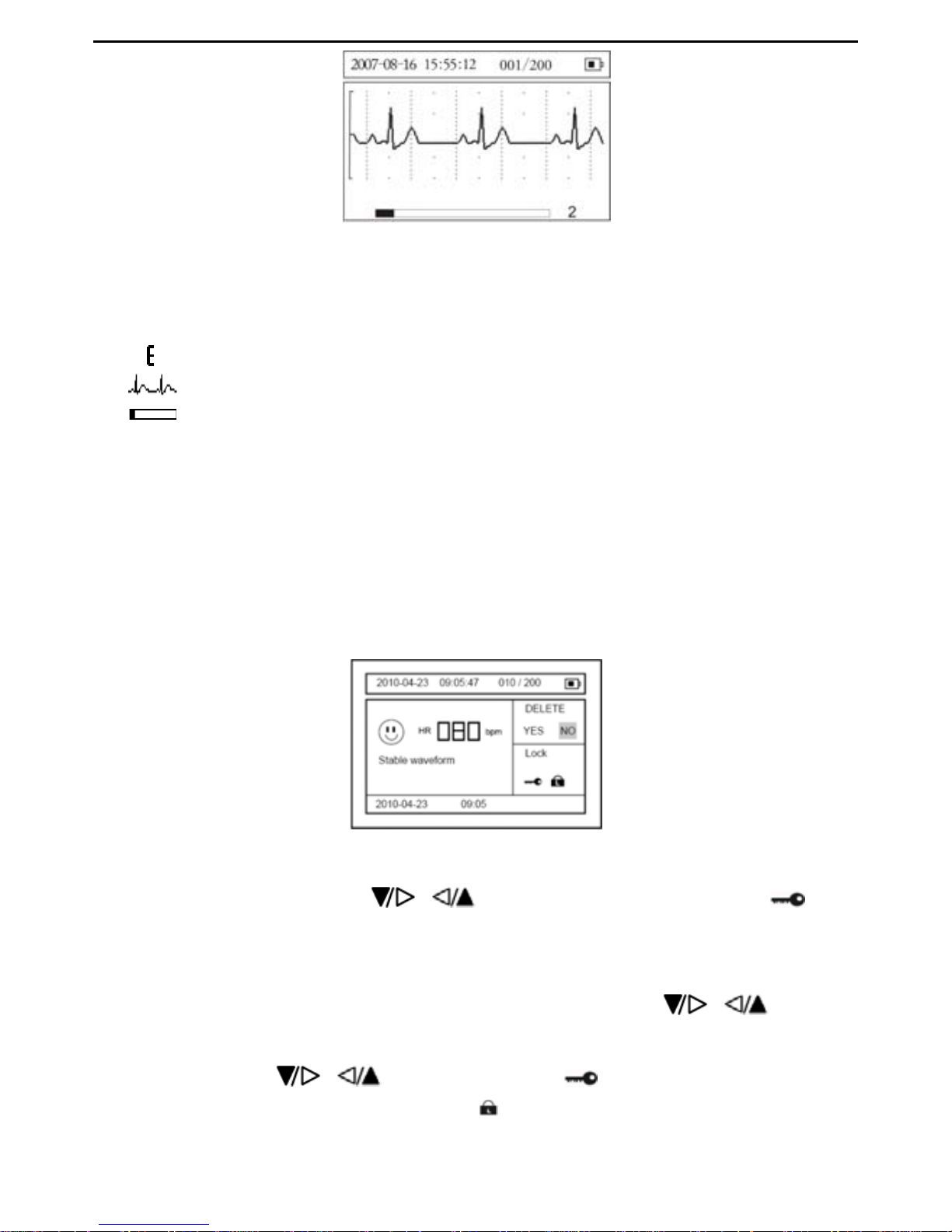
Picture 5-3
Description of picture
5-3
:
“
001/200
”: It indicates one measurement has been saved in the device and the
device can store up to 200 records.
: ECG amplitude ruler
: ECG waveform
: Measurement progress bar
2 : The interval of the current ECG waveform.
Note: Every stored ECG data is displayed with date, time and a character representing
the measured waveform.
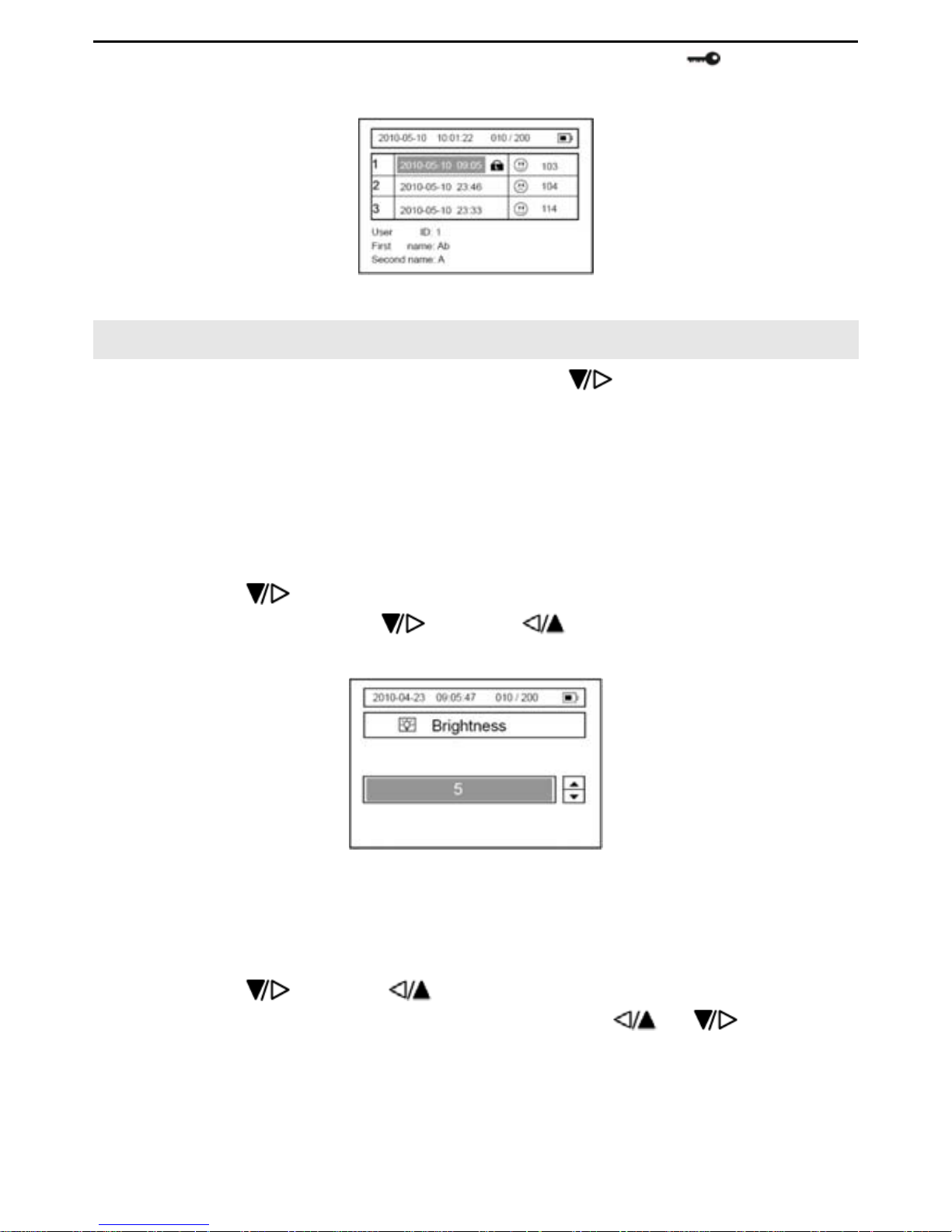
Measuring result depiction: After reviewing a certain ECG waveform, press the “OK”
button to enter in to the corresponding ECG quality result depiction. (Refer to Picture
5-4).
Picture 5-4
In the current menu press the or button to select YES, NO, or the icon,
and then press the “OK” button to delete save or lock the result.
Deleting or locking the ECG data record
Deleting: Under the interface, such as in Picture.5-4, press the
or button to
select the “YES” item, you will delete the current ECG records.
Locking: Press the
or button to select the icon, you will lock the current
ECG record being indicated by the
icon (Refer to Picture 5-5). The locked
Page 23
VER1.0B1 HeartCheck HANDHELD ECG MONITOR
- 21 -
record can NOT be deleted. To unlock the records,select the icon again and
press the “OK” button.
Picture 5-5
6. System Settings
Select “Set Menu” in the main menu by pressing the button, and then press the
“OK” button to enter.
6.1 Date and Time Setting
Please refer to section 3 “Setting Date and Time”.
6.2 Brightness Setting
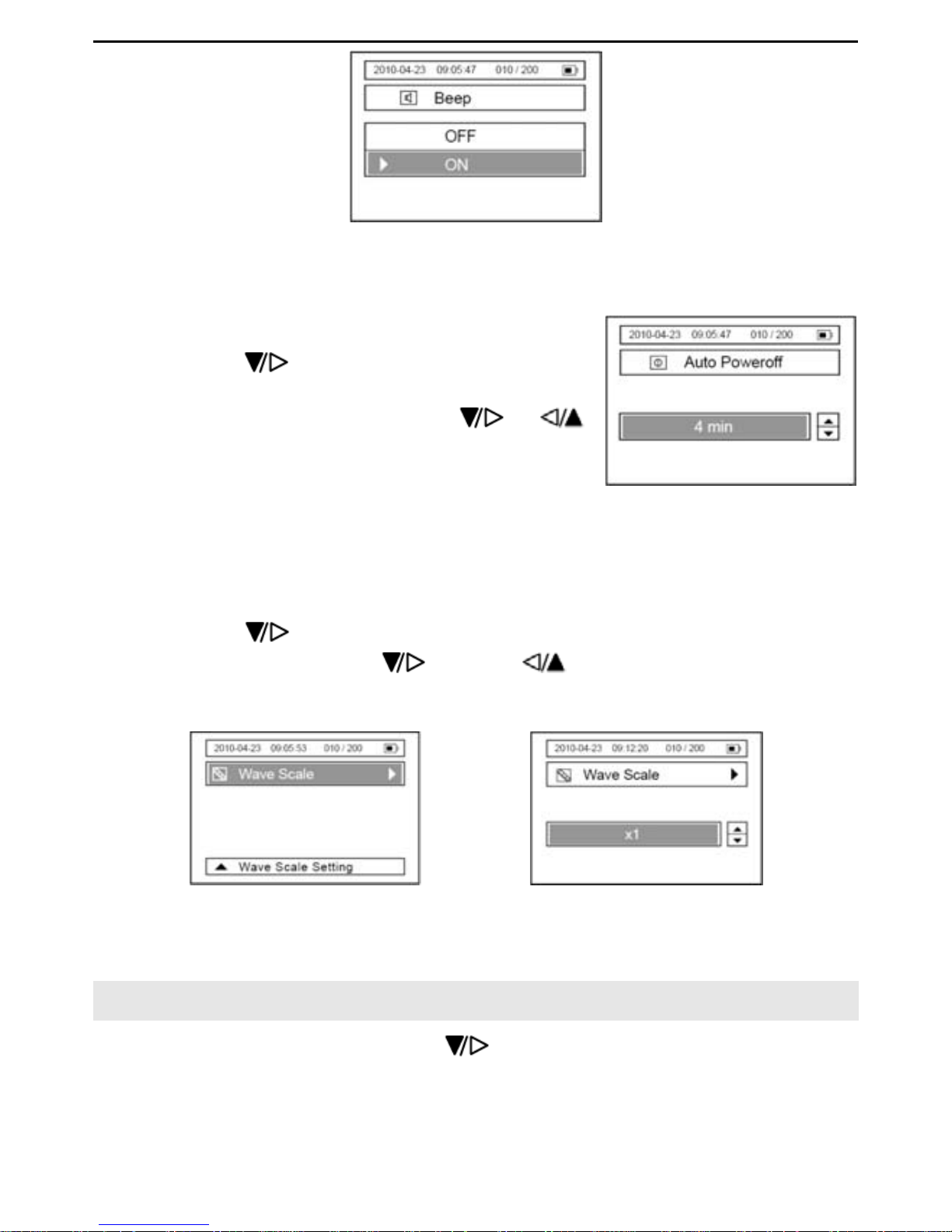
6.2.1 Press the button to select the “Brightness” item, and then press the “OK”
button to enter. Press the
button or to select the backlight level from
“Off” to “1, 2, 3…7”. Refer to Picture. 6-1.
Picture 6-1
6.2.2 Press the “OK” button to confirm, and return to the previous menu.
6.3 Beep Setting
6.3.1 Press the button or to select the “Beep” item. Then press the “OK”
button to enter, Select “On” or “Off” by pressing the
or button, refer
to picture 6-2.
Page 24
VER1.0B1 HeartCheck HANDHELD ECG MONITOR
- 22 -
Picture 6-2
6.3.2 Press the “OK “button to save the settings, and to return to the previous interface.
6.4 Auto Power-off Setting
6.4.1 Press the button to select the
“Auto Power off” item, and then press the “OK”
button to enter. Press the button
or
button to select “off”or to set the time limit “1 Min.
2 Min…. 10 Min.”, refer to Picture 6-3.
Picture 6-3
6.4.2 Press the “OK” button to confirm, and to return to the previous menu.
6.5 Wave Scale Setting
6.5.1 Press the button to select the “Wave Scale” item, and then press the “OK”
button to enter. Press the
button or button to select x0.5, x1, x1.5 or
x2. refer to Picture 6-5.
Picture 6-4 Picture 6-5
6.5.2 Press the “OK” button to confirm, and to return to the previous menu.
7. Data Management
In the main menu interface, press the button to select the “Data Management”
item, and then press the “OK” button to enter into the sub menu. Refer to the following
picture.
Page 25
VER1.0B1 HeartCheck HANDHELD ECG MONITOR
- 23 -
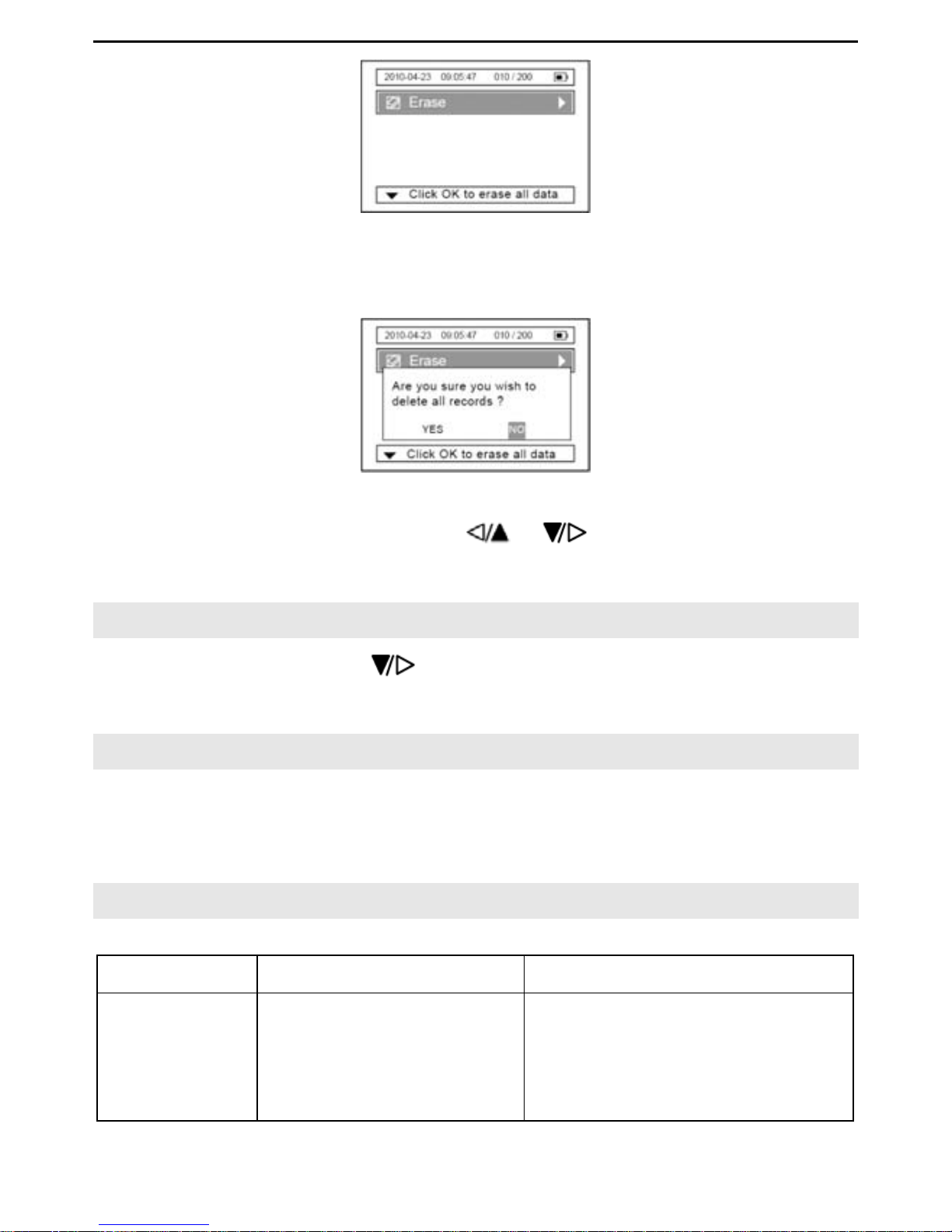
Picture 7-1
Press the “OK” button to erase all data.
Picture 7-2
Select either “YES” or “NO” by using the & buttons. If selecting “YES” all
data on the device will be deleted. Selecting “NO” will cancel the function.
8. Version
In the main menu, press the button to select the “Version”, item, information
about the device will be displayed.
9. Data Transmission
Before data transmission, make sure that the device is on and connected to a computer
by the data cable.
For data transmission operations refer to the accompanying Software User Manual.
10. Trouble Shooting
Problem Cause Solution
The device
can NOT be
turned on
1. The batteries are
drained or almost
drained.
2. The batteries are not
inserted properly.
3. The device is broken
1. Change batteries.
2. Reinstall batteries
3. Please contact the local
service center.
Page 26
VER1.0B1 HeartCheck HANDHELD ECG MONITOR
- 24 -
out.
The device is
failure in
measuring
heart rate.
1. The electrodes have
not made good contact
with your body.
2. Movement occurred
when measuring
3. Electromagnetic
interference
4. The signal is too weak
1. Place the electrodes correctly.
2. When measuring, please keep
quiet and avoid moving.
3. Keep away from
electromagnetic source.
4. Change to another method of
measurement (e.g.
Chest/Cable measurement).
ECG
waveform
excursion or
strong
irrelevant
waveform
1. Your skin is too dry or
oily.
2. Electrode and body
does not contact
tightly.
3. Your body is too tense.
1. Clean the skin thoroughly with
soap and water prior to use.
2. Press the electrode with a
certain force.
3. Relax and repeat the
measurement.
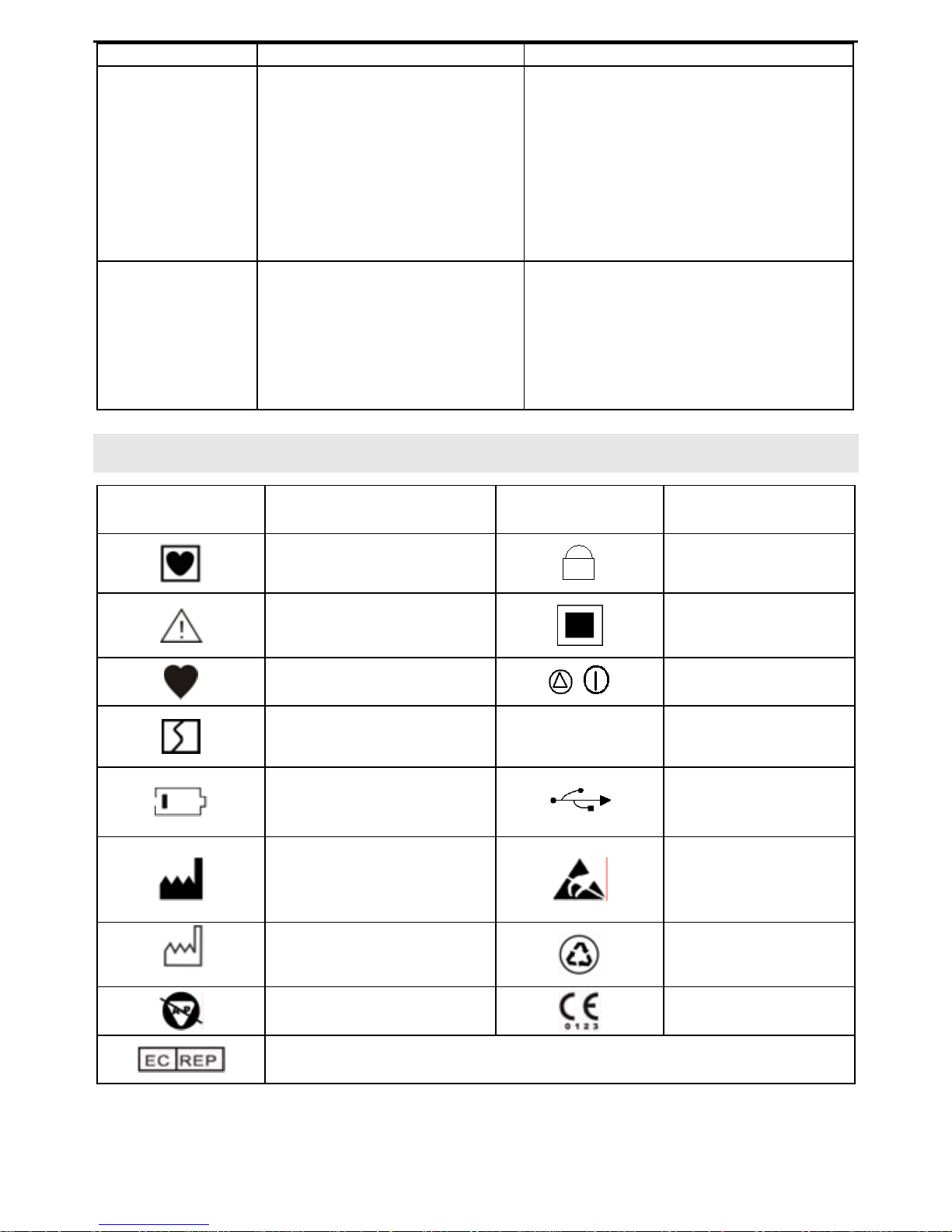
11. Key Symbols
Symbol Meaning Symbol Meaning
Type CF applied part.
Record is locked
Caution. May
indicate important
information.
Record is full
Heart rate (Unit:
BPM(beat per minute))
/
Power button
Ll ECG Lead is
disconnected
SN
Serial number
Low battery
USB interface
Manufacturer
The device is
susceptible to
electro static
discharge (ESD).
Date of Manufacture
The packaging for
this device is
recyclable.
Is not AP category
Equipment.
European union
approval
Authorized representative in the European community.
Page 27

VER1.0B1 HeartCheck HANDHELD ECG MONITOR
- 25 -
12. Technical Data
Classification:
According to the type of protection against electric shock, it can be classified as
internally powered equipment. The device’s application type is CF and it is a
movable common facility with no defibrillator or protection.
Operating Environment:
Operation Temperature: 5℃~40℃;
Atmosphere Pressure Range: 86kPa-106kPa;
Operation Humidity: ≤80%,no condensation;
Operation Voltage: DC 3V (+0.3V, -0.8V); 2 AAA batteries.
Storage Environment
Storage Temperature: -20℃~55℃
Storage Humidity: ≤93%, no condensation
ECG Measurement:
Channel amount: 1 (difference input)
Measuring electrodes: Four integrated metal electrodes.
Three Measuring parts: The signals measured can be lead [I](between right and left
hand)and approximate lead [II] or lead [III] (between both
hands and the chest).
Note: The signals measured by the device positioned from the right hand and left
hand is lead [I] on a standard surface ECG. The signals measured by the device
positioned from the right hand and left chest best approximates a frontal plane lead
such as lead [II] on a standard surface ECG.
Signal bandwidth: 0.5Hz-75Hz
Sampling rate:250Hz
Heart rate measuring range: 30bpm-240bpm
Heart rate measuring accuracy: 30~100bpm: ±2bpm; 101~240bpm: ±4bpm
Display Mode:
Display screen type:160 × 240 dot - matrix single color LCD.
The dimension of display area:70mm×45mm
Page 28

VER1.0B1 HeartCheck HANDHELD ECG MONITOR
- 26 -
Backlight:LCD backlight
Data Storage:
Every record stored holds 30 seconds of ECG data.
The device can store 200 ECG recordings.
Dimension and Weight:
Dimension: 136mm×84mm×21mm(Length × Width × Height)
Weight: 120g (Not including Two AAA batteries)
Product Accessories:
AAA Batteries---------------------------------------------------------------------- ------------2 pieces
Protective Pouch-------------------------------------------------------------------------------1 piece
Software CD-------------------------------------------------------------------------------------1 piece
Instruction Manual-----------------------------------------------------------------------------1 piece
Quick Start Guide------------------------------------------------------------------------------1 piece
Service Policy Label--------------------------------------------------------------------------1 piece
Packing List-------------------------------------------------------------------------------------1 piece
USB cable---------------------------------------------------------------------------------------1 piece
3 Lead ECG Cable----------------------------------------------------------------------------1 piece
Electrodes----------------------------------------- ---------------------------------------------1 Packet
Certificate of Quality--------------------------------------------------------------------------1 piece
Notes:
Specifications may be changed without prior notice.
Disposal of this product and used batteries should be carried out in
accordance with the local regulations for the disposal of electronic
products.
Please use the accessories provided with the equipment, use of other
accessories will render the warranty null and void.
13. Maintenance and Storage
Clean the device with a cloth lightly dampened with water, disinfectant alcohol or
detergent, and then wipe it dry with a dry cloth.
Wipe the electrodes using a cloth dampened with disinfectant alcohol.
Do not wipe the device with benzene, gasoline, paint thinner, concentrated alcohol,
or other volatile detergents.
Page 29
VER1.0B1 HeartCheck HANDHELD ECG MONITOR
- 27 -
Do not place objects on top of the device. This could damage the device.
Do not disassemble the device.
Do not sterilize this device in an autoclave, ultraviolet sterilizer or gas sterilizer (EOG,
formaldehyde, high density ozone etc.).
This device does not require calibration during the expected life cycle.
When displaying the low voltage mark “
”, please change the batteries. Dispose
the used batteries according to the applicable local regulations.
Please remove the batteries if the device is not to be used for a long period of time.
The environment temperature for transport or storage of the packaged device is
-4℉~131℉(-20℃~55℃), and the humidity is ≤93%, no condensation.
CAUTION:
Keep operating environment clean, quiet, no erodent and no flammable material. Do
not use this device in an environment with too high or too low temperature and
humidity.
Please do not use the device when it is moved from a cold place to a warm and moist
place. The device should be given some time to adjust to the change in temperature.
Please do not use sharp tools to operate any of the buttons.
Do not immerge the device into liquids or clean the surface with organic liquid, and
do not splash liquids on the device.
14. General information about the Heart and ECG Measurements
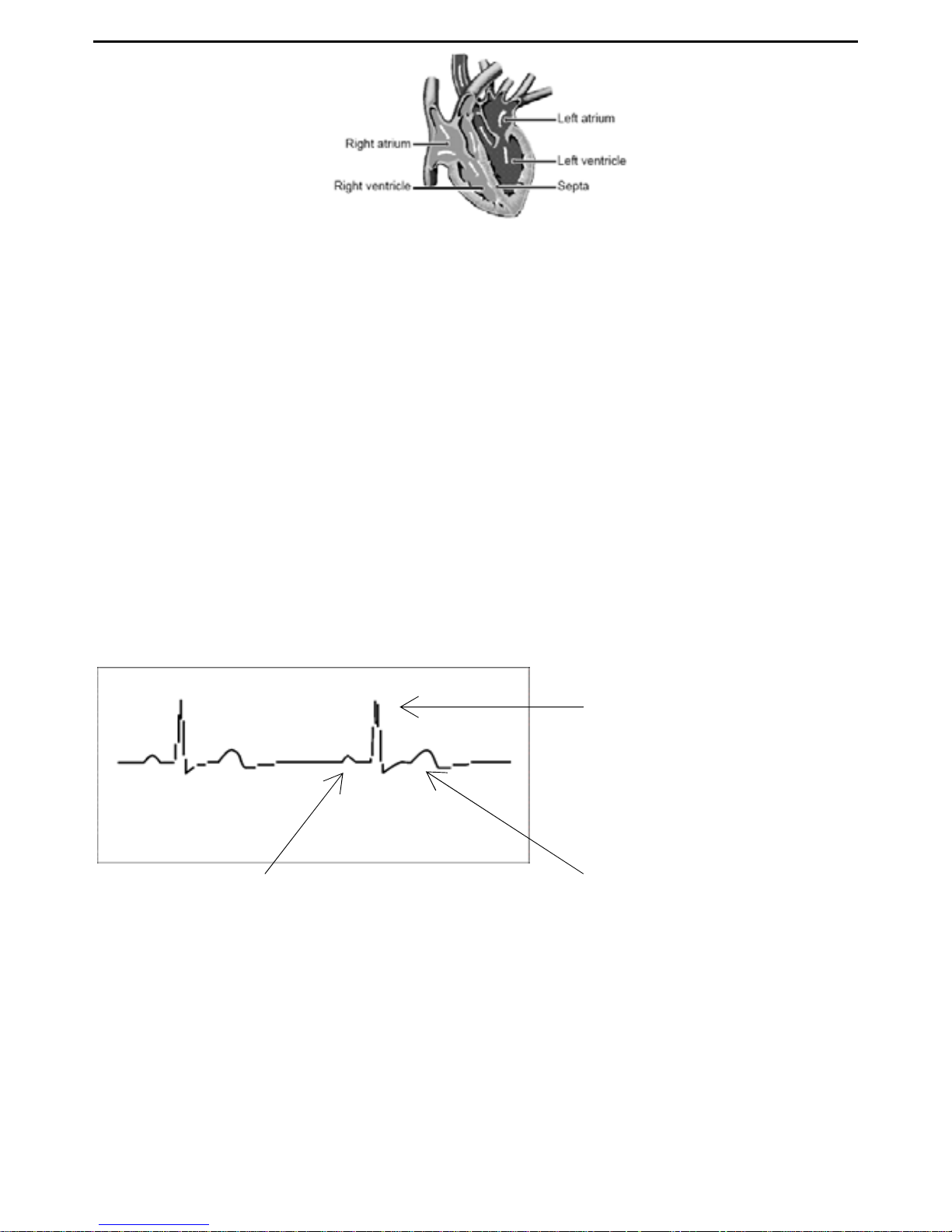
The heart is a muscular pump controlled by electrical impulses generated by the body. It
is divided into two sides by the septa. Each side has two chambers –an atrium and a
ventricle-linked by a one-way valve. The left atrium and ventricle control oxygenated
blood, and the right atrium and ventricle control de-oxygenated (“used”) blood.
The electrical impulse that causes the heart to beat spreads across the atria, causing
the left and right atrium to contract and pump blood into the left and right ventricles
respectively. The two ventricles then contract and pump blood out of the heart. The heart
muscle then relaxes, or re- polarizes, allowing blood to fill up the heart again.
Page 30
VER1.0B1 HeartCheck HANDHELD ECG MONITOR
- 28 -
An ECG monitor is able to measure the electrical impulse as it passes across and
through the heart, causing the heart to beat. An ECG does not measure the movement
of your heartbeat, but rather the electrical activity that causes the heart to beat. The
measurements recorded by an ECG monitor, when combined with a medical
examination, can help your doctor monitor your heart condition. The ECG
measurements recorded by the device are NOT designed or intended for medical
diagnosis. Conditions such as arrhythmia and ischemia can only be diagnosed by a
doctor through a special examination.
About the ECG Waveform
The ECG waveform shows the rhythm of your heartbeat during the 30-second
measurement and displays the electrical activity causing the heart to beat. The
waveform for each heartbeat shows the progress of the electrical impulse across and
through the heart.
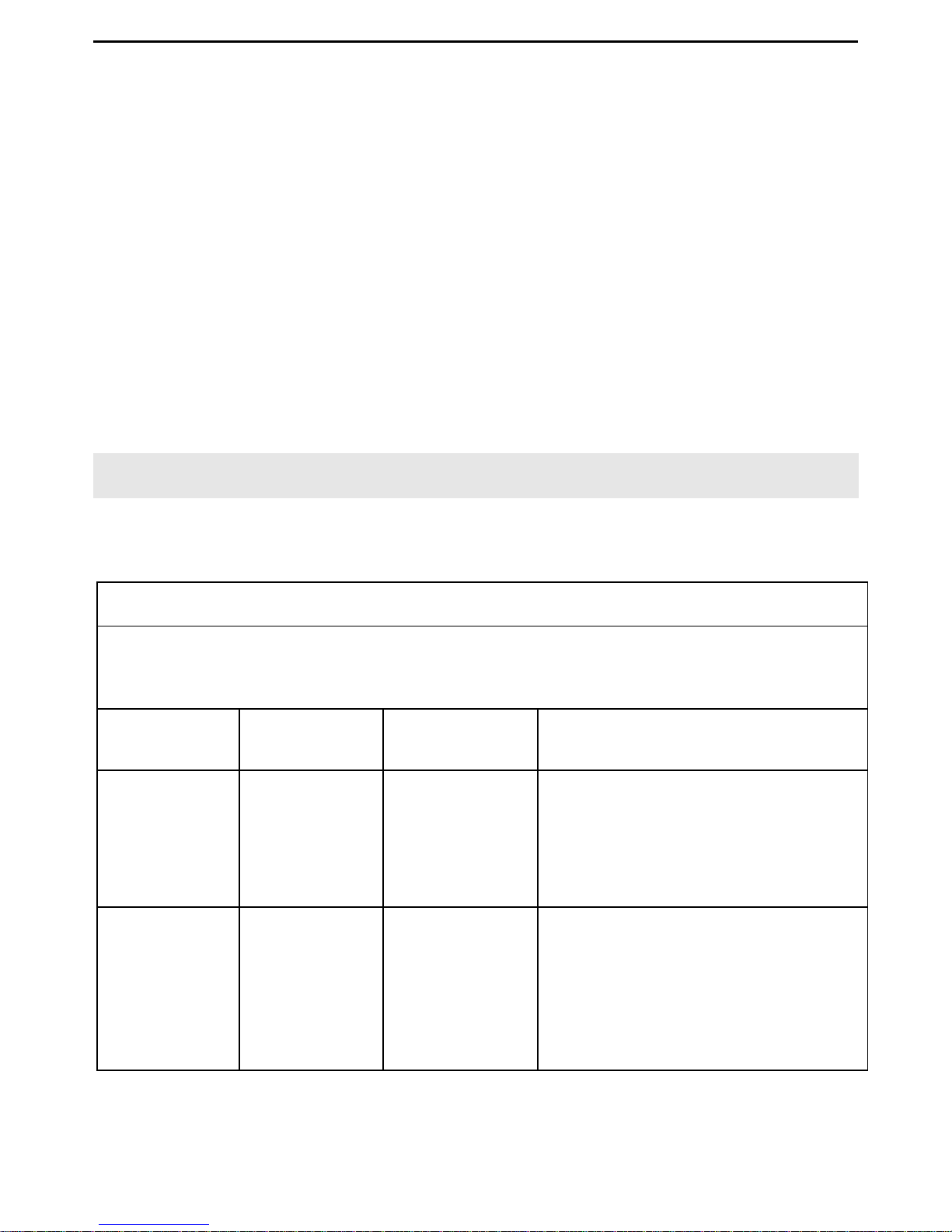
The first peak indicates the spread of the impulse over the atria and the beginning of
their contraction. This is known as the P wave. The second peak indicates the spread of
impulse over the ventricles and the beginning of their contraction. This is known as the
QRS complex. The third peak indicates the activity as the heart relaxes (re-polarization),
and is known as the T wave.
Ventricular contraction
(QRS complex)
Re-
p
olarization (T wave
)
Atrial contraction (P wave)
Page 31
VER1.0B1 HeartCheck HANDHELD ECG MONITOR
- 29 -
What is Arrhythmia?
Arrhythmia is a condition where the heartbeat rhythm is abnormal due to flaws in the
bio-electrical system that drives the heartbeat. Typical symptoms are skipped heartbeats,
premature contraction, an abnormally rapid (tachycardia) or slow (bradycardia) heart
rate. These may be caused by such conditions as heart disease, aging, physical
predisposition, stress, lack of sleep, and fatigue. Arrhythmias can only be diagnosed by
a doctor.
What is Ischemia?
Ischemia is a condition in which insufficient oxygen is supplied to parts of the heart or
other parts of the body. This is usually due to a blockage or partial blockage of an artery.
Ischemia can only be diagnosed by a doctor.
Appendix
Guidance and manufacture's declaration- electromagnetic immunity for all
EQUIPMENT and SYSTEMS
Guidance and manufacture's declaration - electromagnetic immunity
The Handheld ECG Monitor is intended for use in the electromagnetic environment
special below. The customer or the user of Handheld ECG monitor should assure that
it is used in such an environment.
Immunity
Test
IEC 60601
Test level
Compliance
Level
Electromagnetic environment
guidance
Electrostatic
Discharge
(ESD)
IEC6100042
±6kV
contact
±8kV air
±6kV
contact
±8kV air
Floors should be wood, concrete
or ceramic tile. If floor are
converted with synthetic material,
the relative humidity should be at
least 30%
Power
frequency
(50/60Hz)
magnetic
field IEC
61000-4-8
3A/m 3A/m Power frequency magnetic fields
should be at levels characteristic
of a typical location in a typical
commercial or hospital
environment.
Page 32
VER1.0B1 HeartCheck HANDHELD ECG MONITOR
- 30 -
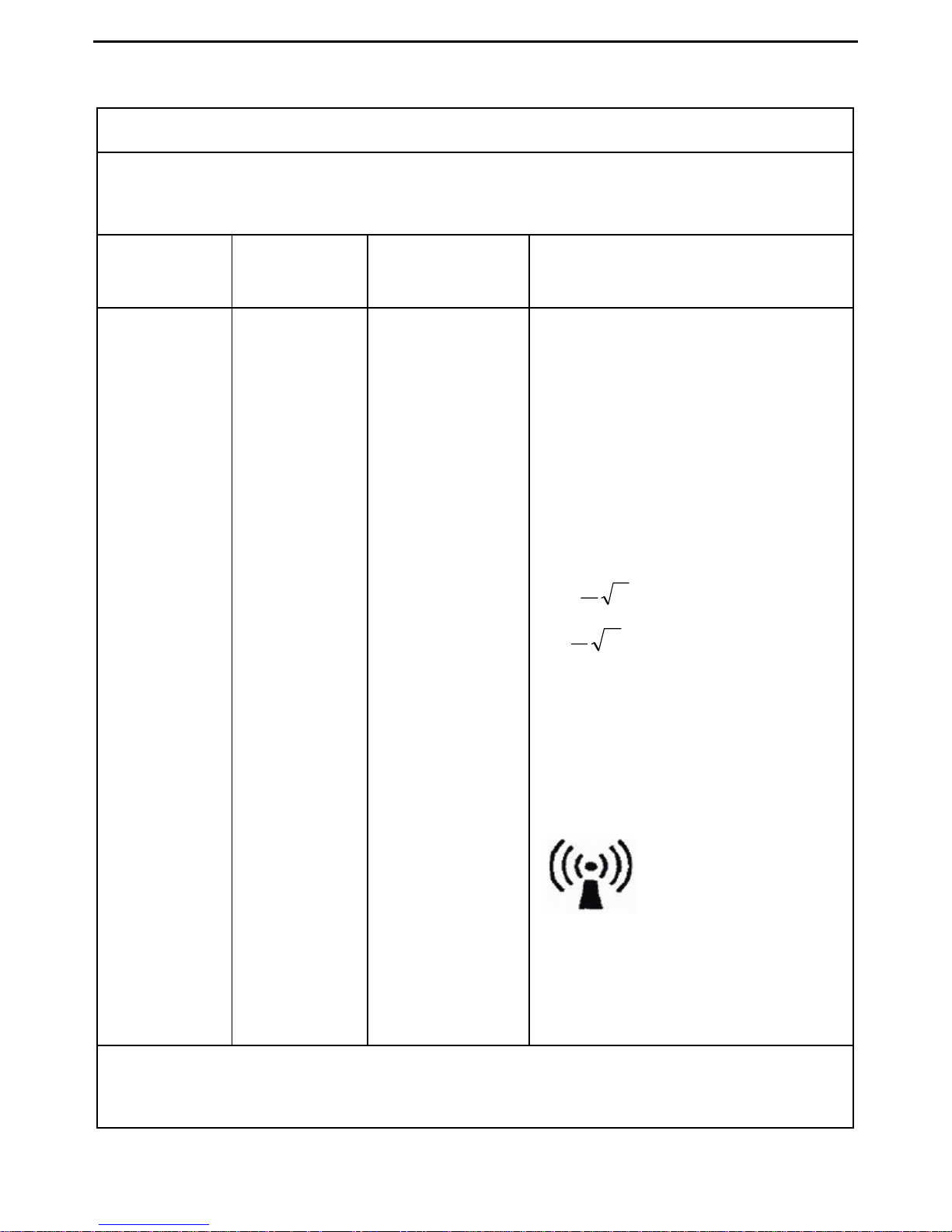
Guidance and manufacture's declaration - electromagnetic immunity for
EQUIPMENT and SYSTEMS that are not LIFE-SUPPORTING
Guidance and manufacture's declaration - electromagnetic immunity
The Handheld ECG Monitor is intended for use in the electromagnetic environment
special below. The customer or the user of Handheld ECG monitor should assure
that it is used in such an environment.
Immunity
Test
IEC 60601
Test level
Compliance
Level
Electromagnetic environment
guidance
61000-4-6
Radiated
RF IEC
61000-4-3
3V/m
80Hz
To 2.5 GHz
3V/m
Portable and mobile RF
communications equipment
should be used no closer to any
part of the Handheld ECG
monitor, including cables, than
the recommended separation
distance calculated from the
equation applicable to the
frequency of the transmitter.
Recommended separation
distance
d=
P
V
1
5.3
80MHz to 800MHz
d=
P
E
1
7
800MHz to 2.5GHz
Where P is the maximum output
power rating of the transmitter in
Watts (W) according separation
distance in meters (m).
Field strengths from fixed RF
transmitters, as determined by an
electromagnetic
site survey,
a
should
be less than the
compliance level in
each frequency range.
b
Interference may occur in the
vicinity of equipment marked with
the following symbol.
Note1: At 80MHz and 800MHz, the higher frequency range applies.
Note2: These guideline may not apply in all situations. Electromagnetic propagation
is affected by absorption and reflection from structures, objects and people.
Page 33
VER1.0B1 HeartCheck HANDHELD ECG MONITOR
- 31 -
a
Field strengths from fixed transmitters, such as base situation for radio
(cellular/cordless) telephones and land mobile radios, amateur radio, AM and FM
radio broadcast and TV broadcast cannot be predicted theoretically with accuracy.
To assess the electromagnetic environment due to fixed RF transmitters, an
electromagnetic site survey should be considered. If the measured field strength
in the location in which the Handheld ECG monitor is used exceeds the applicable
RF compliance level above, the Handheld ECG monitor should be observed to
verify normal operation. If abnormal performance is observed, additional
measures may be necessary, such as reorienting or relocating the Handheld ECG
monitor.
b
Over the frequency range 150kHz to 80MHz, field strengths should be less than
3V/m.
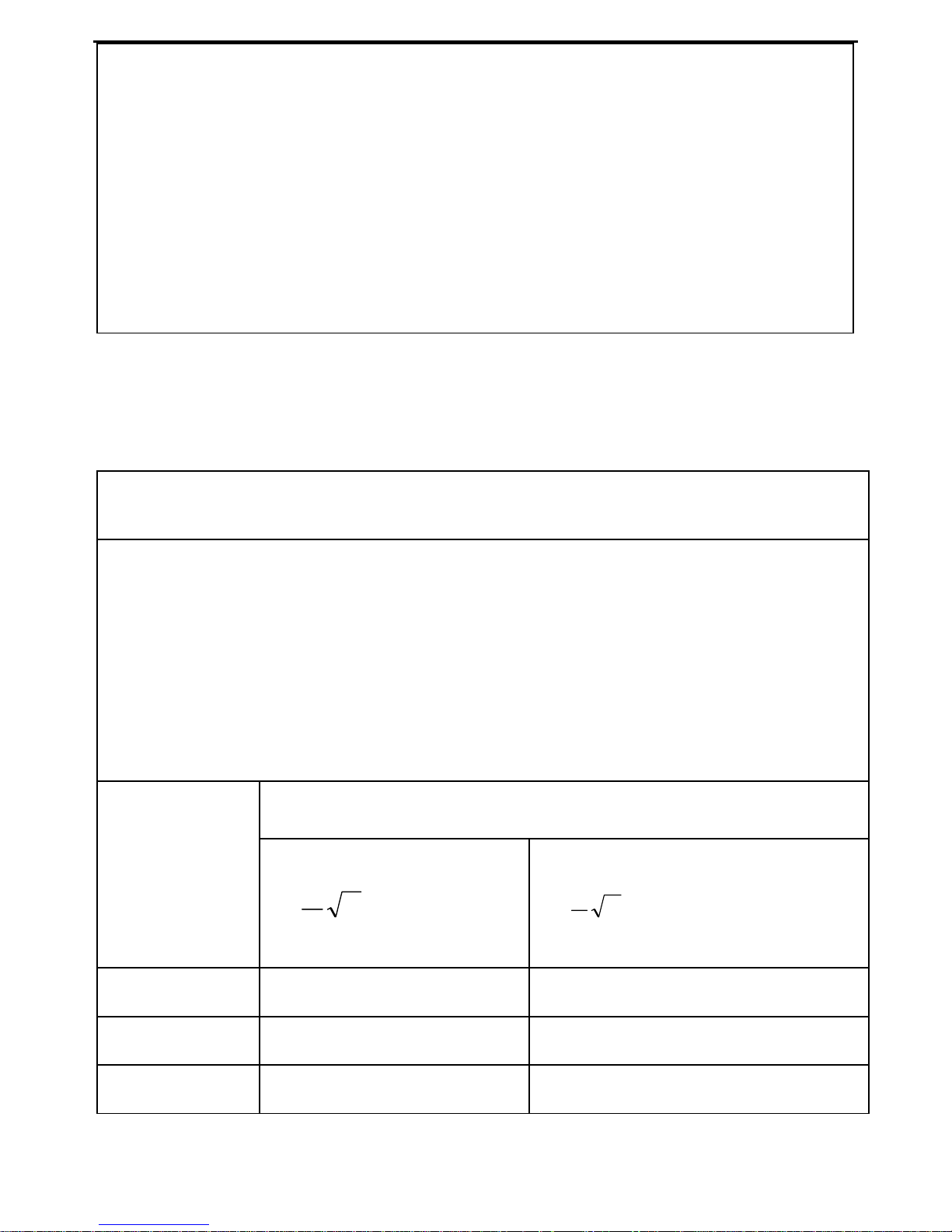
Recommended separation distances between portable and mobile RF
communications equipment and the EQUIPMENT or SYSTEM - for EQUIPMENT or
SYSTEM that are not LIFE-SUPPORTING
Recommended separation distances between portable and mobile RF
communications equipment and the Handheld ECG monitor
The Handheld ECG monitor is intended for use in an electromagnetic environment in
which radiated RF disturbance is controlled. The customer or the user of the MD100
Handheld ECG monitor can help prevent electromagnetic interference by maintaining
a minimum distance between portable and mobile RF communication equipment
(transmitters) and the Handheld ECG monitor as recommended below, according to
the maximum output power of the communications equipment.
Separation distance according to frequency of transmitter (m)
Rated
maximum
output power
of transmitter
(W)
80MHz to 800 MHz
d=
P
E
1
5.3
800MHz to 2.5 GHz
d=
P
E
1
7
0.01 0.1167 0.2334
0.1 0.3689 0.7378
1 1.1667 2.3334
Page 34
VER1.0B1 HeartCheck HANDHELD ECG MONITOR
- 32 -
10 3.6893 7.7386
100 11.6667 23.3334
For transmitters rated at a maximum output power not listed above, the recommended
separation distance in meters (m) can be estimated using the equation applicable to
the frequency of the transmitter, where P is the maximum output power rating of the
transmitter in watts (W) according to the transmitter manufacturer.
NOTE1 At 80MHz and 800MHz, the separation distance for the higher frequency
range applies.
NOTE2 These guidelines may not apply in all situations. Electromagnetic propagation
is affected by absorption and reflection from structures, objects and people.
Distributor:
MD Primer Inc.
2 St. Clair Avenue East, Fifth Floor,
Toronto, Ontario M4T 2V5
Tel: 647 288 3892
Fax: 416 977 8607
www.mdprimer.com
Manufacturer:
Beijing Choice Electronic Technology Co., Ltd.
BailangyuanB1127-1128, Fuxing R, A36
100039 Beijing
PEOPLE’S REPUBLIC OF CHINA
Eiffestraße 80, 20537
Hamburg GERMANY
Shanghai International
Holding Corp. GmbH (Europe)
Page 35

 Loading...