

Page 1
Hearmore
Reconnect with Life
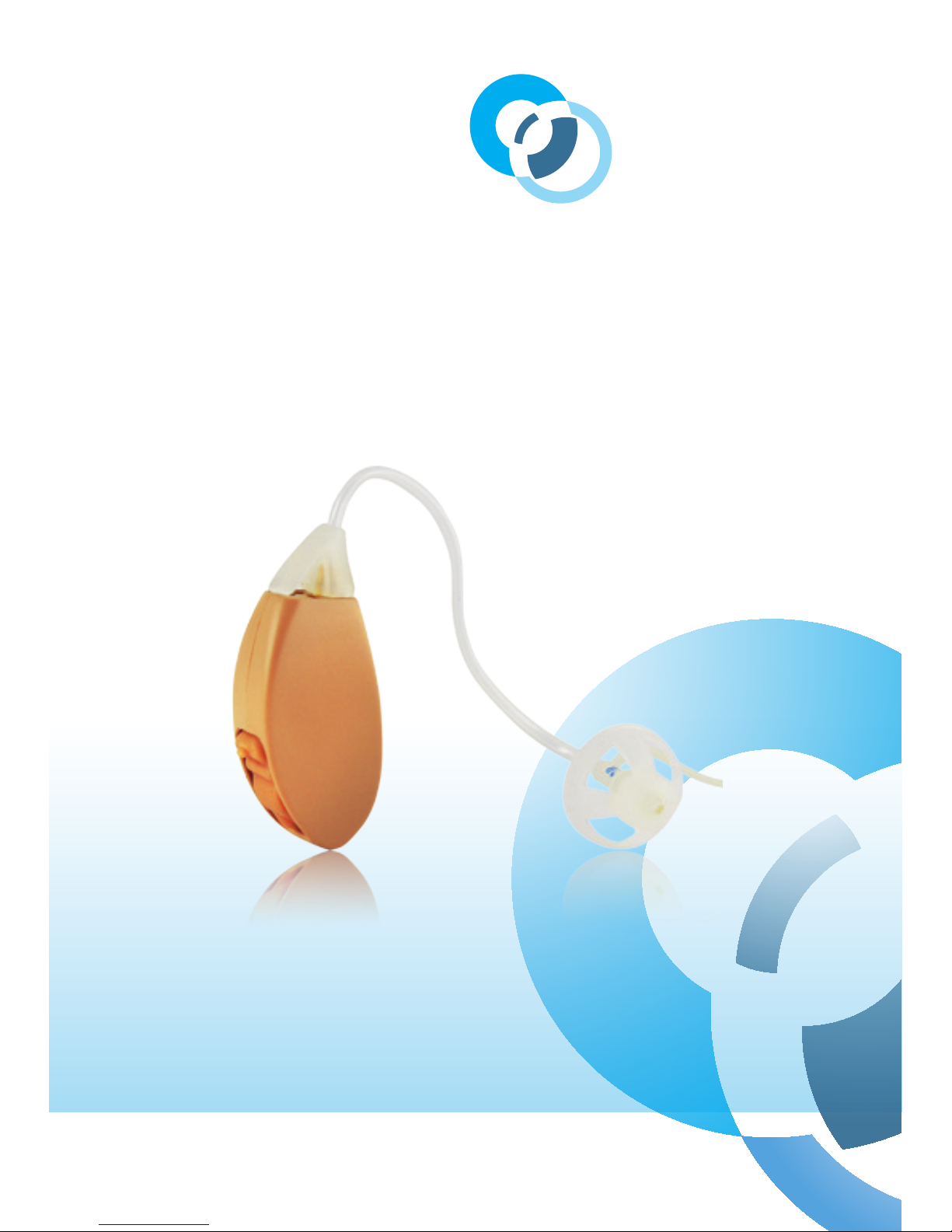
Hearmore EXCITE HM05B-BTE
User Manual
Page 2

User manual
Hearmore EXCITE HM05B-BTE
Hearmore EXCITE customised
Behind-The-Ear Hearing Aid.
Page 3

Contents
Preface 1
Features 3
Battery tting 4
Fitting the tube and dome 6
Operation 7
How to wear your
hearing aid 7
Volume control 10
Program modes 11
Replacing the battery 12
Maintenance 13
Cleaning and
changing tubes 13
Low battery warning 15
Caring for batteries 16
Troubleshooting guide 17
Appendix 19
Operating conditions 19
Technical data 19
Manufacturer 20
Page 4

1
Hearmore Reconnect with Life
Preface
Reconnect with Life! Hearing
aids do more than just make
sounds louder. They help you
reconnect back into family and
community life; this is what
excites people the most. So to
get the most benet from your
new EXCITE series hearing aid,
please read this manual carefully.
Your EXCITE series hearing aid is
a quality precision device made
following the highest standards
of craftsmanship, engineered
to be discrete, comfortable and
durable. It is important that
you understand what to expect
from your hearing aid. Most
important, although hearing
aids will bring you more volume
of sound, they will not restore
perfectly the way you use to hear
sounds, including speech and
music. The EXCITE models have
more features than the ENJOY
range and can be customised
to compensate for your hearing
loss. It may take some time for
you to adjust to the new sounds
you hear and in fact it usually
takes 3-4 weeks to fully adjust.
Your EXCITE hearing aid has been
customised to compensate for
your specic and unique hearing
loss prole. There are four
operating modes programmed
into your hearing aid that will suit
dierent environments
Page 5

2
Intended Use
The EXCITE HM05B-BTE
hearing aid is an electronic
device that amplies the sound
from your surroundings. It is
intended to help the hearing
impaired to recover their
hearing by compensating for
their hearing loss.
Precautions
It is suggested that you do not
wear hearing aids if you have an
ear infection or open wounds in
your ear.
WARNING
If the hearing aid produces
excessively loud sounds,
remove the device and contact
your Hearmore representative.
WARNING
A Magnetic Resonance Imaging
(MRI) scan could damage
your hearing aid and aect its
performance. Ensure that your
hearing aid is removed before
having an MRI scan, CT scan or
XRAY.
THE TECHNICAL
SPECIFICATIONS OF
THIS PRODUCT ARE
SUBJECT TO CHANGE
WITHOUT NOTICE.
Page 6
3
Hearmore Reconnect with Life
Features
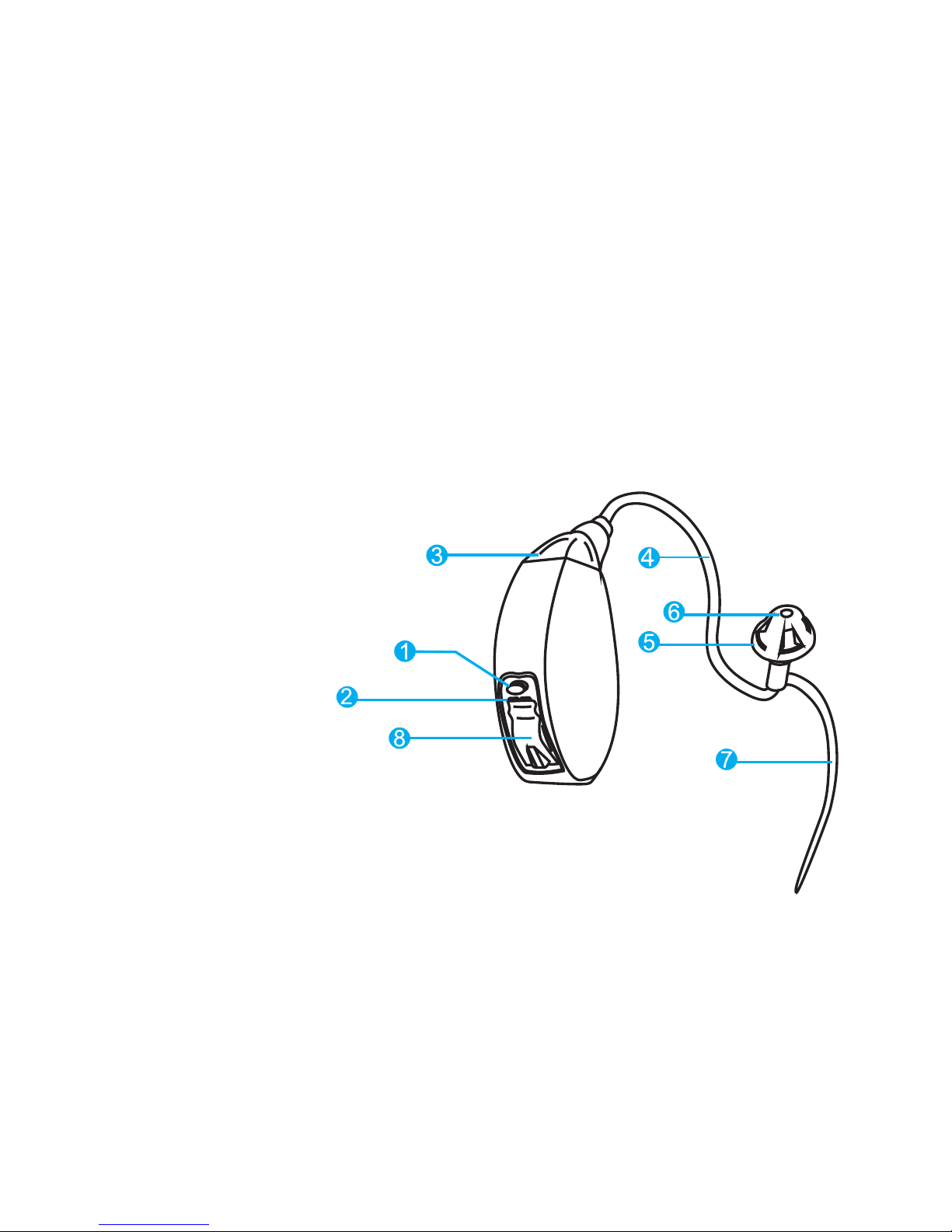
1. Program Mode Switch
2. Rear Microphone
3. Front Microphone
4. Sound Tube
5. Dome
6. Sound Outlet
7. Retention Lock
8. Battery Door
Store in a safe dry place.
Figure 1
The EXCITE BTE is designed to
neatly t Behind-The-Ear, with
a sound tube connected to an
eartip that ts comfortably in
your ear canal.
Page 7

4
CAUTION: Batteries are
dangerous if swallowed! Keep
batteries out of the reach of
children. Never put batteries in
your mouth for any reason as
they are easily swallowed.
In the event that a battery
has been swallowed, seek
immediate medical attention.
Battery tting
Your EXCITE BTE hearing aid uses
Battery Type 10A. Fitting the
Battery into the hearing aid is a
straightforward process.
With your nger gently open the
Battery door (Figure 1)
Place the battery into the battery
compartment. The battery
is shaped in such a way such
that it will t into the battery
compartment in only one
way. The battery door will not
close if the battery is inserted
incorrectly.
Note the (+) on the battery side.
There is no need to use excessive
force to close the door.
Once the Battery Door is closed
the hearing aid will turn on
automatically.
Batteries and accessories can
be purchased on-line from the
Hearmore website
www.hearmore.com.au
Page 8

5
Hearmore Reconnect with Life
TO TURN ON
When the battery door is closed
your hearing aid will turn on
after 5 seconds to allow you
time to t the hearing aid in
your ear. Why the time delay?
Hearing aids can often produce
high-pitch whistling sounds
when your hand is placed
around or close to the hearing
aid. The time delay allows for
a more comfortable tting
experience.
TO TURN OFF
Simply remove the hearing aid
by grasping the tubing close to
the earbud and remove from
the ear canal. Then remove
the hearing aid from the top of
the ear. To turn o your device,
simply open the battery door
completely.
Page 9
6
Fitting the tube & dome
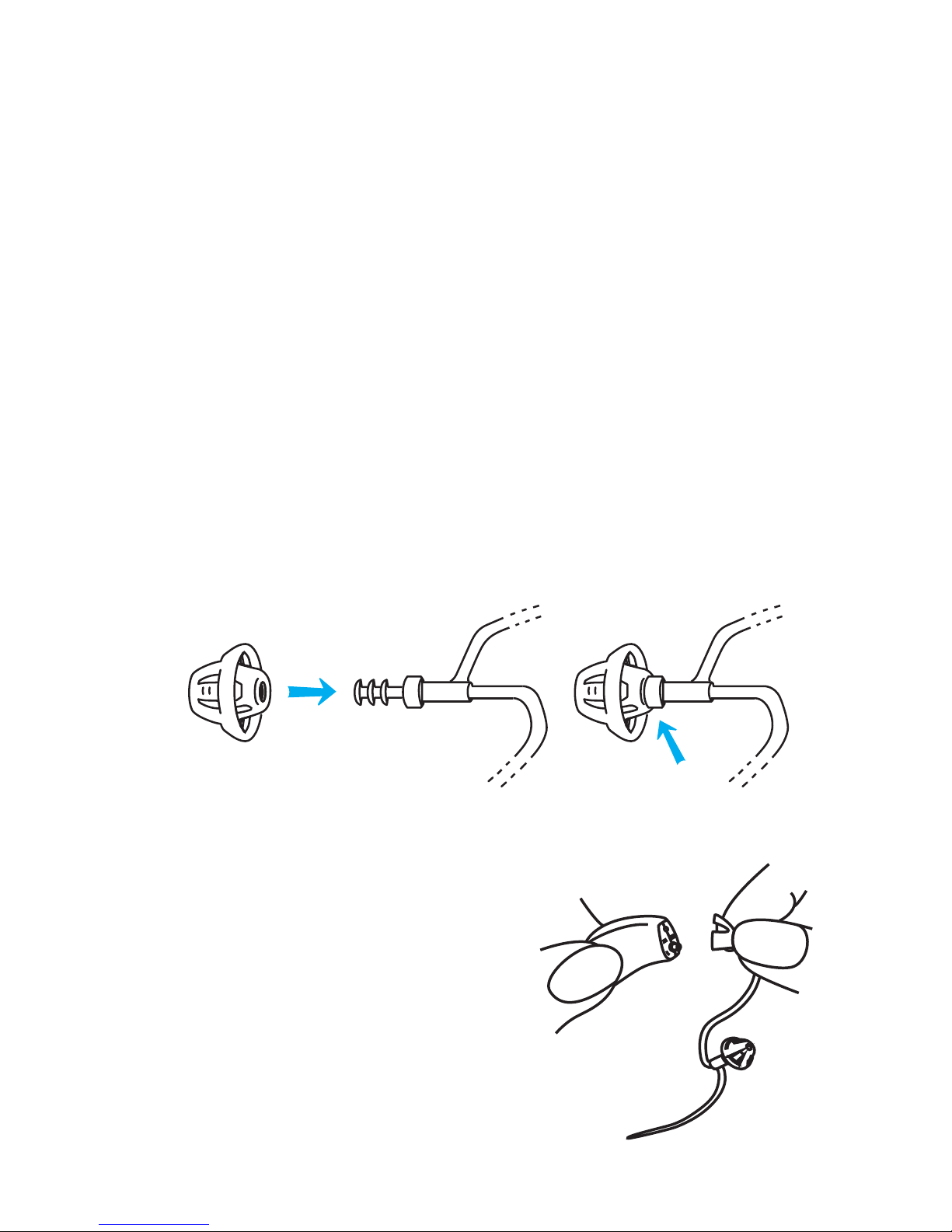
Your EXCITE hearing aid has
basically 3 parts.
1. Sound amplifying unit
2. Connecting sound tube
3. Dome that ts in the
ear canal
The dome connects directly
with the sound tube. Push the
dome over the grooves on the
tube to mount it. There are 3
sizes of domes for dierent ear
canal sizes. Use the dome that
provides the best comfort and t
for you.
Attaching the sound
tube
Hold the end of the sound tube in
one hand and the hearing aid in
the other. Line up the sound tube
on top and push onto the adaptor
that sticks out of the hearing
instrument case. There is no
need to twist the tube when you
push it on.
Page 10

7
Hearmore Reconnect with Life
Operation
How to wear your hearing aid
1. Clean your ear of any
visible wax.
Make sure the device is on (see
page 5). Note you will have 5
seconds to t the hearing aid
once the battery door is closed.
If you take longer than this
the hearing aid may produce
whistling sounds. This is normal
but it may be unpleasant to hear.
It will take some practice at rst.
But after a few times you will be
able to t your hearing aid with
relative ease.
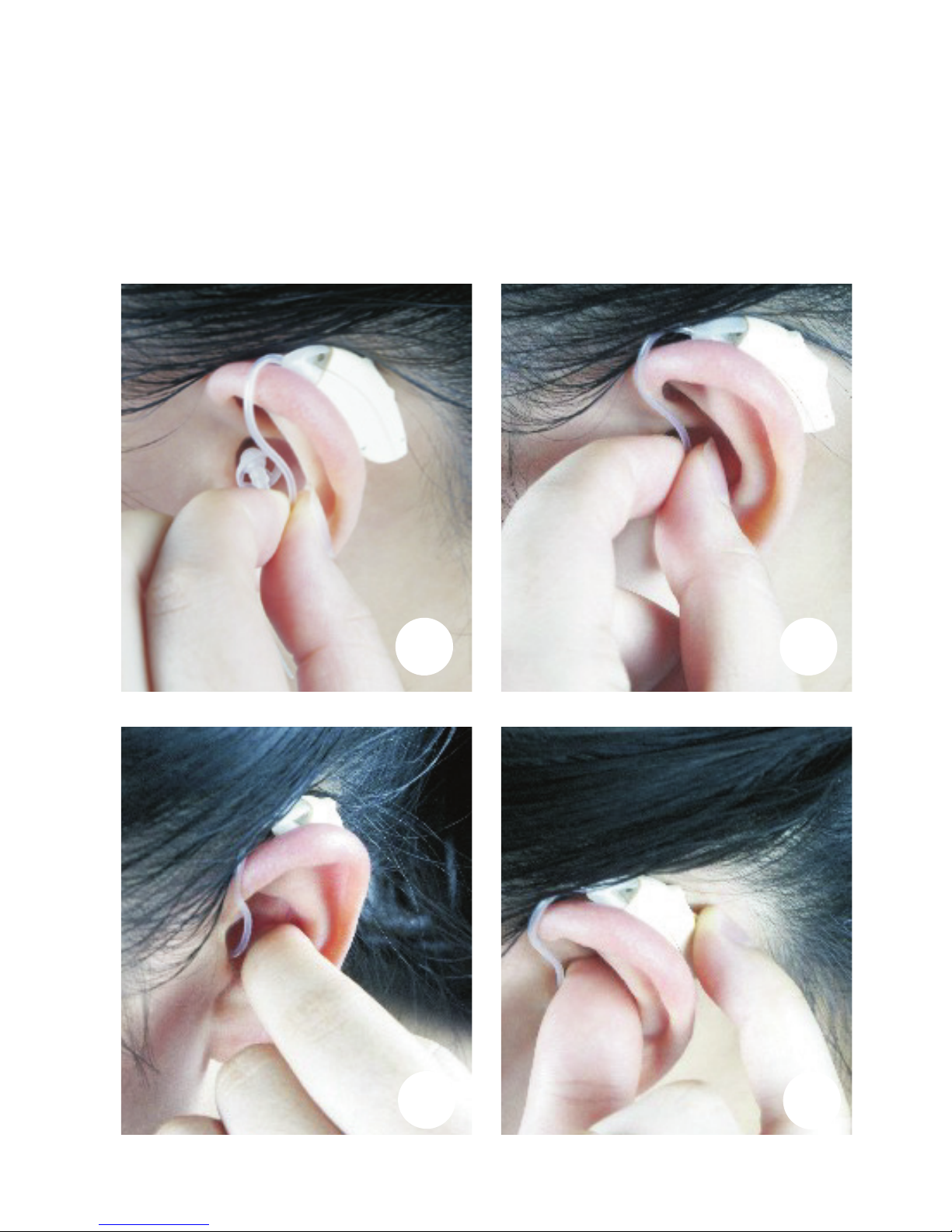
2. Hold the tubing with your
thumb and index nger close to
the ear dome. (Figure A)
3. Place the instrument over
the top of the ear.
4. Gently insert the ear dome
into your ear canal.
Move the retention lock into
position by lifting and placing
it into the bowl of your ear.
The retention lock is a piece of
plastic that extends beyond
the dome. The retention lock
ts in the bowl of your ear and
helps to secure the hearing aid
in place.
Page 11
8
A B
C
D
Page 12

9
Hearmore Reconnect with Life
Page 13

10
Volume control
The HM05B-BTE is an
automatic hearing aid that is
programmed for your specic
hearing loss. There is no volume
control, however when in noisy
environments you may need
to select Program Mode 2 to
improve clarity. Refer to the
next chapter for details on
program modes.
If the hearing aid sound output
is too low or too loud the
hearing aid may have to be
reprogrammed. Consult your
Hearmore representative for
reprogramming of the hearing
aid.
Page 14

11
Hearmore Reconnect with Life
Selecting the custom
program modes
The program mode switch is
used to select from one of four
custom program modes stored
in your EXCITE hearing aid.
Each mode has been chosen for
dierent environments.
Mode 1 is set for general use.
Mode 2 is suitable for noisy/
restaurant environments.
Mode 3 should be used for
listening to TV or music.
Mode 4 selects the audio
Induction loop and can be used
with telephones or in movie
theatres.
You can choose the mode
that helps you the most in
the particular setting you are
in. Here’s how you can cycle
through the program modes.
When your hearing aid is
turned on it will start in Mode 1.
When the program mode
switch is pressed the hearing
aid will switch to the next
program mode and it will
play a number of beeps. The
number of beeps tells you what
program mode the hearing aid
is in: One beep for mode 1, two
beeps for mode 2, etc.
If you have two hearing aids,
ensure that the same program
mode is selected for both
hearing aids.
Page 15
12
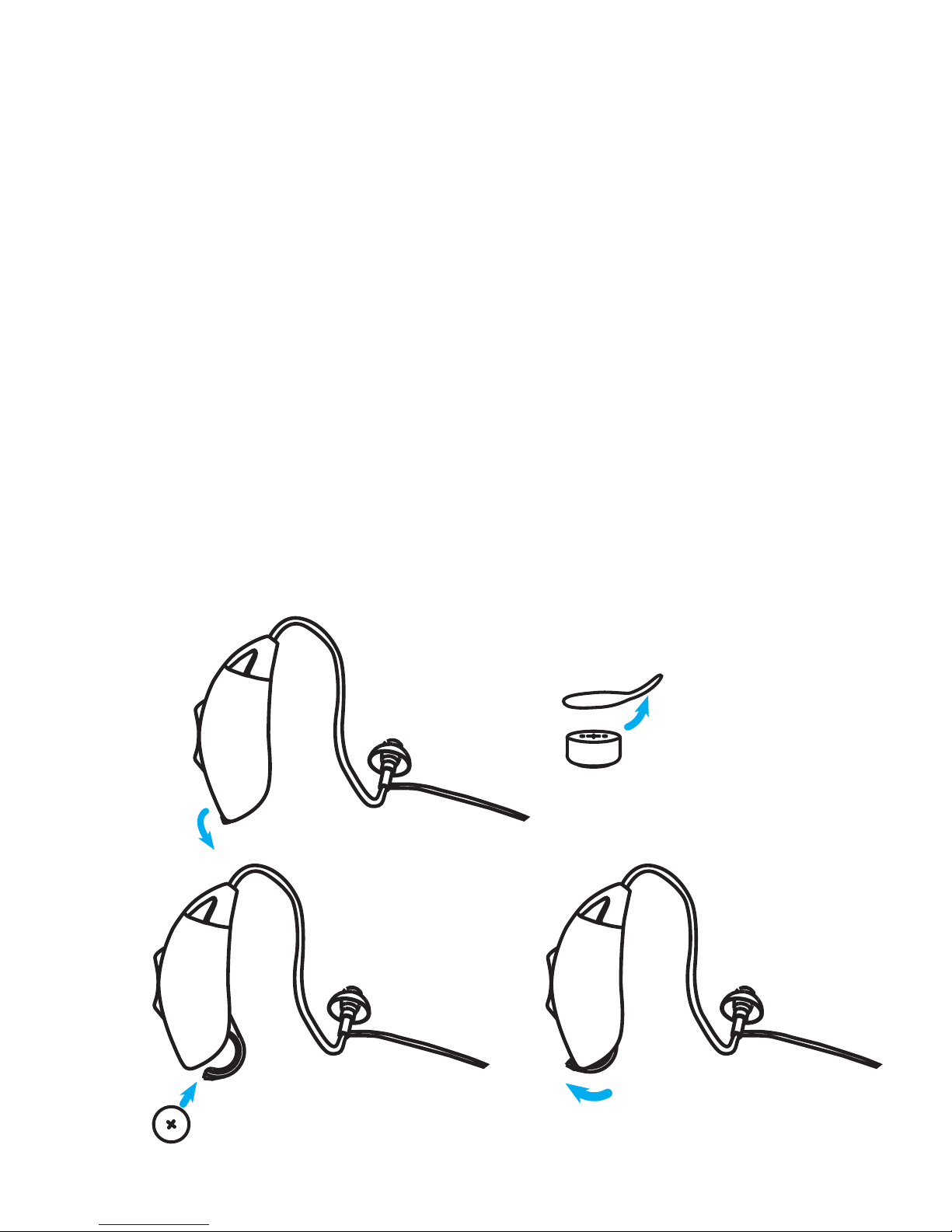
Replacing the battery
1. Open the battery door and
remove the old battery.
2. Remove the protective foil
from the new battery.
3. Insert the new battery, be
sure that the plus (+)
is facing up.
4. Close the battery door.
Important: Handle the battery
door gently. The operation
requires only a minimum of
force. If there is any resistance
when closing the battery door,
ensure that the battery is
correctly inserted. The battery
door cannot be closed if the
battery is inserted incorrectly.
Page 16

13
Hearmore Reconnect with Life
Maintenance
Cleaning and
changing tubes
Your EXCITE hearing aid is a low
maintenance device but there
are some parts that should
be cleaned to maintain good
hygiene for your ear. Also,
earwax can build up around
the dome insert and block
the sound transmission. We
suggest that you clean your
hearing aid once a week:
A cleaning brush has been
provided with your hearing
aid kit.
With correct maintenance the
EXCITE hearing aid should
provide many years of use.
Inspect consumable items
regularly (sound tubes and
domes) and replace if showing
signs of wear or damage.
Batteries, sound tubes and
domes are available from your
Hearmore representative or can
be ordered on line at
www.hearmore.com.au.
Page 17
14
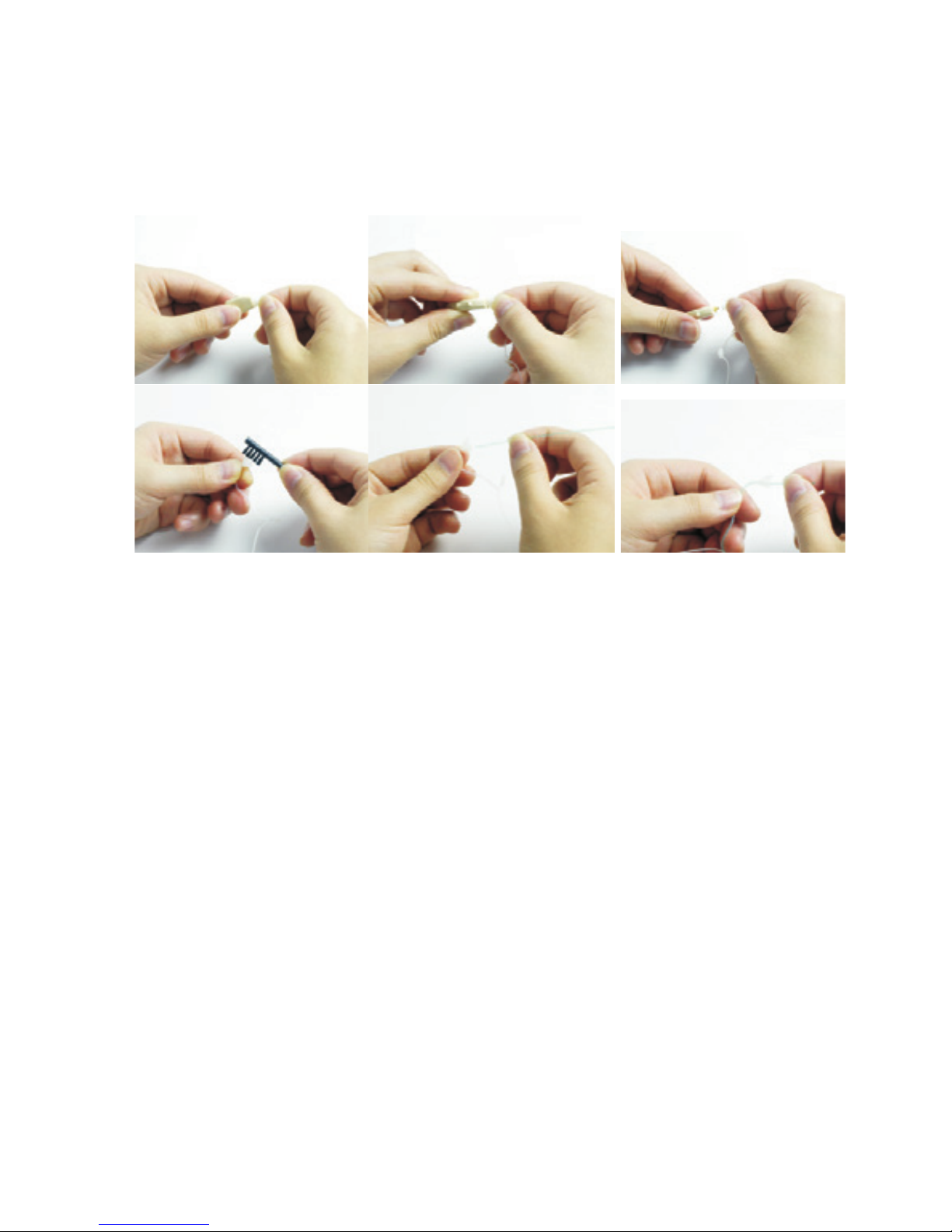
1. Use a soft cloth to wipe
and remove any particles
or moisture from the
tubes and earbud piece.
2. Use the Cleaning Tool to
remove debris / wax from
the sound tubing and
earbud.
3. Remove the tubes by
gently rotating them
whilst rmly holding the
hearing aid.
4. Pull out the sound tubing
from the hearing aid.
5. Insert the cleaning tool
through the nose cone
end. Thread all the way
through the tubing and
earbud.
6. To reassemble or change
sound tubing simply line
up and push tubing until it
snaps into place.
Page 18

15
Hearmore Reconnect with Life
Low battery warning
When you hear one short beep,
it means that the battery is
low. You will hear the warning
intermittently until you replace
the battery.
After the rst warning, you may
experience some reduction in
sound quality. This is normal and
can be remedied by inserting a
new battery in the hearing aid.
Always remove the battery if
your instrument is not in use for
long periods of time.
Page 19

16
Caring for batteries
Use only high quality batteries
from reputable suppliers. It is
recommended that you use
Hearmore supplied batteries
(can be purchased through the
Website www.hearmore.com.
au). Each battery is provided with
an adhesive label that ensures
that the batteries are sealed and
fresh until used. Keep batteries
in the seal until required.
Never let a at battery remain in
the hearing aid. It may leak and
cause damage to the device.
Page 20

17
Hearmore Reconnect with Life
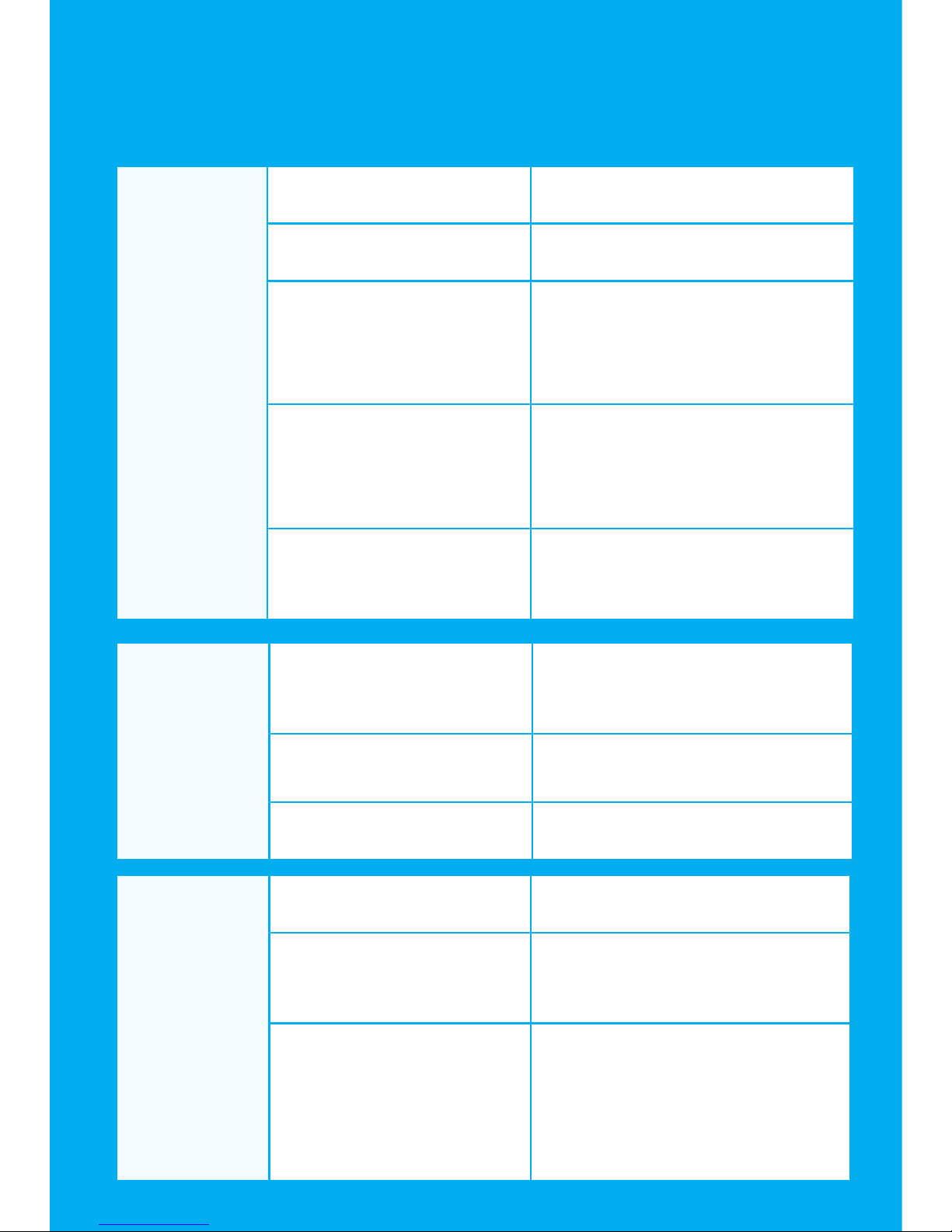
SYMPTOM POSSIBLE CAUSE REMEDY
No sound No battery Insert the battery
Dead or low battery Replace battery
Battery improperly
inserted
Insert battery
correctly
Wax or debris in the
microphone or dome
Clean both
microphone and dome
with brush
Too Loud Volume set too high Contact your
Hearmore
professional to have
the hearing aid
reprogrammed
Low battery Replace battery
Hearing instrument
damaged
Contact your
Hearmore
professional
Troubleshooting guide
Page 21
18
Not loud
enough
Low battery Replace battery
Excessive ear wax Consult your physician
Volume set too low Contact your Hearmore
professional to have the
hearing aid reprogrammed
Wax or debris in
the microphone or
receiver
Clean both microphone
and dome with brush
Hearing loss change Contact your Hearmore
professional
SYMPTOM POSSIBLE CAUSE REMEDY
Whistling,
feedback
Loose insertion of
hearing instrument
Remove and reinsert
Excessive ear wax Consult your physician
Dome incorrect size Change dome size
Not
clear or
distorted
sound
Low battery Replace battery
Hearing instrument
damaged
Contact your Hearmore
professional
Hearing loss may
have changed
Contact your Hearmore
professional to have the
hearing aid reprogrammed
Page 22

19
Hearmore Reconnect with Life
Appendix
Operating Conditions
Temperature should not exceed
limits of –10°/40° Celsius at a
relative air humidity of 10%
to 90% for extended periods
during transportation and
storage. Air pressure between
700 and 1060 hPa is not
detrimental to the instrument.
Technical Data
Maximum Output IEC-60118-7/2005(2cc-coupler)
EXCITE HM05B-BTE 119dB(Typical)
Page 23

20
Manufacturer
Manufactured by Xiamen
Newsound Technology Co
Ltd under agreement with
Hearmore Pty Ltd
405 Wei Ye Building
Innovation Center
Xiamen Torch Hi-Tech Industrial
Development Zone, Xiamen
Peoples Republic of China
TGA Sponsor Hearmore Pty Ltd
www.hearmore.com.au
Wellkang Tech Consulting
Suite B, 29 Harley Street,
LONDON W1G9QR, United Kingdom
www.CE-marking.com
European Representative
Page 24

www.hearmore.com.au
 Loading...