

Page 1

Title
Operating instructions
HD210
Before use, please read these instructions to help you
get the best out of your HearingDirect.com hearing aid
V1.0 June 2011
Page 2
2
Introduction
Thank you for selecting a Hearing Direct hearing system. We are
proud of our hearing products and are confident you have chosen
one of the best products available. Please familiarise yourself with
the information in this guide. It contains important instructions for
proper use and care, technical performance information, and other
general information about your hearing system.
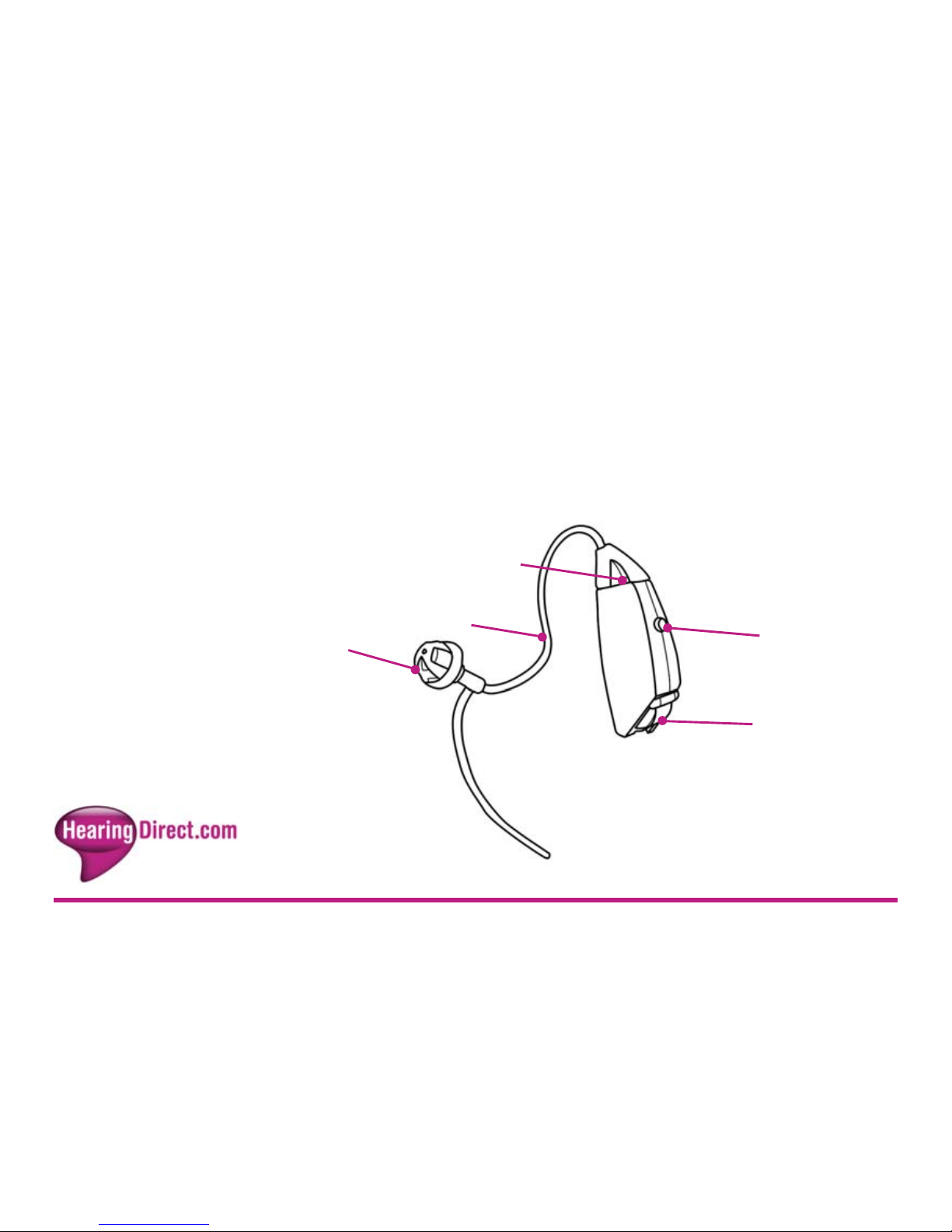
Program button
Thin tube
Dome
Battery door and
On/Off switch
Microphone inlet
Page 3

3
Becoming
accustomed to
amplification
While purchasing a hearing system is a major step, it is only one
step in a process towards more comfortable hearing. Successfully
adapting to the amplification your hearing system provides takes
time and consistent use.
You will enjoy more benefits from your Hearing Direct HD210
hearing system by taking the following actions:
It may take as long as several months for your brain to get used to
all the “new” sounds around you. Following these suggestions will
give your brain time to learn how to interpret amplification and
increase the benefits you get from using a Hearing Direct HD210
hearing system.
Wear the system regularly in order to get comfortable with
using it.
Begin by wearing your system for short periods of time in quiet
environments.
As you get more comfortable with the system, increase the
wearing time and wear your hearing system in multiple types
of listening environments.
Page 4

Contents
On/Off function Page 5
Changing memory programs Page 6
Correct placement in the ear Page 7-8
Using the telephone Page 9
Removing the battery Page 10
Inserting the battery Page 11
Low battery warning Page 12
Battery safety Page 13
Maintenance and cleaning Page 14-16
General advice Page 17-19
Troubleshooting Page 20-21
General precautions Page 22
Repairs Page 23
4
Page 5
On/Off function
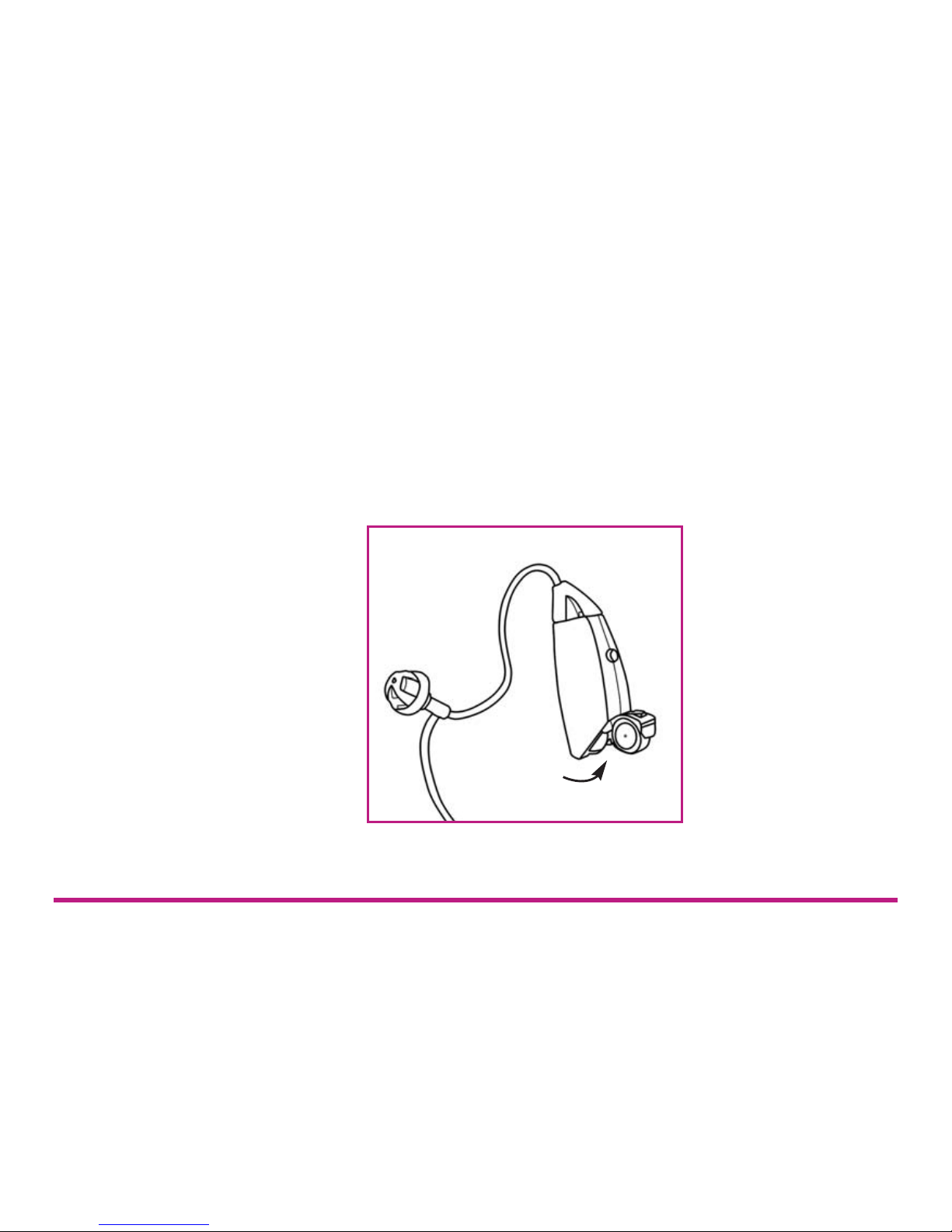
The door to the battery compartment serves as the On/Off
switch for your hearing instrument. When the door is fully
closed, the instrument is on. To turn the instrument off, put your
fingernail under the nail grip and pull gently to open it completely.
Tip: To reduce battery consumption, turn the instrument off when it
is not in use.
Switch off the instrument.
5
Page 6
Changing
memory
programs
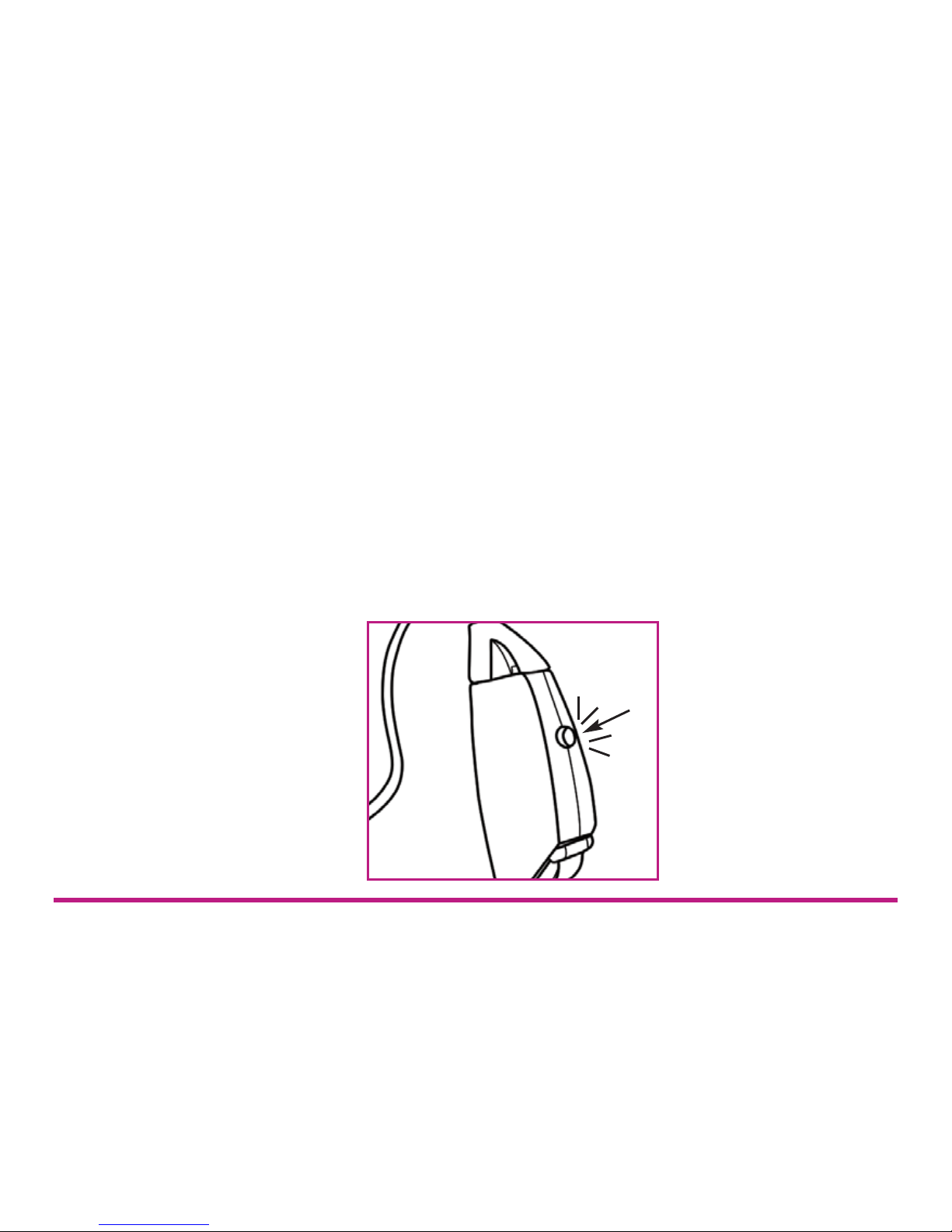
Whenever the hearing instrument is turned on, Memory 1 is
automatically activated. Memories can then be selected by pushing
the Program Button on the instrument.
Your hearing instrument may have up to 4 programs. These act as
different volume settings. Setting 1 is the softest option, setting 4 is
the loudest. Special tones will indicate which memory has been
activated. One tone will sound when Memory 1 is activated, two
tones will sound when Memory 2 is activated, etc. Memories are
always activated in sequence, for example, with three memories: 1
to 2, 2 to 3, 3 to 4, 4 to 1.
6
Page 7
Correct
placement in
the ear
7
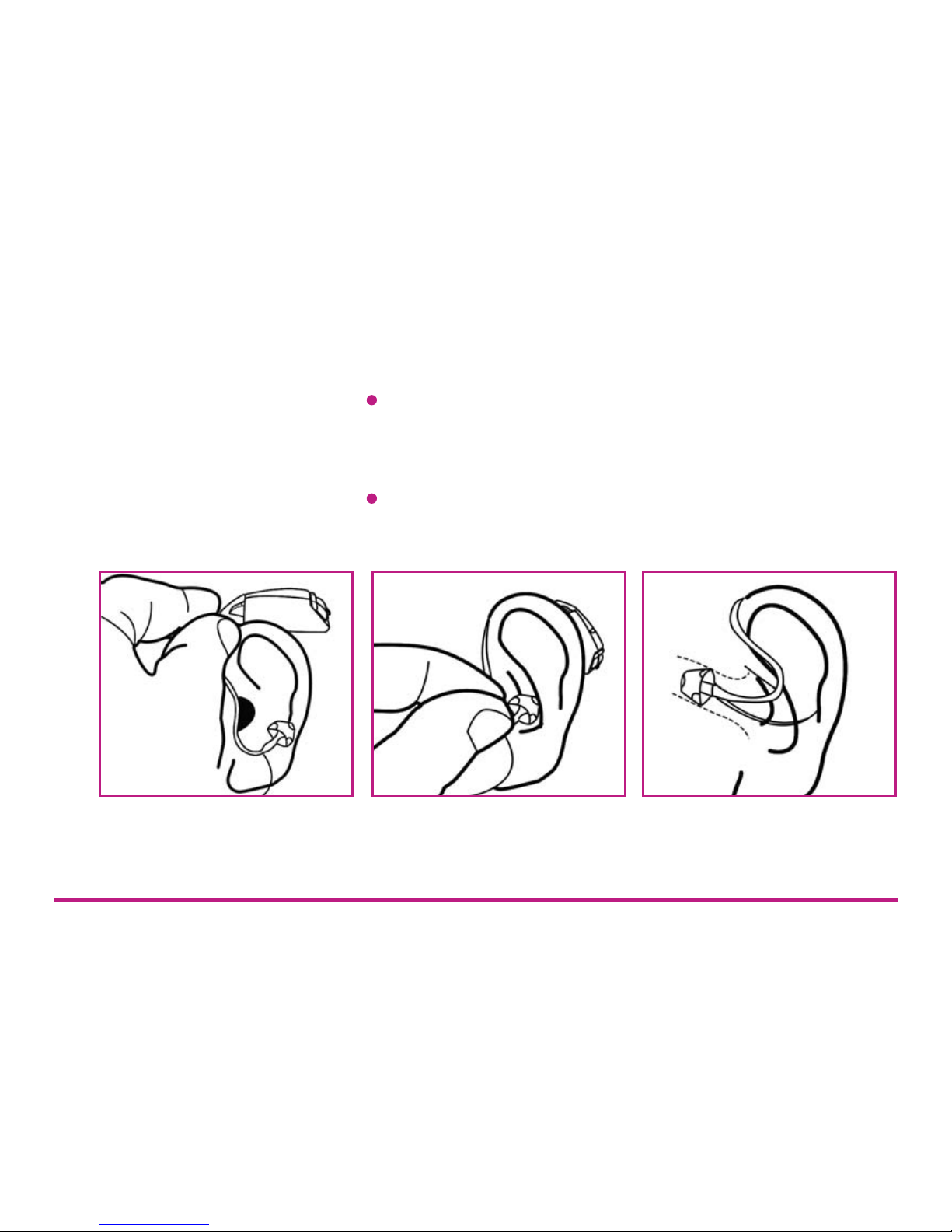
Inserting the dome and BTE instrument:
Hold your hearing instrument by the tube, right where it bends.
You may wish to open the battery door so the instrument is
turned off while it is placed in the ear.
Hang the instrument over the top of your ear so that the
housing portion is behind your ear and the dome is in front.
Page 8

Correct
placement in
the ear
8
Note: If your hearing instrument irritates your ear in any way and
prevents you from wearing your hearing instrument, please contact
us. Never attempt to modify the shape of your hearing instrument
yourself.
To remove the hearing instrument from your ear, simply pull the
tube outward with your thumb and forefinger.
Push the dome into your ear until it sits comfortably and the
tube lies flat against the side of your head. Note: When the
dome is placed correctly, you should not see the tube sticking
out when looking directly into a mirror.
If you have not already turned on your hearing instrument,
switch it on by closing the battery door.
Page 9
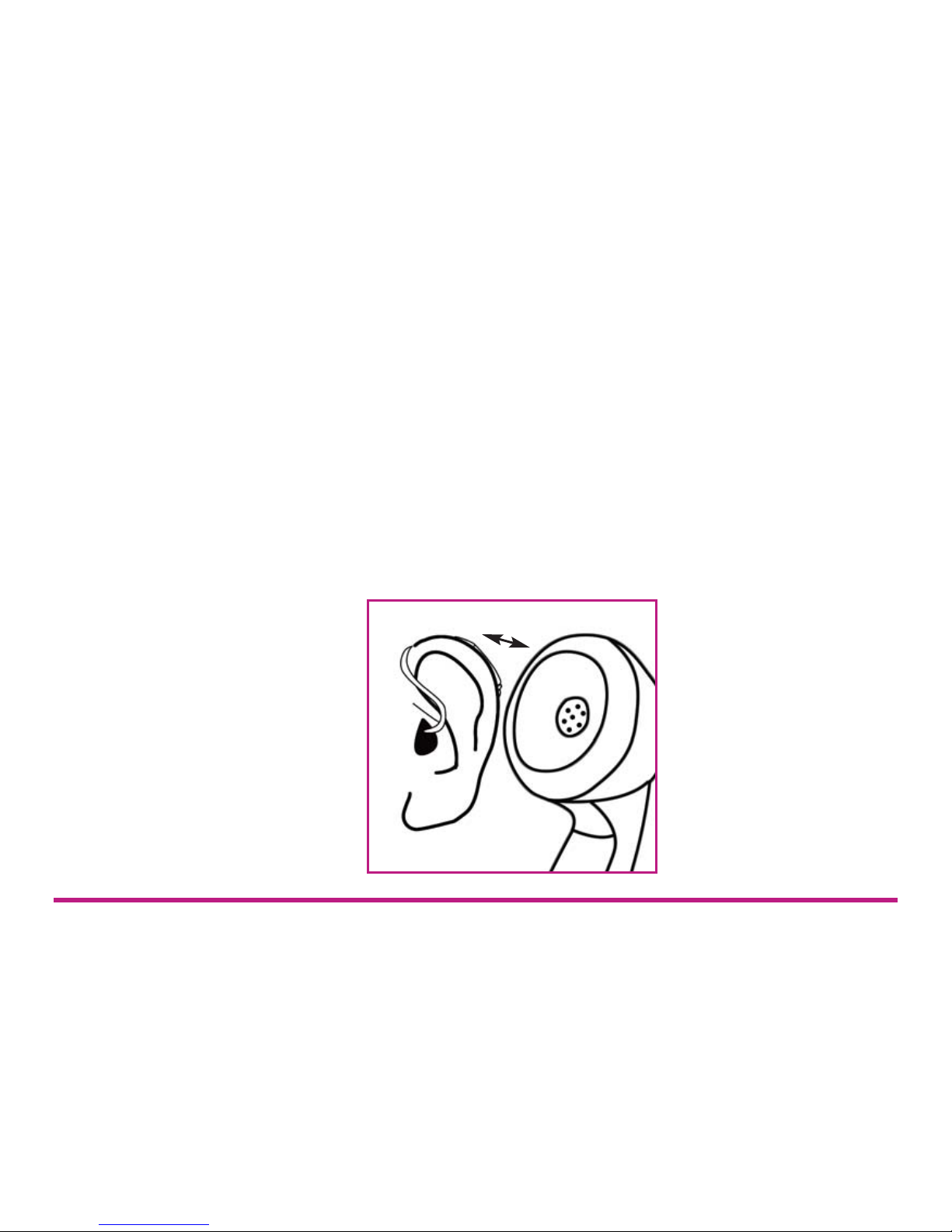
Using the
telephone while
wearing your
HD210
Close proximity to a telephone can sometimes cause hearing
instruments to make a squealing sound, also known as feedback.
To reduce the potential for this problem, your system is equipped
with feedback suppression, which greatly reduces the chance of
feedback.
Further measures to avoid feedback include positioning the phone
close to the hearing instrument, but not directly on the instrument.
If there is feedback, it may take a few seconds for the instrument’s
signal processing to adapt. This technique may require practice.
9
Page 10
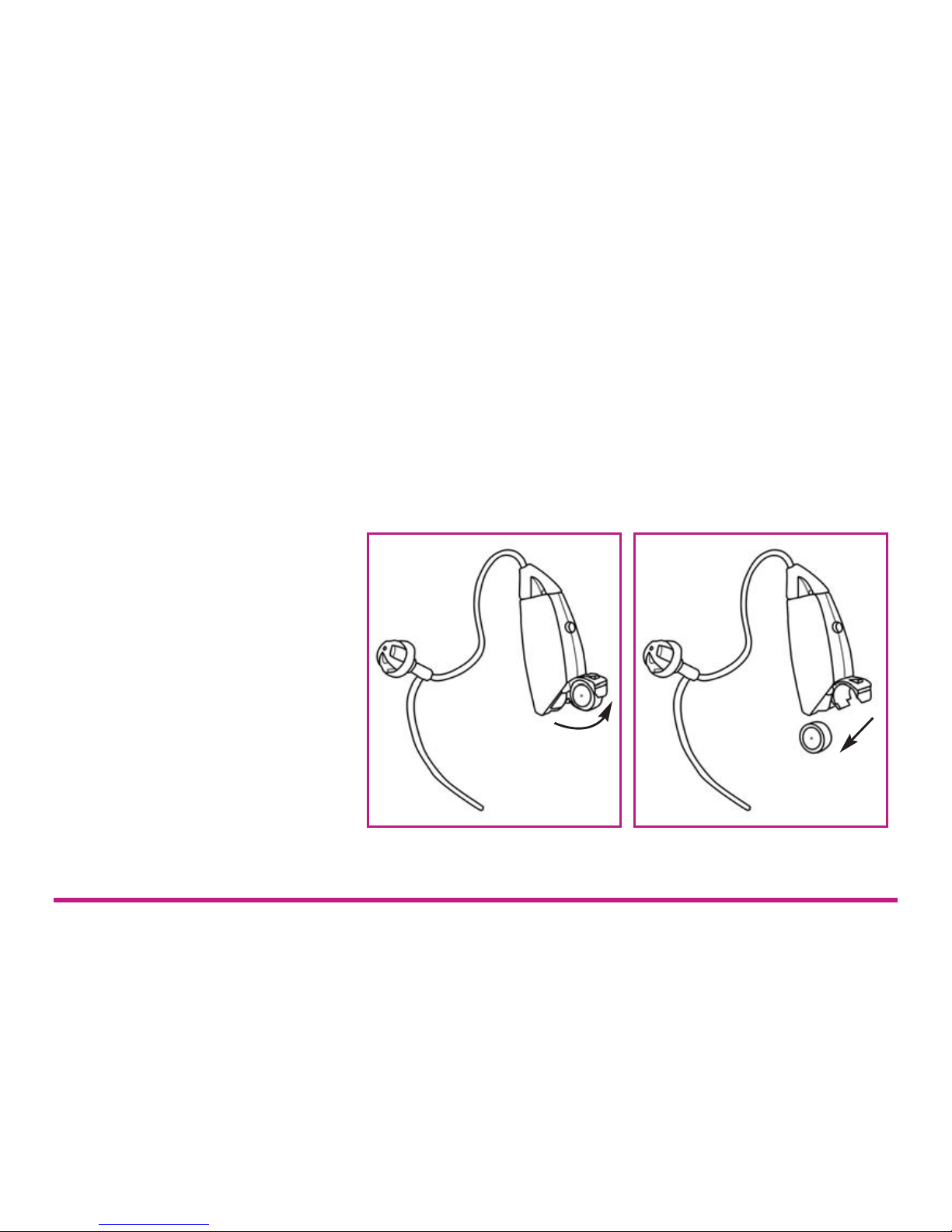
Removing the
battery
Open the battery compartment completely with your fingernail
under the nail grip and pull gently to open it completely. Remove
the used battery from the battery compartment.
Tip: Hold the instrument over a table or a soft surface in case the
battery falls out.
10
Page 11
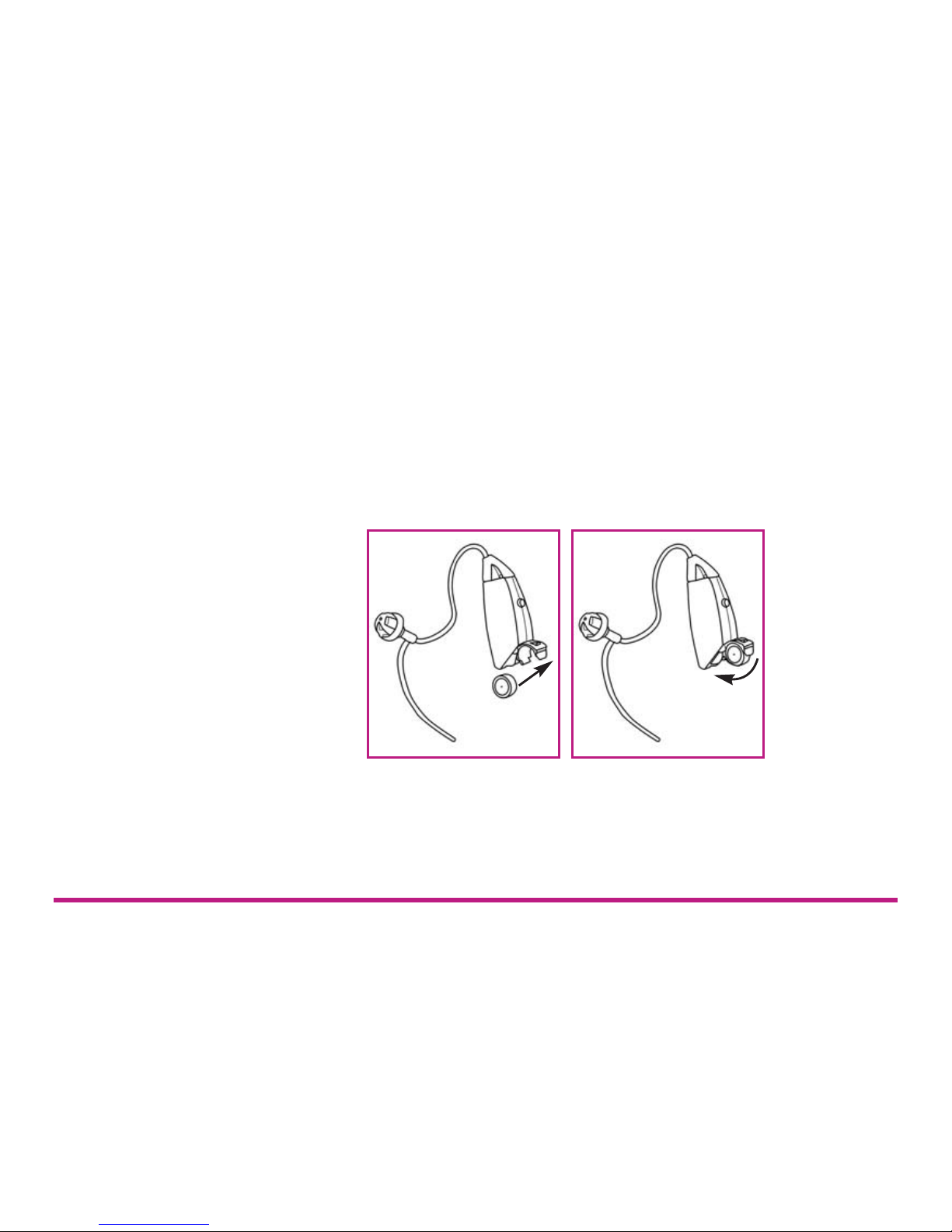
Inserting the
battery
Remove the film from a new battery and place the new battery into
the battery compartment, matching the plus (+) sign on flat side of
the battery to the plus sign in the battery compartment. A
magnifying glass and good lighting may be helpful in seeing these
small markings. Close the battery compartment tightly but do not
use force - it should close very easily. Your hearing system should
now be on.
Tip: Removing the battery when the instrument is not being worn
will help prevent corrosion of the battery contacts. Corrosion can
decrease efficiency, causing excessive battery consumption.
11
Page 12

Low battery
warning
Your hearing system features a Low Battery Warning function to
give you notice when your battery is getting low. The instrument
will signal when the battery power decreases to a certain level, and
will continue beeping until the instrument automatically switches
off.
Tip: It is helpful to keep spare batteries with you in case you need
them.
Your HD210 uses a size 10A battery.
12
Page 13

Battery safety
13
To prevent batteries from leaking or exploding:
Dispose of used batteries properly.
Keep batteries out of reach of children or people with
diminished mental capacity.
Keep batteries away from pets.
Do not place batteries in your mouth. If a battery has been
swallowed, consult a GP immediately.
Do not expose batteries to temperature extremes.
Do not dispose of batteries in fire.
Do not attempt to recharge batteries which are not specifically
designated rechargeable, or reverse a battery’s polarity.
Page 14

Maintenance and
cleaning
Earwax (cerumen) can accumulate in and on the dome and tubing
during use. Therefore, clean your dome and tubing regularly.
Failure to do so can lead to an accumulation of earwax, impairing
sound quality.
Keep your hearing instrument clean and dry. Wipe the case with a
soft cloth or tissue after use to remove grease or moisture. You
should avoid exposing your instrument directly to moisture such as
rain or water from the shower. If your instrument does get wet or if
it has been exposed to high humidity or perspiration, it should be
left to dry out overnight with the battery out and the battery
compartment open.
Alternatively, you could store the instrument in a dry aid kit
available from www.hearingdirect.com
When you are not using your instrument, keep or transport it in the
box supplied. Leave the battery door open. Keep your instrument
in a dry place, not in a bathroom or other humid place.
14
Page 15
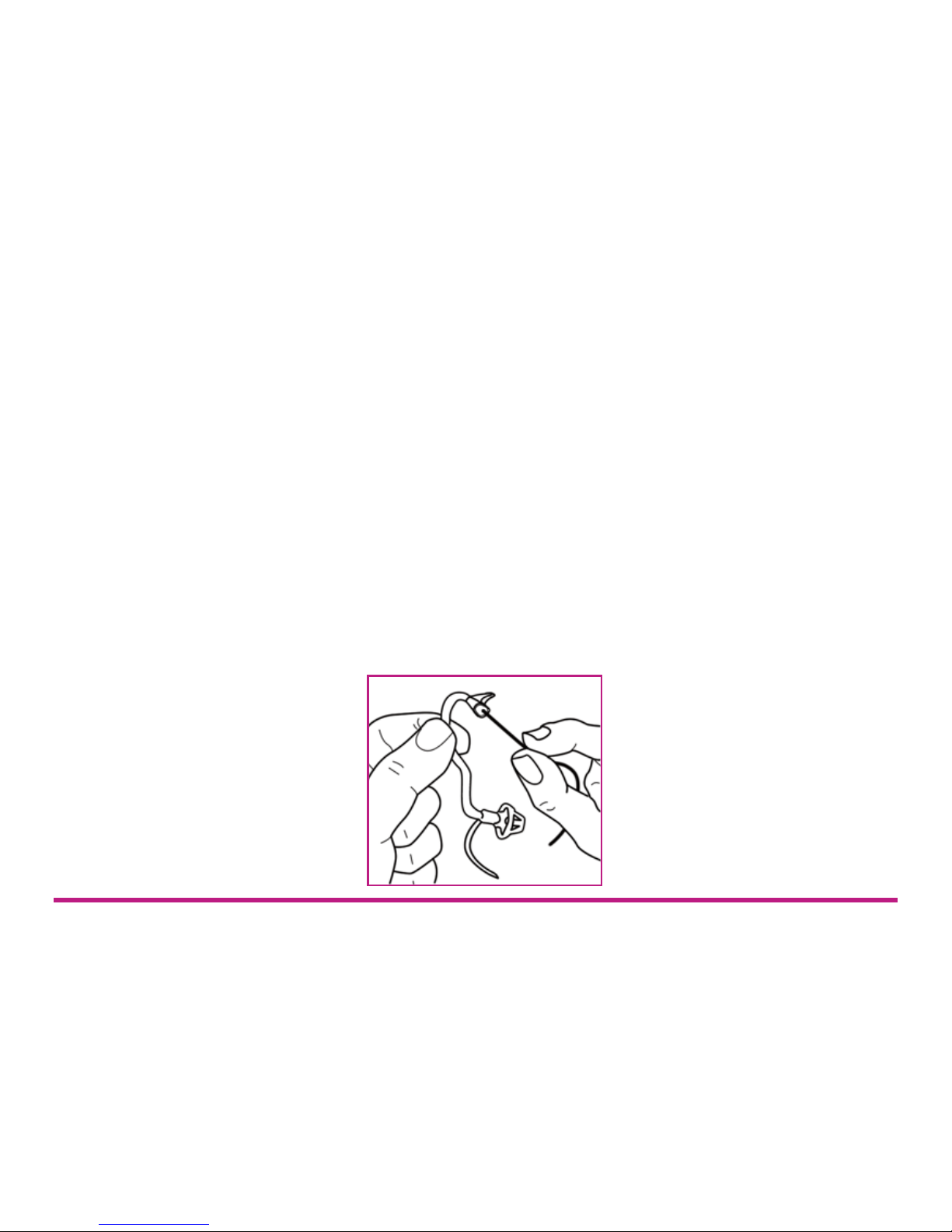
Maintenance and
cleaning
Cleaning the thin tube and dome
The thin tube feeds the amplified sound from the hearing
instrument into the ear. It is important that the thin tube and the
dome fit correctly into your ear.
The thin tube and the dome should be cleaned regularly. Remove
the thin tube from the instrument before cleaning. Remove the thin
tube from the instrument before cleaning by twisting the top of the
tube 90 degrees away from the instrument and then lifting up. Use
a damp cloth to clean the thin tube and dome on the outside and
use the black cleaning rod to “push” any debris out of the sound
tube. The cleaning rod should be inserted where the thin tube
attaches to the instrument and pushed all the way through the thin
tube and out through the dome.
15
Page 16

Maintenance and
cleaning
It is not recommended to submerge or rinse the thin tube and dome
with water, as there is a risk that a water drop may become lodged
in the thin tube. If this should occur, it will prevent sound coming
through the thin tube, and may be harmful for the instrument’s
electronics.
The thin tube and dome should be changed every few months or
sooner if the thin tube becomes stiff or brittle. When changing the
domes yourself, make sure that they are securely fastened to the
thin tube before inserting in your ear. A failure to change the domes
in accordance with the instructions could result in injury.
16
Page 17

General advice
Things that can damage your HD210
Keep in mind that some of your day-to-day routines require that you
remove your hearing system.
Moisture
Avoid getting moisture in the hearing system. It should not be worn
in the shower, bath, or sauna. Do not submerge the instrument in
water or other liquids. If perspiration or humidity is an issue, you
may find it beneficial to use a drying kit specially designed for
hearing systems.
Temperature extremes
Do not expose your hearing system to extremes of heat.
Some typical situations to avoid:
17
Do not wear your hearing system when using a hair dryer.
Do not leave your hearing system in your car or in direct
sunlight.
Do not attempt to dry your hearing system in any device other
than an approved drying kit.
Page 18

General advice
Rough treatment
Protect your hearing system from rough treatment by storing it in
the provided carrying case when it is not in use.
Corrosive substances
18
Non-Approved Cleaning Solutions - If you use cleaning
products, only use those recommended by your hearing
healthcare professional, as housing can be damaged by certain
cleaning agents such as mineral acids, hydrocarbons (benzol),
esters, alcohols and ketones.
Debris from Daily Hygiene Routines - It is suggested you not
wear your hearing system while applying the following:
hairspray, cosmetics, colognes, perfumes,
sunscreens, insect repellent, etc.
Page 19

19
General advice
General warnings
Hearing instruments can be dangerous if improperly used.
Do not allow others to use your instrument. It may cause
permanent damage.
Do not take your instrument into rooms where you receive
treatment with X-rays or MRI.
Wearing an instrument might cause an increased production of
earwax. In rare cases, the anti-allergenic materials may cause
skin irritation. If so, or if in doubt, consult your GP or ENT
consultant.
Page 20

Trouble
shooting
Your Hearing Direct HD210 instrument is a reliable one. In case of
minor problems or malfunctions, you may be able to solve them
yourself.
20
Symptom
Feedback
‘whistling’
Is the dome or the thin tube inserted
correctly?
Are you holding your hand or an object (e.g. a
hat) too close to the instrument?
Is your ear full of wax?
No sound
Is the instrument switched on?
Is there a battery in the instrument?
Is the battery still good?
Is your ear full of wax?
Cause Possible Remedy
Switch it on
Insert a battery
Replace it with a new one
Visit your GP
Put it in again
Move your hand away or create
some more space between
the instrument and the object
Visit your GP
Page 21

Trouble
shooting
Your Hearing Direct HD210 instrument is a reliable one. In case of
minor problems or malfunctions, you may be able to solve them
yourself.
21
Symptom
Sound is distorted,
spluttering or weak
Is the battery dead?
Is the battery dirty?
Did your instrument get moist?
Battery drains
very quickly
Did you leave your hearing instrument
switched on at night?
Is the battery old?
Cause Possible Remedy
Always switch off the instrument at
night
Check the date on the battery
packaging
Replace it with a new one
Clean it or use a new one
Use a desiccator
Page 22

General
precautions
22
Consult a GP if you find a foreign object in your ear canal, if
you experience skin irritation or if excessive ear wax
accumulates with the use of the instrument.
Different types of radiation, e.g. from NMR or CT scanners, may
damage the instrument. Therefore, do not wear the instrument
during these or other corresponding scanning procedures.
Other types of radiation (burglary alarms, room surveillance
systems, radio equipment, mobile telephones, etc) will not
damage the instrument. They could, however, momentarily
affect the sound quality or create strange sounds from the
instruments.
Warning: Do not wear the instrument in mined or other
explosive areas, unless those areas are certified for hearing
instrument use.
Keep the instrument away from children under the age of 3 as
it contains small parts which may present a choking hazard.
Page 23

Repairs
If your Hearing Direct HD210 malfunctions, it must be repaired by a
qualified technician. Do not attempt to open the case of the hearing
instrument since this would invalidate the warranty.
23
Page 24
Supplied by:
Hearing Direct Ltd
The Estate Office
Stockbridge Road
Sutton Scotney
Hants
SO21 3JW
Puretone Ltd. ME2 4FR
 Loading...