

Page 1
Operating instructions
Before use, please read these instructions to help you
get the best out of your HearingDirect.com hearing aid
Model HD392
Page 2
Welcome to a world of better hearing!
Thank you for choosing the HD392. We do hope you enjoy your
new experience.
This user manual only applies to the HD392 hearing aid.
A hearing instrument is an electronic device which amplifies sounds.
They help the hearing-impaired people recover their hearing ability
by compensating for the hearing loss.
Few hearing aids can restore normal hearing, and not everyone
benefits equally.
2 3
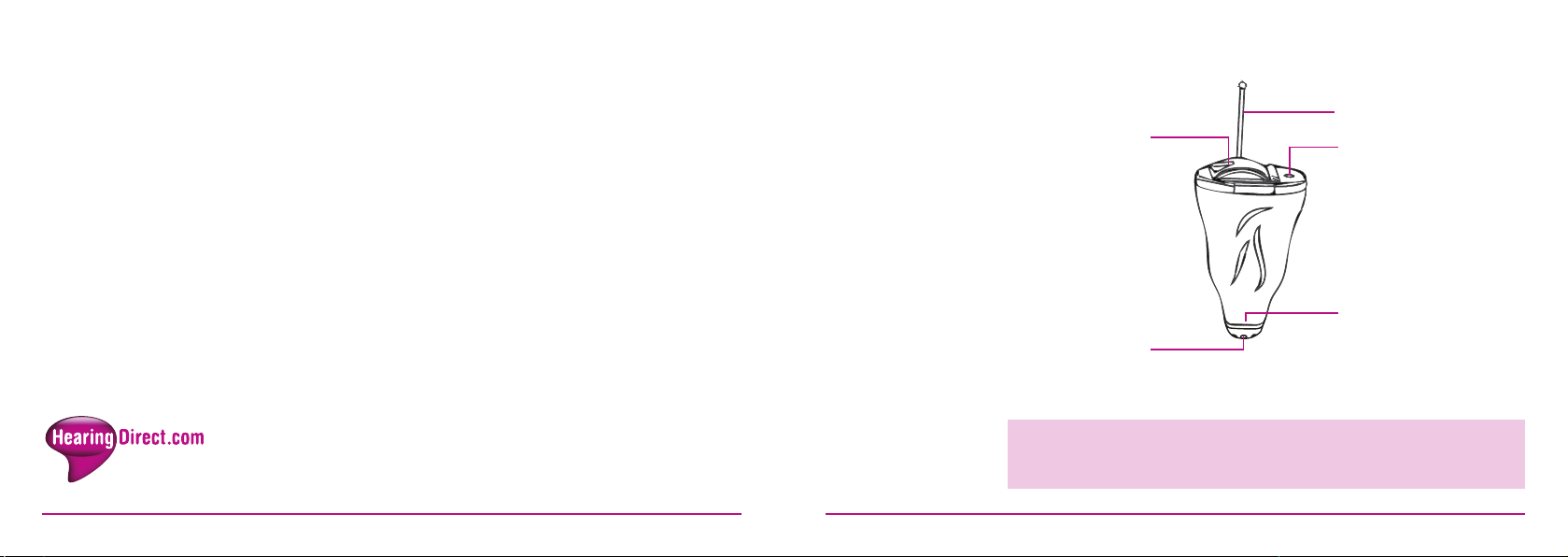
Battery door
Wax filter
The manufacturer reserves the right to modify the technical
specifications of the product without prior consultation
Removal handle
Microphone inlet
Sound outlet
(receiver)
Page 3

HD392
listening
settings
The HD392 has 4 listening settings but will always start up in setting 1.
To change settings cup your hand slightly and tap your hand twice in
quick succession against your ear. You will hear 2 beeps, indicating
you’re now in setting 2. Tap twice again and you will hear 3 beeps
for setting 3. Tap twice again and you’ll hear 4 beeps – which will be
setting 4. One more double tap and you will be back to setting 1.
These settings are mainly used as volume differences (each setting
increasing by 2-3dB) but can be fine-tuned differently by Hearing
Direct if need be.
Inserting your
hearing aid
Hold your hearing aid with your thumb and forefinger on the outer
edges of the case. Gently insert the canal tip of the hearing aid into
your ear canal until you feel resistance. Use tip of your forefinger to
gently push the hearing aid into your ear until it feels comfortable in
your canal. To help position the hearing aid you can pull the outer ear
backwards and upwards with the opposite hand. The removal cord
should be on the bottom; the microphone end at the top.
To remove the hearing aid:
We have a short video showing how to change settings;
please contact us if you need to view this.
4 5
Most people find it easiest to remove the hearing aid via the removal
cord. Hold the removal cord between thumb and forefinger and gently
take the hearing aid out of your ear. Never use the battery door to
pull the hearing aid out. Damage may occur as it is not designed to
withstand the pressure of pulling.
Page 4
Before
Using a dome
Powering your
The HD392 uses a 10A zinc air battery.
wearing your
hearing aid
6 7
A selection of domes has been included with your hearing aid.
The hearing aid can also be worn without any domes. The function
of the domes is to improve fitting comfort and/or reduce whistling.
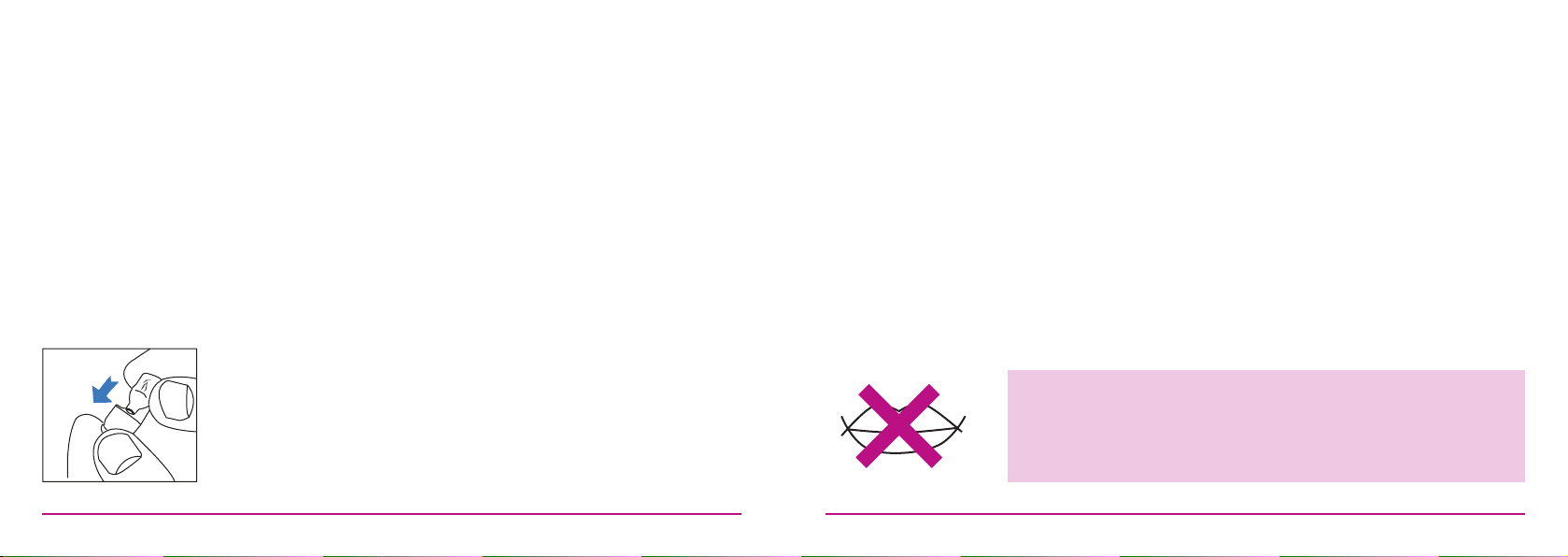
To put a dome on the HD392: Push the dome onto the end of the
hearing aid so that it is on as securely as possible. The dome should
not pull off the hearing aid when you pull on it with light pressure.
Please check before each insertion into the ear.
To remove a dome, pinch the dome with your fingers and pull off the
end of the hearing aid. You will need to remove the dome to check
and clean the wax guard.
hearing aid
After removing the sticky tab from a new battery, leave the battery for
1-2 minutes before inserting into the hearing aid.
With your finger, gently open the door fully. Insert battery and close
the door. Do not close the battery door with force as it may damage
the hearing aid. If you cannot close the battery door, check whether
the battery is installed the correct way up.
If your hearing aid is equipped with a power on delay, you will be given
several seconds to seat the device comfortably in your ear before it
turns on fully.
The battery door effectively functions as the on/off switch.
CAUTION: Batteries are dangerous if swallowed! Keep batteries
out of the reach of children. Never put batteries in your mouth for
any reason - they are easily swallowed. In the event a battery has
been swallowed, seek immediate medical attention.
Page 5

Troubleshooting
SYMPTOM POSSIBLE CAUSES SOLUTIONS
Replace battery
Insert battery correctly
Clean both microphone and receiver with brush.
Remove and clean the dome
Replace battery
Consult your physician
Clean both microphone and receiver with brush.
Remove and clean the dome
Contact HearingDirect.com
Remove and reinsert
Consult your physician
Change to larger or closed dome
Replace battery
Contact HearingDirect.com
Contact HearingDirect.com
No sound
Not loud
enough
Whistling
feedback
Not clear
or distorted
sound
Dead or low battery
Battery improperly inserted
Wax or debris in the microphone or receiver
Low battery
Excessive ear wax
Wax or debris in the microphone or receiver
Hearing change
Loose insertion of hearing aid
Excessive ear wax
Dome too small
Low battery
Hearing instrument damaged
Hearing instrument settings not optimal
8 9
Moisture build up is a common cause of hearing aid failure and preventing it from occurring
will help extend the life of the hearing aid. We recommend placing hearing aids into a ‘dry-aid
kit’ or dehumidifier overnight which will help draw moisture out of the instruments overnight.
A selection of dry aid kits are available on our website.
Please do not wear the hearing aid when swimming. Remove the hearing aid when it is raining,
and when showering or bathing. If hearing aid accidentally falls into the water, do not use a
hairdryer or microwave to dry it. You can dry it with a soft, clean cotton cloth and put it in a
ventilated environment, or in a dry aid kit for a few days.
Do not expose the hearing aid to extreme temperatures or allow prolonged exposure to sunlight.
Do not drop your hearing aids or knock them against hard surfaces.
Do not wear your hearing aids during X-ray, MR scans, CT scans, short-wave diathermy,
or similar radiation treatments.
Take off your hearing aids before you go into high electrical fields or strong magnetic fields
and leave your hearing aids outside. (Such as transformer substation or power stations).
Page 6

Battery
caring
10 11
Low battery warning
When you hear short beeps, it means that the battery is running out.
Intermittent warning exists until you replace the battery. The sound
quality may be influenced after the first warning, this is normal and
can be remedied by inserting a fresh battery in the hearing aid. Always
remove the battery if your instrument is not in use for long periods.
The performance of your hearing aid can vary based on the quality of
the battery being used. It is important to use high-quality batteries.
Never leave a used battery in the hearing aid. Dead batteries may leak
and damage the hearing aid.
Please dispose of the used battery according to local regulations.
Do not throw a used battery into fire.
Cleaning
Hearing aid
warranty
Ear wax is one of the main causes of problems with hearing aids.
A filter and other devices are used for preventing wax from entering
the hearing aid. Use the brush to clean away any accumulated wax
each day. Replace the wax filter regularly.
Cleaning is easier when ear wax is dry in the morning before you
insert the hearing aid to your ear.
Cleaning the hearing aid
Clean your hearing aid with a soft, dry cloth and a small brush.
Do the cleaning on a soft table to avoid damage in case the hearing
aid falls. Do not use water.
The warranty period is 12 months from date of purchase. Any of
the following would not fall under the manufacturer’s warranty:
Damage caused by incorrect use or improper operation. Damage
caused by floods, fires, earthquakes, and any other event described
as ‘acts of God
.
Page 7
Supplied by:
HearingDirect.com
Unit 4 Nine Mile Water
Nether Wallop
Stockbridge
SO20 8DR
UK
NewSound Technology Co. Ltd
1st and 2nd Floor,
No.13 of Xiangyue Road,
Torch Hi-Tech Industrial Development Zone,
Xiang ‘An District,
Xiamen, China
 Loading...