

Page 1

Healy Watch
INSTRUCTIONS FOR USE
Model No.: 0007
Page 2

EN | Table of Contents
1. Introduction 4
2. General 4
2.1 Inten ded Use 4
2.2 D escription 4
2.2.1 Har dware D escr iption 5
2.2. 2 Softwa re Descript ion 5
2.3 A tten tion 6
2.4 S afet y Notes 6
3. Preparations for Use 7
3.1 Installation 7
3.1.1 Smartphone Requirements 7
3.1.2 Android Ope rating System 7
3.1.3 iOS Operating Sys tem 7
3.1.4 Hardware 8
3.1.5 Pairing via Bluetooth 10
3.1.6 Wearing the Hea ly Watc h 12
4. Operation Instructions 12
4.1 Software Functions 13
5. Cleaning, Disinfection and Maintenance 14
5.1 General 14
5.2 Cleaning 14
5.3 St orage Betwe en App lications 14
3 | EN
Page 3

Healy Watch Instructions for Use
5.4 Maintenance 15
5.5 Troubleshooting 15
6. Sys tem Components 16
7. Technical Data 16
7.1 General 16
7.2 Electrical Parameters 17
7.2.1 Power Source Requirements 17
7.2.2 Healy Watch 17
7.2.3 FCC S tate ment 18
7.3 EC-D eclaration of Conformity 19
7.4 Mechanical Parameters 20
7.5 Environmental Conditions 20
7.5.1 Operat ion and Storage 20
8. Disposal 20
9. Used Symbols and Icons 20
10. Revision St atus 22
Disclaimer: The He aly Wat ch is not intend ed to cur e, trea t,
mitigate, di agnose or pre vent di sease, but ra ther to support
vitality and wellbeing.
EN | 4
Page 4

1. Introduction
Thank you for choosing the He aly Wat ch. Please read this
manual carefully and pay specia l attentio n to the wa rnings
and cautions.
This ma nual is intend ed for the user. Intended users include
adult s at home. It aims to ensu re safe handling and to enable
users to beco me fami liar wi th the devic e.
2. General
2.1 Intended Use
Healy Watch is a t racker for wellbeing.
2.2 Description
The Healy Watch is a por table dev ice, in ternally powered and
contr olled v ia Blu etoot h by a sof tw are app lication th at is in stalled on a smartphon e.
The chargin g of the in ternal bat ter y is done throu gh the USB
port.
The “Healy Watch App" sof tware applicat ion is necess ary
for cong uration and contr ol o f th e Healy Watch. T he “ Healy
Watch A pp" is available in the G oogl e Play Store and the Apple App Store.
5 | EN
Page 5
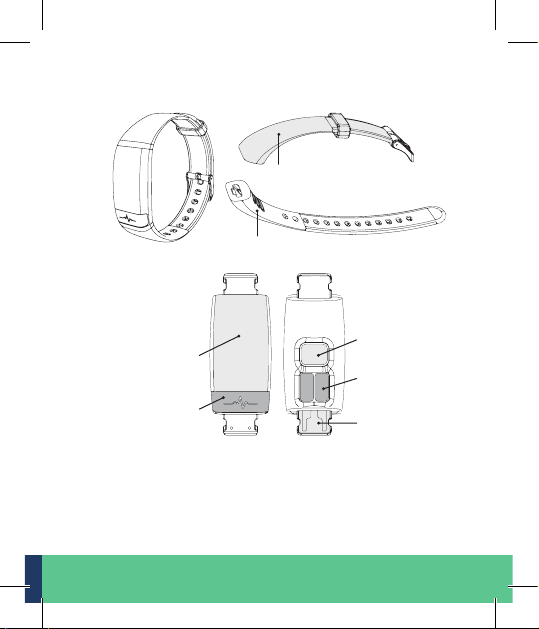
2.2.1 Hardware Description
Wrist pads
Removable straps
Full-screen
touch display
Sensor
Sensor
Sensor
Built-In USB
charger
2.2.2 Software Description
The "Healy Watch App" is re quire d for conguring and controll ing the H ealy Wa tch har dware.
EN | 6
Page 6
2.3 Attention
· Inten tiona l misus e may imp air the func tion of the device.
· Carefully read the instructions b efore u sing the device.
· This produc t is intended o nly for the pur pose d escr ibed in
these ins tructions for use.
· In this manual, the word DANGER warn s of possible person-
al injury!
· In this manual , the word WARNING war ns of pos sible dam-
age to obj ect s.
2.4 Safet y Notes
Danger/Warning:
· Do not im mers e the device in l iquids.
· In the case of a de fect pleas e contact the manufacturer. Any
attempt to re pair the device wil l void th e warranty.
· The device sh ould only be s tored and transported under the
condi tions d ene d in these instruc tions.
· To protec t the de vice agains t cont amina tion and damage,
keep it locked and away f rom chi ldren , dust , sunlight , moisture, p ets an d vermin.
· Do not carr y out maintena nce while the e quipment is in use.
· CHOK ING HA RZ ARD - - Small parts NOT for children under
3 years.
7 | EN
Page 7

3. Preparations for Use
3.1 Installation
Before put ting the Heal y Watch into ope ration, you n eed to
prepa re the hardware and install the "H ealy Wa tch Ap p".
3.1.1 Smartphone Requirements
Bluetooth Bluetoot h 4.2 or higher
Operating s ystem iOS
Android2 version 4.4 or higher
1
iOS is a registered t rademar k of the ope rating system for smar tphones
and dev ices manu factu red by Apple Inc.
2
Android is a regis tered trademark of Google I nc. for th e operating
system for smartphones and other devices
1
version 9.0 or higher
3.1.2 Android Operating System
· Open the Play St ore
· Searc h for the “Healy Watch App"
· Select "Healy Watch App"
· Download and install on your smartphone
3
3.1.3 iOS Operating System
· Open the Apple Store
· Searc h for the "Heal y Watch App"
· Select "Healy Watch App"
· Download and install on your smartphone
3
Play Stor e is the trademark of G oogle In c.
4
App Stor e is the trademark of A pple Inc.
4
EN | 8
Page 8
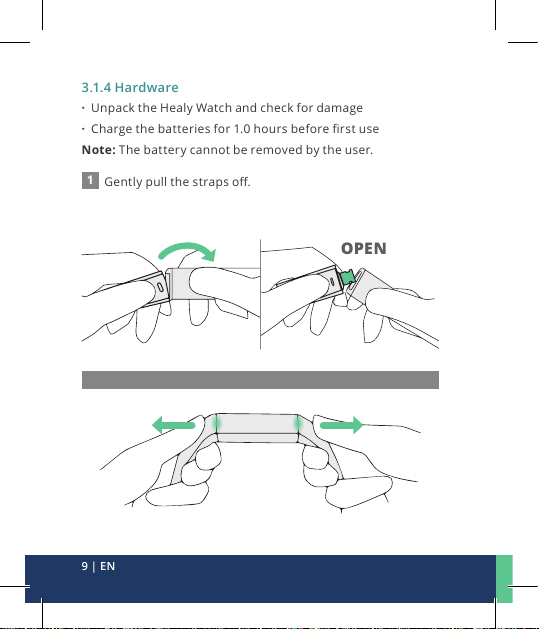
3.1.4 Hardware
· Unpac k the Healy Watch and ch eck for damage
· Charge the batter ies fo r 1.0 hours befor e rst use
Note: T he bat tery cannot be removed b y the user.
1
Gently pull the stra ps o.
OPEN
Do NOT pull the straps horizontally
9 | EN
Page 9
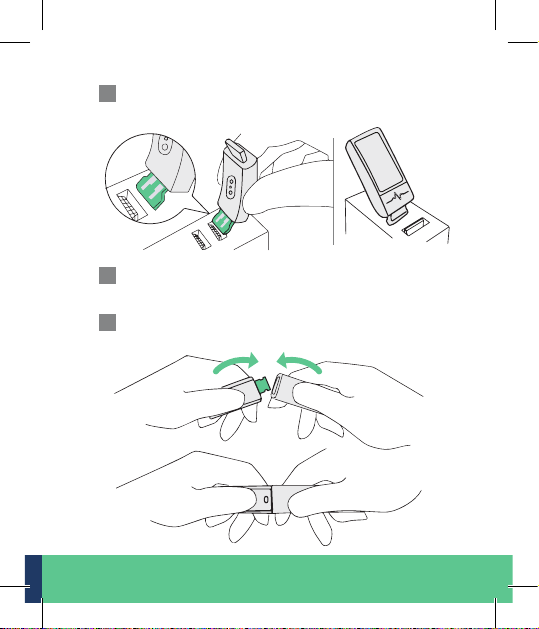
2
Insert the bui lt-in USB char ger into a USB por t for
charging.
3
Remove de vice f rom the power supply once fully
charged.
4
Push the s traps back on .
EN | 10
Page 10
3.1.5 Pairing via Bluetooth
1
Log into yo ur Heal y accou nt.
2
Read and ag ree to te rms and polic ies.
3
Set up acco unt inf ormation:
prol e photo, name, ge nder etc.
4
Make sure th e smar tpho ne Bluetoot h (BLE 4 .2) and
locat ion servi ce are tu rned on.
5
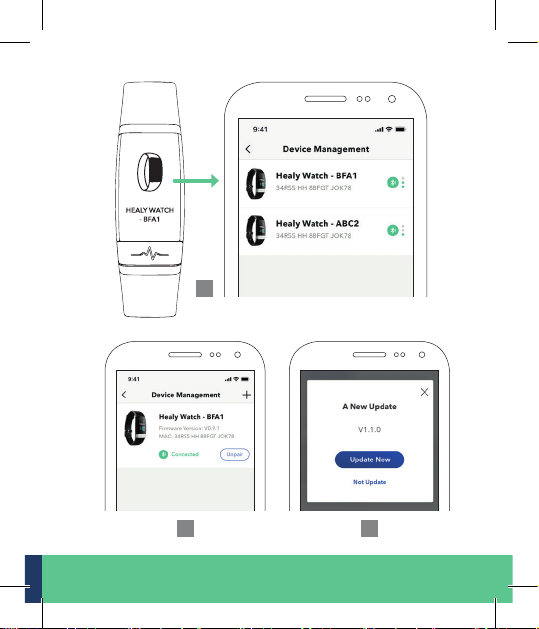
Go to「Settings → Pair Device」and sele ct th e Healy Watch
for pai ring. You can check the H ealy Wa tch Bluetooth ID
in「Function → Info」.
6
Pair the Healy Watch wit h your smartphone .
7
Firmware Upda te: bef ore using the He aly Wat ch, go to
「Setting → Firmware Update」and upgrade t he rmware
if there is a new version available.
11 | EN
Page 11
5
6 7
EN | 12
Page 12
3.1.6 Wearing the Healy Watch
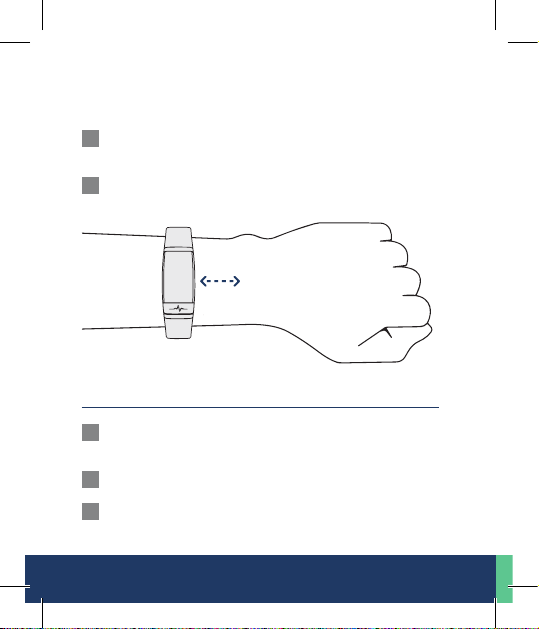
For accurate heart rate* measurement, please wear the watch:
1
Tightl y but comfor tably. It sho uld not m ove while run ning
or exercising.
2
Keep it at least one nger w idth a way from the carpal
bones.
* Not inten ded for diagnosis or t herapy
4. Operation Instructions
1
Swipe - Swipe up and down on t he touchscreen to sc roll
throu gh widgets and menu option s.
2
Tap - Tap the button to exe cute t he function.
3
Long Pres s - Long press fo r 2 second to activa te the func-
tions : Power O , Send SOS.
13 | EN
Page 13
4
Wrist Gesture - Rotate or lif t your w rist toward y our
body to turn the scre en on.
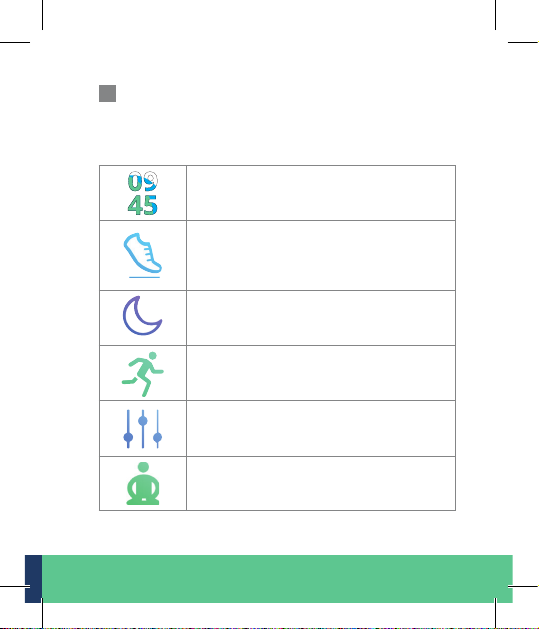
4.1 Software Functions
Watch Face – The He aly Wat ch upda tes the
time an d date au tomatically when you sync
with a s martphon e.
Status – The tot al number of steps, c alories, distance, act ive minutes a nd goal
achievement in % that you have achieved
in a day.
Sleep – The watch automatically records
your sleeping hours, heart rate*, and sleep
quali ty wh ile you ’re wearing i t.
Work Out – 10 diere nt sport modes in-
cluding run, cycl e, gy m, bas ketba ll etc. Tap
to start re cording your workou t.
Function – Set your w atch an d tap in to
smart features including vibration alarm,
timer, music control, weather etc.
Breath – The Healy Watch helps you calm
down w ith 3 levels of b reath ing exercise s.
EN | 14
Page 14
Message – Che ck the 10 la test messages
from yo ur calls, SMS t ext , WeChat,
What sAp p, Faceb ook and more.
SOS – Long pres s for 2 seconds to s end SOS
messages with your location to your emergenc y contact s in SMS fo rm.
* Not inten ded for diagnosis or t herapy
5. Cleaning, Disinfection and Maintenance
5.1 General
Maintenance acti vit ies increase the lif espan and safety of the
Healy Watch. P lease r ead this sec tion c arefully.
5.2 Cleaning
Switch o the Healy Wat ch bef ore cleanin g. For cle an ing, com mercial clea ning produc ts may b e used . The surfaces can b e
wiped with a damp spo nge or cloth. Ma ke sure th at no liquid
penetrates beneath the covers or enclosures.
Caution: Do not use cleaning agen ts con taining sol vent s
(e.g. acetone or nail po lish) or abrasi ve clea ners a s they w ill
damage the sur face of t he dev ice.
5.3 Storage Between Applications
After appl icat ion, s tore the device in a coo l and dr y loc ation
and protect against direct sunlight.
15 | EN
Page 15
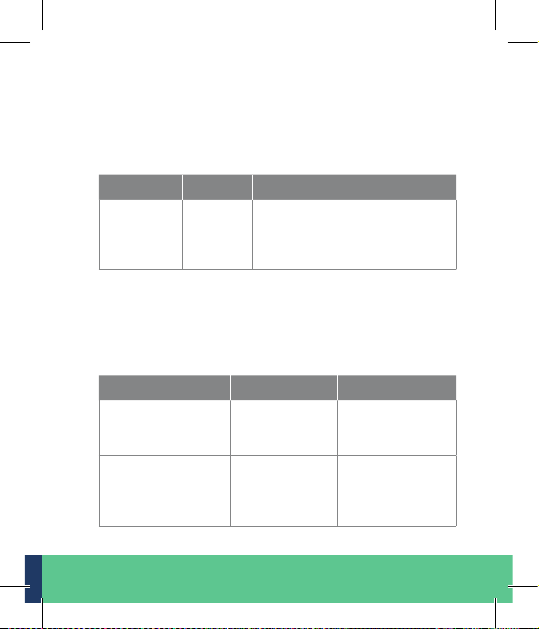
5.4 Maintenance
There are no user ser viceable part s insid e. In the event of
damage, please contact the manufacturer. The following
maintenance activity is recommended and should be followed
for safe operation.
Frequency By who m Maintenance activity
Prior t o
each use
User Check the casing for d amage.
In case of damage contact the
manuf act urer or a n autho rized
dealer
5.5 Troubleshooting
Below you will nd typical warnings or messa ges t hat are related t o the app or hardware. If you experie nce a situati on
that is n ot listed here or a prob lem persists, please co ntact
the manufacturer.
Event o r mess age Cause Actions required
No connection
from the smar tphone to the device
No connection
from the smar tphone to the device
Devi ce is
switched o
Bluetooth in
your smartphone is deactivated
Switch on the
device and restart the App
Open connectivity sett ings
and acti vate
Bluetooth
EN | 16
Page 16
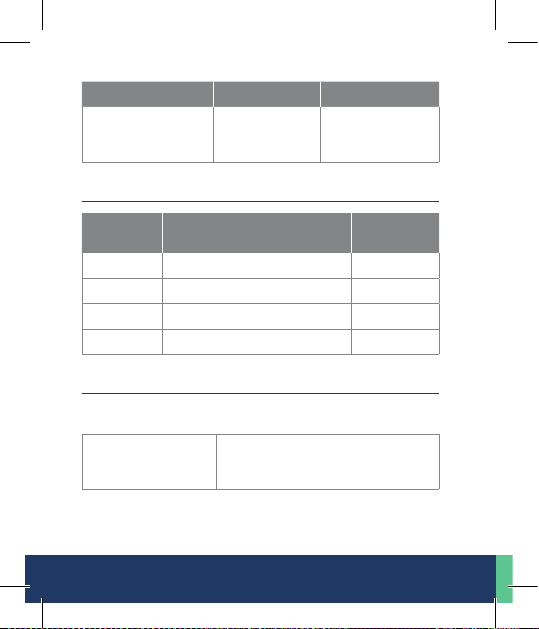
Event o r mess age Cause Actions required
No connection
from the smar tphone to the device
Location service is d isabled.
Enable location
service
6. System Component s
Reference
number
0007 Healy Watch hardware device 1
108 -1301 Screen protector 1
108 -1302 Screen wipe 1
108 -1303 Conductive gel 1
Description Quantity
7. Technical Data
7.1 General
Protection against
ingre ss of water and
particulate matters
17 | EN
IP 67, dustproof, complete protection ag ainst contact, protection
against temporary submersion
Page 17
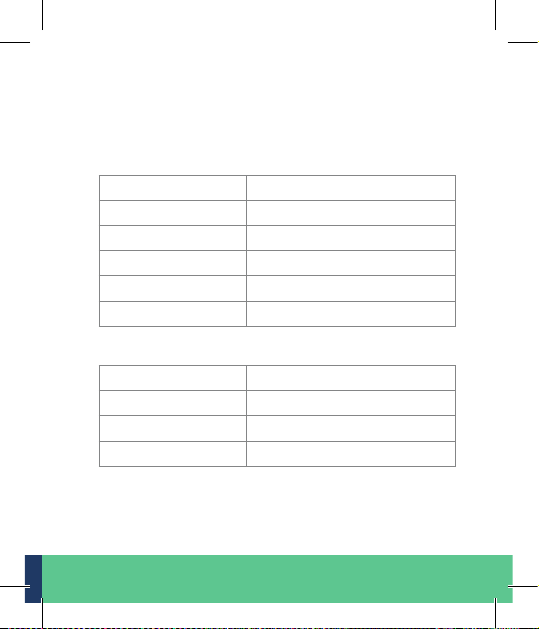
7.2 Electrical Parameters
7.2.1 Power Source Requirements
The Healy Watch can be connected to any pow er source wit h
the following specications:
Supply voltage range 4.4 V – 5. 5 V DC
Output current Max. 2 500 m A
Frequency DC
Socket type USB-Type A
Power type High po wered 500 mA or high er
Insulation type Double or reinforced insulation
7.2.2 Healy Watch
Input voltage See 7. 2.1
Input current 20 mA
Protection class IP 67
Battery capacit y 13 0 mAh
EN | 18
Page 18

7.2.3 FCC Statement
This de vice complies wit h par t 15 of the FCC Rules. O peration
is subject to t he foll owing two co ndit ions:
(1) This device may not cause harmful interference, and
(2) this device must accept any interfe
includ-ing interference that may cause undesired operation.
Changes or modifications not expressly approved by the party responsible
for compliance could void the user's authority to operate the equipment.
Note: This eq uipme nt has be en tes ted and found to compl y
with t he limi ts for a Class B d igit al dev ice, pu rsuant to par t
15 of the FCC Rules. T hese l imit s are designed to prov ide rea sonable protection against harmful inter ference in a residential installation. This equipment generates, uses and c an radiate radio fr equency en erg y and, i f not ins talled and u sed in
accordance with the instructions , may cause harmfu l interference to radio communic atio ns. However, th ere is no g uaran tee tha t interfer ence will not occur in a particular inst allat ion.
If this e quipment does cause harm ful interference to radi o or
telev ision reception, w hich c an be determined by turning the
equip ment o an d on, the user is encourage d to try to correct
the interference by one or more of the following measures:
· Reorient or relocate the receiving an tenna .
· Increase the separation between the equipment and receiver.
· Connect the equipment into an outlet on a circuit dierent
from that to wh ich the recei ver is connec ted.
· Consul t the de aler or a n expe rienced radio/TV te chnic ian
for hel p.
19 | EN
rence received,
Page 19
7.3 EC-Declaration of Conformity
This is an electrical device for application on humans.
Type : Healy Watch Year of manufacture: 09-2019 – 12-2 019
The produc t is desi gned and manu factured in accordance
with t he followin g direc tives:
Low Voltage Di rective 2014/35/EU
ROHS - Di rective 2011/65/EU; RE ACH 1907/2006 /EC
under the sole responsibility of:
Company: Healy GmbH |Schloss Kränzlin|
Darritzer Str. 6|16818 Kränzlin – Germany
The device complies with the following applicable standards:
EN62479 :2010 ; EN6 09 50 -1:20 06 +A11:20 09 +A1:20 10+ A12:
2011+A2:2013; Draft EN301 4 89-17 V3.2.0 (2017-03); Draf t
EN 301 489-1 V2 .2.1 (2019-03) ; EN30 0 328 V2 .2. 2 (2019- 07);
IEC62321-series
The technic al document atio n with r isk analysis is completel y
available.
The instru ctions for use accompany ing the produ ct are
available in the respective national language.
Kränzlin/09.09.2019
Place/date Signature CEO
EN | 20
Page 20
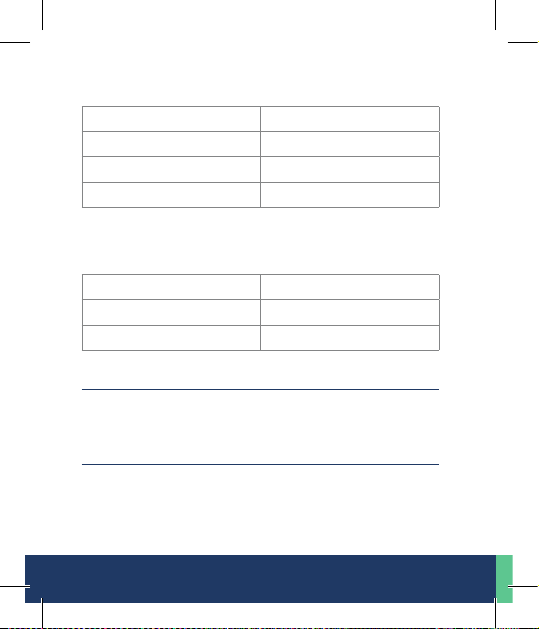
7.4 Mechanical Parameters
Dimensions 11.6 x 2.2 x 12. 4 cm
Weight 30 g
Strap TPU black
Input socket USB
7.5 Environmental Conditions
7.5.1 Operation and Storage
Temperature Range 5°C to 40°C / 41°F to 104°F
Relative humidity 15 % to 93 %
Atmospheric pressure 700 hPa t o 1060 hPa
8. Disposal
The ex pec ted servi ce life i s 5 years. Ask y our local aut hori ty
for recycling advice.
9. Used Symbols and Icons
The followi ng icons are use d on the device, the pa ckaging and
the labelling:
21 | EN
Page 21
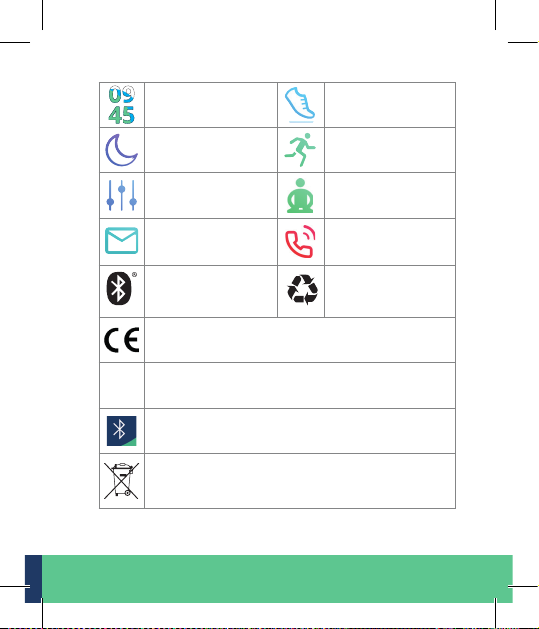
Watch Face Status
REF 0006
Sleep Work Ou t
Function Breath
Message SOS
Bluetooth
In conformity wi th European le gis lation
Hardware reference number
Symbo l for Bluetooth wire less connec tion
Elec tronic waste – do not dis pose. Recyc le acc. to
local regula tions or cont act your authorized dealer
or the manufacturer
Recycling
symbol
EN | 22
Page 22
10. Revision Status
Revision: 1
Date: 23th November 2019
Remark: Second edition
Healy GmbH
Schloss Kränzlin, Darritzer St r. 6
16818 Kränzlin - Germ any
23 | EN
Page 23

EN | 24
Page 24
Healy GmbH | Schloss Kränzlin | Darritzer Str. 6
16818 Kränzlin – Germany
T. +49 30 54905949-1
www.healyworld.net | [email protected]
 Loading...